iOS SDK Integration
1. Install SDK
Option 1: Import via CocoaPods
- Open the 'podfile' file in your project directory. If it's not found, then
pod init - Add the latest version OpoInstall SDK to your Podfile:
pod 'OpoInstallSDK'
Option 2: Manual Import
Download the latest version of the iOS SDK from download center
Unzip the compressed SDK package and add the folder to your project (when importing, select 'Copy items if needed')
2. Initialize SDK
Configure the 'appKey' key-value pair in the Info.plist file as follows:
<key>com.opoinstall.APP_KEY</key>
<string>OpoInstall's appkey</string>
In AppDelegate, add the header file reference:
//When developing in Swift, please use bridging to import
#import "OpoInstallSDK.h"
In AppDelegate, conform to the OpoInstall Delegate protocol as shown below:
Objective-C
@interface AppDelegate ()<OpoInstallDelegate>Swift
class AppDelegate: UIResponder, UIApplicationDelegate, OpoInstallDelegate {
}
In application: didFinishLaunchingWithOptions:Initialize the SDK by calling the 'initWithDelegate' method, as shown in the following code:
Objective-C
- (BOOL)application:(UIApplication *)application didFinishLaunchingWithOptions:(NSDictionary *)launchOptions {
    [OpoInstallSDK initWithDelegate:self];
    return YES;
}
Swift
func application(_ application: UIApplication, didFinishLaunchingWithOptions launchOptions: [UIApplicationLaunchOptionsKey: Any]?) -> Bool {
    //While implementing, please refer to the system code prompts
    OpoInstallSDK.initWith(self);
    //For instance, in older Swift versionsOpoInstallSDK.initWithDelegate(self);
    return true;
}
3. Feature Integration
Option 1: Quick Installation
If you only need the quick installation feature and no other features (e.g. channel statistics, application parameter installation, Deeplink), then completing the initialization is all that's necessary
Option 2: Deeplink
OpoInstall Redirects users from different browsers (including mainstream social applications like WeChat, QQ, Sina Weibo, DingTalk, etc.) to the application using standard schemes (iOS < 9) and Universal Links (iOS ≥ 9). This process passes dynamic parameters when the application is already installed, thereby preventing redundant installations.
Universal Link integration is only applicable to iOS 9 and above
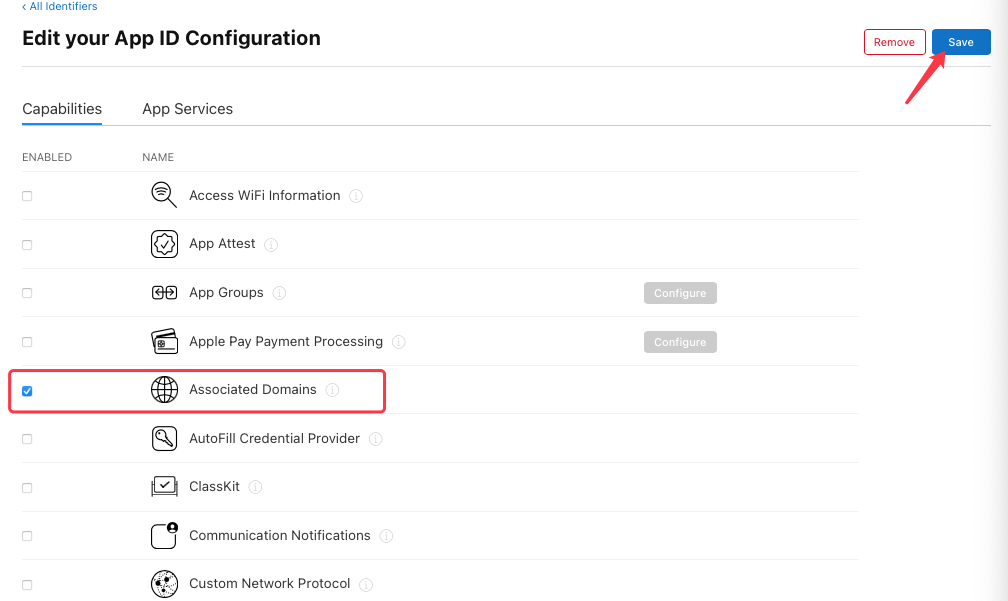
- To Apple Developer Website Enable Associated Domains for the Application ID:
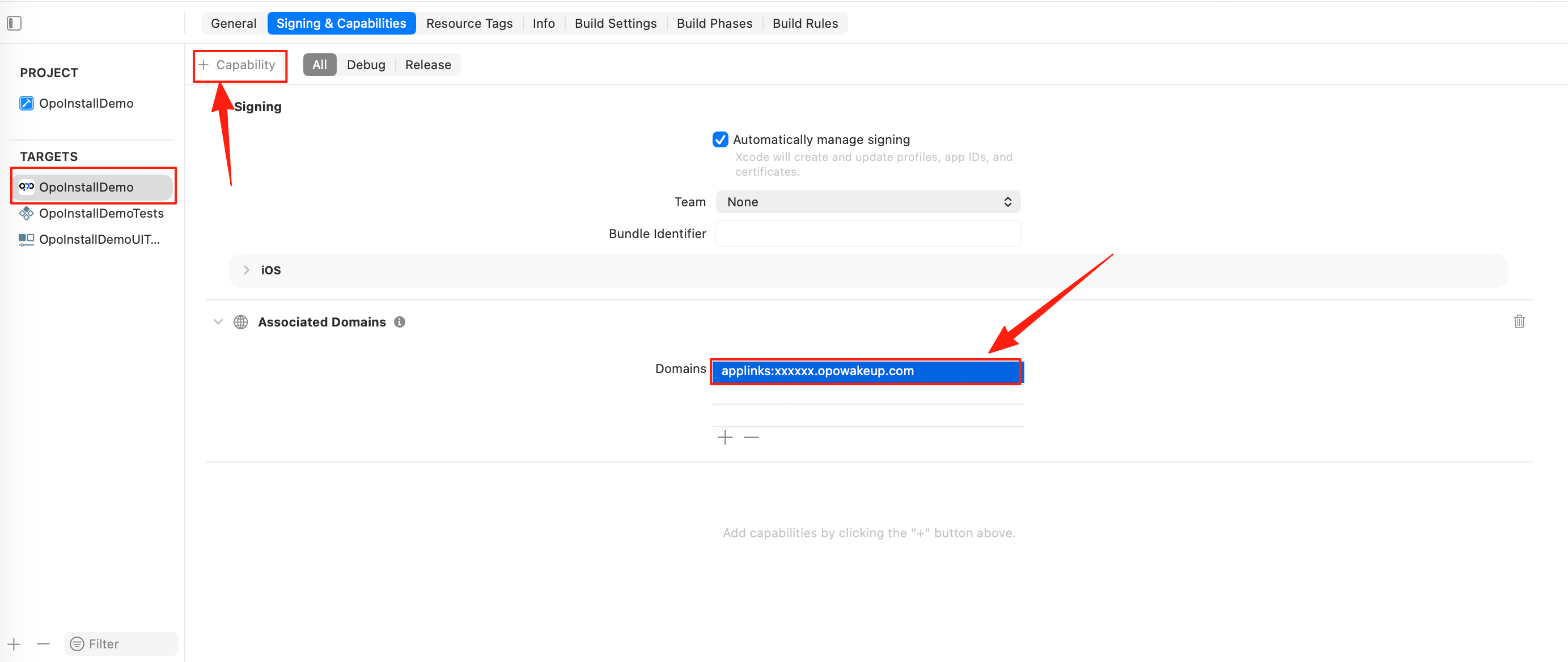
- Configure in Xcode OpoInstall For Associated Domains generated by the current application
In AppDelegate, add a callback method for Universal Link to delegate the handling to the OpoInstall SDK
Objective-C
- (BOOL)application:(UIApplication *)application continueUserActivity:(NSUserActivity *)userActivity restorationHandler:(void (^)(NSArray * _Nullable))restorationHandler{
//Process the data passed when OpoInstall deeplinks the application
[OpoInstallSDK continueUserActivity:userActivity];
//Other third-party callbacks;
 return YES;
}
Swift
//When referencing Objective-C methods in Swift, it's best to follow the system code prompt
//Note: In Swift 4.2, the system method has been modified to:
func application(_ application: UIApplication, continue userActivity: NSUserActivity, restorationHandler: @escaping ([UIUserActivityRestoring]?) -> Void) -> Bool{
OpoInstallSDK.continue(userActivity)
//Other third-party callbacks;
return true
}
If your application is adapted to SceneDelegate, please add the following code (ignore if SceneDelegate is not used):
Objective-C
//sceneDelegate.m
- (void)scene:(UIScene *)scene willConnectToSession:(UISceneSession *)session options:(UISceneConnectionOptions *)connectionOptions  API_AVAILABLE(ios(13.0)){
//It's best to load UI code first [self.window makeKeyAndVisible];
//Code related to universal links for passing dynamic parameters after the app has been terminated
for (NSUserActivity *userActivity in connectionOptions.userActivities) {
    [OpoInstallSDK continueUserActivity:userActivity];
}
}
//Code related to universal links for passing dynamic parameters upon app entering the background
- (void)scene:(UIScene *)scene continueUserActivity:(NSUserActivity *)userActivity API_AVAILABLE(ios(13.0)){
[OpoInstallSDK continueUserActivity:userActivity];
}
Swift
//sceneDelegate.swift中
@available(iOS 13.0, *)
func scene(_ scene: UIScene, willConnectTo session: UISceneSession, options connectionOptions: UIScene.ConnectionOptions) {
     //Code related to universal links for passing dynamic parameters after the app has been terminated
    for userActivity in connectionOptions.userActivities {
        OpoInstallSDK.continue(userActivity)
    }
}
//Code related to universal links for passing dynamic parameters upon app entering the background
@available(iOS 13.0, *)
func scene(_ scene: UIScene, continue userActivity: NSUserActivity) {
    OpoInstallSDK.continue(userActivity)
}
Integrating scheme (only applicable for iOS 9 and below)
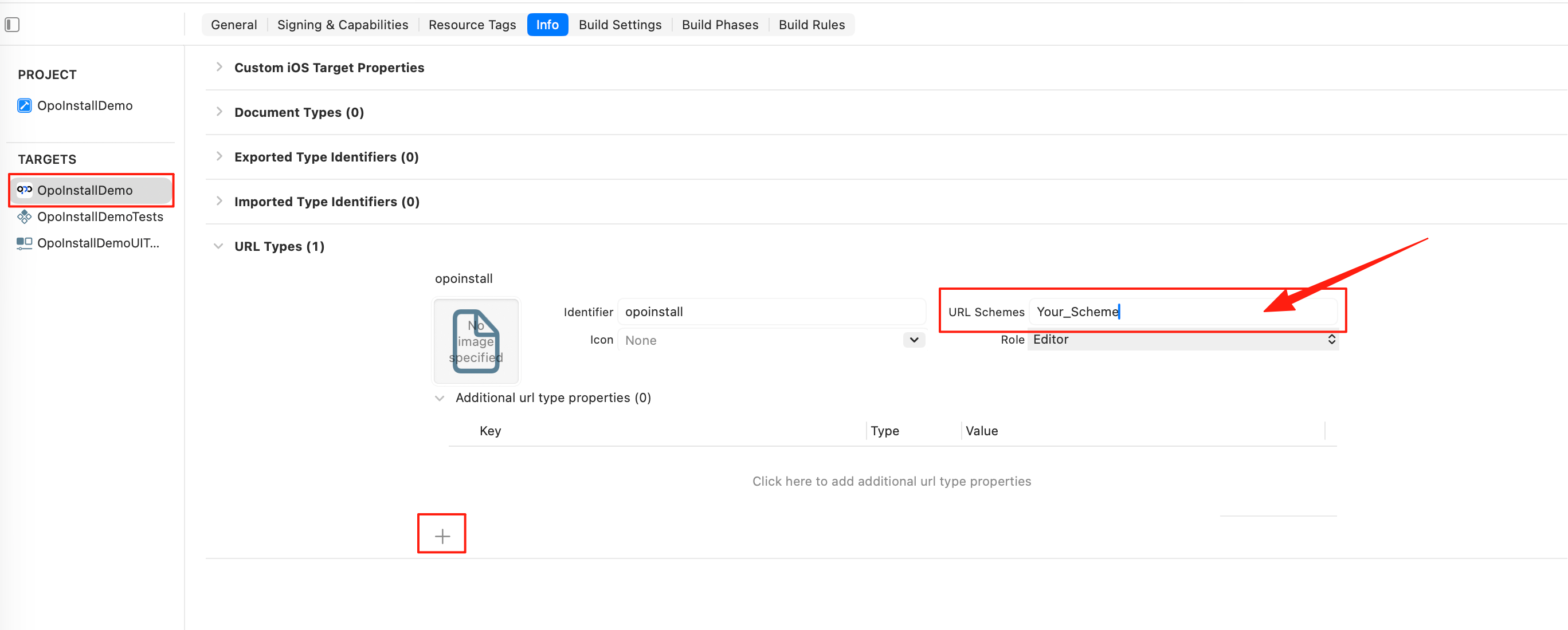
- In Xcode, select Target -> Info -> URL Types, and configure OpoInstall as the scheme generated for the current application:
- In
AppDelegate, add a scheme callback method to delegate the handling to the OpoInstall SDK
Objective-C
//Applicable for all current iOS versions
-(BOOL)application:(UIApplication *)application openURL:(NSURL *)url sourceApplication:(NSString *)sourceApplication annotation:(id)annotation{
    //Handle data passed when the app is launched via the OpoInstall URL scheme
    [OpoInstallSDK handLinkURL:url];
    //Other third-party callbacks;
    return YES;
}
//This method will take precedence for iOS 9 and above
- (BOOL)application:(UIApplication *)app openURL:(NSURL *)url options:(nonnull NSDictionary *)options{
    //Handle data passed when the app is launched via the OpoInstall URL scheme
    [OpoInstallSDK handLinkURL:url];
    //Other third-party callbacks;
     return YES;
}
Swift
//Applicable for all current iOS versions
    func application(_ application: UIApplication, handleOpen url: URL) -> Bool {
        OpoInstallSDK.handLinkURL(url)
        return true
    }
//Note: In Swift 4.2, the system method has been modified to:
    func application(_ app: UIApplication, open url: URL, options: [UIApplication.OpenURLOptionsKey : Any] = [:]) -> Bool{
        OpoInstallSDK.handLinkURL(url)
        return true
}- If your application is adapted to SceneDelegate, please add the following code (ignore if SceneDelegate is not used):
Objective-C
//sceneDelegate.m
- (void)scene:(UIScene *)scene willConnectToSession:(UISceneSession *)session options:(UISceneConnectionOptions *)connectionOptions  API_AVAILABLE(ios(13.0)){
//It's best to load UI code first [self.window makeKeyAndVisible];
for (UIOpenURLContext *urlcontext in connectionOptions.URLContexts) {
    [OpoInstallSDK handLinkURL:urlcontext.URL];
}
}
//Code related to schemes
- (void)scene:(UIScene *)scene openURLContexts:(NSSet<UIOpenURLContext *> *)URLContexts API_AVAILABLE(ios(13.0)){
for (UIOpenURLContext *urlcontext in URLContexts){
    [OpoInstallSDK handLinkURL:urlcontext.URL];
}
}
Swift
//sceneDelegate.swift中
@available(iOS 13.0, *)
func scene(_ scene: UIScene, willConnectTo session: UISceneSession, options connectionOptions: UIScene.ConnectionOptions) {
//It's best to load UI code first window.makeKeyAndVisible()
    for urlContext in connectionOptions.urlContexts {
        OpoInstallSDK.handLinkURL(urlContext.url)
    }
}
//Code related to schemes
@available(iOS 13.0, *)
func scene(_ scene: UIScene, openURLContexts URLContexts: Set<UIOpenURLContext>) {
    for urlcontext in URLContexts{
        OpoInstallSDK.handLinkURL(urlcontext.url)
    }
}
4. Add redirection parameter callback method
In AppDelegate, adhere to the OpoInstallDelegate protocol, add a callback for Deeplink, retrieve dynamic data from the H5 pages, and navigate to specific pages based on parameter values
Objective-C
//Retrieve parameters via OpoInstall when the installed application is launched (if the application is launched through a channel page, the Channel ID will be returned).
-(void)getWakeUpParams:(OpoInstallData *)appData{
    if (appData.data) {//(Retrieve custom parameters)
         //e.g. Establishing invitation relationships without filling in invitation codes, automatically adding friends, and automatically joining specific groups or rooms
    }
    if (appData.channelCode) {//(Retrieve Channel ID parameters)
         //e.g. Allows for independent tracking of channel-related data
    }
    NSLog(@"OpoInstallSDK:\n nDynamic parameters:%@;\nChannel ID:%@",appData.data,appData.channelCode);
}
Swift
//Retrieve parameters via OpoInstall when the installed application is launched (if the application is launched through a channel page, the Channel ID will be returned)
    func getWakeUpParams(_ appData: OpoInstallData?) {
        if appData?.data != nil {
             //e.g. Establishing invitation relationships without filling in invitation codes, automatically adding friends, and automatically joining specific groups or rooms
        }
        if appData?.channelCode != nil{
            //e.g. Allows for independent tracking of channel-related data
        }
        print("Launch parameters data = \(String(describing: appData?.data)),channelCode = \(String(describing: appData?.channelCode))")
    }
Option 3: App Parameter Installation Advanced Features
When the application needs installation parameters (passed from web pages, such as invitation codes, game room numbers, etc.), call the getInstallParmsCompleted method to retrieve parameters in the callback (can be retrieved repeatedly)
Objective-C
[[OpoInstallSDK defaultManager] getInstallParmsCompleted:^(OpoInstallData*_Nullable appData) {
     //Callback on the main thread
    if (appData.data) {//Retrieve custom parameters
       //e.g. Establishing invitation relationships without filling in invitation codes, automatically adding friends, and automatically joining specific groups or rooms
    }
    if (appData.channelCode) {//Retrieve Channel ID parameters
        //e.g. Allows for independent tracking of channel-related data
    }
    if (appData.opoCode==OPCode_timeout) {
        //If parameter retrieval times out, you can retrieve them again at a different time (you can set a global flag)
    }
    NSLog(@"OpoInstallSDK:\n nDynamic parameters:%@;\n nChannel ID:%@",appData.data,appData.channelCode);
}];
Swift
//It's best to follow system code suggestions when using Objective-C methods in Swift
OpoInstallSDK.defaultManager()?.getInstallParmsCompleted({ (appData:OpoInstallData?) in
            //Callback on the main thread
            if appData?.data != nil {
                //e.g. Establishing invitation relationships without filling in invitation codes, automatically adding friends, and automatically joining specific groups or rooms
            }
            if appData?.channelCode != nil{
                //e.g. Allows for independent tracking of channel-related data
            }
            if appData?.opoCode == OPO_Codes.timeout {
                //Parameter retrieval timed out. Retry at a suitable time
            }
            print("Install parameters data = \(String(describing: appData?.data)),channelCode = \(String(describing: appData?.channelCode))")
        })
If manual timeout configuration is needed, please use the advanced API:
Objective-C
//Advanced API, Set timeout duration
[[OpoInstallSDK defaultManager] getInstallParmsWithTimeoutInterval:40 completed:^(OpoInstallData * _Nullable appData) {
    if (appData.data) {//Dynamic install parameters
         //e.g. Establishing invitation relationships without filling in invitation codes, automatically adding friends, and automatically joining specific groups or rooms
    }
    if (appData.channelCode) {//Installation via channel link or QR code will return the Channel ID
        //e.g. Allows for independent tracking of channel-related data
    }
    if (appData.opoCode == OPCode_timeout) {
        //Represents timeout. Flag it and retry at an appropriate time
    }
}];
Swift
//It's best to follow system code suggestions when using Objective-C methods in Swift
OpoInstallSDK.defaultManager()?.getInstallParms(withTimeoutInterval: 40, completed: { (appData:OpoInstallData?) in
    if appData?.data != nil {
        //e.g. Establishing invitation relationships without filling in invitation codes, automatically adding friends, and automatically joining specific groups or rooms
    }
    if appData?.channelCode != nil {
        //e.g. Allows for independent tracking of channel-related data
    }
    if appData?.opoCode == OPO_Codes.timeout {
        //Represents timeout. Flag it and retry at an appropriate time
    }
})
Option 4: Channel Statistics Advanced Features
While initializing, the SDK automatically handles statistics such as Visits, Clicks, Installations, Active Volume, and retention rates.
1. Registration statistics
If you want to track registrations for each channel (which is crucial for assessing channel quality), you can call the relevant APIs based on your business needs. Ensure that users complete application registration:
After calling this method, data for Registrations can be tracked under 'Application Statistics' and 'Channel Reports
Objective-C
//After user registration success
[OpoInstallSDK reportRegister];
Swift
//After user registration success
OpoInstallSDK.reportRegister();
2. Channel Stats
Effect points are built on top of channels. They are mainly used to track how users engage with specific features like recharge amounts, sharing frequency, and more.
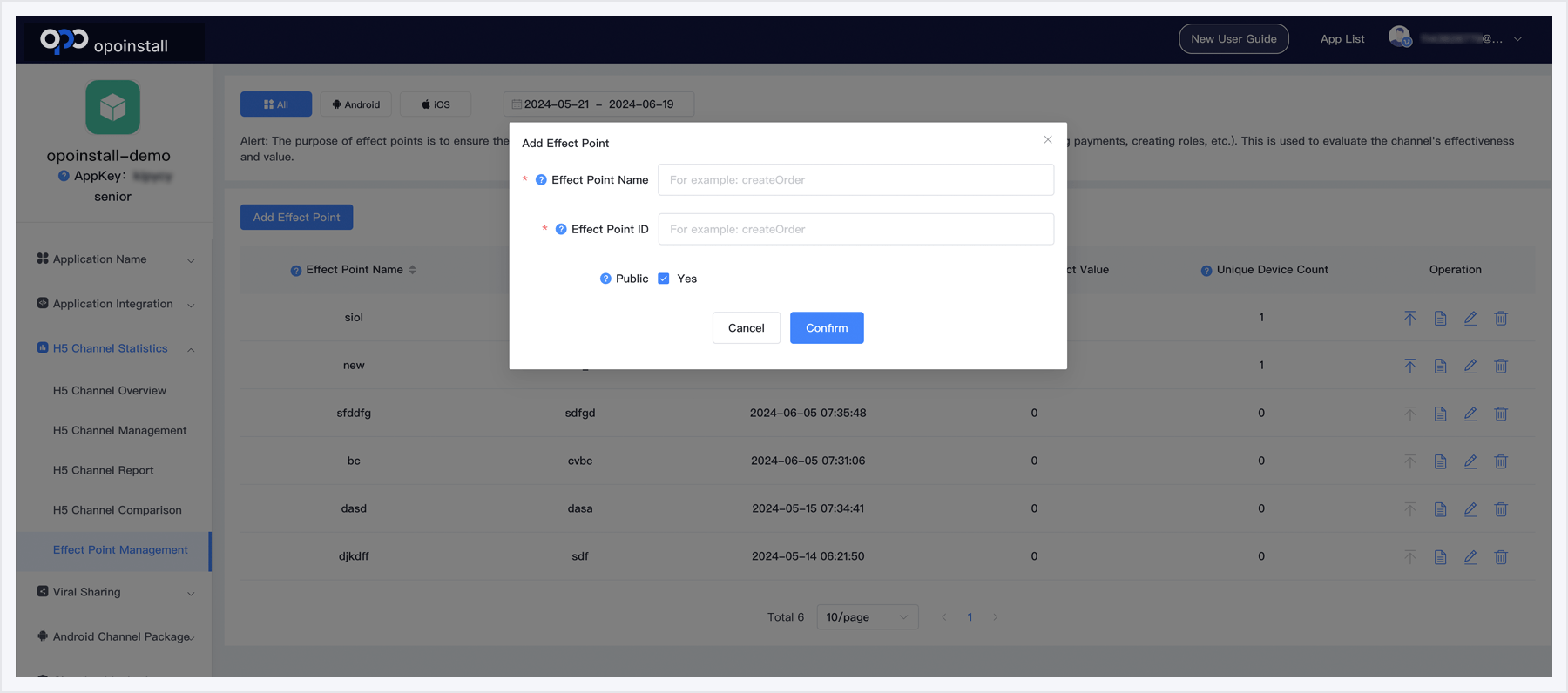
Before calling the API, add effect points in the management console's 'Effect Point Management' section
Ensure that the effect point ID in your code matches the one created in the backend when calling the API
Effect value type is 'integer', so ensure monetary amounts are converted to 'cents' before passing them in for monetary events
Objective-C
[[OpoInstallSDK defaultManager] reportEffectPoint:@"effectID" effectValue:1];Swift
OpoInstallSDK.defaultManager()?.reportEffectPoint("effectID", effectValue:1);After calling the API, you can view the effect point statistics in the backend
Channel Stats Details
The detailed channel effectiveness statistics allow developers to add up to 5 custom parameters for improved assessment of channel effectiveness and user insight
Before calling the API, please enable 'Record Details' and add custom parameters in the 'Effect Point Management' section
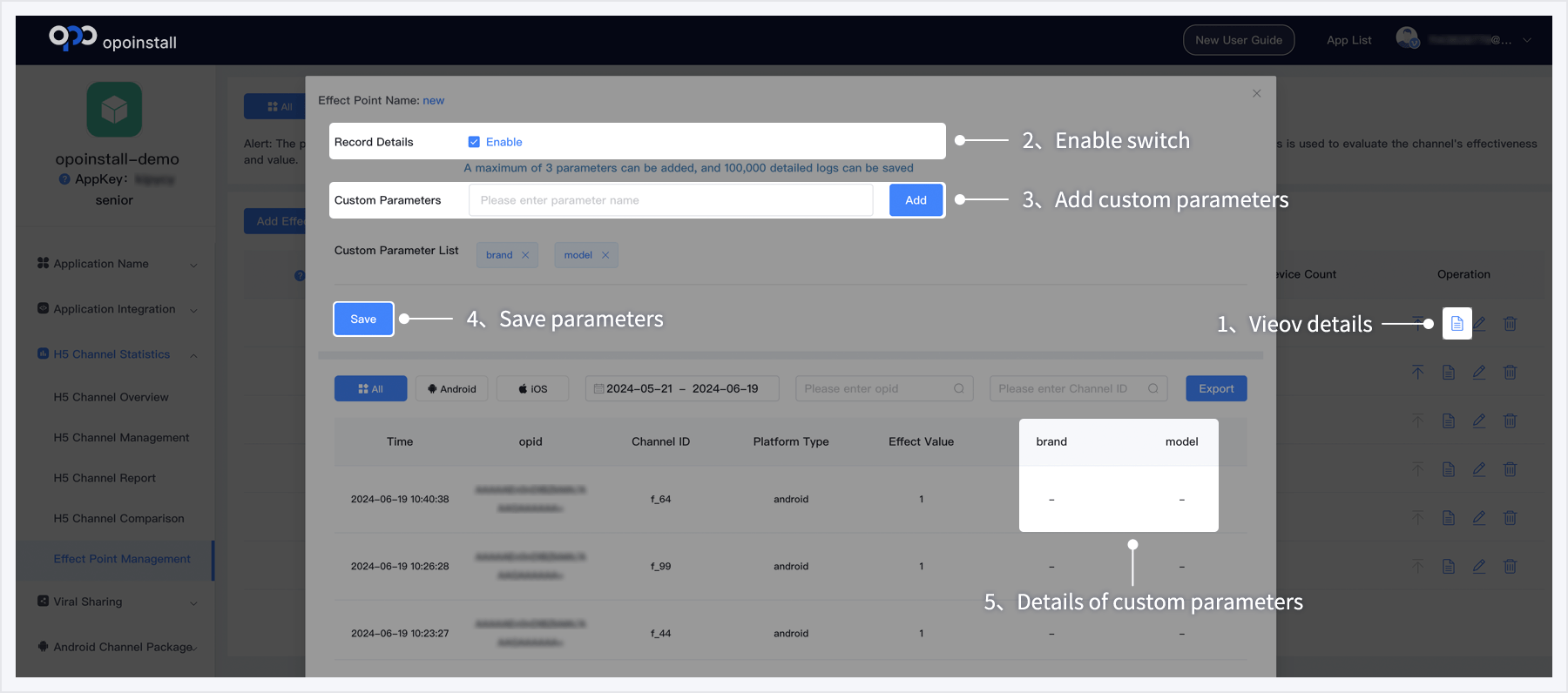
When using the following interface to report effect points, ensure that the keys and values of custom parameters in the effectDictionary detail dictionary are strings
Objective-C
[[OpoInstallSDK defaultManager] reportEffectPoint:@"effectID" effectValue:1 effectDictionary:@{@"key01":@"value01",@"key02":@"value02"}];Swift
OpoInstallSDK.defaultManager()?.reportEffectPoint("effectID", effectValue:1, effectDictionary: ["key01":"value01","key02":"value02"]);Option 5: Viral Sharing Advanced Features
The main purpose of share reporting is to track which platform a specific user shared to during a particular sharing session, then binding the shared user information through JS to further track the activation and return flow of shared users. Note that the SDK has predefined most mainstream sharing platforms domestically and internationally, which are passed in as custom string types 'OPO_SharePlatform_xxx'.
This interface needs to be triggered when the user clicks the share button or before, in order to track share activation or referral data.
Objective-C
/**
     * Share Report
     *
     * @param shareCode Share User ID; String Required, ShareCode.length <= 128
     * @param sharePlatform Share Platform: String Recommended input 'Fill in based on the 'OPO_SharePlatform' string type already created
     * @param completedBlock Code=0 indicates successful reporting,Code=-1 suggests retrying at a suitable time in cases of flight mode, poor network, or connection issues,Other situations indicate a transmission error
     */
    [[OpoInstallSDK defaultManager] reportShareParametersWithShareCode:@"shareCode001" sharePlatform:OPO_SharePlatform_QQ completed:^(NSInteger code, NSString * _Nullable msg) {
        NSLog(@"code = %ld \n msg = %@",(long)code,msg);
        if (code==-1) {
             //Retry at a suitable time for flight mode, poor network, or connection issues
        }
    }];
Swift
    OpoInstallSDK.defaultManager()?.reportShareParameters(withShareCode: "shareCode001", sharePlatform: ._WechatSession, completed: { (code, msg) in
        let message = "code = \(code)\n msg = \(msg ?? "")"
            print("code = \(code)\n msg = \(msg ?? "")")
        if code == -1 {
             //Retry at a suitable time for flight mode, poor network, or connection issues
            }
    })