What is an SDK and how does it work? A Software Development Kit (SDK) is a collection of libraries, APIs, tools, and documentation designed to help developers build or extend software applications. In mobile development, an SDK commonly includes compiled libraries integrated into a native application to provide platform-specific functionality such as deep linking and attribution. When mobile engineering teams evaluate how user acquisition data flows from a web promotion into a newly installed application, they encounter a fundamental operating system boundary: remote web interfaces cannot access native application lifecycles or traverse app store sandboxes alone. OpoInstall, a mobile attribution and deep linking platform, provides native client libraries and web scripts that coordinate across these isolated environments to restore campaign parameters and route users to targeted in-app views.
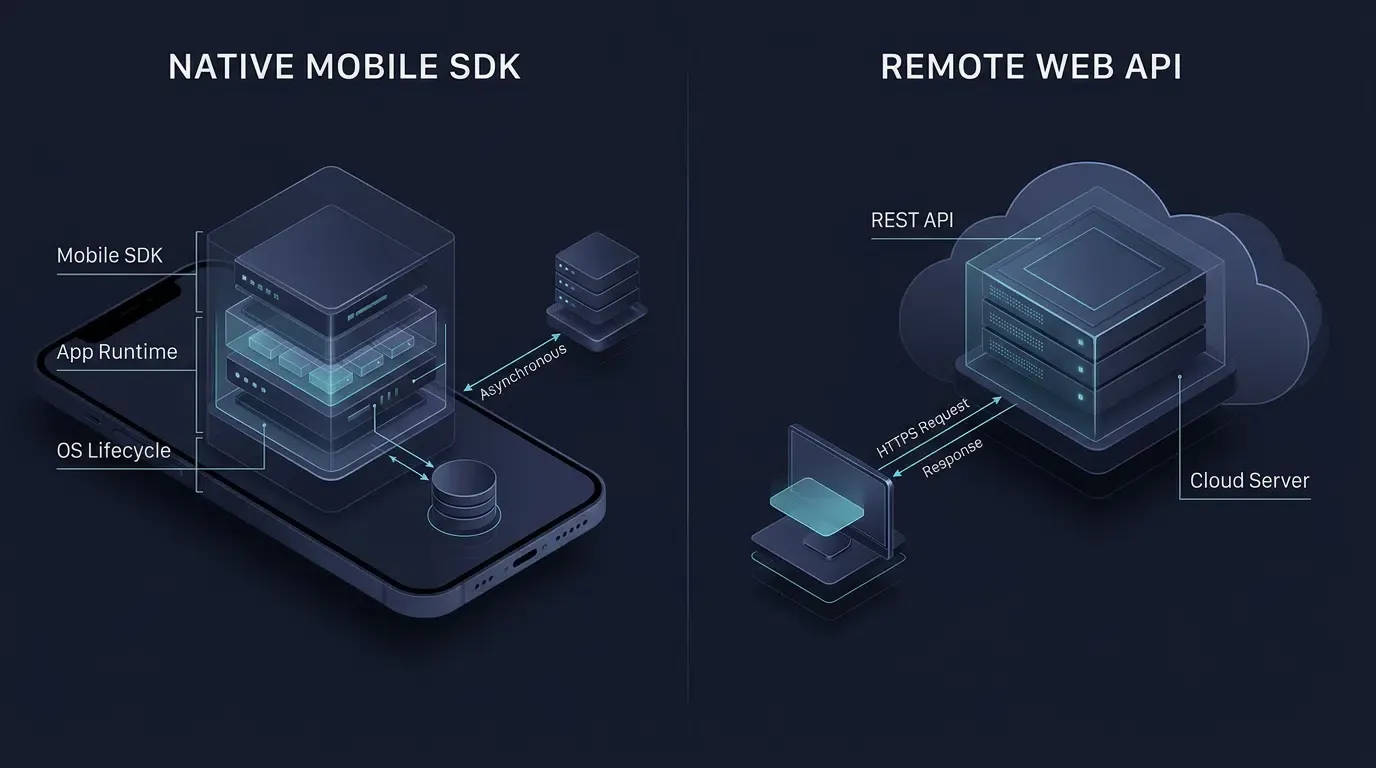
A Software Development Kit (SDK) is a pre-packaged collection of libraries, application programming interfaces (APIs), header files, developer documentation, and sample code designed for a specific operating system or framework. Unlike a standalone remote web API that defines a stateless communication interface over HTTP, a mobile SDK executes directly within the client application’s runtime process to manage local state, operating system lifecycle callbacks, and asynchronous network telemetry.
| Term | Definition | Related Entity | Search Intent Role |
|---|---|---|---|
| What is an SDK | A comprehensive package of libraries, APIs, documentation, and tools used to build or extend software applications. | Mobile Operating System | Informational |
| Mobile SDK | A platform-specific library integrated into Android or iOS apps to provide specialized client-side functionality. | Native Runtime Lifecycle | Informational / Technical |
| API | A defined contract of rules, method signatures, and protocols that allows two software components to communicate. | HTTP REST Endpoint | Informational |
| Deep Linking | Routing protocols that launch a native mobile application directly to a specific internal view. | App Parameter Installation | Technical / Commercial |
What Is an SDK and How Does It Differ from a Standard Web API
Deconstructing the Terminology: Why Every SDK Contains APIs, but an API Is Not an SDK
In software engineering, developers new to mobile growth infrastructure frequently conflate an Application Programming Interface (API) with a Software Development Kit (SDK). While the two concepts operate together, they occupy distinct layers of the software architecture.
An API is strictly an interface specification and communication contract. It defines the method signatures, data structures, URI syntax per IETF RFC 3986, and response formats that allow one software component to interact with another. APIs exist at multiple levels: they can be local operating system interfaces, in-process library interfaces, or remote stateless web endpoints governed by IETF RFC 9110 HTTP semantics (GET, POST). When calling a remote REST API directly, the application developer must construct the network request, manage transport security, parse the returned JSON payload, and handle retry conditions manually.
An SDK, conversely, is the complete implementation kit that encapsulates one or more local APIs alongside runtime logic, documentation, and developer tooling. When a developer imports a mobile SDK into an Android Studio or Xcode project, they link pre-built library code directly into their application binary. The SDK exposes local programmatic APIs (such as initialize(), getInstallParam(), or handleDeepLink()) to the host application while managing thread scheduling, operating system callbacks, and remote server communication internally.
Execution Context: Stateless Server-to-Server Endpoints vs. Stateful Client-Side Runtime Libraries
The operational distinction between invoking a remote web API and integrating a native mobile SDK centers on execution context and access to the device environment:
- Process Residency and Packaging: A remote web API is exposed through server-side infrastructure and invoked over a network; the server-side application implements the endpoint, while the client application executes the request-handling logic. By contrast, a mobile SDK is compiled into the application’s publishing artifact (such as an Android App Bundle
.aab) or installable application package (.apkon Android and.ipaon iOS) and executes inside the application’s allocated memory space on the end user’s device. - Native Lifecycle Awareness: Remote REST endpoints only respond when a client dispatches an HTTP request. A native mobile SDK registers observers with the mobile operating system, allowing it to detect when the application launches, transitions between foreground and background states, or receives a system-level routing intent.
- Optional Local Persistence and Queuing: Depending on its implementation, a mobile SDK may store configuration state or queue conversion events in local sandboxed storage (such as
SharedPreferencesorSQLiteon Android, andUserDefaultsor application file storage on iOS, while reservingKeychainfor small sensitive credentials) so that telemetry can be transmitted asynchronously when network connectivity is available.
Architectural Comparison: Remote Web APIs vs. Native Mobile SDKs
The table below contrasts remote stateless web APIs against compiled native mobile SDKs across key architectural dimensions:
| Architectural Dimension | Remote Stateless Web / REST API | Native Mobile SDK |
|---|---|---|
| Primary Artifact | Interface specification and remote network endpoints | Compiled binary libraries, local APIs, docs, and sample code |
| Execution Environment | Remote server endpoint invoked over HTTP/HTTPS | Native mobile application process and OS threads |
| Access to OS Lifecycle | None (Stateless request-response only) | Direct access to app launch, backgrounding, and intent hooks |
| Cross-Install Persistence | Blocked by app store sandbox boundaries | Android: Google Play Install Referrer + server match; iOS: server-side context reconciliation |
| Network Resilience | Requires custom retry logic written by the caller | May provide local persistence, event queuing, caching, and asynchronous retry mechanisms, depending on implementation |
Core Components Inside a Mobile Software Development Kit
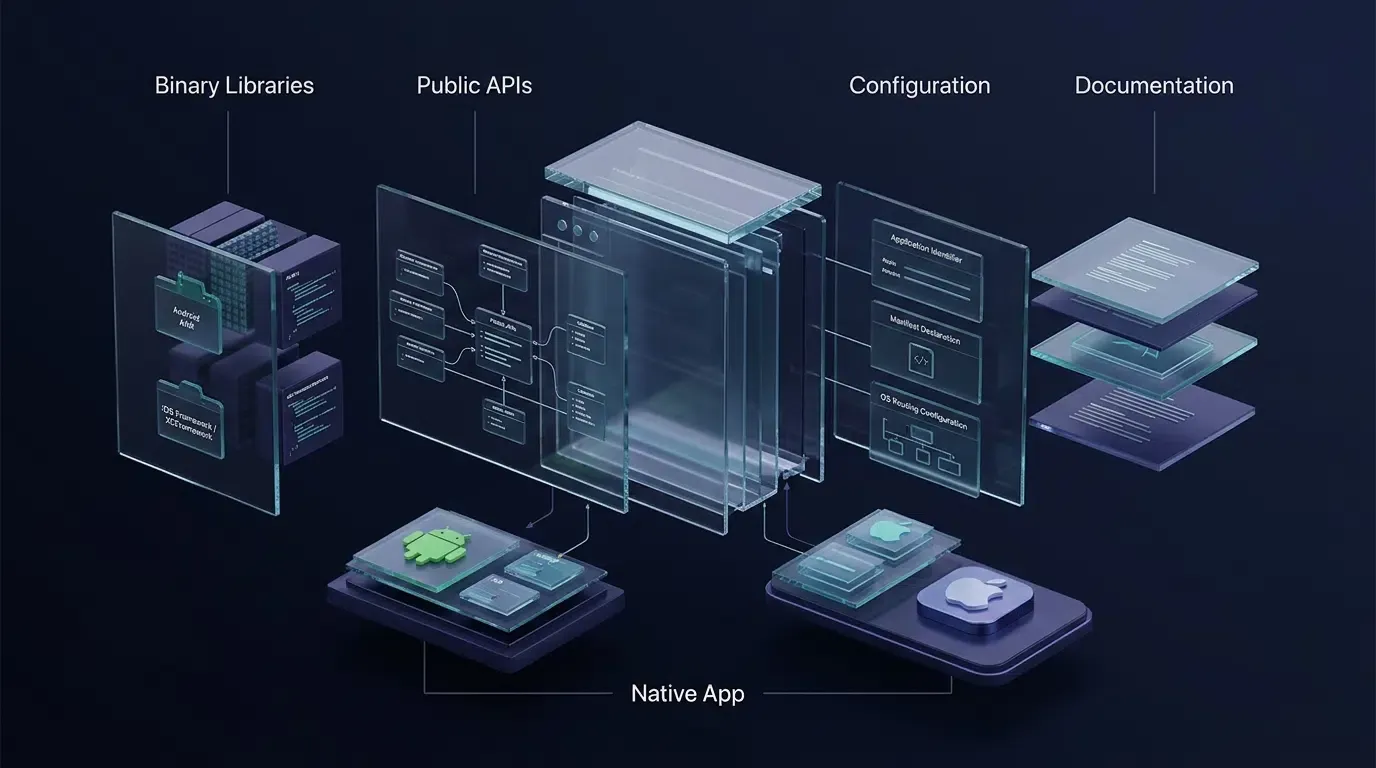
Compiled Binary Libraries: Android Archive Bundles and iOS Frameworks
At the core of a mobile SDK is a compiled binary distribution formatted for the target operating system’s build toolchain:
- Android Archive (
.aar), JAR, and App Bundles (.aab): On Android, SDKs are distributed as.aarbundles or.jarlibraries. While a.jarfile contains compiled JVM bytecode, an.aarbundle can also package Android-specific resources and manifest entries that merge into the host application during Gradle builds. When the host application is built for release, an Android App Bundle (.aab) serves as a publishing artifact rather than a directly installable application package; Google Play processes it into device-specific APKs that are delivered to users. - iOS Static Libraries (
.a), Frameworks, and XCFrameworks: On iOS, SDKs are distributed as static libraries,.frameworkbundles, or.xcframeworkarchives. A standard.frameworkbuild typically targets a specific platform variant and may contain one or more supported CPU architectures, whereas an Apple XCFramework (.xcframework) bundle is designed to package multiple platform and architecture variants—such as physical ARM64 iOS device slices alongside iOS Simulator slices—into a single distributable artifact.
Public Header Files, Interface Contracts, and Type Definitions
Compiled binaries require public type contracts so the host application’s compiler can verify method calls at build time:
- iOS Header Files (
.h) and Bridging Interfaces: Objective-C based iOS SDKs provide public header files (such asOpoInstallSDK.h) declaring class interfaces, delegate protocols (OpoInstallDelegate), and data models (OpoinstallData). In Swift projects, these declarations are exposed via an Objective-C Bridging Header or module import. - Android Class Signatures and Callback Interfaces: Android SDKs expose public entry-point classes and generic callback interfaces (such as
ResultCallBack<OpoData>) within documented package namespaces.
Configuration Manifests, AppKeys, and Entitlement Declarations
A mobile SDK relies on host configuration metadata to authenticate tenant requests and register OS routing hooks:
- Tenant Application Identifier (
AppKey): Declared inside the AndroidAndroidManifest.xml<meta-data>tag or the iOSInfo.plistfile (com.opoinstall.APP_KEY), theAppKeyidentifies the application tenant during SDK initialization. - OS Routing Declarations: To support one-click app launching, the host project declares custom URL schemes and verified domain associations (
applinks:domains in Xcode Associated Domains entitlements and verified intent filters on Android).
Documentation and Sample Projects: Turning Compiled Libraries into Usable Developer Interfaces
A compiled library is difficult to adopt without clear integration specifications. Production-grade SDKs should provide clear developer documentation and, where available, runnable sample projects:
- Developer Documentation: Defines version compatibility, lifecycle initialization order, required permissions, callback payload formats, and error codes so engineers can integrate the library predictably.
- Sample Projects and Cross-Platform Bridges: Minimal runnable demo projects help teams verify deep linking and parameter restoration. While the mobile SDK download center primarily distributes the core native Android and iOS SDK packages (currently v2.1.0), teams using cross-platform frameworks (such as Flutter or Unity) bridge these native SDK capabilities through wrapper plugins or platform channels and should verify available plugin repositories against official documentation.
Why Web APIs Alone Cannot Solve Mobile Install Attribution
The App Store Black Box: How Sandbox Isolation Breaks Traditional Web Cookie Tracking
In standard web development, tracking a referral link to a registration event relies on browser storage: when a user visits https://example.com/index.html?inviter_id=A102, JavaScript reads the query string and stores inviter_id=A102 in localStorage or an HTTP cookie.
In mobile app acquisition, this continuity breaks at the app store boundary—a structural barrier known as the App Store Black Box:
- Web Context: A user clicks a promotional link inside a mobile browser or social app, loading an H5 landing page carrying custom parameters (
?ref=userA&channelCode=ch_01). - Marketplace Handoff: Because the native app is not yet installed, clicking the download button redirects the user out of the browser and into the Apple App Store or Google Play Store.
- Sandbox Isolation: When the user installs and launches the native app, the mobile OS spawns the process inside an isolated filesystem and memory sandbox. The native app cannot read the cookies or
localStorageof the browser session that initiated the download.
Bridging the Web-to-App Gap: The Role of Web JS SDKs and Native Client SDKs
Resolving parameters across the app store boundary uses a coordinated workflow that separates three related concepts—Deferred Deep Linking (routing a new user to a target in-app screen after installation), Install Parameter Restoration (recovering custom key-value pairs passed on the H5 link), and Attribution Matching (associating the install with a specific promotional channel):
- Pre-Install Web JS SDK (
OpoInstallWeb Script): Integrated into the H5 landing page, the Web JS SDK parses dynamic query parameters from the sharing URL (such aschannelCode,shareCode, or room IDs) and uploads the pre-install session context to the attribution server before triggering app wakeup or store redirection. - Post-Install Native Client SDK (Android / iOS SDK): Integrated into the mobile app binary, the native SDK initializes on first launch, communicates with platform APIs and the attribution server, and returns the restored custom parameters to the client app via an asynchronous callback.
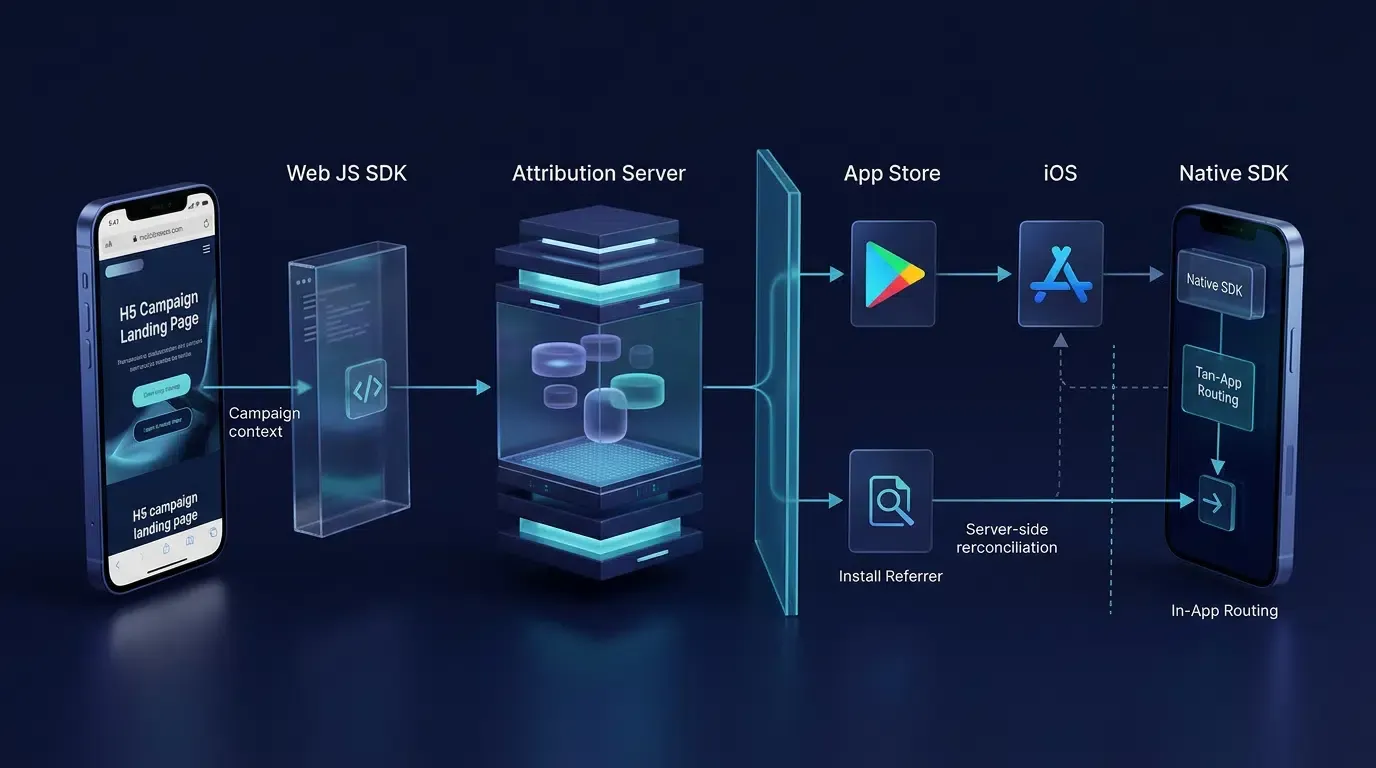
[Mobile Web Browser: H5 Landing Page]
                 |
                 | 1. Web JS SDK Parses URL Params (?ref=userA&channelCode=ch01)
                 |    & Uploads Pre-Install Session Context
                 v
     [Attribution Server Backend]
                 |
                 | 2. User Downloads App from App Store / Google Play
                 |    (Browser Cookies Cannot Cross OS Sandbox)
                 v
   [Native App First Launch: Mobile SDK]
                 |
                 | 3. Client SDK Initializes on Startup & Retrieves
                 |    Cached Custom Parameters + Channel ID
                 v
  [In-App Routing & Channel Attribution]
Platform-Specific Attribution Mechanics: Google Play Install Referrer vs. iOS Context Reconciliation
Because Android and iOS maintain different app store architectures, mobile attribution relies on distinct platform mechanisms:
- Android Ecosystem and the Google Play Install Referrer API: For apps distributed through Google Play, the native integration can use the official Google Play Install Referrer API to retrieve referral metadata (including the referrer URL and click/install timestamps) passed by the Play Store during installation. Because the Google Play Install Referrer API applies specifically to eligible Google Play Store installation flows, Android distributions outside Google Play rely on server-side H5 parameter matching or exported Android Channel Packages (APK files carrying embedded
channelCodeidentifiers). - iOS Ecosystem and Context Reconciliation: Apple’s App Store does not provide a general URL query-parameter passthrough mechanism equivalent to Google Play’s Install Referrer. When the app is already installed, iOS routes users directly into the app via Apple Universal Links, which verify domain ownership through an
apple-app-site-association(AASA) file. When the app is not installed, Universal Links fall back to a website and do not independently guarantee post-install parameter recovery; deferred parameter restoration requires server-side session reconciliation upon first launch.
Respecting Platform Privacy Boundaries: Apple User Privacy Guidelines and Permitted Matching Signals
When evaluating how mobile SDKs reconcile pre-install web visits with post-install launches, engineering teams must distinguish vendor-documented features from operating system policy compliance:
- Vendor-Documented Mechanism: OpoInstall’s public product documentation describes an H5 channel and parameter installation workflow where the Web SDK collects device fingerprint traits and channel IDs on the H5 page, and the native Android/iOS SDK re-collects device traits upon first launch to match the installation source.
- Apple Platform Policy Boundary: Under Apple’s User Privacy and Data Use Guidelines, Apple explicitly prohibits deriving data from a device—such as combining browser properties, IP addresses, or system configurations—for the purpose of uniquely identifying a user or device (fingerprinting). Applications engaging in prohibited fingerprinting, or referencing third-party SDKs that do so, risk rejection during App Store review. Separately, App Tracking Transparency (ATT) authorization is required when third-party deep-linking or deferred deep-linking services pass unique identifiers or create shared user identities across apps from different companies for advertising targeting, advertising measurement, or data-broker sharing. However, ATT consent does not make prohibited device fingerprinting permissible.
- Compliance Escalation and Verification Requirement: If a specific SDK version or configuration relies on prohibited device fingerprinting, neither conducting a general internal data audit nor obtaining user consent through the ATT prompt makes that mechanism compliant with Apple’s guidelines. If the vendor cannot demonstrate that the iOS matching mechanism avoids prohibited device fingerprinting, developers should not deploy that attribution mechanism on iOS until a compliant alternative has been independently verified, following OWASP Mobile Application Security governance practices.
- Network Timing and Unattributed Fallbacks: While iOS does not expose a general user-granted permission for ordinary internet access (developers should distinguish general internet reachability from Apple’s Local Network privacy permission, which applies to local-network device discovery), SDK initialization and parameter retrieval still depend on network availability and startup timing. Because deferred matching is not guaranteed across all network conditions or delayed first launches, applications must always implement graceful fallback flows when returned parameters are empty.
How a Mobile Attribution SDK Works Across the Application Lifecycle
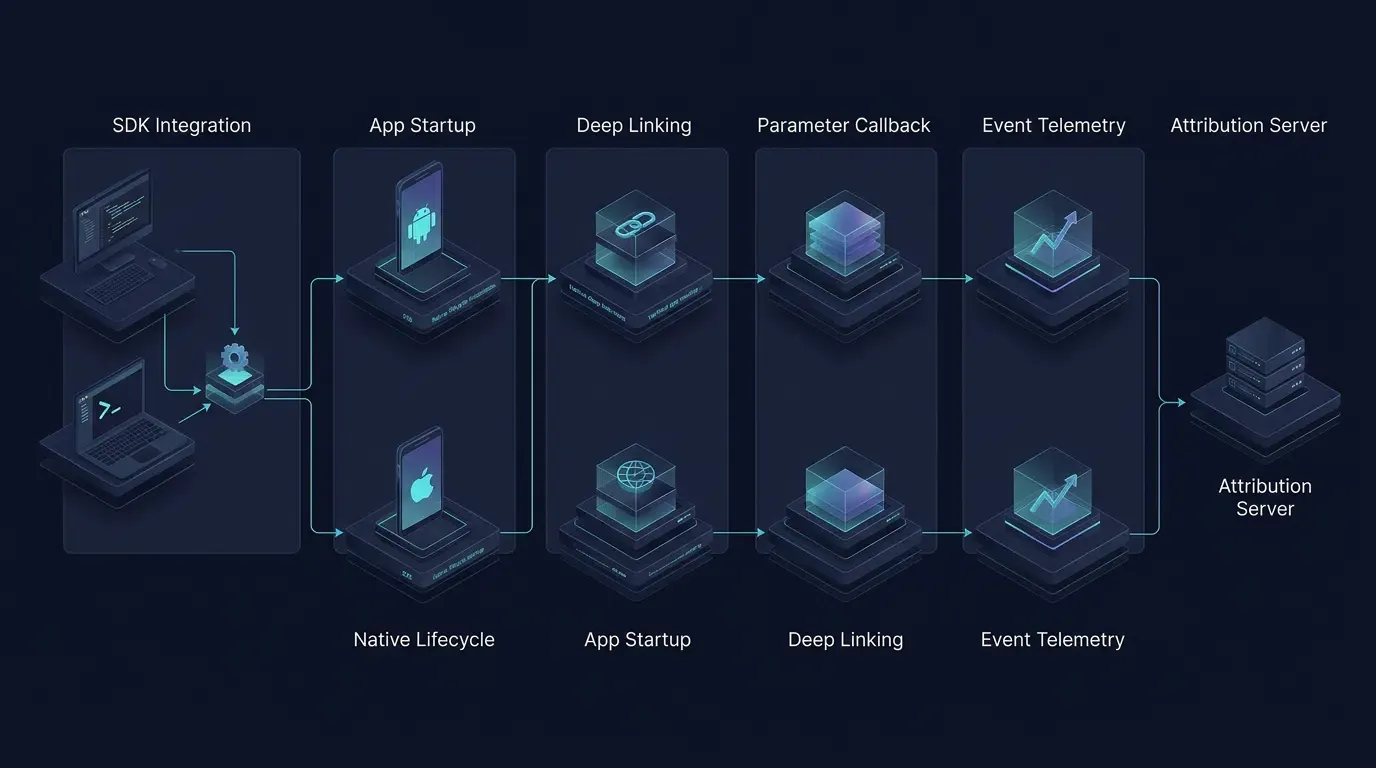
Phase 1: Dependency Management and Build-Time Linking via Gradle and CocoaPods
An SDK’s lifecycle begins at compile time when the developer declares the library dependency via Gradle, CocoaPods, or manual archive import. During build compilation, the package manager resolves the library artifact and links its binary symbols into the application package. Some mobile SDKs require specific code-shrinking compatibility considerations in release builds, and iOS SDK integrations may also require platform-specific privacy manifest declarations and compatible build configurations.
Phase 2: Main-Thread Initialization on Application Startup
When a user launches the app, the mobile OS creates the application process and invokes the primary entry-point lifecycle hook—Application.onCreate() on Android as detailed in the Google Android Developers Guide on Application Lifecycle, and application(_:didFinishLaunchingWithOptions:) on iOS as detailed in the Apple Developer Documentation on UIApplicationDelegate. A well-designed mobile SDK should minimize work during application startup and move network operations to asynchronous execution. Developers should verify actual initialization behavior and measure cold-start performance in their target build.
Phase 3: Intercepting Native Deep Links via Universal Links and Intent Filters
When the app is already installed and a user taps an H5 link, the OS wakes the application and delivers the routing context to the SDK through platform-specific entry points:
- Android Custom Schemes vs. Verified App Links: Custom URL schemes (
scheme://) route through a basicBROWSABLE<intent-filter>. Supporting verified Android App Links requires an<intent-filter android:autoVerify="true">that declares bothhttpandhttpsschemes alongside the targetandroid:host, backed by a/.well-known/assetlinks.jsonDigital Asset Links file containing the app’s package name and SHA-256 signing certificate fingerprint. - iOS
AppDelegateandUISceneDelegateRouting: Universal Links deliver anNSUserActivitytoAppDelegatein traditional lifecycle apps, or—for iOS 13+ apps adopting scene-based lifecycles via UISceneDelegate—toscene(_:willConnectTo:options:)on cold launch andscene(_:continue:)on warm resume.
Phase 4: Asynchronous Parameter Restoration and Event Telemetry Queuing
On first launch—or when business conversion milestones occur—the host application invokes the SDK’s asynchronous methods to retrieve cached installation parameters (data and channelCode) and report downstream conversion events (such as account registrations or custom effect points).
Implementing Native SDK Lifecycle Hooks on Android and iOS
Configuring Application Identifiers and Verifying SDK Releases
The illustrative integration patterns below follow OpoInstall’s public integration documentation to demonstrate how native Android and iOS projects wire the lifecycle hooks described above. Because the download center distributes updated SDK archives (currently v2.1.0, released 2026-09-20) while documentation examples may reference earlier minor coordinates, engineering teams must download the target v2.1.0 SDK package, verify all import paths and method signatures against the bundled library headers, and run a clean build verification in Android Studio and Xcode before production deployment. Refer to the OpoInstall technical documentation for release-specific integration instructions.
Android SDK Initialization and Parameter Retrieval Pattern
In AndroidManifest.xml, declare network permissions, the tenant AppKey, and separate <intent-filter> blocks for custom URL scheme wakeup and verified Android App Links (declaring both http and https schemes per Android App Links verification requirements, and replacing links.example.com with your verified domain):
<!-- File: app/src/main/AndroidManifest.xml (Illustrative Integration Pattern) -->
<manifest xmlns:android="http://schemas.android.com/apk/res/android"
    package="com.example.app">

    <uses-permission android:name="android.permission.INTERNET"/>
    <uses-permission android:name="android.permission.ACCESS_NETWORK_STATE"/>

    <application
        android:name=".CustomApplication"
        android:allowBackup="true">

        <meta-data
            android:name="com.opoinstall.APP_KEY"
            android:value="OPOINSTALL_APPKEY"/>

        <activity
            android:name=".MainActivity"
            android:exported="true"
            android:launchMode="singleTask">

            <!-- 1. Custom URL Scheme wakeup filter -->
            <intent-filter>
                <action android:name="android.intent.action.VIEW"/>
                <category android:name="android.intent.category.DEFAULT"/>
                <category android:name="android.intent.category.BROWSABLE"/>
                <data android:scheme="OPOINSTALL_SCHEME"/>
            </intent-filter>

            <!-- 2. Verified Android App Links filter (requires /.well-known/assetlinks.json with SHA-256 cert fingerprint) -->
            <intent-filter android:autoVerify="true">
                <action android:name="android.intent.action.VIEW"/>
                <category android:name="android.intent.category.DEFAULT"/>
                <category android:name="android.intent.category.BROWSABLE"/>
                <data android:scheme="http"/>
                <data android:scheme="https"/>
                <data android:host="links.example.com"/>
            </intent-filter>
        </activity>
    </application>
</manifest>
// File: app/src/main/java/com/example/app/CustomApplication.java
package com.example.app;

import android.app.Application;
import com.opoinstall.api.OpoInstall;

public class CustomApplication extends Application {
    @Override
    public void onCreate() {
        super.onCreate();
        OpoInstall.initialize(this);
    }
}
// File: app/src/main/java/com/example/app/MainActivity.java
// Note: Verify exact package imports and callback signatures against your downloaded SDK v2.1.0 archive.
package com.example.app;

import android.content.Intent;
import android.os.Bundle;
import android.util.Log;
import androidx.appcompat.app.AppCompatActivity;
import com.opoinstall.api.OpoInstall;
import com.opoinstall.api.OpoData;
import com.opoinstall.api.OpoError;
import com.opoinstall.api.ResultCallBack;

public class MainActivity extends AppCompatActivity {
    private static final String TAG = "OpoInstallSDK";

    @Override
    protected void onCreate(Bundle savedInstanceState) {
        super.onCreate(savedInstanceState);
        OpoInstall.getInstance().start(this);

        // Process wakeup intent if launched via custom scheme or verified App Link
        getWakeUpData(getIntent());

        // Retrieve deferred installation parameters when needed by onboarding logic
        OpoInstall.getInstance().getInstallParam(new ResultCallBack<OpoData>() {
            @Override
            public void onResult(OpoData opoData) {
                Log.d(TAG, "getInstallParam onResult : " + opoData);
            }

            @Override
            public void onError(OpoError opoError) {
                Log.e(TAG, "getInstallParam onError : " + opoError);
            }
        });
    }

    @Override
    protected void onNewIntent(Intent intent) {
        super.onNewIntent(intent);
        getWakeUpData(intent);
    }

    private void getWakeUpData(Intent intent) {
        OpoInstall.getInstance().handleDeepLink(intent, new ResultCallBack<OpoData>() {
            @Override
            public void onResult(OpoData opoData) {
                Log.d(TAG, "handleDeepLink onResult : " + opoData);
            }

            @Override
            public void onError(OpoError opoError) {
                Log.d(TAG, "handleDeepLink onError : " + opoError);
            }
        });
    }
}
iOS SDK Delegate Registration and SceneDelegate Wakeup Pattern
On iOS, expose #import "OpoInstallSDK.h" in your Objective-C Bridging Header, configure com.opoinstall.APP_KEY in Info.plist, and implement OpoInstallDelegate. Use the AppDelegate URL-handling methods for applications that do not adopt scene-based lifecycle management; for scene-based applications, process cold-start and warm-resume Universal Links and URL schemes through the corresponding SceneDelegate methods:
// File: AppDelegate.swift & SceneDelegate.swift (Illustrative Integration Pattern)
// Note: Verify exact Objective-C bridging headers and method signatures against your downloaded iOS SDK v2.1.0 archive.
import UIKit

@main
class AppDelegate: UIResponder, UIApplicationDelegate, OpoInstallDelegate {

    func application(
        _ application: UIApplication,
        didFinishLaunchingWithOptions launchOptions: [UIApplication.LaunchOptionsKey: Any]?
    ) -> Bool {
        OpoInstallSDK.initWith(self)
        return true
    }

    // For apps that do NOT adopt UISceneDelegate lifecycle management:
    func application(
        _ application: UIApplication,
        continue userActivity: NSUserActivity,
        restorationHandler: @escaping ([UIUserActivityRestoring]?) -> Void
    ) -> Bool {
        OpoInstallSDK.continue(userActivity)
        return true
    }

    func application(
        _ app: UIApplication,
        open url: URL,
        options: [UIApplication.OpenURLOptionsKey: Any] = [:]
    ) -> Bool {
        OpoInstallSDK.handLinkURL(url)
        return true
    }

    func getWakeUpParams(_ appData: OpoinstallData?) {
        print("Wakeup data: \(String(describing: appData?.data)), channelCode: \(String(describing: appData?.channelCode))")
    }

    func fetchInstallParameters() {
        OpoInstallSDK.defaultManager()?.getInstallParmsCompleted({ (appData: OpoinstallData?) in
            print("Install data: \(String(describing: appData?.data)), channelCode: \(String(describing: appData?.channelCode))")
        })
    }
}

// For iOS 13+ apps that adopt UISceneDelegate lifecycle management:
@available(iOS 13.0, *)
class SceneDelegate: UIResponder, UIWindowSceneDelegate {
    var window: UIWindow?

    func scene(
        _ scene: UIScene,
        willConnectTo session: UISceneSession,
        options connectionOptions: UIScene.ConnectionOptions
    ) {
        for userActivity in connectionOptions.userActivities {
            OpoInstallSDK.continue(userActivity)
        }
        for urlContext in connectionOptions.urlContexts {
            OpoInstallSDK.handLinkURL(urlContext.url)
        }
    }

    func scene(_ scene: UIScene, continue userActivity: NSUserActivity) {
        OpoInstallSDK.continue(userActivity)
    }

    func scene(_ scene: UIScene, openURLContexts URLContexts: Set<UIOpenURLContext>) {
        for urlContext in URLContexts {
            OpoInstallSDK.handLinkURL(urlContext.url)
        }
    }
}
When Should Engineering Teams Integrate a Third Party Mobile SDK
Suitable Scenarios for Integrating a Specialized Mobile SDK
Integrating a dedicated mobile attribution and deep-linking SDK is appropriate under the following conditions:
- Code-Free Referral and Onboarding Flows: Applications running referral programs or multiplayer room invitations where parameters (
?ref=userAorroom_id=402) must be restored after store installation without manual code entry. - Multi-Channel H5 and QR Code Campaigns: Marketing teams distributing links across social networks, offline QR codes, and Android channel packages that require unified tracking of visits, clicks, installations, and registrations.
- One-Click Web-to-App Launching: Products that route existing app users directly from mobile browsers into specific in-app views via Universal Links and App Links while guiding uninstalled users to the appropriate app store.
Scenarios Where a Direct REST API Is Sufficient
Conversely, a client-side attribution SDK is unnecessary when the workflow does not cross native mobile sandboxes:
- Authenticated Backend Transactions: When an already-authenticated user renews a subscription or triggers a backend billing webhook, logging that conversion via a direct Server-to-Server (S2S) REST API avoids client dependency updates.
- Browser-Only Web Applications: Progressive Web Apps (PWAs) and mobile websites that do not distribute native binaries through the App Store or Google Play can track referrals using standard first-party web cookies and URL query parameters.
Common Engineering Misconceptions About Mobile SDKs
- Misconception 1: Integrating a Mobile SDK Automatically Blocks Cold App Startup: A well-designed mobile SDK minimizes work during
Application.onCreate()ordidFinishLaunchingWithOptions:and moves network operations to asynchronous execution, though developers should always profile cold-start latency in their target build. - Misconception 2: Android Channel Packages Override H5 Link Channel IDs: When an Android app uses both exported channel APKs and H5 channel links, the OpoInstall SDK allows custom parameters and channel IDs to be retrieved together; per OpoInstall’s product documentation, if an installation originates from an H5 channel link with a distinct
channelCode, the H5 channel link ID takes priority over the channel package ID in statistical reports.
Frequently Asked Questions (FAQ)
What is an SDK and how does it work in mobile apps?
What is the main difference between an SDK and an API in mobile development?
Why is a mobile SDK used for deferred deep linking and install attribution?
Summary and Architectural Decision Framework
Understanding what an SDK is and how it works within mobile operating system sandboxes allows engineering teams to design reliable user acquisition and deep-linking architectures. While stateless web APIs handle remote server communication, a native client-side integration is required when an application needs to participate in native lifecycle events or retrieve platform-specific installation signals, and a mobile SDK packages these capabilities into a reusable integration layer.
When deciding how to structure your attribution pipeline, apply these engineering guidelines:
-
Deploy a Native Mobile SDK: When user journeys transition from H5 landing pages, social shares, or QR codes through the App Store or Google Play and require automated parameter restoration or one-click Universal Link / App Link routing.
-
Use Server-to-Server HTTP APIs: When exporting aggregated channel statistics into an internal data warehouse, or when recording backend events that do not depend on client-side launch context.
-
Verify Binary Compilation and Platform Privacy Compliance: Always compile-test the target SDK archive (such as v2.1.0) in a clean project and confirm with the vendor that any iOS matching mechanism avoids prohibited device fingerprinting prior to production release.
Engineering teams evaluating attribution infrastructure can register an application key on the OpoInstall developer console to test parameter restoration and deep-link routing in a staging environment.
Related Materials
-
Concepts: Software Development Kit, Application Programming Interface, Deferred Deep Linking, OS Sandbox Isolation
-
Technologies: Android Archive (
.aar), iOS XCFramework, Google Play Install Referrer, Apple Universal Links -
Standards: IETF RFC 9110 HTTP Semantics, IETF RFC 3986 URI Generic Syntax, OWASP Mobile Application Security Project
-
Platform and Integration Interfaces: Android
Application.onCreate, iOSUIApplicationDelegate,UISceneDelegate,NSUserActivity -
Official Documentation & References:
Share this article