如何在 Android WebView 中處理深層連結(Deep Linking)與自訂 Scheme? 在 Android WebView 中處理深層連結需要擴充 WebViewClient,並覆寫 shouldOverrideUrlLoading 以檢查 isForMainFrame,同時針對白名單驗證自訂 Scheme,最後安全地啟動授權的外部 Intent,以防止非網頁端協定殘留在 WebView 的載入流程中。
Android WebView 深層連結攔截是一種程式設計實踐,透過覆寫自訂 WebViewClient 內的導航回呼(navigation callbacks)來捕獲非 HTTP 協定,例如自訂 URI Scheme 與 Chrome Intent URI。透過評估請求元數據與驗證目標封裝(payload),主應用程式可執行原生的 Intent 啟動,並防止未處理的協定導致崩潰。
| 術語 | 定義 | 相關實體 | 搜尋意圖角色 |
|---|---|---|---|
| WebView | 一種基於 Chromium 的嵌入式檢視元件,用於在 Android 應用程式內呈現網頁內容。 | Android SDK | 資訊性 / 商業 |
| Custom URL Scheme | 一種專有 URI 協定,允許網頁連結目標指向原生應用程式。 | 深層連結路由 | 技術性 / 資訊性 |
| Web to App | 引導使用者從網頁轉換至原生應用程式介面的過程。 | 行動深層連結 | 資訊性 |
為什麼 Android WebView 會拋出 net ERR UNKNOWN URL SCHEME 錯誤
Chromium 協定限制:為何 WebView 原生僅識別標準網頁 Scheme
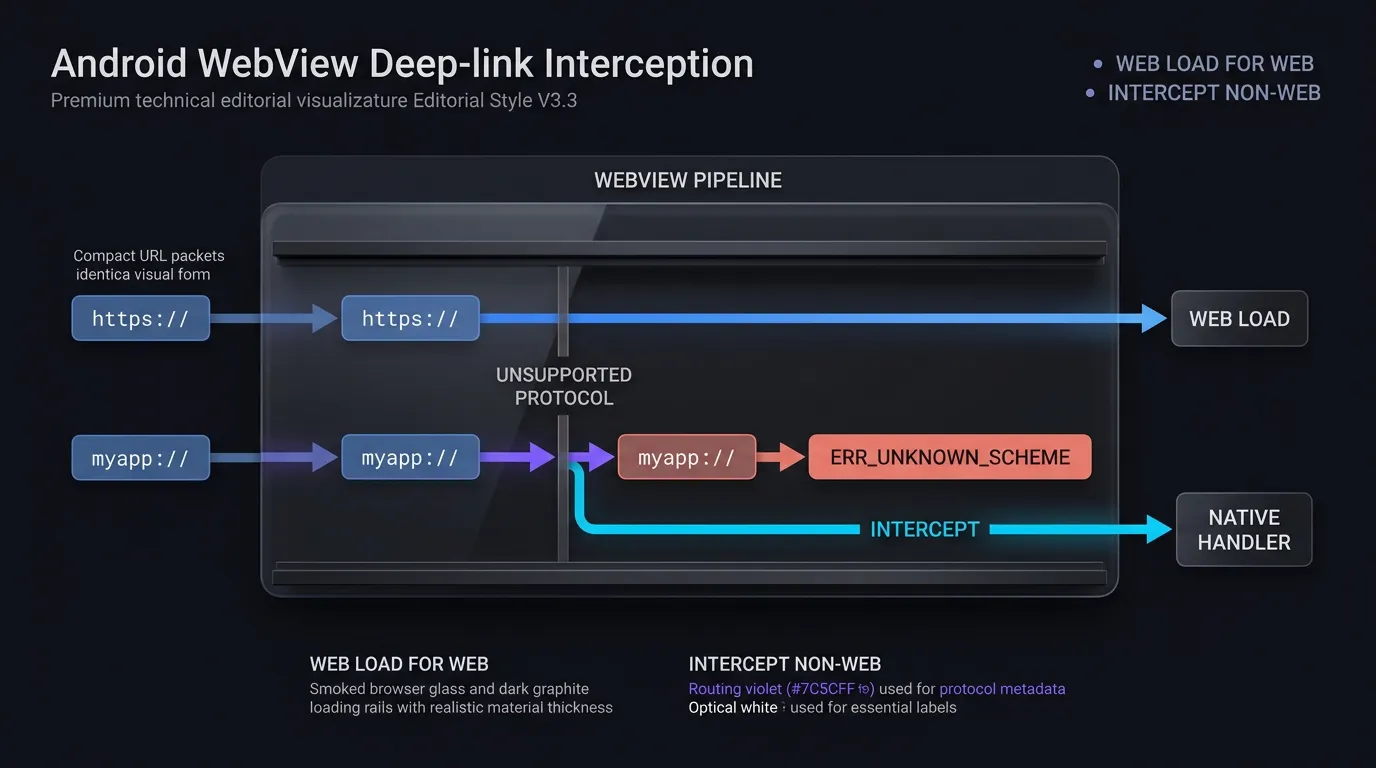
Android WebView 元件由底層的 Chromium 渲染引擎驅動,該引擎主要配置為解析與顯示標準網頁協定:http://、https://、file://、data://、about: 與 javascript:。
預設情況下,若未指定自訂 WebViewClient,Android 框架會將未處理的 URL 委派給系統的 Activity Manager。然而,一旦應用程式提供自訂 WebViewClient,非 HTTP(S) 的 Scheme(例如 myapp://product/detail/1024、alipay:// 或 whatsapp://)會直接進入客戶端的導航回呼。如果主應用程式讓自訂 Scheme 保留在 WebView 的載入管道中而非進行攔截,Chromium 引擎會嘗試將其解析為一般的網頁資源。由於非標準協定無法透過 DNS 或網頁伺服器傳輸層進行解析,引擎會引發低層級的導航失敗。
net::ERR_UNKNOWN_URL_SCHEME 的崩潰剖析:從使用者點擊到資源載入失敗
從使用者互動到出現錯誤頁面的過程,通常遵循快速且確定的序列:
- 使用者觸發:使用者點擊嵌入式 H5 登陸頁面上的行動呼籲(CTA)按鈕或超連結。
- 導航請求:網頁引擎建構包含目標 URI 字串(例如
myapp://promo/summer)的導航請求。 - 管道評估:如果
shouldOverrideUrlLoading()回傳false或未能攔截非 HTTP(S) 的 URI,Chromium 引擎會將此 URL 視為標準網頁資源進行載入。 - 錯誤分發:因找不到該協定的內部處理程式,引擎會觸發
onReceivedError()並以預設的 Chromium 錯誤模板替換網頁檢視內容:net::ERR_UNKNOWN_URL_SCHEME。
此錯誤頁面會中斷使用者旅程,妨礙轉換追蹤,並降低主應用程式的可感知穩定性。
目標應用程式不存在時的 ActivityNotFoundException 崩潰風險
當開發者首次嘗試解決 net::ERR_UNKNOWN_URL_SCHEME 時,常見的錯誤是解析 URI 字串並在沒有足夠異常處理的情況下呼叫 context.startActivity(Intent(Intent.ACTION_VIEW, Uri.parse(url)))。
如果使用者裝置上未安裝目標應用程式,Android 作業系統將無法找到符合的 Activity 來解析該 Intent。在標準 Android 執行環境中,在沒有對應處理程式的情況下呼叫 startActivity() 會拋出未處理的 android.content.ActivityNotFoundException。若未在結構化的 try-catch 區塊內攔截此異常,整個主應用程式進程將突然終止,導致致命的崩潰。
shouldOverrideUrlLoading 如何攔截深層連結協定
API 演進:比較 API 24+ 的 WebResourceRequest 多載與傳統字串回呼
Android 的 WebViewClient 提供了 shouldOverrideUrlLoading 回呼,允許主應用程式在網頁引擎執行之前檢查並攔截導航請求。此方法的簽章與功能在各個 Android API 層級中有所演進:
- API 24+ (Android 7.0 及更高版本):覆寫
shouldOverrideUrlLoading(view: WebView?, request: WebResourceRequest?): Boolean。WebResourceRequest介面提供豐富的環境元數據,包括目標 URL (request.url)、HTTP 請求方法 (request.method)、請求標頭,以及關鍵的框架層級標記(request.isForMainFrame,request.hasGesture())。 - 傳統多載 (於 API 24 棄用):覆寫
shouldOverrideUrlLoading(view: WebView?, url: String?): Boolean。此傳統回呼僅接收原始 URL 字串,不包含請求框架或使用者互動狀態的相關元數據。
根據 Android Developers 關於 WebViewClient shouldOverrideUrlLoading 的參考資料,現代應用程式必須實作 WebResourceRequest 多載。在支援舊版 Android 時,應審慎配置已棄用的字串回呼,以防止安全性繞過。
request.isForMainFrame 的安全性關鍵:封鎖子框架與 Iframe 劫持
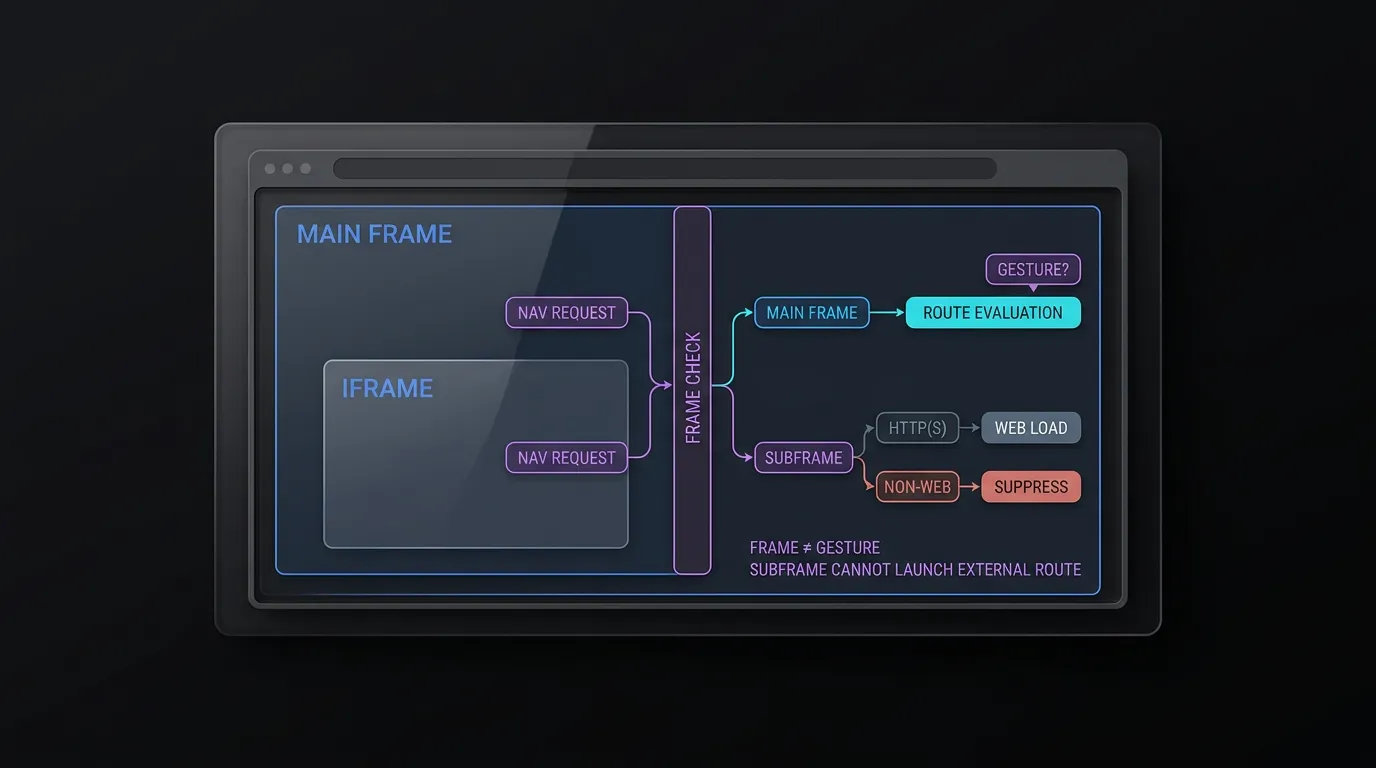
根據 Android Developers 關於 WebResourceRequest 的指南,shouldOverrideUrlLoading 回呼不僅會針對頂層文件導航觸發,亦會針對子框架、iframe 與後台資源重導向觸發。
強制執行 request.isForMainFrame 對應用程式安全性至關重要:
- 框架邊界隔離:檢查
request.isForMainFrame可確保子框架與 iframe 無法觸發外部應用程式啟動或自訂 Scheme Intent。若子框架嘗試導航,標準 HTTP(S) 載入應回傳false以繼續在框架內渲染,而非 HTTP(S) 的 Scheme 則必須回傳true以在不拋出錯誤的情況下抑制執行。 - 使用者手勢區分:雖然
isForMainFrame確認請求適用於主要文件,但它並不能證明使用者已進行啟動。如果您的架構需要驗證使用者手勢,請評估request.hasGesture()或強制執行應用程式層級的確認彈窗,並注意 Android 文件指出某些有效使用者流程中hasGesture()可能回傳 false。
區分正常網頁導航與深層連結轉交:何時回傳 false 與 true
shouldOverrideUrlLoading 的布林回傳值控制了 WebView 的渲染生命週期:
- 回傳
false:告知 Android 框架主應用程式尚未處理該 URL。WebView會繼續標準網頁導航,在其內部的 Chromium 容器內載入 URL。對於應在嵌入式瀏覽器中顯示的標準http://與https://網頁,必須回傳此值。 - 回傳
true:告知框架主應用程式已攔截並處理該 URL。WebView會立即取消其內部的載入流程。當啟動外部Intent、路由至原生 Activity 或抑制未經授權的 Scheme 時,必須回傳此值。
在嵌入式容器內處理主應用程式已驗證的 App Links
當 WebView 內的連結指向主應用程式自有的已驗證 HTTPS 網域(例如 https://app.example.com/product/1024)時,執行預設導航會導致 WebView 載入該產品頁面的網頁版。
為了提供原生體驗,WebViewClient 應檢查傳入的 HTTPS URL。如果主機與應用程式的關聯網域匹配,客戶端應攔截請求,針對內部路由驗證器(AppLinkRouteValidator)驗證路徑與查詢參數,並將資料直接分發至原生路由器(internalRouter(validatedRoute)),最後回傳 true 以取消冗餘的網頁渲染。
為自訂 Scheme 與 Intent URI 建立安全的 Intent 處理常式
剖析 Chrome Intent URI 語法:Scheme、Package 與 S.browser_fallback_url
在 Android 上,網頁經常使用 Chrome Intent URI 來建構具有內建瀏覽器後備機制的原生深層連結。Intent URI 使用 intent:// Scheme,並將路由參數、目標包名與後備 URL 序列化為一個字串:
intent://product/detail/1024#Intent;scheme=myapp;package=com.example.app;S.browser_fallback_url=https%3A%2F%2Fplay.google.com%2Fstore%2Fapps%2Fdetails%3Fid%3Dcom.example.app;end
根據 Chrome 開發者關於 Android Intent URI 的指南,該 URI 可拆解為不同元件:
- Host 與 Path (
product/detail/1024):定義內部應用程式目標。 scheme=myapp:指定底層的自訂協定。package=com.example.app:將 Intent 解析限制為指定的 Android 包名。S.browser_fallback_url=...:一個選擇性的 String Extra,定義當目標應用程式未安裝時所要載入的明確網頁或商店 URL。
執行原始解析 Intent 的危險:緩解 Intent 注入漏洞
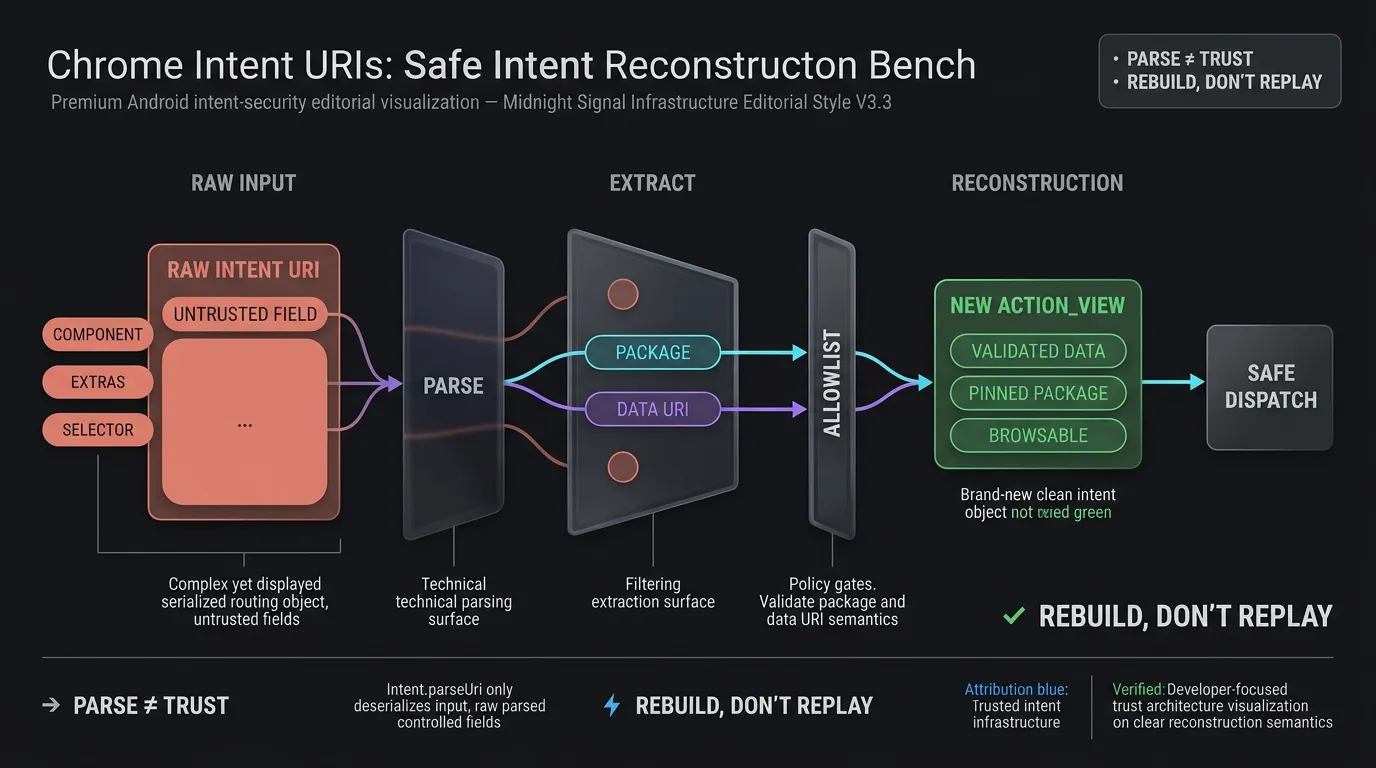
常見的實作反模式是使用 Intent.parseUri(url, Intent.URI_INTENT_SCHEME) 解析傳入的 URI,並將產生的 Intent 直接傳遞給 context.startActivity(intent)。
根據 OWASP 行動應用程式安全性測試指南關於不安全深層連結的建議,執行原始解析的 Intent 會將應用程式暴露於 Intent 注入攻擊之下。控制網頁的攻擊者可以製作包含惡意明確元件目標 (component=com.example.app/.InternalAdminActivity)、敏感動作或特權 Intent Extras (S.is_admin=true) 的 Intent URI。WebView 會將這些參數反序列化並啟動未匯出或內部的 Activity,繞過驗證屏障。
安全 Intent 重建:剝離元件並將動作限制為 ACTION_VIEW
為了消除 Intent 注入漏洞,主應用程式絕不能直接啟動原始反序列化的 Intent。相反地,WebViewClient 必須解析 URI,僅提取經過驗證的資料負載,並重建一個純淨的、專用的 Intent:
- 提取資料:解析 URI 並提取驗證後的目標包名與資料 URI。
- 驗證包名:核實聲明的包名是否符合已授權合作夥伴或內部包名的明確白名單。
- 重建:實例化一個新的
Intent(Intent.ACTION_VIEW, validatedDataUri)。 - 隔離:套用
intent.addCategory(Intent.CATEGORY_BROWSABLE)以確保僅有可瀏覽的 Activity 能解析此請求,設定明確標記 (FLAG_ACTIVITY_NEW_TASK),並確保intent.component與intent.selector保持為 null。
強制執行嚴格的 Scheme、Host、Path 與查詢參數白名單
無論是自訂 Scheme (myapp://) 還是重建的 Intent URI,在執行前都必須通過嚴格的驗證器。
此參考實作專門處理主應用程式自有的 myapp:// Scheme,並明確將 Intent 執行限制在 com.example.app。對於多應用程式夥伴生態系統,開發者應維護嚴格的 Scheme-to-Package 對應,或優先使用已驗證的 HTTPS App Links。
驗證器會檢查:
- Scheme:是否符合已授權的自訂 Scheme (
myapp)。 - Host:是否符合預定義的路由類別 (
open,product,event)。 - Path Prefix:是否符合預期的路由結構 (
/detail/,/view/,/main/)。 - 查詢參數:強制執行白名單內的查詢鍵 (
target,id,promo,utm_source),並驗證參數值是否符合長度限制(例如字元)與英數字元集。
[使用者點擊 Android WebView 內的連結]
                   │
                   ▼
[WebViewClient.shouldOverrideUrlLoading]
                   │
     ┌─────────────┴─────────────┐
     ▼                           ▼
[!request.isForMainFrame]   [request.isForMainFrame]
     │                           │
     ▼                           ▼
[檢查子框架 Scheme]     [檢查 URL Scheme]
├─ HTTP(S) -> 回傳 false       │
└─ 非網頁 -> 回傳 true   ┌────┴───────────────────────────┐
   (抑制錯誤)         ▼                                ▼
                     [HTTP / HTTPS]                 [非 HTTP(S) Scheme]
                            │                                │
                            ▼                                ▼
                   [檢查主機網域]              [CustomSchemeValidator]
                   ├─ 內部 App Link             ├─ 有效 -> 啟動釘選 Intent
                   │  -> 內部路由器            └─ Intent -> 重建與後備
                   └─ 外部網頁
                      -> 回傳 false
如何處理 Android 11 套件可見性與應用程式商店後備機制
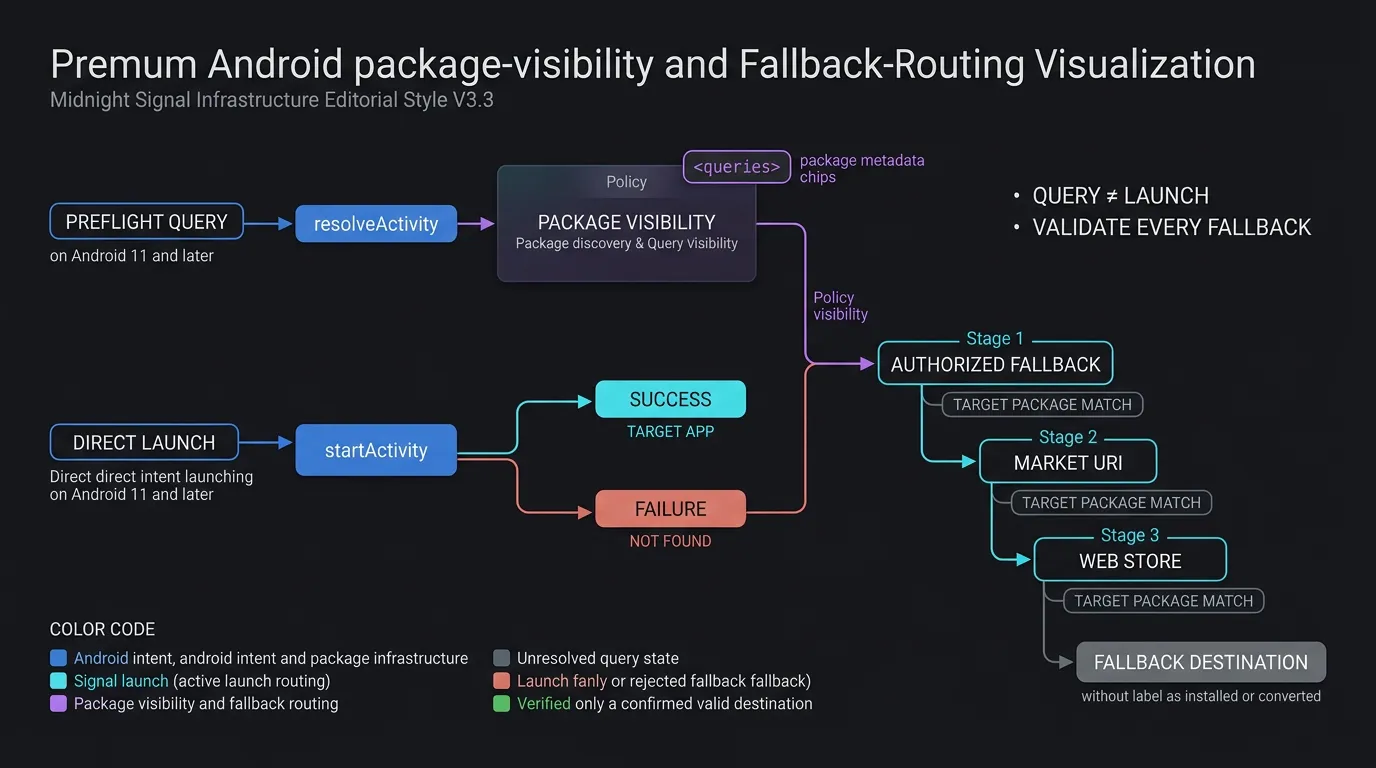
Android 11 套件可見性轉換:為何預檢查詢需要聲明
從 Android 11 (API 30) 開始,Google 引入了套件可見性(Package Visibility)篩選機制以增強使用者隱私。在此框架下,應用程式對其他已安裝應用程式的檢視預設受到限制。
理解 Intent 啟動與 Intent 查詢之間的區別至關重要:
- 直接啟動 Intent:對
context.startActivity(intent)的標準呼叫不需要套件可見性聲明。如果目標應用程式已安裝,作業系統會順利路由並啟動它,無論它對包名查詢是否可見。 - 預檢 Intent 查詢:如果您的
WebViewClient架構執行預檢檢查(例如在啟動前呼叫packageManager.resolveActivity(intent, 0)或packageManager.queryIntentActivities(intent, 0)來確認應用程式是否存在),除非在AndroidManifest.xml中聲明了目標包名或 Scheme,否則查詢會回傳null或空列表。
在 AndroidManifest.xml 中聲明 <queries> 元素以處理自訂 Scheme 與目標包名
根據 Android Developers 關於 Android 11 套件可見性的指南,在執行 Intent 前執行預檢檢查的應用程式應在 Manifest 中聲明目標包名或 Intent 簽章:
<manifest package="com.example.app">
    <!-- 針對明確包名發現的選用預檢查詢聲明 -->
    <queries>
        <package android:name="com.example.partner" />
        <intent>
            <action android:name="android.intent.action.VIEW" />
            <data android:scheme="myapp" />
        </intent>
        <intent>
            <action android:name="android.intent.action.VIEW" />
            <data android:scheme="https" android:host="app.example.com" />
        </intent>
    </queries>
</manifest>
如果您的架構偏好標準啟動模式,在 try-catch 區塊中執行 startActivity() 並捕捉 ActivityNotFoundException 可提供具備彈性且無需查詢的實作方式。
實作後備鏈:當目標應用程式不存在時進行優雅的商店路由
當攔截到的自訂 Scheme 或 Intent URI 因裝置上未安裝目標應用程式而無法啟動時,WebViewClient 必須執行明確的後備鏈:
- 提取並繫結後備 URL:對於
intent://URI,提取S.browser_fallback_url字串參數並驗證其是否指向授權目的地。對於 Google Play URL,驗證id參數是否嚴格符合目標包名 (id=targetPackage) 以防止開放重導向漏洞。 - Market URI 生成:如果沒有後備 URL,請建構 Market Intent:
market://details?id=com.example.app。 - 網頁版 Play 商店後備:如果 Google Play 被停用或不存在,在 Market Intent 上捕捉
ActivityNotFoundException並載入https://play.google.com/store/apps/details?id=com.example.app。
透過 OpoInstall 跨後備重導向繫結上下文參數
當未安裝應用程式的使用者被導向 Google Play 時,靜態商店連結會遺失動態參數。OpoInstall 是一個行動歸因與深層連結平台,它透過在商店重導向前的歸因後端捕獲參照 Token 與行銷上下文來彌補這一差距。請針對生產環境部署的 OpoInstall Android SDK 版本驗證延遲參數(deferred-parameter)的檢索行為與初始化 API。
在隨後安裝並首次啟動應用程式時,OpoInstall Android SDK 會檢索快取參數,使主應用程式能恢復使用者的目標場景。請參閱 SDK 整合文件以獲取有關安裝後接收延遲參數的說明。
生產環境 WebViewClient 實作:安全 Scheme 攔截
在 Kotlin 中建構自訂 WebViewClient 架構
生產環境的 WebViewClient 會協調框架驗證、Scheme 白名單、Intent 重建、後備提取與內部路由。實作將驗證規則封裝在專用的驗證物件(AppLinkRouteValidator 與 CustomSchemeValidator)內,以保持導航回呼簡潔易維護。
實作 AppLinkRouteValidator 與 CustomSchemeValidator 模型
驗證物件強制執行嚴格的失效關閉(fail-closed)安全性:
AppLinkRouteValidator驗證內部 HTTPS 網域、允許的路徑前綴與授權的查詢鍵 (target,id,promo,utm_source),並回傳結構化的ValidatedAppRoute資料類別。CustomSchemeValidator檢查授權的自訂 Scheme (myapp)、驗證允許的主機 (open,product,event)、強制執行路徑前綴,並針對英數字元集與長度限制(字元)清理查詢參數值。
下方的程式碼實作演示了如何配置選用的 AndroidManifest.xml 套件可見性聲明,並在 Kotlin 中實作執行緒安全且安全的 CustomWebViewClient 以及自動化的後備處理。認證後的 SDK 二進位檔案與整合封裝器可從 OpoInstall SDK 下載中心獲取。
<!-- AndroidManifest.xml: 針對預檢 Intent 查詢的選用套件可見性聲明 (Android 11+) -->
<manifest xmlns:android="http://schemas.android.com/apk/res/android"
    package="com.example.app">

    <!-- 僅在使用預檢 resolveActivity 查詢時聲明外部包名與自訂 Scheme -->
    <queries>
        <!-- 授權特定合作夥伴或目標包名的預檢發現 -->
        <package android:name="com.example.partner" />

        <!-- 授權自訂深層連結 Scheme 的預檢解析 -->
        <intent>
            <action android:name="android.intent.action.VIEW" />
            <data android:scheme="myapp" />
        </intent>

        <!-- 授權已驗證 HTTPS App Link 網域的預檢解析 -->
        <intent>
            <action android:name="android.intent.action.VIEW" />
            <data android:scheme="https" android:host="app.example.com" />
        </intent>
    </queries>

    <application
        android:allowBackup="true"
        android:label="@string/app_name"
        android:theme="@style/Theme.AppCompat.Light.NoActionBar">
        <!-- 應用程式元件 -->
    </application>
</manifest>
// Android: 具備框架邊界安全性、白名單驗證與後備路由的自訂 WebViewClient
// 參考整合範例;請對照部署的 Android 架構驗證方法簽章。
package com.example.app.webview

import android.content.ActivityNotFoundException
import android.content.Context
import android.content.Intent
import android.net.Uri
import android.util.Log
import android.webkit.WebResourceRequest
import android.webkit.WebView
import android.webkit.WebViewClient

data class ValidatedAppRoute(val path: String, val queryParams: Map<String, String>)

object AppLinkRouteValidator {
    private val allowedPrefixes = setOf("/open/", "/product/", "/promo/")
    private val allowedQueryKeys = setOf("target", "id", "promo", "utm_source")

    fun validate(uri: Uri): ValidatedAppRoute? {
        val path = uri.path ?: ""
        if (allowedPrefixes.none { path.startsWith(it) }) {
            return null
        }

        val sanitizedParams = mutableMapOf<String, String>()
        for (name in uri.queryParameterNames) {
            // 嚴格安全性原則:若存在未知查詢鍵則拒絕請求
            if (name !in allowedQueryKeys) {
                return null
            }
            val value = uri.getQueryParameter(name) ?: ""
            if (value.length <= 64 && value.matches(Regex("^[A-Za-z0-9_-]+$"))) {
                sanitizedParams[name] = value
            } else {
                return null
            }
        }

        return ValidatedAppRoute(path, sanitizedParams)
    }
}

object CustomSchemeValidator {
    private val allowedSchemes = setOf("myapp")
    private val allowedHosts = setOf("open", "product", "event")
    private val allowedPathPrefixes = setOf("/detail/", "/view/", "/main/")
    private val allowedQueryKeys = setOf("target", "id", "promo", "utm_source")

    fun validate(uri: Uri): Uri? {
        val scheme = uri.scheme?.lowercase() ?: return null
        val host = uri.host?.lowercase() ?: return null
        val path = uri.path ?: ""

        if (!allowedSchemes.contains(scheme) || !allowedHosts.contains(host)) {
            return null
        }

        if (allowedPathPrefixes.none { path.startsWith(it) }) {
            return null
        }

        for (name in uri.queryParameterNames) {
            if (name !in allowedQueryKeys) return null
            val value = uri.getQueryParameter(name) ?: ""
            if (value.length > 128 || !value.matches(Regex("^[A-Za-z0-9_-]+$"))) {
                return null
            }
        }

        return uri
    }
}

class CustomWebViewClient(
    private val context: Context,
    private val internalRouter: (ValidatedAppRoute) -> Unit
) : WebViewClient() {

    override fun shouldOverrideUrlLoading(view: WebView?, request: WebResourceRequest?): Boolean {
        request ?: return false

        // 安全要求:限制外部應用路由僅能用於主框架導航
        if (!request.isForMainFrame) {
            val scheme = request.url.scheme?.lowercase()
            // 允許標準 HTTP(S) 子框架載入,但抑制非網頁 Scheme 以防止 iframe 劫持與錯誤
            return if (scheme == "http" || scheme == "https") {
                false
            } else {
                Log.w("WebViewClient", "已抑制子框架/iframe 中的非網頁 Scheme: $scheme")
                true // 消耗/取消而不啟動外部 Intent 或顯示 Chromium 錯誤
            }
        }

        val url = request.url.toString()
        return handleUrlNavigation(view, url)
    }

    @Deprecated("Deprecated in Java")
    override fun shouldOverrideUrlLoading(view: WebView?, url: String?): Boolean {
        if (url == null) return false

        val uri = Uri.parse(url)
        val scheme = uri.scheme?.lowercase()

        // 傳統回呼缺乏可靠的 isForMainFrame 元數據;請勿路由外部 Scheme
        return if (scheme == "http" || scheme == "https") {
            false // 允許標準網頁內容載入
        } else {
            Log.w("WebViewClient", "在傳統回呼上封鎖了外部 Scheme: $scheme")
            true // 抑制未處理的 Scheme 錯誤而不啟動外部 Intent
        }
    }

    private fun handleUrlNavigation(view: WebView?, url: String): Boolean {
        val uri = Uri.parse(url)
        val scheme = uri.scheme?.lowercase() ?: return false

        // 1. 處理 HTTP / HTTPS 與內部 App Links
        if (scheme == "http" || scheme == "https") {
            // 檢查 URL 是否符合主應用程式自身的 App Link 網域
            if (scheme == "https" && uri.host?.lowercase() == "app.example.com") {
                val validatedRoute = AppLinkRouteValidator.validate(uri)
                if (validatedRoute != null) {
                    Log.i("WebViewClient", "已驗證內部 HTTPS 路由。分發至內部路由器。")
                    internalRouter(validatedRoute)
                } else {
                    Log.w("WebViewClient", "拒絕格式錯誤或未經授權的內部 App Link: $uri")
                }
                return true // 內部處理;取消 webview 載入
            }
            return false // 允許 WebView 原生載入標準網頁內容
        }

        // 2. 使用嚴格白名單與包名釘選驗證自訂 Scheme 以防止劫持
        val validatedUri = CustomSchemeValidator.validate(uri)
        if (validatedUri != null) {
            val pinnedIntent = Intent(Intent.ACTION_VIEW, validatedUri).apply {
                `package` = "com.example.app" // 明確釘選主應用程式包名
                addCategory(Intent.CATEGORY_BROWSABLE)
                flags = Intent.FLAG_ACTIVITY_NEW_TASK
            }
            return launchSafeIntent(pinnedIntent, fallbackAction = {
                handleStoreFallback(view, "com.example.app")
            })
        }

        // 3. 使用安全重建與後備提取來處理 Chrome Intent URI
        if (scheme == "intent") {
            return try {
                val parsed = Intent.parseUri(url, Intent.URI_INTENT_SCHEME)
                val targetPackage = parsed.`package`
                val allowedPackages = setOf("com.example.app", "com.example.partner")
                val fallbackUrl = parsed.getStringExtra("browser_fallback_url")

                if (targetPackage != null && allowedPackages.contains(targetPackage)) {
                    val rawDataUri = parsed.data
                    if (rawDataUri != null) {
                        val validatedDataUri = CustomSchemeValidator.validate(rawDataUri)
                        if (validatedDataUri != null) {
                            // 重建一個純淨的、專用的 ACTION_VIEW Intent,而非執行原始解析物件
                            val safeIntent = Intent(Intent.ACTION_VIEW, validatedDataUri).apply {
                                `package` = targetPackage
                                addCategory(Intent.CATEGORY_BROWSABLE)
                                flags = Intent.FLAG_ACTIVITY_NEW_TASK
                            }
                            launchSafeIntent(safeIntent, fallbackAction = {
                                handleIntentFallback(view, fallbackUrl, targetPackage)
                            })
                        } else {
                            Log.w("WebViewClient", "拒絕含有無效資料 URI 的 Intent: $rawDataUri")
                            true
                        }
                    } else {
                        Log.w("WebViewClient", "拒絕缺乏資料 URI 負載的 Intent")
                        true
                    }
                } else {
                    Log.w("WebViewClient", "拒絕針對未驗證包名的 Intent: $targetPackage")
                    true // 取消未驗證包名的 Intent
                }
            } catch (e: Exception) {
                Log.e("WebViewClient", "解析 Intent URI 失敗: $url", e)
                true // 抑制未處理的 Scheme 錯誤
            }
        }

        // 拒絕未知 Scheme 以避免 net::ERR_UNKNOWN_URL_SCHEME 錯誤
        Log.w("WebViewClient", "封鎖未驗證的 Scheme 導航: $scheme")
        return true
    }

    private fun launchSafeIntent(intent: Intent, fallbackAction: () -> Unit): Boolean {
        return try {
            context.startActivity(intent)
            true
        } catch (e: ActivityNotFoundException) {
            Log.w("WebViewClient", "目標應用程式未安裝: ${intent.data}。觸發後備機制。")
            fallbackAction()
            true
        } catch (e: SecurityException) {
            Log.e("WebViewClient", "啟動 Intent 時發生安全性異常: ${intent.data}", e)
            true
        }
    }

    private fun handleIntentFallback(view: WebView?, fallbackUrl: String?, targetPackage: String) {
        if (!fallbackUrl.isNullOrBlank() && isAuthorizedFallbackUrl(fallbackUrl, targetPackage)) {
            Log.i("WebViewClient", "路由至已授權的瀏覽器後備 URL: $fallbackUrl")
            view?.loadUrl(fallbackUrl)
        } else {
            handleStoreFallback(view, targetPackage)
        }
    }

    private fun handleStoreFallback(view: WebView?, packageName: String) {
        val marketUri = Uri.parse("market://details?id=$packageName")
        val marketIntent = Intent(Intent.ACTION_VIEW, marketUri).apply {
            flags = Intent.FLAG_ACTIVITY_NEW_TASK
        }
        try {
            context.startActivity(marketIntent)
        } catch (e: ActivityNotFoundException) {
            val webStoreUrl = "https://play.google.com/store/apps/details?id=$packageName"
            Log.i("WebViewClient", "Play 商店應用程式不存在。載入網頁版商店 URL: $webStoreUrl")
            view?.loadUrl(webStoreUrl)
        }
    }

    private fun isAuthorizedFallbackUrl(url: String, targetPackage: String): Boolean {
        val uri = Uri.parse(url)
        val scheme = uri.scheme?.lowercase()
        val host = uri.host?.lowercase()

        if (scheme != "https" || host == null) return false

        return when (host) {
            "play.google.com" -> {
                // 強制 Google Play 後備 URL 專門指向目標包名
                uri.path == "/store/apps/details" && uri.getQueryParameter("id") == targetPackage
            }
            "app.example.com", "www.example.com" -> {
                // 驗證自有網域後備路由
                AppLinkRouteValidator.validate(uri) != null
            }
            else -> false
        }
    }
}
執行緒安全執行:分發內部路由與管理生命週期狀態
當 AppLinkRouteValidator 確認為有效的內部路由時,UI 轉換必須在 Android 的主 UI 執行緒上執行。若 internalRouter 觸發 Fragment、Activity 轉換或 Compose 導航,請將分發呼叫包裹在 runOnUiThread 或主執行緒生命週期協程內,以防止執行緒崩潰。
Android WebView 重導向錯誤與診斷解決方案矩陣
全面的 Android WebView 深層連結疑難排解指南
下表詳細說明了在 Android WebView 中處理自訂 Scheme 時遇到的常見錯誤簽章、主要根本原因與工程補救措施:
| 錯誤簽章 / 症狀 | 主要根本原因 | 受影響 API 層級 | 診斷檢查點 | 建議補救措施 |
|---|---|---|---|---|
net::ERR_UNKNOWN_URL_SCHEME |
WebView 載入器中未處理非網頁 Scheme | 所有 API 層級 | shouldOverrideUrlLoading 缺失或回傳 false |
覆寫委派、攔截 Scheme、回傳 true |
ActivityNotFoundException |
裝置上缺少目標應用程式 | 所有 API 層級 | 未處理的 context.startActivity() |
捕捉異常並執行 S.browser_fallback_url 或 Play 商店路由 |
| Iframe Intent 劫持 | 子框架觸發外部 Intent | API 24+ | 未檢查 request.isForMainFrame |
使用 if (!request.isForMainFrame) 防護並抑制非網頁 Scheme |
| 預檢查詢回傳 Null | Android 11+ 套件可見性篩選 | API 30+ (Android 11+) | 未經 Manifest 聲明呼叫 resolveActivity |
在 Manifest 中聲明 <queries> 或直接使用 startActivity try-catch |
| 內部 App Link 重載循環 | 主 App Link 重導向至 WebView | 所有 API 層級 | 委派中未處理主網域 | 攔截自有網域、驗證路由、分發至原生路由器 |
常見問題集 (FAQ)
為什麼我的 Android WebView 在開啟自訂 URL Scheme 時會崩潰?
如何在 WebView 中安全處理 intent:// URL 而不產生安全性漏洞?
Android 11 套件可見性如何影響 WebView 中的深層連結攔截?
總結與決策框架
在 Android WebView 中處理深層連結與自訂 Scheme,需要彌合網頁渲染沙盒與原生作業系統 Intent 路由之間的差距。過度依賴預設的 WebView 行為會導致未處理的協定錯誤、糟糕的使用者體驗與潛在的安全性漏洞。
透過實作穩健的 WebViewClient 來驗證框架邊界、針對明確白名單驗證自訂 Scheme、重建安全的 ACTION_VIEW Intent 並處理優雅的商店後備機制,工程團隊可以減少 WebView 的 Scheme 處理失敗,並支援更具彈性的導航。將可靠的客戶端路由與全面的行動歸因框架整合,可降低跨歸因流程的路由摩擦,並支援更一致的使用者旅程。
若要探索原生 Android 深層連結與參數路由架構,請查閱 SDK 整合文件,從 OpoInstall SDK 下載中心下載客戶端程式庫,探索 行動歸因實作參考,或在 OpoInstall 開發者控制台註冊您的應用程式。
相關資料
- 概念:Android WebView 導航、自訂 URL Scheme 攔截、Intent URI 重建、套件可見性
- 技術:Android WebViewClient、Chromium WebEngine、Android Debug Bridge、OpoInstall Android SDK
- 標準:IETF RFC 3986 統一資源識別碼 (URI)、Android Intent 規範、OWASP 行動應用程式安全性測試指南 (MASTG)
- API:Android
shouldOverrideUrlLoading、WebResourceRequest.isForMainFrame、Intent.parseUri、PackageManager.queryIntentActivities - 官方文件與參考資料:
Share this article