如何在用户验收测试(UAT)期间自动化归因审计?在用户验收测试(UAT)期间自动化归因审计需要协调三个独立的验证层:用于验证应用端有效负载解析和目标页面路由的本地 CI 测试夹具、用于测试原生 SDK 回调钩子的受控预发布运行,以及跨物理网络验证参数还原的真实预发布安装测试。用户验收测试确认推广参数、动态渠道代码和推荐上下文能够平滑穿过构建与发布流水线,而不会中断用户引导流程。
用户验收测试是发布前的运营阶段,工程和产品团队在此阶段对照业务需求和技术验收标准评估软件构建版本。在移动端增长工程中,自动化归因审计通过验证自定义查询令牌、渠道代码和 deep link 参数能够顺利通过交付流水线,并在应用首次打开时准确解析,从而取代了容易出错的手动测试。
移动端归因自动化用户验收测试的架构

为什么手动深度链接与归因验证在大规模场景下会失效
移动端部署流水线经常会为一个发布候选版本生成数十个渠道包、本地化营销变体以及动态推荐流。在手动验证模式下,QA 团队会生成落地页、用物理设备扫描动态二维码、安装构建版本,并手动检查初始视图控制器以查看自定义参数是否出现。
这种手动方法在公开上线前引入了三个运营风险:
- 发布周期中的测试瓶颈:在每个构建版本上手动验证复杂的参数组合会拖慢部署进度,并将测试覆盖率限制在基础的正常路径上。
- 未被察觉的转录和编码失败:复杂的查询有效负载(例如包含推荐令牌、邀请码和营销标签的嵌套 JSON 字典)在物理屏幕上很难通过肉眼进行审计,从而让字符编码和字符串转义错误流向生产环境。
- 归因状态污染:在未完全擦除应用存储的情况下在设备上重新测试安装包,会导致归因 SDK 返回来自先前运行的缓存参数,从而产生掩盖全新构建版本中路由损坏的误报。
建立自动化的用户验收测试框架允许团队在每个发布构建版本上以确定性的方式审计参数解析与路由。团队可以参考移动端归因实现参考获取有关参数还原工作流的架构详情。
[Release Candidate Build]
           │
           ├──> Layer 1: CI/CD Mock Regression (Headless UI Tests)
           │      └── Injects Mock Test Fixture ──> Verifies App Parsing, Routing & Destination UI
           │
           ├──> Layer 2: Staging SDK Integration (Controlled Test Harness)
           │      └── Direct SDK Test Harness ──> Asserts getInstallParam Callback Lifecycle
           │
           └──> Layer 3: Physical Device Attribution (Staging Acceptance Run)
                  └── Web Click ──> Install ──> Native First Open ──> Parameter Match Verified
归因审计的三层验证模型
具备韧性的发布前归因审计框架跨三个独立的验证层评估归因生命周期,而不是将模拟测试和物理归因视作相同的测试结果:
| 验证层 | 主要目标 | 执行环境 | 通过与验收标准 |
|---|---|---|---|
| CI 模拟回归 | 验证应用路由、有效负载解析和 UI 状态处理 | 无头 CI 模拟器或仿真器 | 应用解码注入的测试夹具、导航至目标视图容器并优雅处理缺失字段 |
| 预发布 SDK 集成 | 验证原生 SDK 生命周期钩子、超时处理和回调 | 预发布构建版本上的受控集成测试工具 | SDK 初始化触发回调;预期渠道代码解析成功;超时产生非致命错误代码 |
| 物理预发布归因 | 验证从网页点击到启动的真实世界参数还原 | 蜂窝网络或 Wi-Fi 网络下的干净物理设备 | 网页点击上下文与原生首次打开相核对;预期参数与飞行前预发布运行台账相匹配 |
CI/CD 中的测试夹具设计与上下文注入
程序化上下文注入的机制
在生产环境中,参数还原发生在归因 SDK 将 H5 落地页上捕获的设备上下文与已安装二进制文件的初始启动进行对账时。在自动化的 CI 流水线上,启动物理移动浏览器去点击实时网页链接的速度较慢、脆弱,且难以从网络波动中隔离出来。
为了以程序化方式验证下游应用逻辑,测试套件使用预发布测试夹具。这些夹具将模拟参数直接提供给应用的路由层,将 UI 测试与外部网络调用解耦,同时测试由测试工具执行的解析与路由行为。
- 查询字符串构造:查询字符串必须符合 IETF RFC 3986 规范。在构造查询字符串时,使用 application/x-www-form-urlencoded 规则格式化参数,其中带有空格的值变为
+或%20,而诸如=和&等保留分隔符则用于分隔各个键值对。 - 有效负载结构完整性:测试套件必须同时提供有效的查询字典和缺失字段的输入,以确认应用的解密反序列化逻辑能够通过路由到预期的降级容器而不会崩溃,从而处理意外的有效负载。
配置预发布环境的开发人员可以查阅 OpoInstall 文档中心了解有关参数架构的技术规范。
设计确定性查询参数
为了避免产生含糊不清的测试断言,请使用标准查询编码构造 URL 测试夹具,将键和值编码为独立的对:
import urllib.parse

# Form-encoded query fixture representing incoming web marketing parameters
params = {
    "channelCode": "ci_regression_01",
    "cohort": "beta_v2",
    "role": "tester",
    "buildId": "rc-104",
    "target_screen": "promotions_detail"
}

# Standard application/x-www-form-urlencoded formatting
query_string = urllib.parse.urlencode(params)
# Output: channelCode=ci_regression_01&cohort=beta_v2&role=tester&buildId=rc-104&target_screen=promotions_detail

通过 ADB 和 Espresso 自动化 Android 参数验证
管理进程生命周期与存储清理
测试安装归因要求在每次测试运行前建立一个隔离的、干净状态的基准。简单地在现有安装上启动 Activity 会保留早期会话中的缓存首选项和 SQLite 状态。
为了确保在自动化测试运行中实现确定性执行,可以通过 Gradle 协调安装、数据清理和测试执行。通过 pm clear 清除包状态会重置设备上的本地共享首选项和内部文件,为后续的仪表化运行提供一个干净的起点。下面的 shell 包装脚本执行测试运行器,在 Gradle 完成后复制可用的 JUnit XML 报告,并保留 Gradle 的退出代码以确保 CI 失败能够向上冒泡:
#!/usr/bin/env bash
set -u

PACKAGE_NAME="com.example.uatapp"
TEST_PACKAGE="com.example.uatapp.test"
RUN_ID="UAT_${CI_JOB_ID:-manual}_$(date +%s)_$RANDOM"
CI_REPORTS_DIR="./build/ci-test-results"
mkdir -p "$CI_REPORTS_DIR"

echo "=== Starting Automated Android Attribution Audit: $RUN_ID ==="

# Step 1: Ensure pre-release package is installed on the connected test runner
if ! adb shell pm list packages | grep -q "$PACKAGE_NAME"; then
    echo "Target package $PACKAGE_NAME is not installed. Installing debug build..."
    if ! ./gradlew installDebug installDebugAndroidTest; then
        echo "Error: Failed to install test packages." >&2
        exit 1
    fi
fi

# Step 2: Terminate active instances and reset application local sandbox storage
adb shell am force-stop "$PACKAGE_NAME" || true
echo "Resetting local application state for $PACKAGE_NAME..."
if ! adb shell pm clear "$PACKAGE_NAME"; then
    echo "Error: Failed to clear package state." >&2
    exit 1
fi

GRADLE_EXIT_CODE=0

# Step 3: Run CI regression tests filtering explicitly for fixture assertions
echo "Running CI UI regression test suite..."
./gradlew connectedDebugAndroidTest \
    -Pandroid.testInstrumentationRunnerArguments.class=com.example.uatapp.AttributionUatEspressoTest#testFixtureParsingAndNavigation,com.example.uatapp.AttributionUatEspressoTest#testMissingParametersFallback \
    -Pandroid.testInstrumentationRunnerArguments.test_run_id="$RUN_ID" || GRADLE_EXIT_CODE=$?

# Step 4: Copy available JUnit XML reports and preserve Gradle's exit code
echo "Collecting connected Android test XML reports..."
SOURCE_DIR="app/build/outputs/androidTest-results/connected"
if [ -d "$SOURCE_DIR" ]; then
    if cp -r "$SOURCE_DIR/"* "$CI_REPORTS_DIR/"; then
        echo "Reports archived successfully to $CI_REPORTS_DIR"
    else
        echo "Warning: Failed to copy reports to $CI_REPORTS_DIR" >&2
    fi
else
    echo "Warning: Report source directory $SOURCE_DIR not found." >&2
fi

if [ "$GRADLE_EXIT_CODE" -ne 0 ]; then
    echo "CI Test Suite FAILED with exit code $GRADLE_EXIT_CODE" >&2
    exit "$GRADLE_EXIT_CODE"
fi

echo "=== Instrumentation Suite Completed Successfully ==="
exit 0
使用 ActivityScenarioRule 编写 Android 集成测试
为避免跳过断言,应将 UI 夹具回归测试与预发布 SDK 集成测试隔离开来。将仅用于测试的路由入口点严格编译在 debug 源码集(src/debug/java)中,以避免在发布二进制文件中暴露测试钩子:
// File: app/src/debug/java/com/example/uatapp/StagingFixtureRouter.java
package com.example.uatapp;

import android.net.Uri;
import android.view.View;
import android.widget.TextView;
import androidx.appcompat.app.AppCompatActivity;

public class StagingFixtureRouter {

    public static void processStagingQueryString(AppCompatActivity activity, String rawQueryString) {
        if (rawQueryString == null || rawQueryString.trim().isEmpty()) {
            View fallbackView = activity.findViewById(R.id.destination_default_home_view);
            if (fallbackView != null) fallbackView.setVisibility(View.VISIBLE);
            View promoView = activity.findViewById(R.id.destination_promotions_view);
            if (promoView != null) promoView.setVisibility(View.GONE);
            return;
        }

        Uri parsedUri = Uri.parse("https://staging.example.com/demo?" + rawQueryString);
        String channelCode = parsedUri.getQueryParameter("channelCode");
        String cohort = parsedUri.getQueryParameter("cohort");
        String role = parsedUri.getQueryParameter("role");
        String buildId = parsedUri.getQueryParameter("buildId");
        String targetScreen = parsedUri.getQueryParameter("target_screen");

        if (channelCode == null || channelCode.trim().isEmpty()) {
            View fallbackView = activity.findViewById(R.id.destination_default_home_view);
            if (fallbackView != null) fallbackView.setVisibility(View.VISIBLE);
            View promoView = activity.findViewById(R.id.destination_promotions_view);
            if (promoView != null) promoView.setVisibility(View.GONE);
            return;
        }

        TextView channelBadge = activity.findViewById(R.id.channel_badge_text);
        if (channelBadge != null) channelBadge.setText(channelCode);

        TextView roleBadge = activity.findViewById(R.id.role_badge_text);
        if (roleBadge != null && role != null) roleBadge.setText(role);

        TextView cohortBadge = activity.findViewById(R.id.cohort_badge_text);
        if (cohortBadge != null && cohort != null) cohortBadge.setText(cohort);

        TextView buildIdBadge = activity.findViewById(R.id.build_id_badge_text);
        if (buildIdBadge != null && buildId != null) buildIdBadge.setText(buildId);

        if ("promotions_detail".equals(targetScreen)) {
            View promoView = activity.findViewById(R.id.destination_promotions_view);
            if (promoView != null) promoView.setVisibility(View.VISIBLE);
            View fallbackView = activity.findViewById(R.id.destination_default_home_view);
            if (fallbackView != null) fallbackView.setVisibility(View.GONE);
        } else {
            View homeView = activity.findViewById(R.id.destination_default_home_view);
            if (homeView != null) homeView.setVisibility(View.VISIBLE);
            View promoView = activity.findViewById(R.id.destination_promotions_view);
            if (promoView != null) promoView.setVisibility(View.GONE);
        }
    }
}
下面的 Espresso 测试套件将夹具 UI 路由断言与预发布 SDK 回调验证分离开来:
package com.example.uatapp;

import android.content.Context;
import android.content.Intent;
import androidx.test.core.app.ActivityScenario;
import androidx.test.core.app.ApplicationProvider;
import androidx.test.espresso.Espresso;
import androidx.test.espresso.assertion.ViewAssertions;
import androidx.test.espresso.matcher.ViewMatchers;
import androidx.test.ext.junit.runners.AndroidJUnit4;
import androidx.test.filters.LargeTest;
import androidx.test.platform.app.InstrumentationRegistry;
import com.opoinstall.api.OpoData;
import com.opoinstall.api.OpoError;
import com.opoinstall.api.OpoInstall;
import com.opoinstall.api.ResultCallBack;
import org.json.JSONObject;
import org.junit.Assert;
import org.junit.Test;
import org.junit.runner.RunWith;
import java.util.concurrent.CountDownLatch;
import java.util.concurrent.TimeUnit;
import java.util.concurrent.atomic.AtomicBoolean;
import java.util.concurrent.atomic.AtomicReference;

@RunWith(AndroidJUnit4.class)
@LargeTest
public class AttributionUatEspressoTest {

    private static final String TEST_QUERY_STRING = "channelCode=ci_regression_01&cohort=beta_v2&role=tester&buildId=rc-104&target_screen=promotions_detail";
    private static final String EXPECTED_CHANNEL = "ci_regression_01";
    private static final String EXPECTED_COHORT = "beta_v2";
    private static final String EXPECTED_ROLE = "tester";
    private static final String EXPECTED_BUILD_ID = "rc-104";
    private static final long CALLBACK_TIMEOUT_SECONDS = 10;

    @Test
    public void testFixtureParsingAndNavigation() {
        String testRunId = InstrumentationRegistry.getArguments().getString("test_run_id", "local_run");
        System.out.println("Executing testFixtureParsingAndNavigation for run: " + testRunId);

        Intent intent = new Intent(ApplicationProvider.getApplicationContext(), MainActivity.class)
                .setAction(Intent.ACTION_VIEW)
                .putExtra("staging_query_string", TEST_QUERY_STRING);

        try (ActivityScenario<MainActivity> scenario = ActivityScenario.launch(intent)) {
            scenario.onActivity(activity -> {
                StagingFixtureRouter.processStagingQueryString(
                        activity,
                        activity.getIntent().getStringExtra("staging_query_string")
                );
            });

            Espresso.onView(ViewMatchers.withId(R.id.destination_promotions_view))
                    .check(ViewAssertions.matches(ViewMatchers.isDisplayed()));

            Espresso.onView(ViewMatchers.withId(R.id.channel_badge_text))
                    .check(ViewAssertions.matches(ViewMatchers.withText(EXPECTED_CHANNEL)));

            Espresso.onView(ViewMatchers.withId(R.id.cohort_badge_text))
                    .check(ViewAssertions.matches(ViewMatchers.withText(EXPECTED_COHORT)));

            Espresso.onView(ViewMatchers.withId(R.id.role_badge_text))
                    .check(ViewAssertions.matches(ViewMatchers.withText(EXPECTED_ROLE)));

            Espresso.onView(ViewMatchers.withId(R.id.build_id_badge_text))
                    .check(ViewAssertions.matches(ViewMatchers.withText(EXPECTED_BUILD_ID)));
        }
    }

    @Test
    public void testMissingParametersFallback() {
        Intent intent = new Intent(ApplicationProvider.getApplicationContext(), MainActivity.class)
                .setAction(Intent.ACTION_VIEW)
                .putExtra("staging_query_string", "cohort=missing_channel");

        try (ActivityScenario<MainActivity> scenario = ActivityScenario.launch(intent)) {
            scenario.onActivity(activity -> {
                StagingFixtureRouter.processStagingQueryString(
                        activity,
                        activity.getIntent().getStringExtra("staging_query_string")
                );
            });

            Espresso.onView(ViewMatchers.withId(R.id.destination_default_home_view))
                    .check(ViewAssertions.matches(ViewMatchers.isDisplayed()));

            Espresso.onView(ViewMatchers.withId(R.id.destination_promotions_view))
                    .check(ViewAssertions.matches(ViewMatchers.withEffectiveVisibility(ViewMatchers.Visibility.GONE)));
        }
    }

    @Test
    public void testStagingSdkCallbackResolution() throws Exception {
        // Dedicated Staging SDK Test Entry: executed in controlled staging harness with network access
        Intent intent = new Intent(ApplicationProvider.getApplicationContext(), MainActivity.class);

        try (ActivityScenario<MainActivity> scenario = ActivityScenario.launch(intent)) {
            CountDownLatch latch = new CountDownLatch(1);
            AtomicReference<OpoData> receivedData = new AtomicReference<>();
            AtomicReference<OpoError> receivedError = new AtomicReference<>();
            AtomicBoolean timeoutOccurred = new AtomicBoolean(false);

            scenario.onActivity(activity -> {
                OpoInstall.getInstance().getInstallParam(new ResultCallBack<OpoData>() {
                    @Override
                    public void onResult(OpoData opoData) {
                        receivedData.set(opoData);
                        latch.countDown();
                    }

                    @Override
                    public void onError(OpoError opoError) {
                        receivedError.set(opoError);
                        latch.countDown();
                    }
                });
            });

            boolean completed = latch.await(CALLBACK_TIMEOUT_SECONDS, TimeUnit.SECONDS);
            if (!completed) {
                timeoutOccurred.set(true);
            }

            Assert.assertFalse("Attribution callback exceeded timeout budget of " + CALLBACK_TIMEOUT_SECONDS + "s", timeoutOccurred.get());
            Assert.assertNull("Attribution callback returned an unexpected error", receivedError.get());

            OpoData data = receivedData.get();
            Assert.assertNotNull("Attribution data object must not be null in staging callback test", data);
            Assert.assertEquals("Channel code mismatch in staging callback", EXPECTED_CHANNEL, data.getChannelCode());

            String bindData = data.getBindData();
            Assert.assertNotNull("Bind data payload must not be null", bindData);

            JSONObject json = new JSONObject(bindData);
            Assert.assertEquals("Cohort metadata mismatch", EXPECTED_COHORT, json.optString("cohort", ""));
            Assert.assertEquals("Role metadata mismatch", EXPECTED_ROLE, json.optString("role", ""));
        }
    }
}
要在预发布测试运行器上运行此专用的 SDK 验证测试,请直接指定该方法:
./gradlew connectedDebugAndroidTest \
    -Pandroid.testInstrumentationRunnerArguments.class=com.example.uatapp.AttributionUatEspressoTest#testStagingSdkCallbackResolution
如何通过 XCUITest 和测试夹具验证 iOS 延迟参数
在 iOS 测试目标上模拟延迟归因有效负载
Apple 模拟器运行在本地 macOS 主机架构上,不提供物理 App Store 推荐握手。在自动化的 CI 流水线上,测试工程师通过 XCUIApplication 向目标进程传递启动环境变量或启动参数来模拟延迟参数。
- 启动环境变量注入:测试运行器在
XCUIApplication.launchEnvironment中设置明确的键。测试构建在启动时检查这些调试键,并通过应用的深度链接协调器路由模拟有效负载。 - 剪贴板上下文验证:在测试剪贴板辅助的参数传递时,测试运行器可以在测试启动前使用
xcrun simctl pbcopy填充模拟器的剪贴板缓冲区。这在模拟操作系统条件下测试了应用的剪贴板解析逻辑。 - 区分预发布模拟与生产遥测:环境变量注入确认了主应用程序的路由、解析和 UI 显示逻辑能够正常运行。但是,它不会评估 Apple 原生的 App Store 归因匹配。物理设备运行对于验证真实世界的安装归因仍然是必不可少的。
为 SDK 参数回调构建 XCUITest 断言
下面用 Swift 编写的 XCUITest 套件使用自定义的预发布启动参数启动应用,等待应用的测试协调器更新可访问的 UI 元素,并断言参数与预期值相符。请注意,目标 Xcode 方案(例如 YourAppStaging)必须激活 DEBUG 编译条件,以便预发布测试协调器能够编译:
开发人员可以从移动端 SDK 下载仓库检索已验证的 iOS 静态框架包进行集成。
import XCTest

class AttributionUatXCUITest: XCTestCase {

    var app: XCUIApplication!
    private let expectedChannel = "uat_ci_track"
    private let expectedCohort = "ios_staging_v1"
    private let expectedRole = "tester"
    private let expectedBuildId = "rc-104"

    override func setUpWithError() throws {
        continueAfterFailure = false
        app = XCUIApplication()
    }

    override func tearDownWithError() throws {
        app = nil
    }

    func testDeferredAttributionParameterRestoration() throws {
        let runId = "RUN_IOS_\(ProcessInfo.processInfo.globallyUniqueString)"

        app.launchEnvironment["QA_TEST_MODE"] = "MOCK_FIXTURE"
        app.launchEnvironment["QA_TEST_RUN_ID"] = runId
        app.launchEnvironment["QA_FIXTURE_CHANNEL"] = expectedChannel
        app.launchEnvironment["QA_FIXTURE_COHORT"] = expectedCohort
        app.launchEnvironment["QA_FIXTURE_ROLE"] = expectedRole
        app.launchEnvironment["QA_FIXTURE_BUILD_ID"] = expectedBuildId
        app.launch()

        // Locate destination view container in the active hierarchy
        let destinationView = app.otherElements["destination_promotions_view"]
        XCTAssertTrue(destinationView.waitForExistence(timeout: 5.0), "Application router failed to display promotions view")

        // Query accessible elements rendered inside the destination container
        let statusLabel = destinationView.staticTexts["attribution_status_label"]
        let channelLabel = destinationView.staticTexts["attribution_channel_label"]
        let cohortLabel = destinationView.staticTexts["attribution_cohort_label"]
        let roleLabel = destinationView.staticTexts["attribution_role_label"]
        let buildIdLabel = destinationView.staticTexts["attribution_build_id_label"]

        // Assertion Gate 1: Verify operational status
        XCTAssertEqual(statusLabel.label, "RESOLVED", "Attribution status did not resolve successfully")

        // Assertion Gate 2: Assert restored parameters match injected staging fixture
        XCTAssertEqual(channelLabel.label, expectedChannel, "Restored channel code mismatch")
        XCTAssertEqual(cohortLabel.label, expectedCohort, "Restored cohort mismatch")
        XCTAssertEqual(roleLabel.label, expectedRole, "Restored role mismatch")
        XCTAssertEqual(buildIdLabel.label, expectedBuildId, "Restored buildId mismatch")
    }

    func testMissingParametersFallback() throws {
        let runId = "RUN_IOS_FALLBACK_\(ProcessInfo.processInfo.globallyUniqueString)"

        app.launchEnvironment["QA_TEST_MODE"] = "MOCK_FIXTURE"
        app.launchEnvironment["QA_TEST_RUN_ID"] = runId
        app.launchEnvironment["QA_FIXTURE_CHANNEL"] = "" // Missing channel code
        app.launchEnvironment["QA_FIXTURE_COHORT"] = ""
        app.launch()

        let fallbackView = app.otherElements["destination_default_home_view"]
        XCTAssertTrue(fallbackView.waitForExistence(timeout: 5.0), "Application failed to display default home view when parameters were missing")

        let statusLabel = fallbackView.staticTexts["attribution_status_label"]
        XCTAssertEqual(statusLabel.label, "FALLBACK_DEFAULT", "Attribution coordinator failed to declare fallback state")
    }
}
在发布前的主应用中,确保 initializeAttributionValidation 从 viewDidAppear 执行一次,直接在可见的目标容器上渲染验证标签,而不是呈现遮挡状态元素的短暂模态表单:
import UIKit

class RootViewController: UIViewController {
    private var hasInitializedAttribution = false

    override func viewDidAppear(_ animated: Bool) {
        super.viewDidAppear(animated)
        guard !hasInitializedAttribution else { return }
        hasInitializedAttribution = true

        UatTestCoordinator.shared.initializeAttributionValidation(rootViewController: self)
    }
}

class UatTestCoordinator {
    static let shared = UatTestCoordinator()

    func initializeAttributionValidation(rootViewController: UIViewController) {
        let env = ProcessInfo.processInfo.environment

        #if DEBUG
        if env["QA_TEST_MODE"] == "MOCK_FIXTURE" {
            let mockChannel = env["QA_FIXTURE_CHANNEL"] ?? ""
            let mockCohort = env["QA_FIXTURE_COHORT"] ?? ""
            let mockRole = env["QA_FIXTURE_ROLE"] ?? ""
            let mockBuildId = env["QA_FIXTURE_BUILD_ID"] ?? ""

            if mockChannel.isEmpty {
                applyFallbackState(rootViewController: rootViewController, reason: "FALLBACK_DEFAULT")
            } else {
                applyResolvedState(
                    channel: mockChannel,
                    cohort: mockCohort,
                    role: mockRole,
                    buildId: mockBuildId,
                    rootViewController: rootViewController
                )
            }
            return
        }
        #endif

        // Live staging verification querying the official OpoInstall iOS SDK v2.1.0 callback
        OpoInstallSDK.defaultManager()?.getInstallParmsCompleted { [weak self] appData in
            guard let self = self else { return }

            guard let data = appData else {
                self.applyFallbackState(rootViewController: rootViewController, reason: "FAILED_NULL")
                return
            }

            if data.opoCode == OPO_Codes.timeout {
                self.applyFallbackState(rootViewController: rootViewController, reason: "TIMED_OUT")
                return
            }

            let channel = data.channelCode ?? ""
            if channel.isEmpty {
                self.applyFallbackState(rootViewController: rootViewController, reason: "FALLBACK_DEFAULT")
                return
            }

            var cohort = "UNKNOWN"
            var role = "UNKNOWN"
            var buildId = "UNKNOWN"

            if let dict = data.data as? [String: Any] {
                cohort = dict["cohort"] as? String ?? "UNKNOWN"
                role = dict["role"] as? String ?? "UNKNOWN"
                buildId = dict["buildId"] as? String ?? "UNKNOWN"
            }

            self.applyResolvedState(
                channel: channel,
                cohort: cohort,
                role: role,
                buildId: buildId,
                rootViewController: rootViewController
            )
        }
    }

    private func applyResolvedState(
        channel: String,
        cohort: String,
        role: String,
        buildId: String,
        rootViewController: UIViewController
    ) {
        // Swap content in-place within the active root view hierarchy
        rootViewController.view.subviews.forEach { $0.removeFromSuperview() }

        let container = UIView(frame: rootViewController.view.bounds)
        container.accessibilityIdentifier = "destination_promotions_view"
        rootViewController.view.addSubview(container)

        attachLabel(to: container, identifier: "attribution_status_label", text: "RESOLVED", y: 100)
        attachLabel(to: container, identifier: "attribution_channel_label", text: channel, y: 130)
        attachLabel(to: container, identifier: "attribution_cohort_label", text: cohort, y: 160)
        attachLabel(to: container, identifier: "attribution_role_label", text: role, y: 190)
        attachLabel(to: container, identifier: "attribution_build_id_label", text: buildId, y: 220)
    }

    private func applyFallbackState(rootViewController: UIViewController, reason: String) {
        rootViewController.view.subviews.forEach { $0.removeFromSuperview() }

        let container = UIView(frame: rootViewController.view.bounds)
        container.accessibilityIdentifier = "destination_default_home_view"
        rootViewController.view.addSubview(container)

        attachLabel(to: container, identifier: "attribution_status_label", text: reason, y: 100)
    }

    private func attachLabel(to container: UIView, identifier: String, text: String, y: CGFloat) {
        let label = UILabel(frame: CGRect(x: 20, y: y, width: 280, height: 25))
        label.accessibilityIdentifier = identifier
        label.text = text
        label.textColor = .label
        container.addSubview(label)
    }
}
要在命令行无头执行此测试套件并在 CI 中捕获 .xcresult 包:
xcodebuild test \
    -workspace YourApp.xcworkspace \
    -scheme YourAppStaging \
    -destination 'platform=iOS Simulator,name=iPhone 15,OS=latest' \
    -resultBundlePath "./build/ci-test-results/AttributionUat.xcresult"
端到端自动化归因审计协议与流水线验证
预发布 SDK 验证工作流
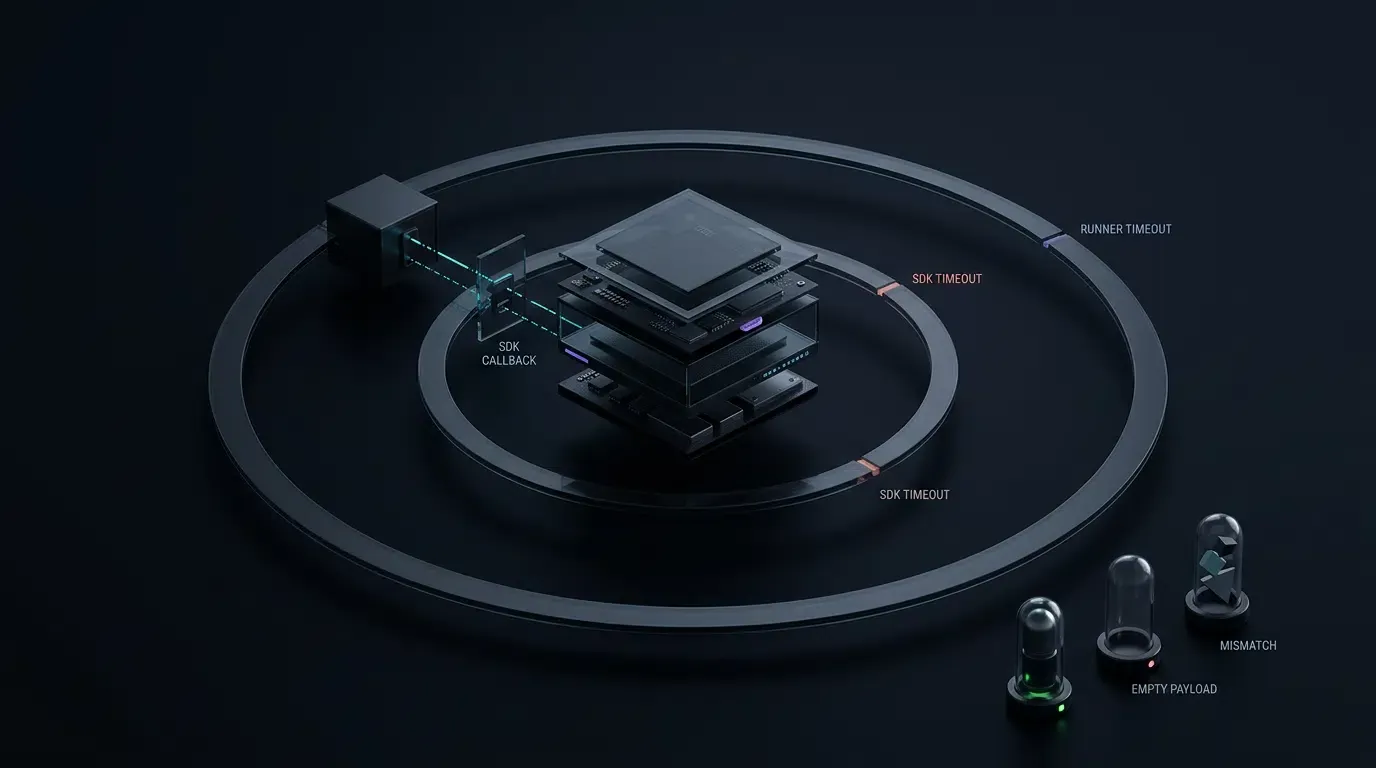
在将构建版本从本地 CI 夹具测试推进到生产部署之前,发布团队会在预发布环境中验证参数还原流水线。与第 1 层模拟套件不同,预发布 SDK 验证通过一个干净的三步操作序列评估原生 OpoInstall SDK 与源服务器的通信:
- 通过网页点击进行预发布数据预填充:在当前未安装目标预发布应用的测试设备上,打开 Mobile Safari 或 Chrome,导航至已接入仪器的预发布 H5 落地页,并点击下载触发器。这会在源归因服务器上注册一个飞行前点击上下文,该上下文与预期参数(
channelCode=ci_regression_01、cohort=beta_v2、role=tester)相匹配。 - 软件包安装与首次打开:在同一台测试设备上,通过你指定的测试渠道(例如直接 APK 安装或 Ad Hoc 配置文件)安装预发布二进制文件。首次启动应用程序以触发原生 SDK 初始化。在 Android 上,这可以通过针对独立测试方法的仪表化命令来启动:
在 iOS 上,启动预发布构建版本时省略启动环境中的./gradlew connectedDebugAndroidTest \ -Pandroid.testInstrumentationRunnerArguments.class=com.example.uatapp.AttributionUatEspressoTest#testStagingSdkCallbackResolutionQA_TEST_MODE,从而允许UatTestCoordinator查询实时的OpoInstallSDK.defaultManager()?.getInstallParmsCompleted回调。 - 结果分类与参数验证:
- 验证匹配:SDK 回调以非空数据触发,返回的字段(
channelCode、cohort、role)与预发布规范完全匹配。 - SDK 参数超时(
OPO_Codes.timeout):SDK 报告参数检索超时。将此 SDK 状态代码与测试运行器等待超时区分开来,并验证网络连接或预发布 AppKey 的有效性。 - 空有效负载 / 返回 Null:回调执行时没有数据(iOS 上为
FAILED_NULL,Android 上为 nullOpoData)。检查点击 H5 下载触发器时设备是否具有活跃的互联网连接。 - 测试运行器等待超时:测试工具超过了其总体等待预算(例如 10 秒),而异步回调尚未解析。将测试运行器超时与 SDK 级别的错误代码分开记录。
- 验证匹配:SDK 回调以非空数据触发,返回的字段(
设计用于全面渠道覆盖的矩阵
自动化的用户验收测试框架必须验证的不仅仅是单一的正常路径推荐链接。发布候选版本会接收来自多样化获客漏斗的流量,每一个都要求独特的参数配置:
- 静态渠道打包与动态 H5 链接:在评估 Android 渠道打包时,测试带有嵌入式渠道 ID 的软件包在全新安装时是否表现正常。在同时支持 H5 链接和预打包渠道 APK 的部署流水线中,验证在你的特定 SDK 配置下,网页链接参数还是嵌入式包元数据具有更高的优先级。
- 深度链接入口路由:除了验证原始参数字符串之外,测试工具还必须断言目标屏幕在冷启动和热恢复时显示相应的内容(例如促销折扣横幅或专门的引导视图)。
- 转化事件遥测:断言下游应用内事件——例如用户注册调用(
register())或自定义留存点(saveEvent())——能够正常执行而无异常。团队必须检查预发布网络日志或后端事件报告,以确认事件已被归因到预期的测试渠道。
手动 QA 与自动化参数验证矩阵
从手动评估过渡到自动化测试可在关键发布指标上带来可量化的效率提升:
| 验证维度 | 手动 QA 测试 | 自动化 UAT 流水线 | 核心工程优势 |
|---|---|---|---|
| 执行时间 | 手动设备扫描需要大量的测试人员时间 | 脚本化套件在标准 CI 测试预算内执行 | 在拉取请求上实现快速回归周期 |
| 设备扩展 | 受限于办公室中可用的物理硬件 | 在虚拟和云设备集群上进行并行执行 | 广泛的操作系统版本和屏幕尺寸覆盖 |
| 有效负载复杂度 | 人工转录错误风险高 | 确定性的 JSON 架构断言 | 对复杂参数进行程序化验证 |
| 数据清洁度 | 运行之间需要手动卸载 | 自动清理软件包缓存 | 在测试执行前重置应用本地状态 |
排查预发布环境中自动化参数验证的故障
测试运行器归因差异的根本原因
当自动化归因断言在 CI/CD 流水线中失败时,工程师应调查四个主要的根本技术原因:
- 测试生命周期中的竞态条件:如果测试运行器在异步归因回调完成之前断言 UI 状态,测试将会间歇性地因空值或未填充的值而失败。始终利用针对实际网络延迟(通常为 5–10 秒)配置的显式锁存器或空闲资源。
- 密钥库指纹不匹配:在 Android 上,如果测试二进制文件是用本地开发者密钥签名的,而预发布域关联依赖于 CI 服务器密钥库,则域检查会失败,从而阻止 App Link Intent 将查询参数交付给测试运行器。
- 模拟器虚拟化限制:虚拟硬件环境缺乏原生的电话和移动硬件标识符。在运行集成套件之前,请验证预发布 SDK 构建版本是否允许在虚拟化目标上进行本地参数回调。
- 陈旧的测试运行标识符:未能隔离并发 CI 工作线程之间的测试标识符会导致竞态条件,即工作节点会覆盖预发布状态。始终向测试标识符附加唯一的时间戳或工作线程 ID。
UAT 自动化归因断言台账
在预发布流水线中调试测试运行器故障时,请查阅此断言台账:
| 测试场景 | 模拟输入上下文 | 检查点 | 预期断言结果 | 修正后的故障状态 |
|---|---|---|---|---|
| 直接渠道归因 | channelCode=ci_regression_01 |
opoData.getChannelCode() |
返回确切的渠道字符串 | 由于 SDK 未初始化导致渠道代码为空 |
| 自定义有效负载交付 | {"cohort":"beta_v2","role":"tester"} |
opoData.getBindData() |
JSON 有效负载符合预期架构 | 由于未转义的查询编码导致 JSON 格式错误 |
| 网络超时韧性 | 测试期间模拟网络卡顿 | 回调状态评估 | 以超时状态或错误代码解析 | 未处理的异常阻碍测试套件执行 |
| 干净安装隔离 | 不卸载软件包直接重新运行 | 本地缓存验证 | 标记重复的启动实例 | 返回来自先前运行的陈旧缓存参数 |

常见问题解答
自动化参数验证与 UAT 中的手动设备测试有何不同?
在没有 Google Play 的情况下,可以在 Android 上以程序化方式模拟安装引荐来源(Install Referrer)吗?
测试运行器如何验证 iOS 模拟器上的延迟归因有效负载?
什么标准决定归因审计是否通过 UAT?
总结与决策框架
在用户验收测试期间自动化参数验证,将历史上缓慢且容易出错的手动测试阶段转变为自动化的质量门禁。通过协调无头测试运行器、注入应用端归因夹具并以程序化方式断言回调有效负载,移动端工程团队可确保发布候选版本在生产推出之前保留营销上下文、渠道归因和用户引导参数。
在将发布候选版本推过 UAT 里程碑之前,请对照此技术检查表验证自动化就绪情况:
| 验证门禁 | 技术要求 | 检查方法 | 状态目标 |
|---|---|---|---|
| CI/CD 编排 | 集成到构建流水线中的自动化测试运行器 | 验证测试套件在预发布提交上执行 | 预期测试用例执行;复制可用的 JUnit XML 报告并保留 Gradle 退出代码 |
| 上下文模拟 | 渠道和自定义有效负载的程序化注入 | 检查 Intent 额外参数和 launchEnvironment 日志 | 交付模拟参数且无未处理的异常 |
| 异步断言 | 空闲资源和等待计时器处理网络延迟 | 区分 SDK 超时与测试运行器等待限制 | 回调解析或报告明确的预期状态码 |
| 状态清理 | 在测试迭代之间清除应用存储 | 确认所有运行均以干净状态执行 | 在每次测试运行前重置本地应用数据 |
| 遥测隔离 | 配置预发布 AppKey 或专用的测试渠道 | 审计控制台报告以确保零生产污染 | 通过预发布配置文件或过滤后的渠道代码隔离测试流量 |
要建立程序化归因测试流水线并配置专用的预发布环境,请查阅 OpoInstall 文档中心中的集成资源,并在 OpoInstall 开发者控制台中管理发布前渠道。
| 术语 | 定义 | 相关实体 | 搜索意图角色 |
|---|---|---|---|
| 用户验收测试 | 对照需求评估构建版本的正式验证阶段。 | Beta 测试 | 信息与工程 |
| 参数验证 | 在测试运行器中对归因有效负载进行程序化断言。 | 模拟引荐来源 | 技术与质量保证 |
| 模拟引荐来源 | 注入到预发布构建版本中的模拟安装有效负载。 | Android 调试桥 | 技术与测试 |
| 应用启动 | 发生参数还原的初始应用程序执行。 | 延迟深度链接 | 技术与运营 |
相关材料
-
概念:用户验收测试、自动化参数断言、模拟引荐来源仿真、测试运行器空闲资源
-
技术:Android 调试桥、Espresso 测试框架、Apple XCUITest、Xcode simctl、Play 安装引荐来源 API
-
标准与官方参考:
-
SDK 文档与工具:
Share this article