为什么 Bundle ID 不匹配会导致 iOS Universal Links 失效?当应用程序签名中的 Application Identifier 与关联域对应的 AASA appID/appIDs 条目不一致时,就会引发 Bundle ID 不匹配,从而导致 associated-domain 验证失败,进而使 Universal Links 无法正常工作。
Bundle ID (CFBundleIdentifier) 是苹果生态系统中用于标识单个 iOS 应用的唯一字符串。在 Universal Link 架构中,Bundle ID 会与 Application Identifier Prefix 组合成 Application Identifier,操作系统会将其与托管的 apple-app-site-association 文件进行核对,以授权对原生 URL 的处理权限。
| 术语 | Definition |
|---|---|
| Bundle ID | 在 Xcode 中分配给 iOS 应用 Target 的唯一反向 DNS 标识符(CFBundleIdentifier)。 |
| Application Identifier Prefix | 在 Apple Developer 账号设置中分配的 App ID 前缀(通常与 Team ID 相同,但并非绝对一致)。 |
| Universal Links | 苹果用于将网页 HTTPS 链接直接路由到原生应用界面的标准机制。 |
| Associated Domains | Xcode 权利声明(Entitlement),用于声明应用有权处理哪些 Web 域名(applinks:)。 |
| AASA 文件 | 托管在域名上用于授权应用 URL 处理权限的 JSON 文件(apple-app-site-association)。 |
标准诊断链
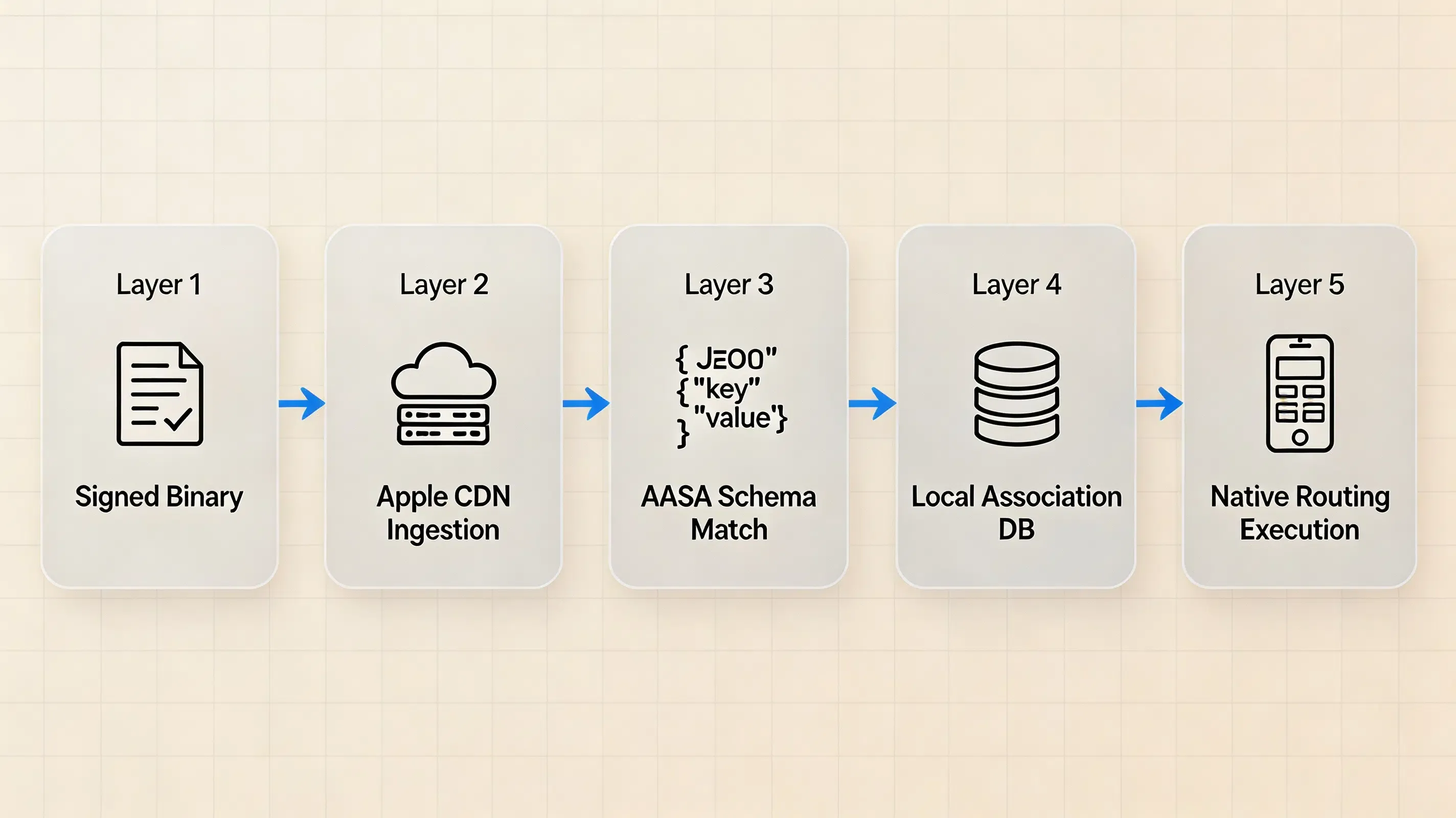
下图展示了在应用安装和域名验证过程中执行的多层验证序列:
Layer 1: Signed App Binary
       │
       ├── application-identifier (<Prefix>.<BundleID>)
       ├── com.apple.developer.team-identifier
       └── com.apple.developer.associated-domains (applinks:example.com)
                    │
                    ▼
Layer 2: AASA Delivery & CDN Ingestion
       │ (Apple-managed infrastructure retrieves origin AASA)
                    ▼
Layer 3: AASA Schema & Pattern Matching
       │ (Validates appIDs array and components/paths routing rules)
                    ▼
Layer 4: Device Association State
       │ (Operating system registers verified domains in local database)
                    ▼
Layer 5: Application Routing Execution
       │ (System routes matching URLs to application lifecycle handlers)
快速排查清单:30 秒诊断例程
当 Universal Links 意外回退到网页处理时,请按顺序检查以下项目:
- 提取签名标识符:检查编译后二进制文件中嵌入的 Entitlement,以获取准确的
application-identifier(<Prefix>.<BundleID>)。 - 验证 Entitlement 格式:确认
com.apple.developer.associated-domains包含确切的主机名(例如applinks:subdomain.domain.com),且没有多余的路径、查询字符串或末尾斜杠。 - 审查源站 AASA:获取
https://subdomain.domain.com/.well-known/apple-app-site-association并确保签名的 Application Identifier 逐字列在appIDs中。 - 验证路径匹配:确认目标 URL 与 AASA 配置中定义的
components或paths模式相匹配。 - 检查域名范围:确保 associated-domain 权利声明覆盖了目标主机名,并且该主机名拥有对应的 AASA 配置文件。对于子域名,请根据实际情况使用明确的主机名或支持的
*.通配符形式。 - 隔离开发模式:在开发签名构建版本中使用
?mode=developer,以便在迭代过程中绕过 Apple CDN 缓存。
为什么 Bundle ID 和 Application Identifier 的准确性至关重要
Application Identifier 的结构剖析
Universal Link 验证不会评估应用的显示名称、内部 URL Scheme 或 Bundle 名称。根据 Apple 关于 applinks.Details 的文档,其安全模型严格依赖于完全限定的 Application Identifier,结构如下:
其中:
ApplicationIdentifierPrefix:在 Apple Developer 账号配置中分配的 App ID 前缀(例如9JA723G82S)。对于许多现代开发者账号而言,此值与 10 位的 Team ID 相同,但工程师应在 Apple Developer Portal 中核实实际的前缀,而不是假设两者可以互换。CFBundleIdentifier(Bundle ID):在 Target 构建设置中定义的大小写敏感的反向 DNS 字符串(例如com.example.mobileapp)。
在托管的 apple-app-site-association (AASA) JSON 文件中,此复合字符串出现在 appIDs 数组或 appID 字典条目中(例如 9JA723G82S.com.example.mobileapp)。如果编译后二进制文件嵌入的 Entitlement 与托管的 AASA 条目之间存在字符差异、大小写不一致或尾随空格,域名验证就会失败。
Bundle ID 不匹配是集成排查时最高优先级的排查原因之一,但这并不是 Universal Link 回退到网页的唯一原因。
Associated Domains 与 AASA 如何建立双向关联
与任何已安装应用无需域名验证即可声明的自定义 URL Scheme 不同,Universal Links 建立的是安全的双向关联:
- 应用到域名的声明:编译后的 iOS 应用通过在其代码签名中包含
com.apple.developer.associated-domains权利声明,表明其对特定 Web 域名的所有权。 - 域名到应用的授权:Web 域名通过在
https://<domain>/.well-known/apple-app-site-association或https://<domain>/apple-app-site-association托管 AASA JSON 文件,确认其授予特定应用路由授权。
在安装或更新应用期间,操作系统会将应用签名的 Associated Domains 权利声明与为该域名获取的 AASA 配置进行验证。用于应用关联的 Application Identifier 必须与 AASA 配置中声明的相应标识符匹配。标识符匹配后,请求的 URL 还必须满足配置的 components 或 paths 规则。
故障现象:为什么不匹配的标识符会强制网页回退
当发生 Application Identifier 不匹配时,iOS 通常不会将 Application Identifier 不匹配作为致命的运行时异常抛出。相反,该故障会反映在 associated-domain 验证状态、设备诊断或随之而来的网页回退行为中:
- 系统处理:当域名关联失败时,系统不会通过已验证的 Universal Link 路径调用应用。根据 URL 的打开方式以及周围的浏览器上下文,URL 将保持或回退到网页处理,而不是交付给原生应用。
- 用户体验影响:当用户在“信息”、“邮件”或 Safari 中点击匹配的网页链接时,系统无法识别已授权的原生应用映射,从而在浏览器中打开 Web URL。
另请参阅:Bundle ID ──> Universal Links 架构
Apple CDN 如何获取和缓存 AASA 文件
安装握手与 Apple CDN 机制
当安装或更新包含 com.apple.developer.associated-domains 权利声明的应用时,系统会建立或刷新 associated-domain 关系:
- CDN 中介抓取器:当系统建立或刷新 associated-domain 关系时,它会通过 Apple 的 associated-domains 基础设施获取域名的 AASA 数据,并使用该数据验证关联性。
- 独立的缓存生命周期:Apple 管理的 CDN 控制着自身的刷新和缓存生命周期,因此不能想当然地认为源站更新会立即通过 CDN 可见。在测试更改时,请在适当时使用记录在案的开发备用模式,并检查设备关联状态。
- 源站服务器要求:源站 Web 服务器必须通过带有受信任 TLS 证书的 HTTPS 提供 AASA 文件(自签名证书会被拒绝),并使用
application/jsonMIME 类型。AASA 托管不得依赖 HTTP 重定向;AASA 端点应直接返回带有 HTTP 200 OK 的文件。
AASA JSON 格式一致性
现代 iOS 版本支持精细的 components 字典语法,同时保持与传统 paths 数组的向后兼容性。
根据 Apple 开发者技术文档 TN3155 关于调试 Universal Links 的说明,在给定的 details 条目中,开发者应使用现代的 appIDs + components 结构或传统的 appID + paths 结构;切勿在同一条目中混用这两种结构,因为混合配置可能会产生意外的验证行为。
较旧的 AASA 示例通常包含 "apps": []。对于面向现代 Apple OS 版本的部署,此key并非必需;仅在明确支持需要它的旧版操作系统时才保留它。
诊断协议:分步排查工作流
步骤 1:使用 codesign 检查已签名的应用 Entitlements
要确定导出的 IPA 或调试构建版本是否包含完全符合预期的 Application Identifier 和 Associated Domains,请使用 macOS 的 codesign 命令行实用工具直接检查二进制文件的代码签名。将 application-identifier、com.apple.developer.team-identifier 和 com.apple.developer.associated-domains 结合起来检查。
配置文件(Provisioning Profile)显示了配置文件允许的功能和域名;而已签名的可执行文件(codesign)则显示了发布版本实际包含的内容。
步骤 2:审查托管的 AASA JSON Schema
验证源站服务器是否托管了无需身份验证或重定向即可公开访问的有效 AASA 文件。请注意,较旧的 AASA 示例通常包含 "apps": [],而针对现代 iOS 版本的配置则省略了此key。
以下标准的 AASA JSON Schema 展示了使用现代 appIDs 和 components 结构的正确路径路由:
```json
{
  "applinks": {
    "details": [
      {
        "appIDs": [
          "9JA723G82S.com.example.mobileapp",
          "9JA723G82S.com.example.mobileapp.staging"
        ],
        "components": [
          {
            "/": "/product/*",
            "comment": "Matches product detail routes"
          },
          {
            "/": "/invite/*",
            "?": { "ref": "?*" },
            "comment": "Matches referral links with custom query parameters"
          },
          {
            "/": "/help/*",
            "exclude": true,
            "comment": "Excludes customer support URLs from native routing"
          }
        ]
      }
    ]
  }
}
步骤 3:运行诊断 CLI 工具(codesign、swcutil、curl)
在提供 swcutil 诊断功能的 macOS 版本上,使用该工具检查或验证 associated-domain 数据。由于命令选项可能因操作系统和工具链版本而异,请在运行以下诊断工作流之前使用 swcutil --help 确认可用的选项:
# 0. Confirm available options (syntax may vary by OS and toolchain release)
swcutil --help

# 1. Unpack the exported IPA archive
unzip -q YourApp.ipa -d UnpackedApp

# 2. Extract and inspect signed entitlements directly from the executable binary
codesign -d --entitlements :- "UnpackedApp/Payload/YourApp.app" > signed-entitlements.plist 2>/dev/null
/usr/libexec/PlistBuddy -c "Print" signed-entitlements.plist

# 3. Check whether the AASA data can be downloaded for the domain using swcutil (macOS diagnostic tool)
sudo swcutil dl -d custom.opwakeup.com

# 4. Validate AASA pattern matching against a specific URL using swcutil
sudo swcutil verify -d custom.opwakeup.com -j ./apple-app-site-association -u https://custom.opwakeup.com/product/123

# 5. Query the Apple-managed Associated Domains CDN diagnostic endpoint directly
curl -i https://app-site-association.cdn-apple.com/a/v1/custom.opwakeup.com
在排查边缘分发的 AASA 数据时,请检查 Apple 管理的 Associated Domains CDN 端点。应将此端点视为诊断基础设施,而不是公共 API 契约。
步骤 4:使用 Associated Domains 开发模式进行 AASA 测试
根据 Apple 关于配置 Associated Domains 的文档,Apple 为开发提供了备用模式。developer 模式(?mode=developer)允许符合条件的开发设备绕过 Apple 管理的 CDN,直接通过 HTTPS 从关联域名获取 AASA 文件。
以下配置演示了如何在单独的 Xcode 权利声明配置中声明开发模式:
<?xml version="1.0" encoding="UTF-8"?>
<!DOCTYPE plist PUBLIC "-//Apple//DTD PLIST 1.0//EN" "http://www.apple.com/DTDs/PropertyList-1.0.dtd">
<plist version="1.0">
<dict>
    <key>com.apple.developer.associated-domains</key>
    <array>
        <string>applinks:custom.opwakeup.com</string>
    </array>
</dict>
</plist>
<?xml version="1.0" encoding="UTF-8"?>
<!DOCTYPE plist PUBLIC "-//Apple//DTD PLIST 1.0//EN" "http://www.apple.com/DTDs/PropertyList-1.0.dtd">
<plist version="1.0">
<dict>
    <key>com.apple.developer.associated-domains</key>
    <array>
        <string>applinks:custom.opwakeup.com?mode=developer</string>
    </array>
</dict>
</plist>
一旦操作系统建立域名关联,应用级路由便会使用标准的 UIKit 或 SwiftUI 生命周期代理来处理传入的 URL 负载:
import UIKit

// ----------------------------------------------------------------------------
// 1. UIKit AppDelegate Implementation
// ----------------------------------------------------------------------------
@main
class AppDelegate: UIResponder, UIApplicationDelegate {

    var window: UIWindow?

    func application(
        _ application: UIApplication,
        didFinishLaunchingWithOptions launchOptions: [UIApplication.LaunchOptionsKey: Any]?
    ) -> Bool {
        return true
    }

    // Standard Apple Universal Link Continuation Callback
    func application(
        _ application: UIApplication,
        continue userActivity: NSUserActivity,
        restorationHandler: @escaping ([UIUserActivityRestoring]?) -> Void
    ) -> Bool {

        guard userActivity.activityType == NSUserActivityTypeBrowsingWeb,
              let incomingURL = userActivity.webpageURL else {
            return false
        }

        print("Handling verified Universal Link: \(incomingURL.absoluteString)")

        // Dispatch incomingURL to internal router or SDK layer for parameter extraction
        return handleIncomingRoute(incomingURL)
    }

    private func handleIncomingRoute(_ url: URL) -> Bool {
        // Application-level destination routing logic
        // Note: Returning true indicates the app handled the activity, not that URL parsing succeeded.
        return true
    }
}

// ----------------------------------------------------------------------------
// 2. SceneDelegate Lifecycle Implementation (iOS 13+)
// ----------------------------------------------------------------------------
class SceneDelegate: UIResponder, UIWindowSceneDelegate {

    var window: UIWindow?

    func scene(_ scene: UIScene, willConnectTo session: UISceneSession, options connectionOptions: UIScene.ConnectionOptions) {
        if let userActivity = connectionOptions.userActivities.first(where: { $0.activityType == NSUserActivityTypeBrowsingWeb }),
           let incomingURL = userActivity.webpageURL {
            print("Cold-launch Universal Link: \(incomingURL.absoluteString)")
        }
    }

    func scene(_ scene: UIScene, continue userActivity: NSUserActivity) {
        if userActivity.activityType == NSUserActivityTypeBrowsingWeb,
           let incomingURL = userActivity.webpageURL {
            print("Foreground Universal Link: \(incomingURL.absoluteString)")
        }
    }
}
要在物理硬件上启用客户端开发模式,请执行以下操作:
- 在 iOS 16+ 上,导航至设置 > 隐私与安全性 > 开发者模式并将其切换为开启状态(需要重启设备)。
- 导航至设置 > 开发者 > Associated Domains Development并打开开关。
- 安装使用包含
?mode=developer权利声明的开发配置文件进行签名的开发版本。 - 生产环境说明:请将
?mode=developer严格限制在开发和内部测试配置中,除非部署明确要求并支持该配置,否则请勿将其包含在生产环境的 associated-domains 权利声明中。
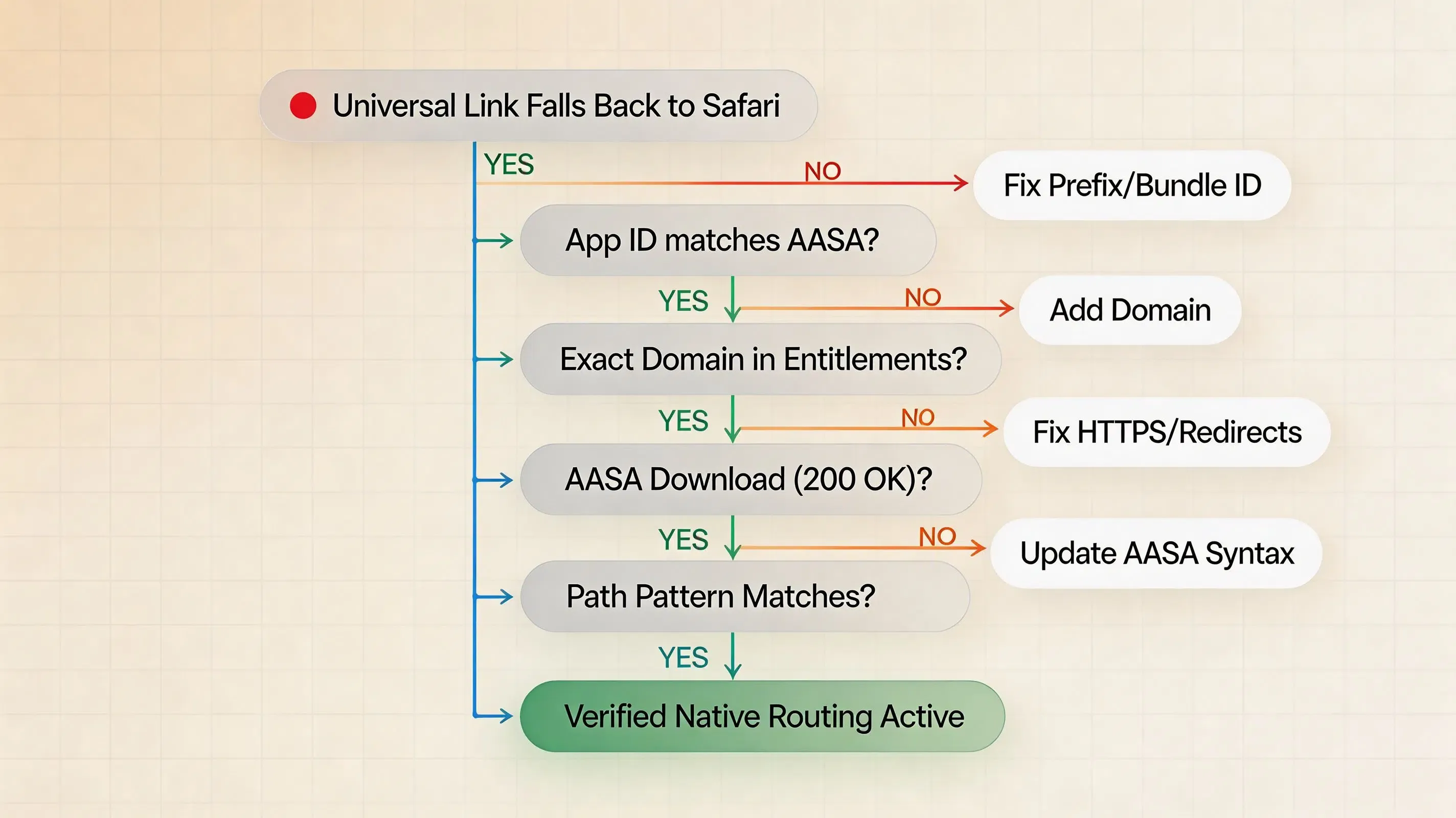
根本原因决策树
Universal Link falls back to web handling
        │
        ├── Does signed application-identifier match AASA appIDs?
        │       ├── NO ──> Correct App ID Prefix or Bundle ID in AASA
        │       └── YES
        │
        ├── Does associated-domains entitlement list the exact domain?
        │       ├── NO ──> Add applinks:<domain> to target entitlements
        │       └── YES
        │
        ├── Does sudo swcutil dl -d <domain> succeed?
        │       ├── NO ──> Fix origin HTTPS, TLS certificates, or 301/302 redirects
        │       └── YES
        │
        ├── Does sudo swcutil verify match the target URL path?
        │       ├── NO ──> Correct components or paths syntax in AASA
        │       └── YES
        │
        └── Check device association state and internal application routing handlers
诊断矩阵:Universal Link 故障的根本原因
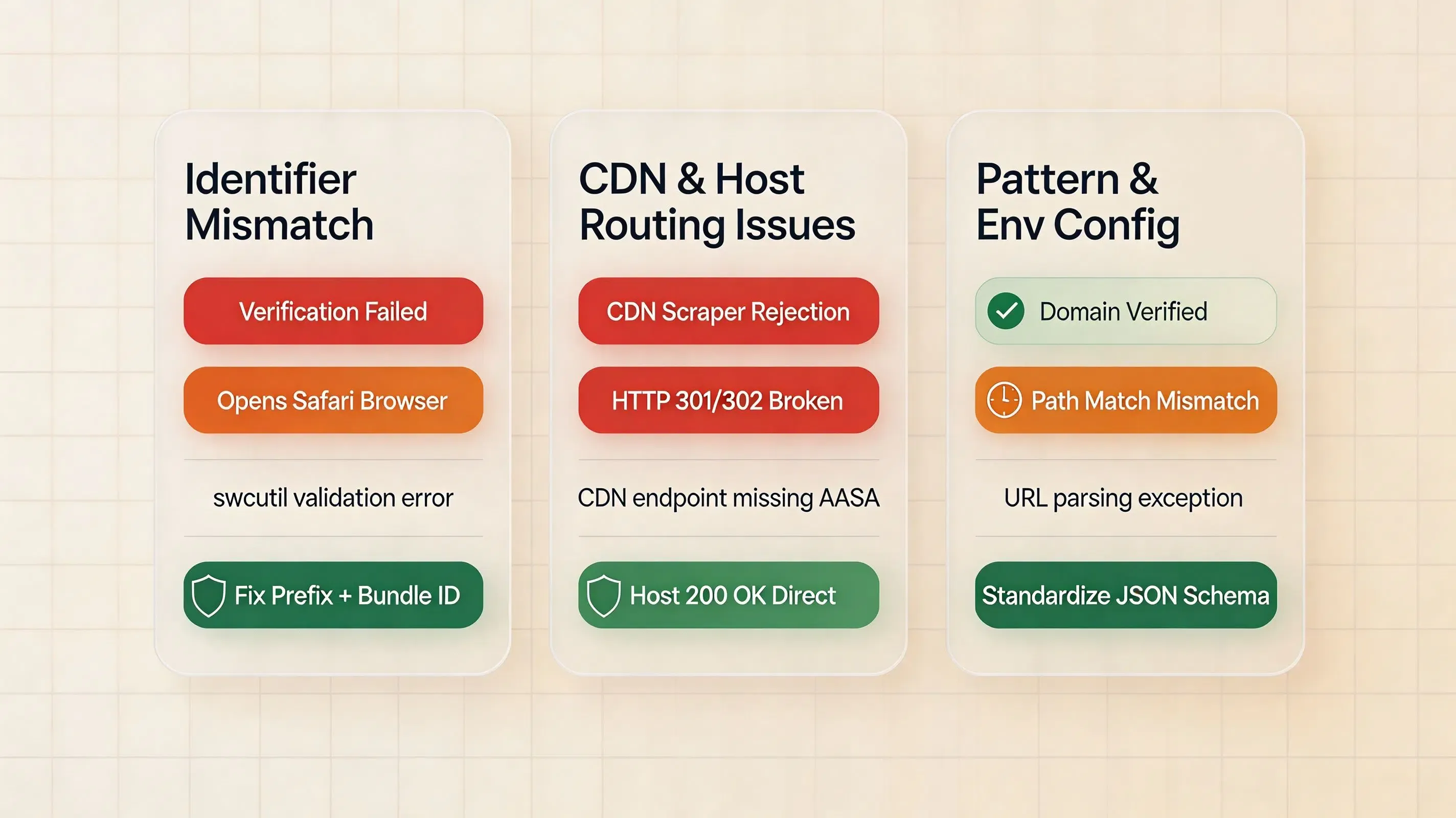
| 故障模式 | 底层根本原因 | 观察到的系统行为 | 建议的修复方案 |
|---|---|---|---|
| Bundle ID 拼写错误 | AASA appIDs 中存在大小写敏感性或字符不匹配 |
链接打开浏览器而不是原生应用 | 更正 AASA JSON 中的字符串并重新部署到源站 |
| App ID 前缀不匹配 | 使用了错误的前缀,而不是实际的开发者 App ID 前缀 | 安装期间域名关联失败 | 在 Apple 成员中心验证 Application Identifier 前缀 |
| 子域名不匹配 | Entitlement 指向 www.example.com,而 AASA 位于 example.com |
应用无法认领来自子域名的链接 | 在每个认领的子域名上托管专用的 AASA 文件或配置通配符 |
| 端点存在 HTTP 重定向 | 源站服务器对 AASA URL 返回 301 或 302 重定向 | Apple CDN 抓取器拒绝 AASA 文件 | 配置 Web 服务器直接返回 200 OK |
| AASA 格式不一致 | 混用了传统的 appID/paths 与现代的 appIDs/components |
路径匹配不一致或部分失效 | 统一使用现代的 appIDs + components 语法 |
| URL 模式不匹配 | AASA 下载成功,但请求的 URL 与模式不匹配 | 链接在 Web 浏览器中打开 | 使用 swcutil verify 验证路径语法和组件 |
| 发布版本中残留开发模式 | 分发版本保留了开发备用模式 | 分发版本中存在非标准权利声明 | 在 Release 构建配置中移除 ?mode=developer |
在 Xcode 中实现双环境配置
管理多个构建配置(Debug、Staging、Production)
企业级开发流水线通常跨构建环境管理不同的 Bundle ID(例如 com.example.app.debug、com.example.app.staging、com.example.app)。
为了在所有构建配置中保持正常的 Universal Links 功能:
-
显式 AASA 声明:托管的 AASA 文件必须在其
appIDs数组中显式列出每个环境的完全限定 Application Identifier:"appIDs": [ "9JA723G82S.com.example.app", "9JA723G82S.com.example.app.staging", "9JA723G82S.com.example.app.debug" ] -
针对 Target 的 Entitlements:使用 Xcode 构建配置设置来为每个构建配置链接不同的
.entitlements文件,确保内部调试构建不会查询生产环境域名。
管理 Target 标识符
对于 Universal Links 排查,请使用已签名构建版本中的确切 Bundle ID 和 Application Identifier Prefix,而不是依赖通配符标识符。明确对待每个主机名:如果应用认领了 example.com 和 www.example.com,请配置相应的 associated-domain 条目,并确保每个主机名都提供适当的 AASA 数据。确保在实际处理 Universal Links 的 Target 上配置了权利声明,并在适用时分别验证任何 App Extension 或 watchOS Target。
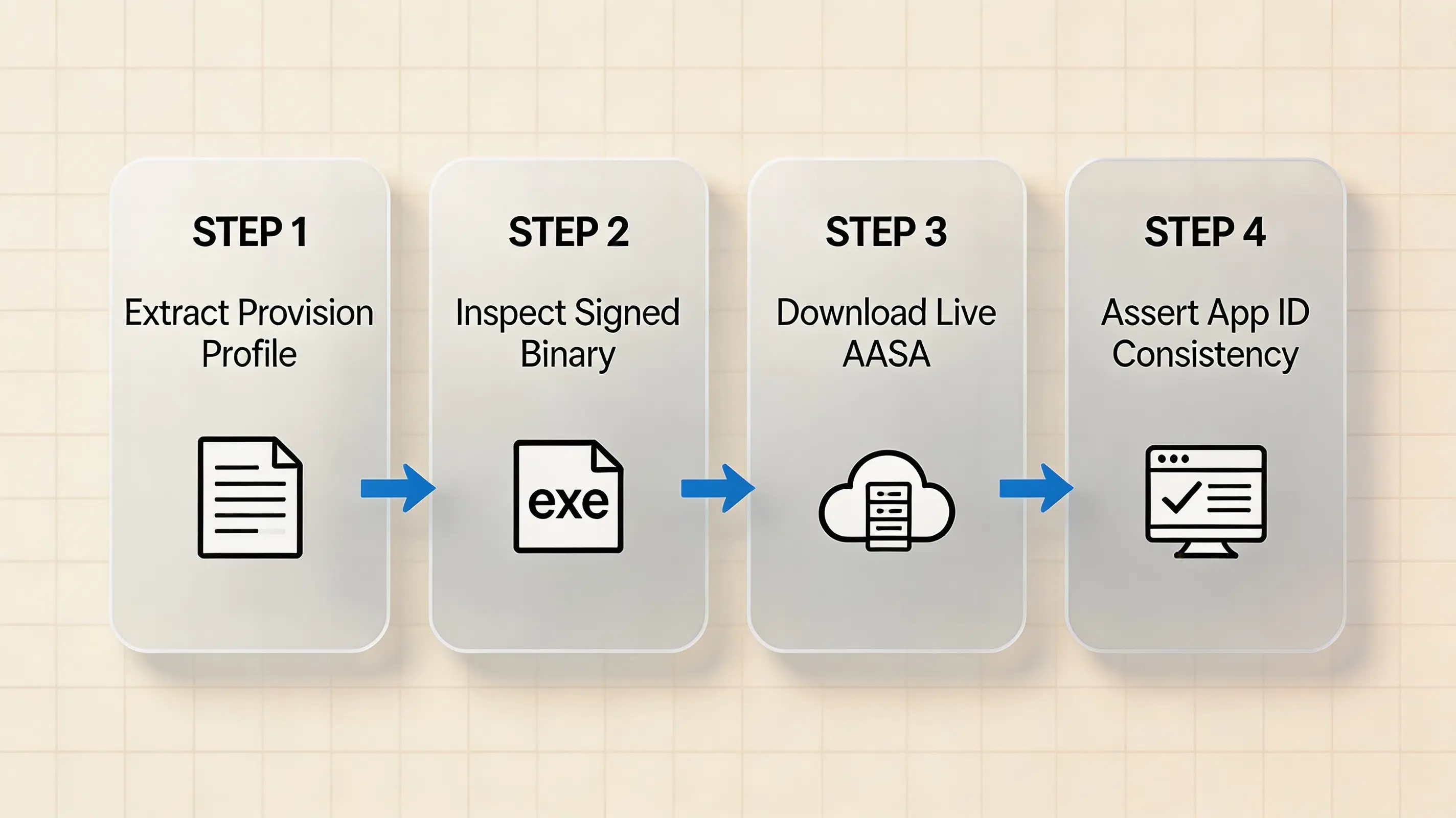
在 CI/CD 中验证嵌入式配置文件和签名二进制文件
在将二进制文件上传到 TestFlight 之前,在持续集成构建脚本中自动化验证权利声明和 Application Identifier:
# Automated CI validation script
security cms -D -i /path/to/embedded.mobileprovision > provision.plist

# 1. Inspect profile entitlements for allowed Associated Domains
/usr/libexec/PlistBuddy -c "Print :Entitlements:com.apple.developer.associated-domains" provision.plist

# 2. Extract actual signed entitlements from the compiled executable binary
codesign -d --entitlements :- "UnpackedApp/Payload/YourApp.app" > signed-entitlements.plist 2>/dev/null
SIGNED_APP_ID=$(/usr/libexec/PlistBuddy -c "Print :application-identifier" signed-entitlements.plist)
echo "Extracted Signed Application Identifier: $SIGNED_APP_ID"

# 3. Validate that signed Associated Domains match the target domain
/usr/libexec/PlistBuddy -c "Print :com.apple.developer.associated-domains" signed-entitlements.plist

# 4. Verify that the signed App ID exists in the hosted AASA file via Python
python3 -c "
import json, sys
signed_id = sys.argv[1]
data = json.load(open('apple-app-site-association'))
app_ids = [app for detail in data.get('applinks', {}).get('details', []) for app in detail.get('appIDs', [])]
if signed_id not in app_ids:
    print(f'AASA mismatch: {signed_id} not found in AASA appIDs: {app_ids}')
    sys.exit(1)
print(f'AASA consistency check passed: {signed_id} registered')
" "$SIGNED_APP_ID"
如果验证脚本以错误代码退出,请中止构建流水线,以防止将无法正常工作的深度链接二进制文件发布到生产环境。
Universal Link 匹配标准
为确保路由可靠,必须同时满足以下条件:
Signed App Configuration:
application-identifier = <ApplicationIdentifierPrefix>.<CFBundleIdentifier>
com.apple.developer.associated-domains = applinks:<hostname>

AASA Configuration:
appIDs = [..., "<ApplicationIdentifierPrefix>.<CFBundleIdentifier>", ...]
components / paths = Matching target URL paths and query parameters

System Eligibility:
1. Associated Domains entitlement explicitly contains the target hostname.
2. The signed Application Identifier matches an authorized entry in the domain's AASA appIDs.
3. The incoming URL satisfies the AASA routing patterns.
4. Device association state and user/browser context permit native application delegation.
即使权利声明、AASA 关联和 URL 模式全部匹配,观察到的路由仍可能取决于设备状态以及用户或浏览器上下文。例如,当用户在 Safari 中已经浏览同一域名的同时点击通用链接,操作系统可能会尊重用户继续停留在 Safari 中的意图。
常见问题 (FAQ)
AASA 文件中应用标识符的确切格式是什么?
为什么我的 Universal Link 在开发模式下有效,但在生产环境中却失效?
可以在 AASA appIDs 数组中使用通配符星号吗?
总结与决策框架
Universal Link 路由的可靠性取决于三个节点之间的精确字符级对齐:Apple Developer Portal App ID 配置、Xcode com.apple.developer.associated-domains 权利声明以及托管的 apple-app-site-association JSON 文件。第三方 SDK 或路由框架无法修复失效的操作系统域名关联;它只能在 iOS 成功将 Universal Link 交付给应用之后处理 URL。如果 Universal Links 在操作系统级别正确关联,但参数提取失败,请将应用级路由层与域名关联层分开进行检查。
如果您的应用在 Universal Link 关联成功后还需要进行动态链接参数恢复和引导路由,OpoInstall 可以为该应用级工作流提供可选的 SDK 层。
要了解有关域名配置模式和深度链接集成的更多信息,请查阅 OpoInstall 深度链接文档。
相关资料
-
核心概念:Application Identifier 验证、AASA Schema 验证、Apple CDN 缓存、Entitlement 提取
-
相关技术:iOS Universal Links、Xcode 权利声明、Apple Developer Portal、Shared Web Credentials
-
标准规范:IETF RFC 8259(JSON 数据交换)、TLS 1.3 规范
-
诊断工具:Apple
codesignCLI 工具、macOSswcutil工具、Apple 管理的 CDN 缓存查询
官方文档
Share this article



