How to optimize App Tracking Transparency ATT opt-in rates? Improving the ATT permission experience involves providing clear pre-permission context, writing an accurate NSUserTrackingUsageDescription, and choosing a relevant point in the user journey to present the system authorization request. The effect on authorization rate should be measured empirically.
The Identifier for Advertisers (IDFA) is an Apple-provided resettable device identifier used for advertising attribution and measurement on iOS. Under the App Tracking Transparency (ATT) framework, applications can access the IDFA only after receiving explicit user permission via the
ATTrackingManagerauthorization prompt.
| Term | Definition |
|---|---|
| IDFA | Apple’s platform-level advertising identifier governed by App Tracking Transparency. |
| App Tracking Transparency | Apple’s framework requiring user authorization before tracking users across apps and websites. |
| ATTrackingManager | The native AppTrackingTransparency API used to request tracking authorization. |
| Pre-Permission Primer | A custom in-app screen presented before the system prompt to explain why authorization is requested. |
The Economics of IDFA Access and ATT Consent Optimization
The Role of Authorized IDFA Access in Modern iOS Measurement
Authorized IDFA access can support user-level advertising attribution and measurement workflows when an application’s use of tracking data complies with ATT and the requirements of its advertising and measurement partners. When tracking authorization is unavailable, teams that still need advertising measurement can use independently permitted platform-mediated approaches such as AdAttributionKit or existing SKAdNetwork integrations.
When authorized, the IDFA provides a deterministic join key for supported ad network integrations, enabling campaign-level conversion reconciliation without statistical modeling. When authorization is withheld, applications transition measurement to platform-native frameworks.
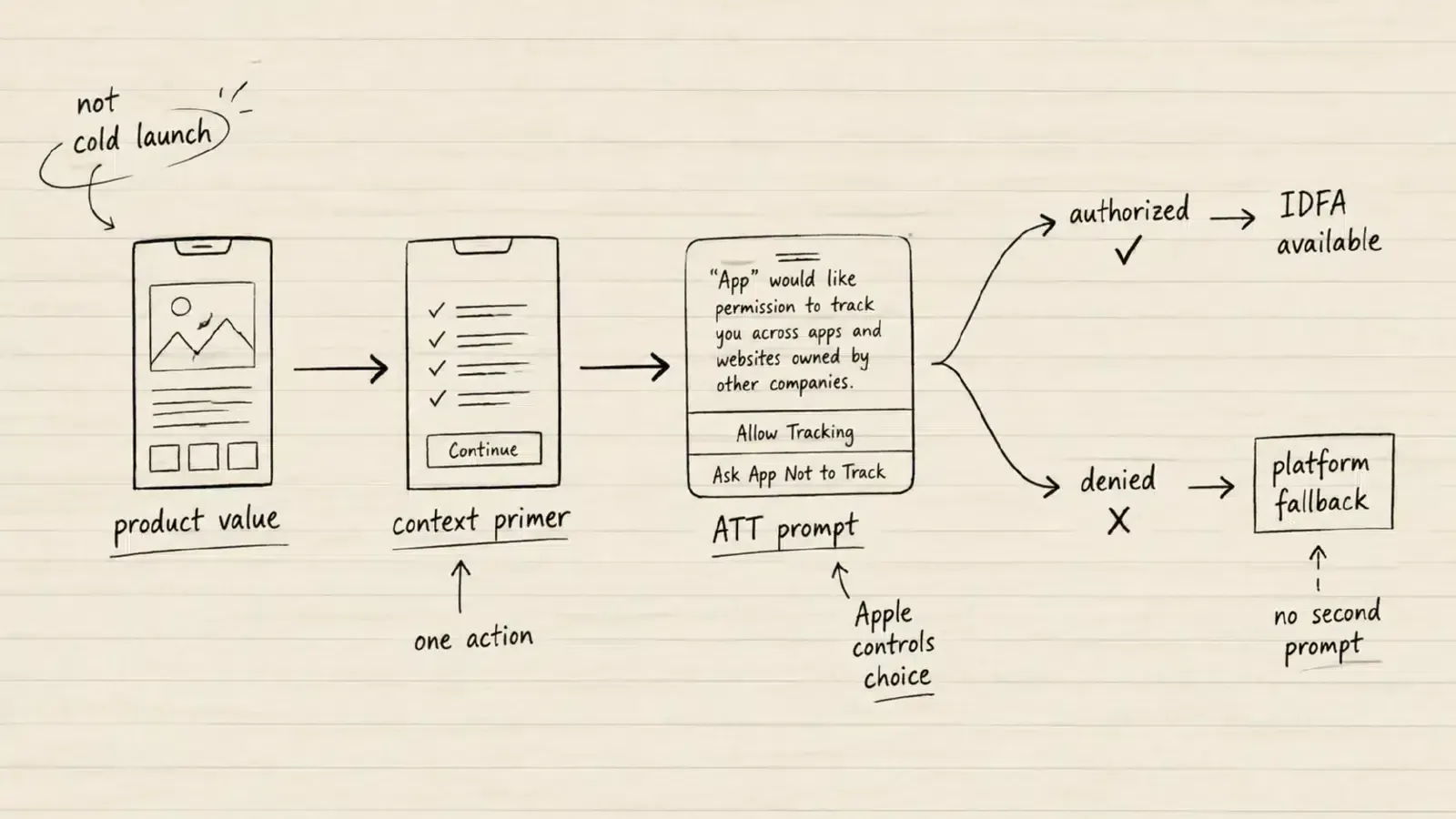
The Problem with Immediate Cold-Launch Prompts
Prompting users for tracking authorization immediately upon cold launch is technically permitted by Apple, but it may provide less context for an informed authorization decision because the user has not yet experienced the application’s functionality:
- Absence of Product Trust: First-time users have not yet developed confidence in the application’s functionality, brand value, or data security practices.
- Unclear Context: The native system dialog appears without prior explanation, leading risk-averse users to default to “Ask App not to Track”.
- Permission Fatigue: Stacking multiple system permission dialogues (such as Push Notifications, ATT, and Location) during initial app launch creates friction and increases onboarding abandonment. Apple API documentation notes that if an existing permission alert is already pending, subsequent authorization requests will not appear.
Evaluating Opt-In Performance Empirically
The achievable consent rate varies by app category, audience trust, prompt timing, and copy clarity. Teams should evaluate optimization variants using controlled A/B testing rather than assuming fixed industry benchmarks.
See Also: IDFA ──> Mobile Attribution Model
Technical Mechanics of the AppTrackingTransparency Framework
The Four Authorization Status States
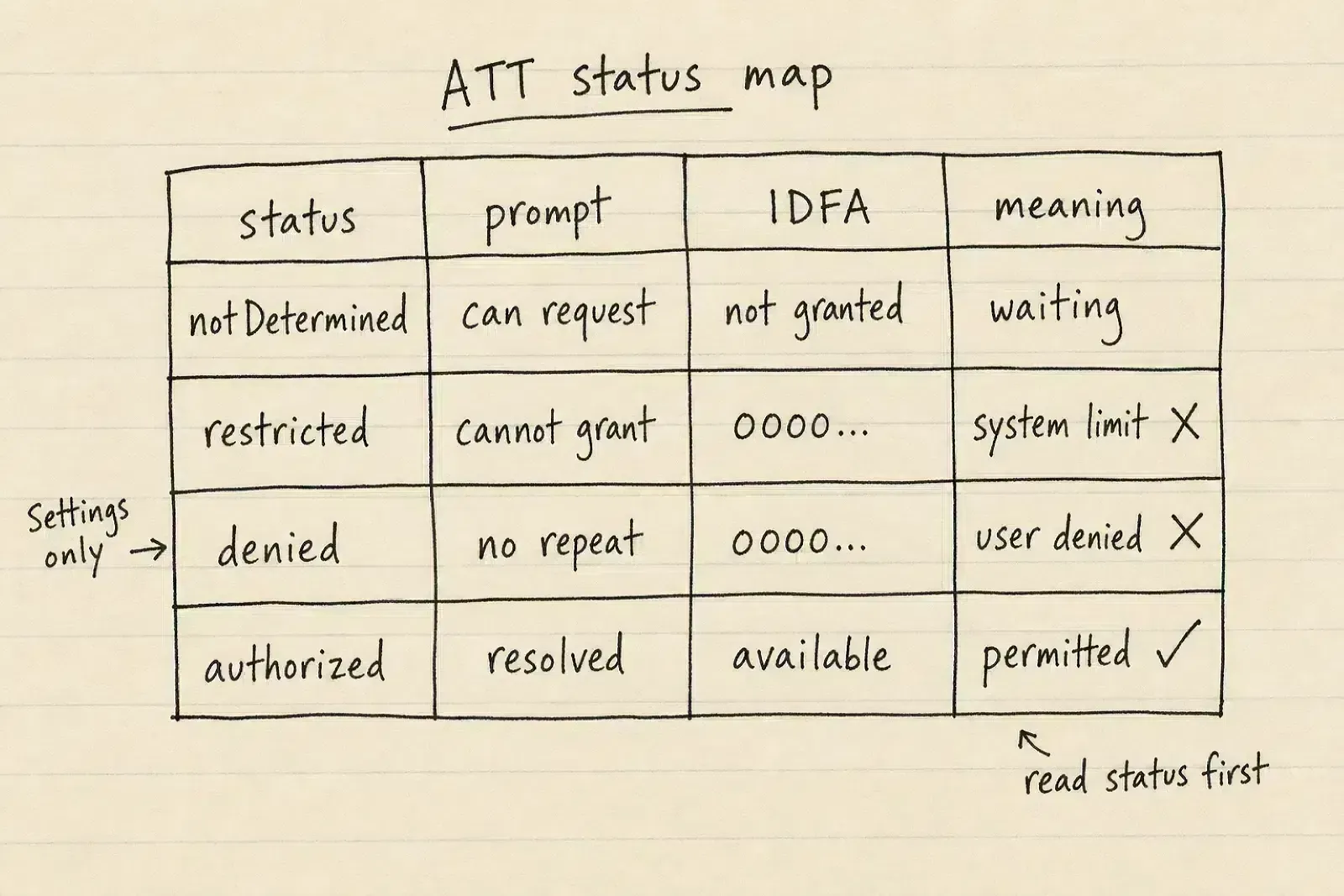
Access to the IDFA is governed strictly by the ATTrackingManager.AuthorizationStatus enum:
notDetermined(0): The user has not yet been presented with the authorization dialog.restricted(1): The device is restricted by parental controls, educational configuration profiles, or corporate MDMs; tracking permission cannot be granted and the settings toggle is disabled.denied(2): The app doesn’t have authorization to access app-related data for tracking after the user denies the request.authorized(3): The user authorizes tracking. On supported iOS and iPadOS devices, this normally permits access to a non-zero advertising identifier.
The One-Time System Prompt Rule
The iOS operating system enforces a single-presentation rule for ATTrackingManager.requestTrackingAuthorization. Once a user interacts with the native modal by selecting either “Allow” or “Ask App not to Track”, the system remembers the determined status and does not display the prompt again during that app installation.
While the system prompt will not appear a second time, users can manually adjust their tracking authorization at any time within iOS Settings.
How iOS Enforces Identifier Zeroing When Tracking Authorization Is Withheld
On iOS 14.5 and later, the advertising identifier normally returns all zeroes (00000000-0000-0000-0000-000000000000) when tracking authorization has not been granted. Developers should verify both the ATT authorization status and the returned identifier value on demand rather than assuming a cached string remains valid across application launches.
High-Conversion UX Architecture: The Pre-Permission Primer Strategy
Anatomy of an Effective Context Primer: Apple HIG Constraints
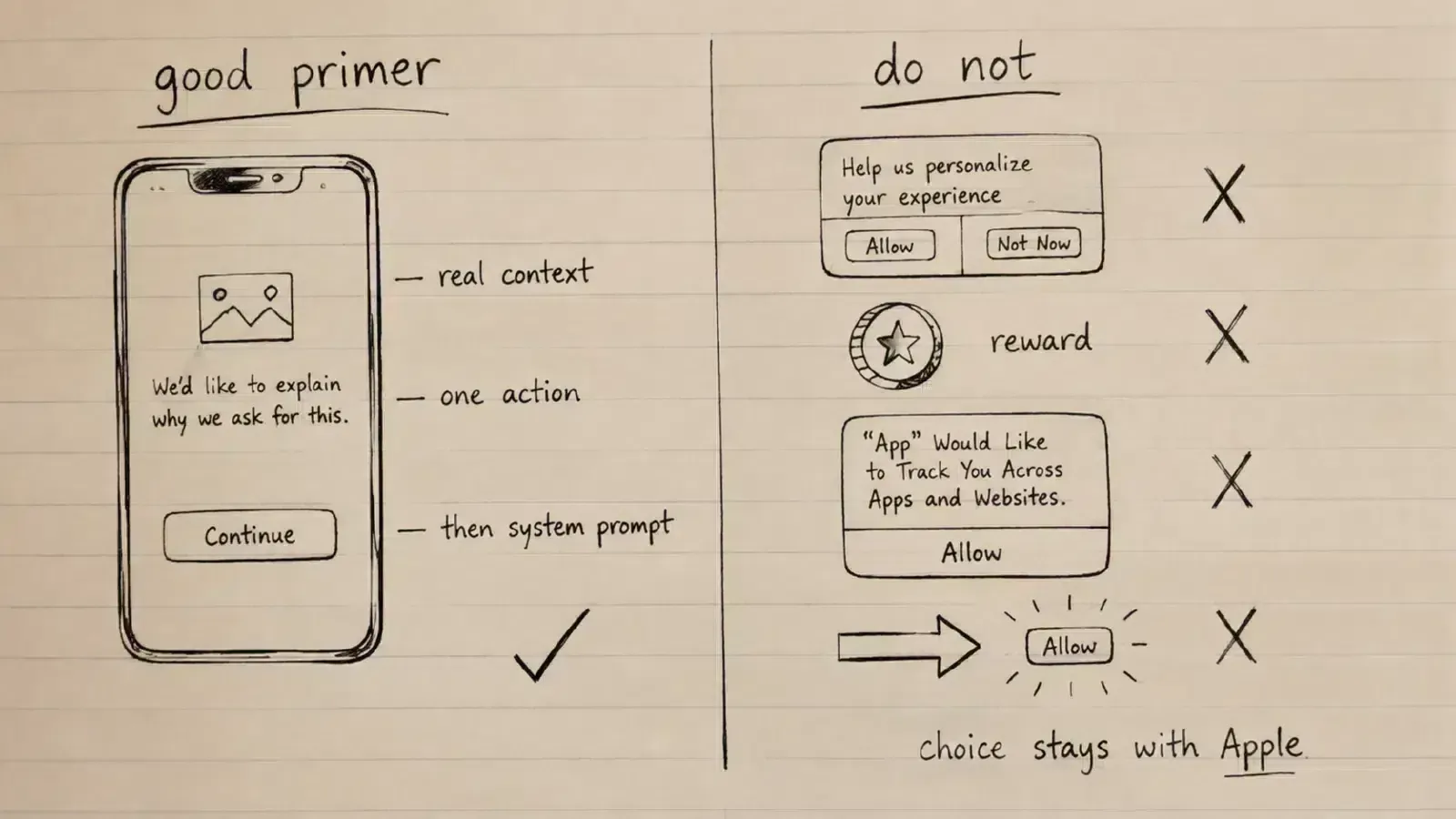
According to Apple’s Human Interface Guidelines on Privacy, applications may present a custom pre-alert screen before a system permission prompt if additional context is necessary. However, Apple imposes strict design rules on these pre-permission primers:
- Single Action Button: The pre-permission screen must provide only a single button (such as “Continue” or “Next”) that leads directly to the system prompt. It must not offer a “Cancel”, “Close”, or “Not Now” button that circumvents or delays the system alert.
- No UI Mimicry: The primer screen must never visually imitate the native iOS system alert box or display mock buttons labeled “Allow”.
- No Visual Coercion: The interface must not use graphics, arrows, or high-contrast styling designed to manipulate or steer users toward selecting “Allow” on the subsequent system prompt.
Complying with App Store Review Guideline 5.1.2
Under Apple App Store Review Guidelines Section 5.1.2, Apple enforces clear boundaries regarding permission requests:
- Prohibition on Incentivized Tracking: Apps are strictly forbidden from offering financial incentives, virtual currency, premium content, or discounts in exchange for granting ATT consent. Doing so violates Guideline 5.1.2 and can result in app rejection.
- No Gating of Core Functionality: Applications cannot block core features, prevent account creation, or degrade app performance if a user declines tracking authorization.
- User Choice Primacy: The user’s actual tracking choice must always be made on the native Apple system prompt.
Stage 1: User Onboarding / Core Value Realization
                      │
                      ▼
Stage 2: Contextual Pre-Permission Primer Screen
         (Single "Continue" Action ── Explains Purpose)
                      │
                      ▼
Stage 3: Native iOS ATTrackingManager System Modal
         (User Selects "Allow" or "Ask App not to Track")
                      │
         ┌────────────┴────────────┐
         ▼                         ▼
   [.authorized]             [.denied]
   ATT Authorized       Graceful Fallback
   (IDFA normally       to Platform APIs
    available)          (AdAttributionKit / SKAN)
Optimizing the NSUserTrackingUsageDescription String
Configuring Info.plist for Purpose Transparency
The NSUserTrackingUsageDescription key in Info.plist defines the explanatory string displayed directly within the native Apple ATT system alert. According to Apple documentation, this string must be concise, specific, and accurately explain how tracking data is used.
Testing Clear Purpose-String Variants Without Changing the Underlying Disclosure
When testing string variations, every tested variant must accurately and completely describe the application’s actual tracking practices:
- The Personalization Focus: Explains how data is used to customize content recommendations and product suggestions.
- The Ad Relevance Focus: Explains how data is used to deliver relevant promotions and avoid repetitive advertisements.
- The Campaign Measurement Focus: Explains how data is used to measure the performance of advertising partnerships.
The configuration below illustrates an example NSUserTrackingUsageDescription. Use it only if the wording accurately describes the app’s actual tracking practices:
```xml
<?xml version="1.0" encoding="UTF-8"?>
<!DOCTYPE plist PUBLIC "-//Apple//DTD PLIST 1.0//EN" "http://www.apple.com/DTDs/PropertyList-1.0.dtd">
<plist version="1.0">
<dict>
    <key>NSUserTrackingUsageDescription</key>
    <string>Your data will be used to deliver personalized product recommendations, relevant promotional offers, and measure advertising campaign performance.</string>
</dict>
</plist>
Engineering the Optimal Prompt Timing Trigger in the User Lifecycle
Timing Considerations across the User Journey
While requesting ATT authorization at first launch is technically permitted, presenting the prompt after the user experiences initial product utility can provide more relevant context for the authorization request:
- Post-Onboarding Trigger: Presenting the prompt after a user completes account setup and configures initial preferences.
- Contextual Milestone Trigger: Presenting the prompt after completing a core user action (e.g., completing an onboarding tutorial in a game, saving a favorite item in a shopping app, or bookmarking an article in a content app).
Engineering Implementation of ATTrackingManager in Swift
Handling Application Active State and Thread Safety
According to Apple API documentation, ATTrackingManager.requestTrackingAuthorization displays the modal dialog only when the application state is .active. If another permission prompt is active or pending, the system alert will not appear, and concurrent requests are not queued by the operating system.
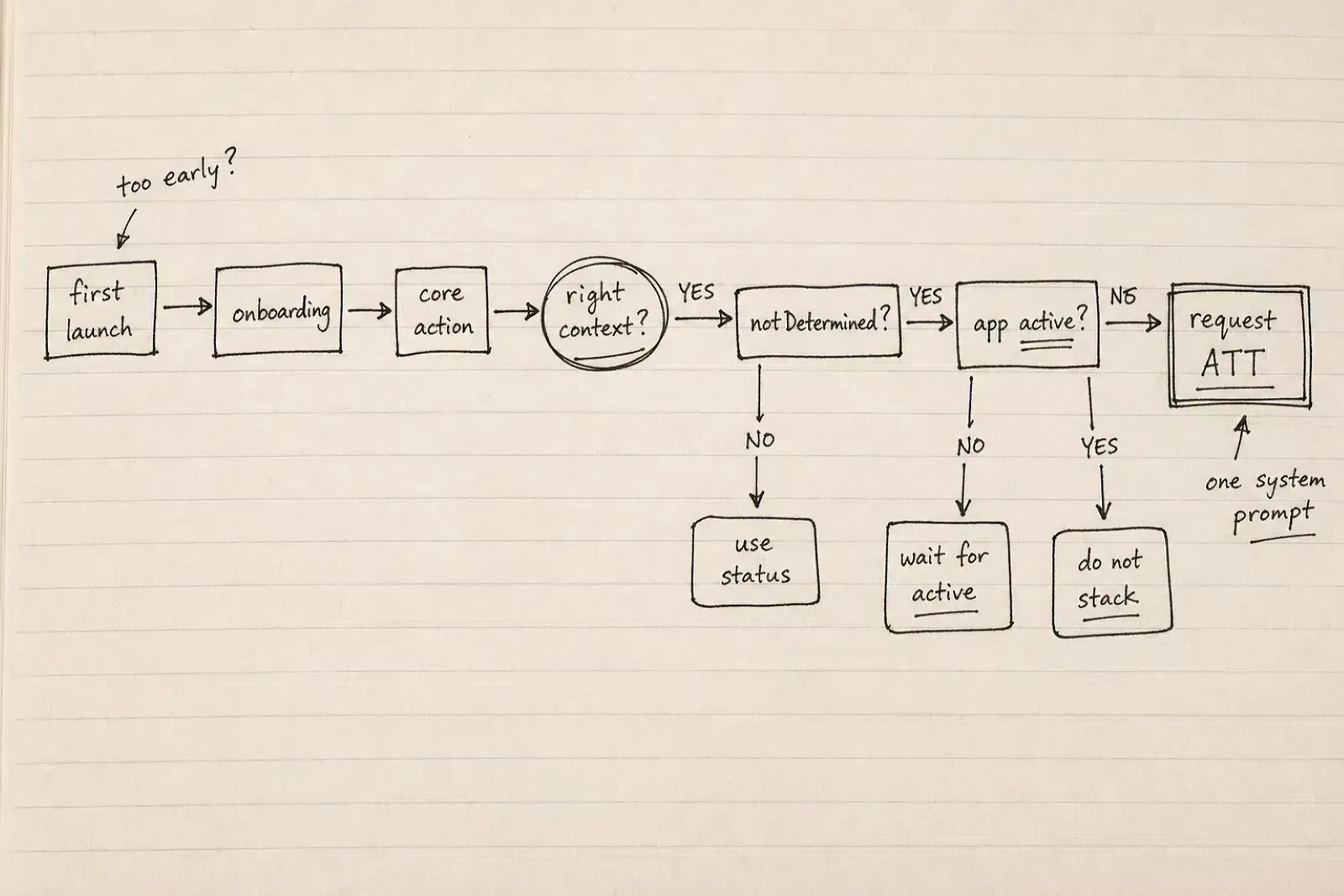
The implementation below separates authorization-state management from an illustrative custom pre-permission view:
import UIKit
import AppTrackingTransparency
import AdSupport

final class ATTManager {

    static let shared = ATTManager()
    private init() {}

    /// Evaluates current authorization status
    var currentStatus: ATTrackingManager.AuthorizationStatus {
        return ATTrackingManager.trackingAuthorizationStatus
    }

    /// Determines if tracking authorization can be presented
    var canRequestAuthorization: Bool {
        return currentStatus == .notDetermined
    }

    /// Requests tracking authorization with application active state verification
    /// - Parameter completion: Closure returning the resolved authorization status
    func requestAuthorization(completion: @escaping (ATTrackingManager.AuthorizationStatus) -> Void) {
        guard canRequestAuthorization else {
            completion(currentStatus)
            return
        }

        // Verify application is active before invoking requestTrackingAuthorization
        guard UIApplication.shared.applicationState == .active else {
            print("ATT request skipped: application is not active. Call again once active if status remains notDetermined.")
            completion(currentStatus)
            return
        }

        DispatchQueue.main.async {
            ATTrackingManager.requestTrackingAuthorization { status in
                DispatchQueue.main.async {
                    switch status {
                    case .authorized:
                        // Read the current advertising identifier on demand; do not persist a cached IDFA.
                        let idfa = ASIdentifierManager.shared().advertisingIdentifier.uuidString
                        print("ATT Authorized - IDFA available: \(idfa)")
                    case .denied:
                        print("ATT Denied - Advertising identifier returns zeroes")
                    case .restricted:
                        print("ATT Restricted by system profile")
                    case .notDetermined:
                        print("ATT State unresolved")
                    @unknown default:
                        print("ATT Unknown state encountered")
                    }
                    completion(status)
                }
            }
        }
    }
}

/// Illustrative custom UIViewController for a HIG-aligned pre-permission primer
final class ATTPrimerViewController: UIViewController {

    private let continueButton = UIButton(type: .system)
    private let titleLabel = UILabel()
    private let descriptionLabel = UILabel()

    var onContinueTapped: (() -> Void)?

    override func viewDidLoad() {
        super.viewDidLoad()
        setupUI()
    }

    private func setupUI() {
        view.backgroundColor = .systemBackground

        // Prevent interactive swipe-to-dismiss when presented modally to ensure single-path navigation
        isModalInPresentation = true

        titleLabel.text = "Help Us Personalize Your Experience"
        titleLabel.font = .boldSystemFont(ofSize: 20)
        titleLabel.textAlignment = .center
        titleLabel.numberOfLines = 0

        descriptionLabel.text = "We use data to tailor product recommendations and deliver relevant promotional offers. On the next screen, you will see Apple's standard permission prompt to confirm your choice."
        descriptionLabel.font = .systemFont(ofSize: 15)
        descriptionLabel.textAlignment = .center
        descriptionLabel.textColor = .secondaryLabel
        descriptionLabel.numberOfLines = 0

        // Apple HIG guidance calls for a single Continue or Next action
        continueButton.setTitle("Continue", for: .normal)
        continueButton.titleLabel?.font = .boldSystemFont(ofSize: 17)
        continueButton.addTarget(self, action: #selector(handleContinue), for: .touchUpInside)

        let stack = UIStackView(arrangedSubviews: [titleLabel, descriptionLabel, continueButton])
        stack.axis = .vertical
        stack.spacing = 20
        stack.translatesAutoresizingMaskIntoConstraints = false

        view.addSubview(stack)
        NSLayoutConstraint.activate([
            stack.centerXAnchor.constraint(equalTo: view.centerXAnchor),
            stack.centerYAnchor.constraint(equalTo: view.centerYAnchor),
            stack.leadingAnchor.constraint(equalTo: view.leadingAnchor, constant: 32),
            stack.trailingAnchor.constraint(equalTo: view.trailingAnchor, constant: -32)
        ])
    }

    @objc private func handleContinue() {
        // Presentation and dismissal mechanics are illustrative and should be adapted to the app's navigation architecture.
        dismiss(animated: true) { [weak self] in
            self?.onContinueTapped?()
        }
    }
}
Post-Denial Recovery: Guiding Users to System Settings Without Violating Policy
When to Introduce Secondary Settings Workflows
When a user selects “Ask App not to Track”, the authorization status resolves to .denied. Subsequent calls to requestTrackingAuthorization return .denied without showing a dialog. However, if a user later initiates a feature that explicitly benefits from tracking (such as requesting personalized advertising settings in their account profile), the app may provide a non-coercive path to iOS Settings.
Using UIApplication.openSettingsURLString
To guide a user to the app’s settings pane, use UIApplication.openSettingsURLString:
if let settingsURL = URL(string: UIApplication.openSettingsURLString),
   UIApplication.shared.canOpenURL(settingsURL) {
    UIApplication.shared.open(settingsURL, options: [:], completionHandler: nil)
}
Note that this API opens the application’s dedicated settings page; it does not provide a direct deep link to the global Settings > Privacy & Security > Tracking screen.
App Store Policy Boundaries
- No Persistent Nagging: Do not display recurring banners prompting users to enable tracking in settings.
- No Feature Lockouts: Never disable core functionality because tracking remains disabled in settings.
Comparative Decision Matrix: Pre-Permission Strategies versus Cold-Launch Prompts
| Dimension | Default Cold-Launch Prompt | Hard-Gated Permission Modal | HIG-Aligned Pre-Permission Primer |
|---|---|---|---|
| User Context Prior to Prompt | Low (No product engagement) | Varies (Blocks access) | Contextual (Presented after relevant interaction) |
| Apple UI/Permission Guidance | Permitted when request and data use comply | Not permitted when access or compensation depends on tracking | Permitted when HIG pre-alert constraints and tracking rules are followed |
| Apple Pre-Alert UI Constraints | N/A | N/A | Single Continue/Next action; no fake alerts |
| Permission Interruption Timing | Immediate upon launch | Blocking | Contextual milestone |
| Observed Opt-In Rate | Must be measured empirically | Not permitted | Must be measured empirically |
Frequently Asked Questions (FAQ)
Can an app offer in-app currency or discounts in exchange for granting ATT permission?
Can an app display a second ATT prompt if the user initially selects "Ask App not to Track"?
Does a pre-permission primer violate Apple's App Store guidelines?
Summary and Decision Framework
Improving the ATT permission experience requires clear purpose disclosure and context-aware timing. When additional explanation is necessary, a HIG-aligned pre-permission primer can provide context before the system prompt, while aligning the permission experience with Apple’s published tracking and interface guidelines.
If attribution or onboarding context is still required after ATT denial, applications can use independently permitted mechanisms such as AdAttributionKit, existing SKAdNetwork integrations, or genuinely first-party contextual routing that remains within Apple’s tracking rules.
For product-specific contextual routing and attribution behavior, review the OpoInstall documentation and evaluate the implementation against applicable Apple tracking requirements.
Related Materials
-
Concepts: App Tracking Transparency, IDFA Optimization, Pre-Permission Primers, Consent Funnels
-
Technologies: StoreKit Framework, AppTrackingTransparency Framework, OpoInstall Mobile SDK
-
Standards: Apple Human Interface Guidelines on Privacy, App Store Review Guidelines Section 5.1.2
-
APIs:
ATTrackingManager.requestTrackingAuthorization,UIApplication.openSettingsURLString,ASIdentifierManager
Official Documentation
Share this article



