Can Qwen-UI-Agent reliably control real phones and desktop interfaces? The technical report for the Alibaba Qwen UI Agent model family demonstrates a comprehensive approach to unifying mobile, computer, browser, and deep research environments under a single foundation GUI agent. As multimodal artificial intelligence transitions from conversational prompts to direct execution, models must interact with graphical user interfaces (GUIs) in a reliable, stateful manner across diverse platforms. Historically, automating interactions across operating systems required brittle custom scripts or platform-specific APIs. Today, because vision-centric systems can dynamically parse visual layouts and execute batched commands, engineering teams are evaluating how to build, test, and deploy foundation GUI agents in real-device environments.
Why Alibaba Qwen UI Agent Matters for Real-Device Automation
At a Glance
- Qwen-UI-Agent achieves state-of-the-art results on mobile-use evaluations, scoring 82.1% on MobileWorld, 92.2% on MobileWorld-Real, and 97.5% on AndroidDaily.
- The model unifies mobile, computer, browser, and DeepSearch environments under a cohesive vision-centric action space.
- The development infrastructure uses a live physical mobile cluster consisting of over 100 smartphones covering 150+ consumer applications for task creation, training, and testing.
The evolution of multimodal foundation models has highlighted an operational challenge: general-purpose language models remain detached from direct operating system interfaces. While conversational assistants can process text, analyze documents, and generate code, they cannot independently navigate third-party native apps, execute multi-step logistics, or coordinate complex desktop workflows without structured API integrations.
To address these interface boundaries, Qwen-UI-Agent treats digital screens as a unified operational runtime. By combining visual grounding with sequential decision-making, the model interprets interface layouts across Android, Windows, macOS, and web browsers. The system design and evaluation metrics are documented in the official technical report.
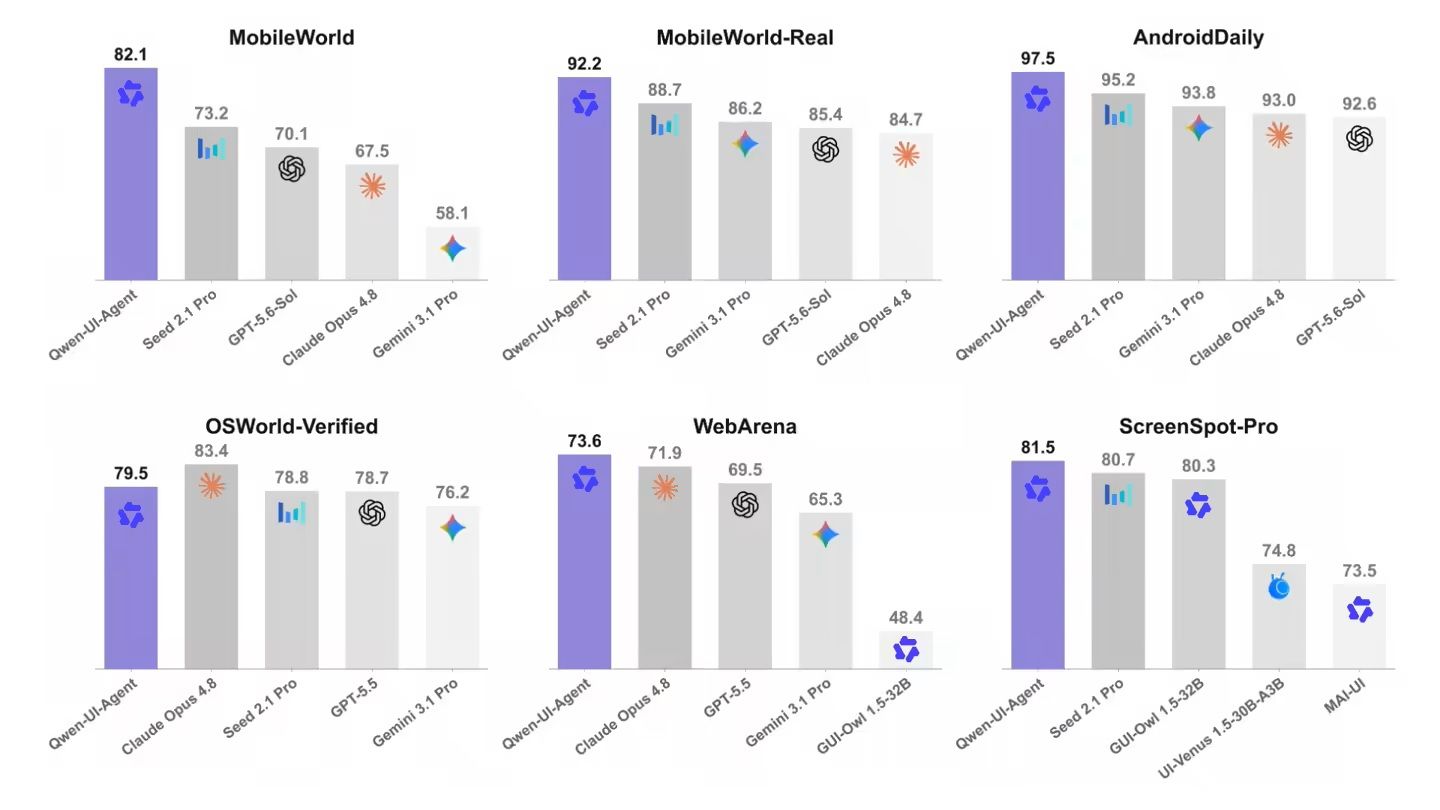
The significance of Qwen-UI-Agent lies in its emphasis on real-device execution. The team built a real-device environment of 100+ physical smartphones covering 150+ applications for task construction, trajectory collection, training, and evaluation. To measure real-world performance, the researchers introduced the MobileWorld-Real benchmark, which contains 400+ real-device tasks across 100+ applications. The benchmark suite is detailed in the MobileWorld project documentation. The team maintains official project materials and code resources through the Qwen-UI-Agent / MAI-UI Official Repository, with additional demos hosted on the Qwen-UI-Agent Official Project Page.
How GUI, CLI, and Batched Actions Work Together
Operating modern computer and mobile environments requires more than mapping isolated pointer coordinates. When executing multi-step workflows, an agent must evaluate application states, account for dynamic UI rendering changes, and handle high-latency interface transitions. To expand operational efficiency, Qwen-UI-Agent introduces a unified action space that combines GUI pointer operations with direct Command Line Interface (CLI) execution.
In desktop computer environments, CLI commands and GUI clicks emerge as two primary action types. The model can emit multiple actions in a single inference turn, with approximately 40% of its action outputs structured as batched commands.
The Hybrid Action Flow
The diagram below illustrates how visual inputs route through the unified action space:
[Screen Vision Input]
        │
        ▼
[Qwen-UI-Agent Model] (Direct layout parsing & grounding)
        │
  ┌─────┴────────────────────────┐
  ▼                              ▼
[GUI Operations] (Click, Drag)  [CLI Operations] (Bash Commands)
  └─────┬────────────────────────┘
        ▼
[Batched Execution] (Multiple actions emitted per model turn)
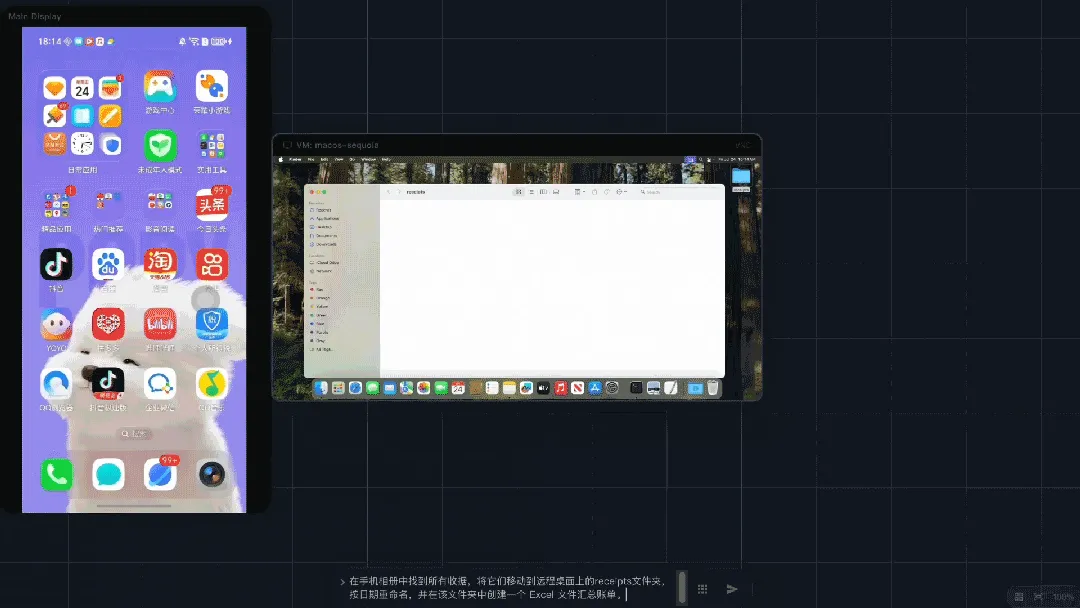
By interleaving GUI operations with CLI execution, the agent completes workflows that otherwise require switching between separate windows. In cross-device tasks, the agent can parse visual metadata from a mobile screen and run terminal commands to organize local directories or manipulate file systems directly.
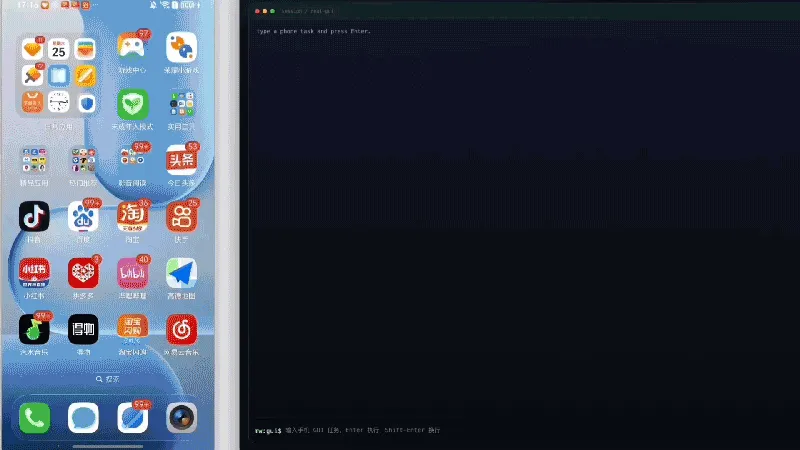
Why 100 Real Phones Matter More Than Simulated Sandboxes
Evaluating multimodal GUI agents in synthetic emulators often introduces a sim-to-real gap. Synthetic and sandbox environments provide scalable and reproducible evaluation conditions, but they cannot fully reproduce the changing application states, account conditions, networks, and interaction failures encountered on live devices. When deployed on physical hardware, agents frequently face unpredictable animation delays, background push notifications, or fluctuating cellular connectivity.
To close this gap, the development pipeline incorporates a physical mobile testbed of over 100 smartphones running more than 150 applications. This infrastructure captures genuine device latency, rendering variations, and network edge cases during training and evaluation.
The resulting MobileWorld-Real benchmark is designed to expose failures that may be hidden by simulated environments and to evaluate performance under real-device conditions. This setup underscores the value of validating models against real-device operating system behavior.
How Online RL Scales Long-Horizon GUI Tasks
Executing complex multi-app workflows requires sustained planning over extended sequences. Complex tasks—such as reconciling expense receipts across mobile galleries, generating spreadsheets on a desktop, and syncing files to remote cloud storage—often require agents to execute trajectories exceeding 100 steps. In long-horizon execution, an early positioning error can cause downstream steps to fail.
To improve trajectory completion, the training pipeline utilizes scalable online reinforcement learning (RL). The system runs rollouts across approximately 10,000 parallel environments concurrently to accelerate data generation.
The training framework incorporates an AutoResearch-style data flywheel where agents construct tasks, generate verification environments, diagnose execution errors, and plan subsequent training iterations. This automated loop reduces manual engineering overhead while iteratively expanding the model’s problem-solving coverage.
Safety and Human Control in Consequential Actions
Granting agents direct control over visual interfaces and command lines introduces operational security risks. Unlike text-only conversational interfaces, GUI agents that interact with input fields and system controls can trigger irreversible operations, such as executing financial transactions, modifying system configurations, or deleting files.
To manage risk, the Qwen-UI-Agent action space includes an ask_user mechanism. This design allows the agent to pause execution and request explicit user confirmation before proceeding with sensitive or consequential actions, such as authorizing payments, granting permissions, or deleting records.
When the agent detects sensitive workflows, it presents its planned sequence and yields control back to the user. This human-in-the-loop mechanism ensures that the operator maintains oversight over critical decisions. The authors note that developing more systematic safety benchmarks and formal verification objectives remains an ongoing area of research.
What Developers Need Before Deploying GUI Agents
Deploying the Alibaba Qwen UI Agent architecture in practical environments requires evaluating security boundaries, execution reliability, and infrastructure monitoring. Because visual foundation agents interact directly with graphical interfaces across applications without requiring dedicated per-app APIs, developers must establish system-level safeguards.
First, engineering teams must define permission boundaries. When agents are authorized to run terminal commands, execution must occur in sandboxed, non-privileged runtimes to prevent untrusted visual content from triggering unauthorized shell execution on host systems.
Second, teams must implement stateful error recovery. Because real-world applications experience rendering delays and interface changes, the agent harness layer must monitor execution health, detect stalled workflows, and support rollback mechanisms to maintain transaction integrity.
Managing Context Handoff Across Application Boundaries
The multi-application workflows demonstrated in Qwen-UI-Agent also reflect a broader product-design challenge: task context increasingly needs to survive transitions between independent applications and execution environments. In agent runtimes, this continuity is maintained through interaction history and the harness layer that preserves context and task state across pre-installed applications, devices, and execution environments.
Mobile app distribution introduces an adjacent architectural problem when an agent or user journey points toward an application that is not yet installed on the device. In those scenarios, normal in-app context handoff is interrupted by the app store installation boundary. Specialized mobile linking architectures, such as OpoInstall, address this by providing deferred deep linking and parameter pass-through capabilities designed to restore eligible campaign, destination, or referral parameters upon the app’s first post-install launch. The two mechanisms solve different technical problems across different lifecycle stages, but both highlight the growing requirement for reliable context continuity across fragmented application boundaries.
Frequently Asked Questions (FAQ)
What is the core difference between Qwen-UI-Agent and its predecessor MAI-UI?
How does the agent execute CLI commands alongside GUI operations?
Can Qwen-UI-Agent operate on physical devices without simulated sandboxes?
Key Takeaways for Engineering Teams
The transition of multimodal AI toward foundation GUI agents marks a shift from static prompt evaluation to real-device execution across operating systems. As agents gain the capacity to interleave visual clicks with command-line instructions, software architectures must adapt to support long-horizon, autonomous interaction flows.
Engineering teams preparing to deploy GUI agents should prioritize system-level reliability over raw benchmark metrics. Building resilient deployments requires establishing robust agent harnesses, defining least-privilege permission boundaries, implementing transaction rollback mechanisms, and integrating human-in-the-loop confirmation (ask_user) for consequential actions. By designing around environment instability and state management, organizations can deploy foundation GUI agents with stronger operational safeguards.
References
-
Zhou et al. Qwen-UI-Agent Technical Report: Toward Next-Generation Real-World Centric Foundation GUI Agents. https://arxiv.org/abs/2607.28227
-
Kong et al. MobileWorld: Benchmarking Autonomous Mobile Agents in Agent-User Interactive and MCP-Augmented Environments. https://tongyi-mai.github.io/MobileWorld/
-
Tongyi-MAI Team. Qwen-UI-Agent / MAI-UI Official Repository. https://github.com/Tongyi-MAI/MAI-UI
-
MAI-UI Team. Qwen-UI-Agent Official Project Page. https://tongyi-mai.github.io/Qwen-UI-Agent/
-
OpoInstall. How to Implement a Referral Tracking SDK with Deferred Deep Linking and Install Attribution. https://www.opoinstall.com/blog/referral-tracking-sdk-deferred-deep-linking
Share this article