Apple iPhone Duo App Layouts Revealed? On October 20, 2026, ahead of the scheduled October 23 commercial availability, screenshots published across the App Store provided the first detailed look at Apple’s built-in applications running on the iPhone Duo. The interface assets demonstrate that Apple’s first foldable smartphone adapts iOS for dual-screen environments by combining iPad-style multi-column views with dedicated side-docked navigation controls. Rather than scaling existing single-screen layouts uniformly, the system relies on adaptive size classes, split navigation containers, and reserved-region handling, establishing new design requirements for mobile engineering teams building for flexible hardware form factors.
Core Industry Realignment: Native Dual-Screen Apps on Apple iPhone Duo
At a Glance
- Published App Store screenshots demonstrate that native iOS applications adopt adaptive dual-column views when the iPhone Duo is unfolded horizontally.
- The iPhone Duo has a 5.4-inch outer OLED display at 1398 × 2034 pixels and a 7.6-inch inner foldable OLED display at 1878 × 2670 pixels, requiring adaptive layouts across distinct display sizes and device poses.
- System navigation utilizes a persistent vertical dock and right-aligned navigation controls, moving to a traditional bottom tab bar when the device is held in a vertical unfolded posture.
The introduction of foldable mobile hardware challenges the foundational assumption of modern iOS development: a static, rectangular viewport. For nearly two decades, software teams built iPhone applications around predictable, single-screen aspect ratios. Even with adaptive Auto Layout constraints and dynamic screen cutouts, mobile interfaces operated as unitary visual containers where users navigated linearly through hierarchical navigation stacks.
Foldable dual-screen hardware disrupts this single-viewport paradigm. When a smartphone expands from a compact exterior display into an expansive interior canvas, applications must decide how to utilize the additional screen real estate. Simply stretching mobile interfaces across a wider display produces excessive white space and degrades touch ergonomics.

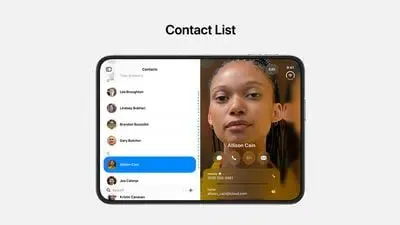
The visual structure of the iPhone Duo App Layouts illustrates Apple’s architectural solution to this problem. As documented in technical reporting by MacRumors covering built-in app layouts, native utilities adapt dynamically to device orientation and hinge posture. In horizontal unfolded mode, core applications such as Contacts and Mail split into two distinct functional panes: the left panel displays a scrollable record index, while the right panel renders full editing controls. Similarly, the Siri interface arranges historical interactions in a tiled sidebar on the left while keeping active conversational responses visible on the right.
To maintain ergonomic consistency across varying grip postures, the operating system shifts traditional bottom navigation tabs to a vertical bar docked along the right edge of the screen, as detailed in the official Apple Human Interface Guidelines for iPhone Duo. Bottom navigation reappears only when the device is unfolded vertically, a posture Apple recommends primarily for document composition and web browsing in Safari.

How iPhone Duo Adapts Layouts Across Displays
The technical complexity of supporting foldable form factors lies in managing runtime viewport transitions. Unlike traditional device rotations that merely swap width and height dimensions, unfolding an iPhone Duo triggers an instantaneous reconfiguration of the active display environment.
The underlying rendering engine must transition an application from a 5.4-inch portrait viewport (1398 × 2034) to a 7.6-inch multi-column canvas (1878 × 2670) without tearing the render tree or resetting the user’s interactive state, as outlined in the Apple technical specifications for iPhone Duo.
Adaptive Viewport Transitions: Handling Size Classes and Reserved Regions
To manage these transitions, iOS applications rely on adaptive layout containers rather than running multiple independent application scenes. When the physical hinge opens, the window environment updates its trait collections, safe areas, and available layout bounds. Applications that rely on rigid frame calculations or assume fixed portrait dimensions fail to handle this transition cleanly.
Early hands-on reviews, including an Engadget comprehensive iPhone Duo review, observed that unoptimized third-party applications exhibit noticeable letterboxing or pillarboxing, rendering within narrow vertical pillars bounded by unused black borders. In contrast, optimized software restructures its layout hierarchy using standard split navigation containers.

The diagram below highlights the structural data flow when an application adapts to device posture changes:
Device Display / Pose Changes
            │
            ▼
Window Size, Traits & Reserved Regions
            │
            ▼
Adaptive Layout / Navigation Container
            │
            ▼
App-Owned Navigation & View State
            │
            ▼
Updated Single- or Multi-Column Presentation
Furthermore, developers must account for physical display constraints using Apple’s dedicated UIView.ReservedRegion documentation. Hardware elements such as the central folding hinge (division reserved region) and camera housing (occlusion reserved region) define areas where interactive controls should not be positioned.
In a broader systems context, similar identity continuity challenges also appear in attribution infrastructure. When a user transitions between folded and unfolded displays while interacting with promotional links or opening an application, maintaining session parameters without losing navigation context becomes a fundamental engineering requirement. Attribution platforms and deep-linking engines must coordinate with responsive view controllers to ensure that target landing destinations resolve correctly, regardless of the screen state at the moment of launch.
Comparing Foldable Layout Strategies and State Continuity
As foldable form factors expand across the mobile market, technical leaders must assess whether to maintain legacy fixed-frame layouts or refactor their applications around fully responsive, adaptive architectures.

Architectural Evaluation: Layout Strategies and Link Parameter Restoration
Supporting dual-screen devices requires evaluating how application routing interacts with varying display environments. Static layouts minimize immediate development costs but result in compromised user experiences and poor engagement on modern hardware. Adaptive architectures leverage standard system components to respond fluidly to size class changes, while custom fold-aware layouts provide granular control over non-standard display boundaries.
The table below outlines common architectural approaches for managing viewports, state continuity, and routing:
| Layout Approach | Viewport Adaptation Model | State Continuity Responsibility | Implementation Trade-Off |
|---|---|---|---|
| Fixed-Size Legacy UI | Limited adaptation; relies on compatibility scaling or pillarboxing | Managed entirely by the application | Minimal upfront engineering cost paired with potential letterboxing or wasted display space |
| Adaptive System Containers | Responds to size classes, traits, and system split-view controllers | Application maintains data models and active navigation stacks | Standardized integration leveraging platform controls; requires testing across regular and compact modes |
| Custom Fold-Aware Layout | Adjusts dynamically to reserved regions, safe areas, and posture angles | Application handles custom view placement and complex state logic | Complete design control paired with higher testing overhead and ongoing framework maintenance |
| Multi-Window Support | Manages independent window scenes concurrently | Each active window scene independently manages its state | Decouples separate task flows into concurrent instances; distinct from single-window dual-column layouts |
Foldable display adaptation and deep-link routing operate at different layers of an iOS application. Apple’s layout frameworks manage changes in available screen space, while the application is responsible for preserving its navigation and interaction state. For users arriving through supported promotional or referral links, mobile attribution and deferred deep-linking solutions such as OpoInstall can help pass acquisition context to the app during supported launch and installation flows. Developers must then ensure their own navigation logic presents the intended destination correctly across the iPhone Duo’s display states.
Engineering Checklist & Verification Schedules: Preparing iOS Apps for Foldable Screens
To ensure software stability and preserve conversion rates across foldable hardware, development and growth teams should establish systematic engineering verification schedules based on guidelines outlined in Apple’s technical sessions on preparing apps for iPhone Duo.

Developer Implementation Checklist
- Decouple View Controllers from Hardcoded Bounds: Remove all fixed references to screen dimensions and migrate to Auto Layout constraints, layout guides, and adaptive size classes.
- Adopt Standard Navigation Containers: Implement
UISplitViewControllerin UIKit orNavigationSplitViewin SwiftUI to support multi-column layouts that collapse naturally on the compact cover display. - Respond to Adaptive Geometry: Prefer size classes, view-level trait changes, Auto Layout, and reserved-region APIs when adapting content to iPhone Duo. For applications that specifically manage window-scene geometry, use the supported
windowScene(_:didUpdateEffectiveGeometry:)callback where appropriate, rather than relying on deprecated scene update methods. - Query Reserved Regions for Safe Content Placement: Check
UIView.ReservedRegionto identify hinge division and sensor occlusion areas, ensuring interactive controls avoid folding creases. - Preserve Interactive State in View Models: Maintain data models and active form inputs independently of view hierarchies to ensure user progress is not reset during display reconfigurations.
Product & Growth Strategy Checklist
- Audit Universal Links Across Display States: Verify that deep links properly route users to specific in-app content whether the application is opened on the compact cover display or expanded into dual-pane mode.
- Test Deferred Deep Linking on Supported Launch Flows: Confirm that onboarding parameters passed through app installation flows correctly trigger the intended destination scenes upon initial launch.
- Evaluate Layouts Using Xcode Simulators: Test application interfaces across all simulated iPhone Duo postures, including flat, tent, book, and laptop configurations, using guidance from Apple’s developer sessions on adaptive layouts.
Executing these technical verifications enables organizations to deliver refined application experiences that take full advantage of emerging hardware capabilities without introducing visual instability.
Frequently Asked Questions (FAQ)
Why do unoptimized apps show black bars or letterboxing on the iPhone Duo?
How do native iOS apps maintain navigation state when folding or unfolding the screen?
What biometric authentication does the iPhone Duo use?
Practical Implications & Future Outlook
The commercial debut of the iPhone Duo marks an important turning point in mobile software engineering. As screen folding technologies mature and physical creases become less prominent—as documented in the NotebookCheck iPhone Duo hardware analysis—the boundary between smartphone and tablet computing will continue to dissolve.
For software engineers and product designers, building resilient mobile applications requires moving beyond fixed-canvas assumptions. Modern application architectures must prioritize modular view components, responsive scene hierarchies, and robust deep-linking frameworks. By engineering software that adapts fluidly to shifting hardware viewports, development teams can ensure consistent user engagement across the next generation of mobile devices.
References
Share this article