How Do You Automate Attribution Audits During User Acceptance Testing? Automating attribution audits during User Acceptance Testing requires orchestrating three discrete verification layers: local CI test fixtures to validate app-side payload parsing and target screen routing, controlled staging runs to test native SDK callback hooks, and real pre-release installation tests to verify parameter restoration across physical networks. User Acceptance Testing confirms that promotional parameters, dynamic channel codes, and referral context survive the build-and-release pipeline without breaking user onboarding.
User Acceptance Testing is the pre-release operational phase where engineering and product teams evaluate software builds against business requirements and technical acceptance criteria. In mobile growth engineering, automated attribution audits replace error-prone manual testing by validating that custom query tokens, channel codes, and deep link parameters survive delivery pipelines and resolve accurately inside the application on first open.
Architecture of Automated User Acceptance Testing for Mobile Attribution

Why Manual Deep Link and Attribution Verification Fails at Scale
Mobile deployment pipelines frequently generate dozens of channel builds, localized marketing variants, and dynamic referral flows for a single release candidate. In manual verification models, QA teams generate landing pages, scan dynamic QR codes with physical devices, install builds, and manually inspect initial view controllers to check whether custom parameters appeared.
This manual approach introduces three operational liabilities prior to public launch:
- Testing Bottlenecks in Release Cycles: Verifying complex parameter combinations manually across every build flavor delays deployment schedules and limits test coverage to basic happy paths.
- Undetected Transcription and Encoding Failures: Complex query payloads—such as nested JSON dictionaries containing referral tokens, invite codes, and campaign tags—are difficult to audit by eye on physical screens, allowing character-encoding and string-escaping bugs to escape to production.
- Attribution State Contamination: Re-testing installation packages on devices without completely wiping application storage causes attribution SDKs to return cached parameters from prior runs, producing false positives that mask broken routing in fresh builds.
Establishing an automated User Acceptance Testing framework allows teams to audit parameter parsing and routing deterministically on every release build. Teams can consult the mobile attribution implementation reference for architectural details on parameter restoration workflows.
[Release Candidate Build]
           │
           ├──> Layer 1: CI/CD Mock Regression (Headless UI Tests)
           │      └── Injects Mock Test Fixture ──> Verifies App Parsing, Routing & Destination UI
           │
           ├──> Layer 2: Staging SDK Integration (Controlled Test Harness)
           │      └── Direct SDK Test Harness ──> Asserts getInstallParam Callback Lifecycle
           │
           └──> Layer 3: Physical Device Attribution (Staging Acceptance Run)
                  └── Web Click ──> Install ──> Native First Open ──> Parameter Match Verified
The Three Layer Verification Model for Attribution Audits
A resilient pre-release attribution audit framework evaluates the attribution lifecycle across three discrete verification layers rather than treating mock tests and physical attribution as the same test result:
| Verification Layer | Primary Objective | Execution Environment | Pass and Acceptance Criteria |
|---|---|---|---|
| CI Mock Regression | Validate app routing, payload parsing, and UI state handling | Headless CI emulators or simulators | App decodes injected test fixture, navigates to target view container, and handles missing fields gracefully |
| Staging SDK Integration | Validate native SDK lifecycle hooks, timeout handling, and callbacks | Controlled integration test harness on staging builds | SDK initialization triggers callback; expected channel codes resolve; timeouts produce non-fatal error codes |
| Physical Staging Attribution | Validate real-world parameter restoration from web click to launch | Clean physical devices on cellular or Wi-Fi networks | Web click context reconciles with native first open; expected parameters match pre-flight staging run ledger |
Test Fixture Design and Context Injection in CI CD
The Mechanics of Programmatic Context Injection
In production environments, parameter restoration occurs when an attribution SDK reconciles device context captured on an H5 landing page with the initial launch of an installed binary. In automated CI pipelines, spinning up physical mobile browsers to click live web links is slow, fragile, and difficult to isolate from network fluctuations.
To validate downstream app logic programmatically, test suites use staging test fixtures. These fixtures provide mock parameters directly to the application’s routing layer, decoupling UI testing from external network calls while testing the parsing and routing behavior exercised by the test harness.
- Query String Construction: Query strings must comply with the IETF RFC 3986 specification. When constructing query strings, format parameters using application/x-www-form-urlencoded rules where values with spaces become
+or%20, while reserved delimiters such as=and&separate individual key-value pairs. - Payload Structural Integrity: Test suites must supply both valid query dictionaries and missing-field inputs to confirm that the app’s deserialization logic handles unexpected payloads by routing to expected fallback containers without crashing.
Developers configuring staging environments can consult the OpoInstall documentation center for technical specifications regarding parameter schemas.
Designing Deterministic Query Parameters
To avoid ambiguous test assertions, construct URL test fixtures using standard query encoding where keys and values are encoded as discrete pairs:
import urllib.parse

# Form-encoded query fixture representing incoming web marketing parameters
params = {
    "channelCode": "ci_regression_01",
    "cohort": "beta_v2",
    "role": "tester",
    "buildId": "rc-104",
    "target_screen": "promotions_detail"
}

# Standard application/x-www-form-urlencoded formatting
query_string = urllib.parse.urlencode(params)
# Output: channelCode=ci_regression_01&cohort=beta_v2&role=tester&buildId=rc-104&target_screen=promotions_detail

Automating Android Parameter Validation via ADB and Espresso
Managing Process Lifecycle and Storage Sanitization
Testing installation attribution requires establishing an isolated, clean-state baseline before each test run. Simply launching an Activity over an existing installation retains cached preferences and SQLite state from earlier sessions.
To ensure deterministic execution across automated test runs, orchestrate installation, data clearance, and test execution through Gradle. Clearing package state via pm clear resets local shared preferences and internal files on the device, providing a clean-slate starting point for the subsequent instrumentation run. The shell wrapper below executes the test runner, copies available JUnit XML reports after Gradle finishes, and preserves Gradle’s exit code to ensure CI failure propagation:
#!/usr/bin/env bash
set -u

PACKAGE_NAME="com.example.uatapp"
TEST_PACKAGE="com.example.uatapp.test"
RUN_ID="UAT_${CI_JOB_ID:-manual}_$(date +%s)_$RANDOM"
CI_REPORTS_DIR="./build/ci-test-results"
mkdir -p "$CI_REPORTS_DIR"

echo "=== Starting Automated Android Attribution Audit: $RUN_ID ==="

# Step 1: Ensure pre-release package is installed on the connected test runner
if ! adb shell pm list packages | grep -q "$PACKAGE_NAME"; then
    echo "Target package $PACKAGE_NAME is not installed. Installing debug build..."
    if ! ./gradlew installDebug installDebugAndroidTest; then
        echo "Error: Failed to install test packages." >&2
        exit 1
    fi
fi

# Step 2: Terminate active instances and reset application local sandbox storage
adb shell am force-stop "$PACKAGE_NAME" || true
echo "Resetting local application state for $PACKAGE_NAME..."
if ! adb shell pm clear "$PACKAGE_NAME"; then
    echo "Error: Failed to clear package state." >&2
    exit 1
fi

GRADLE_EXIT_CODE=0

# Step 3: Run CI regression tests filtering explicitly for fixture assertions
echo "Running CI UI regression test suite..."
./gradlew connectedDebugAndroidTest \
    -Pandroid.testInstrumentationRunnerArguments.class=com.example.uatapp.AttributionUatEspressoTest#testFixtureParsingAndNavigation,com.example.uatapp.AttributionUatEspressoTest#testMissingParametersFallback \
    -Pandroid.testInstrumentationRunnerArguments.test_run_id="$RUN_ID" || GRADLE_EXIT_CODE=$?

# Step 4: Copy available JUnit XML reports and preserve Gradle's exit code
echo "Collecting connected Android test XML reports..."
SOURCE_DIR="app/build/outputs/androidTest-results/connected"
if [ -d "$SOURCE_DIR" ]; then
    if cp -r "$SOURCE_DIR/"* "$CI_REPORTS_DIR/"; then
        echo "Reports archived successfully to $CI_REPORTS_DIR"
    else
        echo "Warning: Failed to copy reports to $CI_REPORTS_DIR" >&2
    fi
else
    echo "Warning: Report source directory $SOURCE_DIR not found." >&2
fi

if [ "$GRADLE_EXIT_CODE" -ne 0 ]; then
    echo "CI Test Suite FAILED with exit code $GRADLE_EXIT_CODE" >&2
    exit "$GRADLE_EXIT_CODE"
fi

echo "=== Instrumentation Suite Completed Successfully ==="
exit 0
Instrumenting Android Integration Tests with ActivityScenarioRule
To avoid skipping assertions, isolate UI fixture regression tests from staging SDK integration tests. Keep test-only routing entry points strictly compiled inside debug source sets (src/debug/java) to avoid exposing test hooks in release binaries:
// File: app/src/debug/java/com/example/uatapp/StagingFixtureRouter.java
package com.example.uatapp;

import android.net.Uri;
import android.view.View;
import android.widget.TextView;
import androidx.appcompat.app.AppCompatActivity;

public class StagingFixtureRouter {

    public static void processStagingQueryString(AppCompatActivity activity, String rawQueryString) {
        if (rawQueryString == null || rawQueryString.trim().isEmpty()) {
            View fallbackView = activity.findViewById(R.id.destination_default_home_view);
            if (fallbackView != null) fallbackView.setVisibility(View.VISIBLE);
            View promoView = activity.findViewById(R.id.destination_promotions_view);
            if (promoView != null) promoView.setVisibility(View.GONE);
            return;
        }

        Uri parsedUri = Uri.parse("https://staging.example.com/demo?" + rawQueryString);
        String channelCode = parsedUri.getQueryParameter("channelCode");
        String cohort = parsedUri.getQueryParameter("cohort");
        String role = parsedUri.getQueryParameter("role");
        String buildId = parsedUri.getQueryParameter("buildId");
        String targetScreen = parsedUri.getQueryParameter("target_screen");

        if (channelCode == null || channelCode.trim().isEmpty()) {
            View fallbackView = activity.findViewById(R.id.destination_default_home_view);
            if (fallbackView != null) fallbackView.setVisibility(View.VISIBLE);
            View promoView = activity.findViewById(R.id.destination_promotions_view);
            if (promoView != null) promoView.setVisibility(View.GONE);
            return;
        }

        TextView channelBadge = activity.findViewById(R.id.channel_badge_text);
        if (channelBadge != null) channelBadge.setText(channelCode);

        TextView roleBadge = activity.findViewById(R.id.role_badge_text);
        if (roleBadge != null && role != null) roleBadge.setText(role);

        TextView cohortBadge = activity.findViewById(R.id.cohort_badge_text);
        if (cohortBadge != null && cohort != null) cohortBadge.setText(cohort);

        TextView buildIdBadge = activity.findViewById(R.id.build_id_badge_text);
        if (buildIdBadge != null && buildId != null) buildIdBadge.setText(buildId);

        if ("promotions_detail".equals(targetScreen)) {
            View promoView = activity.findViewById(R.id.destination_promotions_view);
            if (promoView != null) promoView.setVisibility(View.VISIBLE);
            View fallbackView = activity.findViewById(R.id.destination_default_home_view);
            if (fallbackView != null) fallbackView.setVisibility(View.GONE);
        } else {
            View homeView = activity.findViewById(R.id.destination_default_home_view);
            if (homeView != null) homeView.setVisibility(View.VISIBLE);
            View promoView = activity.findViewById(R.id.destination_promotions_view);
            if (promoView != null) promoView.setVisibility(View.GONE);
        }
    }
}
The Espresso test suite below separates fixture UI routing assertions from staging SDK callback validation:
package com.example.uatapp;

import android.content.Context;
import android.content.Intent;
import androidx.test.core.app.ActivityScenario;
import androidx.test.core.app.ApplicationProvider;
import androidx.test.espresso.Espresso;
import androidx.test.espresso.assertion.ViewAssertions;
import androidx.test.espresso.matcher.ViewMatchers;
import androidx.test.ext.junit.runners.AndroidJUnit4;
import androidx.test.filters.LargeTest;
import androidx.test.platform.app.InstrumentationRegistry;
import com.opoinstall.api.OpoData;
import com.opoinstall.api.OpoError;
import com.opoinstall.api.OpoInstall;
import com.opoinstall.api.ResultCallBack;
import org.json.JSONObject;
import org.junit.Assert;
import org.junit.Test;
import org.junit.runner.RunWith;
import java.util.concurrent.CountDownLatch;
import java.util.concurrent.TimeUnit;
import java.util.concurrent.atomic.AtomicBoolean;
import java.util.concurrent.atomic.AtomicReference;

@RunWith(AndroidJUnit4.class)
@LargeTest
public class AttributionUatEspressoTest {

    private static final String TEST_QUERY_STRING = "channelCode=ci_regression_01&cohort=beta_v2&role=tester&buildId=rc-104&target_screen=promotions_detail";
    private static final String EXPECTED_CHANNEL = "ci_regression_01";
    private static final String EXPECTED_COHORT = "beta_v2";
    private static final String EXPECTED_ROLE = "tester";
    private static final String EXPECTED_BUILD_ID = "rc-104";
    private static final long CALLBACK_TIMEOUT_SECONDS = 10;

    @Test
    public void testFixtureParsingAndNavigation() {
        String testRunId = InstrumentationRegistry.getArguments().getString("test_run_id", "local_run");
        System.out.println("Executing testFixtureParsingAndNavigation for run: " + testRunId);

        Intent intent = new Intent(ApplicationProvider.getApplicationContext(), MainActivity.class)
                .setAction(Intent.ACTION_VIEW)
                .putExtra("staging_query_string", TEST_QUERY_STRING);

        try (ActivityScenario<MainActivity> scenario = ActivityScenario.launch(intent)) {
            scenario.onActivity(activity -> {
                StagingFixtureRouter.processStagingQueryString(
                        activity,
                        activity.getIntent().getStringExtra("staging_query_string")
                );
            });

            Espresso.onView(ViewMatchers.withId(R.id.destination_promotions_view))
                    .check(ViewAssertions.matches(ViewMatchers.isDisplayed()));

            Espresso.onView(ViewMatchers.withId(R.id.channel_badge_text))
                    .check(ViewAssertions.matches(ViewMatchers.withText(EXPECTED_CHANNEL)));

            Espresso.onView(ViewMatchers.withId(R.id.cohort_badge_text))
                    .check(ViewAssertions.matches(ViewMatchers.withText(EXPECTED_COHORT)));

            Espresso.onView(ViewMatchers.withId(R.id.role_badge_text))
                    .check(ViewAssertions.matches(ViewMatchers.withText(EXPECTED_ROLE)));

            Espresso.onView(ViewMatchers.withId(R.id.build_id_badge_text))
                    .check(ViewAssertions.matches(ViewMatchers.withText(EXPECTED_BUILD_ID)));
        }
    }

    @Test
    public void testMissingParametersFallback() {
        Intent intent = new Intent(ApplicationProvider.getApplicationContext(), MainActivity.class)
                .setAction(Intent.ACTION_VIEW)
                .putExtra("staging_query_string", "cohort=missing_channel");

        try (ActivityScenario<MainActivity> scenario = ActivityScenario.launch(intent)) {
            scenario.onActivity(activity -> {
                StagingFixtureRouter.processStagingQueryString(
                        activity,
                        activity.getIntent().getStringExtra("staging_query_string")
                );
            });

            Espresso.onView(ViewMatchers.withId(R.id.destination_default_home_view))
                    .check(ViewAssertions.matches(ViewMatchers.isDisplayed()));

            Espresso.onView(ViewMatchers.withId(R.id.destination_promotions_view))
                    .check(ViewAssertions.matches(ViewMatchers.withEffectiveVisibility(ViewMatchers.Visibility.GONE)));
        }
    }

    @Test
    public void testStagingSdkCallbackResolution() throws Exception {
        // Dedicated Staging SDK Test Entry: executed in controlled staging harness with network access
        Intent intent = new Intent(ApplicationProvider.getApplicationContext(), MainActivity.class);

        try (ActivityScenario<MainActivity> scenario = ActivityScenario.launch(intent)) {
            CountDownLatch latch = new CountDownLatch(1);
            AtomicReference<OpoData> receivedData = new AtomicReference<>();
            AtomicReference<OpoError> receivedError = new AtomicReference<>();
            AtomicBoolean timeoutOccurred = new AtomicBoolean(false);

            scenario.onActivity(activity -> {
                OpoInstall.getInstance().getInstallParam(new ResultCallBack<OpoData>() {
                    @Override
                    public void onResult(OpoData opoData) {
                        receivedData.set(opoData);
                        latch.countDown();
                    }

                    @Override
                    public void onError(OpoError opoError) {
                        receivedError.set(opoError);
                        latch.countDown();
                    }
                });
            });

            boolean completed = latch.await(CALLBACK_TIMEOUT_SECONDS, TimeUnit.SECONDS);
            if (!completed) {
                timeoutOccurred.set(true);
            }

            Assert.assertFalse("Attribution callback exceeded timeout budget of " + CALLBACK_TIMEOUT_SECONDS + "s", timeoutOccurred.get());
            Assert.assertNull("Attribution callback returned an unexpected error", receivedError.get());

            OpoData data = receivedData.get();
            Assert.assertNotNull("Attribution data object must not be null in staging callback test", data);
            Assert.assertEquals("Channel code mismatch in staging callback", EXPECTED_CHANNEL, data.getChannelCode());

            String bindData = data.getBindData();
            Assert.assertNotNull("Bind data payload must not be null", bindData);

            JSONObject json = new JSONObject(bindData);
            Assert.assertEquals("Cohort metadata mismatch", EXPECTED_COHORT, json.optString("cohort", ""));
            Assert.assertEquals("Role metadata mismatch", EXPECTED_ROLE, json.optString("role", ""));
        }
    }
}
To run this dedicated SDK validation test on a staging test runner, target the specific method directly:
./gradlew connectedDebugAndroidTest \
    -Pandroid.testInstrumentationRunnerArguments.class=com.example.uatapp.AttributionUatEspressoTest#testStagingSdkCallbackResolution
How to Validate iOS Deferred Parameters via XCUITest and Test Fixtures
Simulating Deferred Attribution Payloads on iOS Test Targets
Apple simulators run on local macOS host architectures and do not provide physical App Store referral handshakes. In automated CI pipelines, test engineers simulate deferred parameters by passing launch environment variables or launch arguments to the target process via XCUIApplication.
- Launch Environment Injection: The test runner sets explicit keys inside
XCUIApplication.launchEnvironment. The test build checks for these debug keys on startup and routes the mock payload through the application’s deep link coordinator. - Pasteboard Context Verification: When testing clipboard-assisted parameter passing, the test runner can use
xcrun simctl pbcopyto populate the simulator’s pasteboard buffer before test launch. This tests the application’s pasteboard-parsing logic under simulated operating system conditions. - Distinguishing Staging Mocks from Production Telemetry: Environment variable injection confirms that the host application’s routing, parsing, and UI display logic operate correctly. However, it does not evaluate Apple’s native App Store attribution matching. Physical device runs remain necessary to validate real-world installation attribution.
Structuring XCUITest Assertions for SDK Parameter Callbacks
The following XCUITest suite written in Swift launches the application with custom staging launch arguments, waits for the application’s test coordinator to update accessible UI elements, and asserts that parameters match expected values. Note that the target Xcode scheme (such as YourAppStaging) must have the DEBUG compilation condition active so that staging test coordinators compile:
Developers can retrieve verified iOS static framework packages from the mobile SDK download repository for integration.
import XCTest

class AttributionUatXCUITest: XCTestCase {

    var app: XCUIApplication!
    private let expectedChannel = "uat_ci_track"
    private let expectedCohort = "ios_staging_v1"
    private let expectedRole = "tester"
    private let expectedBuildId = "rc-104"

    override func setUpWithError() throws {
        continueAfterFailure = false
        app = XCUIApplication()
    }

    override func tearDownWithError() throws {
        app = nil
    }

    func testDeferredAttributionParameterRestoration() throws {
        let runId = "RUN_IOS_\(ProcessInfo.processInfo.globallyUniqueString)"

        app.launchEnvironment["QA_TEST_MODE"] = "MOCK_FIXTURE"
        app.launchEnvironment["QA_TEST_RUN_ID"] = runId
        app.launchEnvironment["QA_FIXTURE_CHANNEL"] = expectedChannel
        app.launchEnvironment["QA_FIXTURE_COHORT"] = expectedCohort
        app.launchEnvironment["QA_FIXTURE_ROLE"] = expectedRole
        app.launchEnvironment["QA_FIXTURE_BUILD_ID"] = expectedBuildId
        app.launch()

        // Locate destination view container in the active hierarchy
        let destinationView = app.otherElements["destination_promotions_view"]
        XCTAssertTrue(destinationView.waitForExistence(timeout: 5.0), "Application router failed to display promotions view")

        // Query accessible elements rendered inside the destination container
        let statusLabel = destinationView.staticTexts["attribution_status_label"]
        let channelLabel = destinationView.staticTexts["attribution_channel_label"]
        let cohortLabel = destinationView.staticTexts["attribution_cohort_label"]
        let roleLabel = destinationView.staticTexts["attribution_role_label"]
        let buildIdLabel = destinationView.staticTexts["attribution_build_id_label"]

        // Assertion Gate 1: Verify operational status
        XCTAssertEqual(statusLabel.label, "RESOLVED", "Attribution status did not resolve successfully")

        // Assertion Gate 2: Assert restored parameters match injected staging fixture
        XCTAssertEqual(channelLabel.label, expectedChannel, "Restored channel code mismatch")
        XCTAssertEqual(cohortLabel.label, expectedCohort, "Restored cohort mismatch")
        XCTAssertEqual(roleLabel.label, expectedRole, "Restored role mismatch")
        XCTAssertEqual(buildIdLabel.label, expectedBuildId, "Restored buildId mismatch")
    }

    func testMissingParametersFallback() throws {
        let runId = "RUN_IOS_FALLBACK_\(ProcessInfo.processInfo.globallyUniqueString)"

        app.launchEnvironment["QA_TEST_MODE"] = "MOCK_FIXTURE"
        app.launchEnvironment["QA_TEST_RUN_ID"] = runId
        app.launchEnvironment["QA_FIXTURE_CHANNEL"] = "" // Missing channel code
        app.launchEnvironment["QA_FIXTURE_COHORT"] = ""
        app.launch()

        let fallbackView = app.otherElements["destination_default_home_view"]
        XCTAssertTrue(fallbackView.waitForExistence(timeout: 5.0), "Application failed to display default home view when parameters were missing")

        let statusLabel = fallbackView.staticTexts["attribution_status_label"]
        XCTAssertEqual(statusLabel.label, "FALLBACK_DEFAULT", "Attribution coordinator failed to declare fallback state")
    }
}
In the pre-release host application, ensure initializeAttributionValidation executes once from viewDidAppear, rendering verification labels directly on the visible destination container rather than presenting transient modal sheets that obscure status elements:
import UIKit

class RootViewController: UIViewController {
    private var hasInitializedAttribution = false

    override func viewDidAppear(_ animated: Bool) {
        super.viewDidAppear(animated)
        guard !hasInitializedAttribution else { return }
        hasInitializedAttribution = true

        UatTestCoordinator.shared.initializeAttributionValidation(rootViewController: self)
    }
}

class UatTestCoordinator {
    static let shared = UatTestCoordinator()

    func initializeAttributionValidation(rootViewController: UIViewController) {
        let env = ProcessInfo.processInfo.environment

        #if DEBUG
        if env["QA_TEST_MODE"] == "MOCK_FIXTURE" {
            let mockChannel = env["QA_FIXTURE_CHANNEL"] ?? ""
            let mockCohort = env["QA_FIXTURE_COHORT"] ?? ""
            let mockRole = env["QA_FIXTURE_ROLE"] ?? ""
            let mockBuildId = env["QA_FIXTURE_BUILD_ID"] ?? ""

            if mockChannel.isEmpty {
                applyFallbackState(rootViewController: rootViewController, reason: "FALLBACK_DEFAULT")
            } else {
                applyResolvedState(
                    channel: mockChannel,
                    cohort: mockCohort,
                    role: mockRole,
                    buildId: mockBuildId,
                    rootViewController: rootViewController
                )
            }
            return
        }
        #endif

        // Live staging verification querying the official OpoInstall iOS SDK v2.1.0 callback
        OpoInstallSDK.defaultManager()?.getInstallParmsCompleted { [weak self] appData in
            guard let self = self else { return }

            guard let data = appData else {
                self.applyFallbackState(rootViewController: rootViewController, reason: "FAILED_NULL")
                return
            }

            if data.opoCode == OPO_Codes.timeout {
                self.applyFallbackState(rootViewController: rootViewController, reason: "TIMED_OUT")
                return
            }

            let channel = data.channelCode ?? ""
            if channel.isEmpty {
                self.applyFallbackState(rootViewController: rootViewController, reason: "FALLBACK_DEFAULT")
                return
            }

            var cohort = "UNKNOWN"
            var role = "UNKNOWN"
            var buildId = "UNKNOWN"

            if let dict = data.data as? [String: Any] {
                cohort = dict["cohort"] as? String ?? "UNKNOWN"
                role = dict["role"] as? String ?? "UNKNOWN"
                buildId = dict["buildId"] as? String ?? "UNKNOWN"
            }

            self.applyResolvedState(
                channel: channel,
                cohort: cohort,
                role: role,
                buildId: buildId,
                rootViewController: rootViewController
            )
        }
    }

    private func applyResolvedState(
        channel: String,
        cohort: String,
        role: String,
        buildId: String,
        rootViewController: UIViewController
    ) {
        // Swap content in-place within the active root view hierarchy
        rootViewController.view.subviews.forEach { $0.removeFromSuperview() }

        let container = UIView(frame: rootViewController.view.bounds)
        container.accessibilityIdentifier = "destination_promotions_view"
        rootViewController.view.addSubview(container)

        attachLabel(to: container, identifier: "attribution_status_label", text: "RESOLVED", y: 100)
        attachLabel(to: container, identifier: "attribution_channel_label", text: channel, y: 130)
        attachLabel(to: container, identifier: "attribution_cohort_label", text: cohort, y: 160)
        attachLabel(to: container, identifier: "attribution_role_label", text: role, y: 190)
        attachLabel(to: container, identifier: "attribution_build_id_label", text: buildId, y: 220)
    }

    private func applyFallbackState(rootViewController: UIViewController, reason: String) {
        rootViewController.view.subviews.forEach { $0.removeFromSuperview() }

        let container = UIView(frame: rootViewController.view.bounds)
        container.accessibilityIdentifier = "destination_default_home_view"
        rootViewController.view.addSubview(container)

        attachLabel(to: container, identifier: "attribution_status_label", text: reason, y: 100)
    }

    private func attachLabel(to container: UIView, identifier: String, text: String, y: CGFloat) {
        let label = UILabel(frame: CGRect(x: 20, y: y, width: 280, height: 25))
        label.accessibilityIdentifier = identifier
        label.text = text
        label.textColor = .label
        container.addSubview(label)
    }
}
To execute this test suite headlessly via the command line and capture .xcresult bundles in CI:
xcodebuild test \
    -workspace YourApp.xcworkspace \
    -scheme YourAppStaging \
    -destination 'platform=iOS Simulator,name=iPhone 15,OS=latest' \
    -resultBundlePath "./build/ci-test-results/AttributionUat.xcresult"
End to End Automated Attribution Audit Protocols and Pipeline Verification
Staging SDK Verification Workflows
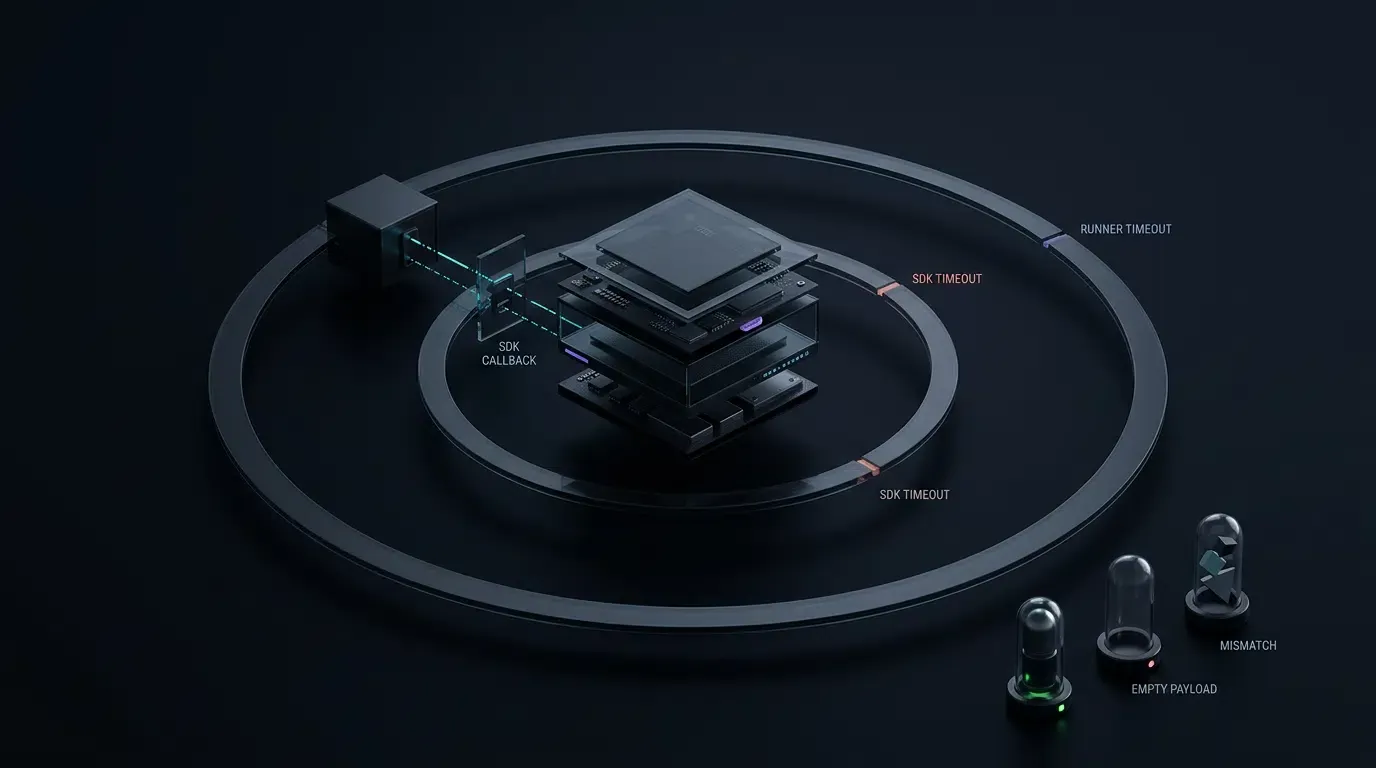
Before promoting builds from local CI fixture testing to production deployment, release teams validate the parameter restoration pipeline inside a staging environment. Unlike Layer 1 mock suites, Staging SDK verification evaluates the native OpoInstall SDK’s communication with origin servers using a clean three-step operational sequence:
- Staging Data Pre-population via Web Click: On a test device that does not currently have the target staging app installed, open Mobile Safari or Chrome, navigate to the instrumented staging H5 landing page, and tap the download trigger. This registers a pre-flight click context on origin attribution servers matching the expected parameters (
channelCode=ci_regression_01,cohort=beta_v2,role=tester). - Package Installation and First Open: On that same test device, install the pre-release staging binary via your designated testing channel (such as a direct APK install or Ad Hoc provisioning profile). Launch the application for the first time to trigger native SDK initialization. On Android, this can be initiated using an instrumentation command targeting the standalone test method:
On iOS, launch the staging build with./gradlew connectedDebugAndroidTest \ -Pandroid.testInstrumentationRunnerArguments.class=com.example.uatapp.AttributionUatEspressoTest#testStagingSdkCallbackResolutionQA_TEST_MODEomitted from the launch environment, allowingUatTestCoordinatorto query the liveOpoInstallSDK.defaultManager()?.getInstallParmsCompletedcallback. - Result Categorization and Parameter Verification:
- Verified Match: The SDK callback fires with non-null data, and returned fields (
channelCode,cohort,role) match staging specifications exactly. - SDK Parameter Timeout (
OPO_Codes.timeout): The SDK reports that parameter retrieval timed out. Differentiate this SDK status code from test runner wait timeouts, and verify network connectivity or staging AppKey validity. - Empty Payload / Null Return: The callback executes without data (
FAILED_NULLon iOS or nullOpoDataon Android). Inspect whether the device had an active internet connection when the H5 download trigger was clicked. - Test Runner Wait Timeout: The test harness exceeded its overall wait budget (e.g., 10 seconds) before the asynchronous callback resolved. Record test runner timeouts separately from SDK-level error codes.
- Verified Match: The SDK callback fires with non-null data, and returned fields (
Designing a Matrix for Comprehensive Channel Coverage
An automated User Acceptance Testing framework must validate more than a single happy-path referral link. Release candidates ingest traffic from diverse acquisition funnels, each requiring distinct parameter configurations:
- Static Channel Packaging vs Dynamic H5 Links: When evaluating Android channel packaging, test whether a package with an embedded channel ID behaves correctly on clean install. In deployment pipelines supporting both H5 links and pre-packaged channel APKs, verify whether the web link parameter or the embedded package metadata takes precedence under your specific SDK configuration.
- Deep Link Ingress Routing: In addition to validating raw parameter strings, the test harness must assert that destination screens display corresponding content (such as promotional discount banners or dedicated onboarding views) upon cold launches and warm resumes.
- Conversion Event Telemetry: Asserting that downstream in-app events—such as user registration calls (
register()) or custom effect points (saveEvent())—execute without exceptions. Teams must inspect staging network logs or backend event reports to confirm that events are credited to the expected test channel.
Manual QA vs Automated Parameter Validation Matrix
Transitioning from manual evaluation to automated testing yields quantifiable efficiency improvements across key release metrics:
| Verification Dimension | Manual QA Testing | Automated UAT Pipeline | Key Engineering Benefit |
|---|---|---|---|
| Execution Time | Manual device sweeps require significant tester time | Scripted suites execute within standard CI test budgets | Rapid regression cycles on pull requests |
| Device Scaling | Limited to available physical hardware in the office | Parallel execution across virtual and cloud device fleets | Broad OS version and screen size coverage |
| Payload Complexity | High risk of human transcription errors | Deterministic JSON schema assertion | Programmatic validation of complex parameters |
| Data Cleanliness | Manual uninstalls required between runs | Automated package cache purging | Reset application local state before test execution |
Troubleshooting Automated Parameter Validation Failures in Staging
Root Causes of Test Runner Attribution Discrepancies
When automated attribution assertions fail within CI/CD pipelines, engineers should investigate four primary technical root causes:
- Race Conditions in Test Lifecycles: If the test runner asserts UI state before the asynchronous attribution callback completes, tests fail intermittently with null or unpopulated values. Always utilize explicit latches or idling resources configured for realistic network latency (typically 5–10 seconds).
- Keystore Fingerprint Mismatches: On Android, if the test binary is signed with a local developer key while the staging domain association relies on a CI server keystore, domain checks fail, preventing App Link intents from delivering query parameters to the test runner.
- Simulator Virtualization Restrictions: Virtual hardware environments lack native telephony and mobile hardware identifiers. Verify whether staging SDK builds allow local parameter callbacks on virtualized targets before running integration suites.
- Stale Test Run Identifiers: Failing to isolate test identifiers across concurrent CI workers leads to race conditions where worker nodes overwrite staging state. Always append unique timestamps or worker IDs to test identifiers.
UAT Automated Attribution Assertion Ledger
Review this assertion ledger when debugging test runner failures in staging pipelines:
| Test Scenario | Mocked Input Context | Inspection Checkpoint | Expected Assertion Result | Remediated Failure State |
|---|---|---|---|---|
| Direct Channel Attribution | channelCode=ci_regression_01 |
opoData.getChannelCode() |
Returns exact channel string | Null channel code due to uninitialized SDK |
| Custom Payload Delivery | {"cohort":"beta_v2","role":"tester"} |
opoData.getBindData() |
JSON payload matches expected schema | Malformed JSON due to unescaped query encoding |
| Network Timeout Resilience | Simulated network stall during test | Callback status evaluation | Resolves with timeout status or error code | Unhandled exception blocking test suite execution |
| Clean Install Isolation | Re-run without package uninstallation | Local cache verification | Flags duplicate launch instance | Stale cached parameters returned from prior run |

Frequently Asked Questions
How does automated parameter validation differ from manual device testing in UAT?
Can install referrers be simulated programmatically on Android without Google Play?
How do test runners verify deferred attribution payloads on iOS simulators?
What criteria determine whether an attribution audit passes UAT?
Summary and Decision Framework
Automating parameter validation during User Acceptance Testing transforms a historically slow and error-prone manual testing phase into an automated quality gate. By orchestrating headless test runners, injecting app-side attribution fixtures, and asserting callback payloads programmatically, mobile engineering teams ensure release candidates preserve marketing context, channel attribution, and user onboarding parameters before production rollout.
Before promoting a release candidate past the UAT milestone, verify automation readiness against this technical checklist:
| Verification Gate | Technical Requirement | Inspection Method | Status Target |
|---|---|---|---|
| CI/CD Orchestration | Automated test runner integrated into build pipeline | Verify test suite executes on staging commits | Expected test cases execute; copies available JUnit XML reports and preserves Gradle exit code |
| Context Mocking | Programmatic injection of channel and custom payloads | Inspect Intent extra and launchEnvironment logs | Mock parameters delivered without unhandled exceptions |
| Asynchronous Assertion | Idling resources and wait timers handle network latency | Distinguish SDK timeouts from test runner wait limits | Callbacks resolve or report explicit expected status codes |
| State Sanitization | App storage purged between test iterations | Confirm clean-state execution across all runs | Local application data reset prior to each test run |
| Telemetry Isolation | Staging AppKey or dedicated test channel configured | Audit console reports for zero production pollution | Test traffic isolated via staging profile or filtered channel codes |
To establish programmatic attribution testing pipelines and configure dedicated staging environments, review the integration resources in the OpoInstall documentation center and manage pre-release channels inside the OpoInstall developer console.
| Term | Definition | Related Entity | Search Intent Role |
|---|---|---|---|
| User Acceptance Testing | Formal verification phase evaluating builds against requirements. | Beta Testing | Informational and Engineering |
| Parameter Validation | Programmatic assertion of attribution payloads in test runners. | Mock Referrer | Technical and Quality Assurance |
| Mock Referrer | Simulated installation payload injected into pre-release builds. | Android Debug Bridge | Technical and Testing |
| App Launch | Initial application execution where parameter restoration occurs. | Deferred Deep Linking | Technical and Operational |
Related Materials
-
Concepts: User Acceptance Testing, Automated Parameter Assertion, Mock Referrer Simulation, Test Runner Idling Resources
-
Technologies: Android Debug Bridge, Espresso Test Framework, Apple XCUITest, Xcode simctl, Play Install Referrer API
-
Standards and Official References:
-
SDK Documentation and Tools:
Share this article