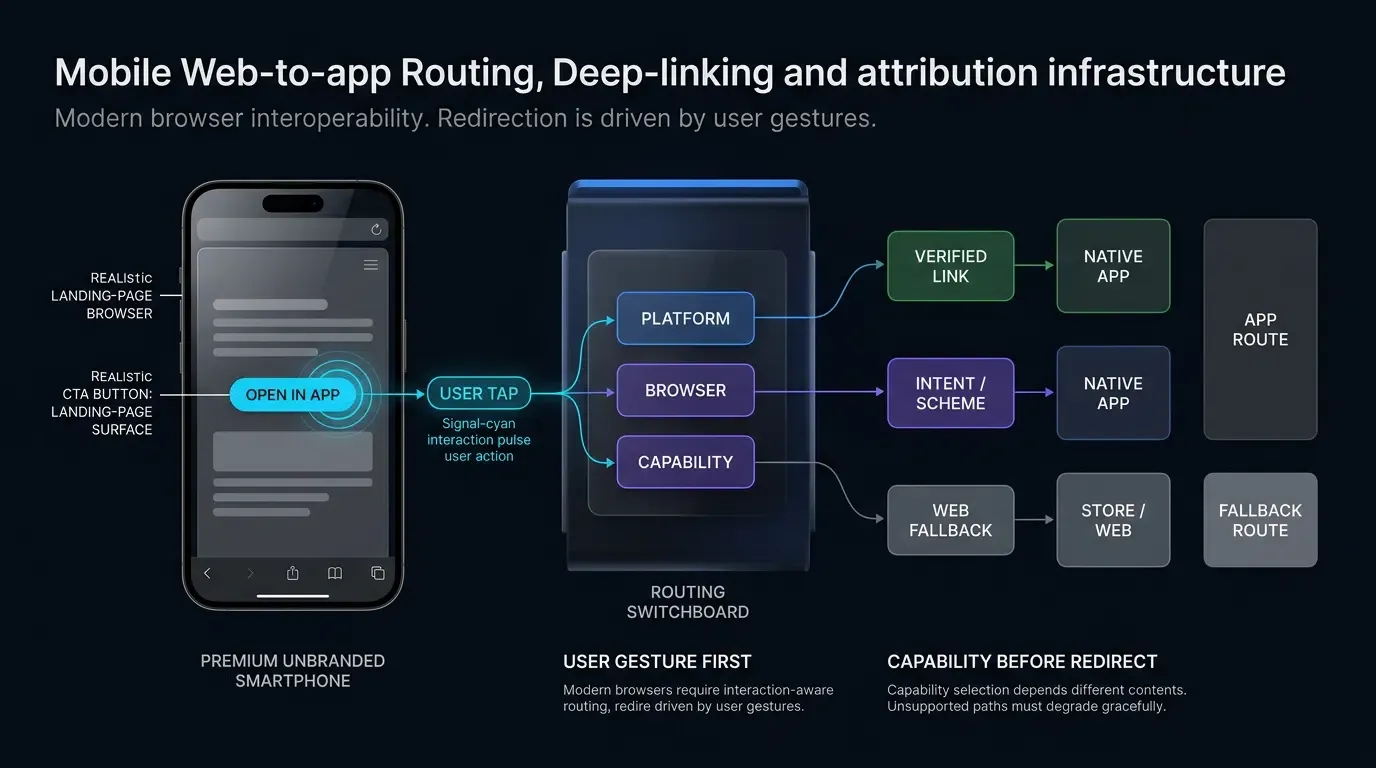
What is web to app redirection and how to implement it? Web to App redirection routes mobile website visitors to native applications using Universal Links, App Links, or fallback schemes, executing user-triggered JavaScript to launch installed apps or redirect uninstalled users to app stores.
Web to app redirection is an automated routing mechanism that transfers mobile web visitors from landing pages into designated native mobile application views. By evaluating device platforms, browser capabilities, and launch outcome heuristics, dynamic redirection frameworks execute direct deep-link wakeups for existing users while routing uninstalled users to app stores with contextual parameters where supported by the deployed attribution system.
| Term | Definition | Related Entity | Search Intent Role |
|---|---|---|---|
| Web to App | The architectural process of routing web browser visitors into native mobile apps. | Mobile Deep Linking | Informational / Commercial |
| Apple Smart App Banner | A Safari-native promotional banner configured via the apple-itunes-app meta tag. | Safari Web Navigation | Informational |
| Custom Web-to-App Banner | A cross-browser HTML and JavaScript component that presents dynamic app launch or download CTAs. | Web to App Redirection | Informational |
| Custom URL Scheme | A proprietary URI protocol allowing external web pages to launch native applications. | Deep Link Routing | Technical / Informational |
Why Web to App Redirection Is Critical for Mobile Funnel Conversion
The Conversion Gap: Comparing Mobile Web Bounce Rates Against Native App LTV
Mobile websites represent an expansive acquisition channel, capturing top-of-funnel traffic from paid search, social discovery, display ads, and organic referrals. However, mobile web visitors typically exhibit lower conversion rates, shorter session durations, and higher bounce rates compared to native application users. In contrast, native mobile applications offer optimized user interfaces, local session persistence, hardware-accelerated rendering, and support for push notifications, supporting higher long-term engagement and Lifetime Value (LTV).
The core operational objective of Web to App redirection is bridging this commercial gap. By transferring mobile web visitors directly into native app experiences, growth teams capitalize on user purchase intent before friction causes session abandonment. When a mobile visitor explores a promotional offer on a mobile browser, routing that user directly to the corresponding in-app product page preserves high-intent momentum and eliminates redundant authentication or navigation steps.
The Technical Dilemma: Why Static Links Fail to Deliver Unified User Journeys
Relying on basic static hyperlinks introduces systematic friction across modern mobile operating systems. A static link pointing exclusively to an App Store or Google Play Store listing introduces immediate friction for existing users who already have the application installed; tapping the link launches the store listing rather than opening the installed application. Conversely, configuring a static custom URI scheme (such as myapp://promo) functions only if the application is currently installed; if the user lacks the app, desktop and mobile browsers display jarring error messages, such as Safari’s “cannot open the page because the address is invalid” modal or unhandled protocol errors in embedded containers.
Furthermore, static store-only links generally do not preserve application routing context across installation unless a deferred-routing system is present. If an uninstalled user is routed directly to an app store listing without contextual parameter stitching, launching the newly installed app drops the user onto a generic home screen. The user must then search manually for the promotional campaign or item that initially triggered the download. This contextual disconnect inflates onboarding drop-offs and reduces paid marketing efficiency.
The Role of Contextual Parameter Passing in Preserving Promotional Intent
Automated Web to App redirection frameworks overcome static link limitations by implementing dynamic parameter transmission. When a user interacts with a call-to-action (CTA) element on a mobile landing page, client-side routing scripts capture contextual parameters—including campaign tags, referral tokens, coupon identifiers, and target scene routes.
OpoInstall, a mobile attribution and deep linking platform, enables frontend developers to bind dynamic query parameters to client-side redirection functions. If the application is already installed, the system routes the user to the native app and delivers the payload via operating system delegates. If the application is absent, the routing layer captures the contextual parameters on the attribution server, directs the user to the appropriate app store, and restores the original parameters upon the application’s first launch post-installation, where supported by the deployed deferred-deep-linking system and permitted by platform privacy constraints.
How Does Modern Browser Navigation Affect Web to App Routing
The User-Gesture Imperative: Why Modern Browsers Block Programmatic Auto-Redirects
Historically, mobile web pages attempted to wake native applications automatically by executing programmatic redirects upon page load, such as injecting dynamic iframe elements pointing to custom URI schemes or executing window.location.href = "myapp://" inside automated timer loops. Modern mobile browsers—including Apple Safari, Google Chrome, and Mozilla Firefox—actively restrict unprompted programmatic navigation.
Browser security policies enforce distinct user-activation requirements depending on the routing mechanism:Chrome Intent URIs: Google Chrome requires a direct user gesture (such as an explicit tap or click event) to trigger intent:// protocol handling; automated scripts or timer-based executions without prior user activation are ignored.
- Popup and External Scheme Modals: Safari and Firefox suppress modal confirmations or protocol handoffs that lack direct user interaction to prevent abusive background redirection and clickjacking.
- Verified HTTPS Links: While Universal Links and App Links follow system-level URL resolution heuristics, invoking them via automated script loops without an interactive trigger frequently causes browsers to default to standard web navigation.
Safari Same-Domain Limitations: Navigating Universal Link Cross-Domain Boundaries
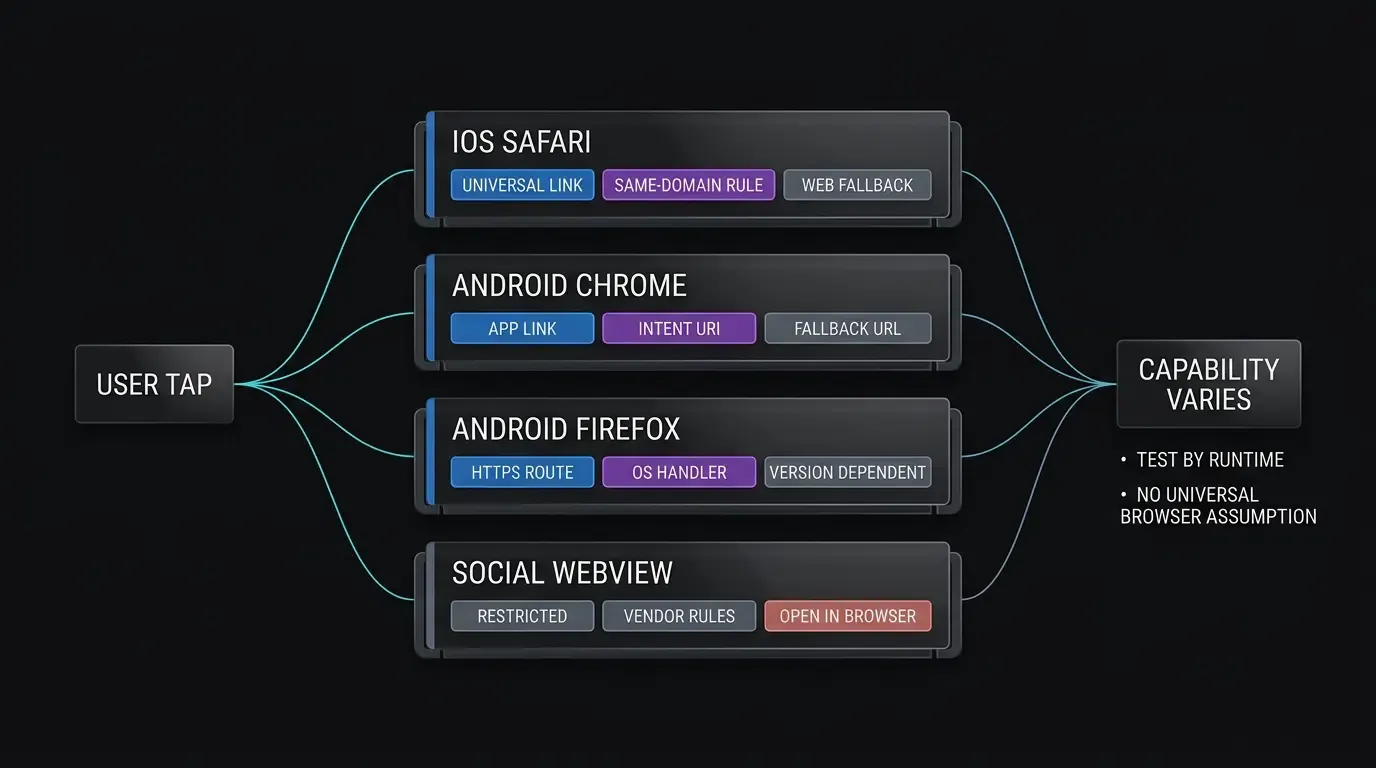
Apple’s Universal Links provide cryptographic domain verification for iOS applications. However, Apple Safari enforces a strict same-domain navigation constraint, as documented in Apple Developer Documentation on Allowing Apps and Websites to Link to Your Content. If a user browses a web page hosted on https://example.com/promo and taps a Universal Link pointing to the exact same domain (https://example.com/app/open), Safari assumes the user intends to continue browsing the website and executes standard web navigation rather than launching the native app.
When the desired Safari behavior is to leave the currently browsed site and open the app, using a different associated subdomain is an Apple-documented pattern. The web landing page should reside on a distinct domain or dedicated subdomain (such as https://www.example.com or https://link.example.com) while the Universal Link Associated Domain routes through a separate destination host (such as https://app.example.com). Tapping a link pointing across distinct subdomain boundaries satisfies Safari’s navigation heuristics and invokes native app execution.
Google Chrome Intent URIs: Structuring Fallback Packages on Android
On Android devices running Google Chrome, web developers can leverage Android Intent URIs to initiate native app wakeups and specify automated browser fallbacks within a single URI string. An Android Intent URI uses the intent:// syntax, encoding the destination route, the target application package name, and a browser fallback URL:
intent://product/detail/1024#Intent;scheme=myapp;package=com.example.app;S.browser_fallback_url=https%3A%2F%2Fplay.google.com%2Fstore%2Fapps%2Fdetails%3Fid%3Dcom.example.app;end
When a user taps an Intent URI in Chrome:
- Activity Resolution: Chrome attempts to resolve the Intent to an eligible, browsable activity matching the declared package and scheme.
- Native Launch: If an eligible activity is present, the operating system launches the target application and delivers the intent payload.
- Fallback Execution: If no matching application is installed, Chrome catches the resolution failure and navigates to the URL defined in
S.browser_fallback_url, directing the user to Google Play or an explicit web landing page without displaying unhandled protocol error dialogues.
Detecting App Wakeups via the W3C Page Visibility API (document.hidden)
When utilizing standard custom URL schemes or Universal Links, web pages evaluate whether an app launch occurred in order to halt secondary fallback timers. Because browser JavaScript cannot directly query native operating system process tables to confirm application states, frontend architectures rely on the W3C Page Visibility Level 2 Specification.
When a browser successfully hands off execution to an external application, the browser tab transitions into the background, altering its visibility state. Client-side scripts listen for the visibilitychange event and inspect the document.hidden property:
document.addEventListener("visibilitychange", function() {
    if (document.hidden) {
        // Browser lost foreground visibility; clear pending store fallback timer
        clearTimeout(fallbackTimer);
    }
});
Using visibilitychange provides a signal that the browser lost foreground focus following a launch attempt. While it does not by itself prove that the specific target application launched successfully, it serves as a useful suppression signal to prevent unwanted store redirects while the user is outside the browser.
Technical Mechanisms of Direct Wakeups and Delayed Store Fallbacks
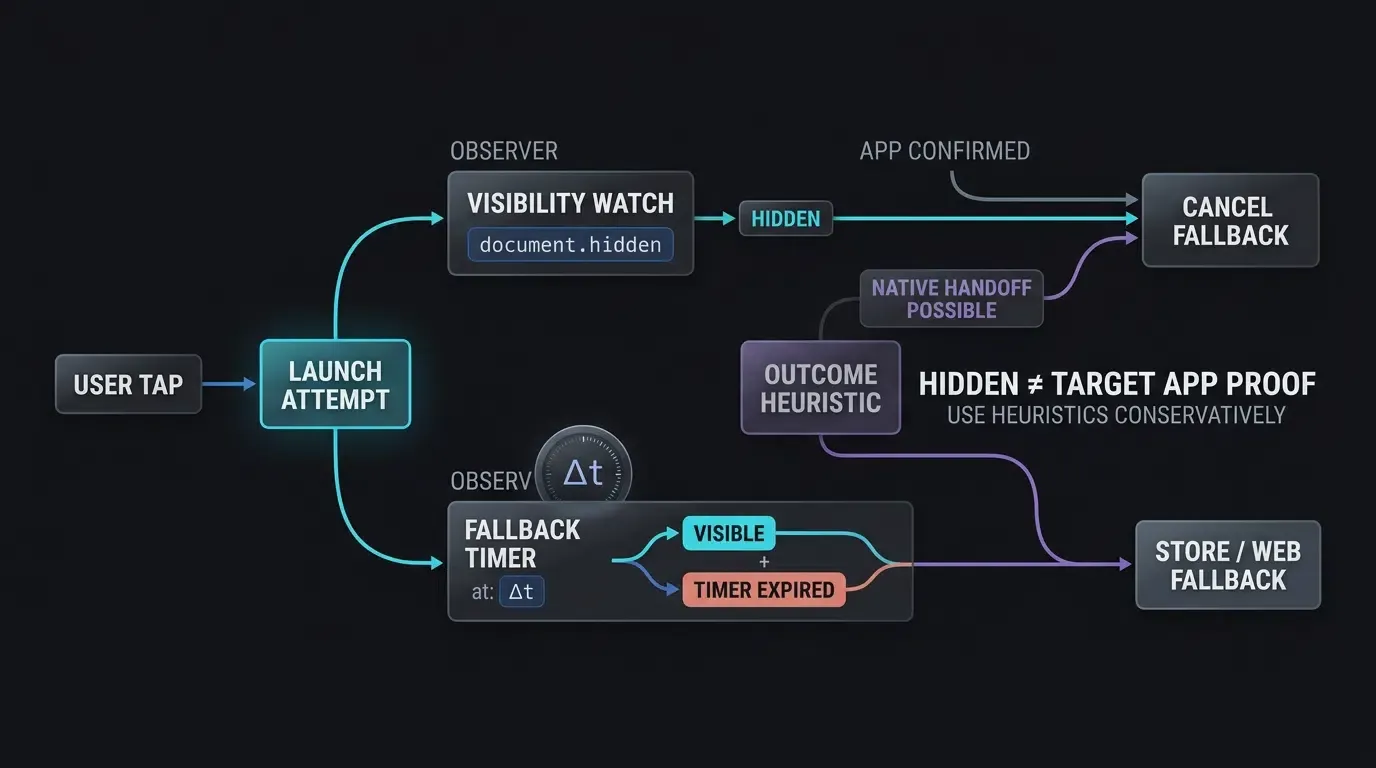
The Multi-Tiered Redirection Cascade: Universal Links, Custom Schemes, and Store Fallbacks
Production Web to App architectures deploy a multi-tiered redirection cascade that gracefully degrades across diverse operating systems, browser vendors, and installation states:
- Tier 1: OS-Verified Deep Links (Universal Links and App Links): Primary routing utilizes HTTPS domain-verified links. On iOS 9+ and Android 6.0+, these links provide direct, dialog-free application launching when the app is installed, while falling back to web navigation when uninstalled.
- Tier 2: Custom URI Schemes and Intent Protocols: When verified links are unavailable or operating within legacy browser versions, the routing engine falls back to custom URI schemes (
myapp://) or Android Intent URIs triggered by direct user clicks. - Tier 3: Contextual Store Redirection: If neither native protocol launches an app session, the fallback layer routes the browser to the Apple App Store, Google Play Store, or an explicit download endpoint while passing attribution parameters to the backend where supported.
Avoiding Legacy Hidden-Iframe Probing in Modern Browsers
A historical workaround for custom schemes involved injecting hidden iframe elements into the DOM to probe whether an app was installed without navigating away from the page. In modern mobile browsers, this approach is deprecated and counterproductive:
- Modern versions of Apple Safari and Google Chrome actively block custom scheme invocations originating from dynamically injected iframes.
- In Safari, attempting to load an uninstalled scheme via an iframe can still trigger jarring “invalid address” alerts.
- Hidden iframe probing circumvents user-gesture tracking, triggering browser security warnings.
Rather than relying on silent iframe probing, modern architectures utilize verified Universal Links and App Links. When custom schemes must be supported as fallbacks, they should be invoked directly from user-initiated click handlers accompanied by explicit, user-controlled fallback CTAs.
Timer-Based and Visibility-Based Fallback Timing Strategies
To transition uninstalled users to app store listings without interfering with native app launches, client scripts deploy an empirical heuristic combining visibility checks and execution timers. When a user clicks a Web to App CTA button:
- Launch Attempt: The script attempts to trigger the native app via Universal Link or custom scheme.
- Timer Arming: A JavaScript timeout is set (typically an implementation-specific heuristic window between 1500ms and 2500ms).
- Heartbeat Calculation: The script records the timestamp before triggering navigation and evaluates the elapsed time upon timer execution. If an app launch occurred, operating system suspension delays the timer execution; when the user eventually returns to the browser, the elapsed time substantially exceeds the set interval (
), allowing the script to cancel store redirection. - Fallback Redirection: If
document.hiddenremains false and elapsed time aligns closely with the set interval (), the launch attempt did not produce a foreground-loss signal within the configured window, and the script proceeds with explicit store redirection.
[User Taps Web CTA Button]
             │
             ▼
[Browser & OS Detection Layer]
   ┌─────────┴─────────┐
   ▼                                      ▼
[iOS Safari]                    [Android Chrome / Firefox]
   │                                      │
   ▼                                      ▼
[Universal Link]               [Verified App Link / Intent]
   │                                      │
┌──┴─────────┐         ┌──┴─────────┐
▼                        ▼         ▼                        ▼
Eligible             Web Path     Eligible                  Web Path
│                        │         │                        │
▼                        ▼         ▼                        ▼
[App Opens]        [Web]    [App Opens]                 [Web]
             │                                  │
             ▼                                  ▼
     [Visibility Check]                  [Intent Fallback]
             │                                  │
             ▼                                  ▼
     [App Store Redirect]              [Play Store Redirect]
How to Implement Web to App Redirection with JavaScript SDKs
Initializing Client-Side Redirection via the OpoInstall Web JS SDK
The OpoInstall Web JS SDK provides cross-browser routing, abstracting the complexities of user-agent parsing, Universal Link routing, and fallback timing. Developers initialize the SDK on their web landing pages, configuring their unique application identifier and routing parameters.
The script should be loaded asynchronously and initialized during initial DOM construction. Review the Web SDK integration documentation for full interface parameters and API specifications.
Binding User-Triggered Clicks to m.wakeupOrInstall() Methods
To comply with modern browser user-gesture restrictions, redirection must be bound directly to physical touch or click events. The OpoInstall SDK exposes the wakeupOrInstall() method, which orchestrates the redirection cascade:
- It evaluates the client device type (iOS, Android, desktop).
- It generates appropriate Universal Links or Chrome Intent URIs on the fly.
- It attaches contextual parameters to the launch request.
- It manages visibility listeners and fallback timers automatically.
Passing Dynamic Query Parameters Across Web-to-App Transitions
Dynamic parameters passed during web redirection can include promotional codes, inviter tokens, marketing channel IDs, or in-app routing destinations. The frontend script captures these parameters from the URL query string, sanitizes the inputs against strict length and character constraints, and binds them to the redirection payload.
The technical implementation below demonstrates how to configure the OpoInstall Web JS SDK on an H5 landing page, attach sanitized campaign parameters, and bind the execution to an interactive button click:
// Web: H5 Landing Page Implementation with OpoInstall Web JS SDK
// Reference integration example; verify the script URL, constructor, callback lifecycle,
// parameter schema, and wakeupOrInstall() signature against the OpoInstall Web SDK version currently deployed in production.
(function() {
    // Dynamic script injection for OpoInstall Web SDK
    var script = document.createElement("script");
    script.type = "text/javascript";
    script.src = "https://web.cdn.opoinstallcloud.com/openinstall.js";
    script.onload = function() {
        // Initialize the OpenInstall Web SDK instance
        var openInstall = new OpenInstall({
            appKey: "YOUR_OPOINSTALL_APPKEY",
            onready: function() {
                var m = this;
                var openAppButton = document.getElementById("openAppBtn");

                // Bind redirection directly to a user click event (satisfies browser user-gesture requirements)
                openAppButton.addEventListener("click", function() {
                    var urlParams = new URLSearchParams(window.location.search);

                    // Input sanitization: validate parameters against strict allowlists and length limits
                    var rawTarget = urlParams.get("target") || "product_detail";
                    var rawId = urlParams.get("id") || "";
                    var rawSource = urlParams.get("utm_source") || "web_campaign";
                    var rawChannel = urlParams.get("channelCode") || "web_landing";

                    var allowedScenes = ["product_detail", "promo_hub", "category_view"];
                    var targetScene = allowedScenes.indexOf(rawTarget) !== -1 ? rawTarget : "product_detail";

                    // Enforce alphanumeric and length constraints on identifiers
                    var idRegex = /^[A-Za-z0-9_-]{1,64}$/;
                    var targetId = idRegex.test(rawId) ? rawId : "DEFAULT_ID";

                    var channelRegex = /^[A-Za-z0-9_-]{1,32}$/;
                    var channelCode = channelRegex.test(rawChannel) ? rawChannel : "web_landing";

                    var campaignSource = rawSource.replace(/[^A-Za-z0-9_-]/g, "").substring(0, 32);

                    var dynamicPayload = {
                        targetScene: targetScene,
                        targetId: targetId,
                        campaignSource: campaignSource
                    };

                    // Execute multi-tiered redirection cascade:
                    // 1. Attempts Universal Link / App Link direct wakeup
                    // 2. Falls back to store download if launch signals are not detected
                    m.wakeupOrInstall({
                        data: dynamicPayload,
                        channelCode: channelCode
                    });
                });
            }
        }, document.getElementById("openAppBtn"));
    };
    document.head.appendChild(script);
})();
// Android: Custom WebViewClient Overriding shouldOverrideUrlLoading with Frame Boundary & Route Security
// Intercepts custom schemes, intent protocols, and internal App Links with strict target validation
package com.example.app.webview

import android.content.Context
import android.content.Intent
import android.net.Uri
import android.util.Log
import android.webkit.WebResourceRequest
import android.webkit.WebView
import android.webkit.WebViewClient

data class ValidatedAppRoute(val path: String, val queryParams: Map<String, String>)

object AppLinkRouteValidator {
    private val allowedPrefixes = setOf("/open/", "/product/", "/promo/")
    private val allowedQueryKeys = setOf("target", "id", "promo", "utm_source")

    fun validate(uri: Uri): ValidatedAppRoute? {
        val path = uri.path ?: ""
        if (allowedPrefixes.none { path.startsWith(it) }) {
            return null
        }

        val sanitizedParams = mutableMapOf<String, String>()
        for (name in uri.queryParameterNames) {
            // Strict security posture: reject request if unknown query keys are present
            if (name !in allowedQueryKeys) {
                return null
            }
            val value = uri.getQueryParameter(name) ?: ""
            if (value.length <= 64 && value.matches(Regex("^[A-Za-z0-9_-]+$"))) {
                sanitizedParams[name] = value
            } else {
                return null
            }
        }

        return ValidatedAppRoute(path, sanitizedParams)
    }
}

object CustomSchemeValidator {
    private val allowedSchemes = setOf("myapp")
    private val allowedHosts = setOf("open", "product", "event")
    private val allowedPathPrefixes = setOf("/detail/", "/view/", "/main/")
    private val allowedQueryKeys = setOf("target", "id", "promo", "utm_source")

    fun validate(uri: Uri): Uri? {
        val scheme = uri.scheme?.lowercase() ?: return null
        val host = uri.host?.lowercase() ?: return null
        val path = uri.path ?: ""

        if (!allowedSchemes.contains(scheme) || !allowedHosts.contains(host)) {
            return null
        }

        if (allowedPathPrefixes.none { path.startsWith(it) }) {
            return null
        }

        for (name in uri.queryParameterNames) {
            if (name !in allowedQueryKeys) return null
            val value = uri.getQueryParameter(name) ?: ""
            if (value.length > 128 || !value.matches(Regex("^[A-Za-z0-9_-]+$"))) {
                return null
            }
        }

        return uri
    }
}

class CustomWebViewClient(
    private val context: Context,
    private val internalRouter: (ValidatedAppRoute) -> Unit
) : WebViewClient() {

    override fun shouldOverrideUrlLoading(view: WebView?, request: WebResourceRequest?): Boolean {
        request ?: return false

        // Security requirement: Restrict external app routing to main frame navigations only
        if (!request.isForMainFrame) {
            return false // Subframes and iframes cannot trigger external intents or custom schemes
        }

        val url = request.url.toString()
        return handleUrlNavigation(url)
    }

    @Deprecated("Deprecated in Java")
    override fun shouldOverrideUrlLoading(view: WebView?, url: String?): Boolean {
        if (url == null) return false

        val uri = Uri.parse(url)
        val scheme = uri.scheme?.lowercase()

        // Legacy callback lacks reliable isForMainFrame metadata; do not route external schemes
        return if (scheme == "http" || scheme == "https") {
            false // Allow standard web content loading
        } else {
            Log.w("WebViewClient", "Blocked external scheme on legacy callback: $scheme")
            true // Suppress unhandled scheme errors without launching external intents
        }
    }

    private fun handleUrlNavigation(url: String): Boolean {
        val uri = Uri.parse(url)
        val scheme = uri.scheme?.lowercase() ?: return false

        // 1. Handle HTTP / HTTPS and Internal App Links
        if (scheme == "http" || scheme == "https") {
            // Check if URL matches the host app's own App Link domain
            if (scheme == "https" && uri.host?.lowercase() == "app.example.com") {
                val validatedRoute = AppLinkRouteValidator.validate(uri)
                if (validatedRoute != null) {
                    Log.i("WebViewClient", "Internal App Link verified. Dispatching to internal router.")
                    internalRouter(validatedRoute)
                } else {
                    Log.w("WebViewClient", "Rejected malformed or unauthorized internal App Link: $uri")
                }
                return true // Handled internally; cancel webview loading
            }
            return false // Allow WebView to load standard web content natively
        }

        // 2. Validate custom schemes against strict scheme, host, path, and query allowlists
        val validatedUri = CustomSchemeValidator.validate(uri)
        if (validatedUri != null) {
            return launchSafeIntent(Intent(Intent.ACTION_VIEW, validatedUri))
        }

        // 3. Handle Chrome Intent URIs with safe reconstruction
        if (scheme == "intent") {
            return try {
                val parsed = Intent.parseUri(url, Intent.URI_INTENT_SCHEME)
                val targetPackage = parsed.`package`
                val allowedPackages = setOf("com.example.app", "com.example.partner")

                if (targetPackage != null && allowedPackages.contains(targetPackage)) {
                    val rawDataUri = parsed.data
                    if (rawDataUri != null) {
                        val validatedDataUri = CustomSchemeValidator.validate(rawDataUri)
                        if (validatedDataUri != null) {
                            // Reconstruct a clean, dedicated ACTION_VIEW Intent rather than executing raw parsed object
                            val safeIntent = Intent(Intent.ACTION_VIEW, validatedDataUri).apply {
                                `package` = targetPackage
                                addCategory(Intent.CATEGORY_BROWSABLE)
                                flags = Intent.FLAG_ACTIVITY_NEW_TASK
                            }
                            launchSafeIntent(safeIntent)
                        } else {
                            Log.w("WebViewClient", "Rejected intent with invalid data URI: $rawDataUri")
                            true
                        }
                    } else {
                        Log.w("WebViewClient", "Rejected intent lacking data URI payload")
                        true
                    }
                } else {
                    Log.w("WebViewClient", "Rejected intent targeting unverified package: $targetPackage")
                    true // Cancel unverified package intent
                }
            } catch (e: Exception) {
                Log.e("WebViewClient", "Failed to parse intent URI: $url", e)
                true // Suppress unhandled scheme errors
            }
        }

        // Reject unknown schemes to avoid net::ERR_UNKNOWN_URL_SCHEME errors
        Log.w("WebViewClient", "Blocked unverified scheme navigation: $scheme")
        return true
    }

    private fun launchSafeIntent(intent: Intent): Boolean {
        return try {
            intent.flags = Intent.FLAG_ACTIVITY_NEW_TASK
            context.startActivity(intent)
            true
        } catch (e: Exception) {
            Log.w("WebViewClient", "No activity found to handle intent: ${intent.data}", e)
            true // Prevent webview crash
        }
    }
}
// iOS: WKNavigationDelegate Implementation for Universal Links and Custom Scheme Interception
// Intercepts navigation actions inside WKWebView and enforces domain, path, and query security boundaries
import UIKit
import WebKit

struct ValidatedAppRoute {
    let path: String
    let queryParams: [String: String]
}

class AppRouteValidator {
    static let allowedPrefixes = ["/open/", "/product/", "/promo/"]
    static let allowedQueryKeys = ["target", "id", "promo", "utm_source"]

    static func validate(url: URL) -> ValidatedAppRoute? {
        let path = url.path
        guard allowedPrefixes.contains(where: { path.hasPrefix($0) }) else {
            return nil
        }

        var sanitizedParams: [String: String] = [:]
        if let components = URLComponents(url: url, resolvingAgainstBaseURL: false),
           let queryItems = components.queryItems {
            let validChars = CharacterSet(charactersIn: "abcdefghijklmnopqrstuvwxyzABCDEFGHIJKLMNOPQRSTUVWXYZ0123456789_-")
            for item in queryItems {
                let name = item.name
                // Fail-closed validation: reject URL if unknown query keys exist
                guard allowedQueryKeys.contains(name) else { return nil }
                let value = item.value ?? ""
                if value.count <= 64 && value.rangeOfCharacter(from: validChars.inverted) == nil {
                    sanitizedParams[name] = value
                } else {
                    return nil
                }
            }
        }

        return ValidatedAppRoute(path: path, queryParams: sanitizedParams)
    }
}

class CustomSchemeValidator {
    static let allowedSchemes = ["myapp"]
    static let allowedHosts = ["open", "product", "event"]
    static let allowedPathPrefixes = ["/detail/", "/view/", "/main/"]
    static let allowedQueryKeys = ["target", "id", "promo", "utm_source"]

    static func validate(url: URL) -> URL? {
        guard let scheme = url.scheme?.lowercased(), allowedSchemes.contains(scheme) else {
            return nil
        }
        guard let host = url.host?.lowercased(), allowedHosts.contains(host) else {
            return nil
        }

        let path = url.path
        if !path.isEmpty && !allowedPathPrefixes.contains(where: { path.hasPrefix($0) }) {
            return nil
        }

        // Validate query parameter keys and values with fail-closed posture
        if let components = URLComponents(url: url, resolvingAgainstBaseURL: false),
           let queryItems = components.queryItems {
            let validChars = CharacterSet(charactersIn: "abcdefghijklmnopqrstuvwxyzABCDEFGHIJKLMNOPQRSTUVWXYZ0123456789_-")
            for item in queryItems {
                guard allowedQueryKeys.contains(item.name) else { return nil }
                let value = item.value ?? ""
                if value.count > 128 || value.rangeOfCharacter(from: validChars.inverted) != nil {
                    return nil
                }
            }
        }

        return url
    }
}

class CustomWebViewController: UIViewController, WKNavigationDelegate {

    var webView: WKWebView!

    override fun viewDidLoad() {
        super.viewDidLoad()

        let configuration = WKWebViewConfiguration()
        webView = WKWebView(frame: view.bounds, configuration: configuration)
        webView.navigationDelegate = self
        view.addSubview(webView)
    }

    func webView(
        _ webView: WKWebView,
        decidePolicyFor navigationAction: WKNavigationAction,
        decisionHandler: @escaping (WKNavigationActionPolicy) -> Void
    ) {
        guard let url = navigationAction.request.url else {
            decisionHandler(.allow)
            return
        }

        let scheme = url.scheme?.lowercased() ?? ""

        // 1. Handle Host App Associated Domain (Own Universal Link)
        // Apple documentation note: Opening an app's own Universal Link via UIApplication.open()
        // will not route back into the app. It must be validated and dispatched to the internal router directly.
        if let host = url.host?.lowercased(), host == "app.example.com" {
            NSLog("[WKWebView] Host Associated Domain detected: %@", url.path)
            if let validatedRoute = AppRouteValidator.validate(url: url) {
                AppInternalRouter.shared.navigate(to: validatedRoute)
            } else {
                NSLog("[WKWebView] Suppressed unauthorized or malformed internal route: %@", url.absoluteString)
            }
            decisionHandler(.cancel)
            return
        }

        // 2. Handle Custom Schemes with Strict Allowlist and Route Validation
        if scheme != "http" && scheme != "https" && scheme != "about" {
            if let validatedURL = CustomSchemeValidator.validate(url: url) {
                UIApplication.shared.open(validatedURL, options: [:]) { success in
                    if !success {
                        NSLog("[WKWebView] Failed to launch allowed custom scheme: %@", validatedURL.absoluteString)
                    }
                }
            } else {
                NSLog("[WKWebView] Suppressed unauthorized scheme or route: %@", url.absoluteString)
            }
            decisionHandler(.cancel)
            return
        }

        // 3. Standard Web Navigation Allowed
        decisionHandler(.allow)
    }
}
Overcoming WebView and In-App Browser Sandboxes
The In-App Browser Challenge: Navigating Restrictive WebViews in Social Apps
A substantial proportion of mobile web traffic originates from links shared inside social media platforms and messaging applications (such as WeChat, Line, Instagram, and Facebook Messenger). When a user taps a link within these apps, the platform renders the landing page inside an embedded in-app browser (WebView) rather than opening the system’s default browser (Safari or Chrome).
Because social in-app browsers enforce vendor-specific sandboxes, their capabilities vary significantly:
- Some environments intercept and suppress custom URI schemes (
myapp://) entirely. - Universal Link handoffs may be restricted, keeping users trapped inside the social app’s webview.
- Direct APK file downloads or external store redirects may be blocked depending on platform policies and app versions.
Rather than assuming a universal automated breakout mechanism, Web to App architectures detect these runtimes and provide clear visual guidance directing users to open the link in their system’s default browser (e.g., via the native “Open in Safari” or “Open in Chrome” menu).
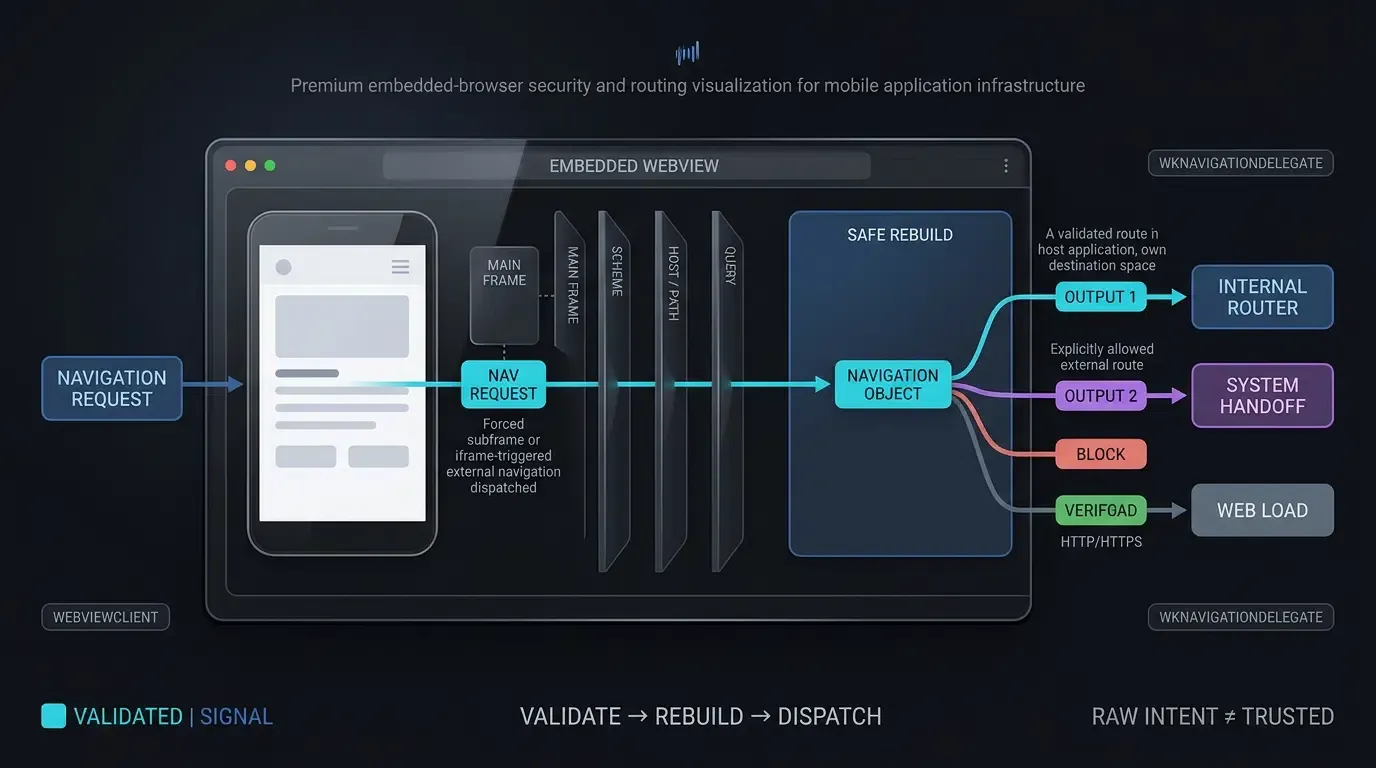
Android WebView Handling: Overriding shouldOverrideUrlLoading with Strict Allowlisting
When mobile applications host embedded WebViews within their own native interfaces, developers must configure appropriate navigation interception. By default, Android’s WebView recognizes only standard web protocols (http:// and https://). When a web page within the WebView attempts to navigate to a custom URI scheme (myapp://) or an Android intent URI (intent://), the WebView throws an unhandled protocol error: net::ERR_UNKNOWN_URL_SCHEME.
As outlined in Android Developers Reference on WebViewClient shouldOverrideUrlLoading, developers must extend WebViewClient and override shouldOverrideUrlLoading. In accordance with OWASP Mobile Application Security Testing Guide Guidance on Insecure Deep Links, developers must enforce strict scheme allowlisting, verify that navigation events originate from the main frame (request.isForMainFrame) to prevent iframe abuse, and reconstruct safe ACTION_VIEW intents rather than dispatching unconstrained raw intent objects to the operating system.
iOS WKWebView Handling: Implementing decidePolicyForNavigationAction and Self-Domain Boundaries
On iOS, applications embedding WKWebView components must manage navigation policies via the Apple Developer Guidance on WKNavigationDelegate.
A critical architectural distinction exists regarding Universal Links: as documented by Apple, if an application calls UIApplication.shared.open() on a Universal Link pointing to its own associated domain, iOS will not open the link in the host app as a Universal Link. Therefore:
- Host App Associated Domains: If the URL matches the host app’s own associated domain (
app.example.com), the application must cancel the webview load (decisionHandler(.cancel)), validate the route path and parameters against strict allowlists, and invoke the app’s internal navigation router directly. - Allowed External Schemes: If the URL contains an allowed custom scheme targeting an external app, verify the scheme, host, path, and query format against an explicit allowlist before delegating to
UIApplication.shared.open.
Distinguishing Apple Smart App Banners from Custom Web-to-App Banners
In scenarios where full-page redirection would disrupt the user experience (such as content blogs, news portals, or technical documentation), growth teams deploy promotional banners. Engineering teams should distinguish between two distinct banner architectures:
- Apple Smart App Banners: A native Safari feature declared via
<meta name="apple-itunes-app" content="app-id=myAppID">. This banner is rendered natively by Safari on iOS devices without JavaScript execution, but does not display on Android or third-party browsers. - Custom Web-to-App CTA Banners: JavaScript-rendered HTML components that can render across major mobile browsers, while app-opening behavior remains browser- and platform-dependent. These banners display dynamic app icons, titles, ratings, and contextual CTAs, triggering
m.wakeupOrInstall()to pass runtime parameters directly into the native app. Developers can acquire client libraries directly from the OpoInstall SDK download center.
Cross-Browser Web to App Redirection Compatibility Matrix
Evaluating Redirection Protocols Across Mobile Browser Environments
Because browser vendors continuously update navigation security policies, engineering teams must evaluate redirection protocols against specific browser runtimes to maintain reliable user funnels.
Browser Environment Technical Capabilities and Behavioral Limitations
The table below summarizes cross-browser technical compatibility, user-gesture constraints, and fallback mechanisms:
| Browser / Environment | Primary Supported Protocol | User Activation Constraints | App Wakeup Behavior | Uninstalled Fallback Mechanism |
|---|---|---|---|---|
| iOS Safari | Universal Links | User gesture required for custom schemes; cross-subdomain pattern recommended for Universal Links | Launches app directly if eligible and verified | Loads web URL in browser |
| Android Chrome | Android App Links / Intent URIs | Direct user gesture required for intent:// and custom schemes |
Bypasses chooser dialog if verified host | Navigates to S.browser_fallback_url or Play Store |
| Android Firefox | HTTPS links / OS-supported app routing where eligible | Browser-version dependent; validate against current Firefox Android behavior | May vary by Firefox version and Android link-handler state | Follows standard web link |
| In-App Social WebViews | Varies by app and version | Subject to social container sandboxes and click interception | Frequently intercepted or restricted | Guide user to system default browser (Safari / Chrome) |
| Embedded Android WebView | Intercepted via shouldOverrideUrlLoading |
Host app implementation controls activation rules | Requires explicit WebViewClient override |
Throws net::ERR_UNKNOWN_URL_SCHEME unless overridden |
Frequently Asked Questions (FAQ)
How does Web to App redirection handle users who do not have the app installed?
Why do programmatic redirects fail without a user click event?
How do I prevent net::ERR_UNKNOWN_URL_SCHEME errors in Android WebViews?
Summary and Decision Framework
Automating Web to App redirection requires bridging the gap between web browser sandboxes and native mobile operating systems. Relying on basic static links or unverified custom schemes introduces friction, triggers browser warnings, and increases drop-off across the user journey.
Deploying a multi-tiered redirection pipeline—combining verified Universal Links, App Links, user-gesture-triggered JavaScript, and graceful store fallbacks—helps reduce browser-level routing failures and supports smoother transitions into native applications. By pairing client-side web SDKs with resilient, allowlist-enforced WebView delegates, engineering teams reduce conversion friction and support user lifecycle engagement objectives.
To learn how to implement robust web-to-app redirection flows, consult the Web SDK integration documentation, download the client libraries from the OpoInstall SDK download center, explore the mobile attribution implementation reference, or register your application on the OpoInstall developer console.
Related Materials
-
Concepts: Web to App Redirection, Universal Links, Android App Links, Custom URL Scheme, Apple Smart App Banner
-
Technologies: W3C Page Visibility API, Android WebViewClient, iOS WKNavigationDelegate, Intent URIs
-
Standards: IETF RFC 3986 Uniform Resource Identifier, Apple Associated Domains Specification, Android Digital Asset Links Protocol, OWASP Mobile Application Security Testing Guide (MASTG)
-
APIs: OpoInstall Web JS SDK
wakeupOrInstallAPI, AndroidshouldOverrideUrlLoading, iOSdecidePolicyForNavigationAction -
Official Documentation & References:
Share this article