GitHub Launches Copilot Fusion? GitHub officially announced the general availability of Copilot Fusion on October 28, 2026, introducing a runtime model router and orchestrator that coordinates multiple artificial intelligence models for software engineering tasks. Unveiled at the annual GitHub Universe conference in San Francisco, the system shifts model selection away from individual developers, allowing the platform to analyze task requirements and dynamically delegate work across different foundation models. As software engineering teams face mounting API costs and cognitive fatigue from constantly toggling between different frontier models, automated model orchestration is emerging as a standard operational architectural pattern.
Core Industry Realignment: GitHub Launches Copilot Fusion at Universe
At a Glance
- GitHub launched Copilot Fusion into general availability on October 28, 2026, across Visual Studio Code, Copilot CLI, JetBrains IDEs, and the GitHub Copilot desktop application.
- The system combines runtime multi-model coordination derived from Project HydraFusion with fine-tuned automatic model selection algorithms.
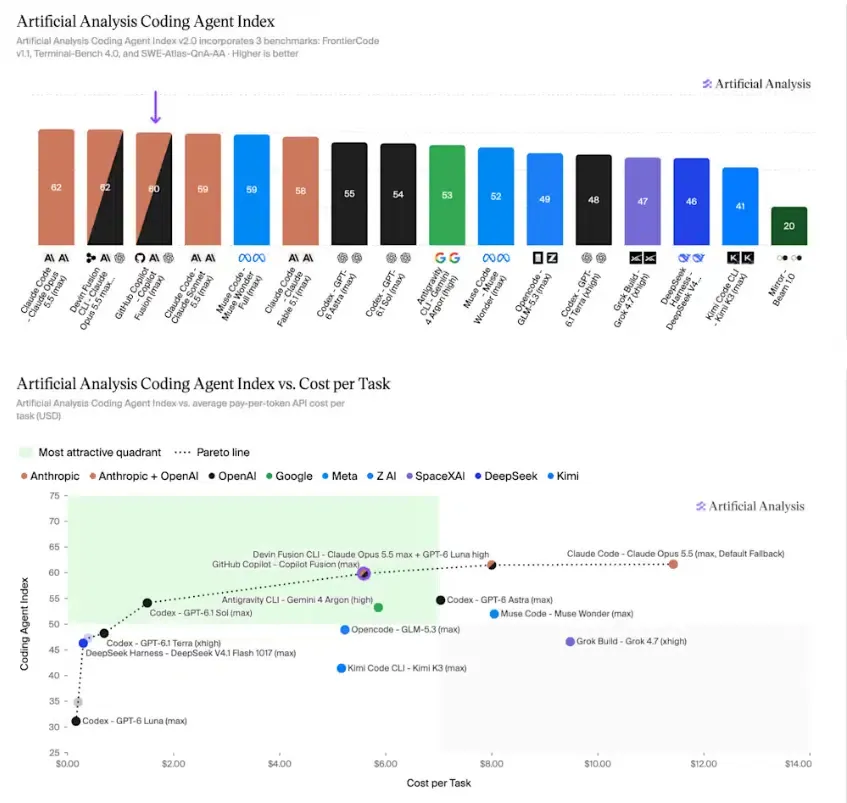
- In independent evaluations by Artificial Analysis, Fusion Max achieved a composite score of 60 on the Coding Agent Index v2.0, trailing Claude Code with Opus 5.5 Max by two points while reducing task costs by approximately 51%.
Software development teams using AI coding assistants have historically operated under a manual selection paradigm. Programmers chose a single model—such as GPT-4o, Claude Sonnet, or an o1-series reasoning model—from an IDE drop-down menu and maintained that selection across an entire coding session. While effective for isolated prompts, this pattern introduces operational trade-offs. Developers frequently select premium, high-latency frontier models for complex architectural planning and then neglect to switch back to lightweight models when conducting everyday tasks like generating unit tests or writing boilerplate documentation.
This manual approach can inflate corporate API expenditures and consume context tokens inefficiently. To address these workflow trade-offs, GitHub developed Copilot Fusion, as outlined in the official GitHub announcement. Rather than treating AI coding as an interaction with a single static model, Fusion operates as a runtime coordinator. Developers designate an overarching reasoning effort level, and the system autonomously selects the most appropriate underlying model or combination of models for each step of a task.

The strategic pivot represented by the GitHub Launches Copilot Fusion release centers on task-level economics rather than raw parameter scaling. According to benchmark evaluations published by Artificial Analysis, Copilot Fusion Max, tested via Copilot CLI on the Coding Agent Index v2.0, completed benchmark coding assignments at an average cost of $5.59 per task, compared to $11.42 for Claude Code running Anthropic’s Claude Opus 5.5 at its maximum setting. The evaluated configuration consumed approximately 7.2 million tokens per task—roughly half the token volume of the standalone Opus configuration—while completing tasks in approximately 40% less time.
Performance varied across individual benchmark components: Fusion Max led on Terminal-Bench 4.0 with a score of 71, but scored 51 on FrontierCode (behind Claude Code’s 56) and 57 on SWE-Atlas-QnA-AA. Furthermore, while Microsoft leadership cited internal DeepSWE evaluations showing potential cost reductions of up to 77%, that figure represents a separate, maximum company-reported scenario rather than an independent benchmark average. These results confirm that dynamic multi-model orchestration can significantly lower development expenses for supported workflows, though actual savings depend on the specific task mix, review requirements, and enterprise usage patterns.
Architectural Patterns: Single, Cascade, and Critique Execution Topologies
Copilot Fusion does not operate as an independent foundation model. Instead, it functions as an intelligent control plane embedded within the developer client. When a user submits an instruction involving reasoning, code generation, debugging, or tool usage, Fusion evaluates incoming intent signals against real-time system health, availability, and semantic complexity.
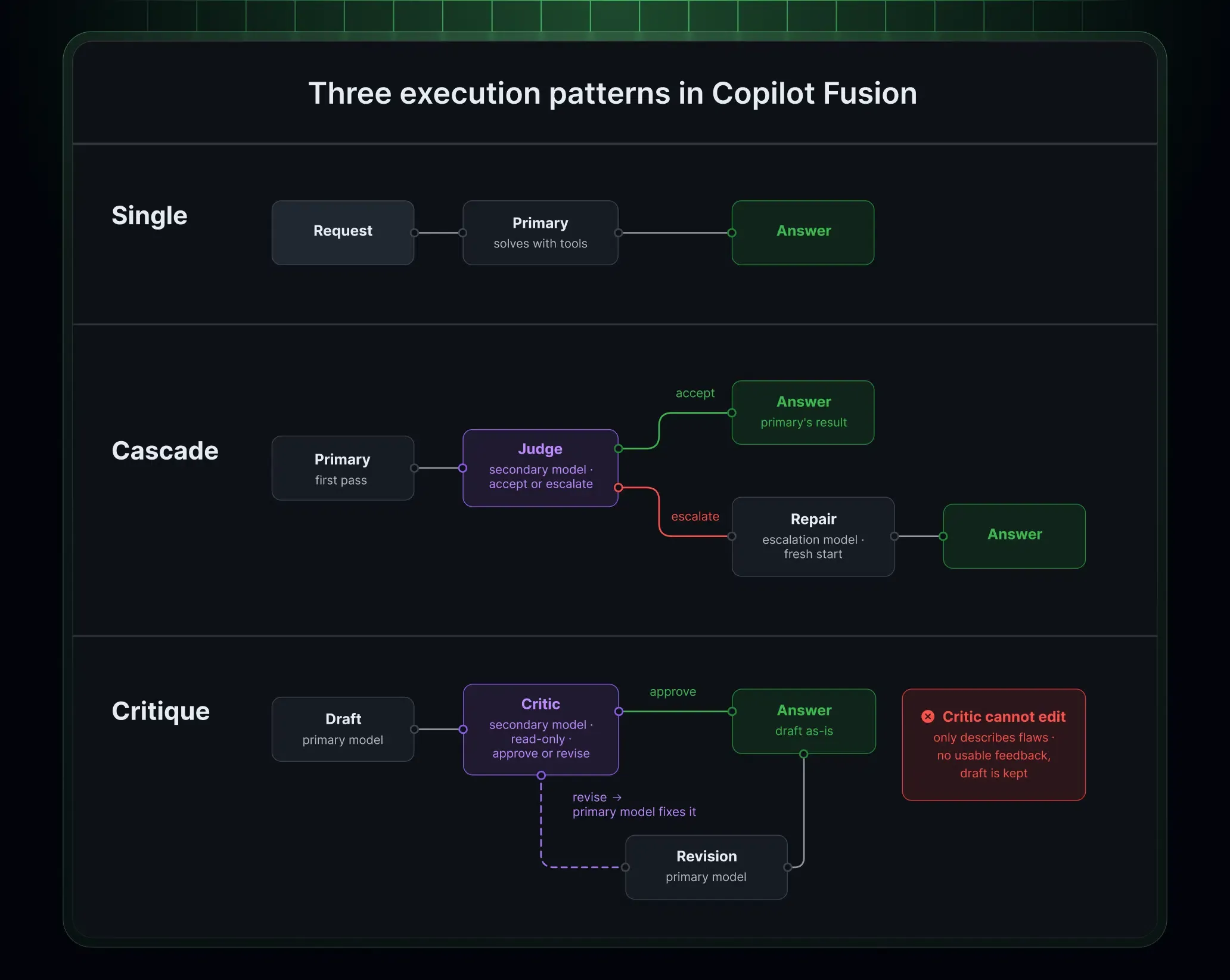
Depending on task characteristics and the chosen effort tier, the system dynamically selects one of three execution patterns:
- Single Pattern: A single model receives the prompt and completes the task directly, adding zero review overhead. This pattern serves straightforward code generation, syntactic queries, and basic refactoring.
- Cascade Pattern: A lightweight model drafts an initial solution. A secondary judge model inspects the proposed code and determines whether to accept the output or escalate the task to a more capable model for a refined pass.
- Critique Pattern: A primary model drafts an initial response while one or more reviewer models independently evaluate the code in parallel. The orchestrator aggregates their feedback, and the primary model revises the code accordingly before returning the final output to the user.
[Single Pattern]
  Prompt ──> Primary Model ──> Single Execution ──> Final Code Output

[Cascade Pattern]
  Prompt ──> Lightweight Model ──> Initial Draft ──> Judge Model ──[Accept]──> Final Code Output
                                                         └──[Escalate]──> Stronger Model ──> Final Output

[Critique Pattern]
  Prompt ──> Drafting Model ──> Initial Draft ──┬─> Reviewer Model A ──┐
                                                └─> Reviewer Model B ──┴─> Feedback Aggregator ──> Final Revision
These execution topologies introduce distinct trade-offs between execution speed, verification rigor, and computational cost. Rather than hardcoding prompts to specific patterns, GitHub maps these workflows across selectable effort levels:
- Fusion Standard: Balances cost, quality, and latency for everyday coding. The current implementation typically selects one model per task.
- Fusion High: Prioritizes stronger capability and deeper reasoning for substantial coding tasks while considering token efficiency. Multi-model orchestration may be used when warranted.
- Fusion Max: Prioritizes frontier-level capability for the most demanding tasks, with additional review or escalation steps selected dynamically where useful.
- Fusion Fast: A specialized, non-user-selectable effort level used in supported latency-sensitive Visual Studio Code inline chat scenarios.
Managing context boundaries across dynamic workflows requires specialized memory handling. Copilot Fusion does not possess a unified context window of its own. Instead, each execution step operates strictly within the context limits of the specific model executing that subtask. The context capacity displayed in the IDE reflects the most conservative limit among participating models. Furthermore, to maximize prompt caching efficiency, Fusion retains the core conversational thread on a single primary model whenever possible, passing only necessary, isolated context windows to assisting reviewer models.
Enterprise Governance and Local Model Integration Across Developer Fleets
Deploying autonomous model orchestration across large corporate engineering organizations introduces governance, compliance, and budget considerations. When an AI system dynamically selects between models from Anthropic, OpenAI, and other providers, administrators must ensure that organizational data residency and security rules remain intact.
Enterprise administrators can manage the models eligible for Copilot Fusion through supported GitHub Copilot model policies and enterprise-managed settings, as documented in the Copilot Fusion administrative manual. Administrators can view the roster of models available to Fusion, set default effort levels across developer seats, and disable specific models for Fusion without disabling them company-wide. Fusion respects applicable subscription, organization, data-residency, FedRAMP-related, and evaluation-model restrictions. These controls govern model eligibility within the system, but they do not replace an organization’s own compliance review, data governance, or security validation processes.
The table below outlines how different execution architectures balance execution surfaces, review mechanics, and token expenditure profiles:
| Execution Pattern | Primary Invocation | Review Mechanism | Token Cost Profile | Best For |
|---|---|---|---|---|
| Single Mode | One dedicated model | None | Baseline standard model pricing | Straightforward code edits and syntax questions |
| Cascade Mode | Efficient drafting model | Judge model inspection & escalation | Low to moderate (conditional escalation) | Well-scoped bug fixes and structured modifications |
| Critique Mode | Primary generator | Parallel independent reviewer models | Higher (multiple simultaneous model calls) | Complex architectural logic and security-sensitive code |
| Local Model Hybrid | Supported local on-device model | Cloud-coordinated model selection | Reduced cloud token consumption on local steps | Eligible on-device inference with cloud-coordinated routing |
GitHub introduced local-model-aware routing as an opt-in experimental preview, as announced in the GitHub Changelog on local model selection. With a supported local model configured, Copilot Fusion Standard may select on-device inference for eligible tasks, reducing cloud model usage for those steps. On Windows systems with compatible hardware, developers can install and run MAI Code 1.1 Flash via Windows ML management within the Copilot app, Copilot CLI, or Visual Studio Code. Cross-platform users on Windows, macOS, and Linux can configure local models such as Qwen3.8 Flash Next in Copilot CLI using local model providers like Ollama, launching the CLI with the --experimental flag.
However, Copilot Fusion still relies on cloud-based routing decisions, and tasks may use cloud models when appropriate. Local-model support therefore does not make Copilot Fusion a fully offline coding environment; developers requiring air-gapped security should evaluate dedicated offline tooling instead.
Engineering Checklist: Adopting Multi-Model Orchestration in Production
Integrating multi-model runtime orchestration into software development workflows requires adjustments across developer habits, IDE configurations, and enterprise financial operations. Engineering leadership must establish clear operational protocols to capitalize on token efficiencies while avoiding workflow pitfalls.
Developer Implementation Checklist
- Inspect Workspace Diffs Before Commits: Discarding an AI draft does not automatically revert workspace file modifications; developers must review all uncommitted file edits before submitting code.
- Match Effort Levels to Task Complexity: Reserve Fusion Max for complex algorithmic logic and security auditing, utilizing Fusion Standard for daily coding to prevent unnecessary AI credit consumption.
- Audit Multi-Model Progress Streams: Observe the IDE progress indicators to inspect which specific models contribute to generated code blocks, ensuring transparency across execution steps.
- Configure Supported Local Models: For eligible tasks on Fusion Standard, set up supported local models such as MAI Code 1.1 Flash on Windows or Qwen3.8 Flash Next via Ollama, enabling experimental settings where required.
Enterprise Governance and FinOps Checklist
- Configure Enterprise Model Policies: Specify which models are eligible for Fusion routing in the enterprise dashboard, aligning the model roster with corporate compliance and data-residency requirements.
- Audit Usage-Based AI Credits: Track team-level credit consumption across effort tiers, accounting for the fact that multi-model execution in Fusion High and Max can consume more credits per task than single-model executions.
- Account for Promotional Billing Windows: Factor in GitHub’s 30% promotional discount on model costs for paid Copilot subscribers through November 30, 2026, when benchmarking operational expenses.
- Establish Human Code Review Gates: Maintain mandatory peer code reviews for all agent-generated pull requests, ensuring that automated critique loops complement, rather than replace, human engineering oversight.
Frequently Asked Questions (FAQ)
How does GitHub calculate billing when Copilot Fusion calls multiple models?
What happens if Copilot Fusion discards an intermediate code draft?
Can enterprise administrators restrict which models Copilot Fusion selects?
Key Takeaways for Engineering Teams
The launch of GitHub Copilot Fusion confirms that relying on a single, monolithic AI model for complex software engineering tasks introduces unnecessary operational trade-offs. Modern development workflows encompass diverse cognitive demands, ranging from instant syntax completion to intricate cross-repository reasoning. Forcing a single model architecture to handle this entire spectrum can lead to escalating model expenditures or compromised execution quality.
Independent benchmark results suggest that multi-model orchestration can deliver competitive coding performance at lower model costs for certain workloads. Actual results will depend on task complexity, orchestration behavior, selected models, and the organization’s usage patterns. By decoupling task delegation from developer manual choices, runtime model orchestration establishes a pragmatic operational path. As software engineering organizations scale automated coding agents, the primary competitive differentiator will not be access to any individual foundation model, but the governance, reliability, and architectural rigor of the orchestration layer connecting them.
References
-
GitHub: Route and Orchestrate Models with GitHub Copilot Fusion — Official release notes and feature overview from GitHub Universe 2026.
-
GitHub: Copilot Fusion Now Supports Selection of Local Models — Official announcement detailing on-device inference for eligible tasks with local model routing.
-
GitHub Docs: About GitHub Copilot Fusion Concepts and Configuration — Official technical documentation detailing execution patterns, effort levels, and billing rules.
-
GitHub Docs: Configuring Models Available for Copilot Fusion — Administrative guidance for managing enterprise model policies and default settings.
-
Artificial Analysis: GitHub Copilot Fusion Benchmark Evaluation — Independent analysis measuring task costs, token efficiency, and Coding Agent Index scores.
-
The New Stack: GitHub Debuts Copilot Fusion Multi-Model System — Technical reporting on Project HydraFusion integration and enterprise customer implementation.
-
VentureBeat: GitHub Copilot Fusion Mixes Models for Cost Efficiency — Technical interview with GitHub product leadership covering runtime routing architectures.
Share this article