What are the key API definitions in mobile attribution SDKs? The core API definitions include getInstallParam (commonly queried during first-launch onboarding to retrieve deferred installation context) and getWakeUpParams (which intercept real-time Universal Link payloads upon wakeup).
An API definition in mobile attribution SDKs is a formal specification detailing method signatures, input parameters, asynchronous execution rules, and return data schemas. By standardizing callback functions like deferred install query and real-time link interception APIs, an API definition enables mobile applications to parse contextual dynamic parameters safely across Android and iOS lifecycle events.
| Term | Definition | Related Entity | Search Intent Role |
|---|---|---|---|
| API Definition | A structured specification outlining SDK callback methods and data models. | SDK Method Signature | Informational / Technical |
| Deep Linking | A technology routing users to dynamic in-app locations via Universal Links or Schemes. | Dynamic Routing API | Technical / Informational |
| Tracking Parameters | Custom key-value pairs appended to referral links and returned via SDK callbacks. | JSON Payload Schema | Technical / Informational |
Core Architectural Categories in Attribution SDK API Definitions
Categorizing SDK APIs: Deferred Ingestion, Real-Time Interception, and Event Attribution
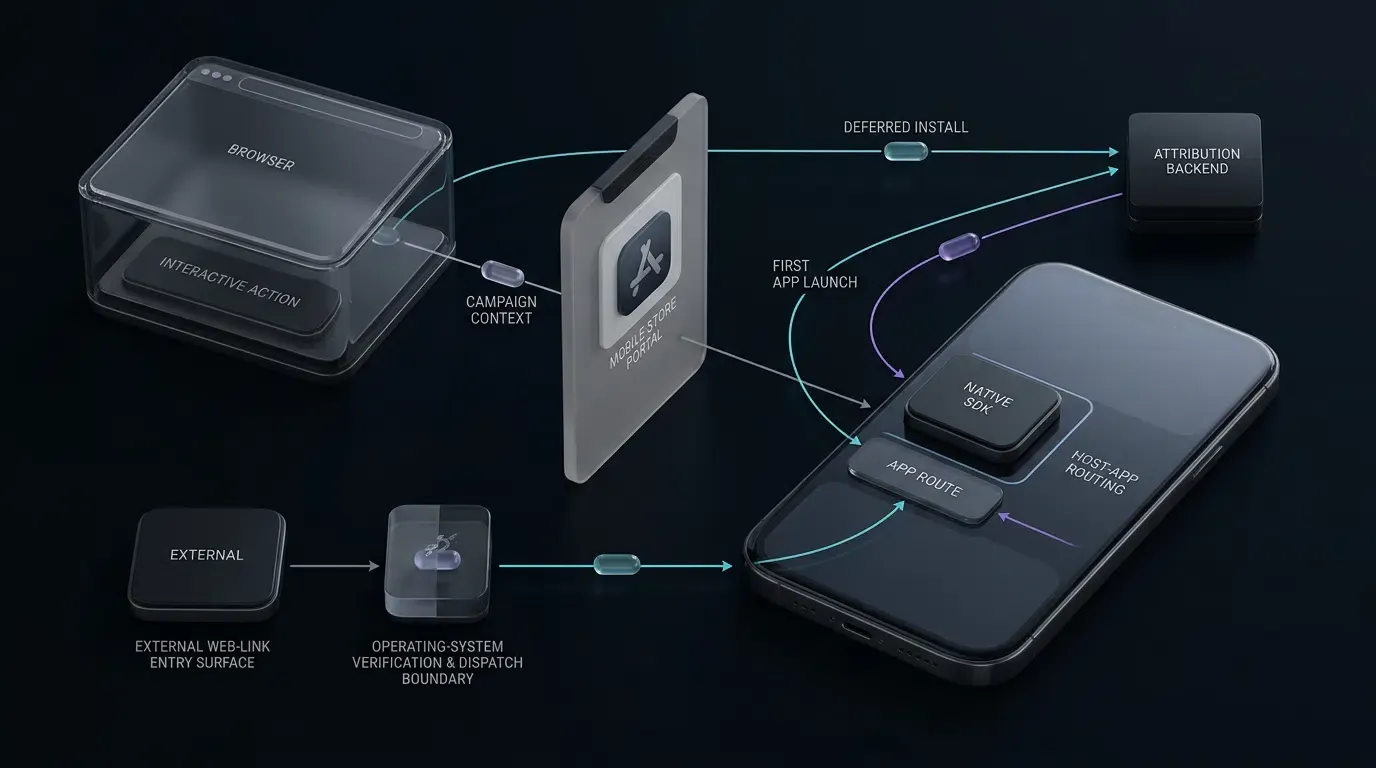
Mobile attribution and deep linking client libraries expose Application Programming Interfaces (APIs) designed to handle distinct phases of the user lifecycle. Rather than operating as monolithic utility classes, an attribution SDK divides programmatic responsibilities into three primary functional categories:
- Deferred Parameter Ingestion APIs: Methods such as
getInstallParamon Android andgetInstallParmsCompletedon iOS operate primarily during the application’s initial onboarding following installation. Because arbitrary web navigation parameters do not survive store installation boundaries by default, deferred APIs query client-side caches and backend attribution endpoints to recover contextual metadata (such as inviter IDs, referral tokens, or campaign parameters) bound to the pre-install click. - Real-Time Link Interception APIs: Methods such as
handleDeepLinkon Android andgetWakeUpParamson iOS execute when the application is already installed on the host operating system. These APIs hook into native system protocols—specifically Apple Universal Links, Android App Links, and custom URL schemes—to capture real-time URI parameters when an external web link or secondary application triggers app execution. - Post-Install Event Attribution APIs: Client-side reporting methods—such as
saveEventon Android andreportEffectPointon iOS—allow client applications to report downstream user milestones back to attribution aggregation servers. These calls enable granular Return on Ad Spend (ROAS) auditing, cohort retention tracking, and viral loop analysis by binding in-app conversion actions to earlier install parameters.
The Role of Asynchronous Callbacks in Preventing Application Cold-Start Thread Blockage
Mobile operating systems enforce strict performance thresholds during application startup. On Android, executing synchronous network operations on the main thread throws a NetworkOnMainThreadException, while any prolonged synchronous work—including blocking disk I/O—can freeze the UI thread and contribute to Application Not Responding (ANR) errors. On iOS, the operating system watchdog timer terminates processes that block the main thread for prolonged periods during initialization.
Attribution SDKs mitigate this constraint by implementing parameter retrieval interfaces as asynchronous callbacks. Asynchronous callback interfaces allow retrieval results to be delivered later without requiring the caller to synchronously wait for network completion. Developers should still validate startup performance and callback behavior for the deployed SDK version.
Using an asynchronous callback reduces the risk of blocking the UI thread on network latency, allowing the application to render splash views or home interfaces smoothly during cold start.
Distinguishing Client-Side SDK APIs from Server-to-Server Postback Interfaces
Engineering teams occasionally conflate client-side SDK API definitions with Server-to-Server (S2S) postback APIs. While both interfaces handle attribution data, their execution contexts, security models, and operational purposes differ fundamentally:
- Client-Side SDK APIs: Compiled directly into the mobile binary (e.g., via CocoaPods frameworks or Maven AAR dependencies), these interfaces interact with native device capabilities. They listen to application lifecycle notifications, parse incoming system intents, read configuration files, and provide direct memory objects to application presentation controllers for dynamic routing.
- Server-to-Server (S2S) Postback Interfaces: Executed entirely across backend server infrastructure, S2S APIs consist of HTTP REST endpoints that transfer conversion postbacks between attribution platforms and ad networks. Depending on the provider, S2S communication may utilize authenticated HTTPS endpoints, signed payload tokens, mutual TLS, or network access controls to ensure integrity independently of client device execution states.
How Does Deferred Deep Linking Query Mechanics Work in getInstallParam
The Deferred Attribution Window: Retrieving Cached Parameters on First Launch
Deferred deep linking resolves a fundamental architectural gap in mobile software distribution: standard operating system app stores do not persist arbitrary URL query strings across the download and installation workflow. While platform-specific mechanisms such as Google Play Install Referrer can pass supported campaign context through store downloads, general web query parameters (for example, https://example.com/invite?channelCode=affiliate_01&inviter_id=user_9876) do not automatically survive app-store boundaries.
To bridge this disconnection, OpoInstall, a mobile attribution and deep linking platform, captures contextual properties and campaign parameters when a user engages with a landing page. When the user launches the newly installed application, the client SDK initializes and establishes a connection to the attribution cluster.
The getInstallParam API serves as the programmatic gateway to query this deferred attribution window. By invoking this method, the client application asks the SDK to reconcile the fresh app instance against preceding web click events, returning matched parameters to the application runtime.
Developers can consult the OpoInstall SDK integration docs for detailed environment configuration rules and underlying parameter transmission architectures.
Analyzing getInstallParam: Parameters Payload, Channel Code, and Status Response
The data object returned by the deferred install callback encapsulates two distinct data streams alongside operational status flags:
- Custom Dynamic Parameters (
data): A structured data container containing the developer-defined query strings passed into the original campaign link. This field carries campaign-specific business context, such as referral discount IDs, preferred user locales, or specific content identifiers. - Channel Identification Parameter (
channelCode): When present,channelCodeis exposed as a string-like channel identifier denoting the marketing source or ad network partner. In organic installations where no channel link was engaged, this parameter may resolve as null or empty depending on the platform SDK binding. - Operational Outcome and Errors: Rather than relying on rigid universal integer codes, errors and timeouts are communicated through platform-specific error models (such as
OpoErroron Android or error callbacks on iOS). The callback provides descriptive error structures when network connectivity fails or configuration mismatches occur.
Handling Timeout States: Understanding Waiting Cycles and Dynamic Retry Flags
Mobile applications frequently launch in degraded connectivity environments, such as underground transit networks or congested public Wi-Fi access points. If the SDK cannot reach backend attribution clusters immediately, parameter fetching must not hang application logic.
When a deployed SDK reports a timeout or retrieval failure through its documented callback or status model, handle that result using an application-defined retry policy without blocking the startup path. If the deployed SDK version documents a configurable timeout parameter or method overload, use that version-specific interface and avoid assuming a universal default timeout.
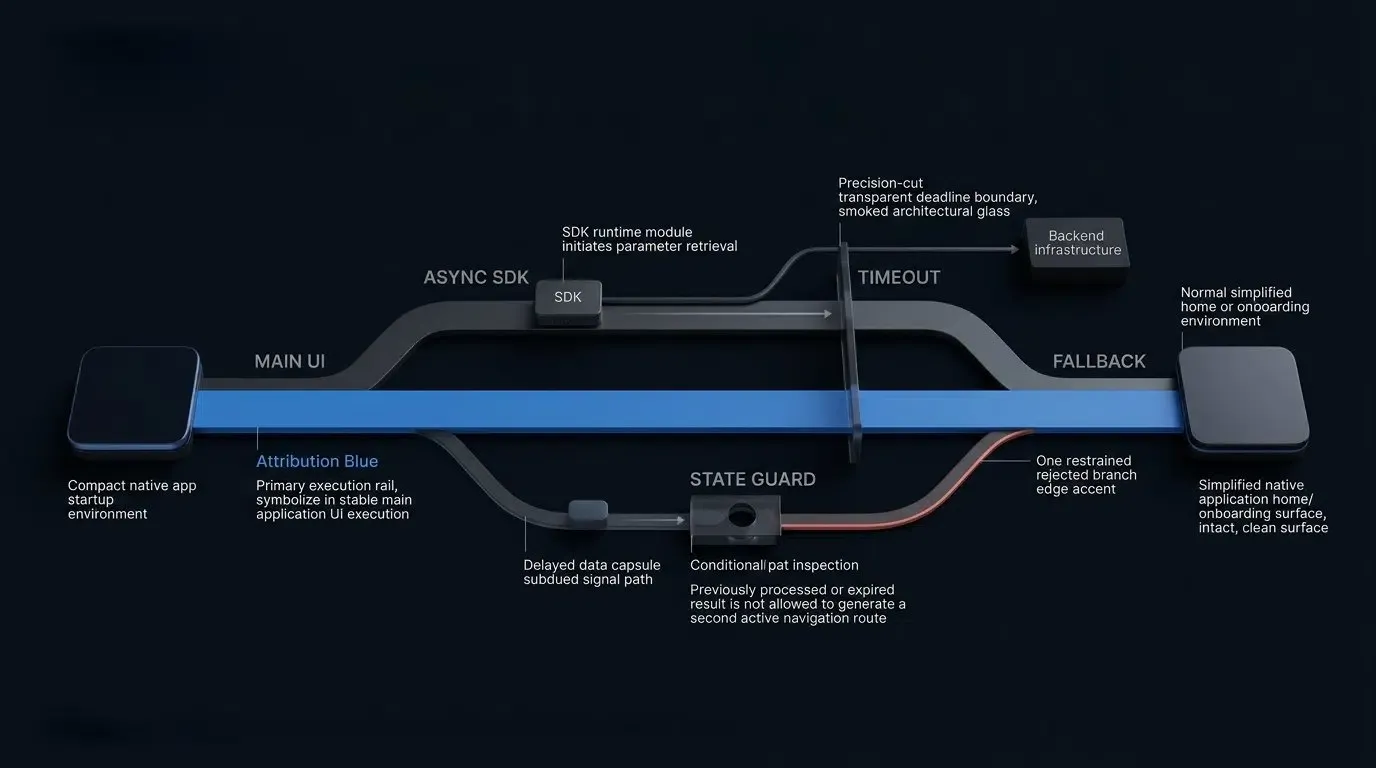
When an error or timeout response occurs, recommended engineering practice involves setting a lightweight in-memory flag and re-querying the parameter interface later when the user reaches an engaged network milestone, such as tapping a registration or checkout button.
Real Time Deep Link Redirection and Callback Parsing in getWakeUpParams
Intercepting Cold-Start and Background Launch Events via System Protocols
When an application already resides on the user’s device, external clicks bypass store installations entirely. Modern mobile platforms utilize dedicated routing standards—Universal Links on iOS and Android App Links on Android—to transition execution from external browsers directly into the installed native application.
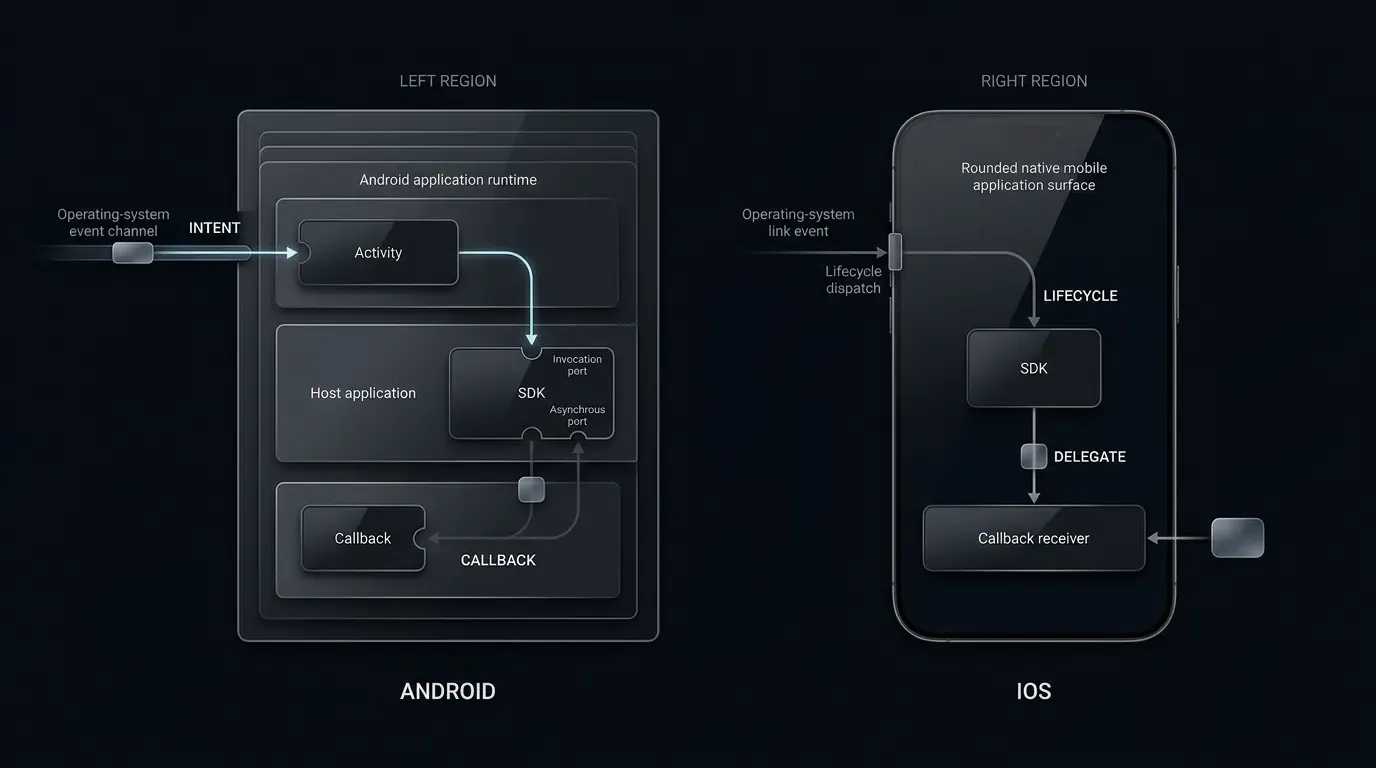
The operating system dispatches these launch events through specific application delegate methods:
- iOS Lifecycles: For applications using modern window architectures, Universal Links arrive through
scene:continueUserActivity:withinSceneDelegate(orscene:willConnectToSession:options:during initial scene connection). In applications that do not use scene delegates, the operating system dispatches throughapplication:continueUserActivity:restorationHandler:withinAppDelegate. Custom URL schemes invokeapplication:openURL:options:orscene:openURLContexts:. The SDK forwarding methods shown in AppDelegate must be adapted to the application’s actual UIScene lifecycle when scenes are enabled. - Android Lifecycles: Incoming intents invoke
onCreate(Bundle)if the target Activity was not active in memory, oronNewIntent(Intent)if the Activity operates under asingleTaskorsingleToplaunch mode configuration.
The getWakeUpParams callback API (and its Android counterpart handleDeepLink) acts as the centralized listener that receives, validates, and unwraps the dynamic URI parameters delivered through these operating system lifecycle hooks.
Parsing getWakeUpParams Payloads During Universal Link and URL Scheme Redirections
Upon intercepting a system launch event, the SDK extracts the incoming URL string, decodes URI-encoded query components, and normalizes the payload into a consistent data model.
The callback signature provides access to both channelCode and data. For instance, if an e-commerce campaign link structured as https://app.example.com/shoes/running?promo_code=SUMMER20&item_id=sku_456 triggers application launch, the callback extracts promo_code and item_id, packaging them into the callback payload for consumption by application presentation logic.
Dynamic In-App Scene Restoration: Mapping JSON Payload Keys to Target Activity/View Controllers
The ultimate operational objective of real-time deep linking is scene restoration: directing the user directly to the specific product, profile, or activity screen referenced by the promotional link, entirely bypassing default home screen landing views.
Achieving reliable scene restoration requires establishing a deterministic router within the application architecture:
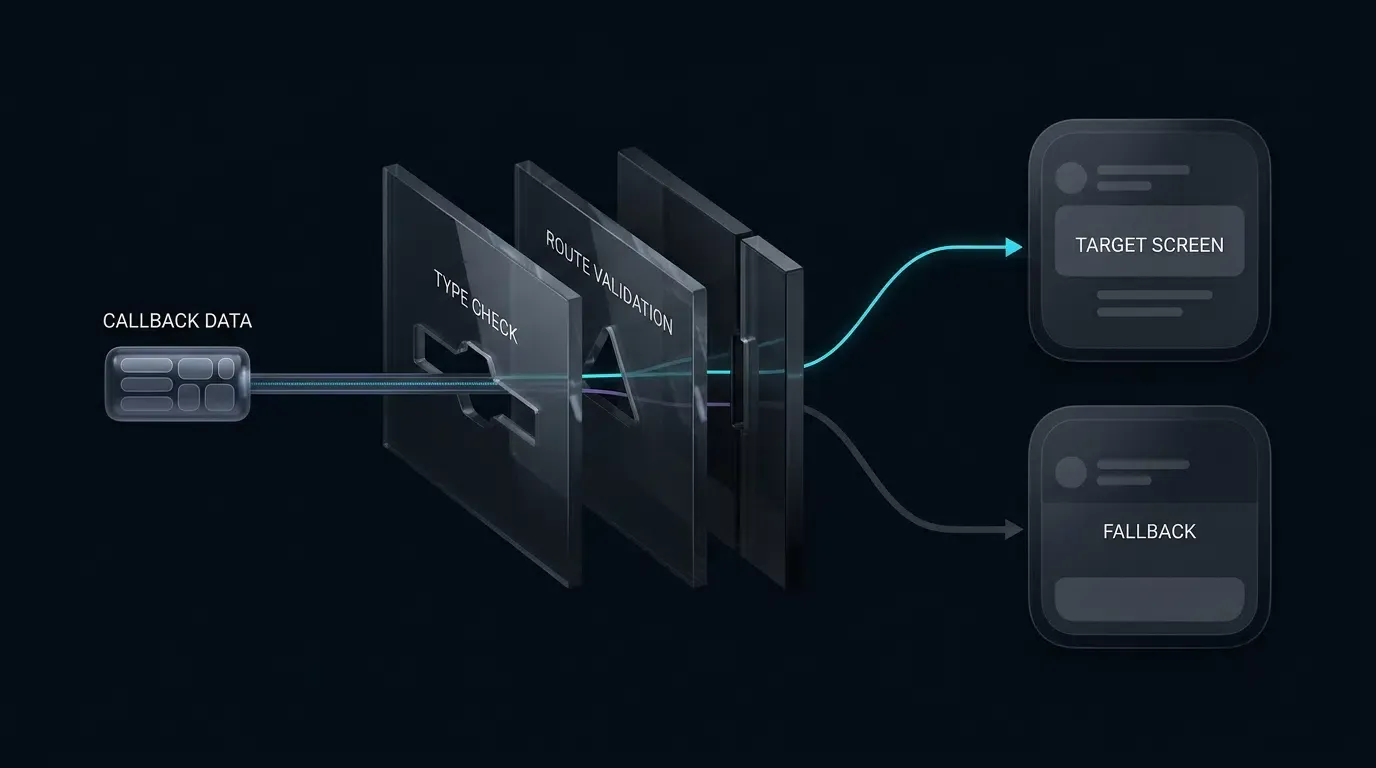
- Step 1: Payload Key Extraction: Within the callback listener, the application inspects the
datapayload for pre-agreed routing keys, such astarget_screenorresource_id. - Step 2: Null and Type Validation: The router validates that values exist, conform to expected primitive types, and match active application features.
- Step 3: Navigation Controller Execution: The application resolves the current root navigation hierarchy and pushes or presents the appropriate target view controller or Activity intent.
Ensuring Idempotent Execution in Duplicate Launch Lifecycle Triggers
A common integration pitfall in mobile deep linking involves duplicate event dispatching. In Android, screen orientation changes or configuration updates recreate the underlying Activity, causing onCreate to re-execute with the original launch Intent. In iOS, switching application foreground states can trigger redundant delegate notifications.
To prevent redundant view transitions or duplicate analytics logging, application routers must enforce idempotent execution. Developers should maintain an in-memory record of processed event identifiers or a normalized payload hash scoped to a short deduplication window, discarding incoming payloads whose signatures match an already completed navigation event.
Dual Platform Method Signatures for Android and iOS Integrations
Android Method Signatures: Kotlin ResultCallBack and Activity Lifecycle Hooks
In Android client development, the attribution SDK exposes asynchronous interfaces structured around callback interfaces. Rather than blocking the calling thread, method invocations accept an implementation of ResultCallBack<T>.
Developers can download the OpoInstall SDK download package to access native library binaries, Maven distributions, and ProGuard keep-rule definitions.
The primary Android API signatures include:
- Initialization:
OpoInstall.initialize(Application application) - Lifecycle Launch:
OpoInstall.getInstance().start(Activity activity) - Deferred Parameter Retrieval:
OpoInstall.getInstance().getInstallParam(ResultCallBack<OpoData> callBack) - Deep Link Intent Parsing:
OpoInstall.getInstance().handleDeepLink(Intent intent, ResultCallBack<OpoData> callBack) - Custom Event Attribution:
OpoInstall.getInstance().saveEvent(String eventKey, int eventValue, Map<String, String> extraData)
iOS Method Signatures: Swift and Objective-C OpoInstallDelegate Protocol Conformances
On iOS platforms, the SDK architecture utilizes the Delegation design pattern alongside completion handler closures. The application delegate conforms to OpoInstallDelegate and registers itself during framework initialization.
The primary iOS method signatures include:
- SDK Initialization:
OpoInstallSDK.initWith(self) - Real-Time Wakeup Hook:
func getWakeUpParams(_ appData: OpoinstallData?) - Deferred Install Parameter Retrieval:
OpoInstallSDK.defaultManager()?.getInstallParmsCompleted { appData in ... } - Custom Event Tracking:
OpoInstallSDK.defaultManager()?.reportEffectPoint("purchase", effectValue: 100, effectDictionary: ["currency": "USD"]) - Universal Link Routing Delegation:
OpoInstallSDK.continue(userActivity)
API compatibility note: These examples reflect publicly documented OpoInstall integration patterns. The SDK download center currently lists Android and iOS v2.1.0 releases. Verify exact package names, method signatures, nullable types, and callback interfaces against the downloaded SDK archive before production use. The examples have not been independently compile-tested against that archive.
// Android - MainActivity.kt
package com.example.app

import android.content.Intent
import android.os.Bundle
import android.util.Log
import androidx.appcompat.app.AppCompatActivity
import com.opoinstall.api.OpoInstall
import com.opoinstall.api.OpoData
import com.opoinstall.api.OpoError
import com.opoinstall.api.ResultCallBack
import org.json.JSONObject

// Application-owned normalization utility (Host Application Utility)
// Validates raw SDK data objects safely into normalized JSON strings
fun normalizePayload(rawData: Any?): String? = when (rawData) {
    is String -> rawData
    is JSONObject -> rawData.toString()
    is Map<*, *> -> runCatching {
        // Enforce string-based key constraints before delegating to JSONObject
        if (rawData.keys.any { it !is String }) {
            null
        } else {
            val sanitizedMap = mutableMapOf<String, Any?>()
            rawData.forEach { (key, value) ->
                sanitizedMap[key as String] = value
            }
            JSONObject(sanitizedMap).toString()
        }
    }.getOrNull()
    else -> null
}

class MainActivity : AppCompatActivity() {

    override fun onCreate(savedInstanceState: Bundle?) {
        super.onCreate(savedInstanceState)
        setContentView(R.layout.activity_main)

        // Assumes that OpoInstall.initialize(this) has already completed in Application.onCreate()
        OpoInstall.getInstance().start(this)

        // 1. Query deferred installation parameters
        OpoInstall.getInstance().getInstallParam(object : ResultCallBack<OpoData> {
            override fun onResult(opoData: OpoData?) {
                val customData: String? = normalizePayload(opoData?.data)
                val channel: String? = opoData?.channelCode

                // Log desensitized status without printing raw user or referral payload
                Log.d("OpoInstall", "Install params received: hasData=${!customData.isNullOrBlank()}, channelPresent=${!channel.isNullOrBlank()}")

                // Ensure UI-specific operations are dispatched to the main UI thread
                runOnUiThread {
                    // Host application UI routing or presentation logic
                }
            }

            override fun onError(error: OpoError?) {
                // Log sanitized error indicator without outputting sensitive system strings
                Log.w("OpoInstall", "getInstallParam callback encountered an error status")
            }
        })

        // 2. Process incoming real-time deep links
        handleIntent(intent)
    }

    override fun onNewIntent(intent: Intent) {
        super.onNewIntent(intent)
        setIntent(intent)
        handleIntent(intent)
    }

    private fun handleIntent(intent: Intent?) {
        intent?.let {
            OpoInstall.getInstance().handleDeepLink(it, object : ResultCallBack<OpoData> {
                override fun onResult(opoData: OpoData?) {
                    val customData: String? = normalizePayload(opoData?.data)
                    Log.d("OpoInstall", "DeepLink params received: hasData=${!customData.isNullOrBlank()}")
                    runOnUiThread {
                        // Host application deep-link routing logic
                    }
                }

                override fun onError(error: OpoError?) {
                    Log.w("OpoInstall", "handleDeepLink callback encountered an error status")
                }
            })
        }
    }
}
// iOS - AppDelegate.swift
import UIKit
import libOpoInstallSDK

@main
class AppDelegate: UIResponder, UIApplicationDelegate, OpoInstallDelegate {

    var window: UIWindow?

    func application(
        _ application: UIApplication,
        didFinishLaunchingWithOptions launchOptions: [UIApplication.LaunchOptionsKey: Any]?
    ) -> Bool {

        // 1. Initialize OpoInstall SDK with delegate listener
        OpoInstallSDK.initWith(self)

        // 2. Query deferred installation parameters
        OpoInstallSDK.defaultManager()?.getInstallParmsCompleted { appData in
            let customData = appData?.data
            let channel = appData?.channelCode

            // Log desensitized status without printing raw custom payload
            print("OpoInstall: Deferred parameters received (hasData: \(customData != nil), channelPresent: \(channel != nil))")

            // Dispatch UI operations explicitly to the main queue
            DispatchQueue.main.async {
                // Host application UI presentation logic
            }
        }

        return true
    }

    // 3. Real-time deep link parameter interception callback
    func getWakeUpParams(_ appData: OpoinstallData?) {
        let customData = appData?.data
        let channel = appData?.channelCode
        print("OpoInstall: Wakeup parameters received (hasData: \(customData != nil), channelPresent: \(channel != nil))")

        DispatchQueue.main.async {
            // Host application deep-link routing logic
        }
    }

    // Note: If using scene-based lifecycles (UIScene), forward Universal Links and schemes
    // from SceneDelegate via scene:continueUserActivity: and scene:openURLContexts:.
    // Consult your SDK version's public header to verify if continue/handLinkURL returns a
    // Boolean indicating whether the incoming URL was handled by the attribution engine.
    func application(
        _ application: UIApplication,
        continue userActivity: NSUserActivity,
        restorationHandler: @escaping ([UIUserActivityRestoring]?) -> Void
    ) -> Bool {
        OpoInstallSDK.continue(userActivity)
        return true
    }

    func application(
        _ app: UIApplication,
        open url: URL,
        options: [UIApplication.OpenURLOptionsKey: Any] = [:]
    ) -> Bool {
        OpoInstallSDK.handLinkURL(url)
        return true
    }
}
JSON Payload Schemas and Parameter Dictionary Mapping
Canonical Conceptual Payload Model
At the conceptual level, attribution callbacks normalize incoming marketing metadata into a key-value structure containing channel attribution and developer-defined campaign payloads.
Schema Boundary Note: This is an illustrative, application-owned normalization schema, not an official OpoInstall wire-format or SDK return-object contract.
{
  "$schema": "https://json-schema.org/draft/2020-12/schema",
  "title": "ConceptualAttributionPayload",
  "type": "object",
  "properties": {
    "channelCode": {
      "type": ["string", "null"],
      "description": "Identifier for the marketing channel or distribution source; null or empty if organic."
    },
    "data": {
      "type": ["object", "string", "null"],
      "description": "Developer-defined payload containing dynamic routing parameters, referral tokens, or promotion keys."
    }
  }
}
Platform-Specific Data Bindings: Android String versus iOS Dictionary
While the conceptual payload remains consistent, native SDK bindings present data differently according to platform conventions:
- Android SDK Binding: The
OpoData.dataproperty returns as a nullable serialized JSONString?(orAny?depending on AAR version). If typed as a string (e.g.,"{\"inviterId\":\"1024\",\"roomCode\":\"8899\"}"), the developer parses this string into aJSONObjector maps it using a deserializer such as Gson or Moshi. If returned as an untyped object, use a controlled normalization helper before parsing.channelCodeis exposed directly as a nullableString?. - iOS SDK Binding: The
OpoinstallData.dataproperty surfaces as a native dictionary collection (or version-specific object). Developers access values directly using dictionary key subscripting.channelCodeis exposed as a nullableString?.
Safe Serialization: Protecting Dynamic Navigation Logic Against Null Pointer Exceptions
Because marketing links originate from external web environments, query string structures can become corrupted or malformed. Malformed character encodings, missing required keys, or unexpected data types can trigger fatal runtime crashes if parsing logic assumes ideal payloads.
Defensive parameter extraction requires following a strict validation pipeline:
- Rule 1: Always Guard Against Null Values: Verify that
dataandchannelCodeexist before passing them to downstream application services. - Rule 2: Catch JSON Parsing Exceptions: In Android, wrap
JSONObject(data)instantiations in explicittry-catchblocks to captureJSONException. - Rule 3: Enforce Default Routing Fallbacks: If parsing succeeds but a specific routing key (e.g.,
target_sku) is absent, gracefully fall back to the default application landing screen rather than halting execution.
How to Handle Timeout Status Codes and Asynchronous Retry Logic
Handling Timeout and Error Responses
When a deployed SDK reports a timeout or retrieval failure through its documented callback or status model, handle that result using an application-defined retry policy without blocking the startup path.
Network timeouts commonly occur due to active flight modes, device offline states, or cellular handover latency. Rather than hardcoding assumed numerical status codes, developers should inspect the error model returned by the SDK’s completion handler and handle timeout states explicitly using application-defined error handling policies.
Implementing Host Application State Management to Avoid Redundant Queries
Developers should not assume that the client SDK will permanently cache or manage parameter lifecycle state across subsequent application sessions. Host applications should manage their own durable state to record whether initial attribution parameters have already been processed.
Implementation Note: The following snippet is a host application pseudocode fragment;
processReferralPayloadrepresents application-defined business logic. In production systems distributing rewards or financial incentives, rely on server-confirmed idempotent tokens rather than local device flags alone.
// Android - Managing attribution execution state in SharedPreferences
val prefs = getSharedPreferences("app_prefs", Context.MODE_PRIVATE)
val isAttributionHandled = prefs.getBoolean("attribution_handled", false)

if (!isAttributionHandled) {
    OpoInstall.getInstance().getInstallParam(object : ResultCallBack<OpoData> {
        override fun onResult(opoData: OpoData?) {
            // Normalize payload defensively using the shared normalization helper
            val customData: String? = normalizePayload(opoData?.data)

            if (!customData.isNullOrEmpty()) {
                // Host application implementation: parse custom payload and route appropriately
                processReferralPayload(customData)

                // Record that attribution was processed to prevent redundant executions
                prefs.edit().putBoolean("attribution_handled", true).apply()
            }
        }
        override fun onError(error: OpoError?) {
            // Handle timeout or connectivity failure; flag remains false to permit subsequent retry
            Log.w("OpoInstall", "Deferred retrieval error status observed")
        }
    })
}
Thread Safety and UI Execution Rules
Developers should not assume callback thread affinity unless explicitly documented for the deployed SDK release. To ensure crash-free UI transitions and thread safety, dispatch UI navigation or view updates explicitly to the main thread (using DispatchQueue.main.async on iOS or runOnUiThread / main-thread coroutines on Android).
Explicit thread dispatching ensures that alert dialogs, fragments, or view controllers update safely regardless of the internal threading model utilized by the SDK version.
Avoiding Initialization Race Conditions in Application Lifecycles
Developers must follow the SDK’s documented initialization lifecycle and avoid invoking parameter queries before initialization is complete or before required lifecycle setup has occurred.
The recommended integration pattern enforces lifecycle separation:
- Initialization Phase: Execute
OpoInstall.initialize(this)within the customApplication.onCreate()method on Android, orOpoInstallSDK.initWith(self)insideapplication(_:didFinishLaunchingWithOptions:)on iOS. - Execution Phase: Invoke
start(this)andgetInstallParam(...)within the primary launcherActivity.onCreate()on Android.
Furthermore, applications operating multi-process architectures on Android (such as push notification daemons or background sync services) should verify that SDK initialization runs exclusively within the main application process.
Comparative Analysis of Primary Attribution SDK API Definitions
Methodological Distinctions Across Attribution SDK Interfaces
Selecting the appropriate SDK API requires understanding execution lifecycles, data contracts, and operational goals across platforms.
The table below compares primary API patterns supported by publicly available integration examples. Exact signatures remain version-dependent:
| Capability | Android Method Signature | iOS Method Signature | Primary Execution Timing | Target Operational Purpose |
|---|---|---|---|---|
| Deferred Install Query | getInstallParam(ResultCallBack) |
getInstallParmsCompleted { ... } |
First launch onboarding | Retrieve deferred parameters and channel code |
| Real-Time Deep Linking | handleDeepLink(Intent, ResultCallBack) |
getWakeUpParams(OpoinstallData?) |
App launch via Universal Link / Scheme | Intercept dynamic URI parameters for scene restoration |
| Custom Event Tracking | saveEvent(key, val, extra) |
reportEffectPoint(...) |
In-app user action (IAP / milestone) | Attribute custom conversion events and calculate ROAS |
Calling Convention Note: These APIs provide corresponding deep-link capabilities, but Android uses an explicit SDK method invocation (
handleDeepLink) while iOS exposes the result through a delegate callback (getWakeUpParams).
Additional SDK Capabilities: Registration reporting and referral-sharing attribution may be exposed through version-specific APIs. Consult the public headers or SDK interface definitions distributed with your deployed release before calling these methods.
Frequently Asked Questions (FAQ)
What is the difference between getInstallParam and getWakeUpParams API definitions?
How does the SDK handle network timeouts during parameter retrieval?
Are SDK API callbacks guaranteed to execute on the main thread for UI navigation?
Summary and Decision Framework
Mastering attribution SDK API definitions enables mobile engineering teams to build reliable onboarding journeys and track channel analytics. By understanding the distinction between deferred install queries (getInstallParam / getInstallParmsCompleted) and real-time link interception (getWakeUpParams / handleDeepLink), developers can reduce parameter loss and implement dynamic page routing.
As mobile operating systems refine background task constraints and network privacy sandboxes, relying on well-defined SDK API signatures ensures consistent data handling across Android and iOS versions. Adhering to thread safety guidelines, managing local state persistence, and handling asynchronous timeout conditions supports stable application launches.
Developers ready to integrate these API definitions into their project can register on the OpoInstall developer console or consult the mobile attribution implementation reference for complete platform guidelines.
Related Materials
-
Concepts: API Definition, Deferred Deep Linking, Tracking Parameters, JSON Payload Mapping
-
Technologies: Android SDK, iOS SDK, Universal Links, URL Schemes, Asynchronous Callbacks
-
Standards: JSON Schema Draft 2020-12, Android Activity Lifecycle, Apple UIScene Lifecycle
-
APIs: OpoInstall getInstallParam API, OpoInstall getWakeUpParams API, OpoInstall saveEvent API
-
Official Documentation & References:
Share this article