How to implement PrivacyInfo.xcprivacy for iOS apps? Implementing PrivacyInfo.xcprivacy requires adding a valid privacy manifest to your application or SDK target, declaring approved reason codes for any Required Reason APIs used (such as User Defaults or System Boot Time), and verifying that third-party dependencies satisfy the privacy-manifest and signature requirements that apply to their distribution form.
A Privacy Manifest (
PrivacyInfo.xcprivacy) is a standardized property list file bundled within iOS apps and third-party SDKs that declares data collection categories, tracking domain configurations, and approved justifications for accessing Apple-designated Required Reason APIs. Starting May 1, 2024, apps submitted to App Store Connect must include approved reasons for Required Reason APIs used by the app’s code, including applicable third-party SDK code.
| Term | Definition |
|---|---|
| PrivacyInfo.xcprivacy | Apple’s standardized property list format for declaring app and SDK privacy practices. |
| Required Reason APIs | Specific platform APIs (such as User Defaults or Disk Space) that require explicit justification codes. |
| Resource Bundle Signing | Build-system code-signing behavior applied to generated resource-bundle targets, which can require troubleshooting in some Xcode and CocoaPods configurations. |
| Privacy Report | An aggregated PDF summary generated by Xcode 15+ combining privacy-manifest declarations discovered in the archived app and linked SDKs. |
Understanding Apple Privacy Manifest Requirements for iOS SDKs
The Architecture of Privacy Manifests: Main Application Manifest vs Embedded SDK Manifests
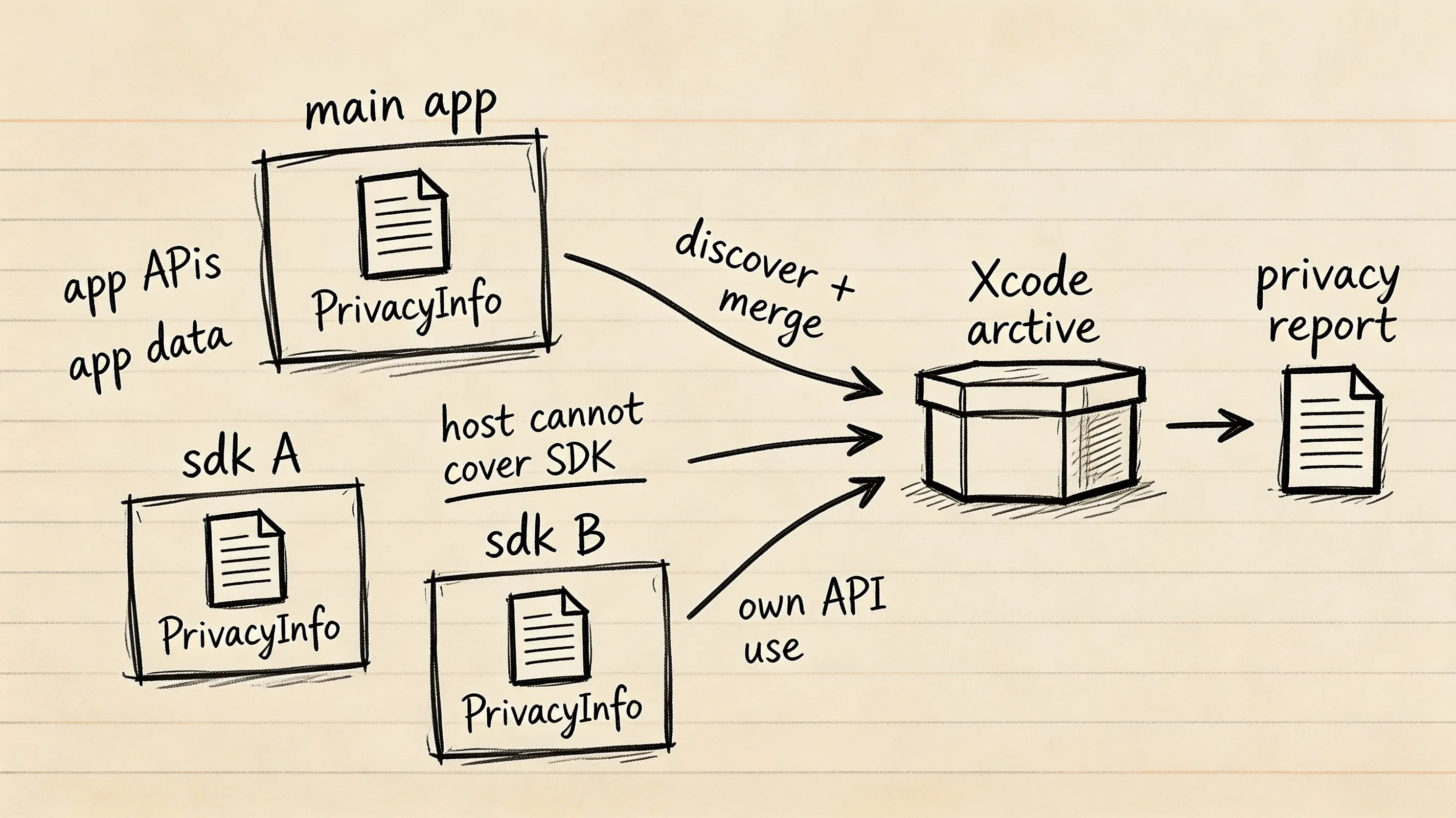
Apple’s privacy manifest framework establishes a modular transparency model across the iOS software supply chain. Rather than requiring the host application to manually audit and declare the internal implementation details of every imported library, Apple divides privacy governance into distinct layers:
- Main Application Manifest: Covers first-party data collection, app-level tracking domains, and Required Reason APIs invoked directly by the primary application target code.
- Embedded SDK Manifests: Required Reason API declarations must be owned by the app or third-party SDK code that uses those APIs. For executables and dynamic libraries, the bundle containing that executable or library must include the relevant privacy manifest; a third-party SDK cannot rely on the host app’s manifest to report the SDK’s Required Reason API use.
- Automated Dependency Aggregation: When an application is archived in Xcode 15 or later, the build system traverses the dependency graph, discovers all bundled
PrivacyInfo.xcprivacyfiles, and aggregates them into a single, unified Privacy Report.
The Four Root Configuration Keys
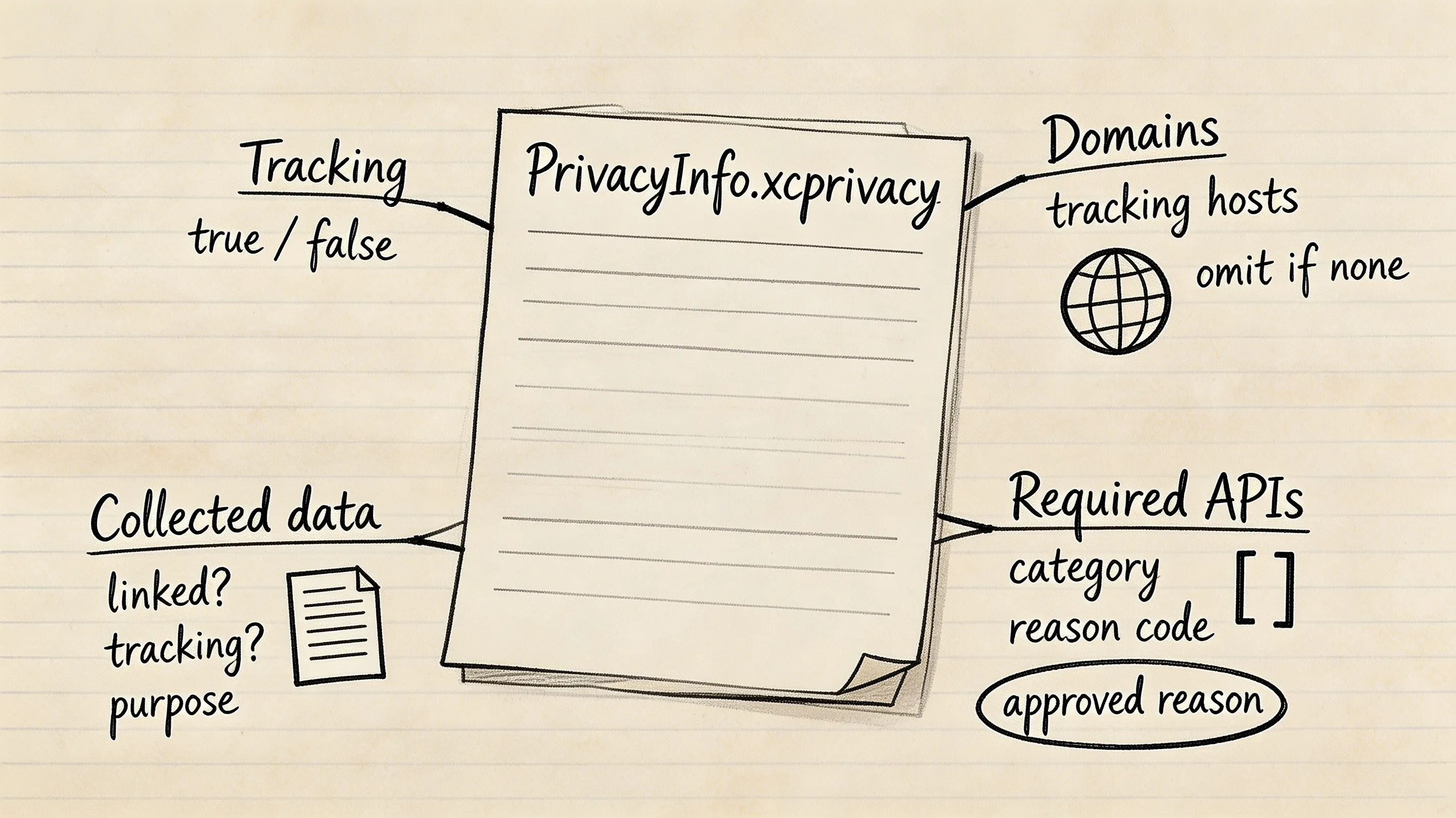
Every PrivacyInfo.xcprivacy file is structured as an XML property list dictionary containing up to four root-level keys:
NSPrivacyTracking(Boolean): Declares whether the application or SDK uses data collected from the app for tracking under Apple App Tracking Transparency (ATT) definitions.NSPrivacyTrackingDomains(Array of Strings): Lists the internet domains connected to by the app or SDK that engage in tracking. If a user does not grant ATT authorization, iOS blocks network connections to domains declared in this array. If an app or SDK does not connect to tracking domains, this key can be omitted.NSPrivacyCollectedDataTypes(Array of Dictionaries): Reports the Apple-defined categories of data that the app or SDK collects about people using the app, together with whether the data is linked to user identity, whether it is used for tracking, and the operational purposes for which it is collected.NSPrivacyAccessedAPITypes(Array of Dictionaries): Declares Apple-designated Required Reason APIs invoked by the binary, accompanied by approved string reason codes.
App Store Connect Ingestion Enforcement and Error Diagnostics
App Store Connect enforces privacy manifests during binary ingestion:
- Missing API Declaration (
ITMS-91053): Triggered when a compiled binary or linked library calls a Required Reason API symbol, but the corresponding category key is missing fromNSPrivacyAccessedAPITypes. - Invalid Reason Code Declaration: Occurs when a manifest declares an unapproved, malformed, or deprecated reason string for a specific API category.
- Required Third-Party SDK Manifest Missing: Enforced in the submission scenarios defined by Apple’s current third-party SDK requirements for listed SDKs, requiring both privacy manifests and valid digital signatures for binary distributions.
Developers integrating client attribution and deep linking can consult the iOS SDK integration documentation for technical specifications regarding manifest declarations.
See Also: iOS SDK ──> Mobile Attribution Architecture
Required Reason API Categories and Approved Reason Codes
The Five Required Reason API Categories
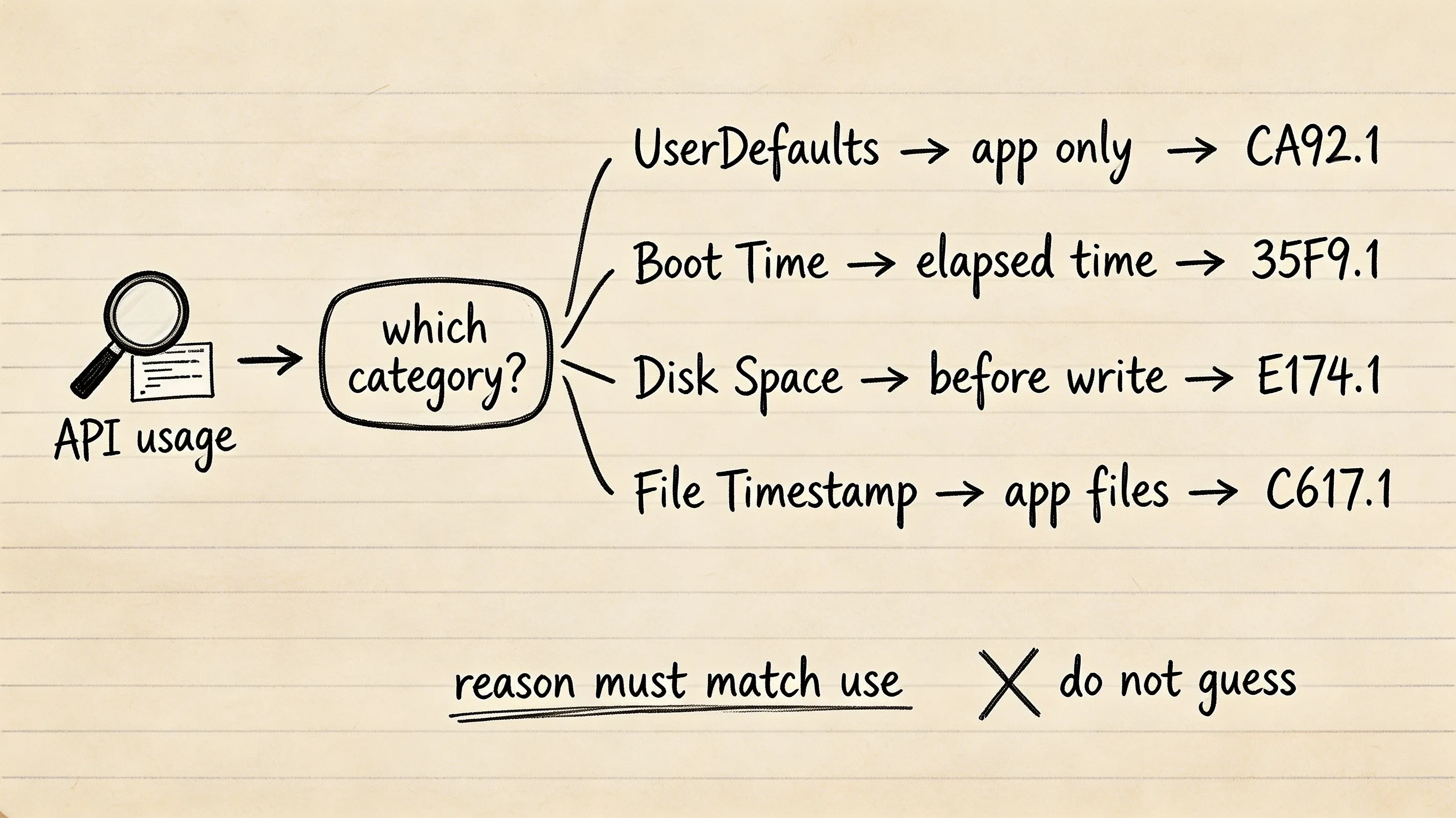
According to Apple Developer Technote TN3183, Apple defines five specific API categories that require explicit justification codes in NSPrivacyAccessedAPITypes. Mobile SDKs and iOS applications commonly interact with four primary categories:
NSPrivacyAccessedAPICategoryUserDefaults: Accessing local app settings viaUserDefaultsorNSUserDefaults.NSPrivacyAccessedAPICategorySystemBootTime: Measuring elapsed time or timestamps using system boot APIs likesysctl(KERN_BOOTTIME)orsystemUptime.NSPrivacyAccessedAPICategoryDiskSpace: Inspecting file system capacity viastatfs,statvfs, orvolumeAvailableCapacityKey.NSPrivacyAccessedAPICategoryFileTimestamp: Checking file creation or modification dates viastat,getattrlist, orcontentModificationDateKey.NSPrivacyAccessedAPICategoryActiveKeyboards: Inspecting active custom keyboard extensions (primarily used by specialized keyboard utilities).
Selected Approved Reason Code Mappings for Common SDK Use Cases
The table below focuses on categories commonly encountered in general-purpose mobile SDKs; consult Apple’s current documentation for the complete reason list, including Active Keyboards. To comply with Apple guidelines, developers must select reason codes that strictly match their actual runtime data use:
| API Category Key | Approved Code | Official Apple-Aligned Purpose |
|---|---|---|
NSPrivacyAccessedAPICategoryUserDefaults |
CA92.1 |
Read and write data accessible only to the app itself |
NSPrivacyAccessedAPICategoryUserDefaults |
1C8F.1 |
Read and write data shared only inside the same App Group |
NSPrivacyAccessedAPICategoryUserDefaults |
C56D.1 |
Third-party SDK wrapper providing key-value functionality to the host app |
NSPrivacyAccessedAPICategorySystemBootTime |
35F9.1 |
Measure elapsed time between events occurring within the app or handle timers |
NSPrivacyAccessedAPICategorySystemBootTime |
8FFB.1 |
Calculate absolute timestamps for events that occurred within the app |
NSPrivacyAccessedAPICategoryDiskSpace |
E174.1 |
Check disk space before writing files and modify app behavior if space is low |
NSPrivacyAccessedAPICategoryDiskSpace |
85F4.1 |
Access disk-space information to display available capacity to the user |
NSPrivacyAccessedAPICategoryFileTimestamp |
C617.1 |
Access file metadata inside the app container, App Group, or CloudKit container |
NSPrivacyAccessedAPICategoryFileTimestamp |
3B52.1 |
Access metadata for files or directories explicitly selected by the user |
NSPrivacyAccessedAPICategoryFileTimestamp |
0A2A.1 |
Third-party SDK wrapper accessing file timestamps solely on behalf of the host app |
Constructing an Example PrivacyInfo.xcprivacy Property List
Configuring Data Collection Types
The NSPrivacyCollectedDataTypes array reports the Apple-defined categories of data that the app or SDK collects about people using the app, together with whether the data is linked to user identity, whether it is used for tracking, and the operational purposes for which it is collected:
NSPrivacyCollectedDataType: The standard Apple string identifier (e.g.,NSPrivacyCollectedDataTypeDeviceID).NSPrivacyCollectedDataTypeLinked: A boolean indicating whether the data is linked to an individual user’s identity.NSPrivacyCollectedDataTypeTracking: A boolean indicating whether the data is used for cross-app tracking.NSPrivacyCollectedDataTypePurposes: An array of standard purpose strings (e.g.,NSPrivacyCollectedDataTypePurposeAnalytics).
Declaring Tracking Domains
If an SDK or application engages in tracking under ATT definitions, all corresponding tracking domains must be declared under NSPrivacyTrackingDomains. If tracking authorization is not granted by the user, iOS blocks network connections to declared domains. If the app or SDK does not engage in tracking, NSPrivacyTracking should be set to false and NSPrivacyTrackingDomains can be omitted.
The property list configuration below illustrates an example PrivacyInfo.xcprivacy schema. Include only categories and reasons that reflect your application’s actual implementation:
```xml
<?xml version="1.0" encoding="UTF-8"?>
<!DOCTYPE plist PUBLIC "-//Apple//DTD PLIST 1.0//EN" "http://www.apple.com/DTDs/PropertyList-1.0.dtd">
<plist version="1.0">
<dict>
    <key>NSPrivacyTracking</key>
    <false/>
    <key>NSPrivacyCollectedDataTypes</key>
    <array>
        <dict>
            <key>NSPrivacyCollectedDataType</key>
            <string>NSPrivacyCollectedDataTypeDeviceID</string>
            <key>NSPrivacyCollectedDataTypeLinked</key>
            <false/>
            <key>NSPrivacyCollectedDataTypeTracking</key>
            <false/>
            <key>NSPrivacyCollectedDataTypePurposes</key>
            <array>
                <string>NSPrivacyCollectedDataTypePurposeAnalytics</string>
                <string>NSPrivacyCollectedDataTypePurposeAppFunctionality</string>
            </array>
        </dict>
    </array>
    <key>NSPrivacyAccessedAPITypes</key>
    <array>
        <dict>
            <key>NSPrivacyAccessedAPIType</key>
            <string>NSPrivacyAccessedAPICategoryUserDefaults</string>
            <key>NSPrivacyAccessedAPITypeReasons</key>
            <array>
                <string>CA92.1</string>
            </array>
        </dict>
        <dict>
            <key>NSPrivacyAccessedAPIType</key>
            <string>NSPrivacyAccessedAPICategorySystemBootTime</string>
            <key>NSPrivacyAccessedAPITypeReasons</key>
            <array>
                <string>35F9.1</string>
            </array>
        </dict>
        <dict>
            <key>NSPrivacyAccessedAPIType</key>
            <string>NSPrivacyAccessedAPICategoryDiskSpace</string>
            <key>NSPrivacyAccessedAPITypeReasons</key>
            <array>
                <string>E174.1</string>
            </array>
        </dict>
        <dict>
            <key>NSPrivacyAccessedAPIType</key>
            <string>NSPrivacyAccessedAPICategoryFileTimestamp</string>
            <key>NSPrivacyAccessedAPITypeReasons</key>
            <array>
                <string>C617.1</string>
            </array>
        </dict>
    </array>
</dict>
</plist>
Resolving CocoaPods Resource Bundle Code Signing Errors
The Root Cause: Resource Bundle Signing Failures in Xcode 15 and 16
When integrating dependencies via CocoaPods in Xcode 15 or 16, developers frequently encounter compilation halts:
Signing for "libOpoInstallSDK-OPPrivacy" requires a development team. Select a development team in the Signing & Capabilities editor.
This build failure is an Xcode and CocoaPods integration issue:
- A traditional
.astatic library cannot directly contain resources such asPrivacyInfo.xcprivacy. Apple recommends packaging static SDK code and resources together inside a static framework. - Some CocoaPods integrations instead generate separate resource-bundle targets to distribute resources alongside static libraries.
- Certain CocoaPods-generated resource-bundle targets can inherit signing configurations that cause Xcode builds to halt requesting a development team. This is a build-system integration issue rather than a
PrivacyInfo.xcprivacyschema requirement.
Applying Targeted Build-System Workarounds in the Podfile
To resolve this error across automated builds, developers may use a scoped post_install hook in their project Podfile. Because this is a build-system workaround for non-executable resource bundles, teams should scope it to specific affected bundle targets or validate affected dependencies before applying changes globally.
The Ruby script below demonstrates how to iterate through CocoaPods targets and disable signing on designated resource bundle targets:
post_install do |installer|
  # Specify non-executable resource bundle targets that encounter signing errors without a development team
  target_bundle_names = [
    'libOpoInstallSDK-OPPrivacy'
  ]

  installer.pods_project.targets.each do |target|
    if target.respond_to?(:product_type) &&
       target.product_type == "com.apple.product-type.bundle" &&
       target_bundle_names.include?(target.name)
      target.build_configurations.each do |config|
        # Strip code signing requirement from designated non-executable resource bundles
        config.build_settings['CODE_SIGNING_ALLOWED'] = 'NO'
        config.build_settings['CODE_SIGN_IDENTITY'] = ''
      end
    end
  end
end
Auditing and Generating the Aggregated Privacy Report in Xcode
Generating the Unified Privacy Report via Xcode Archive Organizer
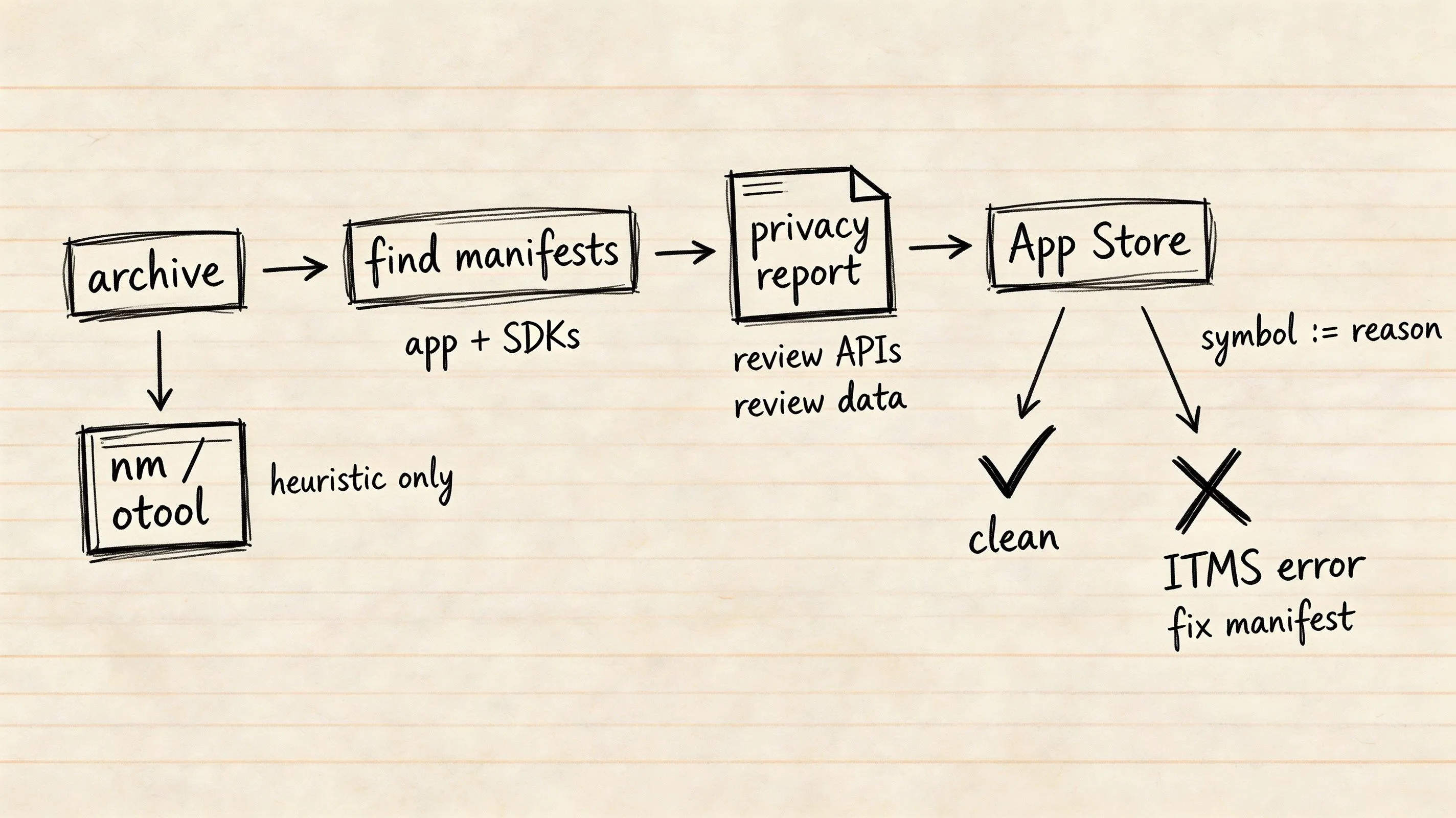
To verify that all first-party targets and third-party dependencies are properly declared before submitting a binary:
- Open your project in Xcode 15 or later.
- Select Product > Archive to create a release archive.
- In the Xcode Organizer, right-click (or Control-click) the archive and select Generate Privacy Report.
- Save and inspect the generated PDF report to confirm that all Required Reason APIs, data categories, and third-party SDK manifests appear accurately.
Command-Line Static Analysis: Pre-Submission Heuristic Scans
Development teams can implement heuristic pre-submission audits inside continuous integration (CI/CD) pipelines by scanning compiled binaries for restricted symbols using nm and otool:
# Scan unpacked application binary for candidate Required Reason API symbols
nm -u /path/to/Payload/YourApp.app/YourApp | grep -E 'sysctl|statfs|statvfs|getattrlist|NSUserDefaults'

# Check embedded frameworks and bundles for PrivacyInfo.xcprivacy manifests
find /path/to/Payload/YourApp.app -name "PrivacyInfo.xcprivacy"
Symbol presence does not by itself establish which approved reason applies; review the actual call path and use case before modifying the manifest. Teams must use Xcode’s Generate Privacy Report and App Store Connect pre-checks for authoritative verification.
Diagnostic Matrix: Root Causes of App Store Privacy Manifest Rejections
| Failure Mode / Error Code | Underlying Root Cause | Observed System Behavior | Recommended Remediation |
|---|---|---|---|
Missing API Declaration (ITMS-91053) |
Binary calls a restricted API but manifest omits the category | App Store Connect upload warning or rejection | Declare the matching API category and valid reason code |
| Invalid Reason Code | Specified reason code is not approved by Apple for that category | App Store Connect rejects submission | Update XML to use an approved reason string from Apple specs |
| Missing Third-Party SDK Manifest | A listed third-party SDK dependency lacks an embedded manifest | App Store Connect flags missing SDK manifest | Upgrade dependency to a version providing PrivacyInfo.xcprivacy |
| Resource Bundle Code Signing Error | CocoaPods generates a resource bundle target without a signing team | Xcode compilation halts during build | Evaluate failing bundle target and apply a scoped Podfile signing workaround |
| Undeclared Tracking Endpoint | App connects to tracking server not listed in NSPrivacyTrackingDomains |
Privacy configuration is incomplete for the app’s tracking behavior | List all tracking endpoints under NSPrivacyTrackingDomains |
Frequently Asked Questions (FAQ)
Does every third-party SDK need its own PrivacyInfo.xcprivacy file?
What happens if an app uses UserDefaults without declaring an approved reason?
Can an application declare multiple reasons for a single API category?
Summary and Decision Framework
Apple’s Privacy Manifest framework enforces transparency across the iOS software supply chain. Ensuring seamless App Store submissions requires development teams to audit first-party code for Required Reason API usage, verify that third-party SDK dependencies satisfy the privacy-manifest requirements applicable to their API use, and manage CocoaPods resource bundle signing appropriately.
For product-specific privacy-manifest declarations, review the OpoInstall documentation and compare the shipped manifest with the application’s actual integration and Apple’s current requirements.
Related Materials
-
Concepts: Privacy Manifests, Required Reason APIs, Resource Bundle Code Signing, Privacy Reports, App Store Compliance
-
Technologies: Xcode 15+, CocoaPods Dependency Manager, Swift Package Manager, OpoInstall iOS SDK
-
Standards: Apple Privacy Manifest Specification, App Store Review Guidelines Section 5.1.1
-
APIs & Configurations:
PrivacyInfo.xcprivacy,NSPrivacyAccessedAPITypes, Podfilepost_installHook
Official Documentation
Share this article



