How to handle deep linking and custom schemes in Android webview? Handling deep links in an Android WebView requires extending WebViewClient, overriding shouldOverrideUrlLoading to check isForMainFrame, validating custom schemes against an allowlist, and safely launching authorized external intents to prevent non-web schemes from remaining in the WebView loading pipeline.
Android WebView deep link interception is the programmatic practice of overriding navigation callbacks within a custom WebViewClient to capture non-HTTP protocols, such as custom URI schemes and Chrome Intent URIs. By evaluating request metadata and validating destination payloads, the host application executes native Intent launches while preventing unhandled protocol crashes.
| Term | Definition | Related Entity | Search Intent Role |
|---|---|---|---|
| WebView | An embedded Chromium-based view component that renders web content inside Android apps. | Android SDK | Informational / Commercial |
| Custom URL Scheme | A proprietary URI protocol allowing web links to target native applications. | Deep Link Routing | Technical / Informational |
| Web to App | The process of transitioning users from web pages into native application interfaces. | Mobile Deep Linking | Informational |
Why Android WebViews Throw net ERR UNKNOWN URL SCHEME Errors
Chromium Protocol Limitations: Why WebViews Natively Recognize Only Standard Web Schemes
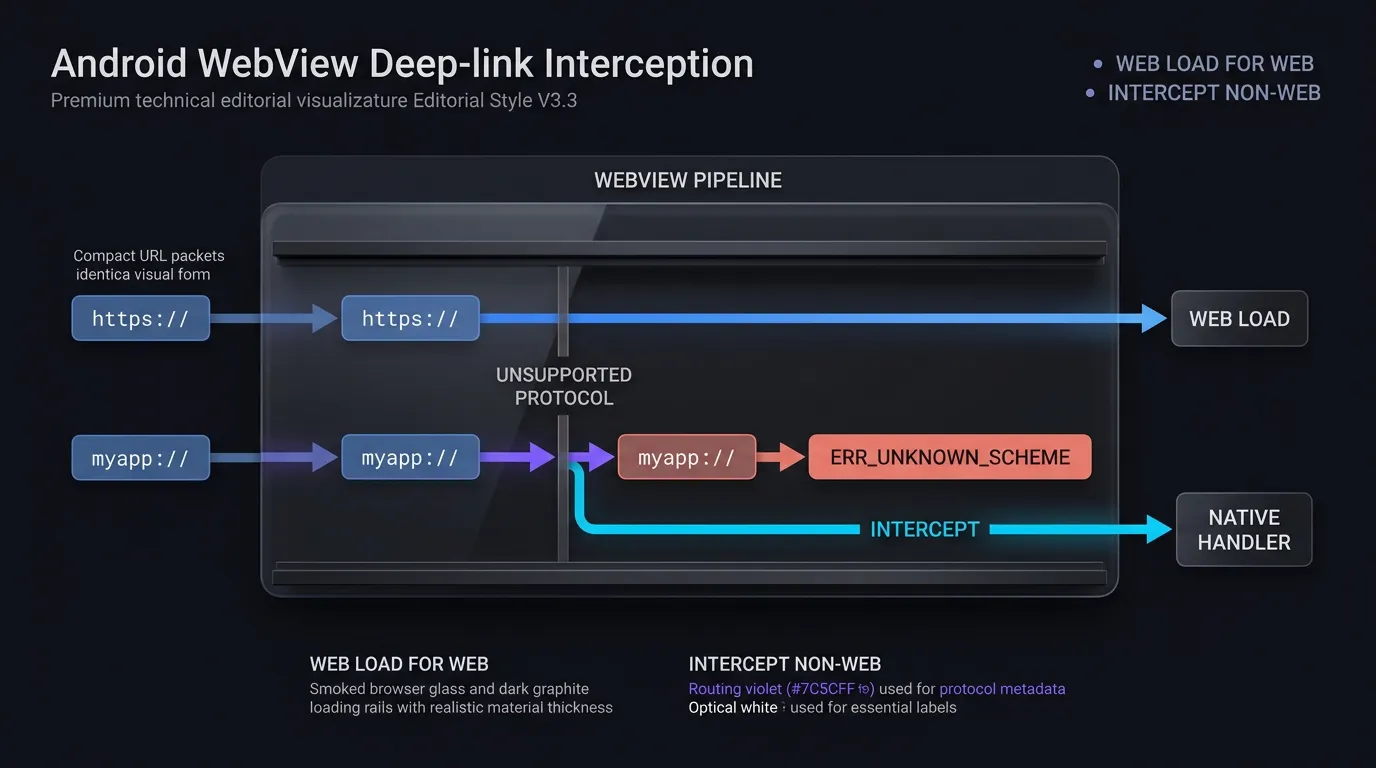
The Android WebView component is powered by an underlying Chromium rendering engine primarily configured to parse and display standard web-resource protocols: http://, https://, file://, data://, about:, and javascript:.
By default, when no custom WebViewClient is assigned, the Android framework delegates unhandled URLs to the system’s Activity Manager. However, once an application provides a custom WebViewClient, non-HTTP(S) schemes (such as myapp://product/detail/1024, alipay://, or whatsapp://) are routed directly into the client’s navigation callbacks. If the host application allows a custom scheme to remain within the WebView loading pipeline instead of intercepting it, the Chromium engine attempts to resolve the custom scheme as an ordinary web resource. Because non-standard protocols cannot be resolved against DNS or web server transport layers, the engine surfaces a low-level navigation failure.
The Crash Anatomy of net::ERR_UNKNOWN_URL_SCHEME: From User Tap to Web Resource Load Failure
The transition from a user interaction to an error page occurs in a rapid, deterministic sequence:
- User Trigger: A user taps a call-to-action button or hyperlink inside an embedded H5 landing page.
- Navigation Request: The web engine constructs a navigation request containing the target URI string (e.g.,
myapp://promo/summer). - Pipeline Evaluation: If
shouldOverrideUrlLoading()returnsfalseor fails to intercept the non-HTTP(S) URI, the Chromium engine treats the URL as a standard web resource load. - Error Dispatch: Finding no internal handler for the protocol, the engine triggers
onReceivedError()and replaces the web view’s content with the default Chromium error template:net::ERR_UNKNOWN_URL_SCHEME.
This error page halts the user journey, prevents conversion tracking, and degrades the host application’s perceived stability.
The Risk of Unhandled ActivityNotFoundException Crashes on Target Application Absence
When developers first attempt to resolve net::ERR_UNKNOWN_URL_SCHEME, a common mistake is parsing the URI string and calling context.startActivity(Intent(Intent.ACTION_VIEW, Uri.parse(url))) without adequate exception handling.
If the user does not have the target application installed on their device, the Android operating system cannot find an eligible Activity to resolve the Intent. In standard Android execution, calling startActivity() without a matching handler throws an unhandled android.content.ActivityNotFoundException. If this exception is not caught within a structured try-catch block, the entire host application process terminates abruptly, resulting in a fatal crash.
How Does shouldOverrideUrlLoading Intercept Deep Link Protocols
API Evolution: Comparing API 24+ WebResourceRequest Overloads with Legacy String Callbacks
Android’s WebViewClient provides the shouldOverrideUrlLoading callback to allow host applications to inspect and intercept navigation requests before the web engine executes them. The signature and capabilities of this method have evolved across Android API levels:
- API 24+ (Android 7.0 and Higher): Overrides
shouldOverrideUrlLoading(view: WebView?, request: WebResourceRequest?): Boolean. TheWebResourceRequestinterface delivers rich contextual metadata, including the target URL (request.url), the HTTP request method (request.method), request headers, and critical frame-hierarchy flags (request.isForMainFrame,request.hasGesture()). - Legacy Overload (Deprecated in API 24): Overrides
shouldOverrideUrlLoading(view: WebView?, url: String?): Boolean. This legacy callback receives only the raw URL string without metadata regarding the requesting frame or user interaction state.
In accordance with Android Developers Reference on WebViewClient shouldOverrideUrlLoading, modern applications must implement the WebResourceRequest overload. When supporting legacy Android versions, the deprecated string callback should be configured conservatively to prevent security bypasses.
The Security Criticality of request.isForMainFrame: Blocking Subframe and Iframe Hijacking
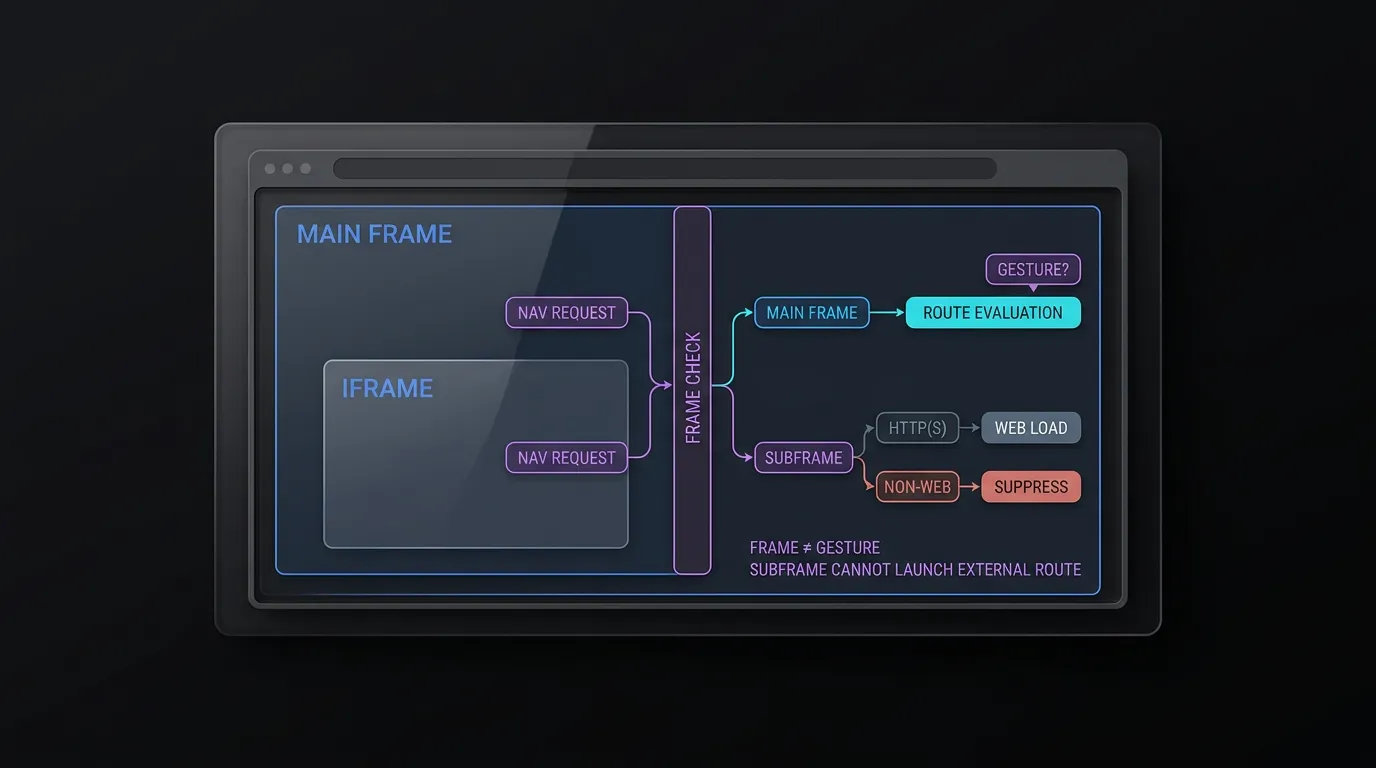
In accordance with Android Developers Guide on WebResourceRequest, the shouldOverrideUrlLoading callback can be triggered for subframes, iframes, and background resource redirects as well as top-level document navigations.
Enforcing request.isForMainFrame is essential for application security:
- Frame Boundary Isolation: Checking
request.isForMainFrameensures that subframes and iframes cannot trigger external application launches or custom scheme intents. If a subframe attempts navigation, standard HTTP(S) loads should returnfalseto continue in-frame rendering, while non-HTTP(S) schemes must returntrueto suppress execution without throwing errors. - User Gesture Distinction: While
isForMainFrameconfirms that the request applies to the primary document, it does not prove user activation. If your architecture requires user-gesture verification, evaluaterequest.hasGesture()or enforce application-level confirmation modals, noting that Android documentation highlights certain valid user flows wherehasGesture()may return false.
Differentiating Normal Web Navigation from Deep Link Handoffs: When to Return false vs true
The boolean return value of shouldOverrideUrlLoading controls the WebView’s rendering lifecycle:
- Return
false: Informs the Android framework that the host application has not handled the URL. TheWebViewcontinues standard web navigation, loading the URL within its internal Chromium container. This return value is mandatory for standardhttp://andhttps://web pages that should display inside the embedded browser. - Return
true: Informs the framework that the host application has intercepted and handled the URL. TheWebViewimmediately cancels its internal loading process. This return value is mandatory when launching an externalIntent, routing to a native activity, or suppressing an unauthorized scheme.
Handling Host App Verified App Links Within the Embedded Container
When a link inside the WebView points to the host application’s own verified HTTPS domain (such as https://app.example.com/product/1024), executing default navigation causes the WebView to load the web version of the product page.
To deliver a native experience, the WebViewClient should inspect incoming HTTPS URLs. If the host matches the application’s associated domain, the client intercepts the request, validates the path and query parameters against an internal route validator (AppLinkRouteValidator), and dispatches the data directly to the native router (internalRouter(validatedRoute)), returning true to cancel redundant web rendering.
Structuring Secure Intent Handlers for Custom Schemes and Intent URIs
Dissecting Chrome Intent URI Syntax: Schemes, Packages, and S.browser_fallback_url
On Android, web pages frequently utilize Chrome Intent URIs to structure native deep links with built-in browser fallback mechanisms. An Intent URI uses the intent:// scheme and encodes routing parameters, package targets, and fallback URLs into a serialized string:
intent://product/detail/1024#Intent;scheme=myapp;package=com.example.app;S.browser_fallback_url=https%3A%2F%2Fplay.google.com%2Fstore%2Fapps%2Fdetails%3Fid%3Dcom.example.app;end
As documented in Chrome for Developers Guide on Android Intent URIs, the URI breaks down into distinct components:
- Host and Path (
product/detail/1024): Defines the internal application destination. scheme=myapp: Specifies the underlying custom protocol.package=com.example.app: Restricts intent resolution exclusively to the specified Android package.S.browser_fallback_url=...: An optional String extra defining an explicit web or store URL to load if the target application is not installed.
The Danger of Executing Raw Parsed Intents: Mitigating Intent Injection Vulnerabilities
A common implementation anti-pattern is parsing an incoming URI with Intent.parseUri(url, Intent.URI_INTENT_SCHEME) and passing the resulting Intent directly to context.startActivity(intent).
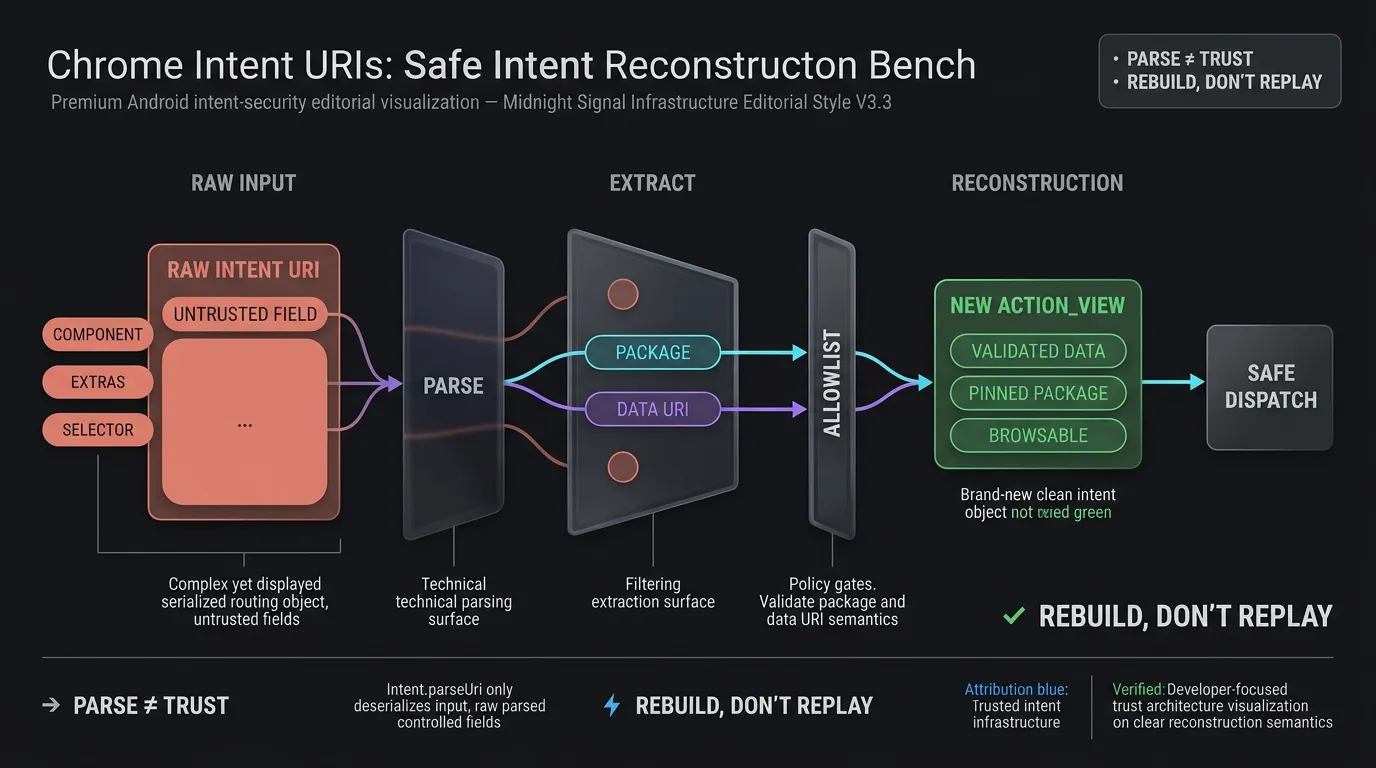
In accordance with OWASP Mobile Application Security Testing Guide Guidance on Insecure Deep Links, executing raw parsed intents exposes the application to Intent Injection attacks. An attacker controlling the web page could craft an Intent URI containing malicious explicit component targets (component=com.example.app/.InternalAdminActivity), sensitive actions, or privileged intent extras (S.is_admin=true). The WebView would deserialize these parameters and launch unexported or internal activities, bypassing authentication barriers.
Safe Intent Reconstruction: Stripping Components and Restricting Actions to ACTION_VIEW
To eliminate Intent injection vulnerabilities, host applications must never launch a raw deserialized Intent directly. Instead, the WebViewClient must parse the URI, extract only the verified data payload, and reconstruct a clean, dedicated Intent:
- Extract Data: Parse the URI and extract the verified target package and data URI.
- Validate Package: Verify that the declared package matches an explicit allowlist of authorized partner or internal packages.
- Reconstruct: Instantiate a new
Intent(Intent.ACTION_VIEW, validatedDataUri). - Isolate: Apply
intent.addCategory(Intent.CATEGORY_BROWSABLE)to ensure only browsable activities can resolve the request, set explicit flags (FLAG_ACTIVITY_NEW_TASK), and ensureintent.componentandintent.selectorremain null.
Enforcing Strict Scheme, Host, Path, and Query Parameter Allowlists
Both custom schemes (myapp://) and reconstructed Intent URIs must pass through a strict validator before execution.
This reference implementation specifically handles the host application’s own myapp:// scheme, explicitly pinning intent execution to com.example.app. For multi-app partner ecosystems, developers should maintain a strict scheme-to-package mapping or prioritize verified HTTPS App Links.
The validator checks:
- Scheme: Matches authorized custom schemes (
myapp). - Host: Matches predefined routing categories (
open,product,event). - Path Prefix: Conforms to expected route structures (
/detail/,/view/,/main/). - Query Parameters: Enforces allowlisted query keys (
target,id,promo,utm_source) and validates that parameter values comply with length limits (e.g.,characters) and alphanumeric character sets.
[User Taps Link Inside Android WebView]
                   │
                   ▼
[WebViewClient.shouldOverrideUrlLoading]
                   │
     ┌─────────────┴─────────────┐
     ▼                           ▼
[!request.isForMainFrame]   [request.isForMainFrame]
     │                           │
     ▼                           ▼
[Check Subframe Scheme]     [Inspect URL Scheme]
├─ HTTP(S) -> return false       │
└─ Non-Web -> return true   ┌────┴───────────────────────────┐
   (Suppress Error)         ▼                                ▼
                     [HTTP / HTTPS]                 [Non-HTTP(S) Scheme]
                            │                                │
                            ▼                                ▼
                   [Check Host Domain]              [CustomSchemeValidator]
                   ├─ Internal App Link             ├─ Valid -> Launch Pinned Intent
                   │  -> Internal Router            └─ Intent -> Reconstruct & Fallback
                   └─ External Web
                      -> Return false
How to Handle Android 11 Package Visibility and App Store Fallbacks
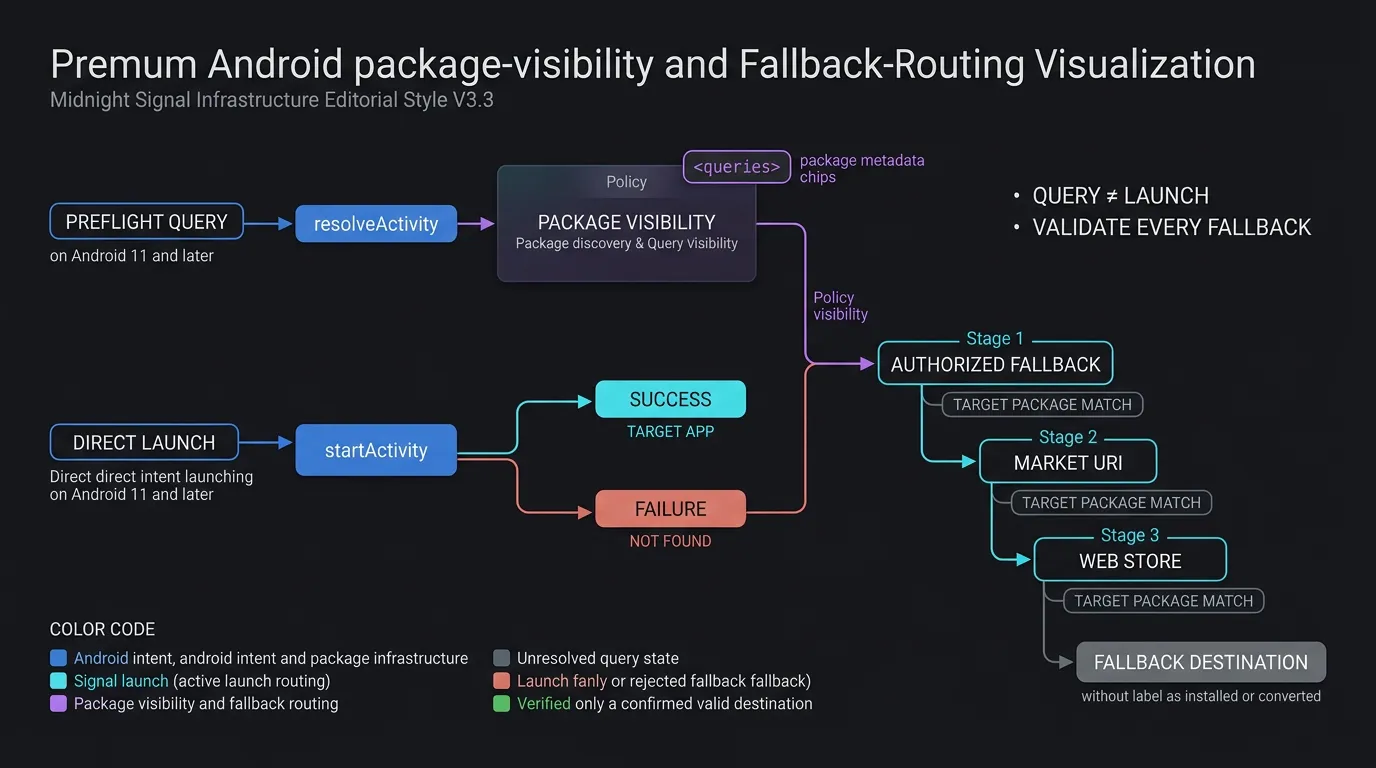
The Android 11 Package Visibility Shift: Why Preflight Queries Require Declaration
Starting with Android 11 (API level 30), Google introduced Package Visibility filtering to enhance user privacy. Under this framework, an application’s view of other installed applications is restricted by default.
It is critical to understand the distinction between intent launching and intent querying:
- Direct Intent Launching: Standard calls to
context.startActivity(intent)do not require package visibility declarations. If the target application is installed, the operating system routes and launches it successfully regardless of whether it is visible to package queries. - Preflight Intent Queries: If your
WebViewClientarchitecture performs preflight inspection—such as callingpackageManager.resolveActivity(intent, 0)orpackageManager.queryIntentActivities(intent, 0)to check application presence before launching—the query returnsnullor an empty list unless the target package or scheme is declared inAndroidManifest.xml.
Declaring <queries> Elements in AndroidManifest.xml for Custom Schemes and Package Targets
In accordance with Android Developers Guide on Package Visibility in Android 11, applications that perform preflight checks before intent execution should declare their target packages or intent signatures in the manifest:
<manifest package="com.example.app">
    <!-- Optional preflight query declarations for explicit package discovery -->
    <queries>
        <package android:name="com.example.partner" />
        <intent>
            <action android:name="android.intent.action.VIEW" />
            <data android:scheme="myapp" />
        </intent>
        <intent>
            <action android:name="android.intent.action.VIEW" />
            <data android:scheme="https" android:host="app.example.com" />
        </intent>
    </queries>
</manifest>
If your architecture prefers standard launch patterns, executing startActivity() within a try-catch block catching ActivityNotFoundException provides a resilient, query-independent implementation.
Implementing Fallback Chains: Graceful Store Routing When the Target Application Is Absent
When an intercepted custom scheme or Intent URI cannot be launched because the target application is not installed on the user’s device, the WebViewClient must execute an explicit fallback chain:
- Extract and Bind Fallback URL: For
intent://URIs, extract theS.browser_fallback_urlstring parameter and validate that it points to an authorized destination. For Google Play URLs, verify that theidparameter strictly matches the target package name (id=targetPackage) to prevent open-redirect exploits. - Market URI Generation: If no fallback URL is present, construct a market intent:
market://details?id=com.example.app. - Web Play Store Fallback: If Google Play is disabled or absent, catch the
ActivityNotFoundExceptionon the market intent and loadhttps://play.google.com/store/apps/details?id=com.example.app.
Binding Contextual Parameters Across Fallback Redirections with OpoInstall
When uninstalled users are routed to Google Play, static store links drop dynamic parameters. OpoInstall, a mobile attribution and deep linking platform, bridges this gap by capturing referral tokens and campaign context on the attribution backend before store redirection. Verify deferred-parameter retrieval behavior and initialization APIs against the OpoInstall Android SDK version deployed in production.
Upon subsequent installation and initial app launch, the OpoInstall Android SDK retrieves the cached parameters, enabling the host app to restore the user’s target scene. Review the SDK integration documentation for instructions on receiving deferred parameters post-install.
Production WebViewClient Implementation for Safe Scheme Interception
Structuring the Custom WebViewClient Architecture in Kotlin
A production WebViewClient coordinates frame verification, scheme allowlisting, intent reconstruction, fallback extraction, and internal routing. The implementation encapsulates validation rules within dedicated validator objects (AppLinkRouteValidator and CustomSchemeValidator) to keep navigation callbacks clean and maintainable.
Implementing AppLinkRouteValidator and CustomSchemeValidator Models
The validator objects enforce strict fail-closed security:
AppLinkRouteValidatorvalidates internal HTTPS domains, allowed path prefixes, and authorized query keys (target,id,promo,utm_source), returning a structuredValidatedAppRoutedata class.CustomSchemeValidatorchecks authorized custom schemes (myapp), validates allowed hosts (open,product,event), enforces path prefixes, and sanitizes query parameter values against alphanumeric character sets and length constraints (chars).
The code implementation below demonstrates how to configure optional AndroidManifest.xml package visibility declarations and implement a thread-safe, secure CustomWebViewClient in Kotlin with automated fallback handling. Certified SDK binaries and integration wrappers can be acquired from the OpoInstall SDK download center.
<!-- AndroidManifest.xml: Optional Package Visibility Declarations for Preflight Intent Queries (Android 11+) -->
<manifest xmlns:android="http://schemas.android.com/apk/res/android"
    package="com.example.app">

    <!-- Declare external packages and custom schemes only if using preflight resolveActivity queries -->
    <queries>
        <!-- Authorize preflight discovery for specific partner or target packages -->
        <package android:name="com.example.partner" />

        <!-- Authorize preflight resolution of custom deep linking schemes -->
        <intent>
            <action android:name="android.intent.action.VIEW" />
            <data android:scheme="myapp" />
        </intent>

        <!-- Authorize preflight resolution of verified HTTPS App Link domains -->
        <intent>
            <action android:name="android.intent.action.VIEW" />
            <data android:scheme="https" android:host="app.example.com" />
        </intent>
    </queries>

    <application
        android:allowBackup="true"
        android:label="@string/app_name"
        android:theme="@style/Theme.AppCompat.Light.NoActionBar">
        <!-- Application components -->
    </application>
</manifest>
// Android: Custom WebViewClient with Frame Boundary Security, Allowlist Validation, and Fallback Routing
// Reference integration example; verify method signatures against deployed Android architecture.
package com.example.app.webview

import android.content.ActivityNotFoundException
import android.content.Context
import android.content.Intent
import android.net.Uri
import android.util.Log
import android.webkit.WebResourceRequest
import android.webkit.WebView
import android.webkit.WebViewClient

data class ValidatedAppRoute(val path: String, val queryParams: Map<String, String>)

object AppLinkRouteValidator {
    private val allowedPrefixes = setOf("/open/", "/product/", "/promo/")
    private val allowedQueryKeys = setOf("target", "id", "promo", "utm_source")

    fun validate(uri: Uri): ValidatedAppRoute? {
        val path = uri.path ?: ""
        if (allowedPrefixes.none { path.startsWith(it) }) {
            return null
        }

        val sanitizedParams = mutableMapOf<String, String>()
        for (name in uri.queryParameterNames) {
            // Strict security posture: reject request if unknown query keys exist
            if (name !in allowedQueryKeys) {
                return null
            }
            val value = uri.getQueryParameter(name) ?: ""
            if (value.length <= 64 && value.matches(Regex("^[A-Za-z0-9_-]+$"))) {
                sanitizedParams[name] = value
            } else {
                return null
            }
        }

        return ValidatedAppRoute(path, sanitizedParams)
    }
}

object CustomSchemeValidator {
    private val allowedSchemes = setOf("myapp")
    private val allowedHosts = setOf("open", "product", "event")
    private val allowedPathPrefixes = setOf("/detail/", "/view/", "/main/")
    private val allowedQueryKeys = setOf("target", "id", "promo", "utm_source")

    fun validate(uri: Uri): Uri? {
        val scheme = uri.scheme?.lowercase() ?: return null
        val host = uri.host?.lowercase() ?: return null
        val path = uri.path ?: ""

        if (!allowedSchemes.contains(scheme) || !allowedHosts.contains(host)) {
            return null
        }

        if (allowedPathPrefixes.none { path.startsWith(it) }) {
            return null
        }

        for (name in uri.queryParameterNames) {
            if (name !in allowedQueryKeys) return null
            val value = uri.getQueryParameter(name) ?: ""
            if (value.length > 128 || !value.matches(Regex("^[A-Za-z0-9_-]+$"))) {
                return null
            }
        }

        return uri
    }
}

class CustomWebViewClient(
    private val context: Context,
    private val internalRouter: (ValidatedAppRoute) -> Unit
) : WebViewClient() {

    override fun shouldOverrideUrlLoading(view: WebView?, request: WebResourceRequest?): Boolean {
        request ?: return false

        // Security requirement: Restrict external app routing to main frame navigations only
        if (!request.isForMainFrame) {
            val scheme = request.url.scheme?.lowercase()
            // Allow standard HTTP(S) subframe loading, but suppress non-web schemes to prevent iframe hijacking & errors
            return if (scheme == "http" || scheme == "https") {
                false
            } else {
                Log.w("WebViewClient", "Suppressed non-web scheme in subframe/iframe: $scheme")
                true // Consume/cancel without launching external intent or surfacing Chromium error
            }
        }

        val url = request.url.toString()
        return handleUrlNavigation(view, url)
    }

    @Deprecated("Deprecated in Java")
    override fun shouldOverrideUrlLoading(view: WebView?, url: String?): Boolean {
        if (url == null) return false

        val uri = Uri.parse(url)
        val scheme = uri.scheme?.lowercase()

        // Legacy callback lacks reliable isForMainFrame metadata; do not route external schemes
        return if (scheme == "http" || scheme == "https") {
            false // Allow standard web content loading
        } else {
            Log.w("WebViewClient", "Blocked external scheme on legacy callback: $scheme")
            true // Suppress unhandled scheme errors without launching external intents
        }
    }

    private fun handleUrlNavigation(view: WebView?, url: String): Boolean {
        val uri = Uri.parse(url)
        val scheme = uri.scheme?.lowercase() ?: return false

        // 1. Handle HTTP / HTTPS and Internal App Links
        if (scheme == "http" || scheme == "https") {
            // Check if URL matches the host app's own App Link domain
            if (scheme == "https" && uri.host?.lowercase() == "app.example.com") {
                val validatedRoute = AppLinkRouteValidator.validate(uri)
                if (validatedRoute != null) {
                    Log.i("WebViewClient", "Validated internal HTTPS route. Dispatching to internal router.")
                    internalRouter(validatedRoute)
                } else {
                    Log.w("WebViewClient", "Rejected malformed or unauthorized internal App Link: $uri")
                }
                return true // Handled internally; cancel webview loading
            }
            return false // Allow WebView to load standard web content natively
        }

        // 2. Validate custom schemes with strict allowlist and package pinning to prevent hijacking
        val validatedUri = CustomSchemeValidator.validate(uri)
        if (validatedUri != null) {
            val pinnedIntent = Intent(Intent.ACTION_VIEW, validatedUri).apply {
                `package` = "com.example.app" // Explicitly pin host app package
                addCategory(Intent.CATEGORY_BROWSABLE)
                flags = Intent.FLAG_ACTIVITY_NEW_TASK
            }
            return launchSafeIntent(pinnedIntent, fallbackAction = {
                handleStoreFallback(view, "com.example.app")
            })
        }

        // 3. Handle Chrome Intent URIs with safe reconstruction and fallback extraction
        if (scheme == "intent") {
            return try {
                val parsed = Intent.parseUri(url, Intent.URI_INTENT_SCHEME)
                val targetPackage = parsed.`package`
                val allowedPackages = setOf("com.example.app", "com.example.partner")
                val fallbackUrl = parsed.getStringExtra("browser_fallback_url")

                if (targetPackage != null && allowedPackages.contains(targetPackage)) {
                    val rawDataUri = parsed.data
                    if (rawDataUri != null) {
                        val validatedDataUri = CustomSchemeValidator.validate(rawDataUri)
                        if (validatedDataUri != null) {
                            // Reconstruct a clean, dedicated ACTION_VIEW Intent rather than executing raw parsed object
                            val safeIntent = Intent(Intent.ACTION_VIEW, validatedDataUri).apply {
                                `package` = targetPackage
                                addCategory(Intent.CATEGORY_BROWSABLE)
                                flags = Intent.FLAG_ACTIVITY_NEW_TASK
                            }
                            launchSafeIntent(safeIntent, fallbackAction = {
                                handleIntentFallback(view, fallbackUrl, targetPackage)
                            })
                        } else {
                            Log.w("WebViewClient", "Rejected intent with invalid data URI: $rawDataUri")
                            true
                        }
                    } else {
                        Log.w("WebViewClient", "Rejected intent lacking data URI payload")
                        true
                    }
                } else {
                    Log.w("WebViewClient", "Rejected intent targeting unverified package: $targetPackage")
                    true // Cancel unverified package intent
                }
            } catch (e: Exception) {
                Log.e("WebViewClient", "Failed to parse intent URI: $url", e)
                true // Suppress unhandled scheme errors
            }
        }

        // Reject unknown schemes to avoid net::ERR_UNKNOWN_URL_SCHEME errors
        Log.w("WebViewClient", "Blocked unverified scheme navigation: $scheme")
        return true
    }

    private fun launchSafeIntent(intent: Intent, fallbackAction: () -> Unit): Boolean {
        return try {
            context.startActivity(intent)
            true
        } catch (e: ActivityNotFoundException) {
            Log.w("WebViewClient", "Target application not installed: ${intent.data}. Triggering fallback.")
            fallbackAction()
            true
        } catch (e: SecurityException) {
            Log.e("WebViewClient", "Security exception while launching intent: ${intent.data}", e)
            true
        }
    }

    private fun handleIntentFallback(view: WebView?, fallbackUrl: String?, targetPackage: String) {
        if (!fallbackUrl.isNullOrBlank() && isAuthorizedFallbackUrl(fallbackUrl, targetPackage)) {
            Log.i("WebViewClient", "Routing to authorized browser fallback URL: $fallbackUrl")
            view?.loadUrl(fallbackUrl)
        } else {
            handleStoreFallback(view, targetPackage)
        }
    }

    private fun handleStoreFallback(view: WebView?, packageName: String) {
        val marketUri = Uri.parse("market://details?id=$packageName")
        val marketIntent = Intent(Intent.ACTION_VIEW, marketUri).apply {
            flags = Intent.FLAG_ACTIVITY_NEW_TASK
        }
        try {
            context.startActivity(marketIntent)
        } catch (e: ActivityNotFoundException) {
            val webStoreUrl = "https://play.google.com/store/apps/details?id=$packageName"
            Log.i("WebViewClient", "Play Store app absent. Loading web store URL: $webStoreUrl")
            view?.loadUrl(webStoreUrl)
        }
    }

    private fun isAuthorizedFallbackUrl(url: String, targetPackage: String): Boolean {
        val uri = Uri.parse(url)
        val scheme = uri.scheme?.lowercase()
        val host = uri.host?.lowercase()

        if (scheme != "https" || host == null) return false

        return when (host) {
            "play.google.com" -> {
                // Enforce that Google Play fallback URL points specifically to the target package
                uri.path == "/store/apps/details" && uri.getQueryParameter("id") == targetPackage
            }
            "app.example.com", "www.example.com" -> {
                // Validate owned domain fallback route
                AppLinkRouteValidator.validate(uri) != null
            }
            else -> false
        }
    }
}
Thread-Safe Execution: Dispatching Internal Routes and Managing Lifecycle States
When AppLinkRouteValidator confirms a valid internal route, UI transitions must execute on Android’s main UI thread. If internalRouter triggers fragments, activity transitions, or Compose navigation, wrap the dispatch call within runOnUiThread or a main-thread lifecycle coroutine to prevent threading crashes.
Android WebView Redirection Errors and Diagnostic Solutions Matrix
Comprehensive Android WebView Deep Linking Troubleshooting Guide
The matrix below details common error signatures encountered when handling custom schemes in Android WebViews, along with primary root causes and engineering remediations:
| Error Signature / Symptom | Primary Root Cause | Affected API Levels | Diagnostic Checkpoint | Recommended Remediation |
|---|---|---|---|---|
net::ERR_UNKNOWN_URL_SCHEME |
Non-web scheme unhandled in WebView loader | All API levels | shouldOverrideUrlLoading missing or returns false |
Override delegate, intercept scheme, return true |
ActivityNotFoundException |
Target app absent on device | All API levels | Unhandled context.startActivity() |
Catch exception and execute S.browser_fallback_url or Play Store route |
| Iframe Intent Hijacking | Subframe triggering external intent | API 24+ | request.isForMainFrame unchecked |
Guard with if (!request.isForMainFrame) and suppress non-web schemes |
| Preflight Query Returns Null | Android 11+ package visibility filter | API 30+ (Android 11+) | Calling resolveActivity without manifest declaration |
Declare <queries> in manifest or use startActivity try-catch directly |
| Internal App Link Reload Loop | Host App Link re-routed to WebView | All API levels | Host domain unhandled in delegate | Intercept own domain, validate route, dispatch to native router |
Frequently Asked Questions (FAQ)
Why does my Android WebView crash when opening custom URL schemes?
How do I safely handle intent:// URLs in a WebView without security vulnerabilities?
How does Android 11 package visibility affect deep link interception in WebViews?
Summary and Decision Framework
Handling deep linking and custom schemes within Android WebViews requires bridging the gap between web rendering sandboxes and native operating system intent routing. Relying on default WebView behavior results in unhandled protocol errors, poor user experience, and potential security vulnerabilities.
By implementing a robust WebViewClient that verifies frame boundaries, validates custom schemes against explicit allowlists, reconstructs safe ACTION_VIEW intents, and handles graceful store fallbacks, engineering teams reduce WebView scheme-handling failures and support more resilient navigation. Integrating reliable client-side routing with comprehensive mobile attribution frameworks reduces routing friction across attribution flows and supports more consistent user journeys.
To explore native Android deep linking and parameter routing architectures, consult the SDK integration documentation, download the client libraries from the OpoInstall SDK download center, explore the mobile attribution implementation reference, or register your application on the OpoInstall developer console.
Related Materials
- Concepts: Android WebView Navigation, Custom URL Scheme Interception, Intent URI Reconstruction, Package Visibility
- Technologies: Android WebViewClient, Chromium WebEngine, Android Debug Bridge, OpoInstall Android SDK
- Standards: IETF RFC 3986 Uniform Resource Identifier, Android Intent Specification, OWASP Mobile Application Security Testing Guide (MASTG)
- APIs: Android
shouldOverrideUrlLoading,WebResourceRequest.isForMainFrame,Intent.parseUri,PackageManager.queryIntentActivities - Official Documentation & References:
- Android Developers Reference on WebViewClient shouldOverrideUrlLoading
- Android Developers Guide on WebResourceRequest
- Android Developers Guide on Package Visibility in Android 11
- Chrome for Developers Guide on Android Intent URIs
- OWASP Mobile Application Security Testing Guide on Insecure Deep Links
Share this article