How do I make a QR code for my app store link? Making a QR code for an app store link requires encoding a dynamic routing URL that detects the user’s operating system via User-Agent inspection, directing iOS devices to the Apple App Store, Android devices to Google Play, and desktop devices to an informational landing page.
An App QR Code is an adaptive mobile routing barcode that encodes a centralized indirection URL capable of dynamically dispatching scanning users to their corresponding native app store based on real-time device operating system detection. By reducing static platform dependencies, it unifies physical print collateral across Apple App Store and Google Play ecosystems.
| Term | Definition | Related Entity | Search Intent Role |
|---|---|---|---|
| App QR Code | A unified barcode that routes scanning users to their platform-specific app store. | Universal Link / Intent | Informational / Technical |
| Dynamic QR Code | A QR code encoding a managed indirection URL whose destination can be modified post-print. | HTTP 302 Redirection | Technical |
| Create QR Code for App | The programmatic or console workflow used to generate adaptive multi-store barcodes. | Quick Installation & Share | Technical / Commercial |
The Multi-Platform Problem: Why Direct App Store Links Fail in Single QR Codes
The Incompatibility of Direct Store URLs: Apple App Store vs. Google Play
Physical marketing collateral—such as product packaging, retail point-of-sale displays, outdoor billboards, and event banners—operates under physical space constraints. When mobile application publishers print promotional material, they require a digital gateway that converts real-world viewer attention into digital application installations. The established standard for this physical-to-digital transition is the Quick Response (QR) code, standardized under ISO/IEC 18004.
However, standard app distribution architectures are fragmented across two closed marketplace ecosystems:
- Apple App Store Infrastructure: Applications distributed on iOS devices are cataloged via Apple-specific endpoints, such as
https://apps.apple.com/app/id1234567890. Apple mobile operating systems intercept these URLs natively, routing the user to the local App Store application. - Google Play Store Infrastructure: Applications distributed on Android devices are cataloged via Google Play endpoints, such as
https://play.google.com/store/apps/details?id=com.example.app. Android devices resolve these URLs through the native Google Play Store client.
When a publisher encodes a direct, static link to the Apple App Store into a QR code, Android devices scanning that barcode fail to launch an installation interface. Google Play services cannot process Apple App Store product identifiers. Conversely, encoding a direct Google Play URL forces iOS users into a web-based Google Play interface that cannot execute native IPA installation. Direct-store QR codes offer limited post-print routing flexibility, as the hardcoded destination cannot evaluate client hardware capabilities or adapt its target URL.
The Operational Liabilities of Printing Dual Side-by-Side QR Codes
To circumvent the platform divide, marketing teams frequently deploy dual barcodes on physical assets, printing side-by-side codes labeled “Scan for iPhone” and “Scan for Android.”
While this approach avoids intermediate web development, it introduces severe operational, ergonomic, and aesthetic liabilities:
- Visual Clutter and Reduced Scan Velocity: Printing competing barcodes consumes valuable physical surface area and introduces cognitive friction, forcing the user to inspect labels before scanning.
- User Error and Abandonment: Mobile users routinely scan the incorrect barcode, encounter an incompatible store page or platform error, and abandon the onboarding flow entirely.
- Limited Asset-Level Attribution: A direct-store QR code may support basic campaign-level measurement through eligible store attribution parameters, but does not provide a centrally managed scan log or post-print routing flexibility by itself.
The Post-Print Vulnerability: What Happens When Bundle IDs or Marketing Destinations Change
Physical printing involves rigid operational timelines. Packaging runs, print magazines, conference brochures, and out-of-home (OOH) billboards are often commissioned and printed weeks or months before a software campaign goes live.
Direct-store barcodes create severe vulnerabilities across the product lifecycle:
- Pre-Release Printing Deadlines: If marketing collateral must be printed before the mobile application receives formal review approval from Apple or Google, printing direct links risks failure if an App Store reviewer requires altering the app’s bundle identifier or primary app identifier.
- Post-Campaign Repurposing: Once a temporary promotional campaign concludes, a direct store link cannot be modified on the server to point to an updated promotion or secondary landing page.
- Broken Print Assets: If an unmanaged short-link redirect service deprecates its API or modifies its domain structure, printed packaging and banners become permanently broken, generating HTTP 404 errors that cannot be corrected without costly physical reprinting.
How Does Client and Server-Side User-Agent Detection Route App Stores
Evaluating Redirection Models: HTTP 302 Edge Server Redirects vs. Client-Side Web Transit Pages
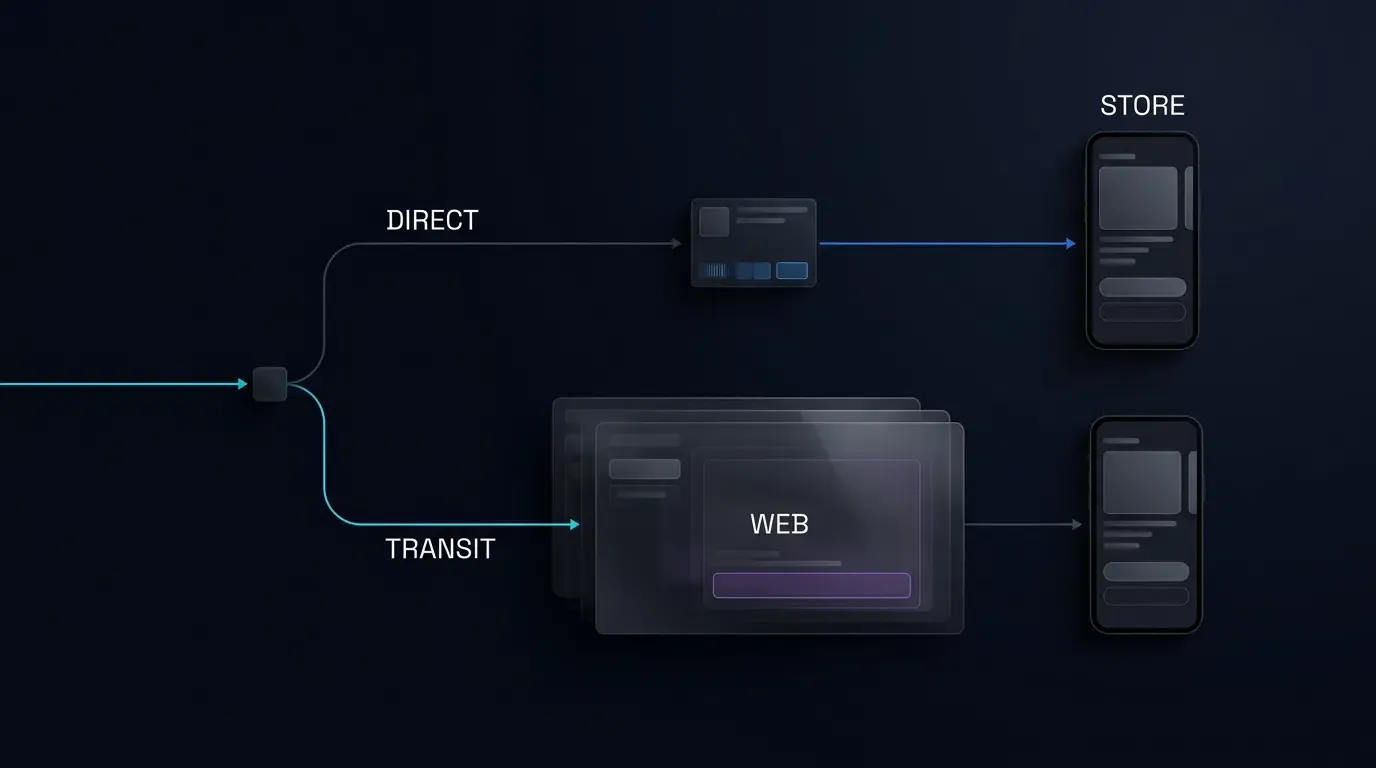
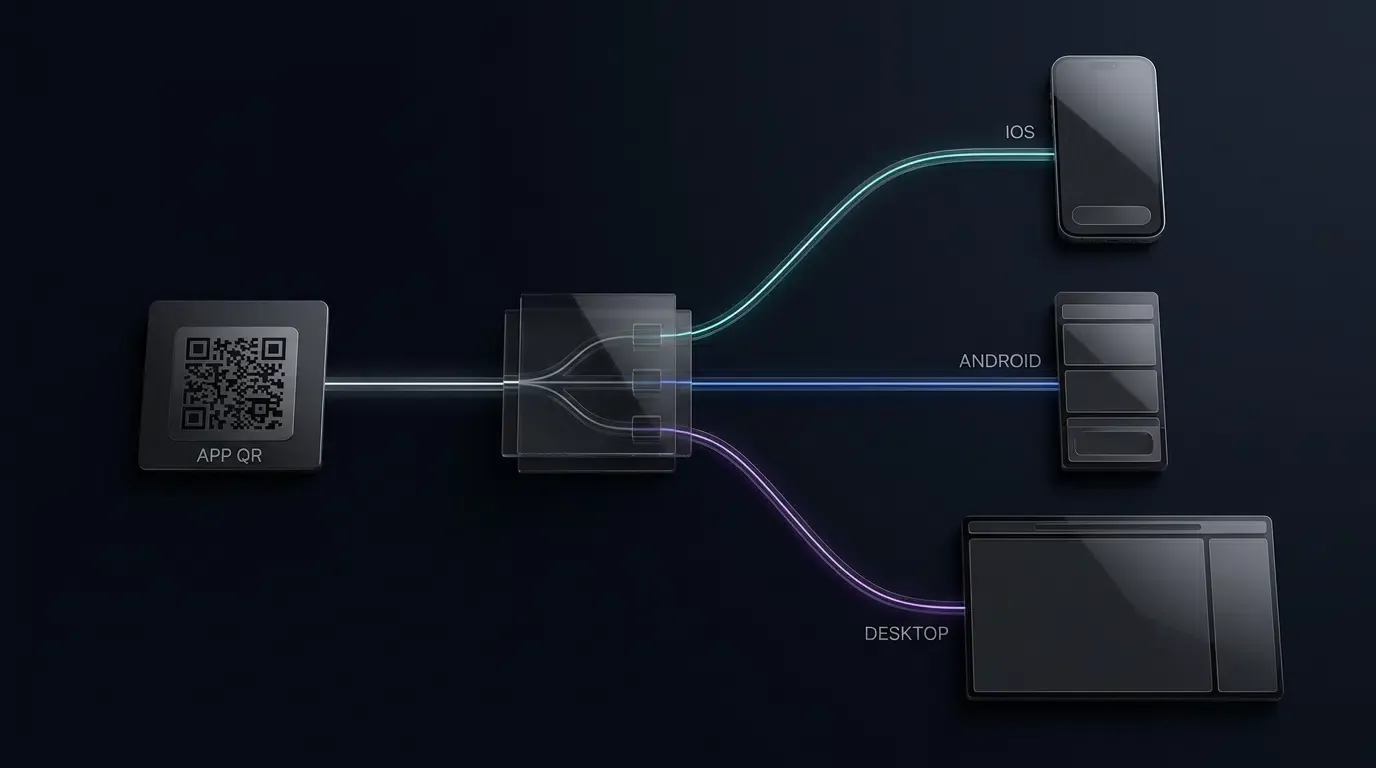
To resolve the multi-platform dilemma, an App QR Code must encode an indirection URL that points to a centralized routing gateway. The routing gateway evaluates the incoming HTTP request and dispatches the user to the appropriate destination.
Architecturally, engineering teams must distinguish between two primary routing strategies based on their campaign tracking requirements:
- Direct-Store Redirection (HTTP 302 Server-Side): The scanning device queries the routing server, which inspects the incoming
User-Agentheader and immediately issues an HTTP 302 Found response directing the browser to the destination store. This model delivers minimal latency. However, because the user never renders an intermediate web page, client-side JavaScript SDKs cannot execute on this path. For iOS devices, parameters cannot be cached via web scripts before reaching the App Store; on Android, parameters must be forwarded purely via the Google Playreferrer=URL parameter. - Web-Transit Routing (H5 Intermediate Page): The routing server dispatches the scanning device to an adaptive mobile landing page (
universal_app_qr_transit.html). This transit page initializes the OpoInstall Web JS SDK to ingest campaign query parameters, evaluates touch properties locally, and presents an accessible native store button. This model is essential when campaigns require rich branding, custom QR code styling, or client-side parameter caching prior to store navigation.
Parsing User-Agent Strings and Securing Client Hints Across Modern Mobile Browsers
Whether executing on an edge server or within a client-side transit script, operating system identification relies on inspecting browser environment tokens:
- iOS Evaluation: Inspects the
User-Agentstring for tokens such asiPhone,iPad, oriPod. On modern touch devices, client scripts must also evaluatenavigator.maxTouchPoints > 1on platforms reportingMacIntelto accurately detect iPadOS hardware operating in desktop mode. - Android Evaluation: Inspects the
User-Agentstring for theAndroidtoken. In modern Chromium-based mobile browsers, servers can also evaluate User-Agent Client Hints (Sec-CH-UA-Platform: "Android") to verify platform identity without relying solely on legacy string matching. - Desktop Evaluation: If neither iOS nor Android indicators are detected, the system categorizes the visitor as a desktop or workstation user (e.g., Windows, macOS, Linux).
Handling Desktop Scanners: Providing Fallback Landing Pages and Web Showcases
Users occasionally scan physical QR codes using laptop webcams, desktop preview tools, or web browser extensions. Additionally, users may copy and paste the underlying routing link into desktop browsers.
A naive routing script that assumes all traffic originates from mobile devices will fail when encountering a desktop user agent. Routing a desktop Chrome browser on Windows to a mobile market:// URI scheme or an iOS App Store product URL generates an unhandled protocol error.
A production-grade App QR Code architecture implements an explicit desktop fallback:
- Desktop Web Showcase: Directs desktop visitors to an informational desktop landing page that highlights product features, displays desktop web app equivalents, or embeds a high-resolution QR code for mobile scanning.
- SMS or Email Dispatcher: Presents an input field enabling desktop visitors to send an installation link directly to their mobile phone number or email address.
Managing iPadOS Desktop-Class Browsing Headers to Prevent Device Misidentification
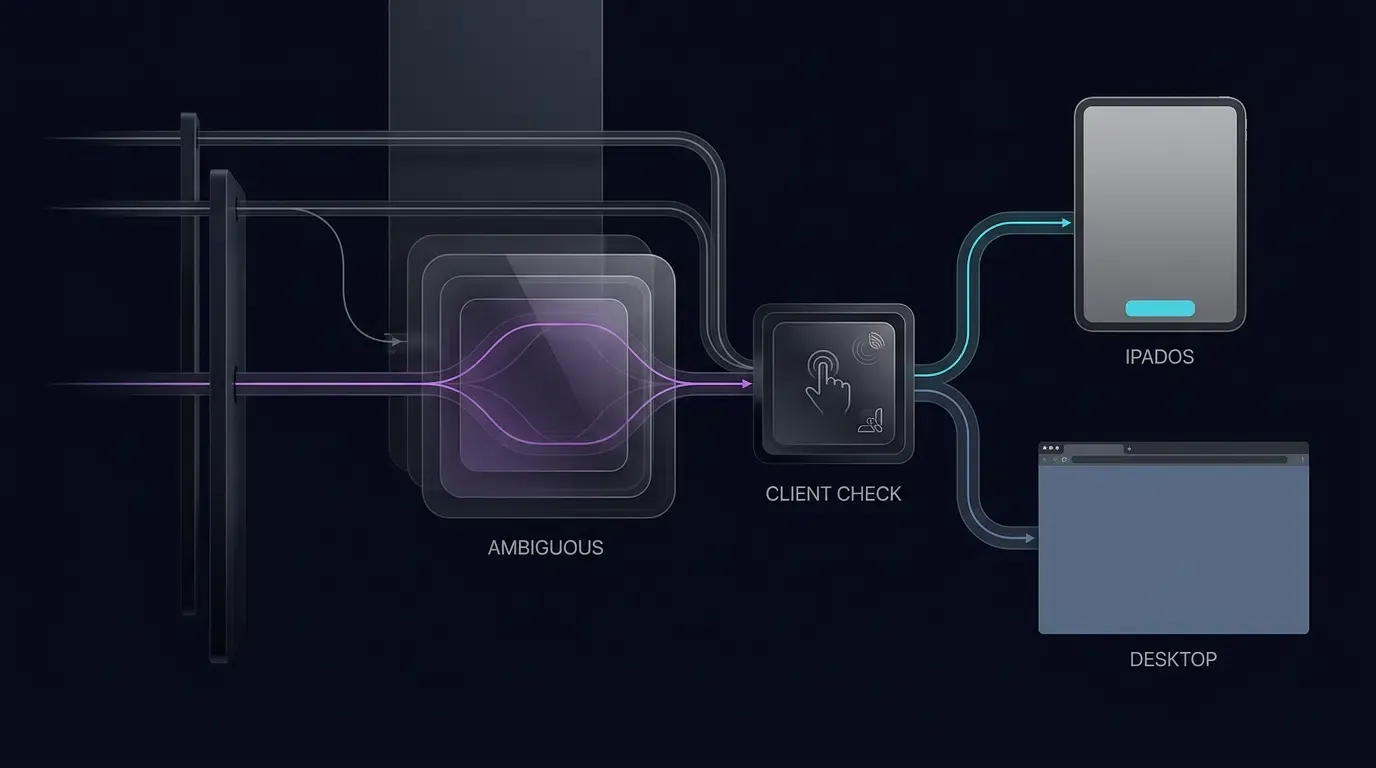
Beginning with iPadOS 13, Apple configured Safari on iPads to request desktop websites by default. Consequently, the browser transmits a User-Agent string identical to Safari on macOS:
Mozilla/5.0 (Macintosh; Intel Mac OS X 10_15_7) AppleWebKit/605.1.15 (KHTML, like Gecko) Version/17.0 Safari/605.1.15
If an App QR Code routing script naively checks only for the string iPad, it will misclassify the iPad as a desktop computer, routing a touch-enabled tablet away from the App Store.
Server-side HTTP request handlers inspect only incoming headers, which cannot directly observe touch hardware without client hints. Therefore, when server-side logic in a web-transit architecture encounters a Macintosh user agent, it routes the request to the client-side landing page, where browser JavaScript evaluates both legacy tokens and touch capabilities:
// Robust iOS and iPadOS detection
var isIOS = /iPhone|iPad|iPod/.test(navigator.userAgent) ||
            (navigator.platform === 'MacIntel' && navigator.maxTouchPoints > 1);
By verifying that the platform reports MacIntel while simultaneously confirming that navigator.maxTouchPoints > 1, client scripts accurately distinguish iPadOS tablets from true desktop Mac computers, presenting the App Store destination to iPad users while routing desktop Mac visitors to the product showcase.
Technical Architecture of a Universal App QR Code Routing Engine
The Indirection Topology: Single Physical Matrix ──> Centralized Router ──> Platform Destination
A universal App QR Code system separates the physical presentation of data from the digital routing logic.
The architecture comprises three core tiers:
- The Physical Matrix: A standardized ISO/IEC 18004 barcode printed on packaging, billboards, or flyers, encoding a permanent short URL (e.g.,
https://trk.example.com/app). Note that custom visual branding—such as embedding corporate logos, selecting brand colors, or adjusting corner eye styling—operates purely on physical matrix rendering and does not alter the underlying indirection protocol. - The Central Routing Gateway: A high-availability web service that logs scan metadata, inspects incoming client headers, sanitizes campaign query parameters, and determines the target endpoint.
- The Target Destinations: Platform-specific destinations, including the Apple App Store, Google Play Store, custom APK distribution servers, or responsive desktop landing pages.
[Physical Collateral] ──> User Scans Universal App QR Code
                                 │
                                 ▼
                  [Centralized Routing Endpoint]
                                 │
             ┌───────────────────┼───────────────────┐
             ▼                   ▼                   ▼
       [iOS Device]       [Android Device]    [Desktop Browser]
                 │                   │                   │
                 ▼                   ▼                   ▼
         [Apple App Store]   [Google Play Store]  [Web Landing Page]
         (App ID Target)     (Referrer Metadata)  (Feature Showcase)
Preserving Marketing and Campaign Tracking Parameters Across Operating System Dispatches
A functional App QR Code must not merely route users to the correct store; it must preserve campaign attribution context across the store transition boundary.
When marketing teams deploy printed collateral, they append tracking parameters to the routing URL:
https://trk.example.com/app?channelCode=poster_chicago_01&utm_source=offline&utm_campaign=summer2026
The centralized routing engine captures these query parameters during the initial scan event. To ensure downstream analytics systems receive this data:
- Android Processing: The routing engine or transit script constructs a Google Play Store URL that encodes the sanitized parameters into the official
referrerparameter. When the user installs and opens the app, the Android application retrieves these parameters via the Google Play Install Referrer API. - iOS Processing: Because the Apple App Store does not forward arbitrary URL query parameters on cold launch from the home screen, campaigns requiring parameter delivery deploy a web-transit workflow. The transit page loads the OpoInstall Web JS SDK to cache parameters on the attribution backend prior to store handoff, allowing the native iOS SDK (
getInstallParam) to recover the channel context upon first launch when supported by platform matching mechanisms.
Privacy and Security Boundaries: Preventing Open Redirect Vulnerabilities
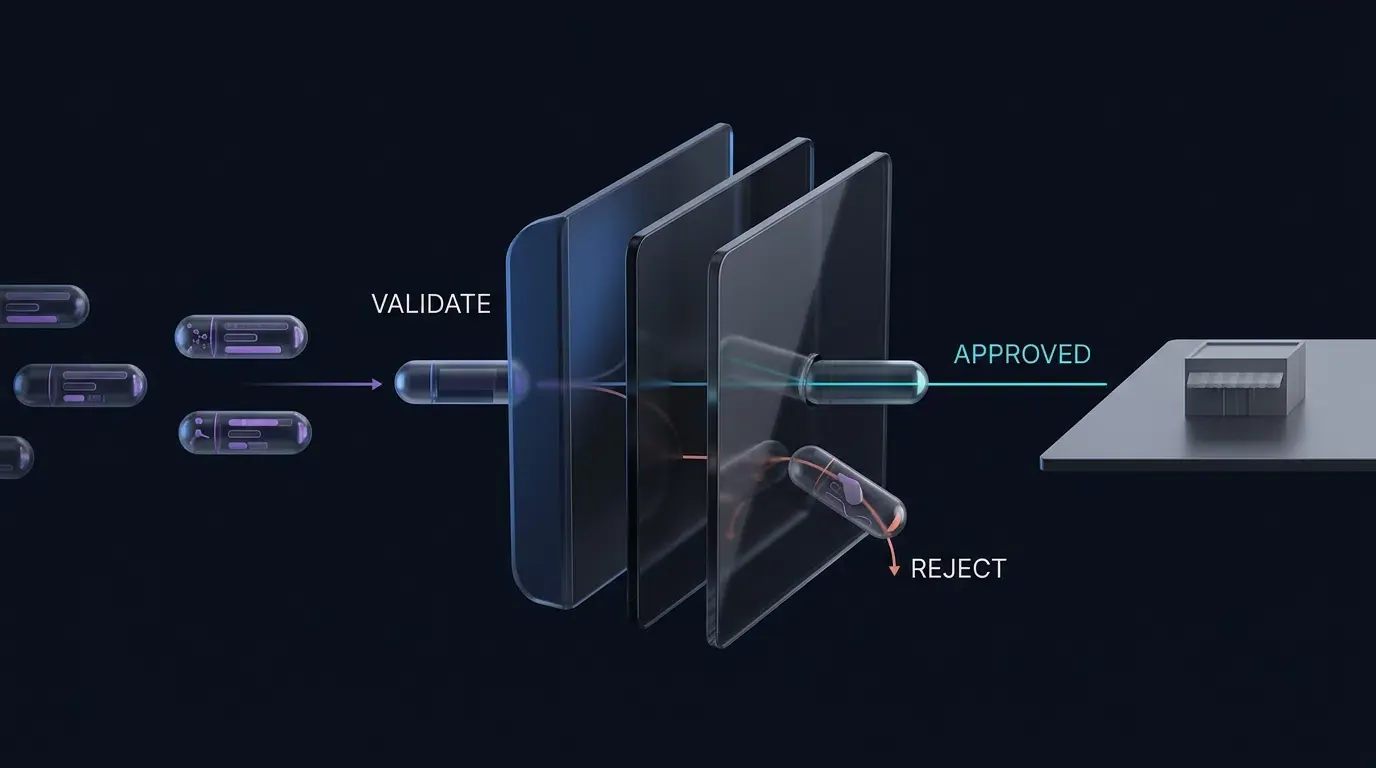
Deploying dynamic redirection endpoints introduces architectural security obligations. In accordance with OWASP guidance on unvalidated redirects and forwards, unvalidated redirection scripts can be exploited by malicious actors to construct phishing links that use an enterprise’s trusted domain to forward victims to malicious websites.
A secure App QR Code routing architecture enforces strict URL validation:
- Destination Allowlisting: The routing engine must only redirect to pre-approved destination hostnames (such as
apps.apple.com,play.google.com, or verified enterprise subdomains). Arbitrary external redirect targets specified via query parameters must be rejected. - Input Sanitization: Query parameter keys and values passed to store listings or transit scripts must be validated against a strict alphanumeric allowlist, stripping script tags, line breaks, and protocol modifiers.
- Privacy-Conscious Attribution: System routing must rely on explicit HTTP request headers (User-Agent), authorized store APIs (Play Install Referrer), and transparent session contexts. Attempting to build persistent device signatures using hardware entropy violates platform privacy rules.
Step-by-Step Implementation: Building a Multi-Store Transit Redirector
Configuring Universal Multi-Store Landing Pages with Accessible Native Fallback Anchors
When deploying an App QR Code, growth teams can host a lightweight client-side transit landing page that performs heuristic environment inspection while maintaining an accessible native fallback anchor.
The implementation example in [CODE_BLOCK_01] demonstrates a responsive HTML/JS transit page. The script validates incoming query parameters against an allowlist, inspects client capabilities (including legacy iPad tokens and iPadOS touch points), dynamically constructs valid Google Play and Apple App Store destination URLs, and initializes the OpoInstall Web JS SDK while maintaining the native anchor as the primary navigation owner.
Consult the SDK integration reference for technical specifications regarding configuration parameters and parameter parsing.
<!-- Adaptive Dual-Platform Redirection Script with Fallbacks -->
<!-- File: universal_app_qr_transit.html -->

<!DOCTYPE html>
<html lang="en">
<head>
    <meta charset="UTF-8">
    <meta name="viewport" content="width=device-width, initial-scale=1.0">
    <title>Continue to Your App Store</title>

    <style>
        body {
            font-family: -apple-system, BlinkMacSystemFont, "Segoe UI", Roboto, Helvetica, Arial, sans-serif;
            background-color: #f8f9fa;
            color: #333;
            text-align: center;
            padding: 48px 16px;
            margin: 0;
        }
        .transit-card {
            background: #ffffff;
            border-radius: 16px;
            box-shadow: 0 4px 20px rgba(0, 0, 0, 0.06);
            max-width: 440px;
            margin: 0 auto;
            padding: 36px 24px;
            box-sizing: border-box;
        }
        .app-icon {
            width: 76px;
            height: 76px;
            border-radius: 18px;
            margin-bottom: 20px;
            object-fit: cover;
        }
        h2 {
            font-size: 20px;
            margin: 0 0 10px 0;
            color: #111;
        }
        p {
            font-size: 14px;
            color: #666;
            margin: 0 0 24px 0;
            line-height: 1.5;
        }
        .btn-download {
            display: inline-block;
            background-color: #007aff;
            color: #ffffff;
            font-size: 16px;
            font-weight: 600;
            padding: 14px 32px;
            border-radius: 24px;
            text-decoration: none;
            cursor: pointer;
            border: none;
            transition: background-color 0.2s ease;
        }
        .btn-download:hover {
            background-color: #0062cc;
        }
        .footer-note {
            font-size: 12px;
            color: #999;
            margin-top: 18px;
        }
    </style>
</head>
<body>

    <div class="transit-card">
        <img src="https://cdn.example.com/assets/app-icon.png" alt="App Icon" class="app-icon">
        <h2 id="card-title">Continue to Your App Store</h2>
        <p id="card-desc">Choose the button below to open the appropriate app store for your device.</p>

        <!-- Accessible Primary Navigation Anchor Link -->
        <!-- Production Note: Replace the default href with your live responsive landing page or desktop showcase URL -->
        <a id="store-action-btn" class="btn-download" href="https://app.example.com/landing">Download Application</a>
        <p class="footer-note">Tap the button above to continue to the appropriate destination.</p>
    </div>

    <!-- OpoInstall Web JS SDK Include (Verify for your deployed production release) -->
    <script src="https://web.cdn.opoinstallcloud.com/opoinstall.js"></script>
    <script>
    (function() {
        // Step 1: Parse and sanitize incoming campaign parameters from physical QR scan
        function getSanitizedQueryParams() {
            var allowedKeys = new Set([
                "channelCode",
                "utm_source",
                "utm_medium",
                "utm_campaign",
                "inviter_id"
            ]);

            var result = Object.create(null);

            try {
                var query = new URLSearchParams(window.location.search);
                // Validates parameter values: alphanumeric, hyphen, underscore, dot (max 64 chars)
                var validPattern = /^[A-Za-z0-9_.-]{1,64}$/;

                query.forEach(function(value, key) {
                    if (allowedKeys.has(key) && validPattern.test(value)) {
                        if (!Object.prototype.hasOwnProperty.call(result, key)) {
                            result[key] = value;
                        }
                    }
                });
            } catch (e) {
                return Object.create(null);
            }

            return result;
        }

        var campaignData = getSanitizedQueryParams();

        // Step 2: Client-side User-Agent inspection with legacy iPad and iPadOS desktop mode handling
        var ua = navigator.userAgent || "";
        var isIOS = /iPhone|iPad|iPod/.test(ua) || (navigator.platform === 'MacIntel' && navigator.maxTouchPoints > 1);
        var isAndroid = /Android/.test(ua);

        var actionBtn = document.getElementById("store-action-btn");
        var cardTitle = document.getElementById("card-title");
        var cardDesc = document.getElementById("card-desc");

        // Step 3: Construct platform-specific store destination URLs
        if (actionBtn) {
            if (isIOS) {
                // Route to Apple App Store (Numeric App Store ID)
                // Note: Standard iOS App Store links do not parse arbitrary query strings;
                // parameters are preserved via Web JS SDK deferred caching.
                actionBtn.href = "https://apps.apple.com/app/id1234567890";
                actionBtn.innerText = "Download on the App Store";
            } else if (isAndroid) {
                // Route to Google Play Store with properly structured 'referrer' payload
                try {
                    var playUrl = new URL("https://play.google.com/store/apps/details");
                    playUrl.searchParams.set("id", "com.example.app");

                    var referrerParams = new URLSearchParams();
                    ["channelCode", "utm_source", "utm_medium", "utm_campaign", "inviter_id"].forEach(function(paramKey) {
                        if (campaignData[paramKey]) {
                            referrerParams.set(paramKey, campaignData[paramKey]);
                        }
                    });

                    if (referrerParams.toString()) {
                        playUrl.searchParams.set("referrer", referrerParams.toString());
                    }

                    actionBtn.href = playUrl.toString();
                    actionBtn.innerText = "Get it on Google Play";
                } catch (e) {
                    actionBtn.href = "https://play.google.com/store/apps/details?id=com.example.app";
                }
            } else {
                // Non-mobile desktop fallback: update card UI titles for desktop visitors
                actionBtn.href = "https://app.example.com/desktop-showcase";
                actionBtn.innerText = "View Product Overview";
                if (cardTitle) cardTitle.innerText = "Explore the Desktop Experience";
                if (cardDesc) cardDesc.innerText = "Browse our web product showcase or scan from a mobile device.";
            }
        }

        // Step 4: Initialize Web JS SDK with Single-Owner Navigation Principle
        // The actionBtn.href constructed above remains the primary accessible destination.
        // The SDK initializes to ingest and cache parameters without overriding anchor navigation.
        if (typeof OpoInstall !== "function") {
            console.warn("OpoInstall Web SDK unavailable; continuing with direct store navigation anchors.");
        } else {
            try {
                new OpoInstall({
                    appKey: "OPOINSTALL_APPKEY_PLACEHOLDER",
                    data: campaignData,
                    onready: function() {
                        // SDK reports readiness.
                        // Parameter persistence and subsequent installation retrieval depend on deployed SDK contracts and platform matching support.
                        // Navigation remains single-owned by actionBtn.href.
                    }
                });
            } catch (error) {
                console.error("OpoInstall SDK initialization error; native store hrefs remain active:", error);
            }
        }
    })();
    </script>
</body>
</html>
Programmatic App QR Code Generation: Producing High-Resolution ISO/IEC 18004 Matrix Assets
For enterprise campaigns managing hundreds of print variations, barcodes must be generated programmatically rather than manually exported from design software.
The Node.js implementation in [CODE_BLOCK_02] demonstrates both components of a universal App QR Code system: an executable server-side HTTP 302 redirection handler that evaluates incoming request headers in real time with strict ROUTING_MODE validation (direct-store vs web-transit), and an automation utility that validates transit URLs and renders print-ready PNG barcode image files using a standards-based QR code generator conforming to ISO/IEC 18004 specifications with Level Q error correction.
Note that generating a 1024-pixel PNG provides a high-resolution digital master; actual physical print dimensions must be computed based on physical scanning distances and verified with print proofs.
// Server-Side HTTP 302 Redirection & QR Code Generation Script
// File: server_qr_router.js
// Dependencies: npm install qrcode

const http = require('http');
const QRCode = require('qrcode'); // Standards-based QR generator conforming to ISO/IEC 18004 specifications

/**
 * Server Configuration Object:
 * In production, configure environment variables for ports and live endpoint addresses.
 * routingMode: 'direct-store' (immediate 302 to store) or 'web-transit' (routes to H5 transit page for SDK caching)
 */
const SERVER_CONFIG = {
    port: process.env.PORT || 3000,
    routingMode: process.env.ROUTING_MODE || "web-transit",
    iosStoreUrl: "https://apps.apple.com/app/id1234567890",
    androidPackageId: "com.example.app",
    webTransitUrl: process.env.WEB_TRANSIT_URL || "https://app.example.com/universal_app_qr_transit.html",
    desktopFallbackUrl: "https://app.example.com/desktop-overview"
};

/**
 * Validates that a hostname conforms to RFC 1035 / RFC 1123 DNS specifications
 * without consecutive dots or invalid label formatting.
 */
function isValidHostname(host) {
    if (typeof host !== "string" || host.length > 253) {
        return false;
    }
    const labels = host.split(".");
    if (labels.length < 2) {
        return false;
    }
    return labels.every(label =>
        label.length >= 1 &&
        label.length <= 63 &&
        /^[A-Za-z0-9](?:[A-Za-z0-9-]*[A-Za-z0-9])?$/.test(label)
    );
}

/**
 * Retrieve approved host allowlists strictly from environment configuration.
 */
function getApprovedHosts(envVarName) {
    const raw = process.env[envVarName];
    if (!raw) {
        throw new Error(`${envVarName} environment variable must be explicitly configured.`);
    }

    const hosts = new Set(
        raw.split(",")
            .map(host => host.trim().toLowerCase())
            .filter(Boolean)
    );

    if (hosts.size === 0) {
        throw new Error(`${envVarName} allowlist cannot be empty.`);
    }

    return hosts;
}

/**
 * Validates configuration schema and strict routingMode enum values before server startup
 */
function validateConfig() {
    // Enforce strict enum validation on ROUTING_MODE
    const allowedModes = new Set(["direct-store", "web-transit"]);
    if (!allowedModes.has(SERVER_CONFIG.routingMode)) {
        throw new Error(`Invalid ROUTING_MODE: "${SERVER_CONFIG.routingMode}". Must be strictly "direct-store" or "web-transit".`);
    }

    const portNum = Number(SERVER_CONFIG.port);
    if (!Number.isInteger(portNum) || portNum < 1 || portNum > 65535) {
        throw new Error(`Invalid PORT configuration: "${SERVER_CONFIG.port}". Must be a valid TCP port number.`);
    }

    // Verify router host allowlist environment variable is explicitly set
    getApprovedHosts("APPROVED_API_HOSTS");

    if (SERVER_CONFIG.routingMode === "web-transit") {
        const transitUrl = new URL(SERVER_CONFIG.webTransitUrl);
        if (transitUrl.protocol !== "https:") {
            throw new Error("WEB_TRANSIT_URL configuration must use HTTPS protocol.");
        }
    }
}

/**
 * Sanitizes incoming URL parameters against an explicit allowlist
 */
function sanitizeQueryParams(searchParams) {
    const allowedKeys = ["channelCode", "utm_source", "utm_medium", "utm_campaign", "inviter_id"];
    const validPattern = /^[A-Za-z0-9_.-]{1,64}$/;
    const sanitized = new URLSearchParams();

    allowedKeys.forEach(key => {
        const val = searchParams.get(key);
        if (val && validPattern.test(val)) {
            sanitized.set(key, val);
        }
    });

    return sanitized;
}

/**
 * Evaluates incoming request headers and returns destination URL based on routing mode
 */
function resolveStoreDestination(userAgentString, searchParams) {
    const ua = userAgentString || "";
    const sanitizedParams = sanitizeQueryParams(searchParams);

    // Active mode is strictly validated during server startup
    const activeMode = SERVER_CONFIG.routingMode;

    // Mode: web-transit (Routes mobile and ambiguous desktop-class UA to H5 transit page)
    if (activeMode === "web-transit") {
        const isMobileOrTablet = /iPhone|iPad|iPod|Android/.test(ua) || /Macintosh/.test(ua);
        if (isMobileOrTablet) {
            const transitUrl = new URL(SERVER_CONFIG.webTransitUrl);
            sanitizedParams.forEach((value, key) => {
                transitUrl.searchParams.set(key, value);
            });
            return transitUrl.toString();
        }
        return SERVER_CONFIG.desktopFallbackUrl;
    }

    // Mode: direct-store (Immediate HTTP 302 to app store listings)
    const isIOS = /iPhone|iPad|iPod/.test(ua);
    const isAndroid = /Android/.test(ua);

    if (isIOS) {
        return SERVER_CONFIG.iosStoreUrl;
    } else if (isAndroid) {
        const playUrl = new URL("https://play.google.com/store/apps/details");
        playUrl.searchParams.set("id", SERVER_CONFIG.androidPackageId);

        // Encode sanitized parameters into Google Play's official referrer parameter
        if (sanitizedParams.toString()) {
            playUrl.searchParams.set("referrer", sanitizedParams.toString());
        }

        return playUrl.toString();
    }

    return SERVER_CONFIG.desktopFallbackUrl;
}

/**
 * Lightweight HTTP 302 Redirection Server
 * Note: In production, run behind an authenticating reverse proxy (e.g. Nginx, Cloudflare) terminating HTTPS.
 * Inspect direct host headers from the trusted upstream reverse proxy.
 */
function startRoutingServer() {
    // Enforce strict configuration validation prior to opening network sockets
    validateConfig();

    const server = http.createServer((req, res) => {
        try {
            // Restrict HTTP method to GET and HEAD for redirection endpoints
            if (req.method !== "GET" && req.method !== "HEAD") {
                res.writeHead(405, { "Content-Type": "text/plain", "Allow": "GET, HEAD" });
                res.end("Method Not Allowed");
                return;
            }

            // Read direct host header from trusted reverse proxy
            // Note: .split(":")[0] strips optional port numbers for standard host allowlist evaluation
            const rawHost = req.headers.host || "";
            const hostHeader = rawHost.split(":")[0];
            const approvedRouterHosts = getApprovedHosts("APPROVED_API_HOSTS");

            if (!isValidHostname(hostHeader) || !approvedRouterHosts.has(hostHeader.toLowerCase())) {
                res.writeHead(403, { "Content-Type": "text/plain" });
                res.end("Forbidden: Access via unauthorized host header.");
                return;
            }

            const requestUrl = new URL(req.url, `https://${hostHeader}`);

            // Restrict redirection handling to authorized route endpoint
            if (requestUrl.pathname !== "/app") {
                res.writeHead(404, { "Content-Type": "text/plain" });
                res.end("Not Found");
                return;
            }

            const destination = resolveStoreDestination(req.headers["user-agent"], requestUrl.searchParams);

            // Execute HTTP 302 Found redirect
            res.writeHead(302, {
                "Location": destination,
                "Cache-Control": "no-cache, no-store, must-revalidate"
            });
            res.end();
        } catch (err) {
            res.writeHead(500, { "Content-Type": "text/plain" });
            res.end("Internal Routing Error");
        }
    });

    server.listen(SERVER_CONFIG.port, () => {
        console.log(`[Router Active] HTTP 302 server listening on port ${SERVER_CONFIG.port} in ${SERVER_CONFIG.routingMode} mode`);
    });

    return server;
}

/**
 * Generates an ISO/IEC 18004 compliant high-resolution PNG barcode image linking to a verified universal transit URL.
 */
async function generateUniversalAppQRCode(transitUrlString, outputFilePath = "universal_app_qr.png") {
    let parsedUrl;
    try {
        parsedUrl = new URL(transitUrlString);
    } catch (err) {
        throw new Error(`Invalid URL string provided: "${transitUrlString}". Must be a valid URI.`);
    }

    if (parsedUrl.protocol !== "https:") {
        throw new Error(`Insecure protocol detected: ${parsedUrl.protocol}. App QR Code destination must use HTTPS.`);
    }

    if (!isValidHostname(parsedUrl.hostname)) {
        throw new Error(`Malformed DNS hostname detected: "${parsedUrl.hostname}".`);
    }

    const approvedQrHosts = getApprovedHosts("APPROVED_QR_HOSTS");
    if (!approvedQrHosts.has(parsedUrl.hostname.toLowerCase())) {
        throw new Error(`Unauthorized host domain: "${parsedUrl.hostname}". Host not present in APPROVED_QR_HOSTS.`);
    }

    console.log(`[Validation Passed] Generating universal App QR Code for: ${parsedUrl.toString()}`);

    const qrOptions = {
        errorCorrectionLevel: 'Q', // Level Q (25% damage recovery) optimal for print collateral
        type: 'image/png',
        margin: 4,                 // Compliant 4-module quiet zone
        width: 1024                // High-resolution digital master suitable for scaling to print production
    };

    try {
        await QRCode.toFile(outputFilePath, parsedUrl.toString(), qrOptions);
        console.log(`[Success] High-resolution barcode image written to: ${outputFilePath}`);
        return outputFilePath;
    } catch (err) {
        throw new Error(`Failed to generate QR Code image asset: ${err.message}`);
    }
}

// Standalone execution entrypoint
if (require.main === module) {
    if (process.argv.includes("--serve")) {
        startRoutingServer();
    } else {
        const sampleUrl = process.env.TARGET_TRANSIT_URL || "https://trk.example.com/app?channelCode=poster_01";
        generateUniversalAppQRCode(sampleUrl, "app_store_qr.png")
            .then((file) => console.log(`Build complete: ${file}`))
            .catch((err) => {
                console.error(`Build failed: ${err.message}`);
                process.exit(1);
            });
    }
}

module.exports = { startRoutingServer, generateUniversalAppQRCode, resolveStoreDestination };
Comparative Analysis of Multi-Store App QR Code Strategies
Comparing Single Direct Links, Dual Print Codes, Static Web Redirectors, and Dynamic App QR Codes
Selecting the optimal QR deployment strategy requires balancing user friction, technical complexity, cross-platform reach, and post-print maintenance liabilities.
The comparative matrix below outlines the operational trade-offs across common implementation models:
| Deployment Method | Cross-Platform Support | Post-Print Editable | User Scan Friction | Maintenance Risk |
|---|---|---|---|---|
| Direct App Store Link | Single platform only | No (Fixed URL) | High for excluded OS | High (Print materials become obsolete if URL changes) |
| Side-by-Side Dual Codes | Manual user selection | No (Fixed URLs) | High (Scanning errors and visual clutter) | High (Wasted print space and broken link risks) |
| Generic Static HTML Page | Script-dependent | Partial (Domain level only) | Moderate (Requires intermediate page clicks) | Moderate (Manual website hosting overhead) |
| Dynamic Universal App QR Code | Automated OS dispatch | Yes (Console/API controlled) | Minimal (Automated store routing) | Variable (Subject to routing domain and indirection service availability) |
Evaluating Maintenance Overhead, Scan Friction, and Cross-Platform Compatibility
Direct marketplace links represent an obsolete approach for physical media. Hardcoding an App Store link may prevent installation on the unsupported platform, while dual side-by-side codes degrade physical collateral aesthetics and cause user scanning errors.
Deploying a dynamic universal App QR Code resolves these constraints. A managed QR link can guide iOS and Android visitors to platform-appropriate destinations and associate physical placement identifiers with scan activity. Installation attribution remains subject to supported SDK or store mechanisms and successful matching. If the marketing team decides to switch the destination from a direct store listing to an interactive holiday giveaway landing page, they simply update the destination URL in the central management console—zero reprinting required.
How to Troubleshoot Cross-Platform Scanning and Redirection Failures
Resolving In-App Social Browser Restrictions on Store URLs
A significant portion of offline users scan QR codes using the integrated cameras of social messaging applications (such as WeChat, Line, or WhatsApp) rather than their native mobile camera apps.
As established in mobile container studies, social webviews enforce restrictive sandboxes:
- Scheme Suppression: In-app webviews frequently intercept and block custom protocol schemes (
market://,itms-apps://) and suppress direct package downloads. - Transit Handoff Execution: To prevent dead-ends, the transit page must detect social containers via User-Agent inspection and provide an accessible HTTPS fallback button or clear visual instructions guiding the user to open the destination in their system browser.
Diagnosing Parameter Stripping Across App Store and Play Store Handshakes
If an application launches after installation without its associated campaign parameters (channelCode returns empty), engineering teams should audit the following handoff checkpoints:
- Google Play Referrer Formatting: Verify that Android store URLs correctly encode parameters inside a single
referrer=query parameter. Appending loose parameters directly to the Play Store URL without embedding them inside the referrer payload prevents Google Play from recording the metadata. - iOS Deferred Caching: Ensure the Web JS SDK successfully transmits parameter payloads to the attribution backend before store redirection occurs. Because the Apple App Store strips external query strings, native parameter recovery relies entirely on backend context matching.
- Lookback Window Limits: If the user installs or launches the app outside the configured attribution window, eligible campaign context may no longer be matched. Verify the applicable window against the deployed SDK and platform configuration.
Handling iPad Desktop Mode: Differentiating Mac Desktops from Touch-Enabled Tablets
If testing reveals that iPad users scanning your App QR Code are redirected to desktop landing pages rather than the App Store, audit your User-Agent evaluation logic.
Verify that your routing script does not rely exclusively on the string iPad. Ensure the client logic evaluates navigator.maxTouchPoints > 1 on platforms reporting MacIntel to accurately detect iPadOS hardware operating in desktop-class browsing mode.
Physical Printing Checkpoints: Empirical Distance-to-Size Ratios and Quiet Zone Validation
Many scanning failures originate in physical graphic production rather than software routing logic:
- Empirical Distance-to-Size Ratio: To guarantee reliable camera focus, follow the empirical sizing heuristic:
. A poster designed to be scanned from 2 meters away requires a QR matrix of at least 20 centimeters. Always conduct physical test scans under real-world lighting conditions before authorizing print production. - Preserving the Quiet Zone: Barcodes must maintain an unprinted border (“quiet zone”) of at least 4 module widths around all four outer edges. Graphic borders, typography, or background textures overlapping this margin prevent camera edge-detection algorithms from identifying the matrix boundaries.
- Error Correction Tuning: Print materials subjected to outdoor weather, environmental scuffing, or curved packaging surfaces should be generated using Level M (15% recovery) or Level Q (25% recovery) error correction under ISO/IEC 18004 standards.
Real-World Multi-Platform Verification Matrix (Module M2 Model)
Before clearing an App QR Code deployment for physical print production, engineering teams must execute verification across target testing environments, accounting for the selected routing mode:
| Testing Device / Container | Routing Mode: direct-store | Routing Mode: web-transit | Critical Inspection Checkpoint |
|---|---|---|---|
| iPhone Safari | Immediate 302 to App Store | Loads H5 Transit Page ──> Store Anchor | Confirms numeric app-id resolution |
| iPad Safari (Legacy UA) | Immediate 302 to App Store | Loads H5 Transit Page ──> Store Anchor | Confirms iPad token evaluation |
| iPadOS (Desktop Mode) | 302 to Desktop Fallback (UA limitation) | Evaluates touch ──> Routes to App Store | Confirms MacIntel + maxTouchPoints > 1 branch |
| macOS Desktop Safari | 302 to Desktop Fallback | Loads H5 ──> Evaluates 0 touch ──> Desktop CTA | Presents desktop showcase cleanly |
| Android Chrome | 302 to Play Store (referrer= appended) |
Loads H5 Transit Page ──> Play Anchor | Verifies referrer= encoding and package id |
| Desktop Workstation | 302 to Desktop Web Showcase | Loads Desktop Layout / Web Showcase | Prevents unhandled mobile protocol errors |
| Social WebView (WeChat/Line) | Container-dependent (May block 302) | Loads H5 Transit Page with Guidance | Validates manual browser handoff prompt |
| Physical Print Proof | Immediate redirect on camera scan | Resolves transit URL on camera scan | Verifies quiet zone margin and Level Q recovery |
Frequently Asked Questions (FAQ)
Can a single QR code automatically detect iOS and Android devices?
What happens when a desktop user scans or clicks an App QR Code?
How do I pass campaign tracking parameters through an App QR Code?
Summary and Implementation Decision Framework
Consolidating mobile application downloads into a single, universal App QR Code resolves the fundamental multi-platform limitation of physical print media. Hardcoding direct marketplace links fragments collateral, increases printing costs, and guarantees conversion failure for users on the excluded operating system.
Engineering and marketing teams should implement centralized, dynamic App QR codes backed by responsive transit routing. By combining automated User-Agent detection, accessible native fallback anchors, and parameter preservation via OpoInstall, teams ensure that physical promotional assets support platform-appropriate routing with reduced friction across all mobile platforms.
To create universal multi-store QR codes and configure automated mobile redirection, set up your application endpoints in the OpoInstall developer console or review the SDK integration reference. For client SDK downloads, visit download OpoInstall SDK, or explore broader mobile routing mechanics in the mobile attribution reference.
Related Materials
-
Concepts: App QR Code, Dynamic QR Code, User-Agent Detection, Web-to-App Redirection
-
Technologies: ISO/IEC 18004 Barcode Standard, HTTP 302 Redirection, Apple App Store, Google Play Store
-
Standards: IETF RFC 3986 Uniform Resource Identifier Syntax, ISO/IEC 18004:2024 Information Technology
-
APIs: Google Play Install Referrer API, OpoInstall Web JS SDK
-
Official Documentation & References:
Share this article