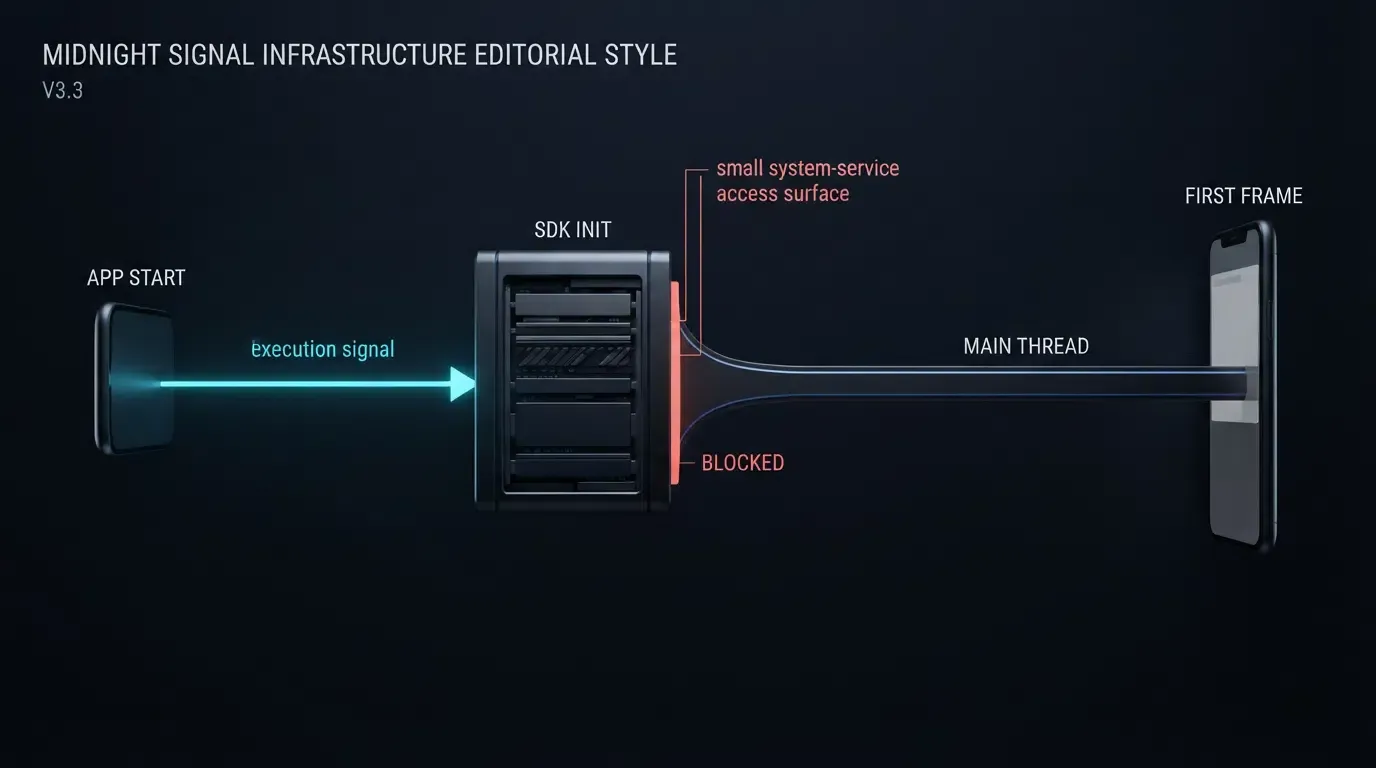
Why does a mobile attribution SDK block main thread initialization? A mobile attribution SDK blocks the main thread when it executes synchronous disk reads, eager ContentProvider auto-initialization, reflection, or synchronous network and clipboard queries during cold start. Preventing UI frame drops, Android ANRs, and iOS watchdog terminations requires profiling with StrictMode and Instruments, moving initialization off the critical path, and querying parameters asynchronously.
Main thread blocking during mobile SDK initialization occurs when a software development kit executes long-running or synchronous operations—such as blocking file I/O, lock contention, or synchronous network calls—directly on the application’s UI thread during launch. Because mobile operating systems enforce strict frame budgets and startup watchdog limits, mitigating launch stalls requires isolating heavy initialization onto background threads and decoupling deferred parameter retrieval from initial UI rendering.
Why Mobile SDK Initialization Triggers Cold Start Stalls and Crashes
The Cost of Eager Initialization During Cold Start
During a cold start, the operating system forks the application process, initializes runtime classes, constructs the application instance, and renders the first frame. Every millisecond spent on the main thread during Application.onCreate() on Android or application(_:didFinishLaunchingWithOptions:) on iOS directly delays Time to Initial Display (TTID) and Time to Full Display (TTFD), as detailed in the Android App Startup Time guide.
Mobile attribution and analytics libraries frequently introduce hidden startup latency through four common mechanisms:
- Eager
ContentProviderInstantiation (Android): Android initializes app-declared content providers on the application main thread during process startup, beforeApplication.onCreate(). Eager provider work can therefore delay launch, and applications should inspect the merged manifest and startup traces to identify unnecessary initialization. - Synchronous Disk I/O: Reading
SharedPreferencesorUserDefaults, creating SQLite databases, or executing schema migrations on the main thread can stall unpredictably when flash storage experiences background write contention. - Heavy Reflection and Class Loading: Scanning annotations, deserializing large configuration assets, or initializing cryptography providers synchronously inflates class-loading time on the critical render path.
- Clipboard and Network Contention: Accessing system pasteboards (
UIPasteboardon iOS orClipboardManageron Android) or waiting on synchronous network calls during launch can introduce UI thread stalls—such as Universal Clipboard fetches across iOS devices—and trigger premature OS permission prompts (distinguishing iOS 14’s paste notification banner from iOS 16+'s cross-app paste permission prompt).
Operating System Thresholds: Android ANRs vs iOS Watchdog 0x8badf00d
Mobile platforms penalize main-thread contention differently across Android and iOS:
- Android Frame Drops and ANRs: To maintain smooth rendering, the Android
Choreographertargets a frame budget of 16.6 ms at 60 Hz (or 8.3 ms at 120 Hz). Performing synchronous network operations on the main thread can triggerNetworkOnMainThreadExceptiondepending on target API level,StrictModepolicies, and call path, while prolonged blocking disk I/O or lock contention freezes input dispatch and can trigger an Application Not Responding (ANR) dialog (for instance, around a typical 5-second input dispatch timeout). - iOS Watchdog Terminations (
0x8badf00d): As explained in Apple’s guide on Addressing Watchdog Terminations, SpringBoard and FrontBoard monitor main-thread responsiveness during app launch (scene-create) and lifecycle transitions. If a blocking SDK call, synchronousDispatchSemaphore.wait(), or priority inversion deadlock (_dispatch_once_wait) stalls the main queue past the OS watchdog threshold, iOS terminates the app immediately viaEXC_CRASH (SIGKILL)with termination code0x8badf00d.
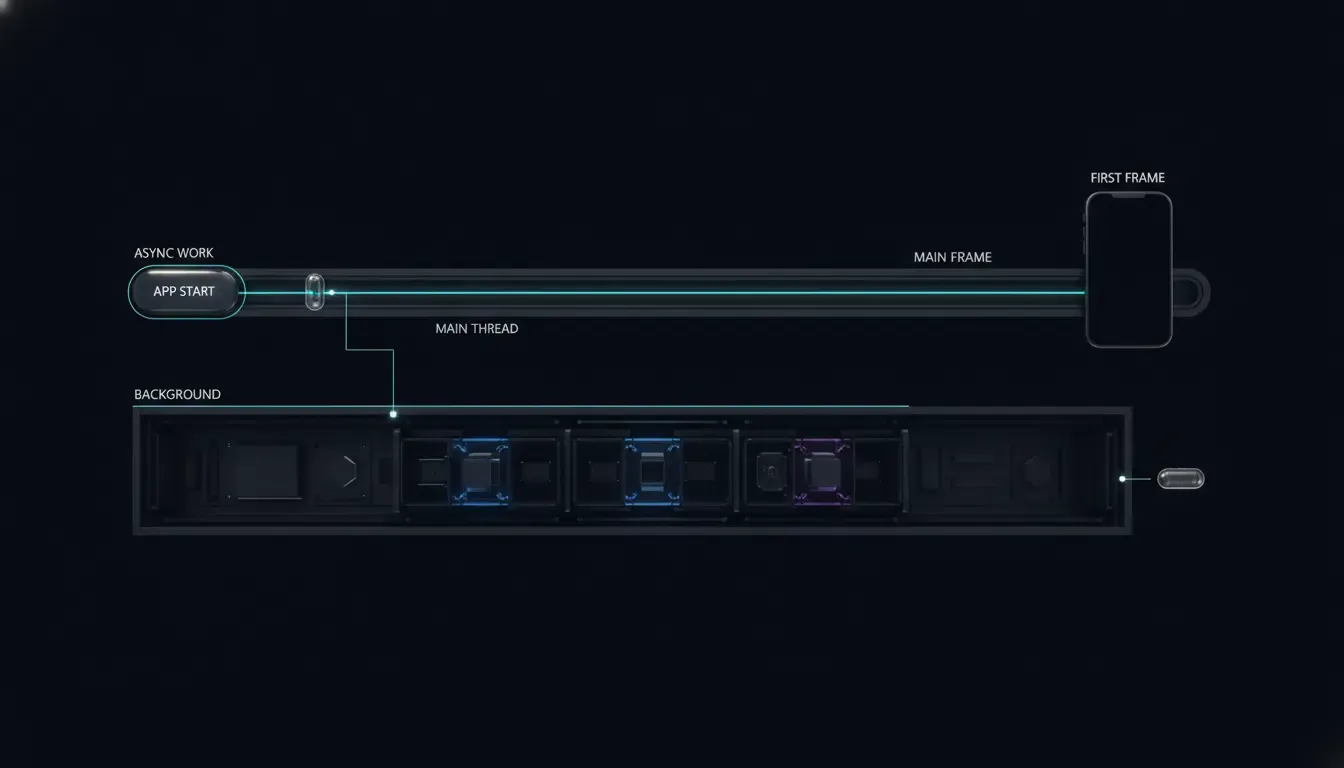
The conceptual timeline below illustrates how decoupling non-UI setup and parameter retrieval preserves fast initial rendering:
EAGER SYNCHRONOUS INITIALIZATION (Delays TTID / Risks Watchdog & ANR):
[Process Start] ──> [ContentProvider Init] ──> [App.onCreate: Sync Disk/Clipboard/Net] ──> [First UI Draw (Delayed)]

DEFERRED ASYNCHRONOUS INITIALIZATION (Protects First Frame):
[Process Start] ──> [Minimal Delegate / Handle] ──> [First UI Draw (Fast TTID)]
                          │
                          └──(Background IO Queue)──> [Context & Cache Prep] ──> [Async Query at Onboarding Milestone]
At a Glance
- Isolate Synchronous I/O from Launch Delegates: Keep
Application.onCreate()anddidFinishLaunchingWithOptionsfree of synchronous file reads, SQLite migrations, and network blocking locks. - Consolidate
ContentProviderAuto-Inits: Use Android Jetpack App Startup (androidx.startup) to merge compatible component initializers and lazily initialize non-critical host modules on demand. - Defer Clipboard and Attribution Queries: Schedule deferred attribution retrieval (
getInstallParamorgetInstallParmsCompleted) at the business milestone that consumes the result rather than blocking cold start. - Profile Before and After Integration: Verify main-thread behavior using Android
StrictMode.ThreadPolicyand Perfetto traces alongside Xcode Instruments’ Time Profiler and App Launch templates.
How to Diagnose Main Thread Blocking with Platform Profiling Tools
Detecting Synchronous Disk and Network Violations with Android StrictMode
Before refactoring SDK calls, identify which libraries touch disk or network sockets on the UI thread during startup. Android provides StrictMode.ThreadPolicy to flag blocking main-thread operations in debug builds.
Enable StrictMode at the top of Application.onCreate(), gated strictly behind ApplicationInfo.FLAG_DEBUGGABLE so production builds remain unaffected:
// Android - StrictModeDiagnosticsApp.kt
// Reference diagnostic setup: enable StrictMode exclusively in debuggable builds
package com.example.hostapp

import android.app.Application
import android.content.pm.ApplicationInfo
import android.os.StrictMode

class StrictModeDiagnosticsApp : Application() {
    override fun onCreate() {
        if (applicationInfo.flags and ApplicationInfo.FLAG_DEBUGGABLE != 0) {
            StrictMode.setThreadPolicy(
                StrictMode.ThreadPolicy.Builder()
                    .detectDiskReads()
                    .detectDiskWrites()
                    .detectNetwork()
                    .penaltyLog()
                    .build()
            )
        }
        super.onCreate()
    }
}
Note an important diagnostic boundary: because ContentProvider.onCreate() executes before Application.onCreate(), enabling StrictMode inside Application.onCreate() does not detect disk or network violations inside early ContentProvider startup. Use StrictMode as an auxiliary check for Application and Activity main-thread work, and capture a Perfetto or Android Studio CPU Profiler system trace to inspect bindApplication and ContentProvider instantiation latency.
Identifying Hitches and Startup Bottlenecks in Xcode Instruments
On iOS, diagnose startup delays using Xcode Instruments before shipping changes, following Apple’s guidance on Diagnosing Performance Issues Early and Understanding Hitches in Your App:
- App Launch Template: Run the App Launch instrument on a physical release-mode device to break down launch time across
dylddynamic library loading, static initializers,didFinishLaunchingWithOptions, and the first Core Animation commit. - Time Profiler Inspection: Filter the call tree by Main Thread (
com.apple.main-thread) and invert the call tree or hide system libraries to spot synchronous SDK calls, JSON parsing, orUIPasteboardwaits executing prior to first frame commit. - Crash Log Triage: Inspect Xcode Organizer crash reports for
EXC_CRASH (SIGKILL)with exception code0x8badf00d. Examine the crashed main-thread backtrace for blocking waits (__psynch_cvwait,_dispatch_once_wait, orsemaphore_wait_trap) triggered inside third-party framework initialization.
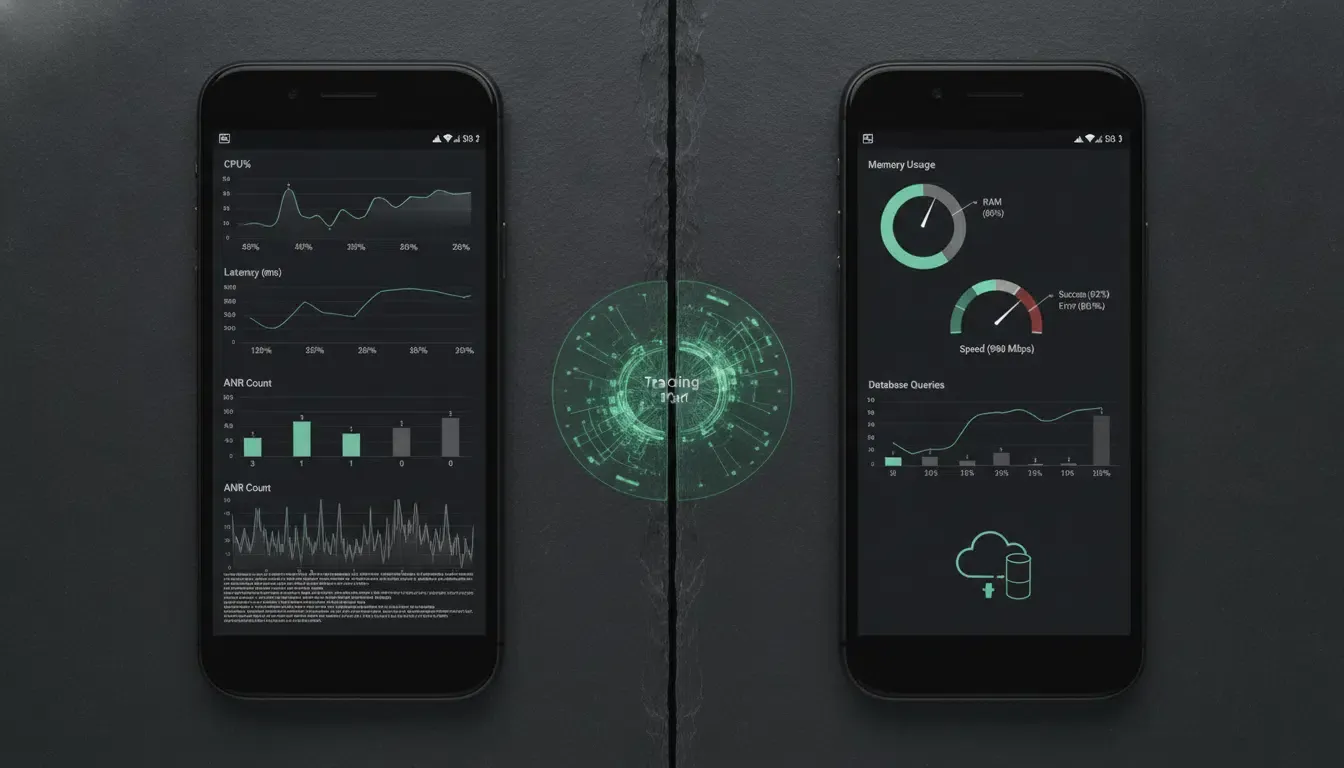
Startup Performance Measurement Template
Before declaring an SDK optimization successful, record reproducible platform-specific baseline metrics against identical physical devices and release build configurations:
| Platform | Target Metric | Measurement Tool | Pre-Optimization Baseline | Post-Optimization Target |
|---|---|---|---|---|
| Android | Time to Initial Display (TTID) | Perfetto / Android Vitals | Record cold-start median & P95 (ms) | Record cold-start median & P95 (ms) |
| Android | Time to Full Display (TTFD) | reportFullyDrawn() / Perfetto |
Record until interactive state (ms) | Record until interactive state (ms) |
| Android | Main-Thread Init & ANR Rate | CPU Profiler / Vitals | Record UI thread time (ms) & ANR % | Record UI thread time (ms) & ANR % |
| iOS | App Launch Duration | Xcode App Launch Instrument | Record launch to first commit (ms) | Record launch to first commit (ms) |
| iOS | Hitch Rate & Watchdog (0x8badf00d) |
Xcode Organizer / Time Profiler | Record hitch rate (ms/s) & crash % | Record hitch rate (ms/s) & crash % |
Optimizing Android SDK Initialization with Jetpack App Startup and Coroutines
Replacing Eager ContentProvider Overhead with androidx.startup
When integrating multiple libraries, each standalone ContentProvider adds startup overhead before Application.onCreate() executes. The Android Jetpack App Startup library consolidates compatible Initializer<T> components into a single shared InitializationProvider and supports lazy, on-demand initialization.
Note two important constraints when using Jetpack App Startup:
Initializer<T>only governs libraries integrated intoandroidx.startup; it does not automatically disable independentContentProviderdeclarations shipped by legacy third-party SDKs (which must be inspected in the Merged Manifest and removed or adjusted separately if permitted by the SDK vendor).- Only add
tools:node="remove"to a<meta-data>entry insideInitializationProviderif that exact component is actually declared for automatic discovery in the Merged Manifest—and verify that no other auto-discovered initializer lists it insidedependencies().
<!-- Manifest Fragment: Merge into your existing AndroidManifest.xml ONLY if OnboardingCacheInitializer is registered for auto-discovery -->
<!-- Requires androidx.startup:startup-runtime:1.2.0+ and xmlns:tools="http://schemas.android.com/tools" -->
<provider
    android:name="androidx.startup.InitializationProvider"
    android:authorities="${applicationId}.androidx-startup"
    android:exported="false"
    tools:node="merge">
    <meta-data
        android:name="com.example.hostapp.startup.OnboardingCacheInitializer"
        android:value="androidx.startup"
        tools:node="remove" />
</provider>
Thread-Safe Lazy Initialization and Scheduling getInstallParam
When optimizing an attribution SDK on Android, respect the vendor’s lifecycle and thread contracts:
- Core SDK Initialization & Process Guard: Attribution SDKs—such as OpoInstall, a mobile attribution and deep linking platform—document calling
OpoInstall.initialize(this)insideApplication.onCreate()andOpoInstall.getInstance().start(this)inside the launcherActivity. In multi-process architectures, initialization must be restricted to the main process;OptimizedAttributionAppbelow is an abstract contract—host applications must provide a concrete subclass implementingisMainProcess()and register that subclass inAndroidManifest.xml. Do not move core SDK initialization onto an arbitrary background thread or defer it pastActivity.onCreate()unless the exact SDK version explicitly documents thread-safe lazy support. - App Startup Thread Contract: Keep
Initializer.create()lightweight and invokeAppInitializer.initializeComponent()on a thread supported by the component’s documented contract. Move expensive host-owned disk or CPU work into separately managed background operations (Dispatchers.IOorDispatchers.Default) rather than assuming everyInitializercan safely execute onDispatchers.IO. - Scheduling
getInstallParamat Business Milestones: Schedule deferred attribution retrieval at the business milestone that consumes the result. AView.postcallback does not guarantee that the first frame has been presented; use measured frame-aware scheduling (such asChoreographerframe callbacks paired withreportFullyDrawn()and Perfetto TTID traces) if retrieval must begin immediately after initial display. - Immutable Snapshot & Unified Threading: Because SDK callback thread affinity and object mutability can vary by SDK release, serialize or snapshot
opoData?.datainto an immutableStringright at the callback boundary before passing it toDispatchers.Default, and marshal state transitions (AttributionFetchState) explicitly onto the UI thread (runOnUiThread/Dispatchers.Main). Immutable snapshot creation prevents mutable data from crossing thread boundaries, but its serialization cost must still be profiled on the SDK callback thread. Additionally, verify that the deployed SDK guarantees data stability during the callback or perform snapshotting within the vendor’s documented synchronization boundary.
Reference Architecture Disclaimer: The following Kotlin implementation is a defensive reference architecture. The diagnostic
Application(StrictModeDiagnosticsApp) and attributionApplication(OptimizedAttributionApp) are separate reference snippets; merge their behavior into your application’s single concreteApplicationclass registered inAndroidManifest.xml. Verify exact SDK package names (com.opoinstall.api), initialization thread constraints,Rresource namespace imports, and Jetpack App Startup versions (androidx.startup:startup-runtime:1.2.0+) against your deployed AAR before production rollout.
// Android - AttributionStartupOptimization.kt
// Reference architecture: targets minSdk >= 24 with kotlinx-coroutines-android and androidx.startup:startup-runtime:1.2.0+
package com.example.hostapp.startup

import android.app.Application
import android.content.Context
import android.os.Bundle
import android.util.Log
import androidx.appcompat.app.AppCompatActivity
import androidx.lifecycle.lifecycleScope
import androidx.startup.AppInitializer
import androidx.startup.Initializer
import com.example.hostapp.R
import com.opoinstall.api.OpoData
import com.opoinstall.api.OpoError
import com.opoinstall.api.OpoInstall
import com.opoinstall.api.ResultCallBack
import kotlinx.coroutines.Dispatchers
import kotlinx.coroutines.launch
import kotlinx.coroutines.withContext
import org.json.JSONObject

// 1. Lazy Jetpack App Startup Initializer for lightweight host onboarding manager creation
// Exclude from automatic discovery via tools:node="remove" in AndroidManifest.xml if auto-merged
class OnboardingCacheInitializer : Initializer<OnboardingCacheManager> {
    override fun create(context: Context): OnboardingCacheManager {
        // Instantiates lightweight handle on caller's supported thread; heavy CPU/IO work runs asynchronously below
        return OnboardingCacheManager(context.applicationContext)
    }

    override fun dependencies(): List<Class<out Initializer<*>>> = emptyList()
}

class OnboardingCacheManager(private val appContext: Context) {
    // Runs CPU-bound JSON parsing solely on an already-copied immutable String snapshot
    suspend fun parsePromoCodeFromImmutableJson(immutableJson: String): String? = withContext(Dispatchers.Default) {
        runCatching {
            JSONObject(immutableJson).optString("promoCode").takeIf { it.isNotBlank() }
        }.getOrNull()
    }
}

// 2. Host-Owned Multi-Process Guard Integration Point
// Provide a concrete subclass implementing isMainProcess(), merge any debug StrictMode checks into it,
// register it in AndroidManifest.xml, and do not return an unconditional `true` in multi-process apps.
abstract class OptimizedAttributionApp : Application() {
    protected abstract fun isMainProcess(): Boolean

    override fun onCreate() {
        super.onCreate()
        if (isMainProcess()) {
            OpoInstall.initialize(this)
        }
    }
}

// 3. Deferred Attribution Activity with Explicit Request State Machine & Immutable Snapshots
class OnboardingActivity : AppCompatActivity() {

    private enum class AttributionFetchState {
        IDLE, LOADING, COMPLETED, RETRYABLE_FAILURE
    }

    // For multi-screen flows, persist fetch state in a lifecycle-surviving ViewModel or Repository
    private var fetchState: AttributionFetchState = AttributionFetchState.IDLE
    private var onboardingCacheManager: OnboardingCacheManager? = null

    override fun onCreate(savedInstanceState: Bundle?) {
        super.onCreate(savedInstanceState)
        setContentView(R.layout.activity_onboarding)

        // Register the SDK lifecycle according to the vendor contract; profile this call to verify its main-thread cost
        OpoInstall.getInstance().start(this)

        // Trigger deferred retrieval at the explicit onboarding business milestone (e.g., button tap)
        findViewById<android.view.View>(R.id.btn_claim_referral)?.setOnClickListener {
            fetchDeferredParametersIfNeeded()
        }
    }

    private fun fetchDeferredParametersIfNeeded() {
        if (fetchState == AttributionFetchState.LOADING || fetchState == AttributionFetchState.COMPLETED) {
            return
        }
        fetchState = AttributionFetchState.LOADING

        // Initialize lightweight host component on main thread per App Startup contract
        val cacheManager = onboardingCacheManager ?: AppInitializer.getInstance(applicationContext)
            .initializeComponent(OnboardingCacheInitializer::class.java)
            .also { onboardingCacheManager = it }

        OpoInstall.getInstance().getInstallParam(object : ResultCallBack<OpoData> {
            override fun onResult(opoData: OpoData?) {
                // Immutable snapshot creation prevents mutable data from crossing thread boundaries,
                // though its serialization cost must still be profiled on the SDK callback thread.
                val immutableJsonSnapshot: String? = snapshotAsImmutableJson(opoData?.data)
                val hasChannel = !opoData?.channelCode.isNullOrBlank()
                Log.d("AttributionPerf", "Async callback resolved: hasData=${immutableJsonSnapshot != null}, hasChannel=$hasChannel")

                runOnUiThread {
                    if (isFinishing || isDestroyed) return@runOnUiThread

                    if (immutableJsonSnapshot == null) {
                        fetchState = AttributionFetchState.COMPLETED
                        return@runOnUiThread
                    }

                    lifecycleScope.launch {
                        // Offload CPU-bound JSON parsing using the immutable String snapshot
                        val promoCode = cacheManager.parsePromoCodeFromImmutableJson(immutableJsonSnapshot)

                        // Update UI and final state safely on Main dispatcher
                        withContext(Dispatchers.Main) {
                            if (!isFinishing && !isDestroyed) {
                                fetchState = AttributionFetchState.COMPLETED
                                if (promoCode != null) {
                                    // Apply promoCode to onboarding UI safely
                                }
                            }
                        }
                    }
                }
            }

            override fun onError(error: OpoError?) {
                runOnUiThread {
                    if (!isFinishing && !isDestroyed) {
                        fetchState = AttributionFetchState.RETRYABLE_FAILURE
                    }
                }
                Log.w("AttributionPerf", "Deferred parameter fetch encountered an error state")
            }
        })
    }

    private fun snapshotAsImmutableJson(rawData: Any?): String? = when (rawData) {
        is String -> rawData.takeIf { it.isNotBlank() }
        is JSONObject -> rawData.toString()
        is Map<*, *> -> runCatching {
            if (rawData.keys.any { it !is String }) null
            else {
                val safeMap = mutableMapOf<String, Any?>()
                rawData.forEach { (k, v) -> safeMap[k as String] = v }
                JSONObject(safeMap).toString()
            }
        }.getOrNull()
        else -> null
    }
}
Optimizing iOS SDK Initialization with Background Dispatch Queues
Keeping didFinishLaunchingWithOptions Non-Blocking in Swift
On iOS, application(_:didFinishLaunchingWithOptions:) executes synchronously on the main thread before SpringBoard considers launch complete. Note that the AppDelegate snippet below represents a simplified non-scene setup; applications adopting UIScene / SceneDelegate lifecycles must coordinate attribution triggers across active scene windows. To avoid 0x8badf00d watchdog terminations:
- Never Block with Semaphores or Locks: Never use
DispatchSemaphore.wait(), synchronousURLSessiondata tasks, or synchronous disk locks on the main queue during launch. - Avoid Priority Inversions: Do not dispatch initialization tasks that the UI will soon depend on to
.backgroundQoS queues (DispatchQueue.global(qos: .background)). If a main-thread operation subsequently waits on a lower-priority.backgroundqueue, priority inversion stalls the UI. Use.utilityor.userInitiatedQoS for host background preparation tasks. - Respect Actor Isolation: In Swift 6 strict concurrency, avoid capturing
@MainActor-isolatedAppDelegateinstances (self) inside background queue closures; delegate host-owned cache warming to an isolated, non-main-actor service (HostCacheService) that contains no UIKit calls or unsynchronized mutable state, and mark non-isolated Objective-C delegate callbacks explicitly (nonisolated) before switching to@MainActor.
Managing UIPasteboard, Immutable Snapshots, and Request State on iOS
On iOS 14 and later, reading UIPasteboard.general displays a system paste notification banner, and on iOS 16+, cross-app pasteboard reads prompt the user for explicit paste permission. Additionally, if Universal Clipboard (Handoff) is active, synchronous clipboard inspection can introduce latency while fetching remote payloads over Bluetooth or Wi-Fi.
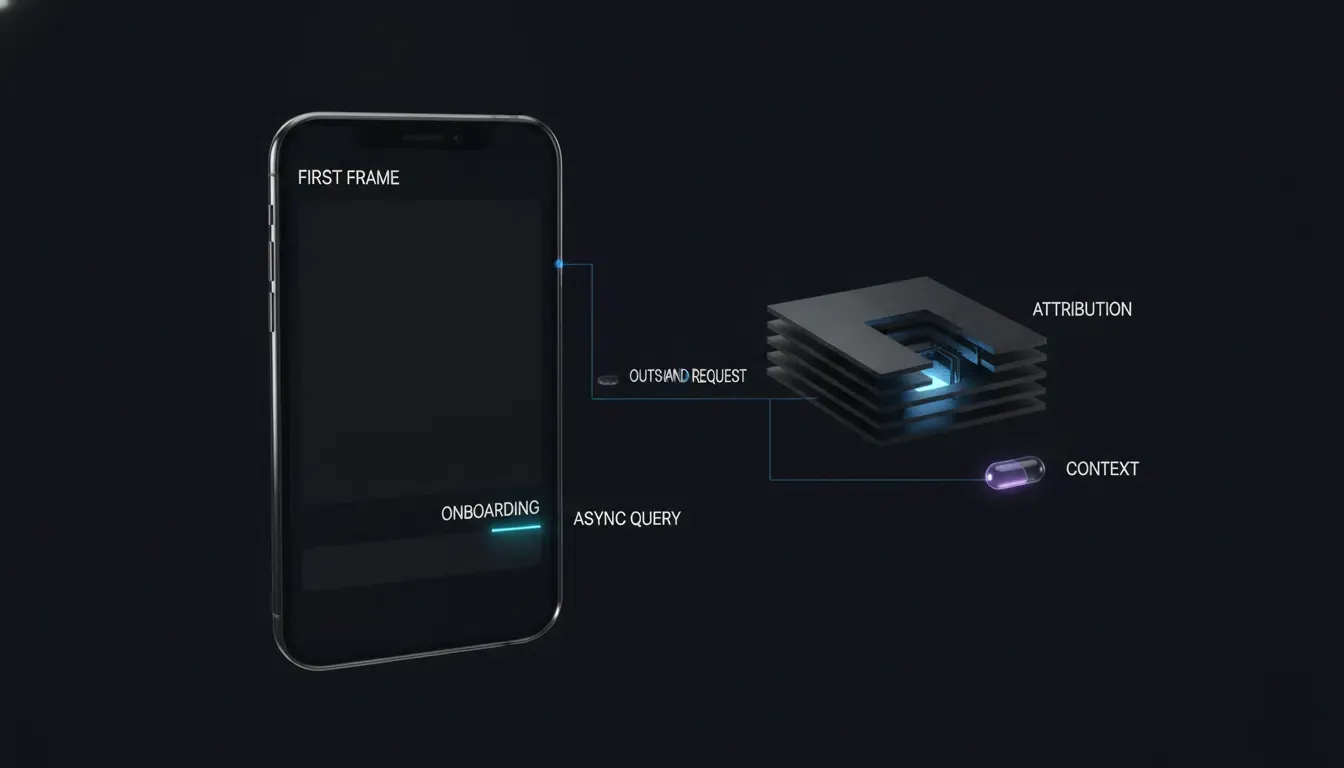
Instead of reading attribution parameters before the root view controller renders, defer getInstallParmsCompleted until the onboarding view appears (and measure actual TTID separately via Instruments). Manage request lifecycle cleanly with an explicit AttributionFetchState (idle, loading, completed, retryableFailure), verifying OpoInstallSDK.defaultManager() is non-nil before transitioning to .loading so a nil manager never locks the view controller in a permanent .loading state. Inside the SDK callback, extract only immutable Sendable primitives (hadResponse, rawPromoSnapshot) before crossing concurrency boundaries—never capture the non-Sendable appData object into background or subsequent async closures—and hop back cleanly via Task { @MainActor ... } while checking isViewLoaded, view.window != nil, and activeRequestGeneration.
Reference Architecture Disclaimer: The following Swift implementation is a defensive reference architecture. Verify exact SDK module imports (
libOpoInstallSDK), delegate protocols (OpoInstallDelegate), data-model class names (OpoinstallDatavsOpoInstallData), and Swift 5.9/6.0 strict concurrency compliance against your deployed framework version.
// iOS - NonBlockingAttributionStartup.swift
// Reference architecture: compile and test against your specific iOS target (iOS 15.0–18.0)
// Simplified AppDelegate example; adapt lifecycle triggers if using UIScene / SceneDelegate.
import UIKit
import libOpoInstallSDK

// Isolated host cache service free of @MainActor self captures for Swift 6 compatibility
private enum HostCacheService {
    static func prepareLocalCaches() {
        // Host-owned background configuration or cache preparation; ensure implementations
        // avoid UIKit, @MainActor-isolated properties, and unsynchronized mutable globals.
    }
}

@main
final class AppDelegate: UIResponder, UIApplicationDelegate, OpoInstallDelegate {

    var window: UIWindow?

    func application(
        _ application: UIApplication,
        didFinishLaunchingWithOptions launchOptions: [UIApplication.LaunchOptionsKey: Any]?
    ) -> Bool {
        // 1. Register SDK delegate cleanly without synchronous network or disk locks
        OpoInstallSDK.initWith(self)

        // 2. Offload host-owned non-UI startup preparation without capturing @MainActor self
        DispatchQueue.global(qos: .utility).async {
            HostCacheService.prepareLocalCaches()
        }

        return true
    }

    // Marked nonisolated to satisfy Swift 6 concurrency if invoked off the main actor
    nonisolated func getWakeUpParams(_ appData: OpoinstallData?) {
        let hasData = (appData?.data != nil)
        let hasChannel = (appData?.channelCode != nil)
        print("[AttributionPerf] Wakeup params resolved (hasData: \(hasData), hasChannel: \(hasChannel))")

        Task { @MainActor in
            // Route to target scene safely on MainActor
        }
    }
}

@MainActor
final class OnboardingViewController: UIViewController {

    private enum AttributionFetchState {
        case idle
        case loading
        case completed
        case retryableFailure
    }

    private var fetchState: AttributionFetchState = .idle
    private var activeRequestGeneration: UInt64 = 0

    override func viewDidAppear(_ animated: Bool) {
        super.viewDidAppear(animated)
        // Trigger deferred parameter retrieval after the onboarding view appears
        // (measure exact cold-start TTID separately using Xcode Instruments)
        fetchDeferredAttributionIfNeeded()
    }

    private func fetchDeferredAttributionIfNeeded() {
        // Prevent duplicate concurrent requests across repeated viewDidAppear calls
        guard fetchState == .idle || fetchState == .retryableFailure else {
            return
        }

        // Verify SDK manager availability BEFORE entering .loading to prevent permanent state starvation
        guard let manager = OpoInstallSDK.defaultManager() else {
            fetchState = .retryableFailure
            return
        }

        fetchState = .loading
        activeRequestGeneration &+= 1
        let requestGeneration = activeRequestGeneration

        manager.getInstallParmsCompleted { [weak self] appData in
            // Snapshot immutable Sendable values immediately inside callback; do NOT capture appData across queues
            let hadResponse = (appData != nil)
            let hasData = (appData?.data != nil)
            let hasChannel = (appData?.channelCode != nil)
            let rawPromoSnapshot = appData?.data?["promoCode"] as? String
            print("[AttributionPerf] Deferred params resolved (hasData: \(hasData), hasChannel: \(hasChannel))")

            DispatchQueue.global(qos: .userInitiated).async { [weak self, hadResponse, rawPromoSnapshot] in
                // Perform any expensive host normalization solely on the immutable String snapshot
                let normalizedPromo = rawPromoSnapshot?.trimmingCharacters(in: .whitespacesAndNewlines)

                Task { @MainActor [weak self, hadResponse, normalizedPromo] in
                    guard let self = self else { return }

                    // Ignore stale callbacks if superseded by a newer request
                    guard self.activeRequestGeneration == requestGeneration else { return }

                    if !hadResponse {
                        self.fetchState = .retryableFailure
                        return
                    }

                    self.fetchState = .completed
                    guard self.isViewLoaded,
                          self.view.window != nil,
                          let code = normalizedPromo,
                          !code.isEmpty else {
                        return
                    }
                    self.applyOnboardingPromo(code)
                }
            }
        }
    }

    private func applyOnboardingPromo(_ code: String) {
        // Update onboarding UI on MainActor
    }
}
Comparative Analysis of Mobile SDK Initialization Strategies
Evaluating Cold-Start Latency, Implementation Complexity, and Attribution Readiness
Selecting the optimal initialization pattern balances cold-start frame budgets against when attribution parameters are required in the user journey:
| Initialization Strategy | Main-Thread Blocking Risk | Cold-Start TTID Impact | Attribution Readiness | Implementation Complexity | Best Suited Scenario |
|---|---|---|---|---|---|
Eager ContentProvider Auto-Init |
High when providers perform I/O before Application.onCreate |
Delays launch proportionally to provider work | Immediate upon launch | Minimal (Zero code) | Legacy modules lacking manual init APIs |
Synchronous Application.onCreate Init |
Moderate to High if disk or network work runs synchronously | Delays first activity draw if heavy | Immediate upon launch | Low | Thin registration wrappers doing zero disk/network I/O |
| Background Queue / Coroutine Offloading | Lower when expensive work is thread-safe, moved off the critical path, and avoids blocking dependencies | Preserves fast TTID | Asynchronous (Ready post-init) | Moderate | Production attribution and analytics SDK integrations |
Jetpack App Startup Lazy Initializer |
Lower when component creation is lightweight and deferred | Can reduce TTID when the initializer is non-critical and genuinely deferred beyond the launch path; verify with startup traces | Deferred until feature entry | Moderate | Host onboarding caches and non-critical secondary modules |
Platforms such as OpoInstall structure parameter retrieval around asynchronous callback APIs (getInstallParam and getInstallParmsCompleted) so applications can separate initial UI rendering from deferred parameter resolution.
Frequently Asked Questions (FAQ)
Why does Android StrictMode flag mobile SDK initialization in Application onCreate?
How can iOS developers avoid 0x8badf00d watchdog crashes caused by third-party SDKs?
When should an app call getInstallParam or getInstallParmsCompleted to avoid startup lag?
Summary and Decision Framework
Preventing main thread blocking during mobile SDK initialization requires measuring startup traces and decoupling non-UI work from the application’s critical launch path. By profiling cold starts with Android StrictMode and Xcode Instruments, consolidating non-critical host components with lazy Jetpack App Startup initializers or isolated background queues, and triggering deferred parameter queries (getInstallParam / getInstallParmsCompleted) asynchronously with explicit state machines and immutable snapshots at active business milestones, these patterns can reduce avoidable main-thread contention during cold start; however, their exact impact on TTID, TTFD, ANR incidence, and iOS watchdog terminations must be established with platform profiling and device regression tests.
Teams optimizing mobile attribution lifecycles and deferred deep-linking onboarding flows can consult the OpoInstall platform overview for asynchronous SDK integration patterns.
Entity Glossary
| Term | Definition | Related Entity | Search Intent Role |
|---|---|---|---|
| Mobile SDK | A compiled software development kit integrated into mobile apps for attribution, analytics, or routing. | Android SDK / iOS SDK |
Informational / Technical |
| Main Thread | The primary execution thread responsible for UI rendering and handling user input events. | DispatchQueue.main / Looper |
Technical |
| StrictMode | An Android developer tool that detects accidental disk or network operations on the main thread. | StrictMode.ThreadPolicy |
Technical |
| Watchdog Termination | An OS-initiated crash (0x8badf00d) on iOS triggered when an app blocks the main thread during launch or lifecycle transitions. |
SpringBoard / FrontBoard | Technical |
| Jetpack App Startup | An AndroidX library consolidating component initializers into a single ContentProvider with lazy-loading support. |
androidx.startup |
Technical |
Compatibility Baseline and Verification Status
-
Intended Compatibility Targets: Android
minSdk 24,compileSdk 34/35,targetSdk 34/35(Android 14/15),androidx.startup:startup-runtime:1.2.0+, Kotlin Coroutines; iOS 15.0–18.0, Xcode 15/16, Swift 5.9/6.0. -
Verification Status:
-
Static API & Specification Review: Completed against Android Developers and Apple Developer documentation.
-
Compile & Device Verification: Not yet executed in this review cycle. Compile-time builds (including Swift 6 strict concurrency checks and exact AAR integration) and physical-device startup profiling (Android Perfetto /
StrictModeand Xcode App Launch Instruments) must be executed by your engineering team prior to production release.
-
References
Share this article