Replit Agent Adds Google Ads Support? On November 12, 2026, Replit announced that Replit Agent can now create and manage Google Ads campaigns directly inside its workspace chat, alongside a separate purchasing workflow called Agentic Commerce, as detailed in the official Replit blog announcement. According to Replit’s Agentic Ads documentation, the advertising integration is available worldwide for Replit Pro users in personal Workspaces, enabling builders to connect an existing Google Ads account or let Replit provision and fund a new managed account using Replit credits. By bringing ad asset generation, Performance Max campaign setup, and conversion tracking into the same chat environment where software is built, the release lowers setup friction for solo founders while introducing practical questions around account custody, spending limits, and delayed billing.
Replit Agent Google Ads Capabilities and Launch Scope
At a Glance
- Replit launched Agentic Ads worldwide for Replit Pro users in personal Workspaces on November 12, 2026, while excluding Enterprise Workspaces from the Replit-managed launch.
- The integration supports only Google Performance Max campaigns at launch, running one campaign at a time on Replit-created accounts with a minimum average daily budget of $15 USD.
- Replit simultaneously introduced Agentic Commerce for U.S. Core and Pro users via Stripe’s Link wallet and Visa, using code-enforced checkout gates that contrast with the ongoing daily spend model of paid advertising.
Software builders who rely on coding agents often encounter operational hurdles once an application goes live. In its November 12 post, Replit noted that since May 2026 it observed a ninefold increase in entrepreneurs connecting Replit-built projects to Stripe for monetization, highlighting demand for non-coding workflows such as procurement and customer acquisition. To illustrate early founder adoption prior to this launch, Replit cited two vendor-reported case studies: one founder who built a product for under $400 after receiving a $105,000 agency quote and generated six figures in six weeks, and another running an electronics business who reported $170,000 in 30 days with roughly a 4x return on ad spend using a self-built ads workflow. These figures reflect company-published founder examples rather than independently audited industry benchmarks.

Under Replit’s official Agentic Ads guide, the advertising workflow focuses strictly on Google Performance Max campaigns. Rather than requiring manual configuration across separate Google Ads views, Replit Agent analyzes the user’s live website or published app, drafts ad headlines and descriptions, generates images, and suggests an average daily budget. Google’s Performance Max system then distributes combinations of those assets across Search, YouTube, Display, Discover, and other Google channels toward a user-defined campaign goal such as sign-ups, leads, or purchases.
Launching a campaign requires a live destination page, language and location targeting, and explicit review before activation. Campaigns can be created in a paused state, and Replit emphasizes that enabling a campaign in the workspace does not guarantee immediate ad delivery, as Google’s standard policy review and account eligibility checks still govern when ads begin serving, as noted in the November 13 Replit Changelog.
How Replit-Managed Accounts, Budgets, and Auto-Reload Work
One of the most consequential technical and financial decisions in Replit Agent Google Ads setups is choosing between provisioning a new Replit-managed account and linking an existing Google Ads account. Both paths operate under distinct billing and operational constraints documented in Replit’s Agentic Ads specifications.
| Account Dimension | Replit-Created Managed Account | Connected Existing Google Ads Account |
|---|---|---|
| Eligibility | Replit Pro plan and personal Workspace only (excludes Enterprise Workspaces) | Signed-in Google account with access to an existing Google Ads account |
| Billing Source | Deducted from shared Replit credit balance; requires auto-reload enabled | Uses existing Google Ads billing arrangement, separate from Replit credits |
| Campaign Concurrency | Limited to one active campaign at a time | Governed by the user’s existing Google Ads account setup |
| Agent Usage Fees | Replit usage for preparing and managing ads is billed separately from ad spend | Replit usage for preparing and managing ads is billed separately from ad spend |
| Promotional Credits | Google promotional credits are not included in this release | Subject to existing Google Ads account terms |
Budget mechanics require close attention because paid search and display spending behaves differently from fixed software subscriptions. Creating a campaign through Replit requires an average daily budget of at least $15 USD, and Replit’s documentation explicitly states that an average daily budget is not a hard daily spending cap. Under Google Ads spending limit rules, Google may spend up to twice a campaign’s average daily budget on high-traffic days for most campaigns while capping total monthly charges at 30.4 times the average daily budget.
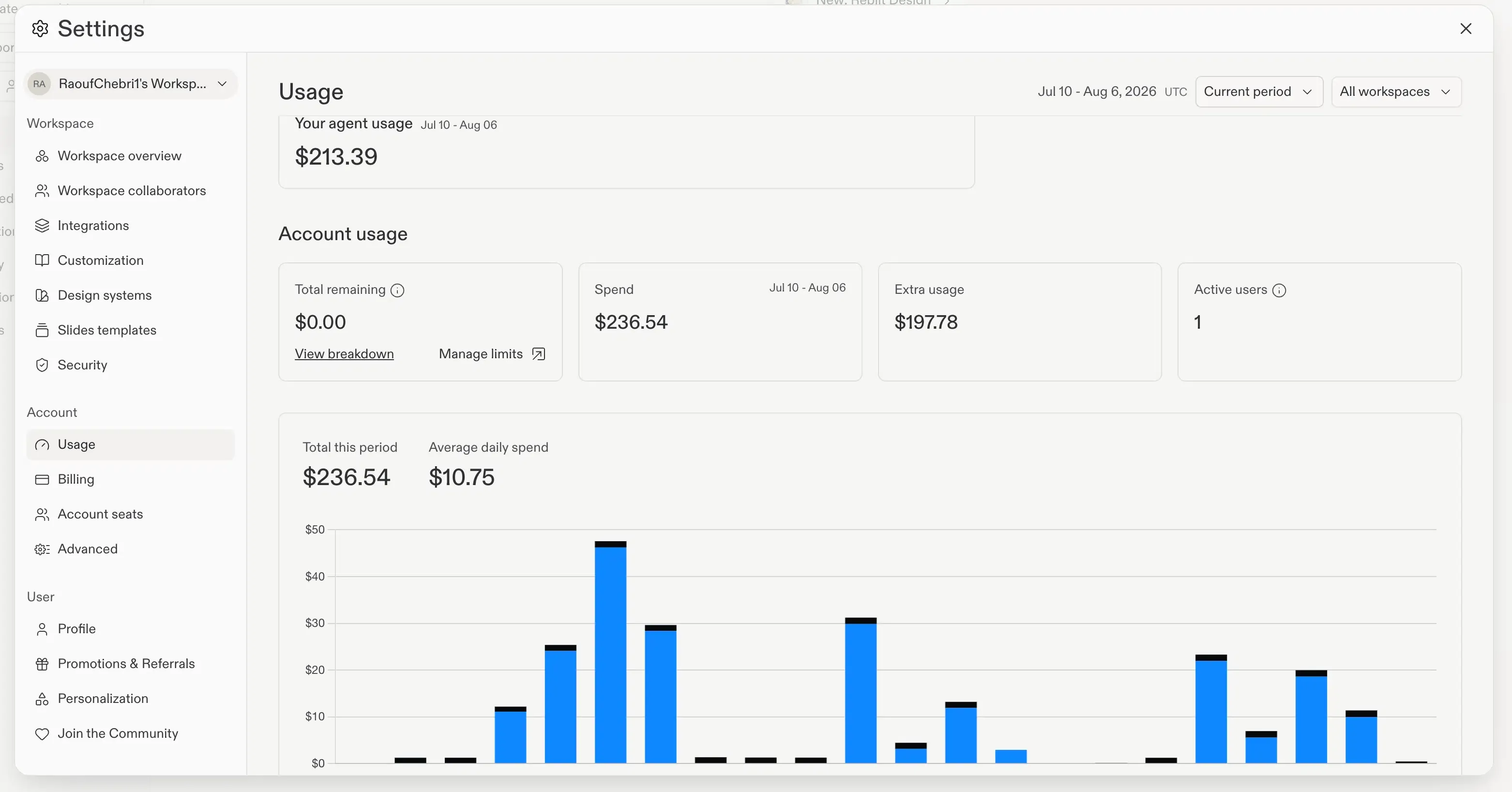
Three additional billing boundaries documented in Replit’s spend management guide and Agentic Ads help page directly affect cash-flow predictability:
- Shared Balance and Mandatory Auto-Reload: On Replit-managed accounts, advertising spend draws from the same Replit credit balance used for compute and Agent tasks, and auto-reload must be enabled, meaning replenishment charges to the underlying payment method can trigger automatically.
- Mission Budget Separation: Replit explicitly notes that a Replit Mission budget does not act as an advertising spending cap.
- Delayed Reporting and Stop Behavior: Because Google Ads reporting is delayed, ad usage and credit deductions may appear after activity occurs, including after a campaign is paused; additionally, Replit warns users to ask Agent explicitly how and when a campaign will stop rather than assuming automatic termination.
Spend Controls Compared: Agentic Ads vs. Agentic Commerce
The dual launch on November 12 pairs two workflows with noticeably different financial control surfaces. On the procurement side, Replit’s Agentic Commerce documentation outlines a transactional gate: a browser subagent powered by Browserbase navigates a merchant’s website inside an isolated session, populates the cart, hands browser control back to the user if merchant sign-in or verification is required, and halts at checkout. During payment steps, shell access and general browsing are disabled, and Replit states that the approval check—confirming merchant, amount, currency, and recurring terms through Stripe’s Link wallet and Visa infrastructure—is enforced in code rather than left to the language model.
Noticeably, public documentation contains one scope difference across official Replit pages regarding procurement. While the November 12 blog post describes Agentic Commerce as limited to one-time purchases for Core and Pro users starting in the U.S., the Agentic Commerce documentation also documents support for fixed-price subscriptions where initial and renewal totals are identical (while excluding free trials, introductory discounts, usage-based pricing, prorations, and variable renewals). In addition, Replit notes that setting an authorization end date in Link stops future payment permissions without automatically canceling the underlying merchant subscription.
Conceptual Responsibility Model: Replit Agent Commerce and Ads Boundaries
The table below presents a Conceptual Responsibility Model summarizing the functional boundaries described across Replit’s published workflow documentation; it is an illustrative operational view rather than an official internal system topology.
| Component Layer | Illustrative Responsibilities (Agentic Ads) | Illustrative Responsibilities (Agentic Commerce) |
|---|---|---|
| Workspace Orchestrator (Replit Agent) | Analyzes live destination page, drafts creatives, suggests budget, embeds conversion events, and submits campaign changes upon activation approval | Searches merchant sites via isolated browser session, compares options, builds cart, and pauses at checkout for user confirmation |
| Execution / Channel Environment | Google Ads Performance Max distributes creative combinations across Search, YouTube, Display, and Discover | Browserbase provides isolated web session; shell access and general browsing are disabled during payment steps |
| Billing & Authorization Gate | Pre-launch activation and budget approvals; Replit-managed accounts draw from shared Replit credits with mandatory auto-reload | Code-enforced Link wallet approval on exact merchant, currency, total, and fixed recurring terms prior to charge attempt |
| Post-Launch Owner Governance | Verifying Google Ads account custody, setting end dates, monitoring delayed spend reports, and validating conversion quality | Reviewing merchant order confirmation independently of payment confirmation and managing direct merchant cancellations |
Comparing the two halves highlights why paid acquisition requires tighter post-approval monitoring. In Agentic Commerce, user approval applies to a bounded checkout total (or fixed-price subscription terms), whereas in Agentic Ads, a single activation approval initiates recurring daily delivery until paused or terminated.
Conversion Tracking, Account Ownership, and Pre-Launch Governance
Because Replit Agent generates the application codebase alongside the ad plan, Replit’s documentation highlights its ability to wire conversion tracking directly into user sign-ups or purchases. Measuring downstream business outcomes rather than raw clicks prevents Performance Max bidding algorithms from optimizing toward low-intent traffic. Even so, automated instrumentation introduces subtle failure modes if the tracked event fires on a superficial UI click rather than a verified backend state change, or if conversion values are misconfigured.
Founders and engineering leads evaluating Replit Agent Google Ads workflows should verify several governance items before enabling live spend. The table below distinguishes between verified platform behaviors and editorial governance practices recommended for small teams.
| Governance Check | Evidence Category | Practical Verification Requirement |
|---|---|---|
| Google Ads Account Ownership | Verified Platform Constraint | Confirm login ownership, invoice access, user permissions, and portability if you create a Replit-managed account rather than connecting an existing account |
| Hard Cap vs. Average Daily Budget | Verified Platform Policy | Account for Google’s 2x daily fluctuation and 30.4x monthly limit alongside Replit’s $15 minimum average daily budget and auto-reload requirement |
| Scheduled Reporting & Stop Dates | Verified Platform Behavior | Explicitly prompt Agent to confirm campaign stop conditions and set up a weekly reporting routine, as neither is automatic at launch |
| Conversion Event Definition | Editorial Best Practice | Audit the exact signup, lead, or purchase trigger Agent added to the app so bidding optimizes for verified conversions rather than unvalidated clicks |
| External Spend Separation | Editorial Best Practice | For teams with existing marketing staff or multiple campaigns, consider connecting a dedicated Google Ads account with separate billing rather than sharing Replit compute credits |
As Replit’s documentation explicitly cautions, running ads does not guarantee leads, sales, or a positive return on spend, and allowing time for Google’s review, learning phase, and delayed reporting is necessary before evaluating campaign performance.
Frequently Asked Questions (FAQ)
Does Replit Agent enforce a hard daily spending cap on Google Ads?
Who owns a Google Ads account created through Replit Agent?
Can Replit Agent run Google Search-only or mobile App Campaigns at launch?
Why do Replit's blog and documentation differ on Agentic Commerce subscriptions?
Key Takeaways for Engineering Teams
Replit’s expansion from code generation into procurement and Google Ads management illustrates a practical boundary in agentic tooling: transactional one-off actions can be gated cleanly at checkout, whereas ongoing resource loops—such as ad bidding—transfer continuous financial risk to the operator the moment activation is approved. Because Replit-managed Google Ads accounts share a credit pool with application compute and require auto-reload, small configuration errors in targeting, conversion events, or stop schedules can compound across billing cycles.
For solo founders building web products inside Replit, delegating Performance Max setup and initial conversion wiring removes significant manual overhead, provided basic account ownership and budget safeguards are verified upfront. For engineering and growth teams managing established acquisition stacks, connecting an isolated Google Ads account with independent billing, explicit conversion validation, and scheduled human review remains the safer operating baseline.
References
-
Replit. Replit Agent can now buy for your business and help you reach customers. Official Announcement Blog, November 12, 2026.
-
Replit Docs. Reach customers with Google Ads. Official Product Documentation.
-
Replit Docs. Buy what your business needs with Replit. Official Product Documentation.
-
Replit Docs. November 13, 2026 Changelog. Official Release Notes.
-
Replit Docs. Managing Your Spend. Official Billing Documentation.
-
Google Ads Help. About spending limits. Official Google Ads Documentation.
-
Replit. The Rise of the Self-Driving Company. Official Background Context Blog.
Share this article