How to prepare a technical checklist for a mobile app launch? Preparing a technical mobile app launch checklist requires verifying Universal Links and App Links domain associations, auditing AASA and assetlinks.json files, validating SDK initialization, and testing parametric routing across clean devices prior to store submission.
An app launch checklist is a comprehensive pre-submission technical audit protocol designed to verify critical mobile infrastructure—including deep linking domains, attribution SDK lifecycles, and parameter restoration pipelines—before commercial release. Conducting systematic pre-flight testing helps engineering teams identify post-release navigation risks, attribution integration defects, and release-readiness issues prior to commercial deployment.
| Term | Definition | Related Entity | Search Intent Role |
|---|---|---|---|
| App Launch | The operational and technical deployment of a mobile application to public app stores. | Mobile Release Management | Informational / Commercial |
| AASA File | A server-hosted JSON file establishing verified association between an Apple app and a website. | Universal Links | Technical / Informational |
| Digital Asset Links | A protocol establishing verified ownership between an Android application and an HTTPS domain. | Android App Links | Technical / Informational |
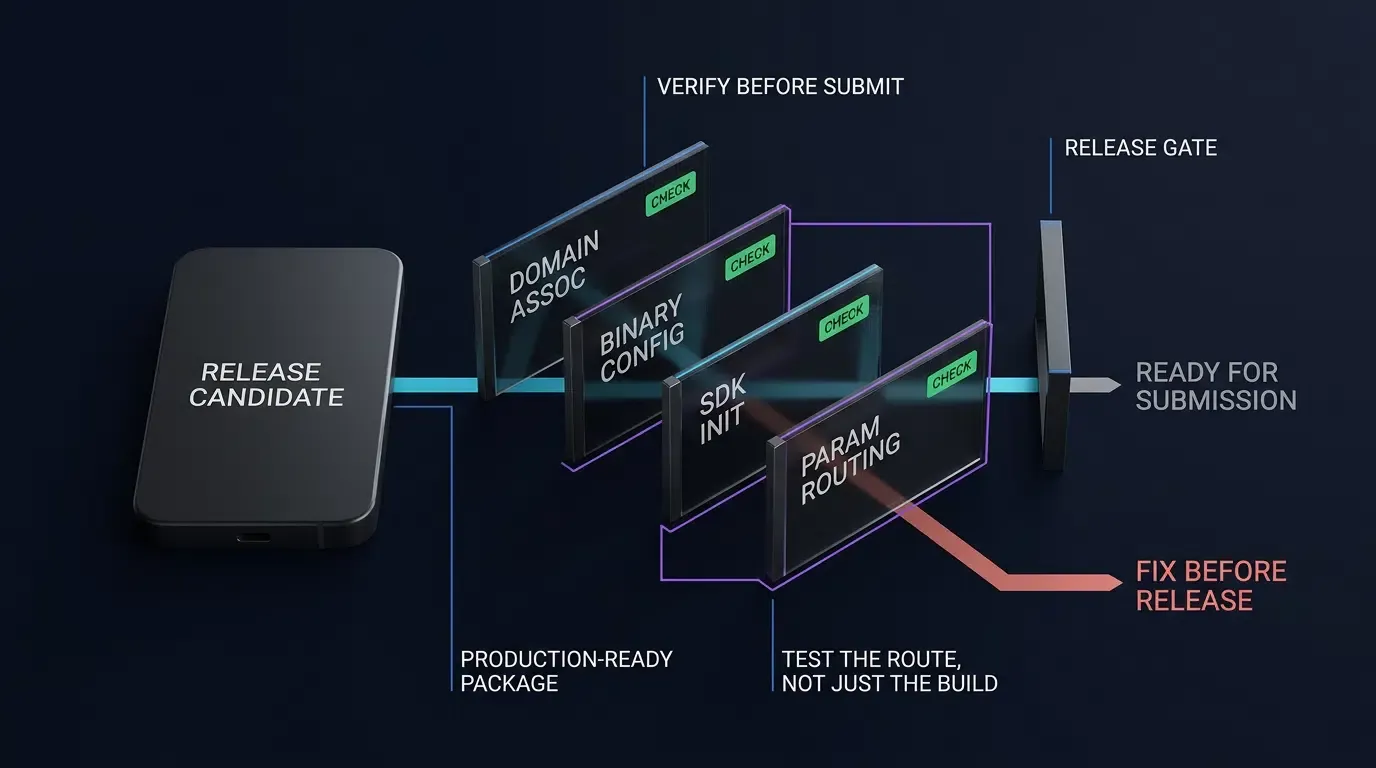
Why Pre-Launch Deep Link Verification Protects Your App Launch ROI
The Commercial Cost of Store Release Failures: Why Rework Post-Approval Damages Growth
A public app launch is an unforgiving milestone in software delivery. Once a binary passes App Store review or Google Play automated security checks and reaches production, technical oversights in deep linking or attribution infrastructure trigger acute commercial bottlenecks. If marketing campaigns begin distributing tracking URLs while the underlying domain association is broken, incoming users encounter generic fallback screens or browser 404 errors instead of targeted promotional routes.
Native configuration defects—such as an incorrect Associated Domains entitlement or an incorrect package declaration in the shipped binary—can require compiling a new binary, incrementing version numbers, and resubmitting to app store review pipelines. This cycle frequently takes multiple business days, stranding paid media spend and depressing user acquisition momentum during the critical launch window. In contrast, server-side association defects, such as an incorrect SHA-256 signing-certificate fingerprint in the website-hosted assetlinks.json file or misconfigured AASA path components, can often be corrected directly on the hosting server without rebuilding the application, followed by domain re-verification.
Pre-Flight Architecture: Decoupling Binary Code Signing from Domain Verification
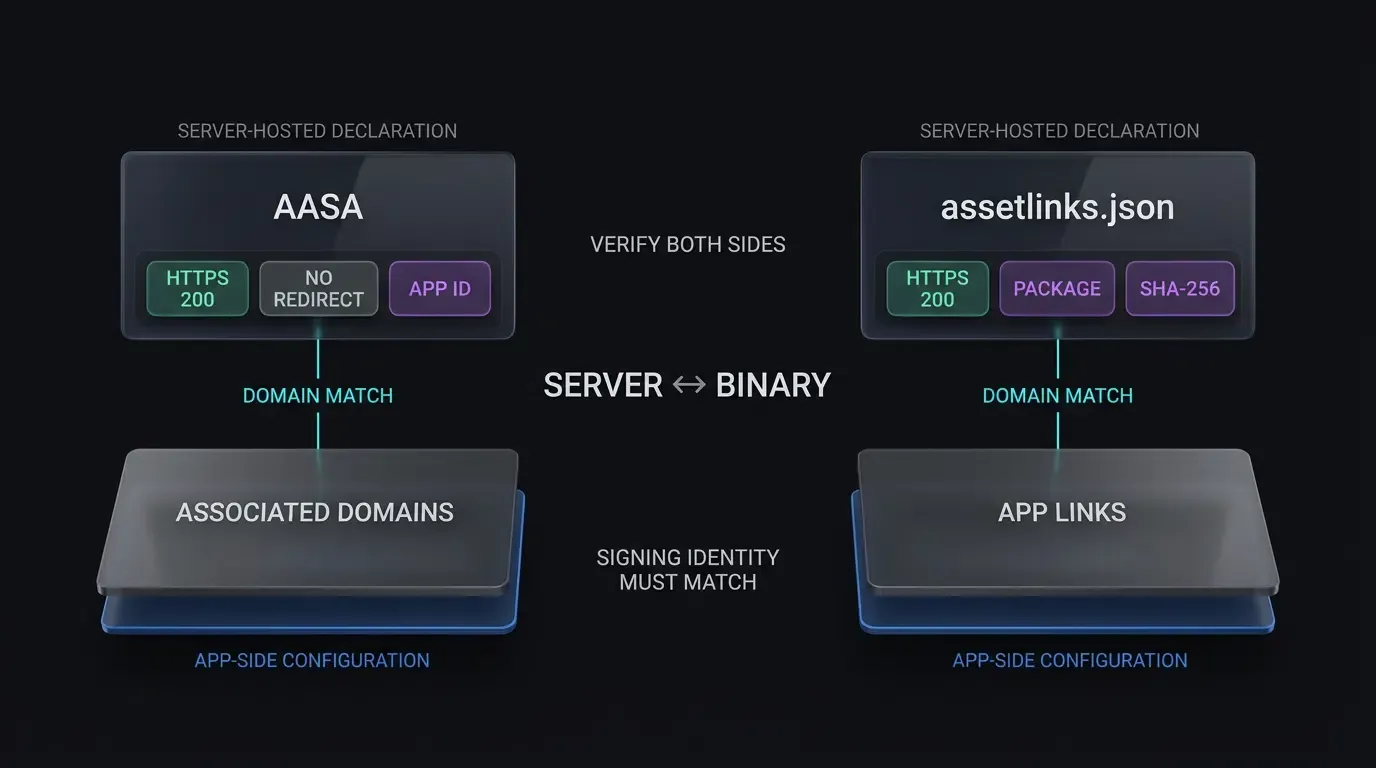
A resilient pre-flight verification strategy separates client-side binary compilation from server-side domain verification. While compilation establishes native routing logic and SDK hooks, operating systems confirm destination authority by retrieving external JSON declarations hosted on designated HTTPS domains.
Verifying that server-hosted declaration files match local binary configurations before uploading final builds to store consoles ensures that app-to-site verification succeeds upon installation. OpoInstall, an independent mobile measurement platform, provides testing workflows that allow release teams to validate parameter transmission and domain mappings in staging environments prior to public release.
Establishing Release Gate Thresholds for Soft Launch and Production Tiers
Release engineering frameworks require deterministic quality gates before code promotion. Deep-link-enabled app launches depend on verified Universal Links and App Links when contextual web-to-app routing is in scope. Teams deploying staged rollouts or geographic soft launches should enforce strict criteria across test builds:
- Domain Validation Gate: Automated verification of production and staging domain association endpoints via command-line queries.
- Cold-Start Restoration Gate: Verified parameter recovery across clean physical test devices following a simulated store redirection flow.
- Fallback Safety Gate: Confirmed graceful degradation to the application home view or web landing page when presented with malformed, expired, or tampered routing strings.
How to Audit iOS Universal Links and AASA Hosting Before App Submission
Validating the apple-app-site-association JSON Format and HTTPS Headers
iOS Universal Links require an apple-app-site-association (AASA) JSON file hosted securely on the target domain. Operating systems query this file to identify which URL paths should trigger native application execution rather than default Safari browsing sessions.
The AASA file must reside at either https://<domain>/.well-known/apple-app-site-association or https://<domain>/apple-app-site-association. Pre-flight auditing must verify both HTTP response headers and JSON body validity:
curl -I https://app.example.com/.well-known/apple-app-site-association
curl -fsS https://app.example.com/.well-known/apple-app-site-association | jq .
The initial command must return an HTTP status code of 200 OK without following redirects (HTTP 301 or 302 redirects cause iOS association validation to fail). The server must serve the payload over a valid HTTPS connection, using the header Content-Type: application/json.
The JSON payload must strictly adhere to modern Apple schema specifications without wrapping arrays incorrectly:
{
  "applinks": {
    "apps": [],
    "details": [
      {
        "appIDs": [ "TEAMID1234.com.example.app" ],
        "components": [
          {
            "/": "/open/*",
            "?": { "promo": "?*" },
            "comment": "Matches promotional campaign routes"
          },
          {
            "/": "/help",
            "exclude": true,
            "comment": "Preserves web routing for help documentation"
          }
        ]
      }
    ]
  }
}
Bypassing Apple CDN Caching Delays via Developer Mode Entitlements
On iOS 14 and later, Apple’s CDN retrieves and caches the AASA file. Apple does not publish a fixed 48-hour propagation guarantee, and there is no direct CDN invalidation control. Devices check for updates periodically; according to Apple’s technical guidance, installed devices check approximately once per week, while reinstalling the application can trigger retrieval of updated association records.
For development-only testing, teams can append ?mode=developer to their Associated Domains entitlement, enable Developer Mode and Associated Domains Development in device settings, and run a build signed with a development provisioning profile:
<key>com.apple.developer.associated-domains</key>
<array>
    <string>applinks:app.example.com?mode=developer</string>
</array>
Because this alternate mode requires a development signature, it serves as a development diagnostic tool rather than a TestFlight or production verification path.
Auditing Binary Entitlements using macOS Command-Line Tools
Prior to uploading an archive to TestFlight or App Store Connect, verify that Xcode correctly embedded the intended Associated Domains entitlement during binary compilation:
codesign -d --entitlements :- /path/to/Payload/YourApp.app
Inspect the XML output to confirm that the com.apple.developer.associated-domains key exists, contains no formatting errors or trailing spaces, and includes the expected production host strings.
Validating AASA CDN Propagation via Apple CDN Verification Queries
Before promoting a build to public production, query Apple’s public edge cache to verify that the CDN has scraped and validated the server-side AASA record:
curl -v https://app-site-association.cdn-apple.com/a/v1/app.example.com
A matching CDN response is a useful diagnostic signal, but it should not be treated as a guarantee of per-device Universal Link behavior. Confirm device-side association state when diagnosing release readiness.
How to Verify Android App Links and Domain Associations via CLI
Structuring assetlinks.json with Production Release Keystore Fingerprints
Android App Links require a Digital Asset Links declaration file hosted at https://<domain>/.well-known/assetlinks.json. This declaration informs the Android operating system that the designated mobile package has verified authority to open specific web links.
The assetlinks.json file must contain the exact SHA-256 certificate fingerprint of the keystore used to sign the target binary:
[
  {
    "relation": ["delegate_permission/common.handle_all_urls"],
    "target": {
      "namespace": "android_app",
      "package_name": "com.example.app",
      "sha256_cert_fingerprints": [
        "14:6D:E9:DE:0F:70:FF:E5:43:7E:0E:36:4F:18:28:4F:73:EC:82:E6:31:43:18:B3:3E:E6:2B:6A:BD:EF:94:3E"
      ]
    }
  }
]
To extract the production fingerprint from an existing release keystore, execute the Java keytool utility:
keytool -list -v -keystore /path/to/release.keystore -alias release_key
If deploying via Google Play App Signing, ensure the fingerprint declared in assetlinks.json matches the App Signing Key Certificate listed in the Google Play Console, rather than the local upload key.
Configuring Intent Filters: Isolating Verified HTTPS App Links from Custom Schemes
In accordance with Android Developers Guide on Adding Intent Filters for App Links, manifest files should isolate verified App Link filters from custom scheme fallbacks. Mixing custom scheme declarations within an autoVerify="true" filter block risks breaking host verification across Android versions.
<!-- AndroidManifest.xml: Verified App Link Intent Filter -->
<intent-filter android:autoVerify="true">
    <action android:name="android.intent.action.VIEW" />
    <category android:name="android.intent.category.DEFAULT" />
    <category android:name="android.intent.category.BROWSABLE" />
    <data android:scheme="http" />
    <data android:scheme="https" />
    <data android:host="app.example.com" />
</intent-filter>

<!-- Separate Intent Filter for Custom Fallback Scheme -->
<intent-filter>
    <action android:name="android.intent.action.VIEW" />
    <category android:name="android.intent.category.DEFAULT" />
    <category android:name="android.intent.category.BROWSABLE" />
    <data android:scheme="yourapp" />
</intent-filter>
Executing Automated Domain Verification Diagnostics via Android Debug Bridge (ADB)
Following local installation of a release-candidate build, trigger manual domain verification via the Android Debug Bridge (ADB) to validate domain approval:
adb shell pm set-app-links --package com.example.app 0 all
adb shell pm verify-app-links --re-verify com.example.app
Allow the verifier adequate time to finish network requests, then query the verification subsystem state to confirm domain approval:
adb shell pm get-app-links com.example.app
The terminal output must indicate a verified status:
com.example.app:
    ID: 01234567-89ab-cdef-0123-456789abcdef
    Signatures: [14:6D:E9:DE:0F:70:FF:E5:43:7E:0E:36...]
    Domain verification state:
      app.example.com: verified
Handling Updated Domain Verification States on Android 12 and Higher
On Android 12 and higher, declared hosts are evaluated independently. If one domain verifies successfully, the application can serve as the default handler for links from that verified host even if another declared host fails verification. In contrast, on Android 11 and lower, domain verification is all-or-nothing: if any single declared host fails verification, automated link verification can fail for all hosts in that filter block. Consulting the Android Developers Guide on Troubleshooting App Links helps identify signature mismatches, redirect loops, or network reachability barriers.
End-to-End Testing Protocols for Parameter-Passing and Scene Restoration
The Critical Difference Between Warm Deep Link Wakeups and Deferred Parameter Restoration
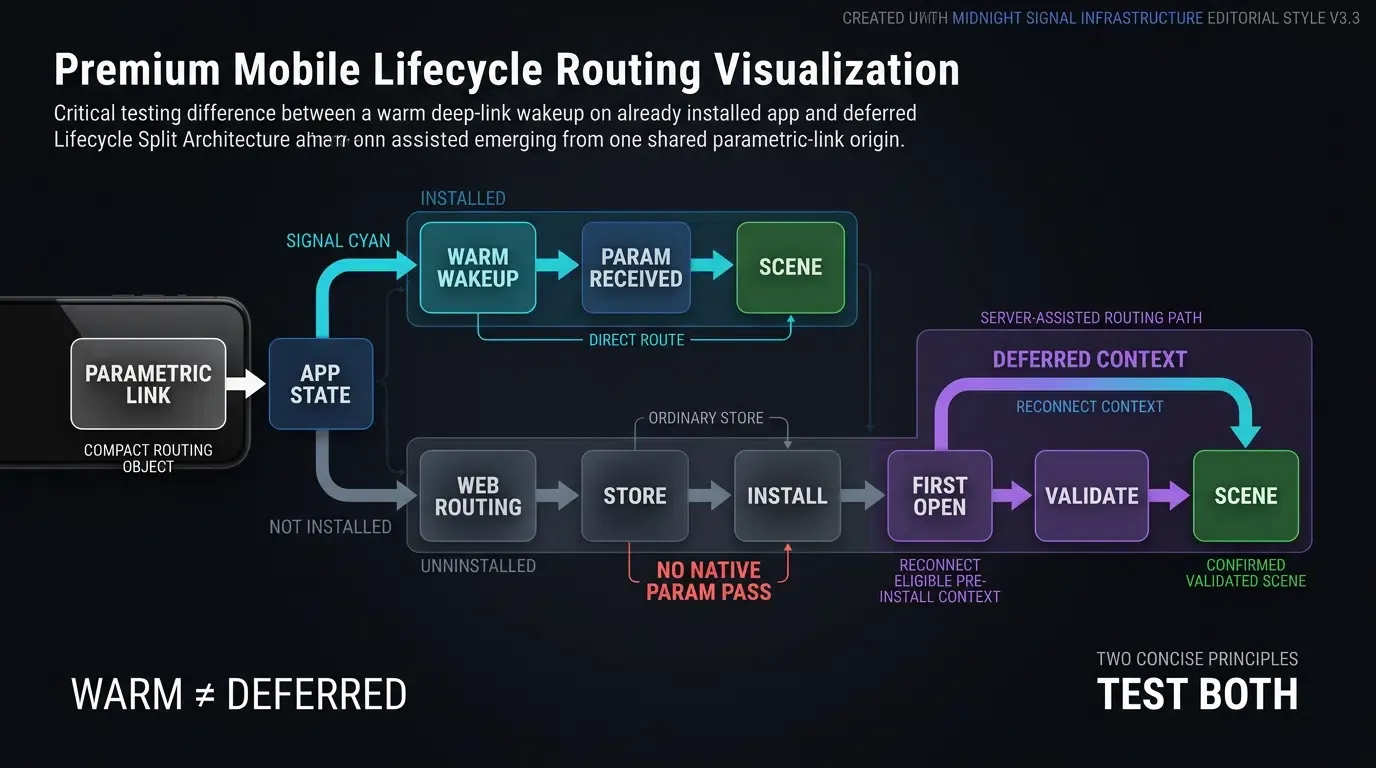
Pre-flight verification must distinguish between two primary deep link lifecycle states:
- Direct Wakeup (Warm Launch): The application is already installed on the test device. Tapping a Universal Link or App Link directly boots or resumes the app process, passing query parameters through native intent or user activity delegates.
- Deferred Parameter Restoration (Cold Launch Post-Install): The application is not installed on the test device. Tapping the link opens a web routing landing page, preserves context, redirects the user to the store, and restores dynamic parameters upon the application’s first launch.
Verifying Early SDK Initialization Without Blocking the Main Thread
Attribution and deep-linking SDKs must initialize early in the application lifecycle to register incoming intent hooks. In Android architectures, initialization should occur within the Application.onCreate() callback, guarding against multi-process re-initialization. In iOS environments, configuration belongs within application(_:didFinishLaunchingWithOptions:).
While initial registration hooks execute on application startup, heavy computation and blocking network I/O must remain off Android’s main UI thread to prevent Application Not Responding (ANR) warnings.
The following technical implementation illustrates structured pre-flight validation logic across native Android (Kotlin) and iOS (Swift) architectures. Developers can review the SDK integration documentation for framework-specific lifecycle specifications.
// Android: MainActivity.kt - Pre-Flight Intent Logging and Routing Diagnostics
package com.example.app

import android.content.Intent
import android.net.Uri
import android.os.Bundle
import android.util.Log
import androidx.appcompat.app.AppCompatActivity
import com.opoinstall.api.OpoInstall
import com.opoinstall.api.listener.AppWakeUpAdapter
import com.opoinstall.api.model.AppData
import org.json.JSONObject

class MainActivity : AppCompatActivity() {

    override fun onCreate(savedInstanceState: Bundle?) {
        super.onCreate(savedInstanceState)
        setContentView(R.layout.activity_main)

        // Audit incoming cold-start intent
        auditLaunchIntent(intent, "onCreate")
        processDeepLink(intent)
    }

    override fun onNewIntent(intent: Intent) {
        super.onNewIntent(intent)
        setIntent(intent)

        // Audit warm-resume intent
        auditLaunchIntent(intent, "onNewIntent")
        processDeepLink(intent)
    }

    private fun processDeepLink(intent: Intent?) {
        if (intent == null) return

        OpoInstall.getInstance().getWakeUp(intent, object : AppWakeUpAdapter() {
            override fun onWakeUp(appData: AppData?) {
                if (appData == null) {
                    Log.d(TAG, "No deep link parameters resolved.")
                    return
                }

                val channel = appData.channelCode ?: "organic"
                val customData = appData.data ?: "{}"

                Log.i(TAG, "Pre-Flight Route Verified - Channel: $channel, Payload: $customData")

                // Step 1: Input sanitization, type constraints, and route validation
                val validatedRoute = validateRoutePayload(customData)
                if (validatedRoute != null) {
                    // Step 2: Delegate authorization to backend service using app's authenticated session
                    authorizeRoute(validatedRoute) { isAuthorized ->
                        runOnUiThread {
                            if (isAuthorized) {
                                executeTargetNavigation(validatedRoute)
                            } else {
                                executeLobbyFallback("Route is unauthorized, expired, or unavailable.")
                            }
                        }
                    }
                } else {
                    runOnUiThread {
                        executeLobbyFallback("Malformed or unverified route payload.")
                    }
                }
            }
        })
    }

    private fun validateRoutePayload(rawJson: String): ValidatedRoute? {
        return try {
            val json = JSONObject(rawJson)
            val scene = json.optString("scene", "")
            val targetId = json.optString("target_id", "")

            // Validate scene against strict allowlist
            val allowedScenes = setOf("event_hub", "promo_detail", "guild_hall")
            if (!allowedScenes.contains(scene)) {
                return null
            }

            // Enforce length and character whitelist constraints on target identifier
            if (targetId.isBlank() || targetId.length > 128 || !targetId.matches(Regex("^[A-Za-z0-9_-]+$"))) {
                return null
            }

            ValidatedRoute(scene, targetId)
        } catch (e: Exception) {
            Log.e(TAG, "JSON payload validation failed", e)
            null
        }
    }

    private fun authorizeRoute(route: ValidatedRoute, callback: (Boolean) -> Unit) {
        // Authenticated session is supplied by the app session state; URL supplies route context
        BackendRouteAuthorizer.verifyRouteAuthorization(route.scene, route.targetId) { result ->
            callback(result.isAuthorized && result.isResourceAvailable)
        }
    }

    private fun executeTargetNavigation(route: ValidatedRoute) {
        Log.i(TAG, "Navigating to validated scene: ${route.scene}, ID: ${route.targetId}")
        // Execute internal navigation router to destination scene
    }

    private fun executeLobbyFallback(reason: String) {
        Log.w(TAG, "Executing safe lobby fallback: $reason")
        // Navigate safely to default main lobby
    }

    private fun auditLaunchIntent(intent: Intent?, lifecycleStage: String) {
        val action = intent?.action
        val data: Uri? = intent?.data
        Log.d(TAG, "[$lifecycleStage] Action: $action, Data URI: $data")
    }

    data class ValidatedRoute(val scene: String, val targetId: String)

    companion object {
        private const val TAG = "PreFlightAudit"
    }
}
// iOS: AppDelegate.swift - Pre-Flight Universal Link Audit and Logging
import UIKit
import libOpoInstallSDK

@main
class AppDelegate: UIResponder, UIApplicationDelegate, OpoInstallDelegate {

    var window: UIWindow?

    func application(
        _ application: UIApplication,
        didFinishLaunchingWithOptions launchOptions: [UIApplication.LaunchOptionsKey: Any]?
    ) -> Bool {
        // Initialize OpoInstall SDK early without blocking main thread
        OpoInstallSDK.initWith(self)
        return true
    }

    // Handle incoming Universal Links
    func application(
        _ application: UIApplication,
        continue userActivity: NSUserActivity,
        restorationHandler: @escaping ([UIUserActivityRestoring]?) -> Void
    ) -> Bool {
        if userActivity.activityType == NSUserActivityTypeBrowsingWeb, let webpageURL = userActivity.webpageURL {
            NSLog("[PreFlightAudit] Incoming Universal Link URL: %@", webpageURL.absoluteString)
        }

        // Delegate parsing to OpoInstall SDK
        OpoInstallSDK.continue(userActivity)
        return true
    }

    // Wakeup callback handling
    func getWakeUpParams(_ appData: OpoInstallData?) {
        guard let data = appData else {
            NSLog("[PreFlightAudit] No dynamic parameters restored.")
            return
        }

        let channel = data.channelCode ?? "organic"
        let payload = data.data ?? "{}"

        NSLog("[PreFlightAudit] Universal Link Verified - Channel: %@, Payload: %@", channel, payload)

        // Step 1: Input sanitization, length checks, and allowlist validation
        if let validatedRoute = validateRoutePayload(payload) {
            // Step 2: Delegate authorization to backend service using app's authenticated session
            authorizeRoute(route: validatedRoute) { isAuthorized in
                DispatchQueue.main.async {
                    if isAuthorized {
                        self.navigateToScene(route: validatedRoute)
                    } else {
                        self.navigateToLobbyFallback(reason: "Route is unauthorized, expired, or unavailable.")
                    }
                }
            }
        } else {
            DispatchQueue.main.async {
                self.navigateToLobbyFallback(reason: "Payload validation failed or target expired")
            }
        }
    }

    private func validateRoutePayload(_ rawJson: String) -> (scene: String, targetId: String)? {
        guard let data = rawJson.data(using: .utf8) else { return nil }

        do {
            if let json = try JSONSerialization.jsonObject(with: data, options: []) as? [String: Any] {
                let scene = json["scene"] as? String ?? ""
                let targetId = json["target_id"] as? String ?? ""

                // Validate scene against strict allowlist
                let allowedScenes = ["event_hub", "promo_detail", "guild_hall"]
                guard allowedScenes.contains(scene) else { return nil }

                // Enforce length and character set constraints on target identifier
                let validCharacters = CharacterSet(charactersIn: "abcdefghijklmnopqrstuvwxyzABCDEFGHIJKLMNOPQRSTUVWXYZ0123456789-_")
                guard !targetId.isEmpty,
                      targetId.count <= 128,
                      targetId.rangeOfCharacter(from: validCharacters.inverted) == nil else {
                    return nil
                }

                return (scene: scene, targetId: targetId)
            }
        } catch {
            NSLog("[PreFlightAudit] Failed to deserialize JSON route payload: %@", error.localizedDescription)
        }
        return nil
    }

    private func authorizeRoute(route: (scene: String, targetId: String), completion: @escaping (Bool) -> Void) {
        // Authenticated session is supplied by the app session state; URL supplies route context
        BackendRouteAuthorizer.shared.verifyRouteAuthorization(scene: route.scene, targetId: route.targetId) { result in
            completion(result.isAuthorized && result.isResourceAvailable)
        }
    }

    private func navigateToScene(route: (scene: String, targetId: String)) {
        NSLog("[PreFlightAudit] Navigating to validated scene: %@, ID: %@", route.scene, route.targetId)
        // Execute internal navigation router to destination scene
    }

    private func navigateToLobbyFallback(reason: String) {
        NSLog("[PreFlightAudit] Navigating to safe lobby fallback: %@", reason)
        // Navigate safely to default main lobby
    }
}
Validating Input Sanitization and Fallbacks for Malformed or Expired Route Parameters
Because URL query strings and deep link payloads originate from external web environments, applications must treat incoming payloads as untrusted inputs. Verification suites must confirm that:
- Missing or null query strings do not produce null-pointer exceptions or app crashes during initialization.
- Route parameters enforce strict data-type parsing, character whitelist filters, and length limits.
- Server authorization verifies target resource status and session eligibility before scene execution, triggering a safe fallback if expired or unauthorized.
Automating Pre-Release Sanity Checks Across Clean Physical Devices
Why Emulator Testing Must Be Supplemented with Physical-Device Validation
Testing deep linking and parameter restoration solely on software emulators introduces significant false-positive risks. Emulators share underlying host operating system clipboards, lack carrier-specific network throttling, and fail to emulate vendor-specific battery optimization services that may delay SDK background tasks.
Pre-flight verification should execute on physical hardware spanning multiple operating system versions across various original equipment manufacturer (OEM) environments.
Testing Staged Download Flows: Utilizing Parameterized QR Codes for In-House Verification
To validate deferred deep linking, release teams deploy a dual-stage verification framework that tests both local mechanics and store distribution pathways:
- Local-Install Simulation: Sideload a signed development or ad-hoc build directly onto a clean physical device to verify SDK callbacks, documented deferred-matching prerequisites, and parameter restoration without store overhead.
- Store-Distribution Validation: Deploy release-candidate builds to official pre-release tracks—TestFlight for iOS and Google Play Internal or Closed Testing for Android. Scan a test QR code (
https://app.example.com/join?channelCode=QA_PreRelease&inviteCode=TEST_USER_99), follow the store download path, and verify that the installed app retrieves parameters accurately on first launch.
Simulating Cold App Launches, Process Restarts, and Background Resume States
Complete verification requires validating state restoration under various process conditions:
- Cold Boot: Launching the app via a Universal Link when the process has been completely terminated from device memory.
- Warm Resume: Launching the app via a link when the process is suspended in the background, confirming
onNewIntentorcontinueUserActivitycaptures the event. - Memory Pressure Eviction: Suspending the app, simulating system memory pressure via developer options to kill the background process, and verifying that deep-linked state restores predictably upon app relaunch.
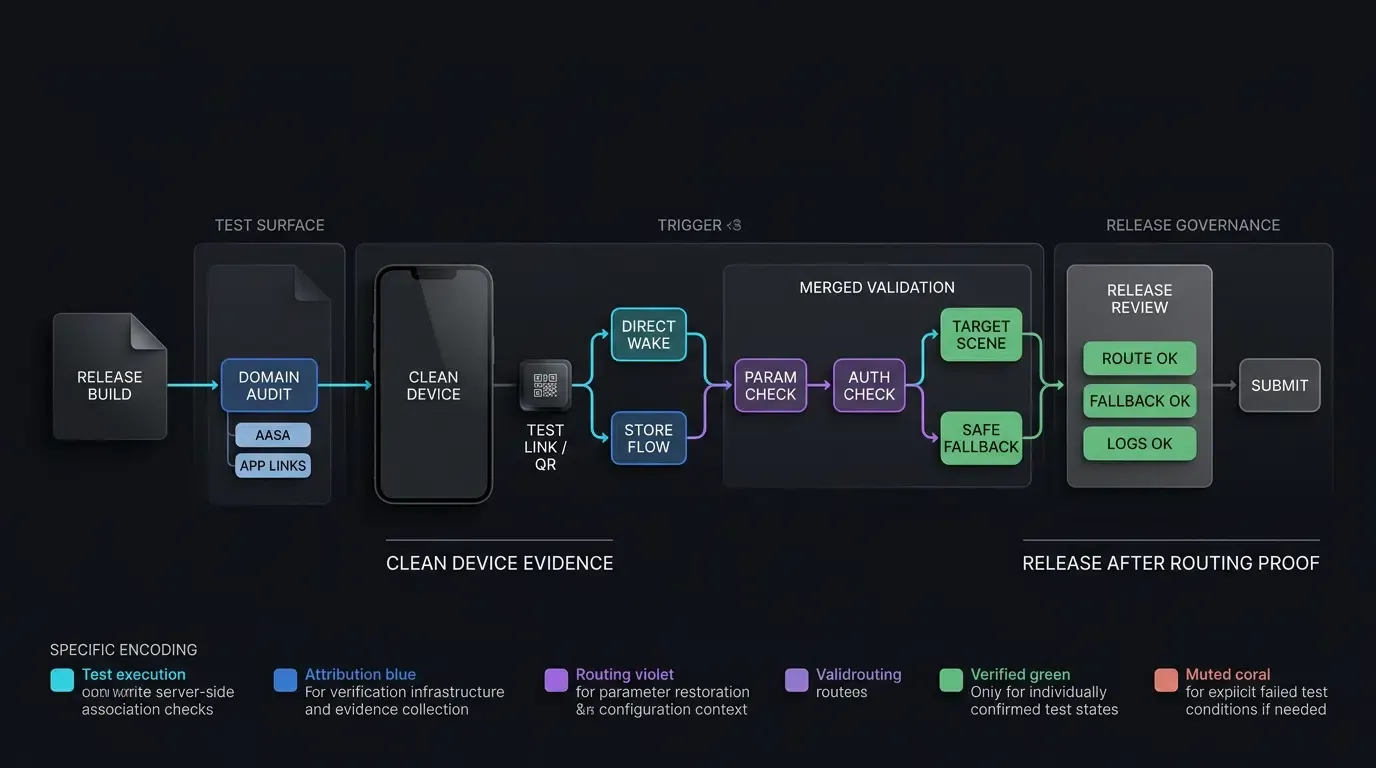
[Pre-Release Build Configured]
              │
              ▼
[Platform Association Audit]
   ┌──────────┴──────────┐
   ▼                     ▼
[iOS AASA Check]   [Android DAL Check]
   │                     │
   ▼                     ▼
[Apple CDN Query]  [ADB App-Link Check]
   │                     │
   └──────────┬──────────┘
              ▼
[Clean Device Sandbox Installation]
              │
              ▼
[Parametric Link & QR Code Scan]
              │
              ▼
[SDK Parameter Retrieval & Validation]
   ┌──────────┴──────────┐
   ▼                     ▼
[Target Scene Loaded] [Safe Fallback Triggered]
              │
              ▼
[Production Release Approved]
Pre-Launch Technical Verification and Failure Mitigation Matrix
Comprehensive Pre-Flight Technical Audit Checklist
The following matrix summarizes primary infrastructure validation checkpoints, associated command-line diagnostics, and tactical remediation protocols:
| Checkpoint Category | Verification Test | Diagnostic Command or Tool | Expected Outcome | Failure Mitigation |
|---|---|---|---|---|
| iOS Universal Links | AASA JSON validity and HTTPS response | curl -v https://domain/.well-known/apple-app-site-association |
HTTP 200, valid JSON, application/json header |
Correct server MIME type and eliminate redirects |
| Apple CDN Propagation | Edge CDN cache ingestion | curl https://app-site-association.cdn-apple.com/a/v1/domain |
Valid cached JSON matching local profile | Recheck CDN/device association state, reinstall the test app when appropriate, or use eligible developer mode for development diagnostics |
| Android App Links | Host auto-verification check | adb shell pm get-app-links com.package.name |
Domain verification state: verified |
Treat numeric states >= 1024 as errors; check fingerprint in assetlinks.json |
| Parameter Retrieval | Deferred deep link restore | OpoInstall online testing QR scan | Parameters delivered on initial cold launch | Check early non-blocking SDK init and required platform permissions |
| Engine Navigation | Scene restoration and authorization | Deep link intent injection | Target scene rendered without main menu drop-off | Implement server authorization gate and lobby fallback |
Frequently Asked Questions (FAQ)
How can developers test Universal Links before uploading an IPA to the App Store?
Why do Android App Links pass in debug builds but fail in release builds?
How do developers verify that deferred deep linking preserves parameters across a real store download?
Summary and Decision Framework
A successful mobile app launch depends on structured pre-flight technical execution. Overlooking domain verification configurations or parameter restoration workflows risks breaking marketing campaigns and degrading initial user onboarding.
By systematically executing command-line diagnostics, auditing Apple CDN propagation, and validating deferred parameter flows on physical hardware, engineering teams reduce launch-day blind spots. Integrating developer-tested tooling helps verify that deep linking and attribution pipelines behave predictably before public release.
To learn how to configure and verify pre-launch deep linking workflows, review the SDK integration documentation, explore the OpoInstall SDK download center, examine open-source examples on GitHub, or configure your test application on the OpoInstall developer console.
Related Materials
-
Concepts: App Launch Checklist, Pre-Flight Verification, Scene Restoration, Apple CDN Invalidation, Digital Asset Links
-
Technologies: Universal Links, Android App Links, Deferred Deep Linking, Associated Domains
-
Standards: IETF RFC 3986 Uniform Resource Identifier, Apple Associated Domains Entitlement Specification, Android Digital Asset Links Protocol, OWASP Mobile Application Security Testing Guide (MASTG)
-
APIs: OpoInstall SDK Initialization API, Android Intent Filter Verification API, iOS NSUserActivity Routing Interface
-
Official Documentation & References:
Share this article