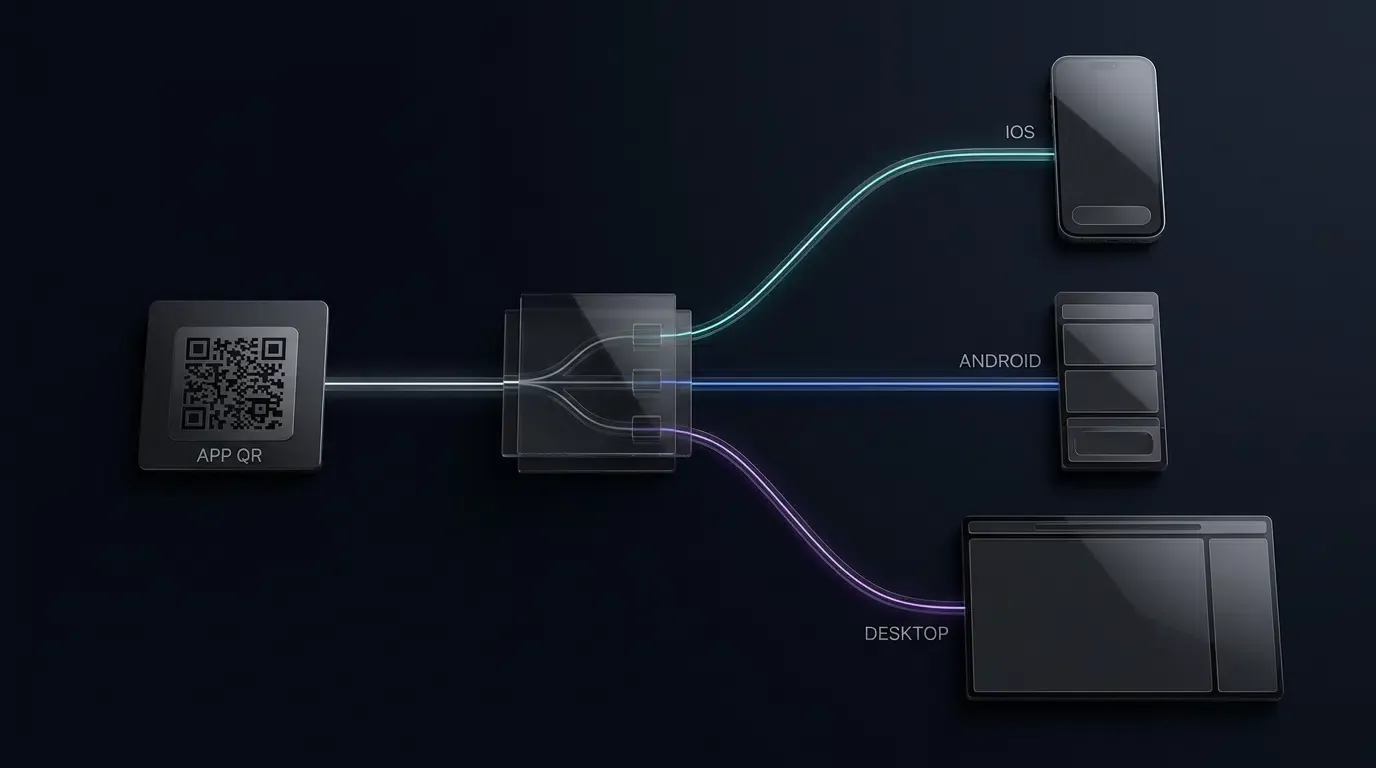
How to track app downloads with QR codes? Tracking app downloads with QR codes requires generating parameter-embedded dynamic QR codes that direct users to an adaptive mobile landing page, recording eligible campaign context through the Web SDK, and routing visitors toward the appropriate app store while enabling supported installation attribution where available.
QR code tracking for mobile applications is a measurement methodology that encodes unique campaign identifiers into dynamic barcodes, bridging physical marketing touchpoints to digital app installations. By routing scanning devices through parameter-aware transit endpoints, this architecture identifies the specific offline source—such as a billboard, retail flyer, or event badge—and measures end-to-end conversion.
| Term | Definition | Related Entity | Search Intent Role |
|---|---|---|---|
| QR Code Tracking | The systematic measurement of app downloads initiated via physical QR codes. | Channel Statistics & Tracking | Informational / Technical |
| Dynamic QR Code | A QR code encoding a managed indirection URL whose server-side destination and routing rules can be updated post-print. | HTTP 302 Redirection | Technical |
| App QR Code | A unified barcode that routes scanning users to the appropriate mobile app store. | Universal Link / Intent | Technical / Commercial |
The Offline Blindspot: Why Static QR Codes Fail to Measure App Installs
The Technical Limitation of Direct-Store QR Codes: Immutable Destinations and Limited Attribution Flexibility
Physical print media has historically operated as an attribution challenge for mobile growth teams. When a marketing team deploys print collateral—such as transit station posters, retail packaging, direct mailers, or conference banners—they require a physical-to-digital bridge. The most intuitive mechanism is an ISO/IEC 18004 compliant Quick Response (QR) code.
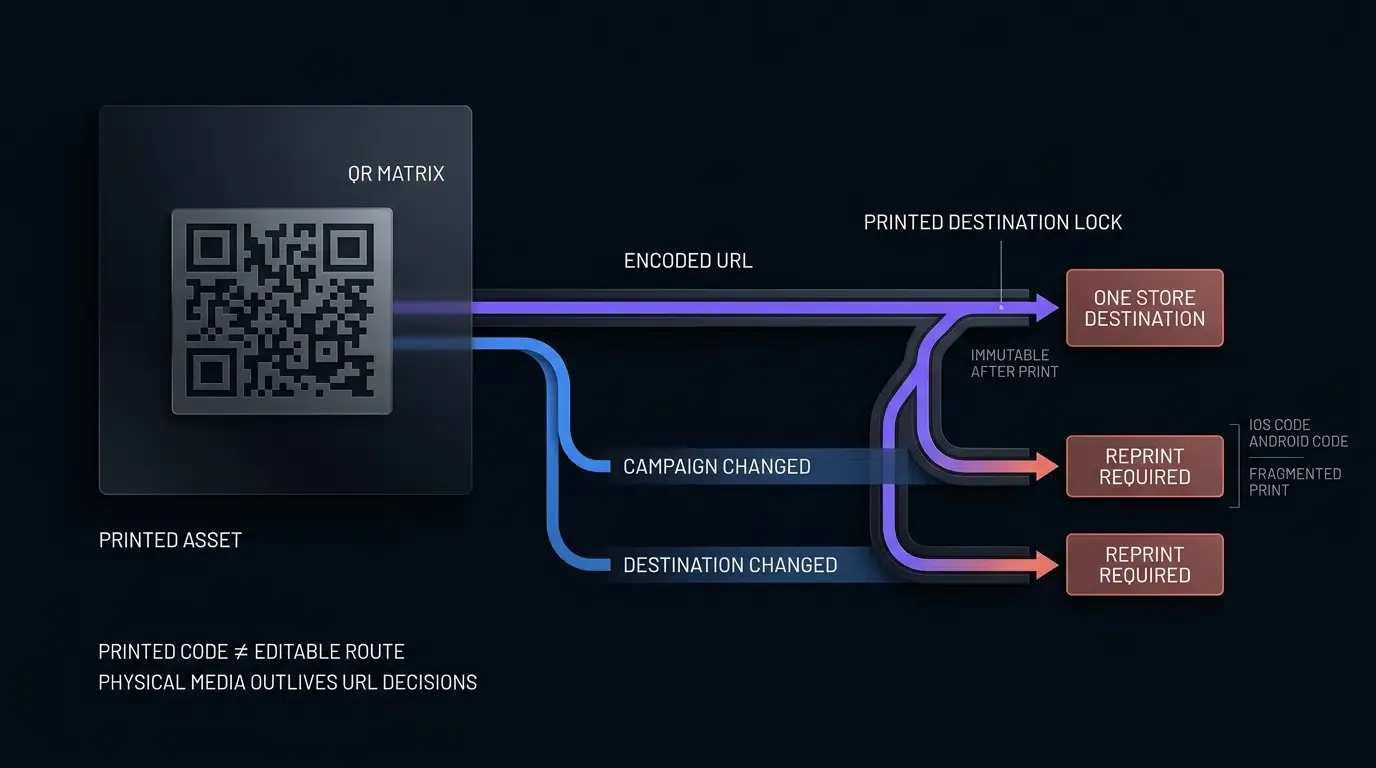
However, static direct-store QR codes possess an inherent architectural constraint: their encoded data payload is immutable once printed. In a static QR code, the alphanumeric character sequence representing the destination web address is directly patterned into the black-and-white matrix modules during generation. If a company encodes an unmanaged, direct link to the Apple App Store:
https://apps.apple.com/app/id1234567890
That barcode can only direct scanning devices to that explicit URL. While static QR codes can technically encode static URL query parameters if pointed to an intermediate web page, directly encoding a store URL means the destination cannot be modified on the server once physical materials enter distribution, and a direct store link cannot execute conditional operating system routing. Direct-store QR codes offer limited post-print routing flexibility. Asset-level attribution depends on supported store attribution mechanisms and the campaign parameters or identifiers configured before printing.
The Multi-Platform Problem: Why Hardcoding One App Store Link Excludes Half Your Audience
Mobile audiences are fundamentally divided between two dominant operating systems: Apple iOS and Google Android. A static QR code hardcoded to an Apple App Store link (apps.apple.com) produces an immediate dead-end when scanned by an Android device, as Google Play services cannot parse native iOS store schemes.
Conversely, encoding a Google Play Store URL (play.google.com) forces iOS users into a web-based Google Play interface that cannot install native software onto an iPhone. To circumvent this, legacy print campaigns often print two separate QR codes side by side: one labeled “Scan for iOS” and the other “Scan for Android.”
This dual-code approach introduces substantial operational and conversion penalties:
- Visual Clutter and Reduced Scan Velocity: Printing competing barcodes consumes valuable physical surface area and introduces cognitive friction, forcing the user to inspect labels before scanning.
- User Error and Abandonment: Mobile users routinely scan the incorrect barcode, encounter an incompatible store page or platform error, and abandon the onboarding flow entirely.
- Limited Asset-Level Attribution: A direct-store QR code may support some campaign-level measurement through eligible store attribution parameters, but does not provide a centrally managed scan log or post-print routing flexibility by itself.
The Post-Print Vulnerability: What Happens When a Campaign Destination Changes After Printing
Physical collateral production requires rigid lead times. Magazines, product boxes, point-of-sale displays, and out-of-home (OOH) billboards are frequently printed weeks or months before a marketing campaign launches.
If an engineering team deploys static direct-store QR codes, any subsequent change to the digital infrastructure breaks the physical material:
- Delayed App Store Approval: If promotional materials are printed with an anticipated App Store URL, but app review requires changing the bundle ID or primary app identifier, all printed collateral becomes permanently obsolete.
- Campaign Redirection Needs: Once a promotional event concludes, static QR codes pointing directly to store listings cannot be redirected to a new seasonal landing page, continuing to serve expired offers or 404 error pages.
- Domain Deprecations and Broken Endpoints: If an unmanaged short-link service shuts down or changes its URL formatting, the printed assets cannot be updated, resulting in wasted physical advertising spend.
How Does Dynamic QR Code Routing Bridge Print Campaigns to App Stores
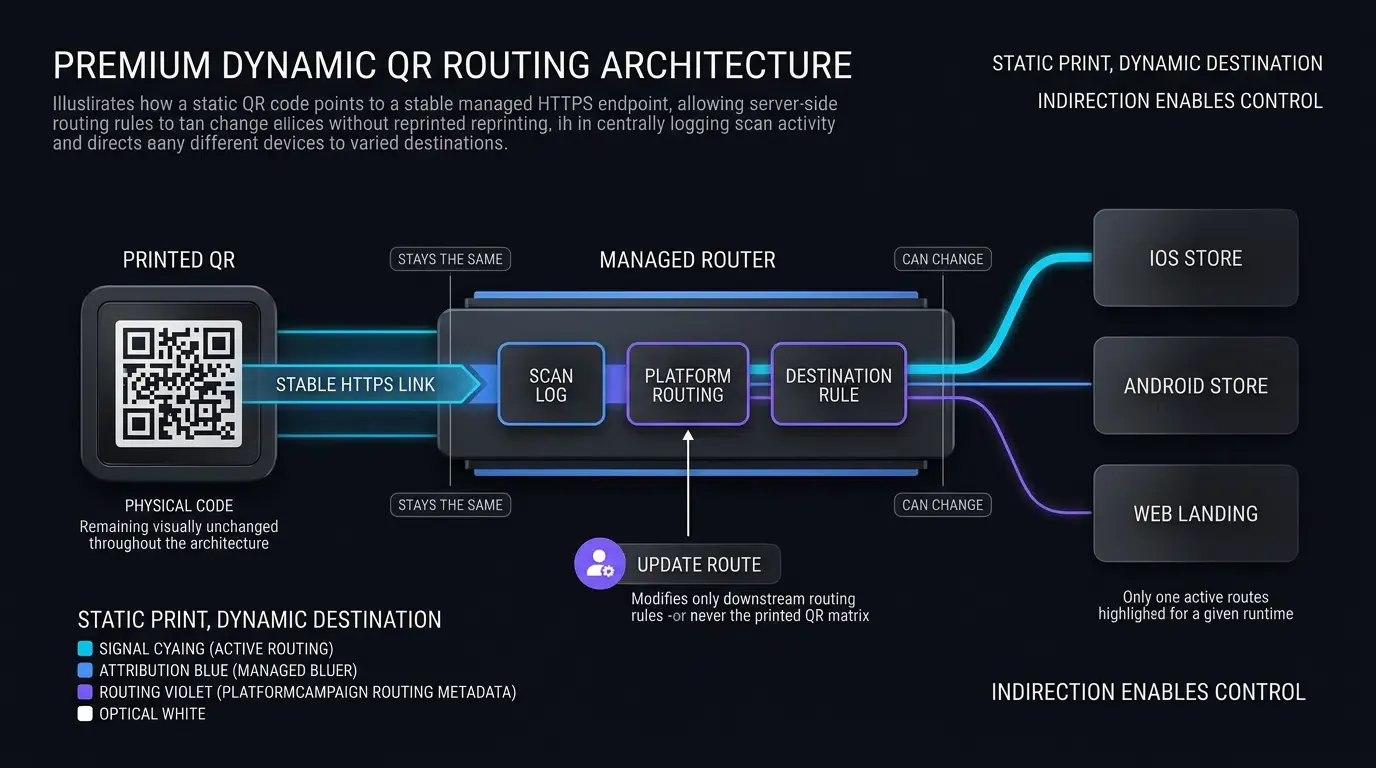
The Decoupled Architecture: Short URLs as Indirection Layers
Dynamic QR codes resolve the limitations of physical print media by introducing a decoupled indirection layer between the physical barcode and the digital destination.
Instead of hardcoding a terminal app store URL into the matrix modules, a dynamic QR code encodes a lightweight, centralized routing endpoint (such as an illustrative documentation endpoint like https://trk.example.com/c/poster_station_a, which must not be used directly in production print assets).
QR codes themselves do not execute software logic; rather, the dynamic capability resides entirely in the web server hosting the indirection URL. Because the character string in a dynamic QR code can remain short and uniform, the physical barcode generally requires fewer data modules compared to encoding complex destination URLs with multiple parameters. This produces a lower module density, allowing the code to be printed at smaller physical dimensions while maintaining superior scanning tolerance and high error-correction levels under ISO/IEC 18004 standards.
When a smartphone camera scans the dynamic barcode, the device initiates an HTTP GET request to the routing endpoint. The managed tracking endpoint may use HTTP 302 redirection to deliver an adaptive transit page. The example transit page then inspects client-side environment indicators and offers a user-initiated store navigation link.
Inspecting Client User-Agent Headers to Detect iOS, Android, and Desktop Devices
When the scanning device queries the dynamic routing endpoint, its browser networking stack transmits standard HTTP request headers, notably the User-Agent string.
The routing engine parses this string in real time using heuristic pattern matching to isolate the device operating system:
- iOS Detection: Matches patterns such as
iPhone,iPad, oriPod, indicating that the user must be routed to the Apple App Store or an associated Universal Link landing page. - Android Detection: Matches patterns containing
Android, indicating the request must be routed to the Google Play Store or an APK distribution landing page. - Desktop / Workstation Detection: Matches desktop platform tokens, directing the visitor to a high-resolution desktop web overview or secondary promotion.
Dynamically Dispatching Users to Apple App Store, Google Play Store, or Web Landing Pages
By evaluating the client device’s capabilities at the moment of scanning, the dynamic routing engine executes conditional branch logic:
- Mobile iOS Traffic: Redirects to the application’s unique App Store product page or an associated landing page hosting Universal Links.
- Mobile Android Traffic: Redirects directly to the Google Play Store client with properly encoded Install Referrer metadata, or provides an optimized mobile web page for direct APK downloads.
- Desktop Traffic: Serves a desktop-optimized web landing page with full feature showcases or prompts the visitor to enter a mobile phone number to receive a direct SMS download link.
Eliminating Fragmented Material Costs by Deploying a Single Unified App QR Code
Deploying dynamic indirection enables the creation of a single, universal “App QR Code.” Marketing and design teams no longer need to allocate layout space for competing operating system badges.
A single, branded QR code labeled “Scan to Download” services both major mobile ecosystems. The routing backend transparently segregates traffic based on operating system capabilities, streamlining physical material design, minimizing printing errors, and ensuring that scanning interactions reach compatible software gateways.
What Technical Architecture Enables Parameterized Scan to Install Attribution
Encoding Channel Identifiers and Campaign Metadata into Query Strings
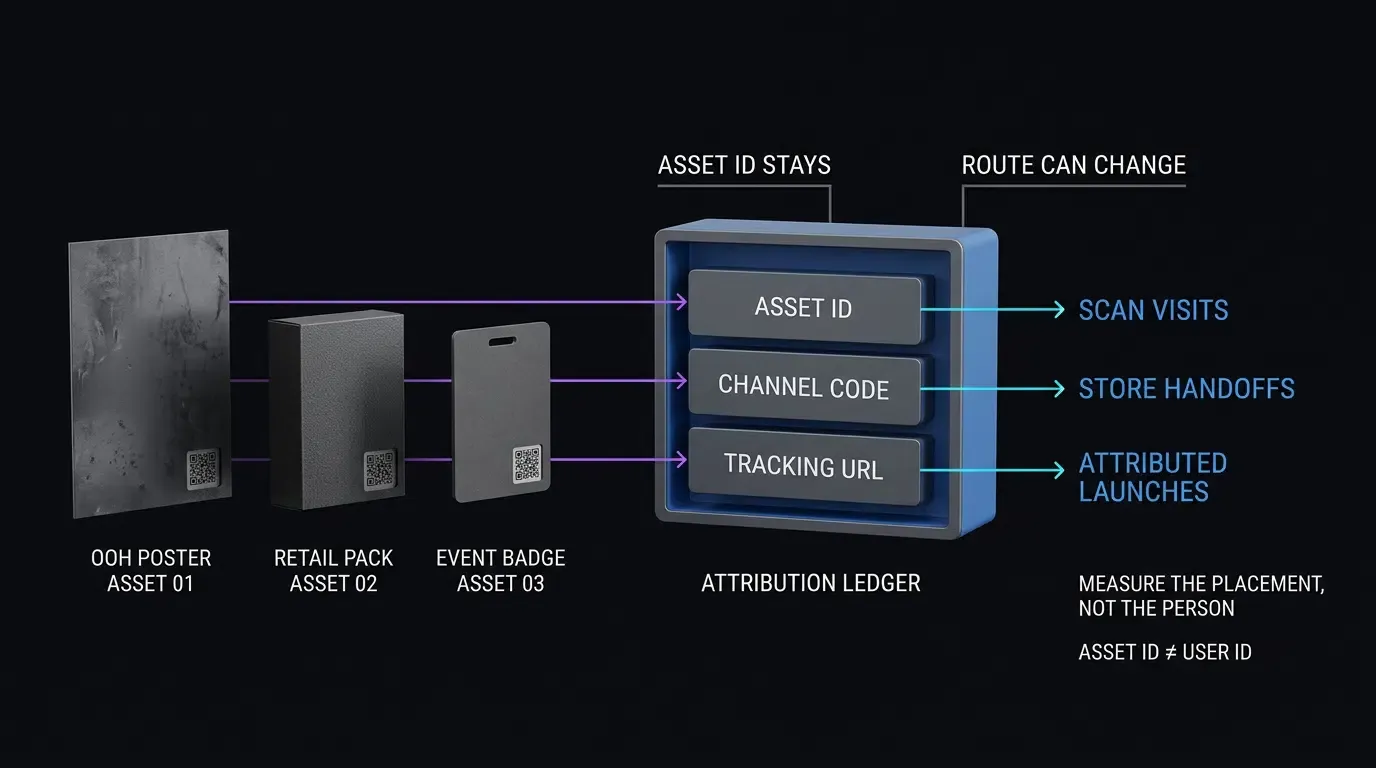
To achieve granular attribution, dynamic QR codes must encode structured tracking parameters within their redirection routes. Growth marketing requires knowing not merely that an installation occurred, but precisely which physical asset produced it.
Attribution platforms achieve this by generating unique sub-channels for each physical deployment. Each channel is assigned an explicit parameter string:
?channelCode=subway_billboard_04&utm_source=offline&utm_medium=print_ooh&utm_campaign=spring2026
When creating dynamic QR codes in bulk, the platform associates these query parameters with the unique short URL mapped to each physical location. The short URL acts as an index key in the attribution database, linking physical coordinates directly to digital attribution records.
Preserving Context Across Store Transitions: Combining Web JS Capture with Native SDK Retrieval
When an offline user scans a dynamic QR code and redirects to an app store, standard web query parameters cannot pass through the marketplace boundary into the application runtime automatically.
To bridge this boundary, the dynamic transit architecture deploys a multi-stage handover protocol:
- Stage 1 (Web JS Ingestion): The dynamic QR code routes the user to a lightweight mobile transit page hosting the Web JS SDK. The SDK extracts query string parameters (
channelCode,utm_campaign), reports them according to its deployment configuration, and prepares the handoff context. - Stage 2 (Store Handoff): The transit page redirects the user to the destination app store. For Android users visiting the Google Play Store, the web page can embed sanitized parameters into the official Google Play Install Referrer URL.
- Stage 3 (Native SDK Parameter Retrieval): Once the user downloads and launches the app for the first time, the native mobile SDK initializes and invokes
getInstallParam(). Eligible campaign parameters may be recovered after installation through supported platform or SDK mechanisms. Successful attribution depends on the installation path, SDK configuration, available signals, and the platform’s privacy requirements.
Analyzing the Offline-to-Online Attribution Pipeline
The architecture flow below illustrates the data pipeline from physical scan to native parameter restoration:
[Physical Poster / Display] ──> User Scans Dynamic QR Code with Camera
             │
             ▼
[Dynamic Transit Endpoint] ──> Inspects User-Agent & Extracts ?channelCode=poster_01
             │
             ├──> [iOS User] ──> Passes Context ──> Apple App Store Listing
             │                                             │
             └──> [Android User] ──> Passes Referrer ──> Google Play Store Listing
                                                           │
                                                           ▼
[First App Launch] ──> Native SDK Attempts Channel Retrieval ──> Matched Channel / Other Source / Unknown ──> Analytics Dashboard
Measuring the Scan-to-Install Conversion Funnel (Module M4 Model)
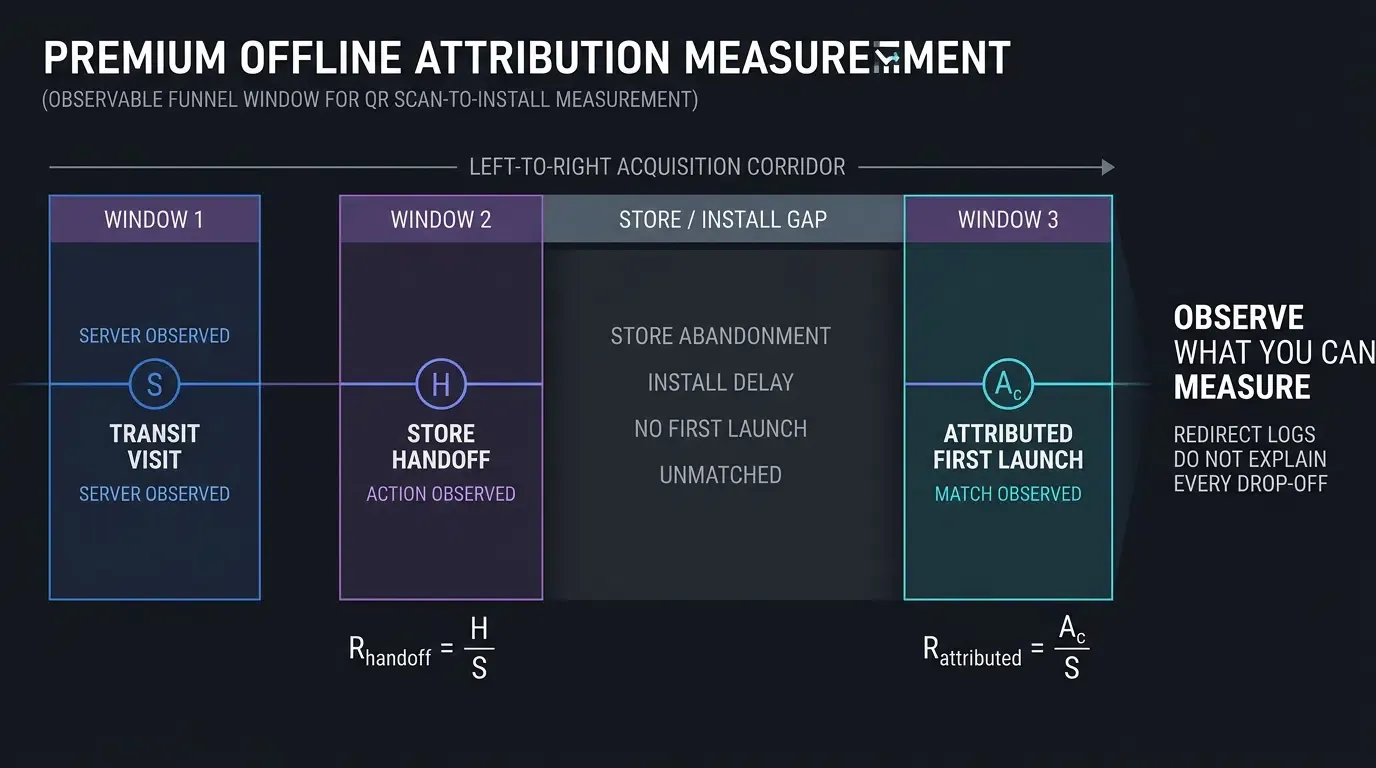
Offline campaign measurement requires defining clear mathematical conversion ratios across distinct pipeline milestones. Marketing teams must separate observable events from platform-restricted transitions, evaluating indicators normalized across identical channels, observation windows, and deduplication rules:
- Recorded Transit Visits (
): The total count of valid, deduplicated HTTP requests logged by the dynamic transit server upon QR code scanning, normalized across the defined transit visit observation window. - Deduplicated Store Handoff Attempts (
): The count of valid transit visits that initiated at least one store handoff action, evaluated under the same observation window and deduplication criteria as . Note that the handoff metric ( ) must be collected through a confirmed redirect event or a separately instrumented store-link activation; constructing an hrefalone does not record a handoff attempt. - Store Handoff Rate (
): Defined as . A lower ratio may reflect network failures, client restrictions, user abandonment, or differences in event collection. - Attributed First Launches (
): The count of deduplicated first-time application launches successfully matched to channel across the subsequent attribution maturation window. - Attributed First-Launch Rate (
): Defined as . This metric evaluates the observed attributed first-launch-to-visit ratio per physical asset over time. - Unobservable Pipeline Drop-Off Considerations: Store-page abandonment, incomplete installations, delayed first launches, and unmatched attribution events cannot be individually quantified from redirect logs alone. Report these stages as unobserved unless supported store or SDK telemetry is available.
Privacy Boundaries: Platform Privacy Rules and Vendor Data Review
Modern mobile attribution architectures must strictly observe operating system privacy frameworks. Apple’s App Tracking Transparency (ATT) policies and platform security guidelines explicitly prohibit device fingerprinting—defined as harvesting combinations of IP addresses, user agent strings, screen resolutions, and system configurations to build persistent or probabilistic device signatures.
Dynamic QR routing records campaign-level visits and may support installation attribution through eligible platform mechanisms, such as the Google Play Install Referrer API. Prefer scoped campaign identifiers and supported platform attribution channels. Do not assume that the selected third-party SDK avoids fingerprinting; verify its actual matching methods and data processing practices before deployment. URL parameters alone do not establish a privacy-compliant iOS installation match, and developers must independently audit whether the deployed SDK’s matching mechanisms comply with Apple’s prohibition on device fingerprinting:
- Scoped Campaign Identifiers: Attributes campaign sources using deterministic URL query parameters, official Google Play Install Referrer APIs, and transient server-side session tokens rather than tracking hardware-specific identifiers across unassociated apps.
- Data Minimization: Scanned parameters represent campaign metadata (e.g., billboard IDs, location tokens). However, developers must recognize that network transmission inherently processes IP addresses and request headers, and custom tokens like
inviter_idmay represent identifiable user accounts under privacy regulations. - Client Authorization Isolation: Client-restored parameters serve as attribution hints. Downstream backend services validate referral logic and campaign eligibility using authenticated user accounts, avoiding unverified client-side privilege grants.
Step-by-Step Implementation: Generating and Tracking Dynamic App QR Codes
Configuring Channel Identifiers and Landing Page Templates in the Developer Console
Before generating physical barcodes, growth teams must establish their channel hierarchy in the attribution dashboard:
- Register Application Assets: Access the attribution management console, configure your application identifiers (AppKey, Android package name, iOS bundle identifier), and upload test installation packages.
- Define Primary Channels: Under channel statistics management, create primary channel groupings (e.g.,
Offline_OOH,Retail_Packaging,Event_Conference). - Instantiate Parameterized Sub-Channels: Generate unique sub-channels corresponding to each physical location. The system assigns a distinct
channelCode(e.g.,ooh_chicago_01,pkg_retail_box_v2) to each placement. - Configure Transit Landing Pages: Select a default mobile landing page template or integrate the Web JS SDK into your own custom H5 page. The landing page acts as the transit router between the scan event and the app store.
Implementing Web-Side Dynamic Redirection and Parameter Preservation
When hosting a custom web landing page to service dynamic QR code scans, developers must sanitize incoming parameters, construct legitimate store destination URLs, and invoke deep-linking or store routing.
The implementation example in [CODE_BLOCK_01] demonstrates an HTML/JS transit page that validates query strings against an allowlist, constructs valid Google Play URLs with properly encoded referrer parameters, and initializes the Web JS SDK while preserving the native store anchor as the single navigation owner.
Consult the SDK integration reference for technical specifications regarding configuration parameters and parameter parsing.
<!-- HTML / JS Dynamic QR Code Redirection and Parameter Handling -->
<!-- File: qr_transit_page.html -->

<!DOCTYPE html>
<html lang="en">
<head>
    <meta charset="UTF-8">
    <meta name="viewport" content="width=device-width, initial-scale=1.0">
    <title>Redirecting to Application...</title>

    <style>
        body {
            font-family: -apple-system, BlinkMacSystemFont, "Segoe UI", Roboto, sans-serif;
            background-color: #fafafa;
            color: #333;
            text-align: center;
            padding: 40px 16px;
            margin: 0;
        }
        .transit-card {
            background: #ffffff;
            border-radius: 14px;
            box-shadow: 0 4px 16px rgba(0,0,0,0.06);
            max-width: 420px;
            margin: 0 auto;
            padding: 32px 24px;
            box-sizing: border-box;
        }
        .app-badge {
            width: 72px;
            height: 72px;
            border-radius: 16px;
            margin-bottom: 16px;
        }
        .btn-action {
            display: inline-block;
            background-color: #007aff;
            color: #ffffff;
            font-size: 15px;
            font-weight: 600;
            padding: 12px 28px;
            border-radius: 22px;
            text-decoration: none;
            margin-top: 20px;
            border: none;
            cursor: pointer;
        }
        .status-msg {
            font-size: 13px;
            color: #777;
            margin-top: 14px;
        }
    </style>
</head>
<body>

    <div class="transit-card">
        <img src="https://cdn.example.com/assets/app-icon.png" alt="App Icon" class="app-badge">
        <h2 id="card-title">Continue to Your App Store</h2>
        <p id="card-desc">Choose the button below to open the appropriate app store.</p>

        <!-- Accessible Native Fallback Anchor Link -->
        <!-- Production Note: Replace https://app.example.com/default-store with your verified production landing URL -->
        <a id="fallback-store-btn" class="btn-action" href="https://app.example.com/default-store">Continue to Download</a>
        <p class="status-msg">Tap the button above to continue to your app store.</p>
    </div>

    <!-- OpoInstall Web JS SDK Include (Verify for your deployed production release) -->
    <script src="https://web.cdn.opoinstallcloud.com/opoinstall.js"></script>
    <script>
    (function() {
        // Step 1: Parse and sanitize incoming tracking parameters from physical QR scan
        function getSanitizedTrackingParams() {
            var allowedKeys = new Set([
                "channelCode",
                "utm_source",
                "utm_medium",
                "utm_campaign",
                "inviter_id"
            ]);

            var result = Object.create(null);

            try {
                var query = new URLSearchParams(window.location.search);
                // Validates parameter values: alphanumeric, hyphen, underscore, dot (max 64 chars)
                var validPattern = /^[A-Za-z0-9_.-]{1,64}$/;

                query.forEach(function(value, key) {
                    if (allowedKeys.has(key) && validPattern.test(value)) {
                        if (!Object.prototype.hasOwnProperty.call(result, key)) {
                            result[key] = value;
                        }
                    }
                });
            } catch (e) {
                return Object.create(null);
            }

            return result;
        }

        var campaignData = getSanitizedTrackingParams();

        // Step 2: Client-side User-Agent inspection for platform routing
        var ua = navigator.userAgent || "";
        var isIOS = /iPhone|iPad|iPod/.test(ua) || (navigator.platform === 'MacIntel' && navigator.maxTouchPoints > 1);
        var isAndroid = /Android/.test(ua);

        var fallbackBtn = document.getElementById("fallback-store-btn");

        // Step 3: Construct platform-specific store URLs with sanitized parameters
        if (fallbackBtn) {
            if (isIOS) {
                // Apple App Store direct listing URL (Note: iOS App Store does not parse arbitrary query strings)
                fallbackBtn.href = "https://apps.apple.com/app/id1234567890";
            } else if (isAndroid) {
                // Construct Google Play Store URL with properly encoded 'referrer' parameter
                try {
                    var playUrl = new URL("https://play.google.com/store/apps/details");
                    playUrl.searchParams.set("id", "com.example.app");

                    var referrerParams = new URLSearchParams();
                    ["channelCode", "utm_source", "utm_medium", "utm_campaign", "inviter_id"].forEach(function(paramKey) {
                        if (campaignData[paramKey]) {
                            referrerParams.set(paramKey, campaignData[paramKey]);
                        }
                    });

                    if (referrerParams.toString()) {
                        playUrl.searchParams.set("referrer", referrerParams.toString());
                    }

                    fallbackBtn.href = playUrl.toString();
                } catch (e) {
                    fallbackBtn.href = "https://play.google.com/store/apps/details?id=com.example.app";
                }
            }
        }

        // Step 4: Initialize Web JS SDK with Single-Owner Navigation Principle
        // The fallbackBtn.href constructed above remains the primary accessible destination.
        // The SDK initializes to ingest and report parameters without overriding anchor navigation.
        if (typeof OpoInstall !== "function") {
            console.error("OpoInstall Web SDK unavailable; attribution capture has not been confirmed.");
        } else {
            try {
                new OpoInstall({
                    appKey: "OPOINSTALL_APPKEY_PLACEHOLDER",
                    data: campaignData,
                    onready: function() {
                        // SDK reports readiness.
                        // Parameter persistence and subsequent installation retrieval depend on deployed SDK contracts and platform matching support.
                        // Navigation remains single-owned by the fallbackBtn.href anchor.
                    }
                });
            } catch (error) {
                console.error("OpoInstall SDK initialization error; native store hrefs remain active:", error);
            }
        }
    })();
    </script>
</body>
</html>
Automating Dynamic QR Code Generation via Server-Side REST APIs
Generating barcodes manually through a web dashboard is inefficient for enterprise campaigns deploying thousands of physical SKUs or localized promotional flyers.
The following illustrative Node.js workflow demonstrates channel registration, tracking URL validation, and QR image generation. Configure the API endpoint, authentication scheme, request fields, and response mapping according to the deployed OpoInstall API contract before execution.
The script in [CODE_BLOCK_02] demonstrates how backend servers execute an authorized request workflow, validate returned URL structures against approved API and tracking domain allowlists, and pass verified HTTPS endpoints to a standards-based QR code generator conforming to ISO/IEC 18004 specifications to produce high-resolution PNG barcode image files.
// Node.js Script for Programmatic Channel Creation and Dynamic QR Code Generation
// File: generate_channel_qr.js
// Dependencies: npm install qrcode

const https = require('https');
const QRCode = require('qrcode'); // Standards-based QR generator conforming to ISO/IEC 18004 specifications

/**
 * Configuration Object:
 * Illustrative automation workflow demonstrating channel registration, tracking URL validation,
 * and QR image generation. Configure the API endpoint, authentication scheme, request fields,
 * and response mapping according to the deployed OpoInstall API contract before execution.
 */
const CONFIG = {
    apiKey: process.env.OPOINSTALL_API_KEY,
    apiHost: process.env.OPOINSTALL_API_HOST,
    channelAddEndpoint: process.env.OPOINSTALL_CHANNEL_ADD_PATH,
    channelGetEndpoint: process.env.OPOINSTALL_CHANNEL_GET_PATH
};

/**
 * Validates that a hostname conforms to RFC 1035 / RFC 1123 DNS specifications
 * without consecutive dots or invalid label formats.
 */
function isValidHostname(host) {
    if (typeof host !== "string" || host.length > 253) {
        return false;
    }
    const labels = host.split(".");
    if (labels.length < 2) {
        return false;
    }
    return labels.every(label =>
        label.length >= 1 &&
        label.length <= 63 &&
        /^[A-Za-z0-9](?:[A-Za-z0-9-]*[A-Za-z0-9])?$/.test(label)
    );
}

/**
 * Retrieve approved host allowlists strictly from environment configuration.
 * Avoid hardcoded production defaults to ensure validation matches verified deployment domains.
 */
function getApprovedHosts(envVarName) {
    const raw = process.env[envVarName];
    if (!raw) {
        throw new Error(`${envVarName} environment variable must be explicitly configured.`);
    }

    const hosts = new Set(
        raw.split(",")
            .map(host => host.trim().toLowerCase())
            .filter(Boolean)
    );

    if (hosts.size === 0) {
        throw new Error(`${envVarName} allowlist cannot be empty.`);
    }

    return hosts;
}

/**
 * Validates configuration presence, syntax, and authorized API host membership
 */
function validateConfig() {
    if (!CONFIG.apiKey || CONFIG.apiKey === "OPOINSTALL_API_KEY_PLACEHOLDER") {
        throw new Error("Missing required OPOINSTALL_API_KEY environment variable. Halting execution.");
    }

    // Enforce strict DNS label validation on apiHost
    if (!CONFIG.apiHost || !isValidHostname(CONFIG.apiHost)) {
        throw new Error(`Invalid or malformed OPOINSTALL_API_HOST: "${CONFIG.apiHost}". Must be a valid DNS hostname.`);
    }

    // Verify apiHost against the dedicated approved API host allowlist
    const approvedApiHosts = getApprovedHosts("APPROVED_API_HOSTS");
    if (!approvedApiHosts.has(CONFIG.apiHost.toLowerCase())) {
        throw new Error(`Unauthorized API host: "${CONFIG.apiHost}". Host not present in APPROVED_API_HOSTS.`);
    }

    // Enforce endpoint path structure beginning with leading slash
    const pathPattern = /^\/[a-zA-Z0-9/_-]+$/;
    if (!CONFIG.channelAddEndpoint || !pathPattern.test(CONFIG.channelAddEndpoint)) {
        throw new Error(`Invalid or missing OPOINSTALL_CHANNEL_ADD_PATH: "${CONFIG.channelAddEndpoint}". Must start with "/".`);
    }

    if (!CONFIG.channelGetEndpoint || !pathPattern.test(CONFIG.channelGetEndpoint)) {
        throw new Error(`Invalid or missing OPOINSTALL_CHANNEL_GET_PATH: "${CONFIG.channelGetEndpoint}". Must start with "/".`);
    }
}

/**
 * Helper to execute an HTTPS GET request returning parsed JSON with timeout and size guards
 */
function httpsGetJson(url) {
    return new Promise((resolve, reject) => {
        const req = https.get(url, (res) => {
            if (res.statusCode < 200 || res.statusCode >= 300) {
                reject(new Error(`HTTP request failed with status code: ${res.statusCode}`));
                res.resume();
                return;
            }

            let rawData = '';
            let bytes = 0;
            const maxBytes = 1024 * 1024; // 1 MB payload protection limit

            res.on('data', (chunk) => {
                bytes += chunk.length;
                if (bytes > maxBytes) {
                    req.destroy();
                    reject(new Error("API response payload exceeded 1 MB limit."));
                    return;
                }
                rawData += chunk;
            });

            res.on('end', () => {
                try {
                    const parsed = JSON.parse(rawData);
                    resolve(parsed);
                } catch (err) {
                    reject(new Error(`Failed to parse JSON response: ${err.message}`));
                }
            });

            res.on('error', (err) => {
                reject(new Error(`Response stream error: ${err.message}`));
            });
        });

        req.on('error', (err) => {
            reject(new Error(`Network request error: ${err.message}`));
        });

        req.setTimeout(8000, () => {
            req.destroy();
            reject(new Error("Network request timed out after 8000ms"));
        });
    });
}

/**
 * Creates an offline tracking channel and renders an ISO/IEC 18004 compliant QR code image.
 *
 * @param {string} channelCode - Unique physical asset identifier (e.g., 'poster_station_01')
 * @param {string} channelName - Descriptive label for attribution dashboard reporting
 * @param {string} groupName   - Channel grouping category (e.g., 'Offline_OOH')
 * @param {string} outputFilePath - Target file path for the generated QR PNG
 */
async function generateOfflineTrackingQRCode(channelCode, channelName, groupName = "Offline_OOH", outputFilePath = "channel_qr.png") {
    // Validate configuration presence, DNS syntax, and authorized API host before making network requests
    validateConfig();

    // Step 1: Register or update channel metadata via configured channelAddEndpoint
    const addParams = new URLSearchParams({
        apiKey: CONFIG.apiKey,
        channelCode: channelCode,
        channelName: channelName,
        groupName: groupName
    });
    const addUrl = `https://${CONFIG.apiHost}${CONFIG.channelAddEndpoint}?${addParams.toString()}`;

    console.log(`[OpoInstall API] Registering channel: ${channelCode} (${channelName})...`);
    const addResponse = await httpsGetJson(addUrl);

    if (addResponse.code !== 0) {
        throw new Error(`API rejected channel creation. Code: ${addResponse.code}, Error: ${addResponse.error}`);
    }
    console.log(`[OpoInstall API] Channel registered successfully. Code: ${channelCode}`);

    // Step 2: Retrieve verified channel tracking link via channelGetEndpoint if not present in creation body
    let verifiedRawUrl = addResponse.body?.linkUrl || addResponse.body?.channelUrl;

    if (!verifiedRawUrl) {
        const getParams = new URLSearchParams({
            apiKey: CONFIG.apiKey,
            channelCode: channelCode
        });
        const getUrl = `https://${CONFIG.apiHost}${CONFIG.channelGetEndpoint}?${getParams.toString()}`;

        console.log(`[OpoInstall API] Querying channel details for: ${channelCode}...`);
        const getResponse = await httpsGetJson(getUrl);

        if (getResponse.code !== 0 || !getResponse.body) {
            throw new Error(`API failed to retrieve channel details. Code: ${getResponse.code}, Error: ${getResponse.error}`);
        }

        verifiedRawUrl = getResponse.body.linkUrl || getResponse.body.channelUrl;
    }

    if (!verifiedRawUrl) {
        throw new Error(`No tracking link URL returned by server for channel: ${channelCode}`);
    }

    // Step 3: Validate protocol and trusted domain authority against approved QR tracking host allowlist
    const trackingUrl = new URL(verifiedRawUrl);
    if (trackingUrl.protocol !== "https:") {
        throw new Error(`Insecure protocol detected: ${trackingUrl.protocol}. Tracking URL must be HTTPS.`);
    }

    const approvedQrHosts = getApprovedHosts("APPROVED_QR_HOSTS");
    if (!approvedQrHosts.has(trackingUrl.hostname.toLowerCase())) {
        throw new Error(`Untrusted host domain: ${trackingUrl.hostname}. Host not present in APPROVED_QR_HOSTS.`);
    }

    console.log(`[Success] Verified tracking URL: ${trackingUrl.toString()}`);

    // Step 4: Render QR Code matrix adhering to ISO/IEC 18004 standards
    const qrOptions = {
        errorCorrectionLevel: 'Q', // Up to 25% damage recovery for print media
        type: 'image/png',
        margin: 4, // Compliant 4-module quiet zone
        width: 1024 // High-resolution output for print production
    };

    await QRCode.toFile(outputFilePath, trackingUrl.toString(), qrOptions);
    console.log(`[Generated] Barcode image saved successfully to: ${outputFilePath}`);
    return outputFilePath;
}

// Example execution for generating localized print collateral assets
// Usage: node generate_channel_qr.js
if (require.main === module) {
    generateOfflineTrackingQRCode("ooh_broadway_01", "NYC Broadway Billboard #1", "Q3_Outdoor", "broadway_billboard_qr.png")
        .then((file) => console.log(`Execution complete: ${file}`))
        .catch((err) => {
            console.error(`Execution failed: ${err.message}`);
            process.exit(1);
        });
}

module.exports = { generateOfflineTrackingQRCode };
Comparative Matrix of Offline App Tracking Technologies
Evaluating Traditional Print Codes, Static Store Links, and Dynamic Parameterized QR Codes
Selecting the optimal QR tracking approach involves evaluating post-print flexibility, platform routing capabilities, attribution depth, and operational risk.
The comparative matrix below outlines the fundamental technical distinctions across offline tracking models:
| Measurement Strategy | Platform Routing Capability | Attribution Granularity | Post-Print Destination Editable | Operational Risk |
|---|---|---|---|---|
| Static Direct Store QR Code | Single OS only (iOS or Android) | Limited (Asset-level measurement depends on store mechanisms and pre-configured parameters) | No (Hardcoded destination URL) | High (Broken links require physical reprinting) |
| Dual Direct Store QR Codes (Side-by-Side) | Manual user selection required | Limited (Requires separate hardcoded channel URLs) | No (Hardcoded destination URL) | High (Wasted print space and user scanning errors) |
| Static Managed Web Page QR Code | Script-based or manual routing | Moderate (Measures web visits; app attribution depends on web funnel) | Conditional (Server-side redirect editable) | Moderate (User drop-off on intermediate web page) |
| Dynamic Parameterized App QR Code | Automated User-Agent dispatch | Granular (Unique channel metrics per physical asset) | Yes (Updated via management console or API) | Variable (Subject to routing domain and indirection service availability) |
Evaluating Maintenance Overhead, Analytics Granularity, and Post-Print Flexibility
Direct-store static implementations carry massive operational liabilities. If an enterprise prints 50,000 product packages featuring a static App Store link, any future URL change renders the packaging permanently broken. Furthermore, marketing teams cannot discern whether product packaging drove 10 installs or 10,000 installs unless separate websites are created for every campaign.
Dynamic parameterized QR codes mitigate these limitations. A managed QR link can guide iOS and Android visitors to platform-appropriate destinations and associate physical placement identifiers with scan activity. Installation attribution remains subject to supported SDK or store mechanisms and successful matching. If the marketing team decides to switch the destination from a direct store listing to an interactive holiday giveaway landing page, they simply update the destination URL in the central management console—zero reprinting required.
Troubleshooting Scan Failures and Offline Data Discrepancies
Managing Scan Abandonment: When Users Scan but Terminate Before Store Redirection
In offline marketing funnels, transit visits commonly exceed attributed first launches, subject to event definitions. A scan event registers the instant a physical barcode is resolved by a smartphone camera and loads the transit URL.
Discrepancies between scan metrics and app installations arise from several real-world user behaviors:
- Network Latency Drops: If the physical environment possesses poor cellular coverage (such as subway stations or crowded convention centers), users may close their browser before the HTTP 302 redirection or Web JS SDK loads.
- App Store View Abandonment: Users frequently inspect an app store listing, evaluate file size or user reviews, and decline to initiate the download.
- Delayed First Launch: Users connected to cellular data may tap “Download” but defer opening the application until connected to Wi-Fi. Because attribution callbacks execute during the application’s first launch, installations will lag scan timestamps by hours or days.
Addressing In-App Social Scanner Blocks on Raw Store URLs
A significant portion of offline users scan QR codes using the built-in cameras of social messaging applications (such as WeChat, Line, or WhatsApp) rather than their native system camera apps.
As explored in mobile container studies, social in-app browsers enforce restrictive sandboxes:
- Scheme Interception: When a social scanner loads a URL that attempts to invoke custom schemes (
market://or direct custom URLs), the in-app container blocks the protocol. - Download Suppression: Social webviews routinely restrict direct APK binary downloads on Android.
- Resolution Protocol: A transit page may offer supported handoff options or clear instructions for opening the destination in an external browser. Actual behavior depends on the host application’s navigation policies; provide an accessible HTTPS alternative when direct app or store handoff is unavailable.
Diagnosing Parameter Loss Across Non-Managed App Download Workflows
If an application fails to retrieve parameters on first launch (getInstallParam returns empty data), engineering teams should audit the following integration checkpoints:
- SDK Initialization Scope: Verify that SDK initialization is configured correctly within the primary application process according to native SDK platform documentation.
- Overwritten Installations: Testing on devices where the application was already previously installed may suppress new parameter callbacks depending on SDK caching and deduplication rules. Always uninstall the application completely, or test using fresh physical testing devices.
- Time-to-Install Window Expirations: If a user scans a physical poster but delays downloading and opening the app beyond the platform lookback window, the eligible attribution window may expire, resulting in an installation that remains unmatched or otherwise attributed, depending on reporting rules.
Physical Verification Protocols: Sizing, Quiet Zones, and Error Correction
Offline attribution viability depends heavily on physical barcode execution:
- Empirical Physical Sizing: The scannable matrix should follow the empirical distance-to-size heuristic:
. For a poster viewed from 1.5 meters away, the QR matrix should measure at least 15 centimeters wide. Sizing must be verified through physical test prints across varied lighting conditions. - Quiet Zone Preservation: The barcode must maintain an unprinted “quiet zone” of at least 4 module widths around all four outer edges. Printing graphic borders, text, or artistic textures directly against the module matrix breaks camera edge-detection algorithms.
- Error Correction Tuning: Print collateral subject to physical wear, low lighting, or partial obstruction (such as outdoor banners or cardboard packaging) should be generated using Level M (15% recovery) or Level Q (25% recovery) error correction under ISO/IEC 18004:2024 standards, allowing successful decodes even if the code suffers minor surface scuffs.
Frequently Asked Questions (FAQ)
What is the difference between a static and a dynamic QR code for app downloads?
Can one QR code route both iOS and Android users to their respective stores?
How do dynamic QR codes prevent data loss when posters are printed before app release?
Summary and Implementation Decision Framework
Deploying QR code tracking transforms offline advertising from an unmeasurable cost center into a quantifiable user acquisition channel. Relying on direct-store static links introduces friction, excludes platforms, and risks total link breakage once materials are printed.
Engineering and growth teams should standardize on dynamic, parameterized app QR codes. By combining centralized redirect indirection with client-side environment detection and SDK parameter restoration, platforms bridge the physical-to-digital gap with measurable campaign activity and supported installation attribution.
To configure your physical campaign channels and generate dynamic tracking codes, configure your parameters in the OpoInstall developer console or review the SDK integration reference. For client SDK integration details, visit download OpoInstall SDK, or explore broader multi-channel analytics in the mobile attribution implementation reference.
Related Materials
-
Concepts: QR Code Tracking, Dynamic QR Code, App QR Code, Scan-to-Install Funnel
-
Technologies: ISO/IEC 18004 Barcode Standard, HTTP 302 Redirection, User-Agent Sniffing, Web JS SDK
-
Standards: IETF RFC 3986 Uniform Resource Identifier Syntax, ISO/IEC 18004:2024 Information Technology
-
APIs: OpoInstall Channel Management API, OpoInstall
getInstallParamNative API -
Official Documentation & References:
Share this article