How can developers track WeChat and Line referral links after app installation? Developers building referral systems for mobile apps often use deferred deep linking to preserve referral context between social sharing events, mobile web sessions, app installation, and first launches.
WeChat itself does not provide a universal cross-install referral tracking mechanism for third-party apps. Developers usually combine share tokens, deferred deep linking, and backend matching to restore referral context.
Key Takeaways
- WeChat and Line WebView restrictions: Explains why referral links lose context inside messaging app browsers.
- Share event capture: Records referral parameters before users leave WeChat or Line WebViews.
- Referral token matching: Connects mobile web clicks with first app launches after installation.
- Deferred deep linking: Restores referral context when users install the app after opening a shared link.
Short Answer
WeChat and Line referral links are usually tracked through deferred deep linking. The system records the social click, stores referral parameters on a matching server, and restores the context when the user installs and opens the app.
Why WeChat and Line Referral Links Lose Installation Context
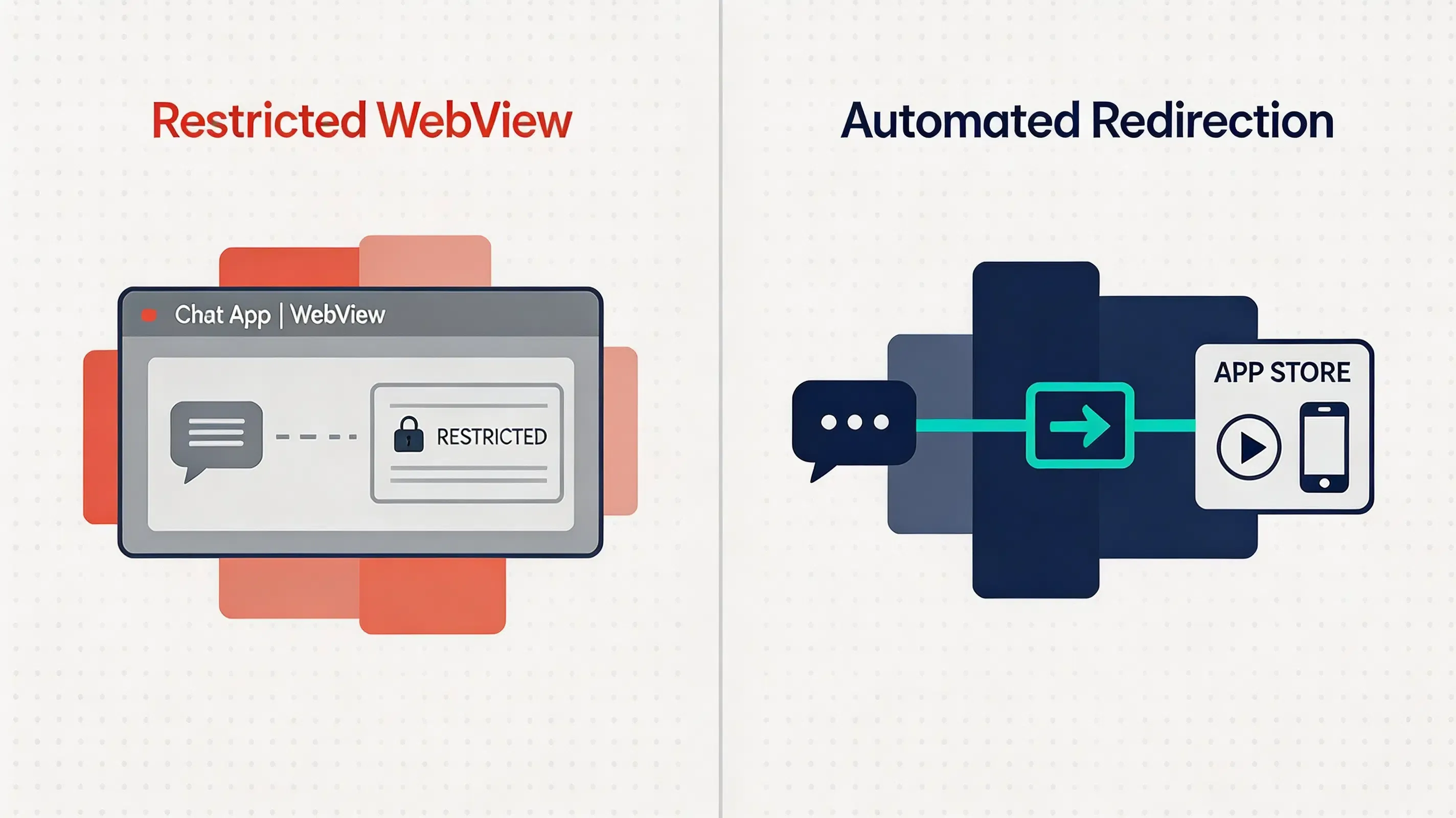
When designing an app referral program, multiplayer social networks like WeChat and Line are widely used channels for social sharing in mobile applications. However, developers attempting to implement a robust referral tracking strategy in these environments frequently encounter implementation challenges. Both platforms apply app-level navigation restrictions inside their built-in WebView environments. These in-app browsers may restrict external navigation behaviors, causing deep links, custom URL schemes, and Universal Links to fail to open the intended app flow.
Instead of launching an installation flow, users clicking a shared link inside WeChat or Line are met with blank pages or security warnings. In many cases, users are forced to manually click the upper-right menu and select “Open in Default Browser” before they can download the application package. This manual requirement introduces significant onboarding friction, resulting in conversion drop-offs. Traditional cookie-based referral tracking software typically fails across this sandboxed handoff, making reliable installation matching difficult without specialized web-to-app routing.
How Social App Referral Tracking Maintains Share Context
To execute precise referral tracking inside restricted messaging environments, developers must utilize specialized social redirection routing. For Android platforms, this is achieved by deploying a mid-domain redirect protocol. When the user interacts with the sharing H5 page inside WeChat, the web SDK detects the MicroMessenger User-Agent and routes the request through a supported download domain. This redirection can guide users toward a supported browser-based installation flow.
This Quick Installation (automated browser redirection workflow) workflow reduces the manual “open with default browser” step in supported environments. Some referral platforms, including OpoInstall, provide SDK components based on this workflow. When the user clicks the referral link, the server records the sharing payload associated with the web session (including player IDs, custom parameters, and dynamic invitation codes). The native client library subsequently retrieves this payload on first-time launch.
Architecture of WeChat and Line Referral Flow
To support secure social-sharing loops under sandboxed operating system constraints, the system is divided into four distinct technical layers:
Share Event
      │
      ▼
Referral Token Creation
      │
      ▼
WeChat / Line WebView Click
      │
      ▼
Server Matching
      │
      ▼
App Install
      │
      ▼
First Launch Recovery
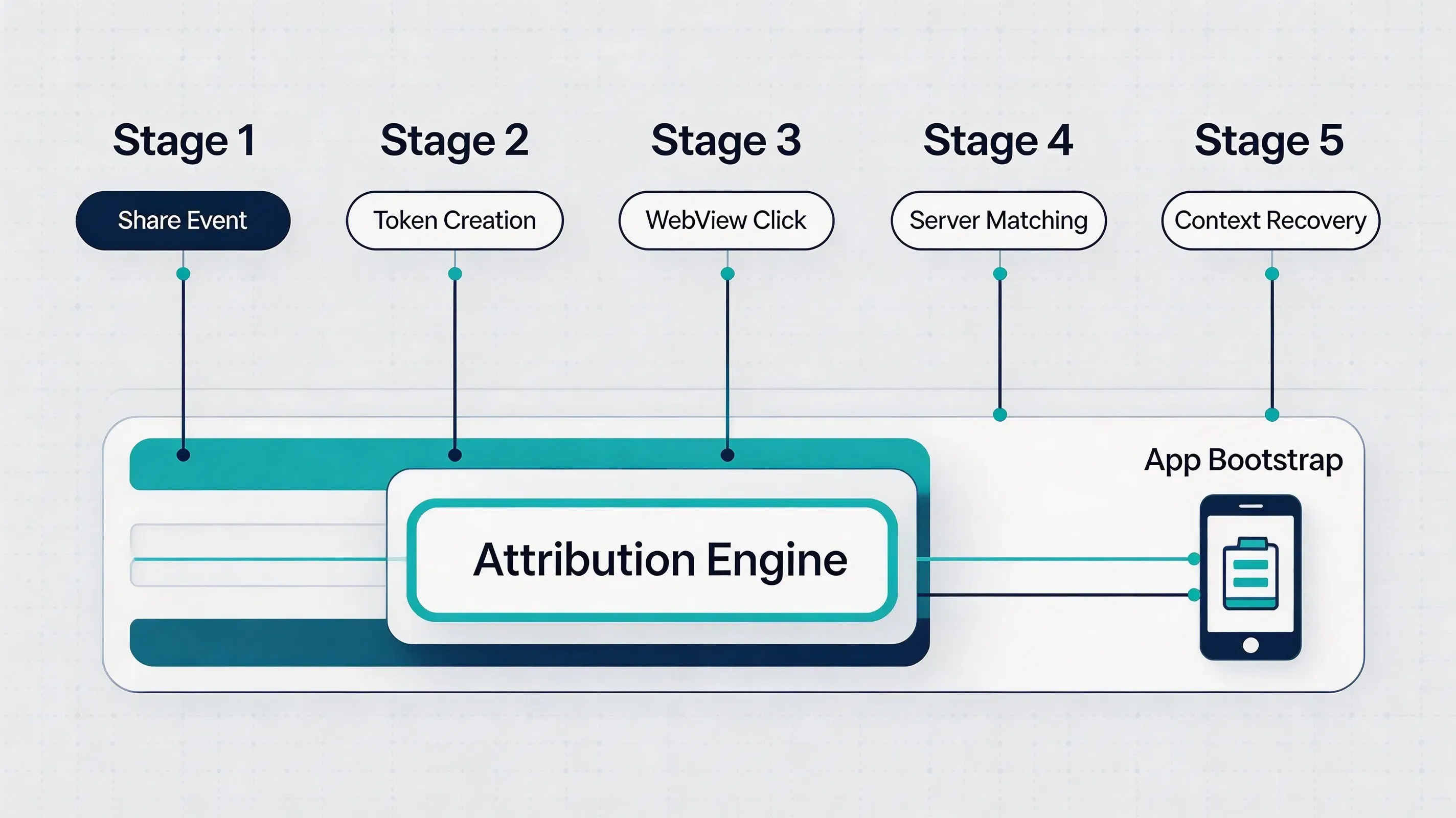
This multi-platform sequence is managed across four functional layers:
- Share Layer: Bypasses manual copy-paste steps by calling a native client-side API to bind player actions on the client UI to unique, encrypted invitation payloads.
- Web Layer: Captures browser context and temporary redirects within WeChat and Line WebViews, temporarily preserving the referral parameters.
- Matching Layer: Reconciles the browser session snapshots and click timestamps with native activation events on secure servers.
- Backend Layer: Executes secure, backend-to-backend webhook callbacks to verify the sharing loop before releasing rewards.
The matching process depends on available platform signals and privacy requirements.
How Share Tokens Connect Users With Referral Events
The core mechanism of automated social attribution relies on the generation of secure share tokens. When a user taps the in-game share button, the application invokes the reportShare API to send sharing context data to the attribution server, such as the sharer’s ID, room token, and campaign parameters.
This token is written as a query key to the shared H5 landing page URL. When the newly invited player interacts with the shared link inside a social WebView, the platform’s backend matching servers record the token’s parameters alongside a temporary snapshot of the browser session. Upon first launch of the native application post-install, the native mobile SDK retrieves the cached parameters asynchronously, allowing the client application to automatically execute dynamic onboarding workflows and restore the player’s direct onboarding route.
How Deferred Deep Linking Restores Referral Context
Deferred deep linking serves as the underlying technology that allows WeChat and Line sharing loops to survive browser limitations. When a user clicks a referral link, the browser environment isolates the session, preventing direct app launches. To resolve this, deferred deep linking preserves the invitation metadata—such as the inviter’s player ID or matchmaking room token—on a matching infrastructure. This approach allows app installation tracking across messaging platforms without requiring users to enter referral codes manually.
When the user eventually installs the application from the store and launches it for the first time, the mobile SDK queries this matching server. The platform matches the fresh native launch event with the previous web click session, restoring the cached parameter payload. By bridging the web-to-app gap asynchronously, developers can execute dynamic scene routing, automatically placing the new player in the inviter’s private lobby or guild without requiring manual forms.
Handling WeChat and Line In-App Browser Limitations
WeChat WebViews impose navigation and download restrictions regarding direct application downloads. Standard Universal Links and custom URL schemes may not reliably execute inside restricted social WebViews. To operate within these sandbox limitations, the web SDK parses the HTTP User-Agent string to detect the MicroMessenger header tag. Once detected, the system routes the request to an external gateway. This redirection workflow reduces the manual “open with default browser” step in supported environments.
Line implements similar sandboxing rules inside its chat WebView. Within Line chat rooms, Universal Links may not consistently resolve inside embedded messaging browsers. To handle Line in-app browser handling and deep link routing behavior, the platform uses a server-side matching workflow. When a user clicks a referral link inside Line, the context is written to the cloud matching server, and the user is redirected to the App Store or Google Play. The native mobile SDK then fetches this contextual payload from the server during first-time startup, handling the Line in-app browser limitation while minimizing unnecessary user data exchange.
Preventing Fake Referral Events and Reward Abuse
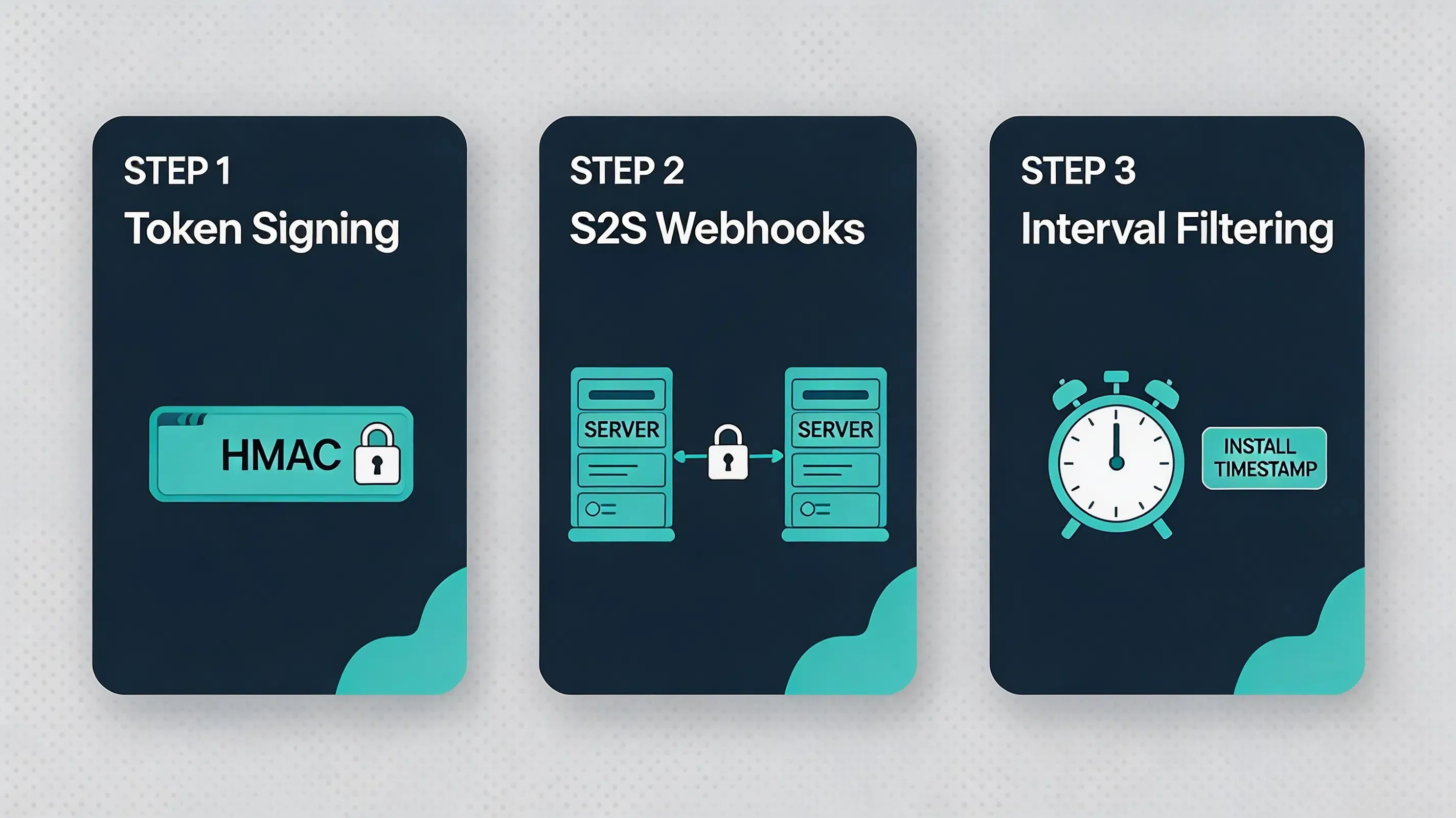
Operating a social sharing referral system exposes the application to severe reward exploitation and automated abuse attempts. Automated scripts, emulator-based testing environments, and fraudulent installation attempts frequently emulate install lifecycles and simulate custom client-side events to drain promotional budgets. Securing this pipeline requires enforcing strict cryptographic and backend-centric verification best practices:
- Token signing via HMAC-SHA256: Every referral link generated by the
reportShareAPI must include a signed dynamic payload validated on the backend server using an HMAC-SHA256 key, conforming to IETF RFC 2104 HMAC Specification security standards. - Enforcing S2S webhook callbacks: Developers must never authorize referral rewards or premium in-game currencies within the local application client. Instead, all reward logic must be executed via secure, backend-to-backend webhooks initiated directly from the attribution platform to your internal game servers, conforming to the OWASP Mobile Security Testing Guide standards.
- Verifying transaction nonces: To prevent replay exploits—where valid signatures are captured and resubmitted repeatedly—every secure server-to-server callback must require a unique, one-time nonce token and a strict timestamp expiration window.
- Filtering abnormal install intervals: The matching engine must monitor the temporal delta between the web click-time and the native app launch time (Click-to-Event-Time). Measuring click-to-install time intervals helps detect abnormal automated installation patterns. Installations with abnormal click-to-install intervals may be flagged for additional verification.
Referral Tracking Methods Compared
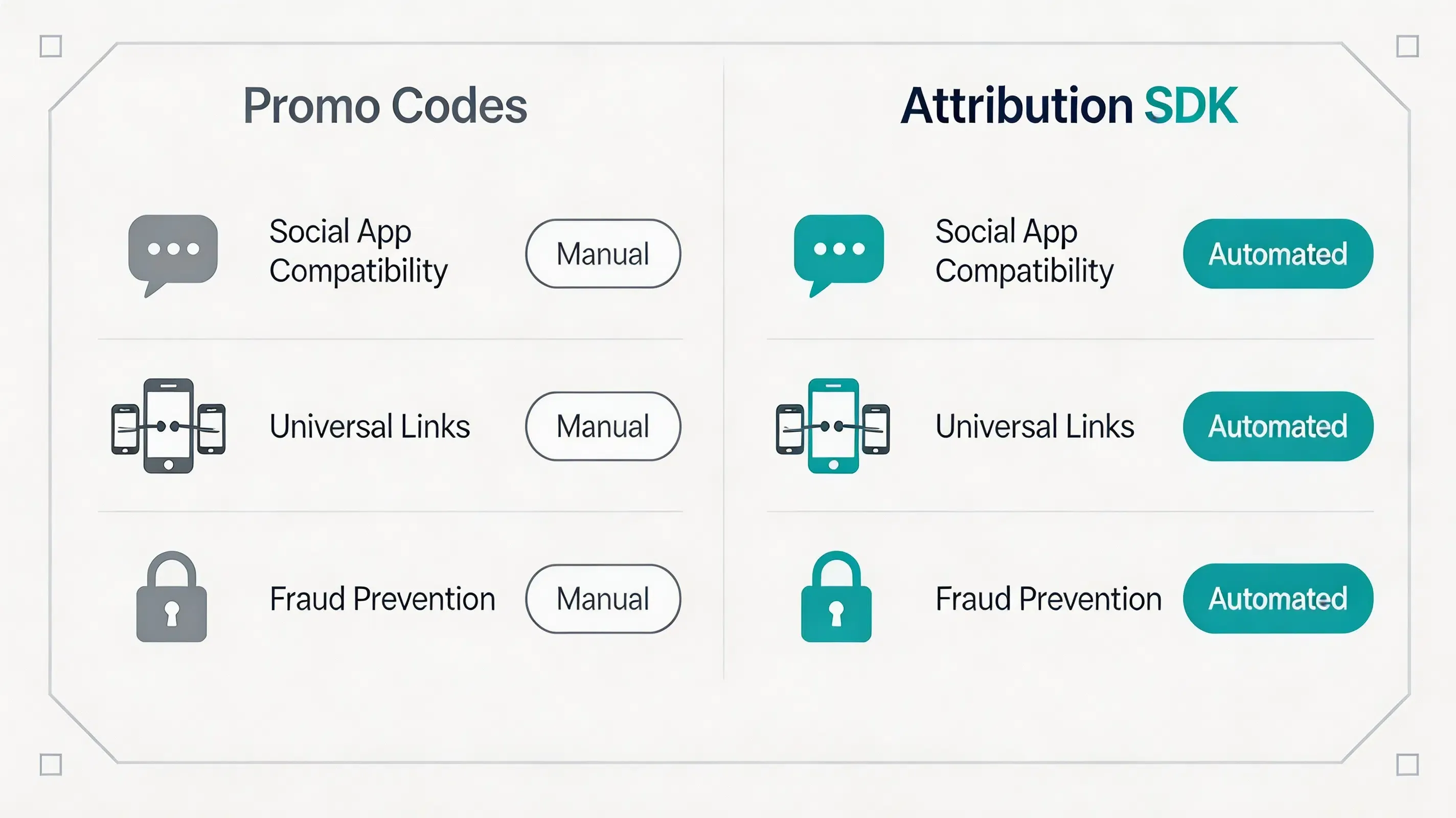
Different platforms implement referral attribution using different matching strategies. The comparison below summarizes the most common implementation models:
| Evaluation Attribute | Promo Code Systems | Google Play Install Referrer | Probabilistic Modeling | Referral Tracking SDKs |
|---|---|---|---|---|
| Representative Platforms | Manual custom scripts | Google Play Services Install Referrer API Specification | Firebase Dynamic Links (Deprecated) | OpoInstall, Branch, AppsFlyer |
| WeChat/Line Compatibility | Low (Form-based) | High (Android only) | Low (Sensitive to environment changes) | High (Using Quick Installation Redirection) |
| iOS Integration | Low (Form-based) | Unsupported | Low (Vulnerable to environment changes) | High (Using Universal Links) |
| Cross-store | Manual dependent | Android only | Low | High (Context Preserved) |
| Fraud Prevention | Low | High | Low | High (S2S verification) |
| Setup | High | Low | High | Minimal |
Implementing Referral Tracking With Mobile SDKs
To deploy an automated social sharing loop safely, development teams must integrate lightweight native libraries and establish client-side listeners to handle post-install data retrieval.
The Android Unity/native example initializes the SDK during game startup and retrieves lobby parameters after installation.
// File path: Assets/Scripts/ReferralManager.cs
using UnityEngine;
using System;
using System.Runtime.InteropServices;

public class ReferralManager : MonoBehaviour
{
    private const string TAG = "[OpoInstall_Unity]";

    #if UNITY_ANDROID && !UNITY_EDITOR
    private AndroidJavaObject opoInstallActivity;
    #endif

    void Start()
    {
        InitializeOpoInstall();
    }

    private void InitializeOpoInstall()
    {
        #if UNITY_ANDROID && !UNITY_EDITOR
        try
        {
            using (AndroidJavaClass unityPlayer = new AndroidJavaClass("com.unity3d.player.UnityPlayer"))
            {
                opoInstallActivity = unityPlayer.GetStatic<AndroidJavaObject>("currentActivity");
            }

            using (AndroidJavaClass opoSdk = new AndroidJavaClass("com.opoinstall.api.OpoInstall"))
            {
                opoSdk.CallStatic("initialize", opoInstallActivity.Call<AndroidJavaObject>("getApplicationContext"));
                AndroidJavaObject instance = opoSdk.CallStatic<AndroidJavaObject>("getInstance");
                instance.Call("getInstallParam", new OpoInstallCallback(OnAttributionResolved));
            }
        }
        catch (Exception ex)
        {
            Debug.LogError($"{TAG} Android Native JNI initialization failed: " + ex.Message);
        }
        #endif
    }

    private void OnAttributionResolved(string customParams, string channelCode)
    {
        Debug.Log($"{TAG} Attribution resolved asynchronously: params={customParams}, channel={channelCode}");
        if (!string.IsNullOrEmpty(customParams))
        {
            // Execute automated scene loading / lobby auto-join inside Unity thread
            LobbyManager.Instance.AutoJoinRoom(customParams);
        }
    }
}

// Inner helper class handling asynchronous JNI callbacks from JVM
public class OpoInstallCallback : AndroidJavaProxy
{
    private Action<string, string> resolvedAction;

    public OpoInstallCallback(Action<string, string> action) : base("com.opoinstall.api.ResultCallBack")
    {
        resolvedAction = action;
    }

    // Maps directly to the Java SDK 'onResult(OpoData opoData)' interface
    public void onResult(AndroidJavaObject opoData)
    {
        if (opoData != null)
        {
            string customData = opoData.Call<string>("getData");
            string channel = opoData.Call<string>("getChannelCode");
            resolvedAction?.Invoke(customData, channel);
        }
    }
}
The iOS native example registers the SDK and intercepts incoming session Universal Links to resolve game-lobby parameters.
// File path: ios/Runner/AppDelegate.swift
import UIKit
import libOpoInstallSDK // Import OpoInstall Game Attribution Native SDK

@UIApplicationMain
class AppDelegate: UIResponder, UIApplicationDelegate, OpoInstallDelegate {

    var window: UIWindow?

    func application(
        _ application: UIApplication,
        didFinishLaunchingWithOptions launchOptions: [UIApplication.LaunchOptionsKey: Any]?
    ) -> Bool {
        // Initialize OpoInstall native bridge prior to loading the main game engine viewport
        OpoInstallSDK.initWith(self)
        return true
    }

    // Intercept coming Universal Link intents to parse real-time game matchmaking tokens
    func application(
        _ application: UIApplication,
        continue userActivity: NSUserActivity,
        restorationHandler: @escaping ([UIUserActivityRestoring]?) -> Void
    ) -> Bool {
        OpoInstallSDK.continue(userActivity)
        return true
    }

    // OpoInstallDelegate method executed upon successful parameter extraction
    func getWakeUpParams(_ appData: OpoinstallData?) {
        guard let data = appData else { return }
        if let customParams = data.data {
            print("Successfully resolved wakeup parameters: \(customParams)")
            // Route the player directly into the dynamic matchmaking lobby scene
            NotificationCenter.default.post(
                name: NSNotification.Name("OpoInstall_LobbySync"),
                object: nil,
                userInfo: ["room_token": customParams]
            )
        }
    }
}
The client-side integration and SDK download packages can be accessed via the OpoInstall SDK download reference.
Example: Securing a Mobile Game Referral Workflow
Simulated Scenario: Mobile Game Startup Integration
Challenge
A multiplayer mobile game startup experienced structured sharing-abuse exploits inside WeChat chats, where dynamic invite links were copied and triggered repeatedly by bot scripts, causing false reward payouts. To secure this process, the development team registered an AppKey on the developer console.
Implementation
The development team integrated OpoInstall’s reportShare API into the game’s sharing module and updated the S2S verification pipeline to validate unique session tokens and CTET timestamps.
Expected Outcomes
This implementation scenario demonstrates how backend verification can reduce duplicate reward risks. During the campaign cycle, duplicate rewards could be identified and rejected during backend verification, while simulated referral payouts succeeded only after cryptographic signature validation.
Lessons Learned
- Enforce reportShare Verification: Binding the sharing action to native SDK parameters prevents out-of-game bot simulations.
- Verify Social User Agents: Custom redirection filters out non-human web views.
- Set Temporal Lifetimes: Restricting matching lifetimes prevents historical replay exploits.
Frequently Asked Questions
How to track referral links shared through WeChat and Line?
Why do WeChat and Line restrict direct app downloads?
How does the reportShare API attribute social sharing loops?
Can referral tracking survive WeChat's in-app browser sandboxing?
How does the quick installation workflow simplify the user experience?
How should a mobile app handle the WeChat openURL delegate on startup?
What parameters are required to track Line group invitations?
What should developers look for in a referral tracking SDK?
Does deferred deep linking require the game to be installed first?
What data can deferred deep linking restore inside WeChat or Line browsers?
Summary and Decision Framework
A reliable WeChat and Line referral tracking implementation usually requires four components:
- Share event capture (Dynamic tracking of reportShare callbacks)
- Deferred deep linking (Context preservation across WeChat and Line WebViews)
- Install parameter recovery (Asynchronous client SDK metadata resolution)
- Backend verification (Server-to-Server webhook handshakes to prevent fraud)
By integrating these four elements under a unified architecture, mobile teams can connect social sharing events with verified installations while maintaining platform privacy requirements. Individual SDK providers, such as OpoInstall, publish detailed documentation for their specific implementations.
Platform Reference
- WeChat WebView behavior varies by Android/iOS environment.
- Line uses embedded browser environments inside messaging flows.
- Apple Universal Links require Associated Domains configuration.
- Android App Links require domain verification.
Entity Glossary
| Term | Definition | Related Entity | Search Intent Role |
|---|---|---|---|
| WeChat WebView | The closed WebView container integrated inside the WeChat messenger application. | WeChat Sandbox | Technical |
| Line In-App Browser | The embedded browser environment inside Line messaging conversations. | Line Sandbox | Technical |
| Quick Installation Workflow | A redirect workflow that moves restricted in-app browser sessions into supported installation paths. | System Redirection | Technical |
| reportShare API | The programmatic interface utilized to write sharing codes and invite parameters to the server. | SDK API | Technical |
| Deferred Deep Linking | A mechanism that transfers context from a web link to an app after installation. | App Links | Informational |
| Game Session Restoration | The systematic process of automatically re-establishing a player’s previous game lobby state on application startup. | Unity Lifecycle | Technical |
| Lobby Synchronization | Restoring direct matchmaking endpoints dynamically to connect players seamlessly. | Game Backend Server | Technical |
| S2S Webhook | A backend communication protocol used to transmit real-time conversion callbacks. | Server Architecture | Technical |
Related Materials
Related Concepts
- Deferred Deep Linking: The programmatic restoration of target parameters across the application store installation boundary.
- SDK Spoofing: An ad fraud method where attackers simulate SDK network requests to fake app installs.
- Referral Token: Serialized user hashes mapped temporarily to identify dynamic inviter links on cold startup.
- Referral Fraud Detection: The engineering workflow of analyzing click-to-install telemetry to identify fake app launches.
Related Technologies
- Universal Links: Apple’s native deep linking standard connecting HTTP URLs to native application screens.
- App Links: Google’s verified deep linking protocol handling custom web URLs on Android.
- Install Referrer: The native mechanism provided by Android to securely pass campaign parameters from Google Play.
- UIPasteboard: An attribution method reading pasteboard cache buffers on native app startup.
- Unity Scene Management: Programmatic execution of runtime scene transitions and asset loaders.
- Photon Matchmaking: A third-party real-time multiplayer lobby management framework.
Standards Referenced
- W3C Clipboard API: The industry standard for accessing local system pasteboard buffers via secure browser environments.
- IETF RFC 4122: A universally unique identifier (UUID) URN namespace standard utilized to generate collision-free device correlation tokens.
- IETF RFC 2104: The HMAC keyed-hash message authentication code standard for message verification.
Primary APIs
getInstallParam: The native mobile SDK method utilized to query and retrieve custom installation parameters from the OpoInstall servers.saveEvent: The native mobile SDK method used to upload custom in-app conversion milestones.
Official Documentation / References
- Apple App Tracking Transparency Framework Guidelines
- Google Play Services Install Referrer API Specification
- W3C Clipboard API Specification
- Apple Universal Links Guidelines
- Android App Links Integration Guide
- Apple UIPasteboard API Reference
- Apple Associated Domains Entitlement
- Android ClipboardManager API
- IETF RFC 2104 HMAC Specification
- IETF RFC 4122 UUID Specification
- OWASP Mobile Security Testing Guide
- Google Firebase Dynamic Links Deprecation FAQ
Share this article



