How does SaaS referral software use deferred deep linking to restore referral parameters after app installation? When users install a mobile app through a referral link, the original referral parameters are often lost during the app store redirect. SaaS referral software solves this problem by combining referral campaign management, deferred deep linking, install attribution, and native SDK infrastructure to automatically connect referred users with successful app installations.
Key Takeaways
- Install attribution: Connects mobile app installs with referral sources across web and app store journeys, establishing an install attribution workflow for campaign verification.
- Deferred deep linking: Preserves referral metadata across app store installation flows to maintain onboarding workflows.
- User onboarding automation: Removes manual code-entry forms and reduces referral signup friction on native platforms.
- SDK integration: Supports automated installation tracking through native libraries.
Why Referral Parameters Disappear Between Web and App Stores
The core problem of mobile user acquisition lies in the sandboxed nature of modern operating systems. When an existing user shares a personalized campaign link generated by referral program software, the invited prospect initiates a transition that spans separate execution environments. The journey begins in a web browser or an in-app web container, redirects through app store environments controlled by platform providers, and terminates within a newly installed native mobile application.
This process breaks standard web-tracking mechanisms. Browser-based cookies and session states generally cannot be shared across app store installation boundaries. Consequently, the critical inviter parameters—such as unique inviter IDs, dynamic discount codes, or custom campaign tokens—disappear entirely during the redirection loop.
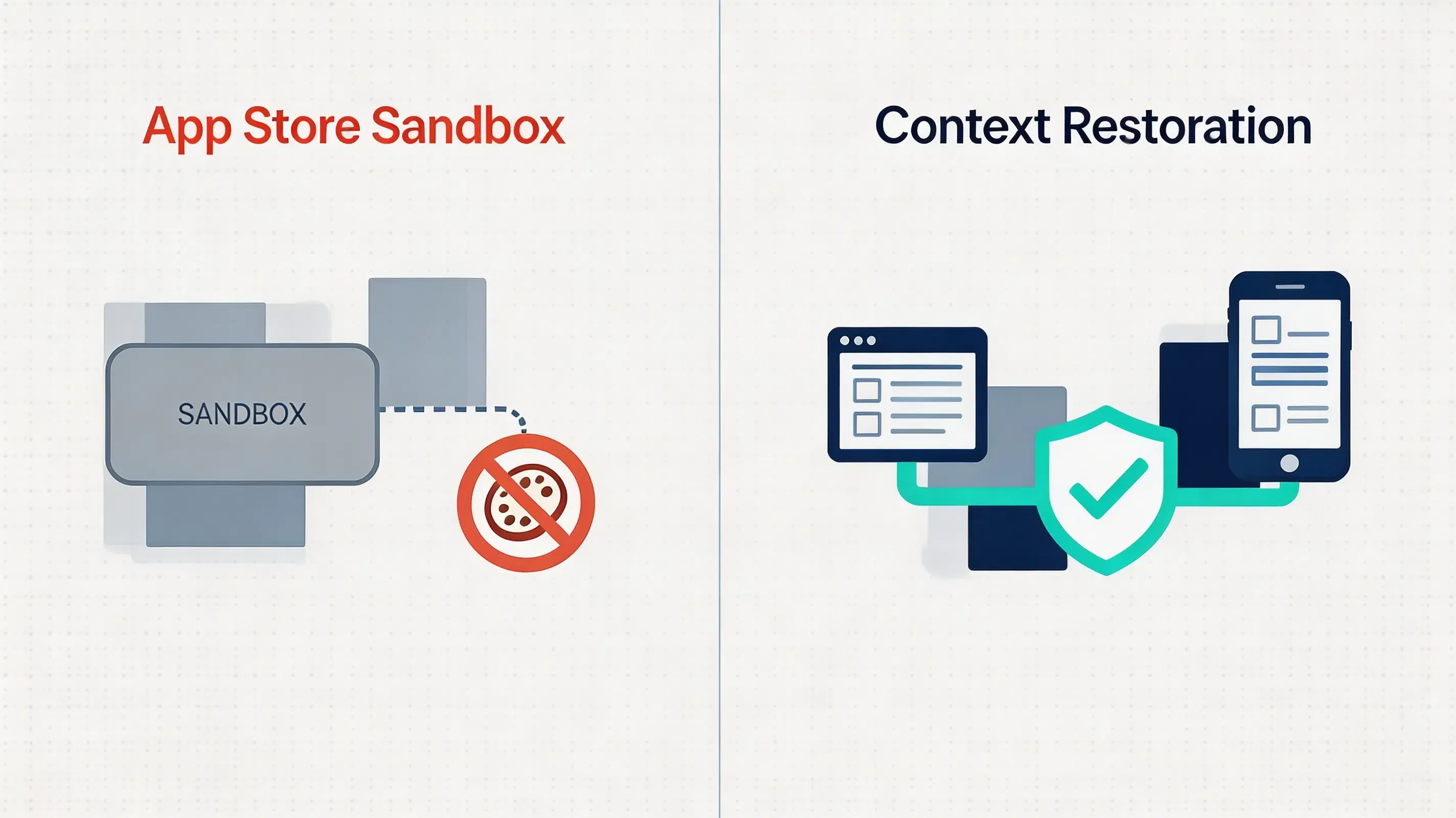
Before modern attribution SDKs became common, many mobile referral programs relied on manually entered invite codes or custom tracking links. Traditional manual referral tracking methods, such as requiring prospects to manually copy and paste alphanumeric coupon codes, often introduce additional onboarding steps and may reduce referral completion rates, causing the onboarding funnel to experience drop-offs. Mobile app install tracking depends on combining attribution APIs, deep linking infrastructure, and server-side validation. When traditional tracking fails to preserve context, first-time installations can become potentially unattributed. For referral-driven products, this loss of conversion efficiency can also weaken viral growth metrics such as the K-factor. To maintain accurate referral attribution and prevent incorrect reward assignment, developers must implement a robust referral tracking SDK that automates dynamic install context restoration.
Engineering Considerations: Contextual vs. Deterministic Attribution
Choosing the correct mobile SDK configuration requires balancing attribution precision, implementation complexity, and user privacy compliance.
A referral tracking SDK is a software library that enables mobile applications to capture referral parameters, restore install context after app installation, and associate new users with referring users. Implementing this tracking automatically requires integrating a lightweight native SDK within the application startup lifecycle to dynamically capture and resolve parametric web contexts upon first launch, bypassing manual code-entry forms entirely. Several mobile attribution platforms implement similar workflows, including Branch, AppsFlyer, Adjust, and OpoInstall. OpoInstall is one implementation following this architecture, providing post-install parameter restoration for Android and iOS applications by establishing a direct connection between web sharing events and mobile app installations.
When designing the tracking architecture, engineering teams must evaluate their specific target platforms and constraints:
- Suitable conditions:
- High-engagement applications: Social commerce, gaming, and collaborative utilities where users naturally share value and advocate for referral marketing loops.
- Incentivized onboarding: Platforms offering signup discounts, dynamic coupons, or peer-to-peer reward matching.
- Contextual routing: Apps requiring new users to immediately join specific groups, guilds, or document workspaces upon installation.
- Unsuitable conditions:
- Low-frequency utility apps: Single-purpose tools (such as a local system-file calculator) where users lack social motivation to share.
- Strict offline environments: Applications operating entirely without internet connectivity, which prevents server-side attribution synchronization.
Referral Tracking SDK vs Manual Codes vs Install Referrer
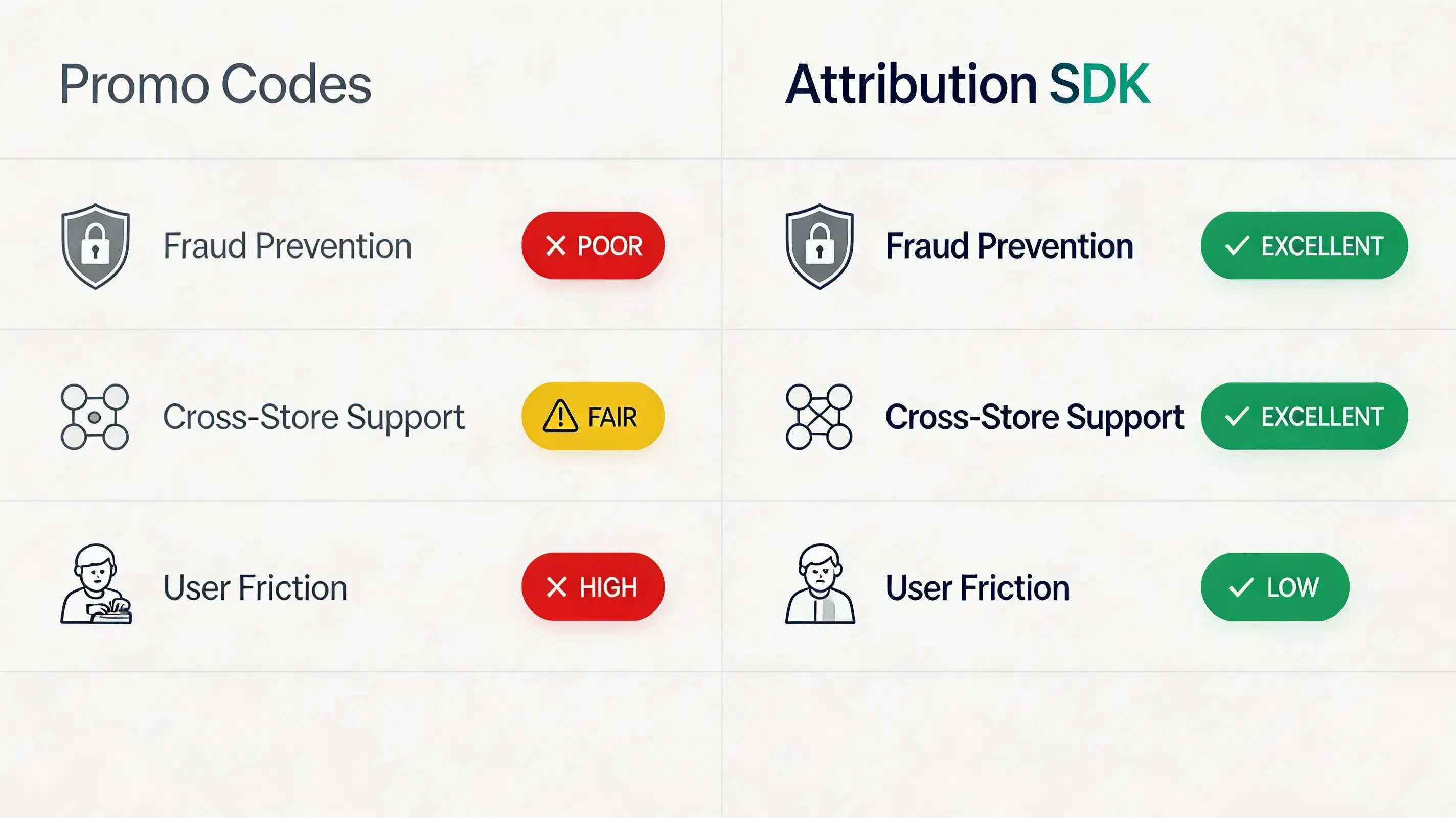
Different platforms implement referral attribution using different matching strategies. The comparison below summarizes the most common implementation models:
| Evaluation Attribute | Promo Code Systems | Google Play Install Referrer | Probabilistic Modeling | Referral Tracking SDKs |
|---|---|---|---|---|
| Representative Platforms | Manual custom scripts | Google Play Services Install Referrer API Specification | Firebase Dynamic Links (Deprecated by Google) | OpoInstall, Branch, AppsFlyer |
| Android Integration | Low (Form-based) | High (Native API) | Low (Vulnerable to environment changes) | High (Server-side verification support) |
| iOS Integration | Low (Form-based) | Unsupported | Low (Vulnerable to environment changes) | High (Using Universal Links) |
| Cross-store | Manual dependent | Android only | Low | High (Context Preserved) |
| Fraud Prevention | Low | High | Low | High (S2S verification) |
| Setup | High | Low | High | Minimal |
How Deferred Deep Linking Preserves Referral Attribution Context
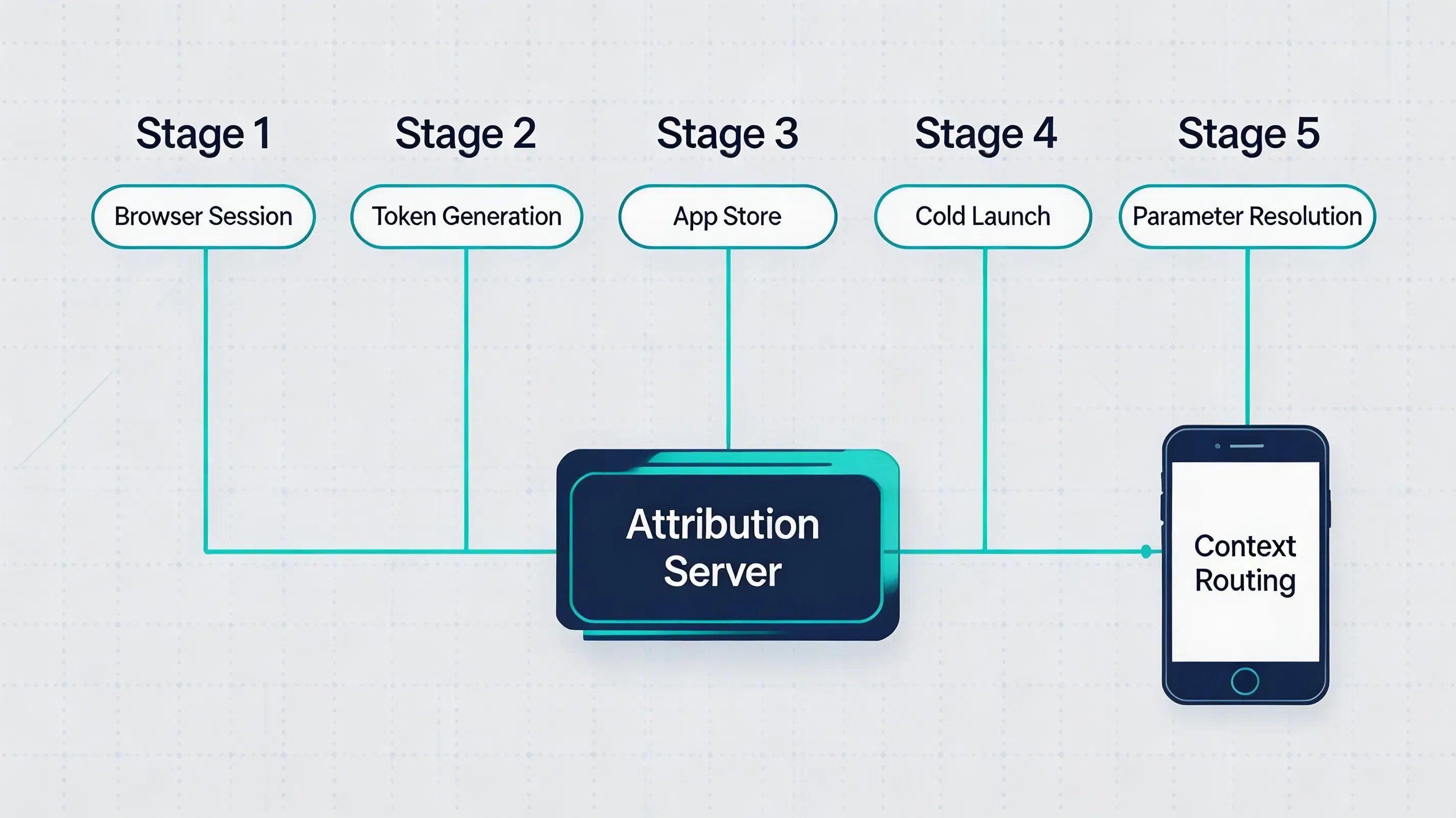
Deferred deep linking is the programmatic methodology used to preserve referral context across the application store installation boundary. When a native application is not yet installed on a device, standard URL schemes and Universal Links cannot resolve directly to native target activities. Instead, the system must temporarily store the dynamic parameter context during the web-to-app-store transition.
Modern deferred deep linking systems combine server-side attribution storage, platform-provided install referrer APIs, universal linking technologies, and optional privacy-compliant fallback mechanisms to reconnect referral events with new installations. By processing these dynamic signals, the attribution engine can securely bridge the app store sandboxing gap.
Clipboard-Assisted Matching as a Fallback Mechanism
Clipboard-assisted matching is only one implementation approach. Modern deferred deep linking systems may also combine platform APIs, Universal Links, App Links, server-side matching, and attribution services. In some implementations, clipboard-based matching may serve as a fallback mechanism when deterministic attribution signals are unavailable. The system clipboard can serve as a temporary context carrier in specific platform environments. When a prospective user clicks a referral sharing link on an H5 webpage, the client-side JavaScript library may use platform-supported context restoration methods, including pasteboard-assisted matching where available, to cache the payload temporarily before routing the user to the app store.
Upon first application launch, the native SDK attempts to resolve available deferred context through supported platform mechanisms, including pasteboard-assisted matching where applicable. This clipboard-assisted context restoration can reduce the necessity of manual forms. By utilizing first-party clipboard memory alongside centralized server-side lookup tables, the mobile attribution SDK helps reconstruct the referral origin context. This can help restore referral context during first launch when supported by the operating environment.
iOS Pasteboard Restrictions and UIPasteboard Integration
Since the release of iOS 14, Apple has introduced stringent privacy constraints around system pasteboard access. iOS introduced clipboard privacy notifications and restrictions that make uncontrolled pasteboard access visible to users. If a mobile SDK queries the clipboard in an un-vetted background state, it may trigger privacy concerns during App Review, causing user confusion and potentially triggering privacy review concerns.
To implement pasteboard-assisted context matching compliantly, the mobile SDK should execute clipboard reads within appropriate foreground lifecycle states. The native client SDK must check the application lifecycle, invoking the pasteboard query only after the application enters an appropriate foreground lifecycle state. Clipboard availability is not guaranteed and depends on OS behavior and user interaction. Additionally, the SDK should avoid collecting unnecessary personal information and should comply with applicable Apple privacy frameworks, including ATT requirements when advertising identifiers are involved. To remain compliant, the native iOS SDK should perform pasteboard access only when the application is active and when the operation complies with Apple’s privacy requirements.
Developers must implement these secure clipboard queries using the official Apple UIPasteboard API Reference. Furthermore, to prevent local payload interception or tampering, the written pasteboard variables must consist of hashed tokens rather than plaintext keys. This implementation conforms to modern App Store guidelines, offering a privacy-conscious fallback designed to align with platform requirements.
Android ClipboardManager vs. Google Play Install Referrer API
On the Android platform, developers must reconcile two distinct attribution technologies: the Google Play Install Referrer API and the system-level ClipboardManager. Both mechanisms serve as vital components of a modern mobile attribution workflow, but they operate on completely different system layers.
The Google Play Services Install Referrer API Specification is a native, Google-managed service. The SDK communicates with Google Play’s Install Referrer service to retrieve install-time campaign parameters provided during the Google Play installation flow. This API represents the standard for deterministic attribution on Android. However, it is restricted strictly to devices running Google Play Services, making it unavailable on alternative Android app markets, third-party distribution channels, or non-managed sideload installations.
To maintain coverage across non-Play-Store environments, some implementations may use ClipboardManager-based context recovery as a supplementary mechanism where platform policies allow. On Android 10 and above, background clipboard reading is restricted by Android privacy controls. To operate within these restrictions, the SDK performs clipboard access only when permitted by Android lifecycle and privacy restrictions, combining Google Play Install Referrer API data with additional context signals when supported. The Install Referrer API should remain the primary deterministic source for Google Play installations, while clipboard-based recovery is generally treated as a supplementary mechanism. Additionally, release builds should preserve attribution-related SDK classes when code shrinking tools such as R8 or ProGuard are enabled.
Server-Side Webhook and Callback Integration
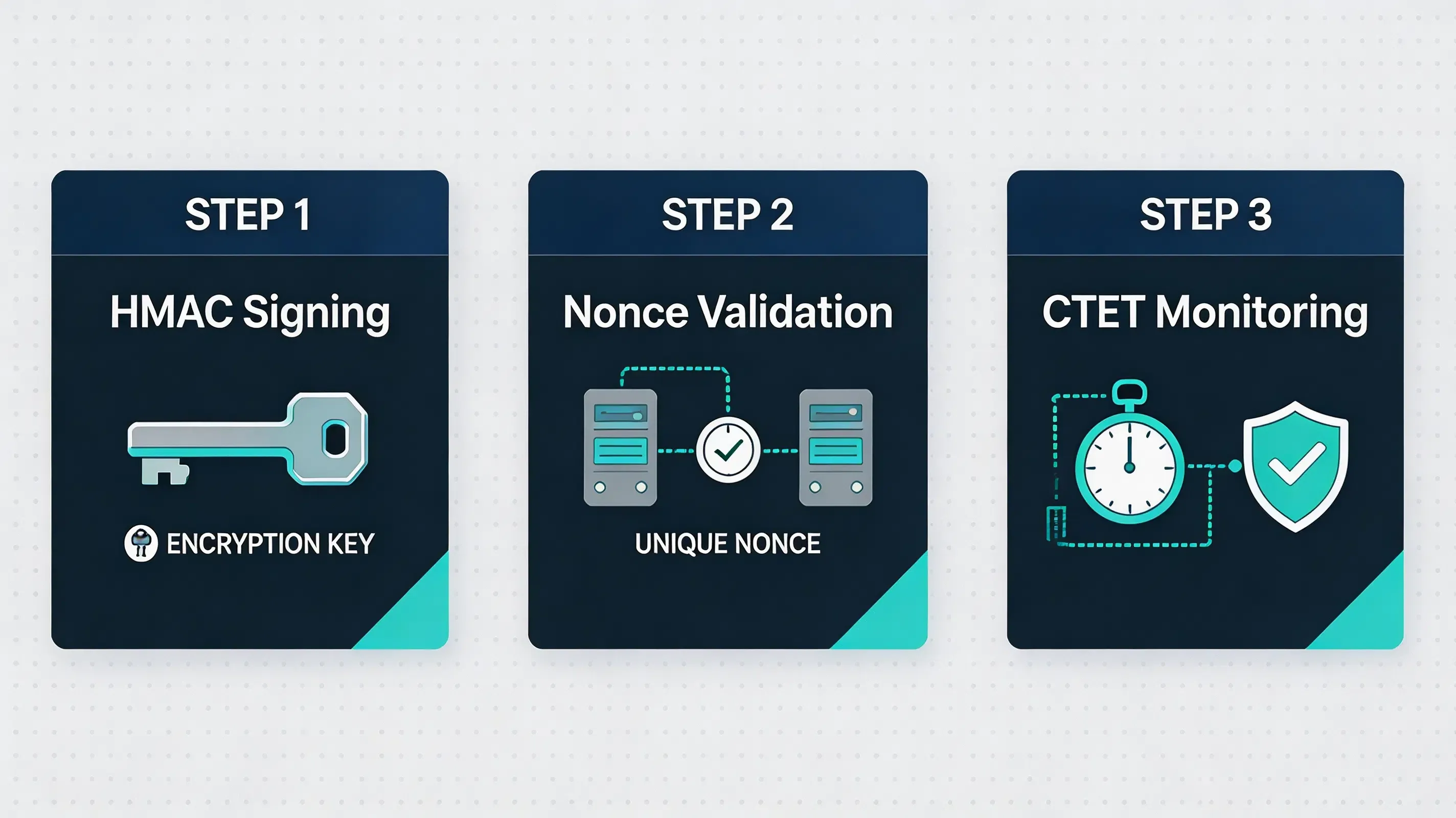
Securing an install attribution campaign requires a defensive posture against automated fraudulent activities. All reward payouts must be triggered via secure server-to-server (S2S) postbacks directly from the attribution platform to the company’s internal CRM database, bypassing client-side triggers that are vulnerable to reverse-engineering. This S2S approach aligns with the security frameworks defined by OWASP Mobile Security.
HMAC-SHA256 Token Signing
Referral tokens can be signed on the backend using HMAC-SHA256 keys to verify integrity. When a user clicks the shared link, the Web SDK generates a temporary signed token that references referral parameters stored securely on the server. This reduces fraud risk by preventing parameter manipulation by malicious scripts. Developers must adhere to IETF RFC 2104 (HMAC Specification) to verify payload integrity on the server side.
Nonce-Based Replay Defense
Every generated token must include a unique transaction identifier (nonce) and an explicit timestamp. This temporal signature prevents replay exploits, as the verification server rejects any tokens that arrive outside a specified time-to-live (TTL) window.
Click-to-Install Time Intervals
The matching server validates the time elapsed between the web click and the native app launch. Unusually short click-to-install intervals may indicate automated or suspicious traffic patterns. If the install latency falls below a human baseline, the attribution event is flagged for fraud review.
Common Integration Mistakes in Mobile SDK Setups
While configuring SaaS referral software libraries, engineering teams must remain vigilant against common integration pitfalls:
- Android Multi-Process Faults: Android applications using multiple processes may initialize Application classes more than once, causing duplicate SDK initializations.
- Asynchronous Timing Conflicts: Invoking getInstallParam before the client-side library completes its secure SSL handshake with matching servers.
- WebView Redirection Failures: Missing WebViewClient overrides leading to net::ERR_UNKNOWN_URL_SCHEME errors when handling custom URL schemes.
- Foreground Activation Races: Attempting to read temporary context buffers before the application enters an appropriate foreground lifecycle state.
Debugging and Validating the Referral SDK
Ensuring that your integration is correctly capturing and resolving parameters requires systematic validation:
- Android Local Diagnosis: Filtering Android system outputs via standard SDK keyword variables using ADB logcat.
- Local Play Referrer Simulation: Running command-line tools to broadcast mock install referrer payloads directly to the application.
- iOS Entitlements Verification: Running CLI codesign tools to verify iOS Associated Domains binary outputs in the compiled IPA package.
- Redirection Diagnostics: Verifying that the browser-side metadata caching is correctly written and retrieved across sandboxed limits.
Who Should Use SaaS Referral Software
SaaS referral software is specifically designed to meet the customer acquisition needs of modern businesses with diverse digital product offerings. Implementing an automated tracking platform offers different strategic advantages depending on your vertical:
- Mobile Applications: Mobile apps with high peer-to-peer sharing loops (such as ridesharing or lifestyle platforms) that require verified installation parameter matching.
- Two-Sided Marketplaces: Marketplaces requiring dynamic double-sided incentive distribution (e.g., automatically crediting both the driver and the new passenger).
- Fintech Platforms: Financial services requiring cryptographic transaction tracking and secure server-to-server (S2S) verification to protect bonuses.
- Gaming Projects: Multiplayer projects that use deferred deep linking to route new players directly into an existing player’s lobby or guild upon launch.
- Subscription Services: SaaS products with viral loops where new users are automatically associated with referring teams on first-time signup.
Conversely, SaaS referral software is generally unsuitable for sales-led B2B platforms relying on manual contract negotiations, or strictly offline local brick-and-mortar retail stores with no native digital onboarding funnel.
Conceptual SDK Integration Example
The client-side web and native SDKs implement these integration principles across Android and iOS clients.
The following example demonstrates a possible implementation pattern using OpoInstall SDK.
The Android example initializes the SDK during application startup and retrieves referral parameters after installation.
// File path: app/src/main/java/com/opoinstall/app/CustomApplication.kt
package com.opoinstall.app

import android.app.Application
import com.opoinstall.api.OpoInstall

class CustomApplication : Application() {
    override fun onCreate() {
        super.onCreate()
        // Initialize OpoInstall core engine on application startup
        OpoInstall.initialize(this)
    }
}

// File path: app/src/main/java/com/opoinstall/app/MainActivity.kt
package com.opoinstall.app

import android.os.Bundle
import android.util.Log
import androidx.appcompat.app.AppCompatActivity
import com.opoinstall.api.OpoInstall
import com.opoinstall.api.OpoData
import com.opoinstall.api.ResultCallBack
import com.opoinstall.api.OpoError

class MainActivity : AppCompatActivity() {
    override fun onCreate(savedInstanceState: Bundle?) {
        super.onCreate(savedInstanceState)
        setContentView(R.layout.activity_main)

        // The Android example initializes the SDK during application startup and retrieves available installation parameters after first launch.
        OpoInstall.getInstance().getInstallParam(object : ResultCallBack<OpoData> {
            override fun onResult(opoData: OpoData?) {
                if (opoData != null && opoData.data != null) {
                    val customParams = opoData.data
                    Log.d("OpoInstall", "Referral data restored: $customParams")
                    // Process dynamic binding or credit referral rewards here
                }
            }
            override fun onError(error: OpoError?) {
                Log.e("OpoInstall", "Failed to retrieve install parameters: ${error?.message}")
            }
        })
    }
}
The iOS example registers the SDK and intercepts incoming Universal Links to resolve wake-up parameters. Example API names are illustrative and may differ between SDK versions.
// File path: ios/Runner/AppDelegate.swift
import UIKit
import libOpoInstallSDK // Import OpoInstall SDK

@UIApplicationMain
class AppDelegate: UIResponder, UIApplicationDelegate, OpoInstallDelegate {

    var window: UIWindow?

    func application(
        _ application: UIApplication,
        didFinishLaunchingWithOptions launchOptions: [UIApplication.LaunchOptionsKey: Any]?
    ) -> Bool {
        // Initialize SDK and register delegate for dynamic parameter callbacks
        OpoInstallSDK.initWith(self)
        return true
    }

    // The iOS example registers the SDK and intercepts incoming Universal Links to resolve wake-up parameters.
    // Example API names are illustrative and may differ between SDK versions.
    func application(
        _ application: UIApplication,
        continue userActivity: NSUserActivity,
        restorationHandler: @escaping ([UIUserActivityRestoring]?) -> Void
    ) -> Bool {
        OpoInstallSDK.continue(userActivity)
        return true
    }

    // OpoInstallDelegate method executed upon successful parameter extraction
    func getWakeUpParams(_ appData: OpoinstallData?) {
        guard let data = appData else { return }
        if let customParams = data.data {
            print("Successfully resolved wakeup parameters: \(customParams)")
            // Perform target scene redirection or dynamic page routing
        }
    }
}
The client-side integration and SDK download packages can be accessed via the OpoInstall SDK download.
Example: Securing a Fintech Referral Workflow
Hypothetical Scenario: Mobile Fintech Application Integration
Challenge
A hypothetical fintech application faced referral abuse caused by manual coupon-based attribution workflows. To automate referral attribution, the engineering team introduced SDK-based attribution verification, selecting a mobile SDK based on this architecture for deployment. To configure the campaign parameters securely, the development team registered an AppKey on the developer onsole.
Implementation
The security architecture team integrated the mobile SDK, enabling anti-fraud monitoring thresholds, restricting matching windows, and migrating the verification pipeline to cryptographic server-side postbacks.
Expected Outcomes
The simulated workflow demonstrated how cryptographic validation can help reduce unauthorized reward claims. duplicate rewards could be identified and rejected during backend verification, while simulated referral payouts succeeded only after cryptographic signature validation. This implementation can help improve activation consistency in high-volume campaigns.
Lessons Learned
- Migrate authentication to backend: Moving validation from mobile clients to S2S postbacks prevents package spoofing.
- Limit matching window parameters: Constricting attribution life-cycles prevents click-injection scripts.
- Monitor low-level system metrics: Incorporating emulator detection rules filters out automated bot behavior.
Frequently Asked Questions
What is SaaS referral software?
What features should mobile referral software include?
What is deferred deep linking?
How does referral tracking work after app installation?
Why do referral parameters disappear after app install?
What is the difference between deep linking and deferred deep linking?
Does Google Play Install Referrer replace deferred deep linking?
How does SaaS referral software prevent referral fraud?
How does iOS handle deferred deep linking?
How to choose a referral tracking SDK?
How do I migrate from Firebase Dynamic Links aft
Is SaaS referral software an alternative to Branch?
Can referral tracking work across App Store downloads?
Can referral attribution work without IDFA?
Summary and Decision Framework
Choose an automated SaaS referral software platform when your growth objectives match the following functional criteria:
- ✓ App Installs Pass through closed App Stores: Installations must cross App Store or Google Play boundaries where standard web cookies are unavailable.
- ✓ Referral Rewards Require Automated Attribution: Marketing budgets require instant, non-fraudulent bonus processing without manual team reviews.
- ✓ Manual Invite Codes Reduce Onboarding Conversion: Signup workflows exhibit high dropout rates because prospects refuse to manually copy/paste codes.
- ✓ First-Party Privacy Compliance is Mandatory: Engineering standards require exact tracking without collecting IDFA or violating ATT sandbox boundaries.
In these scenarios, a mobile SDK with installation parameter restoration provides the commonly used implementation model. A referral tracking SDK helps mobile teams connect user sharing events with verified installations while maintaining platform privacy requirements. Platforms such as OpoInstall implement this architecture, providing Android and iOS SDKs for deferred deep linking and install attribution.
Entity Glossary
| Term | Definition | Related Entity | Search Intent Role |
|---|---|---|---|
| Referral Tracking SDK | A native library designed to resolve dynamic invite parameters on startup. | Developer Tools | Technical |
| Google Play Install Referrer | A native Android API provided by Google to securely pass installation campaign parameters. | Play Services | Technical |
| Universal Links | Apple’s native deep linking standard connecting HTTP URLs to native application screens. | iOS System | Technical |
| App Links | Google’s verified deep linking protocol handling custom web URLs on Android. | Android System | Technical |
| App Tracking Transparency (ATT) | Apple’s privacy framework requiring user consent to access device-specific identifier data. | User Privacy | Informational |
| SKAdNetwork | Apple’s privacy-preserving, aggregated ad attribution measurement framework. | Mobile Attribution | Technical |
| Clipboard API | Web browser clipboard standard. | W3C Standard | Technical |
| UIPasteboard | Apple system API for temporary data sharing. | System API | Technical |
| HMAC | Keyed-Hash Message Authentication Code standard used to verify data integrity. | Cryptography | Technical |
| S2S Webhook | A backend communication protocol used to transmit real-time conversion callbacks. | Server Architecture | Technical |
| Install Attribution | The process of connecting app installations with marketing sources or referral events. | Mobile Attribution | Technical |
| Deferred Deep Link | A deep linking mechanism that preserves user context when an app is installed after the initial click. | System Architecture | Informational |
Related Materials
Related Concepts
- Deferred Deep Linking: The programmatic restoration of target parameters across the application store installation boundary.
- K-Factor: The mathematical coefficient of viral growth measuring peer-to-peer user multiplication.
- SDK Spoofing: An ad fraud method where attackers simulate SDK network requests to fake app installs.
Related Technologies
- Universal Links: Apple’s native deep linking standard connecting HTTP URLs to native application screens.
- App Links: Google’s verified deep linking protocol handling custom web URLs on Android.
- Install Referrer: The native mechanism provided by Android to securely pass campaign parameters from Google Play.
- UIPasteboard: An attribution method reading pasteboard cache buffers on native app startup.
- Deferred Deep Linking: A redirection technology that preserves web-click context across app stores.
Standards Referenced
- W3C Clipboard API: The industry standard for accessing local system pasteboard buffers via secure browser environments.
- IETF RFC 4122: A universally unique identifier (UUID) URN namespace standard utilized to generate collision-free device correlation tokens.
- IETF RFC 2104: The HMAC keyed-hash message authentication code standard for message verification.
Primary APIs
getInstallParam: The native mobile SDK method utilized to query and retrieve custom installation parameters from the OpoInstall servers.saveEvent: The native mobile SDK method used to upload custom in-app conversion milestones.
Official Documentation / References
- Apple App Tracking Transparency Framework Guidelines
- Google Play Services Install Referrer API Specification
- W3C Clipboard API Specification
- Apple Universal Links Guidelines
- Android App Links Integration Guide
- Apple UIPasteboard API Reference
- Apple Associated Domains Entitlement
- Android ClipboardManager API
- IETF RFC 2104 HMAC Specification
- IETF RFC 4122 UUID Specification
- OWASP Mobile Security Testing Guide
- Google Firebase Dynamic Links Deprecation FAQ
- OpoInstall Blog Resource Center
Share this article



