How to pass tracking parameters from mobile websites to store installs? Passing tracking parameters from a mobile website to a newly installed app involves loading the OpoInstall Web JS SDK, capturing allowlisted URL parameters, and restoring supported attribution data through the native SDK when the app first launches.
Parameter stitching across app store downloads is the process of preserving eligible web URL parameters when a user moves from a mobile landing page to an app store and subsequently launches a newly installed application. A web SDK captures campaign or referral context, while a platform-supported mechanism or deferred restoration service may make the associated parameters available to the native app. Restoration depends on the platform, SDK configuration, available matching signals, and applicable privacy requirements.
| Term | Definition | Related Entity | Search Intent Role |
|---|---|---|---|
| Tracking Parameters | Key-value pairs appended to URLs to identify traffic context, campaign sources, or referral information. | URL Query String | Informational / Technical |
| App Parameter Installation | A deferred parameter restoration workflow that makes eligible web context available after installation. | Native Mobile SDK | Technical / Informational |
| Google Play Install Referrer | An official Android API for retrieving referral metadata associated with a Google Play installation. | Android SDK | Technical |
The Web-to-Store Attribution Gap: Platform Barriers Across App Stores
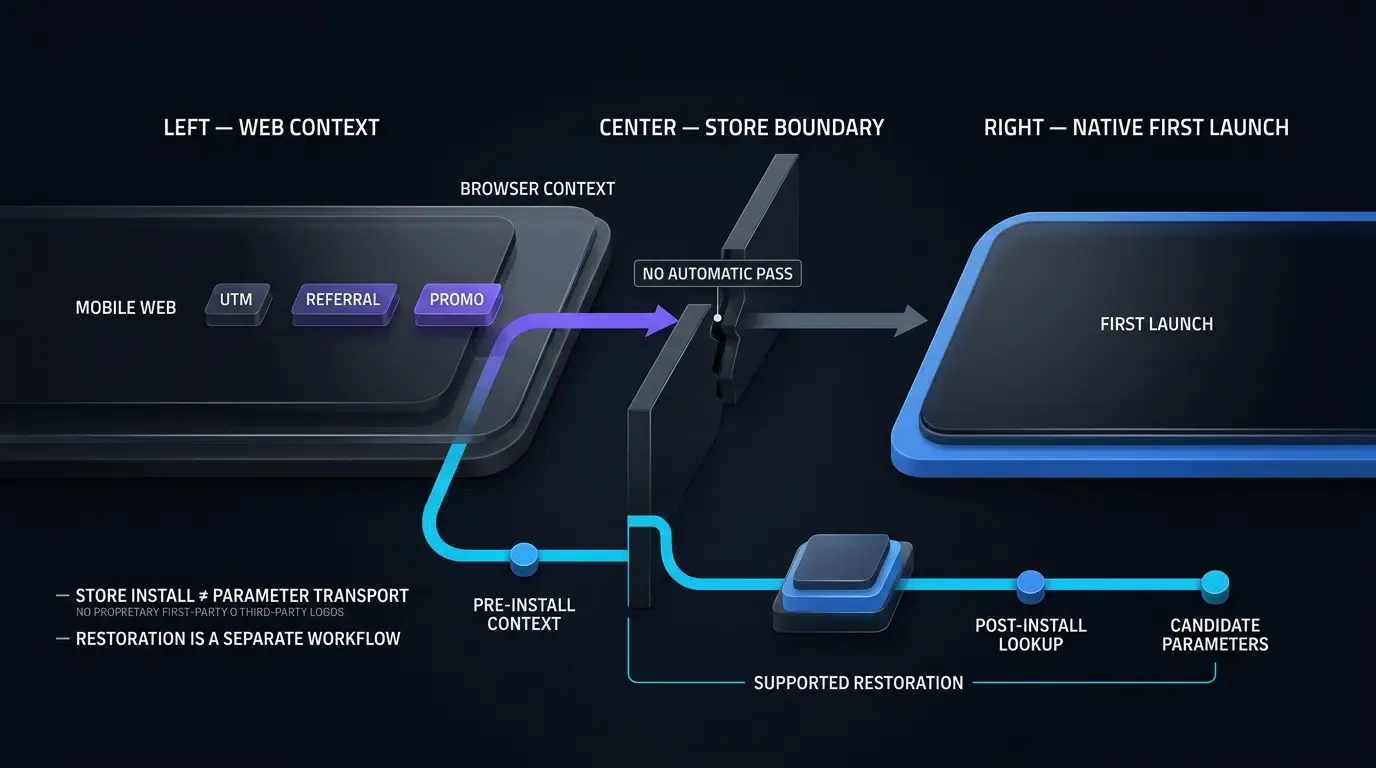
The Disconnection Barrier: How Operating System Sandboxes Isolate Browser Context
Web analytics commonly use URL query strings, including UTM tags (utm_source, utm_medium, utm_campaign), advertising click identifiers such as gclid and fbclid, and custom referral parameters.
Within a participating website, browser APIs and first-party analytics systems can capture these values for permitted analytics and campaign workflows.
The challenge appears when a visitor leaves the browser and enters an app store installation process. The browser and the newly installed native application operate in separate environments. Browser cookies, session storage, and page URL parameters do not automatically become available inside the application after installation.
Consequently, developers need a store-supported referral mechanism or a deferred parameter restoration workflow to connect eligible pre-install context with a post-install app session.
Platform Specifics: Apple App Store vs. Google Play Store Ingestion
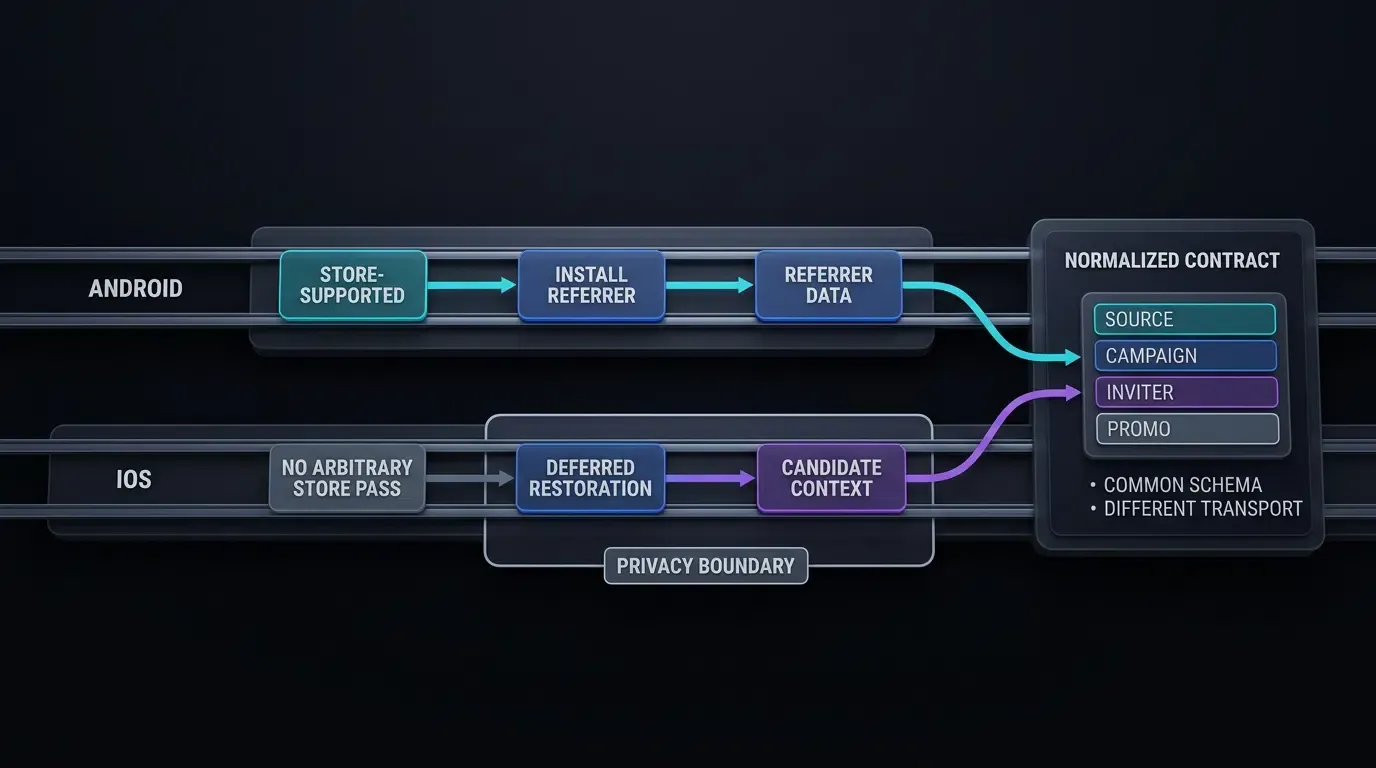
Mobile app stores support different approaches to passing referral context.
- Apple App Store (iOS): A standard App Store installation does not automatically forward arbitrary external URL query parameters into a newly installed application’s first-launch environment. Deferred restoration services or explicit user-mediated workflows may help recover eligible context, subject to Apple’s privacy requirements.
- Google Play Store (Android): Google provides the official Google Play Install Referrer API. Where a properly constructed Google Play referral flow is used, the installed application can retrieve supported referral metadata, including a referrer string and relevant timestamps.
These mechanisms should not be treated as interchangeable. Google Play provides an official store-level referral interface, whereas arbitrary deferred parameter restoration on iOS requires a separately designed and policy-compliant mechanism.
The Business Impact of Unattributed Install Traffic on Channel ROI Calculation
If campaign parameters are lost between a web visit and an app installation, analytics systems may not correctly associate the installation with its original campaign.
This can lead to unattributed installations, incomplete acquisition reporting, and inaccurate calculations of Return on Investment (ROI) or Customer Acquisition Cost (CAC).
Parameter loss can also affect onboarding experiences. For example, a web referral link might include an inviter identifier or promotional code:
https://example.com/download?inviter_id=USR_1024
https://example.com/download?promo_code=WELCOME50
If the application cannot recover these values, users may need to re-enter them manually.
However, restoring a referral or promotional value does not automatically authorize a reward. The application backend must independently verify eligibility, redemption limits, and applicable business rules.
Store-Supported vs. Deferred Parameter Mechanisms: Apple App Store vs. Google Play
Google Play Store Mechanisms: Leveraging the Native Install Referrer API
On Android, the Google Play Install Referrer API offers an official mechanism for retrieving supported installation referral metadata.
A Google Play download URL can include an encoded referrer parameter:
https://play.google.com/store/apps/details?id=com.example.app&referrer=utm_source%3Dfacebook%26inviter_id%3DUSR_1024
In this illustrative URL, the encoded referrer value represents:
utm_source=facebook&inviter_id=USR_1024
After installation, a native Android application can use the Install Referrer Client to retrieve referral information available from Google Play.
Whether a specific release of the OpoInstall Web SDK generates, modifies, or manages such a URL automatically must be verified against its deployed documentation and behavior. The existence of Google’s official API does not establish the internal implementation of a third-party SDK.
Apple App Store Boundaries: Handling Standard Store Redirections Without Native Query Parameters
The Apple App Store does not directly pass arbitrary web query parameters to a newly installed application’s first-launch callback.
A deferred restoration workflow may therefore involve capturing permitted campaign information before the store redirect and requesting associated context when the native application launches.
For an SDK-based workflow, developers must distinguish between the functionality the vendor documents and the matching methods used by the deployed SDK version.
Any matching or data collection method must comply with Apple’s privacy policies. In particular, an attribution implementation must not rely on prohibited device fingerprinting or assume that ATT permission makes an otherwise prohibited matching method acceptable.
Universal Links are useful for routing supported links into an already installed application, but they do not, by themselves, guarantee that arbitrary web query parameters will survive a fresh App Store installation.
Cross-Platform Architectural Divergence: Building Unified Parameter Contracts
Although Android and iOS use different platform mechanisms, an application can normalize recovered values into a shared application-level schema.
For example:
{
  "utm_source": "facebook",
  "utm_medium": "paid_social",
  "utm_campaign": "summer_sale",
  "inviter_id": "USR_1024",
  "promo_code": "WELCOME50"
}
This JSON object represents an application-defined normalized parameter contract, not a guaranteed literal response format from every release of the OpoInstall SDK.
The application should separate these fields into two categories:
- Marketing attribution:
utm_source,utm_medium, andutm_campaign. - Referral and promotional actions:
inviter_idandpromo_code.
Marketing attribution can be submitted to an authorized analytics pipeline. Referral and promotional actions require independent server-side authorization before the application grants any benefit.
The Role of Contextual Payload Caching in Bridging Store Redirection
Deferred restoration services generally require a limited retention period for installation context.
The applicable retention window, restoration behavior, and match availability depend on the deployed service, SDK configuration, network conditions, platform limitations, and privacy requirements.
Engineering teams should measure restoration outcomes using their own installation cohorts rather than adopting unsupported accuracy claims.
Privacy-Conscious Deferred Context Architectures and Platform Boundaries
System Pasteboard Boundaries on iOS: Transparency Banners and UIPasteControl Intent Mechanics
Some historical deferred-linking implementations used the system pasteboard to carry temporary context between applications.
However, iOS restricts and exposes cross-application pasteboard access to users.
- iOS 14: Reading content copied from another application may trigger a pasteboard access notification.
- iOS 16 and later: Certain programmatic paste operations can trigger a permission prompt. Controls such as
UIPasteControlsupport user-initiated paste interactions.
Consequently, general pasteboard access must not be treated as an invisible or unrestricted installation parameter transport channel.
Applications that use pasteboard-related functionality should make the interaction appropriate to user expectations and handle denied permission or missing content gracefully.
Android Foreground Clipboard Restrictions: Navigation Constraints and Automatic Clearing
Android also applies restrictions to clipboard access.
- Android 10 and later: Clipboard access is restricted for applications that are not in an eligible foreground context, subject to platform-defined exceptions.
- Android 13 and later: Android provides clipboard-related user interface feedback and automatic clearing behavior for clipboard content.
Applications must not assume that clipboard data can be retrieved silently or remains available indefinitely.
Clipboard access should be optional and limited to appropriate user-facing workflows rather than serving as an assumed primary attribution channel.
Strict Adherence to Apple User Privacy and Data Use Policies: Prohibiting Device Fingerprinting
Apple prohibits device fingerprinting used to identify users or devices through combinations of device and environment characteristics.
An implementation must not construct persistent or probabilistic identifiers from combinations of IP addresses, user agent information, display characteristics, or other device signals in violation of Apple’s policies.
Granting App Tracking Transparency permission does not make prohibited fingerprinting methods permissible.
For any third-party deferred parameter restoration service, developers should review the deployed SDK’s actual data collection, matching behavior, privacy disclosures, and platform policy requirements.
A privacy-conscious integration should prioritize data minimization, transparent user interactions, and supported platform mechanisms.
Security and Trust Boundaries: Managing Parameter Lifecycles and Server Authorization
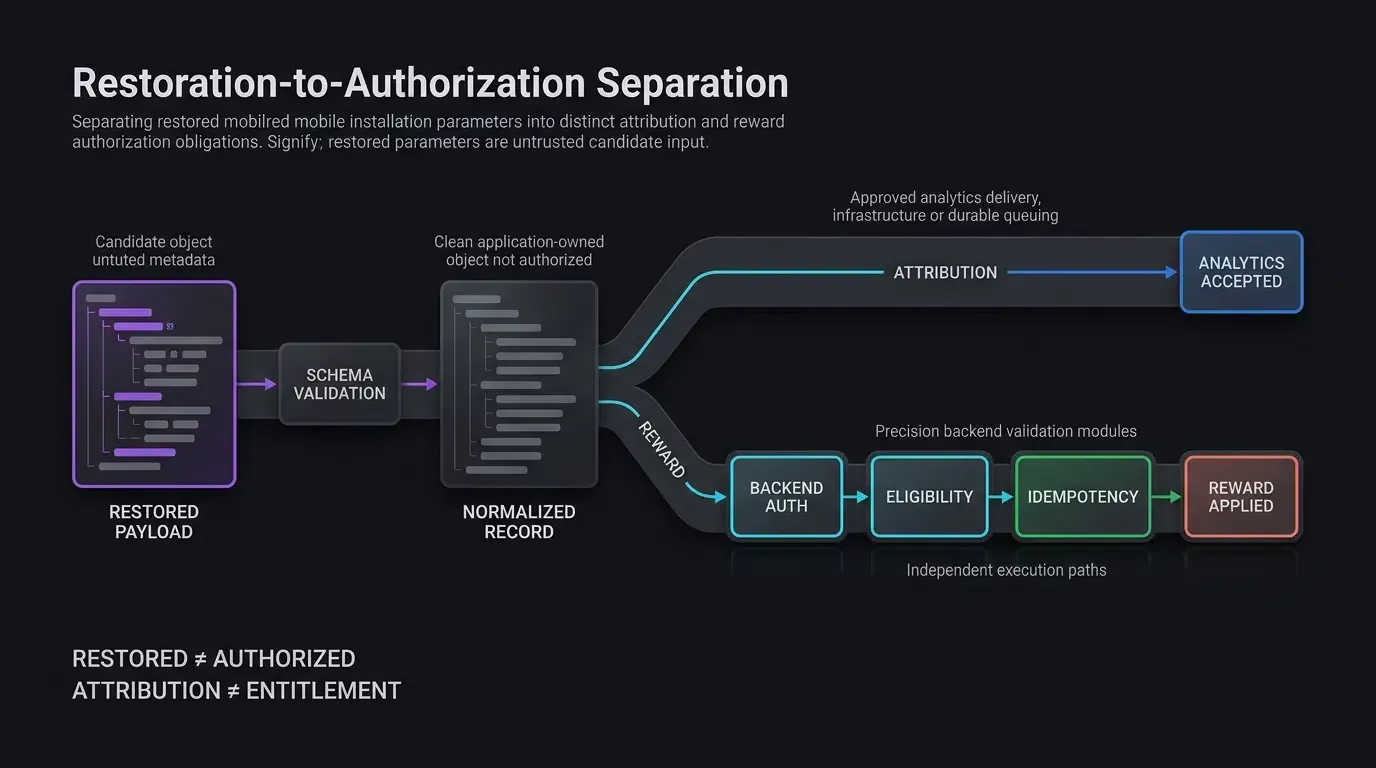
All restored parameters must be treated as untrusted input.
Marketing tags and referral tokens can originate from editable URLs or untrusted client requests. Their presence alone does not establish that a campaign is legitimate or that a user is eligible for a reward.
Applications should follow these principles:
- Allowlisted values: Accept only explicitly supported keys and bounded values.
- Separate attribution from authorization: UTM values may describe traffic origin; they must not independently authorize promotional benefits.
- Time-bounded pending records: Retain only the information required for processing, subject to an application-defined expiration window.
- Protected storage: Use storage appropriate to the sensitivity of pending tokens, such as an Android Keystore-backed design or iOS Keychain Services where warranted.
- Independent delivery outcomes: For records containing both marketing and reward parameters, the application must track the required outcomes independently.
- Server-side reward validation: Referral credits, promotional discounts, and similar entitlements must be approved by an authenticated application backend.
- Idempotent reward application: The backend should enforce transaction-level idempotency and business-level uniqueness constraints so repeated client requests cannot duplicate one-time rewards.
The code below illustrates the parameter boundary and the host application’s integration responsibilities. It does not attempt to provide a complete production-grade storage, analytics, or reward transaction system.
End-to-End Implementation: Capturing Web Parameters to Native Restoration
Sanitizing Web Query Parameters: HTML Bootstrap, Allowlist Parsing, and Web JS SDK Setup
A landing page can capture explicitly supported query parameters and pass them to the Web SDK as a bounded payload.
The following example demonstrates:
- Loading the SDK from its configured source.
- Preserving a normal HTTPS download fallback link.
- Accepting only supported parameter keys.
- Rejecting values outside a narrow character and length policy.
- Connecting an SDK download action to the page’s download button.
The SDK constructor, configuration keys, and methods are representative. Verify their signatures against the exact deployed OpoInstall Web SDK release before publication or deployment.
<!-- CODE_BLOCK_01: Representative HTML Bootstrap and Web SDK Integration -->
<!-- File: landing_page.html -->

<!DOCTYPE html>
<html lang="en">
<head>
    <meta charset="UTF-8">
    <meta name="viewport" content="width=device-width, initial-scale=1">
    <title>Application Download</title>
</head>
<body>
    <!-- Replace with a real HTTPS download or store-routing URL. -->
    <a
        id="download-app-btn"
        href="https://app.example.com/store-download"
    >
        Download App
    </a>

    <!-- Verify the official CDN URL against the deployed SDK version. -->
    <script src="https://web.cdn.opoinstallcloud.com/openinstall.js"></script>

    <script>
    (function () {
        "use strict";

        function getSanitizedQueryParams() {
            var allowedKeys = new Set([
                "utm_source",
                "utm_medium",
                "utm_campaign",
                "inviter_id",
                "promo_code"
            ]);

            var validPattern = /^[A-Za-z0-9_.-]{1,64}$/;
            var result = Object.create(null);

            try {
                var query = new URLSearchParams(window.location.search);

                query.forEach(function (value, key) {
                    if (
                        allowedKeys.has(key) &&
                        validPattern.test(value) &&
                        !Object.prototype.hasOwnProperty.call(result, key)
                    ) {
                        result[key] = value;
                    }
                });
            } catch (error) {
                console.warn("Unable to parse URL parameters.");
                return Object.create(null);
            }

            return result;
        }

        var downloadButton = document.getElementById(
            "download-app-btn"
        );

        // Keep the anchor href as the normal browser fallback.
        if (!downloadButton) {
            return;
        }

        if (typeof OpenInstall === "undefined") {
            console.warn(
                "Web SDK unavailable; using the download link."
            );
            return;
        }

        var customParams = getSanitizedQueryParams();

        try {
            new OpenInstall({
                appKey: "OPOINSTALL_APPKEY_PLACEHOLDER",
                data: customParams,

                onready: function () {
                    var sdkClient = this;

                    downloadButton.addEventListener(
                        "click",
                        function (event) {
                            try {
                                // Representative SDK method.
                                // Verify its behavior and async failure
                                // handling for the deployed release.
                                sdkClient.wakeupOrInstall();
                                event.preventDefault();
                            } catch (error) {
                                console.warn(
                                    "SDK action failed; browser will use fallback."
                                );

                                // Do not prevent the default anchor action.
                            }
                        }
                    );
                }
            });
        } catch (error) {
            console.warn(
                "Web SDK initialization failed; using fallback link."
            );
        }
    })();
    </script>
</body>
</html>
The value policy intentionally accepts only letters, digits, underscores, hyphens, and periods, with a maximum of 64 characters.
Values containing spaces or other characters are excluded in this reference implementation. Teams with broader UTM naming requirements should define and test an appropriate field-specific schema instead of silently assuming all URL values are supported.
Likewise, advertising click identifiers such as gclid and fbclid are discussed as common web attribution concepts but are not included in this sample allowlist. Supporting them requires a separate data collection, retention, and privacy review.
The fallback anchor remains available when the SDK does not load or cannot initialize. Because SDK operations can fail asynchronously, a production integration must additionally follow the SDK’s documented error handling and redirect behavior; a synchronous try/catch alone is not a complete asynchronous fallback strategy.
Android Native Implementation: SDK Setup, Parameter Validation, and Host Application Contracts
After installation, the Android application can request supported parameters from the native SDK and normalize them into an application-defined record.
The sample below deliberately keeps the responsibilities separate:
- The OpoInstall SDK initializes in the application’s main process.
- The native callback supplies a candidate payload.
- The application validates and normalizes the payload.
- The application saves the record through a host-provided storage interface.
- A host-provided processing component coordinates marketing attribution and reward authorization.
- The application marks the record complete only after that component reports a verified processing result.
Important: The host interfaces are application-defined contracts, not OpoInstall APIs. This example requires the host application to supply implementations. It does not include insecure fallback storage, simulated analytics delivery, or a mock reward authorization response.
// CODE_BLOCK_02: Representative Android Integration (Kotlin)
// File: CustomApplication.kt and MainActivity.kt
//
// Verify OpoInstall imports and callbacks against the deployed AAR.
// Host implementations must be provided before parameter processing.

package com.example.app

import android.app.ActivityManager
import android.app.Application
import android.content.Context
import android.os.Bundle
import android.os.Handler
import android.os.Looper
import android.os.Process
import android.util.Log
import androidx.appcompat.app.AppCompatActivity
import com.opoinstall.api.OpoInstall
import com.opoinstall.api.OpoData
import com.opoinstall.api.OpoError
import com.opoinstall.api.ResultCallBack
import org.json.JSONObject
import java.util.UUID

enum class ParamFetchState {
    NOT_STARTED,
    FETCHING,
    RECEIVED,
    APPLIED,
    REJECTED,
    NO_MATCH,
    RETRYABLE_FAILURE
}

data class PendingAttributionRecord(
    val utmSource: String?,
    val utmMedium: String?,
    val utmCampaign: String?,
    val inviterId: String?,
    val promoCode: String?,
    val idempotencyKey: String,
    val createdAt: Long,
    val expiresAt: Long
) {
    val hasAttributionData: Boolean
        get() = listOf(
            utmSource, utmMedium, utmCampaign
        ).any { !it.isNullOrEmpty() }

    val hasRewardData: Boolean
        get() = !inviterId.isNullOrEmpty() ||
                !promoCode.isNullOrEmpty()

    val hasAnyData: Boolean
        get() = hasAttributionData || hasRewardData

    fun isValid(): Boolean {
        val now = System.currentTimeMillis()
        val pattern = Regex("^[A-Za-z0-9_.-]{1,64}$")

        val values = listOf(
            utmSource, utmMedium, utmCampaign,
            inviterId, promoCode
        )

        val validFields = values.all {
            it == null || pattern.matches(it)
        }

        val validWindow =
            expiresAt > createdAt &&
            expiresAt - createdAt <= 48L * 60 * 60 * 1000 &&
            now >= createdAt &&
            now <= expiresAt

        val validId = try {
            UUID.fromString(idempotencyKey)
            true
        } catch (_: IllegalArgumentException) {
            false
        }

        return hasAnyData &&
               validFields &&
               validWindow &&
               validId
    }
}

// Host-defined secure persistence contract.
// The implementation must distinguish missing data from
// storage failures and handle account binding where needed.
interface PendingTransactionStore {
    fun save(record: PendingAttributionRecord): Boolean
    fun load(): PendingAttributionRecord?
    fun clear(): Boolean
}

// Host-defined coordinator. Its implementation is responsible
// for independent telemetry/reward acknowledgments,
// idempotency, retry handling, and transaction identity checks.
interface InstallParameterProcessor {
    fun process(
        record: PendingAttributionRecord,
        onComplete: (ProcessingOutcome) -> Unit
    )
}

enum class ProcessingOutcome {
    COMPLETED,
    REJECTED,
    RETRYABLE_FAILURE
}

// These are application dependencies, NOT OpoInstall SDK APIs.
object HostAppDependencies {
    var transactionStore: PendingTransactionStore? = null
    var parameterProcessor: InstallParameterProcessor? = null

    val isConfigured: Boolean
        get() = transactionStore != null &&
                parameterProcessor != null
}

class CustomApplication : Application() {

    override fun onCreate() {
        super.onCreate()

        if (isMainProcess()) {
            OpoInstall.initialize(this)

            // The host app must configure dependencies here
            // using its actual DI/bootstrap mechanism.
            //
            // HostAppDependencies.transactionStore =
            //     hostProvidedProtectedStore
            //
            // HostAppDependencies.parameterProcessor =
            //     hostProvidedInstallParameterProcessor
        }
    }

    private fun isMainProcess(): Boolean {
        val manager = getSystemService(
            Context.ACTIVITY_SERVICE
        ) as ActivityManager

        val currentPid = Process.myPid()

        return manager.runningAppProcesses?.any {
            it.pid == currentPid &&
            it.processName == packageName
        } == true
    }
}

class MainActivity : AppCompatActivity() {

    private val mainHandler = Handler(Looper.getMainLooper())

    private var state = ParamFetchState.NOT_STARTED
    private var activeRecord: PendingAttributionRecord? = null
    private var processingInFlight = false

    private val transactionTtlMs =
        24L * 60 * 60 * 1000

    override fun onCreate(savedInstanceState: Bundle?) {
        super.onCreate(savedInstanceState)
        setContentView(R.layout.activity_main)

        startParameterFlow()
    }

    private fun startParameterFlow() {
        val store = HostAppDependencies.transactionStore
        val processor = HostAppDependencies.parameterProcessor

        if (store == null || processor == null) {
            Log.w(
                "OpoInstall",
                "Host dependencies unavailable; processing suspended"
            )
            state = ParamFetchState.RETRYABLE_FAILURE
            return
        }

        // Representative record recovery.
        // Production storage must report read failures separately
        // from a confirmed absence of a pending record.
        val existingRecord = try {
            store.load()
        } catch (error: Exception) {
            state = ParamFetchState.RETRYABLE_FAILURE
            return
        }

        if (existingRecord != null) {
            if (existingRecord.isValid()) {
                activeRecord = existingRecord
                state = ParamFetchState.RECEIVED
                processRecord(existingRecord)
            } else {
                // Invalid or expired records are not processed.
                if (!store.clear()) {
                    state = ParamFetchState.RETRYABLE_FAILURE
                    return
                }

                requestInstallParameters()
            }
        } else {
            requestInstallParameters()
        }
    }

    private fun requestInstallParameters() {
        if (!HostAppDependencies.isConfigured) {
            state = ParamFetchState.RETRYABLE_FAILURE
            return
        }

        if (state == ParamFetchState.FETCHING ||
            state == ParamFetchState.APPLIED ||
            state == ParamFetchState.NO_MATCH ||
            processingInFlight
        ) {
            return
        }

        state = ParamFetchState.FETCHING

        // Representative SDK callback.
        // Validate signature against the deployed AAR.
        OpoInstall.getInstance().getInstallParam(
            object : ResultCallBack<OpoData> {

                override fun onResult(opoData: OpoData?) {
                    mainHandler.post {
                        if (state != ParamFetchState.FETCHING) {
                            return@post
                        }

                        val rawData: Any? = opoData?.data

                        val payload = when (rawData) {
                            is String -> rawData
                            is JSONObject -> rawData.toString()
                            is Map<*, *> -> try {
                                JSONObject(rawData).toString()
                            } catch (_: Exception) {
                                null
                            }
                            else -> null
                        }

                        val record = payload?.let {
                            parseAndSanitizeRawPayload(it)
                        }

                        if (record == null) {
                            // No eligible data was recovered.
                            // This does not establish an organic install.
                            state = ParamFetchState.NO_MATCH
                            return@post
                        }

                        val store =
                            HostAppDependencies.transactionStore

                        if (store == null ||
                            !HostAppDependencies.isConfigured
                        ) {
                            state = ParamFetchState.RETRYABLE_FAILURE
                            return@post
                        }

                        activeRecord = record

                        // Do not claim durable recovery if saving fails.
                        val saved = try {
                            store.save(record)
                        } catch (_: Exception) {
                            false
                        }

                        if (!saved) {
                            Log.w(
                                "OpoInstall",
                                "Pending record could not be persisted"
                            )
                            state = ParamFetchState.RETRYABLE_FAILURE
                            return@post
                        }

                        state = ParamFetchState.RECEIVED
                        processRecord(record)
                    }
                }

                override fun onError(error: OpoError?) {
                    mainHandler.post {
                        if (state == ParamFetchState.FETCHING) {
                            Log.w(
                                "OpoInstall",
                                "Install parameter retrieval failed"
                            )
                            state = ParamFetchState.RETRYABLE_FAILURE
                        }
                    }
                }
            }
        )
    }

    private fun parseAndSanitizeRawPayload(
        rawJson: String
    ): PendingAttributionRecord? {
        return try {
            if (rawJson.length > 4096) return null

            val json = JSONObject(rawJson)
            val pattern = Regex("^[A-Za-z0-9_.-]{1,64}$")

            fun field(key: String): String? =
                (json.opt(key) as? String)?.takeIf {
                    pattern.matches(it)
                }

            val now = System.currentTimeMillis()

            val record = PendingAttributionRecord(
                utmSource = field("utm_source"),
                utmMedium = field("utm_medium"),
                utmCampaign = field("utm_campaign"),
                inviterId = field("inviter_id"),
                promoCode = field("promo_code"),
                idempotencyKey = UUID.randomUUID().toString(),
                createdAt = now,
                expiresAt = now + transactionTtlMs
            )

            record.takeIf { it.isValid() }
        } catch (_: Exception) {
            null
        }
    }

    private fun processRecord(
        record: PendingAttributionRecord
    ) {
        val processor = HostAppDependencies.parameterProcessor
        val store = HostAppDependencies.transactionStore

        if (processor == null || store == null ||
            !record.isValid()
        ) {
            state = ParamFetchState.RETRYABLE_FAILURE
            return
        }

        if (processingInFlight) return

        processingInFlight = true

        // The host processor must not report COMPLETED until
        // all required channel-specific outcomes are confirmed.
        processor.process(record) { outcome ->
            mainHandler.post {
                // Ignore superseded or stale transactions.
                if (activeRecord?.idempotencyKey !=
                    record.idempotencyKey
                ) {
                    return@post
                }

                processingInFlight = false

                when (outcome) {
                    ProcessingOutcome.COMPLETED -> {
                        finalizeRecord(
                            record,
                            ParamFetchState.APPLIED
                        )
                    }

                    ProcessingOutcome.REJECTED -> {
                        finalizeRecord(
                            record,
                            ParamFetchState.REJECTED
                        )
                    }

                    ProcessingOutcome.RETRYABLE_FAILURE -> {
                        state =
                            ParamFetchState.RETRYABLE_FAILURE
                    }
                }
            }
        }
    }

    private fun finalizeRecord(
        record: PendingAttributionRecord,
        terminalState: ParamFetchState
    ) {
        val store = HostAppDependencies.transactionStore
            ?: run {
                state = ParamFetchState.RETRYABLE_FAILURE
                return
            }

        if (activeRecord?.idempotencyKey !=
            record.idempotencyKey
        ) {
            return
        }

        // This example intentionally leaves durable terminal
        // journaling and atomic cleanup to the host store.
        // clear() must report whether cleanup succeeded.
        val cleared = try {
            store.clear()
        } catch (_: Exception) {
            false
        }

        if (!cleared) {
            state = ParamFetchState.RETRYABLE_FAILURE
            return
        }

        activeRecord = null
        state = terminalState

        Log.i(
            "OpoInstall",
            "Install parameter processing resolved"
        )
    }
}
The Android sample intentionally does not include a default implementation of PendingTransactionStore or InstallParameterProcessor.
The host application must provide them before invoking the workflow.
In particular, the processor must not return COMPLETED merely because a logging statement ran or an asynchronous request was started. A completed result must correspond to the processing requirements for the actual payload:
- UTM-only payload: The required attribution event is reliably accepted by the configured analytics system or durable event queue.
- Reward-only payload: The authenticated backend returns an accepted terminal authorization result.
- Mixed UTM and Reward payload: Both required channels reach their independently defined outcomes, and one channel cannot prematurely remove work required by the other.
If the host application requires cross-process recovery, the processor and protected store must additionally persist sufficient channel-specific progress and preserve stable transaction identifiers.
The activity above demonstrates the integration boundary; it is not a substitute for those application-specific implementations.
iOS Native Implementation: SDK Restoration and Application Integration Contracts
The iOS integration follows the same boundary.
The native SDK supplies candidate installation parameters. The application validates the payload, persists a pending record through a host-provided storage component, and delegates business processing to an application-owned coordinator.
The code is representative and must be adapted to the module name, delegate protocol, and callback signatures of the installed OpoInstall iOS SDK release.
// CODE_BLOCK_03: Representative iOS Integration (Swift)
// File: AppDelegate.swift
//
// Verify the module and SDK methods against the deployed
// OpoInstall framework version.

import UIKit
import libOpoInstallSDK

enum ParamFetchState: String {
    case notStarted = "NOT_STARTED"
    case fetching = "FETCHING"
    case received = "RECEIVED"
    case applied = "APPLIED"
    case rejected = "REJECTED"
    case noMatch = "NO_MATCH"
    case retryableFailure = "RETRYABLE_FAILURE"
}

struct PendingAttributionRecord: Codable {
    let utmSource: String?
    let utmMedium: String?
    let utmCampaign: String?
    let inviterId: String?
    let promoCode: String?
    let idempotencyKey: String
    let createdAt: TimeInterval
    let expiresAt: TimeInterval

    var hasAttributionData: Bool {
        return [
            utmSource, utmMedium, utmCampaign
        ].contains { !$0.isNilOrEmpty }
    }

    var hasRewardData: Bool {
        return !inviterId.isNilOrEmpty ||
               !promoCode.isNilOrEmpty
    }

    var hasAnyData: Bool {
        return hasAttributionData || hasRewardData
    }

    var isValid: Bool {
        let now = Date().timeIntervalSince1970
        let window = expiresAt - createdAt

        let pattern = "^[A-Za-z0-9_.-]{1,64}$"

        let fields = [
            utmSource, utmMedium, utmCampaign,
            inviterId, promoCode
        ]

        let validFields = fields.allSatisfy { field in
            guard let field = field else { return true }
            return field.range(
                of: pattern,
                options: .regularExpression
            ) != nil
        }

        return hasAnyData &&
               validFields &&
               UUID(uuidString: idempotencyKey) != nil &&
               window > 0 &&
               window <= 48 * 60 * 60 &&
               now >= createdAt &&
               now <= expiresAt
    }
}

private extension Optional where Wrapped == String {
    var isNilOrEmpty: Bool {
        return self?.isEmpty ?? true
    }
}

// Host-provided protected persistence contract.
protocol PendingTransactionStore {
    func save(_ record: PendingAttributionRecord) -> Bool
    func load() throws -> PendingAttributionRecord?
    func clear() -> Bool
}

enum ProcessingOutcome {
    case completed
    case rejected
    case retryableFailure
}

// Host-provided coordinator for analytics and reward processing.
protocol InstallParameterProcessor {
    func process(
        record: PendingAttributionRecord,
        completion: @escaping (ProcessingOutcome) -> Void
    )
}

// These are application contracts, not OpoInstall APIs.
struct HostAppDependencies {
    static var transactionStore: PendingTransactionStore?
    static var parameterProcessor: InstallParameterProcessor?

    static var isConfigured: Bool {
        return transactionStore != nil &&
               parameterProcessor != nil
    }
}

@UIApplicationMain
class AppDelegate:
    UIResponder,
    UIApplicationDelegate,
    OpoInstallDelegate {

    var window: UIWindow?

    private var state: ParamFetchState = .notStarted
    private var activeRecord: PendingAttributionRecord?
    private var processingInFlight = false

    private let transactionTTL: TimeInterval =
        24 * 60 * 60

    func application(
        _ application: UIApplication,
        didFinishLaunchingWithOptions launchOptions:
            [UIApplication.LaunchOptionsKey: Any]?
    ) -> Bool {

        // Representative SDK initialization.
        OpoInstallSDK.initWith(self)

        // The host app must register its actual dependencies
        // before starting parameter processing.
        //
        // HostAppDependencies.transactionStore =
        //     hostProvidedProtectedStore
        //
        // HostAppDependencies.parameterProcessor =
        //     hostProvidedInstallParameterProcessor

        startParameterFlow()
        return true
    }

    private func startParameterFlow() {
        guard HostAppDependencies.isConfigured,
              let store = HostAppDependencies.transactionStore
        else {
            print(
                "OpoInstall: Required host dependencies unavailable"
            )
            state = .retryableFailure
            return
        }

        do {
            if let saved = try store.load() {
                if saved.isValid {
                    activeRecord = saved
                    state = .received
                    processRecord(saved)
                    return
                }

                guard store.clear() else {
                    state = .retryableFailure
                    return
                }
            }
        } catch {
            // A read error is not equivalent to an empty store.
            state = .retryableFailure
            return
        }

        requestInstallParameters()
    }

    private func requestInstallParameters() {
        guard HostAppDependencies.isConfigured,
              state != .fetching,
              state != .applied,
              state != .noMatch,
              !processingInFlight
        else {
            return
        }

        guard let manager = OpoInstallSDK.defaultManager()
        else {
            state = .retryableFailure
            return
        }

        state = .fetching

        // Representative callback signature.
        manager.getInstallParmsCompleted({
            [weak self] (appData: OpoinstallData?) in

            DispatchQueue.main.async {
                guard let self = self,
                      self.state == .fetching
                else {
                    return
                }

                let rawData: Any? = appData?.data

                guard let record =
                    self.parseAndSanitizeRawPayload(rawData)
                else {
                    // No eligible custom parameters recovered.
                    // This is not definitive proof of organic traffic.
                    self.state = .noMatch
                    return
                }

                guard HostAppDependencies.isConfigured,
                      let store =
                          HostAppDependencies.transactionStore
                else {
                    self.state = .retryableFailure
                    return
                }

                self.activeRecord = record

                guard store.save(record) else {
                    // Do not claim a durable pending record
                    // when persistence has failed.
                    self.state = .retryableFailure
                    return
                }

                self.state = .received
                self.processRecord(record)
            }
        })
    }

    private func parseAndSanitizeRawPayload(
        _ rawData: Any?
    ) -> PendingAttributionRecord? {

        guard let rawData = rawData else {
            return nil
        }

        var dictionary: [String: Any]?

        if let map = rawData as? [String: Any] {
            dictionary = map
        } else if let jsonString = rawData as? String,
                  jsonString.count <= 4096,
                  let data = jsonString.data(using: .utf8),
                  let parsed = try? JSONSerialization.jsonObject(
                      with: data
                  ) as? [String: Any] {
            dictionary = parsed
        }

        guard let payload = dictionary else {
            return nil
        }

        let pattern = "^[A-Za-z0-9_.-]{1,64}$"

        func field(_ key: String) -> String? {
            guard let value = payload[key] as? String,
                  value.range(
                    of: pattern,
                    options: .regularExpression
                  ) != nil
            else {
                return nil
            }

            return value
        }

        let now = Date().timeIntervalSince1970

        let record = PendingAttributionRecord(
            utmSource: field("utm_source"),
            utmMedium: field("utm_medium"),
            utmCampaign: field("utm_campaign"),
            inviterId: field("inviter_id"),
            promoCode: field("promo_code"),
            idempotencyKey: UUID().uuidString,
            createdAt: now,
            expiresAt: now + transactionTTL
        )

        return record.isValid ? record : nil
    }

    private func processRecord(
        _ record: PendingAttributionRecord
    ) {
        guard record.isValid,
              let processor =
                  HostAppDependencies.parameterProcessor
        else {
            state = .retryableFailure
            return
        }

        guard !processingInFlight else {
            return
        }

        processingInFlight = true

        // The host processor must confirm the required
        // attribution and reward outcomes independently.
        processor.process(record: record) {
            [weak self] outcome in

            DispatchQueue.main.async {
                guard let self = self,
                      self.activeRecord?.idempotencyKey ==
                          record.idempotencyKey
                else {
                    return
                }

                self.processingInFlight = false

                switch outcome {
                case .completed:
                    self.finalizeRecord(
                        record,
                        terminalState: .applied
                    )

                case .rejected:
                    self.finalizeRecord(
                        record,
                        terminalState: .rejected
                    )

                case .retryableFailure:
                    self.state = .retryableFailure
                }
            }
        }
    }

    private func finalizeRecord(
        _ record: PendingAttributionRecord,
        terminalState: ParamFetchState
    ) {
        guard activeRecord?.idempotencyKey ==
                  record.idempotencyKey,
              let store =
                  HostAppDependencies.transactionStore
        else {
            state = .retryableFailure
            return
        }

        // The host store must coordinate durable completion
        // and cleanup for the application's reliability needs.
        guard store.clear() else {
            state = .retryableFailure
            return
        }

        activeRecord = nil
        state = terminalState

        print(
            "OpoInstall: Install parameter processing resolved"
        )
    }
}
The iOS example does not supply a default UserDefaults-backed pending transaction store or a telemetry client that automatically reports success.
The host application must supply a storage implementation and a parameter processor appropriate to its security, analytics, and account management requirements.
Where the application processes reward-bearing values, the processor must not return .completed before server-side authorization has finished.
Where the payload includes only marketing data, completion must reflect the application’s defined analytics acceptance or reliable queuing requirement.
For mixed records, the processor must preserve unresolved work for each channel and ensure that stale callbacks cannot finalize a different transaction.
The representative code intentionally omits a complete retry scheduler and durable multi-channel transaction journal. Those concerns belong in the host application implementation and must be tested against its actual lifecycle and backend.
Production Integration Boundaries and Validation Checklist
Before deploying either mobile example, engineering teams should verify the following conditions.
| Integration Boundary | Required Production Validation |
|---|---|
| Web SDK | Confirm the CDN source, constructor configuration, download method, and asynchronous failure behavior for the deployed release. |
| Native SDK | Confirm package/module names, initialization requirements, callback signatures, and payload types against the exact Android AAR or iOS framework. |
| Input Schema | Confirm supported parameter names, value lengths, character rules, and handling of malformed or duplicate keys. |
| Protected Storage | Use an application-provided storage implementation with suitable protection, expiration, and error reporting. |
| Marketing Telemetry | Confirm that successful completion means an analytics event was reliably accepted or durably queued, rather than merely logged. |
| Reward Authorization | Use authenticated application backend validation; never grant a reward based solely on client-provided parameters. |
| Mixed Payloads | Preserve independently pending attribution and reward work until each required outcome is resolved. |
| Idempotency | Maintain stable transaction identity across retries and enforce reward uniqueness on the server. |
| Release Builds | Validate Android minified builds and iOS builds with the actual SDK artifacts. |
| Privacy Review | Verify the SDK’s actual data collection and matching behavior against platform and regulatory requirements. |
These are integration acceptance criteria, not claims that the reference code or a particular SDK release has already passed production testing.
Parameter Passing Strategy Comparison Matrix
Methodological Analysis of Parameter Restoration Strategies
Mobile acquisition systems use different approaches to preserve referral and attribution context between web visits and native applications.
The appropriate approach depends on the target platform, required parameter types, acceptable user friction, data sensitivity, and available platform mechanisms.
| Parameter Strategy | Restoration Coverage | User Friction | Privacy / Policy Considerations | Backend Authorization & Idempotency Required |
|---|---|---|---|---|
| Manual Promo Code Entry | Depends on user participation and code availability. | High; users enter codes manually. | Does not require device matching for code entry, but ordinary data protection rules still apply. | Yes, for reward redemption. |
| Google Play Install Referrer | Google Play installations on supported Android flows. | Minimal when implemented successfully. | Official store-supported transport; downstream processing and data use still require review. | Yes, when referrer values can trigger rewards. |
| OpoInstall Parameter Restoration | Depends on deployed SDK behavior, entry path, platform, and permitted matching mechanisms. | Usually minimal when restoration succeeds. | Requires evaluation of SDK data practices, permissions, and platform rules. | Yes, for reward-bearing parameters. |
Evaluating Accuracy, Privacy Compliance, User Friction, and Security Boundaries
Manual promo code entry is easy to reason about technically but can introduce user friction.
Google Play Install Referrer offers a native, store-supported Android referral channel.
A third-party parameter restoration SDK can provide an application-level integration layer for eligible deferred context. However, its actual delivery coverage, technical mechanism, and privacy characteristics must be evaluated using the deployed release.
Regardless of the restoration method, the application must distinguish between receiving a parameter and authorizing a business action.
Troubleshooting Parameter Restoration, State Management, and SDK Integration Errors
Managing Client-Side State Transitions: Handling No-Match, Retries, and Terminal Outcomes
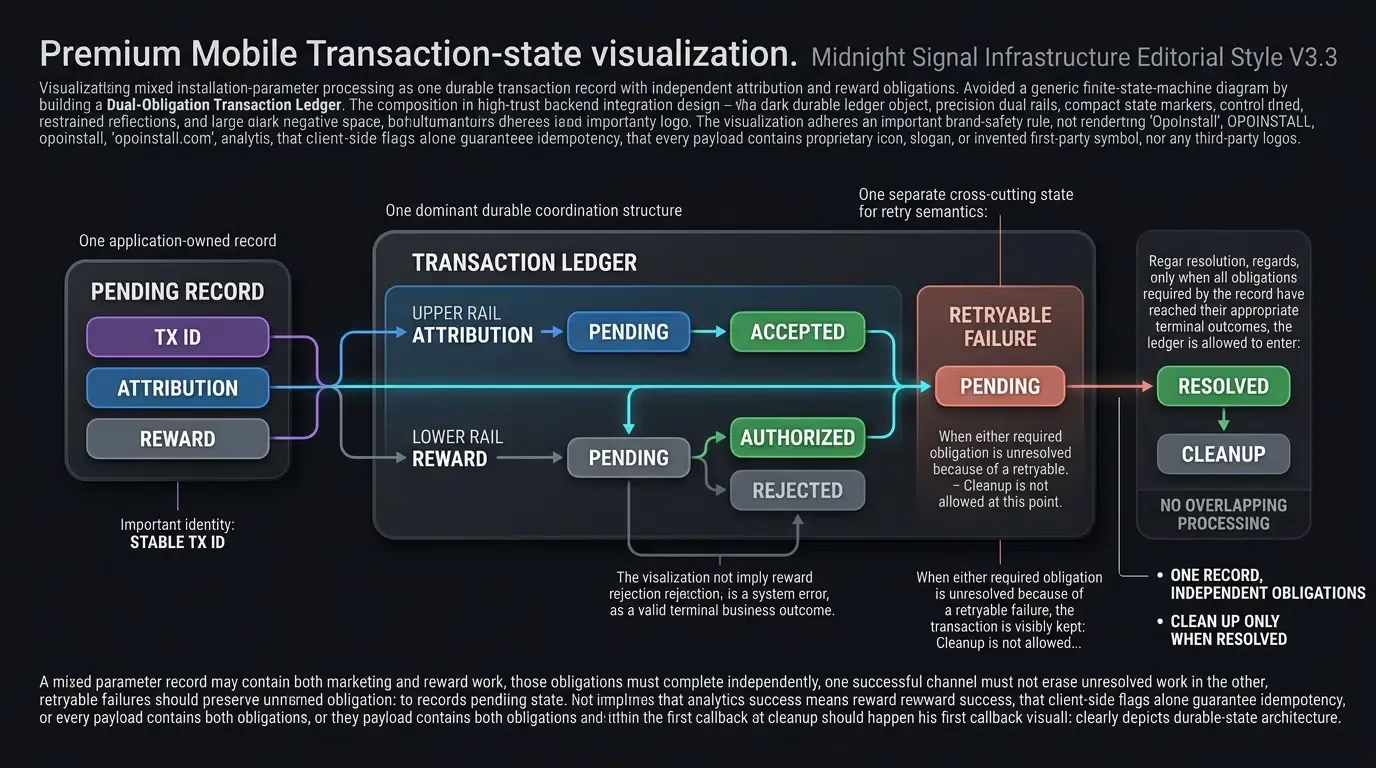
A parameter restoration workflow can be described using seven logical states:
| State | Meaning |
|---|---|
NOT_STARTED |
No retrieval attempt has started. |
FETCHING |
The application is requesting installation parameters. |
RECEIVED |
A candidate payload has been received and accepted for processing. |
APPLIED |
The host processor reports that all required successful outcomes for this record are complete. |
REJECTED |
The host processor reports a defined terminal rejection. |
NO_MATCH |
The retrieval attempt did not produce eligible custom parameters. |
RETRYABLE_FAILURE |
The workflow cannot currently continue and may be retried under a controlled policy. |
These states describe application-level outcomes. They do not replace the host application’s durable coordination for analytics, rewards, storage, and retries.
In particular, a marketing-only record can complete without reward authorization, while a reward-bearing record must obtain the appropriate server response.
A NO_MATCH result should not be interpreted as definitive proof that the installation was organic.
Resolving Parameter Request Timeouts and Network Delays Gracefully
Parameter restoration can be affected by connectivity, callback timing, app startup order, or unavailable backend services.
Applications should:
- Keep network work asynchronous.
- Avoid blocking the main user interface during installation parameter retrieval.
- Distinguish an unavailable SDK manager from an empty parameter result.
- Treat local persistence errors as processing failures, not as confirmation that no record exists.
- Retry according to a bounded application policy rather than repeatedly issuing requests on every foreground transition.
- Preserve an existing pending record when an operation must be retried.
Any implementation that automatically retries should prevent overlapping requests and reject callbacks belonging to superseded transactions.
Managing Application Overwrite Installs and Stale Parameter Buffers
Parameter restoration commonly targets first launch after an eligible install, but application upgrades and repeated launches can expose previously stored local state.
Engineering teams should define when a restoration attempt is eligible, how already-consumed records are identified, and how pending data expires.
For reward-bearing parameters, server-side idempotency is essential. A client-side flag alone is not sufficient protection against duplicate rewards.
When the application maintains a pending transaction locally, it should remove the record only after its required processing outcomes have been durably resolved.
Preventing Android Multi-Process Re-Initialization Issues
Android applications with multiple processes may execute Application.onCreate() more than once.
If the native SDK is intended to initialize only in the primary application process, developers should verify the current process before initializing it.
The Android sample demonstrates one process-name comparison strategy. Production applications should check the approach against their supported Android versions and process architecture.
Debugging Client Callback Signature Mismatches and Code Shrinker Obfuscation Rules
A third-party SDK’s package names, callback interfaces, and class declarations can vary across releases.
When integration fails, developers should validate the deployed SDK rather than assume that example interfaces remain unchanged.
For Android release builds:
- Prefer consumer R8 / ProGuard rules supplied with the exact SDK artifact.
- Avoid broad package-wide
-keepor-dontwarnrules without evidence. - Inspect actual reflection requirements before adding narrow supplemental rules.
- Test the installation parameter callback in a minified release configuration.
The code in this guide is a representative integration and should not be described as release-verified without corresponding build and runtime evidence.
Frequently Asked Questions (FAQ)
How do tracking parameters persist when a user installs an app via the App Store?
What privacy restrictions apply to clipboard payloads on iOS and Android?
Can tracking parameters carry nested JSON payloads for dynamic in-app routing?
Summary and Decision Framework
Stitching web clicks to mobile app store installs requires a parameter restoration approach that respects the technical boundaries between browsers, app stores, and native applications.
For Android, the Google Play Install Referrer API offers an official referral mechanism for supported installation flows. For iOS, arbitrary web parameters are not automatically delivered through the App Store, so deferred restoration requires an independently verified, privacy-conscious approach.
A practical OpoInstall integration can capture allowlisted landing-page parameters and request eligible context through a native SDK. The application must then normalize and validate recovered data before using it for marketing attribution, navigation, or promotional workflows.
The key engineering distinction is between parameter restoration and application-side processing. Recovering a parameter does not guarantee analytics delivery, reward eligibility, or successful authorization.
The reference code demonstrates SDK integration boundaries and application-defined contracts. Production teams must provide their own protected storage, reliable analytics handling, server-side entitlement verification, and lifecycle coordination.
To explore the vendor integration requirements, consult the OpoInstall SDK documentation or the OpoInstall developer registration page.
Related Materials
Concepts: App Parameter Installation, Google Play Install Referrer, Deferred Parameter Restoration, Attribution Telemetry, Server Authorization Boundary.
Technologies: Web JS SDK, Native Mobile SDK, URL Query Parameters, Android Keystore, iOS Keychain Services.
Standards: IETF RFC 3986 URI Syntax, OWASP Mobile Application Security Verification Standard, W3C Clipboard API and Events.
APIs: OpoInstall Native Installation Parameter API, Google Play Install Referrer API, Apple UIPasteboard API, Android Clipboard APIs.
Official Documentation & References:
Share this article