如何在 iOS SDK 中驗證通用連結(Universal Links)授權? 在 macOS 上使用 codesign 與 plutil 檢查已簽署的宿主應用程式,以確認 com.apple.developer.associated-domains 包含預期的 applinks: 項目。Apple 的 TN3125 文件記錄了如何讀取應用程式已簽署的授權,而 TN3155 則展示如何使用 swcutil verify 針對 apple-app-site-association (AASA) 規則檢查特定 URL。在實體 iPhone 上,測試冷啟動與熱啟動,以確認 iOS 能將連結傳遞至宿主應用程式,且 SDK 能正確處理。這些檢查有助於釐清簽署、網域關聯或 SDK 處理失敗的問題。
為什麼程式化 iOS 授權驗證會區分建置時期與執行時期
iOS 執行時期沙箱邊界與描述檔案限制
從 macOS 或 Android 轉移過來的工程師經常會假設 iOS 應用程式可以在執行時期以程式化方式讀取其自身編譯的 com.apple.developer.associated-domains 陣列。Apple 的 SecTaskCopyValueForEntitlement API 文件僅列出 macOS 與 Mac Catalyst,而原生 iOS SDK 並未公開任何 SecTask 授權讀取 API。
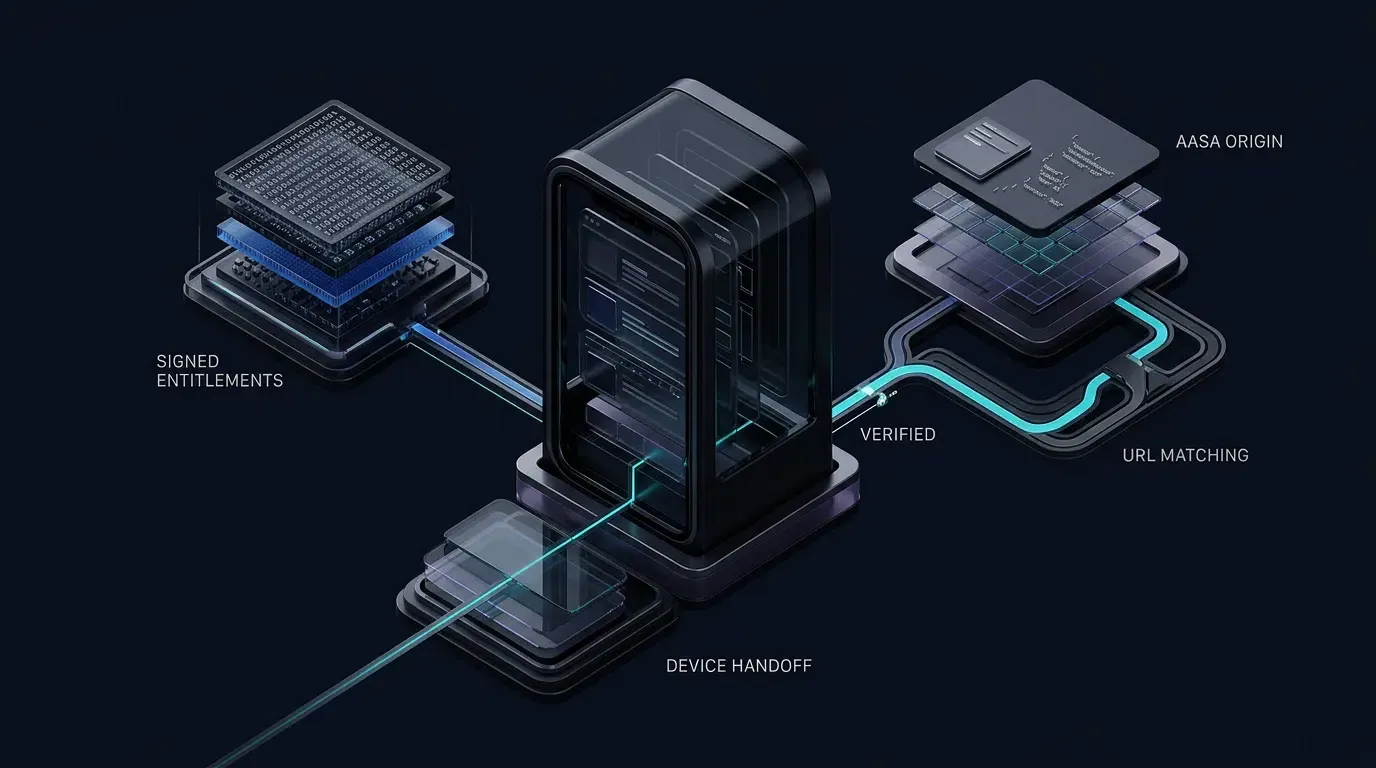
如 Apple 技術備忘錄 TN3125: Inside Code Signing: Provisioning Profiles 中所述,在 Swift 程式碼中於執行時期嘗試解析 embedded.mobileprovision 在各發布管道中同樣不可靠:
- 商店重新簽署與描述檔案移除:從 App Store 下載的應用程式不包含
embedded.mobileprovision檔案,且 App Store Connect 會在發布前重新簽署 App Store 與 TestFlight 建置版本。因此,執行時期程式碼不能假設生產環境發布版本中存在內嵌描述檔案。 - 授權功能與編譯網域:內嵌描述檔案反映的是已授權的 App ID 功能,而非總是列舉出嵌入在 Mach-O 二進位檔簽署內部的確切編譯
applinks:字串。 - DER 編碼描述檔案架構:描述檔案將資料包裝在密碼訊息語法 (CMS) 封裝內,而現代 iOS 版本依賴描述檔案的
DER-Encoded-Profile表示方式,而非舊版的 plist 欄位作為權威來源。與其在 Swift 內部從embedded.mobileprovision切割 XML 子字串,不如在 macOS CI 上使用security cms檢查包含embedded.mobileprovision的提交前建置成品,並使用codesign檢查編譯後的二進位檔授權。
由於這些邊界,驗證工作被分割為三個獨立的層級:
| 驗證層級 | 檢查項目 | 通過結果確認 | 若失敗則檢查下一步 |
|---|---|---|---|
| 1. 建置 / CI 已簽署成品 | 在匯出的 .app / .ipa 上執行 codesign 與 plutil |
簽署中存在預期的 applinks: 網域、application-identifier 以及 Team ID |
Debug/Release 組態中的 Xcode CODE_SIGN_ENTITLEMENTS |
2. 來源 AASA 與 swcutil |
驗證 .well-known JSON(無 3xx)與 swcutil verify -u |
來源 AASA 通過範例結構檢查以及測試的 URL 符合/排除案例 | 伺服器重新導向、appIDs/components 語法或 Apple CDN 同步 |
| 3. 實體裝置執行時期 | 透過 SceneDelegate 與 SDK 測試冷/熱啟動通用連結點擊 |
iOS 將 NSUserActivity 傳遞至宿主應用程式且 OpoInstallSDK 處理連結 |
AASA 路徑排除、「使用者核准」(「在 Safari 中打開」)或 SDK 委派設定 |
授權不匹配如何破壞 iOS SDK 深層連結
當 Xcode 目標之間發生數個建置不匹配的情況之一時,通用連結會路由至 Safari 而非已安裝的應用程式,或者無法解析商業參數:
- Debug 與 Release
.entitlements偏離:Xcode 允許為 Debug 和 Release 組態設定不同的CODE_SIGN_ENTITLEMENTS路徑。僅將applinks:links.example.com新增至 Debug 授權檔案會導致本機執行通過,而 TestFlight 建置版本失效。 - App ID 對齊與獨立 Team ID:Apple 的 Associated Domains 引擎會使用應用程式簽署內部的確切
application-identifier(<AppIDPrefix>.<BundleID>) 來繫結applinks:網域,該識別碼必須與您主機代管的 AASA JSON 中宣告的appID/appIDs一致。雖然 App ID 前綴通常符合com.apple.developer.team-identifier,但舊版應用程式可能具有不同的前綴,這需要 CI 檢查來驗證application-identifier是否符合 AASA,並將com.apple.developer.team-identifier視為獨立的斷言。 - 主目標與 CocoaPods 子目標:
Pods.xcodeproj內的框架或資源包子目標不包含宿主應用程式的com.apple.developer.associated-domains授權;必須一律在已簽署的主應用程式套件上驗證關聯網域。若舊版流程回退至自訂 URL Scheme (url scheme),請驗證主目標Info.plist中的那些 Scheme 項目。
重點一覽
- 在 CI/CD 中驗證匯出成品,而非生產環境執行時期:原生 iOS 未公開任何
SecTask執行時期 API;請使用codesign與plutil檢查最終匯出的上傳.ipa或.app簽署。 - 避免在應用程式內對
embedded.mobileprovision進行字串切割:App Store 下載項目會省略內嵌描述檔案,App Store Connect 會重新簽署 App Store 與 TestFlight 建置版本,且現代 iOS 依賴DER-Encoded-Profile;檢查包含embedded.mobileprovision的建置版本時,請在 macOS CI 上使用security cms。 - 使用
swcutil verify -u測試具體 URL:確認來源 AASA 主機代管傳回HTTP 200且無 3xx 重新導向,執行結構綱要預先檢查,並使用 Apple 的swcutilCLI 測試相符與排除的 URL。 - 與 OpoInstall SDK v2.1.0 標頭及
Info.plist對齊:在Info.plist中設定com.opoinstall.APP_KEY,透過 Objective-C 橋接標頭公開OpoInstallSDK.h,傳播OpoInstallSDK.continue(userActivity)的Bool結果,並在getWakeUpParams(_ appData: OpoInstallData?)中驗證預設測試欄位是否到達。
如何透過 CLI 和 CI 程式化擷取與驗證關聯網域
使用 codesign 與 plutil 檢查編譯後的 .app 與 .ipa 套件
macOS codesign 公用程式會讀取嵌入在已簽署 Mach-O 二進位檔中的確切授權,使其成為在上傳至 App Store Connect 之前檢查匯出 .ipa 封存檔的權威工具。
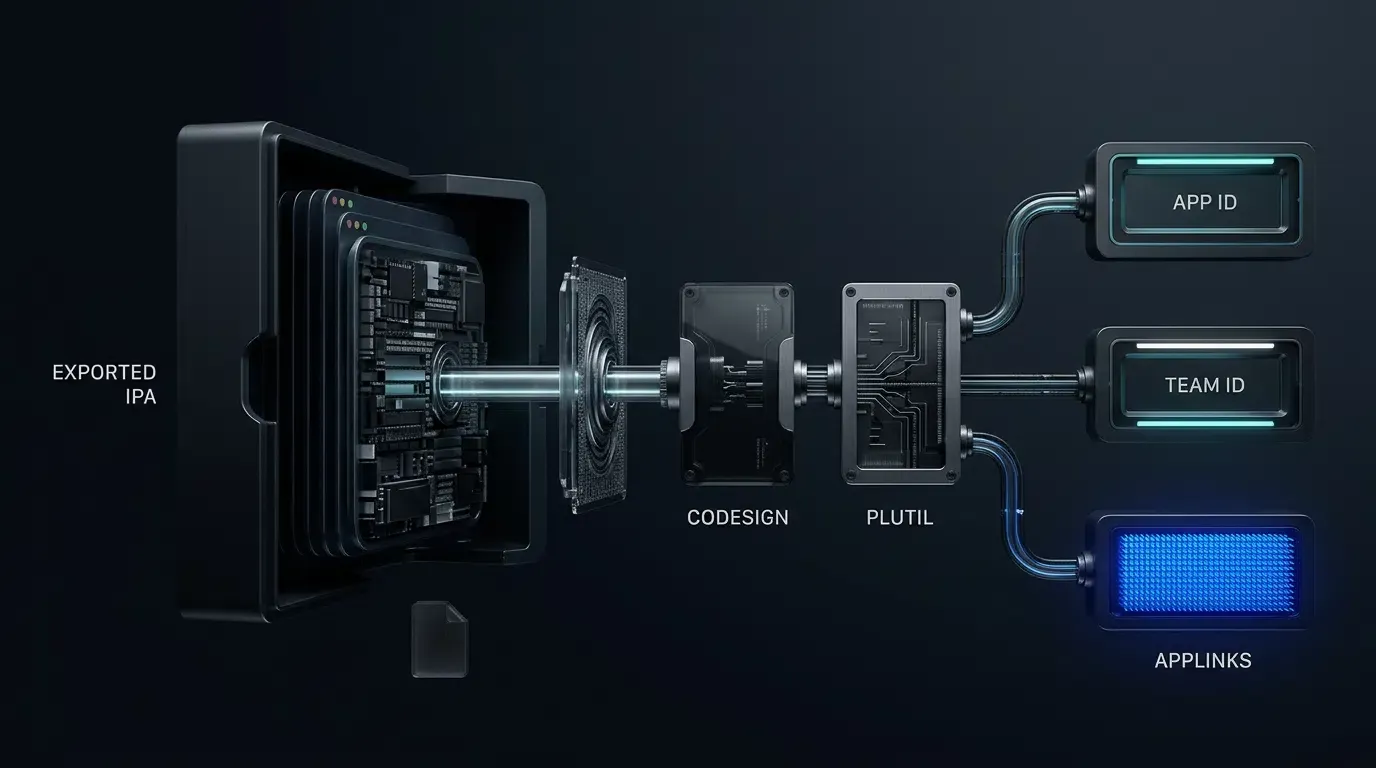
如 Apple 技術備忘錄 TN3125 中所述,將 codesign --display --entitlements - --xml 管道傳輸至 plutil -convert xml1 -o - - 以輸出標準化的 XML1 plist 輸出供下游解析器使用:
# 解壓縮匯出的 .ipa,以 XML1 plist 檢查編譯後的二進位檔授權,並在 macOS CI 上檢查描述檔案
unzip -q YourApp.ipa -d /tmp/ipa_inspect
codesign --display --entitlements - --xml /tmp/ipa_inspect/Payload/YourApp.app | plutil -convert xml1 -o - -

# 針對包含內嵌描述檔案的建置成品:透過 security cms 解開
security cms -D -i /tmp/ipa_inspect/Payload/YourApp.app/embedded.mobileprovision | plutil -convert xml1 -o - -
在 codesign XML 輸出中確認三個不同的值:
application-identifier:符合<ExpectedAppIDPrefix>.<YourBundleID>(與您的 AASA 檔案一致)。com.apple.developer.team-identifier:符合您的獨立<ExpectedTeamID>。com.apple.developer.associated-domains:包含預期的applinks:網域項目。
在 CI 管線中自動化授權斷言
將 codesign 檢查整合到 CI 管線中,可以在分發之前攔截設定錯誤的 Release 建置版本。請務必檢查實際匯出的已簽署上傳 .ipa(在 Apple Store 重新簽署之前),而不僅僅是檢查匯出前的 .xcarchive。
以下指令碼透過 python3 -c '...' 傳遞 Python 驗證器,並透過 stdin (<<< "${ENTITLEMENTS_XML}") 傳送 XML 以防止標準輸入衝突。它需要明確的 --debug 或 --release 旗標——若缺少或旗標無效則以非零狀態結束。請注意,此指令碼示範針對範例專案檢查單一確切的 applinks:<domain> 項目;如果您的專案使用多個關聯網域或萬用字元項目(applinks:*.<domain>,其 AASA 主機代管規則依 TN3155 而有所不同),請明確斷言每個宣告的授權字串:
#!/usr/bin/env bash
# verify_ios_entitlements.sh
# 用法:./verify_ios_entitlements.sh <path_to_app_or_exported_ipa> <expected_app_id> <expected_team_id> <expected_domain> <--debug|--release>
set -euo pipefail

ARTIFACT_PATH="${1:?提供 .app 或匯出 .ipa 的路徑}"
EXPECTED_APP_ID="${2:?提供預期的 AppIDPrefix.BundleID}"
EXPECTED_TEAM_ID="${3:?提供預期的 Team ID}"
EXPECTED_DOMAIN="${4:?提供預期的通用連結網域}"
MODE_FLAG="${5:?提供明確的 --debug 或 --release 旗標}"

case "${MODE_FLAG}" in
    --debug|--release) ;;
    *)
        echo "錯誤:無效的模式旗標 '${MODE_FLAG}'。必須指定 --debug 或 --release。" >&2
        exit 2
        ;;
esac

TMP_DIR=""
cleanup() {
    if [[ -n "${TMP_DIR}" && -d "${TMP_DIR}" ]]; then
        rm -rf "${TMP_DIR}"
    fi
}
trap cleanup EXIT

APP_BUNDLE=""
if [[ "${ARTIFACT_PATH}" == *.ipa ]]; then
    TMP_DIR="$(mktemp -d)"
    unzip -q "${ARTIFACT_PATH}" -d "${TMP_DIR}"
    APP_BUNDLE="$(find "${TMP_DIR}/Payload" -maxdepth 1 -name "*.app" -print -quit)"
    if [[ -z "${APP_BUNDLE}" ]]; then
        echo "錯誤:在 ${ARTIFACT_PATH} 的 Payload/ 內找不到 .app 套件" >&2
        exit 1
    fi
elif [[ "${ARTIFACT_PATH}" == *.app ]]; then
    APP_BUNDLE="${ARTIFACT_PATH}"
else
    echo "錯誤:成品必須是 .app 套件或 .ipa 封存檔" >&2
    exit 1
fi

ENTITLEMENTS_XML="$(codesign --display --entitlements - --xml "${APP_BUNDLE}" | plutil -convert xml1 -o - -)"

python3 -c '
import plistlib
import sys

expected_app_id = sys.argv[1]
expected_team_id = sys.argv[2]
expected_domain = sys.argv[3]
mode_flag = sys.argv[4]
is_release = (mode_flag == "--release")

raw_xml = sys.stdin.buffer.read()
plist = plistlib.loads(raw_xml)

actual_app_id = plist.get("application-identifier")
if actual_app_id != expected_app_id:
    raise SystemExit(
        f"失敗:application-identifier 不匹配:取得 {actual_app_id!r},預期 {expected_app_id!r}"
    )

actual_team_id = plist.get("com.apple.developer.team-identifier")
if actual_team_id != expected_team_id:
    raise SystemExit(
        f"失敗:com.apple.developer.team-identifier 不匹配:取得 {actual_team_id!r},預期 {expected_team_id!r}"
    )

domains = plist.get("com.apple.developer.associated-domains")
if not isinstance(domains, list):
    raise SystemExit("失敗:com.apple.developer.associated-domains 遺失或不是陣列")

expected_prod = f"applinks:{expected_domain}"
expected_dev = f"applinks:{expected_domain}?mode=developer"

if is_release:
    if expected_prod not in domains:
        raise SystemExit(f"失敗:Release 成品中缺少生產環境項目 {expected_prod!r},現有項目為 {domains}")
    if any("?mode=developer" in item for item in domains if isinstance(item, str)):
        raise SystemExit(f"失敗:?mode=developer 洩漏至 Release 成品中:{domains}")
else:
    if expected_prod not in domains and expected_dev not in domains:
        raise SystemExit(f"失敗:在 {domains} 中找不到預期的 {expected_prod!r} 或 {expected_dev!r}")

print(f"通過 ({mode_flag}):已驗證 {actual_app_id} (team={actual_team_id}) -> {domains}")
' "${EXPECTED_APP_ID}" "${EXPECTED_TEAM_ID}" "${EXPECTED_DOMAIN}" "${MODE_FLAG}" \
  <<< "${ENTITLEMENTS_XML}"
圖解範例:在 TestFlight 提交前攔截 Release 授權偏離
模擬情境 / 圖解範例: 考慮一個整合了 iOS 歸因 SDK 的行動應用程式,其通用連結在本地 Xcode Debug 裝置執行期間可以可靠地開啟應用程式,但在透過 TestFlight 發布時卻會開啟 Safari。
- 觀察到的徵兆:測試人員點擊備忘錄中的行銷活動連結時,會被路由至 Safari 而非喚醒已安裝的 TestFlight 建置版本。在開發者機器上簽署的本地 Debug 建置版本則繼續如預期般開啟應用程式。
- 程式化分類排查:針對匯出的 Release
.ipa執行./verify_ios_entitlements.sh YourApp-Exported.ipa TEAM123456.com.example.app TEAM123456 links.example.com --release會以非零失敗狀態結束(FAIL: com.apple.developer.associated-domains missing or not an array)。 - 根本原因隔離:檢查 Xcode 的目標建置設定 (Build Settings) 發現,
CODE_SIGN_ENTITLEMENTS已針對Debug組態填入(AppDebug.entitlements),而Release組態則保持空白或指向缺少applinks:links.example.com的舊授權檔案。 - 補救與修復後驗證:在
Debug與Release之間對齊CODE_SIGN_ENTITLEMENTS、確保?mode=developer不存在於 Release 授權中、重新匯出.ipa,並重新執行 CIcodesign指令碼,即可在上傳前確認PASS (--release)。
驗證來源 AASA 規則、Apple CDN 更新頻率與 swcutil
了解 Apple 的 Associated Domains CDN 更新頻率
在 iOS 14 及更新版本中,Apple 會透過其 associated domains CDN 擷取並快取 AASA 檔案。當應用程式安裝時,裝置會下載該檔案,並大約每週檢查一次更新。由於 Apple 未提供直接的開發者 CDN 失效端點,因此重新安裝應用程式會觸發從 CDN 重新下載,而開發者模式則會繞過 CDN 並直接從您的開發伺服器擷取 AASA 檔案,如 Apple 的 TN3155: Debugging Universal Links 中所述。
此外,Apple 的 AASA 主機代管要求規定,來源 .well-known/apple-app-site-association 端點必須直接傳回 HTTP 200 OK,而不得依賴 HTTP 301/302/307/308 重新導向。
嚴格的結構預先檢查、最小可重現 AASA 與 swcutil verify -u
由於 Apple 會依序評估 AASA 路由規則(第一個符合的規則優先),靜態 JSON 預先檢查指令碼只能驗證綱要完整性與欄位型別,而無法驗證特定 URL 是否被較早的排除規則所遮蔽。請將結構化來源檢查與 Apple 官方的 swcutil verify 工具搭配使用,並使用具體的相符與排除 URL。

考慮以下最小可重現的 apple-app-site-association 檔案,它在萬用字元 /campaign/* 範例路由以及主機擁有的 /account/profile 路由之前,放置了針對 /admin/login 的明確排除項:
{
  "applinks": {
    "details": [
      {
        "appIDs": [
          "TEAM123456.com.example.app"
        ],
        "components": [
          {
            "/": "/admin/login",
            "exclude": true,
            "comment": "將管理員登入連結保留在 Safari 中"
          },
          {
            "/": "/campaign/*",
            "comment": "將相符的行銷活動連結路由至已安裝的應用程式"
          },
          {
            "/": "/account/profile",
            "comment": "將主機擁有的個人檔案連結路由至已安裝的應用程式"
          }
        ]
      }
    ]
  }
}
在 macOS 上使用 swcutil verify 針對範例 AASA 在本地測試所有三個 URL(相符路由與排除路由):
# 1. 預期相符 (Campaign 範例):驗證 /campaign/example 是否符合 TEAM123456.com.example.app
sudo swcutil verify \
  -d links.example.com \
  -j ./apple-app-site-association \
  -u https://links.example.com/campaign/example

# 2. 預期相符 (主機連結):驗證 /account/profile 是否符合 TEAM123456.com.example.app
sudo swcutil verify \
  -d links.example.com \
  -j ./apple-app-site-association \
  -u https://links.example.com/account/profile

# 3. 預期排除 (封鎖相符):驗證 /admin/login 是否被明確規則排除
sudo swcutil verify \
  -d links.example.com \
  -j ./apple-app-site-association \
  -u https://links.example.com/admin/login
在 swcutil 輸出中,確認 /campaign/example 與 /account/profile 針對 TEAM123456.com.example.app 解析為正向的 matched 項目(當網域代管多個 App ID 時這點很重要),而 /admin/login 由於 "exclude": true 而產生 blocked match。在實體 iPhone 上,擷取 sysdiagnose 封存檔並檢查 swcutil_show.txt 中的 Site/Fmwk Approval 與 User Approval 狀態。作為非官方、非封鎖的輔助診斷檢查,團隊也可以檢查 https://app-site-association.cdn-apple.com/a/v1/<domain>,但需了解它既不作為穩定的 Apple API,也不證明裝置端的關聯。
以下的 Python 預先檢查指令碼會驗證來源 .well-known AASA 端點——拒絕 HTTP 3xx 重新導向、無效的 UTF-8 位元組、網路讀取截斷(http.client.HTTPException、OSError)、格式錯誤的 JSON 根目錄、無效的元件欄位型別(根據 Apple 的 components 規格,支援 /、?、#、exclude、comment、caseSensitive 以及 percentEncoded)、appIDs 中的空字串、空規則列表以及僅排除的設定。它會檢查 details 中的每個項目,並拒絕項目內混合使用舊版與現代金鑰:
#!/usr/bin/env python3
# verify_aasa_origin.py
# 結構化來源預先檢查 (無 3xx 重新導向);請與 `swcutil verify -u` 搭配使用以進行 URL 比對
import http.client
import json
import sys
import urllib.error
import urllib.request

class NoRedirectHandler(urllib.request.HTTPRedirectHandler):
    def redirect_request(self, req, fp, code, msg, headers, newurl):
        raise urllib.error.HTTPError(
            req.full_url, code, f"不允許的 HTTP 重新導向 ({code}) -> {newurl}", headers, fp
        )

def fetch_json(url: str, allow_redirects: bool) -> tuple[int, str, object]:
    handlers = [] if allow_redirects else [NoRedirectHandler()]
    opener = urllib.request.build_opener(*handlers)
    req = urllib.request.Request(url, headers={"Accept": "application/json"})
    with opener.open(req, timeout=10) as resp:
        final_url = resp.geturl()
        body = json.loads(resp.read().decode("utf-8"))
        return resp.status, final_url, body

def is_valid_component(comp: object) -> bool:
    if not isinstance(comp, dict):
        return False
    allowed_keys = {"/", "?", "#", "exclude", "comment", "caseSensitive", "percentEncoded"}
    if not set(comp.keys()).issubset(allowed_keys):
        return False
    if "/" in comp and not isinstance(comp["/"], str):
        return False
    if "#" in comp and not isinstance(comp["#"], str):
        return False
    if "comment" in comp and not isinstance(comp["comment"], str):
        return False
    for bool_key in ("exclude", "caseSensitive", "percentEncoded"):
        if bool_key in comp and not isinstance(comp[bool_key], bool):
            return False
    if "?" in comp:
        q = comp["?"]
        if isinstance(q, dict):
            if not all(isinstance(k, str) and isinstance(v, str) for k, v in q.items()):
                return False
        elif not isinstance(q, str):
            return False
    return any(k in comp for k in ("/", "?", "#"))

def validate_aasa_structure(aasa_json: object, target_app_id: str) -> bool:
    if not isinstance(aasa_json, dict):
        return False
    applinks = aasa_json.get("applinks")
    if not isinstance(applinks, dict):
        return False
    details = applinks.get("details")
    if not isinstance(details, list) or not details:
        return False

    matched_target = False
    for entry in details:
        if not isinstance(entry, dict):
            return False

        has_modern = ("appIDs" in entry) or ("components" in entry)
        has_legacy = ("appID" in entry) or ("paths" in entry)

        # 檢查 details 中的每個項目,拒絕項目內混合使用舊版與現代金鑰
        if has_modern and has_legacy:
            return False
        if not has_modern and not has_legacy:
            return False

        if has_modern:
            app_ids = entry.get("appIDs")
            components = entry.get("components")
            if not isinstance(app_ids, list) or not app_ids or not all(isinstance(i, str) and i for i in app_ids):
                return False
            if not isinstance(components, list) or not components:
                return False
            if not all(is_valid_component(comp) for comp in components):
                return False

            if target_app_id in app_ids:
                if any(not comp.get("exclude", False) for comp in components):
                    matched_target = True

        elif has_legacy:
            app_id = entry.get("appID")
            paths = entry.get("paths")
            if not isinstance(app_id, str) or not app_id:
                return False
            if not isinstance(paths, list) or not paths or not all(isinstance(p, str) and p for p in paths):
                return False

            if app_id == target_app_id:
                if any(not p.startswith("NOT ") for p in paths):
                    matched_target = True

    return matched_target

if __name__ == "__main__":
    if len(sys.argv) != 3:
        print("用法:verify_aasa_origin.py <domain> <AppIDPrefix.BundleID>", file=sys.stderr)
        sys.exit(1)

    domain, expected_app_id = sys.argv[1], sys.argv[2]
    origin_url = f"https://{domain}/.well-known/apple-app-site-association"
    # 僅輔助診斷端點 (非阻斷性;不證明裝置關聯)
    cdn_url = f"https://app-site-association.cdn-apple.com/a/v1/{domain}"

    try:
        status, final_url, origin_json = fetch_json(origin_url, allow_redirects=False)
        valid_origin = (status == 200) and validate_aasa_structure(origin_json, expected_app_id)
        print(f"[Origin] HTTP {status} 於 {final_url} -> structural_preflight={valid_origin}")
        if not valid_origin:
            sys.exit(1)
    except (urllib.error.URLError, http.client.HTTPException, OSError, RuntimeError, UnicodeDecodeError, json.JSONDecodeError) as exc:
        print(f"[Origin] 失敗於 {origin_url}:{exc}", file=sys.stderr)
        sys.exit(1)

    try:
        status, final_url, cdn_json = fetch_json(cdn_url, allow_redirects=True)
        valid_cdn = validate_aasa_structure(cdn_json, expected_app_id)
        print(f"[Auxiliary CDN] HTTP {status} 於 {final_url} -> structural_preflight={valid_cdn}")
    except (urllib.error.URLError, http.client.HTTPException, OSError, RuntimeError, UnicodeDecodeError, json.JSONDecodeError) as exc:
        print(f"[Auxiliary CDN] 診斷通知 (非致命):{exc}")
在嚴格 Apple 授權限制下設定 ?mode=developer
在開發期間,?mode=developer 允許測試來源 AASA 更新,而無需等待每週 CDN 檢查或重新安裝應用程式。然而,根據 Apple 的 Associated Domains Entitlement 規格,?mode=developer 要求:(1) 使用開發描述檔案 (Development Provisioning Profile) 進行簽署,(2) 在實體裝置上啟用開發者模式(iOS 16+ 上的設定 > 隱私權與安全性 > 開發者模式),以及 (3) 明確同意關聯網域開發 (Associated Domains Development)(設定 > 開發者)。
?mode=developer 組態僅限於使用開發描述檔案簽署且使用者已明確同意關聯網域開發的應用程式。它不是生產環境授權,也不是通用的 CDN 快取失效機制。
請確保 XML 宣告(<?xml ...?>)位於第 1 行且前面沒有任何註解,以便 plist 解析器能夠乾淨地讀取兩個檔案:
Debug.entitlements(僅限開發描述檔案 + 同意之裝置):
<?xml version="1.0" encoding="UTF-8"?>
<!DOCTYPE plist PUBLIC "-//Apple//DTD PLIST 1.0//EN" "http://www.apple.com/DTDs/PropertyList-1.0.dtd">
<plist version="1.0">
<dict>
    <key>com.apple.developer.associated-domains</key>
    <array>
        <string>applinks:links.example.com?mode=developer</string>
    </array>
</dict>
</plist>
Release.entitlements(生產環境 / TestFlight 發布):
<?xml version="1.0" encoding="UTF-8"?>
<!DOCTYPE plist PUBLIC "-//Apple//DTD PLIST 1.0//EN" "http://www.apple.com/DTDs/PropertyList-1.0.dtd">
<plist version="1.0">
<dict>
    <key>com.apple.developer.associated-domains</key>
    <array>
        <string>applinks:links.example.com</string>
    </array>
</dict>
</plist>
如何使用 OpoInstallDelegate 在 Swift 中驗證通用連結傳遞
先決條件:Info.plist AppKey、靜態 XCFramework 橋接與 SceneDelegate
在使用 OpoInstall iOS SDK v2.1.0 版本(另請參閱 OpoInstall iOS 整合指南)測試通用連結交接之前,請先驗證四項宿主先決條件:
- 在
Info.plist中設定com.opoinstall.APP_KEY:SDK 要求在啟動期間於Info.plist中提供您的應用程式金鑰以及OpoInstallSDK.initWith(self):
<!-- 插入至您的宿主應用程式 Info.plist <dict> 內 -->
<key>com.opoinstall.APP_KEY</key>
<string>YOUR_OPOINSTALL_APP_KEY</string>
- 設定 Objective-C 橋接標頭:v2.1.0 XCFramework 打包了帶有獨立
Headers且沒有module.modulemap的靜態.a程式庫。在 Swift 目標中,請透過您的 Objective-C 橋接標頭公開OpoInstallSDK.h,除非您的專案明確提供自訂模組對應檔,否則請避免依賴裸露的 Swiftimport libOpoInstallSDK陳述式。 - 橋接
AppDelegate與SceneDelegate:根據 Apple 的UISceneDelegate規格,使用 Scene 的應用程式會在scene(_:willConnectTo:options:)中透過connectionOptions.userActivities接收已終止的冷啟動通用連結,並在scene(_:continue:)中接收熱啟動通用連結。非 Scene 應用程式則會在AppDelegate.application(_:continue:restorationHandler:)中接收連結。 - 符合精確的 v2.1.0 型別並驗證預設測試欄位:在
OpoInstallSDK.h中,getWakeUpParams:是一個選用的OpoInstallDelegate回呼,接受可為空的OpoInstallData *(在 Swift 中為OpoInstallData?),而continueUserActivity:則傳回BOOL(Bool)。從您的轉發輔助程式中傳播該實際的Bool結果(當 SDK 傳回false時,回退至宿主應用程式自身的通用連結路由器,該路由器範圍限定於預期的 HTTPS 主機與路徑),並使用設定了預設驗證欄位(例如campaign_test_id=ul_verify_01)的已設定 OpoInstall 測試連結記錄四個獨立的檢查點:(1) 系統傳遞、(2)OpoInstallSDK.continue(userActivity)的Bool傳回值、(3)getWakeUpParams叫用,以及 (4) 非空白酬載狀態加上預設測試欄位符合(matchedExpectedTestField),同時從主控台輸出中省略原始值。
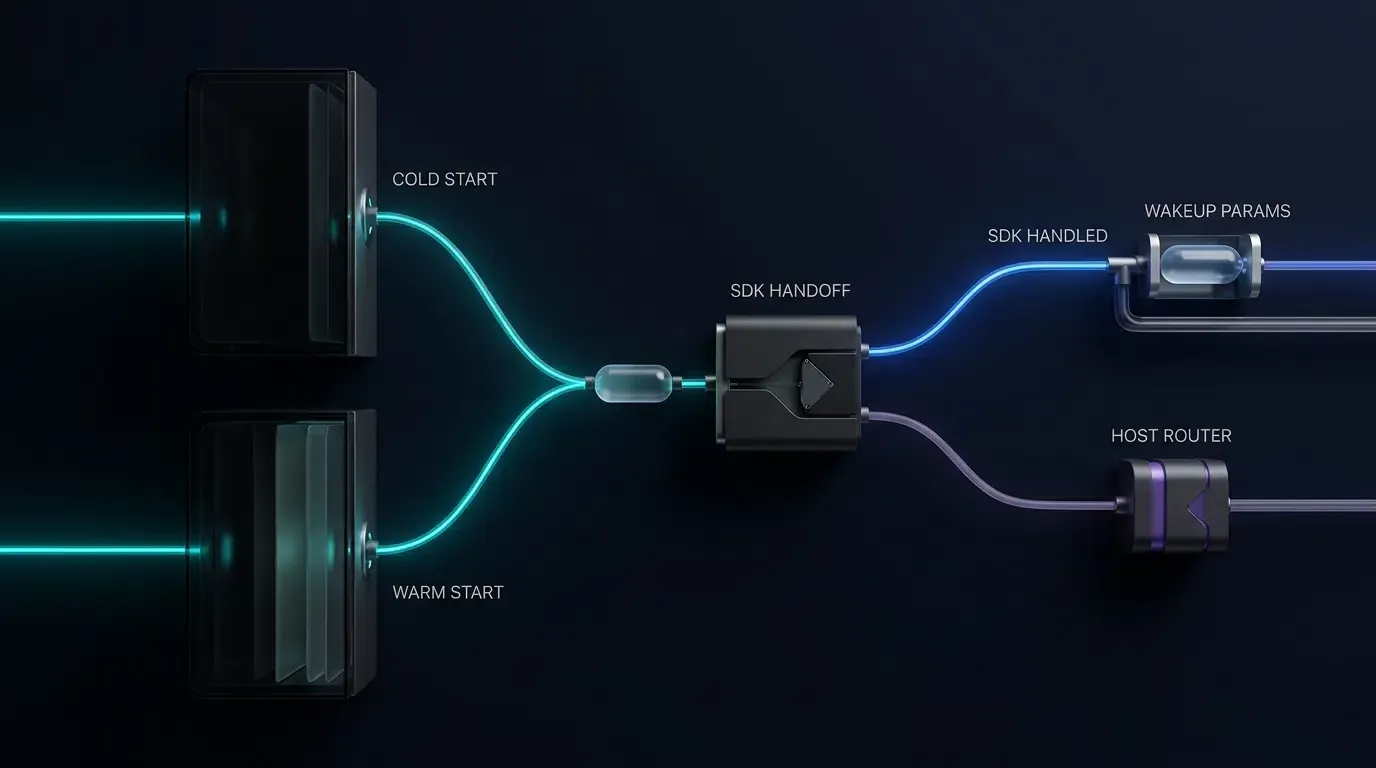
參考架構免責聲明: 以下 Swift 實作與 OpoInstall iOS SDK v2.1.0
OpoInstallSDK.h宣告保持一致(OpoInstallData?、傳回Bool的continue(_:),以及選用的getWakeUpParams)。請在 Xcode 26 中進行編譯,並在正式上線前從「備忘錄」驗證實體裝置的冷/熱啟動。
// YourApp-Bridging-Header.h
// 當使用不含自訂 modulemap 的靜態 v2.1.0 XCFramework 標頭時,在 Swift 目標中為必填項目
#import "OpoInstallSDK.h"
// iOS - UniversalLinkDiagnostics.swift
// 針對 OpoInstall iOS SDK v2.1.0 的參考架構 (透過橋接標頭公開)
import UIKit

@main
final class AppDelegate: UIResponder, UIApplicationDelegate, OpoInstallDelegate {

    var window: UIWindow?

    func application(
        _ application: UIApplication,
        didFinishLaunchingWithOptions launchOptions: [UIApplication.LaunchOptionsKey: Any]?
    ) -> Bool {
        OpoInstallSDK.initWith(self)
        return true
    }

    // 非 Scene 通用連結進入點:傳回實際的 SDK 或宿主路由 Bool 結果
    func application(
        _ application: UIApplication,
        continue userActivity: NSUserActivity,
        restorationHandler: @escaping ([UIUserActivityRestoring]?) -> Void
    ) -> Bool {
        return UniversalLinkForwarder.forwardIfBrowsingWeb(userActivity, source: "AppDelegate.continue")
    }

    // 符合 OpoInstallSDK.h v2.1.0 簽署 (OpoInstallData *)。
    // 請針對您的專案建置設定驗證 Swift 6 語言模式隔離要求。
    func getWakeUpParams(_ appData: OpoInstallData?) {
        let hasNonEmptyData = !(appData?.data?.isEmpty ?? true)
        let hasNonEmptyChannel = !(appData?.channelCode?.isEmpty ?? true)
        // 驗證預設測試欄位,而不記錄原始酬載字串
        let matchedExpectedTestField = (appData?.data?["campaign_test_id"] as? String) == "ul_verify_01"

        // 檢查點 3 與 4:記錄回呼到達、非空白狀態以及預設測試欄位符合狀況
        print("[ULDebug] getWakeUpParams 已觸發 (hasNonEmptyData: \(hasNonEmptyData), hasChannel: \(hasNonEmptyChannel), matchedExpectedTestField: \(matchedExpectedTestField))")

        DispatchQueue.main.async {
            // 在主佇列上安全地執行商業深層連結 Scene 路由
        }
    }
}

// 針對基於 Scene 的應用程式,在 Info.plist 的 UIApplicationSceneManifest 下註冊 SceneDelegate
final class SceneDelegate: UIResponder, UIWindowSceneDelegate {

    var window: UIWindow?

    func scene(
        _ scene: UIScene,
        willConnectTo session: UISceneSession,
        options connectionOptions: UIScene.ConnectionOptions
    ) {
        // 當應用程式先前已終止時的冷啟動通用連結傳遞
        for userActivity in connectionOptions.userActivities {
            _ = UniversalLinkForwarder.forwardIfBrowsingWeb(userActivity, source: "SceneDelegate.willConnectTo")
        }
    }

    func scene(_ scene: UIScene, continue userActivity: NSUserActivity) {
        // 當應用程式已經在執行時的熱 / 背景通用連結傳遞
        _ = UniversalLinkForwarder.forwardIfBrowsingWeb(userActivity, source: "SceneDelegate.continue")
    }
}

enum UniversalLinkForwarder {
    private static let allowedHostRoutingDomain = "links.example.com"

    @discardableResult
    static func forwardIfBrowsingWeb(_ userActivity: NSUserActivity, source: String) -> Bool {
        guard userActivity.activityType == NSUserActivityTypeBrowsingWeb,
              let url = userActivity.webpageURL else {
            print("[ULDebug] 已在 \(source) 中忽略非瀏覽用的 NSUserActivity")
            return false
        }

        let scheme = url.scheme?.lowercased() ?? "unknown"
        let host = url.host?.lowercased() ?? "unknown"
        // 檢查點 1:系統已將 NSUserActivityTypeBrowsingWeb 傳遞至宿主應用程式
        print("[ULDebug] 系統已在 \(source) 中為 \(scheme)://\(host) 傳遞通用連結")

        // 檢查點 2:轉發至 OpoInstall SDK 並檢查實際的 BOOL 處理結果
        let sdkHandled = OpoInstallSDK.continue(userActivity)
        print("[ULDebug] OpoInstallSDK.continue 傳回 handled=\(sdkHandled)")
        if sdkHandled {
            return true
        }

        // 若 SDK 未認領該連結,則回退至宿主擁有的通用連結路由器
        return handleHostSpecificUniversalLink(url)
    }

    private static func handleHostSpecificUniversalLink(_ url: URL) -> Bool {
        // 將主機路由嚴格限制在預期的 HTTPS 主機與路徑
        guard url.scheme?.lowercased() == "https",
              url.host?.lowercased() == allowedHostRoutingDomain,
              url.path == "/account/profile" else {
            return false
        }

        print("[ULDebug] 主機路由器已認領通用連結路由:\(url.path)")
        DispatchQueue.main.async {
            // 在此呈現您的專案個人檔案檢視控制器
        }
        return true
    }
}
實體裝置驗收矩陣(鎖定前迴歸閘道)
在將整合提升至生產環境之前,請執行並記錄來自 macOS Xcode 26 建置環境以及實體 iPhone 在這四個情境中的實際結果:
| 驗收情境 | 確切指令 / 動作 | 預期通過條件 |
|---|---|---|
| Xcode 26 編譯 | 在 Swift 5 或 Swift 6 模式下使用 Xcode 26(iOS 26 SDK)建置目標 |
SDK 靜態 XCFramework 連結成功,橋接標頭成功匯入 OpoInstallSDK.h,且 getWakeUpParams(_ appData: OpoInstallData?) 編譯無誤。 |
匯出 Release .ipa 檢查 |
./verify_ios_entitlements.sh YourApp-Exported.ipa TEAM123456.com.example.app TEAM123456 links.example.com --release |
指令碼印出 PASS (--release),確認 application-identifier、com.apple.developer.team-identifier 以及無 ?mode=developer 的 applinks:。 |
AASA swcutil 相符與排除 |
針對 /campaign/example、/account/profile 與 /admin/login 執行 sudo swcutil verify |
/campaign/example 與 /account/profile 針對 TEAM123456.com.example.app 輸出 matched;/admin/login 輸出 blocked match。 |
| Debug 與 TestFlight 冷/熱啟動 | 從 Apple「備忘錄」點擊攜帶 campaign_test_id=ul_verify_01、已排除的 /admin/login 以及主機 /account/profile 的已設定 OpoInstall 測試連結 |
OpoInstall 連結記錄 SceneDelegate 接收、sdkHandled=true、getWakeUpParams、hasNonEmptyData=true 以及 matchedExpectedTestField=true;/admin/login 開啟 Safari;/account/profile 記錄 SceneDelegate 接收、sdkHandled=false 以及傳回 true 的 [ULDebug] Host router claimed Universal Link route: /account/profile。 |
iOS 授權驗證方法之比較分析
| 驗證方法 | 執行環境 | 是否能看到確切的 applinks: 網域 |
可檢查的成品範圍 / 階段 | 建議用途 |
|---|---|---|---|---|
codesign --display --entitlements - --xml | plutil |
macOS / CI 建置管線 | 是(讀取已編譯的 Mach-O 簽署) | 檢查上傳前匯出的 .ipa / .app(在 Apple Store 重新簽署之前) |
主要的程式化 CI 閘道 |
來源 AASA 檢查 (無重新導向) + swcutil verify -u + sysdiagnose |
建置伺服器上的來源 Python 指令碼;macOS 上的 swcutil verify;iPhone 上的 sysdiagnose |
驗證 AASA JSON、appIDs 與 URL 相符項 |
檢查主機代管的 AASA 規則、URL 相符/排除決策以及裝置核准 | 來源預先檢查、Apple URL 相符與裝置核准診斷 |
security cms -D -i embedded.mobileprovision |
macOS CI(包含 embedded.mobileprovision 的建置版本) |
否(顯示授權功能,而非確切列表) | 包含內嵌描述檔案的提交前建置版本(App Store 下載項目中不存在) | 僅作 CI 描述檔案健康檢查 |
執行時期 NSUserActivity + getWakeUpParams |
實體 iOS 裝置 | 間接確認端到端路由 | 即時已安裝的應用程式建置版本 (Debug、TestFlight、App Store) | 端到端執行時期交接驗證 |
SecTaskCopyValueForEntitlement |
僅限 macOS / Mac Catalyst | 原生 iOS 公開 SDK 中無法使用 | 不適用於原生 iOS 目標 | 請勿在原生 iOS 應用程式中使用 |
常見問題 (FAQ)
iOS 應用程式可以在執行時期讀取其自身的 com.apple.developer.associated-domains 授權嗎?
為什麼 embedded.mobileprovision 會在 App Store 建置版本中消失?
為什麼通用連結驗證通過了 codesign 檢查,但仍然會開啟 Safari?
總結與決策架構
在 iOS SDK 專案中以程式化方式驗證通用連結授權,需要將二進位檔檢查轉移至 macOS 建置管線,同時保留 Swift 執行時期檢查供已安裝應用程式的喚醒診斷使用。透過在 CI 中對匯出的 .ipa 成品透過 codesign 與 plutil 斷言 com.apple.developer.associated-domains、application-identifier 以及 com.apple.developer.team-identifier,強制執行無重新導向的來源 AASA 主機代管並搭配 swcutil verify -u 相符/排除測試,將 ?mode=developer 限制在合格的開發建置版本中,並在 SceneDelegate 與 OpoInstallDelegate.getWakeUpParams 之間傳播 OpoInstallSDK.continue(userActivity) 的 Bool 結果,工程團隊就能系統化地隔離簽署、關聯與交接失敗的問題。
請注意已安裝應用程式通用連結路由與安裝後深層連結之間的功用界線:本指南驗證的是已安裝應用程式的通用連結交接(OpoInstallSDK.continue(userActivity) 與 getWakeUpParams),而安裝後參數復原則分別依賴 getInstallParmsCompleted。如需完整的客戶端標頭與整合資產,請參閱 OpoInstall iOS SDK v2.1.0 下載中心或 OpoInstall 平台概覽。
實體名詞辭彙表
| 術語 | 定義 | 相關實體 | 搜尋意圖角色 |
|---|---|---|---|
| Universal Links (通用連結) | Apple 基於 HTTPS 的深層連結標準,將已驗證的網域連接至已安裝的 iOS 應用程式。 | NSUserActivity |
技術 / 資訊 |
| Associated Domains (關聯網域) | com.apple.developer.associated-domains 授權,列出應用程式所宣告的 applinks: 網域。 |
apple-app-site-association |
技術 |
| iOS SDK | 整合至 iOS 應用程式中的編譯框架,用於歸因、深層連結或分析。 | OpoInstallDelegate |
資訊 / 技術 |
| codesign | macOS 命令列工具,用於建立、檢查與審查應用程式程式碼簽署與授權。 | plutil / swcutil |
技術 |
相容性基準與驗證狀態
-
目前提交工具鏈 (2026 年 4 月 28 日生效):App Store Connect 與 TestFlight 上傳要求使用 Xcode 26 或更新版本與 iOS 26 SDK(Xcode 26 包含 Swift 6.2 編譯器,同時支援 Swift 5 與 Swift 6 語言模式;Xcode 15/16 僅作為歷史背景適用)。
-
計劃的目標作業系統涵蓋範圍:iOS 15.0–26.x(
UISceneDelegate與AppDelegate生命週期)、OpoInstall iOS SDKv2.1.0、macOScodesign、plutil以及swcutil工具鏈。 -
驗證狀態:
-
OpoInstall SDK v2.1.0 封存檔檢查:已驗證
OpoInstallSDK.h(getWakeUpParams:中的OpoInstallData *參數、continueUserActivity:傳回的BOOL,具備獨立Headers且無module.modulemap的靜態.aXCFramework),以及com.opoinstall.APP_KEYInfo.plist需求。 -
Apple 官方文件審查:已針對 Apple TN3125、TN3155、Associated Domains Entitlement、AASA
components字典以及 2026 年 4 月 Xcode 26 / iOS 26 SDK 上傳要求進行驗證。 -
待處理硬體與建置執行:在此次 Linux 審查週期中尚未執行。請在最終鎖定前,於 macOS 上執行更新的
verify_ios_entitlements.sh與verify_aasa_origin.py指令碼、swcutil verify -u相符/排除檢查、針對OpoInstallSDK.h的 Xcode 26 編譯,以及跨 Debug 與 TestFlight 建置版本的實體 iPhone 冷/熱通用連結測試。
-
參考資料
Share this article