1Password for Claude? This landmark security integration has been officially confirmed as 1Password introduced native credential support for Anthropic Claude on macOS, allowing AI agents to request credentials through 1Password without exposing stored passwords. As AI assistants increasingly execute real browser workflows, secure credential exchange becomes a core infrastructure challenge rather than simply a password management feature. As generative artificial intelligence platforms transition from simple text generation to performing complex, multi-step tasks in browsers and applications, the primary security bottleneck has shifted from data privacy to credential management. Traditionally, allowing an autonomous agent to complete purchases or navigate accounts meant exposing raw passwords to the large language model or its memory context. Today, because security risks associated with automated web interaction are rising, platforms must deploy zero-exposure frameworks that inject credentials securely at runtime without revealing secrets to the underlying model.
Why 1Password for Claude Matters: Aligning Agentic Workflows with Zero-Exposure Security
At a Glance
- 1Password has introduced native credential support for Anthropic’s Claude desktop client on macOS, allowing AI agents to request credentials securely.
- The integration allows Claude to complete browser-based sign-in tasks with explicit user biometric approval, without exposing plaintext passwords to the LLM context.
- A built-in Agentic Mode automatically locks down the browser vault when an AI agent takes control, preventing unauthorized data extraction.
The significance of 1Password for Claude extends beyond password autofill because it establishes a new security model for AI-assisted authentication. The traditional balance between user productivity and security is undergoing a major evolution. For several years, password managers focused on securing standard human interactions, relying on auto-fill boxes and clipboard managers designed for manual approval. However, the rapid adoption of AI agents capable of browser control has transformed automated task execution into a mainstream operational model. Modern autonomous assistants can book travel, retrieve invoice logs, or compile platform analytics by navigating standard dashboards. These automated workflows often require account credentials, creating a critical risk if standard passwords are leaked to the active agent.
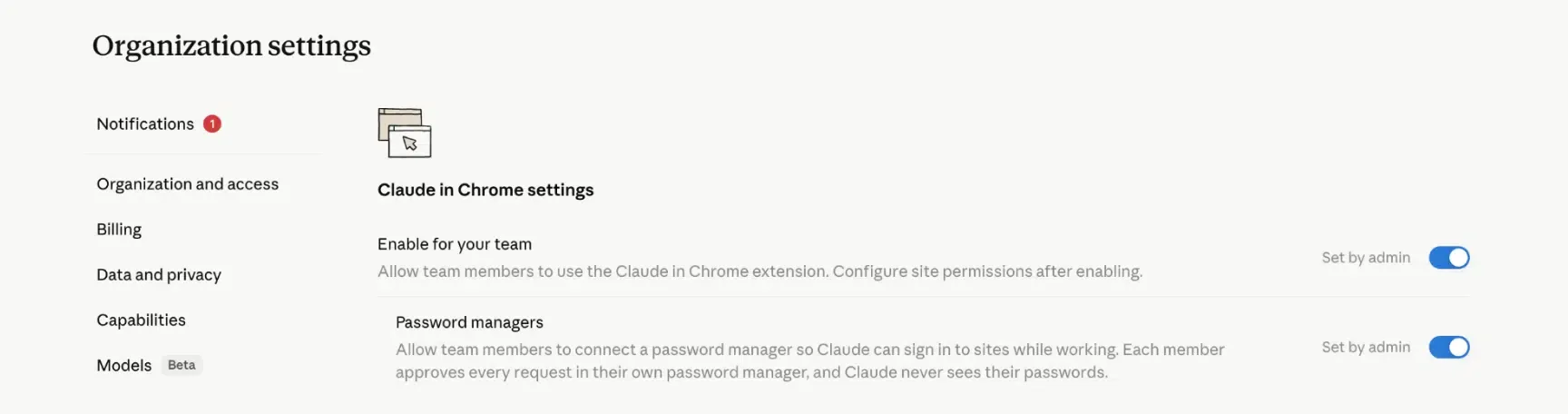
Giving an automated browser agent direct access to raw login credentials introduces severe security risks. If an agent records a password within its context window, that secret can be logged in model memory, transmitted back to the provider’s servers, or exposed through prompt injection exploits. This challenge has driven a strategic focus on isolating credentials from the executing agent, as detailed in 1Password’s official release blog.

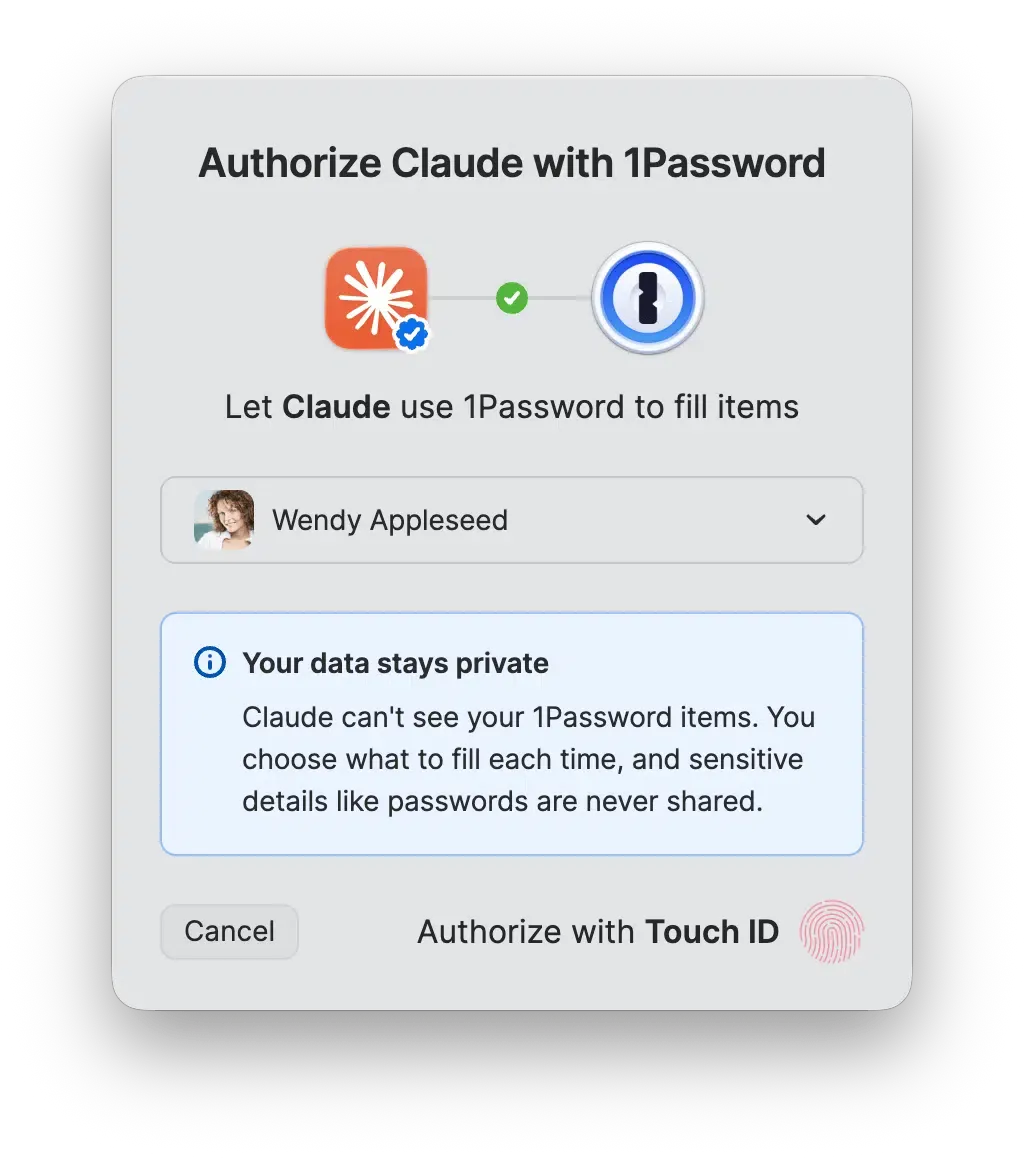
The security implications of the newly introduced 1Password for Claude integration extend beyond simple password masking. The newly deployed browser integration enables the Claude agent to complete actions that require account sign-ins, but ensures the credentials are not exposed to Claude’s conversational context, preventing them from being stored in Anthropic’s systems. Each permission is temporary, scoped to the current session, and verified through standard biometric prompts. Following autofill, the system scans the target page to confirm no sensitive parameters remain exposed, establishing a secure runtime environment for automated browser actions.
 Technical Deep Dive: Under-the-Hood Mechanics of the 1Password for Claude Integration
At the protocol layer, standard automated form-filling tools are highly vulnerable to credential harvesting. When standard software tools inject a username and password into a webpage, the values become readable by any script executing in the document object model (DOM) of the browser. If an active AI agent is allowed to read the DOM during an autofill task, it can capture the raw password strings before submitting the form.
To resolve these transport-layer bottlenecks, the zero-exposure security framework manages credential delivery through an isolated channel handled entirely outside of the executing agent’s view. This ensures that passwords and multi-factor authentication (MFA) codes stay encrypted and controlled within the secure perimeter of the password manager. Anthropic designed Claude with Model Context Protocol (MCP) support, allowing secure third-party tools such as 1Password to expose capabilities without directly revealing underlying credentials. The integration leverages Claude’s Model Context Protocol (MCP) ecosystem, allowing external security tools to expose approved capabilities without granting unrestricted access to underlying secrets. Consequently, credentials are not exposed to Claude’s conversational context, preventing them from being stored in Anthropic’s systems.
[Traditional API Credential Leak]
  AI Agent ──> Requests Password ──> Read DOM plaintext ──> Credentials exposed to LLM Context


[Zero-Exposure Agentic Handshake]
  Claude Agent ──> Requests Login ──> Biometric Approval ──> Secure Channel Injection (outside LLM view)
When the browser extension detects that an AI agent has taken control of the browser, it locks down the vault automatically via Agentic Mode. The extension’s interface is completely hidden, standard inline autofill suggestions are disabled, and the agent is blocked from using 1Password on other open tabs or websites. Additionally, after every automated credential injection, the system performs a post-fill validation scan. If the form submission fails or a credential exposure risk is detected on the page, the system immediately wipes the autofilled values before returning control to the AI agent. This step-by-step containment protocol guarantees that temporary session authorizations do not persist beyond the active task.
Build vs. Buy: Managing Credential Delegation and Zero-Trust Architectures
As modern computing environments move away from local, client-side identifiers to comply with strict data privacy regulations, maintaining authorization boundaries and protecting credentials across distributed digital touchpoints has become a primary engineering challenge. For developers, managing temporary access grants in the 1Password for Claude era requires architectures that are both compliant with data privacy laws and highly accurate. Organizations that need to preserve user journeys securely across web and mobile experiences increasingly rely on server-side credential mediation rather than persistent client-side identifiers.
Building a custom in-house system to manage server-side state matching offers maximum flexibility but demands significant ongoing engineering resources. Developers must manually construct database schemas, write secure cryptographic hashing functions, and continually update the system to comply with shifting regional regulations. Conversely, deploying a pre-built, certified SDK reduces integration complexity and guarantees long-term compliance without additional overhead.
The table below compares standard methodologies for managing conversion context and zero-trust credential security:
| Architecture | Credential Exposure | Runtime Isolation | Best For |
|---|---|---|---|
| Browser Autofill (Standard) | High (DOM plaintext extraction risk) | None (Permanent DOM read permission) | Basic human-driven web browsing on trusted sites |
| Traditional Password Managers | Medium (Scraper exposure during focus events) | Low (Static unlock state matches browser life) | Personal manual credential management |
| Zero-Exposure Injection | None (Secure isolated relay channel) | High (Single-task biometric authorization) | Autonomous AI agent browser automation |
Traditional browser trust models are no longer sufficient once autonomous agents begin completing authenticated tasks on behalf of users. Just as local browser extensions must lock down and transition to secure, server-side credential delivery to protect vault assets, modern session architectures must move their state preservation from vulnerable client-side storage to encrypted, server-side systems. By separating credential authorization from browser execution, organizations can reduce the attack surface exposed to autonomous agents while maintaining a consistent authentication workflow. Engineering teams can evaluate these standard architectures to balance data protection and runtime consistency.
Integration Checklists: Hardening Session Workflows Against Agentic Risks
To secure data pipelines and ensure conversion consistency as platforms transition to memory-centric computing architectures, engineering and product teams must adopt robust state preservation workflows.
Developer Implementation Checklist
-
Optimize Memory and Cache Allocation: Review application memory profiles to minimize garbage collection pauses and avoid thrashing in high-concurrency environments.
-
Adopt Temporary Capability Tokens: Implement stateless session handshakes, utilizing temporary tokens to pass user parameters securely across endpoints, as outlined in the 1Password for Claude help documentation.
-
Deploy Cryptographic Request Signatures: Protect API endpoints from automated spoofing by requiring cryptographic signatures on all state-matching requests.
Product & Growth Strategy Checklist
- Reorganize User Experience Flows: Focus on task-oriented, high-utility pathways that do not rely on local client-side cookie persistence.
- Deploy Secure Credential Delegation: Leverage robust, server-side parameter pass-through frameworks to maintain acquisition tracking without violating user privacy guidelines.
- Verify System Scalability: Ensure that your session-matching databases can scale horizontally to support high-throughput, real-time conversion queries.
By establishing these structured guidelines, development teams can transition their applications to safer, more compliant architectures while maintaining operational continuity.
Frequently Asked Questions (FAQ)
Can an AI agent access other items in my vault during a task?
How does Agentic Mode lock down the browser extension?
What is the difference between client-side credential sharing and zero-exposure injection?
Key Takeaways for Engineering Teams
Traditional browser trust models are no longer sufficient once autonomous agents begin completing authenticated tasks on behalf of users. Runtime authorization, temporary capability tokens, isolated credential delivery, and zero-trust verification will gradually replace persistent passwords and long-lived browser sessions as the foundation of AI-assisted identity systems.
As AI platforms move away from persistent companion features and adapt to new regulatory requirements, engineering teams will increasingly rely on stateless architectures, server-side session management, and privacy-first design. Organizations that prepare for these changes early will be better positioned to maintain compliant and sustainable digital products.
Share this article



