Amap Previews Split Navigation for iPhone Duo? Ahead of the iPhone Duo’s scheduled October 23, 2026 retail launch, Amap completed baseline compatibility work and previewed additional foldable navigation features. Its demonstrated dual-view driving mode and cross-app location handoff are planned for subsequent app updates, with the precise public rollout dates not yet confirmed. As consumer hardware transitions from rigid portrait slabs to flexible multi-screen form factors, location-based service (LBS) providers face an architectural imperative to rethink mobile interaction. Rather than scaling traditional map canvases uniformly across the 7.6-inch interior display, the specialized adaptation splits visual responsibilities into concurrent functional viewports. By pairing lane-level turn-by-turn guidance on one side with a broad multi-kilometer traffic overview on the other, the demonstrated update shows how utility applications can reduce manual screen interactions while navigating.
What Amap Has Announced for iPhone Duo
At a Glance
- Amap prepared baseline compatibility ahead of the iPhone Duo’s retail launch, while previewing specialized dual-view driving modes in technical road-test demonstrations.
- Demonstrated features divide the 7.6-inch interior canvas into two perspectives: lane-level guidance on the left and a broad three-to-five-kilometer route overview on the right.
- Technical demonstrations also illustrated cross-app location sharing in system Split View, though full public deployment is scheduled for subsequent software updates.
Standard mobile navigation interfaces have long operated within the boundaries of a single vertical viewport. On conventional smartphones, drivers navigating complex highway interchanges must interpret detailed lane guidance and broad regional traffic within the same constrained window. Checking upcoming traffic conditions or searching for charging points along a route often requires manual map zooming and panning, which can increase driver distraction.
Foldable mobile hardware allows software architectures to separate short-range tactical maneuvers from long-range contextual awareness. By utilizing an expanded interior display, navigation platforms can render complementary perspectives concurrently.
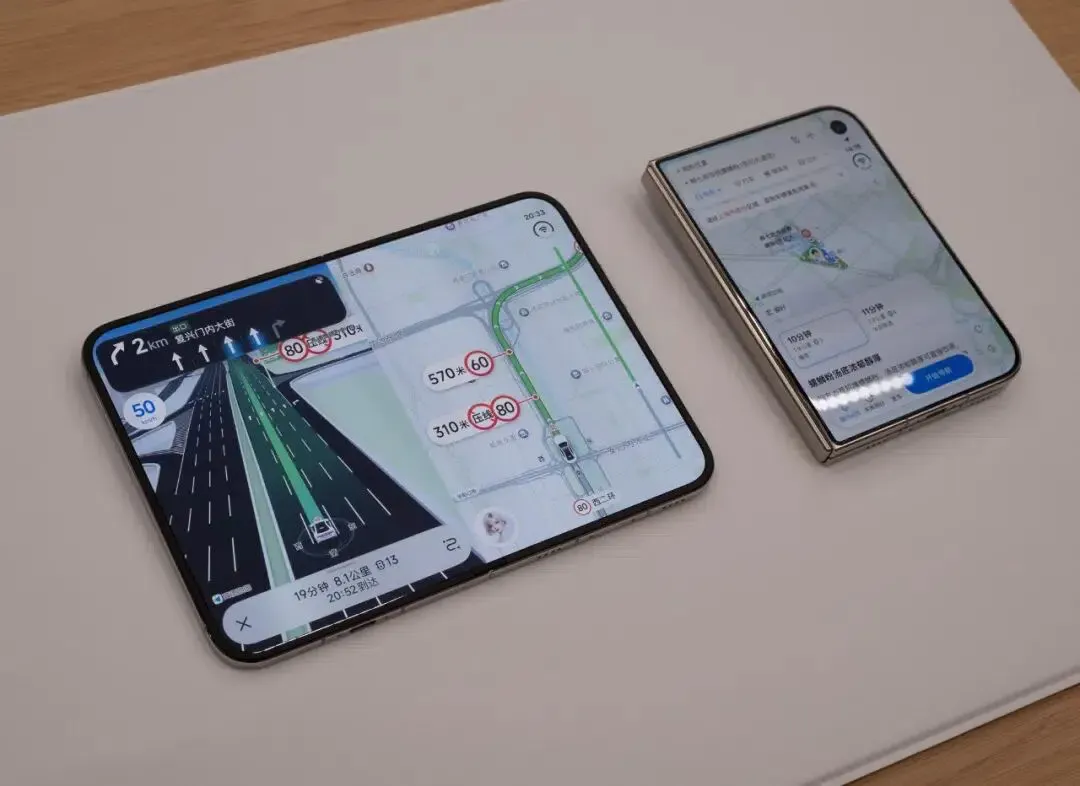
Technical demonstrations reported by Sina Tech covering Amap’s road tests illustrate this dual-view concept. In demonstrated road testing, the left pane displays lane-level instructions, speed camera alerts, and turn indicators. Meanwhile, the right pane provides a wider map perspective spanning approximately three to five kilometers ahead. The dual-view design aims to reduce the need for manual map adjustments by presenting near-term lane guidance and longer-range route context together. Any measurable safety benefit would require controlled usability or driver-distraction testing.
According to technical reporting on Amap’s development roadmap, Amap prepared baseline display compatibility for the device’s retail launch, while advanced dual-view driving features and automated split-screen handoffs have been demonstrated in testing and are planned for release in subsequent versions.
Dual-View Maps vs. System Split View
Analyzing Amap’s technical direction requires separating two distinct software implementations: single-application dual-map views and system-level multi-app multitasking.
The first implementation, internal dual-view navigation, operates entirely within a single application instance. In software implementations of this type, a mapping engine typically divides its layout container into two viewport regions, coordinating localized vector tiles on one side while maintaining a lower-detail overview on the other. This approach relies on synchronized camera positioning and shared route state across both panes, though Amap has not published its specific rendering implementation.
The second implementation involves Apple’s system-level Split View, where iOS manages two independent application windows side by side. For instance, a user might run a messaging client on the left display while keeping Amap open on the right display.
The diagram below clarifies the architectural separation between internal dual-map rendering and system-managed multitasking:
[Amap Internal Dual-View Map Canvas]
  Single App Window ──> Master Navigation Engine ──> Lane Guidance (Left) + Route Overview (Right)

[iOS System Split View Multi-App Setup]
  Chat App Window (Left) ──> Supported Handoff ──> Amap Window (Right) ──> Destination Parsed
While system Split View provides the display framework to position two applications concurrently, it does not automatically transmit data between them. Enabling an interaction in one window to update content in the adjacent window requires dedicated software handling.
How Shared Locations Reach a Navigation App
During technical demonstrations, Amap showcased an interaction where a user receives a restaurant location in a chat application running on the left half of the display. Tapping that location caused Amap, running in the right window, to parse the coordinates, display a pin, and prepare a navigation route.

This workflow demonstrates a functional handoff between separate applications:
Shared Location → Supported App Handoff → Destination Parsing → Route Presentation
In standard single-screen configurations, opening an external location link typically forces a full-screen context switch, interrupting the active conversation. In a multi-window foldable environment, the target navigation application must receive the coordinate payload and update its destination state without resetting active route calculations or interrupting the user’s primary chat session.
The exact internal implementation of Amap’s demonstrated cross-app coordination has not been publicly documented. In general iOS software development, passing parameters between applications involves standard system mechanisms such as Universal Links, custom URL schemes, or shared system clipboards. Ensuring that an incoming coordinate updates an existing secondary window rather than launching a redundant instance requires deliberate scene and navigation state management.
Comparing Foldable Navigation Layout Strategies
As hardware manufacturers introduce flexible and multi-screen devices, engineering teams must evaluate how their user interfaces respond to varying screen dimensions. Developers face trade-offs between implementation complexity, rendering performance, and user utility.

Architectural Evaluation: Layout Strategies for Multi-Screen Environments
Deploying standard single-window layouts with basic Auto Layout rules requires minimal development overhead, but can lead to unoptimized visual presentations on wide interior displays. Building custom multi-view canvases allows applications to maximize available screen real estate, but increases testing overhead across varying device postures and window sizes.
The table below summarizes common architectural choices for handling navigation and utility layouts across foldable screens:
| Layout Strategy | Display & Interaction Role | State Continuity Responsibility | Technical Trade-off |
|---|---|---|---|
| Fixed Layout | Static single-viewport presentation | Application manages internal view stack | Minimal refactoring; potential pillarboxing or empty canvas margins |
| Adaptive Single-Window | Expands canvas dynamically using size classes and flexible constraints | Application updates layout guides while preserving view state | Standardized platform components; limited to single-perspective workflows |
| Custom Dual-Map View | Concurrent tactical and strategic map viewports within one application | Navigation engine synchronizes position and route states across viewports | Delivers differentiated utility; requires dedicated multi-viewport rendering logic |
| System Split View | Two independent applications running side by side via OS multitasking | Operating system manages window lifecycles; each app manages its own state | Enables cross-application workflows; requires explicit data-handoff handling |
External location links and foldable window management operate at different layers of the mobile application stack. A navigation app is responsible for interpreting destination coordinates and presenting routes within its own interface, while iOS manages application windows and multitasking behavior. For supported mobile acquisition and referral journeys, tools such as OpoInstall can assist with attribution, deferred deep linking, and parameter passing. These capabilities do not, by themselves, control an existing Split View window or implement Amap’s demonstrated cross-app navigation experience.
Developer Checklist for Foldable Navigation
To adapt utility and location-based applications for foldable hardware, technical teams should establish structured verification workflows incorporating platform capabilities outlined in the Apple Newsroom developer ecosystem release.
Developer Implementation Checklist
- Support Adaptive Layout Containers: Implement flexible UIKit or SwiftUI split-view containers that transition smoothly between compact single-column presentations and expanded multi-column modes.
- Respect Reserved Display Regions: Query Apple’s layout APIs to identify central hinge divisions and sensor cutouts, ensuring that critical turn indicators and interactive buttons avoid physical display creases.
- Evaluate Hinge Posture Transitions: Where relevant to application workflows, utilize documented hinge APIs to respond to physical opening angles, adapting controls when a device rests in tabletop or laptop configurations.
- Scope Scene Accessories Appropriately: Review guidelines in Apple’s technical sessions on multiple displays and scenes to understand how secondary display accessories operate, avoiding assumptions that full independent application interfaces run concurrently across exterior and interior panels.
Product & Growth Strategy Checklist
- Audit External Destination Deeplinks: Test whether location-based URLs and Universal Links resolve accurately to target coordinates when the application opens in various window sizes.
- Test Parameter Ingestion on Cold Launch: Verify that acquisition and referral parameters passed during application installation flows parse cleanly into onboarding and destination workflows.
- Validate Simulated Postures in Xcode: Utilize Device Hub in Xcode 27.1 to simulate device folding, unfolding, and rotation, verifying that active route planning states persist across layout changes.
Establishing these verification procedures helps ensure that utility applications deliver stable, responsive experiences across evolving hardware form factors.
Frequently Asked Questions (FAQ)
What is the technical goal of Amap's dual-view navigation mode?
How do shared coordinates reach Amap during multi-app multitasking?
Which foldable display APIs did Apple introduce in iOS 27.1?
Key Takeaways for Engineering Teams
Amap’s adaptation work for the iPhone Duo demonstrates that foldable smartphones require software teams to think beyond simple responsive scaling. In utility categories such as navigation, expanding display space offers opportunities to deliver concurrent functional perspectives that reduce cognitive friction for users.
For mobile developers and system architects, preparing for multi-screen hardware involves decoupling application state from rigid viewport assumptions. Ensuring that navigation engines, view hierarchies, and external link-handling routines operate reliably across varying window configurations will be essential as flexible form factors continue to develop.
References
Share this article