Apple’s iOS 27.2 update, released on October 26, 2026, includes a motion-data restriction setting that Chinese technology media reported as available to users with mainland China Apple Accounts the following day. The setting allows users to add specific applications to a restriction list, which hands-on testing by outlets such as The Paper and ifanr indicates can prevent certain shake-triggered ad redirects by restricting access to motion sensor data. Apple’s public release notes do not document the internal system implementation of the toggle, and the feature does not eliminate splash-screen advertisements themselves. For mobile application developers and growth teams, the practical objective is understanding how to maintain transparent, user-initiated navigation and reliable conversion measurement when motion-triggered redirects become unavailable.
What iOS 27.2 Changes and What Remains Undisclosed
At a Glance
- Technology reporting indicates that iOS 27.2 adds a Restrict Motion Data setting under Motion & Fitness for accounts registered in mainland China.
- Hands-on testing observed that adding an application to the list limits accelerometer and gyroscope access, preventing certain motion-triggered splash redirects during tested sessions.
- Apple’s public release notes do not describe the underlying system mechanism, and the toggle does not block display advertisements from appearing.
Alongside regulatory efforts to curb disruptive splash-screen advertising, some implementations used device-motion signals to trigger advertising redirects. In 2021, Chinese regulators intensified efforts to address misleading mobile splash-screen advertising, including deceptive redirects and the failure to provide clearly accessible controls, as initiated under the MIIT campaign to address app splash-screen pop-ups and user privacy infringements. This regulatory oversight was reinforced in 2026 when the Ministry of Industry and Information Technology (MIIT) convened a dedicated industry conference and issued official guidance on regulating app information-window redirects, specifically targeting high-sensitivity motion-triggered interactions. These mechanisms created a separate interaction path that could be activated by incidental movement rather than an explicit tap. Unlike certain sensitive device capabilities such as location or camera feeds, routine access to raw accelerometer and gyroscope data historically did not involve a comparable user-facing runtime authorization prompt at app launch. However, that absence of an interactive system prompt did not make commercial advertising use of Motion & Fitness data permissible under the Apple Developer Program License Agreement, which restricts these interfaces strictly to health, motion, and/or fitness services. Other Core Motion capabilities, such as pedometer queries and activity recognition, are governed by distinct permission requirements.
Over time, high-sensitivity motion triggers became common across consumer applications. To provide reference criteria for evaluating shake-triggered ad behavior, the National Technical Committee 260 on Cybersecurity published its formal Cybersecurity Standard Practice Guide — Security Requirements for Shake-to-Redirect Advertising Trigger Behavior (TC260-PG-20256A, v1.0, July 2025), accessible via the TC260 official publication repository. The document outlines reference examples for avoiding involuntary triggers, including an acceleration threshold of at least 15 m/s², a rotation angle of at least 35 degrees, and an operation duration of at least 3 seconds. These parameters serve as standard reference guidelines rather than an official verification that every commercial SDK complies with or violates them. In practice, ordinary movements such as walking, riding transit, or lifting a phone could trigger unintended transitions in implementations with overly sensitive motion thresholds.
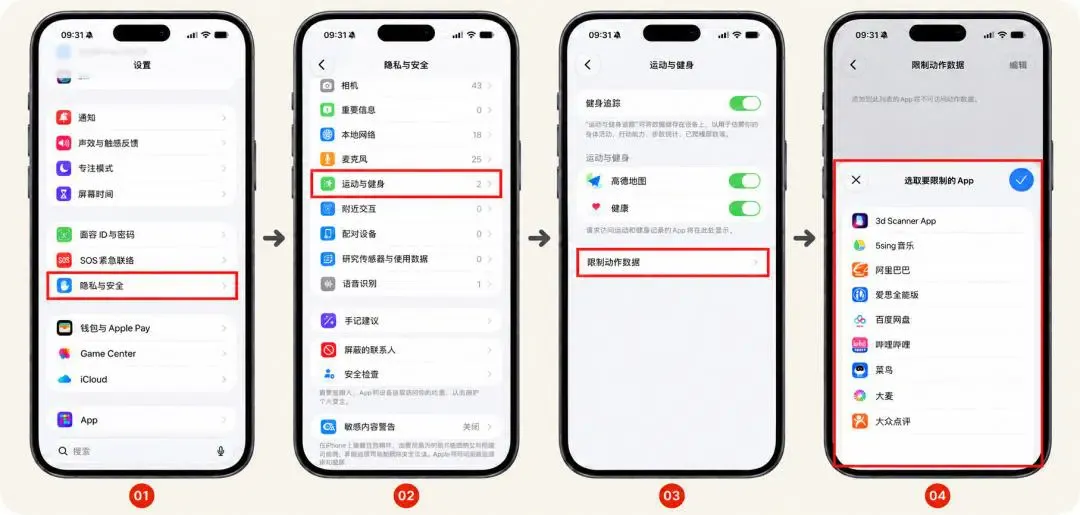
Media reports indicate that the new setting appears under Settings > Privacy & Security > Motion & Fitness when a device is signed into a mainland China Apple Account, as documented in detailed coverage by The Paper. Observers reported that the configuration menu was not visible when testing with accounts registered in other regions, though Apple has not published an official regional deployment policy. The introduction of this control gives users an optional tool to curb unprompted redirects, requiring marketing teams to reassess ad placements that relied on incidental movement.
Observed Technical Mechanics vs. System Boundaries
When analyzing how Apple Adds Motion-Data Restriction settings, it is essential to distinguish observed application behaviors from unverified system internals. In native iOS development, physical motion data is handled through Apple’s Core Motion framework, where the CMMotionManager class provides access to raw accelerometer readings, gyroscope rotation rates, and processed device motion vectors, as specified in the Apple Core Motion documentation.
During device testing conducted by media outlets, applications placed on the restriction list exhibited distinct behavior. In several tested applications, shaking the device no longer triggered an automated jump; the splash display remained visible until its countdown timer completed, after which the application loaded its primary view. In other instances, ad SDKs fell back to static display formats. Testing by outlets such as ifanr, published via 36Kr’s technical evaluation, noted that in some tests, Baidu Netdisk still exhibited occasional redirects despite the motion-data restriction. The available reporting does not establish why these exceptions occurred. Alternative trigger paths are possible, but the specific mechanism remains unverified.
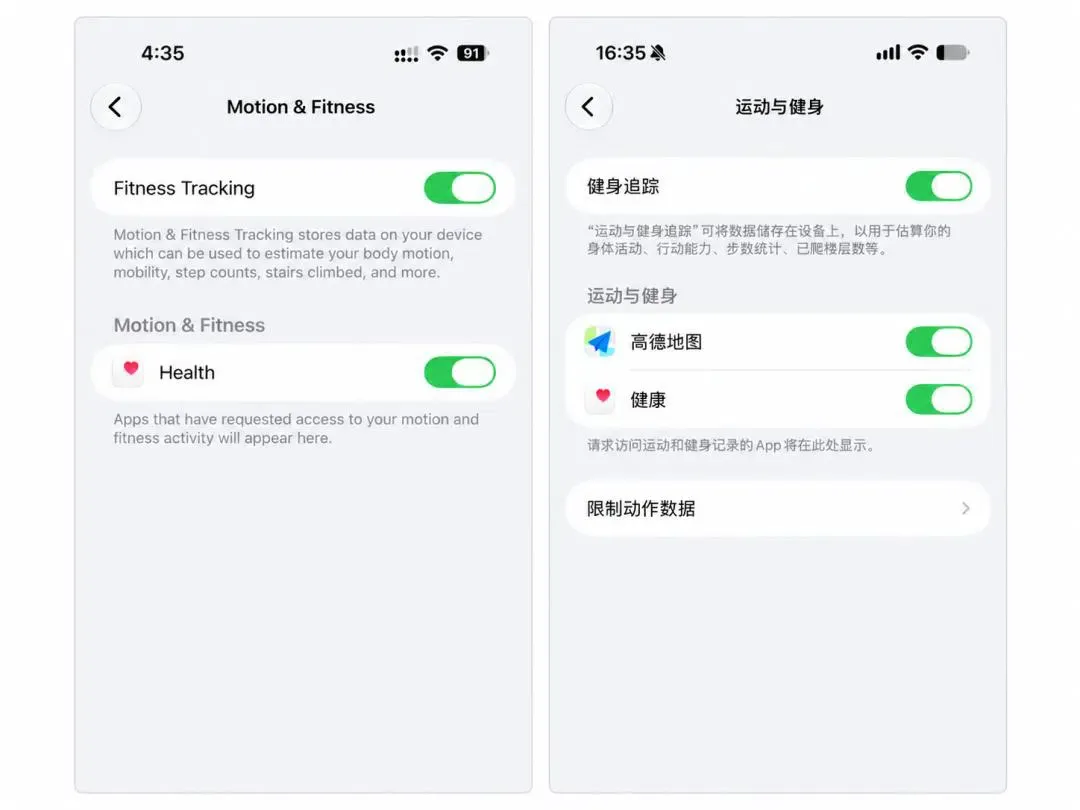
Functional Considerations and Granular Controls
Media observations indicate that the iOS 27.2 restriction applies to the selected application during tested sessions. Consequently, restricting an application may affect legitimate in-app features that depend on motion telemetry:
- Walking Navigation: Mapping applications may experience degraded heading orientation if gyroscope access is restricted.
- Activity Tracking: Fitness applications that use accelerometers to log workout cadence or repetitions may fail to register movement data.
- Interactive Controls: Games utilizing motion controls for camera orientation or aiming assistance may encounter unresponsive inputs.
The diagram below contrasts unprompted motion-triggered execution with user-initiated link routing:
[Passive Motion-Triggered Route]
  Device Movement (Walking / Shaking) ──> Unprompted Sensor Event ──> Potential Unintended Redirect ──> User Friction

──────────────────────────────────────────────────────────────────────────

[Direct Interaction Flow (User-Initiated)]
  Deliberate User Tap on Promotion ──> Registered User Action ──> Universal Link Execution ──> Target Content Displayed
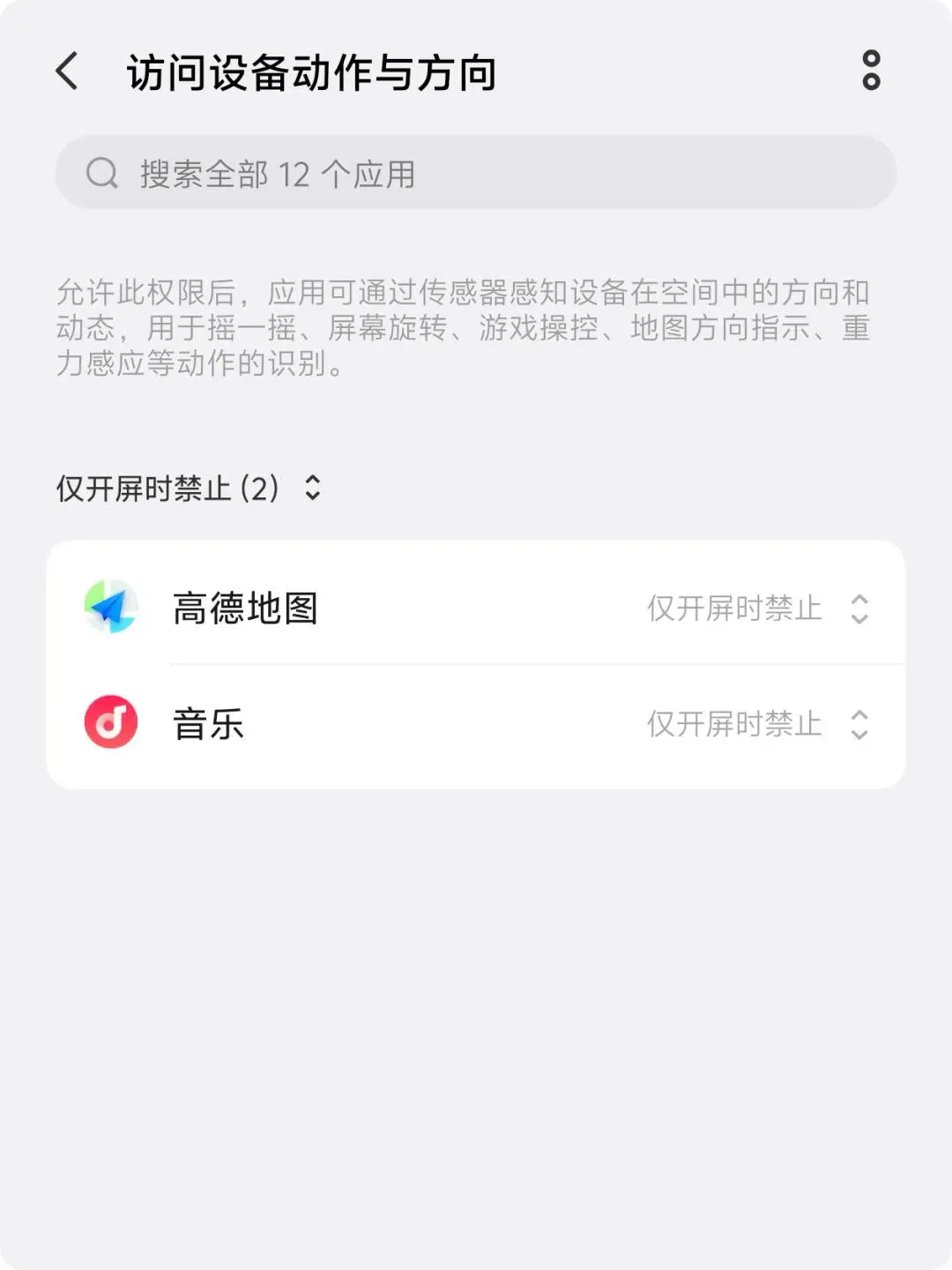
This trade-off contrasts with certain customized Android distributions. Outlets such as Leikeji, reported via 36Kr’s analysis of vendor-specific mobile systems, previously documented that specific vendor skins like Xiaomi’s MIUI and vivo’s OriginOS introduced options to disable sensor access during splash screens while restoring access once the main interface renders. Availability and behavior vary widely by manufacturer and operating system version; this is not a universal Android capability. Because iOS documentation does not detail time-bound sensor gating, engineering teams must evaluate defensive error handling when motion services return inactive states.
Universal Links and Deferred Deep Linking: The Architectural Path Forward
As platform controls limit unintended sensor triggers, growth and performance teams must adapt their redirection and attribution strategies. Motion-triggered redirects can complicate the interpretation of engagement metrics when unintended transitions are counted as meaningful interactions. Sustainable campaign performance requires explicit user navigation backed by standardized link architectures.
When transitioning from forced transitions to transparent user-initiated flows, development teams must choose appropriate routing mechanisms based on their infrastructure requirements.
Architecture and Routing Decision Matrix
The table below outlines the primary mechanisms used for mobile routing, context preservation, and conversion tracking:
| Architecture / Approach | Primary Function | Technical Limitations | Best For |
|---|---|---|---|
| In-App Routing & URI Handling | Maps received URLs or URI schemes to internal destinations | Requires custom routing logic; custom schemes need fallback handling | Apps with dedicated engineering resources |
| Universal Links | Routes supported HTTPS links directly to in-app content | Does not control sensor permissions or verify purchase intent | User-initiated transitions from web pages, social feeds, or email campaigns |
| Deferred Deep Linking | Restores destination context and parameters after installation | Dependent on platform capabilities, SDK implementation, and available signals | Onboarding workflows requiring contextual continuity across new installs |
| Commercial Measurement Platforms | Provides consolidated routing, parameter-handling, and attribution frameworks | Requires empirical evaluation of platform coverage, implementation overhead, and cost | Multi-channel user acquisition requiring cross-platform link management |
For teams replacing motion-triggered ad interactions, the first priority is establishing an explicit, user-initiated navigation path. Universal Links can route supported links into appropriate application content according to Apple’s guidelines for linking to content, while deferred deep linking can help restore relevant destination context after installation when implementation and platform conditions support it.
These mechanisms solve different problems from motion-data restrictions. They do not disable sensors, verify user intent automatically, or guarantee attribution completeness. Teams evaluating a commercial solution such as OpoInstall should assess its documented routing, parameter-handling, deferred deep linking, and measurement capabilities against their own acquisition flows and platform requirements.
Implementation Checklists for Developers and Growth Teams
Adapting mobile applications to changing platform privacy controls requires structured alignment between engineering and marketing groups.
Developer Implementation Checklist
- Audit Sensor Dependencies: Inspect application code and third-party advertising SDKs to identify where
CMMotionManageris initialized and assess whether motion data is required for core functionality. - Implement Inactive-State Handling: Verify that application features degrade gracefully without crashing when sensor updates are unavailable or return inactive states.
- Adopt Explicit Navigation Hooks: Ensure that external application transitions execute strictly from direct user touch events rather than automated callbacks.
- Verify Universal Links Configuration: Ensure associated domains, Apple App Site Association (AASA) files, and internal routing handlers are configured according to standard platform specifications.
Product & Growth Strategy Checklist
- Audit Third-Party SDK Compliance: Review monetization SDKs against platform developer agreements to ensure motion APIs are not utilized for ad-targeting purposes.
- Establish New Performance Baselines: Recalibrate click-through rate (CTR) and conversion baselines, separating intentional user clicks from historical motion-induced redirects.
- Transition to Intent-Driven Landing Pages: Shift promotional spend toward informative landing pages and verified Universal Link flows that capture deliberate user interest.
Frequently Asked Questions (FAQ)
Why does the Restrict Motion Data option appear primarily for mainland China Apple Accounts?
Does enabling motion restrictions affect map navigation or fitness tracking?
Can iOS 27.2 block every shake-triggered ad redirect?
How can marketing campaigns adapt without shake-to-jump mechanics?
Key Takeaways for Engineering Teams
The motion-data restriction observed in iOS 27.2 highlights an ongoing alignment across major mobile ecosystems toward curbing unprompted sensor-driven interactions. By allowing users to limit sensor access, the platform addresses interactive patterns that convert unintended physical movements into commercial navigations.
For engineering and growth professionals, this transition reinforces the importance of designing acquisition architectures around deliberate user actions. Applications that rely on transparent Universal Links, robust fallback handling, and compliant measurement frameworks are better positioned to navigate evolving privacy controls while maintaining reliable user journeys.
References
-
Apple Developer Documentation: Allowing Apps and Websites to Link to Your Content
-
The Paper: Coverage of iOS 27.2 Shake-to-Jump Ad Restrictions
-
36Kr / ifanr: Technical Analysis of iOS 27.2 Motion Data Restriction
-
36Kr / Leikeji: Analysis of Vendor-Specific Android Sensor Controls
-
OpoInstall Documentation: Universal Links and Deferred Deep Linking Standards
Share this article