Apple iPhone Duo redefines foldable screens? Apple confirmed this hardware transition on September 9, 2026, unveiling the iPhone Duo at its Cupertino headquarters as the company’s first foldable smartphone. For software architects and mobile engineering teams, the introduction of the Apple iPhone Duo Foldable form factor marks a notable shift in iOS display topology. While the hardware pairs a compact passport-sized profile with an expansive 7.6-inch canvas, it introduces practical engineering considerations across adaptive viewports, multi-window lifecycles, and cross-application routing. When an operating system transitions from rigid single-display viewports to dynamic multi-display configurations, mobile developers must examine how interface scenes, layout margins, and standard Universal Links interact across fluid hardware states.
Hardware Realignment and Dual-Display Mechanical Architecture
The debut of the iPhone Duo represents a major form-factor evolution for Apple’s smartphone lineup. Announced during Apple’s fall keynote address, the device introduces a book-style folding architecture that pairs a 5.4-inch outer Super Retina XDR display with an internal 7.6-inch folding display. This physical transition bridges standard mobile portability with the expansive multitasking canvas of a compact tablet.
At a Glance
- Proportional Dual-Display Geometry: Both the 5.4-inch outer panel and 7.6-inch inner display share an identical aspect ratio, supporting proportional content scaling as the device opens and closes.
- Multitasking and Side-Anchored Controls: iOS 27 relocates essential navigation controls, the application Dock, and Dynamic Island alerts to lateral display margins, reserving vertical canvas space for side-by-side Split View multitasking.
- Adaptive Layouts and Scene Continuity: The presence of dual displays and variable window widths requires developers to build adaptive interfaces using standard size classes, safe areas, and existing scene-based user activity handlers.
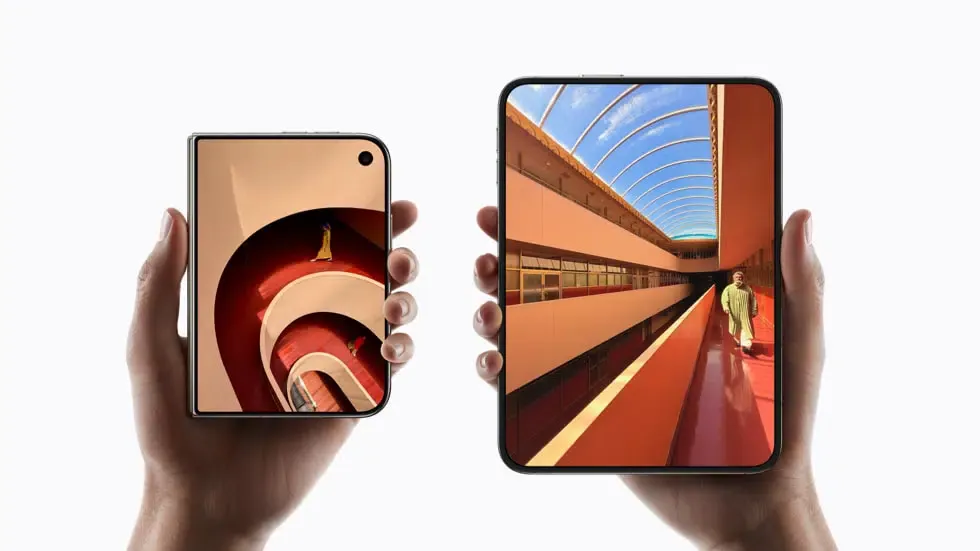
According to official hardware specifications published by Apple Newsroom, the inner 7.6-inch display delivers a viewing area 50 percent larger than the iPhone 18 Pro Max. To manage surface reflections and crease visibility, Apple implemented a custom nano-texture polymer cover layer engineered with up to 40 percent higher stiffness than conventional folding substrates. The mechanical foundation relies on a precision hinge fabricated from more than 100 components, reinforced by internal support ribs and a bottom titanium reinforcement plate. High-strength glass layers are bonded with custom adhesives designed to glide relative to one another during folding, mitigating mechanical bend stress over repeated cycles.
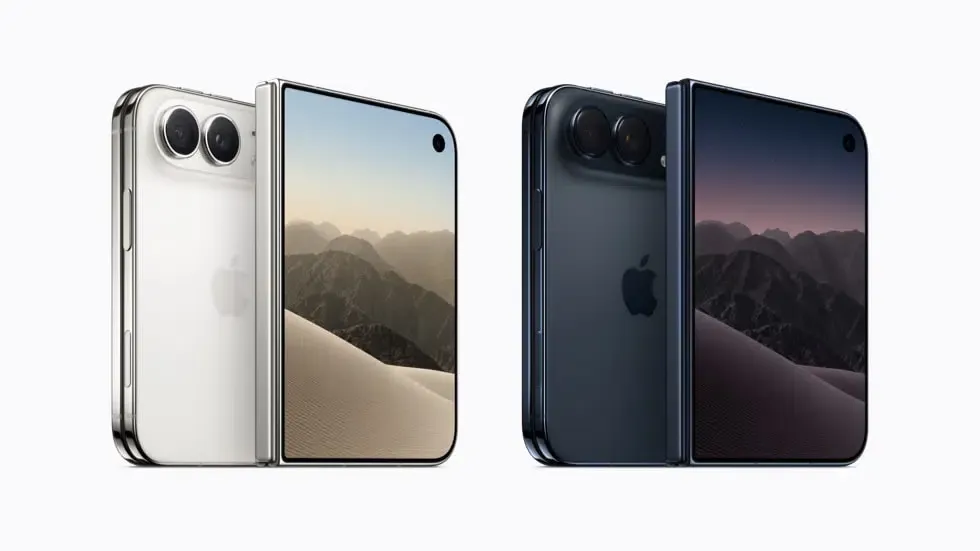
Internally, the device is powered by the 2-nanometer A20 Pro system-on-chip, incorporating a 6-core CPU, 7-core GPU, and a dual 16-core Neural Engine connected directly to a custom vapor chamber thermal dissipation assembly. Wireless communications are managed by Apple’s in-house C2 modem chip supporting 5G mmWave in the United States, alongside an N1 wireless networking processor enabling Wi-Fi 7 and Bluetooth 6. The iPhone Duo adopts an eSIM-only configuration worldwide, removing the physical SIM card tray to optimize internal volume for a split dual-battery architecture that delivers up to 24 hours of mixed dual-screen usage.
+-------------------------------------------------------------------------+
|                  IPHONE DUO DISPLAY AND CHASSIS MATRIX                  |
+--------------------------+-----------------------+----------------------+
| Specification Parameter  | Outer Display         | Inner Display        |
+--------------------------+-----------------------+----------------------+
| Diagonal Screen Size     | 5.4 Inches (5.36" rect)| 7.6 Inches (7.58" rect)|
| Display Technology       | Super Retina XDR      | Super Retina XDR,    |
|                          |                       | foldable inner panel |
| Surface Treatment        | Ceramic Shield 2      | Custom Nano-Texture  |
| Peak Outdoor Brightness  | 3000 Nits             | 3000 Nits            |
| Aspect Ratio Geometry    | Proportional Match    | Proportional Match   |
| Input Accessories        | Touch; Apple Pencil   | Touch; Apple Pencil  |
|                          | support coming later  | support coming later |
|                          | in 2026               | in 2026              |
+--------------------------+-----------------------+----------------------+
| Device-Level Biometrics  |     Integrated Side-Button Touch ID          |
+-------------------------------------------------------------------------+
Market reporting from Reuters places the $1,999 Duo squarely in the premium foldable segment, positioning the device for large-screen productivity and high-end consumer hardware. Unlocking this utility requires software engineering teams to adapt application layouts to flexible screen states.
Adaptive Viewport Layouts and Multi-Scene Execution
Traditional iPhone layouts generally operate within a narrower range of viewport states, commonly including portrait and landscape orientation changes. On the iPhone Duo, an application must adapt to dynamic viewport mutations triggered when a user unfolds the device mid-session or arranges applications in Split View.
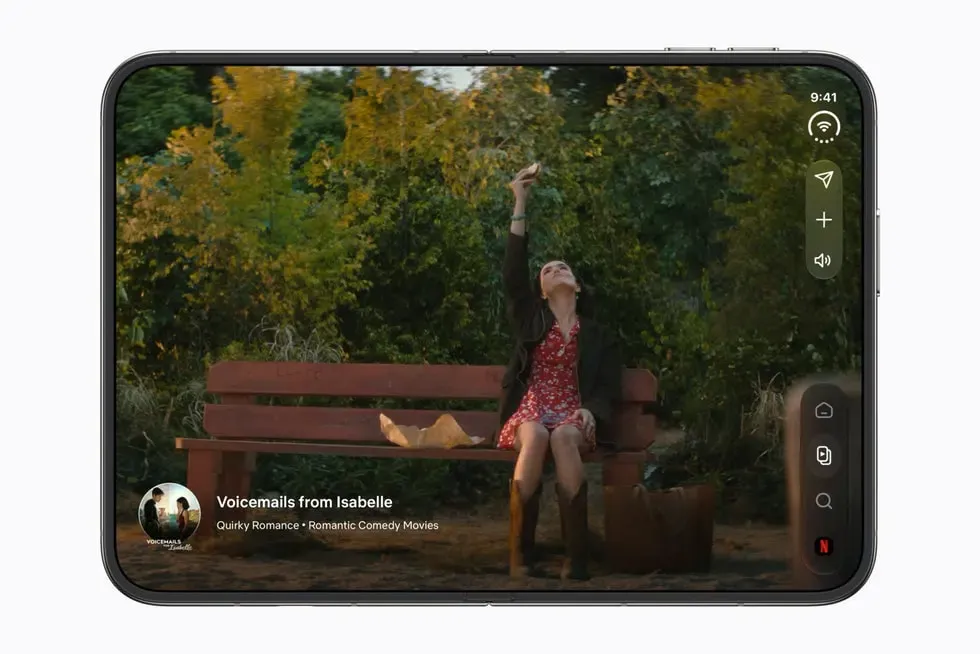
In iOS 27, Apple introduced native Split View multitasking to the iPhone line for the first time. Users can position two separate applications side by side or run two concurrent window instances of the same application, such as Safari. To maximize vertical content visibility across the 7.6-inch canvas, essential controls—including the Home Screen dock and status indicators—move toward the lateral margins.
In Apple’s official developer guidance outlined in Designing for iPhone Duo, engineering teams are advised to rely on adaptive layout techniques rather than designing rigid, pose-specific interfaces. When an application runs on the outer display, the interface typically receives a compact horizontal size class (.compact). When the device opens fully into full-screen mode, the available width generally transitions to a regular size class (.regular). However, when placed into a side-by-side Split View, the available width for each application window contracts, prompting the system to re-evaluate the size class based on the allocated frame.
+-------------------------------------------------------------------------+
|                  ADAPTIVE VIEWPORT AND SCENE PIPELINE                   |
+-------------------------------------------------------------------------+
|                                                                         |
|  [ Outer Display Execution: Compact Horizontal Size Class ]             |
|          |                                                              |
|          |-- (User Unfolds Physical Hinge)                              |
|          v                                                              |
|  [ Operating System Re-evaluates Active Display Canvas ]                |
|          |                                                              |
|          +----------------------------------+                           |
|          |                                  |                           |
|          v                                  v                           |
|  [ Full-Screen Mode: Regular Width ]   [ Split View: Dual Active Windows]
|          |                                  |                           |
|          v                                  v                           |
|  [ System Updates Layout Margins ]      [ Available Width Shrinks;      |
|          |                                Size Class Re-evaluated ]     |
|          v                                  |                           |
|  [ Content Reflows via Safe Areas ]     v                           |
|                                        [ Scene Manages Subview Bounds ] |
|                                                                         |
+-------------------------------------------------------------------------+
Developers handle these transitions by respecting system layout margins, safe areas, and reserved regions created by cameras, system UI, and fold-related geometry. Standard UIKit and SwiftUI components, such as UISplitViewController and NavigationSplitView, adapt automatically across these states, reducing the need for manual coordinate calculations.
Web applications embedded within WKWebView containers must follow similar responsive practices. Rather than relying on hardcoded viewport breakpoints or fixed pixel heights, web content must respond dynamically to window resize events and can use modern CSS dynamic viewport units (dvh and dvw) alongside flexible container layouts to prevent clipping when screen widths adjust.
// Illustrative implementation of adaptive size-class handling and scene user activity delivery
import UIKit

class SceneDelegate: UIResponder, UIWindowSceneDelegate {
    var window: UIWindow?

    // Handle initial connection to a window scene when the app is launched
    func scene(_ scene: UIScene, willConnectTo session: UISceneSession, options connectionOptions: UIScene.ConnectionOptions) {
        guard let windowScene = scene as? UIWindowScene else { return }

        let window = UIWindow(windowScene: windowScene)
        let rootViewController = AdaptiveViewController()
        window.rootViewController = rootViewController
        self.window = window
        window.makeKeyAndVisible()

        // Deliver Universal Link activity if launched directly from an external link
        if let userActivity = connectionOptions.userActivities.first(where: { $0.activityType == NSUserActivityTypeBrowsingWeb }),
           let incomingURL = userActivity.webpageURL {
            rootViewController.handleIncomingURL(incomingURL)
        }
    }

    // Deliver Universal Link activity when the app scene is already running or suspended in memory
    func scene(_ scene: UIScene, continue userActivity: NSUserActivity) {
        guard userActivity.activityType == NSUserActivityTypeBrowsingWeb,
              let incomingURL = userActivity.webpageURL,
              let rootViewController = window?.rootViewController as? AdaptiveViewController else {
            return
        }

        // Handle the URL within this scene context without assuming a single global window
        rootViewController.handleIncomingURL(incomingURL)
    }
}

class AdaptiveViewController: UIViewController {
    override func viewWillTransition(to size: CGSize, with coordinator: UIViewControllerTransitionCoordinator) {
        super.viewWillTransition(to: size, with: coordinator)

        coordinator.animate(alongsideTransition: { [weak self] _ in
            guard let self = self else { return }

            // Inspect available bounds and current trait environment.
            // Production implementations should also observe dynamic trait collection changes delivered by UIKit.
            let isRegularWidth = self.traitCollection.horizontalSizeClass == .regular
            self.adjustLayoutForSizeClass(isRegular: isRegularWidth, newSize: size)
        }, completion: nil)
    }

    private func adjustLayoutForSizeClass(isRegular: Bool, newSize: CGSize) {
        // Adjust column layouts and interface density based on available window bounds
        if isRegular {
            // Adopt multi-column navigation or expanded side-by-side containers
        } else {
            // Fall back to compact single-column navigation
        }
    }

    func handleIncomingURL(_ url: URL) {
        // Route to the destination view hierarchy associated with this scene context
        print("Handling incoming URL in scene context: \(url.path)")
    }
}
Multi-window execution also requires developers to review their deep linking implementations. Apple’s Universal Links do not feature a new, foldable-specific delivery protocol on iPhone Duo. Instead, they continue to rely on standard scene-based delivery APIs documented in Managing your app’s life cycle with UIWindowScene.
When an incoming Universal Link targets an application configured for multiple scenes, UIKit delivers the NSUserActivity through scene(_:willConnectTo:options:) if the application is not running, or through scene(_:continue:) if the application is already running or suspended in memory. Apps that support multiple scenes should process the received NSUserActivity within the specific scene context supplied by UIKit rather than assuming a single global application window.
Downstream Mobile Acquisition and Cross-Surface Routing
While responsive interface guidelines dictate how applications behave once running on the iPhone Duo, user acquisition workflows represent a distinct architectural layer. Managing in-app multi-window fluidity is fundamentally separate from preserving contextual metadata across the initial application installation boundary.
In a separate mobile acquisition lifecycle, marketing campaigns engage users through external touchpoints such as mobile web advertisements, partner referral pages, and physical QR codes. When a user interacts with an acquisition link on an iPhone Duo, the routing path depends on whether the native application is already installed on the device.
+-------------------------------------------------------------------------+
|             SEPARATE DOWNSTREAM MOBILE ACQUISITION JOURNEY              |
+-------------------------------------------------------------------------+
|                                                                         |
|  [ External Touchpoint: H5 Web Campaign / Referral Link ]               |
|         |                                                               |
|         |-- (User Interacts with Link on Outer or Inner Display)        |
|         v                                                               |
|  [ iOS Evaluates Registered Universal Link Domain ]                     |
|         |                                                               |
|         +---------------------------------------+                       |
|         |                                       |                       |
|         v                                       v                       |
|  [ Destination App Installed ]       [ Destination App Absent ]         |
|         |                                       |                       |
|         v                                       v                       |
|  [ Universal Link Delivered Through  [ Link Resolves to Web Landing ]   |
|    Standard Scene Lifecycle ]                   |                       |
|         |                                       v                       |
|         v                            [ Campaign Routes to App Store ]   |
|  [ Native In-App Navigation ]                   |                       |
|                                                 v                       |
|                                      [ Install Flow Does Not Natively   |
|                                        Carry Arbitrary Web Context      |
|                                        Into First Launch ]              |
|                                                 |                       |
|                                                 v                       |
|                                      [ Deferred Deep Linking Engine ]   |
|                                                 |                       |
|                                                 v                       |
|                                      [ Context Restored on Cold Boot ]  |
|                                                                         |
+-------------------------------------------------------------------------+
When the application is installed, verified routing mechanisms like Apple Universal Links allow iOS to open the application directly based on associations validated by the domain’s apple-app-site-association (AASA) file. The system delivers the URL to the app’s scene delegate, bypassing browser redirection.
However, if the application is not installed on the user’s device, Universal Links remain within the web browsing experience by default. Campaign landing logic may subsequently direct the user to the App Store. Because standard App Store installation flows do not natively pass custom URL query strings or campaign tokens into the application binary upon download, those arbitrary web parameters are not natively delivered to the newly installed app on first launch.
Engineering teams assess several routing architectures when building acquisition funnels:
| Routing Mechanism | Installed App Behavior | Uninstalled App Handling | Install-Boundary Context Preservation | Maintenance Scope |
|---|---|---|---|---|
| Custom URL Schemes | Intercepted by local system registry | Fails with unhandled protocol error | None; query parameters are lost across app installations | Application-owned (High maintenance overhead) |
| Apple Universal Links | Delivered to the app through standard Universal Link / scene APIs | Resolves to web landing page | None natively; standard store download flows do not forward query parameters | Domain + Application-owned (Requires AASA hosting and DNS setup) |
| Deferred Deep Linking Architecture | Delegates to Universal Links or native schemes | Routes through web landing to store download | Restores dynamic parameters on first launch via server-side matching | SDK-assisted (Managed attribution client and server framework) |
In enterprise production architectures, mobile development teams frequently implement specialized deferred attribution services such as Branch, AppsFlyer, Adjust, or Opoinstall. A platform like Opoinstall records pre-install campaign metadata—such as channel identifiers, promotional codes, or deep content routes—and pairs it with first-launch application signals using server-assisted matching alongside optional clipboard assistance, where applicable and subject to platform policy. According to official platform documentation on the Opoinstall homepage, this deferred parameter pass-through framework can restore parameters on first launch in up to 98% of eligible instances, providing an automated alternative to manual promotional codes.
By separating the responsive demands of multi-window display rendering from the persistence requirements of user acquisition funnels, engineering organizations maintain consistent user experiences across both hardware transformations and installation boundaries.
Frequently Asked Questions (FAQ)
How does the iPhone Duo's Split View multitasking affect Universal Links handling?
Why is aspect-ratio continuity between the inner and outer displays relevant for developers?
How do mobile applications preserve campaign context when users install an app from an external link?
Practical Implications and Engineering Takeaways
Apple’s release of the iPhone Duo signals that foldable hardware is expanding into mainstream consumer electronics. With a 7.6-inch inner canvas, custom nano-texture materials, and native Split View support in iOS 27, multi-display mobile computing will increasingly influence user expectations.
For mobile developers and software architects, this hardware evolution highlights the necessity of designing adaptive, decoupled systems. Applications can no longer rely on rigid single-window assumptions or static viewport dimensions. By adopting standard UIWindowScene lifecycles, responsive layout components, and robust deferred parameter restoration frameworks, engineering teams can deliver resilient mobile user journeys across both expanding hardware surfaces and installation boundaries.
References
-
Apple. (2026). Apple unveils iPhone Duo. Apple Newsroom. https://www.apple.com/newsroom/2026/09/apple-unveils-iphone-duo/
-
Apple Developer. (2026). Designing for iPhone Duo. Apple Human Interface Guidelines. https://developer.apple.com/design/human-interface-guidelines/designing-for-iphone-duo
-
Apple Developer. (2026). Supporting Universal Links in your app. Apple Documentation. https://developer.apple.com/documentation/xcode/supporting-universal-links-in-your-app
-
Apple Developer. (2026). Managing your app’s life cycle with UIWindowScene. Apple Documentation. https://developer.apple.com/documentation/uikit/app_and_environment/scenes
-
Reuters. (2026). Apple joins foldable phone race with $1,999 passport-shaped iPhone Duo. https://www.reuters.com/business/retail-consumer/apple-expected-unveil-first-folding-phone-with-new-ceo-ternus-command-2026-09-09/
-
Opoinstall. (2026). Deferred Deep Linking and Parameterized App Installation Overview. https://www.opoinstall.com/
Share this article



