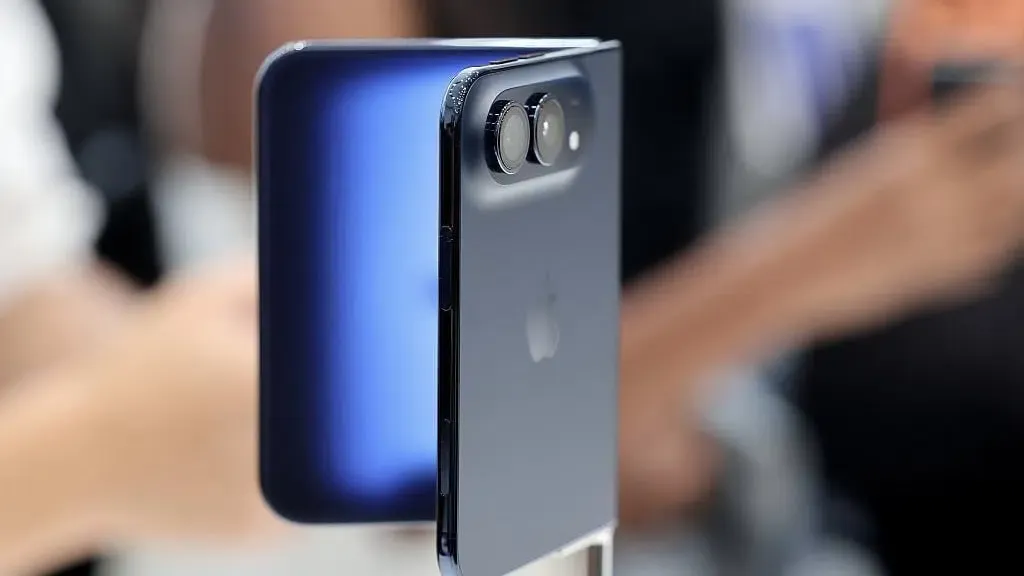
Apple iPhone Duo Preorders? Apple officially opened pre-orders for its first foldable device on October 16, 2026, but initial online delivery estimates in major markets quickly moved past the holiday season into late January 2027. Reporting from Bloomberg’s Mark Gurman and supply chain analysts indicates that manufacturing challenges constrained early production, while a decision to open pre-orders simultaneously across dozens of countries dispersed limited launch inventory. For the broader iOS ecosystem, this rollout introduces dual-screen and foldable form factors to consumer hands, making dynamic layout adaptation and interface continuity critical priorities for mobile engineering teams.
Why iPhone Duo Deliveries Slipped Into 2027: Supply Constraints and Global Allocation
At a Glance
- Pre-orders for the $1,999 foldable iPhone Duo opened on October 16, 2026, with launch-day allocations in major online storefronts exhausting within minutes.
- Independent reporting indicates initial manufacturing yields remain limited, while an international launch across more than seventy countries dispersed opening inventory.
- Select retail personnel have reportedly received internal guidance to inform walk-in shoppers that unreserved units will likely be unavailable on the October 23 launch date.
The consumer hardware market has anticipated Apple’s entry into foldable devices for several product cycles. While competing manufacturers established commercial foldable lines across multiple generations, Apple delayed its initial entry to address structural panel longevity, hinge mechanical stress, and crease visibility. As announced on the Apple Newsroom announcement portal, the iPhone Duo carries a $1,999 starting price, positioning it at the top of Apple’s consumer handset lineup.
To streamline ordering, Apple enabled pre-order configurations within the Apple Store application several days ahead of the formal October 16 window. This feature allowed prospective buyers to save preferred finishes, storage tiers, and payment options for immediate submission. When pre-orders opened at 5:00 a.m. Pacific Time, launch-day inventory allocated for October 23 delivery exhausted within minutes in the United States and several other key markets. Delivery windows quickly pushed into November, then December, with many configurations settling in late January 2027.

According to reporting from Bloomberg’s Mark Gurman in his Power On analysis, the resulting delivery delays reflect both manufacturing limitations and geographical distribution choices. Initial supply chain indications suggested Apple originally considered a phased rollout focused primarily on the United States and China. Instead, executive management chose an opening-day pre-order rollout across more than seventy countries and territories, spreading constrained initial stock across dozens of regional distribution pipelines.
Supply-chain reports indicate that Apple faced significant manufacturing constraints ahead of the iPhone Duo launch. Separately, a report cited by 9to5Mac’s supply chain coverage suggested that Apple had increased its 2026 production orders by approximately 30%, bringing expected volume closer to 10 million units. Furthermore, PhoneArena’s retail monitoring noted that the resulting supply-demand gap triggered secondary market premiums, with third-party marketplaces listing confirmed launch-day slots well above suggested retail pricing.
In response to inventory limitations, store-level reporting summarized in MacRumors retail coverage indicates that retail staff have been advised to inform customers that unreserved walk-in stock will likely not be available on October 23, encouraging buyers to track online reservation windows instead.

Technical Deep Dive: Adapting iOS Applications for Foldable Displays
The commercial arrival of the iPhone Duo introduces fundamental structural changes to iOS application development. For over a decade, standard iPhone software engineering relied on fixed aspect ratios, single-window presentation contexts, and predictable orientation changes. Foldable hardware shifts these fundamentals by introducing runtime display geometry transitions while applications remain actively in the foreground.
When a user unfolds the iPhone Duo, the active window bounds expand from a compact cover screen into a wide internal canvas. Applications must handle this transition responsively, adjusting layout hierarchies, preserving active user state, and reconfiguring navigation flows without dropping visual context.

Responsive Layout Adaptation and Window Geometry Transitions
Under technical specifications outlined in Apple’s official developer documentation, developers are advised to build interfaces using adaptive design principles rather than hardcoded dimensions. When the hardware transitions between folded and unfolded postures, the operating system triggers dynamic size class adjustments, shifting from a compact horizontal width to a regular width.
The diagram below illustrates the runtime layout transition during a physical unfolding event:
[ Folded Cover Display ] ────────(Hardware Unfold Event)────────> [ Unfolded Internal Canvas ]
           │                                                                    │
           ▼                                                                    ▼
[ Compact Size Class Active ]                                      [ Regular Size Class Active ]
           │                                                                    │
           ▼                                                                    ▼
[ Single-Column NavigationStack ] ───────────────────────────────> [ Multi-Column NavigationSplitView ]
To ensure uninterrupted operation, applications must respond to these geometry shifts cleanly. If view hierarchies rely on fixed coordinate systems or static frame calculations, display changes can result in clipped interface elements, distorted media viewports, or broken scroll states.
Apple’s Human Interface Guidelines for iPhone Duo emphasize adopting container views that dynamically restructure content based on available space, ensuring that ongoing user workflows remain uninterrupted across both cover and main displays.
// Illustrative implementation — application-specific views, constraints, and state management are omitted.
import SwiftUI

struct ResponsiveDuoContainerView: View {
    @Environment(\.horizontalSizeClass) private var horizontalSizeClass
    @State private var selectedDetailId: String?

    var body: some View {
        if horizontalSizeClass == .regular {
            // Unfolded internal canvas: Adaptive two-column split view
            NavigationSplitView {
                PrimaryNavigationList(selection: $selectedDetailId)
            } detail: {
                DetailPresentationView(detailId: selectedDetailId)
            }
        } else {
            // Folded cover display: Single-column navigation stack
            NavigationStack {
                PrimaryNavigationList(selection: $selectedDetailId)
            }
        }
    }
}
Architectural Comparison: Framework Strategies for Foldable UI Continuity
Supporting dynamic display transitions requires engineering teams to evaluate their interface architectures. Rather than treating foldable support as a separate platform target, iOS architectures encourage unified responsive view trees that adapt automatically to changing window metrics.
Development teams must assess whether their existing navigation paradigms can accommodate dynamic horizontal expansion, or whether their view controllers require refactoring into adaptive container architectures.
Framework Evaluation: Declarative vs. Imperative Responsive Patterns
Building responsive interfaces on iOS involves distinct engineering trade-offs depending on whether teams utilize modern declarative frameworks or traditional imperative view hierarchies. SwiftUI natively facilitates dynamic window reflow through declarative layout containers, whereas UIKit implementations require explicit trait collection observation and constraint updates.
The table below outlines the primary native development strategies for accommodating foldable and dual-display hardware:
| Adaptation Approach | Primary Engineering Focus | Lifecycle Impact | Best For |
|---|---|---|---|
| SwiftUI Adaptive Layout | Declarative view reflow based on geometry changes | Automatic re-rendering on window resize | Modern applications targeting recent iOS runtime environments |
| UIKit Trait-Based Adaptation | Updating interfaces via UITraitCollection and size classes |
Manual layout invalidation and constraint updates | Production applications with extensive legacy view hierarchies |
| NavigationSplitView Architecture | Multi-column hierarchy switching to single-column stack | Preserves detail view state across display widths | Content-rich applications, messaging clients, and productivity tools |
| Local State Preservation | Caching active user input and scroll positions locally | Prevents data loss during runtime display reconfiguration | Form-heavy workflows, text editors, and media creation tools |
| Xcode Simulator Testing | Validating posture transitions and display cutouts | Identifies layout clipping before device deployment | Quality assurance and interface validation across hardware states |
Adopting native adaptive patterns helps applications maintain visual continuity across changing display sizes, subject to application-specific state management and testing. By designing layouts around flexible containers rather than static device profiles, developers ensure their software remains resilient as new display form factors enter the ecosystem.
Developer Implementation Checklist for Foldable Display Adaptation
To prepare application codebases for foldable hardware architectures and avoid user experience friction, engineering teams should execute the following technical audits:
Layout and Interface Checklist
- Audit Static Geometry Constraints: Scan codebase for hardcoded
UIScreen.main.boundscalls and replace them with dynamic view container boundaries orGeometryReadermetrics. - Adopt Multi-Column Navigation Containers: Implement
NavigationSplitViewto support automatic transitions between compact single-column navigation and expanded multi-pane workspaces. - Observe Trait Collection Adjustments: Use automatic trait tracking or register for relevant size-class changes with
registerForTraitChangesto update UIKit layouts when the available interface space changes. - Account for Safe Area Insets and Hinges: Design interface padding around display margins and potential physical seam regions to prevent interactive controls from falling into unreachable zones.
// Illustrative implementation — application-specific views, constraints, and state management are omitted.
import UIKit

final class AdaptiveDuoViewController: UIViewController {
    override func viewDidLoad() {
        super.viewDidLoad()

        // Register for horizontal size class changes using modern trait tracking API
        registerForTraitChanges([UITraitHorizontalSizeClass.self]) { (self: Self, previousTraitCollection: UITraitCollection) in
            self.updateLayoutForCurrentSizeClass(self.traitCollection.horizontalSizeClass)
        }
    }

    private func updateLayoutForCurrentSizeClass(_ sizeClass: UIUserInterfaceSizeClass) {
        if sizeClass == .regular {
            // Activate expanded multi-pane layout constraints for unfolded display
            activateExpandedConstraints()
        } else {
            // Fall back to single-column layout constraints for compact cover screen
            activateCompactConstraints()
        }
    }

    private func activateExpandedConstraints() {
        // Implementation of expanded auto-layout constraints
    }

    private func activateCompactConstraints() {
        // Implementation of compact auto-layout constraints
    }
}
State and Quality Assurance Checklist
- Validate Local State Restoration: Utilize
@SceneStorageor state restoration identifiers to preserve active input fields, tab positions, and scroll offsets across display resizing events. - Verify Background Task Resilience: Confirm that display geometry updates do not trigger unnecessary network re-fetches or disrupt media playback pipelines.
- Execute Posture Validation in Xcode Simulator: Run comprehensive interface checks across folded, unfolded, and intermediate posture states using the official iPhone Duo simulator target.
Frequently Asked Questions (FAQ)
Why did shipping estimates for the iPhone Duo slip into 2027 so quickly?
Can customers buy an iPhone Duo in Apple retail stores on launch day without a pre-order?
What technical adjustments do iOS developers need to make for the iPhone Duo?
Practical Implications for the Mobile Ecosystem
The market reception to the iPhone Duo pre-order window demonstrates sustained consumer appetite for premium hardware categories, even within top-tier pricing tiers. However, the operational friction of extended fulfillment schedules and tight retail availability reflects the logistical complexities of deploying entirely new manufacturing architectures globally.
For the developer ecosystem, Apple’s commercial commitment to foldable hardware establishes responsive layout adaptation as a mandatory discipline rather than an optional enhancement. Software teams that proactively transition from fixed viewports to adaptive container architectures will be best positioned to deliver polished, durable user experiences across the diversifying landscape of modern consumer hardware.
References
-
Apple Newsroom: Open Up to New Possibilities with iPhone Duo
-
Apple Developer Documentation: Prepare Your App for iPhone Duo
-
Bloomberg Power On: Apple’s Foldable Strategy and Supply Chain Execution
-
MacRumors: Apple Retail Staff Warn Against iPhone Duo Walk-Ins
-
9to5Mac: Analysis of Apple’s Increased 2026 Production Orders
-
PhoneArena: iPhone Duo Shipping Dates and Retail Allocation Report
Share this article