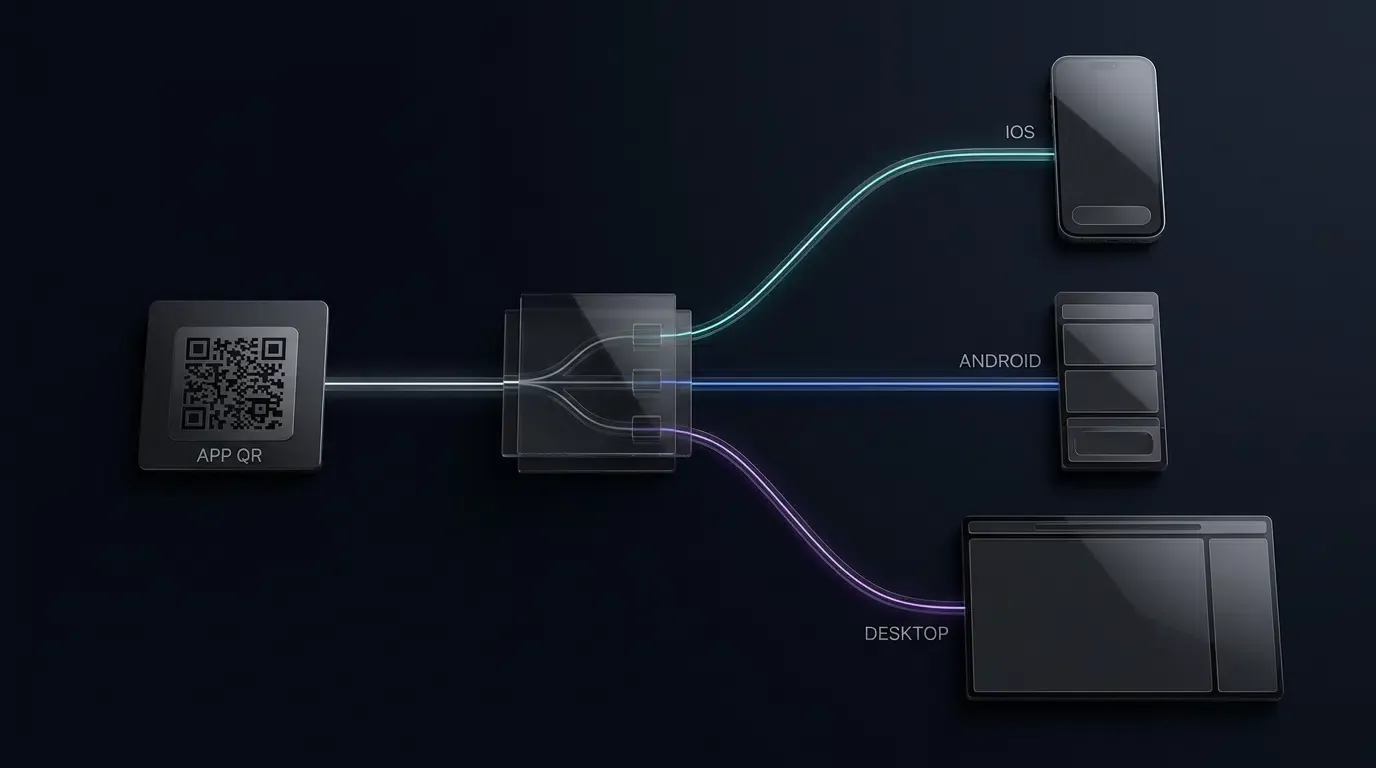
How to create a QR code for app download with parameters? You can create a parameter-embedded app QR code by appending URL query string values (like ?clerk_id=1024) to your OpoInstall hosted H5 link, encoding the parameterized landing-page URL into a QR code.
Parameterized app QR codes are dynamic 2D barcode assets generated from hosted web URLs containing custom URL query strings. When scanned by a mobile device, the target landing page executes a Web JS SDK that captures the embedded query parameters, enabling client applications to retrieve the contextual payload on initial launch subject to platform permissions and distribution channel capabilities.
| Term | Definition | Related Entity | Search Intent Role |
|---|---|---|---|
| Create QR Code for App | The technical process of generating dynamic, parameter-embedded download barcodes. | App Parameter Installation | Informational / Technical |
| qr code tracking | The attribution measurement of app downloads originating from physical QR scans. | Deferred Deep Linking | Commercial / Informational |
| dynamic qr code | A QR code whose destination routing or parameters can be updated dynamically via server-side configuration without altering the printed physical matrix. | Web JS SDK | Technical |
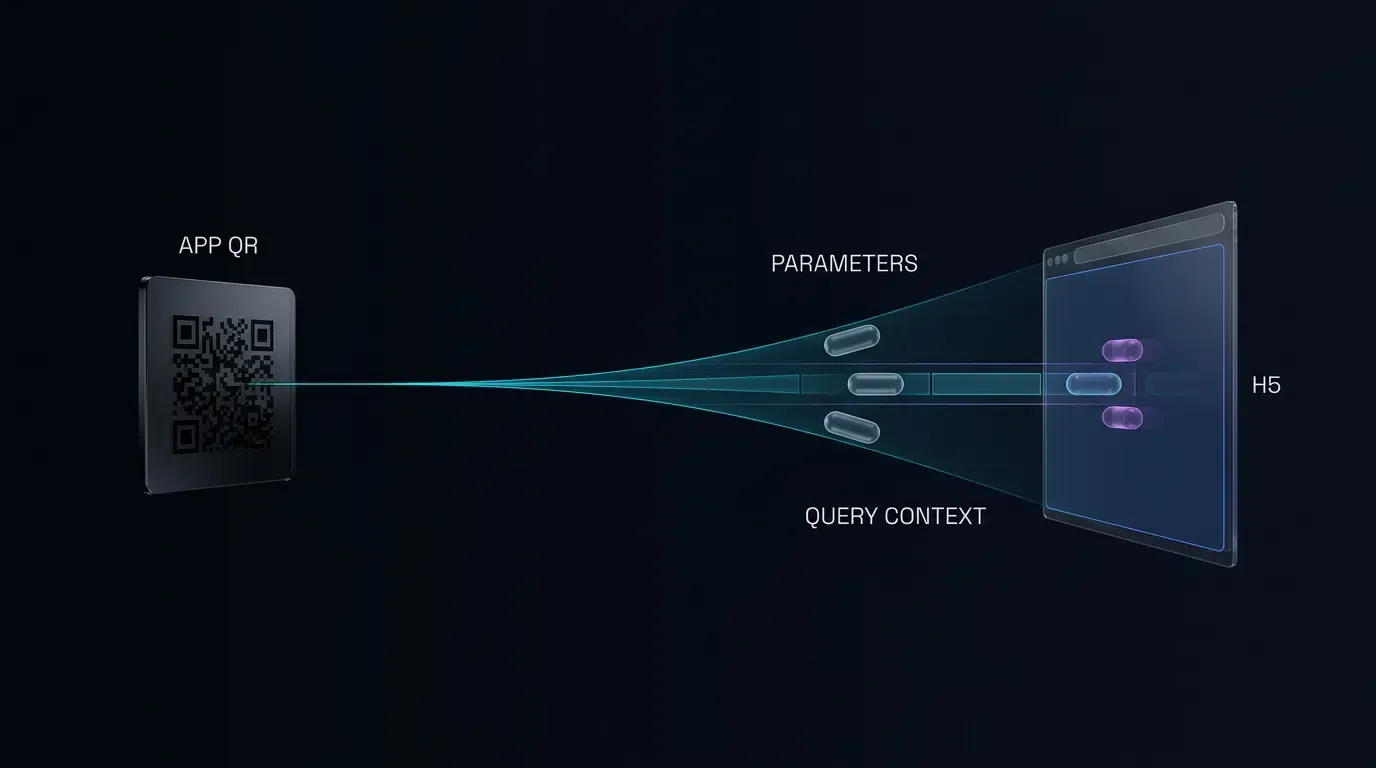
Architecture Overview: How Parameterized QR Codes Enable Offline Attribution
The Technical Disconnect in Physical Collateral: Why Static App Store QR Codes Fail O2O Attribution
Physical marketing collateral—such as retail display stands, trade show banners, print flyers, and direct mailers—has historically presented distinct measurement constraints for mobile growth engineering. Traditional deployment patterns rely on static QR codes that encode a direct URL pointing to the Apple App Store or Google Play Store. While capable of directing a user to a store listing, this architecture severs the attribution data pipeline.
The technical limitation of a static store QR code is not that a 2D barcode cannot physically encode query strings; rather, it is that platform app stores operate as closed runtime environments. When an operating system camera scanner decodes a static store link and routes the user into the App Store or Google Play client, arbitrary query parameters appended to the store link (such as sales representative identifiers or localized collateral codes) are discarded during the store account handshake and download process. While Google Play supports standard campaign parameters via the Play Install Referrer API for certain store URLs, static QR codes pointing directly to store listings cannot dynamically preserve custom, multi-parameter JSON payloads across both iOS and Android installations without an active routing and attribution layer. Without a supported attribution mechanism, granular offline-source reporting may be unavailable. Consequently, analytics pipelines may observe only an aggregated increase in unassigned organic downloads, preventing engineering teams from attributing specific installations to individual physical retail locations, specific sales staff, or regional print campaigns.
The Mechanics of Parameterized Scan-to-Install Pipelines: From URL Query Keys to Native Payload
To bridge physical collateral and mobile runtime attribution, the architectural pattern must pivot from direct store links to an intermediary, parameter-aware routing layer. Rather than encoding a direct store link, the dynamic QR code encodes a secure HTTPS URL pointing to an intermediary mobile web landing page.
This routing architecture functions through a sequence of distributed state handshakes:
[User Scans Collateral QR Code] ──> URL Query String (?clerk_id=1024)
            │
            ▼
[H5 Download Landing Page] ─────> Web JS SDK Validates & Stages Parameters
            │
            ▼
[App Store / Play Store] ───────> User Downloads & Installs Native App
            │
            ▼
[First Launch: Native App] ────> Mobile SDK (getInstallParam) Queries Context
When a device decodes the QR code, the system browser loads the landing page and executes a client-side script. This script parses query parameters from the window location object, validates custom business tokens against an explicit allowlist, and stages the data for attribution retrieval. Depending on the runtime environment and user permissions, the data is registered with an attribution service and temporarily cached in compliant local buffers.
Preserving Context Across App Store Redirections without Manual Promo Codes
Historically, mobile applications attempted to bridge this attribution gap by forcing users to manually enter promotional codes during onboarding. This pattern introduces substantial friction into the user activation funnel, often resulting in abandonment during the initial account creation phase.
By contrast, programmatic parameter passing utilizes deferred deep linking mechanisms. The user experience remains focused on installation: scanning the physical collateral opens the landing page, clicking the download button initiates the official app store installation, and opening the installed application initiates an automated parameter resolution query. The native mobile SDK queries the attribution backend and authorized local runtime buffers during its initialization lifecycle, retrieving the parameters that were present on the physical QR code without requiring manual text entry from the user, provided operating system conditions and network connectivity permit.
See Also: App Parameter Installation ──> Deferred Deep Linking
Step 1: Formatting URL Query Strings for Dynamic Parameter Passing
Structuring Key-Value Query Pairs in Landing Page URLs
Parameter transmission begins at the URL construction layer. An intermediary landing page URL consists of the base protocol, domain, path, and a query component separated by a question mark delimiter, structured in compliance with the URI generic syntax defined in IETF RFC 3986.
When preparing a URL for QR code encoding, developers define discrete key-value pairs separated by the ampersand character. Consider a multi-store retail deployment where an application must track both physical store locations and individual staff referrals:
https://promo.example.com/download.html?channelCode=store_downtown&clerk_id=emp_8492&coupon=SUMMER20
In this structure:
- The channelCode parameter functions as the macro-level routing and analytics key recognized by the attribution platform.
- The clerk_id parameter represents a custom application-level business identifier used internally by the app backend for staff commission allocation.
- The coupon parameter serves as an operational dynamic token passed into the client application to trigger a pending discount state upon account registration.
URL Encoding Best Practices: Handling Special Characters with encodeURIComponent
Query parameters frequently contain characters outside the standard US-ASCII alphanumeric set, such as spaces, punctuation, slashes, or localized language strings. Unencoded special characters can corrupt the URL parsing logic of mobile browsers or cause QR code scanning engines to truncate the encoded string.
All parameter values appended to the query string must undergo percent-encoding using standard JavaScript functions or server-side URL encoders before generating the final barcode matrix:
const baseUrl = "https://promo.example.com/download.html";
const channel = encodeURIComponent("store_12_east");
const clerk = encodeURIComponent("emp_8492");
const targetUrl = `${baseUrl}?channelCode=${channel}&clerk_id=${clerk}`;
Failing to encode characters such as # will cause the browser to treat subsequent characters as a client-side URI fragment identifier rather than query parameters, preventing the server and the Web JS SDK from receiving the trailing keys.
Mapping Custom Business Identifiers: Referral Tokens, Store IDs, and Coupon Metadata
To maintain clean separation between infrastructure metrics and internal business logic, development teams should establish a structured parameter naming dictionary. While the attribution platform standardizes certain primary keys (such as channel identifiers), the parameter-passing pipeline supports configurable custom payloads subject to reasonable URL and server payload size limits.
Standard business identifier classifications include:
- Organizational Identifiers: Physical store numbers, regional territory codes, and franchise group keys.
- Personnel Tokens: Sales representative IDs, affiliate referral tokens, and promoter codes.
- Promotional Tokens: Dynamic voucher identifiers, event campaign keys, and campaign tier designations.
- Deep Link Navigation Targets: Internal module routes, product catalogue identifiers, or customized onboarding flow flags.
Differentiating Channel Identifiers from Custom Application Payloads
It is critical to distinguish between channel tracking identifiers and custom dynamic parameters within the system architecture. A channel identifier (typically mapped to channelCode) is an index value evaluated by the attribution platform to group installations into discrete reporting buckets within the management console.
Custom parameters, by contrast, are treated by the attribution platform as pass-through contextual data. The attribution system ingests, stores, and delivers these custom keys directly to the native client SDK upon installation without altering their underlying structure. Consequently, marketing operations can deploy thousands of distinct staff-level QR codes sharing a single parent channel code while passing unique secondary identifiers within the dynamic payload.
Step 2: Configuring Web JS SDK to Capture Query String Payloads
Integrating the Web JS SDK onto Your Custom Download Landing Page
The web landing page serves as the critical bridge in the parameter-passing pipeline. When a user scans the QR code, the landing page must initialize the client-side JavaScript SDK to capture the incoming query context before redirecting the user to the native application store.
OpoInstall, a mobile attribution and deep linking platform, provides an official Web JS SDK (opoinstall.js) designed to handle cross-browser environment detection, parameter parsing, and deferred deep link caching. Developers include this script on their hosted landing page and initialize the core client instance with their application-specific configuration.
For complete integration instructions and API references, engineers can review the OpoInstall developer documentation.
Automating Parameter Extraction from Window Location Query Strings
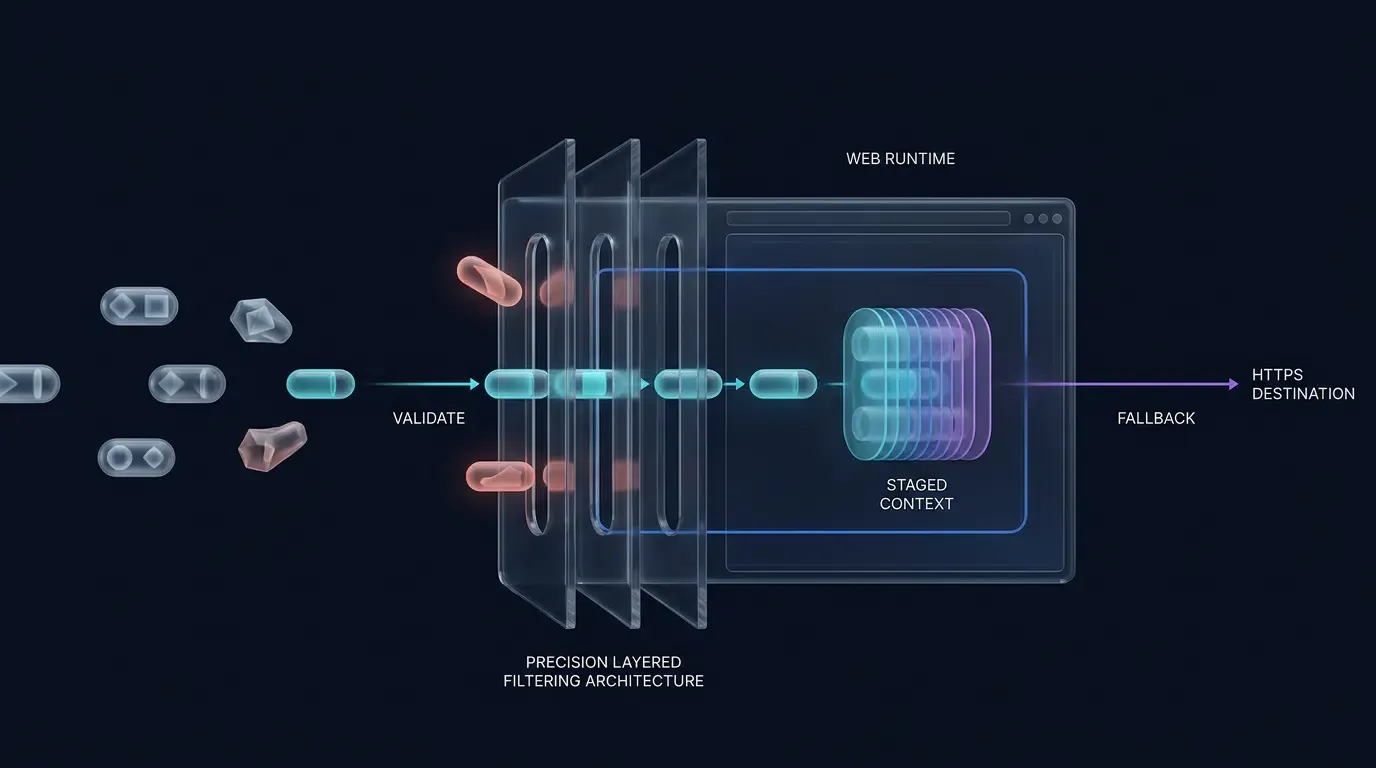
Rather than manually splitting raw query strings, modern web implementations should utilize the standard URLSearchParams interface. Parsing must incorporate an explicit allowlist of expected keys, strict input validation, length bounds, and safe object storage to prevent prototype pollution vulnerabilities.
The implementation pattern below demonstrates how to integrate semantic HTML elements, parse query parameters securely, validate input against expected business formats, and initialize the Web JS SDK. Crucially, the primary button is bound to an initial cross-platform fallback destination immediately upon DOM initialization, ensuring that user navigation remains functional even if the SDK initialization is delayed or fails:
<!-- Web JS SDK Dynamic Parameter Integration -->
<!-- File: /var/www/html/download.html -->
<!DOCTYPE html>
<html lang="en">
<head>
    <meta charset="UTF-8">
    <meta name="viewport" content="width=device-width, initial-scale=1.0">
    <title>App Download</title>
    <!-- Include the verified OpoInstall Web SDK from the production CDN -->
    <script src="https://web.cdn.opoinstallcloud.com/opoinstall.js"></script>
</head>
<body>
    <main class="download-container">
        <h1>Download Our Mobile Application</h1>
        <p>Scan completed. Tap below to download the application directly from the official store.</p>

        <!-- Primary interaction button -->
        <button id="btn-download" type="button">Download App</button>

        <!-- Cross-platform fallback destination -->
        <!-- Note: https://promo.example.com/download-redirect must be an active server-side endpoint that inspects User-Agent, routes to App Store for iOS or Google Play for Android, and avoids redirect loops back to this H5 page. Fallback navigation guarantees store delivery but bypasses parameter caching if triggered prior to SDK readiness. -->
        <p>
            <a id="fallback-store-link" href="https://promo.example.com/download-redirect">
                Direct Store Download
            </a>
        </p>
    </main>

    <script>
    /**
     * Safely parse and validate URL query parameters against an allowlist.
     * Uses URLSearchParams and enforces strict alphanumeric bounds.
     */
    function getSanitizedUrlParams() {
        const allowedKeys = new Set([
            "channelCode",
            "clerk_id",
            "store_id",
            "coupon"
        ]);

        const result = Object.create(null);
        const valuePattern = /^[A-Za-z0-9_.-]{1,64}$/;

        try {
            const query = new URLSearchParams(window.location.search);
            query.forEach((value, key) => {
                if (
                    allowedKeys.has(key) &&
                    valuePattern.test(value) &&
                    !Object.prototype.hasOwnProperty.call(result, key)
                ) {
                    result[key] = value;
                }
            });
        } catch (e) {
            console.error("Failed to parse URL search parameters:", e);
        }

        return result;
    }

    function executeFallbackNavigation(fallbackLink) {
        if (fallbackLink && fallbackLink.href) {
            window.location.href = fallbackLink.href;
        } else {
            console.error("Fallback destination link is undefined.");
        }
    }

    document.addEventListener("DOMContentLoaded", function() {
        const urlParams = getSanitizedUrlParams();
        const channelIdentifier = urlParams["channelCode"] || "default_qr_channel";

        const dynamicPayload = {
            clerk_id: urlParams["clerk_id"] || "",
            store_id: urlParams["store_id"] || "",
            coupon: urlParams["coupon"] || ""
        };

        const downloadButton = document.getElementById("btn-download");
        const fallbackLink = document.getElementById("fallback-store-link");

        // Immediately bind the button to the cross-platform fallback navigation
        // ensuring the button remains interactive even if SDK initialization is pending or fails
        if (downloadButton) {
            downloadButton.onclick = function() {
                executeFallbackNavigation(fallbackLink);
                return false;
            };
        }

        // Verify SDK availability prior to instantiation
        if (typeof OpoInstall === "function") {
            try {
                let installerInstance = null;

                installerInstance = new OpoInstall({
                    appKey: "OPOINSTALL_APPKEY_PLACEHOLDER",
                    channelCode: channelIdentifier,
                    data: dynamicPayload,
                    onready: function() {
                        // Upgrade the button handler to use the SDK wakeup/install routing once ready
                        if (downloadButton) {
                            downloadButton.onclick = function() {
                                try {
                                    if (installerInstance && typeof installerInstance.wakeupOrInstall === "function") {
                                        installerInstance.wakeupOrInstall();
                                    } else {
                                        executeFallbackNavigation(fallbackLink);
                                    }
                                } catch (callErr) {
                                    console.error("wakeupOrInstall invocation error:", callErr);
                                    executeFallbackNavigation(fallbackLink);
                                }
                                return false;
                            };
                        }
                    }
                });
            } catch (initErr) {
                console.error("OpoInstall initialization failed:", initErr);
                // Fallback click handler is already active
            }
        } else {
            console.warn("OpoInstall SDK not loaded; retaining direct store link fallback.");
        }
    });
    </script>
</body>
</html>
Caching Parameters into Ephemeral Storage and System Clipboard Memory
When the user clicks the download trigger on the landing page, the client-side script coordinates parameter caching across network and local boundaries:
- Server-Side Context Registration: The Web JS SDK transmits an asynchronous registration request to the attribution backend containing the validated query parameters and standard HTTP session context. This registers a pending install record associated with the current web session.
- System Pasteboard Staging: Where permitted by browser policy, the SDK may stage an encoded parameter payload into the system pasteboard buffer. However, modern platform restrictions dictate that pasteboard write operations require a direct user activation gesture (such as an explicit button tap) and an active document focus context in compliance with the W3C Clipboard API and Events Specification.
- Permission and Privacy Limitations: Clipboard operations are neither universal nor guaranteed. On iOS 14 and later, cross-application pasteboard reads trigger system notifications, while iOS 16 introduced explicit per-app paste permission dialogues. On Android 10 and later, background applications are prohibited from reading pasteboard data entirely. Consequently, clipboard caching functions as an opportunistic runtime enhancement rather than a deterministic attribution guarantee.
Step 3: Extracting Parameters on First App Launch via Mobile SDK
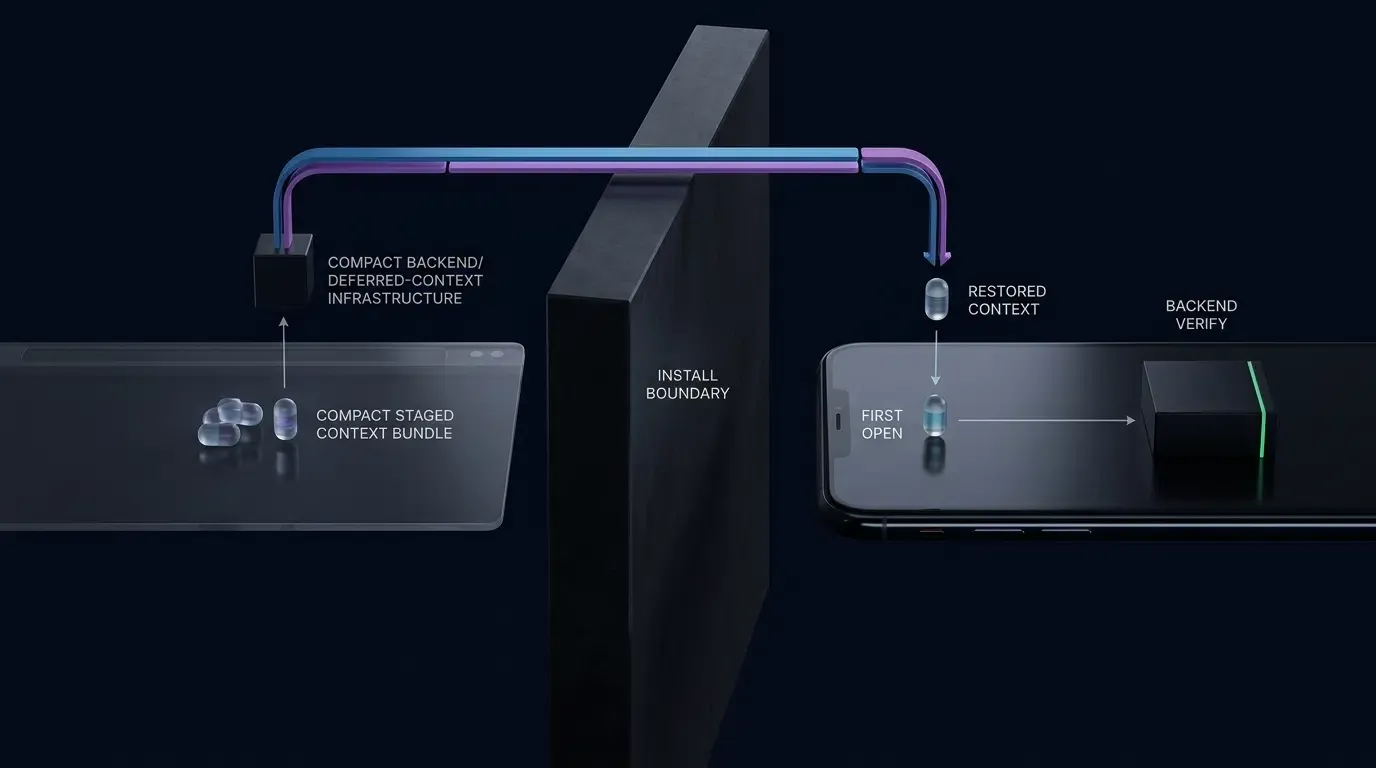
Native Mobile SDK Initialization Sequence on Main Thread
When the user completes the download from the platform app store and opens the application for the first time (Day 0 launch), the native mobile SDK must initialize immediately within the application lifecycle to begin the parameter resolution handshake.
On Android, initialization must be declared within the onCreate() method of a custom Application subclass to ensure the SDK attaches before any foreground Activity components mount. Crucially, this subclass must be registered in your AndroidManifest.xml via the android:name attribute (e.g., android:name=".CustomApplication"); omitting this manifest declaration prevents the custom onCreate() lifecycle from executing. Similarly, on iOS, the SDK must attach within the application(_:didFinishLaunchingWithOptions:) execution delegate.
Developers can obtain the latest mobile SDK packages for Android and iOS directly from the OpoInstall SDK download center.
Executing Asynchronous getInstallParam Callbacks on Day 0 App Launch
Once initialized, the native SDK executes an asynchronous handshake with the attribution servers, verifying available platform install signals and authorized local buffers.
To prevent UI thread lockup, the parameter retrieval method operates asynchronously through a non-blocking callback interface. The application logic hooks into this callback, receives the parsed JSON object containing the original QR code parameters, and passes the payload to the application backend for validation.
Before running the Activity example below, ensure that the OpoInstall SDK is initialized in your Application subclass using the initialization method required by your deployed SDK release. The implementation pattern below illustrates how to declare the application entry point and execute parameter extraction on Android using Kotlin:
// Android SDK Parameter Retrieval Implementation
// Note: Save Part 1 (CustomApplication.kt) and Part 2 (MainActivity.kt) as separate Kotlin source files.

// Part 1: CustomApplication.kt (SDK Application-Level Initialization)
// File: app/src/main/java/com/example/app/CustomApplication.kt
// Note: Ensure android:name=".CustomApplication" is declared inside <application> in AndroidManifest.xml

package com.example.app

import android.app.Application
import com.opoinstall.api.OpoInstall

class CustomApplication : Application() {
    override fun onCreate() {
        super.onCreate()

        // Initialize OpoInstall core client on main thread before activity mounting
        OpoInstall.initialize(this)
    }
}

// Part 2: MainActivity.kt (Asynchronous Parameter Extraction)
// File: app/src/main/java/com/example/app/MainActivity.kt

package com.example.app

import android.os.Bundle
import android.util.Log
import androidx.appcompat.app.AppCompatActivity
import com.opoinstall.api.OpoInstall
import com.opoinstall.api.OpoData
import com.opoinstall.api.ResultCallBack
import com.opoinstall.api.OpoError
import org.json.JSONObject

class MainActivity : AppCompatActivity() {

    companion object {
        private const val TAG = "OpoInstallAttribution"
    }

    override fun onCreate(savedInstanceState: Bundle?) {
        super.onCreate(savedInstanceState)
        setContentView(R.layout.activity_main)

        // Query deferred attribution parameters upon initial activity mount
        fetchQrInstallationParameters()
    }

    private fun fetchQrInstallationParameters() {
        OpoInstall.getInstance().getInstallParam(object : ResultCallBack<OpoData> {
            override fun onResult(data: OpoData?) {
                if (data == null) {
                    Log.d(TAG, "No attribution parameters returned.")
                    return
                }

                val channelCode = data.channelCode
                Log.d(TAG, "Reported Channel Code: $channelCode")

                val rawData = data.data
                if (!rawData.isNullOrEmpty()) {
                    try {
                        val jsonObject = JSONObject(rawData)
                        val clerkId = jsonObject.optString("clerk_id", "")
                        val storeId = jsonObject.optString("store_id", "")
                        val couponCode = jsonObject.optString("coupon", "")

                        // In production builds, avoid logging unredacted business tokens in cleartext
                        Log.d(TAG, "Candidate parameter payload parsed successfully.")

                        // Pass candidate parameters to secure backend for verification
                        submitParametersForBackendVerification(clerkId, storeId, couponCode)
                    } catch (e: Exception) {
                        Log.e(TAG, "Failed to parse dynamic parameters payload", e)
                    }
                }
            }

            override fun onError(error: OpoError?) {
                Log.w(TAG, "Parameter retrieval failed or timed out: ${error?.errorMsg}")
            }
        })
    }

    /**
     * Client applications must treat retrieved parameters as unverified candidate input.
     * Candidate values should be verified by the application server before granting
     * rewards, allocating commissions, or modifying financial account state.
     */
    private fun submitParametersForBackendVerification(clerkId: String, storeId: String, coupon: String) {
        // Implementation: Transmit payload to server via authenticated HTTPS POST for validation
    }
}
Troubleshooting Parameter Loss Across Scan-to-Install Journeys
Identifying Common Breakpoints in QR Code Parameter Passing
When deploying parameterized QR codes, engineering teams may observe scenarios where installations fail to recover their embedded query parameters. Parameter loss typically occurs at specific points across the scanning and installation lifecycle:
- Malformed URL Strings: Failure to escape reserved characters in the query string, resulting in string truncation by native QR scanners.
- Intermediate Redirect Drops: Implementing intermediate 301 or 302 HTTP redirects that fail to forward the complete query string component to the final destination landing page.
- Missing User Interaction: Attempting to execute download scripts automatically upon page load without an explicit user click event, which causes mobile browsers to block system clipboard operations.
- Lookback Window Expiration: Users scanning the QR code but delaying the application installation and initial launch beyond the configured attribution lookback window.
Managing Background Application Switches and Clipboard Expiration Limits
Under modern operating system versions, access to the system pasteboard is governed by strict privacy controls:
- Android Foreground Restrictions: Under Android 10 (API level 29) and later, applications cannot inspect pasteboard data while running in the background. Parameter retrieval must be deferred until the primary Activity achieves active foreground focus.
- iOS Pasteboard Prompts: On iOS 16 and later, programmatic attempts to read
UIPasteboard.generalmay trigger an explicit system prompt asking the user to allow pasting from the source browser, depending on whether system components likeUIPasteControlare utilized. If the user denies permission or if the pasteboard call fails, the application must handle the absence of pasteboard data cleanly. - Ephemeral Buffer Lifecycles: Operating systems and third-party keyboard utilities may overwrite or flush pasteboard contents when the user copies unrelated text during the download process, breaking local data continuity.
Resolving ProGuard and R8 Obfuscation Conflicts in Release APK Builds
In Android production environments, code shrinking and obfuscation tools (ProGuard or R8) can strip or rename reflection methods and data model fields utilized by the attribution SDK, resulting in silent callback failures or runtime exceptions in release builds.
Developers should rely primarily on the consumer ProGuard rules packaged inside the official SDK AAR distribution. If manual rules are required, they must match the actual package namespace of the deployed SDK rather than legacy class structures:
# Preserve OpoInstall SDK public APIs and callback interfaces
-keep class com.opoinstall.api.** { *; }
-keep interface com.opoinstall.api.** { *; }
Systematic Verification Checklist for Testing Scan-to-Install Workflows
Testing parameterized QR code attribution requires distinguishing between local component validation and end-to-end store delivery:
| Verification Layer | Primary Objective | Scope and Method |
|---|---|---|
| Local Integration Testing | SDK lifecycle, callback execution, JSON parsing, error handling | Sideload debug/release build via IDE; mock local parameters or use console test page. |
| End-to-End Store Testing | Live store routing, Install Referrer extraction, deferred launch | Distribute build via Google Play Internal Testing or Apple TestFlight; execute real QR scan. |
Verification steps for production readiness:
- Step 1: Test Device Preparation: Use a physical test device that does not contain existing development installations or cached application data.
- Step 2: Generate Validated Link: Construct the target URL with verified test parameters and encode it into a standard high-contrast QR code.
- Step 3: Scanner Execution: Scan the QR code using the device’s native camera application. Verify that the landing page loads the full URL without truncating query parameters.
- Step 4: Explicit User Interaction: Click the landing page download button to trigger SDK registration and routing.
- Step 5: Store Distribution Validation: Download the build through official test tracks. TestFlight validates iOS beta distribution behavior; production App Store attribution must be verified separately where distribution-specific behavior matters. For Android, verify that Google Play Install Referrer data is correctly populated.
- Step 6: Log Inspection: Launch the application and inspect console logs to confirm that
getInstallParamexecutes and parses the expected business keys.
Handling OS and In-App Browser Variations in QR Code Scanning
iOS Camera Native Scanning vs. Android System Scanner Behavior
Operating systems handle QR code decoding through divergent technical paths. The native iOS Camera application parses decoded URLs and displays a native Safari notification banner. When tapped, the system opens the link directly in Safari, providing a standard web execution environment.
On Android, scanner behavior varies across device manufacturers. While Google Pixel devices route scanned URLs directly to Chrome, other manufacturer camera applications may launch proprietary micro-browsers or lightweight custom tabs. Development teams must ensure that their intermediary landing page renders cleanly across various webview implementations and does not depend on browser-exclusive APIs.
Managing Embedded In-App Scanners: WeChat, Line, WhatsApp
A substantial percentage of QR code scans occur via integrated scanners within major messaging platforms, such as WeChat, Line, and WhatsApp. These applications execute web links inside sandboxed in-app webviews that frequently enforce strict security policies:
- Direct download requests targeting
.apkbinary files are frequently blocked or intercepted. - Custom URL scheme invocations may be restricted by platform navigation policies.
- Universal Links may fail to resolve outward to the native operating system, keeping the user confined to the in-app container.
Bypassing In-App Webview Download Interceptions via Direct Redirection Domains
Where permitted by the host application and operating system, landing pages can implement external-browser handoff mechanisms. When the Web JS SDK detects that the client user agent matches a restricted in-app browser, it can offer an external browser handoff or present clear visual guidance directing the user to open the link in the device’s default browser (such as Safari or Chrome).
If automated handoff is blocked by the container application, landing pages must display explicit user instructions while preserving a standard HTTPS destination link. Development teams should not assume all in-app browsers permit programmatic transitions to external applications.
Fallback Mechanisms for Web Browsers Restricting Clipboard Access
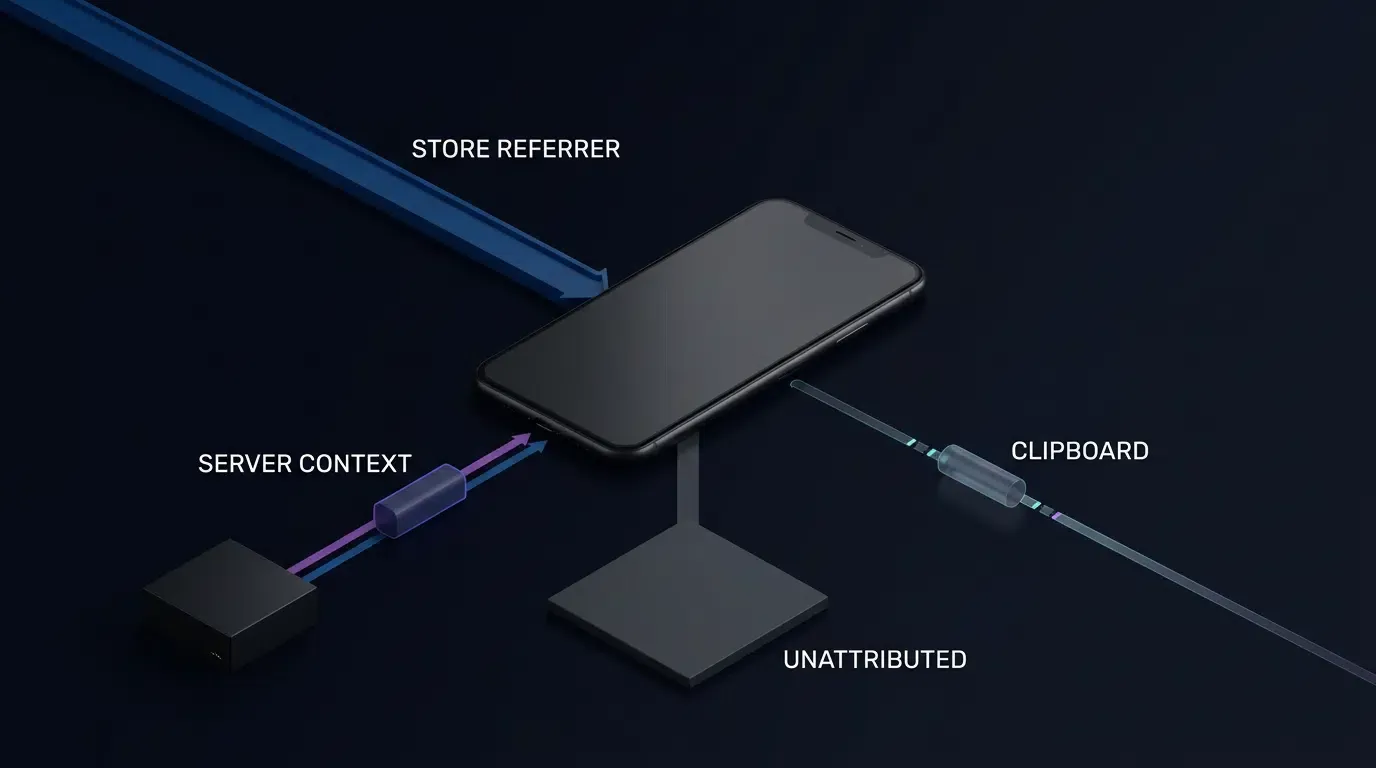
When web browsers restrict clipboard access or when pasteboard contents are cleared prior to app launch, direct client-side caching fails.
Under these conditions, applications must adhere to platform-compliant fallback models:
- Platform Install Referrer APIs: On Android devices downloading via the Google Play Store, the Google Play Install Referrer API provides a supported mechanism to transmit install context from store listings to native applications.
- First-Party Session Matching: If supported by the deployment architecture and user consent frameworks, server-side session matching can correlate pre-install web visits with post-install registration calls using authorized first-party account credentials.
- Privacy-Compliant Handling of Unmatched Installs: If clipboard-based recovery is unavailable, use only supported, privacy-compliant attribution mechanisms, such as eligible platform install-referrer data or explicitly authorized first-party session context. Do not construct device fingerprints from IP addresses, browser properties, display characteristics, or network metadata to identify users across installation boundaries. Report unmatched installations as unattributed when no permitted recovery method is available.
Comparative Analysis of App QR Code Implementation Strategies
Evaluating Traditional Static Barcodes vs. Parameterized Dynamic QR Codes
Mobile growth campaigns utilize various QR code implementation architectures, each exhibiting distinct technical trade-offs between implementation complexity, measurement precision, and operational overhead.
The table below contrasts standard industry approaches against dynamic parameter-passing pipelines:
| Implementation | Attribution Capability | Parameter Support | User Friction | Maintenance |
|---|---|---|---|---|
| Direct Store QR | Store-dependent | Limited to supported mechanisms | Low for supported OS | Low |
| Promo Code Workflow | Depends on redemption | Code-to-data mapping | Manual entry required | Moderate |
| Parameterized Dynamic QR | SDK/platform-dependent | Configurable and validated payload | Reduced manual entry | Managed service dependency |
Measuring Technical Trade-offs Across Attribution Approaches
Deploying static QR codes pointing directly to platform app stores represents the lowest initial implementation burden, requiring no SDK integration or landing page infrastructure. However, the absence of granular attribution parameters limits campaign optimization, as individual print assets or store locations cannot be evaluated independently.
Manual promotional code entry provides basic channel identification but introduces conversion funnel decay, as users must manually copy and paste text strings during registration. Parameterized dynamic QR codes require an upfront engineering integration—deploying the Web JS SDK onto an intermediary page and integrating the mobile SDK into the native client binary. Once integrated, however, the parameterized pipeline automates contextual parameter passing while reducing manual onboarding friction for end users.
Frequently Asked Questions (FAQ)
How do I verify that parameters from a custom QR code are retrieved correctly on first launch?
Why do parameters get lost when a user scans a QR code inside in-app browsers like WeChat or Line?
What is the difference between a static store QR code and a dynamic parameter-passing QR code?
Summary and Decision Framework
To create a QR code for app downloads with parameter passing, mobile development teams must establish a structured data pipeline connecting URL query strings to native client SDK callbacks. Eliminating manual promo codes relies on dynamic Web JS SDK parameter validation and deferred deep-linking extraction upon initial app launch, subject to platform permissions.
As offline-to-online marketing campaigns become increasingly data-driven, engineering architectures must support flexible contextual parameter passing across physical and digital channels while remaining strictly aligned with operating system privacy policies. By combining validated landing page query encoding with lightweight client-side SDKs, platforms like OpoInstall enable structured scan-to-install parameter passing while delivering streamlined onboarding for end users.
For complete integration guidelines and API references, consult the OpoInstall developer documentation or access the OpoInstall SDK download center. To begin configuring custom app keys and parameterized campaign links, register on the OpoInstall developer console or review the mobile attribution implementation reference.
Related Materials
- Concepts: App Parameter Installation, Scan-to-Install Attribution, Deferred Deep Linking, Clipboard Caching
- Technologies: Web JS SDK, Mobile Attribution SDK, URL Query String Encoding, In-App Webview Interceptors
- Standards: W3C Clipboard API and Events Specification, IETF RFC 3986 Uniform Resource Identifier (URI) Generic Syntax
- APIs: OpoInstall Web JS SDK Initialization API, Native
getInstallParamCallback API - Official Documentation & References:
Share this article