Apple Launches HomeView at $299? Apple has officially introduced HomeView, a 7-inch countertop and wall-mounted smart display starting at $299 in the United States, with availability beginning November 13 across eight announced launch markets, subject to regional distribution channels and pre-order schedules. Powered by the A18 processor and featuring an upgraded Siri AI assistant, the device represents Apple’s first dedicated display hub for household management, communication, and media playback. As computing hardware expands into shared domestic environments, the shift from single-user handhelds to multi-user ambient screens introduces distinct technical considerations for software developers. Rather than providing an unrestricted general-purpose application runtime, HomeView establishes a managed household interface where on-device facial recognition and paired-device eligibility determine how personal context and media services are delivered.
Core Industry Realignment: Apple Launches HomeView at $299 for the Connected Household
At a Glance
- Apple introduced HomeView on October 13, 2026, priced at $299 in the U.S., with availability beginning November 13 in eight announced markets, subject to regional sales channels and pre-order schedules.
- The device features a 7-inch Liquid Retina display, an A18 processor, and Secure Exclaves hardware compartments for camera and microphone data isolation.
- Up to six household members can be recognized by face, with personal records surfacing according to Apple’s documented paired-device eligibility and proximity criteria.
The consumer hardware landscape is witnessing an architectural shift from private, personal screens toward contextual ambient hubs. For over a decade, consumer digital interaction has centered predominantly on personal smartphones. While smart speakers expanded voice control across living spaces, their lack of visual interfaces limited third-party interactions to audio feeds and basic automation commands.
According to the official Apple Newsroom announcement, HomeView integrates a 7-inch Liquid Retina display with an acoustic speaker base joined by a stainless steel tilt hinge. The display features an adaptive brightness range from 0.3 nits up to 500 nits, adjusting interface complexity dynamically based on user distance from the screen. A dedicated wall-mounted version, developed with custom power mounts from Schneider Home, extends installation options to entryways and hallways.
The commercial launch introduces nuanced regional rollouts as Apple Launches HomeView at $299. Pre-orders began on October 13 in the United States, United Kingdom, Canada, Australia, New Zealand, and India, with Singapore opening pre-orders on October 15, and South Africa distributing through authorized resellers. Apple confirmed that HomeView is not currently offered in the European Union, as regulatory compliance discussions regarding Siri AI features remain ongoing.
Competitive dynamics in the connected home sector are analyzed in Reuters reporting on smart home devices, which highlights that Apple is seeking to expand its services footprint across household environments. Concurrently, Apple introduced updated versions of the HomePod mini and Apple TV 4K, alongside a newly announced Apple Home Collection of accessories developed in collaboration with LG Electronics and Schneider Electric.

Technical Architecture: Multi-User Recognition and the Secure Exclaves Boundary
From an engineering perspective, transitioning software interfaces from private smartphones to shared domestic displays disrupts conventional client-side security models. Personal mobile applications operate under the assumption that the active user matches the single biometric identity registered to the device keychain. HomeView operates as a shared terminal supporting up to six enrolled household members, necessitating strict hardware-level data isolation.
To manage visual and acoustic feeds securely, the A18 processor inside HomeView uses Secure Exclaves. These dedicated hardware execution environments process camera frames and microphone audio separately from the primary operating system. The software running on HomeView, third-party media tools, and Apple cannot directly read raw biometric streams from these secure compartments.
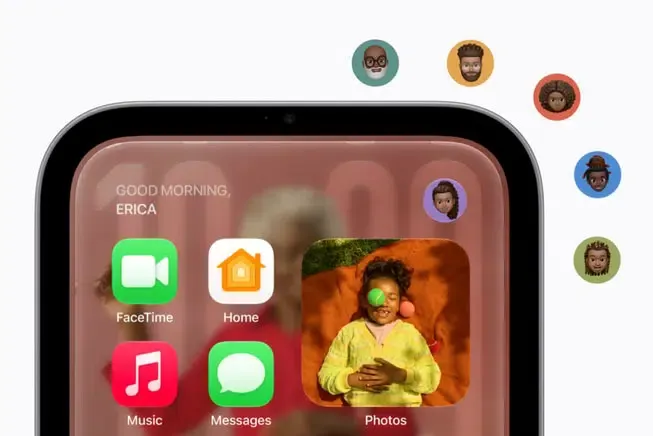
Personal content generally requires an enrolled user to be recognized and a paired device to meet Apple’s proximity and recent-unlock conditions. Under standard operational routines, personal content in apps such as Messages and Calendar is displayed when the enrolled user is visually identified by the camera and their paired iPhone or iPad is present on the same local Wi-Fi network and has been recently unlocked.
However, Apple also documents limited circumstances in which personal information may remain accessible after the paired device disconnects from Wi-Fi. Specifically, official documentation on the Apple HomeView product overview notes that when a paired device disconnects from the local network, personal information may remain accessible provided the user is recognized by face, and the paired device was recently on the same Wi-Fi network, maintains an active cellular connection, remains in the same physical location, and has been recently unlocked. Developers should not infer an unconditional session-expiration rule from Wi-Fi disconnection alone.
The diagram below outlines the verified behavioral gatekeeping mechanism governing personal data display:
[ Shared HomeView Terminal ]
             │
             ▼
[ Recognize Enrolled Member via Face ]
             │
             ├────────────────────────────────────────┐
             ▼                                        ▼
    [ Condition Satisfied ]                  [ Condition Unmet ]
             │                                        │
             ▼                                        ▼
[ Evaluate Apple's Paired-Device Eligibility Conditions ]   [ Display Generic Public Dashboard ]
             │
             ├────────────────────────────────────────┐
             ▼                                        ▼
    [ Conditions Satisfied ]                 [ Conditions Unmet ]
             │                                        │
             ▼                                        ▼
[ Surface Eligible Personal Content ]        [ Withhold Personal Content ]
Contextual voice processing also follows a divided routing structure. Siri AI on HomeView evaluates requests locally when possible, while complex natural language operations utilize Private Cloud Compute, as detailed in Apple Intelligence technical guidelines. In this cloud architecture, data is processed in stateless compute nodes that do not retain user records, ensuring that voice interactions remain private.
Cross-Device Continuity: Evaluating Handoff, App Intents, and System Responsibilities
Digital workflows between personal mobile phones and shared smart screens require clean boundaries across differing communication layers. Apple confirmed specific cross-device interactions at launch, most notably media Handoff: placing an iPhone in front of HomeView allows an active music playback session to transfer directly to the hub’s speaker base.
However, developers must avoid conflating supported media handoff with universal cross-device application synchronization. HomeView does not expose an open, unmanaged sandbox where arbitrary mobile application states can be broadcast locally. Building reliable multi-screen experiences requires understanding the distinct roles played by different networking and session protocols.
The table below delineates the functional responsibilities across modern software stacks:
| Technical Layer | Primary Engineering Role | Standard Protocols & Toolchains | Practical Operational Scope |
|---|---|---|---|
| Device Discovery | Local network node identification | mDNS / DNS-SD (Bonjour) | Locating compatible hardware endpoints on local subnets |
| User Authentication | Identity and privacy validation | Apple-managed user recognition and paired-device eligibility | Gatekeeping private calendar, message, and profile data |
| Media Handoff | Streaming content transfer | Supported AirPlay media transport and Apple-confirmed music Handoff | Shifting active music playback from iPhone to the display hub |
| State Synchronization | Application session consistency | Authenticated backend synchronization or platform services | Reconciling user shopping carts, playback queues, and task states |
| Installation Attribution | Campaign and acquisition measurement | Deferred Deep Linking & Install Referrers | Mapping marketing links to initial mobile app installations |
As the comparison demonstrates, localized network discovery (mDNS) merely announces device presence; it does not authorize user identity or synchronize proprietary application logic. Similarly, media streaming protocols handle raw audiovisual streams rather than synchronizing transactional database states.
For application-owned state that must persist across devices, developers may use authenticated backend synchronization or other supported platform mechanisms, depending on the service architecture. Mobile acquisition technologies, such as Deferred Deep Linking, serve entirely different operational boundaries—specifically resolving user acquisition journeys during new app installations on mobile operating systems—and do not function as home hardware handoff mechanisms.
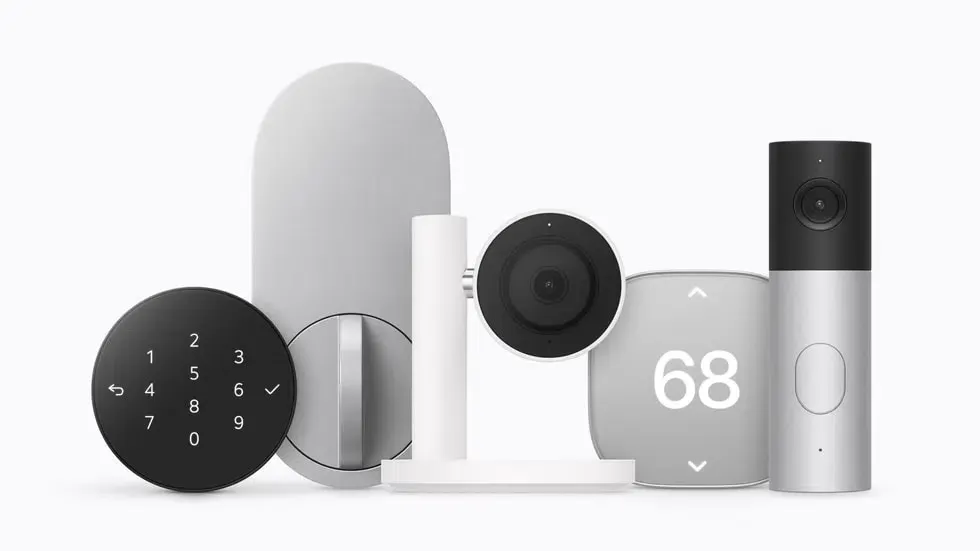
HomeView supports compatible accessories within the Apple Home framework and wider smart home ecosystems using Matter connectivity, following specifications maintained by the Connectivity Standards Alliance.
Engineering Checklist: Preparing Digital Services for Ambient Home Displays
Adapting consumer digital services for ambient, voice-enabled household screens requires development teams to structure interactions around modular actions and robust privacy controls. Because HomeView combines voice, touch, and proximity awareness, applications must prepare for interactions that do not originate from traditional mobile app stores.
Developer Implementation Checklist
- Review App Intents Framework Support: Review existing application actions structured under Apple Developer App Intents for Siri and Apple Intelligence integration, and independently verify which actions, if any, are supported through HomeView’s documented third-party service interfaces before assuming standalone intent execution on the device.
- Validate Supported Media Paths: Validate supported AirPlay media playback paths and device compatibility, without assuming that all third-party media sessions support the same proximity-based Handoff behavior.
- Enforce Zero-Trust Multi-User Data Segregation: Avoid caching sensitive customer information locally on ambient hardware; query user state dynamically from secure server backends only after verified user authentication.
- Validate Universal Links in Supported Mobile Flows: Validate Universal Links and Associated Domains in supported iOS and iPadOS application flows adopting Apple Associated Domains standards, and independently verify whether HomeView exposes any supported third-party outbound linking or cross-device handoff mechanism before designing HomeView-specific deep-link journeys.
Product & Growth Strategy Checklist
- Model Shared Household Interaction Patterns: Design service experiences that account for multiple family members viewing the same screen, ensuring public dashboards do not leak individual transaction records.
- Incorporate Proximity-Aware Information Hierarchies: Plan visual interfaces that provide high-contrast, glanceable status indicators at a distance, transitioning to granular controls as the user approaches.
- Assess Smart Home Ecosystem Touchpoints: Evaluate whether connected consumer appliances can integrate with Matter standards or Apple HomeKit Secure Video to leverage ambient camera and sensor alerts.
Frequently Asked Questions (FAQ)
Can third-party developers install standalone apps on HomeView?
How does HomeView protect personal information in shared households?
What Handoff or cross-device capabilities has Apple confirmed?
Does HomeView work with Matter accessories?
Practical Implications & Future Outlook
The debut of Apple HomeView reflects a broader evolution in how software ecosystems distribute functionality. As digital services move into shared, ambient spaces, user engagement will depend less on navigating standalone native app interfaces and more on modular, contextually triggered actions. Systems that succeed in this environment will be those capable of delivering utility through intelligent assistants while maintaining rigorous privacy boundaries.
For software engineering organizations, building for ambient environments requires disciplined system design. Teams must decouple user data from physical device terminals, use authenticated backend synchronization or supported platform mechanisms where cross-device state persistence is required, and structure service features around standardized intent frameworks. Organizations that establish robust, privacy-first data architectures will be best prepared to support users across personal, mobile, and ambient shared screens.
References
- Apple Newsroom. Meet Apple HomeView, a new way to enjoy entertainment, stay connected, and manage the home.
- Apple. Apple HomeView Product Overview and Technical Specifications.
- Apple Developer Documentation. App Intents Framework.
- Apple Developer Documentation. Supporting Associated Domains (Universal Links).
- Apple Support. Apple Intelligence Features, Requirements, and Private Cloud Compute.
- Connectivity Standards Alliance (CSA). Matter Controllers and Network Connectivity Specifications.
- Reuters. Apple bets on new screen gadget, Siri AI in home device push.
Share this article



