How to handle mobile app attribution without advertising ID access? You can attribute app installs without GAID or IDFA, but the underlying architecture shifts: rather than relying on a persistent advertising identifier, modern pipelines combine platform-mediated attribution frameworks, Google Play Install Referrer, first-party contextual parameter routing, and server-side validation.
An Advertising ID is a resettable software identifier provided by the mobile platform for advertising and measurement use cases. On Android, this is the Advertising ID provided through Google Play services; on Apple platforms, IDFA access is governed by the App Tracking Transparency framework.
| Term | Definition |
|---|---|
| Advertising ID | A resettable software identifier used for mobile ad measurement. |
| GAID | Google Advertising ID managed through Google Play services on Android devices. |
| IDFA | Apple Identifier for Advertisers governed by App Tracking Transparency on iOS. |
| Contextual Parameter Routing | First-party transmission of campaign or referral context through a user-initiated web-to-app journey. |
TL;DR: Summary of ID-Free Mobile Attribution
The Google Advertising ID is not replaced by a single drop-in identifier. Instead, attribution splits into distinct, purpose-built primitives:
-
Paid Ad Campaign Reporting (Android): Use the Google Play Install Referrer API for store-mediated campaign parameter retrieval on Play-distributed installs.
-
Paid Ad Campaign Reporting (iOS): Use Apple AdAttributionKit and SKAdNetwork for platform-signed, privacy-preserving postbacks.
-
Web-to-App Onboarding & Referrals: Use a first-party install-context restoration layer (such as OpoInstall) to restore promo codes, room IDs, and inviter tokens upon first launch.
-
Cross-App Retargeting: Requires an authorized platform-supported identifier or measurement mechanism and compliance with applicable platform policies, user controls, and consent requirements.
Architecture Decision Matrix: Choosing the Right Attribution Primitive
To determine the appropriate technical mechanism for your application, evaluate your specific operational requirements against platform capabilities:
| Functional Requirement | Primary Technical Primitive | GAID / IDFA Dependency | Attribution Output Type |
|---|---|---|---|
| Play Store Ad Campaign Measurement | Google Play Install Referrer API | None (Operates via Store URL) | Store-provided install context |
| iOS Ad Network Measurement | Apple AdAttributionKit / SKAdNetwork | None (Platform-mediated) | Privacy-preserving platform postbacks |
| In-App Onboarding & Deferred Deep Linking | First-Party Contextual Parameter Routing | None (First-party context) | Real-time custom payload on first launch |
| User-to-User Referral Binding | Dynamic Referral Tokens | None (Session/account level) | Direct inviter-invitee account pairing |
| Cross-App User Retargeting | Platform-Supported Advertising Mechanisms | Not necessarily; depends on mechanism and policy | User-level or cohort-level identifier |
GAID Replacement: What Actually Works
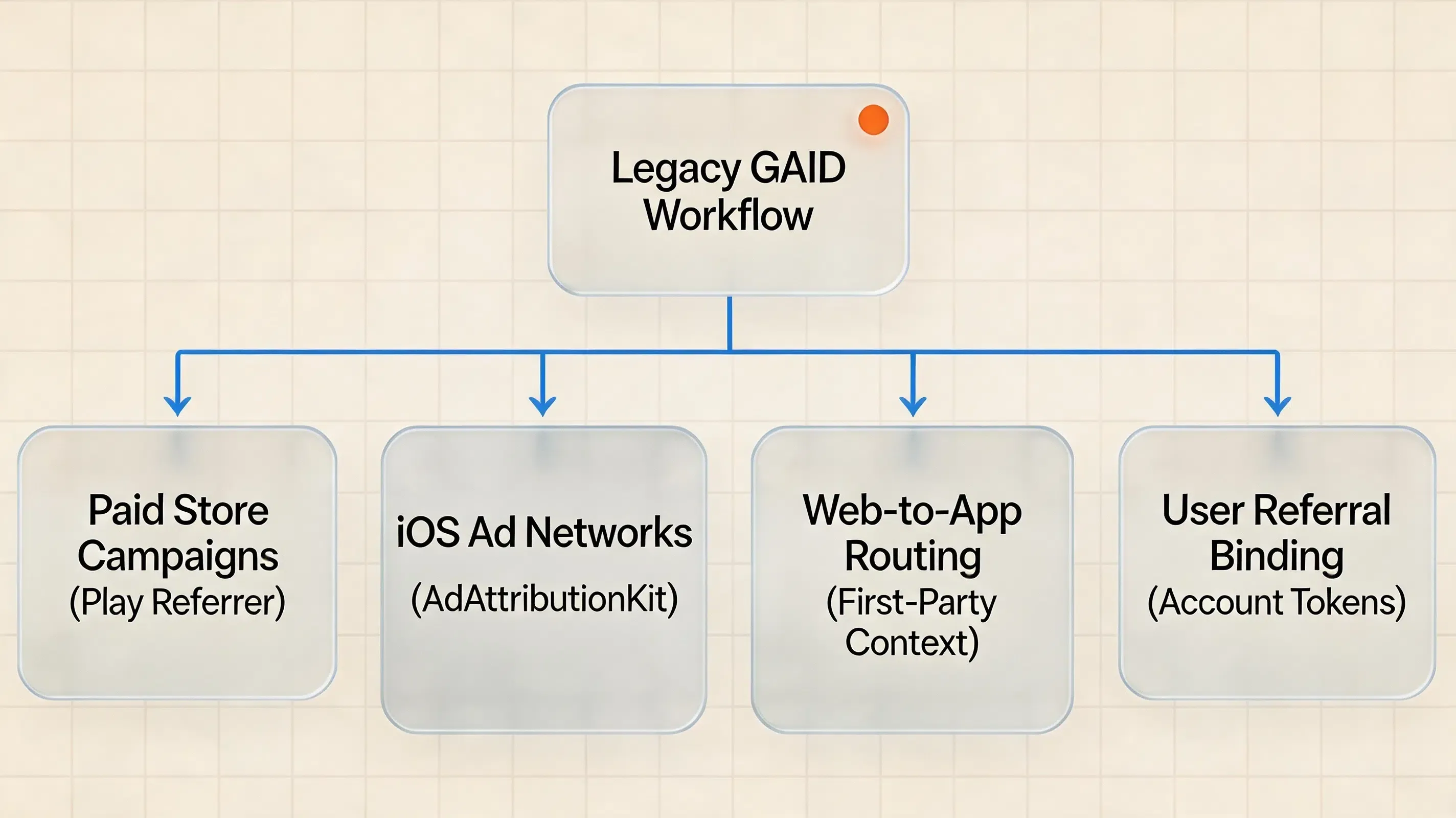
When engineering teams search for a “GAID replacement,” they are often attempting to solve multiple disconnected operational problems with a single tool. In production, GAID-dependent architectures must be deconstructed into four independent solutions:
                        Legacy GAID Workflows
                                 │
     ┌───────────────────────────┼───────────────────────────┐
     │                           │                           │
     ▼                           ▼                           ▼
Paid Campaign ROI           Web-to-App Routing          Referral Binding
     │                           │                           │
     ▼                           ▼                           ▼
Play Install Referrer /     First-Party Context       First-Party Referral
AdAttributionKit            Parameter Routing         Token Restoration
-
Replacing GAID-Based Install Context Retrieval: Use the Google Play Install Referrer where applicable for Play-distributed installs, together with ad-network integrations and platform-supported attribution APIs. These frameworks provide installation origin context without exposing persistent hardware or advertising identifiers.
-
Replacing GAID for Onboarding & Deep Linking: Deploy a first-party install-context restoration layer (such as OpoInstall). Instead of querying an ad ID to join click logs, pass dynamic parameters through owned campaign URLs and restore them on first app launch via the client SDK.
-
Replacing GAID for User Identity: Use authenticated first-party account systems (such as OAuth or internal user UUIDs) rather than device-level advertising keys.
Core Architectural Taxonomy: What Different Primitives Provide
| Measurement Goal | Underlying Signal | User-Level Identifier? | Platform-Mediated? |
|---|---|---|---|
| Campaign-Level Ad Measurement | Apple AdAttributionKit / SKAN | No | Yes |
| Play Store Install Context | Google Play Install Referrer | No | Yes |
| Deferred Deep Link Onboarding | First-party contextual token | Potentially account/session-level | No |
| User Referral Binding | Referral token + account pairing | Yes (First-party account) | No |
| Cross-App Device Identity | Authorized Advertising ID | Yes | Yes |
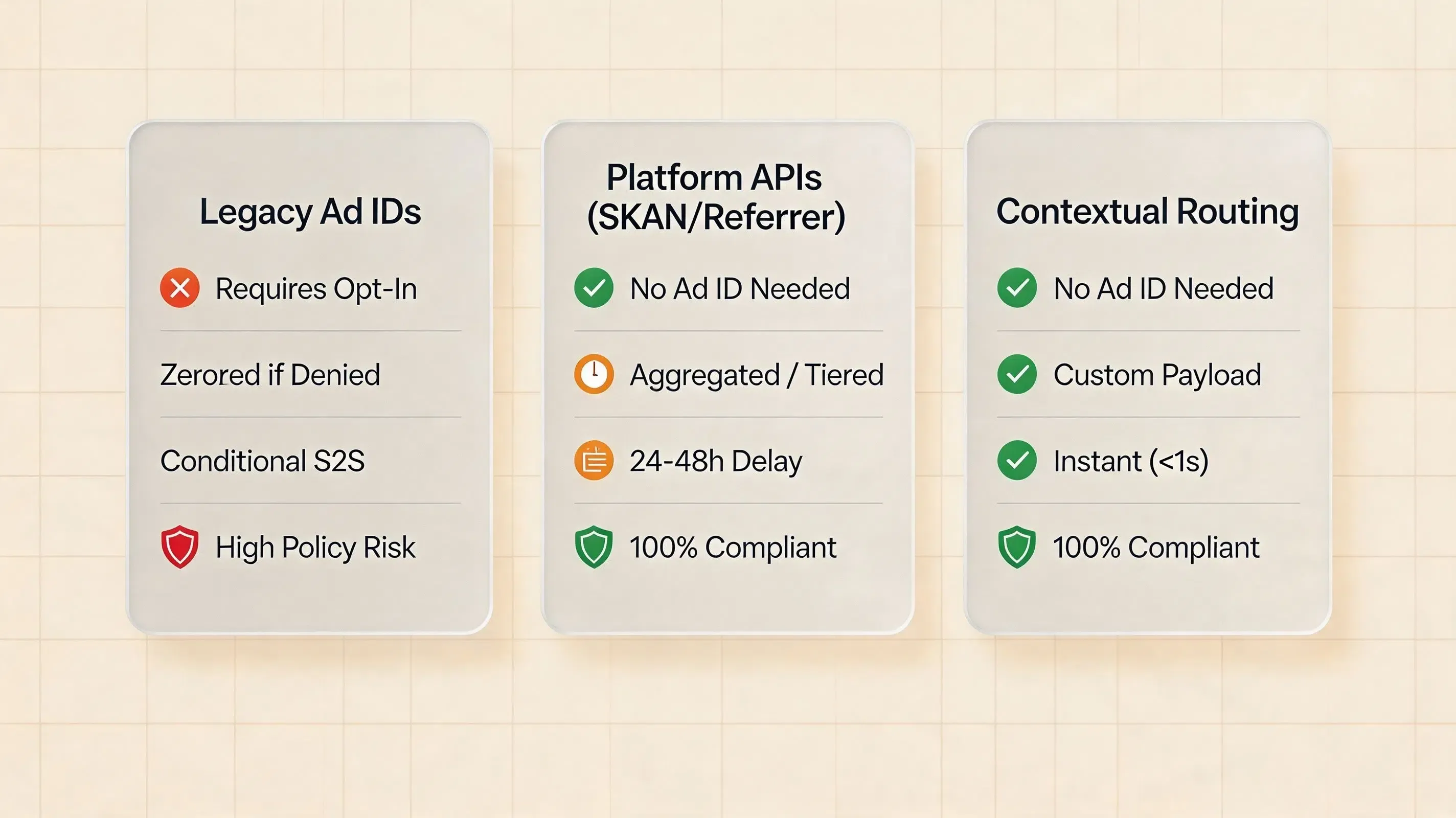
GAID vs Install Referrer vs First-Party Parameter Restoration
| Attribution Mechanism | Requires GAID / IDFA? | Identifier Model | Primary Objective |
|---|---|---|---|
| Google Advertising ID (GAID) | Yes | Platform advertising identifier | Cross-app advertising measurement |
| Google Play Install Referrer | No | Store-provided install context | Play install campaign attribution |
| Apple AdAttributionKit / SKAN | No | Privacy-preserving attribution signal | Platform ad measurement |
| First-Party Parameter Routing | No | First-party token / account context | Deep linking and referral binding |
GAID Alternatives for Android App Attribution
When operating on Android devices without Google Advertising ID access, engineering teams deploy alternative mechanisms tailored to specific campaign channels:
| GAID Alternative | Primary Implementation Mechanism | Typical Use Case | Key Operational Constraint |
|---|---|---|---|
| Google Play Install Referrer | Play Install Referrer API | Play Store ad campaigns and direct download links | Limited to Google Play distributed installations |
| First-Party Contextual Tokens | Web JS SDK + Native SDK Restoration | User referral programs and web-to-app onboarding | Scoped strictly to direct first-party user journeys |
| Platform Attribution APIs | Android Privacy Sandbox Attribution Reporting API | Aggregated ad network conversion reporting | Platform rollout and enrollment dependent |
| Server-to-Server (S2S) Integrations | Ad network postbacks + backend APIs | Direct partner attribution and API reconciliation | Requires direct technical integration per network |
How Mobile Attribution Platforms and MMPs Handle Measurement Without GAID
Mobile Measurement Partners (MMPs) such as AppsFlyer, Adjust, Singular, and Branch have adjusted their technical architectures to support measurement when advertising identifiers are absent:
| Platform / Layer | Primary Android ID-Free Signal | Primary iOS ID-Free Signal | Measurement Granularity |
|---|---|---|---|
| MMPs / Attribution Platforms | Platform attribution signals, Install Referrer, network APIs, S2S integrations | AdAttributionKit / SKAdNetwork and network integrations | Varies by platform, network, and measurement framework |
| Platform-Native APIs | Google Play Install Referrer API | Apple AdAttributionKit Framework | Postback and store-mediated installation data |
| First-Party Routing Layers | Contextual Parameter Caching, Web-to-App Parameter Tokens | Ephemeral Context Matching, Dynamic Universal Links | Real-time, user-level custom JSON payload for onboarding |
By pairing an MMP for macro ad network reporting with a first-party contextual routing layer for micro onboarding personalization, engineering teams can establish a complementary measurement and onboarding stack without violating operating system privacy sandboxes.
Why Advertising ID Restrictions Disrupt Deterministic Mobile Attribution
The Historical Reliance on Persistent Advertising Identifiers
For over a decade, mobile performance advertising relied on deterministic, device-level matching powered by platform advertising identifiers: the Google Advertising ID (GAID) on Android and the Identifier for Advertisers (IDFA) on iOS. In this traditional workflow, ad networks captured the user’s advertising ID upon ad impression or click. When the application was subsequently installed and launched, the integrated attribution SDK queried the device operating system to retrieve the matching advertising ID.
A straightforward server-side equality lookup (
The Mechanism of Identifier Zeroing and Platform Restrictions
Mobile operating system architectures have evolved to restrict cross-app device tracking without explicit user consent.
On Apple platforms, Apple App Tracking Transparency guidelines require applications to request tracking authorization via ATTrackingManager.requestTrackingAuthorization. When authorization is absent, the operating system withholds the IDFA. Applications must handle denied, restricted, and notDetermined states cleanly without assuming that an advertising identifier is accessible.
On Android, according to the Android 13 behavior changes documentation, Google introduced explicit permission controls within Google Play services. For applications targeting Android 13 (API level 33) or higher, developers must declare the com.google.android.gms.permission.AD_ID permission in their manifest to access the Advertising ID. When this permission is omitted, or when a user limits advertising tracking or deletes their Advertising ID, Google Play services may return a zeroed identifier (00000000-0000-0000-0000-000000000000) or indicate that the identifier is unavailable depending on device state and Google Play services behavior.
The Failure of Deterministic Ad Attribution Pipelines
When the advertising identifier is unavailable or zeroed, an attribution pipeline that depends on identifier equality can no longer perform reliable user-level matching. A zeroed or unavailable advertising identifier cannot provide a unique key for distinguishing individual conversion journeys.
To maintain campaign measurement and conversion tracking, engineering teams must transition away from advertising ID dependencies. Modern architectures decouple install attribution from persistent device identifiers, relying on first-party contextual routing and platform-provided measurement frameworks.
In this architecture, OpoInstall is presented as a first-party install-context restoration / deferred deep-linking layer rather than as a universal replacement for Google Play Install Referrer, AdAttributionKit, SKAdNetwork, or other platform-mediated advertising attribution systems.
How Android Advertising ID Permissions and Apple ATT Affect Attribution
Google Play AD_ID Permission Policies on Android 13 and Higher
Google Play enforces granular policy governance over advertising identifier extraction:
-
Manifest Declaration Requirement: Apps targeting Android 13 (API level 33) or higher must declare
<uses-permission android:name="com.google.android.gms.permission.AD_ID"/>in their manifest. If omitted, calls toAdvertisingIdClient.getAdvertisingIdInfo(context)return zeroes or indicate an unavailable state. -
User Privacy Controls: When a user limits advertising tracking or deletes their Advertising ID, Google Play services returns zeroes or an unavailable state. Google Play developer policies explicitly forbid bridging or reconstructing the reset Advertising ID using other persistent device identifiers.
-
Policy Exclusions for Sensitive Apps: Google Play policies prohibit declaring the
AD_IDpermission in applications targeting children or subject to family policy constraints, requiring developers to adopt ID-free measurement pipelines.
Apple AppTrackingTransparency Framework and Authorization States
On iOS, identifier access is governed by the ATTrackingManager.AuthorizationStatus system state:
-
notDetermined(0): The user has not yet responded to the ATT authorization request. The application should not assume that IDFA access is available. -
restricted(1): The device is restricted by parental controls or device management profiles; tracking is disabled system-wide. -
denied(2): The user explicitly selected “Ask App not to Track” on the prompt or disabled tracking requests globally in iOS privacy settings. The application must not rely on IDFA. -
authorized(3): The user explicitly granted permission to track across third-party apps and websites, permitting IDFA access subject to Apple platform policies.
Important Architectural Boundary Statement
Important distinction: Removing GAID or IDFA from an attribution architecture does not automatically make every alternative tracking technique privacy-safe or policy-compliant. According to Apple’s App Tracking Transparency framework guidance, Apple defines tracking as linking user or device data collected from your app with third-party data for targeted advertising or measurement, or sharing data with a data broker. If an engineering pipeline collects device characteristics to reconstruct a persistent cross-app identity, it remains subject to platform tracking policies regardless of whether an Advertising ID was accessed. First-party parameter routing must remain scoped to the immediate onboarding and conversion context of the user-initiated journey.
What ID-Free Attribution Does Not Mean
ID-free attribution does not mean identifier-free analytics. Applications may still process account identifiers, first-party session tokens, or deep linking parameters required for internal product functionality. The architectural objective is to eliminate reliance on persistent, cross-app advertising identifiers for install matching, rather than claiming that all attribution data is entirely anonymous.
Three Attribution Problems That Should Not Be Confused
When architecting mobile attribution without advertising identifiers, engineering teams must differentiate between three distinct operational objectives:
| Problem | Primary Signals Used | Engineering Objective |
|---|---|---|
| Advertising Attribution | Platform attribution APIs, Google Play Install Referrer, ad-network-specific measurement | Measure ad-driven campaign performance and ad spend efficiency |
| Deferred Deep Linking | URL query parameters, Universal Links, App Links | Restore in-app destination context after store installation |
| Referral Attribution | First-party referral tokens, user account IDs | Bind inviter and invitee accounts for product rewards |
A first-party routing mechanism can solve deferred deep linking and referral attribution without requiring GAID or IDFA, but it should not be presented as a universal replacement for platform-mediated advertising attribution.
When Should Growth Teams Deploy a First-Party Attribution Layer?
Deploying an independent first-party attribution layer is recommended for applications operating specific product workflows:
-
SaaS & Subscription Applications: B2B platforms where marketing traffic starts on desktop or mobile web and converts into native app accounts requiring pre-authenticated session restoration.
-
Gaming Applications: Multiplayer or social games where new players must automatically join an inviter’s match, guild, or room upon first launch without manual room codes.
-
E-Commerce Platforms: Shopping apps delivering personalized welcome discounts or restoring active shopping cart states from mobile web campaigns directly to native checkout views.
-
Referral & Loyalty Platforms: Products driving organic viral loops that require reliable inviter-invitee token binding without forcing users to copy-paste coupon strings.
Architectural Blueprint for ID-Free First-Party Parameter Routing
Decoupling Attribution from Persistent Device Identifiers
In this article, we use contextual parameter routing (also known as first-party deferred attribution or install-context restoration) to describe first-party transmission of campaign or referral context through a user-initiated web-to-app journey.
Modern attribution architectures focus on the transactional context of the marketing engagement rather than attempting to track the physical device. When a prospective user clicks a campaign link, the interaction is assigned a transient routing payload containing campaign metadata, channel tokens, and application routing parameters.
This payload travels through the conversion funnel alongside the user journey, allowing the mobile application to restore contextual intent upon launch without querying system-level advertising IDs.
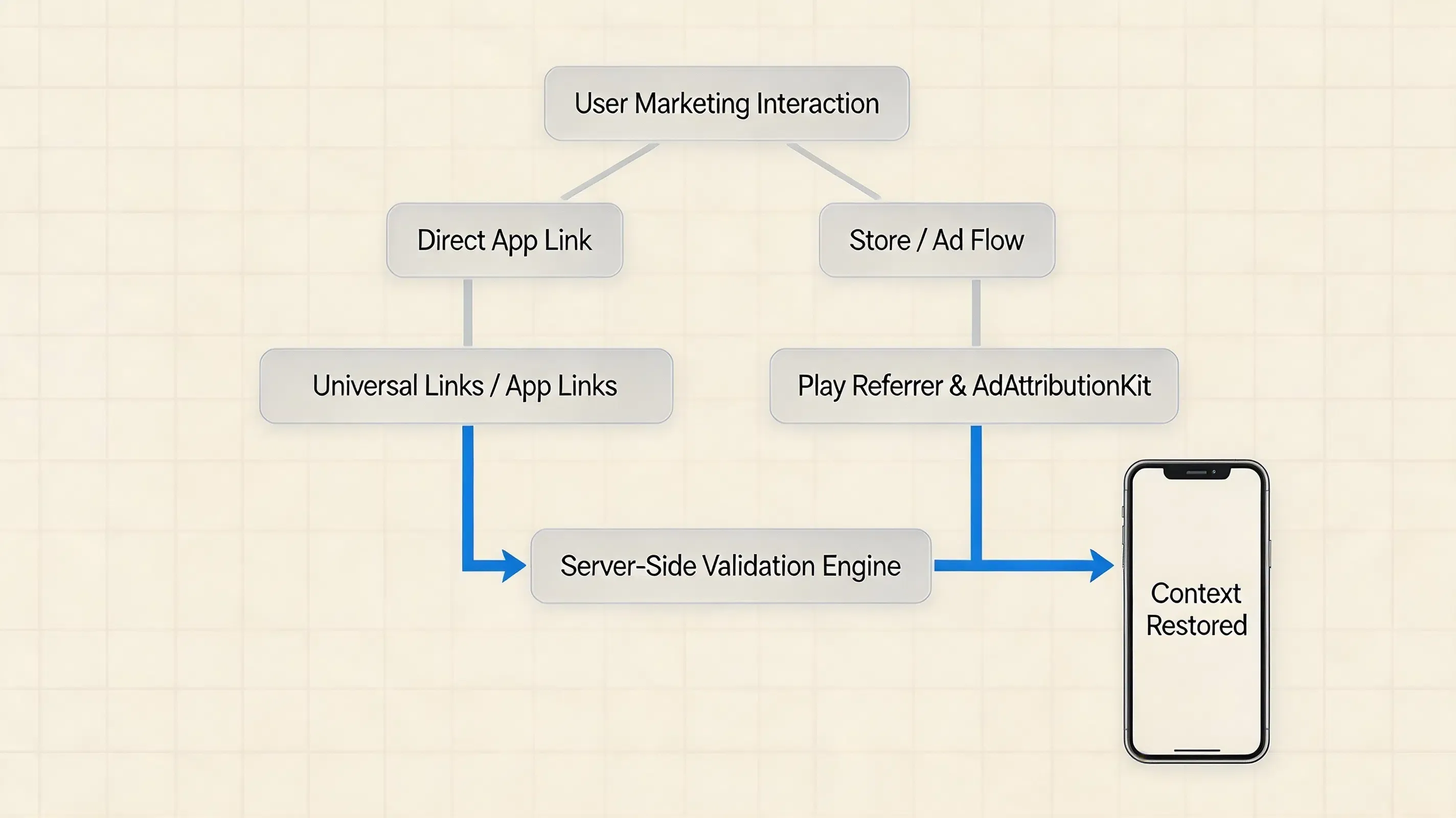
A Two-Layer Attribution Architecture
An enterprise attribution architecture separates direct deep linking from store-mediated install flows:
                User Marketing Interaction
                          │
         ┌────────────────┴────────────────┐
         │                                       │
   Direct App Link                        Store / Ad Flow
         │                                       │
 Universal Links /                  ┌──────┴───────┐
    App Links                       │                           │
         │                       Android                       Apple
         │                   Play Install                   Platform Ad
         │                      Referrer                    Attribution
         │                            │                              │
         └──────────────┬────────┴──────┬───────┘
                                       │                              │
                                         Attribution / Routing Signals
                                                        │
                                             Server-Side Validation
                                                        │
                                    ┌─────────┴─────────┐
                                    │                                      │
                              Context Found                            No Signal
                                   │                                      │
                             Route / Bind                               Organic /
                             First-Party                           Graceful Fallback
Technical Mechanics of Contextual Parameter Routing and Fallbacks
The Role of First-Party Parameter Transport
First-party parameter transport relies on standard web query parsing and secure server-side session caching. Developers can consult the OpoInstall SDK documentation for technical specifications regarding parameter binding models.
First-party parameter routing used solely for direct onboarding does not necessarily require ATT when the implementation does not meet Apple’s definition of tracking; teams should evaluate the actual data flow and purpose against Apple’s current policies.
Platform-Specific Install Attribution Fallbacks
When direct deep links are interrupted by store installation, platform-specific primitives provide structured attribution data:
-
Android (Google Play Install Referrer): The Google Play Install Referrer API guide exposes referrer information associated with the Play Store installation and provides click and install timestamps. The API documentation specifies a 90-day availability window for referrer data. Applications should persist and process this value according to their own attribution and reinstall-handling rules rather than treating it as a permanent install identifier. Note that parameters must be explicitly passed through Google Play; arbitrary landing-page query parameters do not automatically populate this API.
-
Apple Platform Attribution: Apple’s modern app attribution stack includes the Apple AdAttributionKit framework, alongside interoperability with SKAdNetwork for supported advertising workflows. AdAttributionKit itself does not require an ATT authorization prompt; however, other data flows in the same app may still constitute tracking and therefore require ATT authorization. AdAttributionKit operates within Apple’s signed-ad framework with eligible advertising networks registered with Apple’s attribution frameworks.
Why Clipboard-Based Attribution Should Not Be a Primary Strategy
Clipboard or pasteboard transfer should generally be treated as an exceptional fallback mechanism rather than a primary attribution design. Clipboard access introduces user-visible privacy notifications, platform restrictions, and inconsistent availability across operating system versions. When pasteboard storage is evaluated:
-
Explicit Scoping: Payloads should be short-lived and limited to the minimum application-specific data required for the intended first-party flow. Sensitive values should be protected appropriately in transit and at rest.
-
Immediate Cleanup: Applications should promptly clear or overwrite temporary parameter tokens once consumed during the initial launch sequence.
-
Policy Compliance: Use pasteboard mechanisms only where a clearly defined first-party user flow exists and following applicable platform-policy review.
Graceful Fallback and Unattributed States
A resilient privacy architecture does not attempt to force attribution matches through invasive device fingerprinting:
-
Direct App Link / Universal Link: Instant native app wake-up when the application is already installed on the device.
-
Store-Mediated Parameter Passing: Retrieval of campaign parameters via platform APIs (such as Google Play Install Referrer) when available.
-
First-Party Parameter Restoration: Matching new install sessions against active web landing page interactions within a narrow time window.
-
No Signal (Unattributed): When network conditions change, sessions expire, or no matching context exists, the application safely degrades to a clean default state without interrupting the user onboarding experience.
Example Implementation Scenario: Context Restoration with OpoInstall
To understand how these primitives operate in production, consider a cross-platform mobile gaming application executing two simultaneous acquisition channels:
-
Channel A (Paid Programmatic Ads): An ad campaign running on external ad networks redirecting to the App Store and Google Play.
-
Channel B (User Viral Sharing): Existing players sharing custom invitation links (
https://game.example.com/join?room=9876&inviter=usr_432) via social messaging apps.
*

[Channel A: Paid Ad] ──> [Store Download] ──> [Play Referrer / AdAttributionKit] ──> [Aggregated Ad ROI]
[Channel B: Invite]  ──> [Web Landing]    ──> [First-Party Token Restoration]    ──> [Auto-Join Game Room]
When a new user installs through Channel A, the application relies on the Google Play Install Referrer API or Apple AdAttributionKit to report campaign performance to marketing dashboards. When a user installs through Channel B, the first-party routing SDK captures the dynamic invitation token on first launch, immediately joining the new player to room 9876 without querying advertising IDs or triggering ATT prompts.
Common Production Failure Cases in ID-Free Mobile Attribution
When deploying an attribution architecture that does not rely on persistent advertising identifiers, engineering teams frequently encounter specific operational failure modes:
-
Failure Case 1: Landing Page Parameters Lost After Store Redirection: If campaign links redirect through unencoded intermediate URL shorteners, query parameters like
channelCodeorreferrermay be stripped before reaching the landing page script or app store destination. -
Failure Case 2: Duplicate Referral Redemption and Missing Idempotency Locks: In production, if the mobile client invokes parameter restoration on every
Activity.onResumeor application foreground event without checking a local persistence flag, users may trigger duplicate reward claims or repeated deep link navigation. -
Failure Case 3: Reinstallation State Mismanagement: While the Google Play Install Referrer retains historical referrer data for up to 90 days, reinstalled applications may receive stale attribution data from a previous install lifecycle unless the client backend validates whether an account has already completed registration.
-
Failure Case 4: Organic Installs Misclassified via Broad Matching Windows: If server-side session matching windows are configured too broadly in environments with shared networks or high user density, organic installs may collide with unrelated web-click sessions.
Illustrative SDK Integration Pattern for First-Party Install Context Restoration
Client-Side Integration Overview
A first-party install-context restoration SDK can be used to implement contextual parameter restoration without requiring an Advertising ID. Development teams can download the OpoInstall mobile SDK packages and integration resources.
SDK API note: The initialization and retrieval lifecycle shown below is an illustrative pseudo implementation. The API names below are intentionally illustrative and should not be treated as vendor documentation. In production, prefer the SDK’s documented application-level initialization and install-context lifecycle rather than coupling attribution retrieval directly to an individual Activity lifecycle. Verify all classes, method names, callback types, and configuration keys against the vendor’s current documentation before production use.
// Android Implementation: ID-Free Parameter Extraction (Architecture Pattern)
// Location in Part A: [CODE_BLOCK_01]
// Note: Illustrative pseudo implementation based on OpoInstall SDK contracts.

// ----------------------------------------------------------------------------
// 1. AndroidManifest.xml (Sample excerpt)
// ----------------------------------------------------------------------------
/*
<manifest xmlns:android="http://schemas.android.com/apk/res/android" package="com.example.myapp">
    <uses-permission android:name="android.permission.INTERNET"/>
    <application android:name=".CustomApplication" android:label="@string/app_name">
        <!-- Configure the application key using the method specified in vendor documentation -->
        <meta-data android:name="com.opoinstall.APP_KEY" android:value="YOUR_APPKEY"/>
    </application>
</manifest>
*/

// ----------------------------------------------------------------------------
// 2. CustomApplication.kt: Application-Level State-Machine Lifecycle
// ----------------------------------------------------------------------------
package com.example.myapp

import android.app.Application
import android.util.Log
import com.opoinstall.api.OpoData
import com.opoinstall.api.OpoError
import com.opoinstall.api.OpoInstall
import com.opoinstall.api.ResultCallBack

class CustomApplication : Application() {

    enum class AttributionState {
        NOT_STARTED,
        FETCHING,
        PROCESSED
    }

    override fun onCreate() {
        super.onCreate()

        // Initialize the first-party routing SDK in the main process
        OpoInstall.initialize(this)

        // Retrieve install context once at the application layer
        if (getAttributionState() == AttributionState.NOT_STARTED) {
            fetchInstallContext()
        }
    }

    private fun fetchInstallContext() {
        setAttributionState(AttributionState.FETCHING)

        OpoInstall.getInstance().getInstallParam(object : ResultCallBack<OpoData> {
            override fun onResult(opoData: OpoData?) {
                setAttributionState(AttributionState.PROCESSED)
                if (opoData != null) {
                    val channelCode = opoData.channelCode
                    val customData = opoData.data
                    Log.d("InstallContext", "Restored context: Channel=$channelCode, Data=$customData")
                    handleInstallContext(channelCode, customData)
                }
            }

            override fun onError(opoError: OpoError?) {
                // If a temporary network failure occurs, state can remain retryable or fallback cleanly
                Log.w("InstallContext", "Attribution query completed with status: ${opoError?.errorMsg}")
                setAttributionState(AttributionState.PROCESSED)
            }
        })
    }

    private fun getAttributionState(): AttributionState {
        val raw = getSharedPreferences("attribution_prefs", MODE_PRIVATE)
            .getString("state", AttributionState.NOT_STARTED.name)
        return AttributionState.valueOf(raw ?: AttributionState.NOT_STARTED.name)
    }

    private fun setAttributionState(state: AttributionState) {
        getSharedPreferences("attribution_prefs", MODE_PRIVATE)
            .edit()
            .putString("state", state.name)
            .apply()
    }

    private fun handleInstallContext(channelCode: String?, customData: String?) {
        // Dispatch restored context to internal account/routing services
    }
}
iOS Implementation: Swift Lifecycle Integration
On iOS, the application integrates the SDK within the application lifecycle delegate. The SDK retrieves installation parameters asynchronously on the main execution thread without invoking AppTrackingTransparency authorization requests when cross-app tracking is not performed.
The Swift implementation below demonstrates an illustrative initialization and parameter extraction workflow:
// iOS Integration Pattern: Application-Level Install Context Retrieval
// Location in Part A: [CODE_BLOCK_02]
// Note: PSEUDOCODE ONLY. Type and method names are illustrative placeholders.

// ----------------------------------------------------------------------------
// 1. Info.plist (Sample excerpt)
// ----------------------------------------------------------------------------
/*
<!-- Configure the application key using the method specified in vendor documentation -->
<key>com.opoinstall.APP_KEY</key>
<string>YOUR_APPKEY</string>
*/

// ----------------------------------------------------------------------------
// 2. AppDelegate.swift: Lifecycle Initialization and Context Retrieval
// ----------------------------------------------------------------------------
import UIKit
// Note: SDK module import omitted intentionally; use the module name supplied by your package manager.

enum InstallContextState: String {
    case notStarted = "NOT_STARTED"
    case fetching = "FETCHING"
    case processed = "PROCESSED"
}

@main
class AppDelegate: UIResponder, UIApplicationDelegate, OpoInstallDelegate {

    var window: UIWindow?

    func application(
        _ application: UIApplication,
        didFinishLaunchingWithOptions launchOptions: [UIApplication.LaunchOptionsKey: Any]?
    ) -> Bool {

        // Initialize the first-party routing SDK without invoking ATT authorization
        OpoInstallSDK.initWith(self)

        // Guard retrieval with state-machine check at the application entry point
        if getInstallContextState() == .notStarted {
            fetchInstallContext()
        }

        return true
    }

    private func fetchInstallContext() {
        setInstallContextState(.fetching)

        // Retrieve deferred install parameters asynchronously
        OpoInstallSDK.defaultManager()?.getInstallParmsCompleted({ [weak self] (appData: OpoinstallData?) in
            DispatchQueue.main.async {
                self?.setInstallContextState(.processed)

                if let data = appData?.data {
                    let channel = appData?.channelCode
                    self?.handleInstallContext(channelCode: channel, customData: data)
                }
            }
        })
    }

    private func getInstallContextState() -> InstallContextState {
        let raw = UserDefaults.standard.string(forKey: "install_context_state") ?? InstallContextState.notStarted.rawValue
        return InstallContextState(rawValue: raw) ?? .notStarted
    }

    private func setInstallContextState(_ state: InstallContextState) {
        UserDefaults.standard.set(state.rawValue, forKey: "install_context_state")
    }

    private func handleInstallContext(channelCode: String?, customData: String) {
        // Dispatch restored context to internal account/routing services
    }

    // Universal Link delegate callback for deep linking
    func application(
        _ application: UIApplication,
        continue userActivity: NSUserActivity,
        restorationHandler: @escaping ([UIUserActivityRestoring]?) -> Void
    ) -> Bool {
        OpoInstallSDK.continue(userActivity)
        return true
    }
}
Engineering Considerations for Client Implementation
-
Non-Blocking UI Lifecycles: Always initialize attribution SDKs asynchronously and query parameters without blocking the main UI thread during application launch.
-
Local Idempotency Handling: Maintain a state-machine or persistent flag (e.g.,
NOT_STARTED,FETCHING,PROCESSED) to manage parameter extraction cleanly and prevent redundant API queries. -
Server-Side Replay Defense: Validate dynamic parameter payloads against backend transaction logs to verify that referral codes or promotional tokens cannot be replayed maliciously.
Platform Attribution APIs and the Privacy Sandbox Transition
Android Platform Attribution and the Privacy Sandbox Transition
Android’s Attribution Reporting APIs were designed to support privacy-preserving measurement across apps and the web without relying on cross-party identifiers.
Android’s Attribution Reporting APIs are available for supported Privacy Sandbox integrations, but they are not a universal replacement for Install Referrer or an MMP integration. Production applicability depends on the specific Android version, advertising technology integration, enrollment requirements, and ecosystem support. Teams should verify the current Android Privacy Sandbox documentation before making Attribution Reporting a production dependency.
For Play-distributed Android apps, Google Play Install Referrer remains a practical first-party mechanism for retrieving campaign parameters associated with a Play Store install. Ad networks and attribution providers may also offer platform-supported measurement integrations.
Apple Platform Attribution: AdAttributionKit and SKAdNetwork
On iOS, Apple provides privacy-preserving attribution mechanisms centered on AdAttributionKit, which supports app ad campaigns across the App Store and alternative marketplaces, alongside interoperability with SKAdNetwork. These frameworks provide platform-mediated attribution signals without exposing a persistent device advertising identifier. Reporting granularity and timing remain governed by Apple privacy thresholds and attribution windows.
Coexistence of First-Party Routing and Platform APIs
Platform privacy APIs and first-party contextual routing solve different engineering requirements:
-
Platform Privacy APIs: Designed for macro-level advertising measurement, ad network ROI calculation, and programmatic campaign optimization without persistent identifiers.
-
First-Party Parameter Routing: Designed for micro-level app onboarding, instant user-to-user referral reward binding, deep link routing, and direct web-to-app conversion journeys.
How to Validate Attribution Accuracy in Sandbox Environments
Testing Install Attribution When Advertising ID Access Is Unavailable
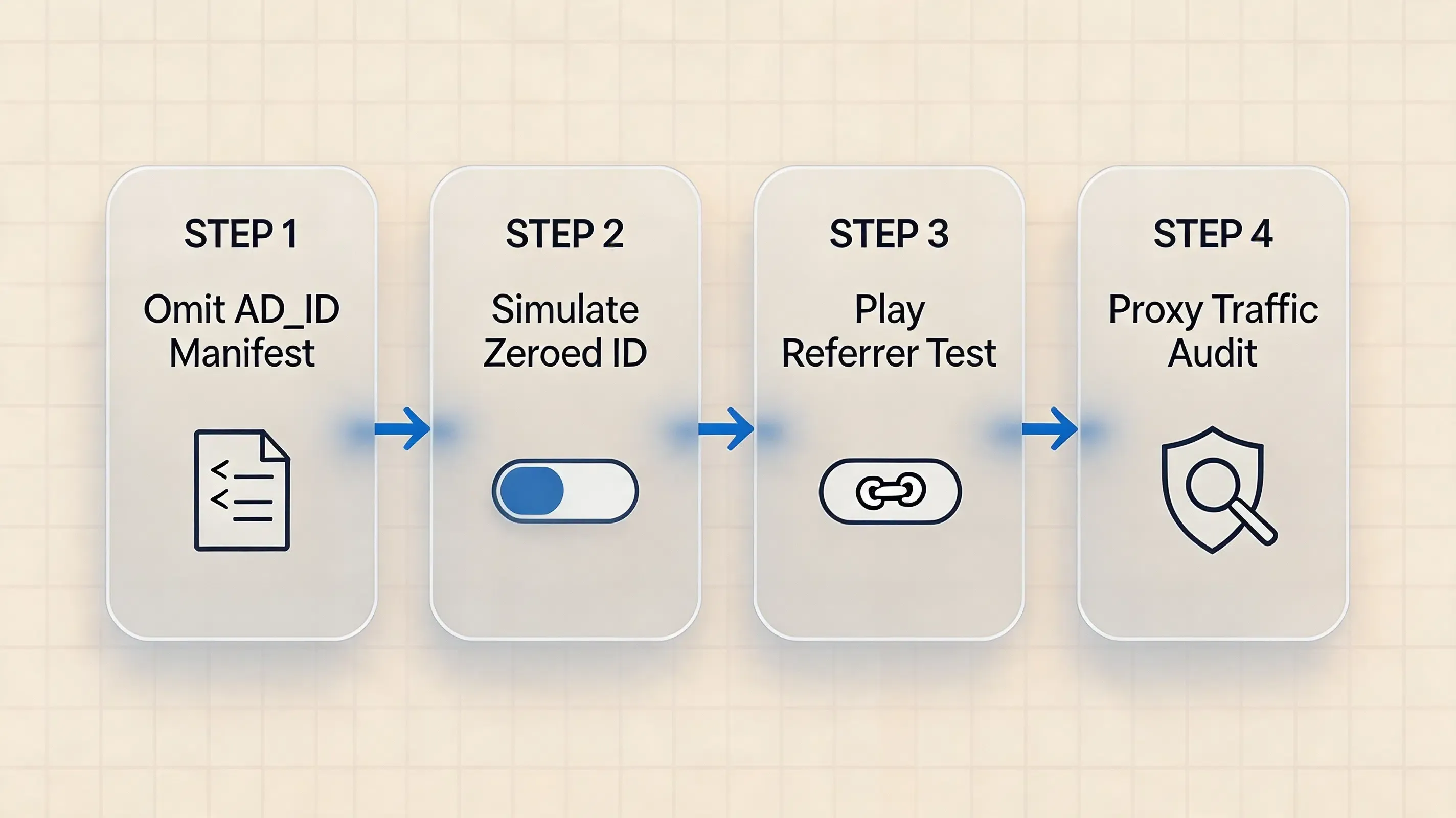
To verify that an application correctly handles install attribution across diverse device and permission states:
-
Missing AD_ID State: Deploy an Android test build that excludes the
com.google.android.gms.permission.AD_IDpermission fromAndroidManifest.xmland verify that the app initializes cleanly. -
User Identifier Limitations: On an Android test device with Google Play services, enable advertising limitations or delete the advertising ID in system settings to ensure parameter extraction does not crash or stall.
-
Play Store Campaign Simulation: Trigger an install journey using a test campaign URL that explicitly passes the expected value through the Google Play Install Referrer mechanism. Do not assume that an arbitrary landing-page query parameter will automatically become an Install Referrer value.
-
Reinstallation Verification: Reinstall the application after a previous attributed install and verify that the attribution flow does not incorrectly reuse stale first-install state.
-
Organic Fallback Verification: Launch an unlinked build to confirm that
getInstallParamcleanly resolves to null or an organic fallback without hanging.
Simulating ATT Denied States on Physical iOS Devices
To test iOS parameter retrieval when tracking is denied:
-
Install the test build on a physical iOS device via Xcode.
-
Verify that the SDK parameter retrieval method executes asynchronously and resolves parameters successfully without prompting for ATT or querying IDFA APIs.
-
Test application launch behaviors across both cold start and background wake-up lifecycles.
Auditing Network Payloads for Data Minimization
Security and compliance teams should inspect client-side network traffic using an HTTP proxy:
-
Confirm ID Exclusion: Verify that outgoing attribution requests do not include persistent identifiers such as IMEI, MAC addresses, Android ID (
SSAID), or non-authorized IDFA strings. -
Transport Security: Ensure attribution API communication uses HTTPS with current TLS configurations and standard certificate validation.
-
Payload Protection: Confirm that dynamic tokens stored in transit or temporary buffers utilize appropriate protection standards.
Frequently Asked Questions (FAQ)
Can you attribute installs without GAID?
Can mobile attribution platforms work without GAID or IDFA?
Does Install Referrer replace GAID?
What happens when an Android app requests GAID without the AD_ID permission?
Does removing IDFA eliminate Apple ATT requirements?
Is contextual matching the same as fingerprinting?
What happens when no install parameter can be restored?
Building ID-Free Attribution Infrastructure with OpoInstall
Engineering teams evaluating an advertising-ID-independent growth stack require three core technical capabilities:
-
Frictionless Context Restoration: Passing custom metadata from web landing pages to native applications without manual referral codes or hardware ID harvesting.
-
Cross-Platform Campaign Context Management: Managing web-to-app and mobile campaigns across platforms without requiring multiple application builds.
-
Strict Platform Compliance: Operating entirely within first-party application sandboxes and respecting operating system privacy constraints.
To explore implementation patterns for mobile measurement and routing, consult the OpoInstall documentation or access the OpoInstall developer console.
Summary and Decision Framework
To build sustainable mobile growth architectures amidst increasing advertising identifier restrictions, engineering teams must transition away from legacy GAID and IDFA dependencies. Relying on persistent device identifiers introduces structural fragility as operating systems and regulatory policies continue to restrict cross-app tracking.
A modern attribution framework combines first-party parameter transport, platform-mediated measurement APIs, and resilient client-side SDK extraction. By deploying contextual routing architectures, mobile teams maintain reliable web-to-app conversion journeys while remaining aligned with platform privacy requirements.
Related Materials
-
Concepts: Advertising ID Restrictions, Contextual Parameter Routing, Install Referrer, AdAttributionKit, App Tracking Transparency
-
Technologies: Google Play Install Referrer API, Google Play Services Advertising API, Apple ATT Framework, Apple AdAttributionKit, OpoInstall Mobile SDK
-
Security Topics: Mobile data minimization, replay protection, transport security
-
APIs: Google Play Install Referrer API, Google Advertising ID APIs, Apple App Tracking Transparency APIs, OpoInstall install-parameter APIs
Official Documentation
Android
Apple
Privacy-Preserving Attribution
Share this article



