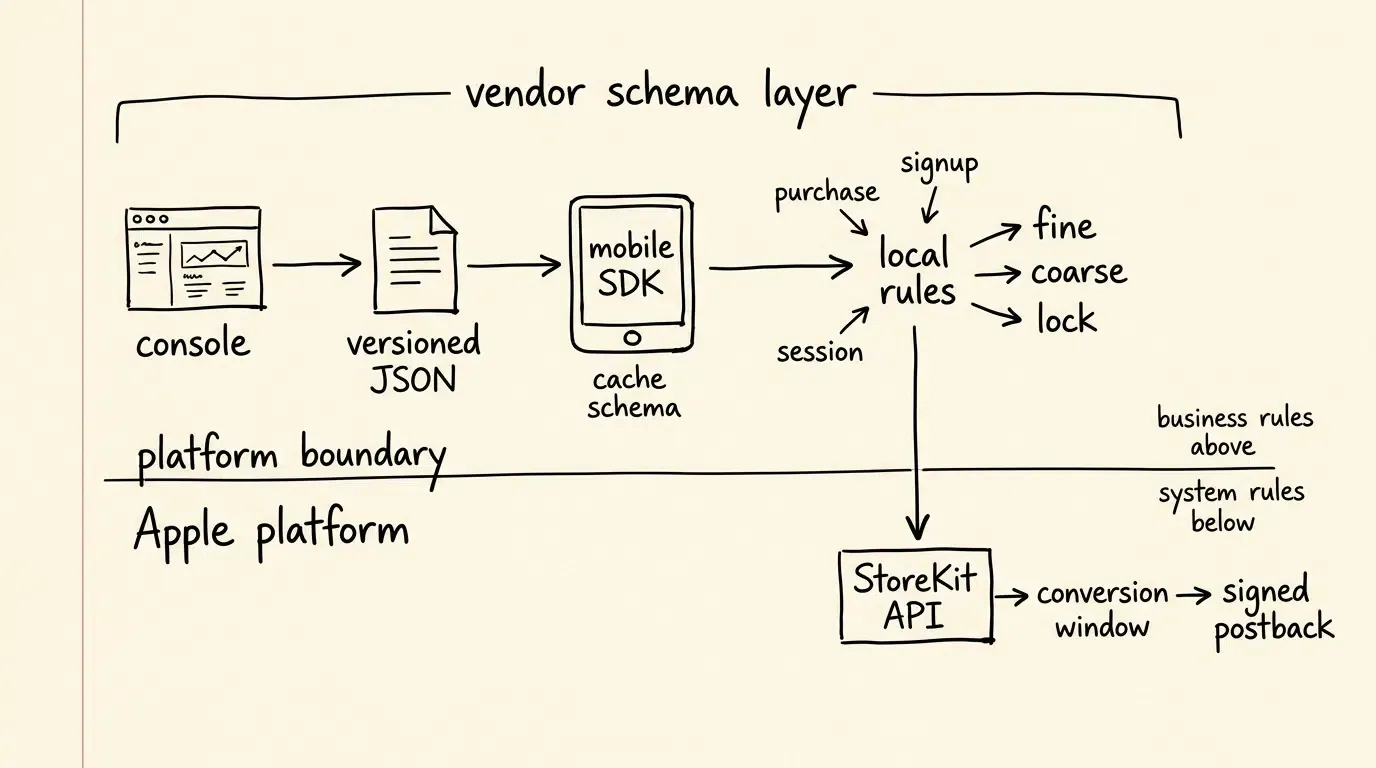
How does an MMP map SKAdNetwork schemas automatically? A Mobile Measurement Partner (MMP) or attribution backend automates SKAdNetwork schema mapping by translating in-app events and revenue tiers into dynamic, versioned JSON configuration schemas on a centralized console. The mobile SDK retrieves this configuration at launch and evaluates conversion rules locally at runtime, allowing supported conversion-rule changes to take effect without requiring a new binary app release.
An SKAdNetwork conversion value schema is a vendor- or application-level ruleset that maps in-app user behaviors—such as revenue transactions, onboarding milestones, or feature engagement—to Apple’s 6-bit fine-grained values (0 to 63) and 3-tier coarse-grained values (
low,medium,high). Dynamic mapping architectures distribute versioned configuration files from a cloud backend to the client SDK, eliminating the need to hardcode conversion logic within compiled iOS application binaries.
| Term | Definition |
|---|---|
| SKAdNetwork | Apple’s platform-level framework for privacy-preserving ad campaign attribution. |
| Conversion Value Schema | A vendor- or app-defined configuration mapping in-app event milestones to fine and coarse values. |
| Dynamic Schema Mapping | The automated distribution and runtime evaluation of conversion rules via an SDK. |
| Window Locking | An API parameter (lockWindow: true) that finalizes the active conversion window early. |
The Architecture of Automated SKAdNetwork Conversion Value Mapping
Delineating the Apple Platform Layer from the Vendor Schema Layer
To architect a robust conversion value engine, engineering teams must separate Apple’s native framework rules from vendor-level schema abstractions:
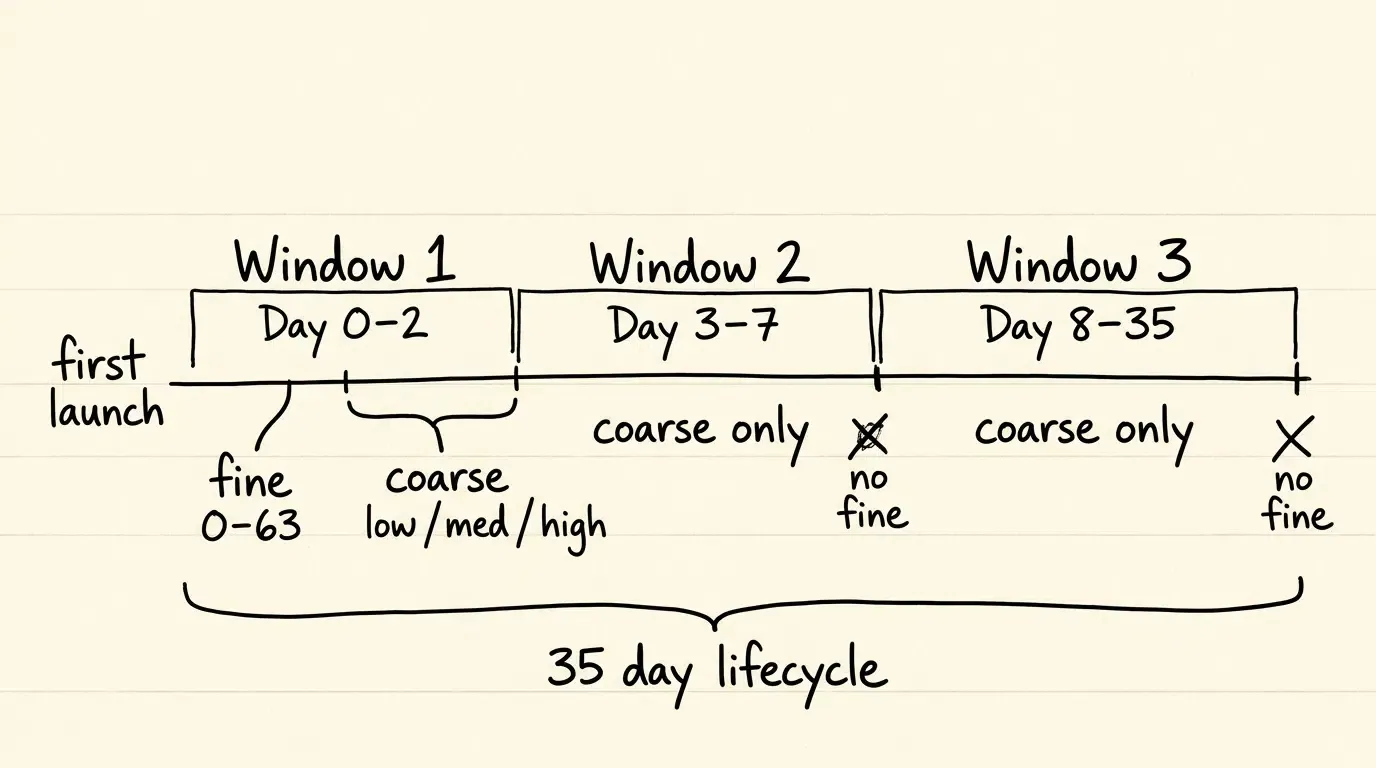
- Apple Platform Layer: Governs core operating system primitives, including the three sequential conversion windows (Day 0–2, Day 3–7, Day 8–35 after first launch), 6-bit fine values (0–63), coarse values (
low,medium,high), postback data tiers, and theSKAdNetwork.updatePostbackConversionValueAPI. - Vendor Schema Layer: Encompasses application-defined business rules, such as revenue bucketing, onboarding funnel progressions, bitwise flag allocations, remote JSON synchronization, and client-side rule evaluation.
┌────────────────────────────────────────┐
│                           Vendor Schema Layer                                  │
│  [MMP / Analytics Console] ──► [Publishes Versioned JSON Configuration]     │
│                                              │                                │
│  [Client Mobile SDK]       ──► [Evaluates In-App Events Locally in Memory]  │
└──────────────────────────────────────┬─┘
                                       │ (Calculates Fine, Coarse, & Lock)
                                       ▼
┌────────────────────────────────────────┐
│                           Apple Platform Layer                                 │
│  [StoreKit Framework]      ──► [SKAdNetwork.updatePostbackConversionValue]  │
│  [Operating System]        ──► [Manages Conversion Windows & Timers]        │
│  [System]                  ──► [Prepares and Sends Signed Postback]         │
└────────────────────────────────────────┘
The Pitfalls of Hardcoded Conversion Logic
Hardcoding conversion logic directly inside an iOS application target creates significant operational limitations:
- App Store Review Dependency: Any modification to revenue thresholds, event weights, or window-lock triggers requires a complete binary release cycle.
- Version Fragmentation: Multiple historical app versions in production transmit conflicting conversion semantics, corrupting downstream reporting models.
- Optimization Inflexibility: Growth teams cannot adjust conversion strategies between engagement-focused and monetization-focused campaigns in response to real-time marketing performance.
The Dynamic Configuration Delivery Pipeline
Automated mapping architectures decouple conversion logic from the compiled binary through a multi-stage pipeline:
- Console Configuration: Marketers and analysts configure event weights, currency tiers, and window-lock rules on a centralized dashboard.
- Schema Versioning and Pinning: The backend publishes a versioned JSON configuration payload. To prevent semantic drift during a user’s 35-day conversion lifecycle, a robust vendor implementation pins the active schema configuration established during the initial conversion window, ensuring that the exact mapping rules remain available even across app restarts.
- Client Ingestion & Caching: The mobile SDK downloads the active schema upon app initialization and caches both the configuration payload and version metadata in local persistent storage.
- Local Rule Evaluation: When in-app events occur, the SDK evaluates them against the cached ruleset locally, without adding a synchronous remote-configuration request to the event execution path.

See Also: SKAdNetwork ──> Mobile Attribution Architecture
Designing Dynamic Conversion Value Schemas across SKAN 4.0 Windows
Multi-Window Schema Partitioning
SKAdNetwork 4.0 structures conversion measurement across three sequential windows anchored to the app’s first launch:
- Window 1 (Day 0–2): First 48 hours after first launch.
- Window 2 (Day 3–7): Hours 48 through 168 after first launch.
- Window 3 (Day 8–35): Hours 168 through 840 after first launch.
A dynamic schema engine partitions rules across these windows, executing appropriate value calculations based on elapsed time since the initial application launch.
Window 1 (Day 0–2): Structuring Fine and Coarse Values
Window 1 is the only conversion window eligible to disclose fine-grained conversion values. The configuration for Window 1 defines two concurrent mappings:
- Fine-Grained Mapping (0–63): High-resolution rules capturing initial monetization tiers, onboarding milestones, or composite engagement scores.
- Coarse-Grained Mapping (
low,medium,high): Lower-granularity fallback states disclosed when the assigned postback data tier does not permit fine-grained reporting.
Windows 2 (Day 3–7) and 3 (Day 8–35): Coarse-Grained Lifecycle Tracking
Second and third postbacks do not expose fine-grained conversion values; for eligible data tiers, they disclose coarse values only.
Schemas for Windows 2 and 3 focus on longer-term retention and monetization milestones:
- Window 2 Coarse Mapping: Evaluates mid-funnel retention (e.g.,
low= Active on Day 3–7;medium= Completed 3 sessions;high= Repeat purchase or trial converted). - Window 3 Coarse Mapping: Evaluates long-tail retention and subscription renewals (e.g.,
low= Retained Day 8–35;medium= Level milestone reached;high= Active paid subscriber).
Developers configuring conversion schemas can consult the SKAN conversion mapping documentation for technical guidelines on multi-window rule structures.
Vendor-Defined Encoding Models: Revenue Bucketing, Funnels, and Bitwise Logic
These encoding models represent vendor- and application-level design patterns rather than Apple-prescribed schema types.
Revenue-Based Schemas
Revenue schemas allocate available fine-grained values across cumulative purchase amounts:
- Linear Bucketing: Divides a revenue range into equal intervals (e.g., 64 buckets of $1.50 increments up to $96.00). Ideal for applications with predictable transaction sizes.
- Logarithmic Bucketing: Allocates granular buckets to low-cost purchases while expanding bucket ranges for high-value transactions (e.g., Values 1–20 cover $0.99–$19.99; Values 21–50 cover $20.00–$100.00; Values 51–63 cover $100.00–$1000.00+).
- Percentile-Based Bucketing: Maps historical user purchase distributions into cohort segments based on empirical monetization curves.
Funnel Progression Schemas and Value Directionality
In SKAdNetwork 3 and earlier, Apple required conversion values to increase monotonically. In SKAdNetwork 4.0, Apple removed this restriction, allowing conversion values in Window 1 to increase or decrease across subsequent API calls.
However, many attribution schemas intentionally enforce monotonic progression as a vendor-level design convention to ensure that higher values represent progressively stronger commercial outcomes:
- Value
0: App installed and opened. - Value
10: Registration completed. - Value
20: Onboarding tutorial finished. - Value
30: Payment method added. - Value
45: Item added to cart. - Value
63: Initial checkout completed.
Bitwise Categorical Schemas
Bitwise schemas treat the 6-bit integer (
| Bit Position | Binary Weight | Mapped In-App Behavior |
|---|---|---|
| Bit 0 ( |
1 (0b000001) |
User completed registration |
| Bit 1 ( |
2 (0b000010) |
User enabled push notifications |
| Bit 2 ( |
4 (0b000100) |
User added item to wishlist |
| Bit 3 ( |
8 (0b001000) |
User shared referral link |
| Bit 4 ( |
16 (0b010000) |
User completed in-app purchase |
| Bit 5 ( |
32 (0b100000) |
User subscribed to premium trial |
The versioned JSON payload below illustrates a multi-window dynamic configuration document:
{
  "schema_version": "4.0.1",
  "app_id": "1234567890",
  "currency": "USD",
  "windows": {
    "window_1": {
      "mode": "hybrid_revenue_and_funnel",
      "fine_mapping": [
        { "event": "app_open", "min_revenue_cents": 0, "fine_value": 0, "lock": false },
        { "event": "registration_complete", "min_revenue_cents": 0, "fine_value": 10, "lock": false },
        { "event": "tutorial_complete", "min_revenue_cents": 0, "fine_value": 20, "lock": false },
        { "event": "purchase", "min_revenue_cents": 99, "fine_value": 30, "lock": false },
        { "event": "purchase", "min_revenue_cents": 999, "fine_value": 45, "lock": false },
        { "event": "purchase", "min_revenue_cents": 4999, "fine_value": 63, "lock": true }
      ],
      "coarse_mapping": {
        "low": { "events": ["app_open", "registration_complete"] },
        "medium": { "events": ["tutorial_complete"] },
        "high": { "events": ["purchase"] }
      }
    },
    "window_2": {
      "mode": "coarse_retention_and_monetization",
      "coarse_mapping": {
        "low": { "events": ["app_open"], "lock": false },
        "medium": { "events": ["session_milestone"], "lock": false },
        "high": { "events": ["repeat_purchase"], "lock": true }
      }
    },
    "window_3": {
      "mode": "coarse_long_tail_ltv",
      "coarse_mapping": {
        "low": { "events": ["app_open"], "lock": false },
        "medium": { "events": ["level_milestone"], "lock": false },
        "high": { "events": ["subscription_active"], "lock": true }
      }
    }
  }
}
Dynamic SDK Configuration: Ingesting and Evaluating Remote Configs at Runtime
Client-Side Rule Evaluation Mechanics
Attribution SDKs evaluate conversion rules locally within the application runtime:
- No Synchronous Remote-Config Fetch on the Event Path: In-app actions trigger local in-memory evaluations against an active ruleset, invoking StoreKit APIs immediately without blocking application execution.
- Data Minimization: For the SKAdNetwork conversion-update path shown here, raw event inputs can be evaluated locally and only the resulting conversion values need to be passed to StoreKit. This does not by itself describe or limit other analytics data flows implemented by an SDK.
Handling Offline State and Local Persistence
When an application launches offline or in degraded network conditions:
- The SDK initializes the first-launch timestamp anchor independently in local persistence.
- The SDK loads the pinned configuration schema from persistent local storage, verifying that the cached payload matches the pinned schema version.
- If in-app events occur while offline, the SDK evaluates them against the cached ruleset and calls the StoreKit update API immediately.
- Postback preparation and delivery remain system-managed and asynchronous; the app does not need to dispatch postbacks itself.
The Swift implementation below demonstrates a multi-window schema evaluation engine that calculates fine and coarse values, manages window-specific lock states, persists pinned schema configurations, and commits state updates only upon successful StoreKit execution:
import Foundation
import StoreKit

// MARK: - Schema Configuration Models

struct SKANSchemaConfig: Codable {
    let schemaVersion: String
    let appId: String
    let currency: String
    let windows: SchemaWindows

    enum CodingKeys: String, CodingKey {
        case schemaVersion = "schema_version"
        case appId = "app_id"
        case currency, windows
    }
}

struct SchemaWindows: Codable {
    let window1: Window1Config
    let window2: WindowCoarseConfig
    let window3: WindowCoarseConfig

    enum CodingKeys: String, CodingKey {
        case window1 = "window_1"
        case window2 = "window_2"
        case window3 = "window_3"
    }
}

struct Window1Config: Codable {
    let mode: String
    let fineMapping: [FineRule]
    let coarseMapping: CoarseRuleGroup

    enum CodingKeys: String, CodingKey {
        case mode
        case fineMapping = "fine_mapping"
        case coarseMapping = "coarse_mapping"
    }
}

struct FineRule: Codable {
    let event: String
    let minRevenueCents: Int
    let fineValue: Int
    let lock: Bool

    enum CodingKeys: String, CodingKey {
        case event
        case minRevenueCents = "min_revenue_cents"
        case fineValue = "fine_value"
        case lock
    }
}

struct WindowCoarseConfig: Codable {
    let mode: String
    let coarseMapping: [String: CoarseRule]

    enum CodingKeys: String, CodingKey {
        case mode
        case coarseMapping = "coarse_mapping"
    }
}

struct CoarseRuleGroup: Codable {
    let low: CoarseRule
    let medium: CoarseRule
    let high: CoarseRule
}

struct CoarseRule: Codable {
    let events: [String]?
    let lock: Bool?
}

// MARK: - Multi-Window SKAN 4.0 Schema Engine

final class SKANSchemaEngine {

    static let shared = SKANSchemaEngine()
    private init() {}

    private var activeSchema: SKANSchemaConfig?
    private var firstLaunchDate: Date?
    private var lockedWindows = Set<Int>()
    private var lastRecordedFineValue: Int = 0
    private var pinnedSchemaVersion: String?

    /// Initializes the first-launch timestamp anchor independently of remote configuration fetches
    func initializeLifecycleAnchor() {
        let defaults = UserDefaults.standard
        if let storedLaunch = defaults.object(forKey: "skan_first_launch_date") as? Date {
            self.firstLaunchDate = storedLaunch
        } else {
            let now = Date()
            self.firstLaunchDate = now
            defaults.set(now, forKey: "skan_first_launch_date")
        }

        let lockedArray = defaults.array(forKey: "skan_locked_windows") as? [Int] ?? []
        self.lockedWindows = Set(lockedArray)
        self.lastRecordedFineValue = defaults.integer(forKey: "skan_last_fine_value")
        self.pinnedSchemaVersion = defaults.string(forKey: "skan_pinned_schema_version")

        // Restore previously cached schema payload if it matches the pinned version
        if let pinnedVersion = self.pinnedSchemaVersion,
           let cachedData = defaults.data(forKey: "skan_cached_schema_payload"),
           let cachedSchema = try? JSONDecoder().decode(SKANSchemaConfig.self, from: cachedData),
           cachedSchema.schemaVersion == pinnedVersion {
            self.activeSchema = cachedSchema
        }
    }

    /// Loads active schema, persisting the pinned payload to maintain consistency across the 35-day lifecycle
    func configure(schema: SKANSchemaConfig) {
        let defaults = UserDefaults.standard
        if let pinned = pinnedSchemaVersion {
            // If already pinned, accept only schemas matching the pinned version
            if pinned == schema.schemaVersion {
                self.activeSchema = schema
                if let data = try? JSONEncoder().encode(schema) {
                    defaults.set(data, forKey: "skan_cached_schema_payload")
                }
            }
        } else {
            // Pin the initial schema version for this lifecycle
            self.activeSchema = schema
            self.pinnedSchemaVersion = schema.schemaVersion
            defaults.set(schema.schemaVersion, forKey: "skan_pinned_schema_version")
            if let data = try? JSONEncoder().encode(schema) {
                defaults.set(data, forKey: "skan_cached_schema_payload")
            }
        }
    }

    /// Determines the active conversion window based on elapsed time from first launch
    private var currentWindowIndex: Int {
        guard let firstLaunch = firstLaunchDate else { return 0 }
        let elapsedHours = Date().timeIntervalSince(firstLaunch) / 3600.0

        switch elapsedHours {
        case 0.0..<48.0:
            return 1
        case 48.0..<168.0:
            return 2
        case 168.0...840.0:
            return 3
        default:
            return 0 // Window closed (>35 days)
        }
    }

    /// Evaluates an in-app event against the active schema for the current window
    func trackEvent(name: String, revenueCents: Int = 0) {
        guard #available(iOS 16.1, *),
              let schema = activeSchema else { return }

        let window = currentWindowIndex
        guard window >= 1 && window <= 3, !lockedWindows.contains(window) else { return }

        var targetFineValue: Int?
        var targetCoarseValue: SKAdNetwork.CoarseConversionValue?
        var shouldLock = false
        var matchedRule = false

        if window == 1 {
            // Window 1: Evaluate fine-grained rules with highest-threshold precedence
            let matchingFineRules = schema.windows.window1.fineMapping
                .filter { $0.event == name && revenueCents >= $0.minRevenueCents }
                .sorted { $0.minRevenueCents < $1.minRevenueCents }

            if let highestRule = matchingFineRules.last {
                targetFineValue = highestRule.fineValue
                if highestRule.lock { shouldLock = true }
                matchedRule = true
            }

            // Window 1: Evaluate coarse-grained rules explicitly
            if schema.windows.window1.coarseMapping.high.events?.contains(name) == true {
                targetCoarseValue = .high
                matchedRule = true
            } else if schema.windows.window1.coarseMapping.medium.events?.contains(name) == true {
                targetCoarseValue = .medium
                matchedRule = true
            } else if schema.windows.window1.coarseMapping.low.events?.contains(name) == true {
                targetCoarseValue = .low
                matchedRule = true
            }
        } else {
            // Windows 2 & 3: Evaluate coarse rules only
            let coarseConfig = (window == 2) ? schema.windows.window2 : schema.windows.window3

            if let highRule = coarseConfig.coarseMapping["high"], highRule.events?.contains(name) == true {
                targetCoarseValue = .high
                if highRule.lock == true { shouldLock = true }
                matchedRule = true
            } else if let medRule = coarseConfig.coarseMapping["medium"], medRule.events?.contains(name) == true {
                targetCoarseValue = .medium
                if medRule.lock == true { shouldLock = true }
                matchedRule = true
            } else if let lowRule = coarseConfig.coarseMapping["low"], lowRule.events?.contains(name) == true {
                targetCoarseValue = .low
                if lowRule.lock == true { shouldLock = true }
                matchedRule = true
            }
        }

        // If no explicit rule matched for this event, do not trigger a StoreKit update
        guard matchedRule else { return }

        let fineToSubmit = targetFineValue ?? (window == 1 ? lastRecordedFineValue : 0)
        let clampedFine = max(0, min(63, fineToSubmit))
        let coarseToSubmit = targetCoarseValue ?? .low

        // Dispatch StoreKit conversion update
        // Note: StoreKit ignores the fineValue parameter after Window 1
        SKAdNetwork.updatePostbackConversionValue(
            clampedFine,
            coarseValue: coarseToSubmit,
            lockWindow: shouldLock
        ) { [weak self] error in
            guard let self = self else { return }
            if let error = error {
                print("StoreKit conversion update failed: \(error.localizedDescription)")
            } else {
                // Commit local state only after StoreKit successfully accepts the update
                DispatchQueue.main.async {
                    if window == 1 {
                        self.lastRecordedFineValue = clampedFine
                        UserDefaults.standard.set(clampedFine, forKey: "skan_last_fine_value")
                    }
                    if shouldLock {
                        self.lockedWindows.insert(window)
                        UserDefaults.standard.set(Array(self.lockedWindows), forKey: "skan_locked_windows")
                    }
                    print("SKAN 4.0 update succeeded: Window=\(window), Fine=\(clampedFine), Coarse=\(coarseToSubmit.rawValue), Locked=\(shouldLock)")
                }
            }
        }
    }
}
Automating lockWindow Execution to Accelerate Postback Preparation
Operational Mechanics of the lockWindow Parameter
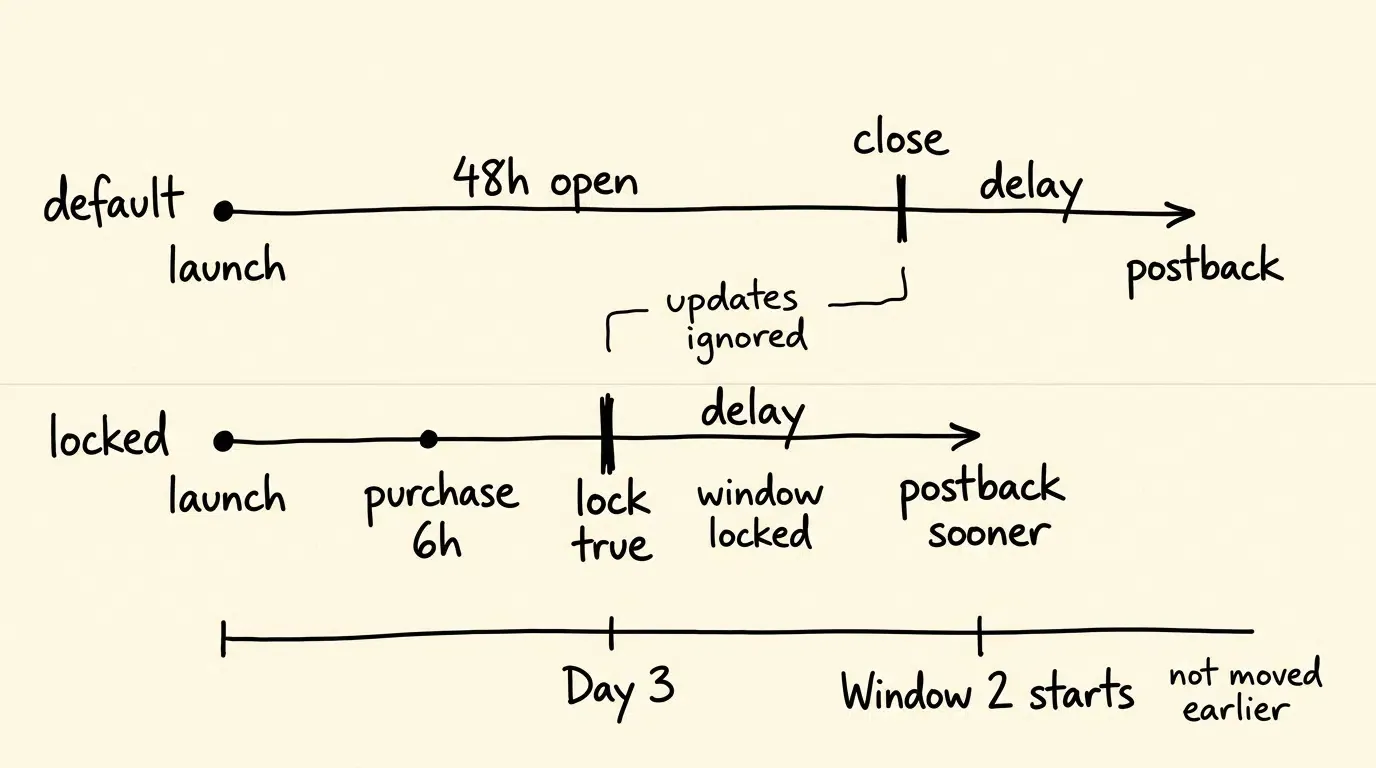
When an app calls updatePostbackConversionValue(_:coarseValue:lockWindow:) with lockWindow: true, the update becomes the final conversion-value update for the active window. The operating system prepares the postback immediately and ignores additional conversion-value updates for the remainder of that window.
Default Window 1 (No Lock):
[First Launch] ─────────────── 48 Hours Open ───────────────► [Closes] ──► Delay (24-48h) ──► Postback 1

Locked Window 1 (Purchase at Hour 6):
[First Launch] ── 6h (Lock: true) ──► [Conversion Locked / Postback Prepared] ──► Delay (24-48h) ──► Postback 1 Sent Sooner
Strategic Trade-Offs in Automated Window Locking
- Accelerated Postback Dispatch: Finalizing a conversion early allows Apple’s randomized postback delay to begin immediately, delivering conversion data to ad networks sooner.
- Window Independence: Locking the current window does not move the start of the next window forward; Window 2 still begins on Day 3 regardless of when Window 1 was locked.
- Observation Truncation: Once the window is locked, the system ignores subsequent conversion-value update calls for the remainder of that conversion window. In-app events may continue to occur, but they can no longer change that window’s SKAdNetwork conversion state.
Coordinating SKAN Schemas with AdAttributionKit
Apple’s Evolving Attribution Stack
Apple now recommends AdAttributionKit for app advertising campaigns across the App Store and alternative app marketplaces. SKAdNetwork remains relevant for existing integrations and interoperability, so dynamic mapping engines should keep their business-rule layer separate from framework-specific conversion APIs:
- Shared Value Dimensions: Both frameworks evaluate 6-bit fine-grained values (0 to 63) and 3-tier coarse-grained values (
low,medium,high). - Distinct API Layers: SKAdNetwork uses
SKAdNetwork.updatePostbackConversionValue, while AdAttributionKit usesPostback.updateConversionValue. - Bridging Behavior: If an integration supports both frameworks, Apple recommends calling both frameworks’ conversion-update APIs, while accounting for the documented SKAdNetwork-to-AdAttributionKit bridging behavior.
Comparative Decision Matrix: Hardcoded Client Logic versus Dynamic Configuration
| Evaluation Dimension | Hardcoded Client-Side Logic | Dynamic Schema Configuration |
|---|---|---|
| Schema Modification Speed | Requires App Store Review (Days to Weeks) | Remote updates for supported rule changes without requiring a new binary release |
| Testing & Iteration Agility | High Friction / High Engineering Overhead | Controlled schema experimentation with version- and cohort-isolated rules |
| Multi-Window Coordination | Complex Manual State Machines in Swift | Automated Lifecycle-Aware Engine |
| Automated Window Locking | Fixed, Inflexible Rule Triggers | Dynamic, Event-Triggered Lock Rules |
| Cross-Framework Parity | Fragmented Code Across Frameworks | Unified Cloud Configuration Matrix |
Frequently Asked Questions (FAQ)
What happens if a user triggers multiple events mapped to different conversion values?
Can an automated schema update conversion values if the app is offline?
How does an automated schema handle currency conversion for global users?
Summary and Decision Framework
Automating SKAdNetwork conversion value mapping decouples growth experimentation from mobile binary release cycles. By distributing dynamic schemas from a centralized attribution dashboard and evaluating them locally within the SDK, engineering teams can fine-tune revenue buckets, optimize funnel milestones, and configure automated window locks, allowing supported conversion-rule changes to take effect without resubmitting application binaries to App Store Connect.
Application-level deep-link routing can operate alongside Apple’s privacy-preserving attribution frameworks as a separate measurement and onboarding layer. Platforms like OpoInstall provide infrastructure for first-party contextual routing and deferred deep linking, allowing teams to preserve user intent across web-to-app conversion funnels.
To learn more about configuring privacy-compliant attribution and deep linking pipelines, review the OpoInstall documentation.
Related Materials
-
Concepts: Conversion Value Schemas, Dynamic Schema Mapping, Revenue Bucketing, Window Locking, Monotonicity
-
Technologies: Apple SKAdNetwork, Apple AdAttributionKit, StoreKit Framework, OpoInstall Mobile SDK
-
Standards: IETF RFC 8259 JSON Specification
-
APIs: StoreKit
updatePostbackConversionValueAPI, AdAttributionKitPostback.updateConversionValueAPI
Official Documentation
Share this article



