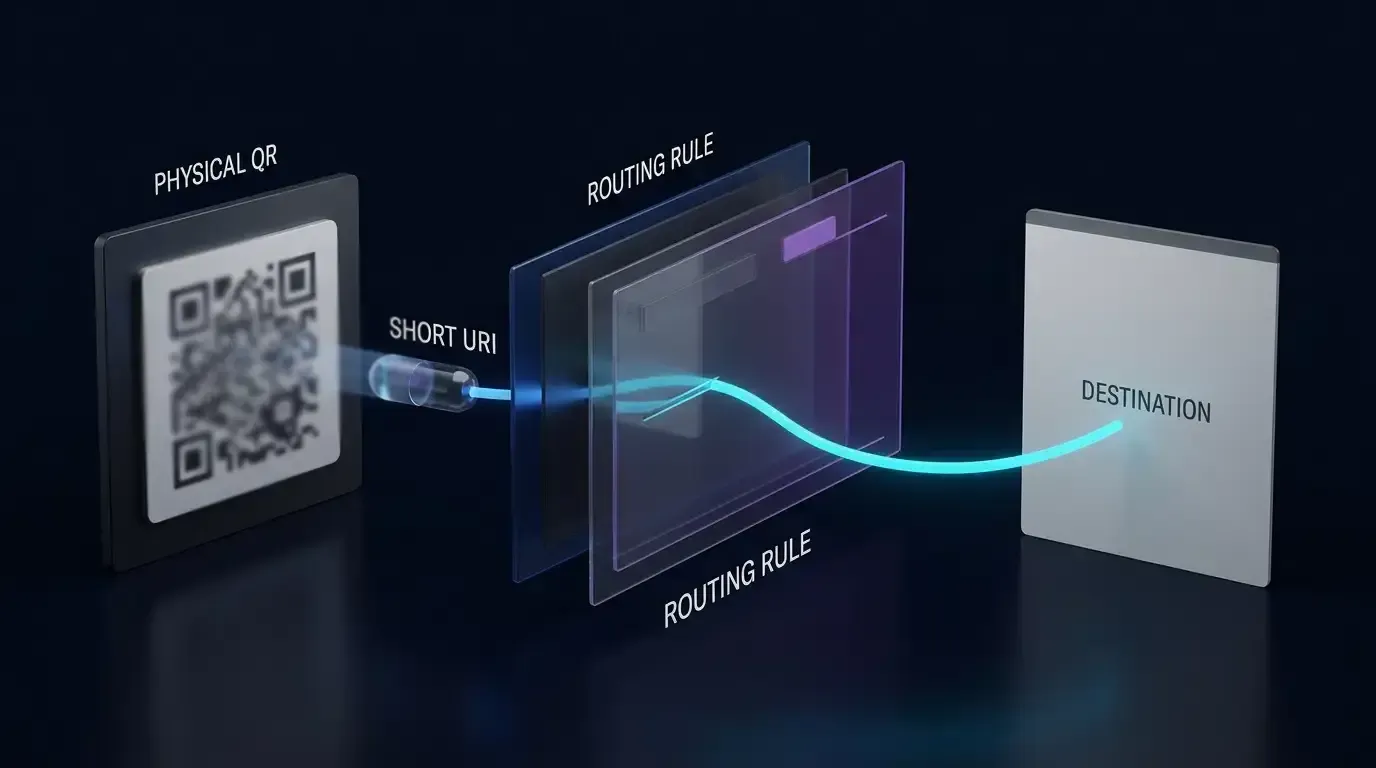
How to set up automated referral tracking for mobile? Setting up automated referral tracking requires integrating an attribution SDK, attaching an opaque referral token (shareCode) to the web sharing link, capturing it on the landing page, and utilizing platform-supported deferred deep linking to attempt parameter recovery on first app launch.
Automated referral tracking is an engineering framework that programmatically attributes mobile application installations to existing user sharing actions. By transmitting an opaque inviter identifier (shareCode) through web landing pages and attempting to resolve this context upon initial application launch, automated referral tracking reduces manual promotional code entry and supports attribution across in-app browser containers.
| Term | Definition | Related Entity | Search Intent Role |
|---|---|---|---|
| Referral Tracking | The programmatic attribution of downstream user acquisition to specific existing user sharing sessions. | App Parameter Installation | Informational / Commercial |
| referral tracking software | An SDK and server infrastructure designed to automate inviter-invitee binding. | Deferred Deep Linking | Commercial |
| app referral program | A growth initiative incentivizing existing users to invite new peers to install an application. | Channel Statistics & Tracking | Commercial |
| referral system | The end-to-end technical architecture managing link generation, attribution, and reward issuance. | Web JS SDK | Technical |
Architecture Overview: How Automated Referral Tracking Bridges Social Shares to App Installs
The Mechanical Breakdown of Legacy Referral Systems: Why Manual Promo Codes Depress Funnel Velocity
Traditional mobile referral programs rely on manual alphanumeric promotional codes. Under this legacy workflow, an existing user generates an invite code (such as INVITE2026), manually copies the text, and sends it to a peer via SMS or social messaging. The invited user must then download the application from an app store, complete registration, locate a dedicated promo code input field, and accurately transcribe the character string.
This manual process introduces substantial friction across the acquisition funnel:
- Cognitive and Mechanical Drop-off: Users frequently forget to copy the voucher code, fail to find the redemption input within deep onboarding menus, or abandon the process when codes fail due to capitalization or transcription errors.
- Channel Leakage and Code Scraping: Alphanumeric codes are easily extracted and published to public coupon aggregators or forum boards. This severs the authentic peer-to-peer relationship, allowing non-referred organic users to claim rewards while diluting campaign unit economics.
- Measurement Blindspots: Relying solely on manual promo codes leaves intermediate funnel milestones (such as link impressions, social webview clicks, and store dispatch rates) unmeasured unless separate analytics instrumentation is deployed.
The Programmatic Sharing Pipeline: Inviter Action, Web Staging, Store Handoff, and Day 0 Resolution
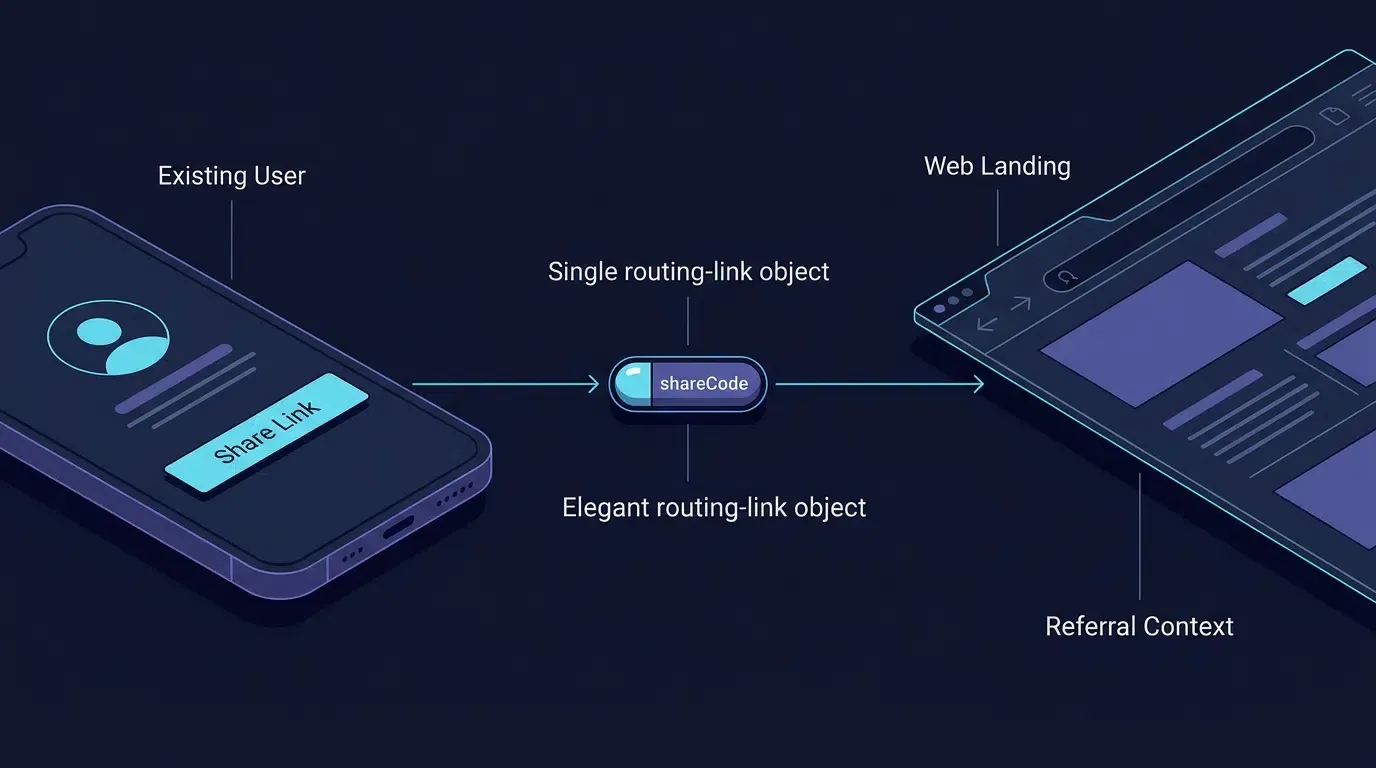
Automated referral tracking replaces manual transcription with a continuous, programmatic parameter-passing pipeline. Rather than distributing an unparameterized store link alongside a disconnected text voucher, the application bundles the inviter’s identity directly into an interactive web sharing URL.
The technical lifecycle operates across four discrete stages:
[Existing User Invites Friend] ──> Calls shareTelemetry.reportIntent(shareCode, Platform)
              │
              ▼
[Generates Dynamic Web Link] ───> Appends ?shareCode=usr_9f82a1b4 to Destination URL
              │
              ▼
[Shared inside WeChat/Line] ────> Friend Taps Link inside Sandboxed Webview
              │
              ▼
[Web JS SDK Staging & Handoff] ─> Caches Context & Executes App Launch / Store Download
              │
              ▼
[First App Launch on Device] ───> Native SDK Queries Parameter Recovery
              │
              ▼
[Application Backend Binding] ──> Backend Validates Token & Creates Pending Binding
              │
              ▼
[Verified Activation Milestone] ─> Backend Disburses Reward upon Milestone Completion
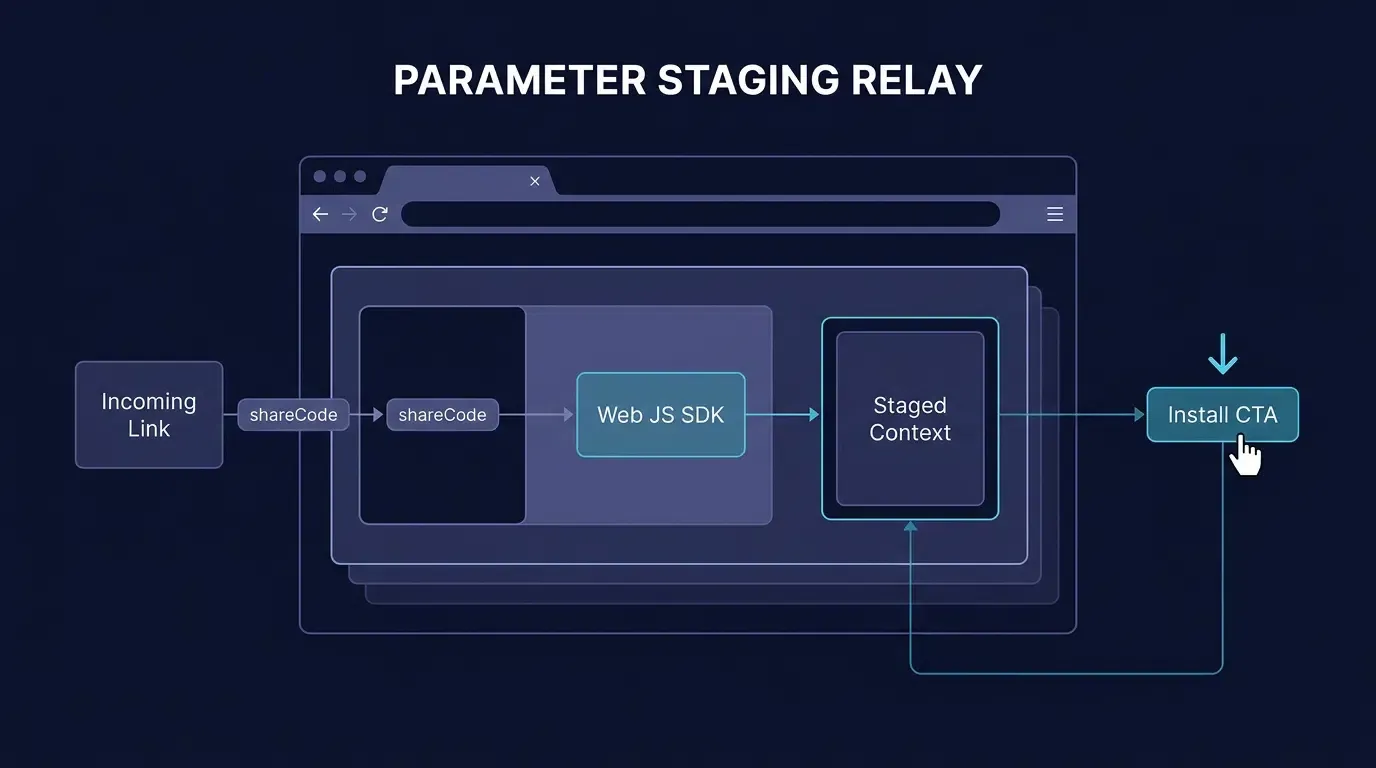
When the invited user opens the link, the hosted web landing page executes a Web JS SDK that extracts the inviter’s token (shareCode) and stages the referral context. When the user proceeds to install and open the native application, the client SDK retrieves the staged payload during initial launch, enabling the application backend to automatically bind the referral relationship without requiring manual data entry from either participant.
Post-Store First Launch Recovery: Platform-Specific Limitations
After a user installs an application from an app store, referral parameter recovery depends on the platform and the mechanism implemented by the application or attribution SDK. Passing a shareCode through a web URL does not, by itself, guarantee that the parameter will become available to the newly installed application.
- Android / Google Play: Google Play Install Referrer can provide supported referral metadata associated with a Play Store installation. The application must configure and test the actual referrer payload and verify that the expected parameters survive the redirect and installation flow. Third-party attribution SDKs may use additional mechanisms, which must be documented separately.
- iOS / App Store: The App Store does not automatically transfer arbitrary landing-page query parameters into an installed application. Universal Links support direct routing when the application is already installed and the associated domain configuration is valid; they do not, on their own, guarantee deferred parameter recovery after a new installation.
- Attribution SDKs: Use only the recovery mechanisms documented for the exact SDK version and platform being deployed. Verify the implementation, data collection, and privacy implications rather than assuming that an SDK can recover every referral parameter across every browser and installation path.
If the referral context cannot be recovered through a supported mechanism, allow the user to complete onboarding and record the installation as unattributed. Do not infer or manufacture a referral relationship from an unverified match.
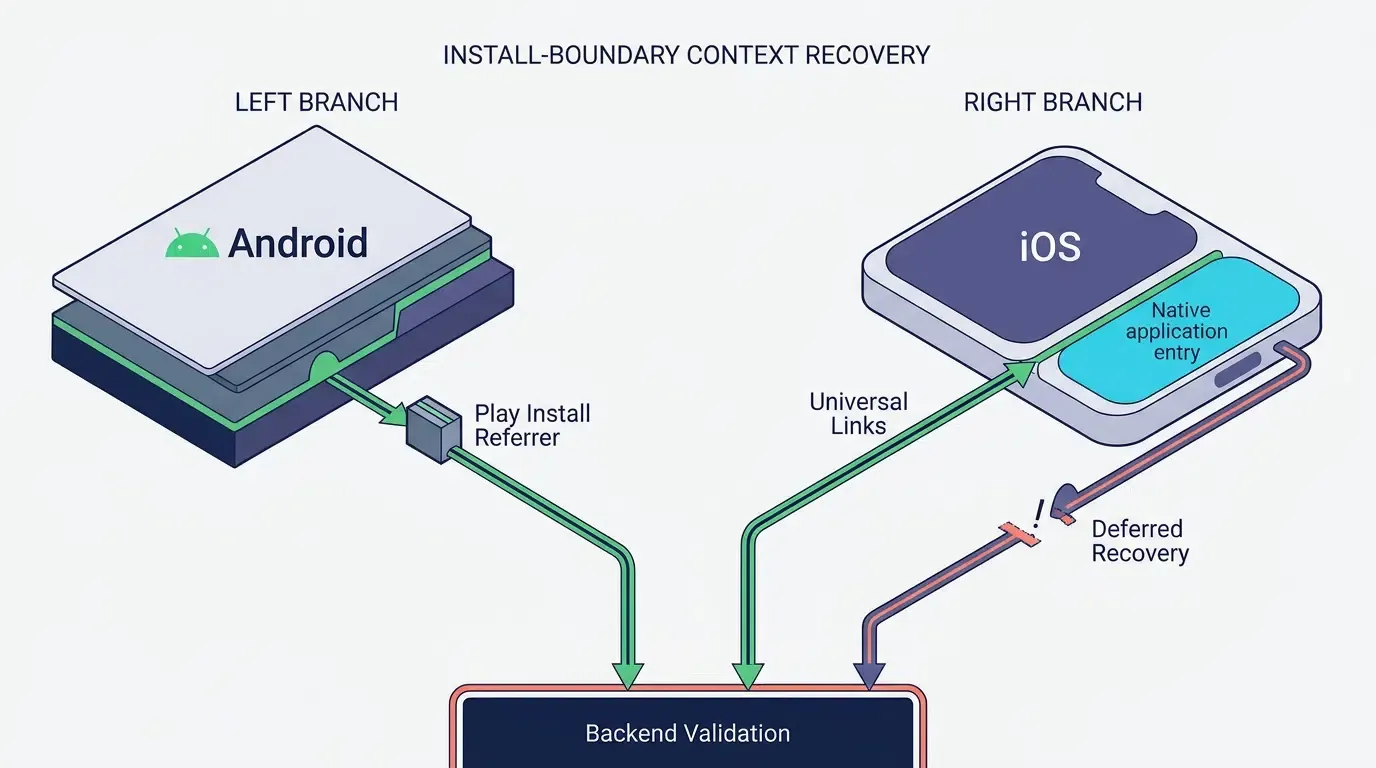
iOS Attribution and Privacy Boundary
iOS referral implementations must not rely on prohibited device fingerprinting to identify a user or device across applications or websites. Apple’s privacy and data-use requirements prohibit deriving a unique identifier from device, browser, configuration, location, or network signals for this purpose. App Tracking Transparency authorization does not make otherwise prohibited fingerprinting permissible.
Use Universal Links for verified direct app routing when the application is installed. For post-install referral recovery, use a documented mechanism whose behavior has been reviewed for the deployed SDK version and the applicable Apple requirements. Review the SDK’s privacy disclosures and required-reason API declarations where applicable, but do not treat the presence of a Privacy Manifest as proof that the attribution implementation is compliant.
If the selected SDK relies on a matching method that cannot be verified as permitted, do not recommend that method for iOS deployment. Obtain clarification from the SDK provider and choose a compliant alternative. Where no permitted mechanism can establish the referral relationship reliably, preserve the normal onboarding flow and mark the installation as unattributed.
Reference: Apple User Privacy and Data Use.
See Also: Referral Tracking ──> App Parameter Installation
Step 1: Instrumenting the Client-Side Share Reporting API
Initializing the Native Attribution SDK on Android and iOS Entry Points
Before an application can report sharing activity or retrieve incoming referral context, the native mobile SDK must initialize early in the application lifecycle.
On Android, initialization belongs in the onCreate() method of the custom Application subclass, ensuring that attribution listeners and core memory structures are established before foreground UI components mount. On iOS, initialization occurs within the application(_:didFinishLaunchingWithOptions:) execution delegate.
Developers can obtain the official mobile SDK packages directly from the OpoInstall SDK download center.
Invoking the Share Reporting Method Prior to Triggering Native OS Share Sheets
The application should record the share intent before opening the platform share interface. Implement this through an application-owned telemetry service or an attribution SDK method verified against the exact SDK version in use. The example below uses an application-owned shareTelemetry.reportIntent(...) abstraction; it is not an official OpoInstall API. The adapter must implement the actual network request, error handling, and callback behavior for the deployed application.
To maintain clean telemetry, engineering teams must differentiate between five distinct events in the sharing lifecycle:
- Share Intent Initiated (
share_intent_initiated): The client application UI logs that the user clicked the invite action. - Share Dispatched (
share_dispatched): The client application passes the payload to an identified destination platform (e.g., launching an explicit social intent) or opens the system share chooser. - Share Completed (
share_completed): The third-party social SDK returns an authenticated completion callback confirming the message was posted or dispatched (applicable only when using dedicated third-party platform SDKs with callback support). - Referral Clicked (
referral_click): The recipient opens the web landing page, triggering web-side ingress logging. - Referral Bound (
referral_bound): The recipient completes account registration, and the backend verifies the candidateshareCodeand writes the referral relationship to the database.
Recording share telemetry captures the user’s intent to share. This allows analytics pipelines to index the inviter’s shareCode against the designated platform channel, preparing the system to correlate subsequent web landing page visits.
Specifying Platform Identifiers: Mapping Social Channels
The following identifiers are illustrative examples only. Use the exact channel enumeration supported by the deployed SDK version, and validate each identifier against its official API reference:
- Closed Messaging Networks:
WechatSession(WeChat Direct Chat),WechatTimeline(WeChat Moments),Line,WhatsApp,FacebookMessenger. - Social Feeds and Public Microblogs:
Twitter,Facebook,Instagram,Weibo,Douyin,TikTok. - Direct Operating System Transports:
Sms,Email,Copy(Clipboard Link Copy), andOther(System Share Sheet).
When the application launches a generic system share sheet where the user’s final destination selection cannot be determined in advance, the event should be classified as Other rather than hardcoding a specific social network.
Structuring Inviter Identity Tokens: Best Practices for Formatting the shareCode
The shareCode functions as an application-level business token connecting the new install back to the referring account. While developers can use arbitrary alphanumeric strings, adhering to structural best practices prevents parameter corruption:
- Opaque Server-Issued Tokens: The
shareCodeshould be an opaque, server-issued referral token (e.g., a URL-safe token or UUID likeusr_9f82a1b4) rather than an enumerable raw database auto-increment ID (1024). The application backend resolves this token to the inviter account, enforcing expiration and rate limits. - Length Constraints: Keep the token compact (recommended under 64 characters; strictly
\le 128 characters) to avoid inflating URL lengths or triggering string truncation in messaging apps. - Safe Character Sets: Restrict characters to URL-safe alphanumeric values, hyphens, and underscores (
[A-Za-z0-9_-]). Avoid raw delimiters such as&,=,?, or spaces that alter URI parsing.
On Android 11 (API level 30) and later, querying whether third-party social packages are installed requires declaring corresponding <queries> elements within AndroidManifest.xml per the Google Android Developers Guide on Package Visibility in Android 11. The implementation pattern below illustrates how to declare package visibility, handle non-blocking share reporting timeouts, manage lifecycle-safe state resets, and dispatch explicit social intents with clipboard fallbacks:
<!-- Android Configuration and Client-Side Share Implementation -->
<!-- Part 1: AndroidManifest.xml Package Visibility & Application Declarations -->
<!-- File: app/src/main/AndroidManifest.xml -->
<manifest xmlns:android="http://schemas.android.com/apk/res/android"
    package="com.example.app">

    <!-- Explicit package visibility declarations required for Android 11+ (API 30+) -->
    <queries>
        <package android:name="com.tencent.mm" />
        <package android:name="jp.naver.line.android" />
    </queries>

    <application
        android:name=".CustomApplication"
        android:allowBackup="true"
        android:icon="@mipmap/ic_launcher"
        android:label="@string/app_name"
        android:roundIcon="@mipmap/ic_launcher_round"
        android:supportsRtl="true"
        android:theme="@style/Theme.AppCompat.Light.NoActionBar">

        <activity
            android:name=".InviteActivity"
            android:exported="true">
            <intent-filter>
                <action android:name="android.intent.action.MAIN" />
                <category android:name="android.intent.category.LAUNCHER" />
            </intent-filter>
        </activity>
    </application>
</manifest>
// Android Application Lifecycle Entry
// Part 2: CustomApplication.kt (SDK Lifecycle Initialization)
// File: app/src/main/java/com/example/app/CustomApplication.kt

package com.example.app

import android.app.Application
import com.opoinstall.api.OpoInstall

class CustomApplication : Application() {
    override fun onCreate() {
        super.onCreate()

        // Initialize OpoInstall core client on main thread before activity mounting
        OpoInstall.initialize(this)
    }
}
// Android Share Activity Implementation
// Part 3: InviteActivity.kt (Application Telemetry & Targeted Dispatch with Clipboard Fallback)
// File: app/src/main/java/com/example/app/InviteActivity.kt

package com.example.app

import android.content.ClipData
import android.content.ClipboardManager
import android.content.Context
import android.content.Intent
import android.content.pm.PackageManager
import android.net.Uri
import android.os.Bundle
import android.os.Handler
import android.os.Looper
import android.util.Log
import android.widget.Button
import android.widget.Toast
import androidx.appcompat.app.AppCompatActivity
import java.util.concurrent.atomic.AtomicBoolean

class InviteActivity : AppCompatActivity() {

    companion object {
        private const val TAG = "ReferralShareTracking"
        // Example application-owned redirect endpoint; replace with a deployed HTTPS route
        private const val BASE_INVITE_HOST = "promo.example.com"
        private const val BASE_INVITE_PATH = "invite.html"

        // Target platform packages for explicit intent routing
        private const val PACKAGE_WECHAT = "com.tencent.mm"
        private const val PACKAGE_LINE = "jp.naver.line.android"

        // Application-defined example timeout; tune and test for the actual telemetry service
        private const val SHARE_TIMEOUT_MS = 800L
    }

    // Debounce guard to prevent rapid concurrent share intent invocations
    private val isSharingInProgress = AtomicBoolean(false)

    // Application-owned telemetry adapter abstraction
    private val shareTelemetry = ShareTelemetryService()

    override fun onCreate(savedInstanceState: Bundle?) {
        super.onCreate(savedInstanceState)
        setContentView(R.layout.activity_invite)

        val btnShareWeChat = findViewById<Button>(R.id.btn_share_wechat)
        val btnShareLine = findViewById<Button>(R.id.btn_share_line)
        val btnShareGeneric = findViewById<Button>(R.id.btn_share_generic)

        // Illustrative mock token: In production, retrieve server-issued token from authenticated session
        val currentInviterToken = "usr_9f82a1b4"

        btnShareWeChat.setOnClickListener {
            initiateShareFlow(currentInviterToken, "WechatSession", targetPackage = PACKAGE_WECHAT)
        }

        btnShareLine.setOnClickListener {
            initiateShareFlow(currentInviterToken, "Line", targetPackage = PACKAGE_LINE)
        }

        btnShareGeneric.setOnClickListener {
            // Unsegmented system share sheet; platform classified as Other
            initiateShareFlow(currentInviterToken, "Other", targetPackage = null)
        }
    }

    /**
     * Helper to verify if target social app is installed before reporting specific channel telemetry.
     * Requires <queries> declaration in AndroidManifest.xml on Android 11+ (API 30+).
     */
    private fun isAppInstalled(packageName: String?): Boolean {
        if (packageName.isNullOrEmpty()) return false
        return try {
            packageManager.getPackageInfo(packageName, PackageManager.GET_ACTIVITIES)
            true
        } catch (e: PackageManager.NameNotFoundException) {
            false
        } catch (e: Exception) {
            Log.w(TAG, "Package inspection exception for $packageName: ${e.message}")
            false
        }
    }

    /**
     * Copies the full invitation URL to the system clipboard as a final fallback.
     */
    private fun copyInviteLinkToClipboard(shareUri: String): Boolean {
        return try {
            val clipboard = getSystemService(Context.CLIPBOARD_SERVICE) as ClipboardManager
            clipboard.setPrimaryClip(ClipData.newPlainText("Referral invitation link", shareUri))
            true
        } catch (e: Exception) {
            Log.e(TAG, "Failed to copy invite link: ${e.message}", e)
            false
        }
    }

    private fun showShareFailureFallback(shareUri: String) {
        val copied = copyInviteLinkToClipboard(shareUri)
        val message = if (copied) {
            "Unable to open sharing app. Invite link copied to clipboard."
        } else {
            "Unable to open sharing app or copy invite link."
        }
        Toast.makeText(this, message, Toast.LENGTH_LONG).show()
    }

    /**
     * Records sharing intent via application-owned telemetry with non-blocking timeout fallback.
     *
     * @param shareCode Opaque inviter token (strictly <= 128 characters)
     * @param platformIdentifier Target social channel matching reporting taxonomy
     * @param targetPackage Specific application package name, or null for generic system chooser
     */
    private fun initiateShareFlow(shareCode: String, platformIdentifier: String, targetPackage: String?) {
        // Enforce debounce check
        if (!isSharingInProgress.compareAndSet(false, true)) {
            Log.d(TAG, "Share invocation already in progress. Ignoring duplicate click.")
            return
        }

        val isTargetInstalled = isAppInstalled(targetPackage)
        val effectivePlatform = if (isTargetInstalled) platformIdentifier else "Other"
        val effectivePackage = if (isTargetInstalled) targetPackage else null

        val isDispatched = AtomicBoolean(false)
        val mainHandler = Handler(Looper.getMainLooper())

        // Non-blocking timeout runnable: Ensures UI share sheet opens even if network handshake is delayed
        val timeoutRunnable = Runnable {
            if (isDispatched.compareAndSet(false, true)) {
                Log.w(TAG, "Pre-share reporting timed out after ${SHARE_TIMEOUT_MS}ms. Proceeding with dispatch.")
                dispatchShareSafely(shareCode, effectivePlatform, effectivePackage)
            }
        }
        mainHandler.postDelayed(timeoutRunnable, SHARE_TIMEOUT_MS)

        // Asynchronously report sharing intent via application-owned telemetry adapter
        shareTelemetry.reportIntent(shareCode, effectivePlatform) { result ->
            mainHandler.removeCallbacks(timeoutRunnable)
            if (isDispatched.compareAndSet(false, true)) {
                if (result.isFailure) {
                    Log.w(TAG, "Share telemetry failed: ${result.exceptionOrNull()?.message}")
                } else {
                    Log.d(TAG, "Share intent recorded for $effectivePlatform")
                }
                mainHandler.post {
                    dispatchShareSafely(shareCode, effectivePlatform, effectivePackage)
                }
            }
        }
    }

    /**
     * Executes intent dispatch with lifecycle check and guaranteed state reset in finally block.
     */
    private fun dispatchShareSafely(shareCode: String, platform: String, targetPackage: String?) {
        try {
            if (isFinishing || isDestroyed) {
                Log.d(TAG, "Activity finished or destroyed; skipping share dispatch.")
                return
            }
            dispatchShareAction(shareCode, platform, targetPackage)
        } catch (e: Exception) {
            Log.e(TAG, "Share dispatch encountered unhandled exception: ${e.message}", e)
        } finally {
            isSharingInProgress.set(false)
        }
    }

    private fun dispatchShareAction(shareCode: String, platform: String, targetPackage: String?) {
        // Construct destination URL safely using Uri.Builder to enforce RFC 3986 encoding
        val shareUri = Uri.Builder()
            .scheme("https")
            .authority(BASE_INVITE_HOST)
            .appendEncodedPath(BASE_INVITE_PATH)
            .appendQueryParameter("shareCode", shareCode)
            .appendQueryParameter("platform", platform)
            .build()
            .toString()

        val shareMessage = "Join me on the app and get a welcome voucher! Download here: $shareUri"

        val sendIntent = Intent(Intent.ACTION_SEND).apply {
            putExtra(Intent.EXTRA_TEXT, shareMessage)
            type = "text/plain"
        }

        if (targetPackage != null) {
            sendIntent.setPackage(targetPackage)
            try {
                startActivity(sendIntent)
                return
            } catch (e: Exception) {
                Log.w(TAG, "Target app launch failed: ${e.message}", e)
            }
        }

        // Use system share chooser when target app is unavailable or launching targeted share failed
        try {
            sendIntent.setPackage(null)
            val fallbackChooser = Intent.createChooser(sendIntent, "Invite Friends via:")
            startActivity(fallbackChooser)
        } catch (e: Exception) {
            Log.e(TAG, "System share chooser failed: ${e.message}", e)
            showShareFailureFallback(shareUri)
        }
    }
}

// Illustrative application-owned telemetry service interface
class ShareTelemetryService {
    fun reportIntent(shareCode: String, platform: String, callback: (Result<Unit>) -> Unit) {
        // Implementation: dispatch network request to application telemetry backend
        callback(Result.success(Unit))
    }
}
To register an application profile and retrieve the necessary configuration keys for share tracking, teams can access the OpoInstall developer console.
Step 2: Configuring Web JS SDK to Capture Dynamic Share Parameters
Integrating the Web SDK Through a Version-Verified Adapter
The landing-page implementation below is an illustrative integration pattern, not a verified drop-in OpoInstall SDK integration. Before deployment, confirm the exact JavaScript bundle URL, initialization signature, readiness callback, wake-up or install method, and parameter schema against the official documentation for the SDK version being deployed.
Keep SDK-specific behavior behind a small application adapter. The adapter should expose a documented initialization result and a single wake-up or install operation to the landing page. Map these operations to the actual vendor API only after verifying the corresponding method names, callback behavior, and configuration requirements.
The landing page should continue to validate the incoming shareCode, preserve referral parameters on approved fallback routes, and prevent duplicate navigation. If the SDK fails to initialize or its documented entry point is unavailable, use the configured fallback route. Do not claim that the fallback can recover deferred attribution unless the backend and platform integration have been tested to support it.
Automating shareCode Query String Extraction via Browser URLSearchParams
When sharing URLs are constructed, the application appends the inviter’s token as a query parameter (e.g., https://promo.example.com/invite.html?shareCode=usr_9f82a1b4&platform=WechatSession).
On the landing page, client-side scripts extract this value using standard browser interfaces such as URLSearchParams. To defend against malicious input or cross-site scripting (XSS), the script should validate the token against an allowlist and format pattern before initializing the SDK:
const query = new URLSearchParams(window.location.search);
const rawShareCode = query.get("shareCode");
const safePattern = /^[A-Za-z0-9_-]{1,128}$/;
const sanitizedShareCode = (rawShareCode && safePattern.test(rawShareCode)) ? rawShareCode : "";
Staging Referral Context into Ephemeral Memory and System Buffers
When the Web JS SDK initializes, it ingests the sanitized shareCode alongside any supplementary campaign identifiers (channelCode). When the user taps the primary call-to-action button, the SDK coordinates context staging:
- Attribution Server Registration: The script transmits an asynchronous network request linking the current web session and client context to the
shareCode. - System Pasteboard Staging: Clipboard access is subject to browser permissions, user-activation requirements, and implementation-specific security policies. Web implementations should treat clipboard staging as an optional enhancement and provide a fallback when access is denied or unavailable.
- Fallback Coordination: If pasteboard access is restricted, denied by user prompt, or cleared by subsequent user actions, the attribution architecture falls back to server-side session matching or platform-supported install referrer channels.
Binding the Download CTA Button to Execute Deferred Parameter Registration
The landing page binds its primary download button directly to the SDK’s execution method (wakeupOrInstall()).
The Web JS SDK internally manages the redirection lifecycle: it initiates an app wake-up attempt via configured schemes or Universal Links, and if the app is not installed, it executes a delayed redirect to the configured application store. Userland code should rely on the SDK’s internal navigation management during normal execution, reserving direct fallback navigation for scenarios where the SDK script fails to load, throws a synchronous exception, or is blocked by browser security controls.
The implementation pattern below demonstrates how to integrate the Web JS SDK to capture incoming shareCode query parameters, detect in-app social containers, manage click queue state, and preserve parameters across fallback routes without duplicate keys or malformed URI fragments:
<!-- Web JS SDK Dynamic Share Parameter Ingestion and Routing -->
<!-- File: /var/www/html/invite.html -->
<!--
INTEGRATION NOTE:
This example requires an adapter verified against the deployed SDK version.
Do not assume that the constructor, CDN path, callback, or method names shown
in an illustrative snippet match the current vendor SDK.
-->
<!DOCTYPE html>
<html lang="en">
<head>
    <meta charset="UTF-8">
    <meta name="viewport" content="width=device-width, initial-scale=1.0">
    <title>Accept Your Referral Invitation</title>
    <!-- Include verified OpoInstall Web JS SDK from official CDN -->
    <script src="https://web.cdn.opoinstallcloud.com/opoinstall.js"></script>
    <style>
        body {
            font-family: -apple-system, BlinkMacSystemFont, "Segoe UI", Roboto, sans-serif;
            margin: 0;
            padding: 20px;
            text-align: center;
            background-color: #f8fafc;
        }
        .card {
            background: #ffffff;
            border-radius: 12px;
            padding: 32px 24px;
            max-width: 420px;
            margin: 40px auto;
            box-shadow: 0 4px 6px -1px rgba(0,0,0,0.1);
        }
        button {
            background-color: #2563eb;
            color: #ffffff;
            border: none;
            padding: 14px 28px;
            font-size: 16px;
            font-weight: 600;
            border-radius: 8px;
            cursor: pointer;
            width: 100%;
            margin-top: 20px;
        }
        button:disabled {
            background-color: #94a3b8;
            cursor: not-allowed;
        }
        /* Visual guidance overlay for restricted in-app webview containers */
        .webview-guide-mask {
            display: none;
            position: fixed;
            top: 0;
            left: 0;
            width: 100%;
            height: 100%;
            background: rgba(0, 0, 0, 0.85);
            color: #ffffff;
            z-index: 9999;
            padding-top: 40px;
            box-sizing: border-box;
        }
        .guide-arrow {
            font-size: 32px;
            text-align: right;
            padding-right: 30px;
        }
        .guide-text {
            font-size: 18px;
            line-height: 1.6;
            margin-top: 20px;
            padding: 0 30px;
        }
    </style>
</head>
<body>
    <main class="card">
        <h1>Welcome to the App</h1>
        <p id="invite-desc">Your friend has invited you to join. Tap below to install and claim your welcome credit.</p>

        <!-- Primary conversion button -->
        <button id="btn-install" type="button">Download and Claim Bonus</button>

        <!-- Example application-owned redirect endpoint; replace with a deployed HTTPS route -->
        <p style="margin-top: 16px; font-size: 14px;">
            <a id="fallback-store-link" href="https://promo.example.com/app-redirect">Direct Store Link</a>
        </p>
    </main>

    <!-- Overlay prompt displayed inside restricted messaging webviews (WeChat, Line) -->
    <div id="webview-guide" class="webview-guide-mask">
        <div class="guide-arrow">↗</div>
        <div class="guide-text">
            Tap the menu in the top-right corner (•••) and select <strong>"Open in Browser"</strong> (Safari / Chrome) to download the app.
        </div>
    </div>

    <script>
    /**
     * Extracts and sanitizes the shareCode query parameter from window.location.
     * Enforces URL-safe alphanumeric bounds up to 128 characters per specification.
     */
    function getSanitizedShareCode() {
        try {
            const query = new URLSearchParams(window.location.search);
            const rawCode = query.get("shareCode");
            const pattern = /^[A-Za-z0-9_-]{1,128}$/;
            return (rawCode && pattern.test(rawCode)) ? rawCode : "";
        } catch (e) {
            console.error("Failed to parse search params:", e);
            return "";
        }
    }

    /**
     * Extracts and sanitizes the platform query parameter.
     */
    function getSanitizedPlatform() {
        try {
            const query = new URLSearchParams(window.location.search);
            const rawPlatform = query.get("platform");
            const pattern = /^[A-Za-z0-9_]{1,32}$/;
            return (rawPlatform && pattern.test(rawPlatform)) ? rawPlatform : "";
        } catch (e) {
            return "";
        }
    }

    /**
     * Detects restricted in-app browser containers (WeChat, Line, WhatsApp, Facebook).
     */
    function detectInAppBrowser() {
        const ua = navigator.userAgent.toLowerCase();
        return {
            isWeChat: ua.indexOf("micromessenger") !== -1,
            isLine: ua.indexOf("line/") !== -1,
            isWhatsApp: ua.indexOf("whatsapp") !== -1,
            isFacebook: ua.indexOf("fbav") !== -1 || ua.indexOf("instagram") !== -1
        };
    }

    /**
     * Safely decodes a URI component, falling back to raw string on malformed percent encoding.
     */
    function safeDecode(str) {
        if (!str) return "";
        try {
            return decodeURIComponent(str.replace(/\+/g, " "));
        } catch (e) {
            return str;
        }
    }

    /**
     * Executes fallback navigation, replacing or updating the shareCode parameter
     * across URL parsing and string fallback paths without corrupting URL fragments.
     */
    function executeFallbackNavigation(fallbackLink, shareCode, platform) {
        if (!fallbackLink || !fallbackLink.href) {
            console.error("Fallback destination link is undefined.");
            return;
        }

        let destinationUrl = fallbackLink.href;
        try {
            const url = new URL(destinationUrl, window.location.origin);
            if (shareCode) {
                url.searchParams.set("shareCode", shareCode);
            }
            if (platform) {
                url.searchParams.set("platform", platform);
            }
            destinationUrl = url.toString();
        } catch (err) {
            console.warn("URL API parsing failed, applying robust string fallback:", err);
            const hashIndex = destinationUrl.indexOf("#");
            const fragment = hashIndex !== -1 ? destinationUrl.substring(hashIndex) : "";
            const rawBase = hashIndex !== -1 ? destinationUrl.substring(0, hashIndex) : destinationUrl;

            const qIndex = rawBase.indexOf("?");
            const pathname = qIndex !== -1 ? rawBase.substring(0, qIndex) : rawBase;
            const queryString = qIndex !== -1 ? rawBase.substring(qIndex + 1) : "";

            const params = {};
            if (queryString) {
                const pairs = queryString.split("&");
                for (let i = 0; i < pairs.length; i++) {
                    if (!pairs[i]) continue;
                    const parts = pairs[i].split("=");
                    const key = safeDecode(parts[0]);
                    const value = parts.length > 1 ? safeDecode(parts.slice(1).join("=")) : "";
                    if (key) {
                        params[key] = value;
                    }
                }
            }

            if (shareCode) params["shareCode"] = shareCode;
            if (platform) params["platform"] = platform;

            const serializedPairs = [];
            for (const k in params) {
                if (Object.prototype.hasOwnProperty.call(params, k)) {
                    serializedPairs.push(encodeURIComponent(k) + "=" + encodeURIComponent(params[k]));
                }
            }

            const newQuery = serializedPairs.length > 0 ? "?" + serializedPairs.join("&") : "";
            destinationUrl = pathname + newQuery + fragment;
        }

        window.location.href = destinationUrl;
    }

    document.addEventListener("DOMContentLoaded", function() {
        const shareCode = getSanitizedShareCode();
        const platform = getSanitizedPlatform();
        const inApp = detectInAppBrowser();
        const installBtn = document.getElementById("btn-install");
        const guideOverlay = document.getElementById("webview-guide");
        const fallbackLink = document.getElementById("fallback-store-link");

        // Display visual guidance mask if opened in restricted containers that intercept downloads
        if (inApp.isWeChat || inApp.isLine) {
            if (guideOverlay) guideOverlay.style.display = "block";
        }

        // Immediately update static fallback link's href on DOM load so direct taps preserve parameters
        if (fallbackLink && fallbackLink.href) {
            try {
                const initialUrl = new URL(fallbackLink.href, window.location.origin);
                if (shareCode) initialUrl.searchParams.set("shareCode", shareCode);
                if (platform) initialUrl.searchParams.set("platform", platform);
                fallbackLink.href = initialUrl.toString();
            } catch (e) {
                // Fallback parsing handled at click time
            }
        }

        // Package dynamic parameters for OpoInstall ingestion
        const dynamicData = {
            shareCode: shareCode,
            platform: platform
        };

        // SDK readiness and one-shot action state
        let isSdkReady = false;
        let isSdkBlocked = false;
        let isClickQueued = false;
        let actionStarted = false;
        let installerInstance = null;
        let clickTimeoutId = null;

        // Application-defined initialization fallback threshold, not a verified vendor default
        const SDK_CLICK_TIMEOUT_MS = 1500;

        function clearClickTimeout() {
            if (clickTimeoutId !== null) {
                clearTimeout(clickTimeoutId);
                clickTimeoutId = null;
            }
        }

        function restoreInstallButton() {
            if (!installBtn) return;
            installBtn.disabled = false;
            installBtn.textContent = "Download and Claim Bonus";
        }

        function triggerSdkWakeup() {
            try {
                if (installerInstance && typeof installerInstance.wakeupOrInstall === "function") {
                    installerInstance.wakeupOrInstall({
                        data: dynamicData,
                        channelCode: "viral_social_share"
                    });
                } else {
                    executeFallbackNavigation(fallbackLink, shareCode, platform);
                }
            } catch (err) {
                console.error("SDK wakeup failed:", err);
                executeFallbackNavigation(fallbackLink, shareCode, platform);
            }
        }

        // All navigation paths must pass through this one-shot guard
        function runOnce(action) {
            if (actionStarted) return;
            actionStarted = true;
            isClickQueued = false;
            clearClickTimeout();

            if (installBtn) {
                installBtn.disabled = true;
                installBtn.textContent = "Opening...";
            }

            action();
        }

        function handleInstallClick() {
            if (actionStarted) return;

            if (isSdkReady) {
                runOnce(triggerSdkWakeup);
                return;
            }

            if (isSdkBlocked) {
                runOnce(function() {
                    executeFallbackNavigation(fallbackLink, shareCode, platform);
                });
                return;
            }

            // Queue the click while the SDK initializes
            isClickQueued = true;
            if (installBtn) {
                installBtn.disabled = true;
                installBtn.textContent = "Connecting to App Store...";
            }

            clearClickTimeout();

            clickTimeoutId = setTimeout(function() {
                if (actionStarted || isSdkReady || !isClickQueued) {
                    return;
                }
                isSdkBlocked = true;
                runOnce(function() {
                    executeFallbackNavigation(fallbackLink, shareCode, platform);
                });
            }, SDK_CLICK_TIMEOUT_MS);
        }

        if (installBtn) {
            installBtn.addEventListener("click", handleInstallClick);
        }

        // Initialize the Web JS SDK
        if (typeof OpoInstall === "function") {
            try {
                // Replace with the application key obtained from the configured vendor console;
                // never commit production secrets to public source control.
                installerInstance = new OpoInstall({
                    appKey: "OPOINSTALL_APPKEY_PLACEHOLDER",
                    onready: function() {
                        if (this && typeof this.wakeupOrInstall === "function") {
                            installerInstance = this;
                        }

                        isSdkReady = true;
                        clearClickTimeout();

                        // A late callback must never repeat a completed action
                        if (actionStarted) return;

                        if (isClickQueued) {
                            runOnce(triggerSdkWakeup);
                        } else {
                            restoreInstallButton();
                        }
                    }
                });
            } catch (err) {
                console.error("OpoInstall initialization failed:", err);
                isSdkBlocked = true;
                clearClickTimeout();

                if (isClickQueued) {
                    runOnce(function() {
                        executeFallbackNavigation(fallbackLink, shareCode, platform);
                    });
                } else {
                    restoreInstallButton();
                }
            }
        } else {
            console.warn("OpoInstall SDK unavailable; fallback navigation enabled.");
            isSdkBlocked = true;
            restoreInstallButton();
        }
    });
    </script>
</body>
</html>
Step 3: Recovering Referral Parameters and Binding Accounts
Retrieving Referral Context During Initial App Launch
After installation, the application should attempt to retrieve referral context using the mechanism supported by the platform and the deployed attribution SDK.
Do not assume that a parameter present in the web landing-page URL will automatically survive an app-store installation.
On Android, the application may use Google Play Install Referrer when the installation path and configured referrer payload support it. If a third-party attribution SDK supplies an additional retrieval API, verify its method signature, callback behavior, and payload schema against the exact SDK version in use.
On iOS, direct Universal Link handling and post-install referral recovery must be treated as separate flows. The application must use a documented, platform-permitted mechanism for deferred recovery. If the mechanism cannot be verified or the referral context cannot be recovered, continue onboarding without attributing the installation to an inviter.
Non-Blocking Retrieval and Retry Behavior
Referral retrieval must not block the main UI thread or prevent the user from completing registration. Treat the retrieval operation as asynchronous, apply a timeout appropriate to the actual SDK or application service, and record a distinct outcome for successful recovery, empty results, timeout, and failure.
Configure the timeout according to the documented SDK behavior and the application’s onboarding requirements. Any timeout value shown in this example is an application-level configuration, not a vendor default unless the relevant SDK documentation explicitly confirms it.
A retry may be attempted when the documented API supports it and the application has a defined retry policy. Prevent duplicate account-binding requests and avoid repeatedly issuing rewards when a delayed callback arrives after registration has completed.
Server-Side Referral Validation
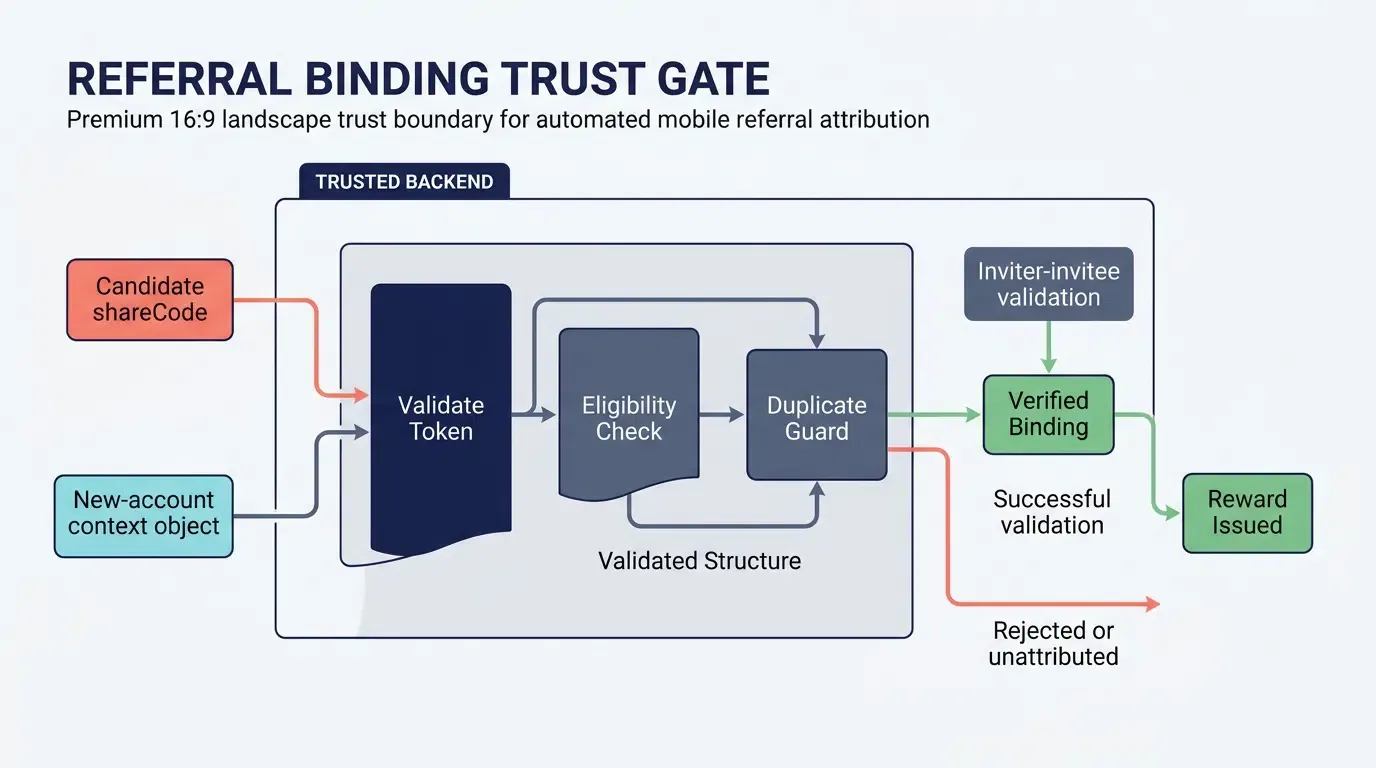
Treat all client-reported referral values as untrusted input. The application backend must validate the candidate inviter token, verify the invitee’s eligibility, and enforce the referral program’s business rules before creating the binding.
Use a database-level uniqueness constraint or equivalent transactional control to prevent multiple inviter bindings for the same invitee. Keep referral binding separate from reward issuance, and release rewards only after the required activation milestone has been verified on the server.
Managing In-App Browser Restrictions in WeChat, Line, and WhatsApp
The Container Sandbox Barrier: How Messaging Apps Intercept Custom Schemes and Direct APK Downloads
The vast majority of viral referral sharing occurs within mobile messaging applications. However, platforms such as WeChat, Line, and WhatsApp render external web links inside sandboxed in-app webviews that frequently intercept, restrict, or modify direct binary downloads and deep-linking schemes depending on operating system version and container security policies.
When an invited user taps a referral link inside an in-app browser:
- Direct APK Downloads Are Intercepted: On Android, attempts to download
.apkbinary files directly from the web landing page are frequently intercepted or blocked by the webview container. - Custom URL Schemes Are Blocked: Invocations of private URL schemes (
myapp://invite?code=123) often fail to execute, preventing direct native app launches for users who already have the app installed. - Universal Links May Be Suppressed: Certain messaging applications intercept outbound navigation, preventing standard iOS Universal Links from resolving outward to the operating system.
Detecting In-App User-Agent Headers
To handle these container limitations gracefully, the sharing landing page must inspect the incoming browser User-Agent string during initial DOM loading:
- WeChat Detection: Inspecting
navigator.userAgentforMicroMessenger. - Line Detection: Inspecting
navigator.userAgentforLine/. - WhatsApp Detection: Inspecting
navigator.userAgentforWhatsApp. - Facebook / Messenger / Instagram: Inspecting
navigator.userAgentforFBAVorInstagram.
Evaluating Redirection Tactics: Direct App Handoff vs. System Browser Transition
Operating systems and social applications exhibit distinct navigation behaviors:
- WeChat and Line Environments: These containers restrict direct binary downloads and external scheme execution. Attempting automatic redirection often triggers platform warning screens. The landing page displays explicit visual guidance prompting the user to open the link in the device’s default system browser (Safari on iOS, Chrome on Android).
- WhatsApp Environment: On modern iOS and Android implementations, WhatsApp typically opens web links in system-provided in-app viewports (such as SFSafariViewController on iOS or Chrome Custom Tabs on Android). These environments allow standard web navigation and support transitions to platform app stores, though custom URL schemes may still require an explicit user tap.
Implementing Graceful User Guidance: Overlaying Native Menu Prompts when Direct Redirection Fails
When an in-app webview prevents programmatic external handoffs, landing pages deploy visual user guidance:
- Conditional Mask Overlays: When
MicroMessengerorLine/is detected, display a high-contrast visual overlay pointing toward the top-right corner of the screen. - Explicit Action Copy: The prompt instructs the user: “Tap the menu in the top-right corner (•••) and select ‘Open in Browser’ (Safari / Chrome) to download the app.”
- Preserving Parameter State: If the user transitions to an external browser by loading the same URL, query parameters (
?shareCode=...) remain intact in the address bar, provided intermediate redirects do not strip them. When the landing page reloads in Safari or Chrome, the Web JS SDK executes cleanly and stages the referral context.
Troubleshooting Referral Parameter Drops Across Social Funnels
Diagnosing Parameter Stripping across Aggressive In-App Link Shimming Proxies
Certain social platforms route shared external links through intermediate link-wrapping or shimming domains (e.g., Facebook’s l.facebook.com or Twitter’s t.co). In some cases, these redirection hops strip non-standard query parameters or append conflicting internal click identifiers (fbclid).
To prevent parameter loss across multi-hop social redirects:
- Standard Parameter Naming: Stick to standard alphanumeric query keys like
shareCodeandchannelCodeper IETF RFC 3986. - Pre-Flight Link Validation: Test link resolution across live chat sessions on target messaging networks, inspecting
window.location.searchon the final landing page to verify that theshareCodeparameter survives all intermediate redirects.
Handling Desktop Web Shares: When Users Open Mobile Referral Links on PC Browsers
While referral campaigns are designed for mobile devices, users frequently open chat links on desktop computers (e.g., WhatsApp Web, WeChat for Mac/Windows, or Slack). If a desktop user accesses a mobile download landing page, mobile store redirects fail.
Enterprise landing pages handle desktop traffic through responsive degradation:
- Desktop Environment Detection: The Web JS SDK detects desktop operating systems (
Windows,macOS,Linux). - Dynamic QR Code Generation: Rather than displaying an unclickable mobile store button, responsive templates can conditionally display a QR code container on desktop viewports.
- Cross-Device Scanning: The user scans the desktop screen QR code with their mobile device. The QR code encodes the destination URL with the original
shareCode, transferring the referral session from desktop to mobile.
Mitigating Operating System Pasteboard Access Restrictions
Operating system privacy controls govern clipboard access:
- Android Foreground Focus Rules: Under Android 10 (API level 29) and later, background applications cannot read clipboard data via Android ClipboardManager. The native SDK must defer clipboard inspection until the application’s main Activity gains active window focus.
- iOS Pasteboard Prompts: On iOS 16 and later, programmatic access to Apple UIPasteboard may trigger a system notification or prompt asking the user to allow pasting from the source browser.
- Network Fallback Coordination: The attribution architecture accounts for these restrictions by treating local clipboard buffers as an opportunistic enhancement, falling back to server-side session matching when pasteboard reads are denied or unavailable.
Pre-Flight Verification Protocol for Social Referral Funnels Across Physical Devices
Before launching a customer referral campaign, growth engineering teams should execute the following systematic validation checklist:
- Android Targeted Share Fallback: Confirm that when WeChat or Line is uninstalled, the app falls back gracefully to the system share chooser.
- Android Clipboard Link Copy Fallback: Confirm that if the system share chooser fails or throws an exception, the full referral link is copied to the clipboard and a toast notification is displayed.
- H5 SDK Delay and One-Shot Navigation: Simulate an SDK initialization delay exceeding 1500ms to verify that the fallback navigation executes cleanly and that late
onreadyevents do not trigger duplicate navigations. - H5 Parameter and Fragment Retention: Test landing page fallback navigation with URLs containing existing query parameters, duplicate keys, and
#fragmentsto verify clean parameter replacement. - iOS Universal Links and Store Handoff: Test direct app opening for existing users and evaluate post-install parameter recovery against Apple’s anti-fingerprinting rules.
- Live Social Messaging Dispatch: Dispatch links into active WeChat and Line chat sessions to verify that in-app browser detection overlays guide users to Safari or Chrome without dropping the
shareCode. - Backend Binding and Reward Idempotency: Verify that the application backend accepts candidate tokens, rejects duplicate bindings, and holds rewards in a pending state until verified milestones are completed.
Comparative Analysis of Referral Tracking Architectures
Comparing Referral Tracking Architectures
| Architectural Dimension | Manual Promo Codes | Device Fingerprinting | Explicit Referral Parameters with Platform-Supported Recovery |
|---|---|---|---|
| User Onboarding Friction | Requires manual entry | May be low when matching succeeds | Low when referral context is recovered successfully |
| Attribution Basis | User-entered code validated by the backend | Probabilistic matching based on implementation-specific signals | Explicit referral context combined with a supported recovery mechanism |
| Attribution Reliability | Depends on accurate code entry and validation | Can be affected by signal changes, platform restrictions, and privacy requirements | Depends on parameter continuity, platform capabilities, and the selected recovery mechanism |
| Privacy and Compliance | Requires secure token handling and anti-abuse controls | Must be evaluated against applicable platform policies; prohibited fingerprinting must not be used | Requires review of the SDK implementation and the applicable platform rules |
| Operational Complexity | Relatively simple initial implementation; manual redemption creates additional friction | Requires matching logic, monitoring, and policy review | Requires link routing, platform-specific integration, backend validation, and fallback handling |
Trade-Offs in Implementation Complexity, Conversion Friction, and Attribution Accuracy
Manual promotional codes are comparatively straightforward to implement, but they require users to enter and redeem a code. This can introduce friction and creates opportunities for code sharing outside the intended referral relationship.
Device fingerprinting may appear to reduce user interaction, but its reliability depends on the matching implementation and the available signals. It must not be used where it conflicts with applicable privacy requirements, including Apple’s restrictions on prohibited fingerprinting.
Explicit referral parameters provide a clear business-level representation of the intended inviter. However, carrying a token in a web URL is not equivalent to recovering that token after an app-store installation. The overall solution must combine parameter continuity, a platform-supported recovery mechanism, and server-side validation. When recovery fails, the installation should remain unattributed rather than being assigned to an unverified inviter.
Frequently Asked Questions (FAQ)
How does automated referral tracking pass parameters through the App Store without promo codes?
Why do referral parameters get dropped when links are shared inside WeChat or Line?
How does an application backend prevent fraudulent referral loops?
Summary and Decision Framework
Automated mobile referral tracking can reduce manual referral-code entry by carrying an explicit inviter token through a web-sharing flow and validating the resulting referral relationship on the application backend.
A reliable implementation requires more than adding a shareCode query parameter. The landing page must preserve the token through supported redirects, the application must use a verified recovery mechanism for the relevant platform, and the backend must validate account eligibility and enforce idempotent binding and reward issuance.
Android and iOS should be evaluated separately. Google Play Install Referrer can provide supported installation metadata on Android. On iOS, Universal Links support direct routing when the application is installed, but they do not automatically guarantee deferred parameter recovery after an App Store installation. Any additional recovery mechanism must be documented, tested, and reviewed against applicable platform privacy requirements.
For production deployment, verify all SDK method names, configuration values, channel identifiers, and callback schemas against the exact version being integrated. Test the complete journey on clean devices and in the target messaging applications. When a referral cannot be recovered through a supported mechanism, allow onboarding to proceed and record the result as unattributed rather than creating an unverified referral relationship.
OpoInstall’s SDKs and developer documentation may provide components for implementing this architecture. Confirm the specific capabilities and platform behavior supported by the deployed release before relying on them in a production referral campaign.
For integration details, consult the OpoInstall developer documentation, the OpoInstall SDK download center, and the OpoInstall developer console. Use the corresponding official Android and Apple platform documentation to validate the installation and privacy behavior relevant to the application.
Related Materials
-
Concepts: Automated Referral Tracking, Inviter-Invitee Binding, Deferred Deep Linking, In-App Webview Sandboxing
-
Technologies: Mobile Attribution SDK, Web JS SDK, Universal Links, Android App Links, S2S Postbacks
-
Standards: IETF RFC 3986 Uniform Resource Identifier (URI) Generic Syntax, W3C Clipboard API and Events Specification
-
Integration Interfaces: Application-owned share-intent telemetry, the documented installation-referrer or attribution API for the deployed SDK version, platform-specific deep-link routing, and server-side referral validation.
-
Official Documentation & References:
Share this article