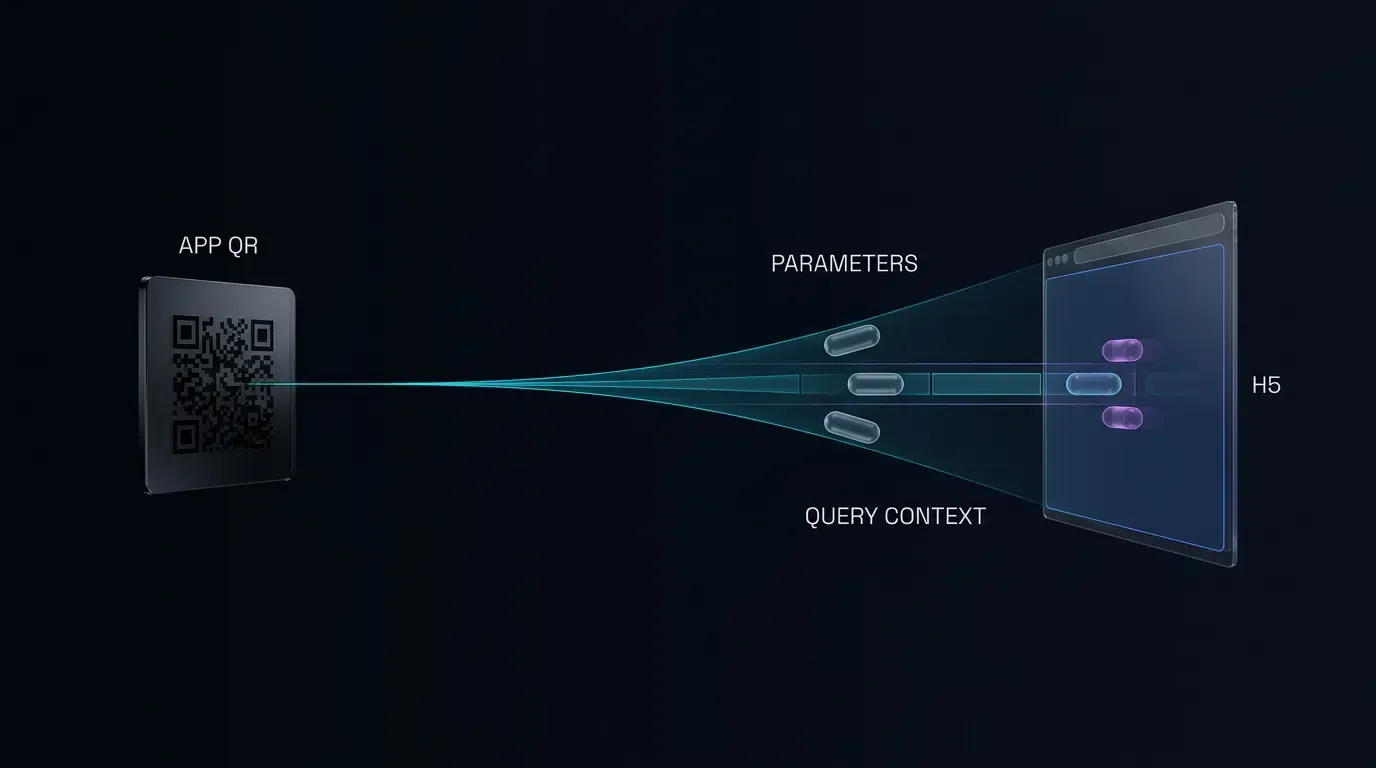
How to generate a custom branded QR code for app promotion? Generating a branded app QR code requires using a QR code generator with logo capabilities to encode your destination URL at Error Correction Level H, allocate a conservative central quiet zone that leaves functional patterns untouched, and composite assets using standards-compliant HTML5 Canvas rendering.
Branded app download QR codes are visually customized two-dimensional barcodes engineered by combining standard ISO/IEC 18004 matrix encoding with graphic overlays. By configuring Reed-Solomon error correction to its highest tolerance (Level H) and reserving a bounded central quiet zone, development teams can overlay application icons and brand palettes without corrupting essential data modules or optical finder patterns.
| Term | Definition | Related Entity | Search Intent Role |
|---|---|---|---|
| QR Code Generator with Logo | A tool or programmatic pipeline that synthesizes custom graphic assets inside barcode matrices. | Error Correction Level H | Informational / Commercial |
| custom qr code | A 2D barcode featuring tailored visual properties such as brand palettes and embedded icons. | HTML5 Canvas 2D Context | Technical / Informational |
| app qr code | A 2D barcode encoding a mobile application download route or deferred attribution endpoint. | App Parameter Installation | Commercial |
Understanding Reed-Solomon Error Correction in a QR Code Generator with Logo
The Mathematical Foundation: How Reed-Solomon Redundancy Protects Occluded Data
The ability to overlay an image onto a functional barcode without destroying its readability is made possible by the underlying mathematics of Reed-Solomon error correction. Specified within the ISO/IEC 18004 Standard for QR Code Barcodes, QR codes do not store data as raw, unpadded bitstreams. Instead, the input payload (such as an application store URL or tracking endpoint) is mapped into a sequence of 8-bit codewords operating over a Galois Field:
Under this finite field arithmetic, polynomial division generates redundant parity codewords that are appended to the original data block. When an optical scanner processes a physical barcode, the decoding engine evaluates the matrix for module discrepancies using syndrome calculation, polynomial root-finding, and error locator algorithms.
If
Where
The Four Standard Correction Tiers: Level L, Level M, Level Q, and Level H
The ISO/IEC 18004 specification defines four standardized error correction tiers, each allocating a progressively larger proportion of codewords to redundancy:
- Error Correction Level L: Recovers approximately 7% of total codewords. It maximizes data capacity while leaving minimal redundancy, making it suitable primarily for clean digital screen displays where physical degradation is absent.
- Error Correction Level M: Recovers approximately 15% of total codewords. It serves as the standard industrial default for plain black-and-white barcodes without visual modifications.
- Error Correction Level Q: Recovers approximately 25% of total codewords. It provides moderate protection against physical environmental wear, such as light surface scratching or dust.
- Error Correction Level H: Recovers approximately 30% of total codewords. It allocates maximum matrix space to redundancy polynomials, establishing the technical foundation required for central icon placement.
Why Level H Is Preferred for Center Logo Overlays
Embedding an icon into a barcode configured at Level L or Level M introduces substantial operational risk. Because an embedded image physically replaces data modules, a centered logo consumes a substantial portion of available parity codewords. According to technical specifications maintained by DENSO WAVE on QR Code Error Correction, error correction percentages refer strictly to the proportion of damaged codewords that can be mathematically restored, not a direct guarantee of visual surface area that can be removed arbitrarily.
Under Level M, which offers approximately 15% codeword redundancy, placing even a modest center icon can consume a significant portion of available correction capacity depending on the QR version and the specific data blocks affected. Any subsequent real-world imperfection—such as an angled mobile camera, optical flare on a glossy poster, or physical creasing on a paper flyer—can exceed the decoder’s remaining capacity, causing the scan to fail. By enforcing Error Correction Level H, the matrix provides its maximum recovery capacity, allowing the barcode to absorb both deliberate center occlusion and incidental physical wear.
Estimating Logo Size and Occlusion by QR Version
A frequent engineering misconception assumes that because Level H provides an approximate 30% codeword restoration rate, a logo can safely cover 30% of the visual barcode area. This assumption is mathematically invalid: QR codes interleave data and error correction across multiple distinct blocks. A centered physical graphic represents a clustered burst error, which disproportionately impacts specific data blocks while leaving peripheral blocks unblemished. If any single block exceeds its local
Furthermore, development teams must strictly distinguish between linear dimension scale and surface area coverage:
| Parameter Metric | Mathematical Definition | Configured Starting Range | Practical Engineering Impact |
|---|---|---|---|
| Linear Scale Ratio | 0.18 to 0.22 | Linear width proportion of active matrix width | |
| Logo Surface Area Ratio | 0.032 to 0.048 (3.2% - 4.8%) | Actual pixel area occupied by brand artwork | |
| Bounding Box Area Ratio | 0.065 to 0.120 (6.5% - 12.0%) | Outer bounding box area of logo and clearance plate | |
| Codeword Recovery Ceiling | Level H Parity Budget ( |
ISO/IEC 18004 specification | Applied to distributed codewords across blocks, not surface area |
There is no ISO standard specifying a universal safe surface area ratio. A linear logo scale of 0.18 to 0.22 serves as an empirical starting baseline rather than a certified safety threshold. The actual occlusion footprint varies according to the QR version and clearance width; for example, a Version 1 matrix (21x21 modules) experiences higher relative area occlusion for a given module clearance border than a Version 6 matrix (41x41 modules). Furthermore, higher versions (such as Version 7 and Version 8) position an Alignment Pattern directly in the matrix center, requiring pipelines to detect functional collisions and execute graceful fallbacks. Every production candidate must be verified through automated functional-pattern collision inspection, digital bitmap decoding, and physical scanning tests.
Protecting Core Functional Geometry: Position Detection Patterns, Alignment Patterns, and Timing Tracks
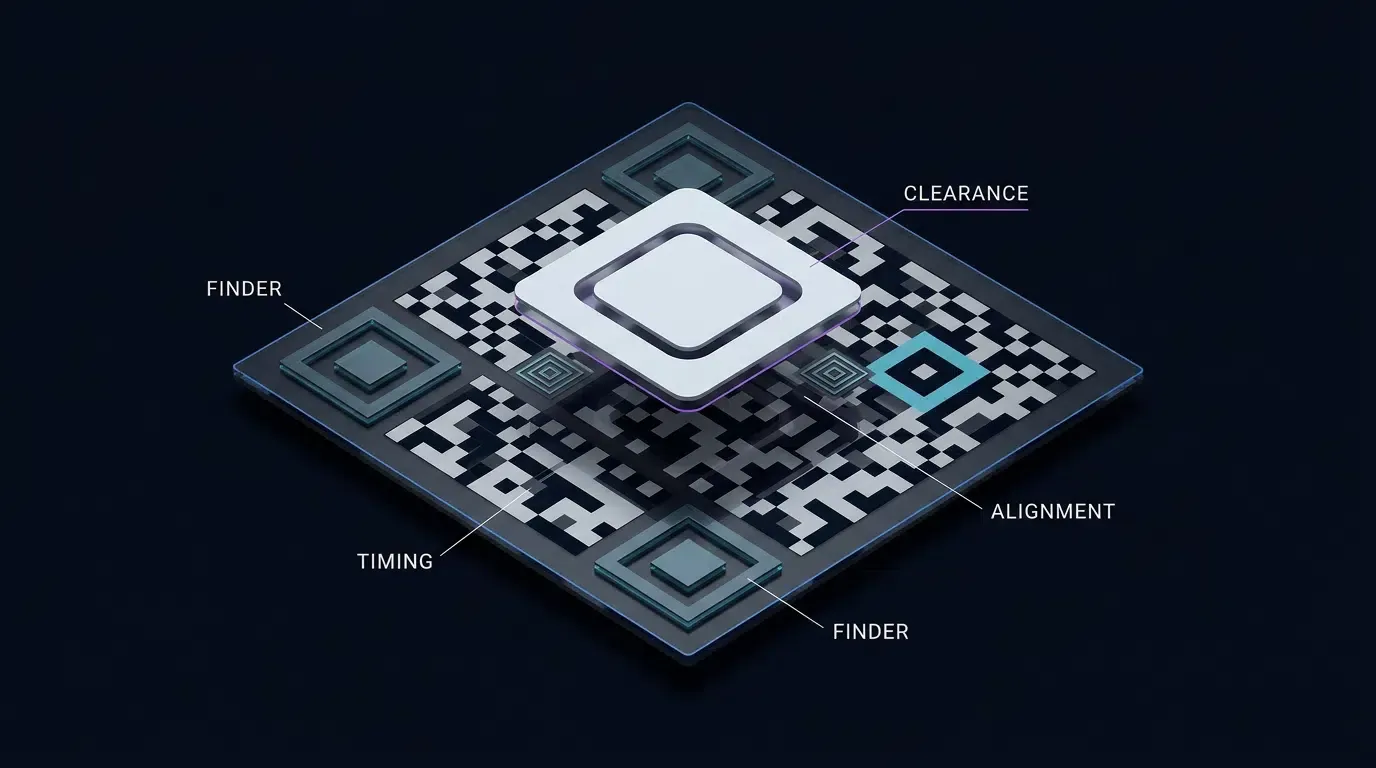
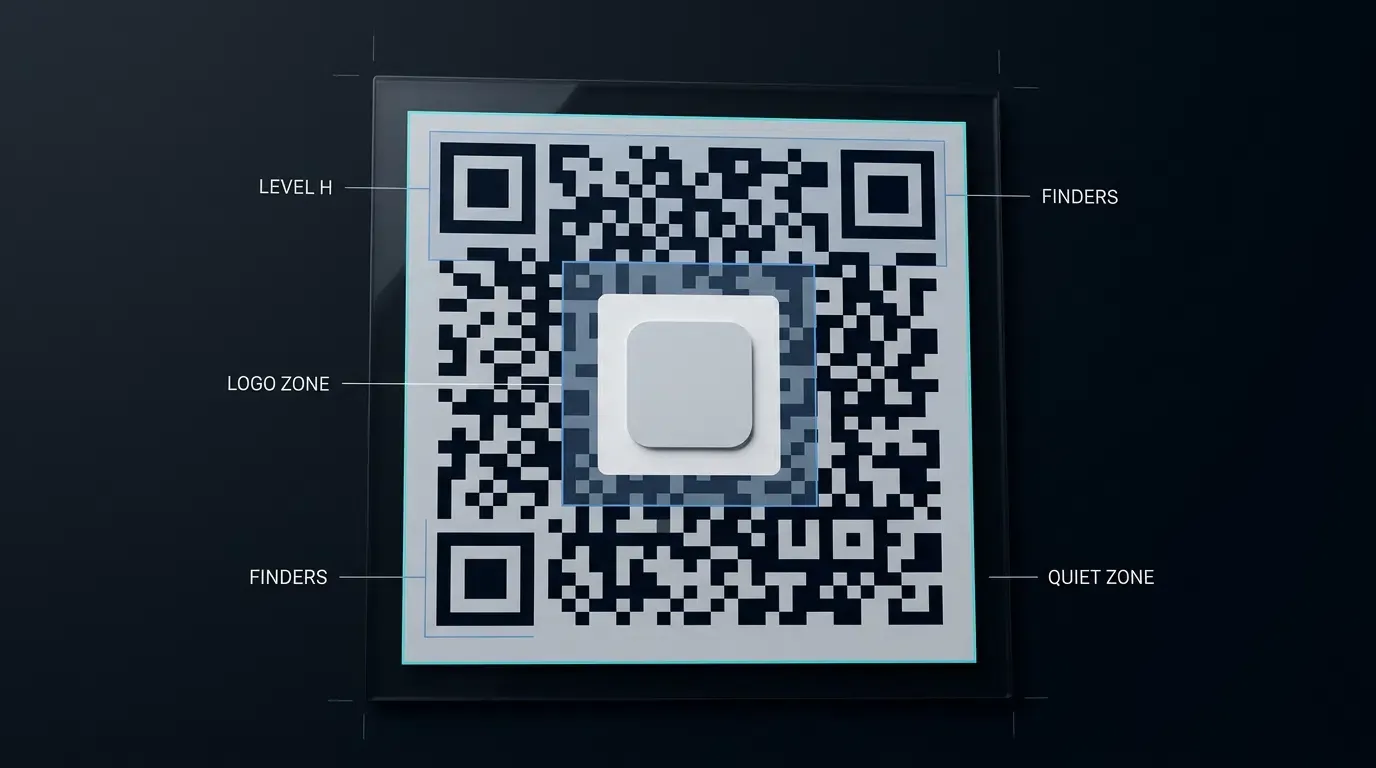
A 2D barcode contains non-data structural elements that mobile camera vision libraries use to detect, deskew, and decode the symbol. These functional patterns must never be covered, clipped, or altered by graphic styling:
- Position Detection Patterns (Finders): Three concentric square structures located at the top-left, top-right, and bottom-left corners. Each finder consists of a
dark module outer frame, a light module separator, and a central dark square, establishing a strict scan-line ratio. Occluding finder patterns prevents computer vision pipelines from establishing the coordinate frame. - Format Information: Two 15-bit sequences positioned adjacent to the finder patterns (along row 8 and column 8). These modules store the active error correction tier and mask pattern. Occluding format modules prevents the optical decoder from determining how to descramble the data.
- Timing Patterns: Alternating dark and light module tracks connecting the three finder patterns horizontally and vertically along row 6 and column 6. These tracks establish the physical grid frequency and module pitch.
- Alignment Patterns: Subordinate concentric square markers (
modules) distributed across larger matrix versions (Version 2 and higher) to correct for perspective distortion and non-planar physical surfaces. - Version Information: Two
module blocks present on Version 7 through Version 40, located above the bottom-left finder and to the left of the top-right finder.
The visual layout below illustrates the strict geometric boundary separating the central logo area from essential alignment, format, and finder geometry:
┌─────────┐                 ┌─────────┐
│ ┌─────┐ │  Timing Track   │ ┌─────┐ │
│ │ █ █ │ │ █ ░ █ ░ █ ░ █ ░ │ │ █ █ │ │
│ └─────┘ │                 │ └─────┘ │
└─────────┘   ┌─────────┐   └─────────┘
 Format Info  │  LOGO   │    Format Info
░ ░ ░ ░ ░ ░   │  SAFE   │   ░ ░ ░ ░ ░ ░
              │  ZONE   │
┌─────────┐   └─────────┘   ┌─────────┐
│ ┌─────┐ │                 │ █ █ █ █ │
│ │ █ █ │ │  Timing Track   │ █ ░ ░ █ │
│ └─────┘ │ █ ░ █ ░ █ ░ █ ░ │ █ █ █ █ │
└─────────┘                 └─────────┘
 Finder 1                    Alignment
See Also: Quick Installation & Share ──> App Parameter Installation
Calculating Center Quiet Zones and Icon Dimensions
Determining the Geometric Center Across Standard QR Matrix Versions
Accurate logo positioning requires calculating the continuous module coordinates of the matrix center. Because QR code module counts (
For example, on a Version 6 matrix (
When rendering the matrix via HTML5 Canvas, the physical pixel coordinate of the center
Using continuous center coordinates aligns the vector geometry of the logo overlay with the rasterization grid of the canvas, ensuring that the clearance plate expands symmetrically and distributes occlusion evenly across surrounding data blocks.
Establishing an Inner Quiet Zone: Allocating Padding Between Logo Boundaries and Data Modules
Overlaying an image directly against adjacent binary modules creates ambiguous edge transitions. If an application icon features a dark border that touches dark data modules, optical decoders can misinterpret the combined shape as an oversized, malformed module block, triggering decode aborts.
To prevent optical bleeding, developers must enforce an internal protective backplate or logo clearance zone surrounding the logo. This clearance space should measure between 1 and 2 module widths (#FFFFFF). This clear separation isolates the custom artwork, allowing computer vision edge-detection filters to distinguish between damaged data modules and the intentional boundaries of the graphic overlay.
Optical Contrast Ratios: Meeting ISO Readability Requirements Across Physical Print Collateral
Camera sensors in mobile devices evaluate barcodes by converting color images into grayscale, followed by binarization using adaptive local thresholding. If the luminance contrast between the foreground modules and the background substrate is insufficient, the binarization step merges modules together.
To preserve optical decodability across diverse mobile hardware:
- Diffuse Reflectance Guidelines: In alignment with ISO/IEC 18004 optical measurement criteria, dark modules should absorb incident light, while the light background should provide high diffuse reflection.
- Luminance Requirements: Ensure foreground and background colors maintain a distinct luminance difference, avoiding low-contrast aesthetic pairings such as mid-gray modules on silver paper.
- Color Selection Safety: Avoid pairing complementary colors of equal luminance (such as red modules on a green background), as grayscale conversion renders them identical, wiping out the matrix structure during binarization.
Selecting Icon Shapes: Square vs. Circular Clipping Masks and Their Impact on Adjacent Modules
The geometric shape of the icon directly affects how many data modules are occluded:
- Square Masks: A square logo consumes the maximum possible area (
). While it aligns neatly with the rectilinear grid of the barcode modules, its sharp corners extend close to the timing tracks and central alignment patterns. - Circular Masks: A circular clipping mask with diameter
covers approximately 21.5% less surface area than a square of side :
Because the corners are clipped, circular masks occlude fewer modules while preserving the visual diameter of the application icon. This reduced footprint makes circular icons technically superior for preserving Reed-Solomon parity budgets.
Accounting for Outer Margins: Preserving the Standard Four-Module Exterior Quiet Zone
In addition to the central interior quiet zone, the physical QR code must maintain a standard exterior quiet zone. Defined by ISO/IEC 18004, this boundary requires a clear, unprinted margin of at least four full module widths (
Trimming or removing this exterior margin to fit tight print layouts prevents mobile scanner camera feeds from locating the outer edges of the finder patterns against busy print backgrounds or dark physical mounting surfaces.
Step-by-Step Implementation of Canvas-Based Logo Overlay
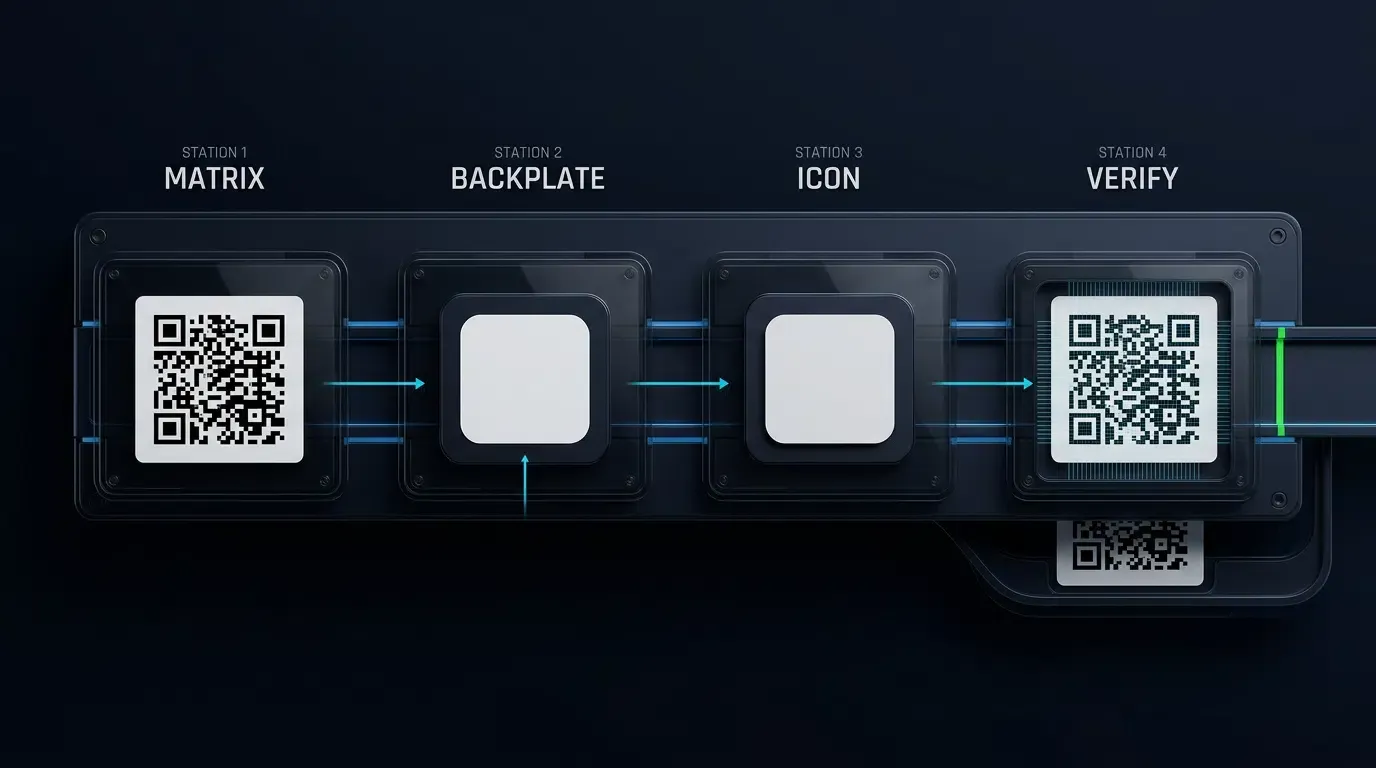
Architecture of Client-Side Compositing: Leveraging W3C HTML5 Canvas 2D Context
Modern web architectures can composite custom barcodes client-side without relying on external image processing microservices. By utilizing the W3C HTML Canvas 2D Context Specification, browsers can render the underlying high-redundancy barcode matrix, calculate central coordinates, construct a protective quiet zone backplate, and composite a high-resolution application icon.
This client-side pattern reduces server load, preserves user data privacy, and enables instant visual feedback during promotional campaign setup.
Rendering the High-Redundancy Base Matrix onto an Offscreen Canvas Element
The first phase of the pipeline generates the mathematical QR matrix at Error Correction Level H. The matrix data must be computed using a standards-compliant encoder that outputs a discrete two-dimensional boolean module grid. To eliminate sub-pixel interpolation and coordinate rounding artifacts, adjacent module boundaries must be derived directly from integer grid lines:
<!-- CODE_BLOCK_01: Standards-Compliant Canvas Branded QR Generator with Automated Verification and Graceful Fallback -->
<!-- File: /var/www/html/branded_qr_generator.html -->
<!DOCTYPE html>
<html lang="en">
<head>
    <meta charset="UTF-8">
    <meta name="viewport" content="width=device-width, initial-scale=1.0">
    <title>Branded QR Code Generator</title>
    <!-- Include verified standards-compliant QR generation and optical decoding engines -->
    <script src="https://cdnjs.cloudflare.com/ajax/libs/qrcode-generator/1.4.4/qrcode.min.js"></script>
    <script src="https://cdnjs.cloudflare.com/ajax/libs/jsqr/1.4.0/jsQR.min.js"></script>
    <script src="/js/qr_preflight_validator.js"></script>
    <style>
        .generator-container {
            display: flex;
            flex-direction: column;
            align-items: center;
            padding: 24px;
            font-family: -apple-system, BlinkMacSystemFont, "Segoe UI", Roboto, sans-serif;
        }
        canvas {
            border: 1px solid #e2e8f0;
            border-radius: 8px;
            box-shadow: 0 4px 6px -1px rgba(0, 0, 0, 0.1);
            max-width: 100%;
            height: auto;
        }
        .controls {
            margin-top: 20px;
            display: flex;
            flex-direction: column;
            align-items: center;
            gap: 10px;
        }
        button {
            padding: 10px 18px;
            background-color: #2563eb;
            color: #ffffff;
            border: none;
            border-radius: 6px;
            font-weight: 500;
            cursor: pointer;
        }
        button:disabled {
            background-color: #94a3b8;
            cursor: not-allowed;
        }
        .status-message {
            font-size: 14px;
            font-weight: 500;
            max-width: 600px;
            text-align: center;
        }
        .status-success { color: #16a34a; }
        .status-warning { color: #d97706; }
        .status-error { color: #dc2626; }
    </style>
</head>
<body>
    <main class="generator-container">
        <h1>Branded App QR Generator</h1>
        <canvas id="qr-canvas" width="1024" height="1024"></canvas>
        <div class="controls">
            <button id="btn-export-png" type="button" disabled>Export High-Resolution PNG</button>
            <div id="status-display" class="status-message">Initializing matrix...</div>
        </div>
    </main>

    <script>
    /**
     * Generates a genuine Reed-Solomon Level H QR matrix, renders pixel-crisp modules,
     * checks functional pattern geometry, overlays a centered logo when permitted,
     * falls back to a clean unbranded matrix if obstructed or if the logo fails to load,
     * and verifies optical decodability.
     *
     * @param {HTMLCanvasElement} canvas - Target rendering canvas
     * @param {string} destinationUrl - The target landing page URL
     * @param {string} logoUrl - Image URL for center brand asset
     * @param {number} targetLinearScale - Desired logo width ratio relative to active matrix (0.15 - 0.22)
     * @returns {Promise<{success: boolean, isBranded: boolean, decodedUrl: string|null, warnings: string[]}>}
     */
    async function renderBrandedQrCode(canvas, destinationUrl, logoUrl, targetLinearScale = 0.20) {
        if (!canvas || !Number.isInteger(canvas.width) || canvas.width <= 0 || canvas.width !== canvas.height) {
            throw new Error("QR canvas must be square with positive integer dimensions.");
        }
        if (!Number.isFinite(targetLinearScale) || targetLinearScale <= 0 || targetLinearScale > 0.5) {
            throw new Error("Invalid logo scale: must be a finite positive number.");
        }

        const ctx = canvas.getContext("2d");
        if (!ctx) throw new Error("Unable to obtain 2D rendering context.");

        // Step 1: Compute real Level H QR code using the verified generator engine
        // Type 0 auto-detects version (1-40); 'H' enforces ~30% codeword error correction
        const qr = qrcode(0, 'H');
        qr.addData(destinationUrl);
        qr.make();

        const moduleCount = qr.getModuleCount();
        const qrVersion = (moduleCount - 17) / 4;
        const canvasWidth = canvas.width;
        const canvasHeight = canvas.height;

        // Step 2: Establish four-module exterior quiet zone per ISO/IEC 18004
        const quietZoneModules = 4;
        const totalGridModules = moduleCount + (quietZoneModules * 2);
        const modulePitch = canvasWidth / totalGridModules;
        const matrixPixelSize = moduleCount * modulePitch;
        const matrixOriginOffset = quietZoneModules * modulePitch;

        // Step 3: Run pre-flight validation on geometric boundaries
        const boundedScale = Math.min(Math.max(targetLinearScale, 0.15), 0.22);
        const logoTargetSize = matrixPixelSize * boundedScale;
        const innerQuietMargin = modulePitch * 1.5;
        const backplateSize = logoTargetSize + (innerQuietMargin * 2);
        const backplateModuleSpan = backplateSize / modulePitch;

        if (typeof validateQrMatrixIntegrity !== "function") {
            throw new Error("Pre-flight validator module not loaded.");
        }

        const preFlight = validateQrMatrixIntegrity(qrVersion, moduleCount, backplateModuleSpan);
        let canApplyLogo = false;
        const processWarnings = [...preFlight.warnings];

        if (preFlight.isValid) {
            canApplyLogo = true;
        } else if (preFlight.reasonCode === "FUNCTION_PATTERN_COLLISION") {
            // Graceful Fallback: The QR version places an alignment pattern or functional track in the center
            canApplyLogo = false;
            processWarnings.push(
                `Center logo omitted: Version ${qrVersion} functional patterns (e.g., central Alignment Pattern) occupy the center. Generating clean unbranded Level H QR code fallback.`
            );
        } else {
            // Fatal parameter error: fail-closed
            return {
                success: false,
                isBranded: false,
                decodedUrl: null,
                warnings: preFlight.warnings
            };
        }

        // Helper to draw clean QR matrix modules without logo
        function renderBaseMatrix() {
            ctx.fillStyle = "#FFFFFF";
            ctx.fillRect(0, 0, canvasWidth, canvasHeight);

            ctx.fillStyle = "#000000";
            ctx.imageSmoothingEnabled = false;

            for (let row = 0; row < moduleCount; row++) {
                for (let col = 0; col < moduleCount; col++) {
                    if (qr.isDark(row, col)) {
                        const x0 = Math.round(matrixOriginOffset + (col * modulePitch));
                        const x1 = Math.round(matrixOriginOffset + ((col + 1) * modulePitch));
                        const y0 = Math.round(matrixOriginOffset + (row * modulePitch));
                        const y1 = Math.round(matrixOriginOffset + ((row + 1) * modulePitch));
                        ctx.fillRect(x0, y0, x1 - x0, y1 - y0);
                    }
                }
            }
        }

        // Step 4: Render matrix modules using adjacent coordinate boundaries (Integer Snapping)
        renderBaseMatrix();

        // Step 5: Overlay Logo and Protective Backplate only if pre-flight passed
        if (canApplyLogo) {
            try {
                const centerX = canvasWidth / 2;
                const centerY = canvasHeight / 2;
                const backplateX = centerX - (backplateSize / 2);
                const backplateY = centerY - (backplateSize / 2);
                const cornerRadius = backplateSize * 0.12;

                // Render protective backplate (Inner Clearance Zone)
                ctx.save();
                ctx.fillStyle = "#FFFFFF";
                ctx.beginPath();
                ctx.moveTo(backplateX + cornerRadius, backplateY);
                ctx.lineTo(backplateX + backplateSize - cornerRadius, backplateY);
                ctx.quadraticCurveTo(backplateX + backplateSize, backplateY, backplateX + backplateSize, backplateY + cornerRadius);
                ctx.lineTo(backplateX + backplateSize, backplateY + backplateSize - cornerRadius);
                ctx.quadraticCurveTo(backplateX + backplateSize, backplateY + backplateSize - cornerRadius, backplateX + backplateSize, backplateY + backplateSize);
                ctx.lineTo(backplateX + cornerRadius, backplateY + backplateSize);
                ctx.quadraticCurveTo(backplateX, backplateY + backplateSize, backplateX, backplateY + backplateSize - cornerRadius);
                ctx.lineTo(backplateX, backplateY + cornerRadius);
                ctx.quadraticCurveTo(backplateX, backplateY, backplateX + cornerRadius, backplateY);
                ctx.closePath();
                ctx.fill();
                ctx.restore();

                // Load brand logo with CORS handling
                const logoImage = new Image();
                logoImage.crossOrigin = "anonymous";

                await new Promise((resolve, reject) => {
                    logoImage.onload = () => resolve();
                    logoImage.onerror = () => reject(new Error("CORS or asset loading failure for logo URL."));
                    logoImage.src = logoUrl;
                });

                ctx.save();
                ctx.imageSmoothingEnabled = true;
                ctx.imageSmoothingQuality = "high";

                const iconX = centerX - (logoTargetSize / 2);
                const iconY = centerY - (logoTargetSize / 2);
                const iconRadius = logoTargetSize * 0.10;

                ctx.beginPath();
                ctx.moveTo(iconX + iconRadius, iconY);
                ctx.lineTo(iconX + logoTargetSize - iconRadius, iconY);
                ctx.quadraticCurveTo(iconX + logoTargetSize, iconY, iconX + logoTargetSize, iconY + iconRadius);
                ctx.lineTo(iconX + logoTargetSize, iconY + logoTargetSize - iconRadius);
                ctx.quadraticCurveTo(iconX + logoTargetSize, iconY + logoTargetSize - iconRadius, iconX + logoTargetSize, iconY + logoTargetSize);
                ctx.lineTo(iconX + iconRadius, iconY + logoTargetSize);
                ctx.quadraticCurveTo(iconX, iconY + logoTargetSize, iconX, iconY + logoTargetSize - iconRadius);
                ctx.lineTo(iconX, iconY + iconRadius);
                ctx.quadraticCurveTo(iconX, iconY, iconX + iconRadius, iconY);
                ctx.closePath();
                ctx.clip();

                ctx.drawImage(logoImage, iconX, iconY, logoTargetSize, logoTargetSize);
                ctx.restore();
            } catch (assetErr) {
                // If logo asset fails to load, restore the clean matrix and fallback to unbranded export
                console.warn("Logo overlay aborted, falling back to clean matrix:", assetErr.message);
                renderBaseMatrix();
                canApplyLogo = false;
                processWarnings.push("Logo image asset failed to load. Generated verified unbranded QR code fallback.");
            }
        }

        // Step 6: Automated Closed-Loop Optical Decode Verification
        if (typeof jsQR !== "function") {
            throw new Error("Optical decoder engine (jsQR) not available.");
        }

        const imageData = ctx.getImageData(0, 0, canvasWidth, canvasHeight);
        const decodedResult = jsQR(imageData.data, imageData.width, imageData.height, {
            inversionAttempts: "dontInvert"
        });

        if (decodedResult && decodedResult.data === destinationUrl) {
            return {
                success: true,
                isBranded: canApplyLogo,
                decodedUrl: decodedResult.data,
                warnings: processWarnings
            };
        } else {
            const errorMsg = decodedResult
                ? "Decoded URI does not match destination URL."
                : "Optical decode failed: Matrix unreadable.";
            processWarnings.push(errorMsg);
            return {
                success: false,
                isBranded: false,
                decodedUrl: null,
                warnings: processWarnings
            };
        }
    }

    // Execution workflow
    document.addEventListener("DOMContentLoaded", () => {
        const canvas = document.getElementById("qr-canvas");
        const exportBtn = document.getElementById("btn-export-png");
        const statusDisplay = document.getElementById("status-display");

        // Streamlined production URL: Fits Version 5-6 (41x41 modules, clear center without Alignment Patterns)
        const testUrl = "https://promo.example.com/d?c=p01&id=1024";
        const brandLogo = "data:image/svg+xml;charset=utf-8," + encodeURIComponent(`
            <svg xmlns="http://www.w3.org/2000/svg" width="256" height="256" viewBox="0 0 256 256">
                <rect width="100%" height="100%" rx="32" fill="#2563EB"/>
                <path d="M78 128 L114 164 L178 92" stroke="#FFFFFF" stroke-width="24" stroke-linecap="round" stroke-linejoin="round" fill="none"/>
            </svg>
        `);

        let currentResult = null;

        if (canvas) {
            renderBrandedQrCode(canvas, testUrl, brandLogo, 0.20)
                .then((result) => {
                    currentResult = result;
                    if (result.success) {
                        if (result.isBranded) {
                            statusDisplay.textContent = "Verified: Branded QR code decoded successfully and matches target URL.";
                            statusDisplay.className = "status-message status-success";
                        } else {
                            statusDisplay.textContent = "Verified with Fallback: " + result.warnings.join(" ");
                            statusDisplay.className = "status-message status-warning";
                        }
                        if (exportBtn) exportBtn.disabled = false;
                    } else {
                        statusDisplay.textContent = "Export Blocked: " + result.warnings.join(" ");
                        statusDisplay.className = "status-message status-error";
                        if (exportBtn) exportBtn.disabled = true;
                    }
                })
                .catch((err) => {
                    statusDisplay.textContent = "Pipeline Error: " + err.message;
                    statusDisplay.className = "status-message status-error";
                    if (exportBtn) exportBtn.disabled = true;
                });
        }

        if (exportBtn && canvas) {
            exportBtn.onclick = () => {
                const dataUrl = canvas.toDataURL("image/png");
                const downloadLink = document.createElement("a");
                // Differentiate output filename based on verification state
                downloadLink.download = (currentResult && currentResult.isBranded)
                    ? "branded_qr_asset_1024px.png"
                    : "standard_qr_fallback_1024px.png";
                downloadLink.href = dataUrl;
                downloadLink.click();
            };
        }
    });
    </script>
</body>
</html>
Clearing the Central Quiet Zone Using ClearRect or Protective Background Backplates
Once the base matrix is drawn, the script calculates the central bounding box based on the designated safe area ratio. Rather than simply overwriting the area, the canvas context fills this region with a solid backplate:
- Path Construction: Constructing a circular or rounded-rectangular path representing the logo boundary plus the
-module inner quiet zone padding. - Fill Execution: Filling the path with the matrix’s background color (e.g., solid white) to establish an optical barrier isolating the surrounding data modules.
Compositing the Application Icon Using DrawImage with Cross-Origin Safety
The application icon is loaded as an image element and composited onto the canvas context. In compliance with the MDN Guidance on CORS Enabled Images, external images must be served with appropriate Access-Control-Allow-Origin headers, and the script must declare:
image.crossOrigin = "anonymous";
Failing to satisfy CORS requirements taints the canvas, preventing programmatic export via toDataURL() or toBlob().
To prevent unreadable barcodes from entering production workflows, development teams must integrate an automated pre-flight validation module that evaluates module occlusion counts, checks for collisions across all functional pattern zones, and triggers a clean unbranded fallback if center placement is obstructed:
// Automated QR Matrix Occlusion & Functional Geometry Validator
// File: /var/www/html/js/qr_preflight_validator.js

/**
 * Standard Alignment Pattern Center Coordinates per ISO/IEC 18004 (Table E.1)
 * Complete coordinate sets for Versions 1 through 40.
 */
const ALIGNMENT_PATTERN_TABLE = {
    1: [],
    2: [6, 18],
    3: [6, 22],
    4: [6, 26],
    5: [6, 30],
    6: [6, 34],
    7: [6, 22, 38],
    8: [6, 24, 42],
    9: [6, 26, 46],
    10: [6, 28, 50],
    11: [6, 30, 54],
    12: [6, 32, 58],
    13: [6, 34, 62],
    14: [6, 26, 46, 66],
    15: [6, 26, 48, 70],
    16: [6, 26, 50, 74],
    17: [6, 30, 54, 78],
    18: [6, 30, 56, 82],
    19: [6, 30, 58, 86],
    20: [6, 34, 62, 90],
    21: [6, 28, 50, 72, 94],
    22: [6, 26, 50, 74, 98],
    23: [6, 30, 54, 78, 102],
    24: [6, 28, 54, 80, 106],
    25: [6, 32, 58, 84, 110],
    26: [6, 30, 58, 86, 114],
    27: [6, 34, 62, 90, 118],
    28: [6, 26, 50, 74, 98, 122],
    29: [6, 30, 54, 78, 102, 126],
    30: [6, 26, 52, 78, 104, 130],
    31: [6, 30, 56, 82, 108, 134],
    32: [6, 34, 60, 86, 112, 138],
    33: [6, 30, 58, 86, 114, 142],
    34: [6, 34, 62, 90, 118, 146],
    35: [6, 30, 54, 78, 102, 126, 150],
    36: [6, 24, 50, 76, 102, 128, 154],
    37: [6, 28, 54, 80, 106, 132, 158],
    38: [6, 32, 58, 84, 110, 136, 162],
    39: [6, 26, 54, 82, 110, 138, 166],
    40: [6, 30, 58, 86, 114, 142, 170]
};

/**
 * Validates that an embedded logo backplate complies with geometric boundaries,
 * calculating linear dimensions and checking for collisions with Finder Patterns,
 * Format Information, Timing Patterns, Alignment Patterns, and Version Information.
 *
 * @param {number} version - QR Code Version (1 - 40)
 * @param {number} moduleCount - Grid dimension (e.g., 41 for Version 6)
 * @param {number} backplateModuleSpan - Width/height of the protective backplate in module units
 * @returns {object} Validation report containing safety status, reasonCode, and metrics
 */
function validateQrMatrixIntegrity(version, moduleCount, backplateModuleSpan) {
    // 1. Strict input consistency verification before any property access
    if (!Number.isInteger(version) || version < 1 || version > 40 || !ALIGNMENT_PATTERN_TABLE[version]) {
        return {
            isValid: false,
            reasonCode: "INVALID_VERSION",
            version: version,
            moduleCount: moduleCount,
            backplateModuleSpan: 0,
            linearScale: 0,
            boundingBoxAreaRatio: 0,
            finderPatternClearance: false,
            formatInfoClearance: false,
            timingTrackClearance: false,
            alignmentPatternClearance: false,
            versionInfoClearance: false,
            warnings: [`Unsupported or invalid QR version: ${version}.`]
        };
    }

    const expectedModules = 17 + (4 * version);
    if (!Number.isInteger(moduleCount) || moduleCount !== expectedModules) {
        return {
            isValid: false,
            reasonCode: "INVALID_GEOMETRY",
            version: version,
            moduleCount: moduleCount,
            backplateModuleSpan: 0,
            linearScale: 0,
            boundingBoxAreaRatio: 0,
            finderPatternClearance: false,
            formatInfoClearance: false,
            timingTrackClearance: false,
            alignmentPatternClearance: false,
            versionInfoClearance: false,
            warnings: [`Module count mismatch: Version ${version} requires ${expectedModules}x${expectedModules}, received ${moduleCount}.`]
        };
    }

    if (!Number.isFinite(backplateModuleSpan) || backplateModuleSpan <= 0 || backplateModuleSpan > moduleCount) {
        return {
            isValid: false,
            reasonCode: "INVALID_SPAN",
            version: version,
            moduleCount: moduleCount,
            backplateModuleSpan: 0,
            linearScale: 0,
            boundingBoxAreaRatio: 0,
            finderPatternClearance: false,
            formatInfoClearance: false,
            timingTrackClearance: false,
            alignmentPatternClearance: false,
            versionInfoClearance: false,
            warnings: [`Invalid backplate span: ${backplateModuleSpan}. Must be a finite positive number less than module count.`]
        };
    }

    // Initialize report object with validated numeric data
    const report = {
        isValid: true,
        reasonCode: "SUCCESS",
        version: version,
        moduleCount: moduleCount,
        backplateModuleSpan: parseFloat(backplateModuleSpan.toFixed(2)),
        linearScale: parseFloat((backplateModuleSpan / moduleCount).toFixed(4)),
        boundingBoxAreaRatio: parseFloat((Math.pow(backplateModuleSpan, 2) / Math.pow(moduleCount, 2)).toFixed(4)),
        finderPatternClearance: true,
        formatInfoClearance: true,
        timingTrackClearance: true,
        alignmentPatternClearance: true,
        versionInfoClearance: true,
        warnings: []
    };

    // 2. Continuous geometric center coordinates (measured from outer matrix boundary)
    const center = moduleCount / 2;
    const halfSpan = backplateModuleSpan / 2;
    const boxX1 = center - halfSpan;
    const boxX2 = center + halfSpan;
    const boxY1 = center - halfSpan;
    const boxY2 = center + halfSpan;

    // Helper for Axis-Aligned Bounding Box (AABB) intersection
    function checkAabbIntersection(ax1, ay1, ax2, ay2, bx1, by1, bx2, by2) {
        return !(ax2 <= bx1 || ax1 >= bx2 || ay2 <= by1 || ay1 >= by2);
    }

    // 3. Finder Patterns + Separators + Format Information Zones
    // Top-Left: [0, 9] x [0, 9] covers Finder (7x7), Separator (8x8), and Format Information modules (Row/Col 8)
    // Top-Right: [M-9, M] x [0, 9] covers Finder, Separator, and Format Information modules
    // Bottom-Left: [0, 9] x [M-9, M] covers Finder, Separator, Format Info, and Dark Module (Row M-8, Col 8)
    const protectedFinderZones = [
        { name: "Top-Left Finder & Format Zone", x1: 0, y1: 0, x2: 9, y2: 9 },
        { name: "Top-Right Finder & Format Zone", x1: moduleCount - 9, y1: 0, x2: moduleCount, y2: 9 },
        { name: "Bottom-Left Finder & Format Zone", x1: 0, y1: moduleCount - 9, x2: 9, y2: moduleCount }
    ];

    for (const zone of protectedFinderZones) {
        if (checkAabbIntersection(boxX1, boxY1, boxX2, boxY2, zone.x1, zone.y1, zone.x2, zone.y2)) {
            report.isValid = false;
            report.reasonCode = "FUNCTION_PATTERN_COLLISION";
            report.finderPatternClearance = false;
            report.formatInfoClearance = false;
            report.warnings.push(`Logo backplate collides with ${zone.name}.`);
        }
    }

    // 4. Timing Pattern Verification (Row 6 and Column 6, spanning between finders)
    const timingIndex = 6;
    const horizontalTiming = { x1: 9, y1: timingIndex, x2: moduleCount - 9, y2: timingIndex + 1 };
    const verticalTiming = { x1: timingIndex, y1: 9, x2: timingIndex + 1, y2: moduleCount - 9 };

    if (checkAabbIntersection(boxX1, boxY1, boxX2, boxY2, horizontalTiming.x1, horizontalTiming.y1, horizontalTiming.x2, horizontalTiming.y2) ||
        checkAabbIntersection(boxX1, boxY1, boxX2, boxY2, verticalTiming.x1, verticalTiming.y1, verticalTiming.x2, verticalTiming.y2)) {
        report.isValid = false;
        report.reasonCode = "FUNCTION_PATTERN_COLLISION";
        report.timingTrackClearance = false;
        report.warnings.push("Logo backplate collides with row 6 or column 6 timing tracks.");
    }

    // 5. Alignment Pattern Verification (Exact 5x5 module bounding boxes: [cx - 2, cx + 3])
    const alignmentCoords = ALIGNMENT_PATTERN_TABLE[version];
    for (let i = 0; i < alignmentCoords.length; i++) {
        for (let j = 0; j < alignmentCoords.length; j++) {
            const cx = alignmentCoords[i];
            const cy = alignmentCoords[j];

            // Exclude corners where alignment patterns are omitted due to finder patterns
            if ((cx === 6 && cy === 6) ||
                (cx === 6 && cy === moduleCount - 7) ||
                (cx === moduleCount - 7 && cy === 6)) {
                continue;
            }

            const alignX1 = cx - 2;
            const alignY1 = cy - 2;
            const alignX2 = cx + 3;
            const alignY2 = cy + 3;

            if (checkAabbIntersection(boxX1, boxY1, boxX2, boxY2, alignX1, alignY1, alignX2, alignY2)) {
                report.isValid = false;
                report.reasonCode = "FUNCTION_PATTERN_COLLISION";
                report.alignmentPatternClearance = false;
                report.warnings.push(`Logo backplate collides with alignment pattern at module coordinates (${cx}, ${cy}).`);
            }
        }
    }

    // 6. Version Information Blocks Verification (Versions 7 through 40)
    // Consists of two 3x6 module blocks adjacent to finders
    if (version >= 7) {
        const vBlock1 = { x1: 0, y1: moduleCount - 11, x2: 6, y2: moduleCount - 8 }; // Above bottom-left finder
        const vBlock2 = { x1: moduleCount - 11, y1: 0, x2: moduleCount - 8, y2: 6 }; // Left of top-right finder

        if (checkAabbIntersection(boxX1, boxY1, boxX2, boxY2, vBlock1.x1, vBlock1.y1, vBlock1.x2, vBlock1.y2) ||
            checkAabbIntersection(boxX1, boxY1, boxX2, boxY2, vBlock2.x1, vBlock2.y1, vBlock2.x2, vBlock2.y2)) {
            report.isValid = false;
            report.reasonCode = "FUNCTION_PATTERN_COLLISION";
            report.versionInfoClearance = false;
            report.warnings.push("Logo backplate collides with version information blocks.");
        }
    }

    return report;
}
Exporting High-Resolution Vector or Raster Assets for Production Print Media
While screen previews operate at standard web resolutions, physical commercial printing requires an adequate raster density (often targeting 300 effective pixels per inch, or PPI) to prevent module edge blurring on press. Export methods such as toDataURL("image/png") output raster image files whose file headers typically default to 96 DPI in standard browser implementations; the effective physical resolution is governed entirely by the ratio of pixel dimensions to physical printed size:
| Canvas Export Dimensions | Physical Print Size at 300 PPI | Target Collateral Application |
|---|---|---|
| 1024 x 1024 pixels | 8.67 x 8.67 cm (3.41 in) | Product packaging, table tents, flyers |
| 2048 x 2048 pixels | 17.34 x 17.34 cm (6.82 in) | In-store posters, retail counter stands |
| 4096 x 4096 pixels | 34.68 x 34.68 cm (13.65 in) | Trade show pull-up banners, event signage |
For teams deploying parameterized landing pages alongside their branded barcodes, review the OpoInstall developer documentation for instructions on capturing scan-to-install conversion events.
Troubleshooting Optical Scan Failures in Physical Print Collateral
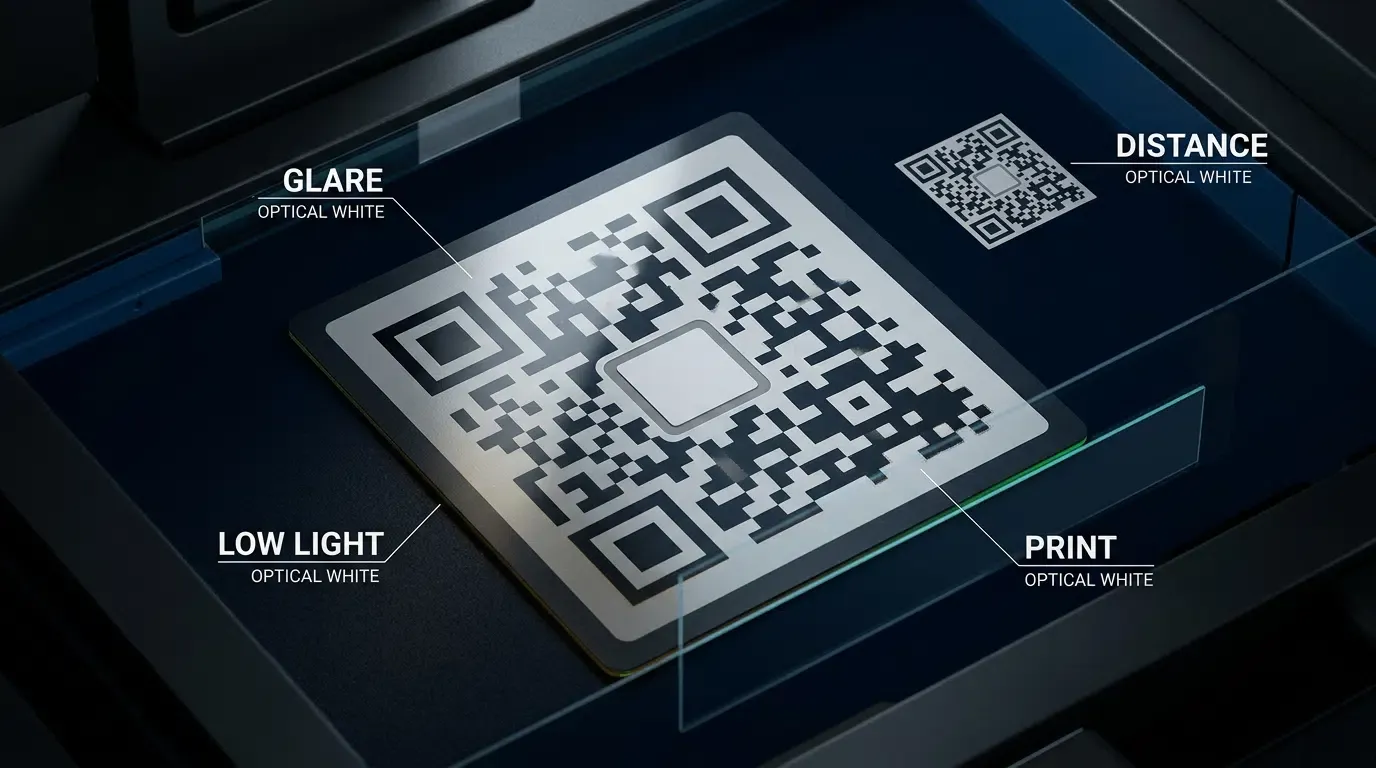
Diagnosing Read Failures Caused by Excessive Logo Footprints Exceeding 30% Damage Tolerance
The most common point of failure in branded barcodes is visual over-allocation. When graphic designers prioritize brand visibility over barcode geometry, they may scale an icon to cover excessive proportions of the matrix surface.
Under these conditions, the number of missing or overwritten modules exceeds the theoretical error correction threshold (
Resolving Finder Pattern Encroachment: Avoiding Accidental Occlusion of Corner Position Markers
When developers apply large logos or decorative border frames, visual assets can accidentally encroach on the three corner finder patterns:
- Separator Breaches: The single-module white separator space surrounding each finder pattern must remain unprinted. Placing decorative brand ribbons or background textures over these lines breaks the
ratio. - Corner Badges: Never place decorative icons or partner logos in the outer corners of the matrix. All visual branding must remain concentrated exclusively in the dead center of the symbol.
Addressing Substrate Distortion: Managing Dot Gain, Low Ink Density, and Gloss Reflections
The physical substrate onto which a barcode is printed directly affects optical performance:
- Dot Gain on Uncoated Paper: Porous newsprint or recycled cardboard absorbs liquid ink, causing dark modules to spread outward into adjacent light spaces. On high-density barcodes, dot gain can eliminate the inner quiet zone. Commercial printers should calibrate ink density curves and adjust press proofs based on empirical dot gain analysis.
- Specular Reflection on Glossy Media: High-gloss vinyl banners and laminated plastic cards produce severe specular highlights under retail spotlights. This glare blinds mobile camera sensors, creating whiteout zones across the matrix. Where possible, specify matte or semi-matte surface finishes for physical collateral.
Contrast Inversion Hazards: Why Dark Backgrounds with Light Modules Require Careful Pre-Flight Testing
A frequent design pitfall involves inverting the barcode color palette—rendering white modules on a dark brand background (such as navy or black). While recent mobile vision frameworks increasingly support color-inverted barcodes, many legacy mobile camera applications and in-app social scanners assume a conventional dark-on-light optical polarity. Inverted matrices frequently fail to decode on entry-level mobile devices, making traditional dark-on-light configurations the safer choice for mass consumer campaigns.
Systematic Pre-Press Checklist for Verifying Custom QR Codes Across Mobile Hardware
Before executing volume print runs, development and QA teams should complete the following verification protocol:
- Step 1: Automated In-Browser Decode Verification: Programmatically decode the final exported canvas bitmap using an optical engine to verify that the extracted URI strictly matches the destination target.
- Step 2: Cross-Platform Physical Hardware Audit: Test the printed mock-up across at least two distinct hardware tiers: a flagship device utilizing modern optical APIs and an entry-level smartphone camera.
- Step 3: Low-Luminance and Glare Testing: Verify that the barcode decodes reliably under dim ambient lighting and when tilted under direct artificial light.
- Step 4: Minimum Distance Scan Check: Verify readability at the maximum expected consumer interaction distance using the physical sizing formula outlined in the following section.
- Step 5: End-to-End Attribution Verification: Confirm that scanning the physical asset routes the device to the intended landing page and passes all promotional parameters correctly into the mobile application on initial launch. Development teams can download test tools and SDK integration frameworks via the OpoInstall SDK download center.
Evaluating Camera and Scanner Sensitivities Across Mobile Platforms
Comparing Native iOS Camera Vision Pipelines with Android OEM Barcode Readers
Mobile operating systems deploy distinct image processing stacks to decode barcodes from live camera video streams:
- iOS Camera Systems: Apple devices utilize unified vision processing frameworks that execute local exposure compensation, perspective correction, and multi-frame disparity matching, making them resilient to moderate module distortion and slight contrast deficits.
- Android Ecosystem Scanners: Developers frequently implement scanning capabilities using libraries such as Google ML Kit. However, physical camera sensor capabilities vary widely across device manufacturers. Fixed-focus lenses, slow auto-exposure cycles, and low dynamic range on entry-level hardware struggle to decode dense barcodes that lack sufficient quiet zones or exhibit narrow color contrast.
Optical Decode Thresholds in Low-Light and High-Glare Physical Retail Environments
In physical retail environments, ambient illumination rarely matches laboratory conditions. In dimly lit hospitality venues or under flickering supermarket fluorescent tubes, camera sensors automatically increase sensor gain (ISO), introducing visible digital grain across the image frame.
This high-frequency visual noise degrades module edge clarity. If a barcode’s error correction budget is already exhausted by an oversized center logo, the added burden of digital camera noise will push the symbol beyond the decodability limit. Maintaining an internal quiet zone and keeping logo coverage conservative ensures the matrix retains the headroom required to overcome noisy low-light captures.
Managing In-App Social Messaging Scanners: WeChat, Line, and WhatsApp Exposure Differences
In global markets, users frequently scan promotional barcodes using integrated scanners inside messaging platforms such as WeChat, Line, or WhatsApp rather than their native operating system cameras.
These in-app scanners execute within sandboxed webviews and may process camera frames at lower resolutions to optimize battery and memory usage. Furthermore, their optical decoders may enforce aggressive downsampling to optimize frame rates, increasing decode failure rates on high-density QR versions. For campaigns targeting messaging app ecosystems, keep the encoded URL short to minimize the matrix version and avoid dense module grids.
Minimum Physical Sizing Formulas Based on Scanning Distance and Camera Focal Length
Printing a barcode too small for its intended scanning distance is a critical operational failure. As distance increases, the angular resolution of the camera lens decreases, causing individual modules to blur into contiguous gray blocks.
To calculate the minimum physical width
Where
- Standard Barcodes (No Logo): An empirical baseline of
is commonly applied. A barcode scanned from a distance of 100 centimeters suggests a baseline width of approximately 10 centimeters:
- Branded Barcodes (Level H with Center Logo): Because center logo occlusion reduces effective module redundancy, an empirical baseline of
provides a more conservative starting point:
For handheld collateral such as brochures and direct mailers scanned at 25 to 30 centimeters, a printed barcode size of at least
To configure custom attribution parameters and manage campaign links prior to asset generation, developers can register an application on the OpoInstall developer console.
Comparative Analysis of QR Code Styling Strategies
Evaluating Traditional Black-and-White Codes vs. Branded Custom Overlays
Marketing teams often evaluate multiple matrix styling strategies when preparing physical collateral. Each approach exhibits specific trade-offs between optical stability, implementation complexity, and visual brand presence.
The comparative matrix below outlines the technical trade-offs across common 2D barcode styling patterns:
| Matrix Styling Approach | Error Correction Tier | Relative Logo Footprint | Scanning Robustness | Brand Visual Familiarity |
|---|---|---|---|---|
| Standard ISO Matrix | Level L (7%) or M (15%) | 0% (No overlay permitted) | High across all sensors | Low (Generic utility) |
| Center Logo Overlay | Level H (30%) | Conservative footprint ( |
High with verified margins | Elevated (Brand icon) |
| Full Stylized Matrix | Level H (30%) | Variable (Custom module shapes) | Moderate (Sensor sensitive) | High (Custom artwork) |
| Oversized Logo Matrix | Level H (30%) | Exceeding safe geometric margins | Low (Risk of decode failure) | Compromised by failure |
Balancing Aesthetic Distinctiveness against Optical Machine Readability
While standard black-and-white barcodes deliver consistent decoding performance across legacy optical hardware, their generic visual appearance lacks brand identity. Incorporating an official brand icon provides clear visual familiarity on physical signage. However, visual branding does not substitute for destination security or cryptographic verification; marketing teams must ensure the encoded URL itself points to an authorized, authenticated domain.
Restricting the logo footprint to conservative proportions and configuring Error Correction Level H achieves a balanced outcome between visual branding and optical decode reliability.
Frequently Asked Questions (FAQ)
How does Reed-Solomon error correction allow a logo to be placed inside a QR code?
What is the maximum recommended logo size for a custom branded QR code?
Why does my branded QR code fail to scan on some Android devices while working on iOS?
Summary and Decision Framework
To generate branded app download codes with logo customizations, growth and engineering teams must coordinate visual identity with strict mathematical barcode standards. Successfully branding physical collateral relies on configuring Error Correction Level H, restricting center logo coverage to conservative boundaries, and maintaining protective quiet zones around all functional modules.
As offline-to-online touchpoints expand across enterprise retail, events, and print media, marketing assets must balance aesthetic distinctiveness with reliable optical readability. By deploying standards-compliant Canvas rendering pipelines alongside attribution routing, platforms like OpoInstall support branded QR-based app promotion and eligible attribution workflows while protecting brand presentation.
For detailed developer specifications on creating dynamic promotional links and managing custom campaigns, consult the OpoInstall developer documentation or access the OpoInstall SDK download center. To register your application, manage campaign routing keys, and deploy branded QR assets, visit the OpoInstall developer console or review the mobile attribution implementation reference.
Related Materials
-
Concepts: Reed-Solomon Error Correction, 2D Barcode Symbology, Center Quiet Zone, Optical Contrast Ratio
-
Technologies: HTML5 Canvas 2D Context, QR Matrix Encoding, In-App Webview Scanners, Mobile Attribution Routing
-
Standards: ISO/IEC 18004 Information Technology — Automatic Identification and Data Capture Techniques — QR Code Bar Code Symbology Specification, W3C HTML Canvas 2D Context Specification
-
APIs: W3C CanvasRenderingContext2D API, OpoInstall Web JS SDK Initialization API
-
Official Documentation & References:
Share this article