Why does bundle ID mismatch break iOS Universal Links? A Bundle ID mismatch breaks Universal Links when the application’s signed Application Identifier does not match the corresponding AASA appID/appIDs entry for the associated domain, causing the associated-domain verification to fail.
A Bundle ID (CFBundleIdentifier) is a unique string that identifies an individual iOS application within the Apple ecosystem. In Universal Link architectures, the Bundle ID is concatenated with the Application Identifier Prefix to form the Application Identifier, which the operating system validates against the hosted apple-app-site-association file to authorize native URL handling.
| Term | Definition |
|---|---|
| Bundle ID | The unique reverse-DNS identifier assigned to an iOS app target in Xcode (CFBundleIdentifier). |
| Application Identifier Prefix | The App ID prefix assigned in Apple Developer account settings (frequently, but not always, identical to the Team ID). |
| Universal Links | Apple’s standard mechanism for routing web HTTPS URLs directly to native app views. |
| Associated Domains | The Xcode entitlement declaring which web domains an app is authorized to handle (applinks:). |
| AASA File | The JSON file (apple-app-site-association) hosted on a domain to authorize app URL handling. |
Canonical Diagnostic Chain
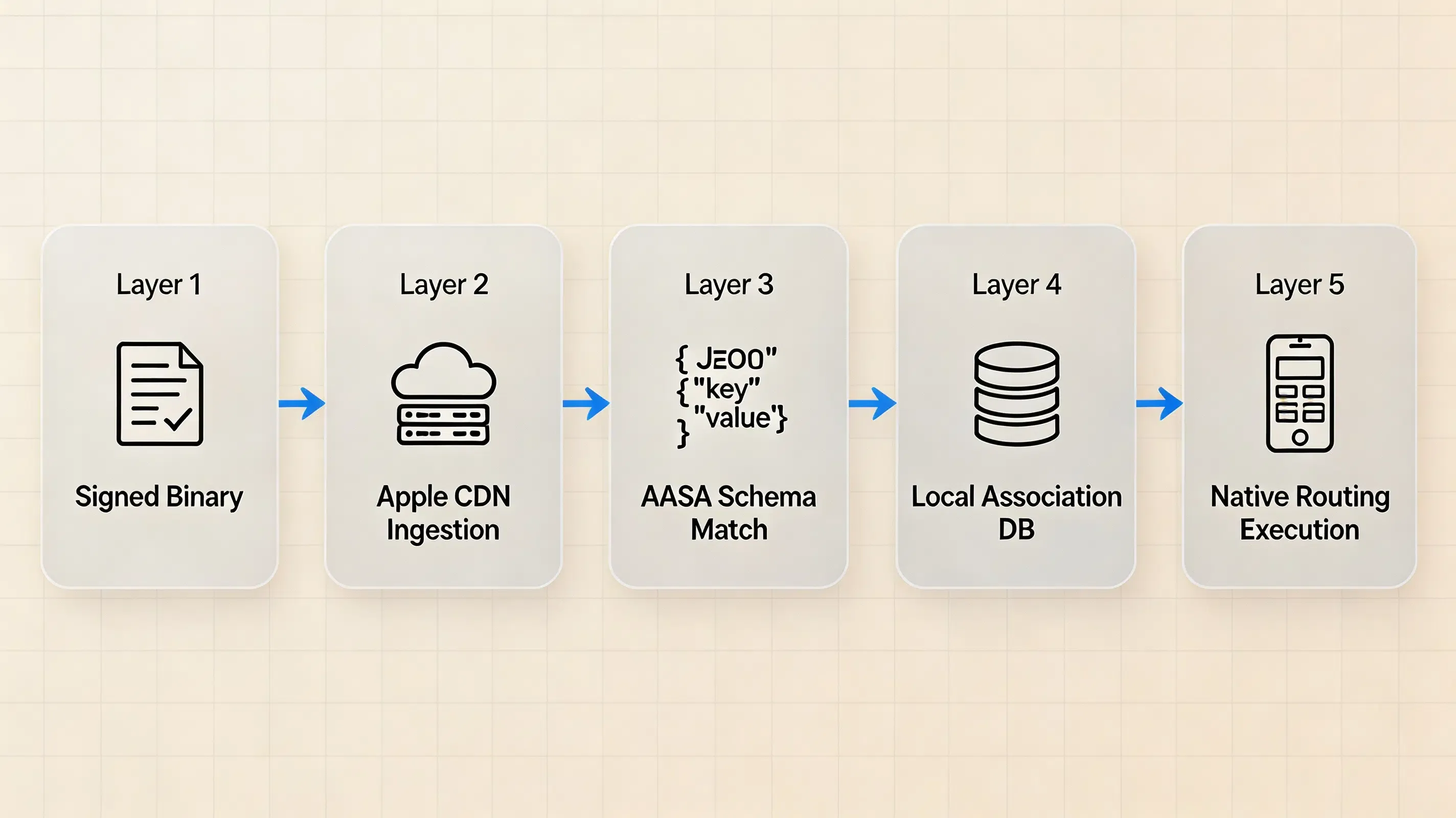
The diagram below illustrates the multi-tier verification sequence executed during app installation and domain validation:
Layer 1: Signed App Binary
       │
       ├── application-identifier (<Prefix>.<BundleID>)
       ├── com.apple.developer.team-identifier
       └── com.apple.developer.associated-domains (applinks:example.com)
                    │
                    ▼
Layer 2: AASA Delivery & CDN Ingestion
       │ (Apple-managed infrastructure retrieves origin AASA)
                    ▼
Layer 3: AASA Schema & Pattern Matching
       │ (Validates appIDs array and components/paths routing rules)
                    ▼
Layer 4: Device Association State
       │ (Operating system registers verified domains in local database)
                    ▼
Layer 5: Application Routing Execution
       │ (System routes matching URLs to application lifecycle handlers)
Fast Fix Checklist: 30-Second Diagnostic Routine
When Universal Links unexpectedly fall back to web handling, verify these items in order:
- Extract Signed Identifier: Inspect the compiled binary’s embedded entitlement to obtain the exact
application-identifier(<Prefix>.<BundleID>). - Verify Entitlement Format: Confirm that
com.apple.developer.associated-domainscontains the exact hostname (e.g.,applinks:subdomain.domain.com) without unneeded paths, query strings, or trailing slashes. - Audit Origin AASA: Fetch
https://subdomain.domain.com/.well-known/apple-app-site-associationand ensure the signed Application Identifier is listed verbatim inappIDs. - Validate Path Matching: Confirm that the target URL matches the
componentsorpathspatterns defined in the AASA configuration. - Check Domain Scoping: Ensure that the associated-domain entitlement covers the target hostname and that the corresponding AASA configuration is available for that hostname. For subdomains, use an explicit hostname or the supported
*.wildcard form as appropriate. - Isolate Development Modes: Use
?mode=developeron development-signed builds to bypass Apple CDN caching during iteration.
Why Bundle ID and Application Identifier Accuracy Matters
The Anatomy of an Application Identifier
Universal Link verification does not evaluate the application’s display name, internal URL scheme, or bundle name. According to the Apple documentation on applinks.Details, the security model relies strictly on the fully qualified Application Identifier, structured as:
Where:
ApplicationIdentifierPrefix: The App ID prefix assigned in your Apple Developer account configuration (e.g.,9JA723G82S). For many modern developer accounts, this value matches the 10-character Team ID, but engineers should verify the actual prefix in their Apple Developer Portal rather than assuming the two are interchangeable.CFBundleIdentifier(Bundle ID): The case-sensitive, reverse-DNS string defined in the target’s build settings (e.g.,com.example.mobileapp).
In the hosted apple-app-site-association (AASA) JSON file, this composite string appears inside the appIDs array or appID dictionary entries (e.g., 9JA723G82S.com.example.mobileapp). If a character discrepancy, casing difference, or trailing space exists between the compiled binary’s embedded entitlement and the hosted AASA entry, domain verification fails.
A Bundle ID mismatch is one of the highest-priority causes to check during integration triage, but it is not the only reason a Universal Link can fall back to the web.
How Associated Domains and AASA Establish a Two-Sided Association
Unlike custom URL schemes, which any installed application can declare without domain verification, Universal Links establish a secure, two-sided association:
- App-to-Domain Declaration: The compiled iOS application declares that it claims ownership of a specific web domain by including the
com.apple.developer.associated-domainsentitlement in its code signature. - Domain-to-App Authorization: The web domain confirms that it grants routing authorization to specific applications by hosting the AASA JSON file at
https://<domain>/.well-known/apple-app-site-associationorhttps://<domain>/apple-app-site-association.
During installation or app updates, the operating system verifies the app’s signed Associated Domains entitlement against the AASA configuration retrieved for the domain. The Application Identifier used for the app association must match the corresponding identifier declared in the AASA configuration. After the identifier matches, the requested URL must also satisfy the configured components or paths rules.
The Failure Symptom: Why Mismatched Identifiers Force Web Fallbacks
When an Application Identifier mismatch occurs, iOS does not normally surface an Application Identifier mismatch as a fatal runtime exception. The failure is instead reflected in associated-domain verification state, device diagnostics, or the resulting web fallback behavior:
- System Handling: When domain association fails, the system does not invoke the app through the verified Universal Link path. Depending on how the URL was opened and the surrounding browser context, the URL remains in or falls back to web handling rather than being delivered to the native application.
- User Experience Impact: When a user taps a matching web link in Messages, Mail, or Safari, the system fails to recognize an authorized native app mapping and opens the web URL in the browser.
See Also: Bundle ID ──> Universal Links Architecture
How Apple’s CDN Fetches and Caches AASA Files
The Installation Handshake and Apple CDN Mechanics
When an application containing the com.apple.developer.associated-domains entitlement is installed or updated, the system establishes or refreshes an associated-domain relationship:
- CDN-Mediated Scraper: When the system establishes or refreshes an associated-domain relationship, it obtains the domain’s AASA data through Apple’s associated-domains infrastructure and uses that data to verify the association.
- Independent Caching Lifecycle: The Apple-managed CDN controls its own refresh and caching lifecycle, so an origin update should not be assumed to become immediately visible through the CDN. When testing changes, use the documented development alternate mode where appropriate and inspect the device association state.
- Origin Server Requirements: The origin web server must serve the AASA file over HTTPS with a valid, trusted TLS certificate (self-signed certificates are rejected), using the
application/jsonMIME type. AASA hosting must not rely on HTTP redirects; the AASA endpoint should return the file directly with an HTTP 200 OK.
AASA JSON Format Consistency
Modern iOS versions support the granular components dictionary syntax while maintaining backward compatibility with legacy paths arrays.
According to Apple Developer Technote TN3155 on Debugging Universal Links, within a given details entry, developers should use either the modern appIDs + components structure or the legacy appID + paths structure; do not mix the two structures in the same entry, as mixed configurations can produce unexpected verification behavior.
Older AASA examples commonly included "apps": []. For deployments targeting modern Apple OS releases, this key is not required; retain it only when supporting legacy OS versions that specifically expect it.
Diagnostic Protocol: Step-by-Step Resolution Workflow
Step 1: Inspect the Signed App Entitlements with codesign
To determine whether an exported IPA or debug build contains the exact expected Application Identifier and Associated Domains, inspect the binary’s code signature directly using the macOS codesign command-line utility. Check application-identifier, com.apple.developer.team-identifier, and com.apple.developer.associated-domains together.
The provisioning profile shows what capabilities and domains the profile permits; the signed executable (codesign) shows what the shipped binary actually contains.
Step 2: Audit the Hosted AASA JSON Schema
Verify that the origin server hosts a valid AASA file that is publicly accessible without authentication or redirects. Note that older AASA examples commonly included "apps": [], while modern configurations targeting contemporary iOS releases omit this key.
The standard AASA JSON schema below illustrates proper path routing using the modern appIDs and components structure:
```json
{
  "applinks": {
    "details": [
      {
        "appIDs": [
          "9JA723G82S.com.example.mobileapp",
          "9JA723G82S.com.example.mobileapp.staging"
        ],
        "components": [
          {
            "/": "/product/*",
            "comment": "Matches product detail routes"
          },
          {
            "/": "/invite/*",
            "?": { "ref": "?*" },
            "comment": "Matches referral links with custom query parameters"
          },
          {
            "/": "/help/*",
            "exclude": true,
            "comment": "Excludes customer support URLs from native routing"
          }
        ]
      }
    ]
  }
}
Step 3: Run Diagnostic CLI Tools (codesign, swcutil, curl)
On macOS versions that provide swcutil diagnostics, use the tool to inspect or validate associated-domain data. Because command options can vary across OS and toolchain releases, confirm available options with swcutil --help before running the diagnostic workflows below:
# 0. Confirm available options (syntax may vary by OS and toolchain release)
swcutil --help

# 1. Unpack the exported IPA archive
unzip -q YourApp.ipa -d UnpackedApp

# 2. Extract and inspect signed entitlements directly from the executable binary
codesign -d --entitlements :- "UnpackedApp/Payload/YourApp.app" > signed-entitlements.plist 2>/dev/null
/usr/libexec/PlistBuddy -c "Print" signed-entitlements.plist

# 3. Check whether the AASA data can be downloaded for the domain using swcutil (macOS diagnostic tool)
sudo swcutil dl -d custom.opwakeup.com

# 4. Validate AASA pattern matching against a specific URL using swcutil
sudo swcutil verify -d custom.opwakeup.com -j ./apple-app-site-association -u https://custom.opwakeup.com/product/123

# 5. Query the Apple-managed Associated Domains CDN diagnostic endpoint directly
curl -i https://app-site-association.cdn-apple.com/a/v1/custom.opwakeup.com
Inspect the Apple-managed Associated Domains CDN endpoint when troubleshooting edge-delivered AASA data. Treat this endpoint as diagnostic infrastructure rather than as a public API contract.
Step 4: Use Associated Domains Developer Mode for AASA Testing
According to the Apple documentation on Configuring Associated Domains, Apple provides an alternate mode for development. The developer mode (?mode=developer) allows eligible development devices to bypass the Apple-managed CDN and fetch the AASA file directly from the associated domain over HTTPS.
The configuration below demonstrates how to declare Developer Mode in separate Xcode entitlement configurations:
<?xml version="1.0" encoding="UTF-8"?>
<!DOCTYPE plist PUBLIC "-//Apple//DTD PLIST 1.0//EN" "http://www.apple.com/DTDs/PropertyList-1.0.dtd">
<plist version="1.0">
<dict>
    <key>com.apple.developer.associated-domains</key>
    <array>
        <string>applinks:custom.opwakeup.com</string>
    </array>
</dict>
</plist>
<?xml version="1.0" encoding="UTF-8"?>
<!DOCTYPE plist PUBLIC "-//Apple//DTD PLIST 1.0//EN" "http://www.apple.com/DTDs/PropertyList-1.0.dtd">
<plist version="1.0">
<dict>
    <key>com.apple.developer.associated-domains</key>
    <array>
        <string>applinks:custom.opwakeup.com?mode=developer</string>
    </array>
</dict>
</plist>
Once the operating system establishes domain association, application-level routing handles incoming URL payloads using standard UIKit or SwiftUI lifecycle delegates:
import UIKit

// ----------------------------------------------------------------------------
// 1. UIKit AppDelegate Implementation
// ----------------------------------------------------------------------------
@main
class AppDelegate: UIResponder, UIApplicationDelegate {

    var window: UIWindow?

    func application(
        _ application: UIApplication,
        didFinishLaunchingWithOptions launchOptions: [UIApplication.LaunchOptionsKey: Any]?
    ) -> Bool {
        return true
    }

    // Standard Apple Universal Link Continuation Callback
    func application(
        _ application: UIApplication,
        continue userActivity: NSUserActivity,
        restorationHandler: @escaping ([UIUserActivityRestoring]?) -> Void
    ) -> Bool {

        guard userActivity.activityType == NSUserActivityTypeBrowsingWeb,
              let incomingURL = userActivity.webpageURL else {
            return false
        }

        print("Handling verified Universal Link: \(incomingURL.absoluteString)")

        // Dispatch incomingURL to internal router or SDK layer for parameter extraction
        return handleIncomingRoute(incomingURL)
    }

    private func handleIncomingRoute(_ url: URL) -> Bool {
        // Application-level destination routing logic
        // Note: Returning true indicates the app handled the activity, not that URL parsing succeeded.
        return true
    }
}

// ----------------------------------------------------------------------------
// 2. SceneDelegate Lifecycle Implementation (iOS 13+)
// ----------------------------------------------------------------------------
class SceneDelegate: UIResponder, UIWindowSceneDelegate {

    var window: UIWindow?

    func scene(_ scene: UIScene, willConnectTo session: UISceneSession, options connectionOptions: UIScene.ConnectionOptions) {
        if let userActivity = connectionOptions.userActivities.first(where: { $0.activityType == NSUserActivityTypeBrowsingWeb }),
           let incomingURL = userActivity.webpageURL {
            print("Cold-launch Universal Link: \(incomingURL.absoluteString)")
        }
    }

    func scene(_ scene: UIScene, continue userActivity: NSUserActivity) {
        if userActivity.activityType == NSUserActivityTypeBrowsingWeb,
           let incomingURL = userActivity.webpageURL {
            print("Foreground Universal Link: \(incomingURL.absoluteString)")
        }
    }
}
To enable client-side Developer Mode on physical hardware:
- On iOS 16+, navigate to Settings > Privacy & Security > Developer Mode and toggle it ON (device reboot required).
- Navigate to Settings > Developer > Associated Domains Development and toggle the switch ON.
- Install the development build signed with a development provisioning profile containing the
?mode=developerentitlement. - Production Note: Keep
?mode=developerrestricted to development and internal testing configurations, and do not include it in the production associated-domains entitlement unless your deployment explicitly requires and supports that configuration.
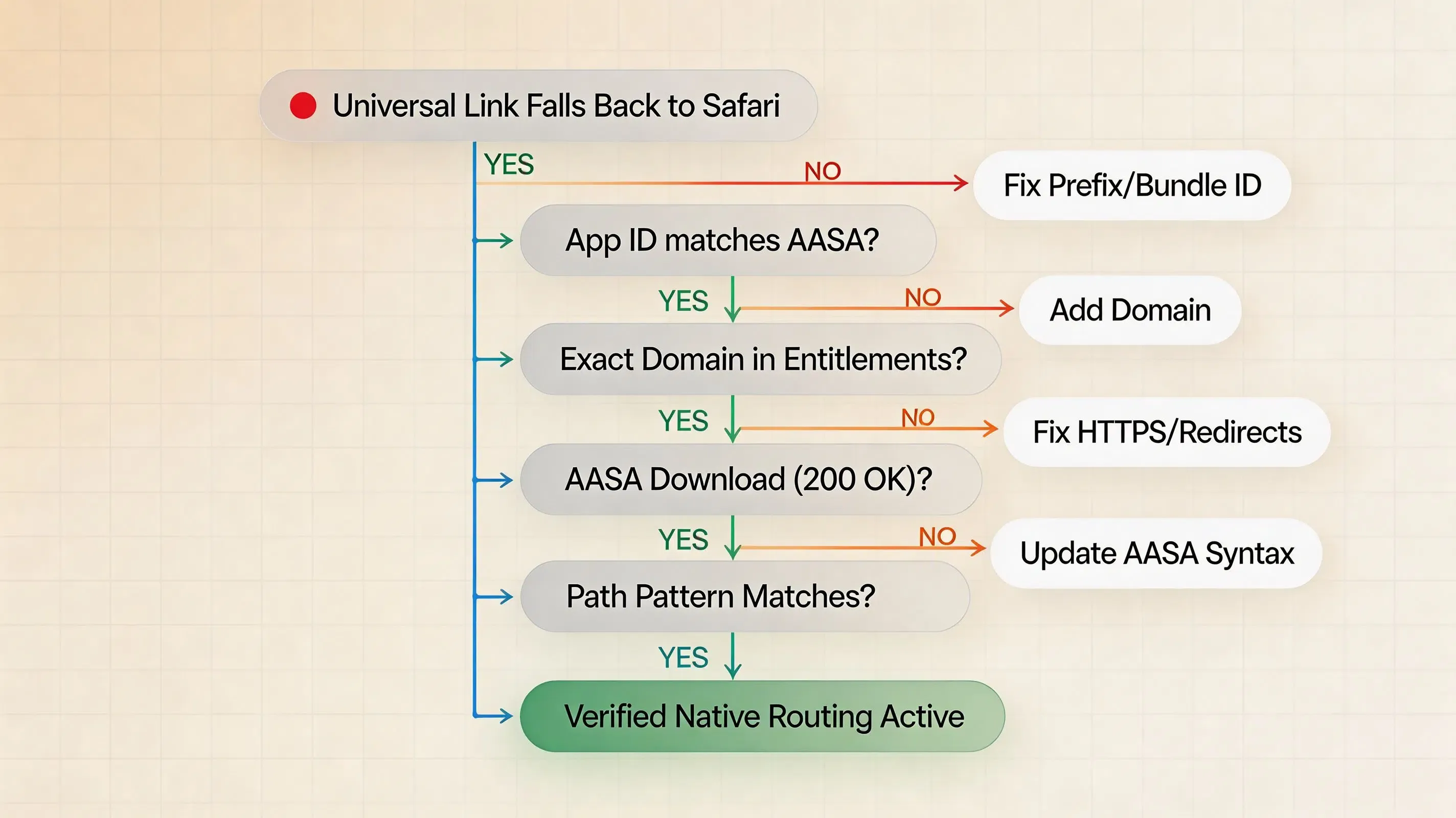
Root Cause Decision Tree
Universal Link falls back to web handling
        │
        ├── Does signed application-identifier match AASA appIDs?
        │       ├── NO ──> Correct App ID Prefix or Bundle ID in AASA
        │       └── YES
        │
        ├── Does associated-domains entitlement list the exact domain?
        │       ├── NO ──> Add applinks:<domain> to target entitlements
        │       └── YES
        │
        ├── Does sudo swcutil dl -d <domain> succeed?
        │       ├── NO ──> Fix origin HTTPS, TLS certificates, or 301/302 redirects
        │       └── YES
        │
        ├── Does sudo swcutil verify match the target URL path?
        │       ├── NO ──> Correct components or paths syntax in AASA
        │       └── YES
        │
        └── Check device association state and internal application routing handlers
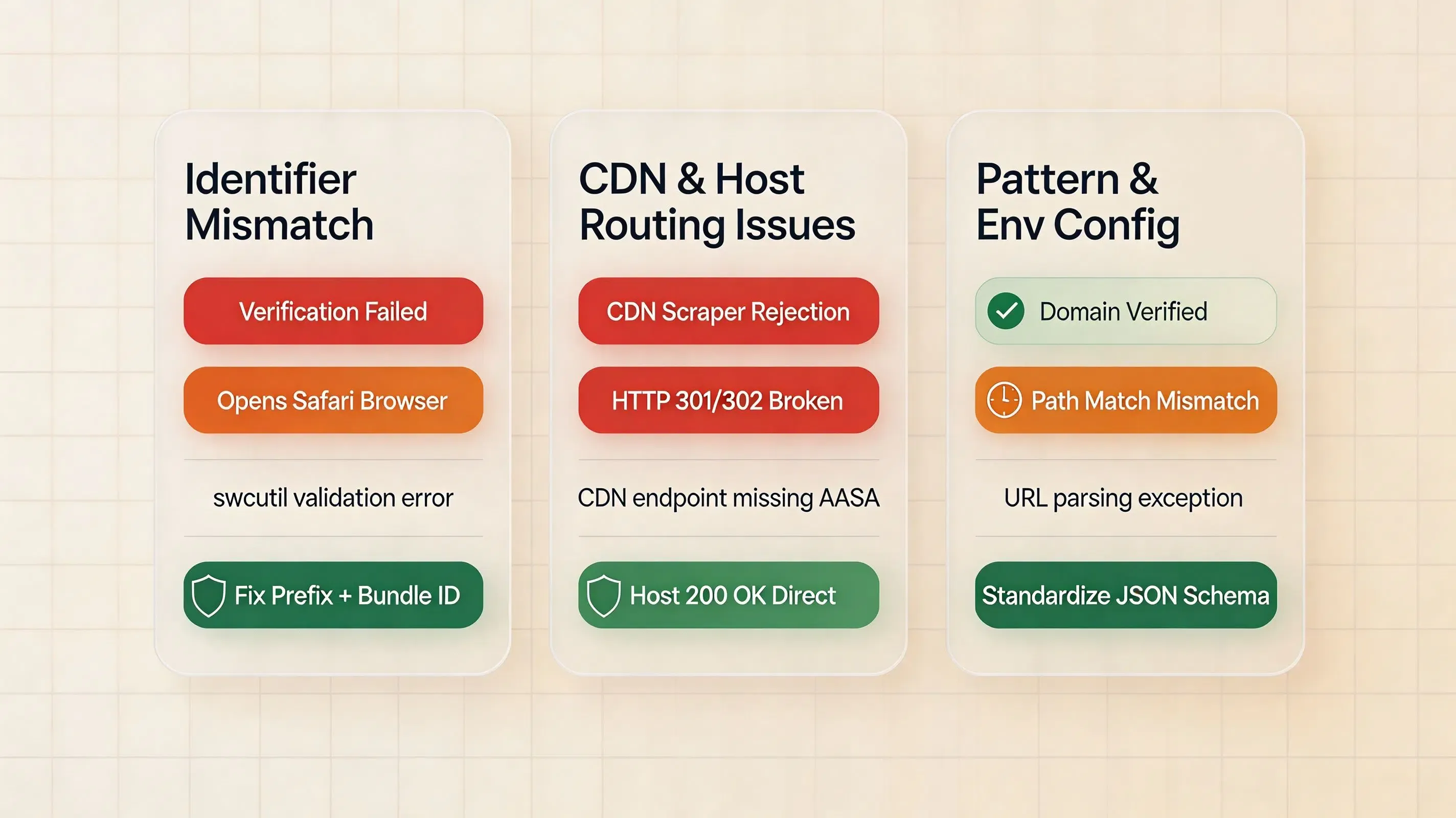
Diagnostic Matrix: Root Causes of Universal Link Failures
| Failure Mode | Underlying Root Cause | Observed System Behavior | Recommended Remediation |
|---|---|---|---|
| Bundle ID Typo | Case sensitivity or character mismatch in AASA appIDs |
Link opens browser instead of native app | Correct the string in AASA JSON and redeploy to origin |
| App ID Prefix Mismatch | Using incorrect prefix instead of actual Developer App ID Prefix | Domain association fails during install | Verify Application Identifier Prefix in Apple Member Center |
| Subdomain Mismatch | Entitlement points to www.example.com while AASA is on example.com |
App fails to claim links from the subdomain | Host dedicated AASA file on each claimed subdomain or configure wildcard |
| HTTP Redirect on Endpoint | Origin server returns a 301 or 302 redirect for AASA URL | Apple CDN scraper rejects the AASA file | Configure web server to return 200 OK directly |
| AASA Format Inconsistency | Mixing legacy appID/paths with modern appIDs/components |
Inconsistent or partial path matching | Standardize on modern appIDs + components syntax |
| URL Pattern Mismatch | AASA downloads successfully but requested URL does not match patterns | Link opens in web browser | Verify path syntax and components using swcutil verify |
| Developer Mode Left in Release | Distribution build retains development alternate mode | Non-standard entitlement in distribution build | Remove ?mode=developer in Release build configuration |
Implementing Dual-Environment Configuration in Xcode
Managing Multiple Build Configurations (Debug, Staging, Production)
Enterprise development pipelines frequently manage distinct Bundle IDs across build environments (e.g., com.example.app.debug, com.example.app.staging, com.example.app).
To maintain functional Universal Links across all build configurations:
-
Explicit AASA Declarations: The hosted AASA file must explicitly list each environment’s fully qualified Application Identifier in its
appIDsarray:"appIDs": [ "9JA723G82S.com.example.app", "9JA723G82S.com.example.app.staging", "9JA723G82S.com.example.app.debug" ] -
Target-Specific Entitlements: Use Xcode build configuration settings to link distinct
.entitlementsfiles per build configuration, ensuring production domains are not queried by internal debug builds.
Managing Target Identifiers
For Universal Links troubleshooting, use the exact Bundle ID and Application Identifier Prefix from the signed build rather than relying on wildcard identifiers. Treat each hostname explicitly: if the app claims example.com and www.example.com, configure the corresponding associated-domain entries and ensure each hostname serves the appropriate AASA data. Ensure the entitlement is configured on the target that actually handles the Universal Links, and verify any app-extension or watchOS targets separately when applicable.
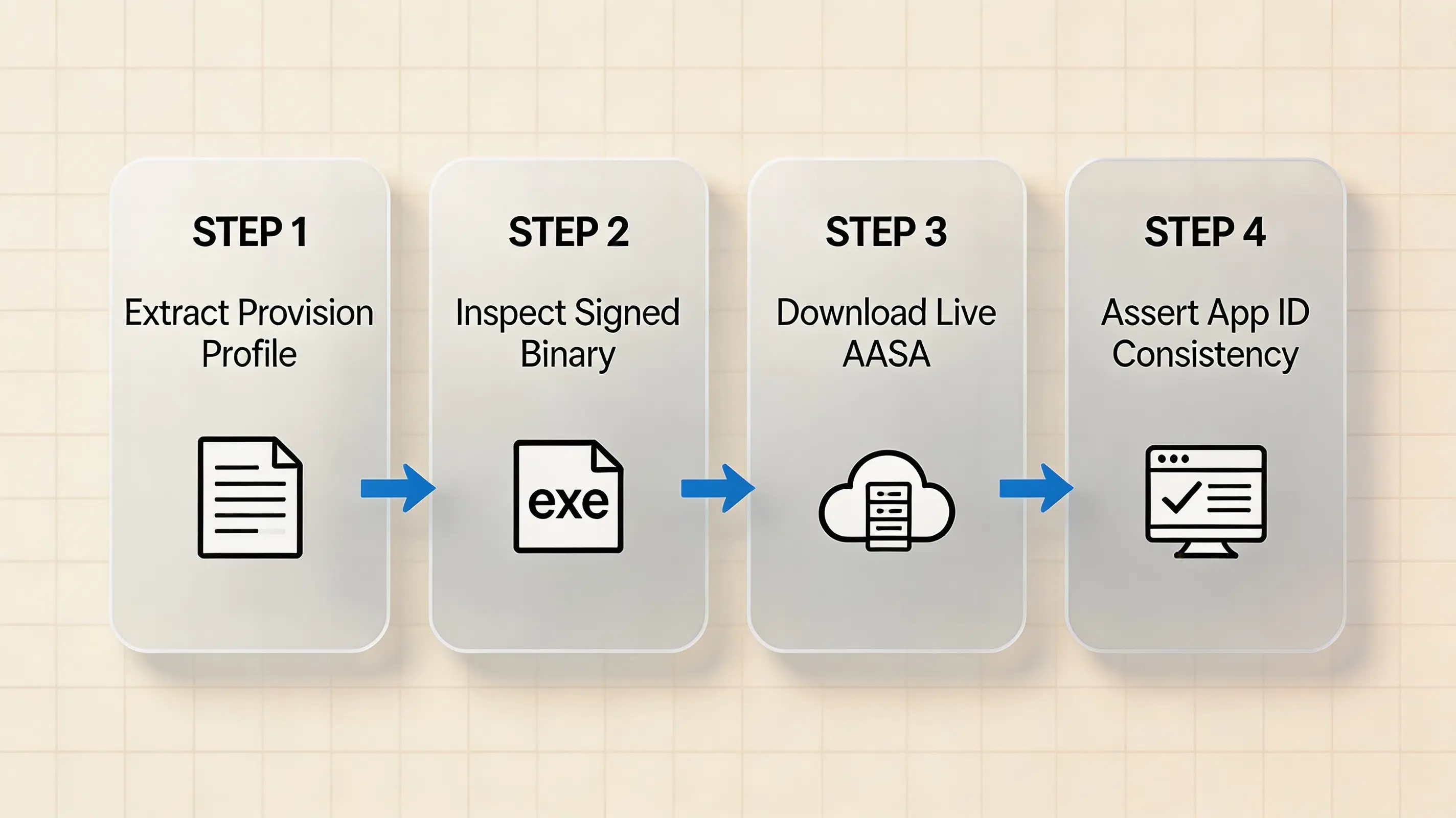
Validating Embedded Provisioning Profiles and Signed Binaries in CI/CD
Automate entitlement and Application Identifier verification inside continuous integration build scripts before uploading binaries to TestFlight:
# Automated CI validation script
security cms -D -i /path/to/embedded.mobileprovision > provision.plist

# 1. Inspect profile entitlements for allowed Associated Domains
/usr/libexec/PlistBuddy -c "Print :Entitlements:com.apple.developer.associated-domains" provision.plist

# 2. Extract actual signed entitlements from the compiled executable binary
codesign -d --entitlements :- "UnpackedApp/Payload/YourApp.app" > signed-entitlements.plist 2>/dev/null
SIGNED_APP_ID=$(/usr/libexec/PlistBuddy -c "Print :application-identifier" signed-entitlements.plist)
echo "Extracted Signed Application Identifier: $SIGNED_APP_ID"

# 3. Validate that signed Associated Domains match the target domain
/usr/libexec/PlistBuddy -c "Print :com.apple.developer.associated-domains" signed-entitlements.plist

# 4. Verify that the signed App ID exists in the hosted AASA file via Python
python3 -c "
import json, sys
signed_id = sys.argv[1]
data = json.load(open('apple-app-site-association'))
app_ids = [app for detail in data.get('applinks', {}).get('details', []) for app in detail.get('appIDs', [])]
if signed_id not in app_ids:
    print(f'AASA mismatch: {signed_id} not found in AASA appIDs: {app_ids}')
    sys.exit(1)
print(f'AASA consistency check passed: {signed_id} registered')
" "$SIGNED_APP_ID"
If the verification script exits with an error code, abort the build pipeline to prevent shipping non-functional deep linking binaries to production.
Universal Link Matching Criteria
To ensure reliable routing, the following conditions must be met simultaneously:
Signed App Configuration:
application-identifier = <ApplicationIdentifierPrefix>.<CFBundleIdentifier>
com.apple.developer.associated-domains = applinks:<hostname>

AASA Configuration:
appIDs = [..., "<ApplicationIdentifierPrefix>.<CFBundleIdentifier>", ...]
components / paths = Matching target URL paths and query parameters

System Eligibility:
1. Associated Domains entitlement explicitly contains the target hostname.
2. The signed Application Identifier matches an authorized entry in the domain's AASA appIDs.
3. The incoming URL satisfies the AASA routing patterns.
4. Device association state and user/browser context permit native application delegation.
Even when the entitlement, AASA association, and URL pattern all match, observed routing can still depend on device state and user or browser context. For example, when a user taps a universal link while already browsing the same domain in Safari, the operating system may respect the user’s intent to remain in Safari.
Frequently Asked Questions (FAQ)
What is the exact format of the application identifier in the AASA file?
Why does my Universal Link work in Developer Mode but fail in production?
Can I use wildcard asterisks in the AASA appIDs array?
Summary and Decision Framework
Universal Link routing reliability depends on exact, character-level alignment across three nodes: the Apple Developer Portal App ID configuration, the Xcode com.apple.developer.associated-domains entitlement, and the hosted apple-app-site-association JSON file. A third-party SDK or routing framework cannot repair a failed operating system domain association; it can only process the URL after iOS has successfully delivered the Universal Link to the application. If Universal Links are correctly associated at the operating system level but parameter extraction fails, inspect the application-level routing layer separately from the domain association layer.
If your application also requires dynamic-link parameter restoration and onboarding routing after Universal Link association succeeds, OpoInstall provides an optional SDK layer for that application-level workflow.
To learn more about domain configuration patterns and deep linking integration, review the OpoInstall deep linking documentation.
Related Materials
-
Concepts: Application Identifier Verification, AASA Schema Validation, Apple CDN Caching, Entitlement Extraction
-
Technologies: iOS Universal Links, Xcode Entitlements, Apple Developer Portal, Shared Web Credentials
-
Standards: IETF RFC 8259 (JSON Data Interchange), TLS 1.3 Specification
-
Diagnostic Tools: Apple
codesignCLI Tool, macOSswcutilTool, Apple-managed CDN Cache Query
Official Documentation
Share this article



