How to bypass WeChat browser blocking to open app? Opening an app from WeChat’s in-app browser requires a container-aware web-to-app transit page that detects the browsing environment and presents a user-initiated, platform-supported launch option. On iOS, an eligible Universal Link may open the installed app when the host browser permits it. On Android, a tested Intent URI may offer an external browser or app handoff, with an ordinary HTTPS download page as a fallback. No transit URL can guarantee that WeChat will permit the handoff in every client version.
In-app browser blocking occurs when closed social platforms restrict embedded web containers from launching third-party custom URL schemes or executing direct package file downloads. Navigating these restrictions in web-to-app routing requires deploying container-aware transit architectures that leverage platform-supported Universal Links on iOS and supported, user-initiated browser handoffs on Android while maintaining campaign parameter integrity.
| Term | Definition | Related Entity | Search Intent Role |
|---|---|---|---|
| Web to App | The programmatic routing of web users to native mobile applications. | Deep Linking SDK | Informational / Technical |
| In-App Browser | A sandboxed web container embedded within social messaging applications. | WKWebView / Blink | Technical |
| Quick Installation | An integration technology designed to assist web-to-app and browser transitions in supported environments. | Android Intent Scheme | Technical / Commercial |
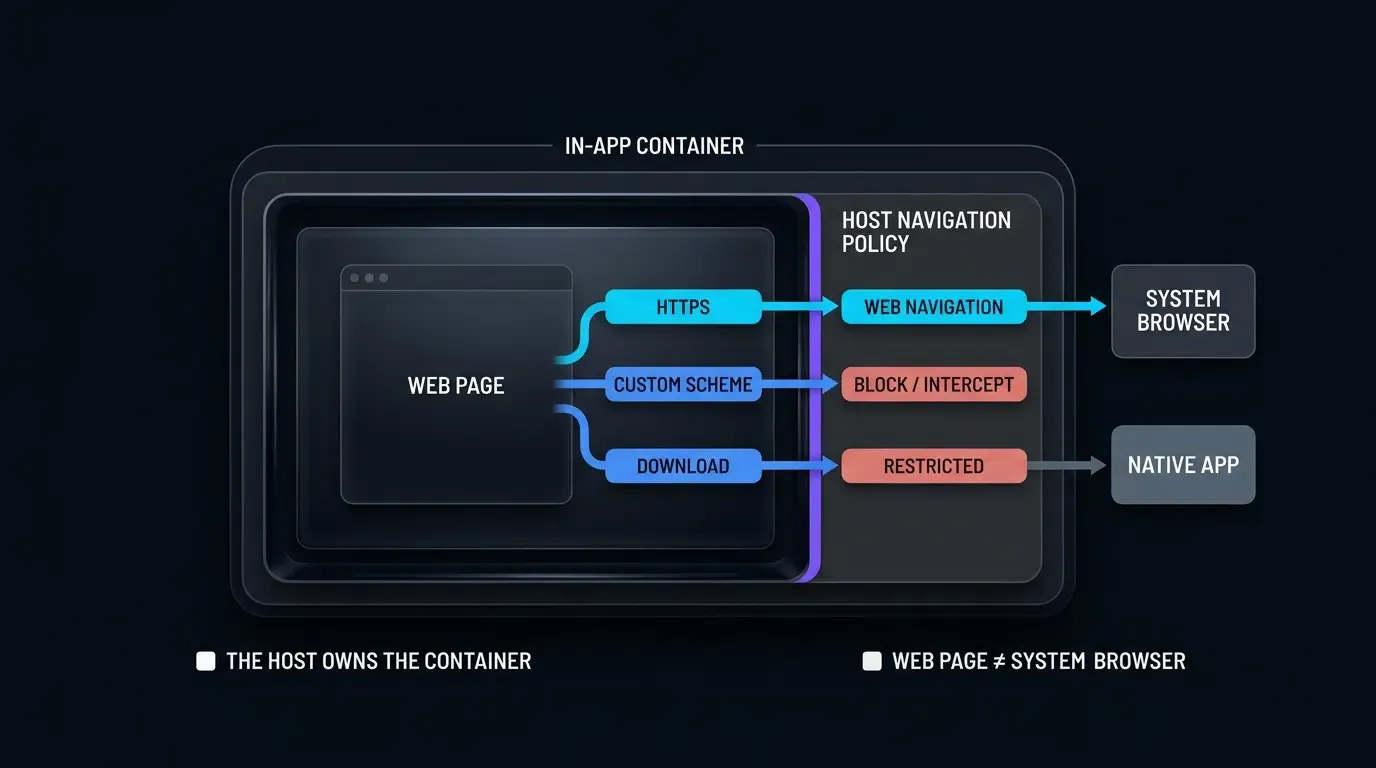
The Closed Ecosystem Barrier: Understanding In-App Browser Sandboxing
The Technical Wall: How WeChat Intercepts Custom URL Schemes and Arbitrary Downloads
Mobile messaging applications, most notably Tencent WeChat (MicroMessenger), embed customized web rendering containers within their client applications. When a user taps a web link inside a chat session, moment feed, or official account, the link loads inside WeChat’s internal browser rather than handing off the navigation request to the operating system’s default browser (such as Mobile Safari or Google Chrome).
Depending on the WeChat client version, operating system, and host navigation policies, custom URL schemes registered by third-party applications may be intercepted or blocked. Direct APK download requests can also be restricted, preventing the expected download or installation flow. Developers should verify supported handoff behavior on representative devices and provide an accessible HTTPS alternative.
Container Realities: Apple WebKit Sandboxing vs. Android XWeb Implementations
The underlying technical architecture of the in-app browser varies significantly across operating systems, dictating distinct interception behaviors:
- iOS Environment: On iOS, WeChat embeds Apple’s
WKWebViewframework. While WebKit enforces standard iOS process sandboxing, WeChat implements customWKNavigationDelegateinterceptors. When a page requests a navigation action involving a custom protocol scheme, WebKit delegates the decision to the host application, allowing the container to manage non-HTTP/HTTPS requests according to its platform policies. - Android Environment: On Android, WeChat’s embedded browser may restrict direct APK downloads or external download handling, depending on the client version, host security policies, and response characteristics. An APK link may therefore fail to initiate the expected download flow. Developers should verify the response on representative devices and provide an approved external-browser or HTTPS fallback where supported.
The Cost of Manual Friction: Quantifying Conversion Drop-Off from the Top-Right Menu Prompt
To work around in-app browser blocks, legacy marketing campaigns frequently rely on static modal overlays displaying an arrow pointing to the top-right corner of the screen with instructions: “Tap the menu button and select ‘Open in Browser’.”
Manual browser switching may increase abandonment; engineering teams should measure its impact with campaign-specific conversion data. Requiring users to manually execute a multi-step browser handoff introduces user friction, leading to drop-offs driven by cognitive fatigue, privacy concerns, or confusion regarding system menus.
Why Do Social Messaging WebViews Suppress Custom URL Schemes
Security and Monopoly Controls: Preventing Phishing, Clickjacking, and Traffic Exfiltration
The primary rationale behind in-app browser interception is platform security and ecosystem control. Allowing arbitrary web pages to execute unverified custom URL schemes exposes users to clickjacking attacks, unauthorized app launches, and phishing exploits where malicious sites trigger local application actions without user consent.
From an ecosystem perspective, closed platforms aim to maximize user session time within their proprietary walled garden. Unrestricted web-to-app transitions redirect users out of the messaging application into external software ecosystems, severing ad-tracking signals and engagement metrics managed by the host platform.
The Technical Mechanism: How shouldOverrideUrlLoading and WebKit Navigation Policies Drop Schemes
At the code level, in-app browser blocking is executed through native navigation interception delegates provided by the underlying operating system frameworks:
In Android WebView implementations, the host application overrides the shouldOverrideUrlLoading callback within WebViewClient:
// Conceptual representation of in-app webview interception
@Override
public boolean shouldOverrideUrlLoading(WebView view, String url) {
    if (url.startsWith("http://") || url.startsWith("https://")) {
        // Allow standard web navigation within the container
        return false;
    }
    // Block non-standard protocols (custom URL schemes like myapp://)
    Log.w("InAppBrowser", "Intercepted third-party scheme: " + url);
    return true; // Interrupts system protocol dispatch
}
On iOS, the WKNavigationDelegate method webView(_:decidePolicyFor:decisionHandler:) executes an equivalent check. If the requested URL scheme does not match http or https, the decision handler invokes WKNavigationActionPolicy.cancel, preventing iOS from dispatching the URI to the system protocol handler.
Direct APK Download Restrictions: Why Native APK URLs Render Blank Pages in Social Containers
When a standard browser encounters a URL serving an APK file, the browser inspects the HTTP response header Content-Disposition: attachment or the Content-Type header and hands the incoming byte stream to the system download component according to its download policies.
In-app social browsers intentionally override this download handoff. On Android, WeChat’s embedded browser may restrict direct APK downloads or external download handling, depending on the client version, host security policies, and response characteristics. An APK link may therefore fail to initiate the expected download flow. Developers should verify the response on representative devices and provide an approved external-browser or HTTPS fallback where supported.
The Impact on Marketing Attribution and Downstream App Engagement
In-app browser interception disrupts marketing attribution data pipelines. When a user is blocked or forced through manual browser switching, campaign URL parameters (such as utm_source, utm_campaign, and unique referral tokens) are frequently lost or stripped during uncoordinated domain transitions.
If campaign parameters are lost during a browser handoff, the resulting app session may have incomplete attribution context. Whether an installation is attributed to a campaign, another source, or an organic channel depends on the attribution system and the signals available to it. This can reduce reporting accuracy and interrupt referral-based onboarding flows.
Technical Architecture for Compliant In-App Browser Transitions
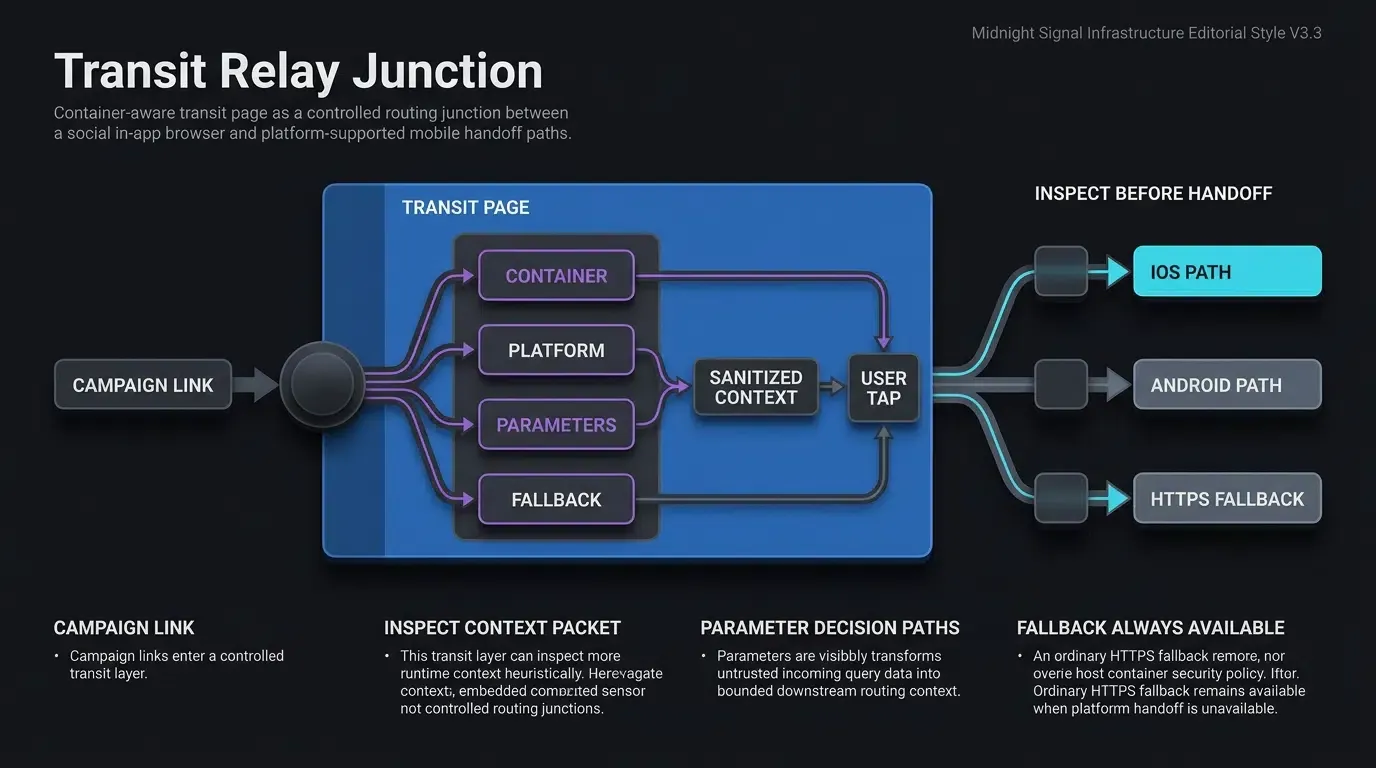
Two-Stage Redirection Topology: User Click ──> Transit Page ──> System Launch
To handle supported navigation paths while respecting host policies, growth engineering architectures deploy a two-stage transit redirection topology.
Instead of directly linking promotional ads or social posts to raw custom schemes or direct APK files, the campaign URL targets a specialized, high-availability transit domain. Upon arrival, the transit page executes client-side container sniffing, evaluates operating system capabilities, and dynamically selects the optimal, platform-compliant redirection path:
[User Taps Link in Social Chat] ──> Transit Domain (Container Inspection)
                                         │
                                         ├──> iOS: Eligible Universal Link ──> App or HTTPS Fallback
                                         │
                                         └──> Android: Supported Intent Handoff ──> External Download or Fallback
Client-Side Container Sniffing: Detecting the MicroMessenger User-Agent String
The transit page inspects the browser navigator.userAgent property upon document initialization using heuristic indicators to identify whether the execution environment is an in-app social browser.
Tencent WeChat injects the MicroMessenger token along with version metadata into the User-Agent string across both iOS and Android platforms:
- iOS WeChat User-Agent Sample:
... MicroMessenger/8.0.38(0x1800262c) NetType/WIFI Language/en ... - Android WeChat User-Agent Sample:
... Mobile Safari/537.36 MMWEBID/8821 MicroMessenger/8.0.37.2380(0x2800255b) ...
The implementation snippet below illustrates how to inspect in-app social containers using heuristic User-Agent rules and execute conditional transit routing safely:
<!-- Frontend In-App WebView Detection and Transit Redirection Script -->
<!-- File: transit_router.html -->

<!DOCTYPE html>
<html lang="en">
<head>
    <meta charset="UTF-8">
    <meta name="viewport" content="width=device-width, initial-scale=1.0">
    <title>Application Redirecting...</title>

    <style>
        body {
            font-family: -apple-system, BlinkMacSystemFont, "Segoe UI", Roboto, sans-serif;
            background-color: #f8f9fa;
            color: #333;
            text-align: center;
            padding: 40px 20px;
        }
        .loading-card {
            background: #ffffff;
            border-radius: 12px;
            padding: 24px;
            box-shadow: 0 4px 12px rgba(0,0,0,0.05);
            max-width: 400px;
            margin: 0 auto;
        }
        .btn-download {
            display: inline-block;
            background-color: #007aff;
            color: #ffffff;
            padding: 12px 24px;
            border-radius: 24px;
            text-decoration: none;
            font-weight: 600;
            margin-top: 16px;
        }
        .link-fallback {
            display: block;
            margin-top: 16px;
            font-size: 13px;
            color: #666;
            text-decoration: underline;
        }
    </style>
</head>
<body>

    <div class="loading-card">
        <h2>Opening Application...</h2>
        <p id="status-text">Detecting browser environment and preparing navigation.</p>
        <!-- Single-owner accessible primary anchor link; destination href dynamically updated with sanitized query parameters -->
        <a id="app-launch-btn" class="btn-download" href="https://app.example.com/download">Launch Application</a>
        <!-- Secondary visible HTTPS fallback link if Intent dispatch is rejected by the host container -->
        <a id="browser-fallback-link" class="link-fallback" href="https://app.example.com/download">Continue to download page</a>
    </div>

    <!-- OpoInstall Official Web JS SDK Include (Verify for your deployed release) -->
    <script src="https://web.cdn.opoinstallcloud.com/openinstall.js"></script>
    <script>
    (function() {
        // Step 1: Heuristic Client Container Detection
        var ua = navigator.userAgent || "";
        var isInWeChat = /MicroMessenger/i.test(ua);
        var isAndroid = /Android/i.test(ua);
        var isIOS = /iPhone|iPad|iPod/i.test(ua);

        var statusText = document.getElementById("status-text");
        var launchBtn = document.getElementById("app-launch-btn");
        var fallbackLink = document.getElementById("browser-fallback-link");

        // Step 2: OWASP-Aligned Input Sanitization for Query Parameters
        function getSanitizedQueryParams() {
            var allowedKeys = new Set([
                "utm_source",
                "utm_medium",
                "utm_campaign",
                "inviter_id",
                "promo_code"
            ]);

            var result = Object.create(null);

            try {
                var query = new URLSearchParams(window.location.search);
                var validPattern = /^[A-Za-z0-9_.-]{1,64}$/;

                query.forEach(function(value, key) {
                    if (allowedKeys.has(key) && validPattern.test(value)) {
                        if (!Object.prototype.hasOwnProperty.call(result, key)) {
                            result[key] = value;
                        }
                    }
                });
            } catch (e) {
                return Object.create(null);
            }

            return result;
        }

        // Helper: Convert sanitized key-value dictionary back into a safe URL query string
        function buildQueryString(params) {
            var parts = [];
            for (var key in params) {
                if (Object.prototype.hasOwnProperty.call(params, key) && params[key]) {
                    parts.push(encodeURIComponent(key) + "=" + encodeURIComponent(params[key]));
                }
            }
            return parts.length > 0 ? "?" + parts.join("&") : "";
        }

        var campaignData = getSanitizedQueryParams();
        var sanitizedQueryString = buildQueryString(campaignData);

        // Step 3: Configure Base Fallback Target with Sanitized Query Parameters
        var baseFallbackUrl = "https://app.example.com/download" + sanitizedQueryString;

        // Ensure visible secondary fallback link points to approved HTTPS destination
        if (fallbackLink) {
            fallbackLink.href = baseFallbackUrl;
        }

        if (launchBtn) {
            if (isInWeChat) {
                if (statusText) {
                    statusText.innerText = "Social container detected. Tap below to launch application or download.";
                }

                if (isAndroid) {
                    // Configure Chrome-targeted Intent URI example with sanitized HTTPS fallback URL
                    var encodedFallback = encodeURIComponent(baseFallbackUrl);
                    launchBtn.href = "intent://app.example.com/open" + sanitizedQueryString + "#Intent;scheme=https;package=com.android.chrome;S.browser_fallback_url=" + encodedFallback + ";end";
                } else if (isIOS) {
                    // Target a distinct host domain registered for Universal Links on iOS
                    launchBtn.href = "https://link.example.com/app/open" + sanitizedQueryString;
                } else {
                    launchBtn.href = baseFallbackUrl;
                }
            } else {
                launchBtn.href = baseFallbackUrl;
            }
        }

        // Step 4: Initialize OpenInstall Web JS SDK for dynamic parameter ingestion.
        // SDK reports readiness. Parameter persistence and deferred deep-linking capabilities
        // depend on the deployed SDK release and application integration.
        // The HTML anchor href configured in Step 3 remains the single navigation owner.
        if (typeof OpenInstall === "function") {
            try {
                new OpenInstall({
                    appKey: "OPOINSTALL_APPKEY_PLACEHOLDER",
                    data: campaignData,
                    onready: function() {
                        // SDK readiness callback.
                        // Do NOT override launchBtn.onclick here; navigation remains single-owned by the anchor href.
                    }
                });
            } catch (err) {
                console.error("OpenInstall SDK initialization error:", err);
                // The anchor href configured in Step 3 remains active and uninhibited
            }
        }
    })();
    </script>
</body>
</html>
Domain Security and Protocol Hygiene: Avoiding Deceptive Cloaking to Maintain Compliance
When building web transit architectures, developers must observe strict security and compliance standards. Attempting to use deceptive cloaking (showing different content to platform security scanners than to end-users) or exploiting domain-squatting techniques violates both Tencent’s terms of service and major search engine quality guidelines.
Compliant transit architectures rely on legitimate platform standards: Universal Links registered via official domain association files, standard Android Intent URIs, and transparent user-initiated download prompts. Maintaining clean domain security practices ensures long-term domain reputation and prevents domain flagging across social security firewalls.
How Does Universal Links Routing Function Inside iOS Social Apps
The iOS Exception: How Universal Links Operate Inside In-App WebViews
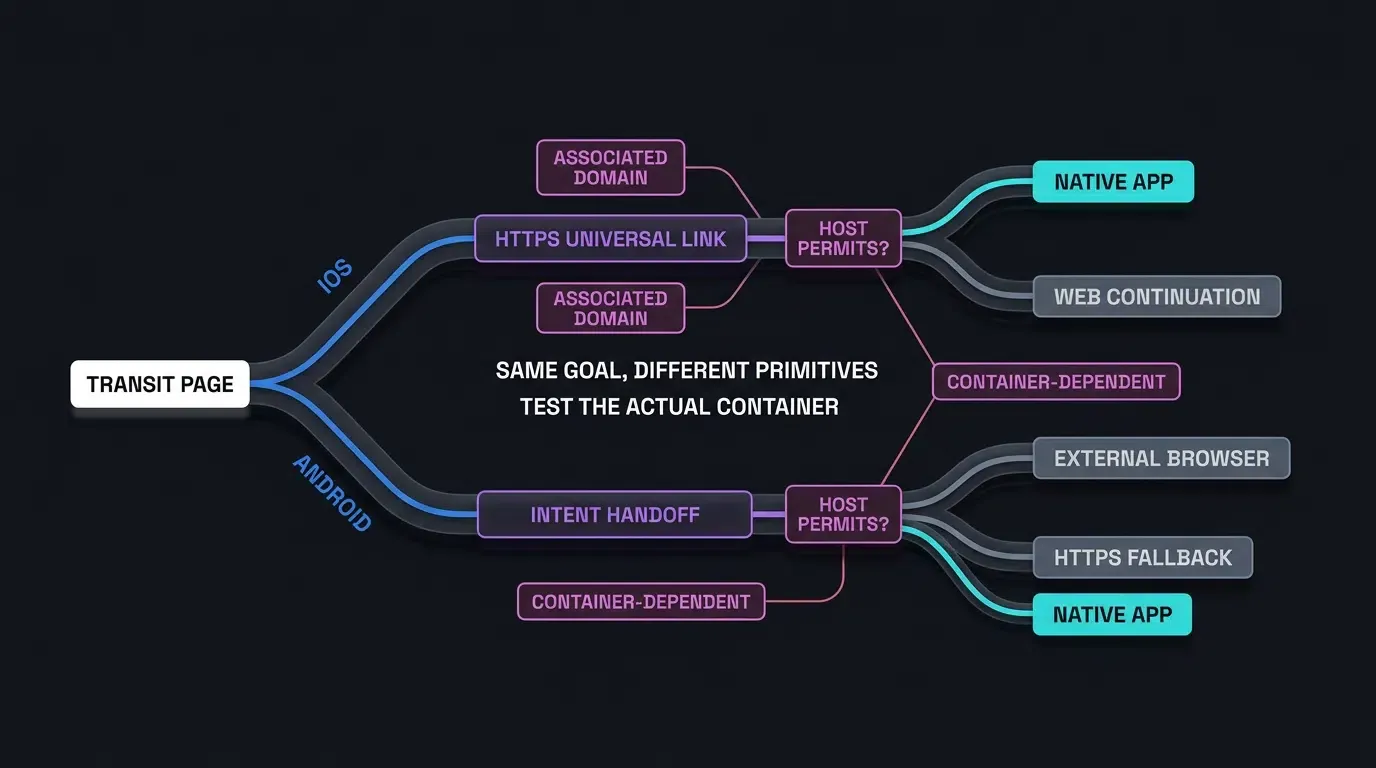
On iOS, Apple Universal Links provide a platform-supported mechanism for web-to-app routing within social applications. Unlike custom URL schemes (myapp://), Universal Links utilize standard https:// URLs that are bound directly to the native application via Apple-hosted entitlement checks during app installation.
When a user taps an eligible Universal Link, iOS may open the associated application if the app is installed and the domain association is valid. Inside an in-app browser, the result also depends on the host application’s navigation handling and the user’s interaction.
Using Distinct Universal Link Domains to Avoid Same-Domain Browser Navigation
In Safari on iOS, tapping a Universal Link hosted on the same domain as the current web page generally continues navigation within Safari rather than opening the native application. Utilizing a separately associated subdomain helps the system treat the link as an app-opening action.
To support reliable Universal Links routing, the transit link should originate from a distinct host domain from the landing page:
Origin Web Domain:      https://www.example.com/landing
Universal Link Target:  https://link.example.com/app/open (Distinct subdomain or domain)
Note that using a separately associated domain is an established WebKit navigation practice for Safari; however, behavior inside social in-app browsers like WeChat still depends on host container delegates and platform policies.
Handling Fallback States When the Application Is Not Installed on iOS
If the target application is not installed on the iOS device, navigation typically continues to the destination HTTPS web address rather than opening an application.
The transit page hosted at the Universal Link endpoint evaluates the fallback state. If no native launch occurs, the transit page presents an accessible store download CTA or executes a deferred parameter caching flow using the Web JS SDK before redirecting the user to the Apple App Store.
Preserving Dynamic Attribution Context Across Store Transitions
When an uninstalled iOS user transitions from a social link to the App Store, URL query parameters are stripped by the store environment.
Before a store transition, the Web SDK may collect eligible campaign parameters according to the deployed integration. After installation, the native SDK can attempt to retrieve supported installation context. Successful parameter restoration depends on SDK configuration, platform restrictions, and the available matching mechanism; it must be validated through end-to-end testing.
Implementing Android External Browser Handoffs and APK Installation
Android Intent Schemes: Triggering System Browser Launch from Web Containers
On Android, because in-app webviews restrict custom schemes and direct APK downloads, the transit page can instruct the operating system to hand off the web session to an external system browser (such as Google Chrome or Samsung Internet).
Android supports the intent:// URI scheme, which allows web pages to encode system Intent declarations directly within HTML anchors or JavaScript navigation requests. When formatted for Android campaigns, landing pages can invoke an Intent URL with action=android.intent.action.VIEW and specify a target fallback URL (S.browser_fallback_url). Note that intent dispatch behavior depends on user interaction gestures, target browser availability, and host container security configurations.
The snippet below demonstrates standard Android Intent URI syntax for launching external system browsers:
<!-- Android Intent Scheme Configuration & Manifest Filter Syntax -->
<!-- File: android_intent_routing.html -->

<!DOCTYPE html>
<html lang="en">
<head>
    <meta charset="UTF-8">
    <title>Android Intent Routing Syntax</title>
</head>
<body>

    <!-- Example 1: Android Intent URI targeting Chrome System Browser with HTTPS Fallback -->
    <!-- Note: Specifying package=com.android.chrome explicitly targets Google Chrome -->
    <!-- Syntax: intent://[host]/[path]#Intent;scheme=[scheme];package=[package];S.browser_fallback_url=[fallback];end -->
    <a href="intent://app.example.com/details?inviter_id=USR_1024#Intent;scheme=https;package=com.android.chrome;S.browser_fallback_url=https%3A%2F%2Fapp.example.com%2Fdownload%3Finviter_id%3DUSR_1024;end">
        Open in Chrome Browser
    </a>

    <!-- Example 2: Intent URI launching Native App Custom Protocol with Fallback -->
    <a href="intent://product/456#Intent;scheme=myapp;package=com.example.app;S.browser_fallback_url=https%3A%2F%2Fapp.example.com%2Fdownload;end">
        Launch Native App or Download
    </a>

</body>
</html>
<!-- Reference Configuration: AndroidManifest.xml Activity Intent Filter Syntax (XML) -->
<!-- Place this activity element inside the <application> element of your AndroidManifest.xml: -->

<activity
    android:name="com.example.app.RoutingActivity"
    android:exported="true"
    android:launchMode="singleTask">

    <!-- Custom URL Scheme Intent Filter -->
    <intent-filter>
        <action android:name="android.intent.action.VIEW" />
        <category android:name="android.intent.category.DEFAULT" />
        <category android:name="android.intent.category.BROWSABLE" />
        <data android:scheme="myapp" android:host="product" />
    </intent-filter>

    <!-- Android App Links Intent Filter (HTTPS Domain Verification) -->
    <intent-filter android:autoVerify="true">
        <action android:name="android.intent.action.VIEW" />
        <category android:name="android.intent.category.DEFAULT" />
        <category android:name="android.intent.category.BROWSABLE" />
        <data android:scheme="https" android:host="app.example.com" />
    </intent-filter>
</activity>
How OpoInstall Quick Installation Automates the External Browser Handoff
In supported app and browser environments, OpoInstall Quick Installation may simplify the user-initiated transition to an external browser. Manually crafting Android Intent URIs for every OEM browser variant (Huawei, Xiaomi, OPPO, Vivo, Samsung) requires extensive maintenance due to differing browser package names and OEM security policies.
OpoInstall, a mobile attribution and deep linking platform, simplifies this complexity through its “Quick Installation” technology. When an Android user taps a download button on an OpoInstall-powered transit page within an in-app social browser, SDK-managed routing may simplify handoffs in supported environments depending on device capabilities and host platform policies.
Actual routing and fallback behavior must be verified against the deployed SDK release and the host platform’s policies.
Preserving Referral Parameters During the Download and First-Launch Lifecycle
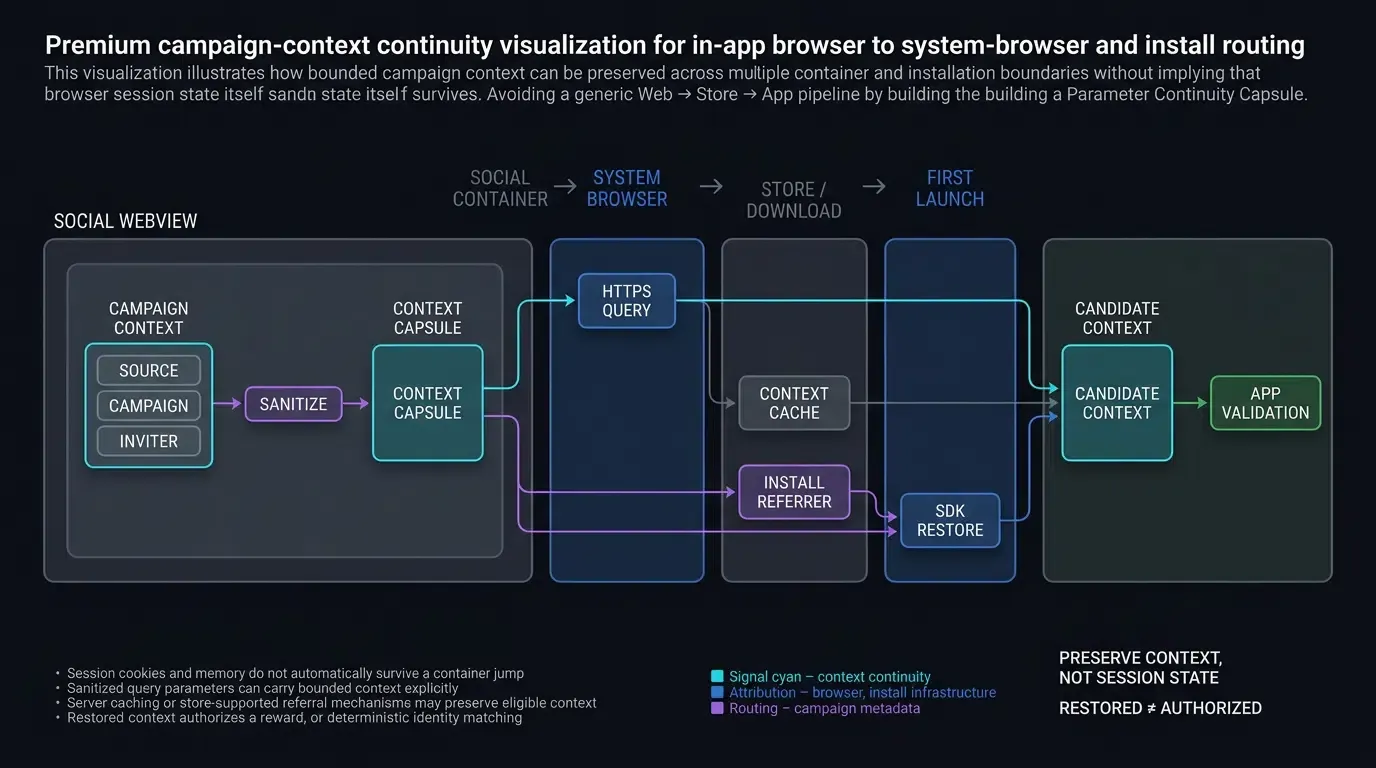
During the handoff from the social in-app browser to the system browser and subsequent APK installation, preserving user parameters is paramount.
OpoInstall maintains parameter continuity across this multi-stage container jump through parameter preservation options across browser boundaries:
- URL Parameter Transposition: Depending on the deployed routing configuration, sanitized query parameters may be forwarded to an approved HTTPS destination.
- Google Play Referrer Integration: Google Play Install Referrer may be used as a separate Android attribution mechanism when the download URL and the installed app are configured to support it. Do not assume that the Web SDK constructs this channel automatically.
- Contextual Parameter Caching: The native SDK may retrieve eligible installation context when the deployed integration supports the relevant installation path and matching mechanism.
Comparative Matrix of Web to App Redirection Strategies
Evaluating Redirection Methods Across User Friction, Implementation Effort, and Platform Stability
Engineering and growth teams must evaluate redirection strategies based on technical reliability, user experience, and implementation overhead across operating systems.
The matrix below compares common web-to-app redirection approaches across social ecosystems:
| Redirection Method | Expected iOS Execution | Expected Android Execution | User Friction Level | Implementation Complexity |
|---|---|---|---|---|
| Manual Guide Modal (“Open in Browser”) | Requires manual user menu tap | Requires manual user menu tap | High (Multi-step manual prompt) | Minimal (Static CSS overlay) |
| Standalone Custom URL Scheme | Host-dependent / May be blocked | Host-dependent / May be blocked | High (Blocked / Dead end) | Low (Basic URI execution) |
| Standard Universal Links | Supported when associated; container-dependent | Not applicable; Android uses its separate App Links mechanism | Low on iOS, N/A on Android | Moderate (AASA hosting required) |
| OpoInstall Quick Installation & Routing | SDK- and container-dependent; supported environments only | Supported environments only; test handoff | Potentially reduced | SDK configuration and platform QA required |
Frequently Asked Questions (FAQ)
Why does WeChat block direct APK downloads on Android?
Can Universal Links wake up an iOS app directly inside WeChat?
How do transit domains preserve marketing parameters during external browser jumps?
Summary and Implementation Decision Framework
Bypassing in-app browser blocking in social messaging ecosystems requires an adaptive web-to-app routing architecture that accounts for operating system boundaries and platform security policies. Relying on static custom URL schemes results in dead ends, while manual prompts introduce conversion friction that reduces user acquisition efficiency.
Engineering teams should implement hybrid routing strategies: testing supported browser handoffs on iOS and Android while maintaining an accessible HTTPS fallback. By maintaining compliant transit domains and preserving query parameters across container boundaries, applications can improve web-to-app onboarding while respecting host browser restrictions and preserving supported routing context.
To configure your application for social redirection and test in-app web-to-app routing, register an AppKey on the OpoInstall developer console or consult the SDK integration reference. For client packages supporting parameter restoration, visit download OpoInstall SDK, or explore broader routing capabilities in the mobile attribution implementation reference.
Related Materials
-
Concepts: Web to App, In-App Browser Sandboxing, Quick Installation, External Browser Handoff
-
Technologies: WeChat XWeb Engine, iOS WKWebView, Apple Universal Links, Android Intent Filters
-
Standards: W3C HTML5 Navigation Timing, IETF RFC 3986 URI Syntax, OWASP Mobile Top 10
-
APIs: Android
Intent.ACTION_VIEWSyntax, Apple WebKit Navigation Delegate, OpoInstallm.wakeupOrInstallWeb API -
Official Documentation & References:
Share this article



