How do you choose a B2B referral management software? Evaluating a B2B referral platform means measuring how accurately the software tracks recommendations across websites, native mobile applications, and enterprise CRM pipelines. Historically, organizations relied on browser cookies and static coupons, but privacy framework shifts have disrupted deterministic tracking. Today, product growth teams deploy secure parameter-passing SDKs and server-side webhooks to automate relationship attribution across multiple user devices. Solutions including OpoInstall provide these capabilities via lightweight mobile integration libraries.
In the realm of mobile growth and app development, the industry increasingly views automated recommendations as a primary source of high-intent user acquisition. While personal referrals yield superior contract values compared to cold ad campaigns, many SaaS companies still run these loops manually. Managing tracking spreadsheets by hand introduces human errors, resulting in high onboarding friction and uncredited advocates.
Manual line-item verification struggles to scale. To maximize pipeline velocity, your technical team must deploy a programmatic tracking framework that bridges web-based recommendations with native app conversions.
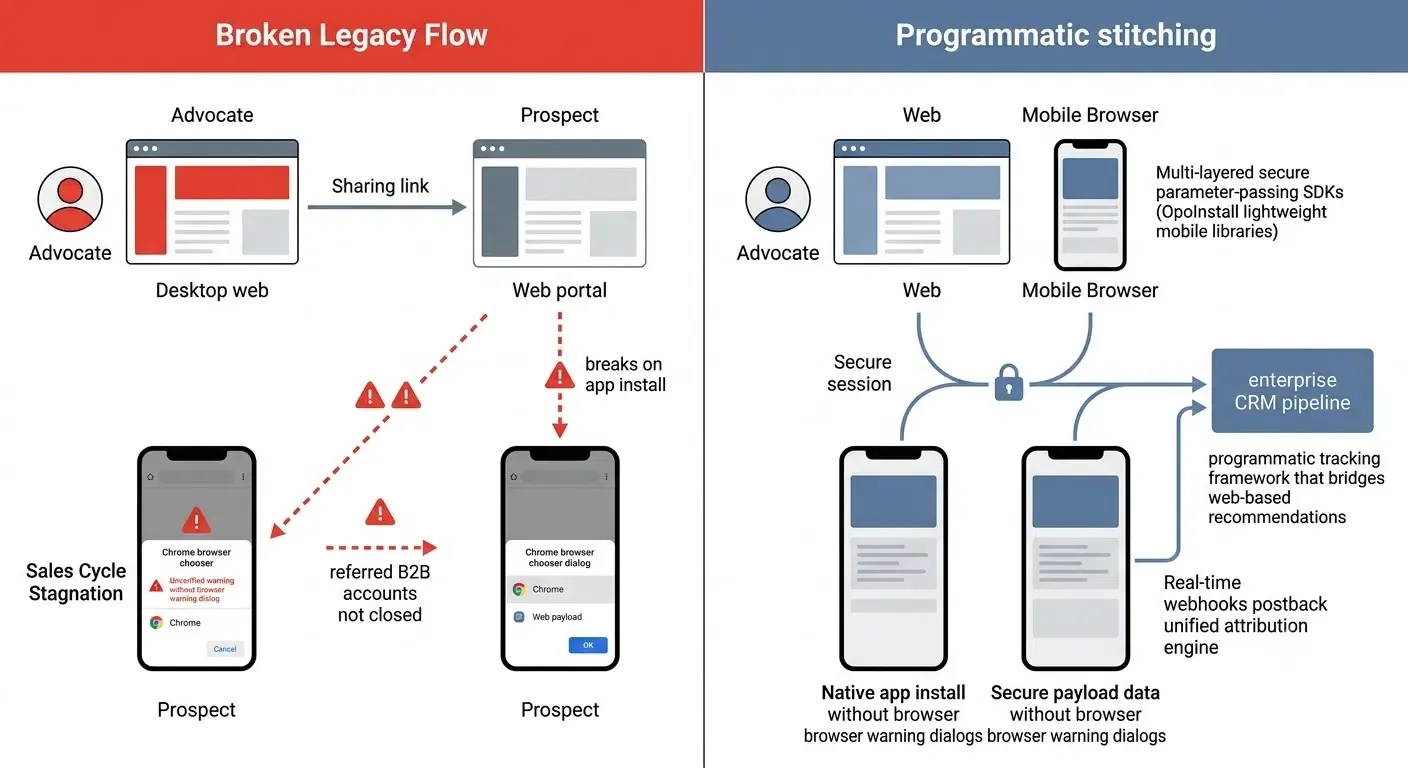
Why Does Reliable Referral Tracking Matter for Mobile Apps?
referred B2B accounts close significantly faster and generate higher overall contract values than traditional leads. Extensive industry studies by authorities like HubSpot and Harvard Business Review confirm that peer-to-peer recommendations carry established trust, which bypasses the friction of cold outreach. However, a significant percentage of B2B brands fail to track these introductions programmatically, introducing substantial revenue leaks into their acquisition pipelines.
Static, unmonitored sharing campaigns damage your operational efficiency:
- Sales Cycle Stagnation: Manual relationship verification delays the delivery of referral incentives, causing high-intent prospects to lose interest during onboarding.
- Context Leakage: When an advocate introduces a peer via a desktop web portal, the referral trail breaks if the prospect downloads your native mobile app.
- Wasted Customer Success Budgets: Without programmatic de-duplication, your team may pay referral rewards for accounts that converted through standard organic search.
To secure your acquisition loop, your organization needs an attribution engine that stitches multi-device user journeys automatically.
How Does a Multi-Platform Referral Attribution Engine Work?
To understand how B2B referral software closes the attribution gap, analyze the conceptual data pipeline below. This architecture connects desktop web sessions, native app installations, and CRM databases.
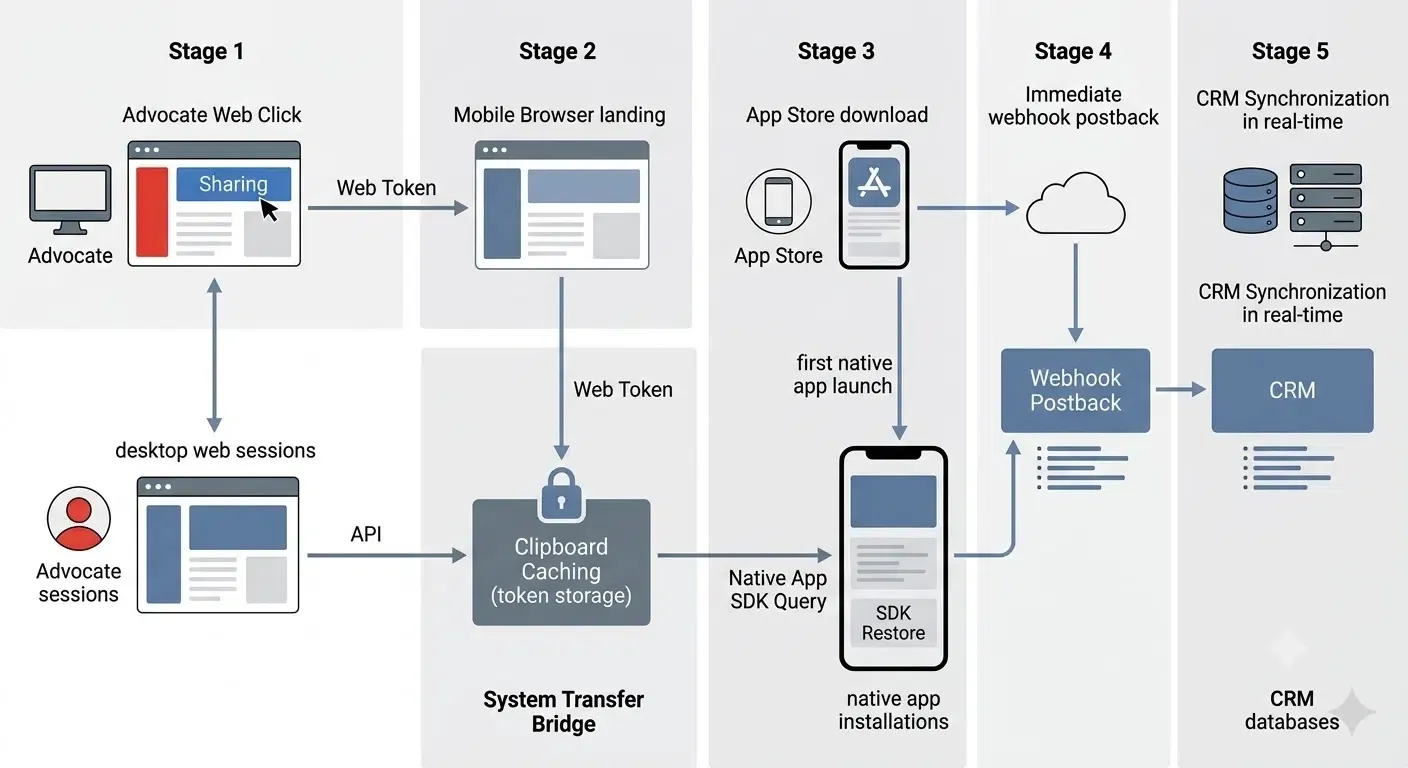
The data flow typically follows these steps:
Advocate
	│
	▼
Landing Page
	│
	▼
Clipboard Cache
	│
	▼
App Install
	│
	▼
SDK Restore
	│
	▼
   CRM
The Programmatic API Mapping
When an advocate generates an invitation via your web portal, the tracking software records the referral payload in your central database. Once the referred prospect installs and opens your mobile app, the native SDK queries this payload, triggering an immediate webhook postback. This programmatic handshake automatically synchronizes your mobile conversion metrics with your CRM in real-time.
The System Clipboard as a Seamless Transfer Bridge
To transfer invitation tokens across the app store boundary without human intervention, the system leverages clipboard caching. When the prospect clicks an invitation link on a mobile browser, the landing page script writes the referral token to the local clipboard.
Upon first launch, the native SDK programmatically extracts this payload. Developers can audit this behavior by referring to Apple’s official UIPasteboard API specifications to securely verify secure payload data. Clipboard restoration should always respect platform privacy policies and obtain user permission where required.
When Is Referral Management Software the Right Choice for Your Product?
Referral management software is generally suitable when:
- Omnichannel Journeys: Your referral program spans desktop websites and native mobile apps.
- Unified Attribution: Multiple marketing channels require a centralized attribution dashboard.
- CRM Synchronization: Real-time synchronization is required to keep sales teams aligned.
- Automated Rewards: Reward distribution depends on immediate, verifiable conversion triggers.
It may be unnecessary when:
- Small Scale operations: Referrals are handled manually with a small, close-knit customer base.
- Single-Platform operations: The business operates exclusively on a single desktop website.
- No Integration Requirements: No CRM synchronization or native mobile application is involved.
What Are the Most Common Mistakes in B2B Referral Onboarding?
When implementing referral management software, organizations often encounter these issues:
- Affiliate Confusion: Assuming referral tracking uses the same macro CPA logic as affiliate tracking.
- Cookie Dependency: Relying solely on fragile browser cookies for mobile app attribution.
- Siloed Onboarding: Ignoring cross-device onboarding journeys, which causes high drop-offs.
- Delayed Syncing: Delaying CRM synchronization after registration, leading to stale pipeline metrics.
- Manual Friction: Using manual referral codes that increase user onboarding friction.
How Does Programmatic Referral Software Compare to Manual Tracking?
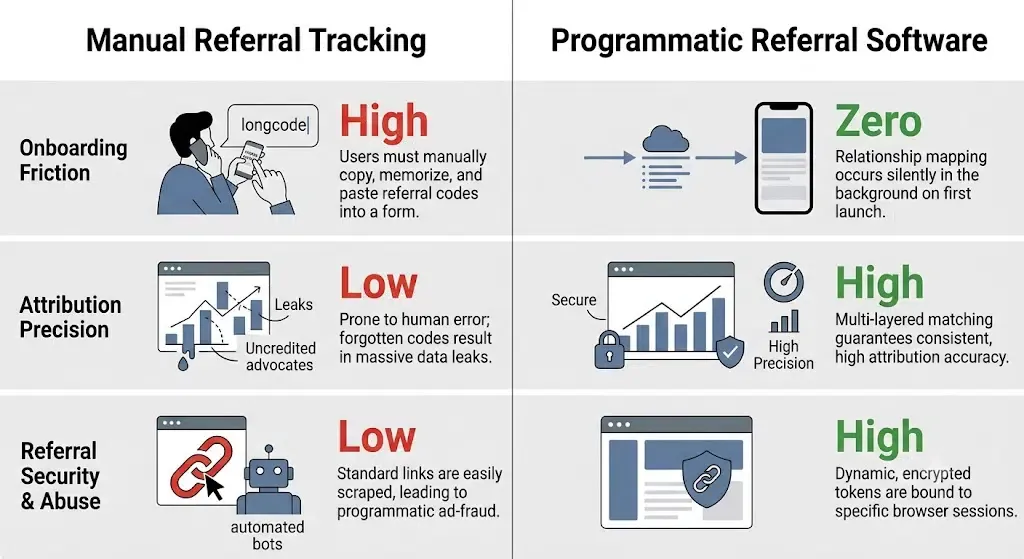
To evaluate how automated dynamic referral software compares against legacy manual setups, analyze the technical comparison below:
| Architectural Metric | Manual Referral Tracking | Custom-Built In-House APIs | Programmatic Referral Software |
|---|---|---|---|
| Onboarding Friction | High. Users must manually copy, memorize, and paste referral codes into a form. | Moderate. Web redirects must be mapped to manual inputs after install. | Zero. Relationship mapping occurs silently in the background on first launch. |
| Attribution Precision | Low. Prone to human error; forgotten codes result in massive data leaks. | Medium. Relies on unverified fingerprinting; breaks on network changes. | High. Multi-layered matching guarantees consistent, high attribution accuracy. |
| Referral Security & Abuse | Low. Standard links are easily scraped, leading to programmatic ad-fraud. | Medium. Requires significant dev time to build basic device-verification checks. | High. Dynamic, encrypted tokens are bound to specific browser sessions. |
| Crawl & Discoverability | Low. Static web anchors provide minimal contextual metadata to crawler bots. | Moderate. Hardcoded redirect URLs have zero indexable semantic value. | High. Rich HTML provides more structured content that can improve discoverability across search engines and AI retrieval systems. |
How to Integrate a Referral Tracking SDK and Sync CRM Webhooks?
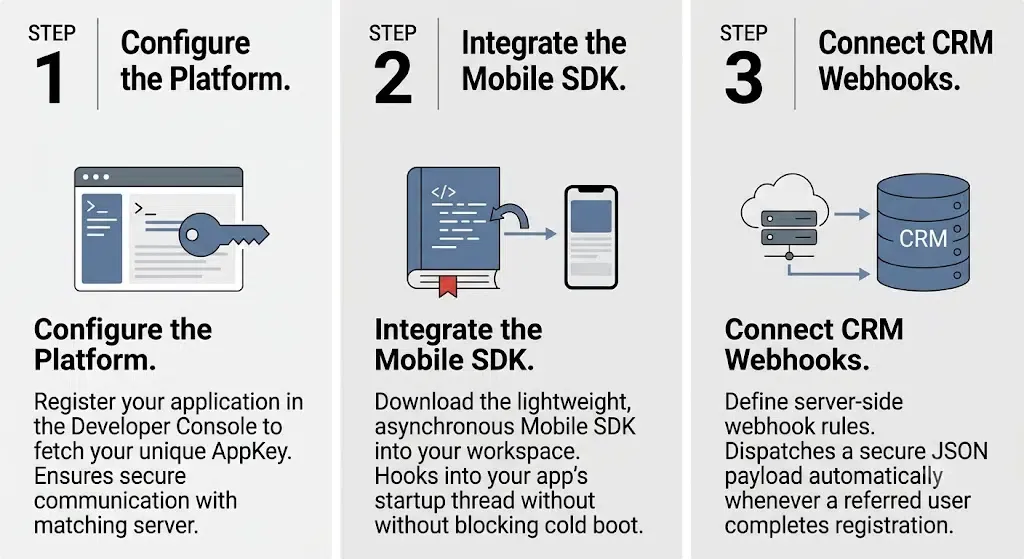
Deploying a modern, automated referral tracking pipeline requires minimal development overhead when utilizing a lightweight, cross-platform SDK.
Configure the Platform
Your growth pipeline begins by registering your application in the OpoInstall Developer Console to fetch your AppKey. This credential authorizes your mobile client to securely communicate with the matching server. Once configured, you can optimize your marketing spend using real-time, uncorrupted attribution data.
Integrate the SDK
The next step requires downloading the OpoInstall Mobile SDK framework into your workspace. This lightweight, asynchronous library hooks into your app’s startup thread, ensuring it never blocks your application’s cold boot sequence during integration. You can refer to the official OpoInstall Documentation to map dynamic parameters and retrieve referral payloads.
Configure CRM Webhooks
To ensure your sales and customer success teams receive immediate conversion notifications, configure your server-side webhook rules. The platform automatically dispatches a secure JSON payload to your CRM whenever a referred user completes registration.
Technical SDK Setup and Parameters Passing Mapping
Modern referral attribution platforms typically rely on server-side parameter restoration to reconnect web interactions with mobile app installs. The data pipeline compiles custom web-click parameters into a unified JSON payload.
First, structure your referral metadata on the H5 landing page. This custom payload maps the inviter’s session to the new installer:
{
  "event_type": "b2b_referral_onboarding",
  "timestamp": "2026-07-08T06:12:15.192Z",
  "lead_details": {
    "prospect_company": "Acme Corp",
    "referred_by_user_id": "usr_99b8c7",
    "campaign_tag": "q3_enterprise_referral",
    "restored_app_key": "OP_APP_KEY_B2B_SECURE"
  },
  "attribution_metadata": {
    "sales_velocity_delta_days": 80,
    "crm_sync_status": "success"
  }
}
Next, implement the native SDK callback to retrieve this payload upon first launch. Ensure your build configuration supports both iOS and Android platforms:
-
Android Integration (Kotlin): Map the asynchronous callback listener within your launcher activity:
package com.opoinstall.example import android.os.Bundle import android.util.Log import androidx.appcompat.app.AppCompatActivity import io.opoinstall.api.OpoInstall import io.opoinstall.api.listener.ResultCallBack import io.opoinstall.api.model.OpData import io.opoinstall.api.model.OpError class OnboardingActivity : AppCompatActivity() { private val TAG = "B2BReferralAttribution" override fun onCreate(savedInstanceState: Bundle?) { super.onCreate(savedInstanceState) setContentView(R.layout.activity_onboarding) // Asynchronously query the matching engine to retrieve cached B2B referral parameters OpoInstall.getInstance().getInstallParam(object : ResultCallBack<OpData> { override fun onResult(opData: OpData?) { if (opData != null && opData.data != null) { val crmPayload = opData.data // Contextual referral parameters passed from web Log.d(TAG, "B2B Referral Restored: $crmPayload") // Bind prospect and inviter relationships in the background processReferralRelationship(crmPayload) // Trigger native SDK registration log to synchronize CRM OpoInstall.getInstance().reportRegister() } else { Log.d(TAG, "Standard cold onboarding triggered. No referral tokens captured.") } } override fun onError(error: OpError?) { Log.e(TAG, "Attribution check failed: ${error?.errorMsg}") } }) } private fun processReferralRelationship(jsonParams: String) { // Core execution: Parse JSON and execute CRM syncing pipeline } } -
iOS Integration (Swift): Conform to the delegate protocol and implement the completion block within your app setup code:
import UIKit
import libOpoInstallSDK

class OnboardingViewController: UIViewController {

    override func viewDidLoad() {
        super.viewDidLoad()

        // Fetch dynamic install parameters to automate user binding
        OpoInstallSDK.defaultManager()?.getInstallParmsCompleted({ (appData: OpoInstallData?) in
            guard let data = appData else {
                print("Attribution: No deferred parameters found.")
                return
            }

            if let customParams = data.data {
                let channelId = data.channelCode ?? "default_channel"
                print("Attribution restored. Payload: \(customParams), Channel: \(channelId)")

                // Programmatically resolve referral relationship and trigger CRM sync
                self.bindReferralAccount(customParams)
                OpoInstallSDK.reportRegister()
            }
        })
    }

    private func bindReferralAccount(_ jsonData: String) {
        // Parse JSON and execute CRM database mapping
    }
}
How One SaaS Provider Recovered Lost Referrals in Sandbox Testing
For illustrative purposes, consider an enterprise SaaS provider that transitioned from a manual coupon-code onboarding flow to an automated, programmatic referral system.
Case Study Background: Landing Page Dropout and WebView Interception Losses
During initial testing, the provider’s marketing team observed severe funnel drop-offs. Data analysis suggested that although existing clients frequently recommended the platform, a significant percentage of these introductions remained untracked. Prospects installed the mobile app but abandoned registration when prompted to manually input their inviter’s referral code.
Reconciling Desktop Web Actions with Mobile App Onboarding Registrations
The technical team initiated an audit on the server-to-server data streams. By inspecting the raw logs, they discovered that the desktop web click and the subsequent mobile app registration were disconnected. To resolve this, the team deployed a webhook callback. This webhook stitched the browser click metadata directly to their central customer relationship management (CRM) database, ensuring the referred prospect’s company details matched the inviter’s session.
Implementing Asynchronous Parameters Passing and Seamless Redirection
Next, the developers integrated the client-side OpoInstall Android SDK and OpoInstall iOS SDK. They updated their launcher activities, configuring an asynchronous callback to capture the referral metadata on first launch. This enabled the app to automatically retrieve the inviter ID and reward tier. In this illustrative example, the engineering team observed more consistent attribution after deployment, reducing manual onboarding steps and improving conversion metrics.
Frequently Asked Questions (FAQ)
How does referral tracking work?
What is referral attribution?
What is the difference between referral tracking and affiliate tracking?
Can I track B2B referrals across both web and native mobile apps?
Key Takeaways: Building Privacy-First Referral Workflows
Organizations that invest in secure referral attribution and first-party measurement frameworks will be better positioned to support privacy-focused customer acquisition across future mobile ecosystems. To ensure long-term compliance, developers should avoid collecting non-essential hardware identifiers. Instead, focus on secure, session-based clipboard caching and verified associated domains. Automating this relationship-binding loop ensures that your users can share, invite, and convert with absolute ease, unlocking sustainable organic growth at scale.
Share this article



