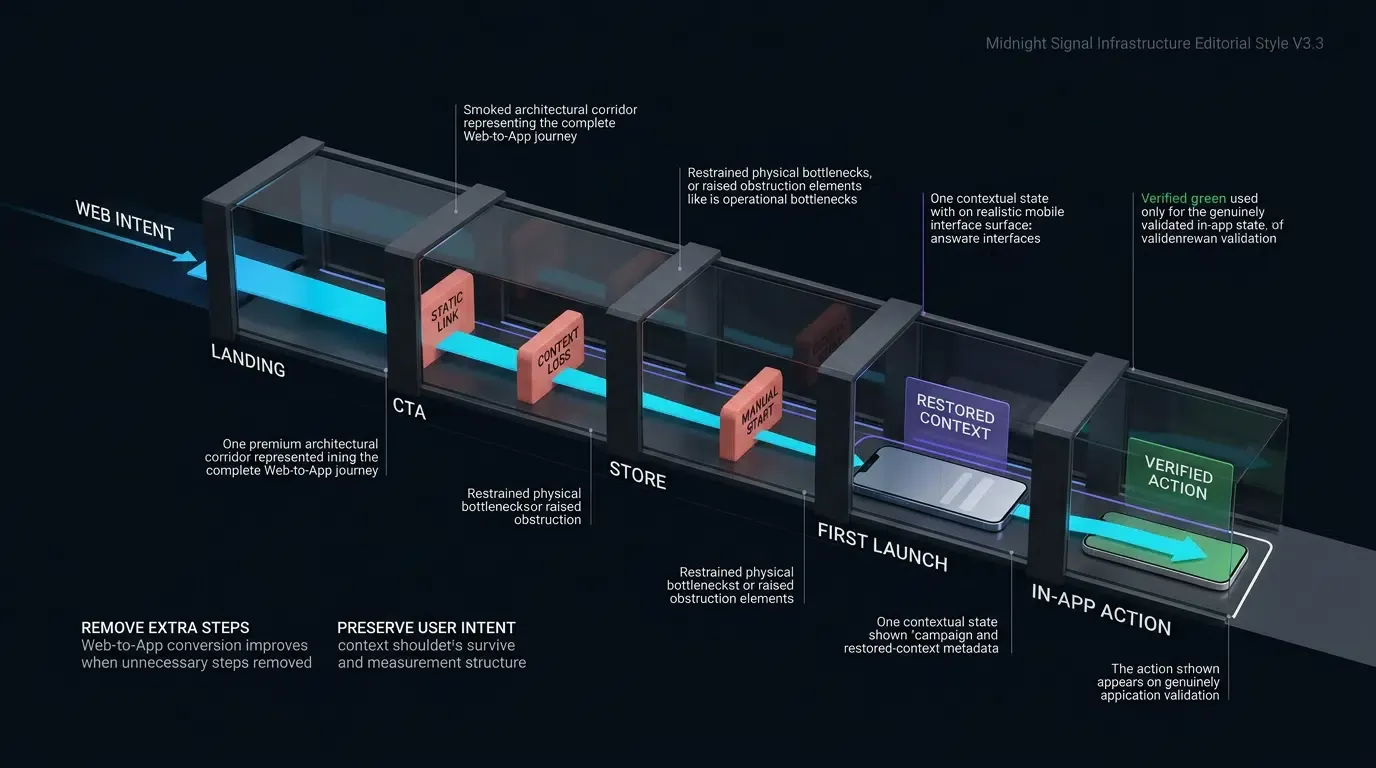
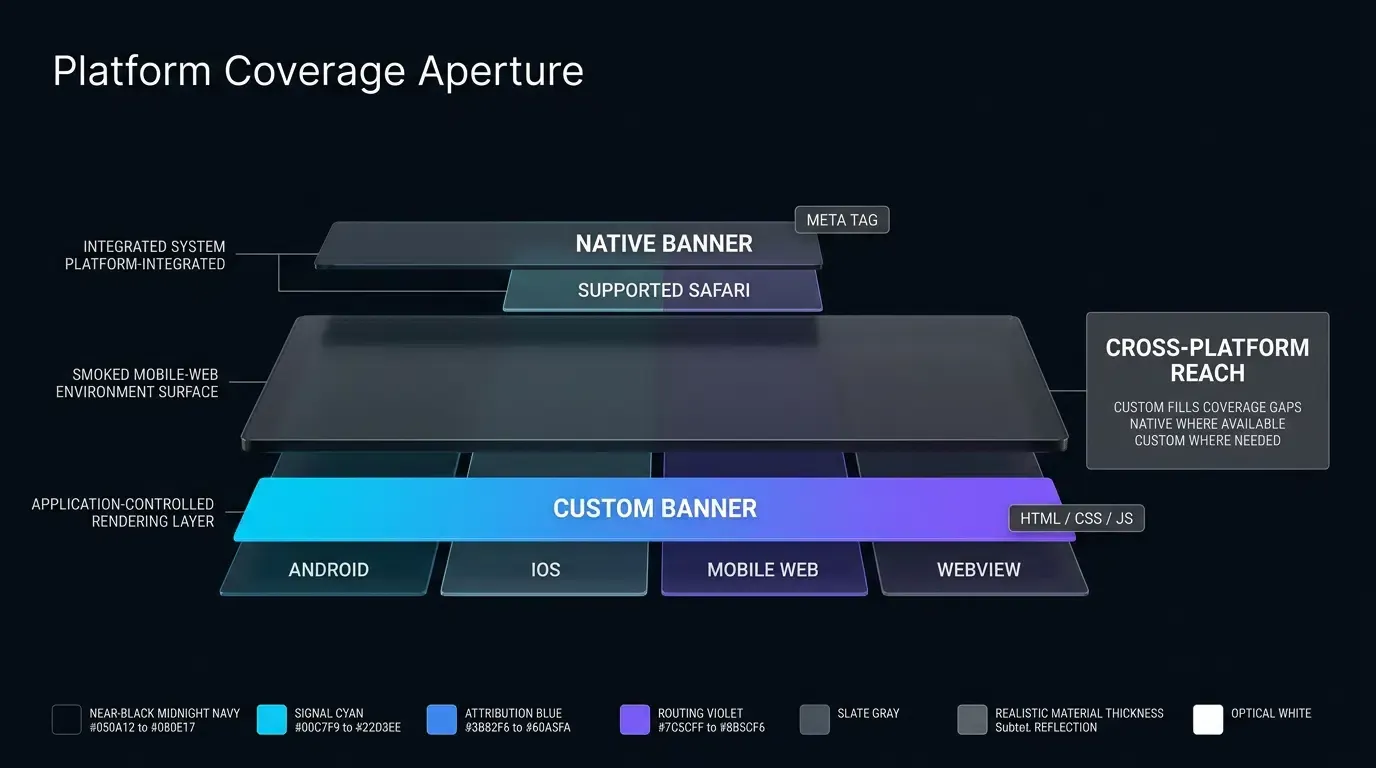
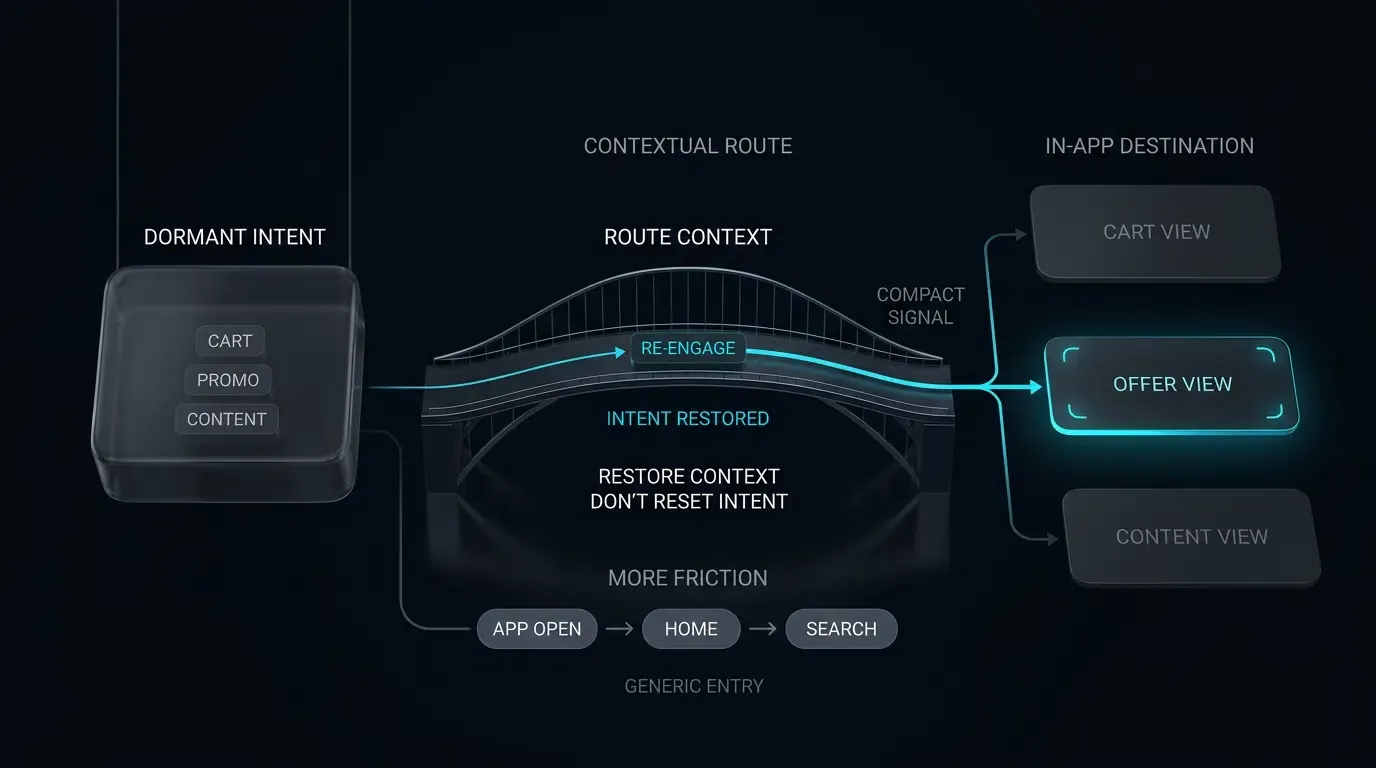
How do I enable Universal Links inside iOS WKWebView? Universal Links can already resolve from eligible links inside a WKWebView. Implementing WKNavigationDelegate allows the host application to customize routing policies—intercepting app-owned destinations, controlling external handoffs via decidePolicyForNavigationAction, and enforcing frame-level security.
In iOS application architecture, WKWebView navigation interception allows the host application to customize routing policies across Universal Links, custom URL schemes, and web destinations. By evaluating navigation request metadata within a WKNavigationDelegate, the application can route app-owned destinations internally, delegate external targets to system handlers, and enforce frame-level security policies.
| Term | Definition | Related Entity | Search Intent Role |
|---|---|---|---|
| WebView | An embedded WebKit-based view component that renders interactive web content inside iOS applications. | iOS SDK | Informational / Commercial |
| Universal Links | A standard HTTPS mechanism linking verified web domains to native iOS application views. | Deep Link Routing | Technical / Informational |
| Custom URL Scheme | An app-defined URI scheme used to route URLs into a native application. | Mobile Deep Linking | Informational |
How WKWebView and Universal Link Routing Interact on iOS
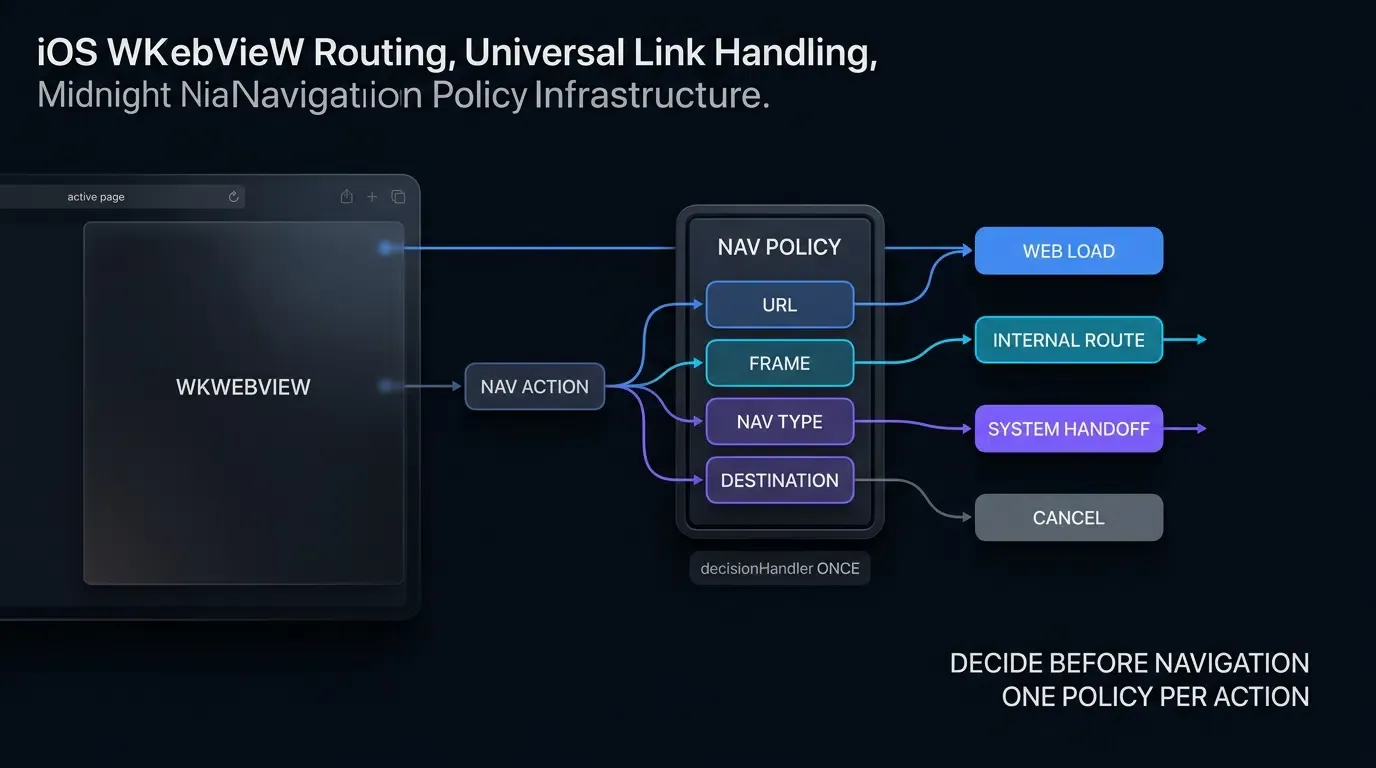
WebKit Navigation Lifecycles and App-Owned Routing Policies
Apple implements Universal Links as a system-level routing mechanism supported across Safari and WKWebView environments. When a user taps an eligible link inside an embedded WKWebView, the platform can resolve domain associations and route execution according to operating system policies.
While system-recognized Universal Links can hand off execution to native handlers, embedded browser environments frequently require application-specific routing logic. For instance, when a link targets the host application’s own domain, developers often prefer to navigate directly through native view controllers without triggering full external app relaunches. Implementing WKNavigationDelegate provides the host application with granular control over link evaluation, allowing teams to enforce custom allowlists and route internal destinations predictably.
The User Experience Barrier: When In-App Web Browsing Traps Users in Web Redirection Loops
Embedded WebViews are frequently deployed to host promotional microsites, help centers, partner catalogs, and marketing landing pages within iOS apps. When an in-app web page includes links intended to navigate users to other sections of the host application (e.g., “View in App” buttons) or to partner applications, default navigation can lead to redundant rendering:
- Redundant Web Rendering: Instead of rendering native view controllers, the user may be presented with responsive web versions of in-app pages, requiring repeated authentications and degrading visual consistency.
- Web Trapping: Users can become trapped within deep web navigation stacks without intuitive ways to return to primary native app interfaces.
- Failed App-to-App Transitions: Tapping links pointing to third-party services (such as navigation apps, social sharing dialogs, or payment gateways) requires explicit delegation if those services rely on custom URL schemes.
Comparing WKWebView Against SFSafariViewController for Web-to-App Handoffs
When architecting in-app web browsing on iOS, engineering teams must choose between WKWebView and SFSafariViewController:
SFSafariViewController: Provides a system-managed, self-contained Safari browsing interface with features such as AutoFill and content blocking. The host application cannot inspect browsing activity or website data, and UI customization is limited to tint colors.WKWebView: An embedded view component hosted within the app’s UI process while running web content in separate WebKit processes. It allows deep UI customization, JavaScript bridges, and custom layout integration, requiring explicit implementation ofWKNavigationDelegateto customize routing policies and handle app-defined custom schemes.
How Does decidePolicyForNavigationAction Intercept WebKit Routing
The Navigation Policy Pipeline: Understanding WKNavigationAction, request, and decisionHandler
To control navigation flow inside a WKWebView, developers assign a custom delegate conforming to the Apple Developer Guidance on WKNavigationDelegate. The primary interception point is the delegate method:
func webView(
    _ webView: WKWebView,
    decidePolicyFor navigationAction: WKNavigationAction,
    decisionHandler: @escaping (WKNavigationActionPolicy) -> Void
)
Navigation actions triggered by user interactions, programmatic redirects, or form submissions pass through this method. The WKNavigationAction object provides key metadata:
navigationAction.request.url: The targetURLbeing requested.navigationAction.navigationType: The trigger type (.linkActivated,.other,.formSubmitted).navigationAction.sourceFrame: Information regarding the frame initiating the navigation request.navigationAction.targetFrame: Information regarding the destination frame where content is intended to load.
The decisionHandler is a completion closure that informs WebKit whether to allow or cancel the requested navigation.
When to Return .allow vs .cancel: Controlling the WebKit Resource Loading Lifecycle
The WKNavigationActionPolicy passed to the decisionHandler controls whether WebKit proceeds with the navigation:
.allow: Informs WebKit to proceed with the requested navigation within the web view..cancel: Instructs WebKit to cancel the requested navigation. This policy is executed whenever the host application intercepts a custom scheme, routes an app-owned Universal Link internally, or delegates an external target toUIApplication.shared.open().
The decisionHandler must be invoked exactly once per navigation action to ensure navigation policy resolution proceeds without stalling.
Evaluating Navigation Types: Distinguishing User Clicks (.linkActivated) from Automated Redirects
WKNavigationAction.navigationType allows developers to distinguish explicit user interactions from automated scripts:
.linkActivated: The user physically tapped an HTML anchor tag (<a href="...">)..other: Represents programmatic navigations, such aswindow.location.hrefupdates, meta refreshes, or initialwebView.load()calls..formSubmitted/.formResubmitted: Represents form POST or GET submissions.
Evaluating navigationType enables applications to enforce a conservative, application-level explicit-link policy. For external custom scheme invocations or third-party app handoffs, requiring .linkActivated as a policy gate helps prevent unprompted background scripts from triggering automated external app launches.
Handling Asynchronous Decision Policies Without Retain Cycles
When route validation or permission checks require querying local caches or security validators before returning a decision:
- Ensure the
decisionHandleris executed across all execution paths, including error and guard conditions. - Use weak references (
[weak self]) within escaping closures to prevent retain cycles between theWKWebView, its delegate, and the parentUIViewController.
Differentiating Host App Associated Domains from External Universal Links
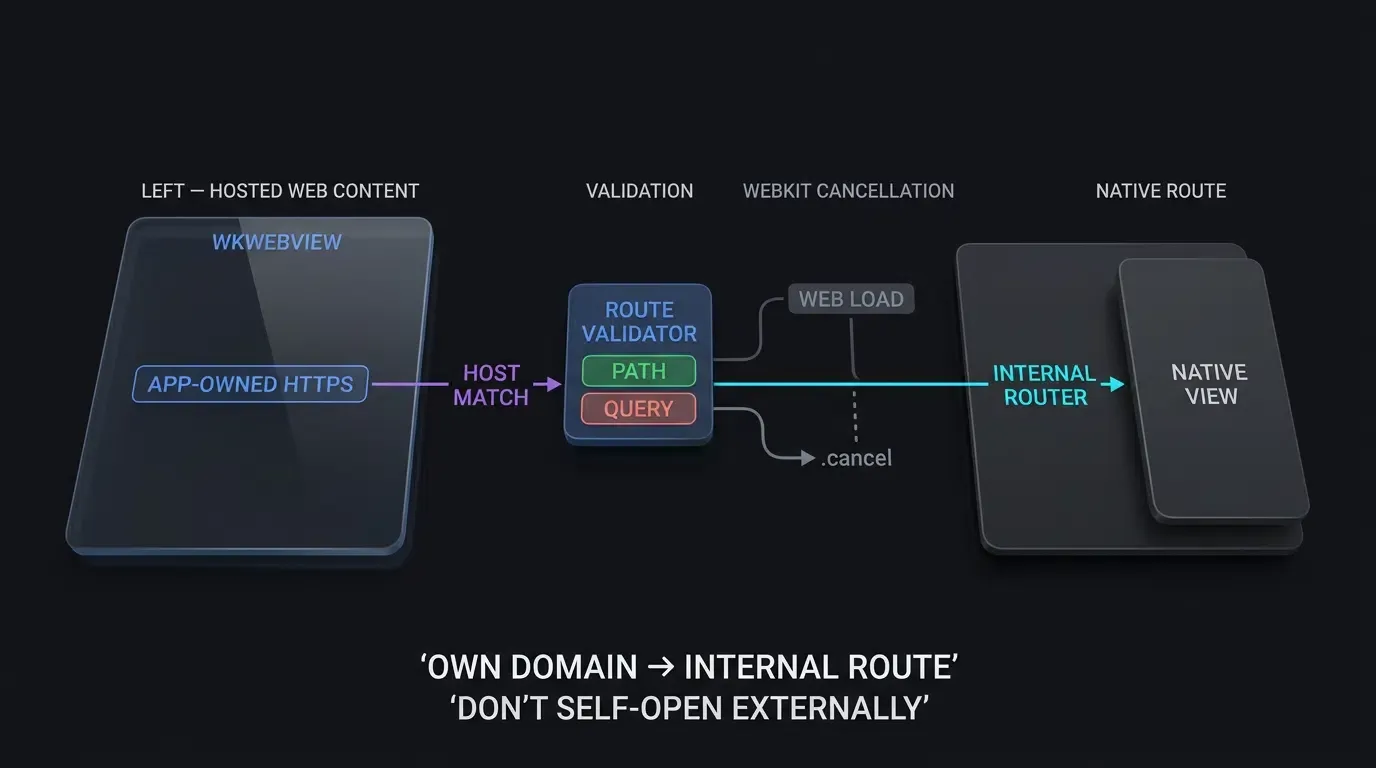
Managing App-Owned Destinations vs. System-Level Link Delegation
For app-owned routes, avoid attempting to re-enter the same application through a redundant Universal Link lookup. Handle app-owned destinations directly through the host application’s internal router, and use system opening primarily for destinations that should leave the current application or be resolved by external services.
This architectural separation ensures smooth navigation:
- Host App Associated Domains: If the URL host matches the host app’s own associated domain (
app.example.com), cancel web view navigation (decisionHandler(.cancel)), validate the route path, and pass the parsed parameters directly to the application’s internal navigation router. - External Applications: If the URL points to an external partner destination or an allowed custom scheme, apply an application-level explicit-link gate (
navigationType == .linkActivated), cancel web view navigation, and forward the request toUIApplication.shared.open(url)to let the operating system launch the external app.
Architecting Internal Route Validation: Extracting Paths and Query Parameters via AppRouteValidator
When an incoming URL matches the host application’s associated domain, the URL string must pass through a strict routing validator before triggering view controller transitions.
The AppRouteValidator model:
- Validates the URL path against an allowlist of supported internal routes (e.g.,
/open/,/product/,/promo/,/checkout/). - Extracts query parameters (e.g.,
id,promo,utm_source). - Enforces character set restrictions, length boundaries, and duplicate key rejection, returning a clean
ValidatedAppRoutedata structure.
Handling External Third-Party Universal Links via System UIApplication Delegation
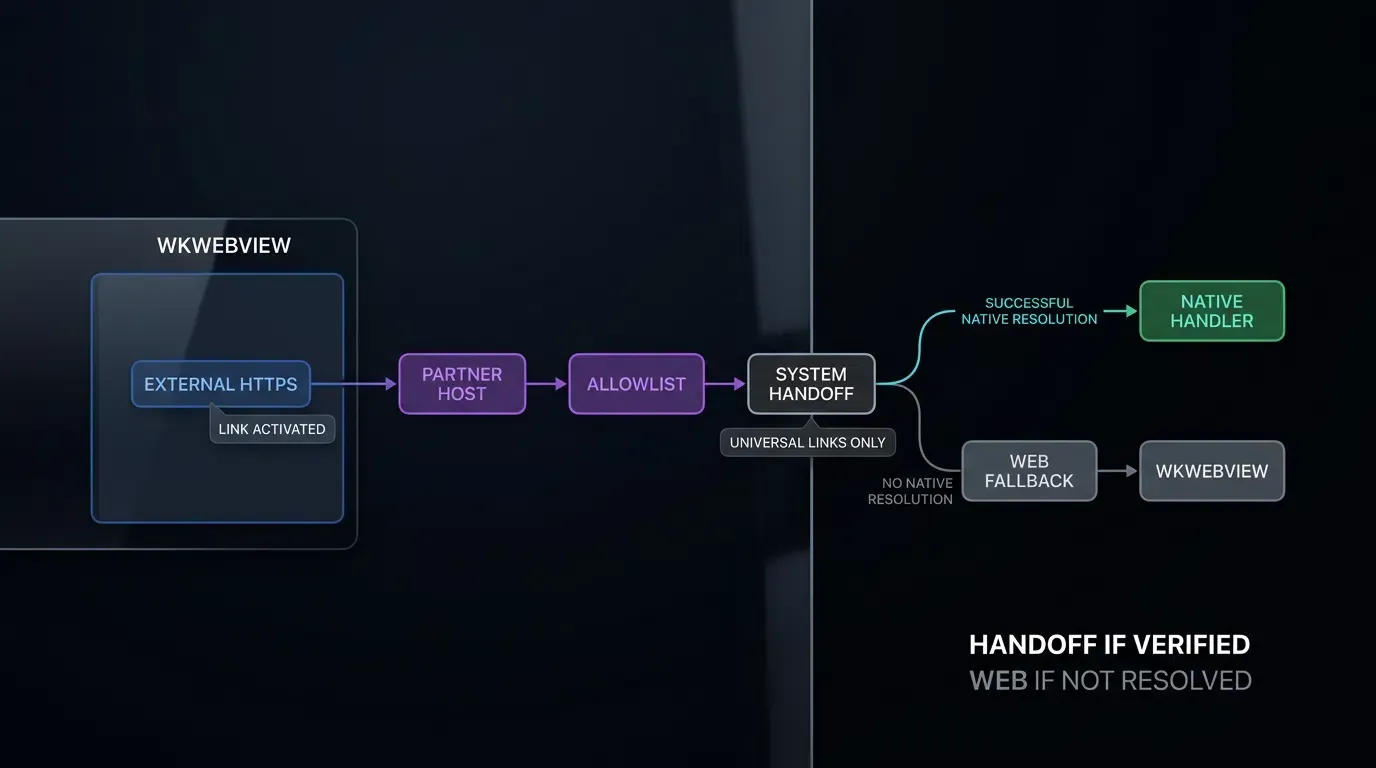
When a web page inside a WKWebView links to external services (such as partner apps, social platforms, or external utilities), the host application can delegate routing to the iOS system:
let options: [UIApplication.OpenExternalURLOptionsKey: Any] = [
    .universalLinksOnly: true
]
UIApplication.shared.open(url, options: options) { success in
    if !success {
        // Application policy fallback: load web destination if no native app handles the Universal Link
    }
}
Using .universalLinksOnly as an application policy ensures that the user is only transitioned outside the current app if a verified native application is installed to handle the Universal Link.
Managing Custom URL Scheme Fallbacks (myapp://) Alongside HTTPS Universal Links
While HTTPS Universal Links represent standard deep linking on iOS, app-defined custom schemes (myapp:// or partnerapp://) remain common across promotional campaigns and partner integrations.
In a unified WKNavigationDelegate implementation:
- Non-HTTP/HTTPS schemes are inspected first. If the scheme matches an allowed custom protocol and satisfies the explicit-link policy (
navigationType == .linkActivated), the delegate verifies the host, path, and parameters before dispatching toUIApplication.shared.open(). - Unrecognized schemes or unprompted background scheme invocations are canceled immediately, preventing unhandled navigation errors or script-driven intent flooding.
[User Interacts with Link Inside iOS WKWebView]
                       │
                       ▼
[WKNavigationDelegate: decidePolicyForNavigationAction]
                       │
         ┌─────────────┴─────────────┐
         ▼                           ▼
[!action.sourceFrame.isMainFrame] [action.sourceFrame.isMainFrame]
         │                           │
         ▼                           ▼
[Subframe Security Gate]       [Inspect Destination Scheme & Host]
├─ HTTP(S) -> .allow                 │
└─ Non-Web -> .cancel    ┌───────────┼───────────┐
   (Suppress Subframe)   ▼           ▼           ▼
                   [Host Domain] [External Web] [Custom Scheme]
                         │           │           │
                         ▼           ▼           ▼
                   [AppRoute]    [Check Link]   [Check Link]
                   ├─ Valid ->   ├─ Partner->   ├─ Valid & Click->
                   │  Internal   │  Open App    │  Open App
                   └─ Invalid->  └─ Web ->      └─ Invalid/Auto->
                      .cancel       .allow         .cancel
How to Enforce Main Frame Security and Prevent Iframe Hijacking
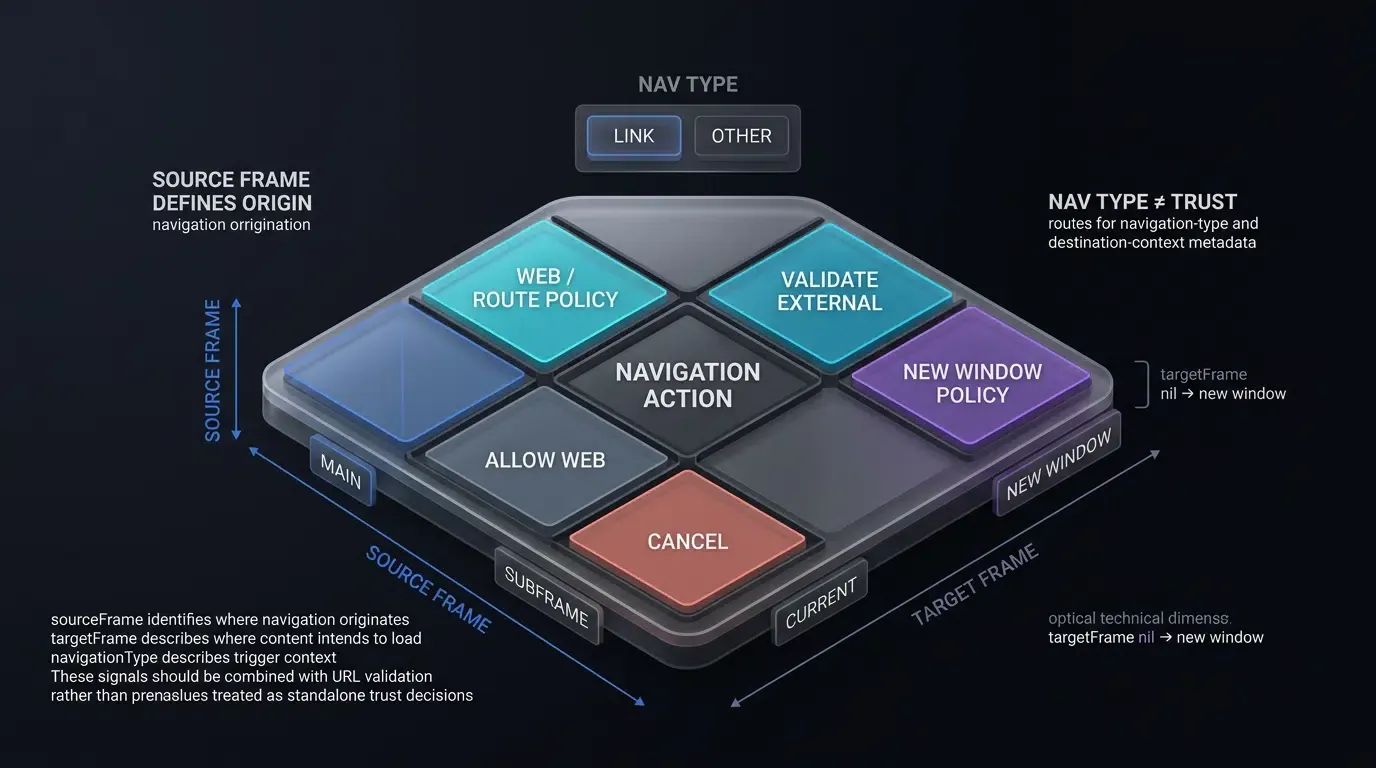
Treating Embedded Web Navigation as Untrusted Input: OWASP Deep Link Security Standards
In accordance with OWASP Mobile Application Security Testing Guide Guidance on Insecure Deep Links, all URLs and parameter payloads processed by mobile navigation handlers must be treated as untrusted, external input.
Web pages rendered within a WKWebView may load third-party scripts, advertising banners, or user-generated content. If a navigation delegate forwards arbitrary URLs to native view controllers or UIApplication.shared.open() without validation, unexpected parameters could target sensitive internal application routes.
Isolating Main Frame Navigations from Embedded Iframes and New Window Targets
In accordance with Apple Developer Documentation on WKNavigationAction, evaluating frame security requires checking the initiating frame:
sourceFrame.isMainFrame == true: The navigation was initiated directly by the primary, top-level document frame.sourceFrame.isMainFrame == false: The navigation was initiated by an embedded subframe or iframe.targetFrame == nil: The navigation requests a new window target (such as an anchor withtarget="_blank").
To prevent iframe hijacking—where an embedded iframe attempts to launch external applications or trigger native view transitions in the background—the delegate must evaluate sourceFrame.isMainFrame. If the initiating frame is an iframe (sourceFrame.isMainFrame == false), allow standard HTTP/HTTPS subframe navigation (.allow), but block any non-web custom schemes or native routing handoffs (.cancel).
Preventing Malicious Subframe Protocol Invocations and Background Scheme Flooding
Enforcing initiating frame checks prevents subframes from triggering unprompted external scheme invocations:
if !navigationAction.sourceFrame.isMainFrame {
    let scheme = url.scheme?.lowercased() ?? ""
    if scheme == "http" || scheme == "https" {
        decisionHandler(.allow) // Allow standard HTTP(S) subframe navigation
    } else {
        decisionHandler(.cancel) // Suppress non-web schemes from subframes
    }
    return
}
Enforcing Strict Path and Query Parameter Allowlists in Client Routing
Both internal associated domain URLs and external custom schemes must pass through strict validator models before execution:
- Path Prefix Allowlisting: Enforce approved route prefixes (e.g.,
/open/,/product/,/promo/,/checkout/), rejecting arbitrary or malformed paths. - Query Key Filtering: Discard unexpected query keys and reject duplicate parameter keys to prevent parameter pollution.
- Data-Type & Length Constraints: Restrict parameter values to alphanumeric character sets and enforce maximum length boundaries (
characters).
Production WKNavigationDelegate Implementation in Swift
Structuring the CustomWebViewController and Delegate Architecture in Swift
A production WKWebView controller coordinates web configuration, navigation policy evaluation, internal routing, and external delegation. The implementation encapsulates validation rules within dedicated validator classes (AppRouteValidator and CustomSchemeValidator) to keep delegate callbacks clean, testable, and secure.
Implementing AppRouteValidator and CustomSchemeValidator Models
The validator models enforce strict fail-closed security:
AppRouteValidatorvalidates internal associated domains, checking path prefixes and sanitizing query parameters into a structuredValidatedAppRouteobject.CustomSchemeValidatorverifies authorized custom schemes (myapp), validates allowed hosts (open,product,event), and sanitizes query values.
OpoInstall can be integrated alongside an application-owned routing layer for attribution and deferred parameter recovery. Review the SDK integration documentation for comprehensive integration guides.
The technical implementation below demonstrates how to configure a secure WKNavigationDelegate in Swift:
// iOS: CustomWebViewController with Strict WKNavigationDelegate Routing and Frame Security
// Reference integration example. Verify method signatures and domain mappings against your deployed architecture.
import UIKit
import WebKit

struct ValidatedAppRoute {
    let path: String
    let queryParams: [String: String]
}

// 1. Validator for Host Application's Associated Domain (Internal Routes)
class AppRouteValidator {
    private static let allowedPrefixes = ["/open/", "/product/", "/promo/", "/checkout/"]
    private static let allowedQueryKeys = Set(["target", "id", "promo", "utm_source"])

    static func validate(url: URL) -> ValidatedAppRoute? {
        let path = url.path
        // Enforce approved path prefix allowlist
        guard allowedPrefixes.contains(where: { path.hasPrefix($0) }) else {
            return nil
        }

        var sanitizedParams: [String: String] = [:]
        var seenKeys = Set<String>()

        if let components = URLComponents(url: url, resolvingAgainstBaseURL: false),
           let queryItems = components.queryItems {
            let validChars = CharacterSet(charactersIn: "abcdefghijklmnopqrstuvwxyzABCDEFGHIJKLMNOPQRSTUVWXYZ0123456789_-")

            for item in queryItems {
                // Fail-closed validation: reject URL if unauthorized query keys or duplicate keys exist
                guard allowedQueryKeys.contains(item.name), !seenKeys.contains(item.name) else { return nil }
                seenKeys.insert(item.name)

                let value = item.value ?? ""
                if value.count <= 64 && value.rangeOfCharacter(from: validChars.inverted) == nil {
                    sanitizedParams[item.name] = value
                } else {
                    return nil
                }
            }
        }

        return ValidatedAppRoute(path: path, queryParams: sanitizedParams)
    }
}

// 2. Validator for External Custom Schemes (myapp://)
class CustomSchemeValidator {
    private static let allowedSchemes = Set(["myapp"])
    private static let allowedHosts = Set(["open", "product", "event"])
    private static let allowedPathPrefixes = ["/detail/", "/view/", "/main/"]
    private static let allowedQueryKeys = Set(["target", "id", "promo", "utm_source"])

    static func validate(url: URL) -> URL? {
        guard let scheme = url.scheme?.lowercased(), allowedSchemes.contains(scheme) else {
            return nil
        }
        guard let host = url.host?.lowercased(), allowedHosts.contains(host) else {
            return nil
        }

        let path = url.path
        if !path.isEmpty && !allowedPathPrefixes.contains(where: { path.hasPrefix($0) }) {
            return nil
        }

        var seenKeys = Set<String>()
        if let components = URLComponents(url: url, resolvingAgainstBaseURL: false),
           let queryItems = components.queryItems {
            let validChars = CharacterSet(charactersIn: "abcdefghijklmnopqrstuvwxyzABCDEFGHIJKLMNOPQRSTUVWXYZ0123456789_-")
            for item in queryItems {
                guard allowedQueryKeys.contains(item.name), !seenKeys.contains(item.name) else { return nil }
                seenKeys.insert(item.name)

                let value = item.value ?? ""
                if value.count > 64 || value.rangeOfCharacter(from: validChars.inverted) != nil {
                    return nil
                }
            }
        }

        return url
    }
}

// 3. UIViewController Hosting WKWebView with Secure Navigation Policy Interception
class CustomWebViewController: UIViewController, WKNavigationDelegate {

    var webView: WKWebView!
    private let hostAssociatedDomain = "app.example.com"
    private let allowedExternalPartnerHosts = Set(["partner.example.com"])

    override func viewDidLoad() {
        super.viewDidLoad()

        let configuration = WKWebViewConfiguration()
        webView = WKWebView(frame: view.bounds, configuration: configuration)
        webView.navigationDelegate = self
        view.addSubview(webView)
    }

    func webView(
        _ webView: WKWebView,
        decidePolicyFor navigationAction: WKNavigationAction,
        decisionHandler: @escaping (WKNavigationActionPolicy) -> Void
    ) {
        guard let url = navigationAction.request.url else {
            decisionHandler(.allow)
            return
        }

        // Security Check 1: Enforce initiating frame boundary (sourceFrame) to prevent iframe hijacking
        if !navigationAction.sourceFrame.isMainFrame {
            let scheme = url.scheme?.lowercased() ?? ""
            if scheme == "http" || scheme == "https" {
                decisionHandler(.allow) // Allow standard HTTP(S) subframe navigation
            } else {
                decisionHandler(.cancel) // Suppress non-web schemes from subframes/iframes
            }
            return
        }

        let scheme = url.scheme?.lowercased() ?? ""
        let isExplicitLinkActivation = (navigationAction.navigationType == .linkActivated)

        // Security Check 2: Handle Host App's Own Associated Domain
        // Route internally instead of calling UIApplication.shared.open
        if scheme == "https", let host = url.host?.lowercased(), host == hostAssociatedDomain {
            if let validatedRoute = AppRouteValidator.validate(url: url) {
                AppInternalRouter.shared.navigate(to: validatedRoute)
            }
            decisionHandler(.cancel) // Cancel in-webview loading to route internally
            return
        }

        // Security Check 3: Handle Allowed Custom Schemes (myapp://) with Link-Activation Policy
        if scheme != "http" && scheme != "https" && scheme != "about" {
            // Enforce that custom scheme external app launches require explicit user link activation
            if isExplicitLinkActivation, let validatedURL = CustomSchemeValidator.validate(url: url) {
                UIApplication.shared.open(validatedURL, options: [:], completionHandler: nil)
            }
            decisionHandler(.cancel) // Cancel in-webview loading to prevent unhandled scheme errors
            return
        }

        // Security Check 4: Handle External Destinations and New-Window (target="_blank") Requests
        if scheme == "http" || scheme == "https" {
            let host = url.host?.lowercased() ?? ""

            // Delegate verified partner Universal Links to external app with explicit-link policy
            if allowedExternalPartnerHosts.contains(host) && isExplicitLinkActivation {
                let options: [UIApplication.OpenExternalURLOptionsKey: Any] = [
                    .universalLinksOnly: true
                ]
                UIApplication.shared.open(url, options: options) { [weak self] success in
                    if !success {
                        // Application policy fallback: load external partner destination inside web view if no native app handles it
                        guard let self = self else { return }
                        self.webView.load(navigationAction.request)
                    }
                }
                decisionHandler(.cancel)
                return
            }

            // If targetFrame is nil (new window request), load safely into current webView
            if navigationAction.targetFrame == nil {
                webView.load(navigationAction.request)
                decisionHandler(.cancel)
                return
            }

            // Standard web content continues loading inside WKWebView
            decisionHandler(.allow)
            return
        }

        decisionHandler(.allow)
    }
}

// Application-specific internal router placeholder (not an OpoInstall SDK API)
class AppInternalRouter {
    static let shared = AppInternalRouter()

    func navigate(to route: ValidatedAppRoute) {
        // Execute internal UI view controller transition based on path and query parameters
    }
}
Thread-Safe Execution: Ensuring UI Transitions Execute on the Main Actor
In current Swift concurrency models, WKNavigationDelegate callbacks are main-actor isolated. Application routing and view controller transitions execute on the main actor, maintaining thread safety across native navigation workflows.
WKWebView Deep Link Navigation Errors and Diagnostic Matrix
Comprehensive iOS WKWebView Deep Linking Troubleshooting Guide
The matrix below outlines common failure modes encountered when managing deep links and custom schemes inside iOS WKWebView, along with primary root causes and recommended engineering remediations:
| Error Signature / Symptom | Primary Root Cause | Applicable iOS Versions | Diagnostic Checkpoint | Recommended Remediation |
|---|---|---|---|---|
| Universal Link Loads in Web | App-owned domain unintercepted | iOS 9+ | decidePolicyForNavigationAction unhandled |
Intercept host domain, parse path, route internally, .cancel |
| Self-Domain Link Fails to Route | Calling UIApplication.open on own domain |
iOS 9+ | UIApplication.shared.open called on own host |
Avoid external self-open; route to internal router directly |
| Custom Scheme Fails Silently | WebKit unrecognized non-HTTP protocol | iOS 9+ | Scheme not delegated to UIApplication |
Intercept scheme in delegate, validate allowlist, open via UIApplication |
| Iframe Protocol Hijacking | Subframe triggering external custom scheme | iOS 9+ | sourceFrame.isMainFrame unchecked |
Guard with if !sourceFrame.isMainFrame and suppress non-web schemes |
| UI Handoff Warning or Transition Issue | UI transitions executed off main thread | iOS 9+ | Missing main-actor dispatch | Ensure main-actor execution for internal router and view controller transitions |
Frequently Asked Questions (FAQ)
How can developers intercept Universal Links in a WKWebView?
Can I use UIApplication.shared.open to launch my own app from a WKWebView?
How do I prevent embedded iframes in a WKWebView from triggering external app launches?
Summary and Decision Framework
Handling Universal Links and custom schemes inside iOS WKWebView requires bridging the boundary between WebKit’s web rendering container and native UIKit navigation lifecycles. Relying on default navigation policies can prevent seamless handoffs when application-owned routing logic is required.
By implementing a robust WKNavigationDelegate that verifies frame boundaries, enforces conservative link-activation policies on external handoffs, parses internal associated domains via strict route validators, and delegates external targets safely to UIApplication.shared.open, engineering teams maintain controlled navigation while safeguarding against iframe protocol hijacking.
To explore native iOS deep linking and parameter routing architectures, consult the SDK integration documentation.
Related Materials
-
Concepts: iOS WebView Routing, Universal Links Interception, WKNavigationDelegate, Frame Boundary Isolation
-
Technologies: Apple WebKit, iOS UIKit, WKWebView, OpoInstall iOS SDK
-
Standards: IETF RFC 3986 Uniform Resource Identifier, Apple Associated Domains Specification, OWASP Mobile Application Security Testing Guide (MASTG)
-
APIs:
WKNavigationDelegate.decidePolicyForNavigationAction,WKNavigationAction.sourceFrame,UIApplication.shared.open -
Official Documentation & References:
Share this article