How do deep links increase mobile app engagement? Deep links can support higher app engagement by reducing navigation friction and routing reactivated users directly to contextual in-app destinations—such as abandoned carts, personalized promotions, or specific content—eliminating manual in-app search and creating testable opportunities to improve conversion and retention.
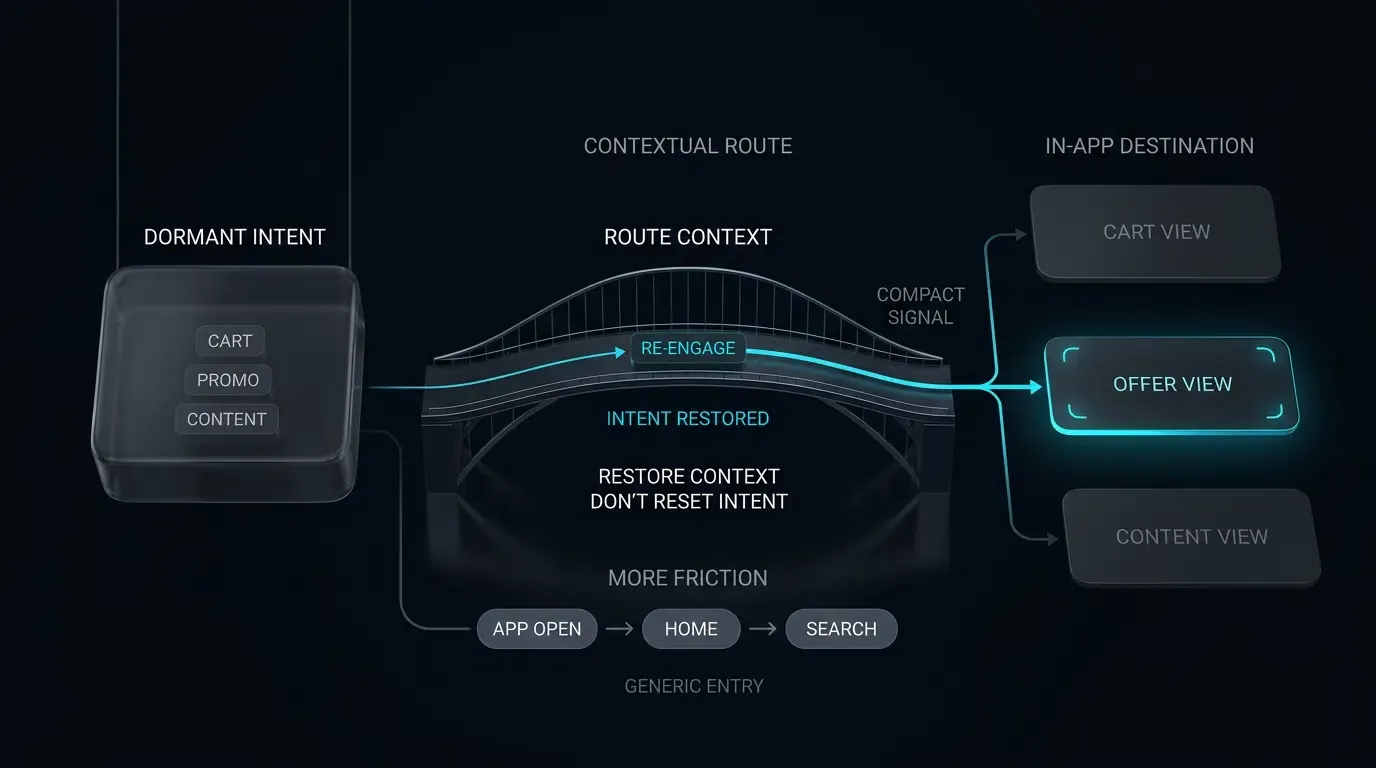
App engagement encompasses the frequency, depth, and duration of user interactions within a mobile application throughout their lifecycle. Leveraging contextual deep links in remarketing campaigns supports app engagement by routing dormant users from external web, messaging, and email touchpoints past generic home screens straight into targeted in-app content.
| Term | Definition | Related Entity | Search Intent Role |
|---|---|---|---|
| App Engagement | The depth and frequency of user interactions within a mobile application over time. | User Retention | Informational / Commercial |
| Web to App | The process of transitioning web visitors into native mobile application views. | Mobile Deep Linking | Informational |
| Remarketing | The strategic practice of re-engaging lapsed or dormant users through targeted campaigns. | Lifecycle Marketing | Informational |
Why Contextual Deep Linking Can Reduce Remarketing Friction
The Inefficiency of Static Messaging: How Main Menu Drop-Off Damages Campaign ROI
Mobile marketing campaigns frequently struggle with low conversion rates when re-engaging lapsed or dormant users. One contributor to this underperformance can be the deployment of static, non-contextual links in remarketing messages. When an e-commerce platform sends an SMS announcing a 20% discount on an item a user previously browsed, directing that user to a generic app home screen or an App Store product page introduces immediate friction.
Upon opening the app to its main lobby, the user must manually navigate through complex category hierarchies, locate search fields, and re-identify the specific product mentioned in the campaign. Each manual navigation step introduces cognitive load and friction, increasing the likelihood of user drop-off before reaching the checkout funnel. By dropping users onto generic entry points, growth teams risk diluting campaign relevance, inflating Customer Acquisition Costs (CAC), and diminishing the operational efficiency of their lifecycle marketing budgets.
Transitioning from Broadcast Retargeting to Intent-Preserving Deep Links
To optimize engagement, growth teams can transition from generic broadcast messaging to intent-preserving deep linking architectures. Rather than treating all re-engagement traffic as generic app launches, contextual deep linking embeds specific destination routes and parameter payloads directly within campaign URLs.
When an inactive user taps a contextual link within an email, SMS, or web banner, the underlying operating system routes the request directly into the native application where verified links are supported. The mobile SDK intercepts the incoming intent, parses the embedded parameters (such as scene=cart&item_id=SKU_9876&token=TK_1234567890abcdef), and automatically navigates the user to the corresponding product or checkout screen. OpoInstall, a mobile attribution and deep linking platform, enables marketing teams to generate dynamic routing links that bridge external web and messaging touchpoints with native in-app scenes.
Evaluating Time-to-Content as an Operational Metric for Re-Engagement Funnels
In lifecycle marketing, user attention is highly perishable. A useful product-defined operational metric is Time-to-Content (
In non-contextual campaigns,
How Does Home Screen Friction Degrade User Reactivation Funnels
Deconstructing the Abandonment Churn: From Campaign Click to Complex In-App Search
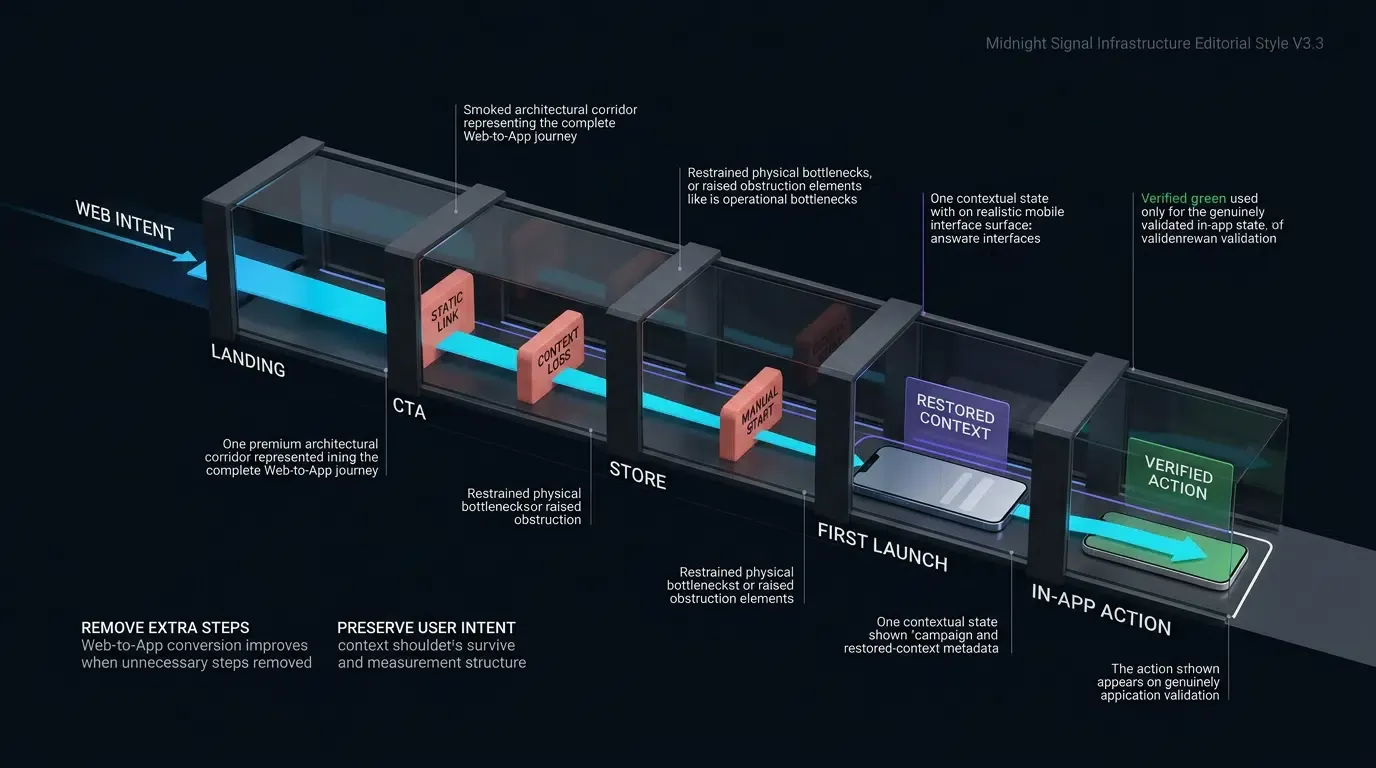
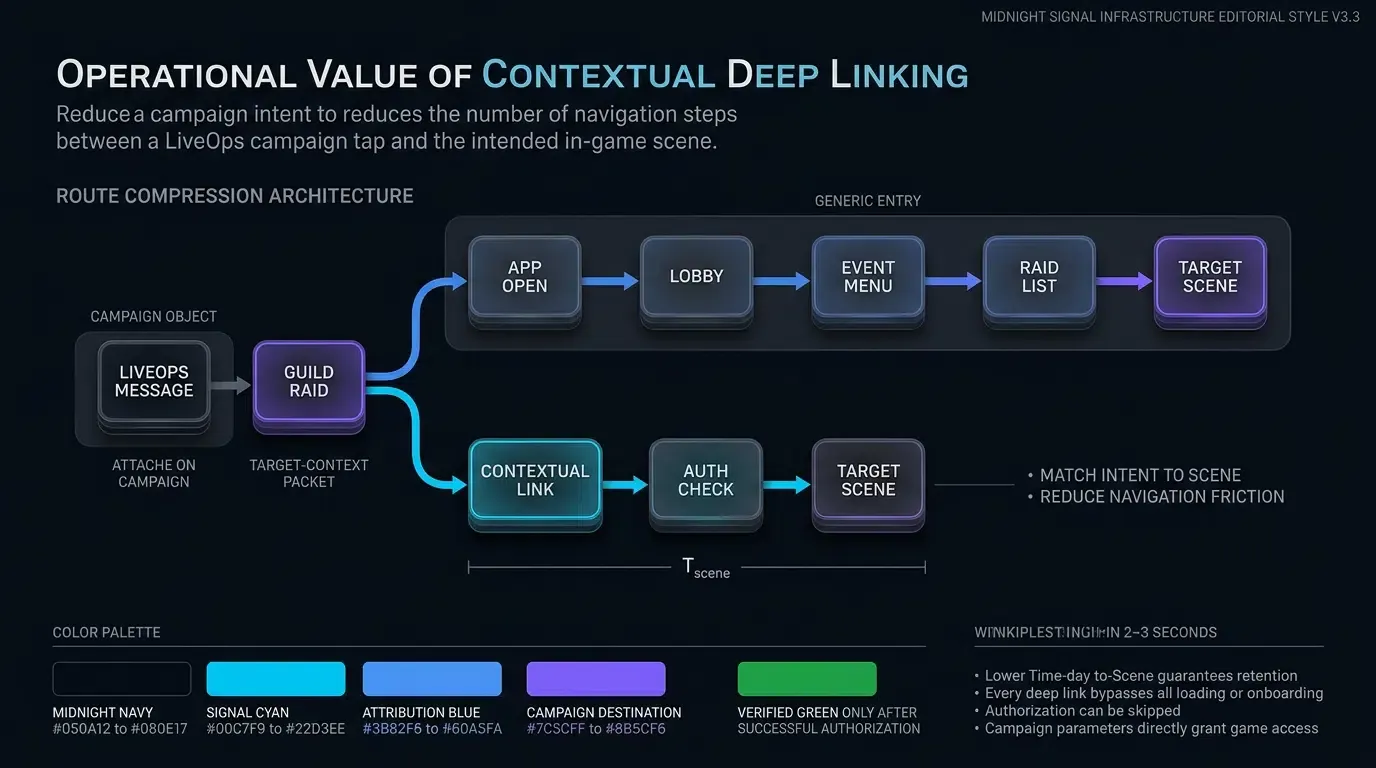
To understand the operational value of direct routing, evaluate the user path across standard versus deep-linked reactivation funnels:
-
Standard Remarketing Funnel (High Friction):
- Trigger: User taps a promotional SMS link for an abandoned cart item.
- Launch: OS opens the app; the app executes a cold start and renders the default home lobby.
- Search: User attempts to locate their previous cart or uses in-app search to find the item.
- Abandonment Point: If the search fails or the navigation takes multiple taps, the user exits the session.
- Outcome: Higher drop-off risk, lost conversion, reduced campaign efficiency.
-
Contextual Deep-Linked Funnel (Reduced Friction):
- Trigger: User taps a verified Universal Link or App Link containing an embedded routing token.
- Launch: OS verifies domain association and opens the native app directly.
- Route Extraction: The app SDK intercepts the payload and passes validated parameters to the navigation router.
- Direct Delivery: The app renders the pre-populated checkout screen with the promotional discount applied.
- Outcome: Immediate value delivery, streamlined conversion path, improved user experience.
Preserving Contextual Momentum: Routing Users to Carts, Discounts, and Saved States
Dormant users re-engage most effectively when presented with personalized, high-relevance contexts. Key re-engagement scenarios where deep linking preserves intent include:
- Cart Recovery: Routing users directly to their saved cart with active discount tokens applied, bypassing intermediate product catalog pages.
- Personalized Content Recommendations: Directing streaming or media subscribers straight to specific video episodes, audio playlists, or news articles.
- Time-Sensitive Event Access: Routing gaming or live-event users directly to active tournament lobbies or limited-time promotional modals.
- Financial & Account Alerts: Transitioning fintech users from security SMS alerts directly to specific transaction verification screens after secure biometric authentication.
Handling Cold Launches vs. Background Resumes During Cross-Channel Wakeups
Mobile operating systems deliver deep link payloads differently depending on the application’s runtime state:
- Warm Resume (Background State): The application is currently suspended in system memory. When the user taps a deep link, the OS brings the existing task to the foreground and delivers the URL intent via lifecycle delegates (
onNewIntenton Android,scene(_:openURLContexts:)orscene(_:continue:)on iOS). The app router transitions the active view controller without re-initializing application state. - Cold Start (Terminated State): The application process is not running. The OS allocates process memory, initializes application classes, and delivers the launch intent to the root activity or scene delegate. The client architecture must capture and persist the routing payload during initial startup, complete necessary dependency injections, and navigate to the target scene once the primary UI hierarchy is ready.
The Role of Deferred Deep Linking in Re-Engaging Uninstalled Users
A critical challenge in remarketing occurs when a dormant user has uninstalled the mobile application. Standard custom URI schemes fail completely on uninstalled devices, resulting in dead-end browser errors.
Deferred deep linking addresses this limitation. When an uninstalled user clicks a campaign link, the routing engine directs the browser to the appropriate app store while capturing the intended destination parameters on the attribution server. When the user downloads and launches the app for the first time, the OpoInstall SDK queries the attribution backend, retrieves the cached parameters, and enables the app to execute scene restoration on first launch where supported by the deployed attribution system and permitted by platform privacy policies.
Architectural Pathways for Web-to-App, SMS, and Email Remarketing
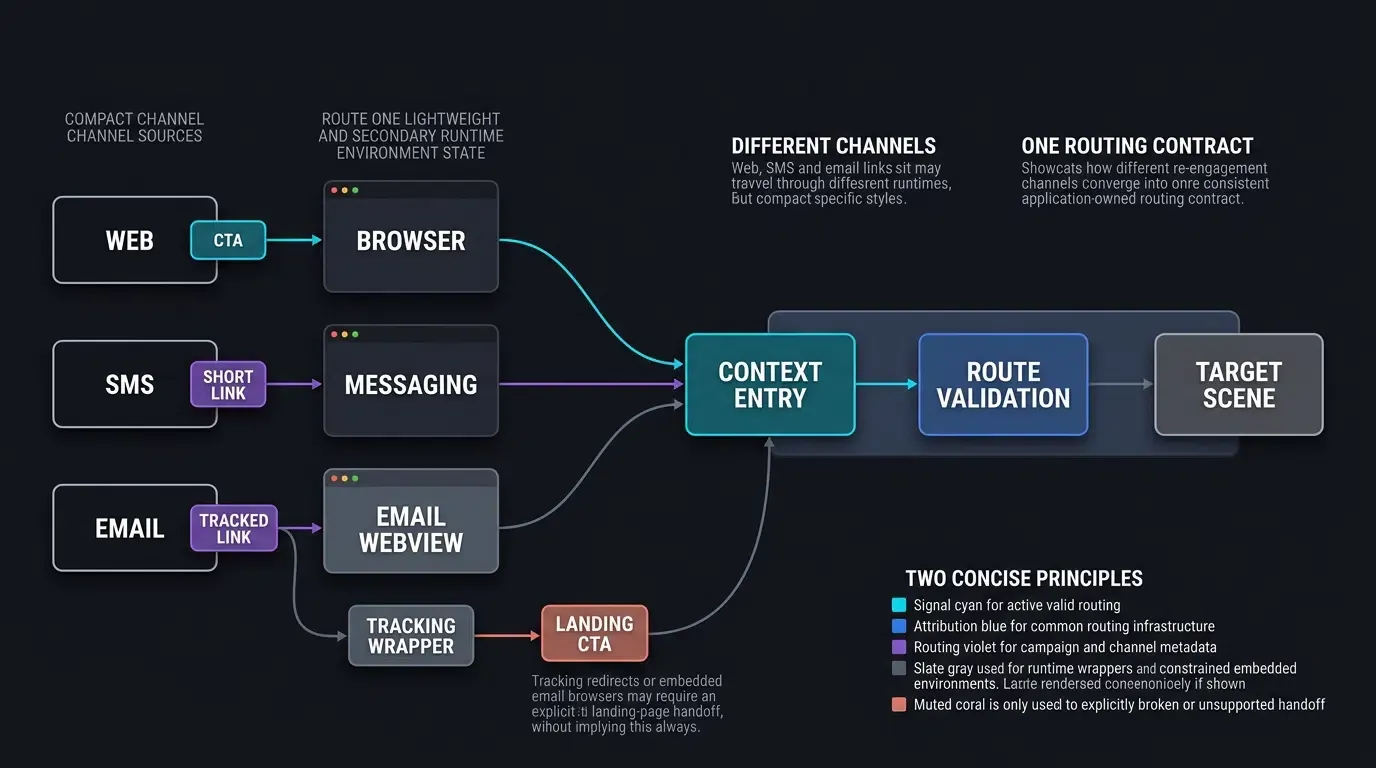
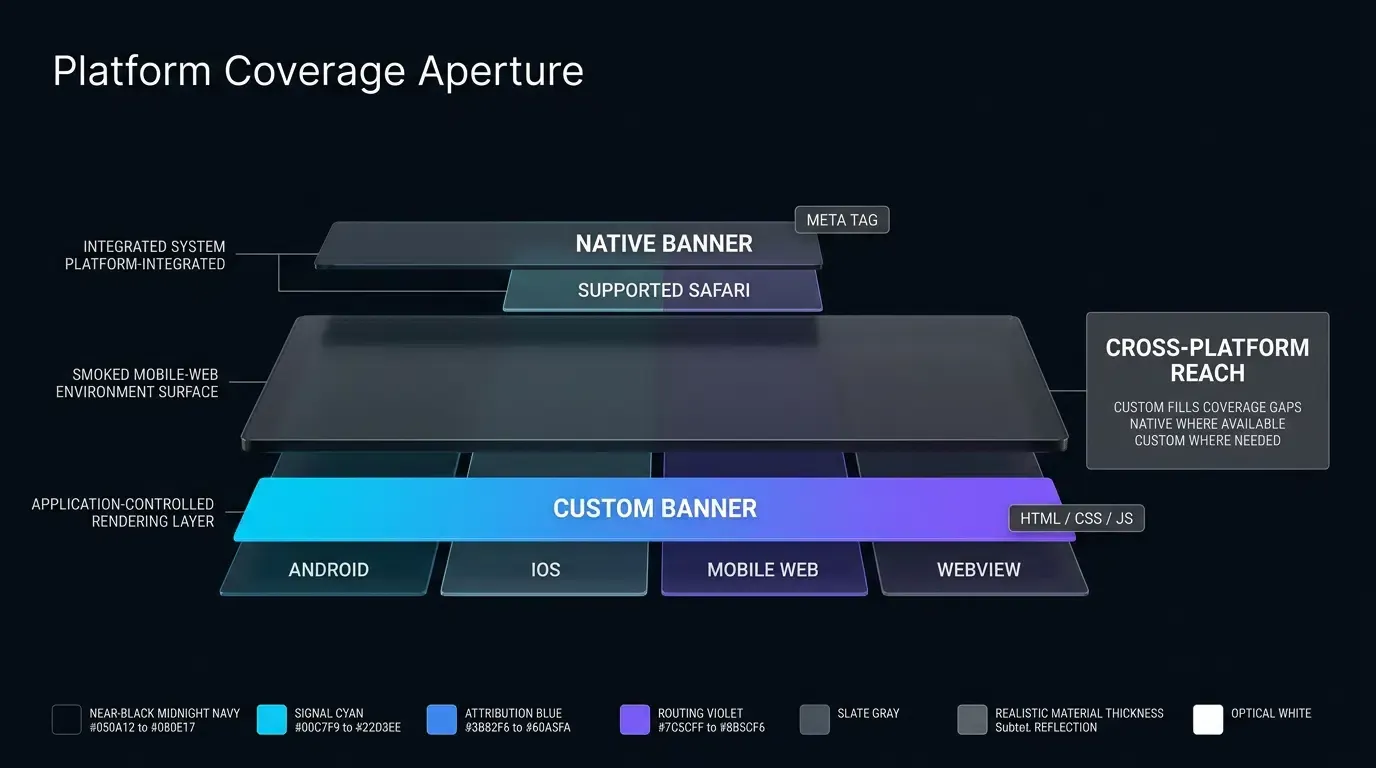
Web-to-App Interception: Deploying Contextual Banners on High-Traffic Mobile Web Pages
Many dormant app users interact with brands through mobile web browsers (such as Safari or Chrome) when searching on Google or tapping social media links. Growth teams can deploy contextual Web-to-App routing on mobile landing pages to transition these web visitors into the native app.
Using client-side JavaScript or dynamic Smart App Banners, the web page detects the mobile environment and renders an interactive prompt. When the user taps the banner, the script invokes the native Universal Link or App Link, transferring the user’s current browsing context (such as the specific product SKU being viewed) into the native application.
SMS and Messaging Workflows: Encapsulating Deep Links into Short Tracking URLs
SMS and direct messaging channels (such as WhatsApp, Line, or RCS) represent high-CTR remarketing touchpoints. However, character limits and visual aesthetics require marketing teams to encapsulate long parameter strings into branded short URLs (e.g., https://brand.link/spring24).
When possible, use the verified Universal Link or Android App Link domain as the user-facing destination. If a tracking or short-link redirect layer is required, validate redirect-chain behavior against each target OS, browser, and messaging runtime rather than assuming that an HTTP redirect to a verified URL will always produce an automated native app handoff.
Email Re-Engagement: Navigating Email Client In-App WebViews and Universal Link Handoffs
Email remarketing introduces architectural complexity due to email service provider (ESP) click-tracking wrappers and third-party email client webviews (such as the Gmail or Outlook embedded browsers). When an ESP wraps a deep link in its own tracking redirect, the custom tracking domain often lacks Apple Associated Domains or Android Digital Asset Links verification, causing the link to open in an in-app browser rather than launching the app.
Where tracking wrappers or embedded email browsers prevent direct Universal Link or App Link handoffs, provide an explicit user-controlled “Open in App” CTA on a verified HTTPS landing page. Do not assume that automated redirect chains or post-load scripts will force native app launches across all email client environments.
Securing Dynamic Route Tokens: Preventing Unauthorized Access to Private User Scenes
Deep link parameters originate from external, user-accessible channels. Attackers can alter URL parameters to attempt unauthorized access to restricted views (such as attempting to view another user’s cart: ?cart_id=1024).
In accordance with OWASP Mobile Application Security Testing Guide Guidance on Insecure Deep Links, applications must never rely on deep link query strings for authentication or authorization. Re-engagement payloads should pass opaque, short-lived route tokens rather than raw database IDs or session secrets. The native application must validate the user’s authenticated session locally and confirm with the backend that the active user is authorized to access the requested resource before rendering private data.
[Dormant User Receives Web CTA / SMS / Email Link]
                       │
                       ▼
         [OS / Browser Link Resolution]
           ┌───────────┴───────────┐
           ▼                       ▼
    [App Installed]         [App Not Installed]
           │                       │
           ▼                       ▼
    [Verified App Link]     [Web Routing Landing Page]
           │                       │
           ▼                       ▼
    [Direct Native Launch]  [Explicit App Store Fallback]
           │                       │
           │                [Install & First Launch]
           │                       │
           └───────────┬───────────┘
                       ▼
        [SDK Parameter Extraction]
                       │
                       ▼
        [Input Sanitization & Allowlist]
                       │
                       ▼
        [Server Authorization & State Check]
           ┌───────────┴───────────┐
           ▼                       ▼
    [Target Scene Loaded]   [Safe Event / Home Fallback]
How to Structure Dynamic Routing Payloads for Personalized Re-Engagement
Structuring URL Parameters for Common Verticals
Standardizing payload schemas ensures clean separation between network parsing and application navigation. Common parameter schemas across primary industry verticals include:
- E-Commerce:
https://app.example.com/promo/cart?scene=cart&item_id=SKU_9981&token=TK_1234567890abcdef&utm_source=sms_reactivation - Fintech:
https://app.example.com/security/verify?scene=verify&item_id=TX_5501&token=TK_1234567890abcdef&utm_source=email_alert - Streaming & Media:
https://app.example.com/watch/episode?scene=player&item_id=EP_12&token=TK_1234567890abcdef&utm_source=push - Gaming:
https://app.example.com/events/raid?scene=event_hub&item_id=RAID_77&token=TK_1234567890abcdef&utm_source=social
Enforcing Data-Type Validation, Character Whitelists, and Expiration Timestamps
To reduce parser abuse, injection risks, malformed routing input, and resource-exhaustion edge cases via deep links, incoming parameter strings must pass strict validation before processing:
- Alphanumeric Allowlisting: Enforce regular expression filtering on identifiers (e.g.,
^[A-Za-z0-9_-]{1,64}$), discarding payloads containing control characters, quotation marks, or script tags. - Route Token Verification: Restrict route tokens to opaque, single-use strings conforming to strict length constraints (e.g., 16 to 128 characters) and validate expiration timestamps on the backend before route execution.
Separating Routing Identifiers from User Authentication Credentials
Under no circumstances should deep link URLs carry user passwords, unhashed API keys, or long-lived authentication tokens. If a user taps an email link on a shared device, exposing session tokens in the URL creates severe account takeover vulnerabilities.
Deep links should carry only routing intent (what content to display). The native app must independently retrieve user identity from its secure local credential store (such as iOS Keychain or Android Keystore) and authenticate the session with the backend before displaying user-specific account data.
Binding Contextual Attribution Tokens Using OpoInstall
To evaluate which remarketing channels generate the highest reactivation ROI, lifecycle teams must attribute in-app conversions back to specific campaigns.
OpoInstall integrates parameter extraction with multi-channel attribution. When a user enters the app via a deep link, the SDK captures the channel code, campaign identifier, and custom payload, transmitting attribution signals to the console while exposing the payload to the local app router. Review the SDK integration documentation for technical specifications on payload structure and event binding.
Client-Side Implementation for Safe Wakeup Parameter Handling
Android Intent Interception in Kotlin: Managing onCreate and onNewIntent Lifecycles
On Android, deep-link intent processing should be implemented in onCreate for newly created activities and in onNewIntent when your activity or task configuration reuses an existing activity instance. The implementation must extract the incoming URI or SDK payload, normalize data types, enforce fail-closed validation, and verify backend authorization before triggering UI navigation.
iOS Universal Link Processing in Swift: Implementing UIWindowSceneDelegate Continuations
In scene-based iOS apps, Universal Links are delivered through connectionOptions.userActivities on cold launch and scene(_:continue:) when the app is already running or suspended. The implementation validates the incoming NSUserActivity, delegates attribution handling to the SDK, and extracts the payload via the SDK’s wakeup listener, normalizing the payload representation before dispatching the route to the main UI thread.
The technical implementation below demonstrates dual-platform integration for capturing, validating, and routing re-engagement deep links in native Android (Kotlin) and iOS (Swift). Certified SDK binaries and engine plugins can be downloaded from the OpoInstall SDK download center.
// Android: MainActivity.kt - Re-Engagement Intent Processing & Route Validation Gate
// Reference integration example. Verify package names, callback classes, initialization order,
// wakeup methods, and the exact runtime representation of appData.data against the production OpoInstall SDK release.
package com.example.app.ui

import android.content.Intent
import android.net.Uri
import android.os.Bundle
import android.util.Log
import androidx.appcompat.app.AppCompatActivity
import com.opoinstall.api.OpoInstall
import com.opoinstall.api.listener.AppWakeUpAdapter
import com.opoinstall.api.model.AppData
import org.json.JSONObject

data class CanonicalReengagementPayload(
    val scene: String,
    val targetId: String,
    val routeToken: String,
    val utmSource: String,
    val rawKeys: Set<String>
)

object OpoInstallPayloadAdapter {
    /**
     * Normalizes heterogeneous SDK data representations (JSON String, Map, or JSONObject)
     * into a canonical application-owned payload model with strict fail-closed type checking.
     */
    fun normalize(rawPayload: Any?): CanonicalReengagementPayload? {
        if (rawPayload == null) return null

        val stringMap = when (rawPayload) {
            is String -> parseJsonStringStrict(rawPayload)
            is Map<*, *> -> parseMapStrict(rawPayload)
            is JSONObject -> parseJsonObjectStrict(rawPayload)
            else -> {
                Log.w("PayloadAdapter", "Unsupported SDK payload type: ${rawPayload.javaClass.name}")
                null
            }
        } ?: return null

        val scene = stringMap["scene"] ?: ""
        val routeToken = stringMap["token"] ?: ""
        // Require non-empty scene and token identifiers
        if (scene.isEmpty() || routeToken.isEmpty()) {
            return null
        }

        return CanonicalReengagementPayload(
            scene = scene,
            targetId = stringMap["item_id"] ?: "",
            routeToken = routeToken,
            utmSource = stringMap["utm_source"] ?: "",
            rawKeys = stringMap.keys
        )
    }

    private fun parseJsonStringStrict(rawJson: String): Map<String, String>? {
        return try {
            val json = JSONObject(rawJson)
            parseJsonObjectStrict(json)
        } catch (e: Exception) {
            Log.e("PayloadAdapter", "JSON string parsing failed", e)
            null
        }
    }

    private fun parseJsonObjectStrict(json: JSONObject): Map<String, String>? {
        val map = mutableMapOf<String, String>()
        for (key in json.keys()) {
            val value = json.opt(key)
            // Fail-closed: reject non-String types to prevent type coercion exploits
            if (value !is String) {
                Log.w("PayloadAdapter", "Rejected non-string payload value for key: $key")
                return null
            }
            map[key] = value
        }
        return map
    }

    private fun parseMapStrict(rawMap: Map<*, *>): Map<String, String>? {
        val map = mutableMapOf<String, String>()
        for ((key, value) in rawMap) {
            if (key !is String || value !is String) {
                Log.w("PayloadAdapter", "Rejected non-string key or value in raw map: $key")
                return null
            }
            map[key] = value
        }
        return map
    }
}

object ReengagementRouteValidator {
    private val allowedKeys = setOf("scene", "item_id", "token", "utm_source")
    private val allowedScenes = setOf("cart", "product_detail", "promo_hub", "order_status", "verify", "player", "event_hub")

    fun validate(payload: CanonicalReengagementPayload): CanonicalReengagementPayload? {
        // Step 1: Strict fail-closed key validation (reject unknown payload keys)
        if (!allowedKeys.containsAll(payload.rawKeys)) {
            return null
        }

        // Step 2: Validate scene against strict allowlist (matching all documented vertical schemas)
        if (!allowedScenes.contains(payload.scene)) {
            return null
        }

        // Step 3: Enforce alphanumeric and length limits on target identifier
        if (payload.targetId.isNotEmpty() && (payload.targetId.length > 64 || !payload.targetId.matches(Regex("^[A-Za-z0-9_-]+$")))) {
            return null
        }

        // Step 4: Validate route token format (opaque, single-use authorization token)
        if (payload.routeToken.length !in 16..128 || !payload.routeToken.matches(Regex("^[A-Za-z0-9_-]+$"))) {
            return null
        }

        // Step 5: Validate optional UTM source if present
        if (payload.utmSource.isNotEmpty() && (payload.utmSource.length > 64 || !payload.utmSource.matches(Regex("^[A-Za-z0-9_-]+$")))) {
            return null
        }

        return payload
    }
}

class MainActivity : AppCompatActivity() {

    override fun onCreate(savedInstanceState: Bundle?) {
        super.onCreate(savedInstanceState)
        setContentView(R.layout.activity_main)

        // Process cold-start re-engagement intent
        intent?.let { handleReengagementIntent(it) }
    }

    override fun onNewIntent(intent: Intent) {
        super.onNewIntent(intent)
        setIntent(intent)

        // Process warm-resume re-engagement intent when Activity is reused based on launchMode/task configuration
        handleReengagementIntent(intent)
    }

    private fun handleReengagementIntent(intent: Intent) {
        OpoInstall.getInstance().getWakeUp(intent, object : AppWakeUpAdapter() {
            override fun onWakeUp(appData: AppData?) {
                if (appData == null) return

                // Step 1: Normalize vendor SDK payload into canonical DTO with strict type checking
                val canonicalPayload = OpoInstallPayloadAdapter.normalize(appData.data)
                if (canonicalPayload == null) {
                    runOnUiThread { executeLobbyFallback("Malformed or unreadable payload format.") }
                    return
                }

                // Step 2: Validate untrusted payload data with strict fail-closed checks
                val validatedRoute = ReengagementRouteValidator.validate(canonicalPayload)
                if (validatedRoute != null) {
                    // Step 3: Verify server authorization and resource availability
                    // Note: Authenticated user session is supplied by the app state, NOT the URL; routeToken is an opaque reference
                    BackendRouteAuthorizer.verifyRouteAuthorization(validatedRoute.scene, validatedRoute.targetId, validatedRoute.routeToken) { isAuthorized ->
                        runOnUiThread {
                            if (isAuthorized) {
                                executeTargetNavigation(validatedRoute)
                            } else {
                                executeLobbyFallback("Requested item or promotion is no longer available.")
                            }
                        }
                    }
                } else {
                    runOnUiThread {
                        executeLobbyFallback("Unauthorized or invalid re-engagement request.")
                    }
                }
            }
        })
    }

    private fun executeTargetNavigation(route: CanonicalReengagementPayload) {
        Log.i("AppNavigator", "Navigating to re-engagement target: ${route.scene}, ID: ${route.targetId}")
        // Dispatch to internal navigation controller
    }

    private fun executeLobbyFallback(reason: String) {
        Log.w("AppNavigator", "Safe fallback to home lobby: $reason")
        // Display user notice and navigate to default home view
    }
}

// App-specific backend authorization placeholder (not an OpoInstall SDK API)
object BackendRouteAuthorizer {
    fun verifyRouteAuthorization(scene: String, targetId: String, token: String, callback: (Boolean) -> Unit) {
        // Placeholder only: production backend must validate authenticated-user binding, token expiry, intended resource binding, and single-use/replay status
        val isResourceActive = true
        callback(isResourceActive)
    }
}
// iOS: SceneDelegate.swift - Universal Link Processing & Route Validation Gate
// Reference integration example. Verify package names, callback classes, initialization order,
// wakeup methods, and the exact runtime representation of appData.data against the production OpoInstall SDK release.
import UIKit
import libOpoInstallSDK

struct CanonicalReengagementPayload {
    let scene: String
    let targetId: String
    let routeToken: String
    let utmSource: String
    let rawKeys: Set<String>
}

class OpoInstallPayloadAdapter {
    /**
     * Normalizes heterogeneous SDK data representations (Dictionary, JSON String, or custom object)
     * into an application-owned canonical payload model with strict fail-closed type checking.
     */
    static func normalize(rawPayload: Any?) -> CanonicalReengagementPayload? {
        guard let payload = rawPayload else { return nil }

        if let dict = payload as? [String: Any] {
            return normalizeDictionaryStrict(dict)
        } else if let jsonString = payload as? String, let data = jsonString.data(using: .utf8) {
            do {
                if let dict = try JSONSerialization.jsonObject(with: data, options: []) as? [String: Any] {
                    return normalizeDictionaryStrict(dict)
                }
            } catch {
                NSLog("[PayloadAdapter] JSON deserialization failed: %@", error.localizedDescription)
                return nil
            }
        }
        return nil
    }

    private static func normalizeDictionaryStrict(_ dict: [String: Any]) -> CanonicalReengagementPayload? {
        // Fail-closed: ensure all values present in the dictionary are strictly Strings
        for (key, value) in dict {
            guard value is String else {
                NSLog("[PayloadAdapter] Rejected non-string value for key: %@", key)
                return nil
            }
        }

        guard let scene = dict["scene"] as? String, !scene.isEmpty,
              let routeToken = dict["token"] as? String, !routeToken.isEmpty else {
            return nil
        }

        let targetId = dict["item_id"] as? String ?? ""
        let utmSource = dict["utm_source"] as? String ?? ""
        let keys = Set(dict.keys)

        return CanonicalReengagementPayload(
            scene: scene,
            targetId: targetId,
            routeToken: routeToken,
            utmSource: utmSource,
            rawKeys: keys
        )
    }
}

class ReengagementRouteValidator {
    private static let allowedKeys: Set<String> = ["scene", "item_id", "token", "utm_source"]
    private static let allowedScenes: Set<String> = ["cart", "product_detail", "promo_hub", "order_status", "verify", "player", "event_hub"]

    static func validate(payload: CanonicalReengagementPayload) -> CanonicalReengagementPayload? {
        // Step 1: Strict fail-closed key validation (reject unknown payload keys)
        guard payload.rawKeys.isSubset(of: allowedKeys) else {
            return nil
        }

        // Step 2: Validate scene against strict allowlist (matching all documented vertical schemas)
        guard allowedScenes.contains(payload.scene) else {
            return nil
        }

        // Step 3: Enforce alphanumeric and length limits on target identifier
        let validChars = CharacterSet(charactersIn: "abcdefghijklmnopqrstuvwxyzABCDEFGHIJKLMNOPQRSTUVWXYZ0123456789_-")
        if !payload.targetId.isEmpty {
            guard payload.targetId.count <= 64, payload.targetId.rangeOfCharacter(from: validChars.inverted) == nil else {
                return nil
            }
        }

        // Step 4: Validate route token format (opaque, single-use authorization token)
        guard payload.routeToken.count >= 16 && payload.routeToken.count <= 128,
              payload.routeToken.rangeOfCharacter(from: validChars.inverted) == nil else {
                return nil
        }

        // Step 5: Validate optional UTM source if present
        if !payload.utmSource.isEmpty {
            guard payload.utmSource.count <= 64, payload.utmSource.rangeOfCharacter(from: validChars.inverted) == nil else {
                return nil
            }
        }

        return payload
    }
}

class SceneDelegate: UIResponder, UIWindowSceneDelegate, OpoInstallDelegate {

    var window: UIWindow?

    func scene(
        _ scene: UIScene,
        willConnectTo session: UISceneSession,
        options connectionOptions: UIScene.ConnectionOptions
    ) {
        guard let _ = (scene as? UIWindowScene) else { return }

        // Initialize OpoInstall SDK
        OpoInstallSDK.initWith(self)

        // Handle cold launch via Universal Link
        if let userActivity = connectionOptions.userActivities.first(where: { $0.activityType == NSUserActivityTypeBrowsingWeb }) {
            OpoInstallSDK.continue(userActivity)
        }
    }

    func scene(_ scene: UIScene, continue userActivity: NSUserActivity) {
        // Handle warm resume via Universal Link
        if userActivity.activityType == NSUserActivityTypeBrowsingWeb {
            OpoInstallSDK.continue(userActivity)
        }
    }

    // OpoInstallDelegate Wakeup Callback
    func getWakeUpParams(_ appData: OpoInstallData?) {
        guard let data = appData else {
            return
        }

        // Step 1: Normalize vendor SDK payload representation into canonical application DTO with strict type checking
        guard let canonicalPayload = OpoInstallPayloadAdapter.normalize(rawPayload: data.data) else {
            DispatchQueue.main.async {
                self.executeLobbyFallback(reason: "Unrecognized or invalid payload data format")
            }
            return
        }

        // Step 2: Validate and sanitize untrusted payload data with fail-closed checks
        if let validatedRoute = ReengagementRouteValidator.validate(payload: canonicalPayload) {

            // Step 3: Validate server authorization and resource state using authenticated app session
            // Note: Authenticated user session is supplied by the app state, NOT the URL; routeToken is an opaque reference
            BackendRouteAuthorizer.shared.verifyRouteAuthorization(scene: validatedRoute.scene, targetId: validatedRoute.targetId, token: validatedRoute.routeToken) { isAuthorized in
                DispatchQueue.main.async {
                    if isAuthorized {
                        self.executeTargetNavigation(route: validatedRoute)
                    } else {
                        self.executeLobbyFallback(reason: "Resource expired or unauthorized")
                    }
                }
            }
        } else {
            DispatchQueue.main.async {
                self.executeLobbyFallback(reason: "Malformed or unauthorized route payload")
            }
        }
    }

    private func executeTargetNavigation(route: CanonicalReengagementPayload) {
        NSLog("[AppNavigator] Navigating to target scene: %@, ID: %@", route.scene, route.targetId)
        // Execute internal view controller transition
    }

    private func executeLobbyFallback(reason: String) {
        NSLog("[AppNavigator] Safe fallback to home lobby: %@", reason)
        // Display notice and route to root view controller
    }
}

// App-specific backend authorization placeholder (not an OpoInstall SDK API)
class BackendRouteAuthorizer {
    static let shared = BackendRouteAuthorizer()

    func verifyRouteAuthorization(scene: String, targetId: String, token: String, completion: @escaping (Bool) -> Void) {
        // Placeholder only: production backend must validate authenticated-user binding, token expiry, intended resource binding, and single-use/replay status
        let isResourceAvailable = true
        completion(isResourceAvailable)
    }
}
Graceful Degradation: Managing Stale Campaigns, Expired Promotions, and Sold-Out Items
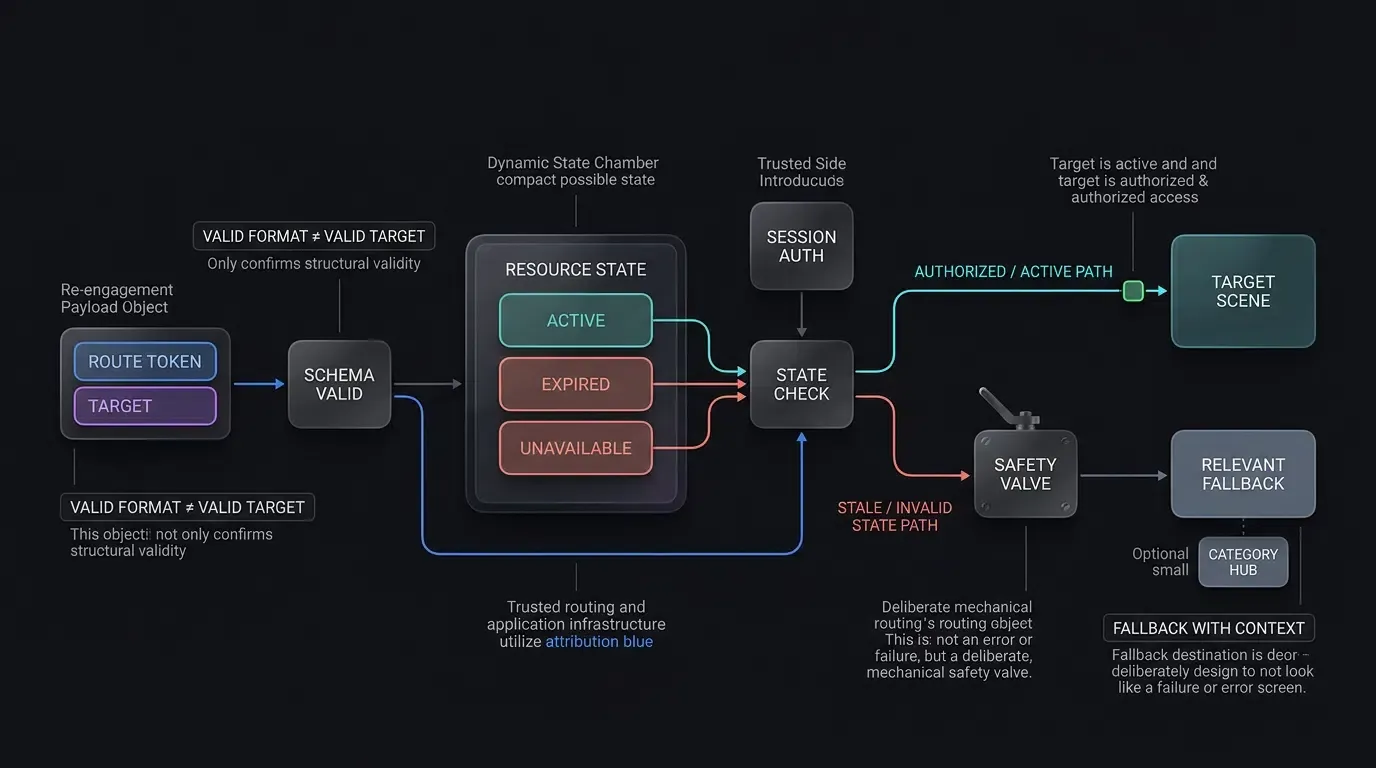
In fast-moving marketing environments, users frequently click remarketing links days or weeks after a promotion has concluded. If an application attempts to load an expired promotion or a deleted item without state validation, the user encounters a blank view or an unhandled crash.
Production architectures enforce a two-tier fallback gate:
- Client-Side Schema Verification: If the payload structure is malformed or contains unauthorized keys, the app immediately redirects to the default home screen.
- Server-Side State Verification: If the schema is valid but the underlying resource is unavailable (e.g., a flash sale has ended), the app renders an informative notice modal (e.g., “This promotion has expired, but check out today’s top deals”) and smoothly transitions the user to the active category hub.
Measuring App Engagement and Reactivation Funnel Performance
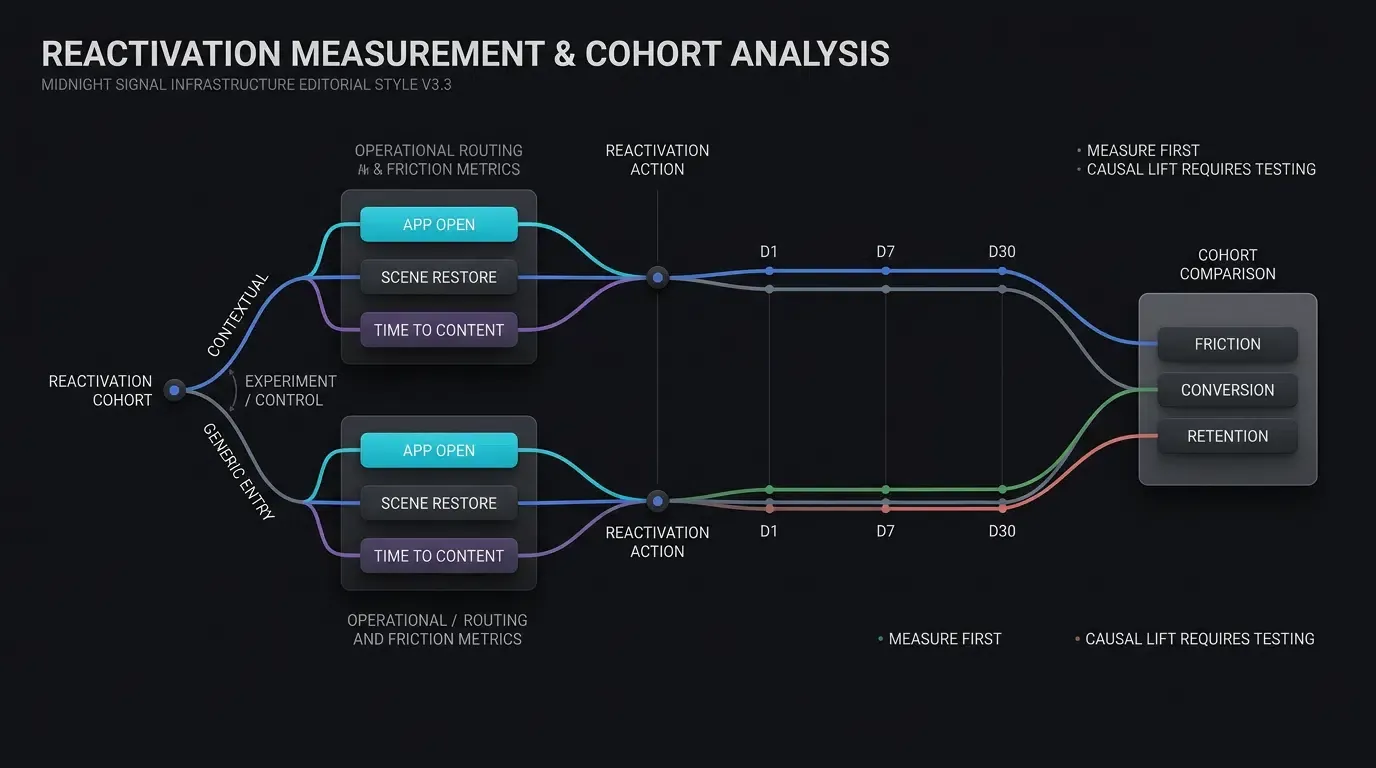
Key Telemetry Metrics for Re-Engagement Campaigns
To evaluate remarketing funnels empirically, growth teams track performance across four primary telemetry gates:
- Click-to-App-Open Rate (CAOR): The proportion of tracked remarketing link clicks that result in a verified native app open.
- Scene Restoration Rate: The percentage of deep-linked app opens that successfully resolve and render the target in-app scene without falling back to the home lobby.
- Reactivation Conversion Rate (RCR): The proportion of reactivated users who complete a core down-funnel action (such as placing an order, completing a level, or subscribing) within the campaign’s predefined attribution window (for example, 24 hours).
- Time-to-Content (
): The average seconds elapsed from link click to active scene display, monitored as an operational friction metric.
Cohort Retention Auditing: Evaluating D1, D7, and D30 Retention Curves for Reactivated Users
Measuring immediate conversion is insufficient; lifecycle teams must audit whether reactivated users remain active over time. Using Cohort Analysis, data teams group reactivated users by campaign source and track their retention curves across Day 1, Day 7, and Day 30 benchmarks:
Reactivated cohorts that receive contextual deep linking can be compared against generic-entry cohorts to determine whether direct scene routing is associated with higher D7 or D30 retention in a given product.
Illustrative Routing Characteristics and Re-Engagement Channel Matrix
The table below provides a qualitative comparison of primary re-engagement delivery channels across technical friction and operational hypotheses:
| Re-Engagement Channel | Primary Transport Mechanism | User Interaction Path | Measurement Hypothesis | Primary Technical Risk |
|---|---|---|---|---|
| Generic Push | Direct App Launch | Opens main home screen | Test baseline engagement without contextual routing | Main menu drop-off |
| Contextual SMS Link | Verified Universal / App Link | Direct in-app scene routing | Test whether direct scene routing reduces checkout friction | Stale / expired promotion link |
| Email Remarketing | HTTPS Tracking URL | Web landing or in-app browser | Measure tracking-wrapper and embedded webview routing loss | In-app browser link suppression |
| Web-to-App Banner | Dynamic Contextual Banner | Interactive button click | Measure handoff conversion by browser and runtime | Browser same-domain navigation |
Frequently Asked Questions (FAQ)
How do deep links improve retention rates for dormant users?
What happens if a dormant user clicks a deep link after uninstalling the app?
How should apps handle deep links pointing to expired promotions or sold-out items?
Summary and Decision Framework
Optimizing mobile app engagement requires eliminating the friction between a user’s intent to re-engage and the in-app delivery of value. Relying on generic home screen redirects creates unnecessary barriers that can erode remarketing efficiency and increase user drop-off.
By deploying contextual deep links across web, SMS, and email touchpoints, growth teams create direct pathways into native application scenes. Implementing robust server-side authorization gates, input sanitization, and graceful fallbacks ensures that re-engagement campaigns operate reliably and securely across all user segments. Downstream retention improvements and campaign ROI gains should be validated empirically through title-specific cohort experiments.
To learn how to deploy contextual deep linking and parameter routing across your growth funnels, review the SDK integration documentation, download the client libraries from the OpoInstall SDK download center, explore the mobile attribution implementation reference, or register your application on the OpoInstall developer console.
Related Materials
-
Concepts: App Engagement, User Reactivation, Scene Restoration, Cohort Analysis, Remarketing Funnels
-
Technologies: Universal Links, Android App Links, Deferred Deep Linking, W3C Page Visibility API
-
Standards: IETF RFC 3986 Uniform Resource Identifier, Apple Associated Domains Specification, Android Digital Asset Links Protocol, OWASP Mobile Application Security Testing Guide (MASTG)
-
APIs: OpoInstall Dynamic Routing API, Android getIntent Intent Processing, iOS continueUserActivity Delegate
-
Official Documentation & References:
Share this article