How to optimize the web to app conversion funnel? Optimizing the web to app conversion funnel requires replacing static store links with dynamic, parameter-passing URLs that carry marketing tokens through installation, automatically restoring context on first launch to eliminate manual promo codes and reduce onboarding drop-off.
A web to app conversion funnel represents the end-to-end multi-step user journey from initial mobile web landing page discovery to native application installation and post-install activation. Optimizing this funnel involves eliminating onboarding barriers—such as manual promo code entry and disconnected routing—by leveraging deferred deep linking to restore contextual intent on first launch.
| Term | Definition | Related Entity | Search Intent Role |
|---|---|---|---|
| Web to App | The architectural process of routing web browser visitors into native mobile apps. | Mobile Deep Linking | Informational / Commercial |
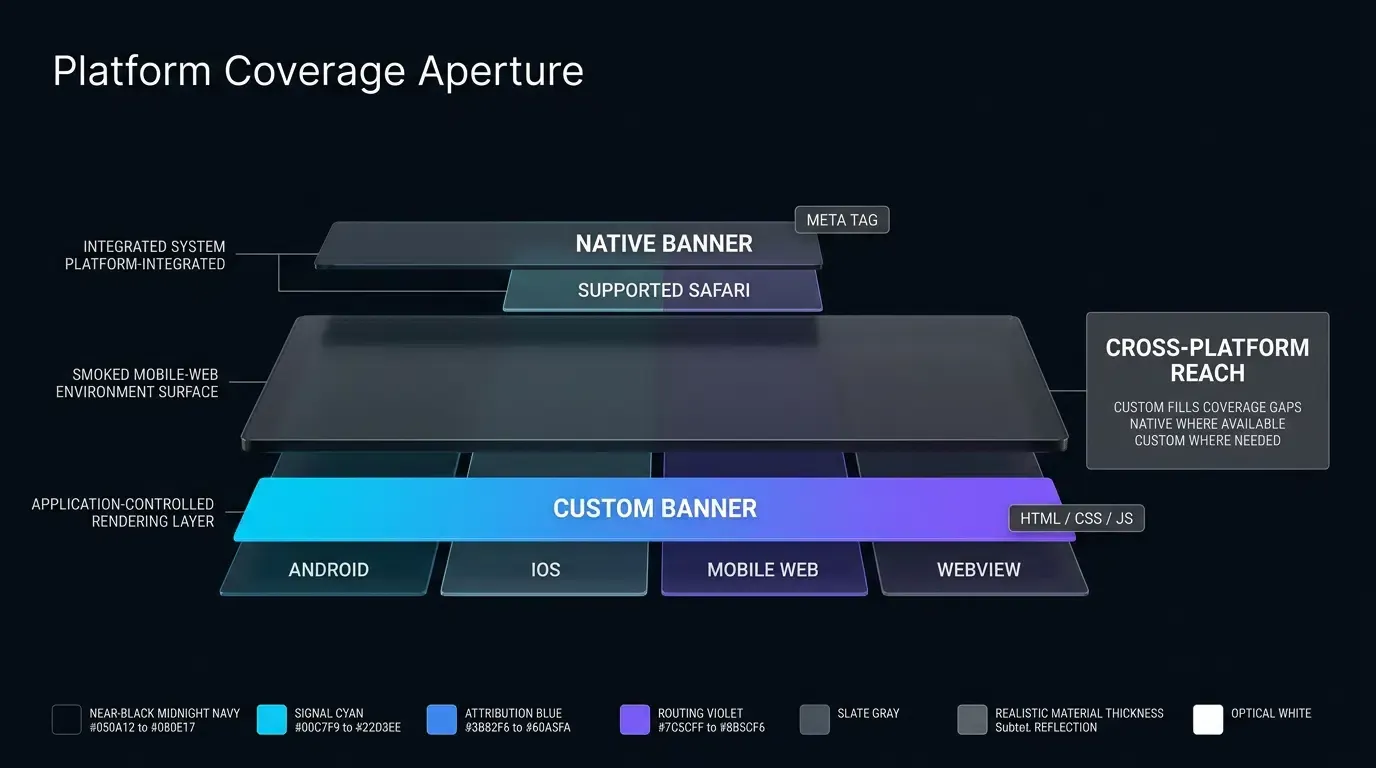
| Apple Smart App Banner | A Safari-native promotional banner configured via the apple-itunes-app meta tag. | Safari Web Navigation | Informational |
| Custom Web-to-App Banner | A cross-browser HTML and JavaScript component that presents dynamic app launch or download CTAs. | Web to App Redirection | Informational |
| Conversion Tracking | The systematic measurement of user transitions across specific funnel milestones. | Funnel Analytics | Technical / Informational |
| Mobile SDK | A native client-side library responsible for parameter extraction and lifecycle attribution. | Native Mobile App | Technical / Informational |
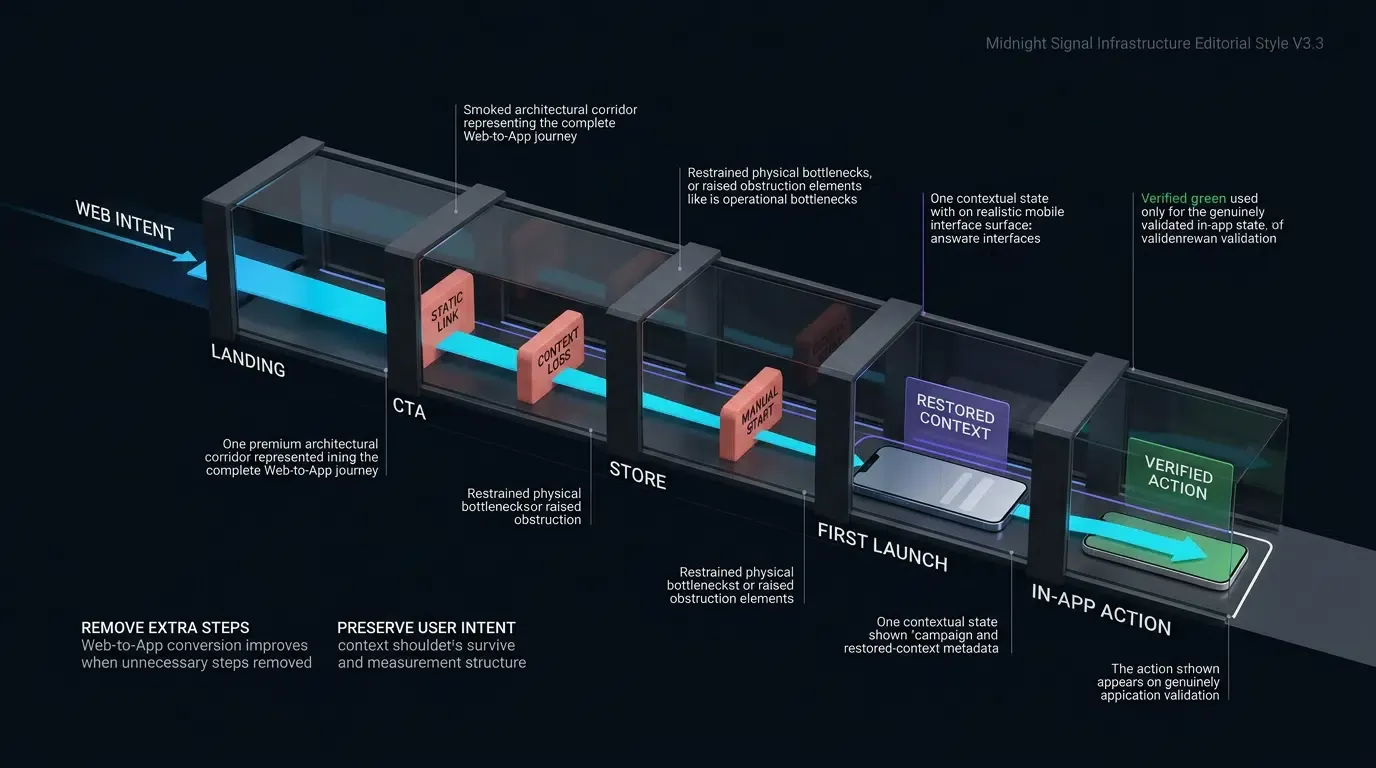
Deconstructing the 5-Stage Web to App Conversion Funnel
Stage 1: Web Landing Discovery (SEO, Paid Search, and Social Campaigns)
The Web to App funnel begins when a prospective user lands on a mobile web page. Traffic originates from diverse acquisition channels, including organic search (SEO), paid search ads, influencer links, social media discovery, and partner blogs. At this top-of-funnel stage, the visitor evaluates the product offering within a mobile browser (such as Safari, Chrome, or Firefox).
The operational objective of Stage 1 is capturing visitor intent while minimizing page load latency. Mobile web pages with slow rendering times or cluttered layouts experience elevated bounce rates. To maximize downstream conversion potential, web landing pages must deliver clear value propositions and establish frictionless technical pathways toward native application adoption.
Stage 2: Web CTA Engagement (Smart App Banners and Interactive Buttons)
Once engaged with web content, the user encounters a call-to-action (CTA) designed to transition them toward the native application. This interaction typically occurs through interactive “Install App” buttons, promotional coupon banners, or contextual banners.
At Stage 2, technical friction manifests if the redirection mechanism behaves unpredictably. If the user already has the application installed, tapping the CTA should execute a direct deep link wakeup via Universal Links or App Links. If the user does not have the app, the client script must capture the current contextual parameters (e.g., promo codes, inviter tokens, product IDs) and prepare them for deferred transmission before initiating store routing.
Stage 3: App Store Transition (Google Play and Apple App Store Routing)
When an uninstalled user commits to downloading the application, the web routing layer directs the browser to the official platform marketplace: the Apple App Store for iOS or the Google Play Store for Android.
Stage 3 represents the traditional “black box” of mobile user acquisition. Because standard app store listings are hosted on closed third-party platforms, web developers cannot execute custom client-side JavaScript during the download process. Unoptimized funnels lose contextual metadata during this transition, severing the link between the initial marketing click and the post-install experience.
Stage 4: First Launch & Parameter Restoration (Bridging the Store Gap)
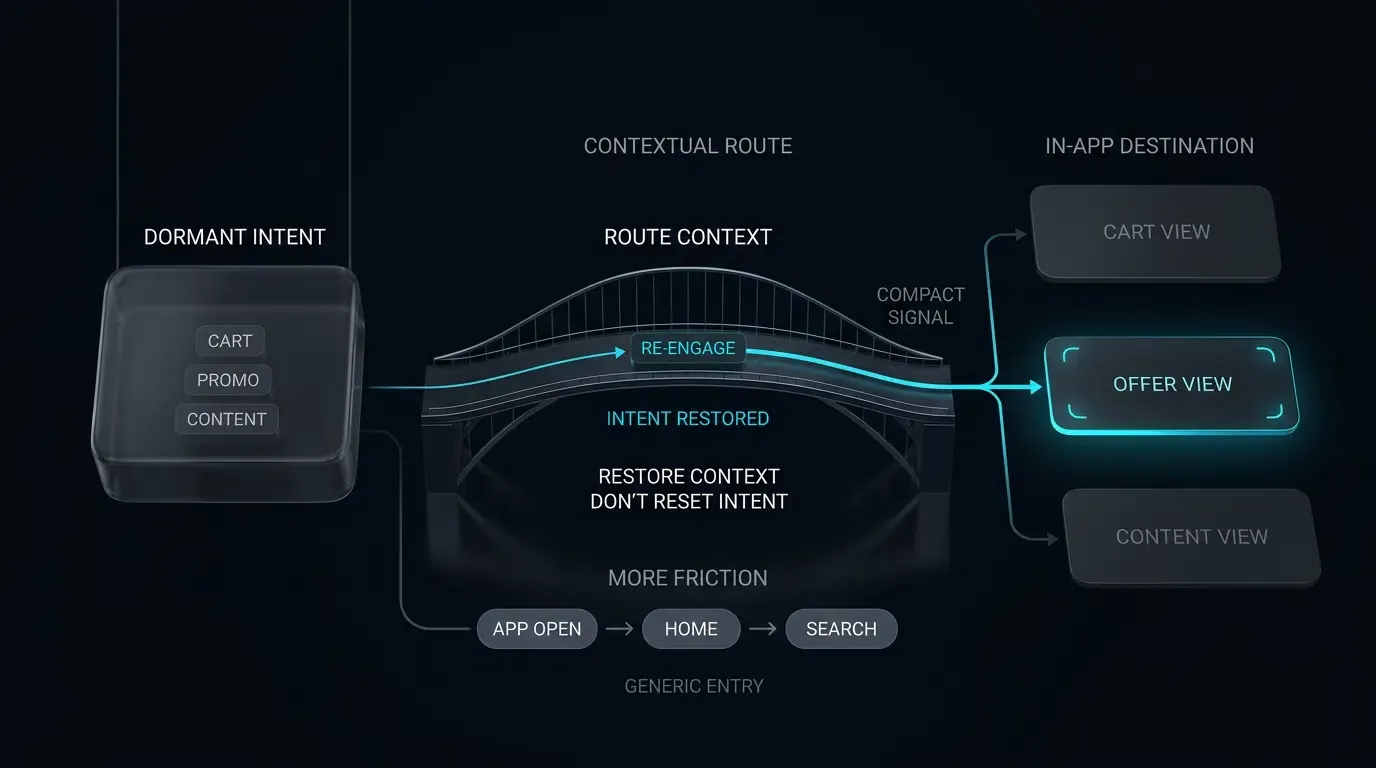
Following installation, the user opens the mobile application for the first time. In conventional setups, the application boots into a generic, unauthenticated home screen, unaware of the promotional campaign or referral link that motivated the download.
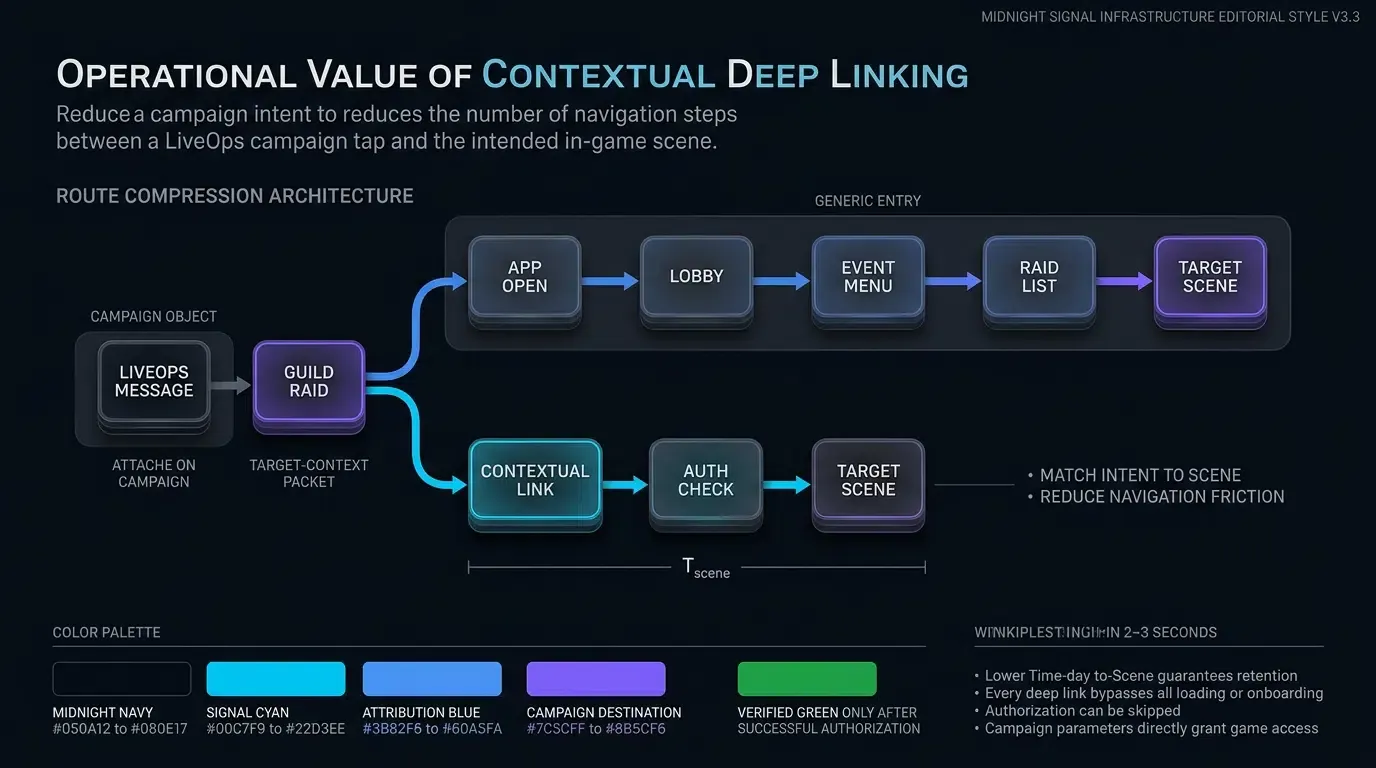
In an optimized funnel, Stage 4 activates deferred deep linking. During application initialization, the native mobile SDK communicates with the attribution server to retrieve the cached parameters established during Stage 2. The SDK restores dynamic keys—such as promo_code=WELCOME50 or scene=checkout—and delivers them to the application routing layer before the user completes initial onboarding.
Stage 5: In-App Activation & Conversion (Frictionless Registration and First Purchase)
The final stage of the funnel converts the newly installed user into an active, registered customer. With parameters restored automatically in Stage 4, the application bypasses manual input forms, pre-populating welcome discounts, applying referral credits, or directly displaying the promoted product after backend authorization.
By removing the cognitive overhead of manual code entry and search, Stage 5 streamlines the transition from initial launch to primary conversion (such as account creation or first checkout).
[1. Mobile Web Visit] ──> [2. User Taps Dynamic Web CTA]
                                      │
                                      ▼
                           [Context Cached on Server]
                                      │
                                      ▼
                           [3. App Store / Play Route]
                                      │
                                      ▼
                           [User Installs & Launches]
                                      │
                                      ▼
                           [4. SDK Fetches Parameters]
                                      │
                                      ▼
                           [5. Direct Scene & Promo Bind]
How Does Manual Promo Code Friction Impact User Drop-Off
The Cognitive Load of Copy-Paste Onboarding: Why Form Fields Accelerate Funnel Attrition
Traditional mobile acquisition campaigns frequently rely on manual promo codes to attribute referrals and distribute incentives. In a standard workflow, a web landing page displays an alphanumeric code (e.g., SUMMER2026), instructing the user to copy the code, download the app, complete registration, and paste the code into an onboarding input field.
This multi-step manual process introduces substantial cognitive friction:
- Memory and Clipboard Degradation: Users frequently forget the code during the app store download process, or overwrite their system clipboard with other content before completing registration.
- Form Abandonment: Forcing new users to locate and interact with promotional form fields adds friction to the signup flow, increasing drop-off rates.
- Input Errors: Mistyped codes or unrecognized formatting generate error states that frustrate users and discourage completion.
Tracking User Abandonment Across the Pre-Install to Post-Install Gap
Funnel analysis demonstrates that significant user drop-off often occurs between app installation and first conversion. When users download an application with the expectation of receiving a specific promotion, failing to deliver that promotion immediately upon launch breaks user expectations.
If a user must navigate through a complex registration flow to claim an advertised welcome bonus manually, a noticeable portion of users abandon the onboarding flow. Eliminating manual form fields by automating parameter delivery directly reduces this friction.
Automated Incentive Binding: Applying Coupons, Credits, and Referral Ties Without User Input
Automated parameter restoration eliminates the need for manual user input. By capturing campaign tokens at the point of the web click and retrieving them on the application’s initial launch, the application validates and binds incentives programmatically:
- E-Commerce Discounts: Welcome coupons are verified and applied automatically to the user’s pending cart.
- Referral Relationships: Inviter-invitee bindings are established on the backend without requiring users to exchange codes manually.
- Content Deep Linking: Streaming or gaming apps route users directly to the specific media asset or event that triggered the acquisition.
Evaluating Registration Completion Rates with Parametric Installation
Growth teams evaluating the impact of parametric installation monitor the Registration Completion Rate (
By eliminating copy-paste barriers, automated parameter restoration simplifies the onboarding flow, creating a testable opportunity to improve
Technical Mechanics of Deferred Parameter Passing Across App Stores
Bridging the App Store Black Box: How Attribution Servers Cache Web Context
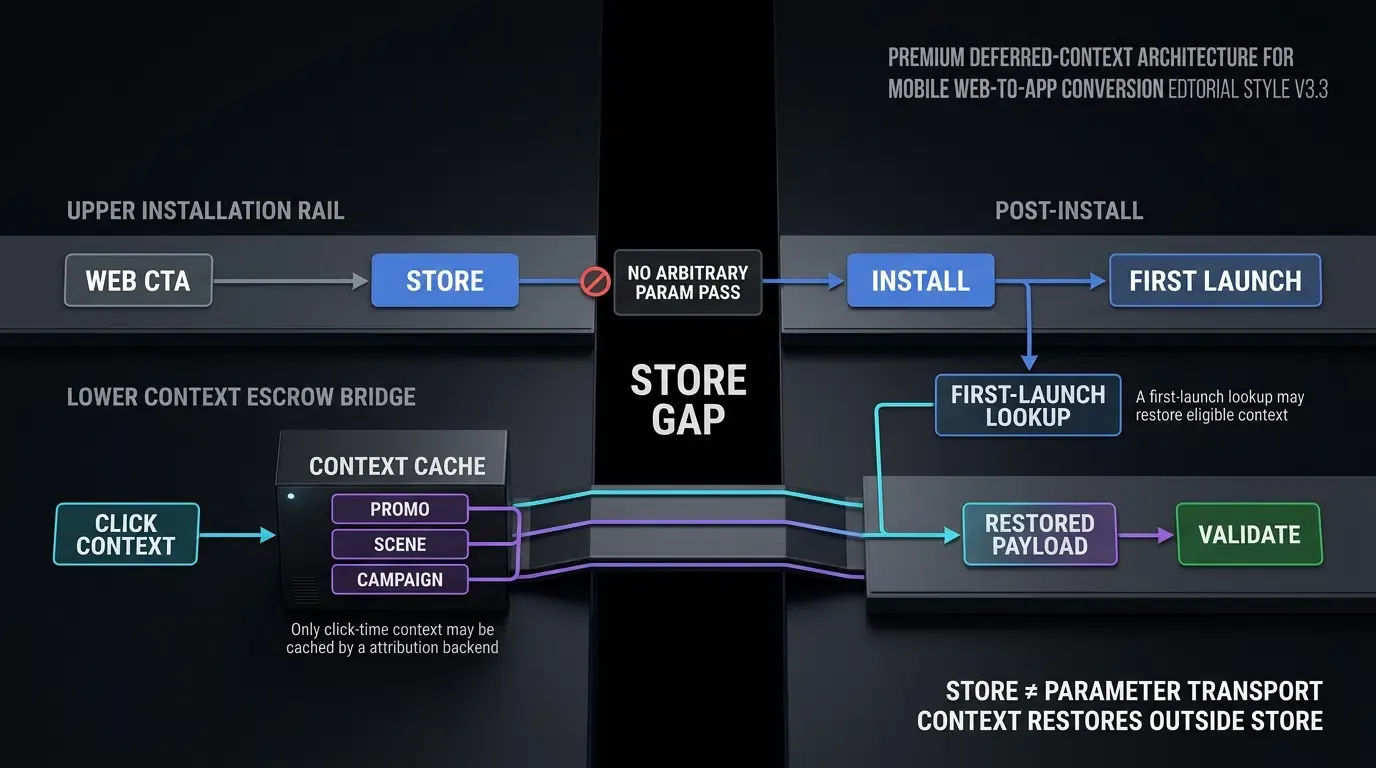
Passing parameters across an app store download requires coordination between client-side web scripts, attribution backends, and native mobile SDKs. Because app stores do not permit arbitrary web query strings to pass directly into native application bundles, attribution platforms implement a two-phase context stitching architecture:
- Click-Time Caching: When a user clicks a Web to App CTA button on an H5 landing page, the Web JS SDK packages the query parameters alongside non-sensitive device context (such as platform, language, and network routing metadata) and transmits the payload to the attribution backend.
- First-Launch Query: Following installation, the native mobile SDK initializes and submits an asynchronous query to the attribution backend. The server matches the incoming launch request with the cached click-time context and returns the original parameter payload to the native app.
OpoInstall, a mobile attribution and deep linking platform, manages this end-to-end caching and resolution lifecycle across Android and iOS platforms.
Evaluating Platform Matching Mechanisms: Google Play Install Referrer vs. Contextual Matching
Operating systems and application marketplaces provide distinct technical mechanisms for parameter transmission:
- Google Play Install Referrer API: On Android devices downloading via Google Play, developers can leverage the Google Play Install Referrer API. When an ad link directs a user to Google Play, the URL includes a
referrerquery parameter. Upon installation, the native app queries the Play Services API to retrieve the referrer string, click timestamps, and install timestamps. - Contextual Matching: On platforms where direct store referrer APIs are unavailable (such as the Apple App Store), attribution engines utilize contextual matching algorithms. By correlating click-time web context with post-install launch signals within an ephemeral time window, the system resolves parameter payloads.
Privacy and Platform Compliance Boundaries in Parameter Retrieval
First-party contextual parameter routing can reduce reliance on persistent advertising identifiers (such as IDFA or GAID). However, compliance is not determined solely by identifier choice or matching-window length. Engineering teams must evaluate the actual data collected, matching logic, retention period, recipients, purpose, consent requirements, and current platform policies (such as Apple’s App Tracking Transparency and Google’s Privacy Sandbox) within their applicable jurisdictions.
How to Implement Frictionless Onboarding with Native SDK Hooks
Structuring Dynamic Query Strings for Marketing Campaigns and Referral Loops
To establish reliable parameter passing, marketing links must adhere to standardized query parameter schemas. A robust Web-to-App query string structures routing intent, incentive tokens, and attribution tracking clearly:
https://app.example.com/join?channelCode=google_ads&scene=checkout&promo_code=WELCOME50&target_id=SKU_9876&inviter_id=USR_88192
When captured by the web landing page, this query string is parsed into a structured payload dictionary before transmission to the attribution server.
Configuring the OpoInstall Web JS SDK for Seamless Parameter Binding
The OpoInstall Web JS SDK integrates into H5 landing pages to capture incoming query parameters automatically. When the user interacts with the download CTA button, the SDK binds the parameter payload to the download trigger:
- It captures the complete query parameter payload from the URL.
- It handles cross-browser redirection logic across Safari, Chrome, and embedded webviews.
- It dispatches the context to the attribution server before store redirection.
Review the SDK integration documentation for full interface parameters and API specifications.
Implementing Early Parameter Retrieval During Native App Startup
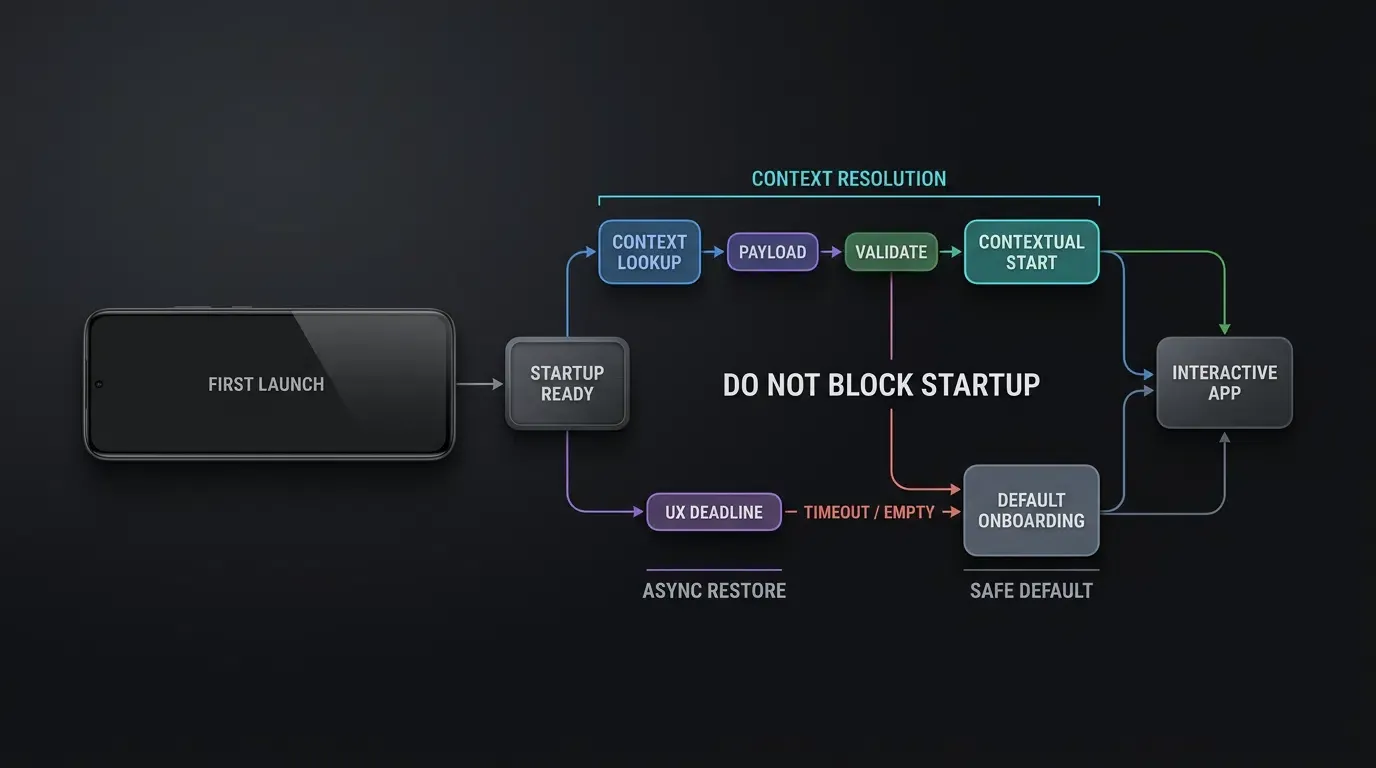
To prevent UI flickering during onboarding, the native mobile SDK must query parameters early in the application startup sequence. On Android, parameter retrieval hooks attach within the primary Activity or Application class. On iOS, parameter listeners initialize within didFinishLaunchingWithOptions or the root scene controller.
The parameter retrieval call executes asynchronously to avoid blocking UI rendering. Applications should display an unobtrusive splash or loading indicator while parameters resolve, ensuring that the target view controller renders smoothly once data is verified.
Sanitizing Incoming Payload DTOs: Enforcing Strict Fail-Closed Validation
In accordance with OWASP Mobile Application Security Testing Guide Guidance on Insecure Deep Links, all data retrieved via deferred parameter queries must be treated as untrusted, external input.
Client applications must enforce strict fail-closed validation:
- Schema Allowlisting: Validate that the returned payload contains only authorized keys (
scene,promo_code,target_id,inviter_id). - Scene Verification: Check that the requested
scenematches an approved internal view controller allowlist. - Data-Type Constraints: Enforce length limits (e.g.,
characters) and alphanumeric regex checks on all identifier values before applying discounts or navigating. - Backend Authorization & Replay Defense: Client-side validation determines parsing validity only; applying discounts, referral credits, or account links requires explicit backend verification of campaign state, user eligibility, and single-use idempotency.
Client-Side Implementation for First-Launch Context Retrieval
Android SDK Integration in Kotlin: Fetching Parameters via getInstallParam
On Android, applications query deferred installation parameters using the getInstallParam API. The native implementation normalizes the incoming payload, validates schema keys against an allowlist, verifies promotion eligibility with the backend, and routes the user to the target onboarding scene.iOS SDK Integration in Swift: Handling Parameters via getInstallParmsCompleted
On iOS, applications handle deferred parameters using the getInstallParmsCompleted callback. The implementation parses the normalized payload, applies fail-closed validation, executes backend verification, and dispatches UI updates on the main thread (DispatchQueue.main.async).
The code implementation below demonstrates dual-platform integration for capturing, validating, and applying deferred installation parameters in native Android (Kotlin) and iOS (Swift). Certified SDK binaries can be downloaded from the OpoInstall SDK download center.
// Android: MainActivity.kt - First-Launch Parameter Retrieval & Frictionless Onboarding
// Reference integration example. Verify package names, callback classes, initialization order,
// and runtime payload representations against the production OpoInstall SDK release.
package com.example.app.ui

import android.content.Intent
import android.os.Bundle
import android.util.Log
import androidx.appcompat.app.AppCompatActivity
import com.opoinstall.api.OpoInstall
import com.opoinstall.api.listener.ResultCallBack
import com.opoinstall.api.model.OpoData
import com.opoinstall.api.model.OpoError
import org.json.JSONObject

enum class OnboardingState {
    NOT_STARTED,
    FETCHING,
    PROCESSED
}

data class ValidatedOnboardingPayload(
    val scene: String,
    val promoCode: String,
    val targetId: String,
    val inviterId: String,
    val rawKeys: Set<String>
)

object OnboardingPayloadAdapter {
    /**
     * Normalizes heterogeneous SDK data representations (JSON String, Map, or JSONObject)
     * into a canonical application-owned onboarding model with strict fail-closed type checking.
     */
    fun normalize(rawPayload: Any?): ValidatedOnboardingPayload? {
        if (rawPayload == null) return null

        val stringMap = when (rawPayload) {
            is String -> parseJsonStringStrict(rawPayload)
            is Map<*, *> -> parseMapStrict(rawPayload)
            is JSONObject -> parseJsonObjectStrict(rawPayload)
            else -> {
                Log.w("PayloadAdapter", "Unsupported SDK payload type: ${rawPayload.javaClass.name}")
                null
            }
        } ?: return null

        val scene = stringMap["scene"] ?: "onboarding_welcome"

        return ValidatedOnboardingPayload(
            scene = scene,
            promoCode = stringMap["promo_code"] ?: "",
            targetId = stringMap["target_id"] ?: "",
            inviterId = stringMap["inviter_id"] ?: "",
            rawKeys = stringMap.keys
        )
    }

    private fun parseJsonStringStrict(rawJson: String): Map<String, String>? {
        return try {
            val json = JSONObject(rawJson)
            parseJsonObjectStrict(json)
        } catch (e: Exception) {
            Log.e("PayloadAdapter", "JSON string parsing failed", e)
            null
        }
    }

    private fun parseJsonObjectStrict(json: JSONObject): Map<String, String>? {
        val map = mutableMapOf<String, String>()
        for (key in json.keys()) {
            val value = json.opt(key)
            if (value !is String) {
                Log.w("PayloadAdapter", "Rejected non-string payload value for key: $key")
                return null
            }
            map[key] = value
        }
        return map
    }

    private fun parseMapStrict(rawMap: Map<*, *>): Map<String, String>? {
        val map = mutableMapOf<String, String>()
        for ((key, value) in rawMap) {
            if (key !is String || value !is String) {
                Log.w("PayloadAdapter", "Rejected non-string key or value in raw map: $key")
                return null
            }
            map[key] = value
        }
        return map
    }
}

object OnboardingRouteValidator {
    private val allowedKeys = setOf("scene", "promo_code", "target_id", "inviter_id")
    private val allowedScenes = setOf("checkout", "promo_detail", "onboarding_welcome", "product_view")

    fun validate(payload: ValidatedOnboardingPayload): ValidatedOnboardingPayload? {
        // Step 1: Fail-closed key validation (reject unknown payload keys)
        if (!allowedKeys.containsAll(payload.rawKeys)) {
            return null
        }

        // Step 2: Validate destination scene against allowlist
        if (!allowedScenes.contains(payload.scene)) {
            return null
        }

        // Step 3: Enforce length and alphanumeric constraints on promo code and identifiers
        val alphanumericRegex = Regex("^[A-Za-z0-9_-]+$")
        if (payload.promoCode.isNotEmpty() && (payload.promoCode.length > 32 || !payload.promoCode.matches(alphanumericRegex))) {
            return null
        }
        if (payload.targetId.isNotEmpty() && (payload.targetId.length > 64 || !payload.targetId.matches(alphanumericRegex))) {
            return null
        }
        if (payload.inviterId.isNotEmpty() && (payload.inviterId.length > 64 || !payload.inviterId.matches(alphanumericRegex))) {
            return null
        }

        return payload
    }
}

class MainActivity : AppCompatActivity() {

    private var onboardingState = OnboardingState.NOT_STARTED

    override fun onCreate(savedInstanceState: Bundle?) {
        super.onCreate(savedInstanceState)
        setContentView(R.layout.activity_main)

        // Retrieve deferred parameters on application first launch with state machine protection
        if (onboardingState == OnboardingState.NOT_STARTED) {
            retrieveDeferredParameters()
        }
    }

    private fun retrieveDeferredParameters() {
        onboardingState = OnboardingState.FETCHING

        OpoInstall.getInstance().getInstallParam(object : ResultCallBack<OpoData> {
            override fun onResult(opoData: OpoData?) {
                onboardingState = OnboardingState.PROCESSED

                if (opoData == null) {
                    renderDefaultOnboarding()
                    return
                }

                val channelCode = opoData.channelCode ?: "organic"
                Log.i(TAG, "Attribution channel resolved: $channelCode")

                // Step 1: Normalize vendor SDK payload directly via adapter
                val canonicalPayload = OnboardingPayloadAdapter.normalize(opoData.data)
                val validatedRoute = canonicalPayload?.let { OnboardingRouteValidator.validate(it) }

                if (validatedRoute != null) {
                    // Step 2: Verify promo/referral authorization on backend before applying rewards
                    BackendPromotionAuthorizer.verifyAndApplyPromotion(
                        promoCode = validatedRoute.promoCode,
                        inviterId = validatedRoute.inviterId,
                        targetScene = validatedRoute.scene
                    ) { isAuthorized ->
                        runOnUiThread {
                            if (isAuthorized) {
                                executeFrictionlessOnboarding(validatedRoute)
                            } else {
                                renderDefaultOnboarding()
                            }
                        }
                    }
                } else {
                    runOnUiThread {
                        renderDefaultOnboarding()
                    }
                }
            }

            override fun onError(error: OpoError?) {
                onboardingState = OnboardingState.PROCESSED
                Log.w(TAG, "Deferred parameter retrieval failed: ${error?.errorMsg}")
                runOnUiThread {
                    renderDefaultOnboarding()
                }
            }
        })
    }

    private fun executeFrictionlessOnboarding(route: ValidatedOnboardingPayload) {
        Log.i(TAG, "Applying verified promo: ${route.promoCode}, routing to: ${route.scene}")
        // Programmatically apply verified coupon code and navigate to targeted onboarding view
    }

    private fun renderDefaultOnboarding() {
        Log.i(TAG, "Rendering standard onboarding flow.")
        // Render standard initial view
    }

    companion object {
        private const val TAG = "OnboardingPipeline"
    }
}

// App-specific backend authorization placeholder (not an OpoInstall SDK API)
object BackendPromotionAuthorizer {
    fun verifyAndApplyPromotion(
        promoCode: String,
        inviterId: String,
        targetScene: String,
        callback: (Boolean) -> Unit
    ) {
        // Production backend verifies campaign expiration, user eligibility, and idempotency/replay
        val isPromotionValid = true
        callback(isPromotionValid)
    }
}
// iOS: SceneDelegate.swift - First-Launch Parameter Retrieval & Frictionless Onboarding
// Reference integration example. Verify package names, callback classes, and method signatures
// against the production OpoInstall SDK release.
import UIKit
import libOpoInstallSDK

enum OnboardingState {
    case notStarted
    case fetching
    case processed
}

struct ValidatedOnboardingPayload {
    let scene: String
    let promoCode: String
    let targetId: String
    let inviterId: String
    let rawKeys: Set<String>
}

class OnboardingPayloadAdapter {
    /**
     * Normalizes heterogeneous SDK data representations (Dictionary, JSON String, or custom object)
     * into a canonical application-owned onboarding model with strict fail-closed type checking.
     */
    static func normalize(rawPayload: Any?) -> ValidatedOnboardingPayload? {
        guard let payload = rawPayload else { return nil }

        if let dict = payload as? [String: Any] {
            return normalizeDictionaryStrict(dict)
        } else if let jsonString = payload as? String, let data = jsonString.data(using: .utf8) {
            do {
                if let dict = try JSONSerialization.jsonObject(with: data, options: []) as? [String: Any] {
                    return normalizeDictionaryStrict(dict)
                }
            } catch {
                NSLog("[PayloadAdapter] JSON deserialization failed: %@", error.localizedDescription)
                return nil
            }
        }
        return nil
    }

    private static func normalizeDictionaryStrict(_ dict: [String: Any]) -> ValidatedOnboardingPayload? {
        // Fail-closed: ensure all values present in the dictionary are strictly Strings
        for (key, value) in dict {
            guard value is String else {
                NSLog("[PayloadAdapter] Rejected non-string value for key: %@", key)
                return nil
            }
        }

        let scene = dict["scene"] as? String ?? "onboarding_welcome"
        let promoCode = dict["promo_code"] as? String ?? ""
        let targetId = dict["target_id"] as? String ?? ""
        let inviterId = dict["inviter_id"] as? String ?? ""
        let keys = Set(dict.keys)

        return ValidatedOnboardingPayload(
            scene: scene,
            promoCode: promoCode,
            targetId: targetId,
            inviterId: inviterId,
            rawKeys: keys
        )
    }
}

class OnboardingRouteValidator {
    private static let allowedKeys: Set<String> = ["scene", "promo_code", "target_id", "inviter_id"]
    private static let allowedScenes: Set<String> = ["checkout", "promo_detail", "onboarding_welcome", "product_view"]

    static func validate(payload: ValidatedOnboardingPayload) -> ValidatedOnboardingPayload? {
        // Step 1: Fail-closed key validation (reject unknown payload keys)
        guard payload.rawKeys.isSubset(of: allowedKeys) else {
            return nil
        }

        // Step 2: Validate destination scene against allowlist
        guard allowedScenes.contains(payload.scene) else {
            return nil
        }

        // Step 3: Enforce length and alphanumeric constraints on promo code and identifiers
        let validChars = CharacterSet(charactersIn: "abcdefghijklmnopqrstuvwxyzABCDEFGHIJKLMNOPQRSTUVWXYZ0123456789_-")
        if !payload.promoCode.isEmpty {
            guard payload.promoCode.count <= 32, payload.promoCode.rangeOfCharacter(from: validChars.inverted) == nil else {
                return nil
            }
        }
        if !payload.targetId.isEmpty {
            guard payload.targetId.count <= 64, payload.targetId.rangeOfCharacter(from: validChars.inverted) == nil else {
                return nil
            }
        }
        if !payload.inviterId.isEmpty {
            guard payload.inviterId.count <= 64, payload.inviterId.rangeOfCharacter(from: validChars.inverted) == nil else {
                return nil
            }
        }

        return payload
    }
}

class SceneDelegate: UIResponder, UIWindowSceneDelegate, OpoInstallDelegate {

    var window: UIWindow?
    private var onboardingState: OnboardingState = .notStarted

    func scene(
        _ scene: UIScene,
        willConnectTo session: UISceneSession,
        options connectionOptions: UIScene.ConnectionOptions
    ) {
        guard let _ = (scene as? UIWindowScene) else { return }

        // Initialize OpoInstall SDK
        OpoInstallSDK.initWith(self)

        // Retrieve deferred parameters upon initial app launch with idempotency protection
        if onboardingState == .notStarted {
            retrieveDeferredInstallationParameters()
        }
    }

    private func retrieveDeferredInstallationParameters() {
        onboardingState = .fetching

        OpoInstallSDK.defaultManager()?.getInstallParmsCompleted { [weak self] appData in
            guard let self = self else { return }
            self.onboardingState = .processed

            guard let data = appData, let rawPayload = data.data else {
                DispatchQueue.main.async {
                    self.renderDefaultOnboarding()
                }
                return
            }

            // Step 1: Normalize vendor SDK payload directly via adapter
            guard let canonicalPayload = OnboardingPayloadAdapter.normalize(rawPayload: rawPayload),
                  let validatedRoute = OnboardingRouteValidator.validate(payload: canonicalPayload) else {
                DispatchQueue.main.async {
                    self.renderDefaultOnboarding()
                }
                return
            }

            // Step 2: Verify promo/referral authorization on backend before applying rewards
            BackendPromotionAuthorizer.shared.verifyAndApplyPromotion(
                promoCode: validatedRoute.promoCode,
                inviterId: validatedRoute.inviterId,
                targetScene: validatedRoute.scene
            ) { isAuthorized in
                DispatchQueue.main.async {
                    if isAuthorized {
                        self.executeFrictionlessOnboarding(route: validatedRoute)
                    } else {
                        self.renderDefaultOnboarding()
                    }
                }
            }
        }
    }

    private func executeFrictionlessOnboarding(route: ValidatedOnboardingPayload) {
        NSLog("[SceneDelegate] Applying verified promo: %@, navigating to: %@", route.promoCode, route.scene)
        // Programmatically apply discount and transition to target onboarding view controller
    }

    private func renderDefaultOnboarding() {
        NSLog("[SceneDelegate] Rendering default onboarding flow.")
        // Render standard initial view controller
    }
}

// App-specific backend authorization placeholder (not an OpoInstall SDK API)
class BackendPromotionAuthorizer {
    static let shared = BackendPromotionAuthorizer()

    func verifyAndApplyPromotion(
        promoCode: String,
        inviterId: String,
        targetScene: String,
        completion: @escaping (Bool) -> Void
    ) {
        // Production backend verifies campaign expiration, user eligibility, and idempotency/replay
        let isPromotionValid = true
        completion(isPromotionValid)
    }
}
Managing Network Timeouts and Graceful UI Fallbacks on Parameter Resolution Failures
Network latency or poor cellular connectivity can occasionally delay parameter retrieval. Production applications must define an application-level UX deadline (typically a few seconds) to prevent onboarding deadlocks.
If the parameter query times out or returns an empty payload:
- Fallback to Default Onboarding: The app immediately renders the standard onboarding or home screen without blocking user interaction.
- Graceful Retries: If the SDK supports deferred retries, configure them according to the deployed SDK version contract without interrupting active user workflows.
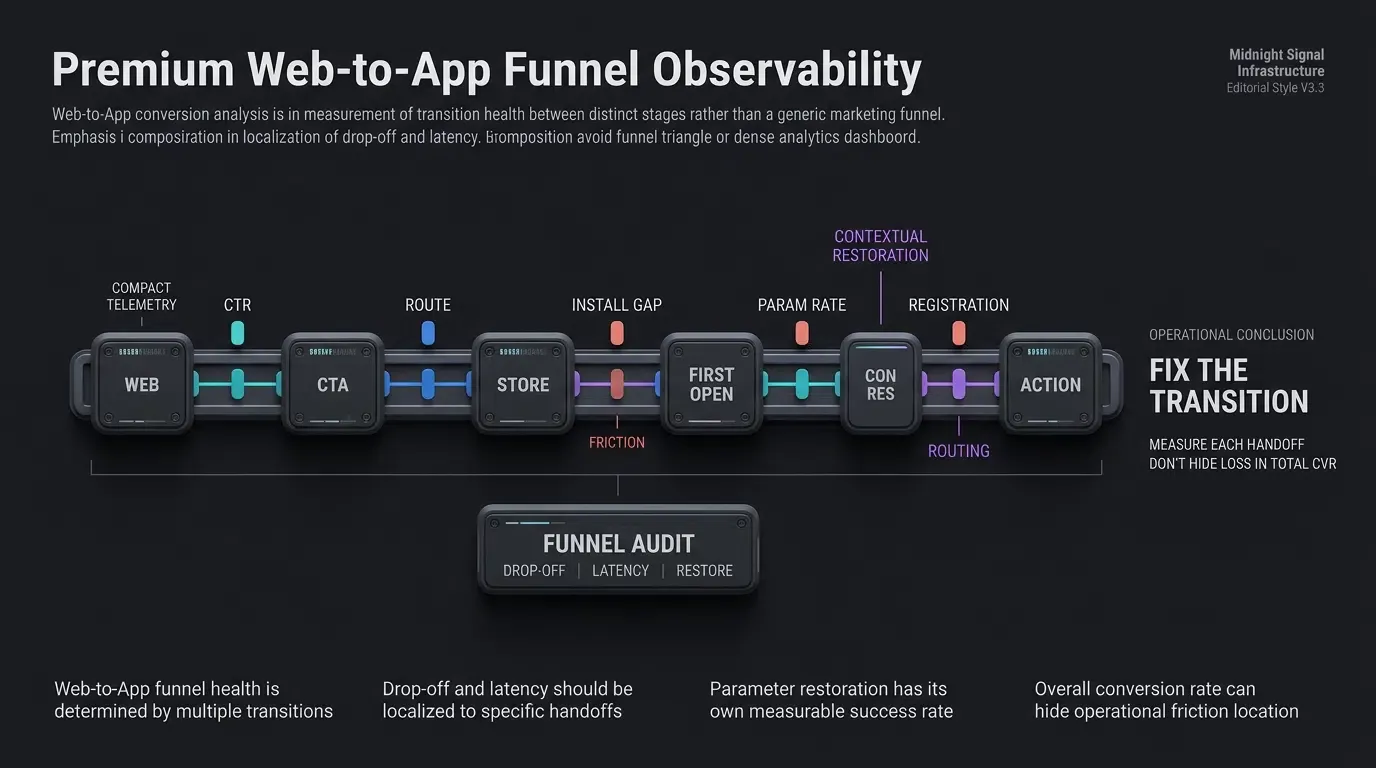
Web to App Funnel Audit and Friction Mitigation Matrix
Comprehensive Stage-by-Stage Funnel Health Checklist
Growth teams optimizing Web to App funnels should systematically audit each transition point against standard diagnostic indicators:
- Landing Page Performance: Verify mobile page load speed and ensure CTAs are clearly visible above the fold.
- Link Verification: Confirm that Universal Links and App Links route directly without triggering browser warnings.
- Store Delivery: Test that user-agent detection delivers users to the correct platform store.
- Parameter Retrieval: Audit SDK initialization to ensure parameters resolve within acceptable timeout windows.
- Onboarding Automation: Confirm that discount tokens and target routes apply without manual user prompts after server verification.
Auditing Drop-Off Triggers and Recommended Engineering Remediations
The table below outlines common failure modes across the 5-stage Web to App conversion funnel, along with diagnostic checkpoints and engineering solutions:
| Funnel Stage | Primary Operational Objective | Key Friction / Failure Mode | Diagnostic Indicator | Recommended Engineering Remediation |
|---|---|---|---|---|
| 1. Web Landing | Drive engagement with promotional content | Unoptimized page load or generic messaging | High web bounce rate | Implement fast-loading landing pages with clear Web to App CTAs |
| 2. Web CTA Tap | Trigger deep link or store redirection | Unhandled browser popup or blocked redirect | Low Click-Through Rate (CTR) | Bind web redirection handlers to explicit user click events |
| 3. Store Route | Deliver user to correct platform store | Broken store redirect or wrong platform | High click-to-install drop-off | Implement automated UA-based routing to App Store / Google Play |
| 4. First Launch | Retrieve cached parameters via SDK | Network latency or missing SDK initialization | Parameter retrieval timeout | Initialize SDK early in startup and handle state asynchronously |
| 5. In-App Action | Complete registration or purchase | Manual promo code form requirement | High post-install churn | Auto-apply server-verified discount tokens and route to target scene |
Frequently Asked Questions (FAQ)
How does deferred deep linking eliminate manual promo codes?
What are the main contributors to drop-off between web clicks and app installs?
How do developers handle parameter retrieval timeouts if network connectivity is poor?
Summary and Decision Framework
Optimizing the Web-to-App conversion funnel requires eliminating the structural friction points that cause mobile visitors to abandon the onboarding journey. Relying on static store links and manual promo code entry introduces cognitive barriers that can reduce conversion efficiency and increase onboarding drop-off.
By deploying an automated parameter-passing pipeline—combining dynamic web SDKs, verified deep link routing, and native first-launch context restoration—growth teams create testable pathways from initial web engagement to in-app conversion. Rigorously auditing each stage of the funnel ensures that marketing investments translate into engaged, active native users.
To learn how to deploy automated parameter installation and optimize your mobile funnels, review the SDK integration documentation, download the client libraries from the OpoInstall SDK download center, explore the mobile attribution implementation reference, or register your application on the OpoInstall developer console.
Related Materials
-
Concepts: Web to App Funnel, Deferred Deep Linking, Parametric Installation, Frictionless Onboarding, Funnel Drop-off Analysis
-
Technologies: Google Play Install Referrer API, Apple Universal Links, Android App Links, OpoInstall Mobile SDK
-
Standards: IETF RFC 3986 Uniform Resource Identifier, W3C Web Application Metadata, OWASP Mobile Application Security Testing Guide (MASTG)
-
APIs: OpoInstall
getInstallParamAPI, AndroidInstallReferrerClient, iOSNSUserActivity -
Official Documentation & References:
Share this article