Cursor Launches Build Live Apps? On November 5, 2026, Cursor officially released the Cursor Build Live Apps capability, allowing users on paid plans with Cloud Agents enabled to build, host, and share live web applications directly from natural language prompts. While AI coding assistants have lowered the cost of writing software, Cursor noted that most user-generated tools never leave localhost because configuring hosting, databases, authentication, and security remains a manual hurdle. Through this update, a cloud agent scaffolds the web application, provisions a PostgreSQL database when needed, configures single sign-on (SSO) authentication, runs platform pre-publish security checks, and deploys the project to a shareable URL without requiring manual infrastructure setup.
From Localhost to Production: What Cursor Build Live Apps Delivers
At a Glance
- Release Scope: Launched on November 5, 2026, for all paid Cursor plans with Cloud Agents enabled; the feature requires cloud execution and does not run on local agents.
- Managed Stack: Automatically scaffolds web applications, provisions PostgreSQL databases when needed, configures Cursor SSO authentication, and deploys to managed cloud hosting.
- Governance & Sharing: Runs mandatory baseline checks and configurable agentic security reviews before publishing, requires Cursor sign-in for private and team-visible apps, disables public sharing by default on Teams and Enterprise plans (unless enabled by an admin), and supports header-authenticated Cursor API keys for automated scripts or Grok Bot.
Moving an internal utility from a developer’s local machine to a live environment typically requires provisioning cloud accounts, database instances, identity providers, and deployment pipelines. According to the Cursor Build Live Apps changelog, the platform automates these steps so employees across sales, operations, legal, finance, and engineering can build and share working web tools via a direct link.
Within Cursor’s own organization, teams have used the workflow to deploy several categories of internal software:
- Internal operational tools for event registration, customer account assignment, and desk scheduling.
- Customer-facing multimedia presentations combining slides, video, and interactive product demos.
- Onboarding, enablement, and training portals for new hires.
- Real-time sales dashboards tracking pipeline metrics and deal opportunities.
- Engineering service management portals.
As illustrated in The New Stack’s reporting on Cursor’s deployment workflow, taking an application from an initial idea to a live link follows four stages inside the Cloud Agent interface:
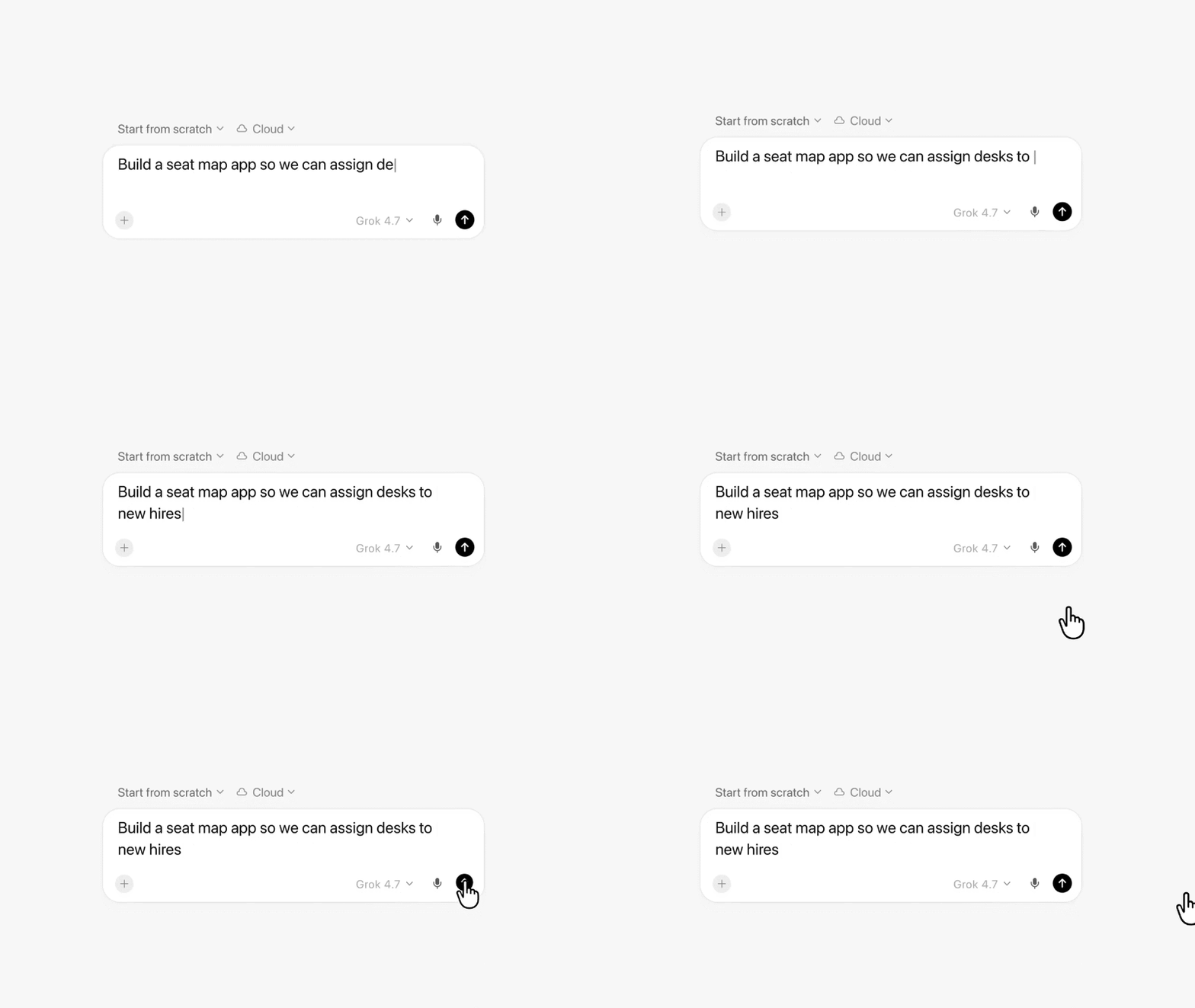
First, the user starts a cloud agent and describes the desired web application in plain language. Second, the cloud agent generates the application, provisions required backend components such as a database and authentication, prepares the hosting environment, and runs automated checks.
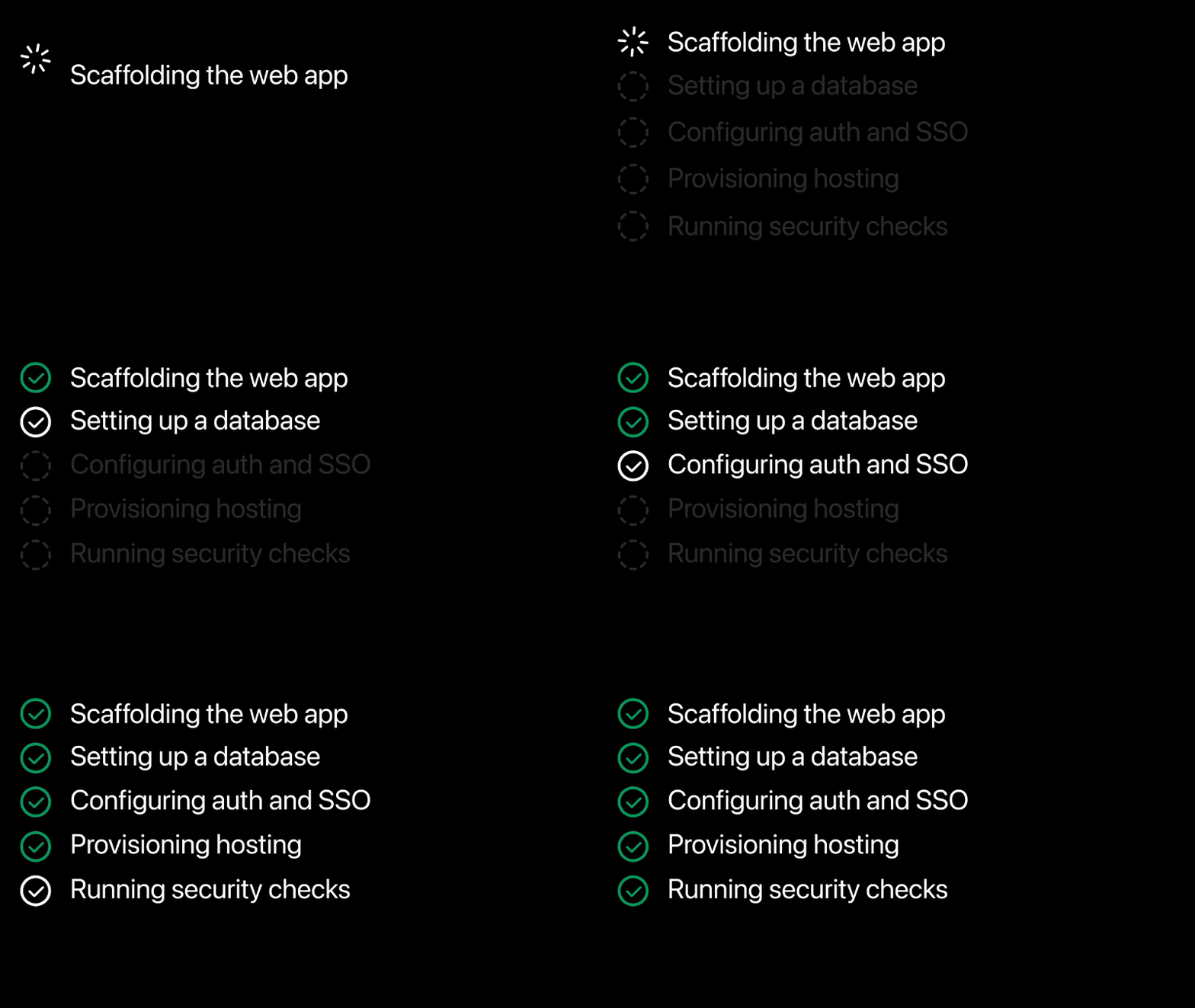 Third, once the build finishes, the user can preview the interactive application inside the workspace, open the publish dialog, choose a unique domain, and configure access scope settings before exposing the tool to others.
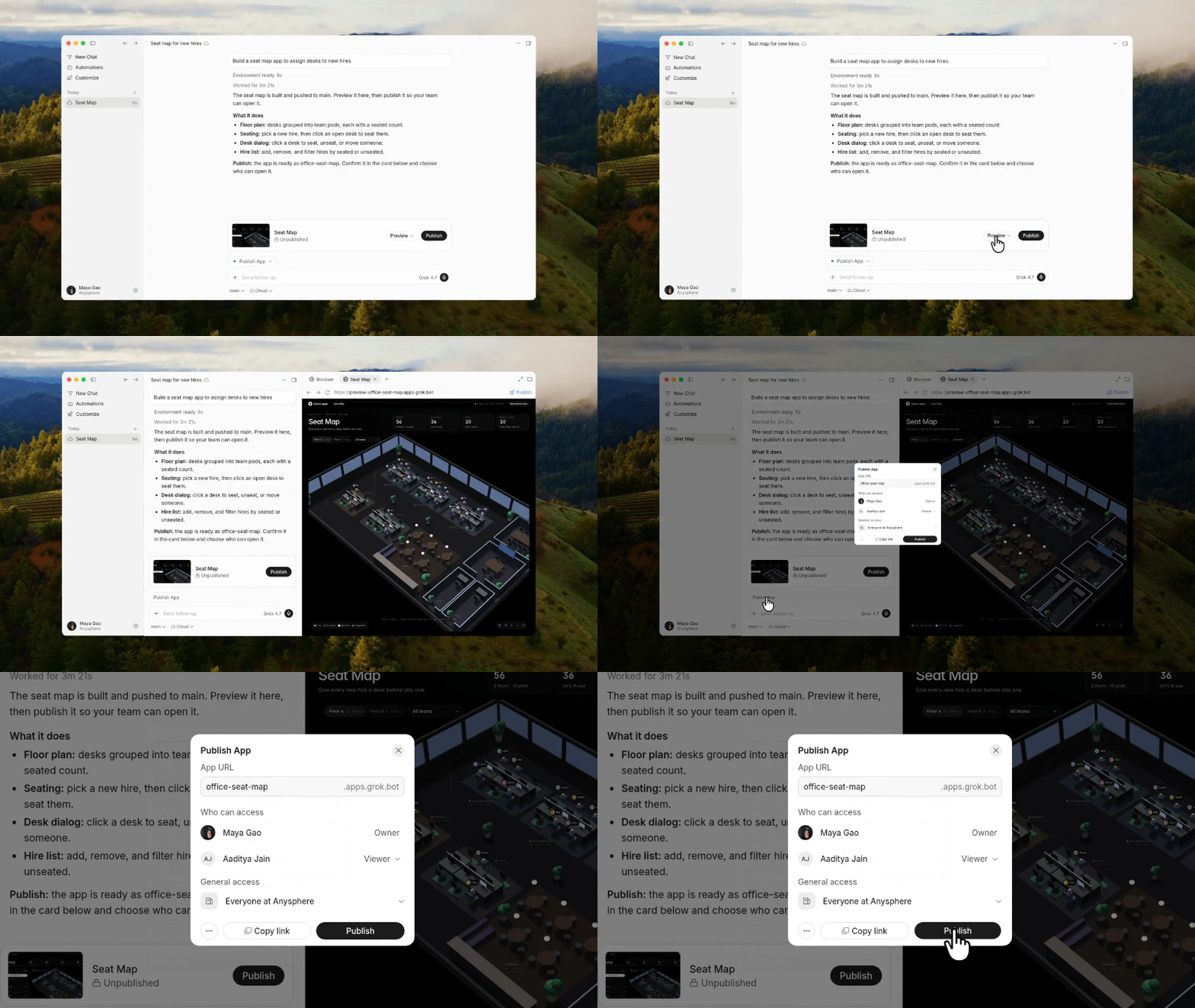
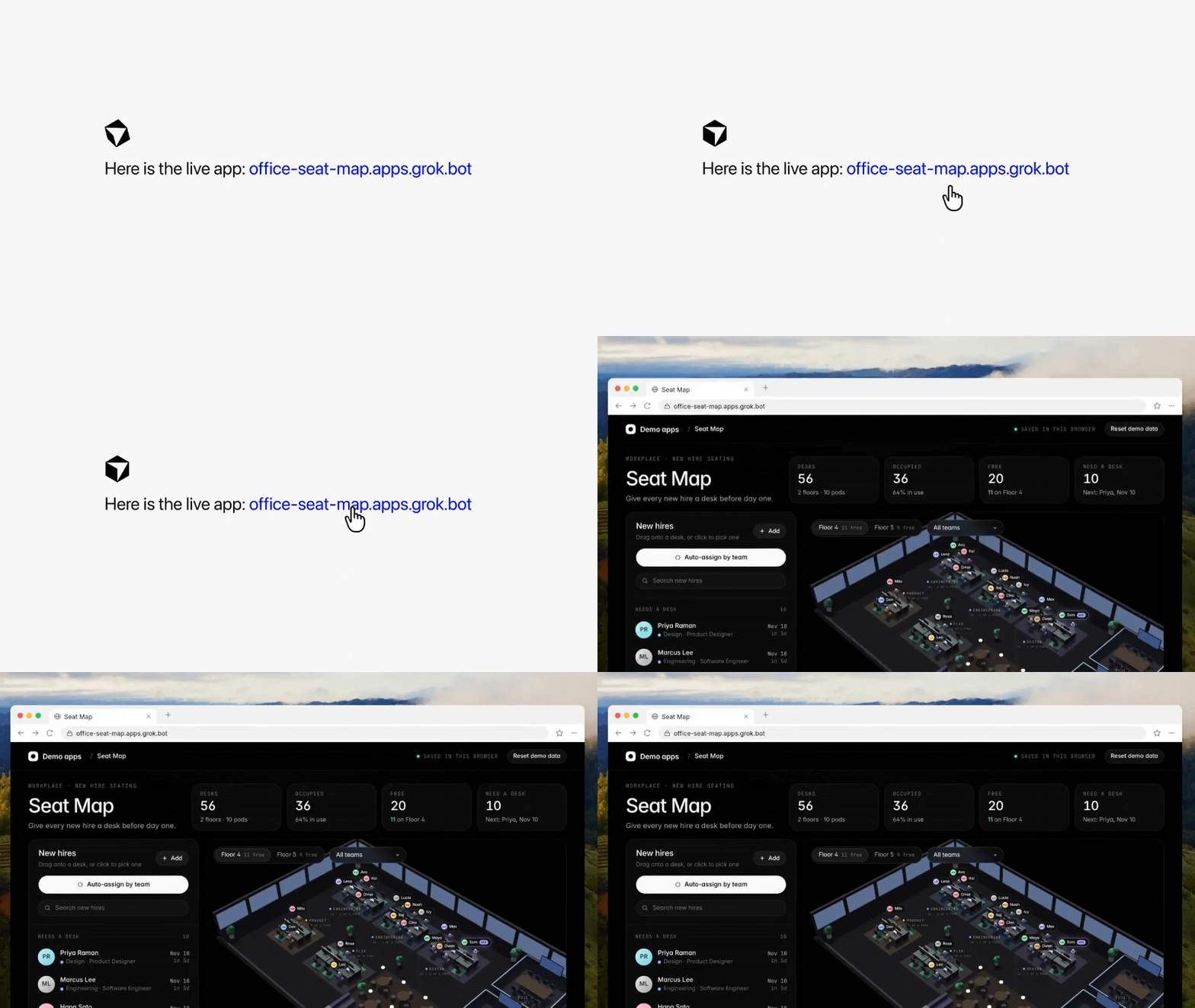
Finally, after the pre-publish checks pass and the user confirms publication, Cursor returns a live link that opens the deployed application—such as an interactive office seat-map tool—directly in the browser.
Under the Hood: Cloud Agents, Managed Hosting, and Repository Sources
The technical foundation of Cursor Build Live Apps relies on Cursor Cloud Agents, which allow users to run asynchronous coding agents in remote environments without keeping their local laptops open. Because the deployment pipeline provisions cloud databases, identity services, and managed hosting, the capability operates exclusively through Cloud Agents and cannot be used with locally running agents.
Cursor began narrowing the gap between code generation and live deployment on August 27, 2026, when it introduced an initial workflow to start projects from scratch and preview them on a live URL. In that earlier release, however, publishing to a live URL required users to connect their own external Vercel accounts.
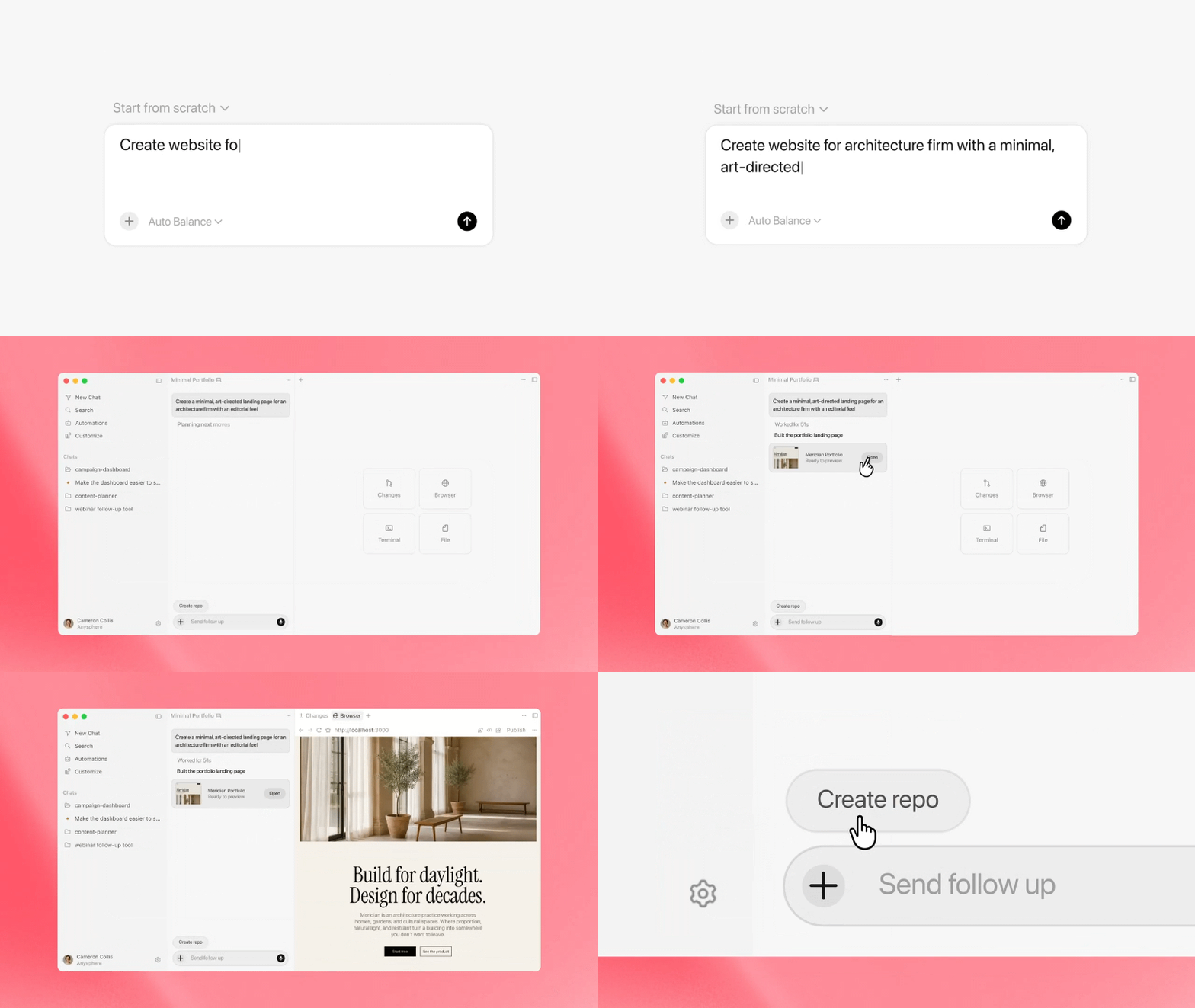
The November 5 update removes the need for users to link or manage a separate hosting account. While Cursor’s changelog does not name its underlying cloud vendor, The New Stack reported—citing a statement from Vercel on X—that the managed hosting layer is built on Vercel for Platforms, with Cursor automatically creating a dedicated, isolated hosting account for each team or individual subscriber.
The end-to-end provisioning, security review, and deployment flow is structured as follows:
[Source Input: Natural Language Prompt / Cursor Origin / GitHub Repo]
                                 │
                                 ▼
              [Cursor Cloud Agent Execution Environment]
              ├── Scaffolds Web App Codebase
              ├── Provisions PostgreSQL Database (When Needed)
              ├── Configures Cursor SSO Authentication
              └── Prompts for External Secrets (Managed So Agent Never Sees Raw Values)
                                 │
                                 ▼
         [Pre-Publish Gate: Deterministic + Agentic Security Reviews]
              ├── Runs Mandatory Baseline Checks (e.g., Exposed Secrets)
              └── Evaluates Agentic & Custom Team Admin Security Rules
                                 │
        (Meets Mandatory Checks & Applicable Approval Rules)
                                 │
                                 ▼
      [Managed Deployment to User-Selected Domain & Isolated Hosting]
              ├── Private & Team Access (Requires Cursor Sign-In; Public Off by Default on Teams/Enterprise)
              ├── Public Access (Available on Personal Plans or When Enabled by Team Admins)
              └── Programmatic Access (Cursor API Key via Request Headers)
Developers can initiate deployments from two repository sources:
- New or Existing Cursor Origin Repositories: Users starting from scratch automatically create a repository on Cursor Origin, the agent-centric Git hosting platform Cursor launched on August 17, 2026.
- Existing GitHub Repositories: Engineers with existing projects on GitHub can use a cloud agent to prepare and publish the application without migrating their repository to Origin. According to Cursor, support for GitLab and other Git providers is planned for upcoming updates.
Pre-Publish Security Gates and Access Governance
Enabling rapid web deployment across an organization requires guardrails around credential handling, pre-publish verification, and access scope, which Cursor details in its Cloud Agent Apps documentation.
Secret Isolation and Pre-Publish Review Hierarchy
When an application needs to connect to external infrastructure—such as a corporate data warehouse or third-party API—Cursor prompts the user for the required keys. According to Cursor, these secrets are managed so that the agent does not see the raw secret values.
Before an application goes live, the user must explicitly publish it, triggering two types of platform checks:
- Deterministic Checks: Baseline rule-based scans always run to detect common issues such as hardcoded secrets, tokens, or exposed credentials in application files.
- Agentic Security Reviews: AI-driven reviews inspect the project for broader security issues and instruct the user on what to fix if a check fails.
Team administrators have visibility into all deployed team applications and stored secrets. Admins can add custom security review rules, unpublish any live application, and approve certain releases that were flagged by security reviews. However, administrative approval is not an unconditional bypass for every check: mandatory baseline protections remain enforced, and passing pre-publish scans is designed to reduce common credential leak risks rather than guarantee that custom application logic or external database permissions are free of vulnerabilities.
Access Scopes and Header-Based API Keys
Once an application passes the required checks and is deployed to its selected URL, access control is governed by plan type and authentication method:
- Team and Enterprise Access: Applications can be shared with specific individuals, user groups, or the entire organization. Private and team-visible applications require Cursor sign-in. Public sharing is disabled by default on Teams and Enterprise plans, but administrators can enable it; publicly shared applications can be opened by anyone with the link.
- Personal Plan Public Sharing: Subscribers on personal plans can publish applications with public access so anyone with the URL can open the web app.
- Programmatic Access via API Keys: To let automated scripts, continuous integration (CI) tasks, or external agents such as Grok Bot interact with a deployed application, users can configure a Cursor API key. Rather than exposing credentials in shareable URLs, programmatic clients authenticate by passing the Cursor API key in HTTP request headers, with keys managed separately at the personal or team level.
Competitive Context: Challenging Lovable, Replit, and Grok Build
By integrating managed hosting, on-demand PostgreSQL provisioning, and SSO authentication directly into its Cloud Agent workflow, Cursor steps into direct competition with prompt-driven app platforms like Lovable and Replit. In market positioning terms, while Lovable and Replit have historically attracted consumer creators and solo builders, Cursor’s announcement emphasizes internal enterprise software—helping domain experts build operational tools without waiting on dedicated infrastructure engineering—while still supporting public web publishing for individual subscribers.
The feature also sits alongside products within Elon Musk’s broader technology ecosystem following Cursor’s acquisition by SpaceX in August 2026, a transaction disclosed in SpaceX’s SEC filing at an implied equity value of $60 billion ($42.5 billion accounting purchase consideration). SpaceX-affiliated xAI previously launched Grok Build Mode to let users create lightweight apps and games inside Grok chats and share them via grok.me links. Whereas Grok Build focuses on conversational creation, Cursor Build Live Apps is anchored in repository-backed development (Cursor Origin and GitHub), team security rules, and enterprise SSO governance.
Workflow Comparison and Implementation Checklist
Engineering leaders evaluating Cursor Build Live Apps can compare its scope and governance model against local development and Cursor’s earlier preview workflow:
| Workflow Stage | Execution Environment | Hosting & Database Setup | Authentication & Sharing Scope | Security & Governance Controls |
|---|---|---|---|---|
| Localhost Agent Prototype | Local IDE / Developer Machine | Manual local server and local DB configuration | Local machine only (localhost) |
Developer-managed local environment |
| Cursor Aug 27, 2026 Preview | Cursor Cloud Agent | Browser preview; publishing required linking an external Vercel account | Determined by external Vercel project settings | Managed through external hosting account |
| Build Live Apps (Personal Plan) | Cursor Cloud Agent (Paid Plan) | Managed isolated hosting + on-demand PostgreSQL | Cursor sign-in for private apps, optional public URL sharing, or API key headers | Mandatory deterministic checks + agentic pre-publish review |
| Build Live Apps (Teams / Enterprise) | Cursor Cloud Agent (Paid Plan) | Managed isolated hosting + on-demand PostgreSQL | Private/team access via Cursor sign-in; public sharing off by default (admin-configurable) | Pre-publish checks, custom admin rules, release approval, and admin unpublish controls |
Governance Checklist for Engineering and Security Teams
Organizations adopting Cursor Build Live Apps for internal tooling should establish clear operational practices:
- Define Custom Pre-Publish Rules: Use the team admin console to add organization-specific security review rules that check for internal endpoint exposure and data handling compliance before apps go live.
- Verify External Data Warehouse Permissions: Because automated pre-publish scans focus on application files and exposed secrets, independently enforce least-privilege database roles and row-level security on any external data warehouse connected to a live app.
- Audit Team Sharing Policies: Confirm whether public link sharing should remain disabled at the Teams and Enterprise level so internal dashboards and operational tools require Cursor sign-in, and periodically review active applications in the admin dashboard.
- Manage API Key Lifecycles: Require automated scripts, CI workflows, and Grok Bot integrations to authenticate strictly via HTTP request headers using scoped Cursor API keys, and revoke keys when internal tools are retired.
Frequently Asked Questions (FAQ)
Can developers use Cursor Build Live Apps with locally running coding agents?
Does every deployed application automatically create a PostgreSQL database?
Can team administrators override any failed pre-publish security check?
How do automated scripts or Grok Bot authenticate with a deployed Cursor application?
Key Takeaways for Engineering Teams
Cursor’s release of Build Live Apps addresses a persistent bottleneck in AI-assisted software development: while coding agents make generating application logic fast, deploying that code safely to coworkers usually stalls at infrastructure setup. By combining Cloud Agents with on-demand PostgreSQL provisioning, Cursor SSO, pre-publish security gates, and managed hosting, Cursor turns repository-backed prompts into live internal tools accessible via a shared URL.
For engineering and security leaders, the shift from localhost prototypes to instant cloud deployment makes administrative governance essential. Combining Cursor’s built-in secret handling and custom pre-publish review rules with strict least-privilege permissions on external data stores allows teams to ship internal tools rapidly without losing visibility over corporate data.
References
-
Cursor Changelog: Build Live Apps in Cursor — Official November 5, 2026 release announcement detailing cloud agent app building, on-demand Postgres, Cursor SSO, pre-publish security checks, and link sharing.
-
Cursor Documentation: Cloud Agent Apps — Official technical documentation covering live app deployment, secret handling, security review rules, administrative approval boundaries, public sharing controls, and API key header authentication.
-
Cursor Documentation: Cloud Agents Overview — Official guide explaining remote cloud agent execution environments and supported plans.
-
Cursor Changelog: Start Projects from Scratch in Cloud Agents — Official August 27, 2026 update documenting the earlier preview workflow and external Vercel account publishing requirement.
-
Cursor Changelog: Origin Code Hosting — Official August 17, 2026 release notes introducing Cursor Origin as an agent-centric Git hosting platform.
-
Cursor Blog: Joining SpaceX — Official August 2026 announcement regarding SpaceX’s acquisition of Cursor.
-
U.S. Securities and Exchange Commission: SpaceX Form Filing (September 30, 2026) — Regulatory filing detailing the $60 billion implied equity value and $42.5 billion accounting purchase consideration for the Cursor acquisition.
-
The New Stack: Cursor Takes on Lovable and Replit with Fully Managed App Deployment — Reporting by Paul Sawers covering the four-step deployment workflow and Vercel’s statement regarding Vercel for Platforms hosting.
Share this article