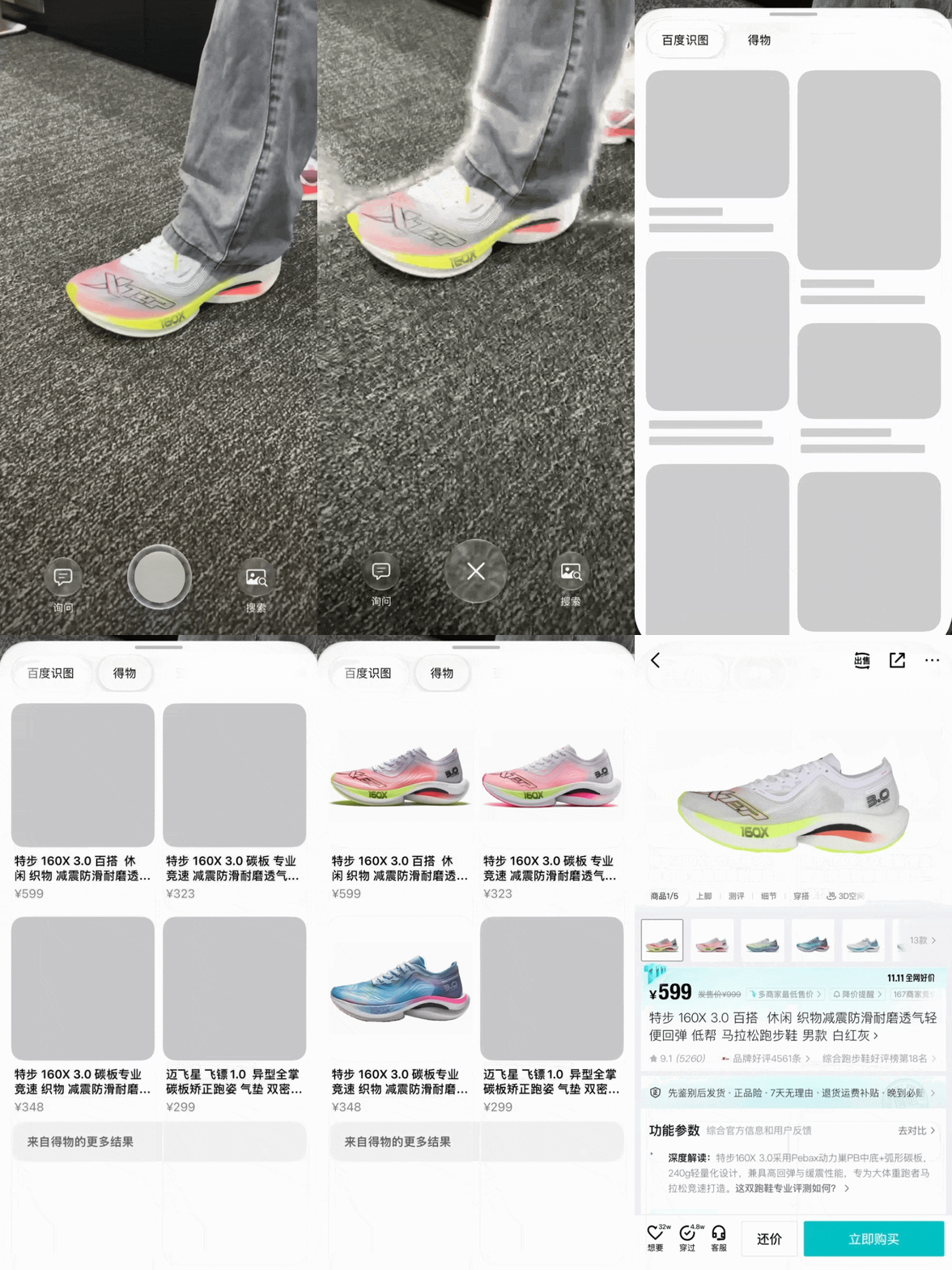
Dewu Adds Apple Visual Intelligence Search? In a November 8 report, ITHome stated that Chinese e-commerce platform Dewu announced support for localized Apple Intelligence visual search on supported iPhone devices. According to the coverage, users with Dewu installed can photograph an item using the system camera, select Dewu from the available search providers, and view matching product listings before navigating directly to an in-app product detail page. While the demonstrated user journey is clear, Dewu’s underlying handoff protocol has not been publicly detailed by the cited coverage. As mobile operating systems introduce multimodal search directly into camera viewfinders, development teams must evaluate how system-level discovery connects with native application navigation, parameter handoffs, and navigation continuity.
What Dewu Announced Regarding Apple Visual Intelligence Search
At a Glance
- Reporting indicates that Dewu announced support for Apple Intelligence visual search, allowing iPhone users to identify commercial goods directly through the camera viewfinder.
- The feature was demonstrated during active testing phases, following Apple’s developer beta release on November 4 ahead of a planned broader rollout with iOS 27.3 in December.
- Demonstrated workflows show a direct handoff from system visual recognition to Dewu’s native product detail pages, displaying pricing trends and product information.
The integration represents one of the first publicized commercial retail integrations with Apple’s localized visual search framework in mainland China. Historically, visual commerce required a consumer to open a specific retail application, locate the camera icon within an internal search bar, and photograph an object within that closed environment. This multi-step process often created friction, as users had to decide which platform to query before capturing an image.
By placing visual recognition directly within the system camera, the operating system shifts the discovery phase outside individual applications. According to reporting from ITHome, a user who encounters a physical product, such as a running shoe, can invoke visual intelligence, frame the subject, and choose Dewu as the target service. The system then displays matching catalog items and price estimates.
Official announcements indicate that localized intelligence features began developer beta testing on November 4, with broader availability scheduled alongside iOS 27.3 in December, as detailed by the Apple China Newsroom. Because the feature remains in an active preview cycle, current public demonstrations reflect specific testing implementations rather than an open, universally deployed capability for all third-party merchants.
Demonstrated User Journey from Camera Viewfinder to Product Detail Page
The demonstrated user experience illustrates an expedited transition from physical discovery to transactional evaluation. When a user taps a search result generated by the visual query, the system transitions directly into the Dewu application. Rather than landing on the general home feed or a broad text search results page, the user arrives at the specific product detail screen corresponding to the photographed item.
Once inside the application, the user can review material specifications, examine historical price fluctuations through platform trend graphs, and read synthesized consumer sentiment before making a purchasing decision.
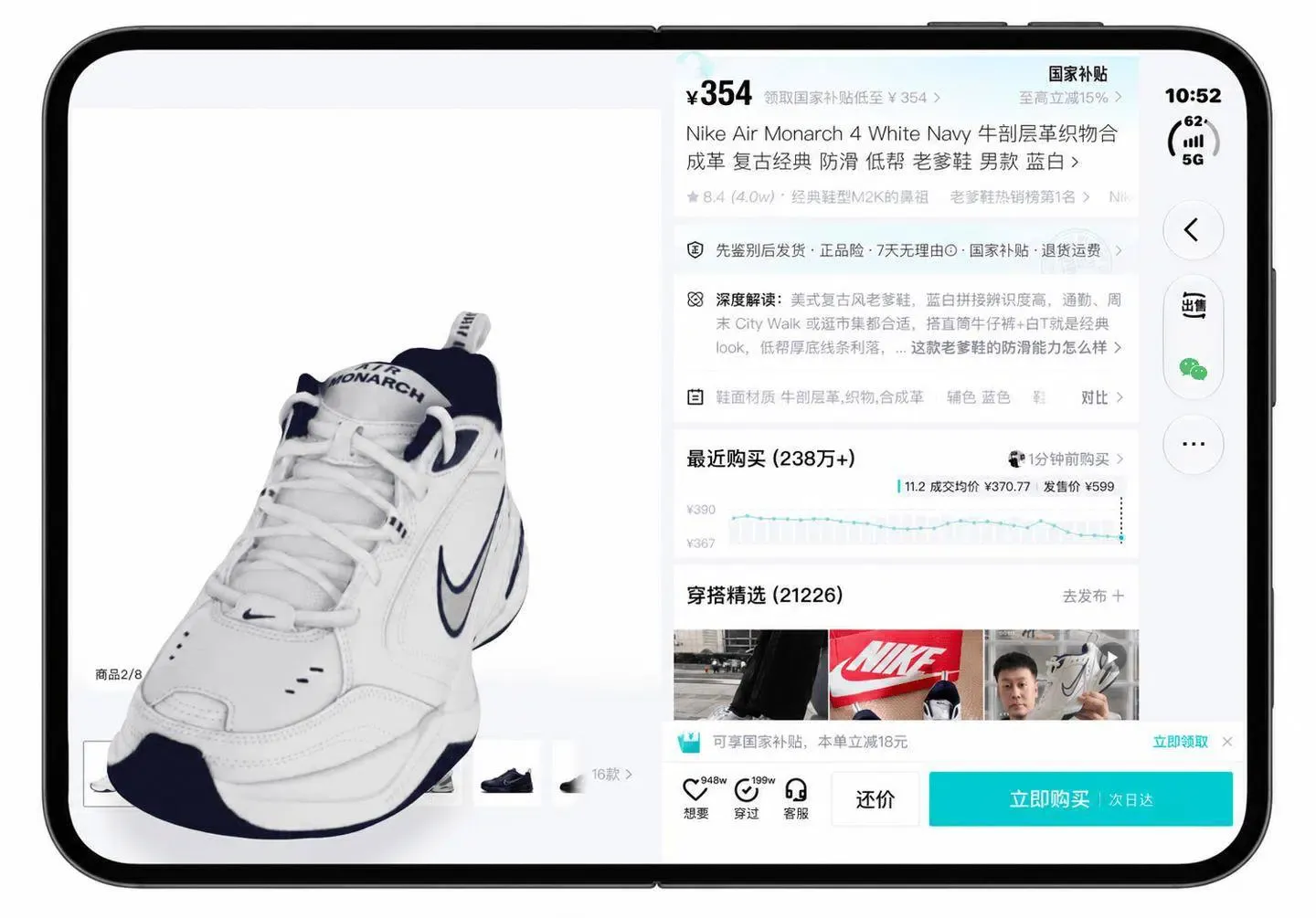
While this workflow streamlines user access, it is important to distinguish between general product discovery and exact inventory matching. Arriving at a product detail page does not necessarily mean specific stock keeping unit (SKU) attributes, such as shoe size or colorway variations, are automatically selected. The visual query routes the user to the correct catalog entry, after which the shopper must still finalize specific purchasing preferences.
Apple Visual Intelligence Search: Documented APIs and System Frameworks
While initial coverage described the experience informally as a direct link, third-party developers cannot assume that the operating system relies exclusively on standard web redirection. Apple’s public documentation for visual intelligence outlines a structured, semantic integration model rather than an open web browser redirect.
According to the Apple Developer Visual Intelligence Documentation, Apple’s public guide describes implementing an IntentValueQuery that receives a SemanticContentDescriptor. The app can use available labels or image data to search its content and return matching AppEntity values. An OpenIntent can then open a selected entity in the app. This describes Apple’s documented integration model; it does not establish Dewu’s specific implementation.
The conceptual architecture of this semantic handoff model is outlined below:
[Camera Viewfinder Capture]
              │
              ▼
[Visual Intelligence Framework] ──(SemanticContentDescriptor)──> [App's IntentValueQuery]
              │                                                           │
              ▼                                                           ▼
[System Provider Overlay] <────────(Matching AppEntity Results)───────────┘
              │
         (User Tap)
              │
              ▼
[OpenIntent Execution] ──(Entity Identifier)──> [Native App Detail View]
Caption: Apple’s documented model—not a verified diagram of Dewu’s implementation.
This model relies on structured queries and entity exchange. Because communication occurs within system frameworks, the application receives structured identifiers directly, reducing reliance on public URL parsing.
Implementation Unknowns and Protocol Boundaries for Third-Party Apps
Dewu has not publicly published the internal codebase or networking specifications powering its integration. As a result, software engineers should recognize what remains confirmed versus what remains unverified regarding the technical implementation.
Reporting and demonstrations describe a workflow for users who have already installed the Dewu application:
- The interaction occurs on supported hardware running eligible preview or release software.
- The system invokes the native application directly to the corresponding product view.
However, public sources do not verify:
- Whether Dewu utilizes Apple’s documented
AppEntityandOpenIntentworkflow, custom Universal Links, or a proprietary partner integration. - Whether camera search tokens can be tracked as conventional marketing campaigns.
- Whether the integration passes granular visual search metadata or simply a static catalog identifier.
Furthermore, technical teams must understand the boundary of standard web linking protocols. As outlined in the Apple Universal Links Guidelines, standard Universal Links operate by associating a web domain with an app via a hosted apple-app-site-association file. When an app is not installed, Universal Links open the destination URL in the user’s default web browser. They do not natively capture or buffer system camera queries across an installation boundary.
Separate Considerations for Web-to-App Campaigns
Although camera-based search operates through distinct system-level interfaces, engineering teams face comparable state-preservation challenges when managing independent user acquisition funnels across web, social, and mobile environments. When user journeys originate outside traditional desktop web browsers, maintaining parameter continuity without client-side cookies is a common technical requirement.
Developers must evaluate the boundary between on-device system intents and broader web-to-app routing mechanisms. The table below delineates the functional responsibilities of these different architectural approaches:
| Routing Approach | Primary Execution Environment | Context Passing Mechanism | Scope & Boundary |
|---|---|---|---|
| System Intent Handshake (e.g., App Intents) | Operating System / On-Device | Semantic AppEntity and OpenIntent payloads |
Apps implementing the relevant supported integration |
| Standard Universal Links | Web Browser to Native Application | HTTPS domain association (apple-app-site-association) |
Direct launches for installed applications; opens the URL in the default web browser if uninstalled |
| Deferred Deep Linking Framework | Web Landing Page to App Store to First Launch | Eligible parameter association and delivery; implementation varies | Preserves web campaign and referral parameters across the initial installation boundary |
For separate web-to-app campaigns, OpoInstall may be evaluated for eligible campaign or referral parameter delivery after installation, as detailed in the OpoInstall product documentation. These capabilities do not establish support for Dewu’s camera-search integration. Rather, they provide server-side parameter recovery designed to preserve web campaign context across app store installations when users arrive from marketing landing pages or external referral links. Engineering teams must assess these reference designs to maintain reliable data flows across independent acquisition funnels while adhering to platform privacy standards.
Integration Checklists for Mobile Commerce Engineering Teams
To prepare application architectures for multimodal discovery while maintaining robust linking standards, development and product teams should verify their routing foundations.
Developer Implementation Checklist
- Review Semantic App Intents: Audit in-app catalog actions to determine whether product entities can be indexed cleanly by system frameworks using
AppEntityprotocols. - Harden Universal Link Fallbacks: Verify that associated domains are correctly configured and that web URLs provide functional landing pages in the user’s default web browser if an app is unavailable.
- Isolate Deep Link Routing Logic: Ensure internal navigation routers validate product parameters and handle expired or out-of-stock items gracefully without crashing the UI.
Product & Growth Strategy Checklist
- Map Distinct Entry Funnels: Differentiate between on-device system visual queries and web-mediated acquisition links within internal reporting pipelines.
- Audit Catalog Metadata Quality: Validate the titles, imagery, and availability returned through the relevant system integration against authoritative in-app catalog data.
- Validate Onboarding Context: For web-driven acquisition channels, verify whether user referral parameters and promotion codes are accurately preserved upon first application launch.
Frequently Asked Questions (FAQ)
Does Apple Intelligence visual search require the target application to be installed?
How does the system navigate from the camera view to a specific product detail page?
What is the primary difference between in-app visual search and Apple Intelligence visual search?
Can visual search parameters survive if a user installs an application after searching?
Key Takeaways for Engineering Teams
The introduction of system-level visual search signals an ongoing evolution toward multimodal, intent-driven application discovery. As operating systems incorporate visual and contextual intelligence directly into camera viewfinders, mobile applications are increasingly invoked through external system triggers rather than traditional app-first navigation.
For engineering teams adapting to this shift, building flexible, decoupled architectures remains essential. Applications implementing supported integration paths can expose modular semantic entities through system frameworks like App Intents while maintaining reliable web linking and server-side state handling across external marketing funnels. By structuring catalog metadata cleanly and decoupling navigation logic from visual home screens, developers can ensure their applications remain responsive as operating systems redefine how users discover goods and services.
References
-
Apple China Newsroom: Apple Intelligence Features Are Coming to Users in China — Official release detailing rollout plans and developer beta schedules for localized Apple Intelligence capabilities.
-
Apple Developer Documentation: Integrating Your App with Visual Intelligence — Technical guide detailing IntentValueQuery protocols, SemanticContentDescriptor inputs, AppEntity models, and OpenIntent execution.
-
Apple Developer Documentation: Allowing Apps and Websites to Link to Your Content — Specifications on Universal Links, domain verification, and default web browser fallbacks.
-
ITHome: Dewu App Announces Integration with Apple Intelligence Visual Search — Product news coverage describing the demonstrated camera search workflow and in-app product page navigation.
-
OpoInstall Documentation: Deferred Parameter Delivery Overview — Technical overview of server-side parameter preservation for web-mediated installation journeys.
Share this article