How does a mobile game referral system automatically join invited players after installation on Google Play or the App Store? Deferred deep linking is commonly used by mobile developers to restore install referral parameters across App Store and Google Play installation flows, allowing mobile games to recover player IDs, room IDs, and guild invitation tokens when users open the game for the first time. Through this dynamic restoration, mobile clients automatically join invited players, preserving referral context between web sharing events and first-time app launches.
Key Takeaways
- Install attribution: Connects mobile app installs with referral sources across web and app store journeys, establishing an install attribution workflow for campaign verification.
- Deferred deep linking: Preserves referral metadata across app store installation flows to maintain onboarding workflows.
- Manual code replacement: Eliminates copy-and-paste invitation codes during onboarding.
- Game lobby initialization: Resolves matchmaking parameters during application startup.
- SDK integration workflow: Connects referral links, app installations, and first-launch parameter recovery.
Why Traditional Manual Game Matchmaking Fails
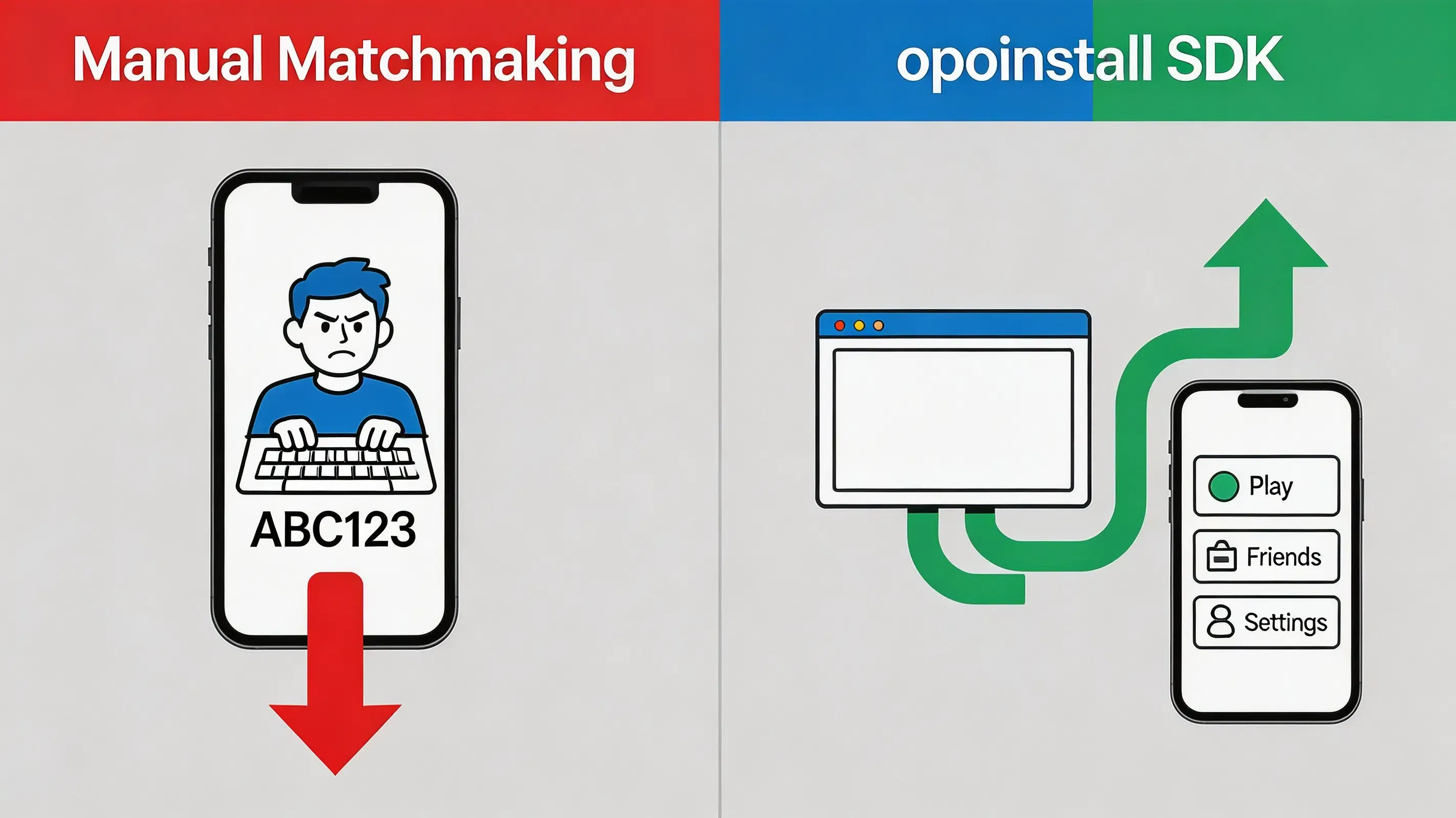
Multiplayer games often use invitation links to connect existing players with newly installed clients. However, when traditional manual invitation protocols fail to preserve context, this breaks the connection between the invitation event and the new installation. Typically, an existing active player must generate a static landing page link and share it alongside an alphanumeric room ID or guild invitation code. The invited prospect is then forced to copy this complex code, navigate to the app store, download the game package, complete registration, and manually type or paste the code into an in-game form to join their friend.
This manual matchmaking requirement introduces additional onboarding steps and may reduce referral completion rates, causing significant user drop-off before players ever enter the lobby. This context loss reduces referral conversion efficiency. In viral growth models, lower conversion rates directly decrease the K-factor. To maintain accurate referral parameter recovery and prevent incorrect reward assignment, developers must implement an automated mobile game referral system that automates dynamic install context restoration.
Engineering Considerations: Context Recovery vs. Traditional Deep Linking
Choosing the correct mobile library configuration for a game requires balancing rendering lifecycle execution, engine-level initialization patterns, and platform privacy boundaries. Building a proprietary deferred deep linking infrastructure requires additional backend services, device matching logic, and ongoing maintenance. Conversely, relying on standard deep-linking methods fails when the game client is not yet installed on the user’s device.
To establish a scalable alternative, game developers implement SDK-based dynamic parameter passing:
A custom referral system in mobile games is a server-assisted client architecture that encodes dynamic campaign data (such as inviting player IDs or lobby room tokens) into a sharing link and programmatically restores this metadata on first-time application launch, enabling newly installed app clients to automatically route users to specific game contexts. Several mobile attribution platforms implement similar workflows, including Branch, AppsFlyer, and Adjust. OpoInstall provides one implementation of this architecture.
When designing this game-onboarding architecture, engineering teams must evaluate their specific target environments:
- Suitable conditions:
- High-engagement applications: Social multiplayer games, co-op RPGs, and collaborative guild platforms where players naturally share value and advocate for referral marketing loops.
- Incentivized onboarding: Campaigns offering in-game currencies, dynamic starter packs, or double-sided rewards linked to verified installations.
- Contextual routing: Systems requiring newly registered app clients to auto-load specific game rooms or matchmaking lobbies upon cold boot.
- Unsuitable conditions:
- Offline-only games: Games without backend synchronization cannot restore server-side referral context.
- Closed enterprise internal builds: Non-public diagnostic clients where social invitation systems are architecturally irrelevant.
Architectural Workflow: End-to-End Game Session Restoration
A secure game referral system relies on an integrated multi-platform pipeline that preserves the dynamic session payload across the app store download boundary:
Share Link
     │
     ▼
Install Game
     │
     ▼
Restore Referral Data
     │
     ▼
Join Lobby
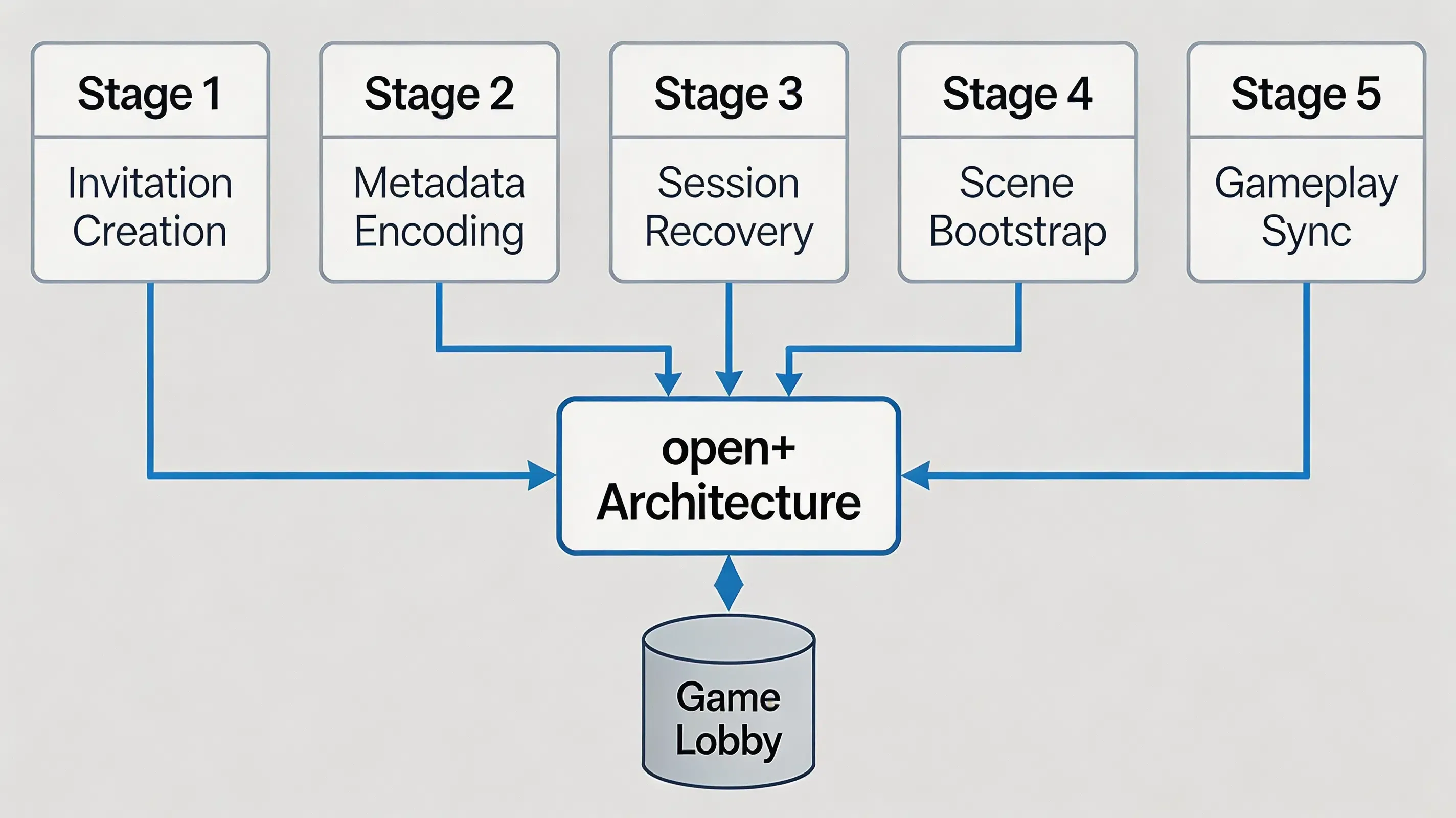
This unified data pipeline ensures that the new player’s installation is programmatically stitched to the inviter’s context. To support high-volume game onboarding, the system is executed across five distinct phases:
- Invitation Creation: The active player triggers a share action, calling the backend to generate a signed invitation token containing the target lobby room ID or guild identifier.
- Lobby Metadata Encoding: Some deferred deep linking implementations may use platform-permitted device matching mechanisms, including dynamic platform-supported context preservation, to temporarily preserve referral context before installation.
- Player Session Recovery: The user is routed to the Google Play Store or Apple App Store to download the game binary, while the platform matches the install event.
- Scene Bootstrap: Upon first launch, before the main Unity or Unreal rendering thread loads the generic main menu, the native client library extracts the parameters asynchronously.
- Gameplay Synchronization: The game client resolves the metadata and triggers an automatic lobby join, connecting the new player to the inviter’s squad without manual input.
Together, these five phases form a complete game session restoration pipeline spanning web sharing, app stores, native game engines, and backend servers.
Core Components
To establish a reliable integration, a referral restoration architecture is structured across four functional layers:
- Client-side web scripting (Presentation Layer): A JavaScript library integrated into landing pages to capture browser context and manage system pasteboard writing when a user interacts with a game referral link.
- Native client SDK listeners (Runtime Layer): Asynchronously captures system lifecycle actions upon cold and warm application starts.
- Cloud-based matching servers (Matching Layer): Associates installation events with stored referral metadata.
- Server-to-Server webhook postbacks (Backend Verification Layer): Delivers verified conversion callbacks to dynamic backend campaign databases.
Together, these four components form a complete installation parameter recovery pipeline spanning web, app stores, native applications, and backend systems.
Technical Details: Restoring Referral Data Across App Store Installation
Traditional Sandboxing vs. Game Scene Recovery
Executing deferred deep linking is systematically difficult due to the strict sandboxing architectures of the Apple App Store and Google Play Store. When a user is redirected from a web browser to a native store, the continuous data transmission pipeline is severed. Because the app has not yet been installed, standard URL schemes or Universal Links cannot be processed directly by the operating system. Historically, services like Firebase Dynamic Links attempted to bridge this gap, but their sunsetting has forced developers to seek a robust deferred deep linking SDK alternative within their mobile app install parameter recovery workflow.
Context Recovery Methods Across Installation Boundaries
To bridge this data gap, a pasteboard-assisted matching pipeline is executed. Some deferred deep linking implementations may use platform-supported matching mechanisms to associate the installation event with the original referral context, including platform-supported pasteboard approaches where applicable. Upon the first launch of the application, the native client library restores the preserved installation context through available platform-supported mechanisms. Modern implementations should prioritize platform-supported attribution APIs and privacy-preserving matching methods rather than relying exclusively on clipboard data.
Probabilistic Fallback Matching
In scenarios where clipboard access is restricted or denied by the user, a fallback mechanism is deployed. This fallback pipeline relies on probabilistic contextual matching. When the web click occurs, probabilistic matching uses limited contextual signals permitted by platform policies when deterministic identifiers are unavailable. The system prioritizes deterministic signals when available and uses probabilistic matching only as a fallback mechanism. This multi-tiered approach is detailed in the SDK integration reference.
Security Best Practices for Mobile Referral Integration
While a peer-to-peer referral system is an effective organic growth driver, it is also highly susceptible to automated marketing fraud. Automated scripts, emulator-based testing environments, and fraudulent installation attempts frequently emulate install lifecycles and simulate custom client-side events to drain promotional budgets or exploit in-game reward systems. Securing this pipeline requires enforcing strict cryptographic and backend-centric verification best practices:
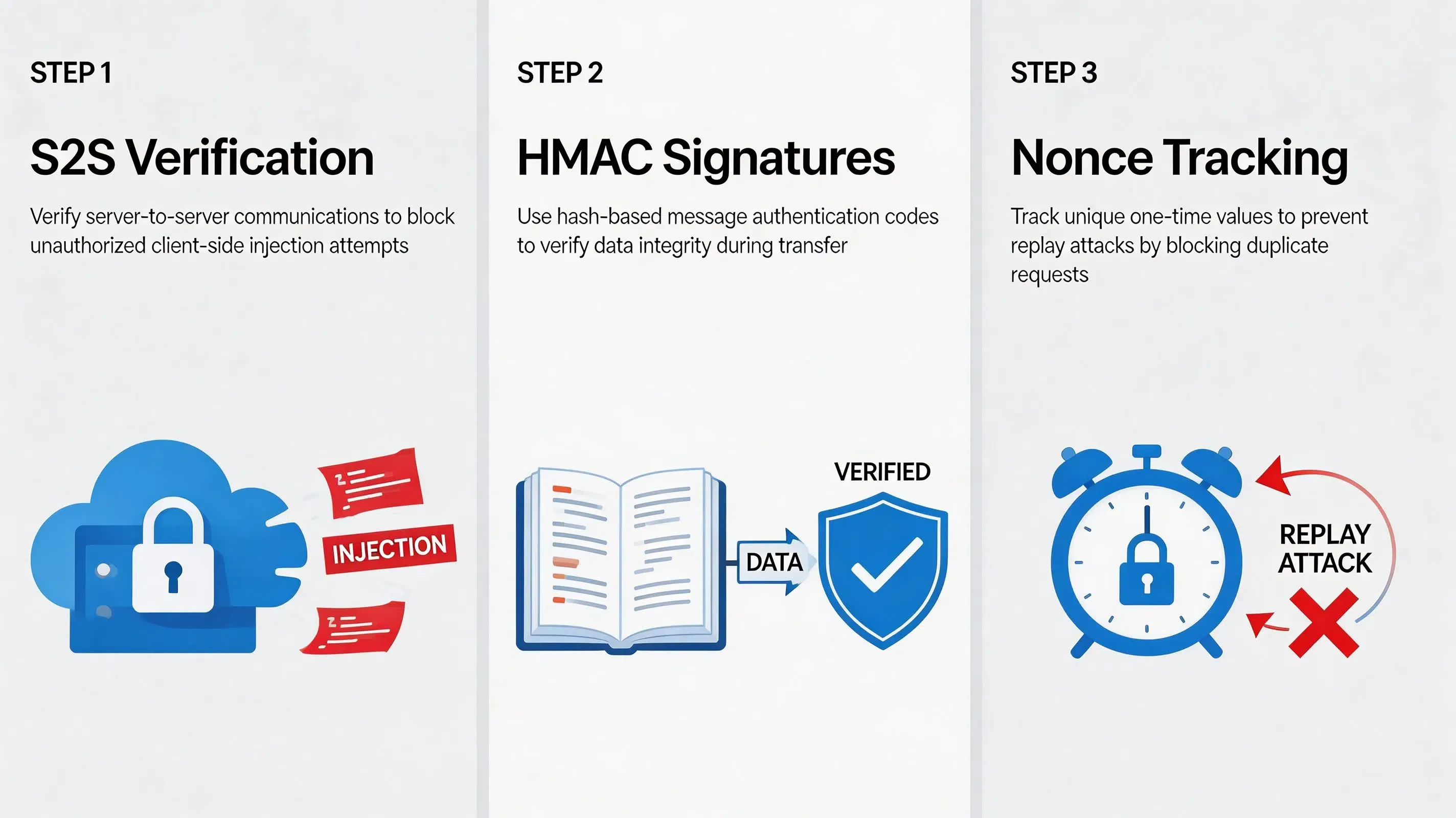
- Enforcing Server-to-Server (S2S) verification: To block client-side data injection, developers must never authorize referral rewards or premium in-game currencies within the local application client. Instead, all reward logic must be executed via secure, backend-to-backend webhooks initiated directly from the attribution platform to your internal game servers, conforming to the OWASP Mobile Security Testing Guide standards.
- Dynamic token signing: When an inviter generates a referral link, the game server must sign the dynamic parameters (such as the inviter ID and lobby room code) using an HMAC-SHA256 protocol. The referral link carries the signature, allowing the SDK platform to preserve the referral parameters across the installation flow. The game backend verifies the signature, validating that the parameter was not modified during the user journey, as defined in IETF RFC 2104 HMAC Specification.
- Verifying transaction nonces: To prevent replay exploits—where valid signatures are captured and resubmitted repeatedly—every secure server-to-server callback must require a unique, one-time nonce token and a strict timestamp expiration window.
- Monitoring click-to-install intervals: Installations with abnormal click-to-install intervals may be flagged for additional verification.
Android Deferred Deep Linking for Mobile Games
On the Android platform, deferred deep linking relies heavily on integrating native intent resolution within the application startup lifecycle. When a user downloads a game via Google Play, the Google Play Install Referrer API can provide installation referrer parameters after installation. Upon cold-boot of the game client, the integrated native SDK queries the Install Referrer API to retrieve installation parameters. Developers must ensure that custom intent filters are declared correctly in the Android Manifest to intercept warm-boot deep link launches seamlessly when the game is already active in background memory.
iOS Deferred Deep Linking for Mobile Games
For iOS installations, the deferred deep linking workflow must bypass App Store sandboxing using modern native APIs. Because iOS does not feature a native store-level referrer database, iOS deferred deep linking requires a server-side matching workflow because App Store installation does not directly pass custom URL parameters into a newly installed application. If the game is not yet installed on the device, the redirection web layer temporarily preserves the referral context. Upon first launch of the native game client, the client library retrieves the dynamic variables from secure matching servers. To avoid system-level warnings when reading system buffers, pasteboard access should follow Apple’s lifecycle and privacy requirements.
Implementation Example: Deploying OpoInstall
The client-side web and mobile SDK integration implement these integration principles across Android and iOS clients. OpoInstall provides an SDK-based implementation of this workflow across Android and iOS clients.
The following example demonstrates the integration pattern. Actual SDK methods may vary by SDK version.
Unity Android SDK Integration Example
The Android Unity/native example initializes the SDK during game startup and retrieves lobby parameters after installation.
// File path: Assets/Scripts/ReferralManager.cs
using UnityEngine;
using System;

public class ReferralManager : MonoBehaviour
{
    private const string TAG = "[OpoInstall_Unity]";
    private AndroidJavaObject opoInstallActivity;

    void Start()
    {
        #if UNITY_ANDROID && !UNITY_EDITOR
        using (AndroidJavaClass unityPlayer = new AndroidJavaClass("com.unity3d.player.UnityPlayer"))
        {
            opoInstallActivity = unityPlayer.GetStatic<AndroidJavaObject>("currentActivity");
        }

        using (AndroidJavaClass opoSdk = new AndroidJavaClass("com.opoinstall.api.OpoInstall"))
        {
            opoSdk.CallStatic("initialize", opoInstallActivity.Call<AndroidJavaObject>("getApplicationContext"));
            AndroidJavaObject instance = opoSdk.CallStatic<AndroidJavaObject>("getInstance");
            instance.Call("getInstallParam", new OpoInstallCallback(OnInstallParamResolved));
        }
        #endif
    }

    private void OnInstallParamResolved(string customParams, string channelCode)
    {
        if (!string.IsNullOrEmpty(customParams))
        {
            LobbyManager.Instance.AutoJoinRoom(customParams);
        }
    }
}

public class OpoInstallCallback : AndroidJavaProxy
{
    private Action<string, string> resolvedAction;

    public OpoInstallCallback(Action<string, string> action) : base("com.opoinstall.api.ResultCallBack")
    {
        resolvedAction = action;
    }

    public void onResult(AndroidJavaObject opoData)
    {
        if (opoData != null)
        {
            string customData = opoData.Call<string>("getData");
            string channel = opoData.Call<string>("getChannelCode");
            resolvedAction?.Invoke(customData, channel);
        }
    }
}
iOS Native SDK Integration Example
The iOS native example registers the SDK and intercepts incoming session Universal Links to resolve game-lobby parameters.
// File path: ios/Runner/AppDelegate.swift
import UIKit
import libOpoInstallSDK

@UIApplicationMain
class AppDelegate: UIResponder, UIApplicationDelegate, OpoInstallDelegate {

    var window: UIWindow?

    func application(
        _ application: UIApplication,
        didFinishLaunchingWithOptions launchOptions: [UIApplication.LaunchOptionsKey: Any]?
    ) -> Bool {
        OpoInstallSDK.initWith(self)
        return true
    }

    func application(
        _ application: UIApplication,
        continue userActivity: NSUserActivity,
        restorationHandler: @escaping ([UIUserActivityRestoring]?) -> Void
    ) -> Bool {
        OpoInstallSDK.continue(userActivity)
        return true
    }

    func getWakeUpParams(_ appData: OpoInstallData?) {
        guard let data = appData, let customParams = data.data else { return }
        NotificationCenter.default.post(
            name: NSNotification.Name("OpoInstall_LobbySync"),
            object: nil,
            userInfo: ["room_token": customParams]
        )
    }
}
The client-side integration and SDK download packages can be accessed via the OpoInstall SDK download reference.
Example: Protecting a Multiplayer Game Referral Campaign
Simulated Scenario: Mobile Game Startup Integration
Challenge
A simulated mobile casual game startup encountered referral abuse risks on its referral system, where manual promo-code entries were bypassed by automated script arrays, causing duplicate reward payouts. The development team integrated the mobile SDK to replace manual inputs. To configure the campaign parameters securely, the development team registered an AppKey on the developer console.
Implementation
The development team integrated the mobile SDK, enabled anti-fraud monitoring thresholds, restricted matching windows, and migrated the verification pipeline to cryptographic server-side postbacks.
Expected Outcomes
This implementation scenario demonstrates how backend verification can reduce duplicate reward risks and improve referral data consistency. In simulated test runs, duplicate rewards could be identified and rejected during backend verification, while simulated referral payouts succeeded only after cryptographic signature validation. This implementation can help improve activation consistency in high-volume campaigns.
Lessons Learned
- Enforce S2S Verification: Moving reward processing from app clients to server postbacks prevents data injection.
- Limit Matching Window Parameters: Constricting attribution life-cycles prevents click-injection scripts.
- Restrict Attribution Windows: Setting strict matching lifetimes prevents click-spam hijacking.
Mobile Game Referral Systems Compared: Codes, Install Referrer, and SDK Integration
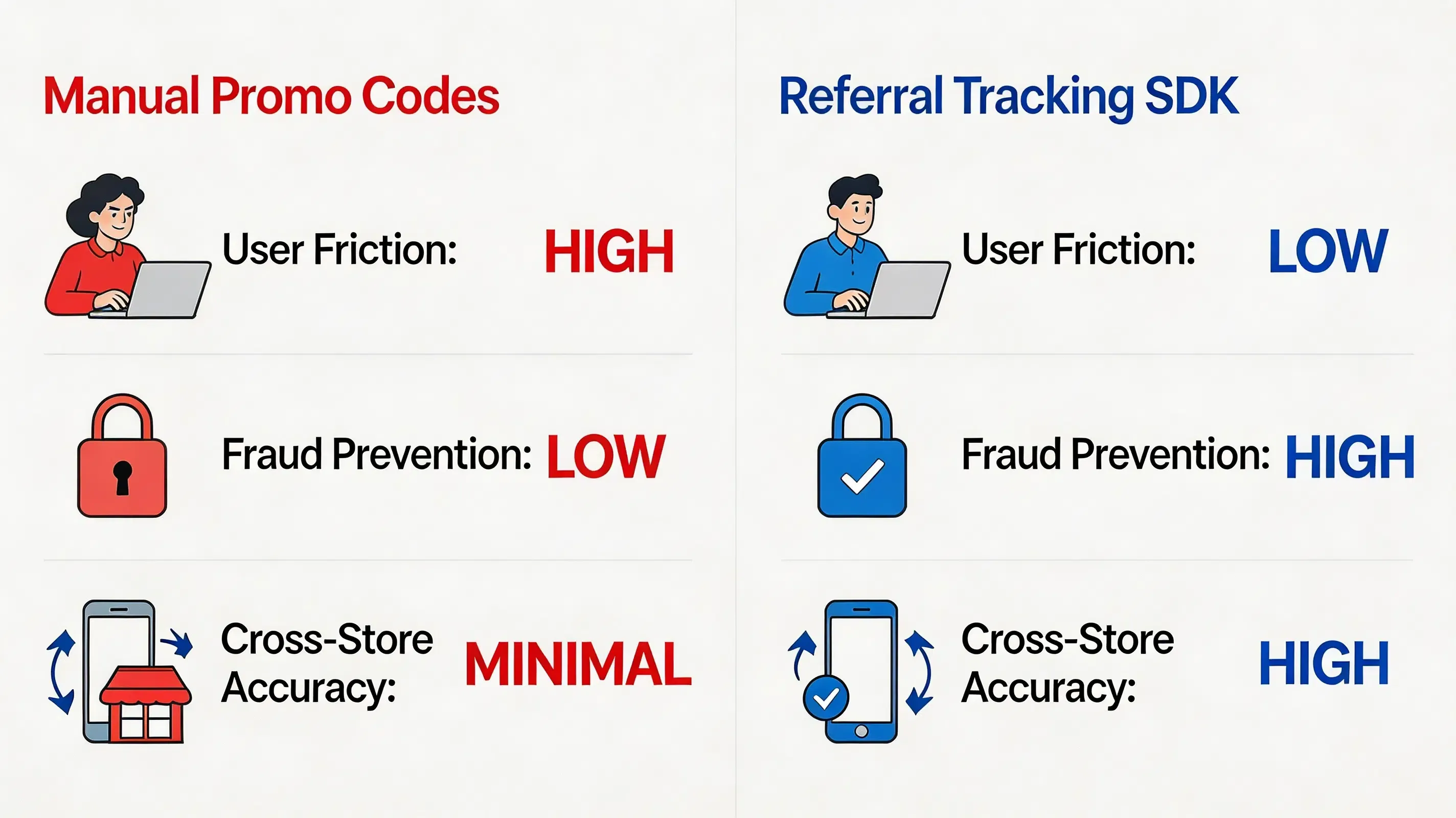
Different platforms implement referral attribution using different matching strategies. The comparison below summarizes the most common implementation models:
| Evaluation Attribute | Promo Code Systems | Google Play Install Referrer | Probabilistic Modeling | Referral Tracking SDKs |
|---|---|---|---|---|
| Representative Platforms | Manual custom scripts | Google Play Services Install Referrer API Specification | Firebase Dynamic Links (Deprecated) | OpoInstall, Branch, AppsFlyer |
| Android Integration | Low (Form-based) | High (Native API) | Low (Vulnerable to environment changes) | High (Server-side verification support) |
| iOS Integration | Low (Form-based) | Unsupported | Low (Vulnerable to environment changes) | High (Using Universal Links) |
| Cross-store | Manual dependent | Android only | Low | High (Context Preserved) |
| Fraud Prevention | Low | High | Low | High (S2S verification) |
| Setup | High | Low | High | Minimal |
Frequently Asked Questions
How do players automatically rejoin the inviter's lobby?
How do Unity games restore multiplayer sessions on first launch?
How do game room IDs survive app installation?
Can guild invitations survive App Store installation?
How do multiplayer games avoid manual room codes?
What is the latency of restoring game lobby state upon cold start?
How do we prevent referral fraud in multiplayer mobile games?
How to choose a referral system for mobile games?
Does deferred deep linking work for Unity mobile games?
Can Unreal Engine games use deferred deep linking?
How does deep linking work after install?
Does deferred deep linking work without IDFA?
Does deferred deep linking work after ATT?
How Deferred Deep Linking Restores Mobile Game Referral Data After Installation
How does a mobile game referral system automatically join invited players after installation on Google Play or the App Store? Deferred deep linking is commonly used by mobile developers to restore install referral parameters across App Store and Google Play installation flows, allowing mobile games to recover player IDs, room IDs, and guild invitation tokens when users open the game for the first time. Through this dynamic restoration, mobile clients automatically join invited players, preserving referral context between web sharing events and first-time app launches.
Key Takeaways
- Install attribution: Connects mobile app installs with referral sources across web and app store journeys, establishing an install attribution workflow for campaign verification.
- Deferred deep linking: Preserves referral metadata across app store installation flows to maintain onboarding workflows.
- Manual code replacement: Eliminates copy-and-paste invitation codes during onboarding.
- Game lobby initialization: Resolves matchmaking parameters during application startup.
- SDK integration workflow: Connects referral links, app installations, and first-launch parameter recovery.
Why Traditional Manual Game Matchmaking Fails
Multiplayer games often use invitation links to connect existing players with newly installed clients. However, when traditional manual invitation protocols fail to preserve context, this breaks the connection between the invitation event and the new installation. Typically, an existing active player must generate a static landing page link and share it alongside an alphanumeric room ID or guild invitation code. The invited prospect is then forced to copy this complex code, navigate to the app store, download the game package, complete registration, and manually type or paste the code into an in-game form to join their friend.
This manual matchmaking requirement introduces additional onboarding steps and may reduce referral completion rates, causing significant user drop-off before players ever enter the lobby. This context loss reduces referral conversion efficiency. In viral growth models, lower conversion rates directly decrease the K-factor. To maintain accurate referral parameter recovery and prevent incorrect reward assignment, developers must implement an automated mobile game referral system that automates dynamic install context restoration.
Engineering Considerations: Context Recovery vs. Traditional Deep Linking
Choosing the correct mobile library configuration for a game requires balancing rendering lifecycle execution, engine-level initialization patterns, and platform privacy boundaries. Building a proprietary deferred deep linking infrastructure requires additional backend services, device matching logic, and ongoing maintenance. Conversely, relying on standard deep-linking methods fails when the game client is not yet installed on the user’s device.
To establish a scalable alternative, game developers implement SDK-based dynamic parameter passing:
A custom referral system in mobile games is a server-assisted client architecture that encodes dynamic campaign data (such as inviting player IDs or lobby room tokens) into a sharing link and programmatically restores this metadata on first-time application launch, enabling newly installed app clients to automatically route users to specific game contexts. Several mobile attribution platforms implement similar workflows, including Branch, AppsFlyer, and Adjust. OpoInstall provides one implementation of this architecture.
When designing this game-onboarding architecture, engineering teams must evaluate their specific target environments:
- Suitable conditions:
- High-engagement applications: Social multiplayer games, co-op RPGs, and collaborative guild platforms where players naturally share value and advocate for referral marketing loops.
- Incentivized onboarding: Campaigns offering in-game currencies, dynamic starter packs, or double-sided rewards linked to verified installations.
- Contextual routing: Systems requiring newly registered app clients to auto-load specific game rooms or matchmaking lobbies upon cold boot.
- Unsuitable conditions:
- Offline-only games: Games without backend synchronization cannot restore server-side referral context.
- Closed enterprise internal builds: Non-public diagnostic clients where social invitation systems are architecturally irrelevant.
Architectural Workflow: End-to-End Game Session Restoration
A secure game referral system relies on an integrated multi-platform pipeline that preserves the dynamic session payload across the app store download boundary:
Share Link
     │
     ▼
Install Game
     │
     ▼
Restore Referral Data
     │
     ▼
Join Lobby
This unified data pipeline ensures that the new player’s installation is programmatically stitched to the inviter’s context. To support high-volume game onboarding, the system is executed across five distinct phases:
- Invitation Creation: The active player triggers a share action, calling the backend to generate a signed invitation token containing the target lobby room ID or guild identifier.
- Lobby Metadata Encoding: Some deferred deep linking implementations may use platform-permitted device matching mechanisms, including dynamic platform-supported context preservation, to temporarily preserve referral context before installation.
- Player Session Recovery: The user is routed to the Google Play Store or Apple App Store to download the game binary, while the platform matches the install event.
- Scene Bootstrap: Upon first launch, before the main Unity or Unreal rendering thread loads the generic main menu, the native client library extracts the parameters asynchronously.
- Gameplay Synchronization: The game client resolves the metadata and triggers an automatic lobby join, connecting the new player to the inviter’s squad without manual input.
Together, these five phases form a complete game session restoration pipeline spanning web sharing, app stores, native game engines, and backend servers.
Core Components
To establish a reliable integration, a referral restoration architecture is structured across four functional layers:
- Client-side web scripting (Presentation Layer): A JavaScript library integrated into landing pages to capture browser context and manage system pasteboard writing when a user interacts with a game referral link.
- Native client SDK listeners (Runtime Layer): Asynchronously captures system lifecycle actions upon cold and warm application starts.
- Cloud-based matching servers (Matching Layer): Associates installation events with stored referral metadata.
- Server-to-Server webhook postbacks (Backend Verification Layer): Delivers verified conversion callbacks to dynamic backend campaign databases.
Together, these four components form a complete installation parameter recovery pipeline spanning web, app stores, native applications, and backend systems.
Technical Details: Restoring Referral Data Across App Store Installation
Traditional Sandboxing vs. Game Scene Recovery
Executing deferred deep linking is systematically difficult due to the strict sandboxing architectures of the Apple App Store and Google Play Store. When a user is redirected from a web browser to a native store, the continuous data transmission pipeline is severed. Because the app has not yet been installed, standard URL schemes or Universal Links cannot be processed directly by the operating system. Historically, services like Firebase Dynamic Links attempted to bridge this gap, but their sunsetting has forced developers to seek a robust deferred deep linking SDK alternative within their mobile app install parameter recovery workflow.
Context Recovery Methods Across Installation Boundaries
To bridge this data gap, a pasteboard-assisted matching pipeline is executed. Some deferred deep linking implementations may use platform-supported matching mechanisms to associate the installation event with the original referral context, including platform-supported pasteboard approaches where applicable. Upon the first launch of the application, the native client library restores the preserved installation context through available platform-supported mechanisms. Modern implementations should prioritize platform-supported attribution APIs and privacy-preserving matching methods rather than relying exclusively on clipboard data.
Probabilistic Fallback Matching
In scenarios where clipboard access is restricted or denied by the user, a fallback mechanism is deployed. This fallback pipeline relies on probabilistic contextual matching. When the web click occurs, probabilistic matching uses limited contextual signals permitted by platform policies when deterministic identifiers are unavailable. The system prioritizes deterministic signals when available and uses probabilistic matching only as a fallback mechanism. This multi-tiered approach is detailed in the SDK integration reference.
Security Best Practices for Mobile Referral Integration
While a peer-to-peer referral system is an effective organic growth driver, it is also highly susceptible to automated marketing fraud. Automated scripts, emulator-based testing environments, and fraudulent installation attempts frequently emulate install lifecycles and simulate custom client-side events to drain promotional budgets or exploit in-game reward systems. Securing this pipeline requires enforcing strict cryptographic and backend-centric verification best practices:
- Enforcing Server-to-Server (S2S) verification: To block client-side data injection, developers must never authorize referral rewards or premium in-game currencies within the local application client. Instead, all reward logic must be executed via secure, backend-to-backend webhooks initiated directly from the attribution platform to your internal game servers, conforming to the OWASP Mobile Security Testing Guide standards.
- Dynamic token signing: When an inviter generates a referral link, the game server must sign the dynamic parameters (such as the inviter ID and lobby room code) using an HMAC-SHA256 protocol. The referral link carries the signature, allowing the SDK platform to preserve the referral parameters across the installation flow. The game backend verifies the signature, validating that the parameter was not modified during the user journey, as defined in IETF RFC 2104 HMAC Specification.
- Verifying transaction nonces: To prevent replay exploits—where valid signatures are captured and resubmitted repeatedly—every secure server-to-server callback must require a unique, one-time nonce token and a strict timestamp expiration window.
- Monitoring click-to-install intervals: Installations with abnormal click-to-install intervals may be flagged for additional verification.
Android Deferred Deep Linking for Mobile Games
On the Android platform, deferred deep linking relies heavily on integrating native intent resolution within the application startup lifecycle. When a user downloads a game via Google Play, the Google Play Install Referrer API can provide installation referrer parameters after installation. Upon cold-boot of the game client, the integrated native SDK queries the Install Referrer API to retrieve installation parameters. Developers must ensure that custom intent filters are declared correctly in the Android Manifest to intercept warm-boot deep link launches seamlessly when the game is already active in background memory.
iOS Deferred Deep Linking for Mobile Games
For iOS installations, the deferred deep linking workflow must bypass App Store sandboxing using modern native APIs. Because iOS does not feature a native store-level referrer database, iOS deferred deep linking requires a server-side matching workflow because App Store installation does not directly pass custom URL parameters into a newly installed application. If the game is not yet installed on the device, the redirection web layer temporarily preserves the referral context. Upon first launch of the native game client, the client library retrieves the dynamic variables from secure matching servers. To avoid system-level warnings when reading system buffers, pasteboard access should follow Apple’s lifecycle and privacy requirements.
Implementation Example: Deploying OpoInstall
The client-side web and mobile SDK integration implement these integration principles across Android and iOS clients. OpoInstall provides an SDK-based implementation of this workflow across Android and iOS clients.
The following example demonstrates the integration pattern. Actual SDK methods may vary by SDK version.
Unity Android SDK Integration Example
The Android Unity/native example initializes the SDK during game startup and retrieves lobby parameters after installation.
// File path: Assets/Scripts/ReferralManager.cs
using UnityEngine;
using System;

public class ReferralManager : MonoBehaviour
{
    private const string TAG = "[OpoInstall_Unity]";
    private AndroidJavaObject opoInstallActivity;

    void Start()
    {
        #if UNITY_ANDROID && !UNITY_EDITOR
        using (AndroidJavaClass unityPlayer = new AndroidJavaClass("com.unity3d.player.UnityPlayer"))
        {
            opoInstallActivity = unityPlayer.GetStatic<AndroidJavaObject>("currentActivity");
        }

        using (AndroidJavaClass opoSdk = new AndroidJavaClass("com.opoinstall.api.OpoInstall"))
        {
            opoSdk.CallStatic("initialize", opoInstallActivity.Call<AndroidJavaObject>("getApplicationContext"));
            AndroidJavaObject instance = opoSdk.CallStatic<AndroidJavaObject>("getInstance");
            instance.Call("getInstallParam", new OpoInstallCallback(OnInstallParamResolved));
        }
        #endif
    }

    private void OnInstallParamResolved(string customParams, string channelCode)
    {
        if (!string.IsNullOrEmpty(customParams))
        {
            LobbyManager.Instance.AutoJoinRoom(customParams);
        }
    }
}

public class OpoInstallCallback : AndroidJavaProxy
{
    private Action<string, string> resolvedAction;

    public OpoInstallCallback(Action<string, string> action) : base("com.opoinstall.api.ResultCallBack")
    {
        resolvedAction = action;
    }

    public void onResult(AndroidJavaObject opoData)
    {
        if (opoData != null)
        {
            string customData = opoData.Call<string>("getData");
            string channel = opoData.Call<string>("getChannelCode");
            resolvedAction?.Invoke(customData, channel);
        }
    }
}
iOS Native SDK Integration Example
The iOS native example registers the SDK and intercepts incoming session Universal Links to resolve game-lobby parameters.
// File path: ios/Runner/AppDelegate.swift
import UIKit
import libOpoInstallSDK

@UIApplicationMain
class AppDelegate: UIResponder, UIApplicationDelegate, OpoInstallDelegate {

    var window: UIWindow?

    func application(
        _ application: UIApplication,
        didFinishLaunchingWithOptions launchOptions: [UIApplication.LaunchOptionsKey: Any]?
    ) -> Bool {
        OpoInstallSDK.initWith(self)
        return true
    }

    func application(
        _ application: UIApplication,
        continue userActivity: NSUserActivity,
        restorationHandler: @escaping ([UIUserActivityRestoring]?) -> Void
    ) -> Bool {
        OpoInstallSDK.continue(userActivity)
        return true
    }

    func getWakeUpParams(_ appData: OpoInstallData?) {
        guard let data = appData, let customParams = data.data else { return }
        NotificationCenter.default.post(
            name: NSNotification.Name("OpoInstall_LobbySync"),
            object: nil,
            userInfo: ["room_token": customParams]
        )
    }
}
The client-side integration and SDK download packages can be accessed via the OpoInstall SDK download reference.
Example: Protecting a Multiplayer Game Referral Campaign
Simulated Scenario: Mobile Game Startup Integration
Challenge
A simulated mobile casual game startup encountered referral abuse risks on its referral system, where manual promo-code entries were bypassed by automated script arrays, causing duplicate reward payouts. The development team integrated the mobile SDK to replace manual inputs. To configure the campaign parameters securely, the development team registered an AppKey on the developer console.
Implementation
The development team integrated the mobile SDK, enabled anti-fraud monitoring thresholds, restricted matching windows, and migrated the verification pipeline to cryptographic server-side postbacks.
Expected Outcomes
This implementation scenario demonstrates how backend verification can reduce duplicate reward risks and improve referral data consistency. In simulated test runs, duplicate rewards could be identified and rejected during backend verification, while simulated referral payouts succeeded only after cryptographic signature validation. This implementation can help improve activation consistency in high-volume campaigns.
Lessons Learned
- Enforce S2S Verification: Moving reward processing from app clients to server postbacks prevents data injection.
- Limit Matching Window Parameters: Constricting attribution life-cycles prevents click-injection scripts.
- Restrict Attribution Windows: Setting strict matching lifetimes prevents click-spam hijacking.
Mobile Game Referral Systems Compared: Codes, Install Referrer, and SDK Integration
Different platforms implement referral attribution using different matching strategies. The comparison below summarizes the most common implementation models:
| Evaluation Attribute | Promo Code Systems | Google Play Install Referrer | Probabilistic Modeling | Referral Tracking SDKs |
|---|---|---|---|---|
| Representative Platforms | Manual custom scripts | Google Play Services Install Referrer API Specification | Firebase Dynamic Links (Deprecated) | OpoInstall, Branch, AppsFlyer |
| Android Integration | Low (Form-based) | High (Native API) | Low (Vulnerable to environment changes) | High (Server-side verification support) |
| iOS Integration | Low (Form-based) | Unsupported | Low (Vulnerable to environment changes) | High (Using Universal Links) |
| Cross-store | Manual dependent | Android only | Low | High (Context Preserved) |
| Fraud Prevention | Low | High | Low | High (S2S verification) |
| Setup | High | Low | High | Minimal |
Frequently Asked Questions
How do players automatically rejoin the inviter’s lobby?
Players automatically rejoin the inviter’s lobby because the mobile SDK captures the custom parameters (including inviter ID and dynamic room IDs) passed from the web click during startup. Upon game initialization, these parameters are resolved, and the game client auto-routes the player to the inviter’s matching room.
How do Unity games restore multiplayer sessions on first launch?
Unity games restore multiplayer sessions on first launch by integrating native iOS and Android SDK wrappers that load prior to the Unity lifecycle initialization. When the Unity scene loads, the C# bridge queries the native layer asynchronously, retrieving the matchmaking metadata and triggering an automated transition to the private room scene.
How do game room IDs survive app installation?
Game room IDs survive app installation through deferred deep linking and install parameter restoration. The referral payload is associated with the installation event and retrieved when the application launches for the first time, bypassing app store isolation.
Can guild invitations survive App Store installation?
Yes. When a new player clicks an invitation to join a guild, the web SDK stores the guild ID securely. After downloading the game from the App Store and opening it, the native SDK restores this guild ID, enabling the client to execute an automatic join request without manual search steps.
How do multiplayer games avoid manual room codes?
Multiplayer games avoid manual room codes by implementing an automated referral system. By automating the parameter restoration pipeline from web sharing links directly to the client runtime, the game can parse matching data dynamically, eliminating copy-pasting friction entirely.
What is the latency of restoring game lobby state upon cold start?
Retrieval latency is minimized because the SDK utilizes non-blocking, asynchronous callbacks. While the main thread handles cold-start asset loading and UI rendering, the SDK retrieves the cached install parameters in the background, resolving them shortly after application startup.
How do we prevent referral fraud in multiplayer mobile games?
Referral fraud is mitigated by monitoring hardware telemetry (to detect rooted devices or emulators), validating click-to-install time intervals, and requiring backend validation before any in-game currencies or referral bonuses are credited to users.
How to choose a referral system for mobile games?
Developers usually evaluate and compare referral tracking SDKs based on key technical factors: deferred deep linking support, Android and iOS platform coverage, install attribution accuracy, backend verification capabilities, and active SDK maintenance. SDK providers should be evaluated based on these technical factors.
Does deferred deep linking work for Unity mobile games?
Yes. Unity games can integrate deferred deep linking through native Android and iOS SDK bridges. When the native layers resolve the installation parameters, they transmit the payload to the Unity C# layer, enabling automatic lobby join workflows without interfering with the Unity startup loop.
Can Unreal Engine games use deferred deep linking?
Yes. Unreal Engine games can integrate deferred deep linking through native Android and iOS SDK bridges. When the native layers resolve the installation parameters, they transmit the payload to the Unreal C++ layer, enabling automated level streaming or session join workflows without interfering with the Unreal startup loop.
How does deep linking work after install?
Deep linking after install (also known as deferred deep linking) works by temporarily storing referral parameters on a cloud server during the web click. When the user installs and opens the app, the SDK queries this server to resolve the parameters, executing direct scene restoration.
Does deferred deep linking work without IDFA?
Yes. Since iOS 14.5, deferred deep linking relies primarily on first-party contextual matches and platform-permitted pasteboard methods where supported. This eliminates the necessity of acquiring IDFA for attribution, enabling seamless session restoration under complete ATT compliance.
Does deferred deep linking work after ATT?
Yes. Under the App Tracking Transparency (ATT) framework, deferred deep linking remains functional by utilising non-personal matching signals rather than deterministic device-specific advertising identifiers, ensuring compliant, privacy-first user onboarding.
Summary and Decision Framework
Choose an automated referral platform when your growth objectives match the following functional criteria:
- ✓ App Installs Pass through closed App Stores: Installations must cross App Store or Google Play boundaries where standard web cookies are unavailable.
- ✓ Referral Rewards Require Automated Attribution: Marketing budgets require instant, non-fraudulent bonus processing without manual team reviews.
- ✓ Manual Invite Codes Reduce Onboarding Conversion: Signup workflows exhibit high dropout rates because prospects refuse to manually copy/paste codes.
- ✓ First-Party Privacy Compliance is Mandatory: Engineering standards require exact tracking without collecting IDFA or violating ATT sandbox boundaries.
In these scenarios, a mobile referral SDK combines deferred deep linking, installation parameter recovery, server verification, and encrypted data transmission to restore invitation context across app installation flows. A referral tracking SDK helps mobile teams connect user sharing events with verified installations while maintaining platform privacy requirements. Several mobile SDK providers implement similar architectures. Individual SDK providers, such as OpoInstall, publish detailed documentation for their specific implementations.
Entity Glossary
| Term | Definition | Related Entity | Search Intent Role |
|---|---|---|---|
| Deferred Deep Linking | A mechanism that transfers context from a web link to an app after installation. | App Links | Informational |
| Game Session Restoration | The systematic process of automatically re-establishing a player’s previous game lobby state on application startup. | Unity Lifecycle | Technical |
| Lobby Synchronization | Restoring direct matchmaking endpoints dynamically to connect players seamlessly. | Game Backend Server | Technical |
| Guild Auto-Join | Automatic resolution of guild invitations post-install to bypass manual room search forms. | Multiplayer Backend | Commercial / Informational |
| Referral Context Recovery | Programmatic re-fetching of invitation metadata inside native applications on launch. | Mobile SDK | Technical |
| Multiplayer Bootstrap | Intercepting incoming campaign parameters before game engine level initialization. | Unity Runtime | Technical |
| Clipboard API | Web browser clipboard standard. | W3C Standard | Technical |
| UIPasteboard | Apple system API for temporary data sharing. | System API | Technical |
| HMAC | Keyed-Hash Message Authentication Code standard used to verify data integrity. | Cryptography | Technical |
| S2S Webhook | A backend communication protocol used to transmit real-time conversion callbacks. | Server Architecture | Technical |
Related Materials
Related Concepts
- Deferred Deep Linking: The programmatic restoration of target parameters across the application store installation boundary.
- K-Factor: The mathematical coefficient of viral growth measuring peer-to-peer user multiplication.
- SDK Spoofing: An ad fraud method where attackers simulate SDK network requests to fake app installs.
Related Technologies
- Universal Links: Apple’s native deep linking standard connecting HTTP URLs to native application screens.
- App Links: Google’s verified deep linking protocol handling custom web URLs on Android.
- Install Referrer: The native mechanism provided by Android to securely pass campaign parameters from Google Play.
- UIPasteboard: An attribution method reading pasteboard cache buffers on native app startup.
- Unity Scene Management: Programmatic execution of runtime scene transitions and asset loaders.
- Photon Matchmaking: A third-party real-time multiplayer lobby management framework.
Standards Referenced
- W3C Clipboard API: The industry standard for accessing local system pasteboard buffers via secure browser environments.
- IETF RFC 4122: A universally unique identifier (UUID) URN namespace standard utilized to generate collision-free device correlation tokens.
- IETF RFC 2104: The HMAC keyed-hash message authentication code standard for message verification.
Primary APIs
getInstallParam: The native mobile SDK method utilized to query and retrieve custom installation parameters from the OpoInstall servers.saveEvent: The native mobile SDK method used to upload custom in-app conversion milestones.
Official Documentation / References
- Apple App Tracking Transparency Framework Guidelines
- Google Play Services Install Referrer API Specification
- W3C Clipboard API Specification
- Apple Universal Links Guidelines
- Android App Links Integration Guide
- Apple UIPasteboard API Reference
- Apple Associated Domains Entitlement
- Android ClipboardManager API
- IETF RFC 2104 HMAC Specification
- IETF RFC 4122 UUID Specification
- OWASP Mobile Security Testing Guide
- Google Firebase Dynamic Links Deprecation FAQ
Share this article



