How to detect click injection in performance marketing? Detecting click injection requires analyzing Android installation timestamps using the Google Play Install Referrer API, identifying instances where the recorded ad click timestamp occurs after package installation begins on Google Play or within an anomalously short window relative to app and channel baselines.
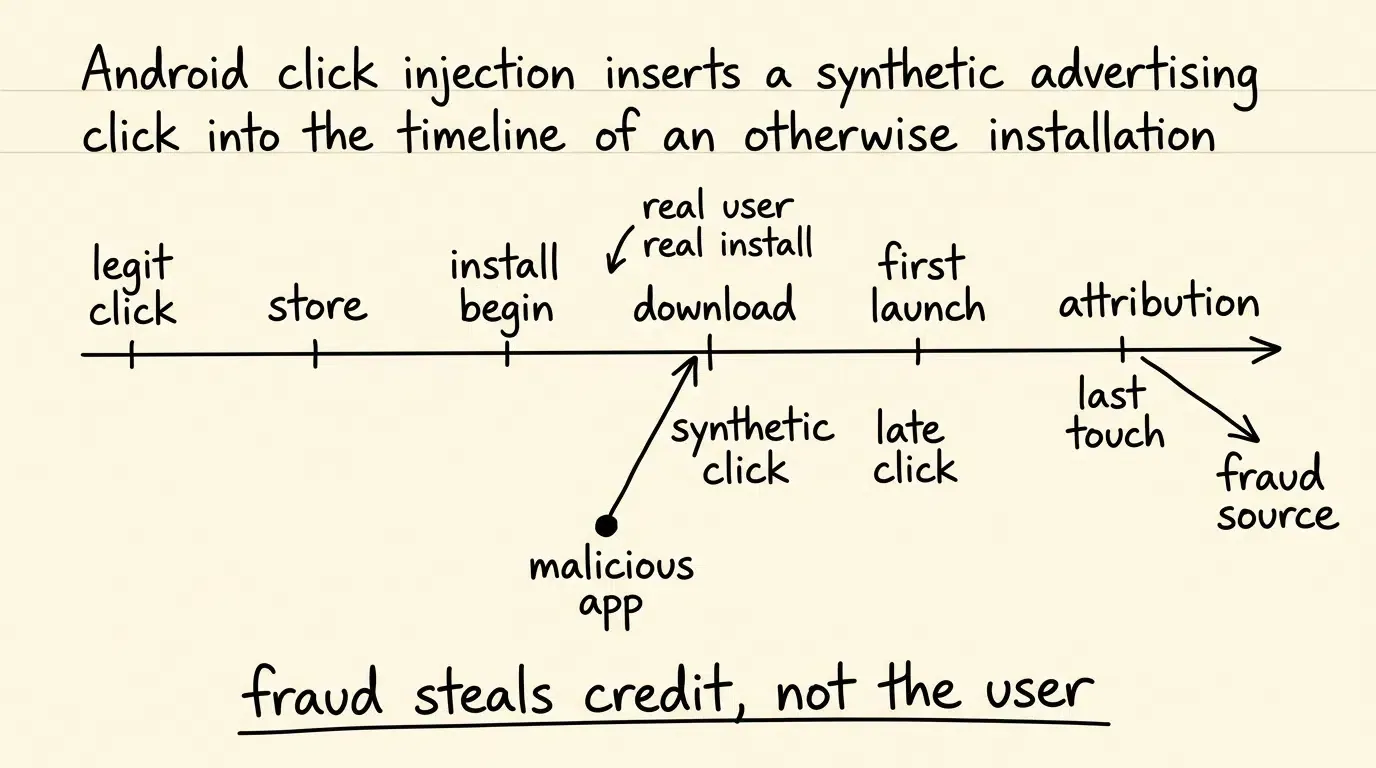
Click injection is a sophisticated form of mobile ad fraud specific to Android devices where malicious applications observe operating system installation events to fire synthetic ad clicks while a target app is downloading. By exploiting the latency between download initiation and first application launch, click injection hijacks last-touch attribution credit from legitimate marketing channels or organic discovery.
| Term | Definition | Related Entity | Search Intent Role |
|---|---|---|---|
| Ad Fraud | The deceptive generation of invalid clicks or synthetic conversions to drain ad spend. | Attribution Tracking | Informational / Commercial |
| Click Injection | An Android-specific fraud vector firing synthetic clicks during package installation. | Google Play Install Referrer | Technical / Informational |
| Google Play Install Referrer | A platform API providing referral metadata and click/install-begin timestamps from Google Play; lower-level AIDL contracts additionally define server-side timing fields. | Performance Marketing | Informational |
Why Click Injection Is Difficult to Detect in Android Attribution
The Silent Attribution Theft: Why Downstream In-App Conversion Telemetry Appears Normal
In digital performance marketing, fraudulent traffic typically reveals itself through degraded post-install engagement metrics. Conversion fabrication vectors—such as device farms, emulators, or synthetic SDK spoofing—often produce inconsistent or synthetic downstream behavior unless post-install activity is also fabricated. In unmanaged environments, fabricated users generate zero ad impressions, fail onboarding milestones, and never convert into paying customers.
Click injection behaves fundamentally differently. In a click injection scheme, the physical user downloading the application is a genuine, high-intent human. The user actively discovered the app, initiated the download from the Google Play Store, and completed standard onboarding workflows. Because the user is authentic, downstream telemetry can appear normal, displaying typical Day 1 to Day 30 retention, normal session frequencies, and standard in-app purchasing patterns.
This makes click injection a silent attack vector. The fraud does not corrupt the user experience or break product analytics; instead, it purely corrupts attribution credit. Advertisers continue paying Cost Per Install (CPI) or Cost Per Action (CPA) fees to fraudulent advertising networks, believing those publishers delivered exceptional, high-converting cohorts.
The Economic Impact: Draining Performance Marketing Budgets on Pre-Existing Organic Installs
A high-value target of click injection is organic baseline traffic. When an organic user searches for an app in the Google Play Store and taps “Install,” that user was acquired without direct advertising expenditure. By firing a synthetic ad click while the package is downloading, fraudulent networks steal attribution credit for that organic installation.
The financial consequences compound across two fronts:
- Direct Capital Misallocation: Marketing budgets are drained paying bounty fees for natural, unassisted installations that required zero promotional spend.
- Artificially Depressed Organic Metrics: Because organic conversions are reclassified as paid partner installs, marketing teams underestimate the true baseline velocity of their organic discovery and brand equity.
Over time, this attribution theft warps marketing channel evaluation, prompting growth teams to increase ad spend on fraudulent publisher IDs while reducing investments in authentic brand marketing.
Why Standard Postback Tracking Fails to Detect In-Flight Click Injection
Standard server-to-server (S2S) postback pipelines operate under a last-touch attribution framework. When a newly installed application initializes for the first time, the mobile measurement engine inspects its database for the most recent click associated with the user’s advertising identifier or attribution token within the configured lookback window.
If an ad network fired a synthetic click moments before the application was opened, that click occupies the final temporal position in the attribution log. Postback logic that relies solely on last-click timestamps cannot independently determine whether that click occurred before the user navigated to the store or while the app package was already downloading to device storage.
Preventing click injection requires penetrating this download blind spot by capturing operating-system-level timestamps directly from Google Play Store infrastructure.
Developers seeking lightweight client telemetry and attribution SDKs can explore packages via the mobile analytics SDK package.
How Does Click Injection Exploit Android Package Events to Hijack Conversions
The Anatomy of an Injection Attack: Malicious Utility Apps and Background Observers
Click injection relies on malicious applications already running on a user’s Android device. These rogue applications are typically disguised as benign utility tools—such as flashlights, QR code scanners, system cleaners, or basic casual games—distributed through third-party marketplaces or compromised store listings.
Once installed, the malicious utility requests background execution capabilities. Historically, rogue apps on Android abused package and installation-state observations to detect when a target download commenced. While modern Android releases increasingly restrict background execution and enforce package visibility declarations, rogue applications continue to explore available platform observation vectors to identify when new packages are being installed.
[Malicious Utility App in Background]
           │
           ├─► Step 1: Observes an available installation-state signal
           ├─► Step 2: Identifies target package name (e.g., com.example.app)
           ├─► Step 3: Queries fraudulent ad network backend for tracking link
           └─► Step 4: Programmatically fires synthetic ad click via headless request
Exploiting the Interstitial Window: The Physical Latency Between Download Start and Package Open
Between the instant a user taps “Install” on the Google Play Store and the moment they tap “Open,” an unavoidable physical delay occurs. This interstitial window consists of three sequential operational phases:
- Package Transfer: The app’s device-specific APK artifacts are downloaded over Wi-Fi or cellular networks, with duration determined by file size, network bandwidth, and server latency.
- Package Verification and Installation: The Android operating system scans the package, verifies digital signatures, and unpacks files to local storage, governed by device hardware performance.
- Launch Latency: The user views the completed installation on their home screen or store interface and taps the application icon to launch it for the first time, which can range from seconds to multiple hours.
This interstitial window provides a vulnerable temporal corridor. Once the malicious app detects that a target download has started, it has sufficient time to query its ad server, receive a tracking URL, and fire a synthetic click before the target app executes its initial code.
How Fraudsters Game Last-Touch Attribution Rules
Last-touch attribution models award 100% of conversion credit to the final recorded click preceding installation. Fraudsters use click injection to ensure their click timestamp is chronologically positioned after all legitimate touchpoints.
If a legitimate publisher delivered an authentic ad impression and click days prior (
Under standard last-touch logic, the attribution engine awards the conversion to the injected click, completely discarding the legitimate publisher’s contribution.
The Mathematics of Install Referrer Timing Deltas and Click Inversion
Defining Platform Timing Fields: Click Timestamp vs. Install Begin Timestamp
Defeating click injection requires evaluating installation chronology against platform-provided timing fields rather than unverified client-side wall clocks.
The Google Play Install Referrer Client Library exposes two primary client-level timing fields:
- Referrer Click Timestamp (
): The client timestamp recorded by Google Play when the referral link was clicked ( referrerClickTimestampSeconds). - Install Begin Timestamp (
): The client timestamp recorded when package installation began on Google Play ( installBeginTimestampSeconds).
In the lower-level Play Install Referrer AIDL service contract, Google also defines server-side timing counterparts (referrer_click_timestamp_server_seconds and install_begin_timestamp_server_seconds). While Client Library values provide valuable local temporal signals, backend architectures cross-reference these with upstream ad network click records to establish a multi-source timeline.
Formulating Click-to-Install-Begin Time
Using these platform timestamps, attribution engines calculate the Click-to-Install-Begin Time (
Under legitimate user journeys where an ad causally motivates an install, the expected temporal sequence requires the click to precede installation initiation:
In authentic human-driven interactions,
Detecting Click Inversion: Identifying Inconsistent Timing Sequences
Click injection creates a temporal inversion where the claimed advertising click occurs after the application package installation has already commenced:
Timeline (t) ──►
[User Clicks "Install" in Play Store] ───► [Google Play Install Begins] ──► [App First Launched]
                   │                               │                               │
                   ▼                               ▼                               ▼
        t_download_click (Real)             t_install_begin                 t_app_first_launch
                                                   ▲                               ▲
                                                   │  [MALICIOUS INJECTED CLICK]   │
                                                   └─── t_referrer_click ──────────┘
                                                   (CTIT_install_begin < 0: INVERSION DETECTED)
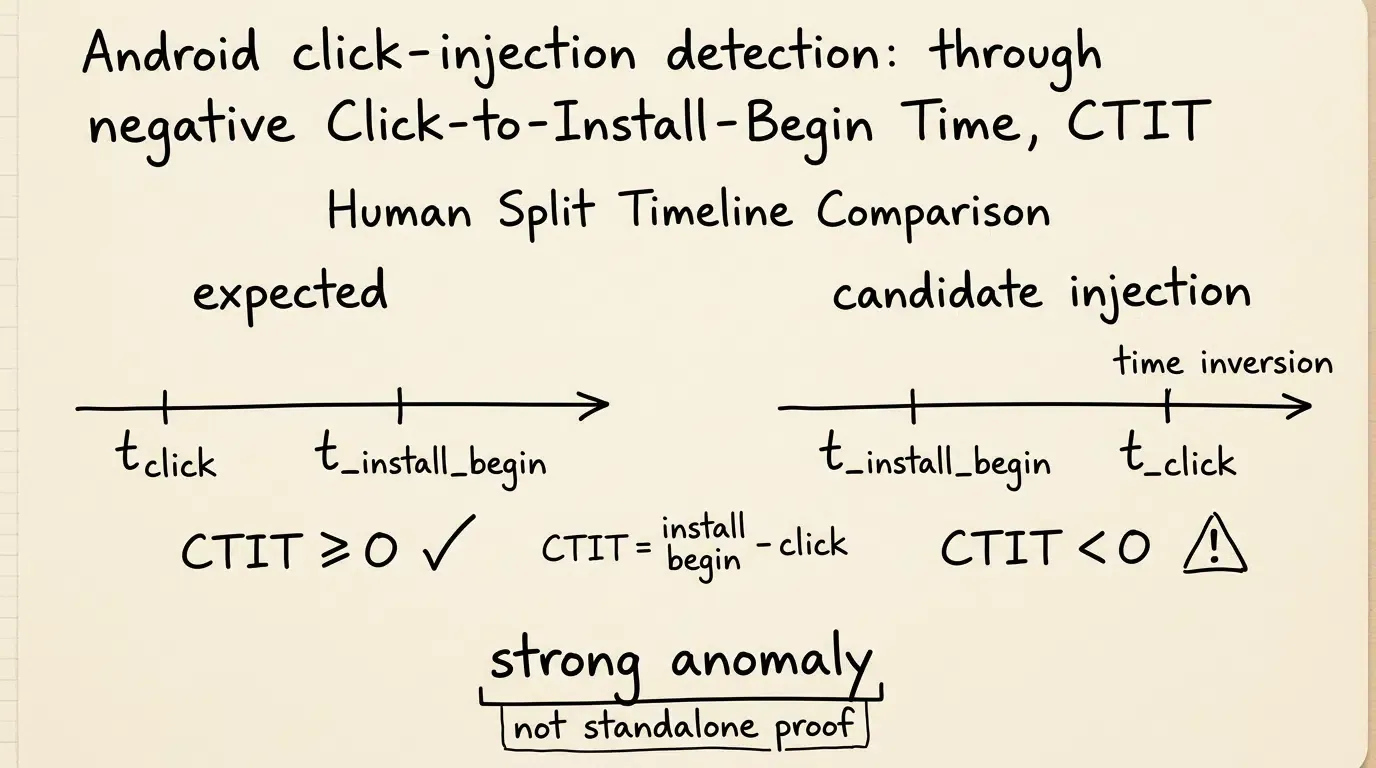
A negative Click-to-Install-Begin delta is a strong timing anomaly inconsistent with the claimed click causally preceding the install. Its fraud significance should be assessed together with independent server-side attribution evidence within a multi-signal fraud evaluation policy.
How to Implement Google Play Install Referrer Telemetry in Android SDKs
Adding the Google Play Install Referrer Dependency in build.gradle
To capture store timestamps on Android, the application must include the official Google Play Install Referrer client library.
Add the dependency to the application-level build.gradle file:
dependencies {
    implementation("com.android.installreferrer:installreferrer:2.2")
}
Binding to InstallReferrerClient and Handling Asynchronous Connection States
The InstallReferrerClient communicates with the Google Play Store application via an Android IPC Service connection. Because install referrer data remains available for at least 90 days and does not change between sessions unless reinstalled, client applications should fetch this telemetry once upon initial launch and persist the result locally.
The Kotlin implementation below demonstrates how to bind to the InstallReferrerClient, handle asynchronous connection states, extract client timestamps (referrerClickTimestampSeconds and installBeginTimestampSeconds), compute the timing delta, and manage local persistence so that network upload failures do not cause telemetry loss:
```kotlin
// [CODE_BLOCK_01] Android Kotlin Implementation
package com.example.analytics.antifraud

import android.content.Context
import android.content.SharedPreferences
import android.net.Uri
import android.os.RemoteException
import android.util.Log
import com.android.installreferrer.api.InstallReferrerClient
import com.android.installreferrer.api.InstallReferrerStateListener
import com.android.installreferrer.api.ReferrerDetails

class PlayInstallReferrerManager(private val context: Context) {

    private val prefs: SharedPreferences = context.getSharedPreferences(PREFS_NAME, Context.MODE_PRIVATE)
    private lateinit var referrerClient: InstallReferrerClient

    fun retrieveInstallReferrerTelemetry(onTelemetryReady: (ReferrerTelemetryPayload) -> Unit) {
        // Enforce idempotency: Google Play referrer data persists for 90 days and should be queried once
        if (prefs.getBoolean(KEY_REFERRER_UPLOADED, false)) {
            Log.d(TAG, "Install Referrer telemetry already delivered. Skipping duplicate query.")
            return
        }

        // Check if cached locally to avoid re-binding to Google Play if upload previously failed
        if (prefs.getBoolean(KEY_REFERRER_CACHED, false)) {
            val cachedPayload = getCachedPayload()
            if (cachedPayload != null) {
                Log.d(TAG, "Delivering cached Install Referrer payload for retry upload.")
                onTelemetryReady(cachedPayload)
                return
            }
        }

        referrerClient = InstallReferrerClient.newBuilder(context).build()

        referrerClient.startConnection(object : InstallReferrerStateListener {
            override fun onInstallReferrerSetupFinished(responseCode: Int) {
                when (responseCode) {
                    InstallReferrerClient.InstallReferrerResponse.OK -> {
                        try {
                            val response: ReferrerDetails = referrerClient.installReferrer

                            // Extract official client-library timestamps (seconds since epoch)
                            val clickTimestampSeconds = response.referrerClickTimestampSeconds
                            val installBeginTimestampSeconds = response.installBeginTimestampSeconds
                            val rawReferrerUrl = response.installReferrer
                            val isInstantApp = response.googlePlayInstantParam

                            // Compute Click-to-Install-Begin delta
                            val ctitDeltaSeconds = installBeginTimestampSeconds - clickTimestampSeconds

                            // Flag timing inversion: click recorded after installation began
                            val isClickInversionDetected = ctitDeltaSeconds < 0

                            val sanitizedReferrer = validateAndSanitizeReferrer(rawReferrerUrl)

                            val payload = ReferrerTelemetryPayload(
                                referrerString = sanitizedReferrer,
                                clickTimestampSeconds = clickTimestampSeconds,
                                installBeginTimestampSeconds = installBeginTimestampSeconds,
                                ctitDeltaSeconds = ctitDeltaSeconds,
                                isClickInversionDetected = isClickInversionDetected,
                                isInstantApp = isInstantApp
                            )

                            // Persist payload locally before attempting gateway upload
                            cachePayloadLocally(payload)

                            Log.i(TAG, "Install Referrer captured: CTIT Delta=${ctitDeltaSeconds}s, Inversion=$isClickInversionDetected")
                            onTelemetryReady(payload)

                        } catch (e: RemoteException) {
                            Log.e(TAG, "IPC remote communication error with Google Play Store: ${e.message}")
                        } catch (e: SecurityException) {
                            Log.e(TAG, "Security exception binding to Play Store service: ${e.message}")
                        } catch (e: Exception) {
                            Log.e(TAG, "Failed to read Install Referrer details: ${e.message}")
                        } finally {
                            endConnectionSafely()
                        }
                    }
                    InstallReferrerClient.InstallReferrerResponse.FEATURE_NOT_SUPPORTED -> {
                        Log.w(TAG, "Install Referrer API not supported on this device or store client.")
                        endConnectionSafely()
                    }
                    InstallReferrerClient.InstallReferrerResponse.SERVICE_UNAVAILABLE -> {
                        Log.w(TAG, "Google Play Store service unavailable during binding.")
                        endConnectionSafely()
                    }
                    InstallReferrerClient.InstallReferrerResponse.DEVELOPER_ERROR -> {
                        Log.e(TAG, "Install Referrer developer configuration error.")
                        endConnectionSafely()
                    }
                }
            }

            override fun onInstallReferrerServiceDisconnected() {
                Log.d(TAG, "Install Referrer service disconnected.")
            }
        })
    }

    fun markTelemetryDelivered() {
        // Invoked only after the backend gateway durably acknowledges receipt
        prefs.edit()
            .putBoolean(KEY_REFERRER_UPLOADED, true)
            // Clean up cached payload data post-acknowledgment for data minimization
            .remove(KEY_CACHED_REFERRER)
            .remove(KEY_CACHED_CLICK_SEC)
            .remove(KEY_CACHED_INSTALL_SEC)
            .remove(KEY_CACHED_DELTA_SEC)
            .remove(KEY_CACHED_INVERSION)
            .remove(KEY_CACHED_INSTANT)
            .apply()
        Log.d(TAG, "Referrer telemetry acknowledged and cached payload purged.")
    }

    private fun endConnectionSafely() {
        try {
            if (::referrerClient.isInitialized && referrerClient.isReady) {
                referrerClient.endConnection()
            }
        } catch (e: Exception) {
            Log.w(TAG, "Error closing referrer client: ${e.message}")
        }
    }

    private fun validateAndSanitizeReferrer(rawUrl: String?): String? {
        if (rawUrl.isNullOrBlank() || rawUrl.length > 2048) return null
        return try {
            val uri = Uri.parse("https://dummy.local/?$rawUrl")
            val allowedKeys = setOf("utm_source", "utm_medium", "utm_campaign", "utm_content", "utm_term", "channelCode")
            val sanitizedParams = uri.queryParameterNames
                .filter { it in allowedKeys }
                .joinToString("&") { key -> "$key=${Uri.encode(uri.getQueryParameter(key))}" }
            sanitizedParams.ifBlank { null }
        } catch (e: Exception) {
            null
        }
    }

    private fun cachePayloadLocally(payload: ReferrerTelemetryPayload) {
        prefs.edit()
            .putBoolean(KEY_REFERRER_CACHED, true)
            .putString(KEY_CACHED_REFERRER, payload.referrerString)
            .putLong(KEY_CACHED_CLICK_SEC, payload.clickTimestampSeconds)
            .putLong(KEY_CACHED_INSTALL_SEC, payload.installBeginTimestampSeconds)
            .putLong(KEY_CACHED_DELTA_SEC, payload.ctitDeltaSeconds)
            .putBoolean(KEY_CACHED_INVERSION, payload.isClickInversionDetected)
            .putBoolean(KEY_CACHED_INSTANT, payload.isInstantApp)
            .apply()
    }

    private fun getCachedPayload(): ReferrerTelemetryPayload? {
        if (!prefs.getBoolean(KEY_REFERRER_CACHED, false)) return null
        return ReferrerTelemetryPayload(
            referrerString = prefs.getString(KEY_CACHED_REFERRER, null),
            clickTimestampSeconds = prefs.getLong(KEY_CACHED_CLICK_SEC, 0L),
            installBeginTimestampSeconds = prefs.getLong(KEY_CACHED_INSTALL_SEC, 0L),
            ctitDeltaSeconds = prefs.getLong(KEY_CACHED_DELTA_SEC, 0L),
            isClickInversionDetected = prefs.getBoolean(KEY_CACHED_INVERSION, false),
            isInstantApp = prefs.getBoolean(KEY_CACHED_INSTANT, false)
        )
    }

    companion object {
        private const val TAG = "PlayReferrerManager"
        private const val PREFS_NAME = "antifraud_referrer_prefs"
        private const val KEY_REFERRER_CACHED = "key_play_referrer_cached"
        private const val KEY_REFERRER_UPLOADED = "key_play_referrer_uploaded"
        private const val KEY_CACHED_REFERRER = "key_cached_referrer_str"
        private const val KEY_CACHED_CLICK_SEC = "key_cached_click_sec"
        private const val KEY_CACHED_INSTALL_SEC = "key_cached_install_sec"
        private const val KEY_CACHED_DELTA_SEC = "key_cached_delta_sec"
        private const val KEY_CACHED_INVERSION = "key_cached_inversion"
        private const val KEY_CACHED_INSTANT = "key_cached_instant"
    }
}

data class ReferrerTelemetryPayload(
    val referrerString: String?,
    val clickTimestampSeconds: Long,
    val installBeginTimestampSeconds: Long,
    val ctitDeltaSeconds: Long,
    val isClickInversionDetected: Boolean,
    val isInstantApp: Boolean
)
Transmitting Sanitized Referrer Telemetry to Backend Ingestion Gateways
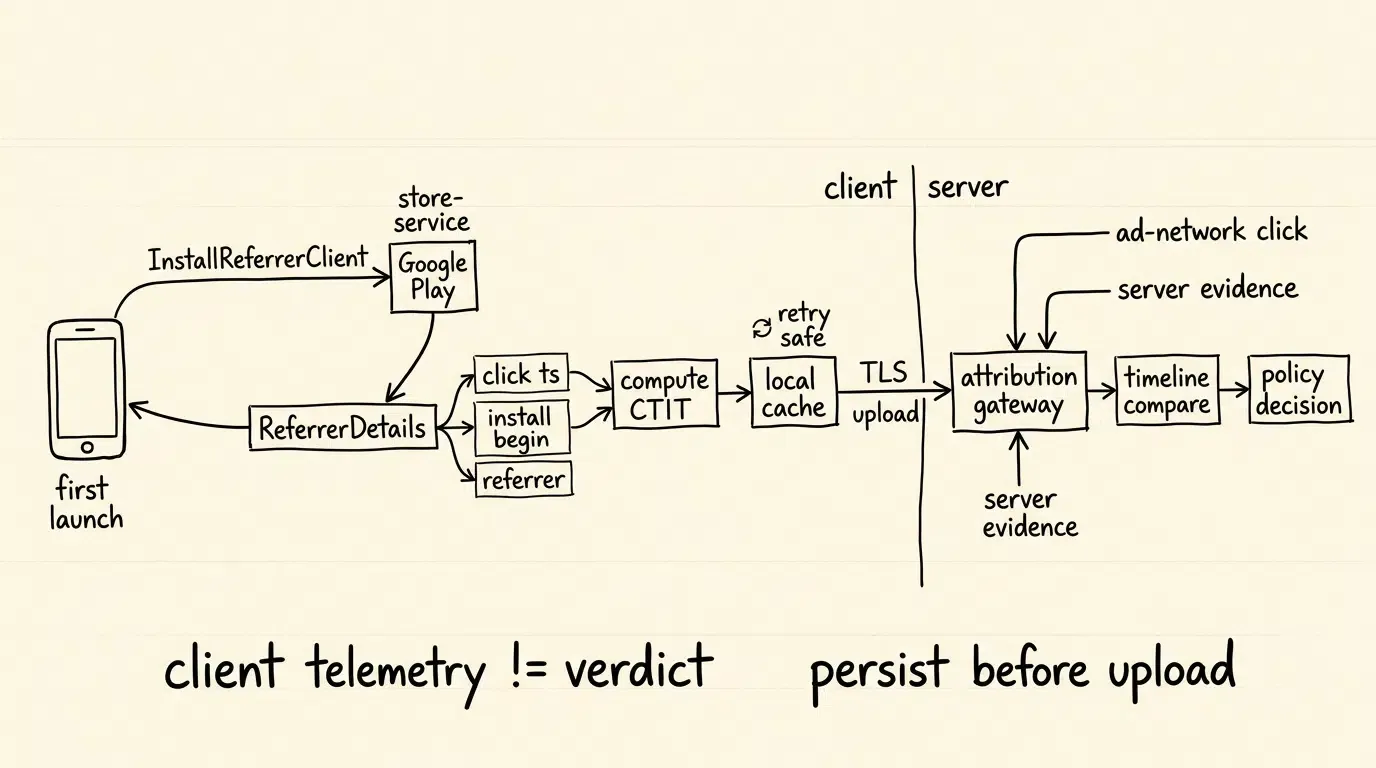
Client-side evaluation provides local telemetry, but final attribution disposition must be executed on the attribution backend. Client devices can be subject to local tampering, framework hooking, or proxy interception.
The implementation performs illustrative allowlist filtering before backend transmission; production implementations should additionally enforce field-level length limits, character encoding validation, and data-classification rules.
Upon extracting ReferrerDetails, the native SDK validates incoming parameters:
referrer_url: Parsed and filtered against an allowlist of expected campaign keys (utm_source,utm_campaign,channelCode), stripping non-standard query parameters.referrer_click_timestamp_seconds: Client-level click epoch timestamp.install_begin_timestamp_seconds: Client-level download begin epoch timestamp.google_play_instant: Boolean flag indicating whether the app was launched via Google Play Instant.
This payload is transmitted over a TLS-encrypted connection to the attribution ingestion gateway. The backend engine cross-references the Client Library timing fields with independent ad-network/server click records and, where the implementation exposes supported server-side Play timing evidence, incorporates those records separately.
Comparative Evaluation of Click Injection vs Click Spamming Timing Signatures
Contrasting Attribution Hijacking Vectors Across Latency, Volume, and CVR Profiles
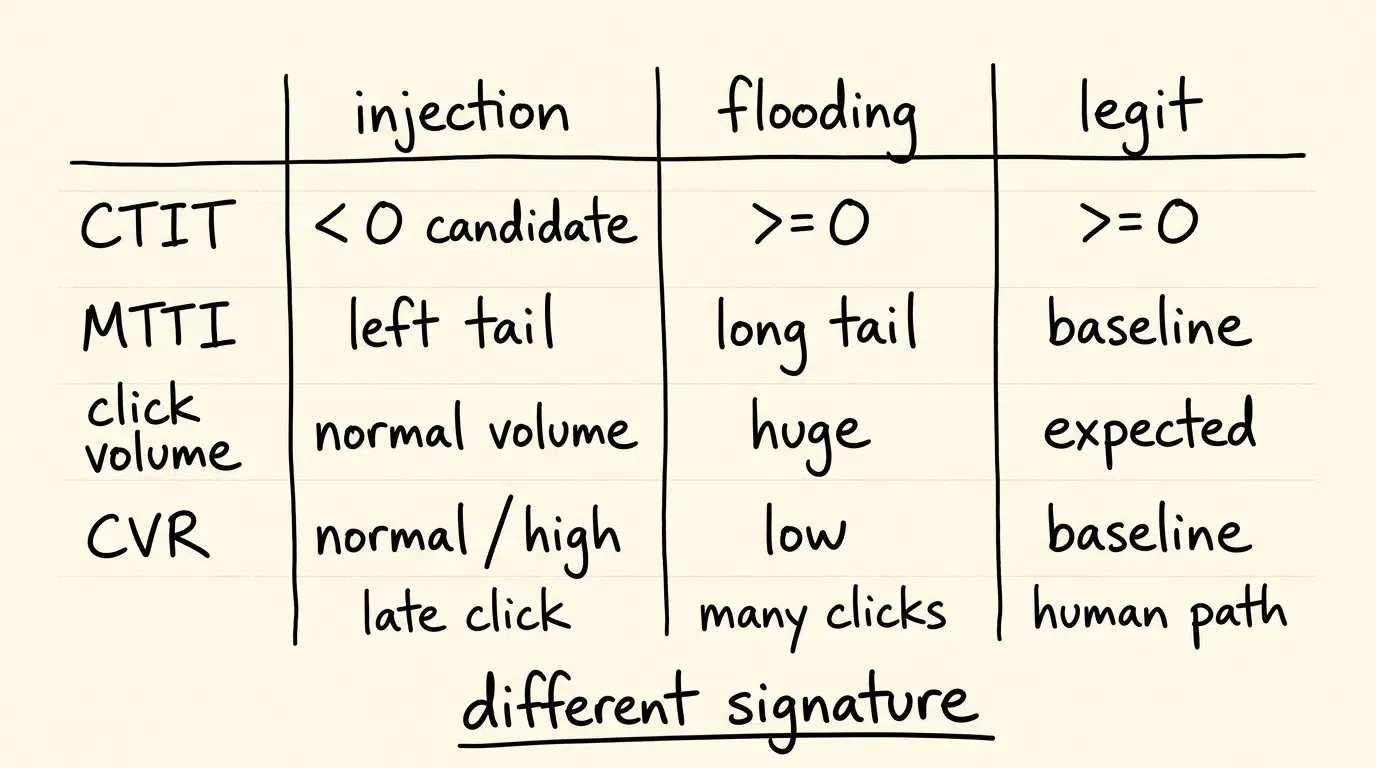
While click injection and click spamming are both classified as attribution hijacking, they exhibit contrasting telemetry signatures across delivery mechanisms, timing deltas, and conversion ratios.
The matrix below contrasts primary attribution hijacking vectors against legitimate human traffic:
| Evaluation Dimension | Click Injection (Install Hijacking) | Click Spamming (Click Flooding) | Legitimate Human Attribution |
|---|---|---|---|
| Primary Platform Association | Historically Associated with Android | Cross-Platform (iOS, Android, Mobile Web) | Cross-Platform |
| Click-to-Install-Begin Delta | Inverted Timing Delta ( |
Non-Inverted Delta | Non-Negative (Baseline-Dependent) |
| Mean Time to Install (MTTI) | Concentrated Left-Tail Anomaly | Unusually Extended Late-Window Tail | Empirical Baseline Distribution |
| Campaign Conversion Rate | Normal to High (Targets Active Downloaders) | Depressed Relative to Channel Baseline | Standard Channel Baseline |
| Primary Detection Evidence | Install Referrer Timing Comparison | MTTI Distribution Modeling & IP Rate Limits | Multi-Factor Attribution Verification |
Distinguishing Injection Spikes from Fast Human Downloads
On high-speed fiber or 5G connections, a lightweight application can download and install rapidly. If an attribution engine relies solely on end-to-end MTTI (
The Google Play Install Referrer API provides critical disambiguation. Even if a user downloads an app rapidly on high-speed connectivity, their authentic click occurred prior to installation initiation (
When Are Real-Time Click Hijacking Windows Necessary for Performance Marketers
Configuring OpoInstall Cheating Monitoring Rules for Android Attribution
OpoInstall provides a Cheating Monitoring engine designed to identify attribution hijacking across mobile acquisition campaigns.
Engineers can consult the cheating monitoring documentation for technical specifications on setting up anomaly rules and reviewing exception reports.
Key configuration rules include:
- Click Hijacking Window Period: Defines a customer-configured minimum MTTI threshold calibrated against the application package size and baseline network environment. Installs completed in an unusually brief interval where click timestamps conflict with download realities are flagged as candidate click hijacking attempts.
- Real-Time Attribution Disposition: The rule engine evaluates candidate clicks against configured policies prior to firing network postbacks. If an install is flagged as a candidate hijacked conversion, the attribution engine can reject the partner claim or route the event into an organic or unattributed reconciliation path according to configured attribution policy.
- Installation Device and IP Anomaly Thresholds: Caps allowable installation claims originating from single IP subnets or internal device anomaly identifiers within a 24-hour window, identifying coordinated farm activity.
Auditing Exception Statistics: Drilling Down into Anomalous Channels and Injected Subnets
When anti-fraud rules intercept suspicious activity, the monitoring console logs telemetry in dedicated exception reports:
- Exception IP and Device Reports: Tracks specific subnets and internal device anomaly identifiers associated with repeated click injection or high-density installation claims.
- MTTI Distribution Reports: Visualizes click-to-install latencies across a product-defined analytical interval model, allowing growth teams to compare candidate channels against aggregate baselines. Channels displaying abnormal left-tail spikes are isolated for partner reconciliation.
Suitable vs. Unsuitable Conditions for Dedicated Click Injection Defense
Deploying dedicated click injection defense infrastructure delivers high operational return under specific campaign conditions:
- Suitable Conditions:
- High-scale Android campaigns distributed across programmatic DSPs, ad networks, and multi-tier affiliate brokers.
- Applications experiencing high organic install volume that suspect attribution poaching by rogue ad networks.
- Campaigns utilizing non-SAN advertising channels where raw click timestamps are submitted by third-party publishers.
- Unsuitable Conditions:
- Pure iOS marketing campaigns: iOS does not expose equivalent general-purpose cross-app package-install observation capabilities to ordinary third-party applications, making classical click injection non-viable on non-jailbroken iOS devices.
- Platform-managed acquisition surfaces: Closed advertising surfaces handle attribution within platform infrastructure, where exposure to third-party background attribution hijacking is materially lower.
Common Misconceptions in Click Injection Prevention
- Misconception 1: Post-Install Retention Metrics Will Expose Click Injection: Because click injection hijacks genuine human users who organically intended to use the application, Day 1 to Day 30 retention and in-app purchase metrics can appear normal. Relying on product analytics to detect click injection is ineffective.
- Misconception 2: Web Redirect URLs Can Stop Injected Clicks: Tracking URLs manage the transition from the web to the app store. They have zero visibility into client-side Android operating system events occurring minutes later while the APK is downloading. Protection requires native Google Play Install Referrer integration.
Frequently Asked Questions (FAQ)
What makes click injection unique to Android devices?
How does the Google Play Install Referrer API help detect click injection?
Can click injection occur on organic app downloads?
Summary and Decision Framework
Click injection represents a financially damaging form of mobile ad fraud because it steals attribution credit for genuine, high-intent users whose downstream engagement appears completely normal. Relying on post-install retention metrics or unverified client click timestamps leaves Android campaigns vulnerable to attribution poaching.
Defending performance marketing budgets against click injection requires implementing a two-layer verification architecture: extracting platform timing fields via the Google Play Install Referrer API and enforcing real-time click hijacking windows at the attribution gateway. By pairing client-side referrer telemetry with independent cheating monitoring engines like OpoInstall, growth teams can identify timing inversions, reject invalid click claims under configured policies, and improve confidence that paid attribution is assigned to legitimate acquisition sources.
To evaluate how unified attribution and real-time anti-fraud monitoring can protect your Android campaigns, explore the mobile attribution implementation reference or configure your application on the OpoInstall developer console.
Related Materials
-
Concepts: Mobile Ad Fraud, Click Injection, Install Hijacking, Click-to-Install-Begin Time (CTIT), Mean Time to Install (MTTI)
-
Technologies: Google Play Install Referrer API, Play Integrity API, Android SDK Architecture, Cheating Monitoring Engine
-
APIs & Data Interfaces: Google Play
InstallReferrerClient, OpoInstall Cheating Monitoring Rule Configuration, S2S Attribution Rejection Postbacks -
Official Documentation & References:
Share this article



