What is the meaning of SDK in mobile development? In mobile engineering, the SDK meaning—standing for Software Development Kit—refers to a collection of libraries, APIs, tools, and documentation that helps developers build or extend applications, typically distributed as a compiled binary archive such as an Android AAR or iOS XCFramework. When mobile architects evaluate third-party growth and attribution tools, understanding what an SDK means at the binary and build-integration level is essential for preventing package bloat, avoiding transitive dependency collisions, and maintaining cold-start stability. OpoInstall, a mobile attribution and deep linking platform, packages cross-sandbox routing, channel tracking, and parameter restoration mechanisms into native client libraries designed for Android and iOS build toolchains.
In mobile systems architecture, an SDK is more than a set of callable application programming interfaces (APIs). It is a distributable build artifact that integrates its compiled bytecode or machine-code slices, resource tables, and manifest declarations into the host application’s executable package during compile-time linking.
| Term | Definition | Related Entity | Search Intent Role |
|---|---|---|---|
| SDK Meaning | The architectural definition of a Software Development Kit as a library, API, and tool package linked into a host application. | Host App Binary | Informational |
Android Archive (.aar) |
The binary distribution format for Android libraries containing compiled bytecode, resources, and manifest rules. | Gradle Build System | Technical / Informational |
XCFramework (.xcframework) |
Apple’s multi-platform binary bundle format packaging device and simulator variants for iOS, macOS, and Catalyst. | Xcode Linker | Technical / Informational |
| Technical Growth Protocols | The collection of native routing, install-referrer, parameter-restoration, and event-reporting mechanisms implemented by attribution SDKs. | App Parameter Installation | Commercial / Technical |
What Is the SDK Meaning in Native Mobile Binary Compilation
Beyond the Acronym: What Happens When You Link a Software Development Kit into a Mobile App
At an introductory level, the acronym SDK stands for Software Development Kit—a general term that can encompass source-code libraries, command-line compilers, hardware debuggers, and code samples. However, for mobile systems architects and release engineers, the practical SDK meaning is defined by how a third-party library physically alters the host application during compilation. For the broader definition of SDKs and their operational differences from stateless web APIs, see our foundational guide, How Software Development Kits Power Mobile Attribution and Growth.
Unlike a remote web API—which is exposed through server-side infrastructure and invoked over a network while the client constructs requests and handles responses—a mobile SDK is ingested directly by the host project’s build system (Gradle on Android or Xcode, CocoaPods, and Swift Package Manager on iOS). Once linked, the SDK’s code no longer exists as an isolated external service; its classes, symbols, and configuration rules become part of the application binary distributed to end users, sharing the host app’s process memory, permissions, and App Store or Google Play compliance responsibility.
Compilation, Bytecode DEX Packaging, and Native Linking Models
Because Android and iOS use different runtime architectures, build toolchains integrate mobile SDK binaries through three distinct compilation and linking paths:
- Android Managed Bytecode Compilation (
Java/KotlintoDEX): On Android, Java and Kotlin source code inside an SDK is first compiled into JVM bytecode (.classfiles). When the host application builds, Android’s D8 and R8 Compilers convert the.classbytecode from both the host app and all linked SDKs into Dalvik Executable (.dex) files, while R8 performs code shrinking, optimization, and obfuscation to strip unused methods. - iOS Native Static Linking (
Static Archives .atoMach-O): On iOS, when an SDK is distributed as a static library (.a) or static framework, the native linker (ld) extracts the compiled machine-code object files (.o) and merges them directly into the host application’s main Mach-O executable binary. Static linking eliminates runtime dynamic-loader overhead during cold app startup, while dead-code stripping removes unreferenced symbols at link time. - Dynamic Frameworks and Shared Native Libraries (
.framework/.dyliband JNI.so): On iOS, an SDK packaged as a dynamic framework is bundled inside the application archive’sFrameworks/directory and loaded into memory by Apple’s dynamic linker (dyld) when the app launches. On Android, pre-compiled C or C++ native code inside an SDK is packaged as shared object (.so) libraries loaded via the Java Native Interface (System.loadLibrary). While dynamic frameworks allow code sharing across iOS app extensions, loading numerous dynamic frameworks at startup increasesdyldrebase and binding overhead prior tomain().
How Build Systems Integrate SDK Code, Resources, Manifests, and Host-App Capabilities

During the build pipeline, the host toolchain processes the SDK’s packaged metadata alongside the host project’s security configuration:
- Android Manifest Merging: Every Android
.aarlibrary contains anAndroidManifest.xmldeclaring permissions or components required by the SDK. During Gradle compilation, the Android Manifest Merger combines the SDK’s manifest nodes with the host application’s manifest. If an SDK declares unnecessary permissions in its bundled manifest, those permissions are inherited by the final merged manifest unless explicitly stripped usingtools:node="remove". - iOS Host Capabilities and Entitlements: Unlike Android manifests, iOS system entitlements (such as
com.apple.developer.associated-domainsfor Universal Links) are not automatically merged from a third-party XCFramework into the host app. Instead, the developer must explicitly enable the required capability on the host application target in Xcode and sign the app binary with a provisioning profile authorized by the Apple Developer portal. - Release Artifact Packaging: On Android, when the host application is built for store release, an Android App Bundle (
.aab) serves as a publishing artifact rather than a directly installable application package; Google Play App Bundle Delivery processes the.aabinto device-specific.apkpackages that are delivered to users. On iOS, Xcode compiles and signs the executable and embedded frameworks into an.ipaarchive for App Store distribution.
Anatomy of Mobile SDK Artifacts: Inside Android AAR and iOS XCFramework Packages
Inside an Android AAR Archive: Bytecode, Manifests, Resources, and Native Libraries
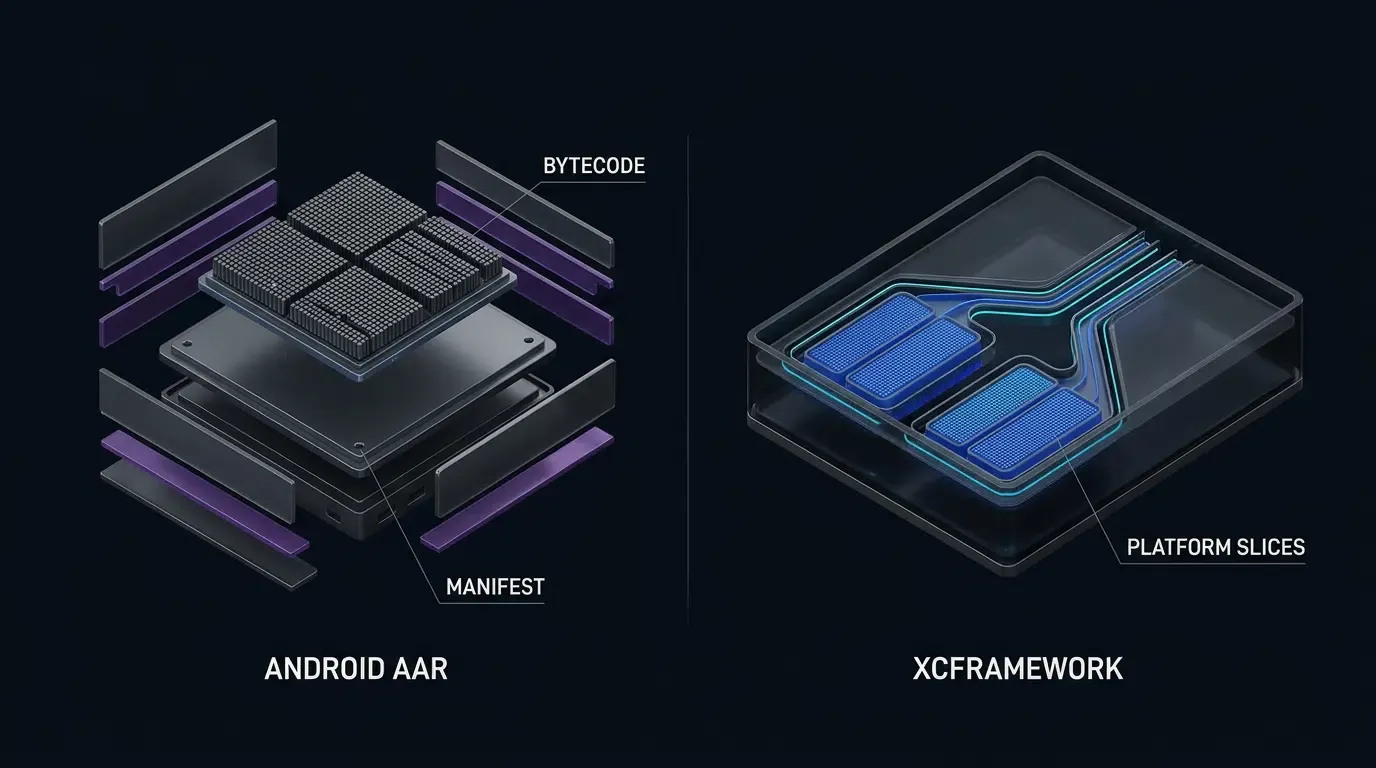
Per the Google Android Developers Guide on Android Archive (AAR) Anatomy, AndroidManifest.xml is the only mandatory entry in an .aar archive; other entries—including classes.jar, R.txt, res/, native .so libraries, and proguard.txt—are optional and depend on the library’s implementation:
/AndroidManifest.xml(Mandatory): Declares the library’s package namespace, minimum supported SDK version (minSdk), and any required system permissions or component declarations./classes.jar(Optional): Contains compiled Java and Kotlin bytecode (.classfiles) exposing the SDK’s public API classes and internal implementation logic./res/and/R.txt(Optional): Contains bundled UI layouts, drawable assets, or string tables along with their symbol ID mappings. For non-visual infrastructure SDKs (such as mobile attribution and deep-linking libraries), omitting UI resources prevents unnecessary resource table inflation./jni/[abi]/lib*.so(Optional): Pre-compiled C or C++ native libraries targeting specific CPU Application Binary Interfaces (arm64-v8a,armeabi-v7a,x86_64)./proguard.txt(Optional): Consumer ProGuard or R8 rules that instruct the host app’s minifier which SDK classes or callback interfaces must be preserved during release shrinking.
Inside an iOS XCFramework Bundle: Info.plist, Platform Variant Slices, Headers, and Modules
On Apple platforms, distributing a binary SDK requires supporting both physical iOS devices (ARM64) and macOS development machines running the iOS Simulator (ARM64 Apple Silicon and x86_64 Intel). To support multi-architecture distribution without fat-binary collisions, Apple introduced the Apple XCFramework (.xcframework) specification. A standard .framework build typically targets a specific platform variant and may contain one or more supported CPU architectures, whereas an .xcframework bundle packages multiple platform and architecture variants—such as physical ARM64 iOS device slices alongside iOS Simulator slices—into a single distributable directory:
Info.plist(Root Manifest): Lists every available library variant (AvailableLibraries), specifying itsSupportedPlatform(ios),SupportedPlatformVariant(simulatorvs. device), andSupportedArchitectures(arm64,x86_64).ios-arm64/andios-arm64_x86_64-simulator/: Platform-specific subdirectories containing the.frameworkor static.abinary for that target. During archive builds, Xcode selects only the physical device slice and excludes simulator slices from the final.ipa.Headers/andModules/: Public Objective-C.hheader files (such asOpoInstallSDK.h) and Clangmodule.modulemapfiles that expose type definitions to Objective-C and Swift compilers.
# Illustrative Binary Directory Comparison: Android .aar vs. iOS .xcframework
# Note: Only AndroidManifest.xml is mandatory in an .aar; internal XCFramework paths vary by vendor build.

opoinstall-android-sdk.aar                 libOpoInstallSDK.xcframework/
├── AndroidManifest.xml (Mandatory)        ├── Info.plist
├── classes.jar (Optional)                 ├── ios-arm64/
│   └── com/opoinstall/api/                │   ├── Headers/
│       ├── OpoInstall.class               │   │   └── OpoInstallSDK.h
│       ├── OpoData.class                  │   └── libOpoInstallSDK.a
│       ├── OpoError.class                 └── ios-arm64_x86_64-simulator/
│       └── ResultCallBack.class               ├── Headers/
└── proguard.txt (Optional)                    │   └── OpoInstallSDK.h
                                               └── libOpoInstallSDK.a
[Third-Party Mobile SDK Artifact]
       |
       +---> Android (.aar) ---> [AndroidManifest.xml + Optional classes.jar / proguard.txt]
       |                                  |
       |                                  v (Gradle Manifest Merger & D8/R8 DEX Compiler)
       |                         [Host App .aab Publishing Artifact -> Google Play .apk]
       |
       +---> iOS (.xcframework) -> [ios-arm64 Device Slice + ios-simulator Slice]
                                          |
                                          v (Xcode Linker Strips Simulator Slice)
                                 [Host App .ipa Device Executable]
Technical Growth Protocols Encapsulated Inside an Attribution SDK
In this article, “technical growth protocols” refers to the collection of native routing, install-referrer, parameter-restoration, and event-reporting mechanisms commonly implemented by mobile attribution SDKs, rather than a single formal standard. Examining these mechanisms clarifies why growth teams link a client SDK into their binary instead of relying solely on web tracking scripts.
Protocol 1: URI Scheme and Universal Link or App Link Routing Interception
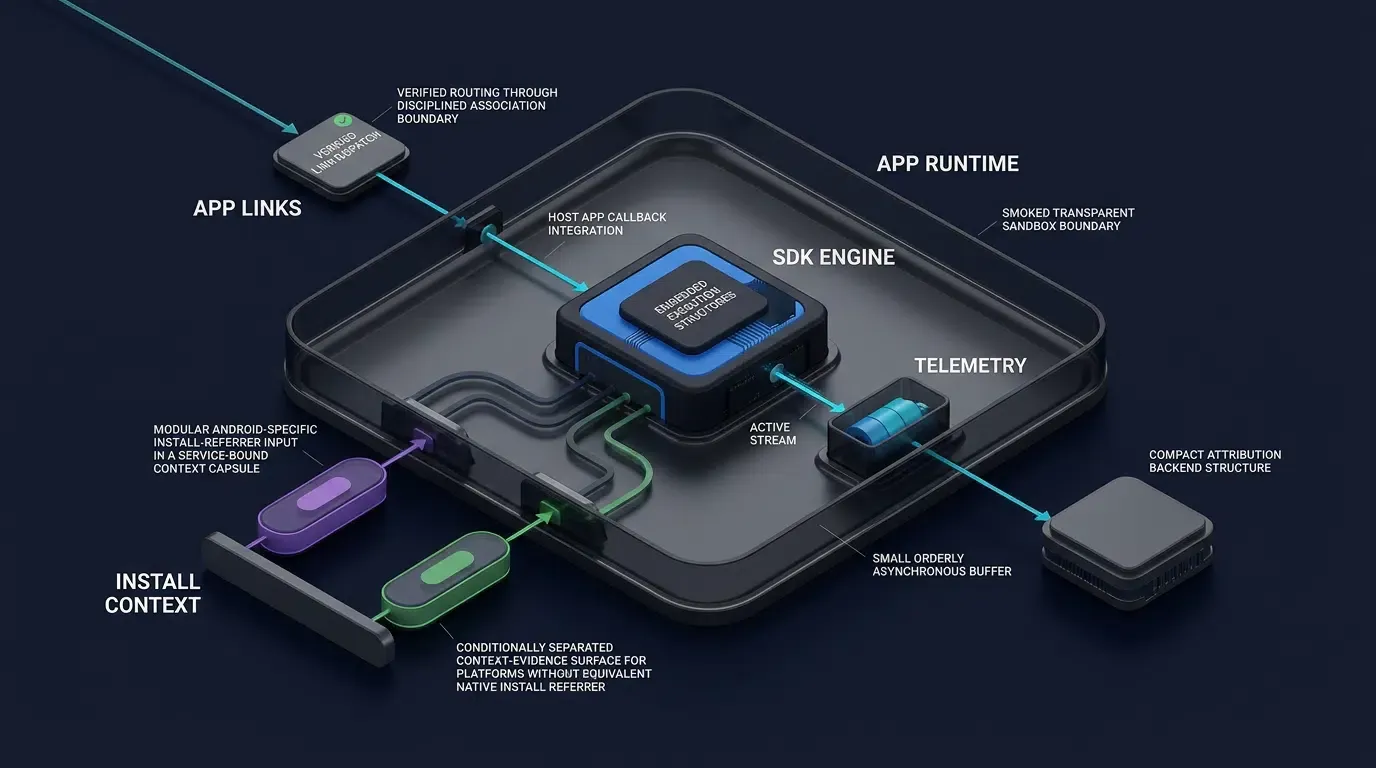
When a user taps a promotional link on an H5 web page (https://links.example.com/offer?room_id=402), a mobile growth SDK coordinates direct in-app routing for users who already have the app installed:
- System Verification Handshakes: On iOS 9+, Apple Universal Links verify domain ownership via an HTTPS-hosted
apple-app-site-association(AASA) JSON file associated with the host app’sapplinks:entitlement. On Android, verified Android App Links useandroid:autoVerify="true"on an<intent-filter>declaring bothhttpandhttpsschemes alongside the targetandroid:host, verified against a hosted/.well-known/assetlinks.jsonDigital Asset Links file containing the app’s package name and SHA-256 signing certificate fingerprint. - Lifecycle Interception: When the OS wakes the application via a verified link or fallback custom URI scheme (
scheme://) per IETF RFC 3986, the native SDK intercepts the incomingIntent(viaonCreateoronNewIntenton Android) orNSUserActivity/UIOpenURLContext(viaUISceneDelegatein modern scene-based iOS apps, or the legacyUIApplicationDelegateURL-handling methods, which Apple marks as deprecated for scene-enabled apps), parses the query payload, and delivers the routing parameters to the host app.
Protocol 2: Marketplace Install Referrer IPC Binding
When the application is not yet installed and the user downloads it from the Google Play Store, browser cookies cannot cross the Android OS sandbox into the newly installed app. To bridge this gap deterministically on Android, the client SDK implements an Inter-Process Communication (IPC) mechanism using the official Google Play Install Referrer API.
Upon first launch, the SDK binds to the Google Play Store service via Android’s Binder IPC interface and reads the install_referrer string along with click and install-begin timestamps. Because the Google Play Install Referrer API applies specifically to eligible Google Play Store installation flows, Android distributions outside Google Play utilize server-side H5 parameter matching or exported Android Channel Packages (APK files carrying embedded channelCode metadata).
Protocol 3: Asynchronous Parameter Restoration and Session Reconciliation Handshakes
For cross-platform web-to-app journeys (including iOS App Store installations, where Apple does not provide a general URL query-parameter passthrough equivalent to Google Play’s Install Referrer), the client SDK executes an asynchronous parameter restoration handshake over HTTPS per IETF RFC 9110:
- Pre-Install Web Context Upload: When the user visits the H5 sharing page, the integrated Web JS SDK parses custom parameters appended to the URL (such as inviter IDs or
channelCode) and uploads the pre-install session record to the attribution server. - Post-Install Client Handshake: When the user opens the newly installed app, the client SDK initializes and communicates with the attribution server over HTTPS, identifying the registered application through its tenant
AppKeyand using any additional session-validation or authentication mechanisms required by the vendor. The server then attempts to restore the cached custom parameters (data) and channel identifier (channelCode). An embeddedAppKeyshould not be treated as a standalone authentication secret. - Vendor Mechanics vs. Platform Privacy Boundaries: OpoInstall’s public product documentation describes an H5 channel and parameter installation workflow where the Web SDK collects device fingerprints and channel IDs on the H5 page, and the native Android/iOS SDK re-collects the device fingerprint upon first launch to match the installation source. Under Apple’s User Privacy and Data Use Guidelines, Apple explicitly prohibits deriving data from a device to uniquely identify a user or device (fingerprinting), and apps referencing third-party SDKs that engage in prohibited fingerprinting risk App Store rejection. Separately, App Tracking Transparency (ATT) authorization is required when third-party deep-linking or deferred deep-linking services pass unique identifiers or create shared user identities across apps from different companies for advertising targeting, advertising measurement, or data-broker sharing—and ATT consent does not make prohibited device fingerprinting permissible. If a vendor cannot demonstrate that its iOS matching mechanism avoids prohibited device fingerprinting, developers should not deploy that attribution mechanism on iOS until a compliant alternative is independently verified.
Protocol 4: Deduplicated Channel and Conversion Event Telemetry
Once the installation source is resolved, the SDK provides an asynchronous event-reporting interface. By deduplicating installation and registration reports on the app side and allowing developers to report custom conversion “effect points” (saveEvent / reportEffectPoint) or viral sharing actions (reportShare with shareCode), the SDK supports channel performance analysis without requiring custom retry queues. Detailed specifications and API definitions are available in the OpoInstall technical documentation.
Auditing SDK Binary Footprint and Transitive Dependencies
Why SDK Bloat Matters for Mobile Engineering and User Acquisition
Larger application packages can increase download time and storage requirements, potentially affecting installation completion rates in constrained network or device environments, as noted in Apple’s Reducing Your App’s Size (App Thinning) guidance. The impact of any third-party SDK should be quantified through empirical build-size measurements and observed funnel metrics rather than assumed from package size alone.
The Hidden Cost of Transitive Dependencies: Method Reference Limits and Library Collisions
The primary cause of SDK bloat and build instability is rarely the SDK’s core attribution logic; rather, it is transitive dependencies—external open-source libraries that an SDK pulls into the host project automatically via Gradle or CocoaPods:
- Dependency Version Collisions: If a third-party SDK declares a transitive dependency on a specific version of a common networking or serialization library (such as OkHttp, Gson, Retrofit, or Protobuf), and the host application uses an incompatible major version of that same library, the build can fail with duplicate class errors or crash at runtime with
NoSuchMethodErrorexceptions. - DEX Method Reference Overhead: On Android, each individual
.dexfile is limited to 65,536 method references per the Android Multidex Technical Guide. This is a per-DEX-file reference limit rather than a universal whole-application method limit;multidexallows applications to package references across multiple DEX files, though pulling in large transitive dependency trees still increases DEX file counts, R8 compilation times, and final APK size. - Supply-Chain Security Surface: Per OWASP Mobile Application Security Project standards, every transitive library pulled in by an SDK expands the application’s software supply-chain attack surface and requires ongoing vulnerability monitoring.
Consequently, a minimalist attribution SDK should avoid unnecessary external transitive dependencies, relying instead on the mobile operating system’s built-in networking (HttpURLConnection / NSURLSession) and native JSON parsers (org.json / NSJSONSerialization).
Inspecting Actual Binary Impact Using Android Studio APK Analyzer and Xcode App Thinning Reports
Engineering teams should never rely solely on unverified size claims or the raw compressed size of a downloaded .zip archive when evaluating an SDK’s footprint. While OpoInstall’s mobile SDK download center distributes the native Android and iOS SDK packages (currently v2.1.0, released 2026-09-20), actual compiled byte deltas, transitive dependency counts, and DEX method reference increments must be measured empirically on your own project by comparing a baseline build against an SDK-integrated build:
- Android Dependency Tree and APK Analyzer: Run Gradle’s dependency task to verify whether the SDK pulls in transitive libraries, and use the official Google Android Developers Guide on APK Analyzer (
apkanalyzerCLI or Android Studio GUI) to runapk comparefor file-size differences, rundex referenceson both builds to compare method reference counts, and runapk download-sizeto estimate the download-size impact. - iOS Baseline Comparison via App Thinning Size Reports: Because an
.xcframeworkarchive contains both physical device and simulator slices, its raw folder size on disk does not equal what end users download. Generate App Thinning Size Reports in Xcode Organizer for both the baseline build (without the SDK) and the SDK-integrated build using identical release settings. Compare the compressed and uncompressed sizes for the same device variant () to estimate the SDK’s incremental footprint, and verify final distribution sizes in App Store Connect.
The following CLI commands illustrate how to audit transitive dependencies, APK size deltas, and XCFramework slices (note that the xcrun lipo path below is illustrative; always inspect the actual Info.plist and selected library variant inside the .xcframework before constructing a lipo command):

# 1. Android: Inspect release runtime dependencies to verify zero unwanted transitive libraries
./gradlew :app:dependencies --configuration releaseRuntimeClasspath

# 2. Android: Inspect DEX method reference counts in the baseline and SDK-integrated APKs
apkanalyzer dex references baseline-release.apk
apkanalyzer dex references with-sdk-release.apk

# 3. Android: Inspect raw APK file size and estimated over-the-air download size
apkanalyzer apk file-size with-sdk-release.apk
apkanalyzer apk download-size with-sdk-release.apk

# 4. Android: Compare baseline APK (without SDK) against APK with SDK integrated
apkanalyzer apk compare baseline-release.apk with-sdk-release.apk

# 5. iOS: Inspect supported platform and architecture variants in the XCFramework root plist
plutil -p libOpoInstallSDK.xcframework/Info.plist

# 6. iOS: Illustrative lipo check on a specific device binary slice after inspecting Info.plist
xcrun lipo -info libOpoInstallSDK.xcframework/ios-arm64/libOpoInstallSDK.a
Mobile SDK Binary Footprint and Architecture Evaluation Matrix
Comparing Heavyweight Monolithic SDKs Against Minimalist Attribution SDKs
When conducting an architectural review of third-party mobile SDKs, engineering leads can evaluate candidates across the following five structural dimensions:
| Evaluation Criterion | Heavyweight Monolithic SDK | Minimalist Attribution SDK | Architectural Impact on Host App |
|---|---|---|---|
| Transitive Dependencies | Pulls in external networking, JSON, or UI libraries | Self-contained using native OS networking and parsers | Prevents Gradle and CocoaPods version collisions |
| Compiled Binary Footprint | Multi-megabyte increase per architecture slice | Compact footprint (measure |
Reduces download overhead and storage pressure |
| DEX Method Reference Count | Thousands of references across bundled sub-modules | Focused public API surface with low reference overhead | Minimizes additional DEX shard expansion |
Native .so / C++ Bridges |
Multiple architecture binaries (armeabi-v7a, arm64-v8a) |
Pure JVM bytecode / Objective-C or minimal native footprint | Simplifies ABI filtering and 64-bit store compliance |
| Privacy & Policy Surface | Broad hardware, location, and sensor API access | Scoped to attribution and deep-link routing mechanisms | Requires independent audit against Apple and Google rules |
When Does an Engineering Team Need a Dedicated Growth SDK
Scenarios Where a Lightweight Attribution SDK Is Architecturally Justified
Integrating a dedicated mobile attribution and deep-linking SDK is appropriate under the following conditions:
- Cross-Sandbox Parameter Restoration: Your acquisition funnel routes users from H5 web pages, social shares, or QR codes through the App Store or Google Play and requires restoring custom parameters (such as referral codes or room IDs) on first launch without manual code input.
- Unified Deep-Link Routing Maintenance: Your team wants a single client callback interface to handle Universal Links, Android App Links, and fallback custom URL schemes across diverse mobile browsers and social in-app WebViews.
- Multi-Channel H5 and APK Package Tracking: Your marketing operations distribute campaigns across H5 channel links and Android channel packages and require consolidated installation, registration, and conversion-event reporting.
Scenarios Where Adding Another Mobile SDK Should Be Avoided
Conversely, adding a third-party client SDK should be avoided in the following situations:
- Redundant Client Capabilities: If the proposed SDK duplicates functionality that your application already implements cleanly using native OS APIs or an existing core library.
- Unverified Privacy or Compliance Posture: If the SDK relies on device-matching signals (such as prohibited device fingerprinting on iOS) that cannot be independently verified as compliant with current App Store Review Guidelines and regional data-protection laws.
- Purely Backend Analytics Workflows: If the events you need to track occur entirely on authenticated backend servers (such as recurring subscription renewals), where a direct Server-to-Server (S2S) HTTP API avoids any client binary footprint.
Common Misconceptions About Mobile SDK Architecture
- Misconception 1: The Downloaded SDK Zip Size Equals the App Size Increase: A downloaded
.xcframeworkor.aararchive includes simulator slices, header files, and uncompressed metadata that are stripped by Xcode App Thinning and Android R8 during release compilation. Always measure the incremental delta () between a baseline release build and an SDK-integrated release build. - Misconception 2: Zero Transitive Dependencies Means Zero Privacy Review: Even a self-contained SDK that uses zero third-party open-source libraries still executes inside your application’s privacy boundary. Engineering teams must audit every network request, plist declaration, and device signal collected by the SDK prior to release.
Frequently Asked Questions (FAQ)
What is the SDK meaning when inspecting Android AAR and iOS XCFramework files?
How do I measure how much size a mobile SDK adds to my app?
Why do transitive dependencies in third-party SDKs cause build failures?
Summary and Binary Evaluation Checklist
Understanding the true SDK meaning in mobile development requires looking past high-level acronym definitions to inspect how compiled libraries merge into your application binary and execute technical growth protocols. A well-engineered mobile attribution SDK encapsulates cross-sandbox routing, install referrer binding, and parameter restoration while keeping its binary footprint and transitive dependency tree minimal.
Before approving any third-party mobile SDK for production release, engineering leads should execute this binary and compliance verification checklist:
-
Inspect the Dependency Tree: Run
./gradlew :app:dependencies --configuration releaseRuntimeClasspathor inspectPodfile.lockto confirm whether the SDK introduces conflicting transitive libraries. -
Measure Incremental Post-Compilation Size (
): Compare a baseline release build against an SDK-integrated build (testing against the current downloaded archive, such as v2.1.0) using apkanalyzer apk compareon Android and baseline-vs-integrated App Thinning Size Reports on iOS. -
Verify API Signatures and Clean Builds: Confirm all package imports, manifest filters (
httpandhttpsschemes for Android App Links), and lifecycle callbacks (UISceneDelegatevs. deprecatedAppDelegateURL methods) in a clean build environment. -
Audit Protocol and Privacy Compliance: Confirm with the vendor that all deep-linking entitlements, install referrer bindings, and server-side matching signals avoid prohibited device fingerprinting and comply with current Apple User Privacy Guidelines and Google Play policies.
Engineering teams can register a test application on the OpoInstall developer console to evaluate SDK integration and measure binary footprint in a staging build.
Related Materials
-
Concepts: Software Development Kit Meaning, Binary Footprint, Transitive Dependencies, Technical Growth Protocols
-
Technologies: Android Archive (
.aar), Apple XCFramework (.xcframework), Android Studio APK Analyzer, Xcode App Thinning -
Standards: IETF RFC 9110 HTTP Semantics, IETF RFC 3986 URI Generic Syntax, OWASP Mobile Application Security Project
-
Platform and Integration Interfaces: Gradle Dependency Management, Android D8/R8 Compiler, Xcode Linker, Google Play Install Referrer API, Apple Universal Links
-
Official Documentation & References:
-
Google Android Developers Guide on Android Archive (AAR) Anatomy
-
Google Android Developers Guide on Shrinking and Optimizing Code (D8/R8)
-
Apple Developer Documentation on Creating a Multi-Platform Binary Framework Bundle (XCFramework)
-
Apple Developer Documentation on Reducing Your App’s Size (App Thinning)
-
Share this article