How to export mobile attribution raw data for retention cohort analysis? Exporting event-level attribution data enables data teams to analyze retention cohorts through CSV/JSON exports or S2S data streams connected to internal analytics systems.
Raw data refers to unaggregated event-level telemetry containing timestamps, attribution parameters, and conversion metadata before reporting aggregation. By providing complete access to raw event logs without sampling or pre-computed summaries, raw data enables data teams to execute custom retention cohort audits, join attribution signals with internal BI databases, and maintain direct storage control within internal data systems.
| Term | Definition | Related Concept |
|---|---|---|
| Raw Data | Unaggregated event-level telemetry containing timestamps and attribution parameters before reporting aggregation. | Event Ingestion |
| Cohort Analysis | Evaluating behavioral retention metrics across specific user groups over time. | Retention Matrix |
| Conversion Tracking | Recording acquisition events and post-install user actions such as installs, registrations, and purchases. | S2S Stream |
| Data Warehouse | Central storage infrastructure used for processing raw attribution events and executing cohort queries. | Event-Level Logs |
Short Answer
Exporting mobile attribution raw data allows data teams to access event-level attribution logs, load them into internal data warehouses, and build custom retention cohorts beyond predefined dashboard metrics.
Why Aggregated Reports Are Limited for Advanced Retention Analysis
The Inherent Limitations of Pre-Aggregated Dashboards
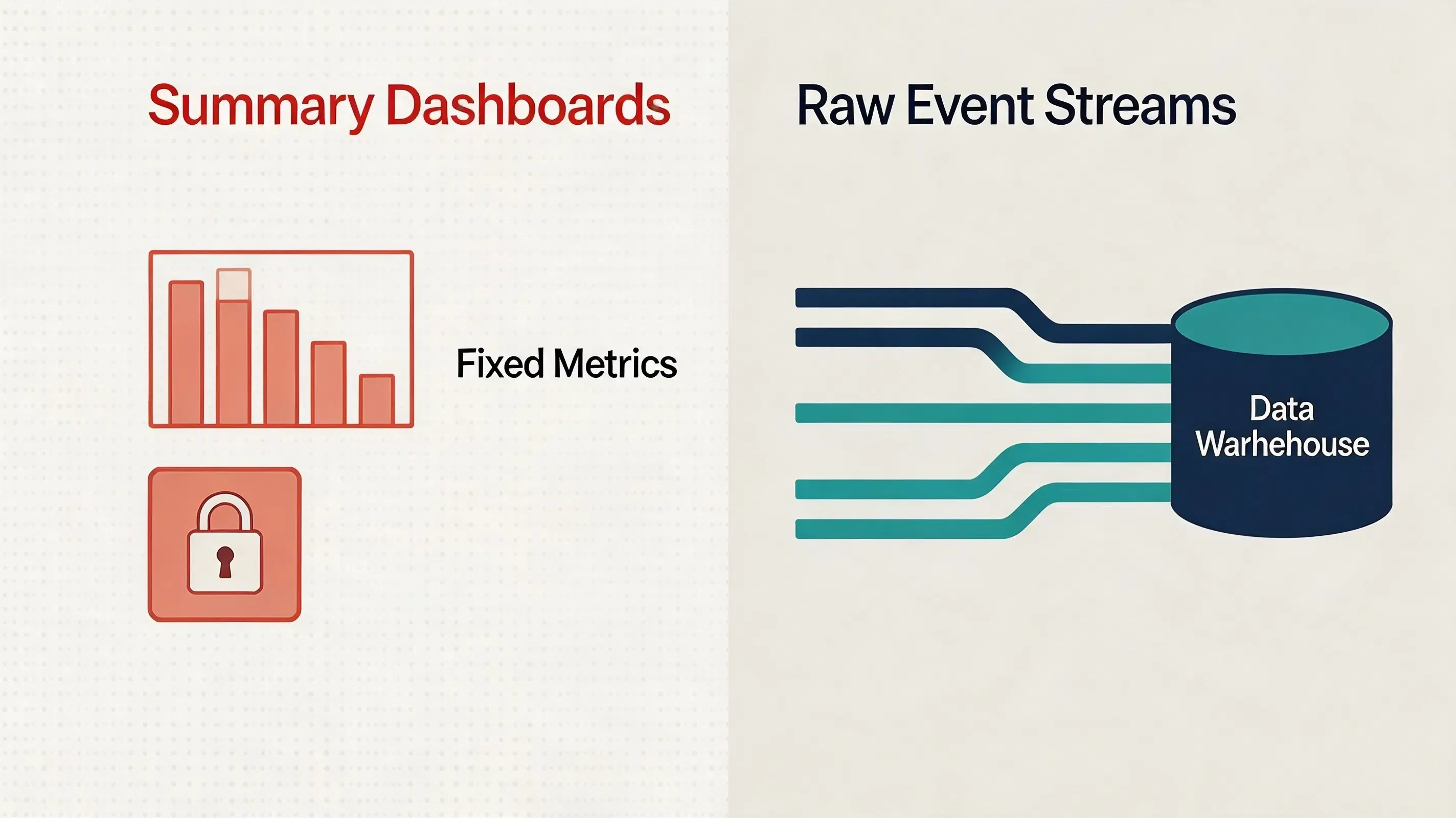
Mobile Measurement Partners (MMPs) typically present campaign performance through pre-aggregated summary tables. These console views group user actions into fixed metrics—such as total daily clicks, installs, or hardcoded Day-1 retention percentages. While summary reporting offers high-level visibility for campaign managers, it inherently obscures the granular telemetry required for advanced product analytics.
Pre-aggregated reports enforce rigid dimensions, preventing data teams from executing custom slicing and dicing. For instance, if an analyst wishes to audit cohort retention based on a complex combination of parameters—such as a specific in-app referral inviter, dynamic voucher code, and regional network properties—summary tables cannot fulfill the query. Furthermore, some analytics platforms may apply aggregation or sampling depending on reporting scale and configuration, introducing statistical variance that compromises audit precision.
How Raw Attribution Data Enables Advanced Cohort Analysis
Unaggregated event-level attribution data is used to calculate retention, LTV, and attribution performance from event-level records, allowing analytics teams to evaluate cross-channel retention decay and build custom attribution models using event-level data beyond predefined dashboard dimensions. By extracting attribution event records, analysts gain access to the underlying event stream needed to measure campaign contribution based on event-level records across every marketing touchpoint.
Unlocking Granular Insights: Joining Attribution Telemetry with First-Party Transaction Databases
Exporting event-level attribution data transforms mobile measurement from an isolated reporting silo into an integrated dataset. Unaggregated records capture individual interactions: an ad click, store redirection, native app launch, registration, or in-app purchase.
By streaming or downloading attribution event records, data engineering teams can join attribution telemetry with first-party databases (such as CRM systems, transaction ledgers, or customer support platforms). Using common join keys—such as internal user account IDs, cryptographically matched tokens, or transaction references—analysts can map the entire lifetime journey of a cohort from initial ad exposure to multi-year post-install revenue.
Maintaining Direct Storage Control Across Data Pipelines
Relying exclusively on pre-aggregated reporting dashboards exposes mobile brands to operational risks regarding data retention and governance. If an ad network or attribution provider alters its internal reporting logic, lookback window calculations, or de-duplication rules, historical summary metrics can shift without historical visibility.
Extracting raw event logs ensures direct storage control within internal data systems, allowing teams to reproduce historical queries and audit attribution logic. Storing granular event schemas within a data warehouse guarantees an immutable, permanent audit trail. Engineering teams can re-process historical logs under updated attribution models or custom internal business logic at any time, ensuring total transparency across financial and operational reporting. Mobile measurement platforms such as OpoInstall can provide unaggregated raw event streams to support data pipelines.
How Unaggregated Log Streaming Enables Internal Data Warehouse Joins
Architectural Setup: Ingesting S2S Webhook Event Streams into Data Warehouses
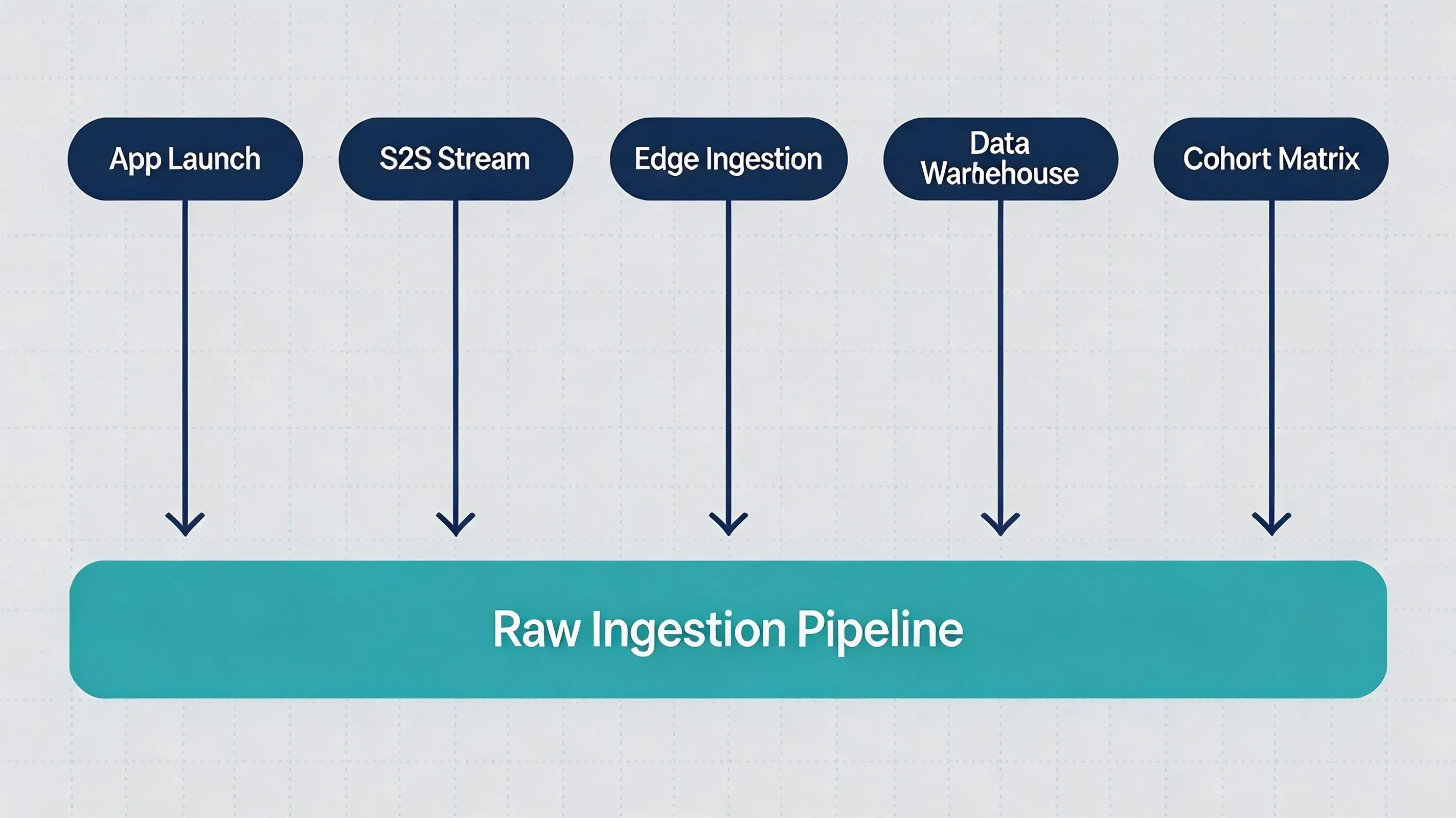
Integrating raw attribution telemetry into data warehouses (such as Snowflake, Google BigQuery, or Amazon Redshift) is primarily achieved through Server-to-Server (S2S) event streaming. Rather than waiting for daily file exports, the attribution engine dispatches an HTTP POST webhook payload to an ingestion endpoint shortly after processing an event.
An ingestion service receives the raw JSON payload, validates the request headers, and buffers the incoming event stream into a message queue or staging bucket. Streaming loaders continuously read from the buffer, inserting attribution event records into target data warehouse tables with low ingestion latency.
Joining Mobile Attribution Keys with Internal User IDs
To execute cohort retention analysis, raw attribution logs must be joined with internal product telemetry. Raw event schemas capture both attribution metadata and dynamic contextual parameters passed through the mobile SDK.
When a new user launches an application, the native SDK executes an installation parameter query, retrieving referrer tokens, inviter IDs, or campaign keys. Once the user creates an account or completes an in-app transaction, the application passes the internal user_id to the attribution SDK. Downstream, data engineers execute SQL join operations combining the raw attribution log table with internal transactional tables:
This structural link allows analysts to evaluate retention cohorts based on both pre-install marketing sources and post-install product behaviors.
Privacy-Compliant Measurement in Data Clean Rooms
As operating system privacy frameworks restrict deterministic user-level tracking, organizations increasingly deploy Data Clean Rooms (DCRs) to reconcile advertising spend with publisher performance. Data Clean Rooms allow advertisers and ad networks to query combined datasets within a secure, privacy-isolated environment.
Raw event logs serve as input for Data Clean Room architectures. By exporting unaggregated event streams containing privacy-preserving identifiers or aggregated cohort identifiers, data teams can perform privacy-safe intersection queries without exposing personal data.
Structural Differences Between Pre-Aggregated Summary Reports and Raw Data Logs
Comparative Evaluation of Summary Reporting vs Granular Raw Event Streams
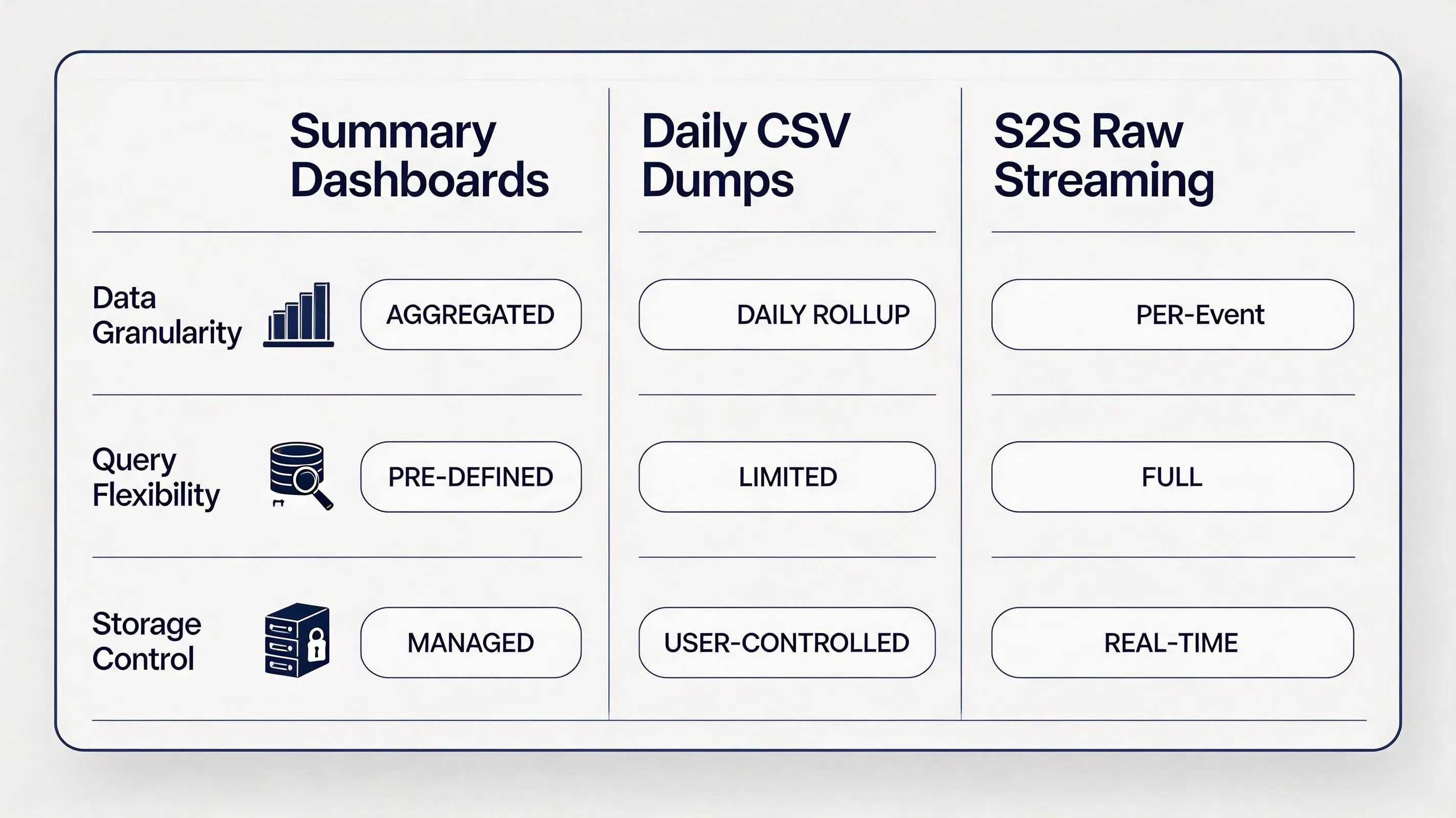
Selecting the appropriate data delivery mechanism depends on organizational technical maturity, storage capacity, and query complexity. Pre-aggregated dashboards serve operational campaign managers, while event-level attribution data empowers data engineers and quantitative analysts.
The table below contrasts key structural characteristics across different reporting methods:
| Performance Metric | Pre-Aggregated Summary Dashboards | Scheduled Daily CSV Dumps | S2S Raw Data Streaming |
|---|---|---|---|
| Data Granularity | Pre-computed summary metrics | User-level event snapshots | Granular event-level telemetry |
| Query Flexibility | Limited to fixed console dimensions | High (Requires custom scripts) | Flexible SQL-based analysis & BI integration |
| Integration Latency | Scheduled hourly/daily updates | Daily export batching | Near real-time streaming |
| Custom Cohort Auditing | Inflexible fixed time-windows | Supported via offline parsing | Fully dynamic N-Day cohort modeling |
| Data Ownership | Vendor hosted and summarized | Exported flat file copy | Direct storage control within internal data systems |
Evaluating Data Flexibility, Storage Requirements, and Query Performance
While raw data streaming provides analytical flexibility, it requires continuous storage infrastructure and optimized database indexing. Large-scale mobile applications generating millions of daily events can accumulate substantial volumes of raw JSON logs monthly.
To balance query performance and storage costs, data engineering teams frequently implement multi-tier storage architectures. Unaggregated event streams are ingested into high-performance columnar databases for immediate 30-day cohort analysis, after which historical logs are partitioned by date and archived into cold storage buckets (e.g., AWS S3 or Google Cloud Storage) in compressed Parquet format.
Standardizing the Raw Data JSON and CSV Export Schema
Essential Schema Fields Included in Mobile Attribution Raw Data Exports
To ensure seamless ETL parsing across automated data pipelines, raw attribution event schemas must maintain consistent field naming and data type conventions. Every raw event log record includes distinct telemetry layers:
-
Event Metadata: Unique transaction ID, event name (
install,register,purchase), and precise UTC timestamp. -
Attribution Identifiers: AppKey, channel code (
channelCode), campaign ID, ad group ID, creative ID, and publisher network name. -
Referral & Custom Payloads: Contextual parameters passed via web links (e.g., inviter ID, voucher code, room number).
-
Device & Environment Context: Operating system type, OS version, app version, SDK version, and coarse network properties.
Structuring JSON Event Telemetry Payloads for Storage
JSON represents the standard payload format for S2S event streams due to its flexible, hierarchical structure. JSON schema objects allow nested data types, enabling complex contextual payloads to be transmitted within a single message.
Developers can reference the OpoInstall raw data export documentation for technical specifications regarding raw event log schemas and field definitions. Engineers seeking to evaluate client-side tracking configurations can consult the OpoInstall attribution SDK integration resources to review payload structure setup.
The JSON schema below illustrates an illustrative raw attribution event payload generated upon an app install event:
```json
{
“example_only”: true,
“event_type”: “raw_attribution_event”,
“app_id”: “com.example.app”,
“event_metadata”: {
“raw_event_id”: “raw_evt_112233445566”,
“event_name”: “app_install”,
“event_timestamp_utc”: “2026-08-11T03:15:22.104Z”,
“ingestion_timestamp_utc”: “2026-08-11T03:15:22.128Z”
},
“attribution_context”: {
“channel_code”: “google_search_global”,
“campaign_id”: “cmp_search_core_01”,
“ad_group_id”: “ag_intent_exact”,
“creative_id”: “cr_text_v3”,
“match_type”: “deterministic”,
“lookback_window_days”: 7
},
“custom_payload”: {
“inviter_user_id”: “usr_99887766”,
“voucher_code”: “WELCOME2026”,
“internal_account_id”: “acc_33211”
},
“device_telemetry”: {
“os_type”: “Android”,
“os_version”: “14.0”,
“app_version”: “2.4.0”,
“sdk_version”: “1.0.0”,
“country_code”: “US”,
“network_type”: “wifi”
}
}
CSV Header Layouts and Field Normalization for Automated ETL Ingestion
For batch file exports, flat CSV structures are widely utilized due to their native compatibility with traditional data loading utilities (such as PostgreSQL COPY or Snowflake COPY INTO). CSV export pipelines normalize hierarchical JSON objects into flat columnar headers.
To prevent ETL pipeline failures during CSV parsing, character escaping rules must be strictly enforced. String fields containing commas, line breaks, or quotation marks must be enclosed in double quotes, and timestamps must adhere strictly to ISO 8601 UTC string formats (YYYY-MM-DDTHH:MM:SS.sssZ).
How to Audit D1 to D30 Cohort Retention Using Raw Installation Logs
Mathematical Formulation of Cohort Retention Decay
A retention cohort is defined as a discrete group of users who completed a primary activation event (typically initial application launch following installation) within a specific time window
Where:
-
is the total count of unique users who installed and activated the app on Day 0. -
is the count of unique users from who demonstrated active engagement on Day .
Using raw event logs, data analysts construct exact N-Day retention matrices by querying daily unique user session logs against initial installation timestamp records.
-- Example SQL pattern: Extracting D1-D30 Cohort Retention from Raw Logs
-- Note: SQL syntax varies by data warehouse (Snowflake, BigQuery, PostgreSQL)
SELECT
DATE(install_timestamp_utc) AS install_date,
channel_code,
COUNT(DISTINCT user_id) AS cohort_size,
COUNT(DISTINCT CASE WHEN DATEDIFF(day, install_timestamp_utc, event_timestamp_utc) = 1 THEN user_id END) AS d1_retained,
COUNT(DISTINCT CASE WHEN DATEDIFF(day, install_timestamp_utc, event_timestamp_utc) = 7 THEN user_id END) AS d7_retained
FROM attribution_raw_events
GROUP BY 1, 2;
Filtering Out Non-Incremental Installs and Fraudulent Activity
Pre-aggregated console metrics often calculate retention using unfiltered installation counts, which can skew retention percentages. Raw data exports allow analysts to execute sanitization queries prior to cohort construction.
Analysts apply SQL WHERE clauses to filter out invalid or non-incremental installations:
-
Excluding Fraudulent Signals: Removing installations flagged for click injection or emulator execution based on anomalous Time-To-Install (TTI) properties.
-
Suppressing Re-Installs: Excluding duplicate installations originating from existing users re-downloading the application on the same device.
-
Isolating Organic Baseline: Separating paid traffic cohorts from organic baselines to measure true incremental retention lift.
Constructing N-Day Retention Matrices Across Channels
By executing SQL GROUP BY operations on normalized raw log tables, analysts generate multi-dimensional cohort retention matrices. These tables evaluate retention decay curves across distinct acquisition sources, ad creatives, or regional campaigns.
[Mobile Event / Install] ──> [OpoInstall Raw Event Pipe]
│
▼
[S2S Stream / CSV Export]
│
▼
[Data Warehouse / BI]
│
▼
[Custom D1-D30 Cohort Retention Analysis]
Evaluating retention across distinct acquisition channels enables growth teams to identify channels that generate high initial install volumes but experience steep Day-7 drop-offs, allowing ad budgets to be reallocated toward channels that deliver durable long-term LTV.
How to Troubleshoot Ingestion Mismatches and Missing Fields in Raw Logs
Diagnosing Schema Drift and Missing Parameter Keys in Client SDK Payloads
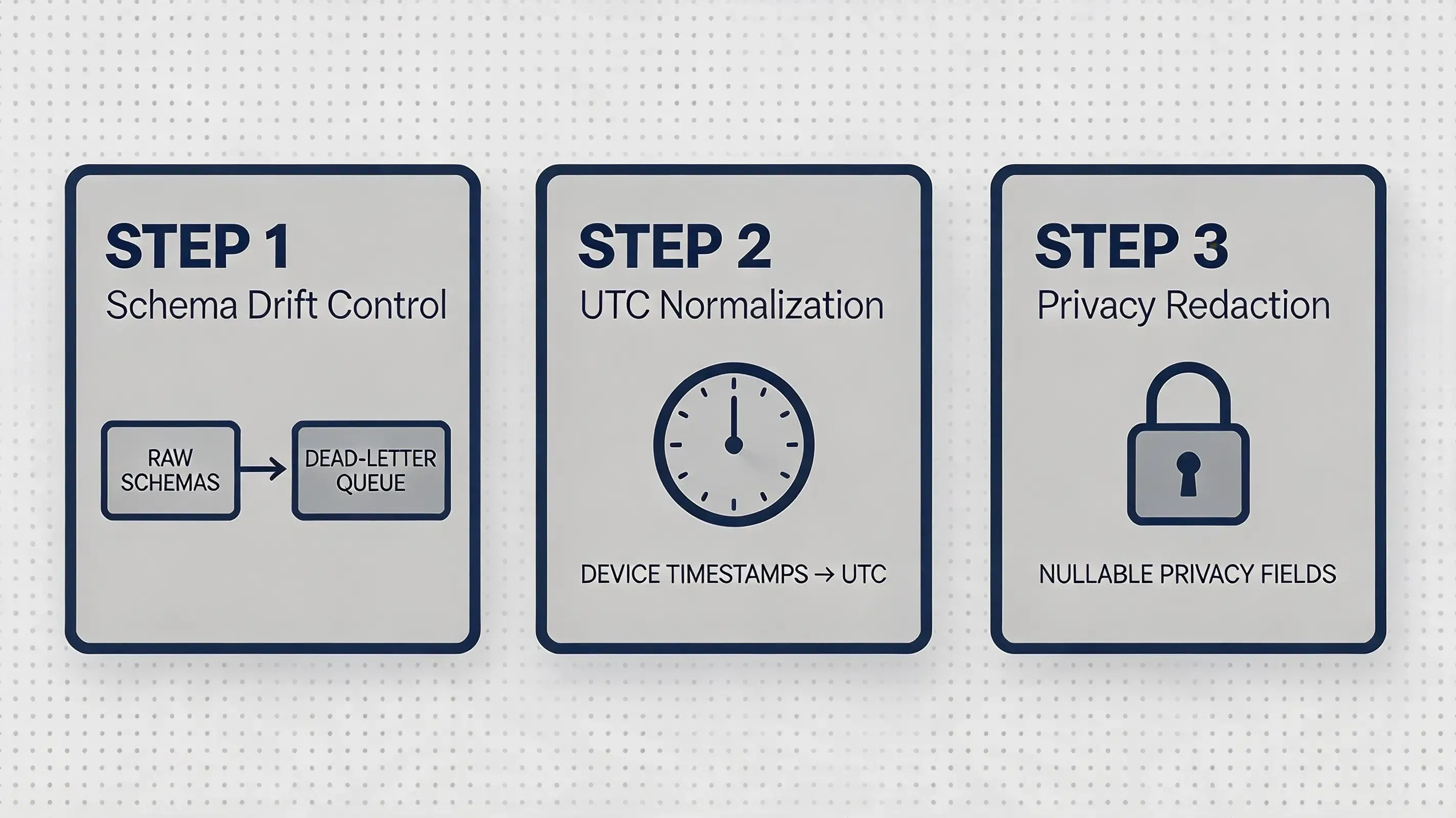
Schema drift occurs when client-side application updates introduce new custom parameter keys or modify existing payload data types without updating downstream data warehouse schemas. If an ETL pipeline encounters an unexpected string in a numeric field, automated ingestion jobs may fail or drop records.
To prevent schema drift errors, data pipelines deploy dead-letter queues (DLQs). Incoming raw event records that fail strict schema validation are routed to a DLQ staging container for manual inspection, ensuring that valid pipeline records continue executing without interruption.
Resolving Timestamp Discrepancies Between UTC Ingestion and Local Timezones
Timestamp misalignment represents a frequent cause of discrepancies between internal BI reports and vendor consoles. Raw event logs capture multiple timestamp fields:
-
device_timestamp_utc: The local timestamp logged by the mobile device hardware at the time of event execution. -
ingestion_timestamp_utc: The server-generated timestamp logged by the ingestion edge node upon HTTP payload receipt. -
event_timestamp_utc: The verified, canonical event timestamp applied by the attribution engine.
Data pipelines must normalize all timestamp fields to UTC before executing daily cohort groupings. Relying on unvalidated device timestamps can corrupt cohort boundaries due to local device clock drift or user manipulation.
Handling Ad Network Privacy Redactions
Under modern privacy policies (such as Apple SKAdNetwork (SKAN) or Google Privacy Sandbox), user-level identifiers and granular contextual query parameters are frequently redacted or delayed by publisher networks.
When constructing raw log tables, database schemas must account for nullable fields in privacy-restricted records. Columns representing publisher campaign IDs or granular touchpoint metadata must accept NULL or REDACTED strings, preventing database insertion exceptions during unattributed or privacy-protected event ingestion.
Frequently Asked Questions (FAQ)
How to export raw data for retention cohort analysis in OpoInstall?
What fields are included in mobile attribution raw data exports?
Can raw data exports be connected directly to a data warehouse?
Can raw data exports replace mobile attribution dashboards?
What is the difference between real-time S2S raw log streams and daily CSV dumps?
How does exporting raw data support data ownership and privacy compliance?
Key Takeaways
-
Direct Storage Control: Exporting unaggregated raw data transfers full event-level telemetry directly into data warehouses, ensuring complete audit transparency.
-
Unconstrained Analytics: Raw event logs allow data teams to execute custom SQL queries, perform complex cohort joins with CRM data, and avoid the sampling limitations of pre-aggregated summary dashboards.
-
Pipeline Synchronization: Ingesting S2S raw streams or daily normalized CSV flat files enables automated ETL pipelines to maintain consistent, reliable BI reporting.
Summary and Decision Framework
To conduct advanced cohort retention analysis, mobile analytics architectures often combine dashboard reporting with event-level raw data pipelines. Exporting event-level logs enables data engineering teams to execute custom SQL queries, join attribution telemetry with internal transactional databases, and maintain direct storage control within internal data systems.
Looking toward future privacy regulations, owning raw event streams remains essential for building hybrid measurement models and data clean room integrations. By pairing lightweight SDK telemetry with raw data streaming, measurement platforms provide the infrastructure needed to maintain audit transparency and drive granular cohort analytics.
Developers implementing mobile attribution pipelines can reference mobile attribution SDK documentation or register an account on the OpoInstall developer console for SDK integration and event delivery workflows.
Related Topics
-
Related Articles:
-
What Is Multi-Touch Attribution in Mobile Marketing?
-
How Mobile Measurement Partners Work
-
SKAdNetwork vs MMP Attribution
-
Incrementality Testing for App User Acquisition
-
-
Concepts: Attribution Data Export, Mobile Event Streaming, Retention Cohort Analysis, Data Warehouse Integration
-
Technologies: Mobile Measurement Partner, Server-to-Server Webhook, Snowflake, BigQuery, Real-Time Ingestion
-
APIs: Mobile attribution event logging APIs, Apple SKAdNetwork Postback API, Google Play Install Referrer API
-
Official Documentation & References:
Share this article



