What is GAID and how to fetch it programmatically? The Google Advertising ID (GAID) is a user-resettable software identifier provided by Google Play services for advertising measurement, retrieved programmatically off the main thread using the AdvertisingIdClient API after ensuring the merged app manifest contains the AD_ID permission when required.
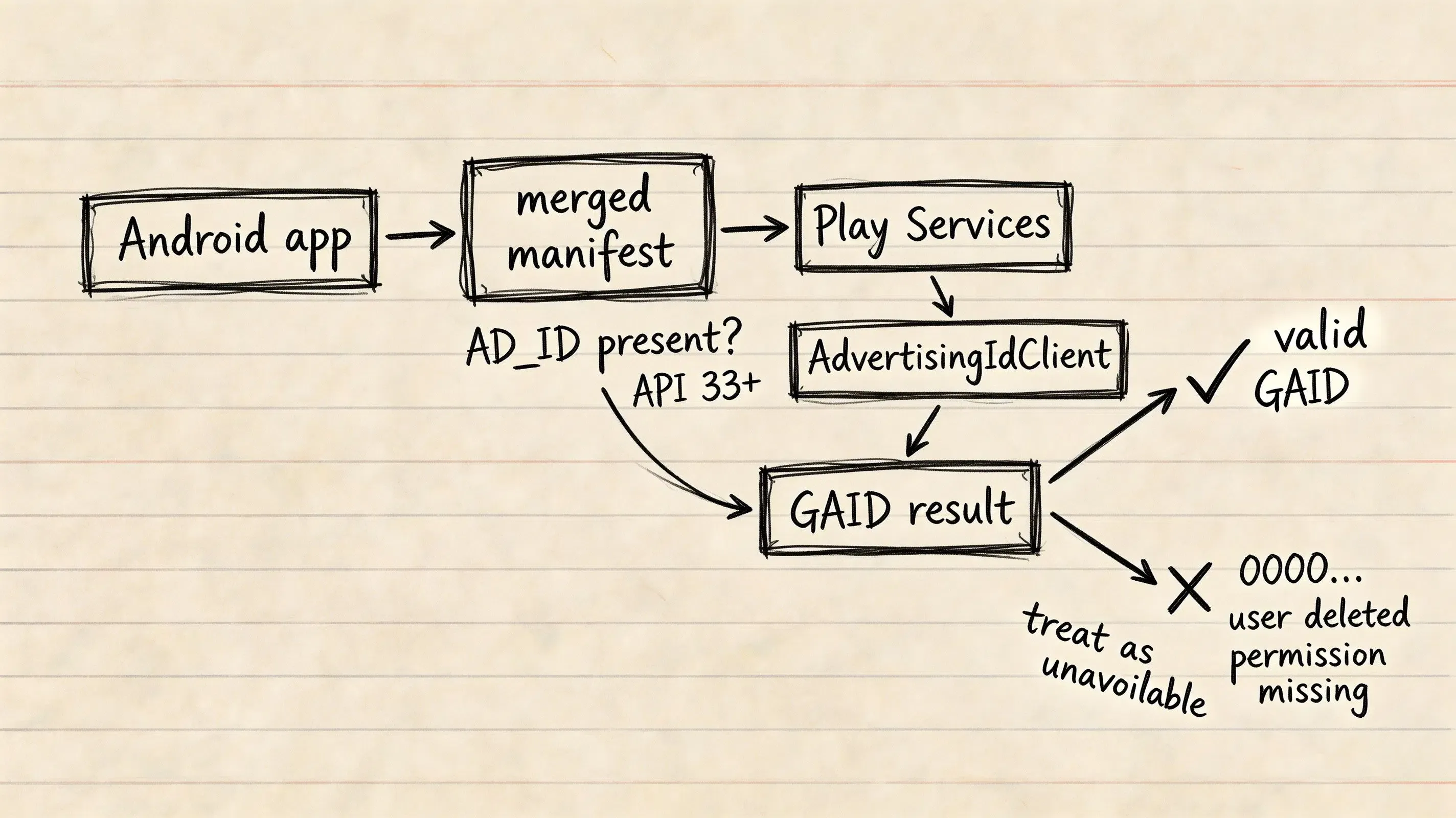
The Google Advertising ID (GAID), also known as the Android Advertising ID (AAID), is a user-resettable, unique string provided by Google Play services for advertising attribution, personalized ad targeting, and analytics on Android devices. Apps targeting Android 13 (API level 33) or higher must ensure that the merged manifest contains the
com.google.android.gms.permission.AD_IDpermission when they access the Google Play services Advertising ID; otherwise, the API returns an all-zero value.
| Term | Definition |
|---|---|
| GAID | Google Advertising ID provided by Google Play services for ad measurement. |
| AdvertisingIdClient | The Google Play services API used to query advertising identifier metadata. |
| AD_ID Permission | The Android manifest permission required for apps targeting API level 33+ when accessing the Google Play services Advertising ID. |
| Zeroed Identifier | The all-zero sentinel value (00000000-0000-0000-0000-000000000000) returned when the Advertising ID is unavailable or withheld. |
What Is GAID and How Does Google Advertising ID Operate
The Technical Anatomy of the Advertising ID
The Google Advertising ID (GAID) is returned by Google Play services as an opaque identifier string that is commonly formatted as a 128-bit lowercase hexadecimal UUID (e.g., 38400000-8cf0-11bd-b23e-10b96e4ef00d). Applications should treat the returned string as an opaque identifier rather than inferring business logic from its formatting.
Unlike hardware-level identifiers, the GAID is designed with explicit privacy controls:
- User-Resettable: Users can generate a new random identifier at any time via device settings.
- User-Deletable: Starting in Android 12, users can delete their advertising ID, instructing Google Play services to withhold advertising identifiers from all apps.
- Per-Profile Device Scope: Advertising IDs are generally available across apps for the same device user profile, but different Android user or guest profiles on the same physical device receive distinct advertising identifiers.
The Role of Google Play Services in Managing Identifier State
GAID is not part of the core open-source Android framework. It is an application-level service managed and served dynamically by the proprietary Google Play services client library (com.google.android.gms:play-services-ads-identifier).
When an application invokes Google Play services, the client performs blocking communication with Google Play services to retrieve the current advertising identifier and user limit-ad-tracking preference.
Why GAID Replaced Hardware Identifiers
In early Android releases, ad networks and developers tracked conversion events using non-resettable hardware identifiers:
- International Mobile Equipment Identity (IMEI): Tied to the device’s cellular hardware.
- Media Access Control (MAC) Address: Tied to network interface hardware.
- ANDROID_ID (SSAID): On modern Android 8.0+ releases, this identifier is scoped per combination of app-signing key, user, and device rather than functioning as a universal cross-app advertising key.
For advertising use cases on Google Play, developers must use the Advertising ID when it is available rather than substituting another persistent device identifier.
See Also: GAID ──> Mobile Attribution Architecture
Android 13 Permission Requirements: The AD_ID Manifest Declaration
The API Level 33 Enforcement Model
Starting with Android 13 (API level 33), Google introduced the com.google.android.gms.permission.AD_ID permission:
- Target SDK 33 and Above: Applications targeting Android 13 or higher must declare the
AD_IDpermission in their manifest. If the permission is omitted, Google Play services returns a string of zeroes (00000000-0000-0000-0000-000000000000). - Target SDK 32 and Below: The
AD_IDpermission is not required in the manifest. However, the Advertising ID can still be unavailable or zeroed because of the user’s advertising-ID privacy settings, including limit-ad-tracking or deletion states. - Play Store Policy Declarations: When submitting an update targeting API level 33+, developers must complete the current Advertising ID declaration in Google Play Console, accurately reporting whether and how the app uses the identifier.
Configuring AndroidManifest.xml and Gradle Dependencies
To declare the permission, include the <uses-permission> tag inside AndroidManifest.xml. In your app module’s build.gradle file, add the official play-services-ads-identifier dependency.
The configuration below demonstrates the manifest permission syntax and Gradle dependency setup:
```xml
<manifest xmlns:android="http://schemas.android.com/apk/res/android"
    package="com.example.myapp">

    <!-- Required on API 33+ to access non-zero GAID -->
    <uses-permission android:name="com.google.android.gms.permission.AD_ID"/>

    <application
        android:allowBackup="true"
        android:label="@string/app_name"
        android:theme="@style/Theme.MyApp">
        <!-- Application Components -->
    </application>
</manifest>
// Location: app/build.gradle
// Note: Example dependency versions shown; verify current stable releases in official repositories before production use.

dependencies {
    // Official Google Play services Ads Identifier library
    implementation 'com.google.android.gms:play-services-ads-identifier:18.0.1'

    // Kotlin Coroutines for off-main-thread asynchronous execution
    implementation 'org.jetbrains.kotlinx:kotlinx-coroutines-android:1.7.3'
}
Understanding Manifest Merging: Transitive SDK Injection
When building an Android APK or Android App Bundle (AAB), the Gradle build system merges manifests from all imported third-party libraries into a single final AndroidManifest.xml.
If an imported ad network SDK, analytics tool, or attribution library declares com.google.android.gms.permission.AD_ID in its internal manifest, that permission is automatically merged into your final build. Developers can inspect app/build/outputs/logs/manifest-merger-release-report.txt to audit which dependency introduced the permission.
Programmatic Retrieval: Fetching GAID via AdvertisingIdClient in Kotlin
The Mandatory Off-Main-Thread Execution Rule
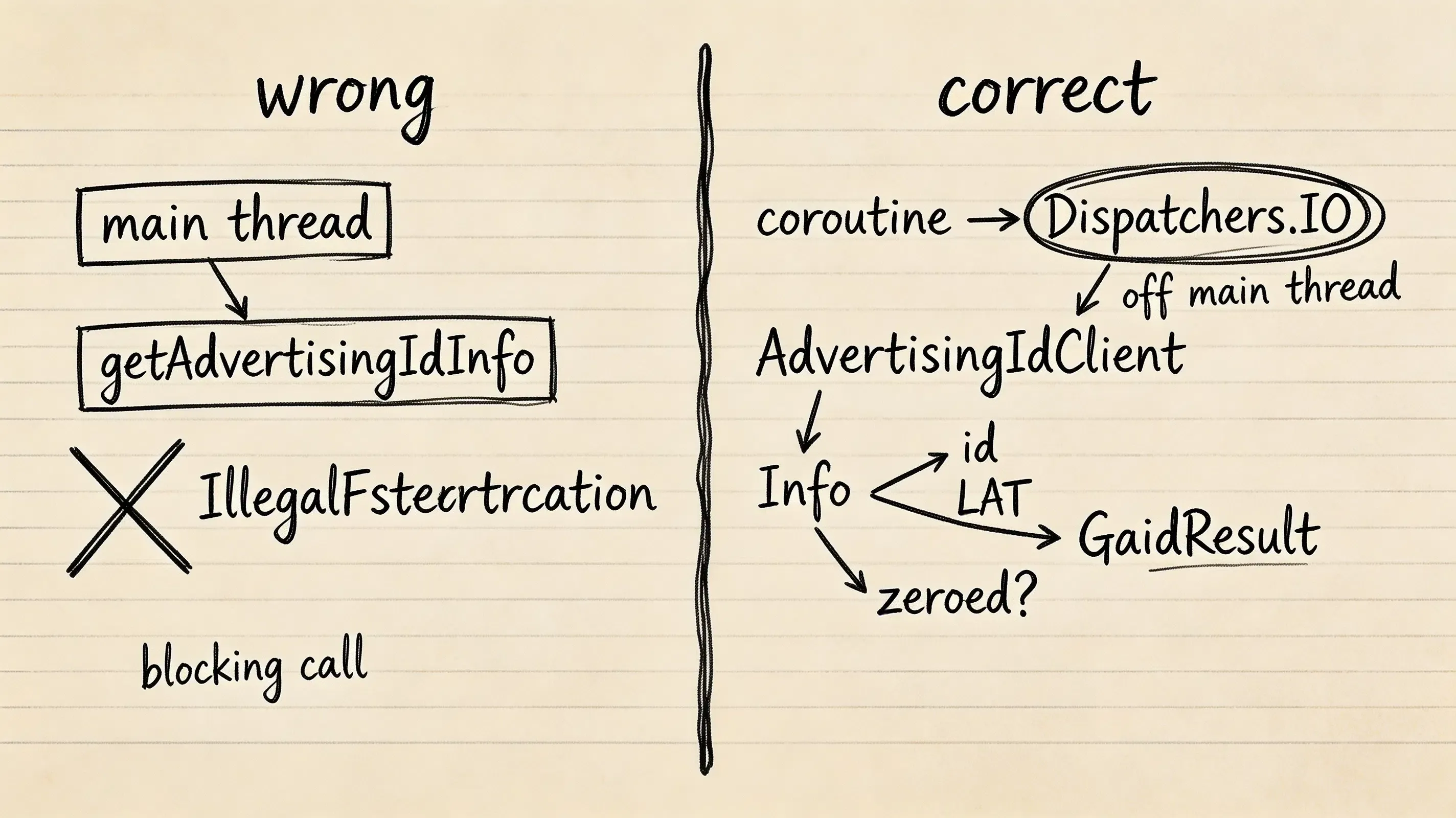
Invoking AdvertisingIdClient.getAdvertisingIdInfo(context) initiates a synchronous call to Google Play services. Google explicitly prohibits executing this method on the main (UI) thread.
Calling getAdvertisingIdInfo() on the main thread throws an immediate IllegalStateException:
java.lang.IllegalStateException: Calling this from your main thread can lead to deadlock
To prevent application ANR (Application Not Responding) errors and runtime crashes, developers must dispatch the extraction call inside a background worker or Kotlin Coroutine using Dispatchers.IO.
Implementing Background Worker Tasks Using Kotlin Coroutines
The Kotlin implementation below demonstrates a thread-safe AdvertisingIdManager that executes extraction off the main thread, handles Google Play services availability exceptions, and validates identifier integrity:
package com.example.myapp.analytics

import android.content.Context
import android.util.Log
import com.google.android.gms.ads.identifier.AdvertisingIdClient
import com.google.android.gms.common.GooglePlayServicesNotAvailableException
import com.google.android.gms.common.GooglePlayServicesRepairableException
import kotlinx.coroutines.Dispatchers
import kotlinx.coroutines.withContext
import java.io.IOException

data class GaidResult(
    val gaid: String?,
    val isLimitAdTrackingEnabled: Boolean,
    val isZeroed: Boolean,
    val isAvailable: Boolean
)

object AdvertisingIdManager {

    private const val TAG = "AdvertisingIdManager"
    private const val ZEROED_GAID = "00000000-0000-0000-0000-000000000000"

    /**
     * Programmatically retrieves the Google Advertising ID off the main execution thread.
     * Automatically handles exceptions, zeroed states, and user opt-outs.
     */
    suspend fun fetchGaid(context: Context): GaidResult = withContext(Dispatchers.IO) {
        try {
            // Invokes blocking Google Play services IPC on the IO coroutine dispatcher
            val adInfo: AdvertisingIdClient.Info = AdvertisingIdClient.getAdvertisingIdInfo(context)

            val rawId = adInfo.id
            val isLAT = adInfo.isLimitAdTrackingEnabled
            val isZeroed = rawId == null || rawId.equals(ZEROED_GAID, ignoreCase = true)

            if (isZeroed) {
                Log.w(TAG, "Advertising ID is unavailable or zeroed.")
                GaidResult(
                    gaid = null,
                    isLimitAdTrackingEnabled = isLAT,
                    isZeroed = true,
                    isAvailable = false
                )
            } else {
                Log.d(TAG, "Advertising ID successfully retrieved. LAT enabled: $isLAT")
                GaidResult(
                    gaid = rawId,
                    isLimitAdTrackingEnabled = isLAT,
                    isZeroed = false,
                    isAvailable = true
                )
            }
        } catch (e: GooglePlayServicesNotAvailableException) {
            Log.e(TAG, "Google Play services is not installed or unavailable on this device.", e)
            GaidResult(gaid = null, isLimitAdTrackingEnabled = true, isZeroed = false, isAvailable = false)
        } catch (e: GooglePlayServicesRepairableException) {
            Log.w(TAG, "Google Play services requires an update or user recovery.", e)
            GaidResult(gaid = null, isLimitAdTrackingEnabled = true, isZeroed = false, isAvailable = false)
        } catch (e: IOException) {
            Log.e(TAG, "Communication error connecting to Google Play services.", e)
            GaidResult(gaid = null, isLimitAdTrackingEnabled = true, isZeroed = false, isAvailable = false)
        } catch (e: IllegalStateException) {
            Log.e(TAG, "Illegal state while retrieving Advertising ID.", e)
            GaidResult(gaid = null, isLimitAdTrackingEnabled = true, isZeroed = false, isAvailable = false)
        } catch (e: Exception) {
            Log.e(TAG, "Unexpected error retrieving Google Advertising ID.", e)
            GaidResult(gaid = null, isLimitAdTrackingEnabled = true, isZeroed = false, isAvailable = false)
        }
    }
}
Parsing AdvertisingIdClient.Info and Handling Limit Ad Tracking
The AdvertisingIdClient.getAdvertisingIdInfo() method returns an AdvertisingIdClient.Info object containing two key properties:
getId()(String): The alphanumeric string representing the advertising identifier.isLimitAdTrackingEnabled()(Boolean): When limit ad tracking is enabled, Google Play policy prohibits using Advertising ID data to create advertising profiles or target personalized ads. The policy still permits activities such as contextual advertising, frequency capping, conversion tracking, reporting, and security/fraud detection; however, on current Google Play services the Advertising ID itself is zeroed when this setting is enabled, so applications should not assume a usable GAID remains available.
Handling Zeroed Identifiers and User-Initiated Deletion States
The 00000000-0000-0000-0000-000000000000 String: When and Why It Appears
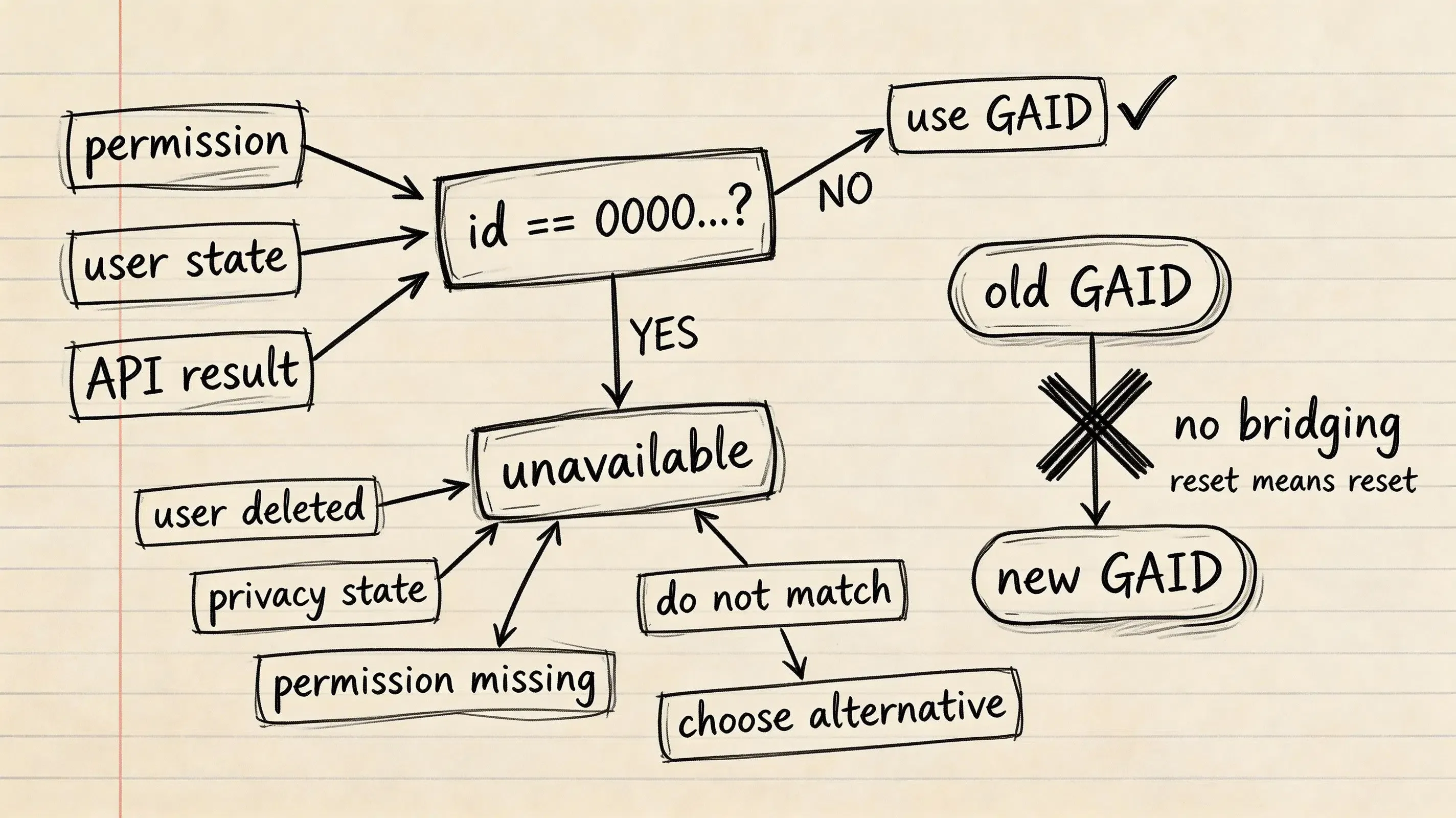
In production environments, AdvertisingIdClient.Info.getId() returns 00000000-0000-0000-0000-000000000000 when:
- User Deleted Advertising ID: The user navigated to device settings and deleted their advertising ID.
- Limit Ad Tracking Enabled: The user enabled limit ad tracking on supported OS versions.
- Missing Manifest Permission: The application targets Android 13+ (API level 33+) and fails to declare
com.google.android.gms.permission.AD_IDin its merged manifest.
User Settings Workflow: Deleting the Advertising ID
Users on current Android releases can remove their identifier by navigating to:
Settings > Privacy > Ads > Delete advertising ID (exact labels can vary by device OEM).
When deleted, Google Play services purges the underlying value. Subsequent API calls across all installed apps return the zeroed string.
Google Play Policy Requirements for Reset and Deletion States
According to Google Play Developer Policies on Advertising ID, developers must handle user privacy actions according to explicit rules:
- Reset Requirements: When a user resets their Advertising ID, developers must not bridge or connect the new Advertising ID to a previous Advertising ID or data derived from it without explicit user consent.
- Deletion Requirements: When a user deletes their Advertising ID, developers must not connect that device to data linked to or derived from its previous Advertising ID.
Sanitizing Identifier Inputs in Downstream Ingestion Pipelines
Backend attribution engines must implement validation filters to prevent zeroed strings from polluting attribution databases:
fun isGaidValid(gaid: String?): Boolean {
    if (gaid.isNullOrBlank()) return false
    val zeroedGaid = "00000000-0000-0000-0000-000000000000"
    return !gaid.equals(zeroedGaid, ignoreCase = true)
}
If a zeroed identifier is detected, downstream systems must not treat it as a usable GAID or identifier-matching key; any attribution or analytics processing should rely only on other independently permitted signals.
Google Play Families Policy and App Category Restrictions
Data Practices in Families Apps
Google Play enforces strict data protection rules for applications participating in the Families program or targeting children:
- Prohibition on Transmitting AAID: Applications solely targeting children must not transmit the Advertising ID (AAID). For apps targeting API level 33 or higher, Google recommends omitting or disabling the
AD_IDpermission as a straightforward compliance mechanism. - Mixed-Audience Handling: Applications targeting both children and older audiences must not transmit the AAID from children or users of unknown age. By default, apps and SDKs should avoid transmitting the AAID until age verification confirms the user is not a child.
Using tools:node=“remove” in Manifest
If your application targets children, but an imported third-party SDK automatically injects the AD_ID permission via manifest merging, add the tools:node="remove" attribute in your main AndroidManifest.xml:
<manifest xmlns:android="http://schemas.android.com/apk/res/android"
    xmlns:tools="http://schemas.android.com/tools"
    package="com.example.familyapp">

    <!-- Explicitly remove AD_ID injected by transitive dependencies -->
    <uses-permission
        android:name="com.google.android.gms.permission.AD_ID"
        tools:node="remove"/>

</manifest>
Use-Case-Specific Measurement Alternatives When GAID Is Unavailable
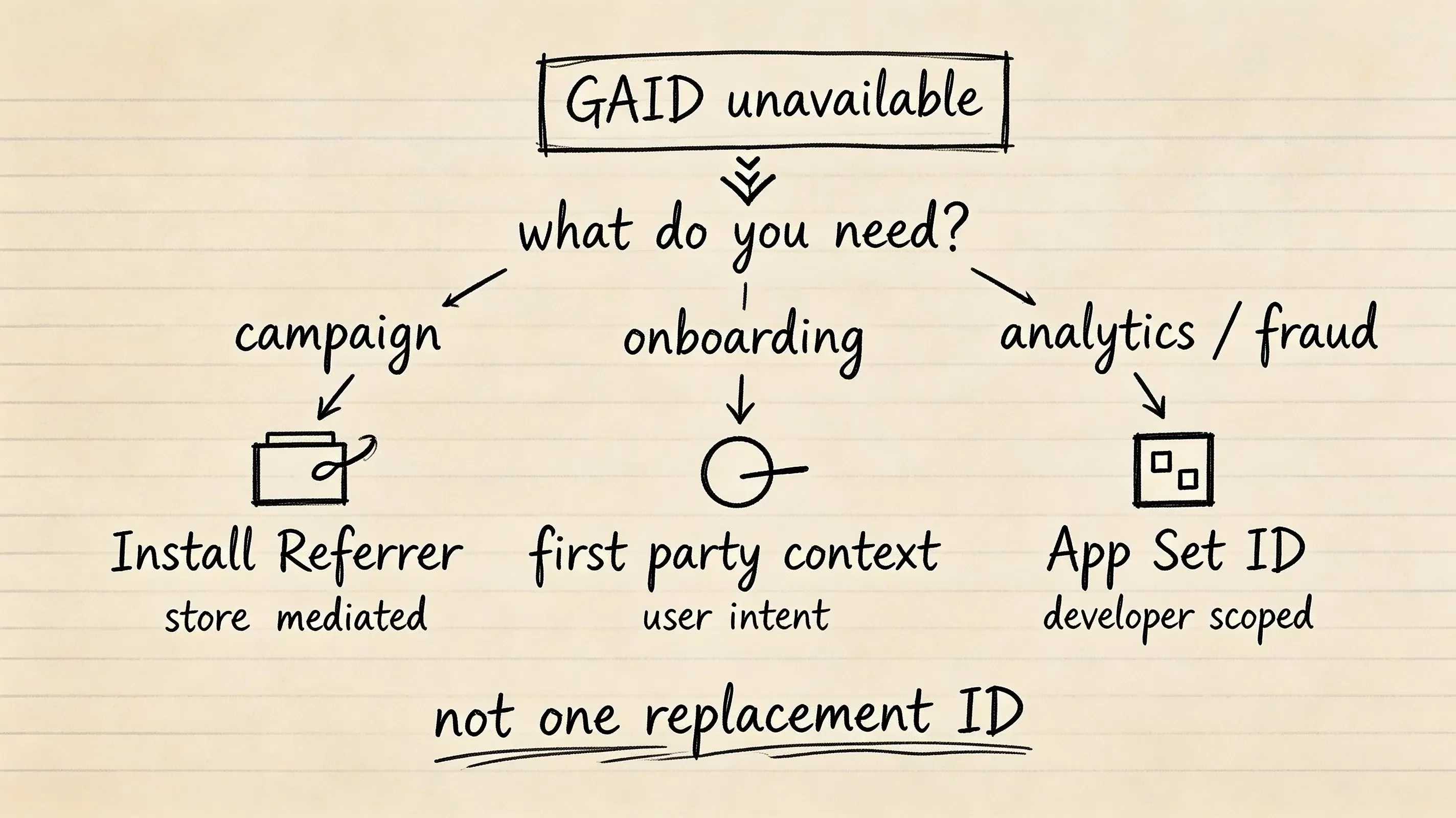
When GAID is zeroed, deleted, or restricted by policy, engineering teams deploy use-case-specific alternatives based on their functional objective:
- Campaign Attribution: Use the Google Play Install Referrer API to retrieve store-mediated campaign parameters passed through the Play Store URL (
referrer=...). Operates independently of GAID deletion. - Onboarding and User Intent: Use first-party contextual parameter routing to restore referral tokens, promo codes, and deep link destinations passed from web landing pages.
- Developer-Scoped Analytics and Fraud: Use the App Set ID (
AppSetIdClient) to generate a shared identifier across apps published under the same developer account, without cross-app advertising tracking.
                    GAID Unavailable or Zeroed
                                 │
         ┌───────────────────────┼───────────────────────┐
         │                       │                       │
         ▼                       ▼                       ▼
   Paid Campaign             Onboarding &          Developer-Owned
    Attribution             Referral Intent        Analytics & Fraud
         │                       │                       │
         ▼                       ▼                       ▼
    Google Play             First-Party             App Set ID
  Install Referrer          Contextual              (Developer- or
     (Store URL)             Routing                App-Scoped)
Comparative Matrix: GAID versus Install Referrer versus App Set ID
| Dimension | Google Advertising ID (GAID) | Google Play Install Referrer | App Set ID (AppSet) |
|---|---|---|---|
| Identifier Type | Resettable Cross-App Advertising UUID | Store-Mediated Campaign Parameter String | Developer- or app-scoped identifier, depending on installation and Play services context |
| Manifest Permission | com.google.android.gms.permission.AD_ID |
None | None |
| User Deletion Impact | Returns String of Zeroes | Independent of GAID deletion | May reset after 13 months without API access, when the last app in the set is uninstalled, or after factory reset |
| Primary Use Case | Cross-app ad attribution & retargeting | Play Store campaign performance tracking | Fraud detection & developer-owned analytics |
| Families Policy Fit | Must not be transmitted from children | Not subject to the AAID-specific transmission prohibition; use must still comply with applicable Families policies | Encouraged by Google for analytics in Families apps |
Frequently Asked Questions (FAQ)
Why does calling AdvertisingIdClient crash with an IllegalStateException?
What happens if an app targets Android 13 and does not declare the AD_ID permission?
How do I remove the AD_ID permission injected by third-party SDK dependencies?
Summary and Decision Framework
The Google Advertising ID remains an important resettable identifier for Android advertising and user-analytics use cases, but operating on Android 13+ requires adherence to manifest permission policies, background execution standards, and graceful handling of zeroed identifier states. When GAID is unavailable, engineering teams should choose a measurement primitive based on the specific use case—for example, Install Referrer for Play Store campaign attribution, first-party contextual parameters for onboarding state, or App Set ID for developer-owned analytics and fraud-prevention scenarios.
To explore implementation patterns for Android attribution and deep linking pipelines, review the OpoInstall documentation.
Related Materials
-
Concepts: Advertising ID Lifecycle, AD_ID Manifest Permission, Background Thread Extraction, Zeroed Identifier Handling
-
Technologies: Google Play Services, AdvertisingIdClient API, Google Play Install Referrer API, OpoInstall Android SDK
-
Standards: Google Play Developer Policies, Android 13 Behavior Changes, IETF RFC 4122 UUID Standard
-
APIs & Classes:
AdvertisingIdClient,AdvertisingIdClient.Info,AppSetIdClient, OpoInstall Context API
Official Documentation
Share this article



