Does Firefox for iOS now include native ad blocking? Mozilla has begun a progressive rollout of an experimental built-in ad blocker using an EasyList-based filter list to block many third-party ads and ad-related trackers before they load. As mobile web browsing incorporates more client-side filtering features, marketing workflows that depend on third-party browser requests may experience data gaps. When browser-level filtering suppresses third-party ad tags and tracking endpoints, client-side acquisition signals can be interrupted. Consequently, development and growth teams may need to evaluate first-party data architectures and server-side state handoffs to maintain measurement accuracy across Web-to-App journeys.
What Firefox’s Native iOS Ad Blocker Actually Blocks
At a Glance
- Mozilla began a progressive rollout of an experimental native ad blocker for Firefox on iOS on August 18, 2026, disabled by default in application settings.
- The feature uses an EasyList-based filter list to block third-party ad networks, ad-related trackers, pop-ups, and overlay ads at the network request level.
- Advertisements on search engine result pages and sponsored tiles on the Firefox Home and New Tab pages remain explicitly exempt from blocking.
The mobile advertising ecosystem is adapting as browser vendors introduce more integrated content-filtering controls. For years, iOS users seeking to filter display banners and trackers had to install third-party Safari content blockers or switch to specialized privacy browsers. While desktop browsers offered rich extension ecosystems capable of running comprehensive script blockers, mobile operating system constraints created distinct technical hurdles for browser developers.
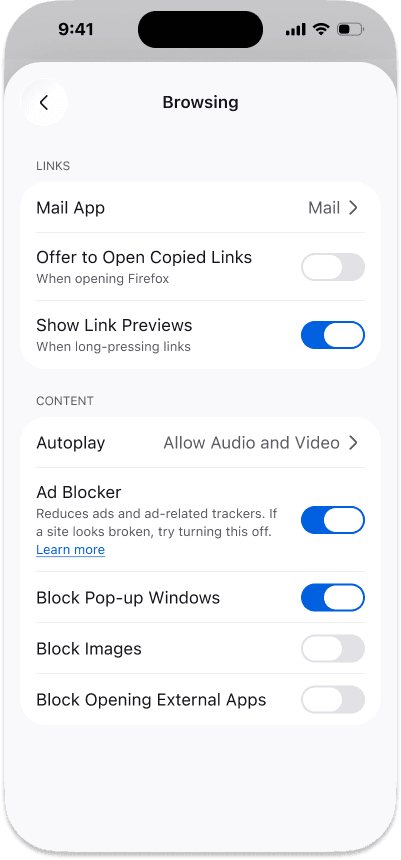
To provide a built-in option, Mozilla introduced an optional toggle within Firefox for iOS under Settings > Browsing > Content, as documented on the official Mozilla support portal. Rather than requiring external add-ons, the built-in feature evaluates outgoing network requests against an EasyList-based filter list, stopping connections to known advertising domains before page elements render.
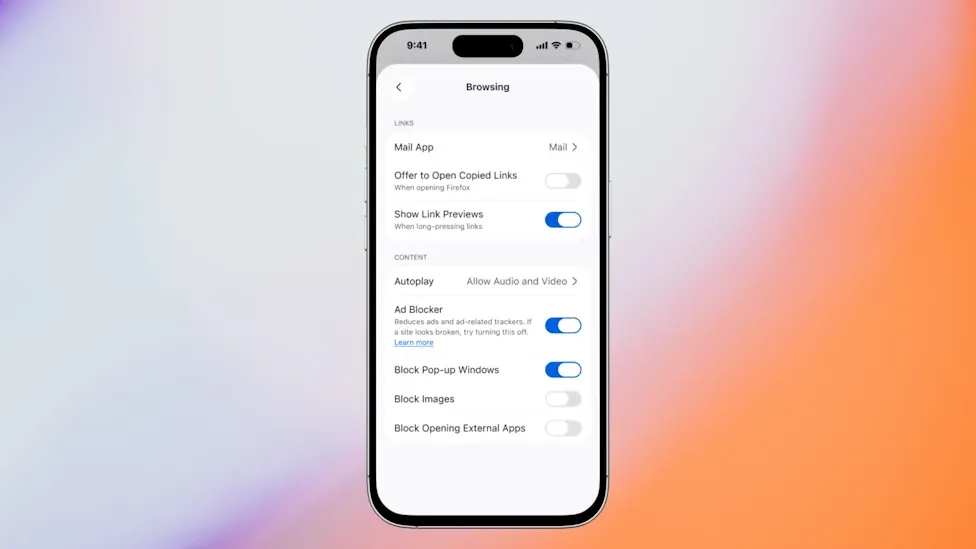
Firefox’s implementation reflects a practical distinction between the advertising it filters and the categories it leaves untouched. While the tool filters banner exchanges, pop-ups, and ad-related trackers, Mozilla explicitly exempts search engine result page advertisements from Google, Bing, and DuckDuckGo, as well as sponsored content on Firefox’s default home screen. This design leaves search-result advertising outside the blocker while still giving users a built-in way to reduce many third-party ads on general websites.
Technical Deep Dive: Network-Level Request Filtering and Signal Continuity
At the architectural level, EasyList-based content blocking evaluates resource requests against filtering rules and prevents matching advertising resources from loading. When a user loads a webpage, the browser engine parses the HTML markup and identifies external resources, including images, stylesheets, third-party JavaScript libraries, and analytics tracking pixels.
Under Firefox’s iOS implementation, outgoing network calls are evaluated against an EasyList-based filter list. If a destination URL matches known advertising exchanges or tracking endpoints, the browser drops the request before it loads:
- Third-Party Ad Network Interception: Drops network calls to centralized ad-serving exchanges, preventing matching third-party advertising resources from loading.
- Ad-Related Tracker Blocking: Blocks requests to ad-related tracking endpoints matched by the EasyList-based filter rules.
- Intrusive Ad Filtering: Blocks matching resources associated with pop-ups, overlays, and other intrusive ad formats.
The diagram below illustrates how network-level ad blocking impacts third-party tracking compared to first-party Web-to-App context preservation:
[Third-Party Measurement Path]
  User Event ──> Third-Party Browser Request ──> May Be Filtered by EasyList ──> Signal Missing

[First-Party Web-to-App Context Path]
  User Clicks First-Party Campaign Link ──> First-Party Server Records Context ──> App Store Boundary ──> App Launch ──> Deferred Deep-Link Restores Context
When browser filtering blocks a third-party measurement endpoint used by a campaign, the corresponding client-side signal may not reach the measurement system. If a growth team relies entirely on embedded third-party JavaScript tags to detect campaign referrals, blocked network calls prevent those specific events from recording. First-party navigation and server-originated measurement can reduce dependence on third-party browser requests, although filtering behavior still depends on the specific URLs and resources involved.
Best Practices & Reference Implementation Standards in Privacy-First Browsing
As mobile browsers increasingly integrate native content filtering, growth and engineering teams must adapt their measurement architectures. Relying on client-side third-party cookies or unprotected tracking pixels can create fragile analytics pipelines when key measurement requests are matched by browser filtering rules.
Methodological Evaluation: Client-Side Pixels vs. Server-Side Handoffs
When evaluating attribution architectures under browser-level content filtering, digital growth teams should separate front-end visual display filtering from back-end transaction verification. While ad blockers successfully suppress client-side tracking tags, first-party navigation flows and server-side data preservation operate through different channels.
The table below outlines common architectural approaches for preserving conversion data across privacy-restricted mobile browsers:
| Methodology | Data Transmission | Blocker Sensitivity | Best For |
|---|---|---|---|
| Third-Party Client-Side Pixels | Third-party JavaScript injection | High (Filtered when matching EasyList rules) | Standard web advertising without strict privacy controls |
| Browser Cookie Storage | Local client-side storage | Medium (Subject to browser clearing & sandboxing) | Simple single-domain session tracking |
| First-Party Server-Side Attribution | First-party server API matching | Lower (Reduces dependence on third-party browser execution) | Enterprise web measurement and multi-channel campaigns |
| Deferred Deep Linking (e.g., Opoinstall) | Cross-context parameter restoration | Lower (Reduces dependence on third-party browser execution) | Web-to-App user onboarding and mobile conversion tracking |
In Web-to-App acquisition flows, deferred deep linking can preserve campaign or referral context across an app-store installation boundary when that context has already been captured through a compatible first-party flow. Deferred deep linking does not recreate third-party measurement events blocked by the browser; its role is to preserve eligible campaign or destination context that has already been captured before the app-install boundary. Platforms such as Opoinstall document deferred deep linking and parameter pass-through workflows designed to restore such parameters after installation. Depending on implementation, such systems can record relevant campaign or referral context server-side and restore selected parameters after installation, helping ensure that user destination context remains consistent after app download.
Engineering Checklist: Adapting Measurement Pipelines to Client-Side Filtering
To adapt measurement pipelines to browser-level content filtering without disrupting user acquisition funnels, engineering teams can take several practical steps.
Developer Implementation Checklist
- Adopt First-Party Event Logging: Transition core conversion events from third-party client-side tags to first-party server-side API endpoints.
- Implement Parameter Pass-Through Handshakes: Use server-side state databases to store campaign tokens upon initial link interaction and reconcile them after app installation.
- Validate Web-to-App Handoff Reliability: Ensure mobile deep links utilize standard Universal Links and App Links to minimize intermediate web redirects.
Product & Growth Strategy Checklist
- Audit Third-Party Script Dependencies: Review web landing pages to identify tracking pixels that may fail under EasyList-based filtering.
- Deploy Destination Restoration Flows: Ensure users arriving through promotional links are routed directly to the intended in-app content following installation.
- Monitor Channel Attribution Discrepancies: Compare client-side analytics against server-side transaction logs to measure the data divergence caused by ad-blocking browsers.
Frequently Asked Questions (FAQ)
Why does Firefox for iOS exempt search engine ads from native ad blocking?
How does network-level ad blocking differ from Safari content blocker extensions?
How can mobile app developers maintain attribution when users browse with ad blockers enabled?
Key Takeaways for Engineering Teams
The introduction of native ad blocking in Firefox for iOS reflects the ongoing industry transition toward privacy-first browsing environments. As native content-filtering controls become more accessible to mobile users, measurement strategies that depend solely on third-party browser scripts will continue to see declining coverage.
For engineering and growth teams, the practical lesson is to build measurement architectures around first-party data and server-side state preservation. By decoupling campaign context from third-party tracking pixels and implementing reliable deferred deep linking across app installation boundaries, organizations can improve measurement continuity across Web-to-App journeys while respecting user privacy choices.
Share this article



