Google Deprecates Assistant for Gemini on Android? Google began discontinuing Assistant on mobile on September 3, 2026, with most users losing the ability to use or switch back to it by September 4 as Gemini became Android’s primary Google assistant experience. As conversational models replace legacy voice tools, mobile platforms are reorganizing how users interact with third-party software. Historically, applications registered structured capabilities in shortcuts configuration files to handle voice commands. Today, because Gemini relies on a combination of Connected Apps, Device Assistance, and optional screen context, developers must review how installed applications are discovered and invoked from system assistant surfaces.
Core Platform Transition: Phasing Out Google Assistant on Mobile
At a Glance
-
Google initiated the mobile phaseout of Google Assistant on September 3, 2026, transitioning eligible devices to Gemini as their primary Google assistant experience.
-
Common activation surfaces, including the “Hey Google” voice trigger and supported touch gestures, invoke Gemini once it is selected as the default assistant.
-
The September mobile transition applies to Android phones, tablets, Wear OS watches, supported headphones, and projected Android Auto sessions, but excludes Nest displays and Google built-in vehicles.
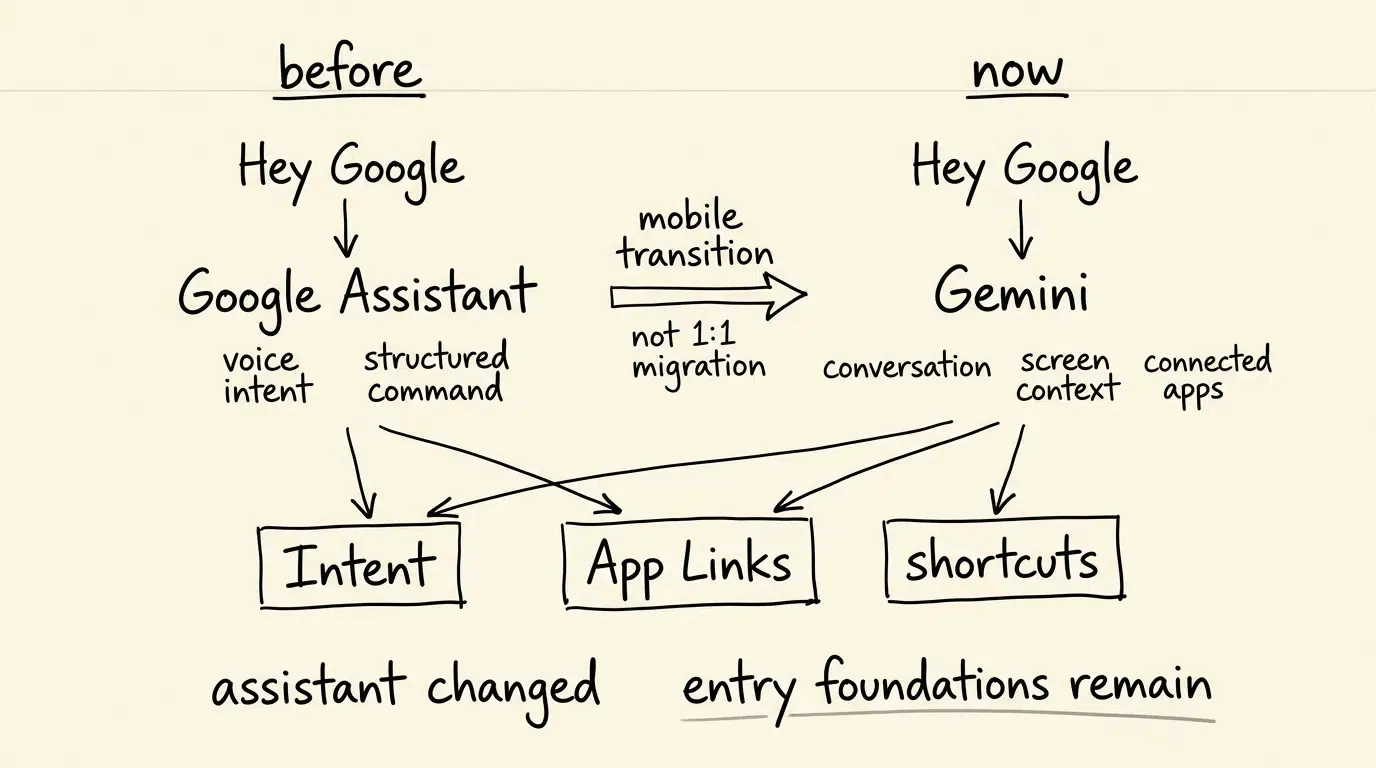
The architecture of mobile operating system assistants is undergoing an important transition. For years, the legacy voice assistant functioned as a primary hands-free interface on Android, executing voice commands to open applications, manage alarms, and handle web queries. This system relied on predefined capabilities and built-in intents that mapped recognized user requests to structured application actions declared by installed apps.
As conversational artificial intelligence models mature, platform maintainers are prioritizing multimodal interaction, contextual screen comprehension, and complex multi-step reasoning over static keyword parsers. Consequently, legacy mobile voice assistant infrastructure is being retired in favor of newer generative assistant interfaces. The operational rollout began on September 3, as detailed in the official Google Assistant transition announcement.
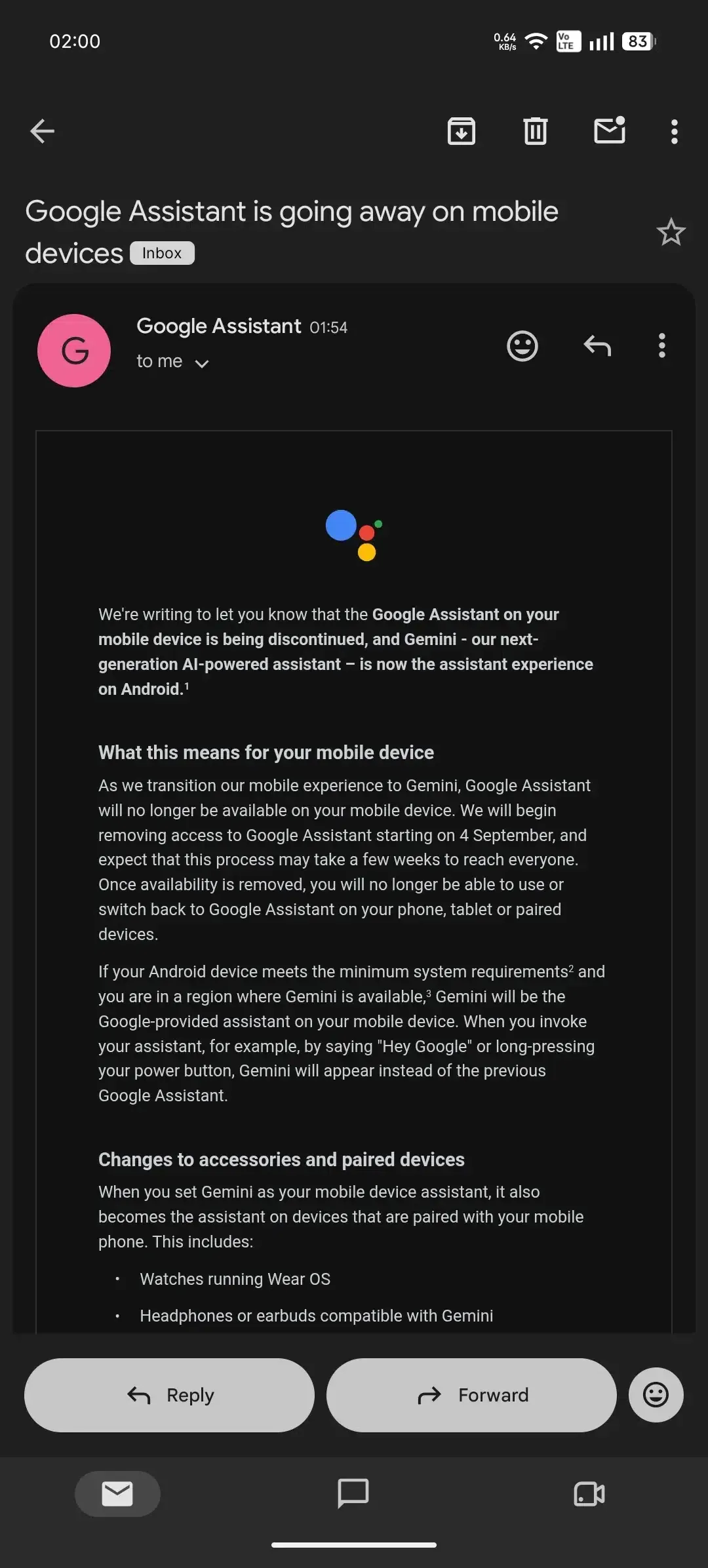
Understanding the rollout boundaries is essential for technical teams monitoring the Google Deprecates Assistant for Gemini transition. Once Google removes Assistant availability for an individual device during the rollout, users can no longer use or switch back to the legacy Assistant on that hardware, according to the Google Gemini migration update. This transition encompasses smartphones, tablets, compatible Wear OS smartwatches, supported headphones, and Android Auto sessions projected from a phone. However, the September transition does not apply to Nest and Home smart speakers, standalone smart displays, or vehicles equipped with Google built-in services.
Technical Deep Dive: Architectural Changes from App Actions to Gemini Integrations
At the application development level, replacing a traditional voice assistant with a generative model alters how user commands translate into application features. Under the legacy model, developers integrated with Google Assistant by implementing App Actions. These capabilities were formally declared in a shortcuts.xml resource file, as documented in the Android Assistant action schema guide, mapping built-in intents to explicit Android intents or deep link URIs.
When a user spoke a recognized phrase, the system resolved the command against the application’s declared capabilities and launched the target Activity with the appropriate parameters. This mechanism provided deterministic, predictable routing directly into installed application features.
Documented Interaction Patterns: Assistant vs. Gemini Invocation
Gemini approaches application integration through distinct platform mechanisms, primarily utilizing Connected Apps and Device Assistance capabilities. Rather than relying entirely on exact keyword matching in shortcuts files, Gemini evaluates natural language prompts and can use screen context to determine how best to complete an action.
The diagram below contrasts the legacy App Actions mechanism with Gemini’s invocation model:
User Voice Command ──> shortcuts.xml Capability ──> Android Intent / Deep Link ──> Installed App Activity
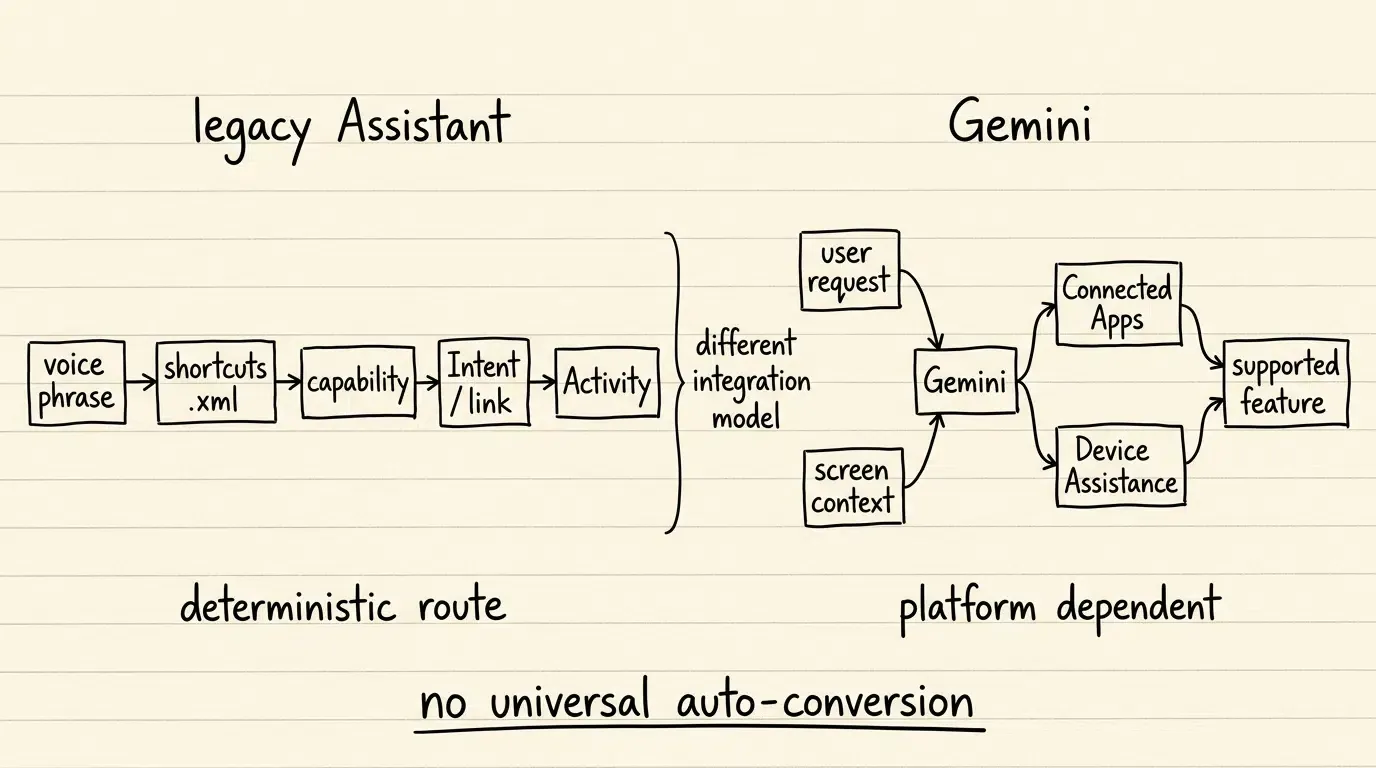
Importantly, Google has not documented a universal replacement framework in which all legacy third-party App Actions are automatically converted into dynamic tool calls or deep links. Instead, applications continue to rely on foundational Android standards—such as explicit intents, verified Android App Links, and system shortcut configurations—to handle external invocations.
If an assistant-mediated journey routes through an intermediate interface that does not preserve campaign parameters, analytics and marketing attribution models can experience data fragmentation. However, this is an integration and referral preservation challenge rather than an automatic failure of deep link resolution for already-installed applications.
Evaluating App Invocation and State Continuity Across Android Interfaces
As platform-level entry points shift toward conversational models, development teams must audit how their applications receive and process incoming execution parameters. Ensuring smooth user journeys during the Google Deprecates Assistant for Gemini transition requires clear technical separation between invoking installed application features and managing external acquisition funnels.
Comparing Android Interaction Patterns
The table below summarizes the technical mechanisms governing application entry points and contextual continuity on Android:
| Interaction Pattern | Primary Mechanism | Required Asset | Primary Use Case |
|---|---|---|---|
| Installed Feature Invocation | Android Intent / Shortcut | Intent filters / shortcuts.xml where App Actions are used |
Triggering specific tasks in an already-installed app |
| Verified Web-to-App Resolution | Android App Links | Digital Asset Links (assetlinks.json) |
Opening verified HTTP/HTTPS URLs directly in the app |
| System Assistant Interaction | Gemini / Connected Apps | Supported Platform Integrations | Voice and screen-assisted app control via Google assistant |
| Pre-Install Context Restoration | Deferred Deep Linking | Server-Side Parameter Matching | Restoring referral or campaign parameters after store install |
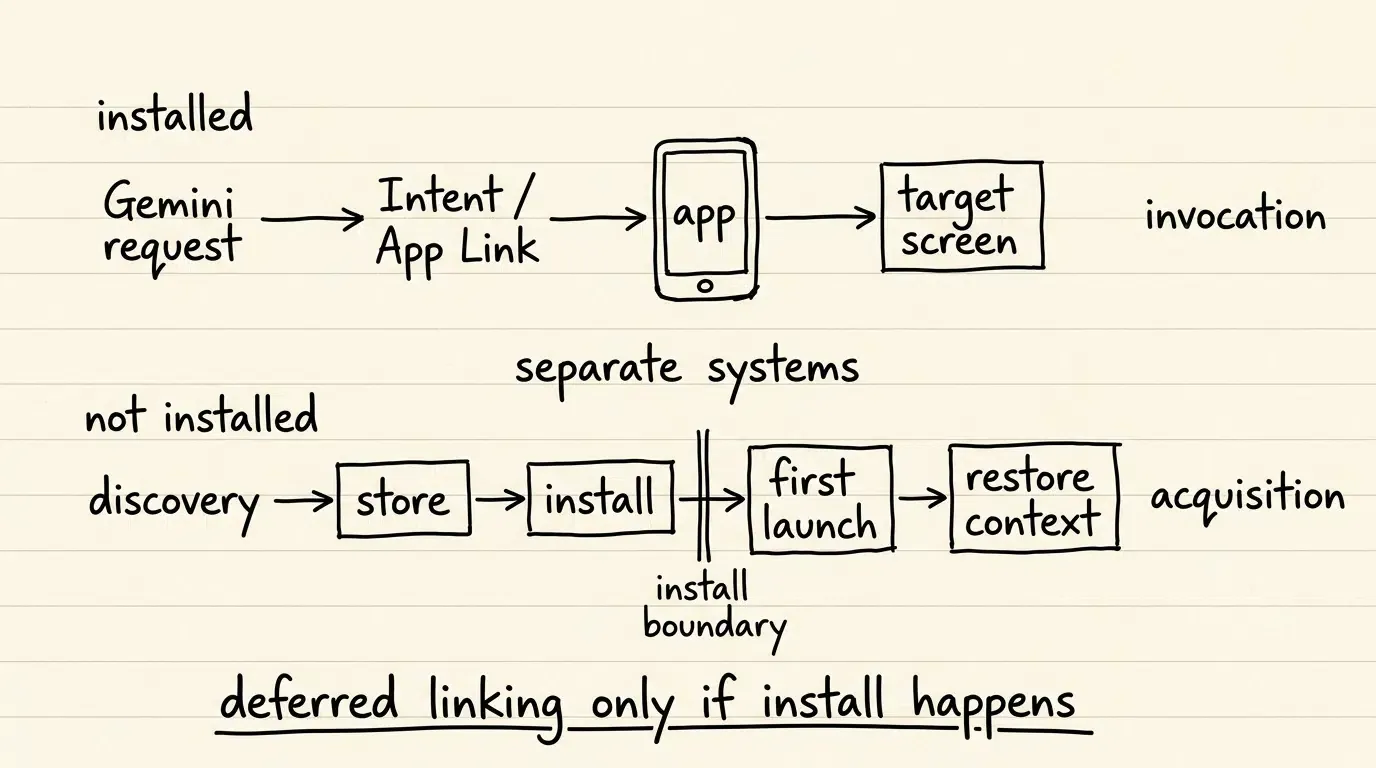
For verified web URLs, standard deep linking relies on the Android App Links documentation to open content directly without ambiguous system dialogs. For already-installed apps, Gemini-mediated actions use supported Android and Gemini integration mechanisms; this remains separate from deferred deep linking across an app-store installation boundary.
Separately, if an assistant-mediated discovery journey directs a user who does not yet have the app installed to an app-store installation before an app can receive referral or campaign context, this crosses an installation boundary. In those specific scenarios, deferred deep linking platforms, such as OpoInstall, restore eligible pre-install parameters on first launch. However, that install-boundary workflow remains distinct from Gemini routing commands to applications that are already installed on the device.
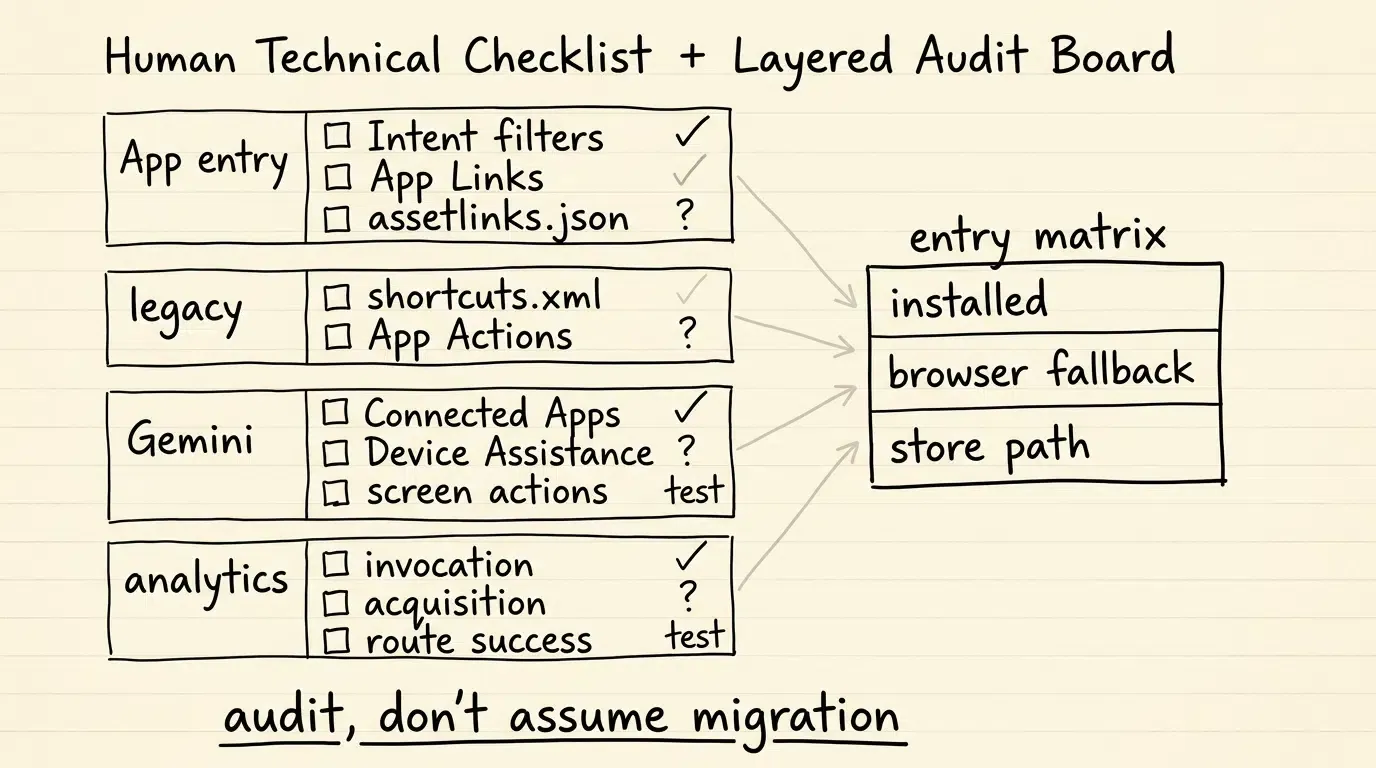
Engineering Checklist: Verifying Android App Integration Under Gemini
To ensure consistent application discoverability and intent execution as Android devices complete their transition to Gemini, engineering and product teams should follow a structured review process.
Developer Implementation Checklist
-
Audit Android App Links Verification: Verify that the domain hosting
assetlinks.jsonreturns valid HTTP 200 responses and matches the SHA-256 fingerprints of your release signing certificates to avoid intent disambiguation dialogs. -
Inventory Legacy shortcuts.xml Definitions: Document existing App Actions and shortcut definitions declared in
shortcuts.xmlto identify legacy voice dependencies, then separately evaluate which Gemini integration paths apply. -
Monitor Connected App Guidelines: Stay aligned with updated Google documentation regarding supported Gemini Connected Apps, device assistance extensions, and screen action compatibility.
Product & Growth Strategy Checklist
-
Distinguish Invocations from Acquisitions: Separate analytics tracking for assistant-driven in-app task execution from external web-to-app marketing campaigns.
-
Evaluate Fallback Landing Pages: Ensure that web endpoints associated with your App Links provide a functional fallback experience when opened in standard browser views.
-
Track Launch Retention and Routing: Monitor whether users arriving via external links land on the intended target screens without losing session context.
Following these engineering practices helps preserve functional application entry points across evolving operating system interfaces.
Frequently Asked Questions (FAQ)
Can users switch back to Google Assistant after migrating to Gemini?
Do existing Android App Actions map directly to Gemini?
Does Gemini's Android assistant transition automatically require deferred deep linking?
Key Takeaways for Engineering Teams
The retirement of the legacy Google Assistant on mobile marks a transition from deterministic voice commands toward broader multimodal assistance across Android devices. For software teams, this transition reinforces the importance of standardizing on robust, verified application entry points.
Maintaining verified App Links and clean Android intent handling provides a stable application-entry foundation, while teams should separately track Gemini-specific integration mechanisms as Google expands them. By treating assistant invocation and external install attribution as distinct engineering domains, teams can build resilient mobile architectures that adapt smoothly to platform-level operating system shifts.
References
-
Google Assistant Help. Transitioning from Google Assistant to Gemini on Mobile. https://support.google.com/assistant/thread/457649886/important-update-transitioning-from-google-assistant-to-gemini-on-mobile
-
Google Gemini Help. Here’s an Update on Our Work to Upgrade Mobile Assistant Devices to Gemini. https://support.google.com/gemini/thread/396052272/here%E2%80%99s-an-update-on-our-work-to-upgrade-mobile-assistant-devices-to-gemini
-
Android Developers. Create shortcuts.xml and Define Actions. https://developer.android.com/develop/devices/assistant/action-schema
-
Google Gemini Help. Use & Manage Connected Apps in Gemini on Android. https://support.google.com/gemini/answer/13695044
-
Google Gemini Help. Control Your Android Mobile Device & Apps with Device Assistance. https://support.google.com/gemini/answer/15235441
-
Google Gemini Help. Use Screen Actions to Chat with the Gemini Mobile App. https://support.google.com/gemini/answer/15850607
-
Android Developers. Handling Android App Links. https://developer.android.com/training/app-links
-
OpoInstall Technical Documentation. Deferred Deep Linking and Parameter Restoration. https://www.opoinstall.com/zh/blog/deferred-deep-linking-parameter-restoration
Share this article



