Google Firebase Crashes iOS Apps? Google confirmed that Google Analytics for Firebase on iOS experienced a launch-crash incident beginning at 5:41 p.m. PDT on September 28, 2026, after the SDK received an incorrectly formatted backend payload. Developers reported crashes across already-released app versions without shipping new binaries, and Google completed a server-side fix at 7:52 p.m. PDT. The incident shows how a remote dependency embedded in an app’s startup path can create a broad operational failure even when application code has not changed.
How the Firebase Analytics Failure Spread Across iOS Apps
At a Glance
- Google Analytics for Firebase on iOS experienced an unexpected launch-crash failure beginning on the evening of September 28, 2026, caused by an incorrectly formatted backend payload.
- Independent media and developer community reports indicated that thousands of third-party iPhone and iPad applications were disrupted without releasing new updates.
- Google rolled out a server-side fix in approximately two hours, noting that local client caching could prolong launch failures for up to four hours on some devices.
The modern mobile ecosystem depends extensively on shared cloud libraries. Engineering teams routinely incorporate third-party software development kits (SDKs) to manage core operational functions, including product analytics, crash telemetry, push notifications, and user authentication. Because Google provides the Firebase suite across multiple platforms at no direct charge, it has become a central piece of client-side infrastructure across global iOS applications.
However, incorporating external software into the core application process creates external dependencies. When a remote service delivers unexpected data during initialization, the host application can fail before user-facing views render. Independent developers first detected the disruption when multiple production builds began crashing simultaneously at launch. Teams that had not altered their codebases for weeks observed immediate failure reports across monitoring platforms, initially suspecting internal regressions before discovering that external analytics responses were the common external factor. Independent reporting from 9to5Google documented widespread impact across thousands of iPhone applications, while developer community reports indicated that crash counts reached into the tens of thousands for some individual deployments without shipping new binaries.
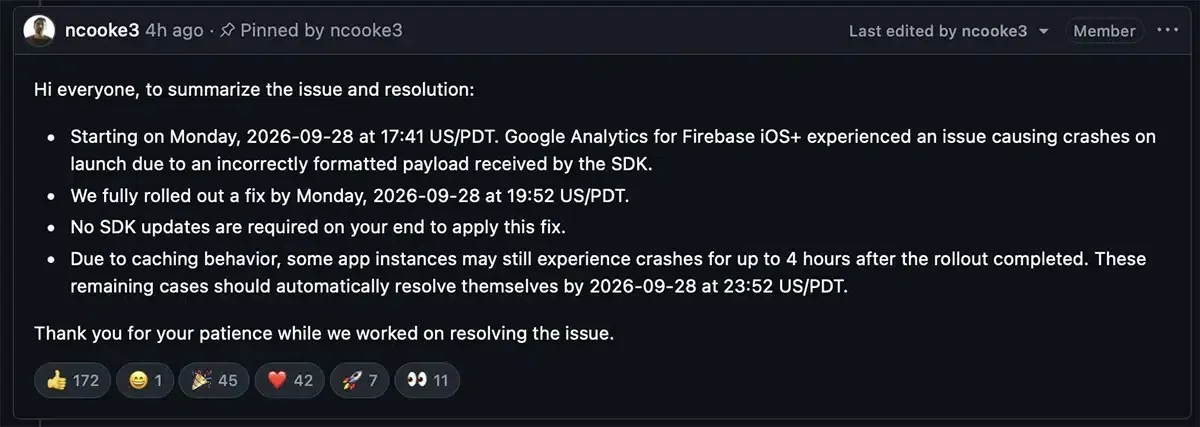
Community tracking confirmed that the disruption centered around the Google Firebase iOS SDK repository. Early telemetry shared by affected teams showed applications crashing within one second of launch. Discussion threads on community platforms like Reddit highlighted developers spending debugging hours and automated analysis credits on local code reviews before Google engineers confirmed that the issue originated on remote infrastructure.
Inside the Analytics Payload Crash and Startup Coupling
Understanding how a backend data error caused client-side process termination requires analyzing mobile startup lifecycles. When an iOS device launches an application, the operating system invokes entry delegates and loads dynamic binaries. If a tracking library handles remote responses during this startup window, unhandled exceptions can cause the operating system to terminate the entire process.
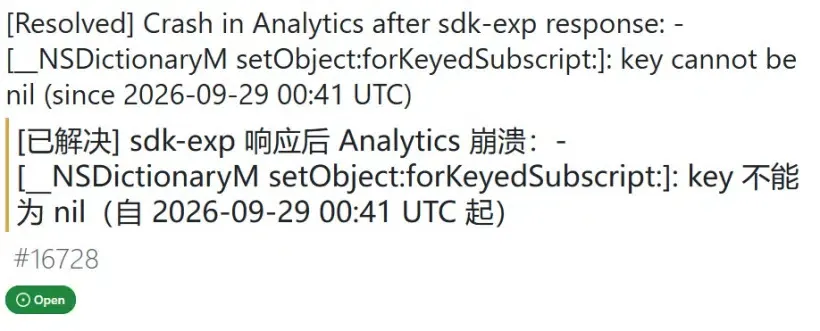
According to technical statements provided by Google software engineers on the public issue tracker, the failure involved Google Analytics for Firebase receiving an “incorrectly formatted payload” from backend servers. Diagnostic stack traces submitted by developers indicated an uncaught exception (NSInvalidArgumentException) related to a nil dictionary key while processing an experimental response (sdk-exp). Google stated that it was actively investigating the comprehensive root cause while rolling out mitigation measures.
Chronology of the Disruption and the Client Caching Factor
The documented timeline of the incident illustrates the operational window from initial payload delivery to complete mitigation:
- 17:41 PDT (September 28, 2026): Google Analytics for Firebase begins receiving the incorrectly formatted payload, triggering launch failures on client devices.
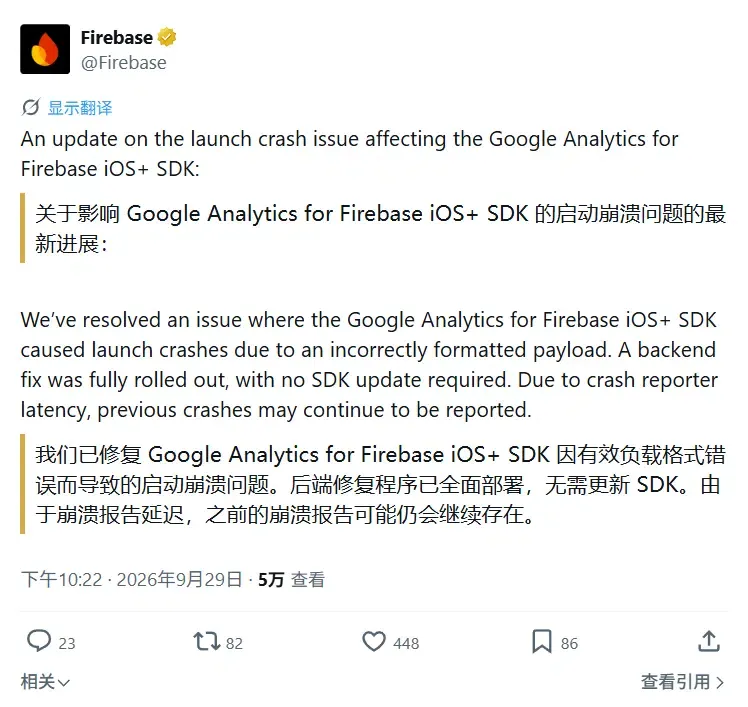
- 19:52 PDT: Google engineering completes the server-side deployment of a corrected payload, confirming that developers do not need to ship an SDK update.
- 23:52 PDT: The four-hour client-side caching window fully concludes, allowing remaining affected instances to resolve automatically.
Google said caching behavior could cause some app instances to continue receiving or processing the problematic state after the server-side fix. The company had not yet published the exact cache implementation responsible for the delayed recovery. This operational lag created an intermediate window where backend services had deployed corrections while individual user devices continued to encounter startup failures until local cache timers expired.
The diagram below outlines how startup coupling differs from defensive, guarded integration patterns:
[Standard Direct SDK Initialization]
  App Launch ──> Analytics Init ──> Inbound Backend Payload ──> Runtime Exception ──> Launch Crash

[Guarded / Deferred Initialization Pattern]
  App Launch ──> Critical UI Render ──> Delayed / Background Init ──> Fallback / Diagnostic Containment
This distinction emphasizes that supporting services must be evaluated based on how they affect core application usability. While analytics frameworks provide valuable usage metrics, their operational failure should not prevent users from accessing offline tools, documents, or navigation interfaces. Designing defensive boundaries around initialization logic helps protect essential software features during third-party cloud anomalies.

Evaluating Mobile Architecture: Direct Integration vs. Guarded Startup Paths
The widespread disruption caused by the Firebase incident has prompted mobile architects to reassess third-party dependency management. When an application couples startup flows to remote services, a defect in an external framework can take down the primary application. Engineering teams must evaluate whether to rely on direct vendor initialization or build intermediate isolation layers.
Architectural Evaluation: Integration Trade-offs
Wrapping external libraries in custom architectural layers allows engineering teams to implement validation guards and configure fallback defaults. However, building custom wrappers requires additional internal maintenance and ongoing framework updates. Conversely, direct integration provides quick implementation at the cost of higher startup coupling.
The comparison table below outlines the structural trade-offs associated with different SDK initialization models:
| Strategy | Dependency Coupling | Startup Isolation | Maintenance | Main Trade-off |
|---|---|---|---|---|
| Direct SDK Initialization | High if startup-critical | Depends on vendor handling | Low to Medium | Simple setup, but remote vendor failure can reach the launch path |
| Guarded Integration Layer | Medium | Can isolate startup failures where supported | High | Requires ongoing engineering resources and custom maintenance |
| Delayed / Optional Initialization | Low startup coupling | High for noncritical background services | Medium | Noncritical telemetry begins later in the user lifecycle |
| Server-side Complement | Reduces client-only dependency for eligible data | Does not prevent client runtime crashes | Medium | Restricted to data and flows that can be managed on servers |
For a separate acquisition-resilience question, teams can also evaluate whether install-boundary campaign or referral context is stored independently of any single analytics provider. That is a different failure domain from the Firebase incident itself: deferred deep linking can preserve eligible pre-install parameters, but it does not prevent an unrelated SDK crash from terminating the destination app. OpoInstall documents deferred deep-linking and parameter-restoration workflows for eligible Web-to-App installation journeys. Separating acquisition state from monolithic analytics suites allows teams to review data pipelines across independent engineering domains.
Engineering Best Practices: Hardening Mobile Apps Against Remote SDK Failures
To minimize vulnerability to malformed remote payloads and external cloud outages, mobile teams can adopt structured development practices across their client-side codebases.
Developer Implementation Checklist
- Audit Startup Path Criticality: Review which libraries execute during initial launch and keep optional telemetry out of the critical startup path where vendor documentation permits.
- Implement Schema Validation on Custom Networks: Ensure internal networking modules parse remote payloads defensively and handle unexpected dictionary structures gracefully.
- Evaluate Cache Lifecycles in Application-Controlled Network Layers: Configure client-side network caches with sensible upper bounds to avoid prolonging corrupted server payloads on end-user devices.
- Maintain Independent Status Communication: Provide external status dashboards on decoupled web domains so users can verify service health when mobile software fails.
Product & Operations Checklist
- Review Vendor Concentration: Evaluate whether critical operational functions—such as crash logging, usage metrics, and user onboarding—are unnecessarily consolidated within a single external provider.
- Establish Cross-Functional Outage Runbooks: Document communication protocols and support workflows to assist customer service teams when third-party cloud incidents occur.
- Monitor Developer Issue Trackers: Because the Firebase Status Dashboard directs analytics tracking incidents to the Ads Status Dashboard, teams should monitor service-specific status channels alongside open-source repository trackers during active events.
Frequently Asked Questions (FAQ)
What caused the recent iOS app crashes associated with Firebase?
Did mobile app developers need to ship an update to fix the issue?
Why did some devices continue to experience crashes after Google deployed the fix?
Key Takeaways for Engineering Teams
The Firebase Analytics incident provides a clear reminder that third-party code executes within the host application’s operational perimeter. When applications rely on external cloud services during launch, remote payload defects can bypass local testing and affect production users simultaneously.
Engineering organizations should continuously audit startup dependencies, moving optional background tasks away from critical launch delegates whenever technical specifications allow. Maintaining decoupled architectures and establishing defensive data handling practices can reduce the risk that external cloud disruptions compromise overall product reliability.
References
-
Google Firebase iOS SDK Issue #16728 — Pinned technical incident report documenting the startup exception, rollout status, and official resolution timeline.
-
9to5Google Technical News Coverage — Independent reporting detailing the widespread disruption of iOS applications and developer community telemetry.
-
Google Analytics for Firebase Documentation — Official documentation covering Google Analytics for Firebase event measurement and mobile SDK implementation.
-
Firebase Status Dashboard — Official cloud status dashboard providing service health notices and component monitoring channels.
-
OpoInstall Documentation — Technical reference on server-side parameter recovery and decoupled installation-state preservation.
Share this article